• A Database Management System (DBMS) is a software system that
enables users to manage databases by providing a user-friendly interface.
It facilitates tasks such as creating, storing, retrieving, updating, and
organizing data in a structured manner. Along with data management, a
DBMS handles essential functions like data storage, indexing, concurrency
control, and transaction management. Well-known examples of DBMSs
include Oracle Database, MySQL, Microsoft SQL Server, and PostgreSQL.
• On the other hand, a DBOS, or Database Operating System, refers to an
operating system specifically designed to manage databases and serve as
a platform for running database applications. DBOSs are tailored to meet
the requirements of database-centric environments.
The Key Functionalities of Database
• Data Storage and Retrieval
• This is perhaps the most fundamental aspect of a DBOS. Since it often interacts with the
hardware layer, it manages the physical storage of data on the connected storage devices.
This ensures the DBOS can efficiently access and retrieve information from the data storage
devices. These processes involve managing data structures (usually files and indexes) to
optimize storage and retrieval operations.
• Data Definition and Schema Management
• Effective data management is often the result of adequately defined data structure and
organization through schemas, tables, and relationships. A DBOD allows database designers
to create and update database schemas, tables, and relationships. In addition, the database
operating system also ensures the integrity of the defined schemas and uses them to enforce
data consistency and validity.
• Data Manipulation
• A DBOS’s primary job is to facilitate data manipulation. All DBOS comes with a similar set of
such capabilities that help high-level systems in database interactions. These capabilities
include inserting, updating, deleting, and retrieving data based on specific queries. While
executing these operations, the DBOS always ensures process efficiency and data integrity.
• Data Security and Access Control
• All DBOSs have robust security features such as access control, user authentication, and
authorization to protect critical business intelligence and user-related data. DBOS security
is mainly driven by user access levels, ensuring only authorized users have appropriate
data access privileges.
• Concurrency Control
• In a typical business environment, multiple users access the database at anytime. This
makes concurrency management an essential operating requirement. A DBOS ensures this
at all levels so that multiple users (people and applications) can work simultaneously
without conflicts or causing inconsistencies in data. For this, DBOS can maintain
transaction isolation levels and data locking techniques that help avoid disputes and
sustain consistency and integrity of the entire data store.
• Transaction Management
• Often considered a high-level activity, transaction management is a crucial DBOS feature
that groups multiple database operations into atomic units known as transactions. This
ensures operational consistency and long-term reliability of the data storage.
• Now that you know about database operating systems and their capabilities for effectively
managing database systems, let’s consider some popular examples of DBOSs.
Database Operating System Supported by Microsoft
• Microsoft Windows is a popular server OS and supports different database operating systems.
• Microsoft SQL Server
• Microsoft SQL Server is a commonly used relational database management system (RDBMS) developed
by Microsoft. While it primarily runs on the Windows operating system, Microsoft has expanded its
lineup to include versions for Linux distributions such as Red Hat Enterprise Linux, SUSE Linux Enterprise
Server, and Ubuntu. As a result, you can use MS SQL Server on both Windows and Linux platforms
without worrying about compatibility issues.
• Azure Cosmos DB
• Azure Cosmos DB is a flexible and distributed database service offered by Microsoft. It supports multiple
NoSQL database models, including key-value, columnar, document, and graph databases. Azure Cosmos
DB is designed to be platform-independent, enabling applications running on Windows, Linux, macOS,
iOS, Android, and other platforms to access and utilize the service seamlessly.
• Azure SQL Database
• Azure SQL Database is a cloud-based relational DBMS service provided as part of the Azure cloud
platform. It is a fully managed service where Microsoft handles the underlying operating system. Azure
SQL Database supports deployment options like Single Database, Elastic Pool, and Managed Instance. It
supports Windows, Linux, and macOS applications, allowing development and deployment flexibility.
•
A mobile operating system (Mobile OS)
• A mobile operating system (Mobile OS) is a software platform on top of which other
programs called application programs, can run on mobile devices such as personal digital
assistant (PDA), tablets, cellular phones, smart phone etc.
• The Mobile OS powers mobile devices like mobile phones, Smartphones, PDAs,and Tablet
PCs (a wireless PC equipped with a touch screen and a digital pen). It manages the mobile
device hardware, memory, and software resources. It controls the functioning, and the
capabilities of a mobile device. The feature set, security, reliability, and the ease of use are
not the only criteria that make a mobile platform good or bad, but also the flexibility of the
mobile platform to integrate with diverse set of devices and software systems.
• A mobile operating system controls everything from handling the input obtained from
touch screen, keyboard, or some external device to controlling the memory and the overall
functioning of the device. It also manages the communication and the interplay between
the mobile device and other compatible hardware such as, computers, televisions, or
printers. Operating system manages and controls all the features and functionalities of the
mobile device. Therefore, a Smartphone is a combination of the hardware and the
operating system, which determines what capabilities it can or cannot support.
DESIGN ISSUES IN MOBILE OS
• Power Management
• In the power management system power management, device power management and
processor power management need to be considered.
• Battery Management
• Mobile OS collects the information about the state of the batteries of the device and
inform the user. In case of abnormal consumption or battery discharge due to some
application/game, OS must perform an emergency shutdown keeping the data loss at
minimum level.
• Thermal Management
• As the mobile devices operate with the batteries, heat dissipation is also a challenge. It is
one of the functions’ of the Mobile OS to manage and reduce the power consumption of
the devices.
• Memory Management
• Mobile OS should consume less space in RAM. Instead it should have a small piece of
code existing in the RAM. However, to avoid RAM space there should be a provision that
the kernel, applications and libraries should be directly executed 240 in ROM. The
microkernel structure of mobile OS also may help in reducing the memory size. Also
memory leakages need to be taken care by the Mobile OS.
• Scheduling
• The mobile OS may adopt the pre-emptive scheduling mechanism. The
interrupt latency and dispatch latency must be minimized in mobile OS.
• File System
• Flash file systems are used in mobile devices. They offer a fast-read
access. The file system should adopt the memory management
techniques that minimize the fragmentation problem, caching
techniques and intelligent reclaim techniques.
• Security
• One of the major issues to be considered is Security. Unlike desktops,
these mobile devices also may get infected with worms, Trojan horses
or viruses wherein compromising the user’s security and privacy. As all
the mobile devices are prone to attacks any time, it is therefore the
major function of the mobile OS to provide security mechanisms to
address all the security issues
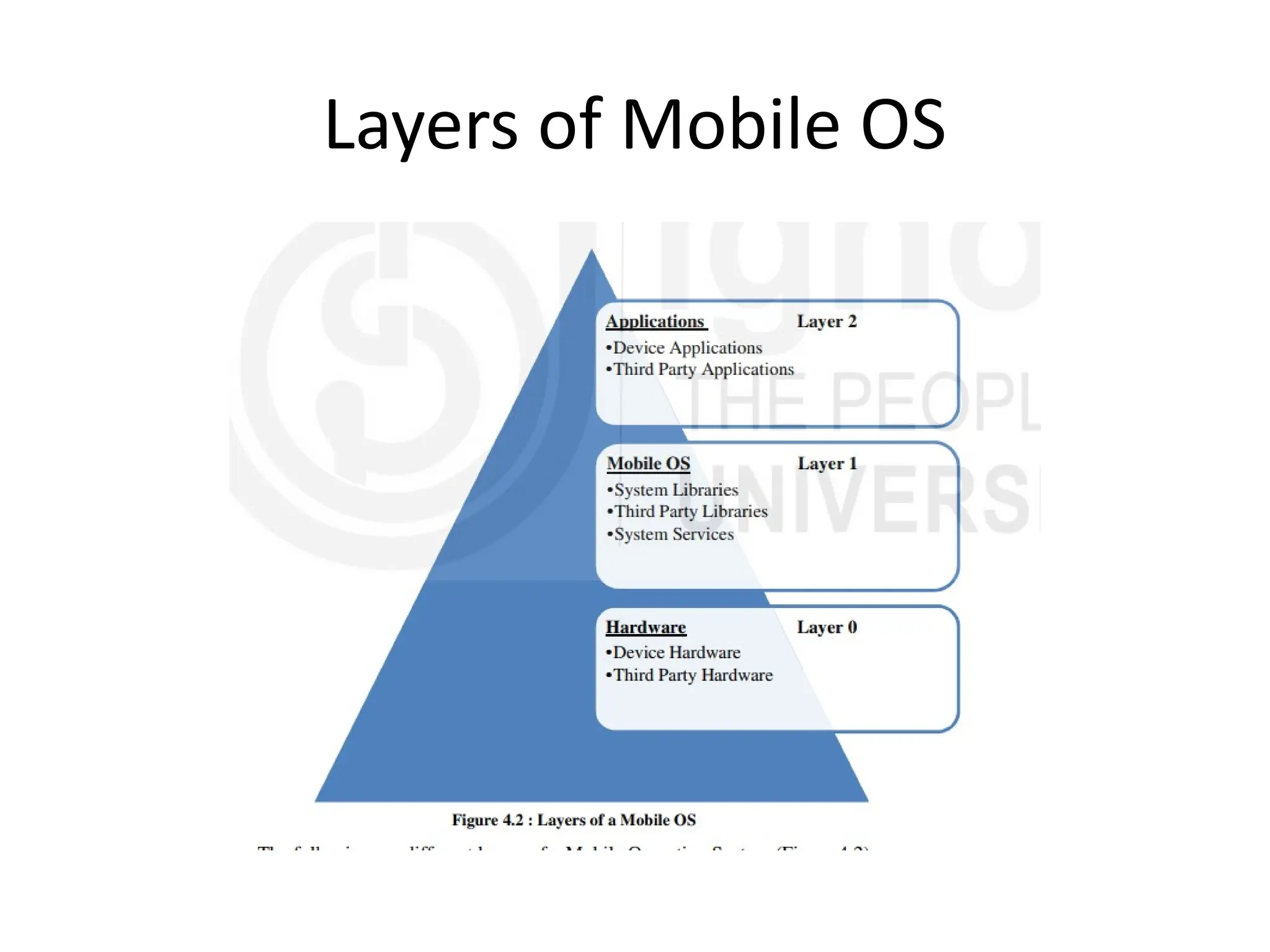
Layers of Mobile OS
• Layer 0
• It includes device hardware and third party hardware
• Device Hardware
• Device Hardware refers to the identification of all physical
components which are essential to develop a complete product in
terms of its usability. The hardware components of the mobile
include circuits, IC’s, screen, and speakers which are needed to
make a complete mobile phone.
• Third Party Hardware
• It includes all physical components of the mobile devices which
are manufactured by companies besides the original mobile
manufacturer like using Samsung earphone in Apple iPhone. In
other words, the hardware or physical component of the system
which is not supported by the original manufacturer is known as
third party hardware.
• Layer 1
• It includes system libraries, third party libraries and system services. It includes
configuration, message templates, help data etc. For example, playing a game on
mobile phone required a graphics library for rendering different scenes,similarly
for smooth functioning of system, system libraries are needed.
• Third Party Libraries
• These are those software resources which are required for running third party
applications like flash player is required for running SWF (Small Web Format) file
on the web browser. Similar to third party hardware, third party libraries are
offered by the companies besides the original manufacturer of the application.
• System Services
• These are the services which are actually required for running a mobile OS like
notification manager, message organizer, contacts, dialing services etc. No mobile
can work without system services; they have to be initiated or started first before
using any phone. For example, you cannot write on a paper without a pen
similarly all system services should be loaded first; boot manager is required for
starting the operating system. Wifi service is needed for establishing a wireless
connection etc.
• Layer 2
• It includes device applications and third party applications.
• Device Applications
• These are the pre-installed applications which come up along with
the purchase of your smart phone;these are pre-loaded in the
smartphones. For example, if you buy an apple iPhone, then you can
find Apple iTunes, Apple Store, iWork etcare pre-installed in your
phonesimilarly android phones come up with Google play store,
google drive, YouTube, Gmail etc.
• Third Party Applications
• These are the extra applications which are not bundled along-with
device applications. Basically, these applications are used to extend
the features of your device. They not pre-installed applications, a
user has to download and install it from the app store or play store.
Some of the most commonly used third applicationsare MX Player,
WhatsApp, Twitter etc.
database operating systemjsjsnsnnhh.pptx

  • 1.
    • A DatabaseManagement System (DBMS) is a software system that enables users to manage databases by providing a user-friendly interface. It facilitates tasks such as creating, storing, retrieving, updating, and organizing data in a structured manner. Along with data management, a DBMS handles essential functions like data storage, indexing, concurrency control, and transaction management. Well-known examples of DBMSs include Oracle Database, MySQL, Microsoft SQL Server, and PostgreSQL. • On the other hand, a DBOS, or Database Operating System, refers to an operating system specifically designed to manage databases and serve as a platform for running database applications. DBOSs are tailored to meet the requirements of database-centric environments.
  • 2.
    The Key Functionalitiesof Database • Data Storage and Retrieval • This is perhaps the most fundamental aspect of a DBOS. Since it often interacts with the hardware layer, it manages the physical storage of data on the connected storage devices. This ensures the DBOS can efficiently access and retrieve information from the data storage devices. These processes involve managing data structures (usually files and indexes) to optimize storage and retrieval operations. • Data Definition and Schema Management • Effective data management is often the result of adequately defined data structure and organization through schemas, tables, and relationships. A DBOD allows database designers to create and update database schemas, tables, and relationships. In addition, the database operating system also ensures the integrity of the defined schemas and uses them to enforce data consistency and validity. • Data Manipulation • A DBOS’s primary job is to facilitate data manipulation. All DBOS comes with a similar set of such capabilities that help high-level systems in database interactions. These capabilities include inserting, updating, deleting, and retrieving data based on specific queries. While executing these operations, the DBOS always ensures process efficiency and data integrity.
  • 3.
    • Data Securityand Access Control • All DBOSs have robust security features such as access control, user authentication, and authorization to protect critical business intelligence and user-related data. DBOS security is mainly driven by user access levels, ensuring only authorized users have appropriate data access privileges. • Concurrency Control • In a typical business environment, multiple users access the database at anytime. This makes concurrency management an essential operating requirement. A DBOS ensures this at all levels so that multiple users (people and applications) can work simultaneously without conflicts or causing inconsistencies in data. For this, DBOS can maintain transaction isolation levels and data locking techniques that help avoid disputes and sustain consistency and integrity of the entire data store. • Transaction Management • Often considered a high-level activity, transaction management is a crucial DBOS feature that groups multiple database operations into atomic units known as transactions. This ensures operational consistency and long-term reliability of the data storage. • Now that you know about database operating systems and their capabilities for effectively managing database systems, let’s consider some popular examples of DBOSs.
  • 4.
    Database Operating SystemSupported by Microsoft • Microsoft Windows is a popular server OS and supports different database operating systems. • Microsoft SQL Server • Microsoft SQL Server is a commonly used relational database management system (RDBMS) developed by Microsoft. While it primarily runs on the Windows operating system, Microsoft has expanded its lineup to include versions for Linux distributions such as Red Hat Enterprise Linux, SUSE Linux Enterprise Server, and Ubuntu. As a result, you can use MS SQL Server on both Windows and Linux platforms without worrying about compatibility issues. • Azure Cosmos DB • Azure Cosmos DB is a flexible and distributed database service offered by Microsoft. It supports multiple NoSQL database models, including key-value, columnar, document, and graph databases. Azure Cosmos DB is designed to be platform-independent, enabling applications running on Windows, Linux, macOS, iOS, Android, and other platforms to access and utilize the service seamlessly. • Azure SQL Database • Azure SQL Database is a cloud-based relational DBMS service provided as part of the Azure cloud platform. It is a fully managed service where Microsoft handles the underlying operating system. Azure SQL Database supports deployment options like Single Database, Elastic Pool, and Managed Instance. It supports Windows, Linux, and macOS applications, allowing development and deployment flexibility. •
  • 5.
    A mobile operatingsystem (Mobile OS) • A mobile operating system (Mobile OS) is a software platform on top of which other programs called application programs, can run on mobile devices such as personal digital assistant (PDA), tablets, cellular phones, smart phone etc. • The Mobile OS powers mobile devices like mobile phones, Smartphones, PDAs,and Tablet PCs (a wireless PC equipped with a touch screen and a digital pen). It manages the mobile device hardware, memory, and software resources. It controls the functioning, and the capabilities of a mobile device. The feature set, security, reliability, and the ease of use are not the only criteria that make a mobile platform good or bad, but also the flexibility of the mobile platform to integrate with diverse set of devices and software systems. • A mobile operating system controls everything from handling the input obtained from touch screen, keyboard, or some external device to controlling the memory and the overall functioning of the device. It also manages the communication and the interplay between the mobile device and other compatible hardware such as, computers, televisions, or printers. Operating system manages and controls all the features and functionalities of the mobile device. Therefore, a Smartphone is a combination of the hardware and the operating system, which determines what capabilities it can or cannot support.
  • 6.
    DESIGN ISSUES INMOBILE OS • Power Management • In the power management system power management, device power management and processor power management need to be considered. • Battery Management • Mobile OS collects the information about the state of the batteries of the device and inform the user. In case of abnormal consumption or battery discharge due to some application/game, OS must perform an emergency shutdown keeping the data loss at minimum level. • Thermal Management • As the mobile devices operate with the batteries, heat dissipation is also a challenge. It is one of the functions’ of the Mobile OS to manage and reduce the power consumption of the devices. • Memory Management • Mobile OS should consume less space in RAM. Instead it should have a small piece of code existing in the RAM. However, to avoid RAM space there should be a provision that the kernel, applications and libraries should be directly executed 240 in ROM. The microkernel structure of mobile OS also may help in reducing the memory size. Also memory leakages need to be taken care by the Mobile OS.
  • 7.
    • Scheduling • Themobile OS may adopt the pre-emptive scheduling mechanism. The interrupt latency and dispatch latency must be minimized in mobile OS. • File System • Flash file systems are used in mobile devices. They offer a fast-read access. The file system should adopt the memory management techniques that minimize the fragmentation problem, caching techniques and intelligent reclaim techniques. • Security • One of the major issues to be considered is Security. Unlike desktops, these mobile devices also may get infected with worms, Trojan horses or viruses wherein compromising the user’s security and privacy. As all the mobile devices are prone to attacks any time, it is therefore the major function of the mobile OS to provide security mechanisms to address all the security issues
  • 8.
  • 9.
    • Layer 0 •It includes device hardware and third party hardware • Device Hardware • Device Hardware refers to the identification of all physical components which are essential to develop a complete product in terms of its usability. The hardware components of the mobile include circuits, IC’s, screen, and speakers which are needed to make a complete mobile phone. • Third Party Hardware • It includes all physical components of the mobile devices which are manufactured by companies besides the original mobile manufacturer like using Samsung earphone in Apple iPhone. In other words, the hardware or physical component of the system which is not supported by the original manufacturer is known as third party hardware.
  • 10.
    • Layer 1 •It includes system libraries, third party libraries and system services. It includes configuration, message templates, help data etc. For example, playing a game on mobile phone required a graphics library for rendering different scenes,similarly for smooth functioning of system, system libraries are needed. • Third Party Libraries • These are those software resources which are required for running third party applications like flash player is required for running SWF (Small Web Format) file on the web browser. Similar to third party hardware, third party libraries are offered by the companies besides the original manufacturer of the application. • System Services • These are the services which are actually required for running a mobile OS like notification manager, message organizer, contacts, dialing services etc. No mobile can work without system services; they have to be initiated or started first before using any phone. For example, you cannot write on a paper without a pen similarly all system services should be loaded first; boot manager is required for starting the operating system. Wifi service is needed for establishing a wireless connection etc.
  • 11.
    • Layer 2 •It includes device applications and third party applications. • Device Applications • These are the pre-installed applications which come up along with the purchase of your smart phone;these are pre-loaded in the smartphones. For example, if you buy an apple iPhone, then you can find Apple iTunes, Apple Store, iWork etcare pre-installed in your phonesimilarly android phones come up with Google play store, google drive, YouTube, Gmail etc. • Third Party Applications • These are the extra applications which are not bundled along-with device applications. Basically, these applications are used to extend the features of your device. They not pre-installed applications, a user has to download and install it from the app store or play store. Some of the most commonly used third applicationsare MX Player, WhatsApp, Twitter etc.