1
DATABASE
MANAGEMENT
SYSTEM
1
Prof. JISHNU M S
Assistant Professor
Kristu Jayanti College(Autonomous)
Bengaluru
What is Database?
▪ A database is a collection of related data.
▪ It is an organised collection of records and files which
are related to each other.
▪ A database may also be described as an integrated
collection of logically related records and files.
3
2
DBMS
▪ A Database Management System (DBMS) consist of
▪ A collection of inter related data (usually referred to as
database (DB))
▪ A set of application programs used to access, update and
manage the data
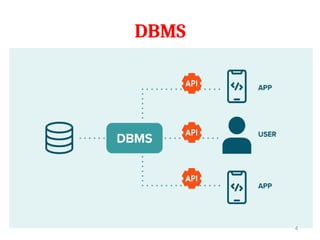
▪ A database management system (DBMS) is a computerized
system that enables users to create and maintain a database.
▪ The DBMS is a general-purpose software system that facilitates
the processes of defining, constructing, manipulating, and
sharing databases among various users and applications.
3
DBMS
4
Characteristics of the Database
Approach
▪ In traditional file processing, each user defines and implements
the files needed for a specific software application as part of
programming the application.
▪ For example, in a college, one user i.e the grade reporting office,
may keep files on students and their grades.
▪ A second user, the accounting office, may keep track of students’
fees and their payments. Although both users are interested in
data about students, each user maintains separate files
▪ This redundancy in defining and storing data results in wasted
storage space and in redundant efforts to maintain common up-
to-date data.
5
Characteristics of the Database
Approach
▪ In the database approach, a single repository maintains data
that is defined once and then accessed by various users.
▪ For example, in a college, one user i.e the grade reporting
office, may keep files on students and their grades.
▪ System Catalog
▪ Program Data Independence
▪ Support Multiple Views of the Data
▪ Sharing of Data and Multi-user Transaction Processing
6
Characteristics of the Database Approach
1. System Catalog
▪ A fundamental characteristic of the database approach is
that the database system contains not only the database
itself but also a complete definition or description of the
database structure and constraints
▪ This definition is stored in the System / DBMS Catalog,
which contains information such as the structure of the
each file, the type and storage format of each data item,
etc.
▪ The information stored in the catalog is called meta-data,
and it describes the structure of the primary database.
7
Characteristics of the Database Approach
2. Program Data Independence
▪ In traditional file processing, the structure of data files is
embedded in the application programs, so any changes to
the structure of a file may require changing all programs
that access that file.
▪ In database approach, the structure of the data file is
stored in the DBMS catalog separately. This is called
Program Data Independence.
▪ Therefore, any change in the structure of the file does not
require any change in the programs that uses the file.
8
Characteristics of the Database Approach
2. Program Data Independence
▪ For example, the structure of student data file has been
changed by adding another piece of data – Birth Date.
▪ In DBMS environment, you just change the description of
student data in the catalog to reflect the inclusion of the
new data item –Birthdate.
▪ There is no need for changing the program that uses the
student data file.
9
PROF. JISHNU M S | KRISTU JAY
ANTI COLLEGE
Characteristics of the Database Approach
3. Support Multiple views of Data
▪ A database typically has many types of users, each of them
may require a different perspective or view of the
database.
▪ A view may be a subset of the database or it may contain
virtual data that is derived from the database files.
▪ A multiuser DBMS whose users have a variety of distinct
applications must provide facilities for defining multiple
views.
10
PROF. JISHNU M S | KRISTU JAY
ANTI COLLEGE
Characteristics of the Database Approach
3. Sharing of Data & Multi User Transaction Processing
▪ A multiuser DBMS, as its name implies, must allow
multiple users to access the database at the same time
▪ The DBMS must include concurrency control software to
ensure that several users trying to update the same data
do so in a controlled manner so that the result of the
updates is correct.
▪ For example, when several reservation agents try to assign
a seat on an airline flight, the DBMS should ensure that
each seat can be accessed by only one agent at a time for
assignment to a passenger.
▪ These types of applications are generally called online
transaction processing (OLTP) applications.
11
PROF. JISHNU M S | KRISTU JAY
ANTI COLLEGE
Different People Behind DBMS
(Database Users)
 Primary goal of a database system is to retrieve
information from and store new information in the
database.
 Many People are involved in the design, use and
maintenance of a large database.
1. Database Administrators
2. Database Designers
3. End Users
 Naive or parametric end users
 Casual end users
 Sophisticated end users
 Standalone users 12
PROF. JISHNU M S | KRISTU JAY
ANTI COLLEGE
1. Database Administrators
 In any organization where many people use the same
resources, there is a need for a chief administrator to
oversee and manage these resources.
 In a database environment, the primary resource is the
database itself, and the secondary resource is the DBMS
and related software.
 Administering these resources is the responsibility of the
database administrator (DBA).
Different People Behind DBMS
(Database Users)
13
PROF. JISHNU M S | KRISTU JAY
ANTI COLLEGE
1. Database Administrators
 The DBA is responsible for authorizing access to the
database, coordinating and monitoring its use, and
acquiring software and hardware resources as needed.
 The DBA is accountable for problems such as security
breaches and poor system response time.
Different People Behind DBMS
(Database Users)
14
PROF. JISHNU M S | KRISTU JAY
ANTI COLLEGE
2. Database Designers
 Database designers are responsible for identifying the
data to be stored in the database and for choosing
appropriate structures to represent and store this data.
 These tasks are mostly undertaken before the database is
actually implemented and populated with data.
 It is the responsibility of database designers to
communicate with all prospective database users in order
to understand their requirements and to create a design
that meets these requirements.
Different People Behind DBMS
(Database Users)
15
PROF. JISHNU M S | KRISTU JAY
ANTI COLLEGE
2. Database Designers
 Database designers typically interact with each potential
group of users and develop views of the database that
meet the data and processing requirements of these
groups.
 Each view is then analyzed and integrated with the views
of other user groups.
 The final database design must be capable of supporting
the requirements of all user groups.
Different People Behind DBMS
(Database Users)
16
PROF. JISHNU M S | KRISTU JAY
ANTI COLLEGE
3. End Users
 End users are the people whose jobs require access to the
database for querying, updating, and generating reports;
the database primarily exists for their use.
 Naive or parametric end users
 Casual end users
 Sophisticated end users
 Standalone users
Different People Behind DBMS
(Database Users)
17
PROF. JISHNU M S | KRISTU JAY
ANTI COLLEGE
3.1 Naive or parametric end users
 These are the unsophisticated users who interact with
the system by invoking one of the application programs
that have been written previously.
 Their main job function revolves around constantly
querying and updating the database, using standard
types of queries and updates— called canned
transactions—that have been carefully programmed and
tested.
 Bank customers and tellers check account balances and
post withdrawals and deposits.
 Reservation agents or customers for airlines, hotels, and
car rental companies check availability for a given
Different People Behind DBMS
(Database Users)
18
PROF. JISHNU M S | KRISTU JAY
ANTI COLLEGE
3.1 Naive or parametric end users
 A few examples are:
 Bank customers and tellers check account balances
and post withdrawals and deposits.
 Reservation agents or customers for airlines, hotels,
and car rental companies check availability for a
given request and make reservations.
 Employees at receiving stations for shipping
companies enter package identifications via bar codes
and descriptive information through buttons to
update a central database of received and in-transit
packages.
Different People Behind DBMS
(Database Users)
19
PROF. JISHNU M S | KRISTU JAY
ANTI COLLEGE
3.2 Casual end users
 Casual end users occasionally access the database, but
they may need different information each time.
 They use a sophisticated database query interface to
specify their requests and are typically middle- or high-
level managers or other occasional browsers.
3.3 Sophisticated end users
 Sophisticated end users include engineers, scientists,
business analysts, and others who thoroughly familiarize
themselves with the facilities of the DBMS in order to
implement their own applications to meet their complex
requirements.
Different People Behind DBMS
(Database Users)
20
PROF. JISHNU M S | KRISTU JAY
ANTI COLLEGE
3.3 Sophisticated end users
 Using the query, they can view summaries of data in
different ways.
 For instance, a manager can see total sales by region, or
by product or by a combination of region and products
3.4 Standalone users
 maintain personal databases by using ready-made
program packages that provide easy-to-use menu-based
or graphics-based interfaces.
 An example is the user of a financial software package
that stores a variety of personal financial data
Different People Behind DBMS
(Database Users)
21
PROF. JISHNU M S | KRISTU JAY
ANTI COLLEGE
4. System Analysts and Application Programmers
(Software Engineers)
 System analysts determine the requirements of end users,
especially naive and parametric end users, and develop
specifications for standard canned transactions that meet
these requirements.
 Application programmers implement these specifications as
programs; then they test, debug, document, and maintain
these canned transactions.
 Such analysts and programmers—commonly referred to as
software developers or software engineers—should be
familiar with the full range of capabilities provided by the
DBMS to accomplish their tasks.
Different People Behind DBMS
(Database Users)
22
PROF. JISHNU M S | KRISTU JAY
ANTI COLLEGE
Workers behind the Scene
 These persons are typically not interested in the database
content itself. We call them the workers behind the scene,
and they include the following categories:
 Tool developers: it include persons who design and
implement tools i.e., the software packages that facilitate
database system design.
 Tools are the optional packages that are often purchased
separately.
 They include packages for database design, performance
monitoring, graphical interfaces, prototyping etc.
Different People Behind DBMS
(Database Users)
23
PROF. JISHNU M S | KRISTU JAY
ANTI COLLEGE
5. Workers behind the Scene
 Operators and maintenance personnel:
 Operators and maintenance personnel (system
administration personnel) are responsible for the
actual running and maintenance of the hardware and
software environment for the database system.
Different People Behind DBMS
(Database Users)
24
PROF. JISHNU M S | KRISTU JAY
ANTI COLLEGE
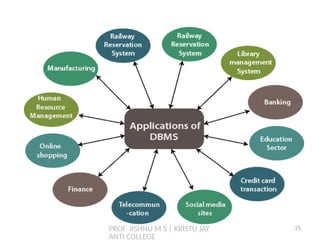
25
PROF. JISHNU M S | KRISTU JAY
ANTI COLLEGE
 In this section we discuss some additional advantages of
using a DBMS and the capabilities that a good DBMS should
possess.
 Data Redundancy can be reduced
 Sharing of Data
 Security of Data
 Enforcing Integrity Constraints
 Providing Backup and Recovery
 Providing Multiple User Interfaces
Advantages of Using the DBMS Approach
26
PROF. JISHNU M S | KRISTU JAY
ANTI COLLEGE
 This section discusses a few additional implications of using
the database approach that can benefit most organizations.
 Potential for Enforcing Standards
 Reduced Application Development Time.
 Flexibility
 Availability of Up-to-Date Information.
 Economies of Scale.
Additional Implications of Using
the Database Approach
27
PROF. JISHNU M S | KRISTU JAY
ANTI COLLEGE
 Potential for Enforcing Standards
 The database approach permits the DBA to define and enforce
standards among database users in a large organization.
 This facilitates communication and cooperation among various
departments, projects, and users within the organization.
 Standards can be defined for names and formats of data
elements, display formats, report structures, terminology, and
so on.
 The DBA can enforce standards in a centralized database
environment more easily than in an environment where each
user group has control of its own data files and software.
Additional Implications of Using
the Database Approach
28
PROF. JISHNU M S | KRISTU JAY
ANTI COLLEGE
 Reduced Application Development Time.
 A prime selling feature of the database approach is that
developing a new application—such as the retrieval of certain
data from the database for printing a new report—takes very
little time.
 Designing and implementing a large multiuser database from
scratch may take more time than writing a single specialized
file application.
 once a database is up and running, substantially less time is
generally required to create new applications using DBMS
facilities.
Additional Implications of Using
the Database Approach
29
PROF. JISHNU M S | KRISTU JAY
ANTI COLLEGE
 Flexibility
 It may be necessary to change the structure of a database as
requirements change.
 For example, a new user group may emerge that needs
information not currently in the database.
 In response, it may be necessary to add a file to the database or
to extend the data elements in an existing file.
 Modern DBMSs allow certain types of evolutionary changes to
the structure of the database without affecting the stored data
and the existing application programs.
Additional Implications of Using
the Database Approach
30
PROF. JISHNU M S | KRISTU JAY
ANTI COLLEGE
 Availability of Up-to-Date Information
 A DBMS makes the database available to all users.
 As soon as one user’s update is applied to the database, all
other users can immediately see this update. This availability of
up-to-date information is essential for many transaction-
processing applications, such as reservation systems or
banking databases, and it is made possible by the concurrency
control and recovery subsystems of a DBMS.
Additional Implications of Using
the Database Approach
31
PROF. JISHNU M S | KRISTU JAY
ANTI COLLEGE
 Economies of Scale
 The DBMS approach permits consolidation of data and
applications, thus reducing the amount of wasteful overlap
between activities of data-processing personnel in different
projects or departments as well as redundancies among
applications.
 This enables the whole organization to invest in more powerful
processors, storage devices, or networking gear, rather than
having each department purchase its own (lower performance)
equipment.
 This reduces overall costs of operation and management.
Additional Implications of Using
the Database Approach
32
PROF. JISHNU M S | KRISTU JAY
ANTI COLLEGE
 There are a few situations in which a DBMS may involve
unnecessary overhead costs that would not be incurred in
traditional file processing.
 The overhead costs of using a DBMS are due to the following:
 High initial investment in hardware, software, and
training
 The generality that a DBMS provides for defining and
processing data
 Overhead for providing security, concurrency control,
recovery, and integrity functions.
When not to use DBMS
33
PROF. JISHNU M S | KRISTU JAY
ANTI COLLEGE
 Therefore, it may be more desirable to develop customized
database applications under the following circumstances:
 Simple, well-defined database applications that are not
expected to change at all
 Stringent, real-time requirements for some application
programs that may not be met because of DBMS
overhead
 Embedded systems with limited storage capacity, where a
general-purpose DBMS would not fit
 No multiple-user access to data
When not to use DBMS
34
PROF. JISHNU M S | KRISTU JAY
ANTI COLLEGE
DATABASE SYSTEM CONCEPTS
AND ARCHITECTURE
Chapter 2
35
PROF. JISHNU M S | KRISTU JAY
ANTI COLLEGE
Contents
 Data Models, Schemas, and Instances
 Categories of Data Models
 Schemas, Instances, and Database State
 Three Schema Architecture and Data
Independence
 Database languages
 DBMS Interfaces
 The Database System Environment
36
PROF. JISHNU M S | KRISTU JAY
ANTI COLLEGE
 A data model—a collection of concepts that can be used to
describe the structure of a database—provides the necessary
means to achieve this abstraction.
 By structure of a database we mean the data types,
relationships, and constraints that apply to the data.
 A database model is the method of organizing the data and
representing the logical relationships among the data
elements in the database.
 It is the theoretical foundation of a database and determines
in which manner data can be stored, organized and
manipulated in a database system.
Data Model
37
PROF. JISHNU M S | KRISTU JAY
ANTI COLLEGE
 Many data models have been proposed, which we can
categorize according to the types of concepts they use to
describe the database structure.
 High-level or conceptual data model
 Provide concepts that are close to the way many users
perceive data. (ER Model)
 Low-level or physical data model
 provide concepts that describe the details of how data is
stored on the computer storage media, typically magnetic
disks.
Categories of Data Model
38
PROF. JISHNU M S | KRISTU JAY
ANTI COLLEGE
 Representational or Implementation data model
 Provide concepts that may be understood by user , but
that are not too far removed from the way data is
organized within the computer.
 There are 3 types of representational model
1. Hierarchical data model.
2. Network data model.
3. Relational data model.
Categories of Data Model
39
PROF. JISHNU M S | KRISTU JAY
ANTI COLLEGE
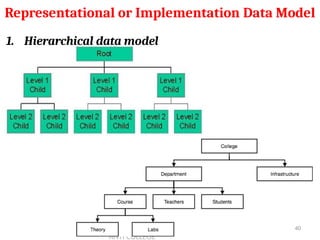
1. Hierarchical data model
Representational or Implementation Data Model
40
PROF. JISHNU M S | KRISTU JAY
ANTI COLLEGE
1. Hierarchical data model
 The hierarchical model assigns records to different levels
of hierarchy.
 A lower level record is called child and higher level one is
called a parent.
 The parent record at the top of the database is called root
record.
 Any record other than the root must be connected with
the superior record(parent).
 Thus to insert a record, the user must select a parent
record first.
 When a record id deleted, all the descendant's of the
record also deleted.
Representational or Implementation Data Model
41
PROF. JISHNU M S | KRISTU JAY
ANTI COLLEGE
1. Hierarchical data model
 The following characteristics may be derived from
hierarchical mode
 A child has only one parent
 A parent must be exist before adding children to the
data structure and there cannot be any other
relationship between two records in the consecutive
levels than that of the parent – child.
 Disadvantages:
 Duplication of data
 Difficult to update records stored in multiple
locations.
Representational or Implementation Data Model
42
PROF. JISHNU M S | KRISTU JAY
ANTI COLLEGE
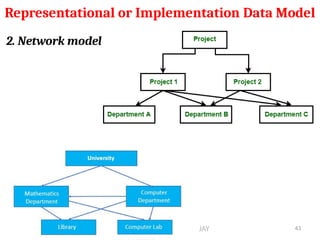
2. Network model
Representational or Implementation Data Model
43
PROF. JISHNU M S | KRISTU JAY
ANTI COLLEGE
2. Network model
 The network model is similar to the hierarchical model,
but each child record can have more than one parent
record.
 This model eliminates the redundancy encountered in
the previous case.
 It is more flexible than hierarchical, because different
relationships may be established between different
branches of data.
Representational or Implementation Data Model
44
PROF. JISHNU M S | KRISTU JAY
ANTI COLLEGE
2. Network model
 Although this model reduces the duplication problem, it
introduces certain other problems
 Disadvantages:
 A High degree of Complexity
 Errors are difficult to trace
 It is not flexible enough to make changes easily
once the data is entered.
Representational or Implementation Data Model
45
PROF. JISHNU M S | KRISTU JAY
ANTI COLLEGE
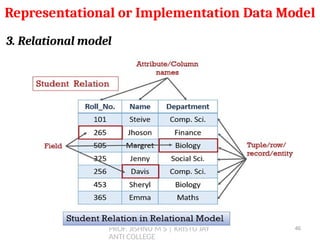
3. Relational model
Representational or Implementation Data Model
46
PROF. JISHNU M S | KRISTU JAY
ANTI COLLEGE
3. Relational model
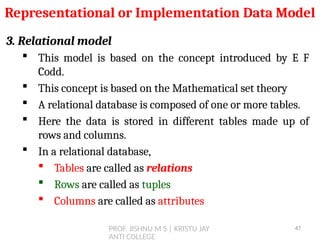
 This model is based on the concept introduced by E F
Codd.
 This concept is based on the Mathematical set theory
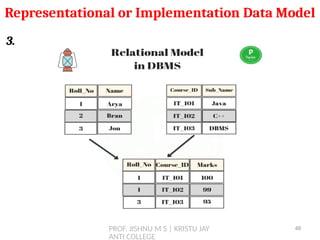
 A relational database is composed of one or more tables.
 Here the data is stored in different tables made up of
rows and columns.
 In a relational database,
 Tables are called as relations
 Rows are called as tuples
 Columns are called as attributes
Representational or Implementation Data Model
47
PROF. JISHNU M S | KRISTU JAY
ANTI COLLEGE
3.
Representational or Implementation Data Model
48
PROF. JISHNU M S | KRISTU JAY
ANTI COLLEGE
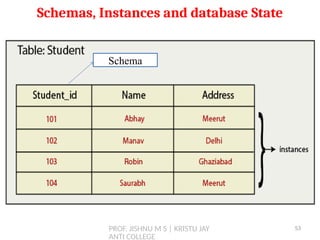
1. SCHEMAS
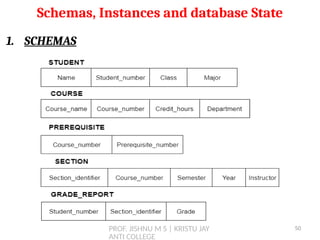
 The description of the database is called Database
Schema which is specified during database design and is
not expected to change frequently.
 A schema diagram displays only some aspects of a
schema, such as the names of record types, data items
and some types of constraints.
 The overall design of a database is called schema.
 A database schema is the skeleton structure of the
database. It represents the logical view of the entire
database.
 A schema contains schema objects like table, foreign key,
primary key, views, columns, data types, stored procedure,
etc.
Schemas, Instances and database State
49
PROF. JISHNU M S | KRISTU JAY
ANTI COLLEGE
1. SCHEMAS
Schemas, Instances and database State
50
PROF. JISHNU M S | KRISTU JAY
ANTI COLLEGE
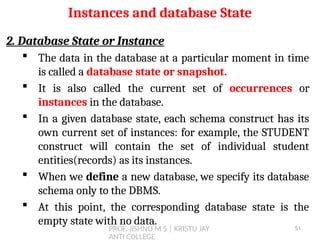
2. Database State or Instance
 The data in the database at a particular moment in time
is called a database state or snapshot.
 It is also called the current set of occurrences or
instances in the database.
 In a given database state, each schema construct has its
own current set of instances: for example, the STUDENT
construct will contain the set of individual student
entities(records) as its instances.
 When we define a new database, we specify its database
schema only to the DBMS.
 At this point, the corresponding database state is the
empty state with no data.
Instances and database State
51
PROF. JISHNU M S | KRISTU JAY
ANTI COLLEGE
Schemas, Instances and database State
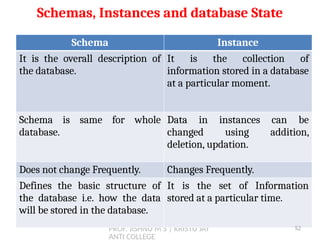
Schema Instance
It is the overall description of
the database.
It is the collection of
information stored in a database
at a particular moment.
Schema is same for whole
database.
Data in instances can be
changed using addition,
deletion, updation.
Does not change Frequently. Changes Frequently.
Defines the basic structure of
the database i.e. how the data
will be stored in the database.
It is the set of Information
stored at a particular time.
52
PROF. JISHNU M S | KRISTU JAY
ANTI COLLEGE
Schemas, Instances and database State
Schema
53
PROF. JISHNU M S | KRISTU JAY
ANTI COLLEGE
Three - Schema / DBMS Architecture
 The three important characteristics of the database
approach are
1) Use of catalog to store the database
description(schema) so as to make it self-
describing
2) Insulation of programs and data (program-data
independence)
3) support of multi user views.
 Three-schema architecture, was proposed to achieve and
visualize these characteristics.
54
PROF. JISHNU M S | KRISTU JAY
ANTI COLLEGE
Three - Schema / DBMS Architecture
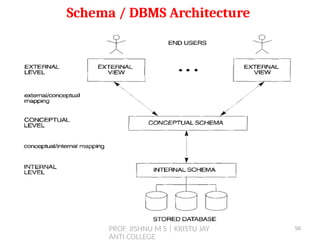
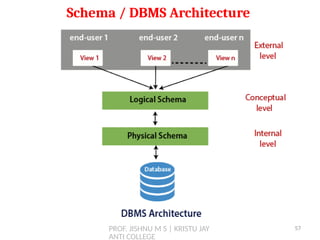
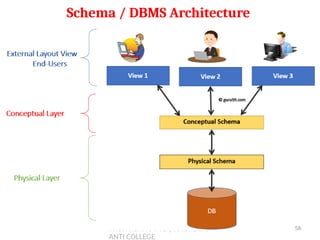
 The goal of the three-schema architecture is to separate
the user applications from the physical database.
 In this architecture, schemas can be defined at the
following three levels:
Internal Level (Physical Level)
Conceptual Level (Logical Level)
External Level (View Level)
55
PROF. JISHNU M S | KRISTU JAY
ANTI COLLEGE
Schema / DBMS Architecture
56
PROF. JISHNU M S | KRISTU JAY
ANTI COLLEGE
Schema / DBMS Architecture
57
PROF. JISHNU M S | KRISTU JAY
ANTI COLLEGE
Schema / DBMS Architecture
58
PROF. JISHNU M S | KRISTU JAY
ANTI COLLEGE
Three - Schema / DBMS Architecture
1. Internal Level (Physical Level)
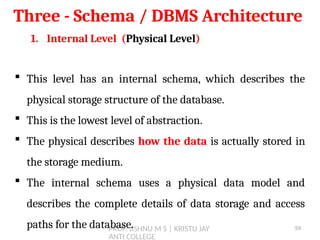
 This level has an internal schema, which describes the
physical storage structure of the database.
 This is the lowest level of abstraction.
 The physical describes how the data is actually stored in
the storage medium.
 The internal schema uses a physical data model and
describes the complete details of data storage and access
paths for the database. 59
PROF. JISHNU M S | KRISTU JAY
ANTI COLLEGE
Three - Schema / DBMS Architecture
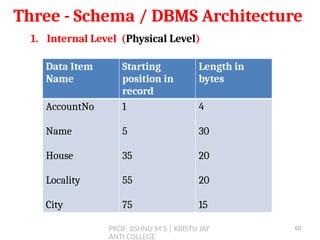
1. Internal Level (Physical Level)
Data Item
Name
Starting
position in
record
Length in
bytes
AccountNo
Name
House
Locality
City
1
5
35
55
75
4
30
20
20
15
60
PROF. JISHNU M S | KRISTU JAY
ANTI COLLEGE
Three - Schema / DBMS Architecture
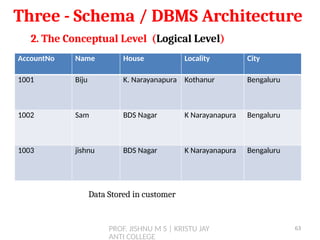
2. The Conceptual Level (Logical Level)
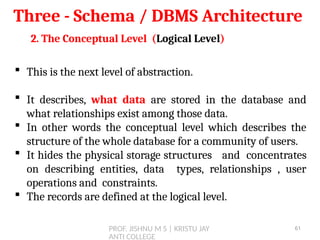
 This is the next level of abstraction.
 It describes, what data are stored in the database and
what relationships exist among those data.
 In other words the conceptual level which describes the
structure of the whole database for a community of users.
 It hides the physical storage structures and concentrates
on describing entities, data types, relationships , user
operations and constraints.
 The records are defined at the logical level.
61
PROF. JISHNU M S | KRISTU JAY
ANTI COLLEGE
Three - Schema / DBMS Architecture
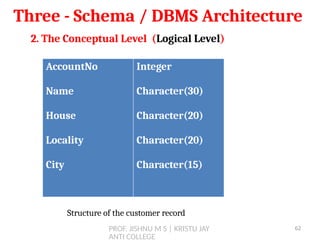
2. The Conceptual Level (Logical Level)
AccountNo
Name
House
Locality
City
Integer
Character(30)
Character(20)
Character(20)
Character(15)
Structure of the customer record
62
PROF. JISHNU M S | KRISTU JAY
ANTI COLLEGE
Three - Schema / DBMS Architecture
2. The Conceptual Level (Logical Level)
Data Stored in customer
AccountNo Name House Locality City
1001 Biju K. Narayanapura Kothanur Bengaluru
1002 Sam BDS Nagar K Narayanapura Bengaluru
1003 jishnu BDS Nagar K Narayanapura Bengaluru
63
PROF. JISHNU M S | KRISTU JAY
ANTI COLLEGE
Three - Schema / DBMS Architecture
3. The External Level (View Level)
 View level is the highest level of database abstraction and
is closest to users.
 It is concerned with the way in which the individual users
view the data.
 It describes only a part of the entire database.
 Most of the users of the database are not concerned with
all the information that is contained in the database.
 Instead they need only a part of the database that is
relevant to them.
64
PROF. JISHNU M S | KRISTU JAY
ANTI COLLEGE
DATA INDEPENDENCE
 The ability to modify a schema definition at one level
without affecting the schema definition at higher level is
called Data Independence
 There are two levels of data Independence
 Physical Data Independence
 Logical Data Independence
65
PROF. JISHNU M S | KRISTU JAY
ANTI COLLEGE
DATA INDEPENDENCE
1. Physical Data Independence
 It is the ability to modify the physical schema without
causing application program to rewritten.
 Modification at the physical level is occasionally necessary
to improve the performance.
 In physical data independence there should not be any
effect on the structure of the data even if modification on
the storage format is made. i.e. the change in the internal
level should not affect the conceptual & view level.
66
PROF. JISHNU M S | KRISTU JAY
ANTI COLLEGE
DATA INDEPENDENCE
2. Logical Data Independence
 It is the ability to modify the logical schema without
causing application program to rewritten.
 Modification at the logical level is are necessary whenever
the logical structure of the database is altered.
 In logical data independence, the view level should not
affected even if changes are made to the structure of the
data.
 The application programs that use the view level must
work as before, even after the reorganization made at the
conceptual level
67
PROF. JISHNU M S | KRISTU JAY
ANTI COLLEGE
DATABASE LANGUAGES
 Database languages can be used to read, store and update
the data in the database.
 A DBMS must provide appropriate languages and interfaces
for each category of users to express database queries and
updates. Database Languages are used to create and
maintain database on computer.
68
PROF. JISHNU M S | KRISTU JAY
ANTI COLLEGE
DATABASE LANGUAGES
69
PROF. JISHNU M S | KRISTU JAY
ANTI COLLEGE
DATABASE LANGUAGES
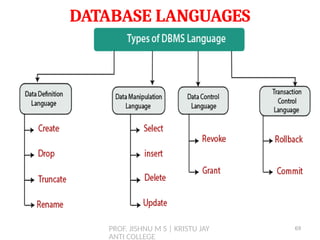
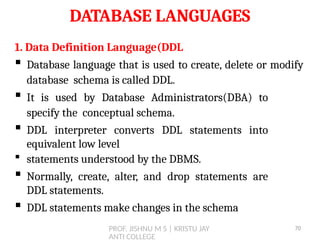
1. Data Definition Language(DDL
 Database language that is used to create, delete or modify
database schema is called DDL.
 It is used by Database Administrators(DBA) to
specify the conceptual schema.
 DDL interpreter converts DDL statements into
equivalent low level
 statements understood by the DBMS.
 Normally, create, alter, and drop statements are
DDL statements.
 DDL statements make changes in the schema
70
PROF. JISHNU M S | KRISTU JAY
ANTI COLLEGE
DATABASE LANGUAGES
2. Data Manipulation Language(DML)
 Database language that enables insert, update, delete,
and retrieval of data from the database is called Data
Manipulation Language.
 DML complier converts DML statements into equivalent
low level statements that the database understands.
 Normally, insert, update, delete, select are DML
commands.
 DML reflects change in the instance, not the schema
71
PROF. JISHNU M S | KRISTU JAY
ANTI COLLEGE
DATABASE LANGUAGES
3. Data Control Language(DCL)
 DCL statements control access to data and the database
using statements such as GRANT and REVOKE.
 A privilege can either be granted to a User with the help
of GRANT statement.
 The privileges assigned can be SELECT, ALTER, DELETE,
EXECUTE, INSERT, INDEX etc.
 In addition to granting of privileges, you can also revoke
(taken back) it by using REVOKE command.
72
PROF. JISHNU M S | KRISTU JAY
ANTI COLLEGE
DATABASE LANGUAGES
4. Transaction Control Language(TCL)
 TCL is used to run the changes made by the DML
statement. TCL can be grouped into a logical transaction.
 Here are some tasks that come under TCL:
 Commit: It is used to save the transaction on the
database.
 Rollback: It is used to restore the database to original
since the last Commit.
73
PROF. JISHNU M S | KRISTU JAY
ANTI COLLEGE
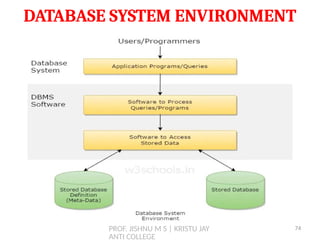
DATABASE SYSTEM ENVIRONMENT
74
PROF. JISHNU M S | KRISTU JAY
ANTI COLLEGE
CLASSIFICATION OF DATABASE
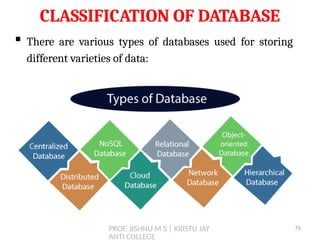
 There are various types of databases used for storing
different varieties of data:
75
PROF. JISHNU M S | KRISTU JAY
ANTI COLLEGE
CLASSIFICATION OF DATABASE
1. Centralized Database
 It is the type of database that stores data at a centralized
database system.
 It comforts the users to access the stored data from
different locations through several applications. These
applications contain the authentication process to let
users access data securely.
 An example of a Centralized database can be Central
Library that carries a central database of each library in a
college/university.
76
PROF. JISHNU M S | KRISTU JAY
ANTI COLLEGE
CLASSIFICATION OF DATABASE
2. Distributed Database
 Unlike a centralized database system, in distributed
systems, data is distributed among different database
systems of an organization.
 These database systems are connected via
communication links.
 Such links help the end-users to access the data easily.
 Examples of the Distributed database are Apache
Cassandra, HBase, Ignite, etc.
77
PROF. JISHNU M S | KRISTU JAY
ANTI COLLEGE
CLASSIFICATION OF DATABASE
2. Distributed Database
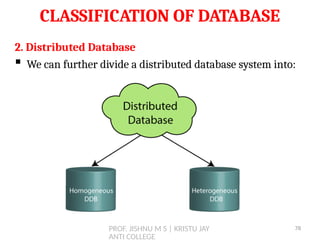
 We can further divide a distributed database system into:
78
PROF. JISHNU M S | KRISTU JAY
ANTI COLLEGE
CLASSIFICATION OF DATABASE
2. Distributed Database
 Homogeneous DDB: Those database systems which
execute on the same operating system and use the same
application process and carry the same hardware devices.
 Heterogeneous DDB: Those database systems which
execute on different operating systems under different
application procedures, and carries different hardware
devices.
79
PROF. JISHNU M S | KRISTU JAY
ANTI COLLEGE
CLASSIFICATION OF DATABASE
3. Relational Database
 The model is based on mathematical set theory and it uses
a relation as the building block of the database.
 A relational database uses SQL for storing, manipulating,
as well as maintaining the data. E.F. Codd invented the
database in 1970.
 The relation is represented by a 2-dimensional flat
structure called as table.
80
PROF. JISHNU M S | KRISTU JAY
ANTI COLLEGE
CLASSIFICATION OF DATABASE
3. Relational Database
 A table is a matrix of rows and column in which each row
represent an entity and each column represents an
attribute.
 Row is also called as tuple and column is called as
attribute
 Examples of Relational databases are MySQL, Microsoft
SQL Server, Oracle, etc.
81
PROF. JISHNU M S | KRISTU JAY
ANTI COLLEGE
CLASSIFICATION OF DATABASE
4. NoSQL Database
 Non-SQL/Not Only SQL is a type of database that is used
for storing a wide range of data sets.
 It is not a relational database as it stores data not only in
tabular form but in several different ways.
 It came into existence when the demand for building
modern applications increased.
 Thus, NoSQL presented a wide variety of database
technologies in response to the demands.
82
PROF. JISHNU M S | KRISTU JAY
ANTI COLLEGE
CLASSIFICATION OF DATABASE
4. NoSQL Database
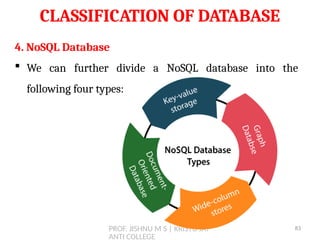
 We can further divide a NoSQL database into the
following four types:
83
PROF. JISHNU M S | KRISTU JAY
ANTI COLLEGE
CLASSIFICATION OF DATABASE
4. NoSQL Database
 Key-value storage: It is the simplest type of database
storage where it stores every single item as a key (or
attribute name) holding its value, together.
 Document-oriented Database: A type of database used to
store data as JSON-like document. It helps developers in
storing data by using the same document-model format as
used in the application code.
84
PROF. JISHNU M S | KRISTU JAY
ANTI COLLEGE
CLASSIFICATION OF DATABASE
4. NoSQL Database
 Graph Databases: It is used for storing vast amounts of
data in a graph-like structure. Most commonly, social
networking websites use the graph database.
 Wide-column stores: It is similar to the data represented
in relational databases. Here, data is stored in large columns
together, instead of storing in rows.
85
PROF. JISHNU M S | KRISTU JAY
ANTI COLLEGE
CLASSIFICATION OF DATABASE
4. Cloud Database
 A type of database where data is stored in a virtual
environment and executes over the cloud computing
platform.
 It provides users with various cloud computing services
(SaaS, PaaS, IaaS, etc.) for accessing the database.
 There are numerous cloud platforms, but the best options
are: Amazon Web Services(AWS), Microsoft Azure, Google
Cloud SQL, etc.
86
PROF. JISHNU M S | KRISTU JAY
ANTI COLLEGE
CLASSIFICATION OF DATABASE
5. Object Oriented database
 An object oriented database can be used to store data from a
variety of media sources, such as photographs and text.
 Uses small, reusable chunks of software called objects. These
objects are themselves stored in the OODB.
 Each object consist of two elements:
1. a piece of data (ex: sound, video, text or graphics)
2. the instructions or software programs called methods
 Could be useful in Healthcare organizations, to store, track
and recall CT Scan, X-rays.
87
PROF. JISHNU M S | KRISTU JAY
ANTI COLLEGE
CLASSIFICATION OF DATABASE
6. Hierarchical Databases
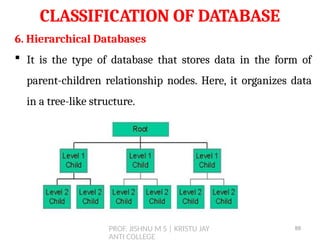
 It is the type of database that stores data in the form of
parent-children relationship nodes. Here, it organizes data
in a tree-like structure.
88
PROF. JISHNU M S | KRISTU JAY
ANTI COLLEGE
CLASSIFICATION OF DATABASE
7. Network Databases
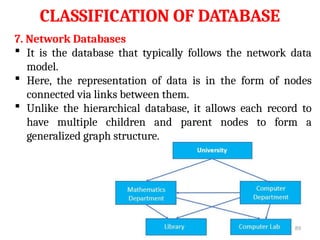
 It is the database that typically follows the network data
model.
 Here, the representation of data is in the form of nodes
connected via links between them.
 Unlike the hierarchical database, it allows each record to
have multiple children and parent nodes to form a
generalized graph structure.
89
PROF. JISHNU M S | KRISTU JAY
ANTI COLLEGE
CLASSIFICATION OF DATABASE
8. Single User Databases
 Support only one user at a time and are mostly used with
PC’s.
9. Multi User Databases
 Which include majority of the DBMS, supports concurrent
multiple users.
90
PROF. JISHNU M S | KRISTU JAY
ANTI COLLEGE
CLASSIFICATION OF DATABASE
10. General purpose or special purpose Databases
 It can be designed and built for a specific application.
 such a system cannot be used for other applications without
major changes.
 Many airline reservations and telephone directory systems
developed in the past are special-purpose DBMSs.
 These fall into the category of online transaction processing
(OLTP) systems, which must support a large number of
concurrent transactions without imposing excessive delays.
91

DATABASE MANAGEMENT SYSTEM UNIT 1 - Prof. JISHNU M S

  • 1.
    1 DATABASE MANAGEMENT SYSTEM 1 Prof. JISHNU MS Assistant Professor Kristu Jayanti College(Autonomous) Bengaluru
  • 2.
    What is Database? ▪A database is a collection of related data. ▪ It is an organised collection of records and files which are related to each other. ▪ A database may also be described as an integrated collection of logically related records and files. 3 2
  • 3.
    DBMS ▪ A DatabaseManagement System (DBMS) consist of ▪ A collection of inter related data (usually referred to as database (DB)) ▪ A set of application programs used to access, update and manage the data ▪ A database management system (DBMS) is a computerized system that enables users to create and maintain a database. ▪ The DBMS is a general-purpose software system that facilitates the processes of defining, constructing, manipulating, and sharing databases among various users and applications. 3
  • 4.
  • 5.
    Characteristics of theDatabase Approach ▪ In traditional file processing, each user defines and implements the files needed for a specific software application as part of programming the application. ▪ For example, in a college, one user i.e the grade reporting office, may keep files on students and their grades. ▪ A second user, the accounting office, may keep track of students’ fees and their payments. Although both users are interested in data about students, each user maintains separate files ▪ This redundancy in defining and storing data results in wasted storage space and in redundant efforts to maintain common up- to-date data. 5
  • 6.
    Characteristics of theDatabase Approach ▪ In the database approach, a single repository maintains data that is defined once and then accessed by various users. ▪ For example, in a college, one user i.e the grade reporting office, may keep files on students and their grades. ▪ System Catalog ▪ Program Data Independence ▪ Support Multiple Views of the Data ▪ Sharing of Data and Multi-user Transaction Processing 6
  • 7.
    Characteristics of theDatabase Approach 1. System Catalog ▪ A fundamental characteristic of the database approach is that the database system contains not only the database itself but also a complete definition or description of the database structure and constraints ▪ This definition is stored in the System / DBMS Catalog, which contains information such as the structure of the each file, the type and storage format of each data item, etc. ▪ The information stored in the catalog is called meta-data, and it describes the structure of the primary database. 7
  • 8.
    Characteristics of theDatabase Approach 2. Program Data Independence ▪ In traditional file processing, the structure of data files is embedded in the application programs, so any changes to the structure of a file may require changing all programs that access that file. ▪ In database approach, the structure of the data file is stored in the DBMS catalog separately. This is called Program Data Independence. ▪ Therefore, any change in the structure of the file does not require any change in the programs that uses the file. 8
  • 9.
    Characteristics of theDatabase Approach 2. Program Data Independence ▪ For example, the structure of student data file has been changed by adding another piece of data – Birth Date. ▪ In DBMS environment, you just change the description of student data in the catalog to reflect the inclusion of the new data item –Birthdate. ▪ There is no need for changing the program that uses the student data file. 9
  • 10.
    PROF. JISHNU MS | KRISTU JAY ANTI COLLEGE Characteristics of the Database Approach 3. Support Multiple views of Data ▪ A database typically has many types of users, each of them may require a different perspective or view of the database. ▪ A view may be a subset of the database or it may contain virtual data that is derived from the database files. ▪ A multiuser DBMS whose users have a variety of distinct applications must provide facilities for defining multiple views. 10
  • 11.
    PROF. JISHNU MS | KRISTU JAY ANTI COLLEGE Characteristics of the Database Approach 3. Sharing of Data & Multi User Transaction Processing ▪ A multiuser DBMS, as its name implies, must allow multiple users to access the database at the same time ▪ The DBMS must include concurrency control software to ensure that several users trying to update the same data do so in a controlled manner so that the result of the updates is correct. ▪ For example, when several reservation agents try to assign a seat on an airline flight, the DBMS should ensure that each seat can be accessed by only one agent at a time for assignment to a passenger. ▪ These types of applications are generally called online transaction processing (OLTP) applications. 11
  • 12.
    PROF. JISHNU MS | KRISTU JAY ANTI COLLEGE Different People Behind DBMS (Database Users)  Primary goal of a database system is to retrieve information from and store new information in the database.  Many People are involved in the design, use and maintenance of a large database. 1. Database Administrators 2. Database Designers 3. End Users  Naive or parametric end users  Casual end users  Sophisticated end users  Standalone users 12
  • 13.
    PROF. JISHNU MS | KRISTU JAY ANTI COLLEGE 1. Database Administrators  In any organization where many people use the same resources, there is a need for a chief administrator to oversee and manage these resources.  In a database environment, the primary resource is the database itself, and the secondary resource is the DBMS and related software.  Administering these resources is the responsibility of the database administrator (DBA). Different People Behind DBMS (Database Users) 13
  • 14.
    PROF. JISHNU MS | KRISTU JAY ANTI COLLEGE 1. Database Administrators  The DBA is responsible for authorizing access to the database, coordinating and monitoring its use, and acquiring software and hardware resources as needed.  The DBA is accountable for problems such as security breaches and poor system response time. Different People Behind DBMS (Database Users) 14
  • 15.
    PROF. JISHNU MS | KRISTU JAY ANTI COLLEGE 2. Database Designers  Database designers are responsible for identifying the data to be stored in the database and for choosing appropriate structures to represent and store this data.  These tasks are mostly undertaken before the database is actually implemented and populated with data.  It is the responsibility of database designers to communicate with all prospective database users in order to understand their requirements and to create a design that meets these requirements. Different People Behind DBMS (Database Users) 15
  • 16.
    PROF. JISHNU MS | KRISTU JAY ANTI COLLEGE 2. Database Designers  Database designers typically interact with each potential group of users and develop views of the database that meet the data and processing requirements of these groups.  Each view is then analyzed and integrated with the views of other user groups.  The final database design must be capable of supporting the requirements of all user groups. Different People Behind DBMS (Database Users) 16
  • 17.
    PROF. JISHNU MS | KRISTU JAY ANTI COLLEGE 3. End Users  End users are the people whose jobs require access to the database for querying, updating, and generating reports; the database primarily exists for their use.  Naive or parametric end users  Casual end users  Sophisticated end users  Standalone users Different People Behind DBMS (Database Users) 17
  • 18.
    PROF. JISHNU MS | KRISTU JAY ANTI COLLEGE 3.1 Naive or parametric end users  These are the unsophisticated users who interact with the system by invoking one of the application programs that have been written previously.  Their main job function revolves around constantly querying and updating the database, using standard types of queries and updates— called canned transactions—that have been carefully programmed and tested.  Bank customers and tellers check account balances and post withdrawals and deposits.  Reservation agents or customers for airlines, hotels, and car rental companies check availability for a given Different People Behind DBMS (Database Users) 18
  • 19.
    PROF. JISHNU MS | KRISTU JAY ANTI COLLEGE 3.1 Naive or parametric end users  A few examples are:  Bank customers and tellers check account balances and post withdrawals and deposits.  Reservation agents or customers for airlines, hotels, and car rental companies check availability for a given request and make reservations.  Employees at receiving stations for shipping companies enter package identifications via bar codes and descriptive information through buttons to update a central database of received and in-transit packages. Different People Behind DBMS (Database Users) 19
  • 20.
    PROF. JISHNU MS | KRISTU JAY ANTI COLLEGE 3.2 Casual end users  Casual end users occasionally access the database, but they may need different information each time.  They use a sophisticated database query interface to specify their requests and are typically middle- or high- level managers or other occasional browsers. 3.3 Sophisticated end users  Sophisticated end users include engineers, scientists, business analysts, and others who thoroughly familiarize themselves with the facilities of the DBMS in order to implement their own applications to meet their complex requirements. Different People Behind DBMS (Database Users) 20
  • 21.
    PROF. JISHNU MS | KRISTU JAY ANTI COLLEGE 3.3 Sophisticated end users  Using the query, they can view summaries of data in different ways.  For instance, a manager can see total sales by region, or by product or by a combination of region and products 3.4 Standalone users  maintain personal databases by using ready-made program packages that provide easy-to-use menu-based or graphics-based interfaces.  An example is the user of a financial software package that stores a variety of personal financial data Different People Behind DBMS (Database Users) 21
  • 22.
    PROF. JISHNU MS | KRISTU JAY ANTI COLLEGE 4. System Analysts and Application Programmers (Software Engineers)  System analysts determine the requirements of end users, especially naive and parametric end users, and develop specifications for standard canned transactions that meet these requirements.  Application programmers implement these specifications as programs; then they test, debug, document, and maintain these canned transactions.  Such analysts and programmers—commonly referred to as software developers or software engineers—should be familiar with the full range of capabilities provided by the DBMS to accomplish their tasks. Different People Behind DBMS (Database Users) 22
  • 23.
    PROF. JISHNU MS | KRISTU JAY ANTI COLLEGE Workers behind the Scene  These persons are typically not interested in the database content itself. We call them the workers behind the scene, and they include the following categories:  Tool developers: it include persons who design and implement tools i.e., the software packages that facilitate database system design.  Tools are the optional packages that are often purchased separately.  They include packages for database design, performance monitoring, graphical interfaces, prototyping etc. Different People Behind DBMS (Database Users) 23
  • 24.
    PROF. JISHNU MS | KRISTU JAY ANTI COLLEGE 5. Workers behind the Scene  Operators and maintenance personnel:  Operators and maintenance personnel (system administration personnel) are responsible for the actual running and maintenance of the hardware and software environment for the database system. Different People Behind DBMS (Database Users) 24
  • 25.
    PROF. JISHNU MS | KRISTU JAY ANTI COLLEGE 25
  • 26.
    PROF. JISHNU MS | KRISTU JAY ANTI COLLEGE  In this section we discuss some additional advantages of using a DBMS and the capabilities that a good DBMS should possess.  Data Redundancy can be reduced  Sharing of Data  Security of Data  Enforcing Integrity Constraints  Providing Backup and Recovery  Providing Multiple User Interfaces Advantages of Using the DBMS Approach 26
  • 27.
    PROF. JISHNU MS | KRISTU JAY ANTI COLLEGE  This section discusses a few additional implications of using the database approach that can benefit most organizations.  Potential for Enforcing Standards  Reduced Application Development Time.  Flexibility  Availability of Up-to-Date Information.  Economies of Scale. Additional Implications of Using the Database Approach 27
  • 28.
    PROF. JISHNU MS | KRISTU JAY ANTI COLLEGE  Potential for Enforcing Standards  The database approach permits the DBA to define and enforce standards among database users in a large organization.  This facilitates communication and cooperation among various departments, projects, and users within the organization.  Standards can be defined for names and formats of data elements, display formats, report structures, terminology, and so on.  The DBA can enforce standards in a centralized database environment more easily than in an environment where each user group has control of its own data files and software. Additional Implications of Using the Database Approach 28
  • 29.
    PROF. JISHNU MS | KRISTU JAY ANTI COLLEGE  Reduced Application Development Time.  A prime selling feature of the database approach is that developing a new application—such as the retrieval of certain data from the database for printing a new report—takes very little time.  Designing and implementing a large multiuser database from scratch may take more time than writing a single specialized file application.  once a database is up and running, substantially less time is generally required to create new applications using DBMS facilities. Additional Implications of Using the Database Approach 29
  • 30.
    PROF. JISHNU MS | KRISTU JAY ANTI COLLEGE  Flexibility  It may be necessary to change the structure of a database as requirements change.  For example, a new user group may emerge that needs information not currently in the database.  In response, it may be necessary to add a file to the database or to extend the data elements in an existing file.  Modern DBMSs allow certain types of evolutionary changes to the structure of the database without affecting the stored data and the existing application programs. Additional Implications of Using the Database Approach 30
  • 31.
    PROF. JISHNU MS | KRISTU JAY ANTI COLLEGE  Availability of Up-to-Date Information  A DBMS makes the database available to all users.  As soon as one user’s update is applied to the database, all other users can immediately see this update. This availability of up-to-date information is essential for many transaction- processing applications, such as reservation systems or banking databases, and it is made possible by the concurrency control and recovery subsystems of a DBMS. Additional Implications of Using the Database Approach 31
  • 32.
    PROF. JISHNU MS | KRISTU JAY ANTI COLLEGE  Economies of Scale  The DBMS approach permits consolidation of data and applications, thus reducing the amount of wasteful overlap between activities of data-processing personnel in different projects or departments as well as redundancies among applications.  This enables the whole organization to invest in more powerful processors, storage devices, or networking gear, rather than having each department purchase its own (lower performance) equipment.  This reduces overall costs of operation and management. Additional Implications of Using the Database Approach 32
  • 33.
    PROF. JISHNU MS | KRISTU JAY ANTI COLLEGE  There are a few situations in which a DBMS may involve unnecessary overhead costs that would not be incurred in traditional file processing.  The overhead costs of using a DBMS are due to the following:  High initial investment in hardware, software, and training  The generality that a DBMS provides for defining and processing data  Overhead for providing security, concurrency control, recovery, and integrity functions. When not to use DBMS 33
  • 34.
    PROF. JISHNU MS | KRISTU JAY ANTI COLLEGE  Therefore, it may be more desirable to develop customized database applications under the following circumstances:  Simple, well-defined database applications that are not expected to change at all  Stringent, real-time requirements for some application programs that may not be met because of DBMS overhead  Embedded systems with limited storage capacity, where a general-purpose DBMS would not fit  No multiple-user access to data When not to use DBMS 34
  • 35.
    PROF. JISHNU MS | KRISTU JAY ANTI COLLEGE DATABASE SYSTEM CONCEPTS AND ARCHITECTURE Chapter 2 35
  • 36.
    PROF. JISHNU MS | KRISTU JAY ANTI COLLEGE Contents  Data Models, Schemas, and Instances  Categories of Data Models  Schemas, Instances, and Database State  Three Schema Architecture and Data Independence  Database languages  DBMS Interfaces  The Database System Environment 36
  • 37.
    PROF. JISHNU MS | KRISTU JAY ANTI COLLEGE  A data model—a collection of concepts that can be used to describe the structure of a database—provides the necessary means to achieve this abstraction.  By structure of a database we mean the data types, relationships, and constraints that apply to the data.  A database model is the method of organizing the data and representing the logical relationships among the data elements in the database.  It is the theoretical foundation of a database and determines in which manner data can be stored, organized and manipulated in a database system. Data Model 37
  • 38.
    PROF. JISHNU MS | KRISTU JAY ANTI COLLEGE  Many data models have been proposed, which we can categorize according to the types of concepts they use to describe the database structure.  High-level or conceptual data model  Provide concepts that are close to the way many users perceive data. (ER Model)  Low-level or physical data model  provide concepts that describe the details of how data is stored on the computer storage media, typically magnetic disks. Categories of Data Model 38
  • 39.
    PROF. JISHNU MS | KRISTU JAY ANTI COLLEGE  Representational or Implementation data model  Provide concepts that may be understood by user , but that are not too far removed from the way data is organized within the computer.  There are 3 types of representational model 1. Hierarchical data model. 2. Network data model. 3. Relational data model. Categories of Data Model 39
  • 40.
    PROF. JISHNU MS | KRISTU JAY ANTI COLLEGE 1. Hierarchical data model Representational or Implementation Data Model 40
  • 41.
    PROF. JISHNU MS | KRISTU JAY ANTI COLLEGE 1. Hierarchical data model  The hierarchical model assigns records to different levels of hierarchy.  A lower level record is called child and higher level one is called a parent.  The parent record at the top of the database is called root record.  Any record other than the root must be connected with the superior record(parent).  Thus to insert a record, the user must select a parent record first.  When a record id deleted, all the descendant's of the record also deleted. Representational or Implementation Data Model 41
  • 42.
    PROF. JISHNU MS | KRISTU JAY ANTI COLLEGE 1. Hierarchical data model  The following characteristics may be derived from hierarchical mode  A child has only one parent  A parent must be exist before adding children to the data structure and there cannot be any other relationship between two records in the consecutive levels than that of the parent – child.  Disadvantages:  Duplication of data  Difficult to update records stored in multiple locations. Representational or Implementation Data Model 42
  • 43.
    PROF. JISHNU MS | KRISTU JAY ANTI COLLEGE 2. Network model Representational or Implementation Data Model 43
  • 44.
    PROF. JISHNU MS | KRISTU JAY ANTI COLLEGE 2. Network model  The network model is similar to the hierarchical model, but each child record can have more than one parent record.  This model eliminates the redundancy encountered in the previous case.  It is more flexible than hierarchical, because different relationships may be established between different branches of data. Representational or Implementation Data Model 44
  • 45.
    PROF. JISHNU MS | KRISTU JAY ANTI COLLEGE 2. Network model  Although this model reduces the duplication problem, it introduces certain other problems  Disadvantages:  A High degree of Complexity  Errors are difficult to trace  It is not flexible enough to make changes easily once the data is entered. Representational or Implementation Data Model 45
  • 46.
    PROF. JISHNU MS | KRISTU JAY ANTI COLLEGE 3. Relational model Representational or Implementation Data Model 46
  • 47.
    PROF. JISHNU MS | KRISTU JAY ANTI COLLEGE 3. Relational model  This model is based on the concept introduced by E F Codd.  This concept is based on the Mathematical set theory  A relational database is composed of one or more tables.  Here the data is stored in different tables made up of rows and columns.  In a relational database,  Tables are called as relations  Rows are called as tuples  Columns are called as attributes Representational or Implementation Data Model 47
  • 48.
    PROF. JISHNU MS | KRISTU JAY ANTI COLLEGE 3. Representational or Implementation Data Model 48
  • 49.
    PROF. JISHNU MS | KRISTU JAY ANTI COLLEGE 1. SCHEMAS  The description of the database is called Database Schema which is specified during database design and is not expected to change frequently.  A schema diagram displays only some aspects of a schema, such as the names of record types, data items and some types of constraints.  The overall design of a database is called schema.  A database schema is the skeleton structure of the database. It represents the logical view of the entire database.  A schema contains schema objects like table, foreign key, primary key, views, columns, data types, stored procedure, etc. Schemas, Instances and database State 49
  • 50.
    PROF. JISHNU MS | KRISTU JAY ANTI COLLEGE 1. SCHEMAS Schemas, Instances and database State 50
  • 51.
    PROF. JISHNU MS | KRISTU JAY ANTI COLLEGE 2. Database State or Instance  The data in the database at a particular moment in time is called a database state or snapshot.  It is also called the current set of occurrences or instances in the database.  In a given database state, each schema construct has its own current set of instances: for example, the STUDENT construct will contain the set of individual student entities(records) as its instances.  When we define a new database, we specify its database schema only to the DBMS.  At this point, the corresponding database state is the empty state with no data. Instances and database State 51
  • 52.
    PROF. JISHNU MS | KRISTU JAY ANTI COLLEGE Schemas, Instances and database State Schema Instance It is the overall description of the database. It is the collection of information stored in a database at a particular moment. Schema is same for whole database. Data in instances can be changed using addition, deletion, updation. Does not change Frequently. Changes Frequently. Defines the basic structure of the database i.e. how the data will be stored in the database. It is the set of Information stored at a particular time. 52
  • 53.
    PROF. JISHNU MS | KRISTU JAY ANTI COLLEGE Schemas, Instances and database State Schema 53
  • 54.
    PROF. JISHNU MS | KRISTU JAY ANTI COLLEGE Three - Schema / DBMS Architecture  The three important characteristics of the database approach are 1) Use of catalog to store the database description(schema) so as to make it self- describing 2) Insulation of programs and data (program-data independence) 3) support of multi user views.  Three-schema architecture, was proposed to achieve and visualize these characteristics. 54
  • 55.
    PROF. JISHNU MS | KRISTU JAY ANTI COLLEGE Three - Schema / DBMS Architecture  The goal of the three-schema architecture is to separate the user applications from the physical database.  In this architecture, schemas can be defined at the following three levels: Internal Level (Physical Level) Conceptual Level (Logical Level) External Level (View Level) 55
  • 56.
    PROF. JISHNU MS | KRISTU JAY ANTI COLLEGE Schema / DBMS Architecture 56
  • 57.
    PROF. JISHNU MS | KRISTU JAY ANTI COLLEGE Schema / DBMS Architecture 57
  • 58.
    PROF. JISHNU MS | KRISTU JAY ANTI COLLEGE Schema / DBMS Architecture 58
  • 59.
    PROF. JISHNU MS | KRISTU JAY ANTI COLLEGE Three - Schema / DBMS Architecture 1. Internal Level (Physical Level)  This level has an internal schema, which describes the physical storage structure of the database.  This is the lowest level of abstraction.  The physical describes how the data is actually stored in the storage medium.  The internal schema uses a physical data model and describes the complete details of data storage and access paths for the database. 59
  • 60.
    PROF. JISHNU MS | KRISTU JAY ANTI COLLEGE Three - Schema / DBMS Architecture 1. Internal Level (Physical Level) Data Item Name Starting position in record Length in bytes AccountNo Name House Locality City 1 5 35 55 75 4 30 20 20 15 60
  • 61.
    PROF. JISHNU MS | KRISTU JAY ANTI COLLEGE Three - Schema / DBMS Architecture 2. The Conceptual Level (Logical Level)  This is the next level of abstraction.  It describes, what data are stored in the database and what relationships exist among those data.  In other words the conceptual level which describes the structure of the whole database for a community of users.  It hides the physical storage structures and concentrates on describing entities, data types, relationships , user operations and constraints.  The records are defined at the logical level. 61
  • 62.
    PROF. JISHNU MS | KRISTU JAY ANTI COLLEGE Three - Schema / DBMS Architecture 2. The Conceptual Level (Logical Level) AccountNo Name House Locality City Integer Character(30) Character(20) Character(20) Character(15) Structure of the customer record 62
  • 63.
    PROF. JISHNU MS | KRISTU JAY ANTI COLLEGE Three - Schema / DBMS Architecture 2. The Conceptual Level (Logical Level) Data Stored in customer AccountNo Name House Locality City 1001 Biju K. Narayanapura Kothanur Bengaluru 1002 Sam BDS Nagar K Narayanapura Bengaluru 1003 jishnu BDS Nagar K Narayanapura Bengaluru 63
  • 64.
    PROF. JISHNU MS | KRISTU JAY ANTI COLLEGE Three - Schema / DBMS Architecture 3. The External Level (View Level)  View level is the highest level of database abstraction and is closest to users.  It is concerned with the way in which the individual users view the data.  It describes only a part of the entire database.  Most of the users of the database are not concerned with all the information that is contained in the database.  Instead they need only a part of the database that is relevant to them. 64
  • 65.
    PROF. JISHNU MS | KRISTU JAY ANTI COLLEGE DATA INDEPENDENCE  The ability to modify a schema definition at one level without affecting the schema definition at higher level is called Data Independence  There are two levels of data Independence  Physical Data Independence  Logical Data Independence 65
  • 66.
    PROF. JISHNU MS | KRISTU JAY ANTI COLLEGE DATA INDEPENDENCE 1. Physical Data Independence  It is the ability to modify the physical schema without causing application program to rewritten.  Modification at the physical level is occasionally necessary to improve the performance.  In physical data independence there should not be any effect on the structure of the data even if modification on the storage format is made. i.e. the change in the internal level should not affect the conceptual & view level. 66
  • 67.
    PROF. JISHNU MS | KRISTU JAY ANTI COLLEGE DATA INDEPENDENCE 2. Logical Data Independence  It is the ability to modify the logical schema without causing application program to rewritten.  Modification at the logical level is are necessary whenever the logical structure of the database is altered.  In logical data independence, the view level should not affected even if changes are made to the structure of the data.  The application programs that use the view level must work as before, even after the reorganization made at the conceptual level 67
  • 68.
    PROF. JISHNU MS | KRISTU JAY ANTI COLLEGE DATABASE LANGUAGES  Database languages can be used to read, store and update the data in the database.  A DBMS must provide appropriate languages and interfaces for each category of users to express database queries and updates. Database Languages are used to create and maintain database on computer. 68
  • 69.
    PROF. JISHNU MS | KRISTU JAY ANTI COLLEGE DATABASE LANGUAGES 69
  • 70.
    PROF. JISHNU MS | KRISTU JAY ANTI COLLEGE DATABASE LANGUAGES 1. Data Definition Language(DDL  Database language that is used to create, delete or modify database schema is called DDL.  It is used by Database Administrators(DBA) to specify the conceptual schema.  DDL interpreter converts DDL statements into equivalent low level  statements understood by the DBMS.  Normally, create, alter, and drop statements are DDL statements.  DDL statements make changes in the schema 70
  • 71.
    PROF. JISHNU MS | KRISTU JAY ANTI COLLEGE DATABASE LANGUAGES 2. Data Manipulation Language(DML)  Database language that enables insert, update, delete, and retrieval of data from the database is called Data Manipulation Language.  DML complier converts DML statements into equivalent low level statements that the database understands.  Normally, insert, update, delete, select are DML commands.  DML reflects change in the instance, not the schema 71
  • 72.
    PROF. JISHNU MS | KRISTU JAY ANTI COLLEGE DATABASE LANGUAGES 3. Data Control Language(DCL)  DCL statements control access to data and the database using statements such as GRANT and REVOKE.  A privilege can either be granted to a User with the help of GRANT statement.  The privileges assigned can be SELECT, ALTER, DELETE, EXECUTE, INSERT, INDEX etc.  In addition to granting of privileges, you can also revoke (taken back) it by using REVOKE command. 72
  • 73.
    PROF. JISHNU MS | KRISTU JAY ANTI COLLEGE DATABASE LANGUAGES 4. Transaction Control Language(TCL)  TCL is used to run the changes made by the DML statement. TCL can be grouped into a logical transaction.  Here are some tasks that come under TCL:  Commit: It is used to save the transaction on the database.  Rollback: It is used to restore the database to original since the last Commit. 73
  • 74.
    PROF. JISHNU MS | KRISTU JAY ANTI COLLEGE DATABASE SYSTEM ENVIRONMENT 74
  • 75.
    PROF. JISHNU MS | KRISTU JAY ANTI COLLEGE CLASSIFICATION OF DATABASE  There are various types of databases used for storing different varieties of data: 75
  • 76.
    PROF. JISHNU MS | KRISTU JAY ANTI COLLEGE CLASSIFICATION OF DATABASE 1. Centralized Database  It is the type of database that stores data at a centralized database system.  It comforts the users to access the stored data from different locations through several applications. These applications contain the authentication process to let users access data securely.  An example of a Centralized database can be Central Library that carries a central database of each library in a college/university. 76
  • 77.
    PROF. JISHNU MS | KRISTU JAY ANTI COLLEGE CLASSIFICATION OF DATABASE 2. Distributed Database  Unlike a centralized database system, in distributed systems, data is distributed among different database systems of an organization.  These database systems are connected via communication links.  Such links help the end-users to access the data easily.  Examples of the Distributed database are Apache Cassandra, HBase, Ignite, etc. 77
  • 78.
    PROF. JISHNU MS | KRISTU JAY ANTI COLLEGE CLASSIFICATION OF DATABASE 2. Distributed Database  We can further divide a distributed database system into: 78
  • 79.
    PROF. JISHNU MS | KRISTU JAY ANTI COLLEGE CLASSIFICATION OF DATABASE 2. Distributed Database  Homogeneous DDB: Those database systems which execute on the same operating system and use the same application process and carry the same hardware devices.  Heterogeneous DDB: Those database systems which execute on different operating systems under different application procedures, and carries different hardware devices. 79
  • 80.
    PROF. JISHNU MS | KRISTU JAY ANTI COLLEGE CLASSIFICATION OF DATABASE 3. Relational Database  The model is based on mathematical set theory and it uses a relation as the building block of the database.  A relational database uses SQL for storing, manipulating, as well as maintaining the data. E.F. Codd invented the database in 1970.  The relation is represented by a 2-dimensional flat structure called as table. 80
  • 81.
    PROF. JISHNU MS | KRISTU JAY ANTI COLLEGE CLASSIFICATION OF DATABASE 3. Relational Database  A table is a matrix of rows and column in which each row represent an entity and each column represents an attribute.  Row is also called as tuple and column is called as attribute  Examples of Relational databases are MySQL, Microsoft SQL Server, Oracle, etc. 81
  • 82.
    PROF. JISHNU MS | KRISTU JAY ANTI COLLEGE CLASSIFICATION OF DATABASE 4. NoSQL Database  Non-SQL/Not Only SQL is a type of database that is used for storing a wide range of data sets.  It is not a relational database as it stores data not only in tabular form but in several different ways.  It came into existence when the demand for building modern applications increased.  Thus, NoSQL presented a wide variety of database technologies in response to the demands. 82
  • 83.
    PROF. JISHNU MS | KRISTU JAY ANTI COLLEGE CLASSIFICATION OF DATABASE 4. NoSQL Database  We can further divide a NoSQL database into the following four types: 83
  • 84.
    PROF. JISHNU MS | KRISTU JAY ANTI COLLEGE CLASSIFICATION OF DATABASE 4. NoSQL Database  Key-value storage: It is the simplest type of database storage where it stores every single item as a key (or attribute name) holding its value, together.  Document-oriented Database: A type of database used to store data as JSON-like document. It helps developers in storing data by using the same document-model format as used in the application code. 84
  • 85.
    PROF. JISHNU MS | KRISTU JAY ANTI COLLEGE CLASSIFICATION OF DATABASE 4. NoSQL Database  Graph Databases: It is used for storing vast amounts of data in a graph-like structure. Most commonly, social networking websites use the graph database.  Wide-column stores: It is similar to the data represented in relational databases. Here, data is stored in large columns together, instead of storing in rows. 85
  • 86.
    PROF. JISHNU MS | KRISTU JAY ANTI COLLEGE CLASSIFICATION OF DATABASE 4. Cloud Database  A type of database where data is stored in a virtual environment and executes over the cloud computing platform.  It provides users with various cloud computing services (SaaS, PaaS, IaaS, etc.) for accessing the database.  There are numerous cloud platforms, but the best options are: Amazon Web Services(AWS), Microsoft Azure, Google Cloud SQL, etc. 86
  • 87.
    PROF. JISHNU MS | KRISTU JAY ANTI COLLEGE CLASSIFICATION OF DATABASE 5. Object Oriented database  An object oriented database can be used to store data from a variety of media sources, such as photographs and text.  Uses small, reusable chunks of software called objects. These objects are themselves stored in the OODB.  Each object consist of two elements: 1. a piece of data (ex: sound, video, text or graphics) 2. the instructions or software programs called methods  Could be useful in Healthcare organizations, to store, track and recall CT Scan, X-rays. 87
  • 88.
    PROF. JISHNU MS | KRISTU JAY ANTI COLLEGE CLASSIFICATION OF DATABASE 6. Hierarchical Databases  It is the type of database that stores data in the form of parent-children relationship nodes. Here, it organizes data in a tree-like structure. 88
  • 89.
    PROF. JISHNU MS | KRISTU JAY ANTI COLLEGE CLASSIFICATION OF DATABASE 7. Network Databases  It is the database that typically follows the network data model.  Here, the representation of data is in the form of nodes connected via links between them.  Unlike the hierarchical database, it allows each record to have multiple children and parent nodes to form a generalized graph structure. 89
  • 90.
    PROF. JISHNU MS | KRISTU JAY ANTI COLLEGE CLASSIFICATION OF DATABASE 8. Single User Databases  Support only one user at a time and are mostly used with PC’s. 9. Multi User Databases  Which include majority of the DBMS, supports concurrent multiple users. 90
  • 91.
    PROF. JISHNU MS | KRISTU JAY ANTI COLLEGE CLASSIFICATION OF DATABASE 10. General purpose or special purpose Databases  It can be designed and built for a specific application.  such a system cannot be used for other applications without major changes.  Many airline reservations and telephone directory systems developed in the past are special-purpose DBMSs.  These fall into the category of online transaction processing (OLTP) systems, which must support a large number of concurrent transactions without imposing excessive delays. 91