Dr APJ AbdulKalam UIT Jhabua
Topic :- Data Types & Variables
Submitted by:
Prof. Shray Saxena sir
Submitted to:
Hemendra parmar
2.
What is datatypes and variable
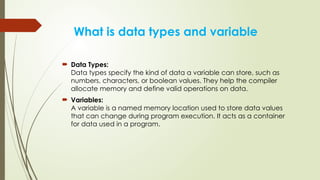
Data Types:
Data types specify the kind of data a variable can store, such as
numbers, characters, or boolean values. They help the compiler
allocate memory and define valid operations on data.
Variables:
A variable is a named memory location used to store data values
that can change during program execution. It acts as a container
for data used in a program.
3.
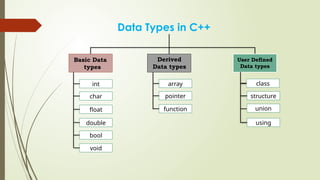
Data Types inC++
Basic Data
types
Derived
Data types
User Defined
Data types
int
char
float
double
bool
void
array
pointer
function
class
structure
union
using
4.
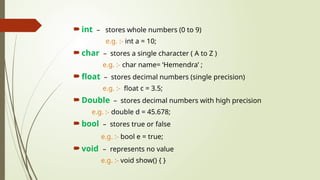
int –stores whole numbers (0 to 9)
e.g. :- int a = 10;
char – stores a single character ( A to Z )
e.g. :- char name= ‘Hemendra’ ;
float – stores decimal numbers (single precision)
e.g. :- float c = 3.5;
Double – stores decimal numbers with high precision
e.g. :- double d = 45.678;
bool – stores true or false
e.g. :- bool e = true;
void – represents no value
e.g. :- void show() { }
5.
Array: Stores multiplevalues of the same data type in a
single variable.
e.g.:- int a[3] = {1, 2, 3};
Pointer: Stores the memory address of another variable.
e.g.:- int x = 10; int *p = &x;
Function: A block of code that performs a specific task and
can be reused.
e.g.:- int add(int a, int b){ return a+b; }
6.
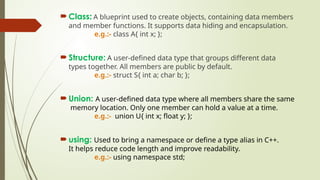
Class: Ablueprint used to create objects, containing data members
and member functions. It supports data hiding and encapsulation.
e.g.:- class A{ int x; };
Structure: A user-defined data type that groups different data
types together. All members are public by default.
e.g.:- struct S{ int a; char b; };
Union: A user-defined data type where all members share the same
memory location. Only one member can hold a value at a time.
e.g.:- union U{ int x; float y; };
using: Used to bring a namespace or define a type alias in C++.
It helps reduce code length and improve readability.
e.g.:- using namespace std;
7.
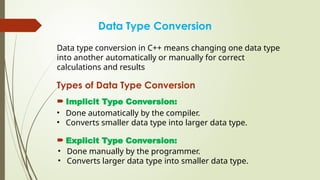
Data Type Conversion
Datatype conversion in C++ means changing one data type
into another automatically or manually for correct
calculations and results
Types of Data Type Conversion
Implicit Type Conversion:
• Done automatically by the compiler.
• Converts smaller data type into larger data type.
Explicit Type Conversion:
• Done manually by the programmer.
• Converts larger data type into smaller data type.
8.
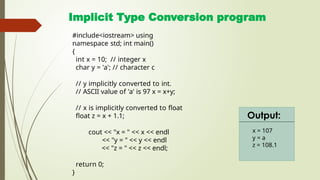
Implicit Type Conversionprogram
#include<iostream> using
namespace std; int main()
{
int x = 10; // integer x
char y = 'a'; // character c
// y implicitly converted to int.
// ASCII value of 'a' is 97 x = x+y;
// x is implicitly converted to float
float z = x + 1.1;
cout << "x = " << x << endl
<< "y = " << y << endl
<< "z = " << z << endl;
return 0;
}
x = 107
y = a
z = 108.1
Output:
9.
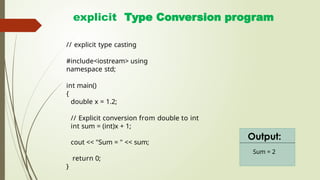
explicit Type Conversionprogram
Sum = 2
Output:
// explicit type casting
#include<iostream> using
namespace std;
int main()
{
double x = 1.2;
// Explicit conversion from double to int
int sum = (int)x + 1;
cout << "Sum = " << sum;
return 0;
}

![Array: Stores multiple values of the same data type in a
single variable.
e.g.:- int a[3] = {1, 2, 3};
Pointer: Stores the memory address of another variable.
e.g.:- int x = 10; int *p = &x;
Function: A block of code that performs a specific task and
can be reused.
e.g.:- int add(int a, int b){ return a+b; }](https://image.slidesharecdn.com/datatypesoops-251214124511-86fa6924/85/data-types-object-oriented-programings-pptx-5-320.jpg)



![Water_pollution_pptx_20251220_190556_0000[1].pptx](https://cdn.slidesharecdn.com/ss_thumbnails/waterpollutionpptx2025122019055600001-260106150828-31b53774-thumbnail.jpg?width=640&height=640&fit=bounds)


