data-presentationData presentation and interpretation
1.
Effective Data Presentation
EffectiveData Presentation
Making Figures and Tables
Making Figures and Tables
Dr. Gail P. Taylor
Dr. Gail P. Taylor
University of Texas at San Antonio
University of Texas at San Antonio
Professional Skills Development
Professional Skills Development
02/04/2009
2.
Acknowledgements
• Scientific Papersand Presentations,
by Martha Davis. Academic press,
1997
• Survival Skills and Ethics Program:
www.pitt.edu/~survival
• Department of Biology, Bates College
http://abacus.bates.edu/~ganderso/biol
ogy/resources/writing/HTWtoc.html
3.
“Graphic Excellence isthat which gives to
the viewer the greatest number of ideas in
the shortest time with the least ink in the
smallest place.”
Edward R. Tufte
4.
Guidelines
• Simplify messagewithout falsifying data
• Generally need either graph or table
• Present with clarity, brevity
• Note prior conventions
5.
• What typesof data presentation formats
do you know?
• How are they different?
6.
Data Presentation Formats
•Tables
– Specific data
– Exact comparisons between data points
• Bar Charts
– Less numerically specific
– Examine differences rather than trends/changes
– Comparisons of size, magnitude, amounts
• Line Graphs
– Not numerically specific
– Demonstrate movement, change, trends
– Generally over time or concentration
7.
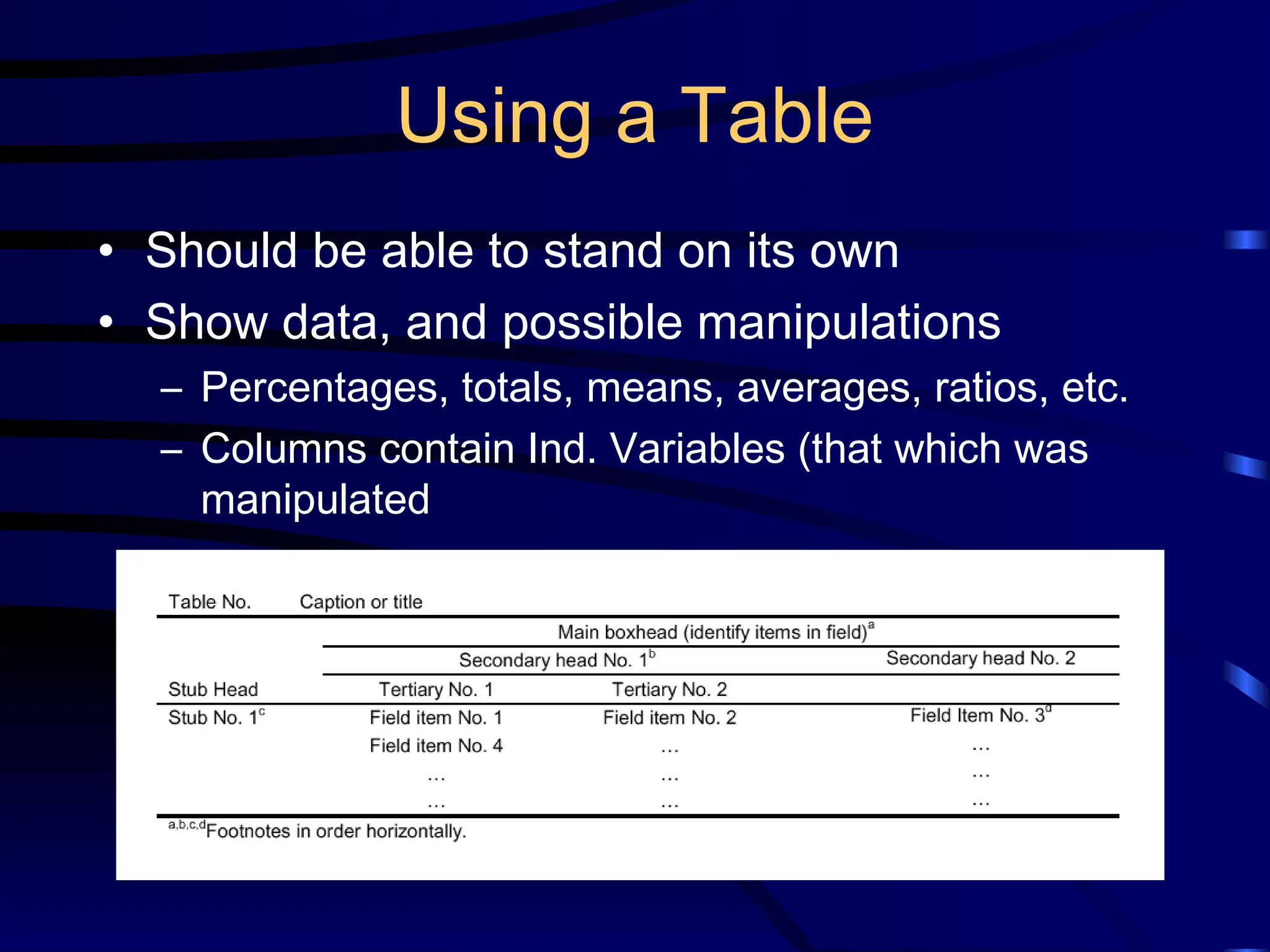
Using a Table
•Should be able to stand on its own
• Show data, and possible manipulations
– Percentages, totals, means, averages, ratios, etc.
– Columns contain Ind. Variables (that which was
manipulated
8.
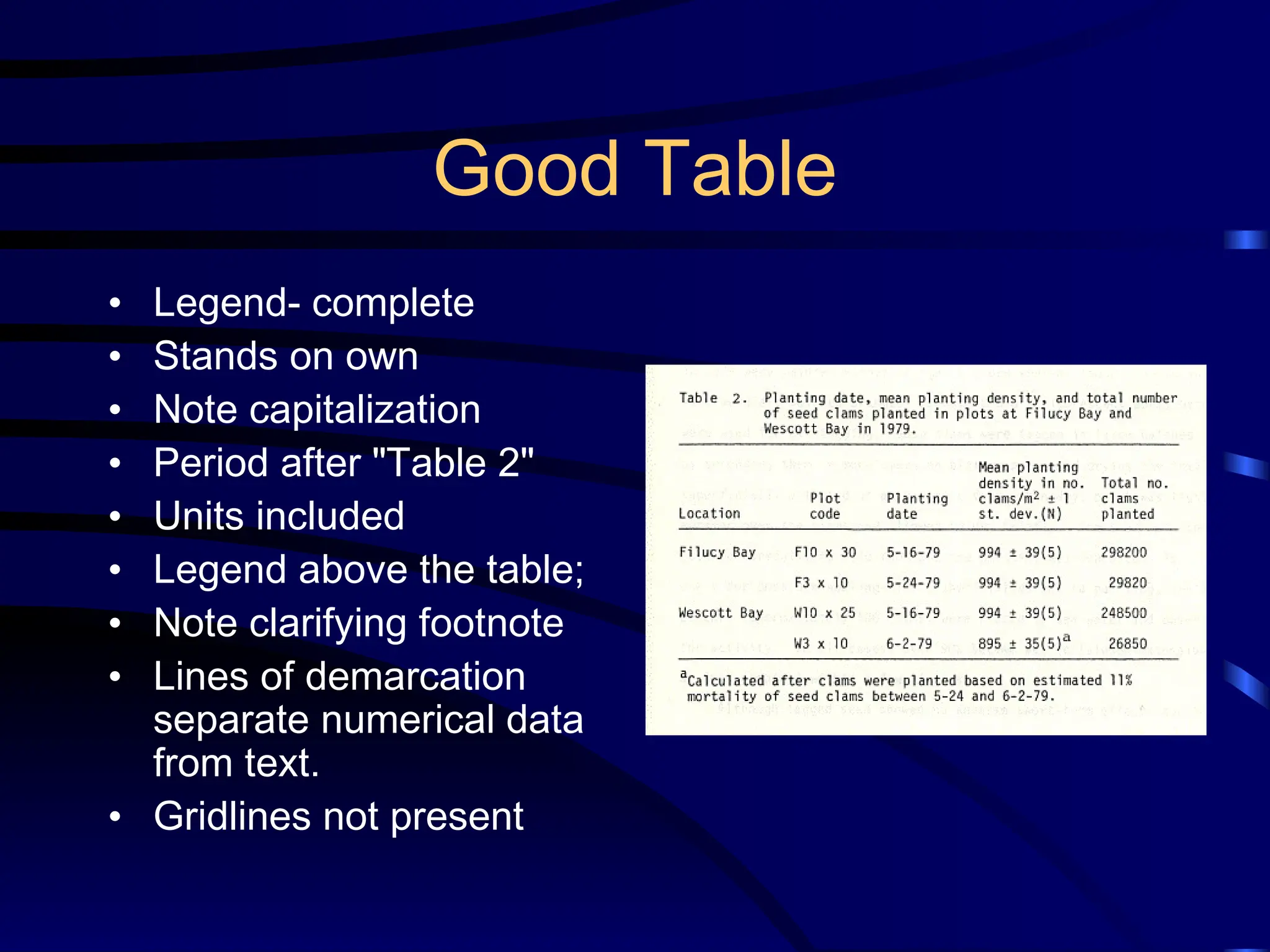
Good Table
• Legend-complete
• Stands on own
• Note capitalization
• Period after "Table 2"
• Units included
• Legend above the table;
• Note clarifying footnote
• Lines of demarcation
separate numerical data
from text.
• Gridlines not present
9.
More on Tables
•Limit total items/columns
– (But more than than 6-8 datapoints)
• No vertical lines
• Do not overload with headings
• Use captions/footnotes for definitions
• Strings of “0’s” or unchanging data might not be included
• Use restraint with decimal places
• Obvious abbreviations can be included
• Don’t repeat data in text, just call attention to main points
10.
Preparing a Table
•Examine style sheet and examples
• One table, one page, double spaced
• Use Arabic numerals to number
• Group so that comparisons run down column
• Logically group data to stress baseline and trends
• Round off numbers and align decimals
• Create a descriptive caption (no verb required)
• Use head- or foot-notes to explain abbreviations
• Verify all data
• Verify accuracy of use of symbols
• Use consistent labeling throughout paper
• Proofread carefully
11.
Tables in aPoster/Presentation
• Time limitations- make more simple
• Utilize color, shapes, to emphasize
• Symbols are okay
12.
Actually Making aTable
• Use publisher’s recommendations
• Can use Word or Excel (I like Word)
Figures
• Designed toadd understanding of
information that it difficult to convey with
words
• Must be clear, accurate, appropriate
• Avoid mere decoration
• KISS
• Need a legend
Line Graphs
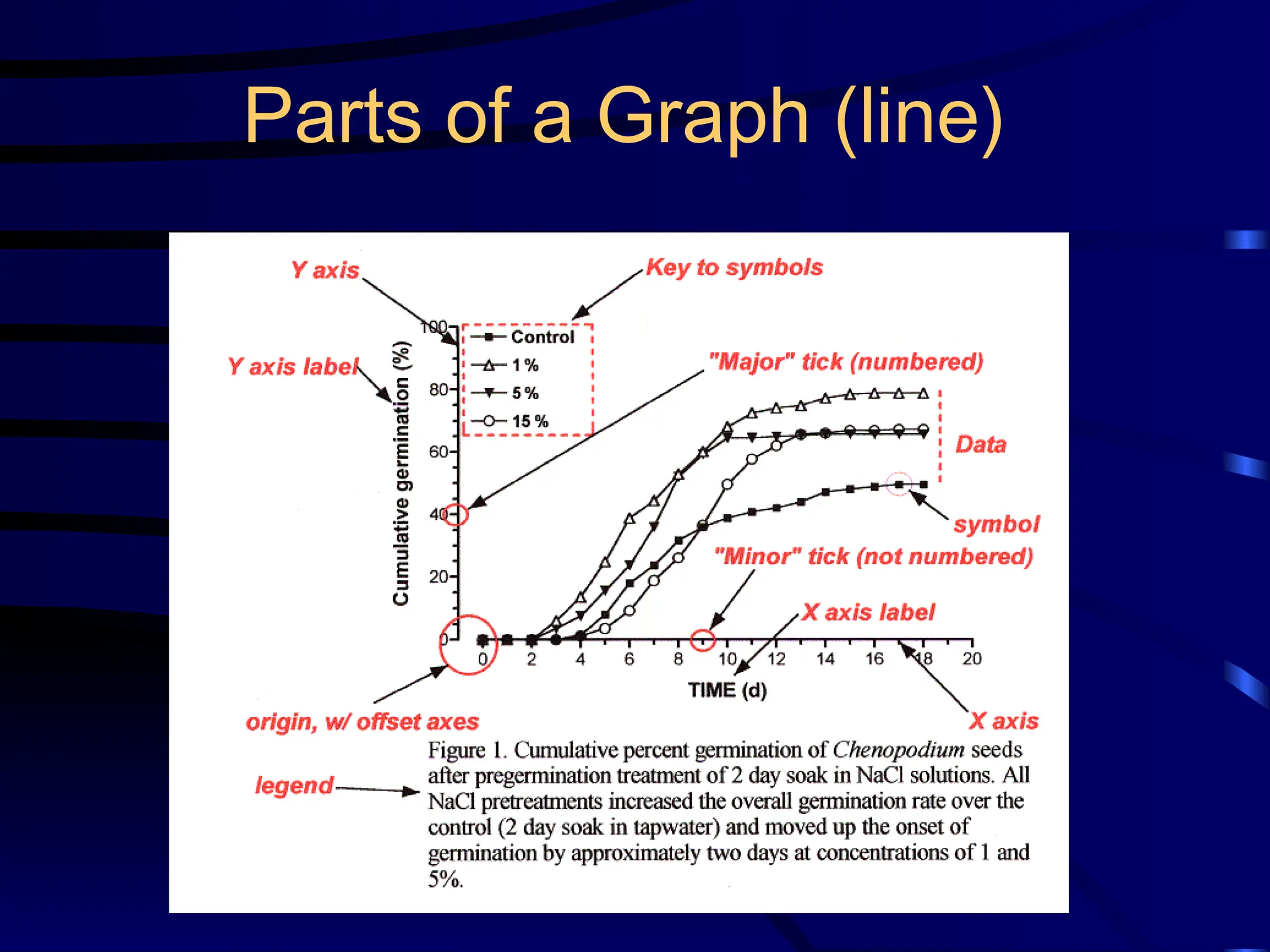
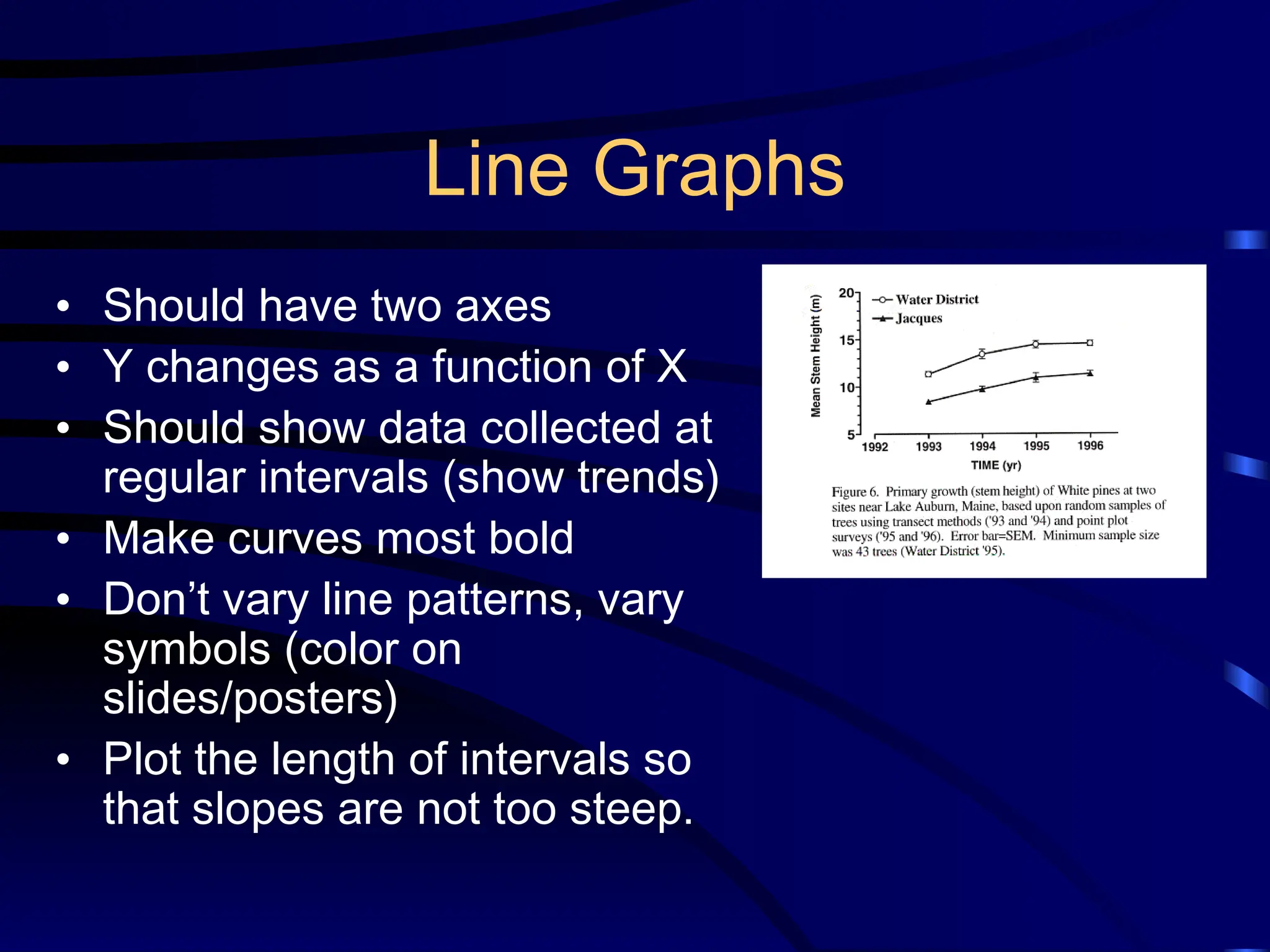
• Shouldhave two axes
• Y changes as a function of X
• Should show data collected at
regular intervals (show trends)
• Make curves most bold
• Don’t vary line patterns, vary
symbols (color on
slides/posters)
• Plot the length of intervals so
that slopes are not too steep.
17.
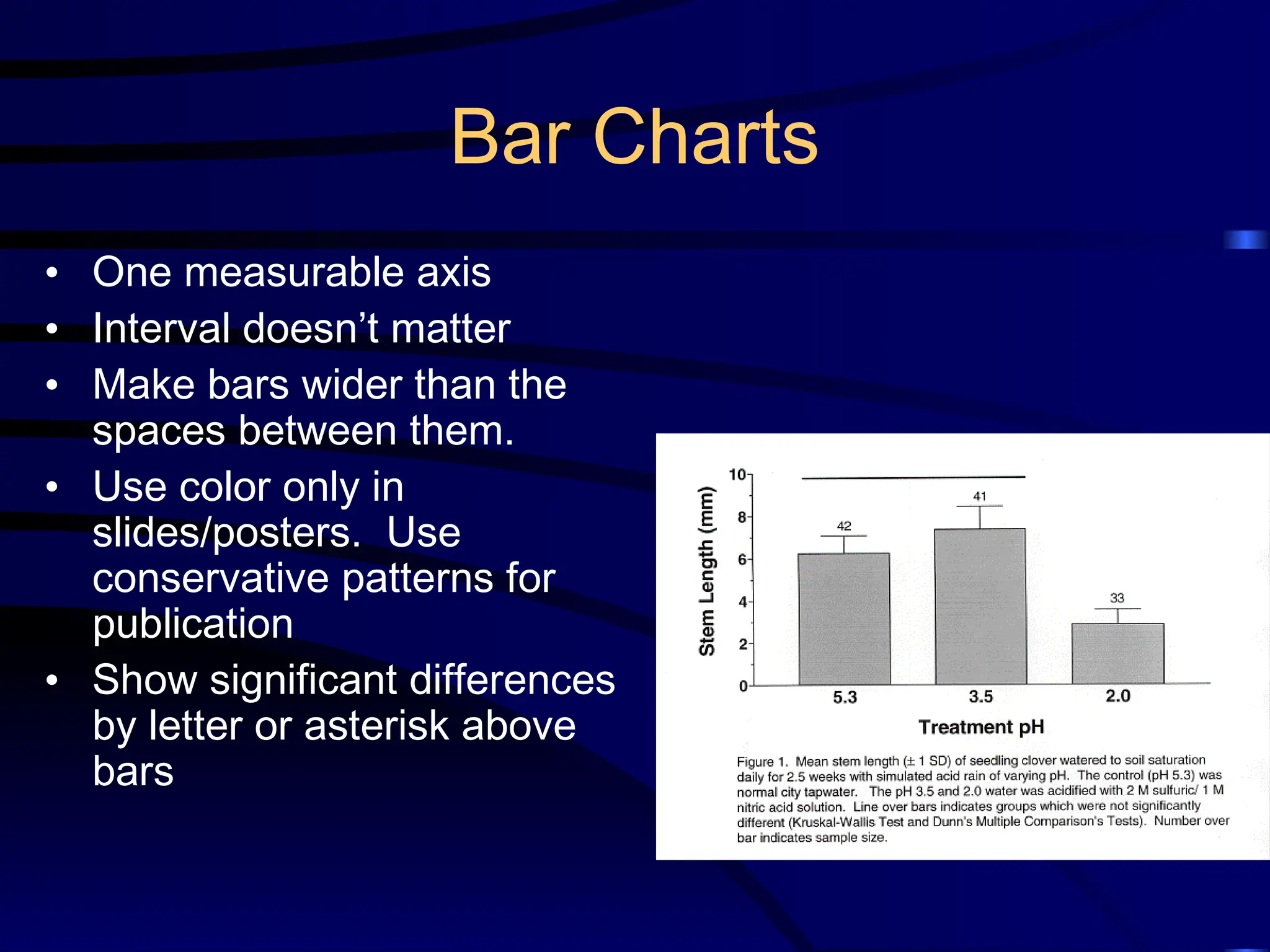
Bar Charts
• Onemeasurable axis
• Interval doesn’t matter
• Make bars wider than the
spaces between them.
• Use color only in
slides/posters. Use
conservative patterns for
publication
• Show significant differences
by letter or asterisk above
bars
18.
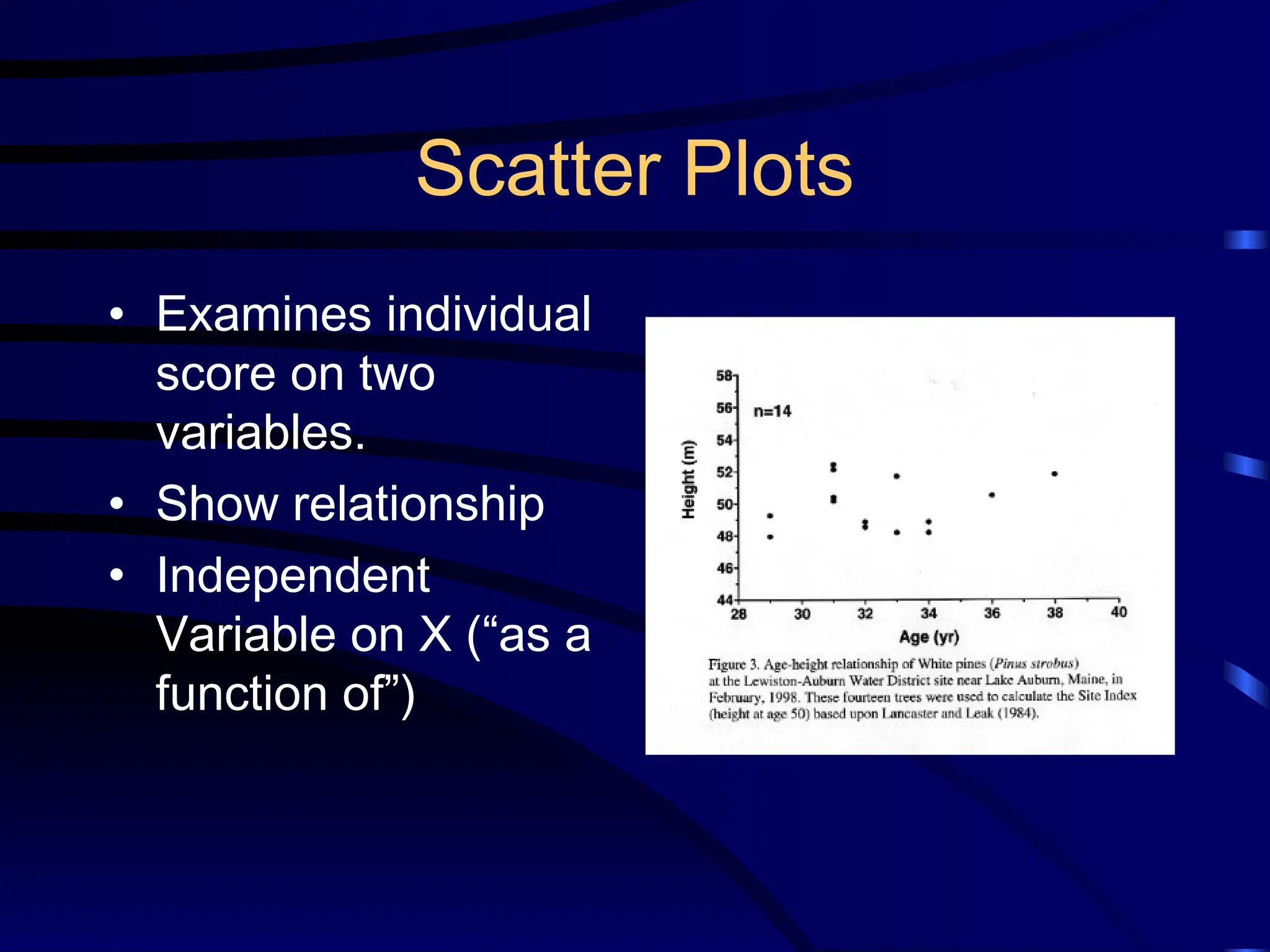
Scatter Plots
• Examinesindividual
score on two
variables.
• Show relationship
• Independent
Variable on X (“as a
function of”)
19.
Recommendations for Figures
(Part1)
• Read publishers recommendations regarding
size, color, format!
• Is it needed?
• Do not have a title
• Can it be understood at a glance?
• Limit curves (3-5) or bars (6-8; 9-10 grouped)
• Plot independent variable on X (time,
concentration), dependent on Y (what
happened?)
• Avoid wasted space; legend on field
20.
Recommendations (Part 2)
•Label axes and show units of measure. Use
tics and subtics, to not crowd with numbers
• Position, size, shape, length, symbols, angle,
color: all are cues. Use when appropriate,
and avoid misuse.
• Start scales at “0,” unless you make it clear (tic
marks) that you are doing otherwise.
• For a journal, type caption on a separate page
so that the figure can be photographed and the
type set separately.
21.
Figure Legends
• Mustaccompany Figures.
• Should give pertinent, clarifying information
– key to abbreviations
– sample size
– statistical results
– a brief description of how the data were acquired
• Should allow Table/Figure to stand alone
• In the legend, both “Table” and “Figure” are
spelled out completely
22.
How to referto a Table/Figure
• Every table/figure must be referred to in the text
• It is best to refer to them in parenthesis:
– Germination rates were significantly higher after 24 hr water
soak than in the control (Fig. 1) .
– DNA sequence homologies for the purple gene from the four
congeners (Table 1) show a strong similarity, differing at
most by 4 base pairs.
– Note: Fig., here is abbreviated. Not on headings, though.
• Avoid sentences that only direct you to the table:
– Table 1 shows the summary results for male and female
height at Bates College.
23.
A little moreInfo…
• Figures and tables are numbered
independently, in the sequence in which they
are referred.
• In a thesis or class paper, place them as near
where you refer to them as possible
• For manuscripts, follow publisher’s directions
(historically, legends were are on a separate
page)