INTRODUCTION 
 Display: 
 To show or make visible 
 Result: 
 Something that ensure from an action 
 Displaying Results 
 To show or make visible the outcomes that ensure from 
an action.
ELECTRONIC WAYS 
 Word processing programs 
 Spread sheet programs 
 Statistical packages 
 Highly specialized software
MANUALWAYS 
 Table: 
 Tables usually show numerical values or textual 
information arranged in an orderly display of columns 
and rows. 
 Figure: 
 A figure may be a chart, a graph, a photo graph, a 
drawing or any other illustration or nontextual depiction.
GENERAL GUIDANCE 
 Purpose of data display 
 Exploration 
 Communication 
 Calculation 
 Storage 
 Decoration
CONT…. 
 Design and preparation 
 Items to be compared next to each other 
 Clarity in labeling 
 Enough large font size 
 Include relevant information 
 Free of extraneous material
CONT….. 
 Graphical verses textual presentation 
 Large number of tables and figures 
 Large number of tables and figures verses small amount 
of text 
 Not always optimal for effective presentation
CONT…. 
 Formatting tables and figures 
 Word processing program 
 Cut and pasted from computer output 
 PDF images
CONT…. 
 Table and figure numbers 
 Use Arabic numerals 
 Do not use Suffix letters (5a , 5b, 5c etc) 
 Use same sequence 
 Mention Appendix with capital letters and Arabic 
numerals (Appendix A, Appendix B etc)
CONT….. 
 Permission to reproduce data display 
 If you used tables and figures of any other author then 
must take permission from copyright holder. 
 Mention original author’s name.
“TABLES” 
 Conciseness in tables 
 Limit the content to essential materials. 
 Conciseness is necessary for both text tables and 
supplement archives. 
 Supplemental tables are in more detail than text tables. 
 Tables should be concise but having enough detail which 
can be easily understandable by the reader.
TABLES 
 Tables Layout 
 Should be logical and easily grasped. 
 Should be in sequences. 
 Different indices should be in different lines of tables. 
 Values used in tables should be comparable. 
 Tables should be specific in nature.
TABLES 
 Standard forms 
 Some data tables have standard forms. 
 Reader can easily get information by standard forms.
STANDARD FORMS 
younger older 
Level of 
difficulty 
n M (SD) 95%Cl n M(SD) 95%Cl 
Low 12 .05(.08) [.02,.11] 18 .14(.15) [.08,.22] 
Mederate 15 .05(.07) [.02,.10] 12 .17(.15) [.08,.28] 
high 16 .11(.10) [.07,.17] 14 .26(.21) [.15,.39]
TABLES 
 Relation of tables and texts 
 In this relationship, tables are discussed in textual form. 
 Discuss only the highlights of tables. 
 If online tables are used then mention its existence in 
form of brief articles.
TABLES 
 Relation between tables 
 Use similar format, titles and headings and use same 
terminology throughout.
TABLES 
 Table titles 
 Tables have clear and explanatory titles. 
 Too general: 
 Table 1 
 Relation Between College Majors and Performance [It is 
unclear what data are presented in the table.]
 Too detailed: 
 Table 1 
 Mean Performance Scores on Test A, Test B. and Test C 
of Students With 
 Psychology. Physics. English. and Engineering Majors 
[This duplicates information in the headings of the 
table.] 
 Good title: 
 Mean Performance Scores of Students With Different 
College Majors
TABLES 
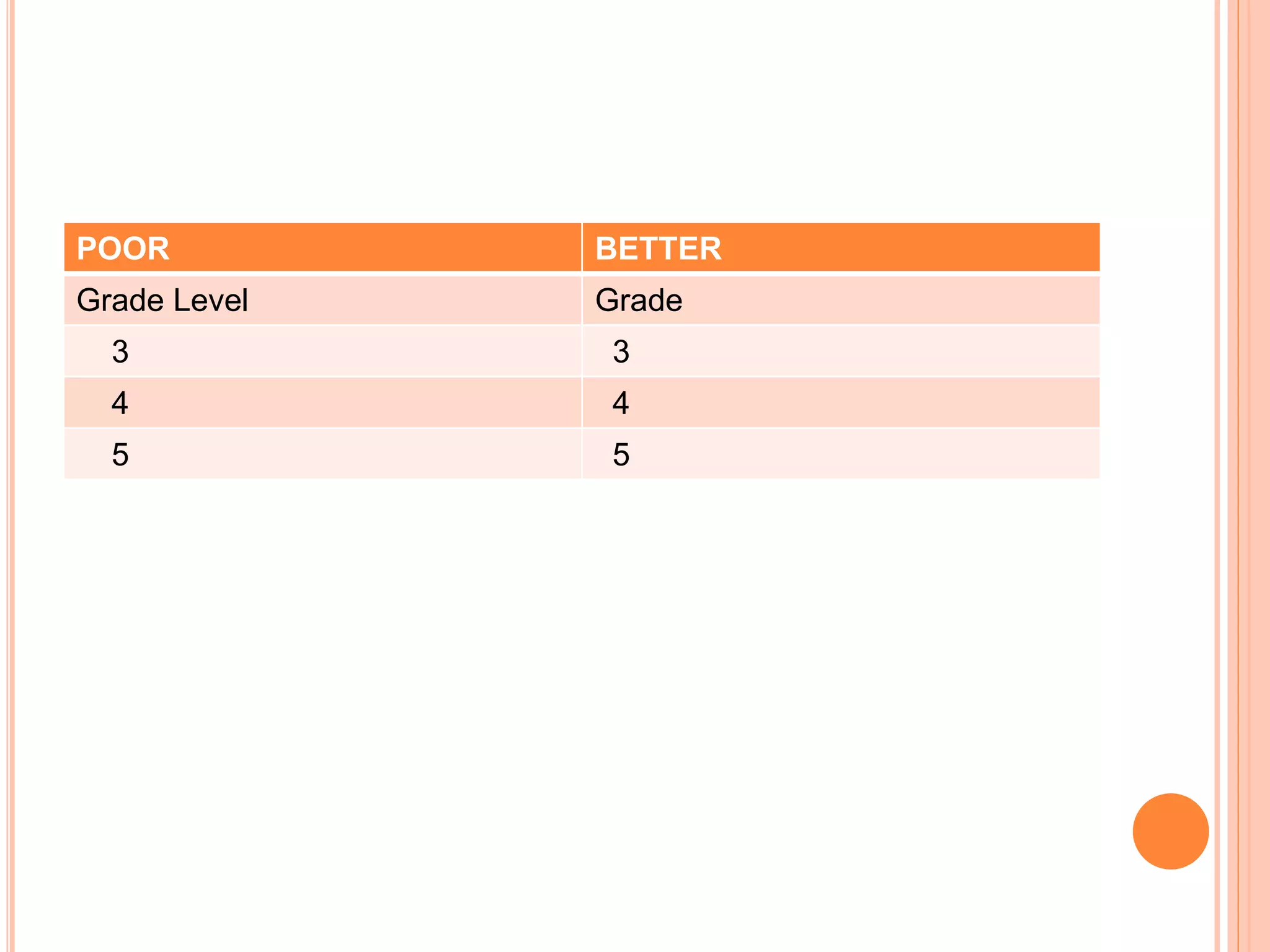
 Table headings 
 A table heading should be brief but not lengthy. 
 Abbreviation and symbols can be used for non technical 
terms. (M, SD etc) 
 Abbreviation of technical terms, group names must be 
explained in the table title or in a note to the tables.
POOR BETTER 
Grade Level Grade 
3 3 
4 4 
5 5
TABLES 
 Table body 
 Decimal Value (Express numerical values to the number 
of decimal places that the precision of measurement 
justifies.) 
 Empty Cell (Point of intersection between row and 
columns is called Cell.) We leave the cell blank if the 
data in the point of intersection is not applicable. 
 Conciseness (Be selective in your presentation)
TABLES 
 Table Notes 
 General Notes 
 Specific Notes 
 Probability Notes

Displaying Results in Resarch

  • 2.
    INTRODUCTION  Display:  To show or make visible  Result:  Something that ensure from an action  Displaying Results  To show or make visible the outcomes that ensure from an action.
  • 3.
    ELECTRONIC WAYS Word processing programs  Spread sheet programs  Statistical packages  Highly specialized software
  • 4.
    MANUALWAYS  Table:  Tables usually show numerical values or textual information arranged in an orderly display of columns and rows.  Figure:  A figure may be a chart, a graph, a photo graph, a drawing or any other illustration or nontextual depiction.
  • 5.
    GENERAL GUIDANCE Purpose of data display  Exploration  Communication  Calculation  Storage  Decoration
  • 6.
    CONT….  Designand preparation  Items to be compared next to each other  Clarity in labeling  Enough large font size  Include relevant information  Free of extraneous material
  • 7.
    CONT…..  Graphicalverses textual presentation  Large number of tables and figures  Large number of tables and figures verses small amount of text  Not always optimal for effective presentation
  • 8.
    CONT….  Formattingtables and figures  Word processing program  Cut and pasted from computer output  PDF images
  • 9.
    CONT….  Tableand figure numbers  Use Arabic numerals  Do not use Suffix letters (5a , 5b, 5c etc)  Use same sequence  Mention Appendix with capital letters and Arabic numerals (Appendix A, Appendix B etc)
  • 10.
    CONT…..  Permissionto reproduce data display  If you used tables and figures of any other author then must take permission from copyright holder.  Mention original author’s name.
  • 11.
    “TABLES”  Concisenessin tables  Limit the content to essential materials.  Conciseness is necessary for both text tables and supplement archives.  Supplemental tables are in more detail than text tables.  Tables should be concise but having enough detail which can be easily understandable by the reader.
  • 12.
    TABLES  TablesLayout  Should be logical and easily grasped.  Should be in sequences.  Different indices should be in different lines of tables.  Values used in tables should be comparable.  Tables should be specific in nature.
  • 14.
    TABLES  Standardforms  Some data tables have standard forms.  Reader can easily get information by standard forms.
  • 15.
    STANDARD FORMS youngerolder Level of difficulty n M (SD) 95%Cl n M(SD) 95%Cl Low 12 .05(.08) [.02,.11] 18 .14(.15) [.08,.22] Mederate 15 .05(.07) [.02,.10] 12 .17(.15) [.08,.28] high 16 .11(.10) [.07,.17] 14 .26(.21) [.15,.39]
  • 16.
    TABLES  Relationof tables and texts  In this relationship, tables are discussed in textual form.  Discuss only the highlights of tables.  If online tables are used then mention its existence in form of brief articles.
  • 17.
    TABLES  Relationbetween tables  Use similar format, titles and headings and use same terminology throughout.
  • 20.
    TABLES  Tabletitles  Tables have clear and explanatory titles.  Too general:  Table 1  Relation Between College Majors and Performance [It is unclear what data are presented in the table.]
  • 21.
     Too detailed:  Table 1  Mean Performance Scores on Test A, Test B. and Test C of Students With  Psychology. Physics. English. and Engineering Majors [This duplicates information in the headings of the table.]  Good title:  Mean Performance Scores of Students With Different College Majors
  • 22.
    TABLES  Tableheadings  A table heading should be brief but not lengthy.  Abbreviation and symbols can be used for non technical terms. (M, SD etc)  Abbreviation of technical terms, group names must be explained in the table title or in a note to the tables.
  • 23.
    POOR BETTER GradeLevel Grade 3 3 4 4 5 5
  • 24.
    TABLES  Tablebody  Decimal Value (Express numerical values to the number of decimal places that the precision of measurement justifies.)  Empty Cell (Point of intersection between row and columns is called Cell.) We leave the cell blank if the data in the point of intersection is not applicable.  Conciseness (Be selective in your presentation)
  • 25.
    TABLES  TableNotes  General Notes  Specific Notes  Probability Notes