Data Manipulation for Humanities
Presented by:
Mohamed Hadra
Data Manipulation:
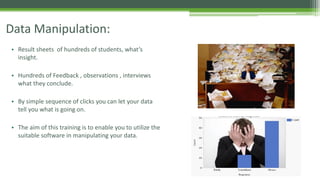
• Result sheets of hundreds of students, what’s
insight.
• Hundreds of Feedback , observations , interviews
what they conclude.
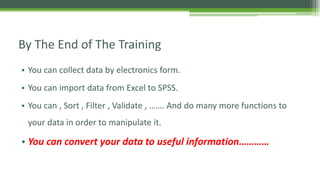
• By simple sequence of clicks you can let your data
tell you what is going on.
• The aim of this training is to enable you to utilize the
suitable software in manipulating your data.
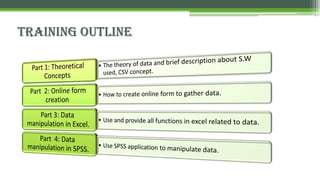
By The End of The Training
• You can collect data by electronics form.
• You can import data from Excel to SPSS.
• You can , Sort , Filter , Validate , ……. And do many more functions to
your data in order to manipulate it.
• You can convert your data to useful information…………
Brief Bio of presenter
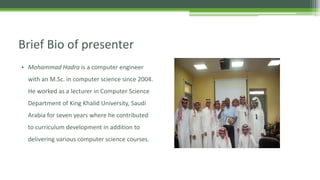
• Mohammad Hadra is a computer engineer
with an M.Sc. in computer science since 2004.
He worked as a lecturer in Computer Science
Department of King Khalid University, Saudi
Arabia for seven years where he contributed
to curriculum development in addition to
delivering various computer science courses.
Brief Bio of presenter ….Cont.
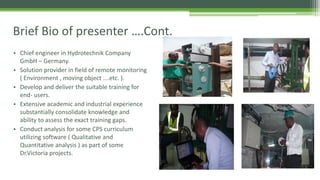
• Chief engineer in Hydrotechnik Company
GmbH – Germany.
• Solution provider in field of remote monitoring
( Environment , moving object ….etc. ).
• Develop and deliver the suitable training for
end- users.
• Extensive academic and industrial experience
substantially consolidate knowledge and
ability to assess the exact training gaps.
• Conduct analysis for some CPS curriculum
utilizing software ( Qualitative and
Quantitative analysis ) as part of some
Dr.Victoria projects.
Training Outline
Part 1: What is Data
• Data : Qualitative or quantitative values of a variable.
• Various techniques for collecting primary data such as :
▫ Survey
▫ Experiments
▫ Direct observation.
• Data in it self is difficult to understood , we need to interpret OR
process it in order to get useful information.
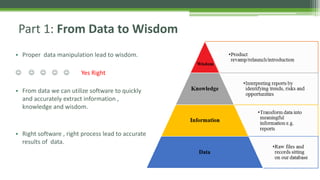
• Proper data manipulation lead to wisdom.
     Yes Right
• From data we can utilize software to quickly
and accurately extract information ,
knowledge and wisdom.
• Right software , right process lead to accurate
results of data.
Part 1: From Data to Wisdom
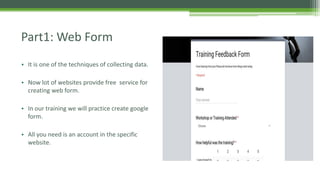
Part1: Web Form
• It is one of the techniques of collecting data.
• Now lot of websites provide free service for
creating web form.
• In our training we will practice create google
form.
• All you need is an account in the specific
website.
Web Form : sample websites
• Syrveymonkey.com
• Checkbox.com
• Kwiksurvey.com .
• https://www.123formbuilder.com/
• https://form.io/
• http://tryfree.caspio.com/
• drive.google.com.
• We will work with google drive for the following reasons :
▫ No ads.
▫ Simplicity of use.
▫ Unlimited response.
▫ Support English and Arabic.
▫ Possibility of quick descriptive analysis
• Simply go to drive.google.com , create your account and start creating
your form.
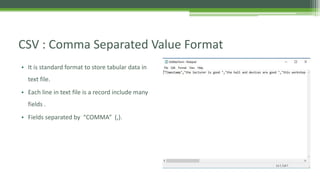
CSV : Comma Separated Value Format
• It is standard format to store tabular data in
text file.
• Each line in text file is a record include many
fields .
• Fields separated by “COMMA” (,).
CSV File format
• It is standard format help in exchanging data between different
applications.
• Many web sites ask to convert any data file into CSV prior to upload.
• In practical part we will see how to create , open and save a file as CSV.
Microsoft Excel
• It is one of the famous spreadsheet applications.
• It helps in organizing sorting and deriving values from data.
• The best way we will go directly to application and a solve an excercis
SPSS : Statistical Package for Social science
• It is one of IBM application work for data manipulation.
• We will work with SPSS version 25 .
• In SPSS we have different files and different view.
• Data file *.sav include variable and data view
• Syntax file *.sps
• Output file which include results it is .spv
SPSS
• Now Open SPSS file and browse all these file and menus.
• Solve the exercise together.
• Mainly we will import data from excel file and solve an exercise.
• This allow us to compare and see what can done here and what can
done there.
•

Data manipulation

  • 1.
    Data Manipulation forHumanities Presented by: Mohamed Hadra
  • 2.
    Data Manipulation: • Resultsheets of hundreds of students, what’s insight. • Hundreds of Feedback , observations , interviews what they conclude. • By simple sequence of clicks you can let your data tell you what is going on. • The aim of this training is to enable you to utilize the suitable software in manipulating your data.
  • 3.
    By The Endof The Training • You can collect data by electronics form. • You can import data from Excel to SPSS. • You can , Sort , Filter , Validate , ……. And do many more functions to your data in order to manipulate it. • You can convert your data to useful information…………
  • 4.
    Brief Bio ofpresenter • Mohammad Hadra is a computer engineer with an M.Sc. in computer science since 2004. He worked as a lecturer in Computer Science Department of King Khalid University, Saudi Arabia for seven years where he contributed to curriculum development in addition to delivering various computer science courses.
  • 5.
    Brief Bio ofpresenter ….Cont. • Chief engineer in Hydrotechnik Company GmbH – Germany. • Solution provider in field of remote monitoring ( Environment , moving object ….etc. ). • Develop and deliver the suitable training for end- users. • Extensive academic and industrial experience substantially consolidate knowledge and ability to assess the exact training gaps. • Conduct analysis for some CPS curriculum utilizing software ( Qualitative and Quantitative analysis ) as part of some Dr.Victoria projects.
  • 6.
  • 7.
    Part 1: Whatis Data • Data : Qualitative or quantitative values of a variable. • Various techniques for collecting primary data such as : ▫ Survey ▫ Experiments ▫ Direct observation. • Data in it self is difficult to understood , we need to interpret OR process it in order to get useful information.
  • 8.
    • Proper datamanipulation lead to wisdom.      Yes Right • From data we can utilize software to quickly and accurately extract information , knowledge and wisdom. • Right software , right process lead to accurate results of data. Part 1: From Data to Wisdom
  • 9.
    Part1: Web Form •It is one of the techniques of collecting data. • Now lot of websites provide free service for creating web form. • In our training we will practice create google form. • All you need is an account in the specific website.
  • 10.
    Web Form :sample websites • Syrveymonkey.com • Checkbox.com • Kwiksurvey.com . • https://www.123formbuilder.com/ • https://form.io/ • http://tryfree.caspio.com/ • drive.google.com.
  • 11.
    • We willwork with google drive for the following reasons : ▫ No ads. ▫ Simplicity of use. ▫ Unlimited response. ▫ Support English and Arabic. ▫ Possibility of quick descriptive analysis
  • 12.
    • Simply goto drive.google.com , create your account and start creating your form.
  • 13.
    CSV : CommaSeparated Value Format • It is standard format to store tabular data in text file. • Each line in text file is a record include many fields . • Fields separated by “COMMA” (,).
  • 14.
    CSV File format •It is standard format help in exchanging data between different applications. • Many web sites ask to convert any data file into CSV prior to upload. • In practical part we will see how to create , open and save a file as CSV.
  • 15.
    Microsoft Excel • Itis one of the famous spreadsheet applications. • It helps in organizing sorting and deriving values from data. • The best way we will go directly to application and a solve an excercis
  • 16.
    SPSS : StatisticalPackage for Social science
  • 17.
    • It isone of IBM application work for data manipulation. • We will work with SPSS version 25 . • In SPSS we have different files and different view. • Data file *.sav include variable and data view • Syntax file *.sps • Output file which include results it is .spv
  • 18.
    SPSS • Now OpenSPSS file and browse all these file and menus. • Solve the exercise together. • Mainly we will import data from excel file and solve an exercise. • This allow us to compare and see what can done here and what can done there. •