Using TDI with IBM Connections
Morten Christensen, IBM Collaboration Solutions
Twitter: @mortench


                                       ©2010 IBM Corporation
Tivoli Directory Integrator
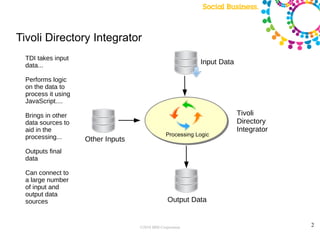
  TDI takes input
  data...                                                    Input Data

  Performs logic
  on the data to
  process it using
  JavaScript....

  Brings in other                                                         Tivoli
  data sources to                                                         Directory
  aid in the                                                              Integrator
  processing...                                  Processing Logic
                     Other Inputs
  Outputs final
  data

  Can connect to
  a large number
  of input and
  output data
  sources                                         Output Data


                                    ©2010 IBM Corporation                              2
Software Requirements

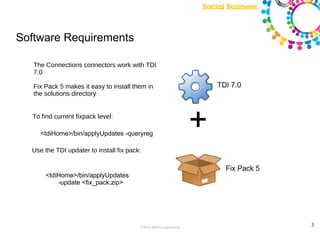
   The Connections connectors work with TDI
   7.0

   Fix Pack 5 makes it easy to install them in                       TDI 7.0
   the solutions directory


  To find current fixpack level:

     <tdiHome>/bin/applyUpdates -queryreg
                                                                 +
  Use the TDI updater to install fix pack:

                                                                       Fix Pack 5
       <tdiHome>/bin/applyUpdates
           -update <fix_pack.zip>


                                         ©2010 IBM Corporation                      3
Profiles update philosophy


IBM Connections does NOT document the schema due to the fact that as new enhancements are
  added, the schema changes; tables may be updated, renamed, deleted, etc. For this reason,
  updating Connections tables directly is NOT SUPPORTED or recommended. You should always
  use existing assemblyLines such as SyncDBFromSource, new 3.0 Connectors, or the Service
  Provider Interface


                                      ©2010 IBM Corporation                                   4
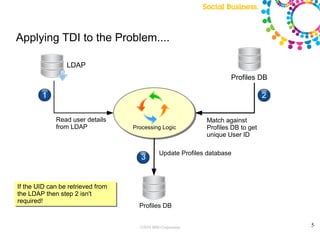
Applying TDI to the Problem....

                 LDAP
                                                                      Profiles DB
                                                                                       2
        1                                                                          2

             Read user details                                Match against
             from LDAP             Processing Logic           Profiles DB to get
                                                              unique User ID

                                               Update Profiles database
                                      3


If the UID can be retrieved from
the LDAP then step 2 isn't
required!
                                     Profiles DB


                                     ©2010 IBM Corporation                                 5
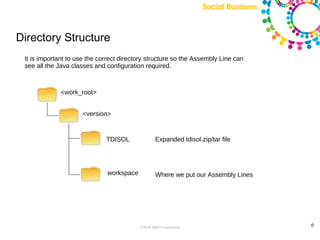
Directory Structure
 It is important to use the correct directory structure so the Assembly Line can
 see all the Java classes and configuration required.


              <work_root>


                     <version>


                              TDISOL              Expanded tdisol.zip/tar file


                              workspace           Where we put our Assembly Lines


                                          ©2010 IBM Corporation                     6
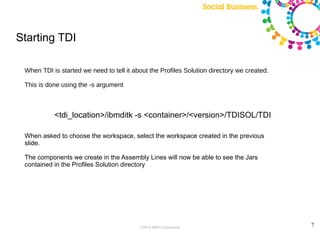
Starting TDI

 When TDI is started we need to tell it about the Profiles Solution directory we created.

 This is done using the -s argument


           <tdi_location>/ibmditk -s <container>/<version>/TDISOL/TDI

 When asked to choose the workspace, select the workspace created in the previous
 slide.

 The components we create in the Assembly Lines will now be able to see the Jars
 contained in the Profiles Solution directory


                                          ©2010 IBM Corporation                             7
Identifying User in Profiles

Users on the Profiles database are identified by a UID.
When user details are retrieved from the Domino database this information is available....
However, data may be retrieved from a source that uses another attribute to identify users, one
  example being an email address.
This can be handled using the ProfileConnector component....


                                          ©2010 IBM Corporation                                   8
Demo – Populate additional data from DB2

Additional data from DB2 table needs to be populated into Profiles
Two assembly lines will be created and made ready for command line invocation
    PopulateProfilesDB
    ProcessChanges
Two main components will be explored
    ProfilesConnector
    JDBCConnector


                                         ©2010 IBM Corporation                  9

DanNotes: Using TDI with IBM Connections

  • 1.
    Using TDI withIBM Connections Morten Christensen, IBM Collaboration Solutions Twitter: @mortench ©2010 IBM Corporation
  • 2.
    Tivoli Directory Integrator TDI takes input data... Input Data Performs logic on the data to process it using JavaScript.... Brings in other Tivoli data sources to Directory aid in the Integrator processing... Processing Logic Other Inputs Outputs final data Can connect to a large number of input and output data sources Output Data ©2010 IBM Corporation 2
  • 3.
    Software Requirements The Connections connectors work with TDI 7.0 Fix Pack 5 makes it easy to install them in TDI 7.0 the solutions directory To find current fixpack level: <tdiHome>/bin/applyUpdates -queryreg + Use the TDI updater to install fix pack: Fix Pack 5 <tdiHome>/bin/applyUpdates -update <fix_pack.zip> ©2010 IBM Corporation 3
  • 4.
    Profiles update philosophy IBMConnections does NOT document the schema due to the fact that as new enhancements are added, the schema changes; tables may be updated, renamed, deleted, etc. For this reason, updating Connections tables directly is NOT SUPPORTED or recommended. You should always use existing assemblyLines such as SyncDBFromSource, new 3.0 Connectors, or the Service Provider Interface ©2010 IBM Corporation 4
  • 5.
    Applying TDI tothe Problem.... LDAP Profiles DB 2 1 2 Read user details Match against from LDAP Processing Logic Profiles DB to get unique User ID Update Profiles database 3 If the UID can be retrieved from the LDAP then step 2 isn't required! Profiles DB ©2010 IBM Corporation 5
  • 6.
    Directory Structure Itis important to use the correct directory structure so the Assembly Line can see all the Java classes and configuration required. <work_root> <version> TDISOL Expanded tdisol.zip/tar file workspace Where we put our Assembly Lines ©2010 IBM Corporation 6
  • 7.
    Starting TDI WhenTDI is started we need to tell it about the Profiles Solution directory we created. This is done using the -s argument <tdi_location>/ibmditk -s <container>/<version>/TDISOL/TDI When asked to choose the workspace, select the workspace created in the previous slide. The components we create in the Assembly Lines will now be able to see the Jars contained in the Profiles Solution directory ©2010 IBM Corporation 7
  • 8.
    Identifying User inProfiles Users on the Profiles database are identified by a UID. When user details are retrieved from the Domino database this information is available.... However, data may be retrieved from a source that uses another attribute to identify users, one example being an email address. This can be handled using the ProfileConnector component.... ©2010 IBM Corporation 8
  • 9.
    Demo – Populateadditional data from DB2 Additional data from DB2 table needs to be populated into Profiles Two assembly lines will be created and made ready for command line invocation PopulateProfilesDB ProcessChanges Two main components will be explored ProfilesConnector JDBCConnector ©2010 IBM Corporation 9