Dance O Clock Examples Contents Page  Help Videos Plan Sources Table Charities Constructing a Database What to screenshot for your report Dance O Meter Quiz  – celebrity Dance O Meter Quiz  – serious Second Quiz Example Danceometer  Quiz example ( Jiminez ) Invitation Sponsor Form Sponsor Form Example (Jimenez) Make a Catch - criteria Make a Catch  example (Marie Therese Maligisa Make a Catch example (Kevin Jimenez) Playlist example (Kevin Jimenez) Project Review  – download these review notes. Marks to aim for
Help Videos Click on the logo for video help with making your eportfolio!
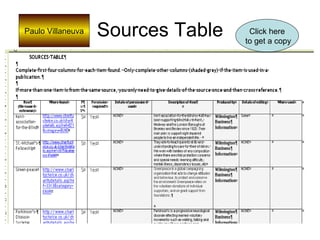
Sources Table Paulo Villaneuva Click here to get a copy
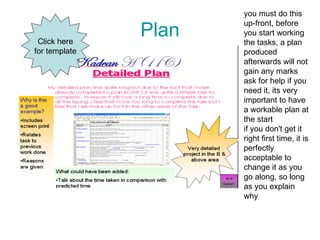
Plan you must do this up-front, before you start working the tasks, a plan produced afterwards will not gain any marks  ask for help if you need it, its very important to have a workable plan at the start  if you don't get it right first time, it is perfectly acceptable to change it as you go along, so long as you explain why  Click here for template
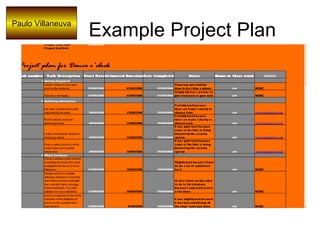
Example Project Plan Paulo Villaneuva
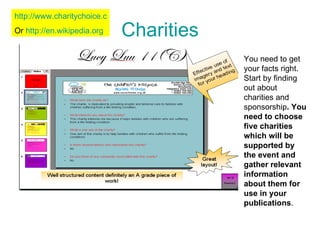
Charities You need to get your facts right. Start by finding out about charities and sponsorship . You need to choose five charities which will be supported by the event and gather relevant information about them for use in your publications .  http://www.charitychoice.co.uk/ Or  http://en.wikipedia.org
Constructing your database Spare Database
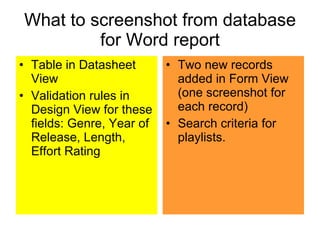
What to screenshot from database for Word report Table in Datasheet View Validation rules in Design View for these fields: Genre, Year of Release, Length, Effort Rating Two new records added in Form View (one screenshot for each record) Search criteria for playlists.
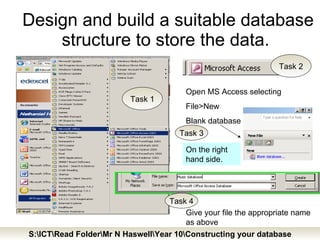
Design and build a suitable database structure to store the data.  Open MS Access selecting File>New Blank database On the right hand side. Give your file the appropriate name as above Task 1 Task 2 Task 3 Task 4 S:\ICT\Read Folder\Mr N Haswell\Year 10\Constructing your database
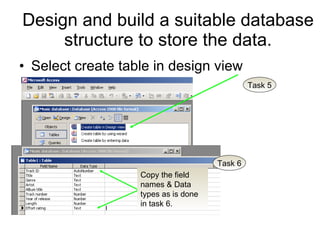
Design and build a suitable database structure to store the data. Select create table in design view Task 5 Task 6 Copy the field names & Data types as is done in task 6.
Look up Wizards! Task 7 Select look up wizard! Task 9 Type in the values as given these values represent the Genres. Then select  Next  then  Finish Task 10 Repeat a look up wizard for field name Effort rating using the codes: Task 8 Select the option to type the values in
Validation Rules Select  Year of Release  Task 12 Task 10 In the properties area enter the  Validation Rule  and  Validation text Task 11 Now enter the validation rule for Length: <=600 What Would the Validation Text be?
If you find something's missing Go to the  DIDA  the website  Find out what's missing read the SPB and have ago as a final resort ask your teacher for that help!
POSSIBLE PROBLEM AREAS Dance O’ meter Quiz: Some questions we should all have… Fitness level:  High, Medium, Low What were your favourite years of music? A)1960-1970 (B)1970-1980 (C)1980-1990 (D)1990-2000 (E )2000+ What Genre of Music do you like? Answers:  RP  Rock & Pop  ,DA  Dance  ,UR  Urban  , AT  Alternative  , JB  Jazz & Blues
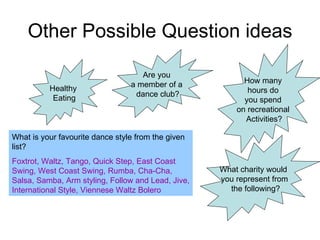
Other Possible Question ideas Healthy  Eating Are you  a member of a  dance club? What is your favourite dance style from the given list? Foxtrot, Waltz, Tango, Quick Step, East Coast Swing, West Coast Swing, Rumba, Cha-Cha, Salsa, Samba, Arm styling, Follow and Lead, Jive, International Style, Viennese Waltz Bolero How many  hours do  you spend  on recreational  Activities? What charity would  you represent from the following?
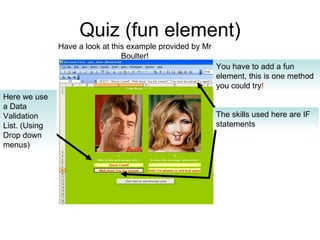
Quiz (fun element) You have to add a fun element, this is one method you could try ! Here we use a Data Validation List. (Using Drop down menus) The skills used here are IF statements Have a look at this example provided by Mr Boulter!
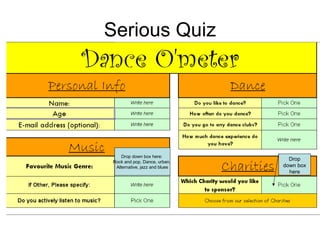
Serious Quiz Drop down box here:  Rock and pop, Dance, urban,  Alternative, jazz and blues Drop down box here
Quiz Example Mahmoudah Bangura
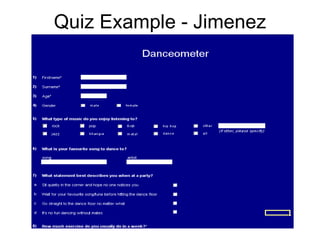
Quiz Example - Jimenez
Make a Catch Criteria An on screen publication to attract students, sponsors and parents Must: include images and text Include information about each charity (5) Advertise the event Persuade students to take part Encourage people to sponsor a dancer Run  automatically  with enough time for each slide/frame Use used. Use feedback from test users after designing. Update your  sources table  with any pictures/images you used. Go to the next slide to see a MAC example.  It has been made in Flash, but can easily be done in Powerpoint.
Example Make a Catch (Flash) – Marie Therese Maligisa
Make A Catch Example (Flash) – Kevin Jimenez
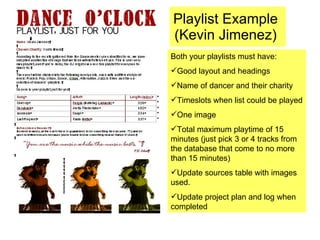
Playlist Example (Kevin Jimenez) Both your playlists must have: Good layout and headings Name of dancer and their charity Timeslots when list could be played One image Total maximum playtime of 15 minutes (just pick 3 or 4 tracks from the database that come to no more than 15 minutes) Update sources table with images used. Update project plan and log when completed
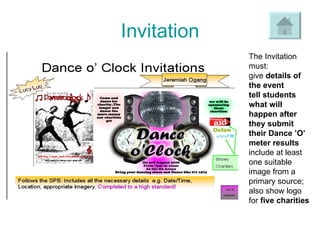
Invitation The Invitation must: give  details of the event  tell students what will happen after they submit their Dance ’O’ meter results   include at least one suitable image from a primary source; also show logo for  five charities
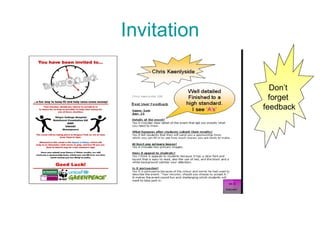
Invitation Don’t  forget  feedback
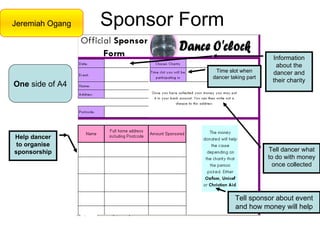
Sponsor Form Jeremiah Ogang One  side of A4 Information about the dancer and their charity Tell dancer what to do with money once collected Help dancer to organise sponsorship Tell sponsor about event and how money will help Time slot when dancer taking part
Sponsor Form Example  (K Jimenez)
Marks to aim for >85% (36 marks) = A* >71% (30 marks)= A >56% (24 marks)= B >42% (18 marks)= C

Dance O Clock Examples

  • 1.
    Dance O ClockExamples Contents Page Help Videos Plan Sources Table Charities Constructing a Database What to screenshot for your report Dance O Meter Quiz – celebrity Dance O Meter Quiz – serious Second Quiz Example Danceometer Quiz example ( Jiminez ) Invitation Sponsor Form Sponsor Form Example (Jimenez) Make a Catch - criteria Make a Catch example (Marie Therese Maligisa Make a Catch example (Kevin Jimenez) Playlist example (Kevin Jimenez) Project Review – download these review notes. Marks to aim for
  • 2.
    Help Videos Clickon the logo for video help with making your eportfolio!
  • 3.
    Sources Table PauloVillaneuva Click here to get a copy
  • 4.
    Plan you mustdo this up-front, before you start working the tasks, a plan produced afterwards will not gain any marks ask for help if you need it, its very important to have a workable plan at the start if you don't get it right first time, it is perfectly acceptable to change it as you go along, so long as you explain why Click here for template
  • 5.
    Example Project PlanPaulo Villaneuva
  • 6.
    Charities You needto get your facts right. Start by finding out about charities and sponsorship . You need to choose five charities which will be supported by the event and gather relevant information about them for use in your publications . http://www.charitychoice.co.uk/ Or http://en.wikipedia.org
  • 7.
  • 8.
    What to screenshotfrom database for Word report Table in Datasheet View Validation rules in Design View for these fields: Genre, Year of Release, Length, Effort Rating Two new records added in Form View (one screenshot for each record) Search criteria for playlists.
  • 9.
    Design and builda suitable database structure to store the data. Open MS Access selecting File>New Blank database On the right hand side. Give your file the appropriate name as above Task 1 Task 2 Task 3 Task 4 S:\ICT\Read Folder\Mr N Haswell\Year 10\Constructing your database
  • 10.
    Design and builda suitable database structure to store the data. Select create table in design view Task 5 Task 6 Copy the field names & Data types as is done in task 6.
  • 11.
    Look up Wizards!Task 7 Select look up wizard! Task 9 Type in the values as given these values represent the Genres. Then select Next then Finish Task 10 Repeat a look up wizard for field name Effort rating using the codes: Task 8 Select the option to type the values in
  • 12.
    Validation Rules Select Year of Release Task 12 Task 10 In the properties area enter the Validation Rule and Validation text Task 11 Now enter the validation rule for Length: <=600 What Would the Validation Text be?
  • 13.
    If you findsomething's missing Go to the DIDA the website Find out what's missing read the SPB and have ago as a final resort ask your teacher for that help!
  • 14.
    POSSIBLE PROBLEM AREASDance O’ meter Quiz: Some questions we should all have… Fitness level: High, Medium, Low What were your favourite years of music? A)1960-1970 (B)1970-1980 (C)1980-1990 (D)1990-2000 (E )2000+ What Genre of Music do you like? Answers: RP Rock & Pop ,DA Dance ,UR Urban , AT Alternative , JB Jazz & Blues
  • 15.
    Other Possible Questionideas Healthy Eating Are you a member of a dance club? What is your favourite dance style from the given list? Foxtrot, Waltz, Tango, Quick Step, East Coast Swing, West Coast Swing, Rumba, Cha-Cha, Salsa, Samba, Arm styling, Follow and Lead, Jive, International Style, Viennese Waltz Bolero How many hours do you spend on recreational Activities? What charity would you represent from the following?
  • 16.
    Quiz (fun element)You have to add a fun element, this is one method you could try ! Here we use a Data Validation List. (Using Drop down menus) The skills used here are IF statements Have a look at this example provided by Mr Boulter!
  • 17.
    Serious Quiz Dropdown box here: Rock and pop, Dance, urban, Alternative, jazz and blues Drop down box here
  • 18.
  • 19.
  • 20.
    Make a CatchCriteria An on screen publication to attract students, sponsors and parents Must: include images and text Include information about each charity (5) Advertise the event Persuade students to take part Encourage people to sponsor a dancer Run automatically with enough time for each slide/frame Use used. Use feedback from test users after designing. Update your sources table with any pictures/images you used. Go to the next slide to see a MAC example. It has been made in Flash, but can easily be done in Powerpoint.
  • 21.
    Example Make aCatch (Flash) – Marie Therese Maligisa
  • 22.
    Make A CatchExample (Flash) – Kevin Jimenez
  • 23.
    Playlist Example (KevinJimenez) Both your playlists must have: Good layout and headings Name of dancer and their charity Timeslots when list could be played One image Total maximum playtime of 15 minutes (just pick 3 or 4 tracks from the database that come to no more than 15 minutes) Update sources table with images used. Update project plan and log when completed
  • 24.
    Invitation The Invitationmust: give details of the event tell students what will happen after they submit their Dance ’O’ meter results include at least one suitable image from a primary source; also show logo for five charities
  • 25.
    Invitation Don’t forget feedback
  • 26.
    Sponsor Form JeremiahOgang One side of A4 Information about the dancer and their charity Tell dancer what to do with money once collected Help dancer to organise sponsorship Tell sponsor about event and how money will help Time slot when dancer taking part
  • 27.
  • 28.
    Marks to aimfor >85% (36 marks) = A* >71% (30 marks)= A >56% (24 marks)= B >42% (18 marks)= C

Editor's Notes

  • #2 http://tinyurl.com/ljaarg