#3 Suggested Script:
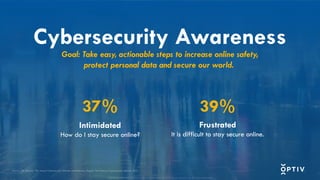
Last year, 37% of respondents in a study reported feeling that information on how to stay secure online is intimidating, and 39% felt frustrated while trying to stay secure online.
The goal of this presentation and the goal of Cybersecurity Awareness Month is to inform you of easy yet actionable steps to increase online safety. In turn, we aim to alleviate some of the intimidation and frustration that many experience.
#4 Suggested Script:
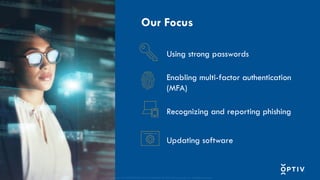
Starting in 2023, Secure Our World is the enduring theme for all future Cybersecurity Awareness Months. This theme concentrates on four fundamental actions.
They are:
Using strong passwords
Enabling multi-factor authentication
Recognize and reporting phishing
Updating software
#5 Suggested Script:
Our first key behavior is using strong passwords. Strong passwords is one of the most fundamental steps to securing your online activity.
#6 Suggested Script:
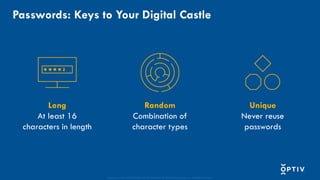
Passwords are the keys to your digital castle. Just like your house, car and office keys, you want to do everything in your power to keep them safe.
Regardless of the account you are protecting, the password you create should be long, random, unique and complex.
First, each one of your passwords should be at least 16 characters in length. The longer the password, the better.
Next, use either random string of mixed-case letters, numbers and special characters OR create a memorable passphrase of 4-7 random words. This will make it even more difficult for hackers to crack with the technologies they use.
Finally, each one of your accounts should be protected with a unique password. If one of your passwords is compromised by a threat actor, you want to prevent them from copying that key and accessing the rest of your digital properties.
Do note that people often will use the same base password and change one or two characters. Having variant passwords like this that are similar in length and strength are not hard to crack if a threat actor cracks one of them. This is why it is important to make each password unique.
#7 Suggested Script:
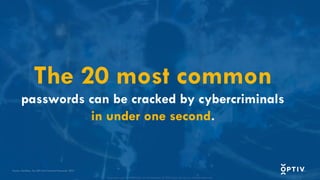
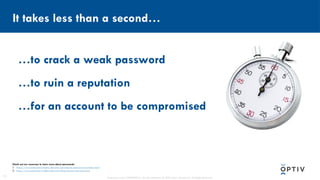
A study published last year found that 17 of the 20 most common passwords can be cracked by cybercriminals in under one second.
Let’s do an activity. What do you think the most common passwords people use have in common?
[Options for Participation]
(In-person Session) Would anyone like to share their guess?
(Online Session) Drop your guess in the chat.
[Read/share responses as they come in. After allowing time to answer, click to advance to the next slide where the 10 most common passwords will be shown.]
#8 Suggested Script:
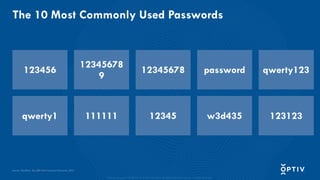
Shown here are the 20 most common passwords of 2024.
What do you notice about these passwords? What sticks out to you?
[Options for Participation]
(In-person Session) Would anyone like to share their observations?
(Online Session) Drop your observations in the chat.
(After sufficient wait time of 7-10 seconds, continue.)
Using these keys would not be considered a secure practice because they lack length and complexity.
#9 Suggested Script:
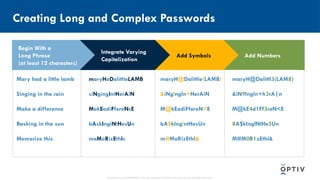
Creating long and complex passwords can be done in four easy steps.
Take a look at the phrases we have chosen as examples. All of them are at least 12 characters long and do not include any personal information such as birthdates, addresses or names of relative significance.
(Click to bring up the second column.)
Next, let’s integrate some varying capitalization to our phrases.
(Click to bring up the third column.)
After we’ve done that, let’s replace some characters with symbols or add them to our phrase.
(Click to bring up the last column.)
Finally, replace a character or two with numbers or add them to your strengthening password.
Just like that, we turned everyday phrases into long and complex passwords.
You may be concerned that memorizing these passwords will be difficult – especially since each account will have a unique password.
#10 Suggested Script:
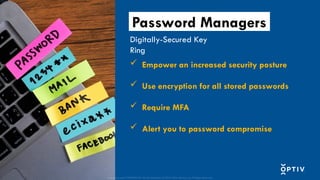
Remembering all you strong passwords can be a challenge. A password manager is software that can help manage your passwords. Not only do password managers store your passwords, but they can also suggest long, random and unique passwords for each of your accounts.
One of the difficulties of our digital age is ensuring that we have appropriately secured all of our online accounts, which may be upwards of 100 or more. Taking away the effort of creating and remembering all of those passwords is alleviated with password managers.
While many users may be hesitant to use password managers, thinking a breach would provide a threat actor access to all their passwords, the best password managers use multi-factor authentication (MFA) and technology that stores the master password in a way that even the provider has no knowledge of the actual password.
Managing passwords with a password manager does give your memory or sticky notes a break, and using one can also provide other benefits, depending on which one you choose. These include saving time, working across all operating systems, protecting your identity, notifying you of potentially malicious sites known for phishing and alerting you to potential password compromise.
#11 Suggested Script:
When it comes to password security, the small details matter. It takes no time at all for a threat actor to crack a weak password, compromise your account or ruin your reputation. Be sure you use lengthy, random and unique passwords for each you have and use a password manager to keep track of them, if allowed by your organization.
#12 Suggested Script:
Our second topic is enabling multi-factor authentication, or “MFA” for short. This key behavior adds an additional layer of security, preventing unauthorized access to your accounts, even if your secure password has been compromised.
#13 Suggested Script:
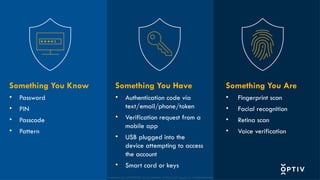
The additional layer of security is often something you have (like a smartphone) or something you are (like a fingerprint) in addition to something you know (which is your long, random, and unique password).
Why is it important to enable multi-factor authentication?
[Options for Participation]
(In-person Session) Would anyone like to share?
(Online Session) Drop your ideas in the chat.
(After sufficient wait time of 7-10 seconds, continue to the next slide.)
#14 Suggested Script:
Since MFA requires at least two forms of authentication, it’s much harder for cybercriminals to gain unauthorized access to your accounts, even if they have compromised your password.
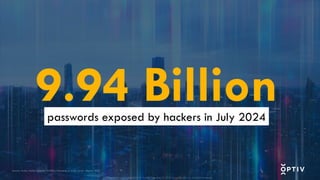
On July 4, 2024, threat actors exposed the world’s largest collection of stolen passwords. When credentials are breached, organizations face a multitude of consequences, such as reduced productivity, declining trust from clients and partners, financial repercussions or the loss of long-term customer loyalty.
With so much at stake, opting into MFA makes sense.
#15 Suggested Script:
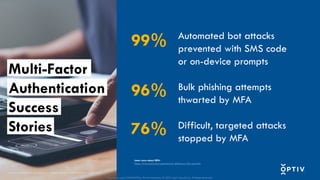
Consider this. Even if an attacker had possession of one of those 9.94 billion passwords:
100% of automated bot attacks would be prevented if MFA was in place where SMS code or on-device prompts were used as secondary authentication
96% of bulk phishing attempts would be thwarted if MFA was in place
76% of the most sophisticated, difficult-to-stop, targeted attacks would be stopped if MFA was in place
#16 Suggested Script:
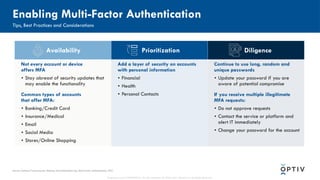
Enabling multi-factor authentication is relatively easy.
First, confirm that MFA is available on your account. If it’s not, keep up-to-date on security updates and feature releases, as more and more accounts are enabling MFA functionality.
Common accounts that enable MFA are often those that contain some type of personal information that you would want protected from threat actors. A second layer of security on accounts that safeguard financial information, personal contacts or connections and health data should be prioritized. These accounts are more valuable to threat actors because they contain data that has potential monetary value or could be used in more sophisticated attacks in the future.
#17 Suggested Script:
As with every security measure, cyber threat actors have attempted to circumvent defenses by capitalizing on MFA fatigue.
Users are accustomed to receiving MFA authentication requests to their email, smartphone or other device. The MFA fatigue attack takes advantage of this by repeatedly pushing authentication requests to users with a goal of coercing them to approve the illegitimate requests.
Often, a preceding social engineering attack has been successful, and the attacker has possession of the password for the account protected by MFA.
Remaining diligent and thoroughly analyzing all received communications for authenticity continues to be one of the strongest defenses against social engineering attacks like these.
#18 Suggested Script:
Phishing is one of the most common ways cyber threat actors gain access to the valuable information they want.
#19 Suggested Script:
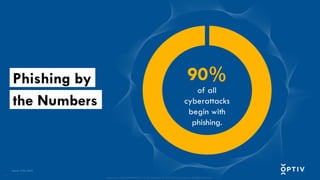
According to CISA in 2023, 90% of all cyberattacks begin with phishing.
Phishing is a fraudulent attempt to trick individuals into divulging sensitive information (usernames, passwords and banking details) by pretending to be a trusted source, often through email communication. You may be urged to click a link that leads to a malicious website or download an attachment containing malware. But you can prevent the losses that come with acting on a phishing email.
#20 Suggested Script:
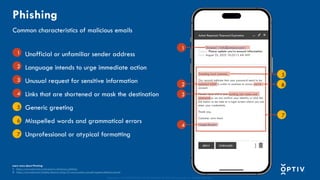
Phishing messages are getting more sophisticated, so thorough scrutiny is necessary when analyzing email. Look for an unofficial or unfamiliar sender addresses, unusual requests for sensitive information, language meant to urge immediate action and links that are shortened or mask the destination.
Formerly common signs like generic greetings, misspelled words, grammatical errors and unprofessional or atypical formatting still exist; however, generative AI has become a useful tool for generating phishing emails free of these telltale signs.
#21 Suggested Script:
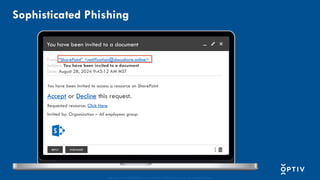
As an individual, you may not think you’re a valuable target; however, cybercriminals see you as the gateway to your organization, which could be quite lucrative.
With a little bit of research on your company’s website or on LinkedIn, threat actors can gather enough information to craft a convincing email from SharePoint like the one you see here. If you click on the link to access the file, you'll be taken to what appears to be a standard Office 365 login page. However, it’s not a legitimate website; its purpose is to steal your network credentials – both username and password.
Don’t click links in suspicious emails.
#22 Suggested Script:
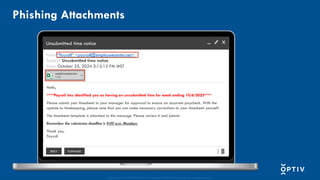
Stealing your credentials is not the only way a cybercriminal can gain access to your device and/or your organization’s network. Malicious attachments in phishing emails contain malware that, when downloaded, can allow cybercriminals to take remote control of your computer or capture your keystrokes, among other nefarious activities. Never click attachments in suspicious emails.
#23 Suggested Script:
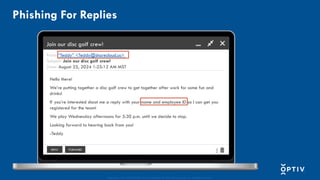
Don’t be fooled by the lack of a link or attachment, though. The phishing email you receive may appear to have an entire backstory with it, involving actual employees within your organization. Don’t reply to suspicious messages.
#24 Suggested Script:
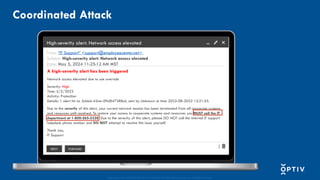
For instance, let’s examine at this email. Unlike the other examples, it’s asking you to make a phone call. You should ask yourself, “Is this a normal process?”
In a coordinated attack, a phishing email is sent that asks the recipient to call a number included in the message. Never call the number in these types of emails. If you want to question the authenticity of the message, find the published number for the entity and call it, not the included number, to question the message.
#25 Suggested Script:
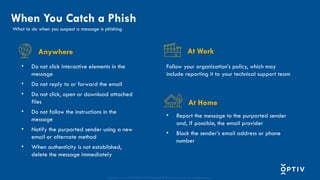
You may respond to a phishing or smishing attempt differently depending on where you receive the message, but you should always report it first, then delete it. Be sure to follow your organizational policies if you are at work and use best practices at home as well.
Following these best practices could prevent others from falling victim to the same attack, which could help thwart potential cyberattacks.
#26 Suggested Script:
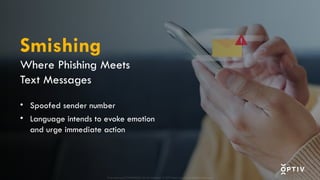
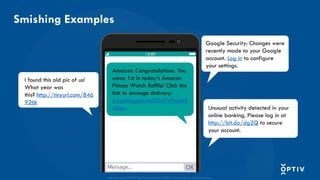
It’s a good idea to ask yourself the following questions when you think you might have received a smishing message like these.
Does this company usually contact me via text?
Can I see the URL linked in the message?
If the smish comes from a company you do business with but not usually via text, manually navigate to the known, official site to verify the information you were sent or call the official, published number of the organization to check out the smish.
You may respond to a phishing or smishing attempt differently depending on where you receive the message, but you should always report it first, then delete it. Be sure to follow your organizational policies if you are at work and use best practices at home as well.
Following these best practices could prevent others from falling victim to the same attack, which could help thwart potential cyberattacks.
#27 Suggested Script:
You may respond to a phishing or smishing attempt differently depending on where you receive the message, but you should always report it first, then delete it. Be sure to follow your organizational policies if you are at work and use best practices at home as well.
Following these best practices could prevent others from falling victim to the same attack, which could help thwart potential cyberattacks.
#28 Suggested Script:
In addition to credential theft and compromise, phishing and other social engineering tactics, threat actors also try to capitalize on vulnerabilities in software and applications. Developers do their best to patch or fix these vulnerabilities to safeguard their users and information from being exploited.
#29 Suggested Script:
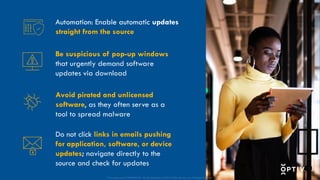
Security updates are released with relative frequency to keep up with the nefarious activities of threat actors. Instead of checking your settings daily for all the applications and software you use, consider turning on automatic updates. While you might have to restart your device to fully install the updates, the rest of the effort is done for you.
While automation can help prevent missed updates, there are other important considerations that should be made.
First, be suspicious of pop-up windows on your computer that demand urgent downloads to update software. This is often a social engineering tactic to exploit human emotion and feelings of urgency.
As a general good practice, avoid using pirated or unlicensed software, as these are often a front for malicious tools. Updating these will not address security vulnerabilities; in fact, installing updates may introduce additional risk to your device, data you’re processing or networks you’re connected to.
Alerts for updates that come via email are a known cover for phishing. Instead of clicking links or downloading attachments, navigate directly to the source and check for updates. The source may be the app store, an official website or a software update center on your device.
#30 Suggested Script:
Cybersecurity isn’t a once-a-year task to check off your to-do list. It takes awareness with each click to stay safe online.
#31 Suggested Script:
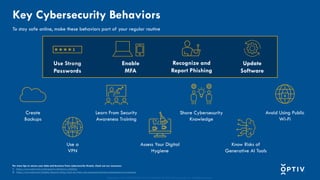
We’ve discussed the importance of using strong passwords, enabling MFA, recognizing and reporting phishing and updating software regularly today. Your security also depends on:
conducting regular digital hygiene assessments to ensure your online presence is clean.
creating backups in case of data loss.
learning from security awareness training.
sharing your cybersecurity knowledge with coworkers, clients, family and friends.
avoiding connecting to public WiFi, when possible.
using a virtual private network (VPN) to shield your online activity from those who seek to use it for their benefit.
knowing the risks of inputting information into generative AI tools.
Engaging in these behaviors can help keep you safe online.