CTools Style Plugin
Demo & Code Walk-Through
Amber Himes
IRC/d.o: agentolivia | Twitter: @amberhimes
What is CTools?
• CTools = Chaos Tool Suite
• A contrib project on drupal.org
• Developer APIs and Tools
• Page Manager
• drupal.org/project/ctools
What is a CTools
plugin?
• A plugin is way for a module to allow
another module or theme to implement a
piece of functionality
• Useful when you want to add or alter
existing features of a module.
• Types of plugins include contexts,
content types, layouts, and style
Style Plugins
• With a Style Plugin, define:
• a settings form
• how to render settings in a template
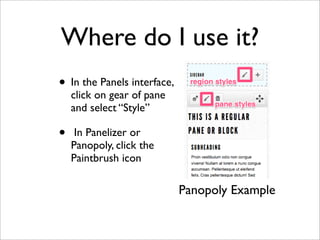
Where do I use it?
• In the Panels interface,
click on gear of pane
and select “Style”
• In Panelizer or
Panopoly, click the
Paintbrush icon
Panopoly Example
Demo
• Weber County Library in Ogden, UT
• Panopoly distro, Panels IPE (In-Place Editor)
• Live Preview of panel pane styles
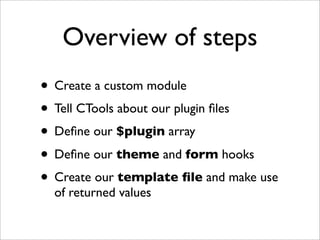
Overview of steps
• Create a custom module
• Tell CTools about our plugin files
• Define our $plugin array
• Define our theme and form hooks
• Create our template file and make use
of returned values
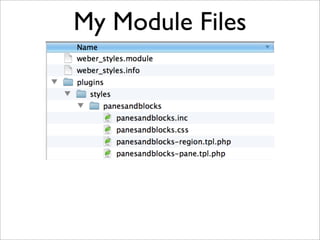
My Module Files
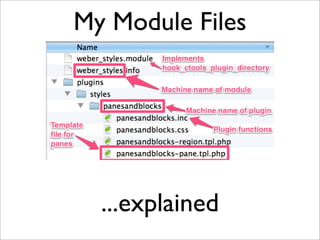
...explained
My Module Files
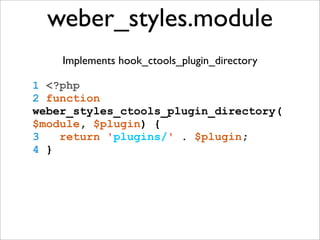
weber_styles.module
Implements hook_ctools_plugin_directory
1 <?php
2 function
weber_styles_ctools_plugin_directory(
$module, $plugin) {
3 return 'plugins/' . $plugin;
4 }
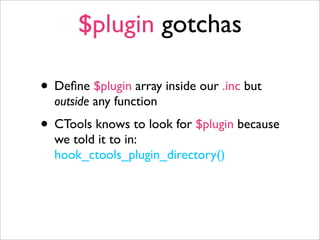
$plugin gotchas
• Define $plugin array inside our .inc but
outside any function
• CTools knows to look for $plugin because
we told it to in:
hook_ctools_plugin_directory()
$plugin array
Follow along...
https://gist.github.com/agentolivia/5745929
=> http://tinyurl.com/ctools-style-gist <=
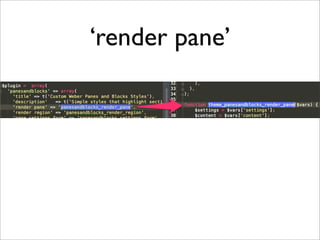
‘render pane’
• corresponds to the theme function that
renders the pane, without “theme_”
• If the theme function is named
theme_panesandblocks_render_pane
then the value for ‘render pane’ is
‘panesandblocks_render_pane’
‘render pane’
‘region pane’
• corresponds to the theme function that
renders the region, without “theme_”
• If the theme function is named
theme_panesandblocks_render_region
then the value for ‘render region’ is
‘panesandblocks_render_region’
‘pane settings form’
• The full name of the function that returns
the settings form. For example:
panesandblocks_settings_form
• The corresponding function:
function panesandblocks_settings_form
($style_settings)
• Use Form API to build form components.
Set default values using $style_settings
‘hook theme’
• Defines theme functions and variables for
pane and region
• Pane and Region will each have their own
arrays of hook theme information
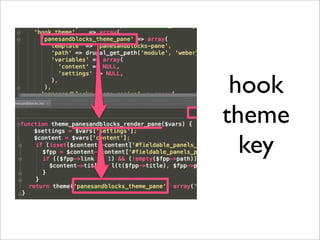
• Array key = the first parameter of theme()
returned in the corresponding theme_
function
hook
theme
key
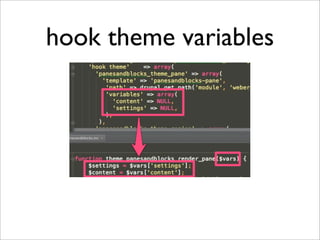
hook theme variables
render pane theme fxn
1 function
theme_panesandblocks_render_pane($vars)
{
2 $settings = $vars['settings'];
3 $content = $vars['content'];
4
5 return
theme('panesandblocks_theme_pane',
array('content' => $content,
6 'settings' => $settings));
7 }
vars in template files
• Whatever variables I listed in $plugin’s
‘hook theme’ are passed into the theme
function which make these values available
in my template files
• $content and $settings seem to be the two
preferred choices for variables in hook
theme
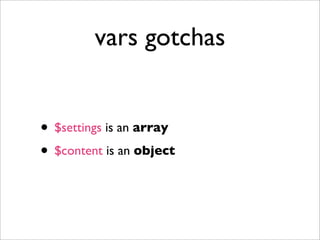
vars gotchas
• $settings is an array
• $content is an object
tpl vars gotchas
• $settings is an array
• i.e. $settings[‘heading_classes’]
• $content is an object
• i.e. $content->title
use of vars in tpl
1 <?php if (isset($content->title)): ?>
2 <h3 class="<?php print
(isset($settings['heading_classes'])) ?
$settings['heading_classes'] : ''; ?>">
<?php print $content->title; ?></h3>
3 <?php endif; ?>
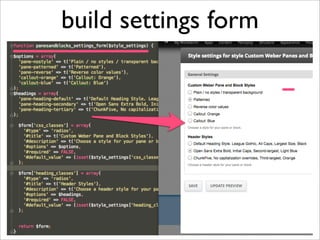
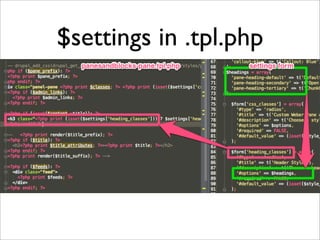
build settings form
Print values from
settings form in tpl.php
• Use php print statements to output
settings form values as CSS classes
in your pane template file
$settings in .tpl.php
Apply CSS
• No need to bury a CSS file in a plugin
directory
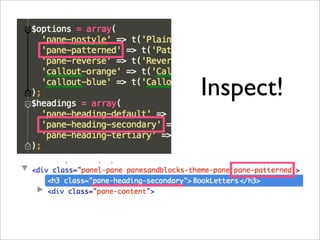
• Do inspect the elements to make sure
classes have been applied as expected
Inspect!
Troubleshooting tips
• Add a css file through drupal_add_css at
the top of your template file to get the
preview working right away
• Check all instances of panel panes to make
sure they are rendering correctly, as this
template file will override the panels-
pane.tpl.php.
• Add logic to theme function as needed
Questions?
• Slides: http://tinyurl.com/ctools-style
• Code: http://tinyurl.com/ctools-style-gist
• Twitter: @amberhimes
• IRC/drupal.org agentolivia

CTools Style Plugins: Demo & Code Walk-Thru

  • 1.
    CTools Style Plugin Demo& Code Walk-Through Amber Himes IRC/d.o: agentolivia | Twitter: @amberhimes
  • 2.
    What is CTools? •CTools = Chaos Tool Suite • A contrib project on drupal.org • Developer APIs and Tools • Page Manager • drupal.org/project/ctools
  • 3.
    What is aCTools plugin? • A plugin is way for a module to allow another module or theme to implement a piece of functionality • Useful when you want to add or alter existing features of a module. • Types of plugins include contexts, content types, layouts, and style
  • 4.
    Style Plugins • Witha Style Plugin, define: • a settings form • how to render settings in a template
  • 5.
    Where do Iuse it? • In the Panels interface, click on gear of pane and select “Style” • In Panelizer or Panopoly, click the Paintbrush icon Panopoly Example
  • 6.
    Demo • Weber CountyLibrary in Ogden, UT • Panopoly distro, Panels IPE (In-Place Editor) • Live Preview of panel pane styles
  • 7.
    Overview of steps •Create a custom module • Tell CTools about our plugin files • Define our $plugin array • Define our theme and form hooks • Create our template file and make use of returned values
  • 8.
  • 9.
  • 10.
    weber_styles.module Implements hook_ctools_plugin_directory 1 <?php 2function weber_styles_ctools_plugin_directory( $module, $plugin) { 3 return 'plugins/' . $plugin; 4 }
  • 11.
    $plugin gotchas • Define$plugin array inside our .inc but outside any function • CTools knows to look for $plugin because we told it to in: hook_ctools_plugin_directory()
  • 12.
  • 13.
    ‘render pane’ • correspondsto the theme function that renders the pane, without “theme_” • If the theme function is named theme_panesandblocks_render_pane then the value for ‘render pane’ is ‘panesandblocks_render_pane’
  • 14.
  • 15.
    ‘region pane’ • correspondsto the theme function that renders the region, without “theme_” • If the theme function is named theme_panesandblocks_render_region then the value for ‘render region’ is ‘panesandblocks_render_region’
  • 16.
    ‘pane settings form’ •The full name of the function that returns the settings form. For example: panesandblocks_settings_form • The corresponding function: function panesandblocks_settings_form ($style_settings) • Use Form API to build form components. Set default values using $style_settings
  • 17.
    ‘hook theme’ • Definestheme functions and variables for pane and region • Pane and Region will each have their own arrays of hook theme information • Array key = the first parameter of theme() returned in the corresponding theme_ function
  • 18.
  • 19.
  • 20.
    render pane themefxn 1 function theme_panesandblocks_render_pane($vars) { 2 $settings = $vars['settings']; 3 $content = $vars['content']; 4 5 return theme('panesandblocks_theme_pane', array('content' => $content, 6 'settings' => $settings)); 7 }
  • 21.
    vars in templatefiles • Whatever variables I listed in $plugin’s ‘hook theme’ are passed into the theme function which make these values available in my template files • $content and $settings seem to be the two preferred choices for variables in hook theme
  • 22.
    vars gotchas • $settingsis an array • $content is an object
  • 23.
    tpl vars gotchas •$settings is an array • i.e. $settings[‘heading_classes’] • $content is an object • i.e. $content->title
  • 24.
    use of varsin tpl 1 <?php if (isset($content->title)): ?> 2 <h3 class="<?php print (isset($settings['heading_classes'])) ? $settings['heading_classes'] : ''; ?>"> <?php print $content->title; ?></h3> 3 <?php endif; ?>
  • 25.
  • 26.
    Print values from settingsform in tpl.php • Use php print statements to output settings form values as CSS classes in your pane template file
  • 27.
  • 28.
    Apply CSS • Noneed to bury a CSS file in a plugin directory • Do inspect the elements to make sure classes have been applied as expected
  • 29.
  • 30.
    Troubleshooting tips • Adda css file through drupal_add_css at the top of your template file to get the preview working right away • Check all instances of panel panes to make sure they are rendering correctly, as this template file will override the panels- pane.tpl.php. • Add logic to theme function as needed
  • 31.
    Questions? • Slides: http://tinyurl.com/ctools-style •Code: http://tinyurl.com/ctools-style-gist • Twitter: @amberhimes • IRC/drupal.org agentolivia