CSS
Apa itu CSS ?
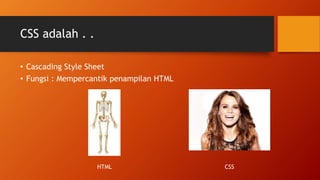
CSS adalah . .
• Cascading Style Sheet
• Fungsi : Mempercantik penampilan HTML
HTML CSS
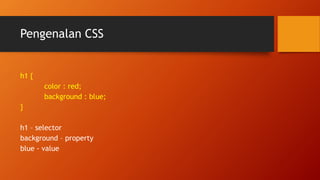
Pengenalan CSS
h1 {
color : red;
background : blue;
}
h1 – selector
background – property
blue - value
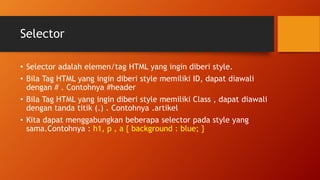
Selector
• Selector adalah elemen/tag HTML yang ingin diberi style.
• Bila Tag HTML yang ingin diberi style memiliki ID, dapat diawali
dengan # . Contohnya #header
• Bila Tag HTML yang ingin diberi style memiliki Class , dapat diawali
dengan tanda titik (.) . Contohnya .artikel
• Kita dapat menggabungkan beberapa selector pada style yang
sama.Contohnya : h1, p , a { background : blue; }
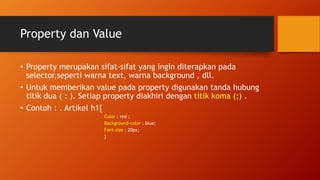
Property dan Value
• Property merupakan sifat-sifat yang ingin diterapkan pada
selector,seperti warna text, warna background , dll.
• Untuk memberikan value pada property digunakan tanda hubung
titik dua ( : ). Setiap property diakhiri dengan titik koma (;) .
• Contoh : . Artikel h1{
Color : red ;
Background-color : blue;
Font-size : 20px;
}
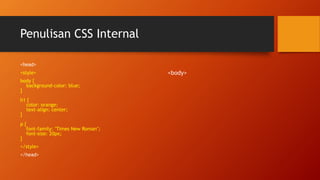
Penulisan CSS Internal
<head>
<style>
body {
background-color: blue;
}
h1 {
color: orange;
text-align: center;
}
p {
font-family: "Times New Roman";
font-size: 20px;
}
</style>
</head>
<body>
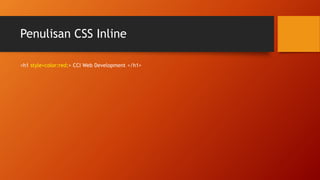
Penulisan CSS Inline
<h1 style=color:red;> CCI Web Development </h1>
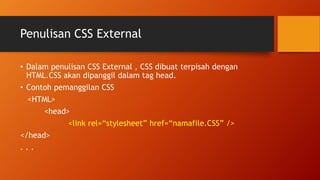
Penulisan CSS External
• Dalam penulisan CSS External , CSS dibuat terpisah dengan
HTML.CSS akan dipanggil dalam tag head.
• Contoh pemanggilan CSS
<HTML>
<head>
<link rel=“stylesheet” href=“namafile.CSS” />
</head>
. . .
• Buka http://www.w3schools.com/cssref/
• Twitter: @wendianto_n @webdevccitelu
#HENDRAPUNYALAPTOPBARU
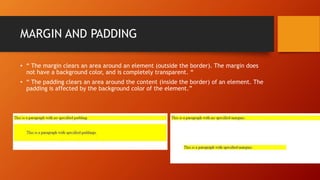
MARGIN AND PADDING
• “ The margin clears an area around an element (outside the border). The margin does
not have a background color, and is completely transparent. “
• “ The padding clears an area around the content (inside the border) of an element. The
padding is affected by the background color of the element.”
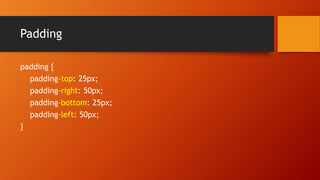
Padding
padding {
padding-top: 25px;
padding-right: 50px;
padding-bottom: 25px;
padding-left: 50px;
}
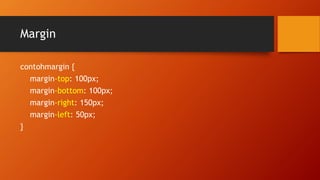
Margin
contohmargin {
margin-top: 100px;
margin-bottom: 100px;
margin-right: 150px;
margin-left: 50px;
}
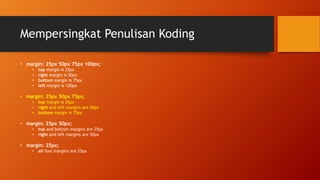
Mempersingkat Penulisan Koding
• margin: 25px 50px 75px 100px;
• top margin is 25px
• right margin is 50px
• bottom margin is 75px
• left margin is 100px
• margin: 25px 50px 75px;
• top margin is 25px
• right and left margins are 50px
• bottom margin is 75px
• margin: 25px 50px;
• top and bottom margins are 25px
• right and left margins are 50px
• margin: 25px;
• all four margins are 25px

Webdev CCI Tel U - Introduction to CSS

  • 1.
  • 2.
    CSS adalah .. • Cascading Style Sheet • Fungsi : Mempercantik penampilan HTML HTML CSS
  • 3.
    Pengenalan CSS h1 { color: red; background : blue; } h1 – selector background – property blue - value
  • 4.
    Selector • Selector adalahelemen/tag HTML yang ingin diberi style. • Bila Tag HTML yang ingin diberi style memiliki ID, dapat diawali dengan # . Contohnya #header • Bila Tag HTML yang ingin diberi style memiliki Class , dapat diawali dengan tanda titik (.) . Contohnya .artikel • Kita dapat menggabungkan beberapa selector pada style yang sama.Contohnya : h1, p , a { background : blue; }
  • 5.
    Property dan Value •Property merupakan sifat-sifat yang ingin diterapkan pada selector,seperti warna text, warna background , dll. • Untuk memberikan value pada property digunakan tanda hubung titik dua ( : ). Setiap property diakhiri dengan titik koma (;) . • Contoh : . Artikel h1{ Color : red ; Background-color : blue; Font-size : 20px; }
  • 6.
    Penulisan CSS Internal <head> <style> body{ background-color: blue; } h1 { color: orange; text-align: center; } p { font-family: "Times New Roman"; font-size: 20px; } </style> </head> <body>
  • 7.
    Penulisan CSS Inline <h1style=color:red;> CCI Web Development </h1>
  • 8.
    Penulisan CSS External •Dalam penulisan CSS External , CSS dibuat terpisah dengan HTML.CSS akan dipanggil dalam tag head. • Contoh pemanggilan CSS <HTML> <head> <link rel=“stylesheet” href=“namafile.CSS” /> </head> . . .
  • 9.
    • Buka http://www.w3schools.com/cssref/ •Twitter: @wendianto_n @webdevccitelu #HENDRAPUNYALAPTOPBARU
  • 10.
    MARGIN AND PADDING •“ The margin clears an area around an element (outside the border). The margin does not have a background color, and is completely transparent. “ • “ The padding clears an area around the content (inside the border) of an element. The padding is affected by the background color of the element.”
  • 11.
    Padding padding { padding-top: 25px; padding-right:50px; padding-bottom: 25px; padding-left: 50px; }
  • 12.
    Margin contohmargin { margin-top: 100px; margin-bottom:100px; margin-right: 150px; margin-left: 50px; }
  • 13.
    Mempersingkat Penulisan Koding •margin: 25px 50px 75px 100px; • top margin is 25px • right margin is 50px • bottom margin is 75px • left margin is 100px • margin: 25px 50px 75px; • top margin is 25px • right and left margins are 50px • bottom margin is 75px • margin: 25px 50px; • top and bottom margins are 25px • right and left margins are 50px • margin: 25px; • all four margins are 25px