Digital Forensics
Module 4
Computer forensics tools, Encase and Windows
os
Dr. Nagaraj S V & Prof Seshu Babu Pulagara
VIT Chennai
File systems
 A file system controls how data is stored and retrieved.
 Without a file system, data placed in a storage medium would be one
large body of data with no way to tell where one piece of data stops
and the next begins.
 It provides the OS a road map to data on a disk
 The types of file systems used by an OS specify how data is stored on
the disk
Dr.Nagaraj S V & Prof Seshu Babu
Pulagara, VIT Chennai
2
 There are many different kinds of file systems. Each one has
different structure and logic, properties of speed, flexibility, security,
size and more. Some file systems have been designed to be used for
specific applications.
 A file system is responsible for arranging storage space. Reliability,
efficiency, and tuning with regard to the physical storage medium
are important design considerations.
Dr.Nagaraj S V & Prof Seshu Babu
Pulagara, VIT Chennai
3
 The forensic investigator must be familiar with the operating
systems used by a computer and also its file systems
 This is essential for accessing a defendant’s computer in order to
scrutinize or acquire data
 The file system manages access to both the content of files and
the metadata about those files.
 Modern computers can accommodate more than one operating
system and file system
Dr.Nagaraj S V & Prof Seshu Babu
Pulagara, VIT Chennai
4
 Linux supports numerous file systems, but common choices for the
system disk on a block device include the ext* family
(ext2, ext3 and ext4), XFS, JFS, and btrfs.
 Mac OS (formerly Mac OS X) uses the Apple File System (APFS),
which recently replaced a file system inherited from classic Mac OS
called HFS Plus (HFS+).
Dr.Nagaraj S V & Prof Seshu Babu
Pulagara, VIT Chennai
5
Microsoft Windows File systems
 Microsoft Windows makes use of the FAT, NTFS, exFAT, Live File
System and ReFS file systems (the last of these is only supported and
usable in Windows Server 2012, Windows Server 2016, Windows
8, Windows 8.1, and Windows 10; Windows cannot boot from it).
 File Allocation Table (FAT)
 NTFS (NT File System)
(a proprietary journaling file system) developed by Microsoft
Dr.Nagaraj S V & Prof Seshu Babu
Pulagara, VIT Chennai
6
Encrypting File System (EFS)
 EFS on Microsoft Windows is a feature introduced in version 3.0
of NTFS that provides file system-level encryption.
 The technology enables files to be transparently encrypted to
protect confidential data from attackers with physical access to the
computer.
 Windows EFS supports a range of symmetric encryption algorithms,
depending on the version of Windows in use when the files are
encrypted
Dr.Nagaraj S V & Prof Seshu Babu
Pulagara, VIT Chennai
7
Understanding booting
 Booting is the process of starting a computer. It can be initiated by
hardware such as a button press, or by a software command.
 After it is switched on, a computer's central processing unit (CPU)
has no software in its main memory, so some process must load
software into memory before it can be executed. This may be done
by hardware or firmware in the CPU, or by a separate processor in
the computer system.
Dr.Nagaraj S V & Prof Seshu Babu
Pulagara, VIT Chennai
8
 Restarting a computer is called rebooting, which can be "hard", e.g.
after electrical power to the CPU is switched from off to on, or "soft",
where the power is not cut.
 On some systems, a soft boot may optionally clear RAM. Both hard
and soft booting can be initiated by hardware such as a button press
or by software command.
 Booting is complete when the functional runtime system,
typically the operating system and some applications, is attained.
Dr.Nagaraj S V & Prof Seshu Babu
Pulagara, VIT Chennai
9
 The Basic Input / Output System (BIOS) is firmware stored in a chip
on a computer's motherboard. It is the first program that runs when
a computer is turned on
 When changes are made to the BIOS configuration, the settings are
not stored on the BIOS chip itself, rather, they are stored on a
special memory chip, which is referred to as the Complementary
Metal Oxide Semiconductor (CMOS)
Dr.Nagaraj S V & Prof Seshu Babu
Pulagara, VIT Chennai
10
 The BIOS performs the power-on self-test (POST which initializes
and tests a computer's hardware. Then it locates and runs the boot
loader, or loads the operating system directly.
 The BIOS also provides a simple interface for configuring a
computer's hardware.
Dr.Nagaraj S V & Prof Seshu Babu
Pulagara, VIT Chennai
11
 The BIOS firmware comes pre-installed on a personal computer's
(PC’s) system board
 The BIOS memory has to be non-volatile since it has to retain
information even when the computer is not powered. This is
because the computer must remember its BIOS settings even when
it is turned off.
 Unified Extensible Firmware Interface (UEFI) is a successor to the
legacy PC BIOS, aiming to address its technical defects
Dr.Nagaraj S V & Prof Seshu Babu
Pulagara, VIT Chennai
12
Power-on self-test or POST
 It is a test a computer must perform for verifying that all the
hardware is working properly before starting the remainder of the
boot process.
 The POST process checks computer hardware such as Random
Access Memory (RAM), hard drives, CD-ROM drives, keyboards to
make sure all are working correctly.
Dr.Nagaraj S V & Prof Seshu Babu
Pulagara, VIT Chennai
13
 The information on the CMOS chip includes the types of disk drives
installed, the current date and time of the system clock, and the
computer's boot sequence.
 The CMOS has its own dedicated power source, which is the CMOS
battery
Dr.Nagaraj S V & Prof Seshu Babu
Pulagara, VIT Chennai
14
Boot sequence
 The boot sequence defines which devices a computer should check
for the operating system's boot files.
 It also specifies the order devices are checked. The list can be
changed and re-ordered in the computer's BIOS.
 Common devices usually listed in the boot sequence are the disc
drives (CD or DVD), hard drive, USB flash drive, and Solid State
Devices (SSDs).
Dr.Nagaraj S V & Prof Seshu Babu
Pulagara, VIT Chennai
15
 The forensics investigator should ensure that the suspect’s computer
is made to boot from a forensic disk or CD
 The boot sequence should be set to how the investigator wants the
computer to boot.
 The purpose of a forensic boot disk is to boot the computer and load
an operating system, in a forensically sound manner in which the
evidentiary media is not altered.
Dr.Nagaraj S V & Prof Seshu Babu
Pulagara, VIT Chennai
16
 Many commercial tools such as EnCase provide forensic boot disks
 Forensic boot CDs are specially designed to write-protect detected
storage in case it has to be forensically imaged
Dr.Nagaraj S V & Prof Seshu Babu
Pulagara, VIT Chennai
17
Understanding disk drives
 Data is recorded or stored in disks by various electronic, magnetic,
optical, or mechanical changes to a surface layer of one or more
rotating disks
 A disk drive is a device implementing such a storage mechanism.
Notable types are the hard disk drive containing a non-removable
disk, the floppy disk drive and its removable floppy disk, and
various optical disc drives and associated optical disc media.
Dr.Nagaraj S V & Prof Seshu Babu
Pulagara, VIT Chennai
18
 Digital disk drives are block storage devices.
 Each disk is divided into logical blocks (collection of sectors).
 Blocks are addressed using their logical block addresses (LBA).
 Read from or writing to disk happens at the granularity of blocks.
Dr.Nagaraj S V & Prof Seshu Babu
Pulagara, VIT Chennai
19
 Originally, the disk capacity was quite low and has been improved in
one of several ways.
 Improvements in mechanical design and manufacture allowed
smaller and more precise heads, meaning that more tracks could be
stored on each of the disks.
 Advancements in data compression methods permitted more
information to be stored in each of the individual sectors.
Dr.Nagaraj S V & Prof Seshu Babu
Pulagara, VIT Chennai
20
 The drive stores data onto cylinders, heads, and sectors.
 The sectors unit is the smallest size of data to be stored in a hard disk
drive and each file will have many sectors units assigned to it.
 Disk drives comprise of one or more platters coated with magnetic
stuff
Dr.Nagaraj S V & Prof Seshu Babu
Pulagara, VIT Chennai
21
Terminology
 Disk - Generally refers to magnetic media and devices
 Platter – An individual recording disk. A hard disk drive contains a set
of platters.
 Track – The circle of recorded data on a single recording surface of a
platter.
 Sector – A segment of a track
 Head – The device that reads and writes the information—magnetic
or optical—on the disk surface.
Dr.Nagaraj S V & Prof Seshu Babu
Pulagara, VIT Chennai
22
 Cylinder is a cylindrical intersection through the stack of platters in a
disk, centered around the disk's spindle.
 A combination of tracks forms a cylinder, which is stacked on another
platter
 Spindle – the spinning axle on which the platters are mounted.
Dr.Nagaraj S V & Prof Seshu Babu
Pulagara, VIT Chennai
23
Cylinder-head-sector
 Cylinder-head-sector (CHS) is an early method for giving addresses to
each physical block of data on a hard disk drive
 https://en.wikipedia.org/wiki/Cylinder-head-sector
 As the geometry became more complicated (for example, with the
introduction of zone bit recording) and drive sizes grew over time, the
CHS addressing method became restrictive
Dr.Nagaraj S V & Prof Seshu Babu
Pulagara, VIT Chennai
24
 Zone bit recording is a method used by disk drives to optimise
the tracks for increased data capacity. It does this by placing
more sectors per zone on outer tracks than on inner tracks.
 By the mid 1990s, hard drive interfaces replaced the CHS scheme
with logical block addressing
Dr.Nagaraj S V & Prof Seshu Babu
Pulagara, VIT Chennai
25
Solid-state storage
 Solid-state storage is a type of non-volatile computer storage that
stores and retrieves digital information using only electronic circuits,
without any involvement of moving mechanical parts.
 This differs fundamentally from the
traditional electromechanical storage, which records data using
rotating or linearly moving media coated with magnetic material.
Dr.Nagaraj S V & Prof Seshu Babu
Pulagara, VIT Chennai
26
Solid-State Drive
 A solid-state drive (SSD) is a solid-state storage device that
uses integrated circuit assemblies to store data persistently, typically
using flash memory
 It acts as a secondary storage in the hierarchy of computer storage.
 It is also sometimes called a solid-state device or a solid-state disk
Dr.Nagaraj S V & Prof Seshu Babu
Pulagara, VIT Chennai
27
 Forensic investigators should make a full forensic copy of solid-state
devices, at the earliest to recover data from unallocated disk space
 SSDs provide many challenges to Forensic investigators
 https://link.springer.com/chapter/10.1007/978-3-030-23547-5_11
 https://belkasoft.com/download/info/SSD%20Forensics%202012.pd
f
Dr.Nagaraj S V & Prof Seshu Babu
Pulagara, VIT Chennai
28
Disk Clusters
 In computer file systems, a cluster or allocation unit is a unit of disk
space allocation for files and directories.
 A cluster, or allocation unit, is a group of sectors that make up the
smallest unit of disk allocation for a file within a file system
 A file system's cluster size is the smallest amount of space a file can
take up on a computer. A common sector size is 512 bytes
Dr.Nagaraj S V & Prof Seshu Babu
Pulagara, VIT Chennai
29
 To reduce the overhead of managing on-disk data structures, the file
system does not allocate individual disk sectors by default, but
contiguous groups of sectors, called clusters.
 On a disk that uses 512-byte sectors, a 512-byte cluster contains one
sector, whereas a 4-kibibyte cluster contains eight sectors.
Dr.Nagaraj S V & Prof Seshu Babu
Pulagara, VIT Chennai
30
 A cluster is the smallest logical amount of disk space that can be
allocated to hold a file. Storing small files on a file system with large
clusters will therefore waste disk space; such wasted disk space is
called slack space.
 The term cluster was changed to allocation unit in DOS 4.0. However
the term cluster is still widely used.
Dr.Nagaraj S V & Prof Seshu Babu
Pulagara, VIT Chennai
31
 For cluster sizes which are small versus the average file size, the
wasted space per file will be statistically about half of the cluster
size; for large cluster sizes, the wasted space will become greater.
 A larger cluster size reduces bookkeeping overhead and
fragmentation, which may improve reading and writing speed
overall.
 Typical cluster sizes range from 1 sector (512 B) to 128 sectors
(64 KB).
Dr.Nagaraj S V & Prof Seshu Babu
Pulagara, VIT Chennai
32
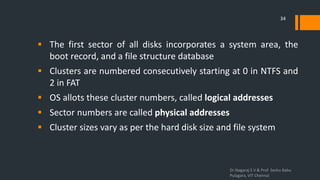
Disk structure
 Disk structure:
(A) track
(B) geometrical sector
(C) track sector
(D) cluster
Dr.Nagaraj S V & Prof Seshu Babu
Pulagara, VIT Chennai
33
 The first sector of all disks incorporates a system area, the
boot record, and a file structure database
 Clusters are numbered consecutively starting at 0 in NTFS and
2 in FAT
 OS allots these cluster numbers, called logical addresses
 Sector numbers are called physical addresses
 Cluster sizes vary as per the hard disk size and file system
Dr.Nagaraj S V & Prof Seshu Babu
Pulagara, VIT Chennai
34
Partition
 Disk partitioning or disk slicing is the creation of one or more
regions on secondary storage, so that each region can be managed
separately. These regions are called partitions.
 t is typically the first step of preparing a newly installed disk, before
any file system is created. The disk stores the information about the
partitions' locations and sizes in an area known as the partition
table that the operating system reads before any other part of the
disk
Dr.Nagaraj S V & Prof Seshu Babu
Pulagara, VIT Chennai
35
 Each partition then appears to the operating system as a distinct
"logical" disk that uses part of the actual disk.
 System administrators use a program called a partition editor to
create, resize, delete, and manipulate the partitions]. Partitioning
allows the use of different file systems to be installed for different
kinds of files.
Dr.Nagaraj S V & Prof Seshu Babu
Pulagara, VIT Chennai
36
 Windows OSs can have three primary partitions succeeded by an
extended partition that can contain one or more logical drives
 Hidden partitions or voids are large unused gaps between partitions
on a disk
 Partition gaps are unused space between partitions
 Hidden partitions and partition gaps are of concern to investigators
as data could be hidden there
Dr.Nagaraj S V & Prof Seshu Babu
Pulagara, VIT Chennai
37
 Every file system is identified by a unique hexadecimal code in the
partition table.
 See for e.g. https://datarecovery.com/rd/hexadecimal-flags-for-
partition-type/
Dr.Nagaraj S V & Prof Seshu Babu
Pulagara, VIT Chennai
38
Master boot record (MBR)
 A master boot record (MBR) is a special type of boot sector at the
very beginning of partitioned computer mass storage
devices like fixed disks or removable drives intended for use
with IBM PC-compatible systems and beyond.
 The concept of MBRs was introduced in 1983 with PC DOS 2.0.
Dr.Nagaraj S V & Prof Seshu Babu
Pulagara, VIT Chennai
39
 The MBR holds the information on how the logical partitions,
containing file systems, are organized on that medium.
 The MBR also contains executable code to function as a loader for the
installed operating system—usually by passing control over to the
loader's second stage, or in conjunction with each partition's volume
boot record (VBR). This MBR code is usually referred to as a boot
loader.
Dr.Nagaraj S V & Prof Seshu Babu
Pulagara, VIT Chennai
40
 MBR stores information about partitions on a disk and their
locations, size, and other important items
 A partition table is a table maintained on disk by the operating
system describing the partitions on that disk.
Dr.Nagaraj S V & Prof Seshu Babu
Pulagara, VIT Chennai
41
 The terms partition table and partition map are most commonly
associated with the MBR partition table of a MBR in IBM PC
compatibles
 Partitions can be created, resized, or deleted. This is called disk
partitioning. It is usually done during the installation of an operating
system, but it is also possible to make changes to the partitions after
the operating system has been installed.
Dr.Nagaraj S V & Prof Seshu Babu
Pulagara, VIT Chennai
42
 The partition table is in the Master Boot Record (MBR) and is
situated at sector 0 of the disk drive
 The first partition is at offset 0x1BE
 The file system’s hexadecimal code is offset 3 bytes from
0x1BE for the first partition
 Partition tables may be viewed using a hex editor
 See https://www.codeproject.com/Articles/488296/Partition-
Tables-Explained
Dr.Nagaraj S V & Prof Seshu Babu
Pulagara, VIT Chennai
43
FAT disks
 File Allocation Table (FAT) is a computer file system architecture.
Originally developed in for use on floppy disks, it was adapted for use
on hard disks and other devices
 It is often supported for compatibility reasons by current operating
systems for personal computers and many mobile
devices and embedded systems, allowing interchange of data between
disparate systems.
Dr.Nagaraj S V & Prof Seshu Babu
Pulagara, VIT Chennai
44
 FAT database is typically written to a disk’s outermost track
 It has filenames, directory names, date and time stamps, the
starting cluster number, and file attributes
 The increase in disk drives capacity required three major
variants: FAT12, FAT16 and FAT32.
Dr.Nagaraj S V & Prof Seshu Babu
Pulagara, VIT Chennai
45
 FAT file systems are still commonly found on floppy disks, flash and
other solid-state memory cards and USB flash drives, as well as
many portable and embedded devices such as PDAs, digital
cameras, camcorders, media players, and mobile phones.
Dr.Nagaraj S V & Prof Seshu Babu
Pulagara, VIT Chennai
46
 FAT was also used on hard disks throughout the DOS and Windows
9x eras.
 Windows XP, introduced a new file system, NTFS.
 FAT is still used in hard drives expected to be used by multiple
operating systems, such as in shared Windows, GNU/Linux and
DOS environments.
Dr.Nagaraj S V & Prof Seshu Babu
Pulagara, VIT Chennai
47
 exFAT (Extensible File Allocation Table) is a file system introduced
by Microsoft in 2006 and optimized for flash memory such as USB
flash drives and SD cards
 exFAT can be used where NTFS is not a feasible solution (due to data-
structure overhead), but a greater file-size limit than the
standard FAT32 file system (i.e. 4 GB) is required.
Dr.Nagaraj S V & Prof Seshu Babu
Pulagara, VIT Chennai
48
 See https://en.wikipedia.org/wiki/Comparison_of_file_systems for
a comparison of file systems and their capabilities, limitations etc.
Dr.Nagaraj S V & Prof Seshu Babu
Pulagara, VIT Chennai
49
 Unused space in a cluster between the end of an active file and
the end of the cluster leads to creation of drive slack
 This is because operating systems such as Microsoft OSs
allocate disk space for files by clusters
 Drive slack includes RAM slack and file slack
Dr.Nagaraj S V & Prof Seshu Babu
Pulagara, VIT Chennai
50
Fragmentation of files
 When the first allotted cluster is full and runs out of space, FAT assigns
the next usable cluster to the file
 If the next usable cluster is not adjacent to the current cluster then the
file becomes fragmented
 Unallocated disk space gets created when a FAT file is deleted
Dr.Nagaraj S V & Prof Seshu Babu
Pulagara, VIT Chennai
51
NTFS - NT File System
 NTFS is a proprietary journaling file system developed by Microsoft
 Incorporates advances over FAT file systems such as improved
support for metadata and advanced data structures to improve
performance, reliability, and disk space use
 NTFS gives more information about a file
 NTFS provides more control over files and folders
Dr.Nagaraj S V & Prof Seshu Babu
Pulagara, VIT Chennai
52
 NTFS offers many advantages over FAT see
https://en.wikipedia.org/wiki/NTFS
 Clusters are more minuscule for smaller disk drives
 NTFS causes much less file slack space than FAT
 NTFS uses Unicode which is a global data format
 In NTFS, all data written to a disk is regarded as a file
Dr.Nagaraj S V & Prof Seshu Babu
Pulagara, VIT Chennai
53
Default cluster size for NTFS, FAT, and
exFAT
 https://support.microsoft.com/en-us/help/140365/default-cluster-
size-for-ntfs-fat-and-
exfat#:~:text=By%20default%2C%20the%20maximum%20cluster,have
%20a%20larger%20cluster%20size.
Dr.Nagaraj S V & Prof Seshu Babu
Pulagara, VIT Chennai
54
Master File Table (MFT)
 In NTFS, all file, directory and metafile data—file name, creation date,
access permissions (by the use of access control lists), and size—are
stored as metadata in the Master File Table.
 Even info about system files the OS uses is in the MFT
 MFT records are called metadata. The first 15 records are earmarked
for system files
Dr.Nagaraj S V & Prof Seshu Babu
Pulagara, VIT Chennai
55
Metadata records in the MFT
 See http://209.68.14.80/ref/hdd/file/ntfs/archFiles-c.html
Dr.Nagaraj S V & Prof Seshu Babu
Pulagara, VIT Chennai
56
File Attributes
 In the NTFS MFT, the files and folders are stored in assorted records
of 1024 bytes each
 Each record contains file or folder information, which is divided into
record fields containing metadata
 A record field is called an attribute ID
Dr.Nagaraj S V & Prof Seshu Babu
Pulagara, VIT Chennai
57
 Files bigger than 512 bytes are stored outside the MFT
 Files whose info are recorded in the MFT are classified as resident or
non-resident
 Almost everything in NTFS is a file
 Files are implemented as collections of attributes.
 Attributes are pieces of information of various kinds
 See http://209.68.14.80/ref/hdd/file/ntfs/files_Attr.htm
Dr.Nagaraj S V & Prof Seshu Babu
Pulagara, VIT Chennai
58
Exercise
 See http://www.c-
jump.com/bcc/t256t/Week04NtfsReview/W01_0240_mft_attribute_
types.htm for info about MFT Attribute types
 See https://docs.microsoft.com/en-us/previous-versions/windows/it-
pro/windows-server-2003/cc781134(v=ws.10)#ntfs-physical-structure
to know how NTFS works
Dr.Nagaraj S V & Prof Seshu Babu
Pulagara, VIT Chennai
59
Cluster numbers
 In NTFS, the cluster is the fundamental unit of disk usage.
 When a disk is made as an NTFS file structure the OS allots logical
clusters to the entire disk partition
 Each cluster in a volume is given a sequential number. This is its
Logical Cluster Number (LCN)
Dr.Nagaraj S V & Prof Seshu Babu
Pulagara, VIT Chennai
60
Cluster numbers
 Clusters on an NTFS volume are enumerated consecutively from the
start of the partition into logical cluster numbers.
 LCN 0 (zero) refers to the first cluster in the volume viz. the boot
sector.
Dr.Nagaraj S V & Prof Seshu Babu
Pulagara, VIT Chennai
61
Virtual Cluster Number (VCN)
 Each cluster of a non-resident stream is assigned a sequential
number. This is its Virtual Cluster Number. VCN 0 (zero) refers to
the first cluster of the stream.
 To locate the stream on a disk, it's necessary to convert from a
VCN to an LCN. This is done with the help of data runs.
Dr.Nagaraj S V & Prof Seshu Babu
Pulagara, VIT Chennai
62
Data Runs
 Each conterminous block of LCNs is given a Data Run, which
contains a VCN, an LCN and a length.
 When NTFS needs to locate an object on the disk, it looks up the
VCN in the Data Runs to get the LCN.
 See https://flatcap.org/linux-ntfs/ntfs/concepts/data_runs.html
Dr.Nagaraj S V & Prof Seshu Babu
Pulagara, VIT Chennai
63
Alternate Data Streams (ADS)
 NTFS supports the concept of ADS
 Alternate data streams allow more than one data stream to be
associated with a filename, using the format
"filename:streamname”
 Malwares have used ADS to hide code. As a result, malware
scanners and other special tools now check for ADS
 ADS are a concern for forensics investigators
Dr.Nagaraj S V & Prof Seshu Babu
Pulagara, VIT Chennai
64
 ADS permits data to be appended to existent files
 ADS can blot out worthy evidentiary data, deliberately or by coincidence
 An ADS turns into an additional file attribute of a file and permits it
to be linked with various applications
 It is possible to determine whether a file has a data stream affiliated
to it only by analyzing that file’s MFT entry
Dr.Nagaraj S V & Prof Seshu Babu
Pulagara, VIT Chennai
65
Exercise
 Create a text ADS and detect it using an open source / free hex
editor
 Explore Encrypting File System (EFS)
https://en.wikipedia.org/wiki/Encrypting_File_System
 Explore Resilient File System (ReFS)
https://en.wikipedia.org/wiki/ReFS
Dr.Nagaraj S V & Prof Seshu Babu
Pulagara, VIT Chennai
66
Whole Disk Encryption
 Disk encryption is a technology which protects information by
converting it into unreadable code that cannot be deciphered easily
by unauthorized people
 Disk encryption uses disk encryption
software or hardware to encrypt every bit of data that goes on
a disk or disk volume.
 Whole disk encryption (WDE) is often used to prevent loss of
information in case of theft of devices such as laptops or tablets
Dr.Nagaraj S V & Prof Seshu Babu
Pulagara, VIT Chennai
67
 Full disk encryption (FDE) or whole disk encryption signifies that
everything on disk is encrypted, but the MBR, or similar area of a
bootable disk, with code that starts the operating system loading
sequence, is not encrypted.
 Some hardware-based full disk encryption systems can truly encrypt
an entire boot disk, including the MBR.
Dr.Nagaraj S V & Prof Seshu Babu
Pulagara, VIT Chennai
68
Features offered by WDE tools
 Hidden containers
 Pre-boot authentication
 Single sign-on
 Custom authentication
 Hardware acceleration
 Full or partial disk encryption with secure hibernation
 Advanced encryption algorithms
 Key management function
 Two-factor authentication
Dr.Nagaraj S V & Prof Seshu Babu
Pulagara, VIT Chennai
69
 WDE tools often encrypt each sector of a drive on an individual
basis
 If the tools encrypt the drive’s boot sector then attempts to get
around the secured drive’s partition can be thwarted
Dr.Nagaraj S V & Prof Seshu Babu
Pulagara, VIT Chennai
70
Examples of some WDE tools
 BestCrypt
 BitLocker (except for the boot volume)
 Check Point Full Disk Encryption
 DiskCryptor
 PGPDisk
 VeraCrypt
Dr.Nagaraj S V & Prof Seshu Babu
Pulagara, VIT Chennai
71
Exercise
 Evaluate software for disk encryption and study features available
https://en.wikipedia.org/wiki/Comparison_of_disk_encryption_so
ftware
Dr.Nagaraj S V & Prof Seshu Babu
Pulagara, VIT Chennai
72
The Windows Registry
 The Windows Registry is a hierarchical database that stores low-
level settings for the Microsoft Windows operating system and for
applications that opt to use the registry.
 The kernel, device drivers, services, Security Accounts Manager,
and user interface can all use the registry. The registry also allows
access to counters for profiling system performance.
Dr.Nagaraj S V & Prof Seshu Babu
Pulagara, VIT Chennai
73
 The Windows Registry contains information, settings, options, and
other values for programs and hardware installed on all versions of
Microsoft Windows operating systems.
 For example, when a program is installed, a new sub-key containing
settings such as a program's location, its version, and how to start the
program, are all added to the Windows Registry.
Dr.Nagaraj S V & Prof Seshu Babu
Pulagara, VIT Chennai
74
 The Registry is a useful database for forensic investigators since
it stores information about hardware and software configured,
network connections, user preferences, setup etc.
 The registry can be viewed using the Registry Editor (regedit)
program which is available in the Windows OS itself
Dr.Nagaraj S V & Prof Seshu Babu
Pulagara, VIT Chennai
75
 Regedit program works in Windows 9x and the latest Windows
10
 Regedt32 works in older Windows OS versions such as Windows
2000, XP, and Vista
 For Windows 7 and 8 both Regedit and Regedit32 may be used
Dr.Nagaraj S V & Prof Seshu Babu
Pulagara, VIT Chennai
76
Keys and values
 The registry contains two basic elements: keys and values.
 Registry keys are container objects similar to folders.
 Registry values are non-container objects similar to files.
Dr.Nagaraj S V & Prof Seshu Babu
Pulagara, VIT Chennai
77
Keys and values
 Keys may contain values and sub-keys. Keys are referenced with a
syntax similar to Windows' path names, using backslashes to indicate
levels of hierarchy. Keys must have a case insensitive name without
backslashes
 More details about the Registry can be got at
https://msdn.microsoft.com/en-us/library/ms724871.aspx
Dr.Nagaraj S V & Prof Seshu Babu
Pulagara, VIT Chennai
78
Microsoft Startup Tasks
 Helps the investigator know what files are accessed when Windows
OS starts
 The above information helps ascertain when a suspect’s computer
was last reached
 Suspect’s sometimes attempt to access computers after an incident
was announced as a result of an investigation. In such situations,
startup tasks help
Dr.Nagaraj S V & Prof Seshu Babu
Pulagara, VIT Chennai
79
Exercise
 Study startup In various versions of Windows OS. Try to identify
difficulties which may be faced by investigators
Dr.Nagaraj S V & Prof Seshu Babu
Pulagara, VIT Chennai
80
Virtual machines
 A virtual machine (VM) is an emulation of a computer system.
 Virtual machines are based on computer architectures and provide
functionality of a physical computer.
 Their implementations may involve specialized hardware, software,
or a combination
Dr.Nagaraj S V & Prof Seshu Babu
Pulagara, VIT Chennai
81
 A suspect ‘s drive can be restored on an investigator’s VM
 Using a VM it is also possible to run non-standard software the
suspect may have installed
 Investigator’s have to be careful since VM’s are often used by
cyber criminals to attack other computers or computer networks
 VMware Server, VMware Player and VMware Workstation, Oracle
VM VirtualBox, Microsoft Virtual PC, and Hyper-V help in making
VMs
Dr.Nagaraj S V & Prof Seshu Babu
Pulagara, VIT Chennai
82
Tools for digital forensics
 Digital forensics investigators need many tools for doing their
investigations. A majority of these tools are software tools while some
are hardware tools
 A variety of tools are available: commercial as well as open-source
Dr.Nagaraj S V & Prof Seshu Babu
Pulagara, VIT Chennai
83
Exercise
 List questions that need to be asked when determining what tools are
needed. Hint: think about the following
 Open source / commercial
 OS supported
 File systems supported
 Automation support
 Scripting language facility for automation
 Vendor esteem
 Command line / GUI
Dr.Nagaraj S V & Prof Seshu Babu
Pulagara, VIT Chennai
84
Classification of tools by purpose
 Acquisition
 Validation and verification
 Extraction
 Reconstruction
 Reporting
Dr.Nagaraj S V & Prof Seshu Babu
Pulagara, VIT Chennai
85
Guidelines
 ISO/IEC standard 27037:2012 Information technology — Security
techniques — Guidelines for identification, collection, acquisition
and preservation of digital evidence
https://www.iso.org/standard/44381.html
 US National Institute of Standards and Technology (NIST) Computer
Forensics Tool Testing (CFTT) program
https://www.nist.gov/itl/ssd/software-quality-group/computer-
forensics-tool-testing-program-cftt
Dr.Nagaraj S V & Prof Seshu Babu
Pulagara, VIT Chennai
86
Need for validated tools
 It is necessary for investigators and investigating agencies to use
forensic tools that are validated.
 Validated means declared or made legally valid by accrediting
agencies
 It is to affirm that a tool is operating as proposed
 To prevent damaging the evidence
Dr.Nagaraj S V & Prof Seshu Babu
Pulagara, VIT Chennai
87
Acquisition
 It is the process of making a copy of the original drive or media
 Sub-functions could include
 Physical data copy
 Logical data copy
 Data acquisition format
 Command-line acquisition
 GUI acquisition
 Remote, live, and memory acquisitions
Dr.Nagaraj S V & Prof Seshu Babu
Pulagara, VIT Chennai
88
Acquisition
 Physical copy of the drive as a whole
 Logical copy of a disk partition
 Remote acquisition of files
Dr.Nagaraj S V & Prof Seshu Babu
Pulagara, VIT Chennai
89
Other capabilities of tools
 Verification: establishes that two sets of data are incapable of being
perceived as different by computing hash values
 Filtering: classifying good data and wary data by sorting and searching
through probe determinations
 Hashing: support for hash functions such as SHA-1 , RIPEMD, SHA-3
 examining file headers
 Verifying whether a file extension is wrong for the file type
Dr.Nagaraj S V & Prof Seshu Babu
Pulagara, VIT Chennai
90
Extraction
 Recovering data is the first course of action in examining an
investigation’s data
 Most intriguing of all tasks
 Encrypted files and systems could pose problems as passwords
may be needed
Dr.Nagaraj S V & Prof Seshu Babu
Pulagara, VIT Chennai
91
Extraction
 Sub-functions of extraction include
 Viewing data
 Searching using keywords
 Restoring data to its uncompressed form
 File Carving: searching for files in a data stream based on
knowledge of file formats rather than any other metadata.
 Decrypting
 Bookmarking or tagging
Dr.Nagaraj S V & Prof Seshu Babu
Pulagara, VIT Chennai
92
Reconstruction
 It is the process of revivifying a suspect drive to demonstrate what
occurred during a crime or an incident
 Techniques of reconstruction
 Disk-to-disk copy
 Partition-to-partition copy
 Image-to-disk copy
 Image-to-partition copy
 reconstructing files from data runs and by carving
Dr.Nagaraj S V & Prof Seshu Babu
Pulagara, VIT Chennai
93
Reconstructing an image of a suspect
drive
 Use a tool that makes a direct disk-to-image copy such as
ProDiscover, the Linux dcfldd, dd commands
 It is safer to copy the image to another place, such as a partition,
a physical disk, or perhaps a virtual machine
Dr.Nagaraj S V & Prof Seshu Babu
Pulagara, VIT Chennai
94
Reporting
 It is essential to record the results of an investigation in order to
report
 Bookmarking or tagging, log reports, report generators help in
this process
Dr.Nagaraj S V & Prof Seshu Babu
Pulagara, VIT Chennai
95
Exercise
 Look up major forensic tools and compare the functions that can
be performed by them such as acquisition, physical data copy,
logical data copy, acquisition formats, filtering, extraction,
reporting, flexibility, reliability etc.
Dr.Nagaraj S V & Prof Seshu Babu
Pulagara, VIT Chennai
96
Command line tools and GUI-based
tools
 Call for few system resources
 Can run with the least possible configurations
 Nowadays they are very powerful and have many capabilities
hence expertise is required for using them
 Novices may prefer GUI-based tools which have many advantages
such as being easy to use than command line tools, multi-tasking
capability, older Oss need not be learnt
Dr.Nagaraj S V & Prof Seshu Babu
Pulagara, VIT Chennai
97
Exercise
 Make a list of command line tools and GUI-based forensic tools.
Compare and contrast them
 Determine what criteria a forensic lab must meet
Dr.Nagaraj S V & Prof Seshu Babu
Pulagara, VIT Chennai
98
SMART
 Tool meant for Linux versions
 Several file systems can be analyzed
 Numerous plug-in utilities available
 Other utilities are Helix3, Kali Linux, Autopsy and Sleuth KIt
Dr.Nagaraj S V & Prof Seshu Babu
Pulagara, VIT Chennai
99
Hardware Tools
 Forensic Workstations options include stationary, light weight,
portable
 Budget constraints, obsolescence, vendor support
 Write-blockers: can be hardware-based or software-based
Dr.Nagaraj S V & Prof Seshu Babu
Pulagara, VIT Chennai
100
 Computer Forensics Tool Testing (CFTT) project of NIST gives
guidelines regarding tools
https://www.nist.gov/itl/ssd/software-quality-group/computer-
forensics-tool-testing-program-cftt
 NIST has produced standards for testing computer forensics tools
 ISO 17025 standard for testing items that have no current standards
Dr.Nagaraj S V & Prof Seshu Babu
Pulagara, VIT Chennai
101
 ISO 5725 - stipulates results must be repeatable and reproducible. This
is very important when results have to be demonstrated before a court
 It is safer to verify results by repeating the same tasks with other
forensics tools having the same characteristics
Dr.Nagaraj S V & Prof Seshu Babu
Pulagara, VIT Chennai
102
Forensic Tool Functionalities
 Cloud Services
 Data Analytics
 Database Forensics
 Deleted File Recovery
 Disk Cataloging
 Disk Imaging
 Drone Forensics
 Email Parsing
 File Carving
Dr.Nagaraj S V & Prof Seshu Babu
Pulagara, VIT Chennai
103
Forensic Tool Functionalities
 Forensics Boot Environment
 Forensic File Copy
 Forensic Tool Suite (Mac Investigations)
 Forensic Tool Suite (Windows Investigations)
 GPS Forensics
 Hardware Write Block
 Hash Analysis
 Image Analysis (Video & Graphics Files)
Dr.Nagaraj S V & Prof Seshu Babu
Pulagara, VIT Chennai
104
Forensic Tool Functionalities
 Incident Response Forensic Tracking & Reporting
 Infotainment & Vehicle Forensics
 Instant Messenger
 Live Response
 Media Sanitization/Drive Re-use
 Memory Capture and Analysis
 Mobile Device Acquisition, Analysis and Triage
 P2P Analysis
 Password Recovery
 Remote Capabilities / Remote Forensics
Dr.Nagaraj S V & Prof Seshu Babu
Pulagara, VIT Chennai
105
Forensic Tool Functionalities
 Social Media
 Software Write Block
 Steganalysis
 String Search
 Video Analytics
 Video Format Conversion
 VoIP Forensics
 Web Browser Forensics
 WiFi Forensics
 Windows Registry Analysis
Dr.Nagaraj S V & Prof Seshu Babu
Pulagara, VIT Chennai
106
Exercise
 Visit the CFTT web site and find out the various tool functionalities
See https://toolcatalog.nist.gov/taxonomy/
 Visit the following web site and study various tools
https://forensicswiki.xyz/wiki/index.php?title=Tools
Dr.Nagaraj S V & Prof Seshu Babu
Pulagara, VIT Chennai
107
EnCase Forensic software
 EnCase is the shared technology within a suite of digital
investigation products by Guidance Software (now acquired by
OpenText). The software comes in several products designed
for forensic, cyber security, security analytics, and e-discovery use.
Dr.Nagaraj S V & Prof Seshu Babu
Pulagara, VIT Chennai
108
EnCase Forensic software
 Encase is traditionally used in forensics to recover evidence from
seized hard drives. Encase allows the investigator to conduct in
depth analysis of user files to collect evidence such as documents,
pictures, internet history and Windows Registry information
 https://www.guidancesoftware.com/encase-forensic
 http://www.cosgrovecomputer.com/documents/computer_magazin
e_article.pdf
Dr.Nagaraj S V & Prof Seshu Babu
Pulagara, VIT Chennai
109
References
 Nelson, Amelia Philips, Christopher Steuart, “ Guide to Computer
Forensics and Investigations”, Fifth Edition, 2015.
 Wikipedia
Dr.Nagaraj S V & Prof Seshu Babu
Pulagara, VIT Chennai
110

CSE4004_Module4_1.pptx

  • 1.
    Digital Forensics Module 4 Computerforensics tools, Encase and Windows os Dr. Nagaraj S V & Prof Seshu Babu Pulagara VIT Chennai
  • 2.
    File systems  Afile system controls how data is stored and retrieved.  Without a file system, data placed in a storage medium would be one large body of data with no way to tell where one piece of data stops and the next begins.  It provides the OS a road map to data on a disk  The types of file systems used by an OS specify how data is stored on the disk Dr.Nagaraj S V & Prof Seshu Babu Pulagara, VIT Chennai 2
  • 3.
     There aremany different kinds of file systems. Each one has different structure and logic, properties of speed, flexibility, security, size and more. Some file systems have been designed to be used for specific applications.  A file system is responsible for arranging storage space. Reliability, efficiency, and tuning with regard to the physical storage medium are important design considerations. Dr.Nagaraj S V & Prof Seshu Babu Pulagara, VIT Chennai 3
  • 4.
     The forensicinvestigator must be familiar with the operating systems used by a computer and also its file systems  This is essential for accessing a defendant’s computer in order to scrutinize or acquire data  The file system manages access to both the content of files and the metadata about those files.  Modern computers can accommodate more than one operating system and file system Dr.Nagaraj S V & Prof Seshu Babu Pulagara, VIT Chennai 4
  • 5.
     Linux supportsnumerous file systems, but common choices for the system disk on a block device include the ext* family (ext2, ext3 and ext4), XFS, JFS, and btrfs.  Mac OS (formerly Mac OS X) uses the Apple File System (APFS), which recently replaced a file system inherited from classic Mac OS called HFS Plus (HFS+). Dr.Nagaraj S V & Prof Seshu Babu Pulagara, VIT Chennai 5
  • 6.
    Microsoft Windows Filesystems  Microsoft Windows makes use of the FAT, NTFS, exFAT, Live File System and ReFS file systems (the last of these is only supported and usable in Windows Server 2012, Windows Server 2016, Windows 8, Windows 8.1, and Windows 10; Windows cannot boot from it).  File Allocation Table (FAT)  NTFS (NT File System) (a proprietary journaling file system) developed by Microsoft Dr.Nagaraj S V & Prof Seshu Babu Pulagara, VIT Chennai 6
  • 7.
    Encrypting File System(EFS)  EFS on Microsoft Windows is a feature introduced in version 3.0 of NTFS that provides file system-level encryption.  The technology enables files to be transparently encrypted to protect confidential data from attackers with physical access to the computer.  Windows EFS supports a range of symmetric encryption algorithms, depending on the version of Windows in use when the files are encrypted Dr.Nagaraj S V & Prof Seshu Babu Pulagara, VIT Chennai 7
  • 8.
    Understanding booting  Bootingis the process of starting a computer. It can be initiated by hardware such as a button press, or by a software command.  After it is switched on, a computer's central processing unit (CPU) has no software in its main memory, so some process must load software into memory before it can be executed. This may be done by hardware or firmware in the CPU, or by a separate processor in the computer system. Dr.Nagaraj S V & Prof Seshu Babu Pulagara, VIT Chennai 8
  • 9.
     Restarting acomputer is called rebooting, which can be "hard", e.g. after electrical power to the CPU is switched from off to on, or "soft", where the power is not cut.  On some systems, a soft boot may optionally clear RAM. Both hard and soft booting can be initiated by hardware such as a button press or by software command.  Booting is complete when the functional runtime system, typically the operating system and some applications, is attained. Dr.Nagaraj S V & Prof Seshu Babu Pulagara, VIT Chennai 9
  • 10.
     The BasicInput / Output System (BIOS) is firmware stored in a chip on a computer's motherboard. It is the first program that runs when a computer is turned on  When changes are made to the BIOS configuration, the settings are not stored on the BIOS chip itself, rather, they are stored on a special memory chip, which is referred to as the Complementary Metal Oxide Semiconductor (CMOS) Dr.Nagaraj S V & Prof Seshu Babu Pulagara, VIT Chennai 10
  • 11.
     The BIOSperforms the power-on self-test (POST which initializes and tests a computer's hardware. Then it locates and runs the boot loader, or loads the operating system directly.  The BIOS also provides a simple interface for configuring a computer's hardware. Dr.Nagaraj S V & Prof Seshu Babu Pulagara, VIT Chennai 11
  • 12.
     The BIOSfirmware comes pre-installed on a personal computer's (PC’s) system board  The BIOS memory has to be non-volatile since it has to retain information even when the computer is not powered. This is because the computer must remember its BIOS settings even when it is turned off.  Unified Extensible Firmware Interface (UEFI) is a successor to the legacy PC BIOS, aiming to address its technical defects Dr.Nagaraj S V & Prof Seshu Babu Pulagara, VIT Chennai 12
  • 13.
    Power-on self-test orPOST  It is a test a computer must perform for verifying that all the hardware is working properly before starting the remainder of the boot process.  The POST process checks computer hardware such as Random Access Memory (RAM), hard drives, CD-ROM drives, keyboards to make sure all are working correctly. Dr.Nagaraj S V & Prof Seshu Babu Pulagara, VIT Chennai 13
  • 14.
     The informationon the CMOS chip includes the types of disk drives installed, the current date and time of the system clock, and the computer's boot sequence.  The CMOS has its own dedicated power source, which is the CMOS battery Dr.Nagaraj S V & Prof Seshu Babu Pulagara, VIT Chennai 14
  • 15.
    Boot sequence  Theboot sequence defines which devices a computer should check for the operating system's boot files.  It also specifies the order devices are checked. The list can be changed and re-ordered in the computer's BIOS.  Common devices usually listed in the boot sequence are the disc drives (CD or DVD), hard drive, USB flash drive, and Solid State Devices (SSDs). Dr.Nagaraj S V & Prof Seshu Babu Pulagara, VIT Chennai 15
  • 16.
     The forensicsinvestigator should ensure that the suspect’s computer is made to boot from a forensic disk or CD  The boot sequence should be set to how the investigator wants the computer to boot.  The purpose of a forensic boot disk is to boot the computer and load an operating system, in a forensically sound manner in which the evidentiary media is not altered. Dr.Nagaraj S V & Prof Seshu Babu Pulagara, VIT Chennai 16
  • 17.
     Many commercialtools such as EnCase provide forensic boot disks  Forensic boot CDs are specially designed to write-protect detected storage in case it has to be forensically imaged Dr.Nagaraj S V & Prof Seshu Babu Pulagara, VIT Chennai 17
  • 18.
    Understanding disk drives Data is recorded or stored in disks by various electronic, magnetic, optical, or mechanical changes to a surface layer of one or more rotating disks  A disk drive is a device implementing such a storage mechanism. Notable types are the hard disk drive containing a non-removable disk, the floppy disk drive and its removable floppy disk, and various optical disc drives and associated optical disc media. Dr.Nagaraj S V & Prof Seshu Babu Pulagara, VIT Chennai 18
  • 19.
     Digital diskdrives are block storage devices.  Each disk is divided into logical blocks (collection of sectors).  Blocks are addressed using their logical block addresses (LBA).  Read from or writing to disk happens at the granularity of blocks. Dr.Nagaraj S V & Prof Seshu Babu Pulagara, VIT Chennai 19
  • 20.
     Originally, thedisk capacity was quite low and has been improved in one of several ways.  Improvements in mechanical design and manufacture allowed smaller and more precise heads, meaning that more tracks could be stored on each of the disks.  Advancements in data compression methods permitted more information to be stored in each of the individual sectors. Dr.Nagaraj S V & Prof Seshu Babu Pulagara, VIT Chennai 20
  • 21.
     The drivestores data onto cylinders, heads, and sectors.  The sectors unit is the smallest size of data to be stored in a hard disk drive and each file will have many sectors units assigned to it.  Disk drives comprise of one or more platters coated with magnetic stuff Dr.Nagaraj S V & Prof Seshu Babu Pulagara, VIT Chennai 21
  • 22.
    Terminology  Disk -Generally refers to magnetic media and devices  Platter – An individual recording disk. A hard disk drive contains a set of platters.  Track – The circle of recorded data on a single recording surface of a platter.  Sector – A segment of a track  Head – The device that reads and writes the information—magnetic or optical—on the disk surface. Dr.Nagaraj S V & Prof Seshu Babu Pulagara, VIT Chennai 22
  • 23.
     Cylinder isa cylindrical intersection through the stack of platters in a disk, centered around the disk's spindle.  A combination of tracks forms a cylinder, which is stacked on another platter  Spindle – the spinning axle on which the platters are mounted. Dr.Nagaraj S V & Prof Seshu Babu Pulagara, VIT Chennai 23
  • 24.
    Cylinder-head-sector  Cylinder-head-sector (CHS)is an early method for giving addresses to each physical block of data on a hard disk drive  https://en.wikipedia.org/wiki/Cylinder-head-sector  As the geometry became more complicated (for example, with the introduction of zone bit recording) and drive sizes grew over time, the CHS addressing method became restrictive Dr.Nagaraj S V & Prof Seshu Babu Pulagara, VIT Chennai 24
  • 25.
     Zone bitrecording is a method used by disk drives to optimise the tracks for increased data capacity. It does this by placing more sectors per zone on outer tracks than on inner tracks.  By the mid 1990s, hard drive interfaces replaced the CHS scheme with logical block addressing Dr.Nagaraj S V & Prof Seshu Babu Pulagara, VIT Chennai 25
  • 26.
    Solid-state storage  Solid-statestorage is a type of non-volatile computer storage that stores and retrieves digital information using only electronic circuits, without any involvement of moving mechanical parts.  This differs fundamentally from the traditional electromechanical storage, which records data using rotating or linearly moving media coated with magnetic material. Dr.Nagaraj S V & Prof Seshu Babu Pulagara, VIT Chennai 26
  • 27.
    Solid-State Drive  Asolid-state drive (SSD) is a solid-state storage device that uses integrated circuit assemblies to store data persistently, typically using flash memory  It acts as a secondary storage in the hierarchy of computer storage.  It is also sometimes called a solid-state device or a solid-state disk Dr.Nagaraj S V & Prof Seshu Babu Pulagara, VIT Chennai 27
  • 28.
     Forensic investigatorsshould make a full forensic copy of solid-state devices, at the earliest to recover data from unallocated disk space  SSDs provide many challenges to Forensic investigators  https://link.springer.com/chapter/10.1007/978-3-030-23547-5_11  https://belkasoft.com/download/info/SSD%20Forensics%202012.pd f Dr.Nagaraj S V & Prof Seshu Babu Pulagara, VIT Chennai 28
  • 29.
    Disk Clusters  Incomputer file systems, a cluster or allocation unit is a unit of disk space allocation for files and directories.  A cluster, or allocation unit, is a group of sectors that make up the smallest unit of disk allocation for a file within a file system  A file system's cluster size is the smallest amount of space a file can take up on a computer. A common sector size is 512 bytes Dr.Nagaraj S V & Prof Seshu Babu Pulagara, VIT Chennai 29
  • 30.
     To reducethe overhead of managing on-disk data structures, the file system does not allocate individual disk sectors by default, but contiguous groups of sectors, called clusters.  On a disk that uses 512-byte sectors, a 512-byte cluster contains one sector, whereas a 4-kibibyte cluster contains eight sectors. Dr.Nagaraj S V & Prof Seshu Babu Pulagara, VIT Chennai 30
  • 31.
     A clusteris the smallest logical amount of disk space that can be allocated to hold a file. Storing small files on a file system with large clusters will therefore waste disk space; such wasted disk space is called slack space.  The term cluster was changed to allocation unit in DOS 4.0. However the term cluster is still widely used. Dr.Nagaraj S V & Prof Seshu Babu Pulagara, VIT Chennai 31
  • 32.
     For clustersizes which are small versus the average file size, the wasted space per file will be statistically about half of the cluster size; for large cluster sizes, the wasted space will become greater.  A larger cluster size reduces bookkeeping overhead and fragmentation, which may improve reading and writing speed overall.  Typical cluster sizes range from 1 sector (512 B) to 128 sectors (64 KB). Dr.Nagaraj S V & Prof Seshu Babu Pulagara, VIT Chennai 32
  • 33.
    Disk structure  Diskstructure: (A) track (B) geometrical sector (C) track sector (D) cluster Dr.Nagaraj S V & Prof Seshu Babu Pulagara, VIT Chennai 33
  • 34.
     The firstsector of all disks incorporates a system area, the boot record, and a file structure database  Clusters are numbered consecutively starting at 0 in NTFS and 2 in FAT  OS allots these cluster numbers, called logical addresses  Sector numbers are called physical addresses  Cluster sizes vary as per the hard disk size and file system Dr.Nagaraj S V & Prof Seshu Babu Pulagara, VIT Chennai 34
  • 35.
    Partition  Disk partitioningor disk slicing is the creation of one or more regions on secondary storage, so that each region can be managed separately. These regions are called partitions.  t is typically the first step of preparing a newly installed disk, before any file system is created. The disk stores the information about the partitions' locations and sizes in an area known as the partition table that the operating system reads before any other part of the disk Dr.Nagaraj S V & Prof Seshu Babu Pulagara, VIT Chennai 35
  • 36.
     Each partitionthen appears to the operating system as a distinct "logical" disk that uses part of the actual disk.  System administrators use a program called a partition editor to create, resize, delete, and manipulate the partitions]. Partitioning allows the use of different file systems to be installed for different kinds of files. Dr.Nagaraj S V & Prof Seshu Babu Pulagara, VIT Chennai 36
  • 37.
     Windows OSscan have three primary partitions succeeded by an extended partition that can contain one or more logical drives  Hidden partitions or voids are large unused gaps between partitions on a disk  Partition gaps are unused space between partitions  Hidden partitions and partition gaps are of concern to investigators as data could be hidden there Dr.Nagaraj S V & Prof Seshu Babu Pulagara, VIT Chennai 37
  • 38.
     Every filesystem is identified by a unique hexadecimal code in the partition table.  See for e.g. https://datarecovery.com/rd/hexadecimal-flags-for- partition-type/ Dr.Nagaraj S V & Prof Seshu Babu Pulagara, VIT Chennai 38
  • 39.
    Master boot record(MBR)  A master boot record (MBR) is a special type of boot sector at the very beginning of partitioned computer mass storage devices like fixed disks or removable drives intended for use with IBM PC-compatible systems and beyond.  The concept of MBRs was introduced in 1983 with PC DOS 2.0. Dr.Nagaraj S V & Prof Seshu Babu Pulagara, VIT Chennai 39
  • 40.
     The MBRholds the information on how the logical partitions, containing file systems, are organized on that medium.  The MBR also contains executable code to function as a loader for the installed operating system—usually by passing control over to the loader's second stage, or in conjunction with each partition's volume boot record (VBR). This MBR code is usually referred to as a boot loader. Dr.Nagaraj S V & Prof Seshu Babu Pulagara, VIT Chennai 40
  • 41.
     MBR storesinformation about partitions on a disk and their locations, size, and other important items  A partition table is a table maintained on disk by the operating system describing the partitions on that disk. Dr.Nagaraj S V & Prof Seshu Babu Pulagara, VIT Chennai 41
  • 42.
     The termspartition table and partition map are most commonly associated with the MBR partition table of a MBR in IBM PC compatibles  Partitions can be created, resized, or deleted. This is called disk partitioning. It is usually done during the installation of an operating system, but it is also possible to make changes to the partitions after the operating system has been installed. Dr.Nagaraj S V & Prof Seshu Babu Pulagara, VIT Chennai 42
  • 43.
     The partitiontable is in the Master Boot Record (MBR) and is situated at sector 0 of the disk drive  The first partition is at offset 0x1BE  The file system’s hexadecimal code is offset 3 bytes from 0x1BE for the first partition  Partition tables may be viewed using a hex editor  See https://www.codeproject.com/Articles/488296/Partition- Tables-Explained Dr.Nagaraj S V & Prof Seshu Babu Pulagara, VIT Chennai 43
  • 44.
    FAT disks  FileAllocation Table (FAT) is a computer file system architecture. Originally developed in for use on floppy disks, it was adapted for use on hard disks and other devices  It is often supported for compatibility reasons by current operating systems for personal computers and many mobile devices and embedded systems, allowing interchange of data between disparate systems. Dr.Nagaraj S V & Prof Seshu Babu Pulagara, VIT Chennai 44
  • 45.
     FAT databaseis typically written to a disk’s outermost track  It has filenames, directory names, date and time stamps, the starting cluster number, and file attributes  The increase in disk drives capacity required three major variants: FAT12, FAT16 and FAT32. Dr.Nagaraj S V & Prof Seshu Babu Pulagara, VIT Chennai 45
  • 46.
     FAT filesystems are still commonly found on floppy disks, flash and other solid-state memory cards and USB flash drives, as well as many portable and embedded devices such as PDAs, digital cameras, camcorders, media players, and mobile phones. Dr.Nagaraj S V & Prof Seshu Babu Pulagara, VIT Chennai 46
  • 47.
     FAT wasalso used on hard disks throughout the DOS and Windows 9x eras.  Windows XP, introduced a new file system, NTFS.  FAT is still used in hard drives expected to be used by multiple operating systems, such as in shared Windows, GNU/Linux and DOS environments. Dr.Nagaraj S V & Prof Seshu Babu Pulagara, VIT Chennai 47
  • 48.
     exFAT (ExtensibleFile Allocation Table) is a file system introduced by Microsoft in 2006 and optimized for flash memory such as USB flash drives and SD cards  exFAT can be used where NTFS is not a feasible solution (due to data- structure overhead), but a greater file-size limit than the standard FAT32 file system (i.e. 4 GB) is required. Dr.Nagaraj S V & Prof Seshu Babu Pulagara, VIT Chennai 48
  • 49.
     See https://en.wikipedia.org/wiki/Comparison_of_file_systemsfor a comparison of file systems and their capabilities, limitations etc. Dr.Nagaraj S V & Prof Seshu Babu Pulagara, VIT Chennai 49
  • 50.
     Unused spacein a cluster between the end of an active file and the end of the cluster leads to creation of drive slack  This is because operating systems such as Microsoft OSs allocate disk space for files by clusters  Drive slack includes RAM slack and file slack Dr.Nagaraj S V & Prof Seshu Babu Pulagara, VIT Chennai 50
  • 51.
    Fragmentation of files When the first allotted cluster is full and runs out of space, FAT assigns the next usable cluster to the file  If the next usable cluster is not adjacent to the current cluster then the file becomes fragmented  Unallocated disk space gets created when a FAT file is deleted Dr.Nagaraj S V & Prof Seshu Babu Pulagara, VIT Chennai 51
  • 52.
    NTFS - NTFile System  NTFS is a proprietary journaling file system developed by Microsoft  Incorporates advances over FAT file systems such as improved support for metadata and advanced data structures to improve performance, reliability, and disk space use  NTFS gives more information about a file  NTFS provides more control over files and folders Dr.Nagaraj S V & Prof Seshu Babu Pulagara, VIT Chennai 52
  • 53.
     NTFS offersmany advantages over FAT see https://en.wikipedia.org/wiki/NTFS  Clusters are more minuscule for smaller disk drives  NTFS causes much less file slack space than FAT  NTFS uses Unicode which is a global data format  In NTFS, all data written to a disk is regarded as a file Dr.Nagaraj S V & Prof Seshu Babu Pulagara, VIT Chennai 53
  • 54.
    Default cluster sizefor NTFS, FAT, and exFAT  https://support.microsoft.com/en-us/help/140365/default-cluster- size-for-ntfs-fat-and- exfat#:~:text=By%20default%2C%20the%20maximum%20cluster,have %20a%20larger%20cluster%20size. Dr.Nagaraj S V & Prof Seshu Babu Pulagara, VIT Chennai 54
  • 55.
    Master File Table(MFT)  In NTFS, all file, directory and metafile data—file name, creation date, access permissions (by the use of access control lists), and size—are stored as metadata in the Master File Table.  Even info about system files the OS uses is in the MFT  MFT records are called metadata. The first 15 records are earmarked for system files Dr.Nagaraj S V & Prof Seshu Babu Pulagara, VIT Chennai 55
  • 56.
    Metadata records inthe MFT  See http://209.68.14.80/ref/hdd/file/ntfs/archFiles-c.html Dr.Nagaraj S V & Prof Seshu Babu Pulagara, VIT Chennai 56
  • 57.
    File Attributes  Inthe NTFS MFT, the files and folders are stored in assorted records of 1024 bytes each  Each record contains file or folder information, which is divided into record fields containing metadata  A record field is called an attribute ID Dr.Nagaraj S V & Prof Seshu Babu Pulagara, VIT Chennai 57
  • 58.
     Files biggerthan 512 bytes are stored outside the MFT  Files whose info are recorded in the MFT are classified as resident or non-resident  Almost everything in NTFS is a file  Files are implemented as collections of attributes.  Attributes are pieces of information of various kinds  See http://209.68.14.80/ref/hdd/file/ntfs/files_Attr.htm Dr.Nagaraj S V & Prof Seshu Babu Pulagara, VIT Chennai 58
  • 59.
    Exercise  See http://www.c- jump.com/bcc/t256t/Week04NtfsReview/W01_0240_mft_attribute_ types.htmfor info about MFT Attribute types  See https://docs.microsoft.com/en-us/previous-versions/windows/it- pro/windows-server-2003/cc781134(v=ws.10)#ntfs-physical-structure to know how NTFS works Dr.Nagaraj S V & Prof Seshu Babu Pulagara, VIT Chennai 59
  • 60.
    Cluster numbers  InNTFS, the cluster is the fundamental unit of disk usage.  When a disk is made as an NTFS file structure the OS allots logical clusters to the entire disk partition  Each cluster in a volume is given a sequential number. This is its Logical Cluster Number (LCN) Dr.Nagaraj S V & Prof Seshu Babu Pulagara, VIT Chennai 60
  • 61.
    Cluster numbers  Clusterson an NTFS volume are enumerated consecutively from the start of the partition into logical cluster numbers.  LCN 0 (zero) refers to the first cluster in the volume viz. the boot sector. Dr.Nagaraj S V & Prof Seshu Babu Pulagara, VIT Chennai 61
  • 62.
    Virtual Cluster Number(VCN)  Each cluster of a non-resident stream is assigned a sequential number. This is its Virtual Cluster Number. VCN 0 (zero) refers to the first cluster of the stream.  To locate the stream on a disk, it's necessary to convert from a VCN to an LCN. This is done with the help of data runs. Dr.Nagaraj S V & Prof Seshu Babu Pulagara, VIT Chennai 62
  • 63.
    Data Runs  Eachconterminous block of LCNs is given a Data Run, which contains a VCN, an LCN and a length.  When NTFS needs to locate an object on the disk, it looks up the VCN in the Data Runs to get the LCN.  See https://flatcap.org/linux-ntfs/ntfs/concepts/data_runs.html Dr.Nagaraj S V & Prof Seshu Babu Pulagara, VIT Chennai 63
  • 64.
    Alternate Data Streams(ADS)  NTFS supports the concept of ADS  Alternate data streams allow more than one data stream to be associated with a filename, using the format "filename:streamname”  Malwares have used ADS to hide code. As a result, malware scanners and other special tools now check for ADS  ADS are a concern for forensics investigators Dr.Nagaraj S V & Prof Seshu Babu Pulagara, VIT Chennai 64
  • 65.
     ADS permitsdata to be appended to existent files  ADS can blot out worthy evidentiary data, deliberately or by coincidence  An ADS turns into an additional file attribute of a file and permits it to be linked with various applications  It is possible to determine whether a file has a data stream affiliated to it only by analyzing that file’s MFT entry Dr.Nagaraj S V & Prof Seshu Babu Pulagara, VIT Chennai 65
  • 66.
    Exercise  Create atext ADS and detect it using an open source / free hex editor  Explore Encrypting File System (EFS) https://en.wikipedia.org/wiki/Encrypting_File_System  Explore Resilient File System (ReFS) https://en.wikipedia.org/wiki/ReFS Dr.Nagaraj S V & Prof Seshu Babu Pulagara, VIT Chennai 66
  • 67.
    Whole Disk Encryption Disk encryption is a technology which protects information by converting it into unreadable code that cannot be deciphered easily by unauthorized people  Disk encryption uses disk encryption software or hardware to encrypt every bit of data that goes on a disk or disk volume.  Whole disk encryption (WDE) is often used to prevent loss of information in case of theft of devices such as laptops or tablets Dr.Nagaraj S V & Prof Seshu Babu Pulagara, VIT Chennai 67
  • 68.
     Full diskencryption (FDE) or whole disk encryption signifies that everything on disk is encrypted, but the MBR, or similar area of a bootable disk, with code that starts the operating system loading sequence, is not encrypted.  Some hardware-based full disk encryption systems can truly encrypt an entire boot disk, including the MBR. Dr.Nagaraj S V & Prof Seshu Babu Pulagara, VIT Chennai 68
  • 69.
    Features offered byWDE tools  Hidden containers  Pre-boot authentication  Single sign-on  Custom authentication  Hardware acceleration  Full or partial disk encryption with secure hibernation  Advanced encryption algorithms  Key management function  Two-factor authentication Dr.Nagaraj S V & Prof Seshu Babu Pulagara, VIT Chennai 69
  • 70.
     WDE toolsoften encrypt each sector of a drive on an individual basis  If the tools encrypt the drive’s boot sector then attempts to get around the secured drive’s partition can be thwarted Dr.Nagaraj S V & Prof Seshu Babu Pulagara, VIT Chennai 70
  • 71.
    Examples of someWDE tools  BestCrypt  BitLocker (except for the boot volume)  Check Point Full Disk Encryption  DiskCryptor  PGPDisk  VeraCrypt Dr.Nagaraj S V & Prof Seshu Babu Pulagara, VIT Chennai 71
  • 72.
    Exercise  Evaluate softwarefor disk encryption and study features available https://en.wikipedia.org/wiki/Comparison_of_disk_encryption_so ftware Dr.Nagaraj S V & Prof Seshu Babu Pulagara, VIT Chennai 72
  • 73.
    The Windows Registry The Windows Registry is a hierarchical database that stores low- level settings for the Microsoft Windows operating system and for applications that opt to use the registry.  The kernel, device drivers, services, Security Accounts Manager, and user interface can all use the registry. The registry also allows access to counters for profiling system performance. Dr.Nagaraj S V & Prof Seshu Babu Pulagara, VIT Chennai 73
  • 74.
     The WindowsRegistry contains information, settings, options, and other values for programs and hardware installed on all versions of Microsoft Windows operating systems.  For example, when a program is installed, a new sub-key containing settings such as a program's location, its version, and how to start the program, are all added to the Windows Registry. Dr.Nagaraj S V & Prof Seshu Babu Pulagara, VIT Chennai 74
  • 75.
     The Registryis a useful database for forensic investigators since it stores information about hardware and software configured, network connections, user preferences, setup etc.  The registry can be viewed using the Registry Editor (regedit) program which is available in the Windows OS itself Dr.Nagaraj S V & Prof Seshu Babu Pulagara, VIT Chennai 75
  • 76.
     Regedit programworks in Windows 9x and the latest Windows 10  Regedt32 works in older Windows OS versions such as Windows 2000, XP, and Vista  For Windows 7 and 8 both Regedit and Regedit32 may be used Dr.Nagaraj S V & Prof Seshu Babu Pulagara, VIT Chennai 76
  • 77.
    Keys and values The registry contains two basic elements: keys and values.  Registry keys are container objects similar to folders.  Registry values are non-container objects similar to files. Dr.Nagaraj S V & Prof Seshu Babu Pulagara, VIT Chennai 77
  • 78.
    Keys and values Keys may contain values and sub-keys. Keys are referenced with a syntax similar to Windows' path names, using backslashes to indicate levels of hierarchy. Keys must have a case insensitive name without backslashes  More details about the Registry can be got at https://msdn.microsoft.com/en-us/library/ms724871.aspx Dr.Nagaraj S V & Prof Seshu Babu Pulagara, VIT Chennai 78
  • 79.
    Microsoft Startup Tasks Helps the investigator know what files are accessed when Windows OS starts  The above information helps ascertain when a suspect’s computer was last reached  Suspect’s sometimes attempt to access computers after an incident was announced as a result of an investigation. In such situations, startup tasks help Dr.Nagaraj S V & Prof Seshu Babu Pulagara, VIT Chennai 79
  • 80.
    Exercise  Study startupIn various versions of Windows OS. Try to identify difficulties which may be faced by investigators Dr.Nagaraj S V & Prof Seshu Babu Pulagara, VIT Chennai 80
  • 81.
    Virtual machines  Avirtual machine (VM) is an emulation of a computer system.  Virtual machines are based on computer architectures and provide functionality of a physical computer.  Their implementations may involve specialized hardware, software, or a combination Dr.Nagaraj S V & Prof Seshu Babu Pulagara, VIT Chennai 81
  • 82.
     A suspect‘s drive can be restored on an investigator’s VM  Using a VM it is also possible to run non-standard software the suspect may have installed  Investigator’s have to be careful since VM’s are often used by cyber criminals to attack other computers or computer networks  VMware Server, VMware Player and VMware Workstation, Oracle VM VirtualBox, Microsoft Virtual PC, and Hyper-V help in making VMs Dr.Nagaraj S V & Prof Seshu Babu Pulagara, VIT Chennai 82
  • 83.
    Tools for digitalforensics  Digital forensics investigators need many tools for doing their investigations. A majority of these tools are software tools while some are hardware tools  A variety of tools are available: commercial as well as open-source Dr.Nagaraj S V & Prof Seshu Babu Pulagara, VIT Chennai 83
  • 84.
    Exercise  List questionsthat need to be asked when determining what tools are needed. Hint: think about the following  Open source / commercial  OS supported  File systems supported  Automation support  Scripting language facility for automation  Vendor esteem  Command line / GUI Dr.Nagaraj S V & Prof Seshu Babu Pulagara, VIT Chennai 84
  • 85.
    Classification of toolsby purpose  Acquisition  Validation and verification  Extraction  Reconstruction  Reporting Dr.Nagaraj S V & Prof Seshu Babu Pulagara, VIT Chennai 85
  • 86.
    Guidelines  ISO/IEC standard27037:2012 Information technology — Security techniques — Guidelines for identification, collection, acquisition and preservation of digital evidence https://www.iso.org/standard/44381.html  US National Institute of Standards and Technology (NIST) Computer Forensics Tool Testing (CFTT) program https://www.nist.gov/itl/ssd/software-quality-group/computer- forensics-tool-testing-program-cftt Dr.Nagaraj S V & Prof Seshu Babu Pulagara, VIT Chennai 86
  • 87.
    Need for validatedtools  It is necessary for investigators and investigating agencies to use forensic tools that are validated.  Validated means declared or made legally valid by accrediting agencies  It is to affirm that a tool is operating as proposed  To prevent damaging the evidence Dr.Nagaraj S V & Prof Seshu Babu Pulagara, VIT Chennai 87
  • 88.
    Acquisition  It isthe process of making a copy of the original drive or media  Sub-functions could include  Physical data copy  Logical data copy  Data acquisition format  Command-line acquisition  GUI acquisition  Remote, live, and memory acquisitions Dr.Nagaraj S V & Prof Seshu Babu Pulagara, VIT Chennai 88
  • 89.
    Acquisition  Physical copyof the drive as a whole  Logical copy of a disk partition  Remote acquisition of files Dr.Nagaraj S V & Prof Seshu Babu Pulagara, VIT Chennai 89
  • 90.
    Other capabilities oftools  Verification: establishes that two sets of data are incapable of being perceived as different by computing hash values  Filtering: classifying good data and wary data by sorting and searching through probe determinations  Hashing: support for hash functions such as SHA-1 , RIPEMD, SHA-3  examining file headers  Verifying whether a file extension is wrong for the file type Dr.Nagaraj S V & Prof Seshu Babu Pulagara, VIT Chennai 90
  • 91.
    Extraction  Recovering datais the first course of action in examining an investigation’s data  Most intriguing of all tasks  Encrypted files and systems could pose problems as passwords may be needed Dr.Nagaraj S V & Prof Seshu Babu Pulagara, VIT Chennai 91
  • 92.
    Extraction  Sub-functions ofextraction include  Viewing data  Searching using keywords  Restoring data to its uncompressed form  File Carving: searching for files in a data stream based on knowledge of file formats rather than any other metadata.  Decrypting  Bookmarking or tagging Dr.Nagaraj S V & Prof Seshu Babu Pulagara, VIT Chennai 92
  • 93.
    Reconstruction  It isthe process of revivifying a suspect drive to demonstrate what occurred during a crime or an incident  Techniques of reconstruction  Disk-to-disk copy  Partition-to-partition copy  Image-to-disk copy  Image-to-partition copy  reconstructing files from data runs and by carving Dr.Nagaraj S V & Prof Seshu Babu Pulagara, VIT Chennai 93
  • 94.
    Reconstructing an imageof a suspect drive  Use a tool that makes a direct disk-to-image copy such as ProDiscover, the Linux dcfldd, dd commands  It is safer to copy the image to another place, such as a partition, a physical disk, or perhaps a virtual machine Dr.Nagaraj S V & Prof Seshu Babu Pulagara, VIT Chennai 94
  • 95.
    Reporting  It isessential to record the results of an investigation in order to report  Bookmarking or tagging, log reports, report generators help in this process Dr.Nagaraj S V & Prof Seshu Babu Pulagara, VIT Chennai 95
  • 96.
    Exercise  Look upmajor forensic tools and compare the functions that can be performed by them such as acquisition, physical data copy, logical data copy, acquisition formats, filtering, extraction, reporting, flexibility, reliability etc. Dr.Nagaraj S V & Prof Seshu Babu Pulagara, VIT Chennai 96
  • 97.
    Command line toolsand GUI-based tools  Call for few system resources  Can run with the least possible configurations  Nowadays they are very powerful and have many capabilities hence expertise is required for using them  Novices may prefer GUI-based tools which have many advantages such as being easy to use than command line tools, multi-tasking capability, older Oss need not be learnt Dr.Nagaraj S V & Prof Seshu Babu Pulagara, VIT Chennai 97
  • 98.
    Exercise  Make alist of command line tools and GUI-based forensic tools. Compare and contrast them  Determine what criteria a forensic lab must meet Dr.Nagaraj S V & Prof Seshu Babu Pulagara, VIT Chennai 98
  • 99.
    SMART  Tool meantfor Linux versions  Several file systems can be analyzed  Numerous plug-in utilities available  Other utilities are Helix3, Kali Linux, Autopsy and Sleuth KIt Dr.Nagaraj S V & Prof Seshu Babu Pulagara, VIT Chennai 99
  • 100.
    Hardware Tools  ForensicWorkstations options include stationary, light weight, portable  Budget constraints, obsolescence, vendor support  Write-blockers: can be hardware-based or software-based Dr.Nagaraj S V & Prof Seshu Babu Pulagara, VIT Chennai 100
  • 101.
     Computer ForensicsTool Testing (CFTT) project of NIST gives guidelines regarding tools https://www.nist.gov/itl/ssd/software-quality-group/computer- forensics-tool-testing-program-cftt  NIST has produced standards for testing computer forensics tools  ISO 17025 standard for testing items that have no current standards Dr.Nagaraj S V & Prof Seshu Babu Pulagara, VIT Chennai 101
  • 102.
     ISO 5725- stipulates results must be repeatable and reproducible. This is very important when results have to be demonstrated before a court  It is safer to verify results by repeating the same tasks with other forensics tools having the same characteristics Dr.Nagaraj S V & Prof Seshu Babu Pulagara, VIT Chennai 102
  • 103.
    Forensic Tool Functionalities Cloud Services  Data Analytics  Database Forensics  Deleted File Recovery  Disk Cataloging  Disk Imaging  Drone Forensics  Email Parsing  File Carving Dr.Nagaraj S V & Prof Seshu Babu Pulagara, VIT Chennai 103
  • 104.
    Forensic Tool Functionalities Forensics Boot Environment  Forensic File Copy  Forensic Tool Suite (Mac Investigations)  Forensic Tool Suite (Windows Investigations)  GPS Forensics  Hardware Write Block  Hash Analysis  Image Analysis (Video & Graphics Files) Dr.Nagaraj S V & Prof Seshu Babu Pulagara, VIT Chennai 104
  • 105.
    Forensic Tool Functionalities Incident Response Forensic Tracking & Reporting  Infotainment & Vehicle Forensics  Instant Messenger  Live Response  Media Sanitization/Drive Re-use  Memory Capture and Analysis  Mobile Device Acquisition, Analysis and Triage  P2P Analysis  Password Recovery  Remote Capabilities / Remote Forensics Dr.Nagaraj S V & Prof Seshu Babu Pulagara, VIT Chennai 105
  • 106.
    Forensic Tool Functionalities Social Media  Software Write Block  Steganalysis  String Search  Video Analytics  Video Format Conversion  VoIP Forensics  Web Browser Forensics  WiFi Forensics  Windows Registry Analysis Dr.Nagaraj S V & Prof Seshu Babu Pulagara, VIT Chennai 106
  • 107.
    Exercise  Visit theCFTT web site and find out the various tool functionalities See https://toolcatalog.nist.gov/taxonomy/  Visit the following web site and study various tools https://forensicswiki.xyz/wiki/index.php?title=Tools Dr.Nagaraj S V & Prof Seshu Babu Pulagara, VIT Chennai 107
  • 108.
    EnCase Forensic software EnCase is the shared technology within a suite of digital investigation products by Guidance Software (now acquired by OpenText). The software comes in several products designed for forensic, cyber security, security analytics, and e-discovery use. Dr.Nagaraj S V & Prof Seshu Babu Pulagara, VIT Chennai 108
  • 109.
    EnCase Forensic software Encase is traditionally used in forensics to recover evidence from seized hard drives. Encase allows the investigator to conduct in depth analysis of user files to collect evidence such as documents, pictures, internet history and Windows Registry information  https://www.guidancesoftware.com/encase-forensic  http://www.cosgrovecomputer.com/documents/computer_magazin e_article.pdf Dr.Nagaraj S V & Prof Seshu Babu Pulagara, VIT Chennai 109
  • 110.
    References  Nelson, AmeliaPhilips, Christopher Steuart, “ Guide to Computer Forensics and Investigations”, Fifth Edition, 2015.  Wikipedia Dr.Nagaraj S V & Prof Seshu Babu Pulagara, VIT Chennai 110