Creative D2L
 Design, Tips & Tricks


    Dorea Hardy
What this session was…
 Thissession demonstrates how to place a
  D2L logon box on your college web site,
  use iFrames with D2L, and use widgets to
  modify the look and feel of D2L.
What this session is now…
 Thissession demonstrates how to place a
  D2L logon box on your college web site,
  use iFrames with D2L, and use widgets to
  modify the look and feel of D2L.
Tools…
Site, pre-widget
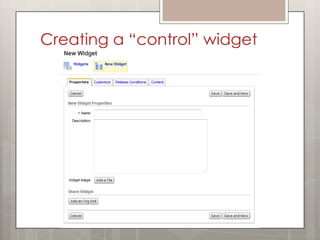
Creating a “control” widget
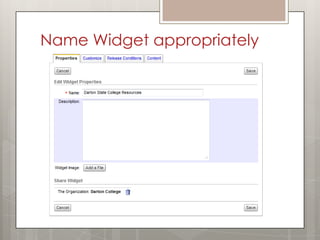
Name Widget appropriately
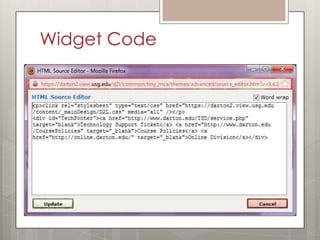
Widget Code
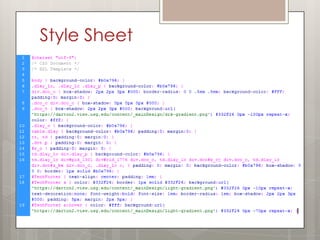
Style Sheet
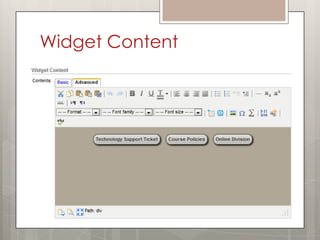
Widget Content
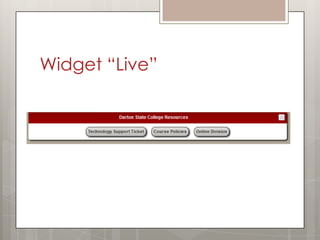
Widget “Live”
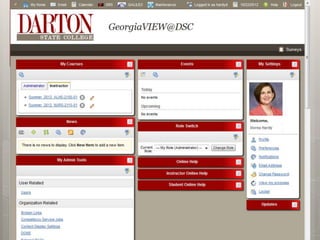
Site, post-widget
Questions?

 dorea.hardy@darton.edu


 229-317-6956


 SlidesAvailable at:
  http://www.slideshare.net/chibitrowa/
  creative-d2l-design-tips-tricks

Creative D2L: Design, Tips & Tricks

Editor's Notes

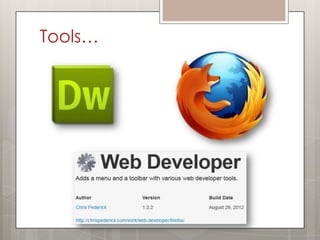
  • #5 Tools used in development:DreamweaverFirefoxFirefox Plugin – Web Developer by Chris Pederickhttp://chrispederick.com/work/web-developer/
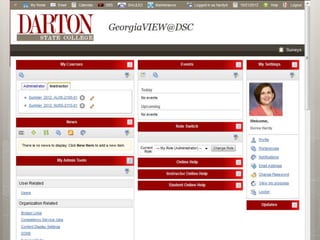
  • #6 The Site, pre-widget, has a primarily white background and the widget boxes blend in. This makes it harder for the students to know what exactly they need to be looking at on the page.
  • #9 <!--Full URL to the cascading style sheet to be used--><p><link rel="stylesheet" type="text/css" href="https://darton2.view.usg.edu/content/_mainDesign/D2L.css" media="all" /></p><!--Additions to the widget to provide an obvious use for the widget so that instructors do not remove the widget--><div id="TechFooter"> <a href="http://www.darton.edu/TSD/service.php" target="blank">Technology Support Ticket</a> <a href="http://www.darton.edu/CoursePolicies" target="_blank">Course Policies</a> <a href="http://online.darton.edu/" target="_blank">Online Division</a></div>
  • #10 Copy of FULL Style Sheet Code:@charset "utf-8";/* CSS Document *//* D2L Template */body { background-color: #b0a796; }.dlay_lc, .dlay_lc .dlay_p { background-color: #b0a796; }div.dco_c { box-shadow: 2px 2px 3px #000; border-radius: 0 0 .5em .5em; background-color: #FFF; padding:0; margin:0; }.dco_cdiv.dco_c { box-shadow: 0px 0px0px #000; }.dco_t { box-shadow: 2px 2px 3px #000; /* Shadow for box title bars */ background:url('https://darton2.view.usg.edu/content/_mainDesign/drk-gradient.png') #332F26 0px -100px repeat-x; color: #fff; }.dco_t_hc { /* Box Titles */ /*background-color: #900; */ }.dlay_c { background-color: #b0a796; }table.dlay { background-color: #b0a796; padding:0; margin:0; }tr, td { padding:0; margin:0; }.drt p { padding:0; margin: 0; }#z_o { padding:0; margin: 0; }td.dlay_lcdiv.dlay_p {background-color: #b0a796; }td.dlay_lc div#pid_1301 div#cid_1776 div.dco_c,td.dlay_lcdiv.dco#z_cjdiv.dco_c,td.dlay_lcdiv.dco#z_bediv.dco_c,.dlay_lc >, { padding: 0;margin: 0;background-color: #b0a796;box-shadow: 0 0 0;border: 1px solid #b0a796; }#TechFooter { text-align: center; padding: 1em;}#TechFooter a { color: #332F26;border: 1px solid #332F26;background:url('https://darton2.view.usg.edu/content/_mainDesign/light-gradient.png') #332F26 0px -10px repeat-x; text-decoration:none;font-weight:bold; font-size: 1em; border-radius: 1em; box-shadow: 2px 2px 3px #000; padding: 5px; margin: 2px 5px;}#TechFooter a:hover { color: #fff; background:url('https://darton2.view.usg.edu/content/_mainDesign/light-gradient.png') #332F26 0px -70px repeat-x; }
  • #14 Questions?dorea.hardy@darton.edu229-317-6956Slides at http://www.slideshare.net/chibitrowa/creative-d2l-design-tips-tricks