RSS Feed using ASP.NET & Linq http://www.livetolearn.in
RSS is a format for an XML document that describes a list of items, such as blog entries or news headlines.  The document may just be a stream of XML created on the fly rather than a static file.  http://www.livetolearn.in
<rss> <channel> <item> <title></title> <description></description> <link></link> <pubDate></pubDate> <!--..............................--> </item> </channel> </rss> http://www.livetolearn.in
Add a generic handler named rsshandler.ashx Add import directive   Imports System.Xml.Linq Replace the process request() subroutine as follows http://www.livetolearn.in
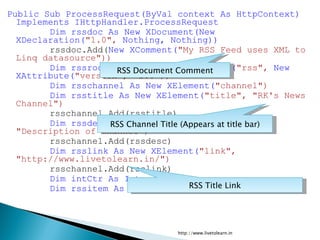
Public Sub ProcessRequest(ByVal context As HttpContext) Implements IHttpHandler.ProcessRequest Dim rssdoc As New XDocument(New XDeclaration( &quot;1.0&quot;,  Nothing, Nothing)) rssdoc.Add( New XComment( &quot;My RSS Feed uses XML to Linq datasource&quot;)) Dim rssrootelement As New XElement( &quot;rss&quot;,  New XAttribute( &quot;version&quot;, &quot;2.0&quot;)) Dim rsschannel As New XElement( &quot;channel&quot;) Dim rsstitle As New XElement( &quot;title&quot;, &quot;RK's News Channel&quot;) rsschannel.Add(rsstitle) Dim rssdesc As New XElement( &quot;description&quot;, &quot;Description of Channel&quot;) rsschannel.Add(rssdesc) Dim rsslink As New XElement( &quot;link&quot;, &quot;http://www.livetolearn.in/&quot;) rsschannel.Add(rsslink) Dim intCtr As Integer Dim rssitem As XElement RSS Document Comment RSS Channel Title (Appears at title bar) RSS Title Link http://www.livetolearn.in
For intCtr = 0 To 10 rssitem =  New XElement( &quot;item&quot;, _ New XElement( &quot;title&quot;, &quot;This is item number &quot; & intCtr.ToString), _ New XElement( &quot;description&quot;, &quot;Description for item # &quot; & _ intCtr.ToString), _ New XElement( &quot;link&quot;, &quot;http://www.livetolearn.in/item&quot; & _ intCtr.ToString &  &quot;.aspx&quot;)) rsschannel.Add(rssitem) Next rssrootelement.Add(rsschannel) rssdoc.Add(rssrootelement) rssdoc.Save(( New System.IO.StreamWriter _ (context.Response.OutputStream))) End Sub This for loop creates 10 sample items with Description.  http://www.livetolearn.in
Now, browse the rsshandler.ashx with Internet Explorer 7 and above or Firefox http://www.livetolearn.in
Displaying XML data  http://www.livetolearn.in
Add an XmlDataSource control to a ASP.NET page Click smart tag Choose configure data source Enter the URL of the RSS feed For example http://www.livetolearn.in/blog/?feed=rss2 Type the following in Xpath expression text box Rss/channel/item Add a data list control and set source to Xmldatasource1, Edit Item template of data list control Add a hyper link control inside the item template Set it’s data binding property as follows Navigate URL – xPath(“link”) xPath(“title”) It displays the list of items from rss feed. http://www.livetolearn.in
By adding more items in Item Template (e.g. Text box), we can display description from RSS feed. ******** http://www.livetolearn.in

Creating an RSS feed

  • 1.
    RSS Feed usingASP.NET & Linq http://www.livetolearn.in
  • 2.
    RSS is aformat for an XML document that describes a list of items, such as blog entries or news headlines. The document may just be a stream of XML created on the fly rather than a static file. http://www.livetolearn.in
  • 3.
    <rss> <channel> <item><title></title> <description></description> <link></link> <pubDate></pubDate> <!--..............................--> </item> </channel> </rss> http://www.livetolearn.in
  • 4.
    Add a generichandler named rsshandler.ashx Add import directive Imports System.Xml.Linq Replace the process request() subroutine as follows http://www.livetolearn.in
  • 5.
    Public Sub ProcessRequest(ByValcontext As HttpContext) Implements IHttpHandler.ProcessRequest Dim rssdoc As New XDocument(New XDeclaration( &quot;1.0&quot;, Nothing, Nothing)) rssdoc.Add( New XComment( &quot;My RSS Feed uses XML to Linq datasource&quot;)) Dim rssrootelement As New XElement( &quot;rss&quot;, New XAttribute( &quot;version&quot;, &quot;2.0&quot;)) Dim rsschannel As New XElement( &quot;channel&quot;) Dim rsstitle As New XElement( &quot;title&quot;, &quot;RK's News Channel&quot;) rsschannel.Add(rsstitle) Dim rssdesc As New XElement( &quot;description&quot;, &quot;Description of Channel&quot;) rsschannel.Add(rssdesc) Dim rsslink As New XElement( &quot;link&quot;, &quot;http://www.livetolearn.in/&quot;) rsschannel.Add(rsslink) Dim intCtr As Integer Dim rssitem As XElement RSS Document Comment RSS Channel Title (Appears at title bar) RSS Title Link http://www.livetolearn.in
  • 6.
    For intCtr =0 To 10 rssitem = New XElement( &quot;item&quot;, _ New XElement( &quot;title&quot;, &quot;This is item number &quot; & intCtr.ToString), _ New XElement( &quot;description&quot;, &quot;Description for item # &quot; & _ intCtr.ToString), _ New XElement( &quot;link&quot;, &quot;http://www.livetolearn.in/item&quot; & _ intCtr.ToString & &quot;.aspx&quot;)) rsschannel.Add(rssitem) Next rssrootelement.Add(rsschannel) rssdoc.Add(rssrootelement) rssdoc.Save(( New System.IO.StreamWriter _ (context.Response.OutputStream))) End Sub This for loop creates 10 sample items with Description. http://www.livetolearn.in
  • 7.
    Now, browse thersshandler.ashx with Internet Explorer 7 and above or Firefox http://www.livetolearn.in
  • 8.
    Displaying XML data http://www.livetolearn.in
  • 9.
    Add an XmlDataSourcecontrol to a ASP.NET page Click smart tag Choose configure data source Enter the URL of the RSS feed For example http://www.livetolearn.in/blog/?feed=rss2 Type the following in Xpath expression text box Rss/channel/item Add a data list control and set source to Xmldatasource1, Edit Item template of data list control Add a hyper link control inside the item template Set it’s data binding property as follows Navigate URL – xPath(“link”) xPath(“title”) It displays the list of items from rss feed. http://www.livetolearn.in
  • 10.
    By adding moreitems in Item Template (e.g. Text box), we can display description from RSS feed. ******** http://www.livetolearn.in