RUBY ON RAILS
UP AND RUNNING WITH
Alain Bindele - mail:alain.bindele@gmail.com
UP AND RUNNING WITH RUBY ON RAILS
INTRO - WHAT’S RUBY ON RAILS
Ruby on Rails, or simply Rails, is a server side web application
framework written in RUBY under MIT Licence. Rails is a Model-
View-Controller (MVC) framework, providing default structures
for a database, a web service and web pages [Wikipedia]
+
UP AND RUNNING WITH RUBY ON RAILS
INSTALLATION (OSX)
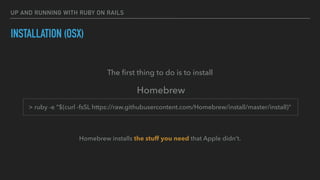
The first thing to do is to install
Homebrew
> ruby -e "$(curl -fsSL https://raw.githubusercontent.com/Homebrew/install/master/install)"
Homebrew installs the stuff you need that Apple didn’t.
UP AND RUNNING WITH RUBY ON RAILS
INSTALLATION (OSX)
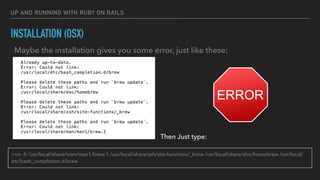
Maybe the installation gives you some error, just like these:
Then Just type:
>rm -fr /usr/local/share/man/man1/brew.1 /usr/local/share/zsh/site-functions/_brew /usr/local/share/doc/homebrew /usr/local/
etc/bash_completion.d/brew
UP AND RUNNING WITH RUBY ON RAILS
INSTALLATION (OSX)
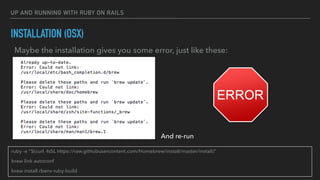
Maybe the installation gives you some error, just like these:
And re-run
ruby -e "$(curl -fsSL https://raw.githubusercontent.com/Homebrew/install/master/install)”
brew link autoconf
brew install rbenv ruby-build
UP AND RUNNING WITH RUBY ON RAILS
INSTALLATION (OSX)
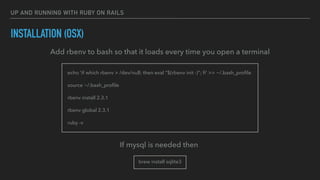
Add rbenv to bash so that it loads every time you open a terminal
echo 'if which rbenv > /dev/null; then eval "$(rbenv init -)"; fi' >> ~/.bash_profile
source ~/.bash_profile
rbenv install 2.3.1
rbenv global 2.3.1
ruby -v
If mysql is needed then
brew install sqlite3
UP AND RUNNING WITH RUBY ON RAILS
INSTALLATION (OSX)
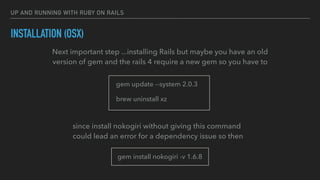
Next important step ...installing Rails but maybe you have an old
version of gem and the rails 4 require a new gem so you have to
gem update --system 2.0.3
brew uninstall xz
since install nokogiri without giving this command
could lead an error for a dependency issue so then
gem install nokogiri -v 1.6.8
UP AND RUNNING WITH RUBY ON RAILS
INSTALLATION (OSX)
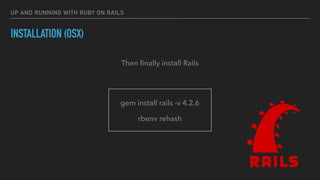
gem install rails -v 4.2.6
rbenv rehash
Then finally install Rails
UP AND RUNNING WITH RUBY ON RAILS
INSTALLATION (OSX)
brew install mysql
gem install mysql2 -v '0.4.5'
You may need a mysql client (with the relative jam)
UP AND RUNNING WITH RUBY ON RAILS
CREATE A NEW RAILS PROJECT
To create a brand new project go in your favourite workspace directory and type:
rails new new_rails_app
rails new new_rails_app -d mysql
but if you need mysql support type:
UP AND RUNNING WITH RUBY ON RAILS
CREATE A NEW RAILS PROJECT
If you setup MySQL or Postgres with a username/password, modify the
config/database.yml file to contain the username/password that you specified
Create the database
rake db:create
rails server
UP AND RUNNING WITH RUBY ON RAILS
CREATE A NEW RAILS PROJECT
If you setup MySQL or Postgres with a username/password, modify the
config/database.yml file to contain the username/password that you specified
Create the database
rake db:create
rails server
UP AND RUNNING WITH RUBY ON RAILS
CREATE A NEW RAILS PROJECT
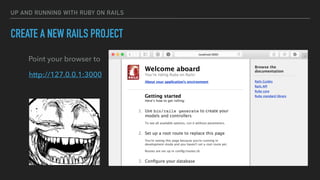
Point your browser to
http://127.0.0.1:3000
ALAIN BINDELE
MAIL: ALAIN.BINDELE@GMAIL.COM
SKYPE: ALAIN.BINDELE
THANK YOU ^_^

Create rails project

  • 1.
    RUBY ON RAILS UPAND RUNNING WITH Alain Bindele - mail:alain.bindele@gmail.com
  • 2.
    UP AND RUNNINGWITH RUBY ON RAILS INTRO - WHAT’S RUBY ON RAILS Ruby on Rails, or simply Rails, is a server side web application framework written in RUBY under MIT Licence. Rails is a Model- View-Controller (MVC) framework, providing default structures for a database, a web service and web pages [Wikipedia] +
  • 3.
    UP AND RUNNINGWITH RUBY ON RAILS INSTALLATION (OSX) The first thing to do is to install Homebrew > ruby -e "$(curl -fsSL https://raw.githubusercontent.com/Homebrew/install/master/install)" Homebrew installs the stuff you need that Apple didn’t.
  • 4.
    UP AND RUNNINGWITH RUBY ON RAILS INSTALLATION (OSX) Maybe the installation gives you some error, just like these: Then Just type: >rm -fr /usr/local/share/man/man1/brew.1 /usr/local/share/zsh/site-functions/_brew /usr/local/share/doc/homebrew /usr/local/ etc/bash_completion.d/brew
  • 5.
    UP AND RUNNINGWITH RUBY ON RAILS INSTALLATION (OSX) Maybe the installation gives you some error, just like these: And re-run ruby -e "$(curl -fsSL https://raw.githubusercontent.com/Homebrew/install/master/install)” brew link autoconf brew install rbenv ruby-build
  • 6.
    UP AND RUNNINGWITH RUBY ON RAILS INSTALLATION (OSX) Add rbenv to bash so that it loads every time you open a terminal echo 'if which rbenv > /dev/null; then eval "$(rbenv init -)"; fi' >> ~/.bash_profile source ~/.bash_profile rbenv install 2.3.1 rbenv global 2.3.1 ruby -v If mysql is needed then brew install sqlite3
  • 7.
    UP AND RUNNINGWITH RUBY ON RAILS INSTALLATION (OSX) Next important step ...installing Rails but maybe you have an old version of gem and the rails 4 require a new gem so you have to gem update --system 2.0.3 brew uninstall xz since install nokogiri without giving this command could lead an error for a dependency issue so then gem install nokogiri -v 1.6.8
  • 8.
    UP AND RUNNINGWITH RUBY ON RAILS INSTALLATION (OSX) gem install rails -v 4.2.6 rbenv rehash Then finally install Rails
  • 9.
    UP AND RUNNINGWITH RUBY ON RAILS INSTALLATION (OSX) brew install mysql gem install mysql2 -v '0.4.5' You may need a mysql client (with the relative jam)
  • 10.
    UP AND RUNNINGWITH RUBY ON RAILS CREATE A NEW RAILS PROJECT To create a brand new project go in your favourite workspace directory and type: rails new new_rails_app rails new new_rails_app -d mysql but if you need mysql support type:
  • 11.
    UP AND RUNNINGWITH RUBY ON RAILS CREATE A NEW RAILS PROJECT If you setup MySQL or Postgres with a username/password, modify the config/database.yml file to contain the username/password that you specified Create the database rake db:create rails server
  • 12.
    UP AND RUNNINGWITH RUBY ON RAILS CREATE A NEW RAILS PROJECT If you setup MySQL or Postgres with a username/password, modify the config/database.yml file to contain the username/password that you specified Create the database rake db:create rails server
  • 13.
    UP AND RUNNINGWITH RUBY ON RAILS CREATE A NEW RAILS PROJECT Point your browser to http://127.0.0.1:3000
  • 14.