Week 4: SAP Analytics
Unit 4: Creating a KPI Tile
2
PUBLIC
© 2019 SAP SE or an SAP affiliate company. All rights reserved. ǀ
Creating a KPI Tile
Content
▪ SAP Fiori content for SAP S/4HANA embedded
analytics overview
▪ SAP Manage KPIs and Reports app overview
▪ Terminology changes
▪ Create a KPI group
▪ Create a KPI
▪ Define a data source
▪ Define semantics
▪ Create a report
▪ Add drilldown views
▪ Create an application
3
PUBLIC
© 2019 SAP SE or an SAP affiliate company. All rights reserved. ǀ
Creating a KPI Tile
SAP Fiori content for SAP S/4HANA embedded analytics
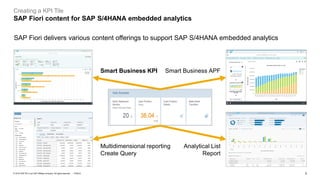
SAP Fiori delivers various content offerings to support SAP S/4HANA embedded analytics
Smart Business KPI Smart Business APF
Analytical List
Report
Multidimensional reporting
Create Query
4
PUBLIC
© 2019 SAP SE or an SAP affiliate company. All rights reserved. ǀ
Creating a KPI Tile
Overview
User role required:
SAP_BR_ANALYTICS_SPECIALIST
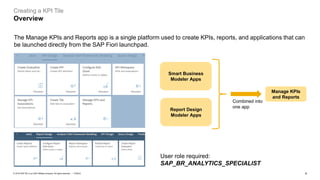
Smart Business
Modeler Apps
The Manage KPIs and Reports app is a single platform used to create KPIs, reports, and applications that can
be launched directly from the SAP Fiori launchpad.
Report Design
Modeler Apps
Manage KPIs
and Reports
Combined into
one app
5
PUBLIC
© 2019 SAP SE or an SAP affiliate company. All rights reserved. ǀ
Creating a KPI Tile
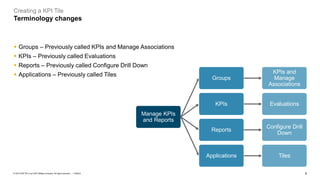
Terminology changes
▪ Groups – Previously called KPIs and Manage Associations
▪ KPIs – Previously called Evaluations
▪ Reports – Previously called Configure Drill Down
▪ Applications – Previously called Tiles
Manage KPIs
and Reports
Groups
KPIs and
Manage
Associations
KPIs Evaluations
Reports
Configure Drill
Down
Applications Tiles
6
PUBLIC
© 2019 SAP SE or an SAP affiliate company. All rights reserved. ǀ
Creating a KPI Tile
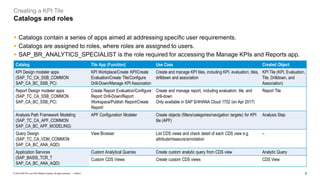
Catalogs and roles
Catalog Tile App (Function) Use Case Created Object
KPI Design modeler apps
(SAP_TC_CA_SSB_COMMON
SAP_CA_BC_SSB_PC)
KPI Workplace/Create KPI/Create
Evaluation/Create Tile/Configure
Drill-Down/Manage KPI Association
Create and manage KPI tiles, including KPI, evaluation, tiles,
drilldown and association
KPI Tile (KPI, Evaluation,
Tile, Drilldown, and
Association)
Report Design modeler apps
(SAP_TC_CA_SSB_COMMON
SAP_CA_BC_SSB_PC)
Create Report Evaluation/Configure
Report Drill-Down/Report
Workspace/Publish Report/Create
Report/
Create and manage report, including evaluation, tile, and
drill-down
Only available in SAP S/4HANA Cloud 1702 (on Apr 2017)
Report Tile
Analysis Path Framework Modeling
(SAP_TC_CA_APF_COMMON
SAP_CA_BC_APF_MODELING)
APF Configuration Modeler Create objects (filters/categories/navigation targets) for KPI
tile (APF)
Analysis Step
Query Design
(SAP_TC_CA_VDM_COMMON
SAP_CA_BC_ANA_AQD)
View Browser List CDS views and check detail of each CDS view e.g.
attribute/measure/annotation
–
Application Services
(SAP_BASIS_TCR_T
SAP_CA_BC_ANA_AQD)
Custom Analytical Queries Create custom analytic query from CDS view Analytic Query
Custom CDS Views Create custom CDS views CDS View
▪ Catalogs contain a series of apps aimed at addressing specific user requirements.
▪ Catalogs are assigned to roles, where roles are assigned to users.
▪ SAP_BR_ANALYTICS_SPECIALIST is the role required for accessing the Manage KPIs and Reports app.
7
PUBLIC
© 2019 SAP SE or an SAP affiliate company. All rights reserved. ǀ
Creating a KPI Tile
Demo
8
PUBLIC
© 2019 SAP SE or an SAP affiliate company. All rights reserved. ǀ
Creating a KPI Tile
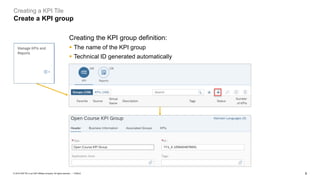
Create a KPI group
Creating the KPI group definition:
▪ The name of the KPI group
▪ Technical ID generated automatically
9
PUBLIC
© 2019 SAP SE or an SAP affiliate company. All rights reserved. ǀ
Creating a KPI Tile
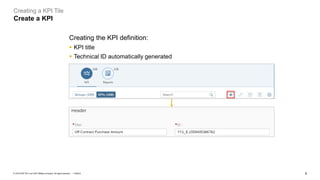
Create a KPI
Creating the KPI definition:
▪ KPI title
▪ Technical ID automatically generated
10
PUBLIC
© 2019 SAP SE or an SAP affiliate company. All rights reserved. ǀ
Creating a KPI Tile
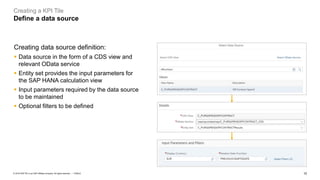
Define a data source
Creating data source definition:
▪ Data source in the form of a CDS view and
relevant OData service
▪ Entity set provides the input parameters for
the SAP HANA calculation view
▪ Input parameters required by the data source
to be maintained
▪ Optional filters to be defined
11
PUBLIC
© 2019 SAP SE or an SAP affiliate company. All rights reserved. ǀ
Creating a KPI Tile
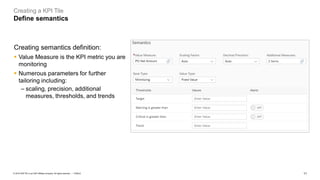
Define semantics
Creating semantics definition:
▪ Value Measure is the KPI metric you are
monitoring
▪ Numerous parameters for further
tailoring including:
– scaling, precision, additional
measures, thresholds, and trends
12
PUBLIC
© 2019 SAP SE or an SAP affiliate company. All rights reserved. ǀ
Creating a KPI Tile
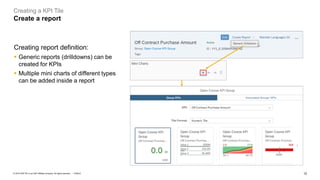
Create a report
Creating report definition:
▪ Generic reports (drilldowns) can be
created for KPIs
▪ Multiple mini charts of different types
can be added inside a report
13
PUBLIC
© 2019 SAP SE or an SAP affiliate company. All rights reserved. ǀ
Creating a KPI Tile
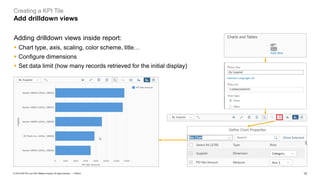
Add drilldown views
Adding drilldown views inside report:
▪ Chart type, axis, scaling, color scheme, title…
▪ Configure dimensions
▪ Set data limit (how many records retrieved for the initial display)
14
PUBLIC
© 2019 SAP SE or an SAP affiliate company. All rights reserved. ǀ
Creating a KPI Tile
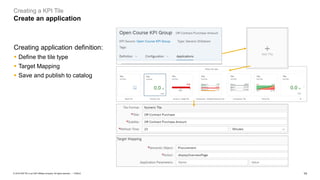
Create an application
Creating application definition:
▪ Define the tile type
▪ Target Mapping
▪ Save and publish to catalog
Thank you.
Contact information:
open@sap.com
© 2019 SAP SE or an SAP affiliate company. All rights reserved.
No part of this publication may be reproduced or transmitted in any form or for any purpose without the express permission of
SAP SE or an SAP affiliate company.
The information contained herein may be changed without prior notice. Some software products marketed by SAP SE and its
distributors contain proprietary software components of other software vendors. National product specifications may vary.
These materials are provided by SAP SE or an SAP affiliate company for informational purposes only, without representation or
warranty of any kind, and SAP or its affiliated companies shall not be liable for errors or omissions with respect to the materials.
The only warranties for SAP or SAP affiliate company products and services are those that are set forth in the express warranty
statements accompanying such products and services, if any. Nothing herein should be construed as constituting an additional
warranty.
In particular, SAP SE or its affiliated companies have no obligation to pursue any course of business outlined in this document or
any related presentation, or to develop or release any functionality mentioned therein. This document, or any related presentation,
and SAP SE’s or its affiliated companies’ strategy and possible future developments, products, and/or platforms, directions, and
functionality are all subject to change and may be changed by SAP SE or its affiliated companies at any time for any reason
without notice. The information in this document is not a commitment, promise, or legal obligation to deliver any material, code, or
functionality. All forward-looking statements are subject to various risks and uncertainties that could cause actual results to differ
materially from expectations. Readers are cautioned not to place undue reliance on these forward-looking statements, and they
should not be relied upon in making purchasing decisions.
SAP and other SAP products and services mentioned herein as well as their respective logos are trademarks or registered
trademarks of SAP SE (or an SAP affiliate company) in Germany and other countries. All other product and service names
mentioned are the trademarks of their respective companies.
See www.sap.com/copyright for additional trademark information and notices.
www.sap.com/contactsap
Follow all of SAP

Create Kpi fiori apps

  • 1.
    Week 4: SAPAnalytics Unit 4: Creating a KPI Tile
  • 2.
    2 PUBLIC © 2019 SAPSE or an SAP affiliate company. All rights reserved. ǀ Creating a KPI Tile Content ▪ SAP Fiori content for SAP S/4HANA embedded analytics overview ▪ SAP Manage KPIs and Reports app overview ▪ Terminology changes ▪ Create a KPI group ▪ Create a KPI ▪ Define a data source ▪ Define semantics ▪ Create a report ▪ Add drilldown views ▪ Create an application
  • 3.
    3 PUBLIC © 2019 SAPSE or an SAP affiliate company. All rights reserved. ǀ Creating a KPI Tile SAP Fiori content for SAP S/4HANA embedded analytics SAP Fiori delivers various content offerings to support SAP S/4HANA embedded analytics Smart Business KPI Smart Business APF Analytical List Report Multidimensional reporting Create Query
  • 4.
    4 PUBLIC © 2019 SAPSE or an SAP affiliate company. All rights reserved. ǀ Creating a KPI Tile Overview User role required: SAP_BR_ANALYTICS_SPECIALIST Smart Business Modeler Apps The Manage KPIs and Reports app is a single platform used to create KPIs, reports, and applications that can be launched directly from the SAP Fiori launchpad. Report Design Modeler Apps Manage KPIs and Reports Combined into one app
  • 5.
    5 PUBLIC © 2019 SAPSE or an SAP affiliate company. All rights reserved. ǀ Creating a KPI Tile Terminology changes ▪ Groups – Previously called KPIs and Manage Associations ▪ KPIs – Previously called Evaluations ▪ Reports – Previously called Configure Drill Down ▪ Applications – Previously called Tiles Manage KPIs and Reports Groups KPIs and Manage Associations KPIs Evaluations Reports Configure Drill Down Applications Tiles
  • 6.
    6 PUBLIC © 2019 SAPSE or an SAP affiliate company. All rights reserved. ǀ Creating a KPI Tile Catalogs and roles Catalog Tile App (Function) Use Case Created Object KPI Design modeler apps (SAP_TC_CA_SSB_COMMON SAP_CA_BC_SSB_PC) KPI Workplace/Create KPI/Create Evaluation/Create Tile/Configure Drill-Down/Manage KPI Association Create and manage KPI tiles, including KPI, evaluation, tiles, drilldown and association KPI Tile (KPI, Evaluation, Tile, Drilldown, and Association) Report Design modeler apps (SAP_TC_CA_SSB_COMMON SAP_CA_BC_SSB_PC) Create Report Evaluation/Configure Report Drill-Down/Report Workspace/Publish Report/Create Report/ Create and manage report, including evaluation, tile, and drill-down Only available in SAP S/4HANA Cloud 1702 (on Apr 2017) Report Tile Analysis Path Framework Modeling (SAP_TC_CA_APF_COMMON SAP_CA_BC_APF_MODELING) APF Configuration Modeler Create objects (filters/categories/navigation targets) for KPI tile (APF) Analysis Step Query Design (SAP_TC_CA_VDM_COMMON SAP_CA_BC_ANA_AQD) View Browser List CDS views and check detail of each CDS view e.g. attribute/measure/annotation – Application Services (SAP_BASIS_TCR_T SAP_CA_BC_ANA_AQD) Custom Analytical Queries Create custom analytic query from CDS view Analytic Query Custom CDS Views Create custom CDS views CDS View ▪ Catalogs contain a series of apps aimed at addressing specific user requirements. ▪ Catalogs are assigned to roles, where roles are assigned to users. ▪ SAP_BR_ANALYTICS_SPECIALIST is the role required for accessing the Manage KPIs and Reports app.
  • 7.
    7 PUBLIC © 2019 SAPSE or an SAP affiliate company. All rights reserved. ǀ Creating a KPI Tile Demo
  • 8.
    8 PUBLIC © 2019 SAPSE or an SAP affiliate company. All rights reserved. ǀ Creating a KPI Tile Create a KPI group Creating the KPI group definition: ▪ The name of the KPI group ▪ Technical ID generated automatically
  • 9.
    9 PUBLIC © 2019 SAPSE or an SAP affiliate company. All rights reserved. ǀ Creating a KPI Tile Create a KPI Creating the KPI definition: ▪ KPI title ▪ Technical ID automatically generated
  • 10.
    10 PUBLIC © 2019 SAPSE or an SAP affiliate company. All rights reserved. ǀ Creating a KPI Tile Define a data source Creating data source definition: ▪ Data source in the form of a CDS view and relevant OData service ▪ Entity set provides the input parameters for the SAP HANA calculation view ▪ Input parameters required by the data source to be maintained ▪ Optional filters to be defined
  • 11.
    11 PUBLIC © 2019 SAPSE or an SAP affiliate company. All rights reserved. ǀ Creating a KPI Tile Define semantics Creating semantics definition: ▪ Value Measure is the KPI metric you are monitoring ▪ Numerous parameters for further tailoring including: – scaling, precision, additional measures, thresholds, and trends
  • 12.
    12 PUBLIC © 2019 SAPSE or an SAP affiliate company. All rights reserved. ǀ Creating a KPI Tile Create a report Creating report definition: ▪ Generic reports (drilldowns) can be created for KPIs ▪ Multiple mini charts of different types can be added inside a report
  • 13.
    13 PUBLIC © 2019 SAPSE or an SAP affiliate company. All rights reserved. ǀ Creating a KPI Tile Add drilldown views Adding drilldown views inside report: ▪ Chart type, axis, scaling, color scheme, title… ▪ Configure dimensions ▪ Set data limit (how many records retrieved for the initial display)
  • 14.
    14 PUBLIC © 2019 SAPSE or an SAP affiliate company. All rights reserved. ǀ Creating a KPI Tile Create an application Creating application definition: ▪ Define the tile type ▪ Target Mapping ▪ Save and publish to catalog
  • 15.
  • 16.
    © 2019 SAPSE or an SAP affiliate company. All rights reserved. No part of this publication may be reproduced or transmitted in any form or for any purpose without the express permission of SAP SE or an SAP affiliate company. The information contained herein may be changed without prior notice. Some software products marketed by SAP SE and its distributors contain proprietary software components of other software vendors. National product specifications may vary. These materials are provided by SAP SE or an SAP affiliate company for informational purposes only, without representation or warranty of any kind, and SAP or its affiliated companies shall not be liable for errors or omissions with respect to the materials. The only warranties for SAP or SAP affiliate company products and services are those that are set forth in the express warranty statements accompanying such products and services, if any. Nothing herein should be construed as constituting an additional warranty. In particular, SAP SE or its affiliated companies have no obligation to pursue any course of business outlined in this document or any related presentation, or to develop or release any functionality mentioned therein. This document, or any related presentation, and SAP SE’s or its affiliated companies’ strategy and possible future developments, products, and/or platforms, directions, and functionality are all subject to change and may be changed by SAP SE or its affiliated companies at any time for any reason without notice. The information in this document is not a commitment, promise, or legal obligation to deliver any material, code, or functionality. All forward-looking statements are subject to various risks and uncertainties that could cause actual results to differ materially from expectations. Readers are cautioned not to place undue reliance on these forward-looking statements, and they should not be relied upon in making purchasing decisions. SAP and other SAP products and services mentioned herein as well as their respective logos are trademarks or registered trademarks of SAP SE (or an SAP affiliate company) in Germany and other countries. All other product and service names mentioned are the trademarks of their respective companies. See www.sap.com/copyright for additional trademark information and notices. www.sap.com/contactsap Follow all of SAP