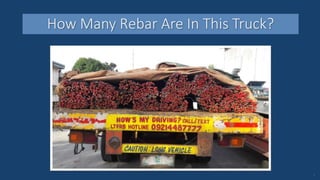
How Many Rebar Are In This Truck?
1
• Problems with manual counting
• Benefits of using apps that count from photos
• How the CountThings Apps work
• Overcoming limitations
• Getting started
Overview
2
• Error prone
• Impossible to verify and document count
• Tedious and time consuming
• Correcting mistakes requires re-counting
Problems with Manual Counting
3
4
Apps that Count from Photos
5
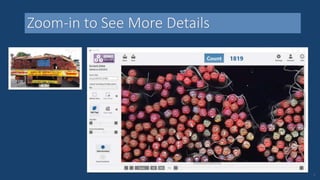
Zoom-in to See More Details
6
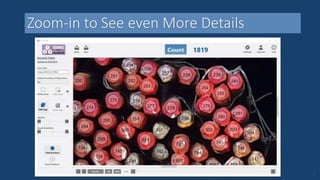
Zoom-in to See even More Details
7
Counting Logs
8
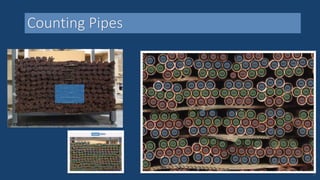
Counting Pipes
9
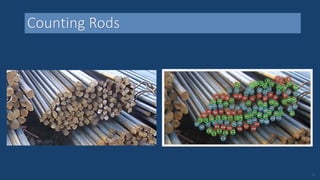
Counting Rods
10
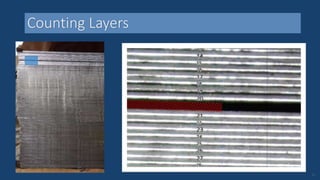
Counting Layers
11
Counting Other Items
12
• Accuracy
• Verification of counting results
• Documentation of the actual count
• Fast and easy corrections
• Major time + cost savings
Benefits of Using CountingThings Apps
13
How the CountingThings
Apps Work
• Using the CountingThings apps
• Automated counting technology
• Improving accuracy and speed
Overview
15
• Automated counting stage
• User takes picture and presses “Count”
• App annotates photo with numbered tags
• Review stage
• Add or delete tag with single tap
• After counting
• Save the results
• Integrate with other systems
Using the CountingThings Apps
16
Using the Counting Apps
17
• Computer Vision
• Image Processing
• Machine Learning
The Technology of Automated Counting
18
Use Case Variations
19
• Standard configuration comes with all apps
• Contain information specific to each type of object
• Created by applying complex math to a large set of relevant
photos
• Can be tailored to specific use-cases
Counting Configurations
20
Use Case Variations
21
Size Variations
22
• Tweaks the Counting Configuration to help the apps:
• Identify items faster
• Yield more accurate counts
• Aids object recognition by defining an object’s possible
maximum and minimum size
• Is user-adjustable
Counting Calibrations
23
Size Variations
24
• Initial setup needed to ensure optimal configuration
• Poor configurations yield slow or inaccurate counts
• Counting Configuration currently available only for
limited types of objects
Limitations
25
• Initial setup is required for optimal configurations and
calibrations
• Support is available to help with the initial setup at no cost
• Initial setup requires a sufficient number of sample photos
typical of what needs to be counted
• Once initial setup is done, counting is fast and accurate
Overcoming Limitations
26
• Go to https://CountingThings.com
• Choose the app that’s right for you based on:
• The type of object you want to count
• Your platform
• Watch our “Learn to use the app” video
• Download the app for free
(counts up to 10 items)
How to Get Started with CountingThings Apps
27
Contact us to request:
• A time-limited free trial use of the app with no count limit
• A demo of the app in a virtual meeting
(using your sample photos)
• Help setting up the app
• A Custom Counting Configuration optimized to your use-case
(Requires a sufficient number of sample photos typical of what
you need to count)
Come Up-to-Speed with Your App
28
Thank You!
Dynamic Ventures, Inc., d/b/a CountingThings Copyright © 2016. All Rights Reserved.

Count Things with a Camera!

  • 1.
    How Many RebarAre In This Truck? 1
  • 2.
    • Problems withmanual counting • Benefits of using apps that count from photos • How the CountThings Apps work • Overcoming limitations • Getting started Overview 2
  • 3.
    • Error prone •Impossible to verify and document count • Tedious and time consuming • Correcting mistakes requires re-counting Problems with Manual Counting 3
  • 4.
  • 5.
    Apps that Countfrom Photos 5
  • 6.
    Zoom-in to SeeMore Details 6
  • 7.
    Zoom-in to Seeeven More Details 7
  • 8.
  • 9.
  • 10.
  • 11.
  • 12.
  • 13.
    • Accuracy • Verificationof counting results • Documentation of the actual count • Fast and easy corrections • Major time + cost savings Benefits of Using CountingThings Apps 13
  • 14.
  • 15.
    • Using theCountingThings apps • Automated counting technology • Improving accuracy and speed Overview 15
  • 16.
    • Automated countingstage • User takes picture and presses “Count” • App annotates photo with numbered tags • Review stage • Add or delete tag with single tap • After counting • Save the results • Integrate with other systems Using the CountingThings Apps 16
  • 17.
  • 18.
    • Computer Vision •Image Processing • Machine Learning The Technology of Automated Counting 18
  • 19.
  • 20.
    • Standard configurationcomes with all apps • Contain information specific to each type of object • Created by applying complex math to a large set of relevant photos • Can be tailored to specific use-cases Counting Configurations 20
  • 21.
  • 22.
  • 23.
    • Tweaks theCounting Configuration to help the apps: • Identify items faster • Yield more accurate counts • Aids object recognition by defining an object’s possible maximum and minimum size • Is user-adjustable Counting Calibrations 23
  • 24.
  • 25.
    • Initial setupneeded to ensure optimal configuration • Poor configurations yield slow or inaccurate counts • Counting Configuration currently available only for limited types of objects Limitations 25
  • 26.
    • Initial setupis required for optimal configurations and calibrations • Support is available to help with the initial setup at no cost • Initial setup requires a sufficient number of sample photos typical of what needs to be counted • Once initial setup is done, counting is fast and accurate Overcoming Limitations 26
  • 27.
    • Go tohttps://CountingThings.com • Choose the app that’s right for you based on: • The type of object you want to count • Your platform • Watch our “Learn to use the app” video • Download the app for free (counts up to 10 items) How to Get Started with CountingThings Apps 27
  • 28.
    Contact us torequest: • A time-limited free trial use of the app with no count limit • A demo of the app in a virtual meeting (using your sample photos) • Help setting up the app • A Custom Counting Configuration optimized to your use-case (Requires a sufficient number of sample photos typical of what you need to count) Come Up-to-Speed with Your App 28
  • 29.
    Thank You! Dynamic Ventures,Inc., d/b/a CountingThings Copyright © 2016. All Rights Reserved.

Editor's Notes

  • #2 Questions to ask the audience: How many rebar are in this truck? How long it will take to count? How many people are needed to count them? If multiple people count the piles and get different results, how do you know which one is the correct result?
  • #4 No way to identify mistakes. Impossible to identify items that were counted twice or items that were not counted. When re-counting and getting different results, there is no way to know which count is correct and which one is incorrect
  • #5 Play Video
  • #6 Remind audience that this is the stack of rebar shown on first slide Respond to their guesses of how many – point out the actual count Acknowledge the person in the audience with the best answer Mention that they were guessing, but with this software, the actual count can be viewed, verified, and documented. Image is from window PC version, IOS and Android version screens look diferent
  • #9 Logs: 58
  • #10 Counting results: 2054 pipes
  • #11 Rods: 115
  • #12 Counting results: 261 sheets
  • #13 Screws: 84
  • #14 Pictures with numbered tags confirm counting accuracy If something is wrong you can point to it (it is visibly identifiable) No need to re-count in order to correct mistakes; just add missing tags or delete erroneous tags
  • #15 How the CountingThings family of apps works
  • #17 CountingThings website has short videos on learning to use the apps Additionally, after counting – you can also export additional data like operator name , customer name, or ship to, PO number, batch number etc. The additional data to be exported is filled in by an operator, using a form created ahead of time, during the initial setup. (currently available on Windows PC version of the apps only)
  • #18 This screenshot matches iOS and Android version
  • #19 Done with mathematics, geometry, statistics, and algorithms
  • #21 Each image can have many different types of things that can be counted. The Counting Configuration tells the app what to count. The Counting Configuration is created by applying complex mathematics to a large set of photos that contain piles/stacks/collections of objects of a given type. Custom Configurations can be created for cases that the standard configurations do not work for.
  • #25 Typically, a given company has only a few types of items and sizes to be counted – so only a limited number of Counting Configurations and Calibrations are needed for optimal results
  • #26 Initial setup includes selection and setting-up of counting configuration and counting calibration