Corpora, Tracked Changes,
and PDFs
Some useful tips at no cost!
The Translation and Localization
Conference 2017
Patricia M. Ferreira Larrieux
EN <> ES <> IT Medical & Technical Translator
Agenda
About me
Purpose of this presentation
Working with corpora: your way to specialized
terminology
Extracting tracked changes
Searching in multiple PDF files at once
The Translation and Localization Conference 2017 2
About me
The Translation and Localization Conference 2017 3
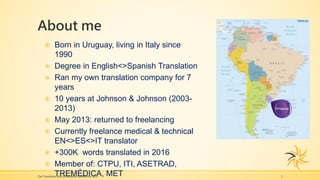
 Born in Uruguay, living in Italy since
1990
 Degree in English<>Spanish Translation
 Ran my own translation company for 7
years
 10 years at Johnson & Johnson (2003-
2013)
 May 2013: returned to freelancing
 Currently freelance medical & technical
EN<>ES<>IT translator
 +300K words translated in 2016
 Member of: CTPU, ITI, ASETRAD,
TREMÉDICA, MET
Purpose of This Presentation
Sharing tips on:
Corpora – how to use BootCat & AntConc
Tracked changes – how to use DocTools
ExtractData
PDFs – searching multiple PDFs with Acrobat
Reader
Note: I am in no way connected with the
respective owners of these software programs!
The Translation and Localization Conference 2017 4
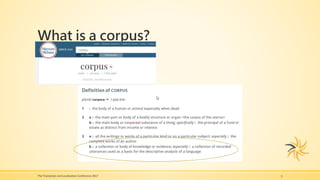
What is a corpus?
The Translation and Localization Conference 2017 5
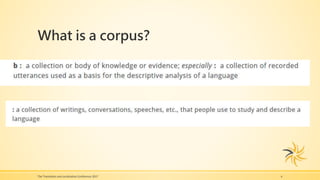
What is a corpus?
The Translation and Localization Conference 2017 6
Why are Corpora useful for Translators?
They are a great resource for terminology and
phraseology.
Monolingual corpora in the target language have
proved to be an outstanding terminological tool for
specialized translation (Bowker, 1998)
The Translation and Localization Conference 2017 7
Online Corpora
The British National Corpus
http://corpus.byu.edu/bnc/
A collection of English corpora
http://corpus.leeds.ac.uk/protected/query.html
Michigan Corpus of Academic Spoken English
http://quod.lib.umich.edu/cgi/c/corpus/corpus?c=mic
ase;page=simple
The Translation and Localization Conference 2017 8
Online Corpora (cont’d)
Corpus de Referencia del Español Actual (CREA)
http://www.rae.es/recursos/banco-de-datos/crea
Corpora created by Mark Davies, Professor of
Linguistics at Brigham Young University.
http://corpus.byu.edu/corpora.asp
Paisà
http://www.corpusitaliano.it/
The Translation and Localization Conference 2017 9
Building Your Own Corpora:
BootCat Front End
The Translation and Localization Conference 2017 10
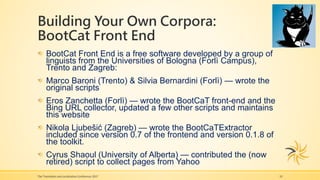
BootCat Front End is a free software developed by a group of
linguists from the Universities of Bologna (Forlì Campus),
Trento and Zagreb:
Marco Baroni (Trento) & Silvia Bernardini (Forlì) — wrote the
original scripts
Eros Zanchetta (Forlì) — wrote the BootCaT front-end and the
Bing URL collector, updated a few other scripts and maintains
this website
Nikola Ljubešić (Zagreb) — wrote the BootCaTExtractor
included since version 0.7 of the frontend and version 0.1.8 of
the toolkit.
Cyrus Shaoul (University of Alberta) — contributed the (now
retired) script to collect pages from Yahoo
Building Your Own Corpora:
BootCat Front End
The Translation and Localization Conference 2017 11
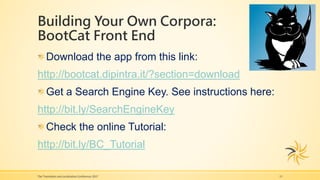
Download the app from this link:
http://bootcat.dipintra.it/?section=download
Get a Search Engine Key. See instructions here:
http://bit.ly/SearchEngineKey
Check the online Tutorial:
http://bit.ly/BC_Tutorial
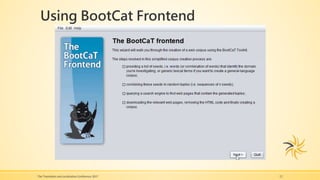
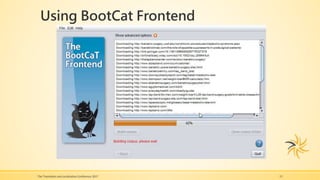
Using BootCat Frontend
The Translation and Localization Conference 2017 12
Using BootCat Frontend
The Translation and Localization Conference 2017 13
AntConc: Exploring Your Corpus
The Translation and Localization Conference 2017 14
A free software developed by Dr. Laurence
Anthony, a Professor in the Faculty of Science
and Engineering at Waseda University, Japan. He
is a former director of the Center for English
Language Education (CELESE) and coordinator
of the CELESE technical English program.
AntConc: Exploring Your Corpus
The Translation and Localization Conference 2017 15
Download the app from this link:
http://www.laurenceanthony.net/software.html
Download the manual from this link:
http://bit.ly/AC_Manual
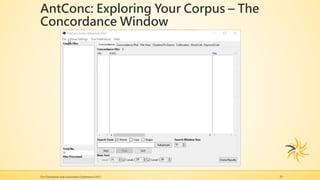
AntConc: Exploring Your Corpus – The
Concordance Window
The Translation and Localization Conference 2017 16
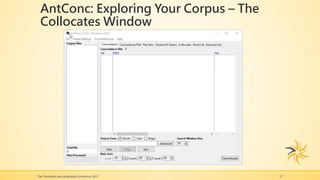
AntConc: Exploring Your Corpus – The
Collocates Window
The Translation and Localization Conference 2017 17
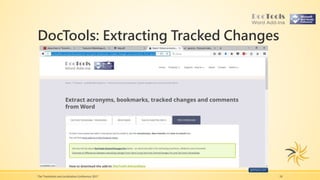
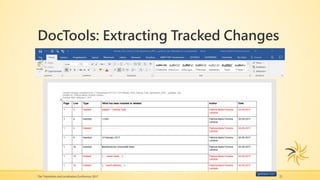
DocTools: Extracting Tracked Changes
The Translation and Localization Conference 2017 18
DocTools: Extracting Tracked Changes
The Translation and Localization Conference 2017 19
ExtractData: a free word add-in developed by Lene Fredborg
Some highlights from her website: https://wordaddins.com
Established DocTools in 2006.
+20 years working professionally with Word and programming
add-ins and macros in Visual Basic for Applications (VBA)
Developed several add-ins that can function as stand-alone
products
Via her website, she makes add-ins available to Word users in
general
Her motto: “Time-saving tools made for you!”
DocTools: Extracting Tracked Changes
The Translation and Localization Conference 2017 20
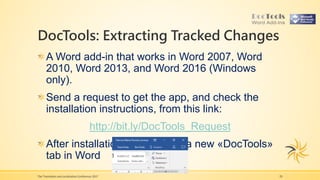
A Word add-in that works in Word 2007, Word
2010, Word 2013, and Word 2016 (Windows
only).
Send a request to get the app, and check the
installation instructions, from this link:
http://bit.ly/DocTools_Request
After installation, you will see a new «DocTools»
tab in Word
DocTools: Extracting Tracked Changes
The Translation and Localization Conference 2017 21
Acrobat Reader: Searching in multiple
PDFs
The Translation and Localization Conference 2017 22
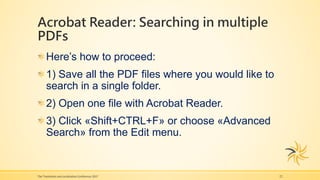
Here’s how to proceed:
1) Save all the PDF files where you would like to
search in a single folder.
2) Open one file with Acrobat Reader.
3) Click «Shift+CTRL+F» or choose «Advanced
Search» from the Edit menu.
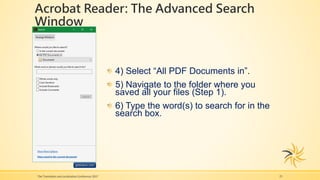
Acrobat Reader: The Advanced Search
Window
The Translation and Localization Conference 2017 23
4) Select “All PDF Documents in”.
5) Navigate to the folder where you
saved all your files (Step 1).
6) Type the word(s) to search for in the
search box.
Acrobat Reader: The Advanced Search
Window
24
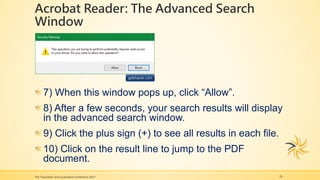
7) When this window pops up, click “Allow”.
8) After a few seconds, your search results will display
in the advanced search window.
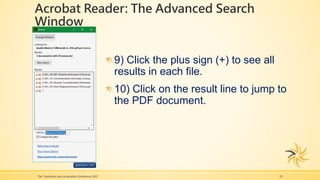
9) Click the plus sign (+) to see all results in each file.
10) Click on the result line to jump to the PDF
document.
The Translation and Localization Conference 2017
Acrobat Reader: The Advanced Search
Window
The Translation and Localization Conference 2017 25
9) Click the plus sign (+) to see all
results in each file.
10) Click on the result line to jump to
the PDF document.
Patricia María Ferreira Larrieux
E-mail: patricia.ferreira@language.proz.com
Website: www.pmferreira-larrieux.it
Linkedin profile: https://www.linkedin.com/in/pmferreiralarrieux/
ProZ profile: http://www.proz.com/profile/4437
Twitter: @PFerreiraLarr
The Translation and Localization Conference 2017 26
Thank you!
The Translation and Localization Conference 2017 27

Corpora, tracked changes, and PDFs: some useful tips, at no cost!

  • 1.
    Corpora, Tracked Changes, andPDFs Some useful tips at no cost! The Translation and Localization Conference 2017 Patricia M. Ferreira Larrieux EN <> ES <> IT Medical & Technical Translator
  • 2.
    Agenda About me Purpose ofthis presentation Working with corpora: your way to specialized terminology Extracting tracked changes Searching in multiple PDF files at once The Translation and Localization Conference 2017 2
  • 3.
    About me The Translationand Localization Conference 2017 3  Born in Uruguay, living in Italy since 1990  Degree in English<>Spanish Translation  Ran my own translation company for 7 years  10 years at Johnson & Johnson (2003- 2013)  May 2013: returned to freelancing  Currently freelance medical & technical EN<>ES<>IT translator  +300K words translated in 2016  Member of: CTPU, ITI, ASETRAD, TREMÉDICA, MET
  • 4.
    Purpose of ThisPresentation Sharing tips on: Corpora – how to use BootCat & AntConc Tracked changes – how to use DocTools ExtractData PDFs – searching multiple PDFs with Acrobat Reader Note: I am in no way connected with the respective owners of these software programs! The Translation and Localization Conference 2017 4
  • 5.
    What is acorpus? The Translation and Localization Conference 2017 5
  • 6.
    What is acorpus? The Translation and Localization Conference 2017 6
  • 7.
    Why are Corporauseful for Translators? They are a great resource for terminology and phraseology. Monolingual corpora in the target language have proved to be an outstanding terminological tool for specialized translation (Bowker, 1998) The Translation and Localization Conference 2017 7
  • 8.
    Online Corpora The BritishNational Corpus http://corpus.byu.edu/bnc/ A collection of English corpora http://corpus.leeds.ac.uk/protected/query.html Michigan Corpus of Academic Spoken English http://quod.lib.umich.edu/cgi/c/corpus/corpus?c=mic ase;page=simple The Translation and Localization Conference 2017 8
  • 9.
    Online Corpora (cont’d) Corpusde Referencia del Español Actual (CREA) http://www.rae.es/recursos/banco-de-datos/crea Corpora created by Mark Davies, Professor of Linguistics at Brigham Young University. http://corpus.byu.edu/corpora.asp Paisà http://www.corpusitaliano.it/ The Translation and Localization Conference 2017 9
  • 10.
    Building Your OwnCorpora: BootCat Front End The Translation and Localization Conference 2017 10 BootCat Front End is a free software developed by a group of linguists from the Universities of Bologna (Forlì Campus), Trento and Zagreb: Marco Baroni (Trento) & Silvia Bernardini (Forlì) — wrote the original scripts Eros Zanchetta (Forlì) — wrote the BootCaT front-end and the Bing URL collector, updated a few other scripts and maintains this website Nikola Ljubešić (Zagreb) — wrote the BootCaTExtractor included since version 0.7 of the frontend and version 0.1.8 of the toolkit. Cyrus Shaoul (University of Alberta) — contributed the (now retired) script to collect pages from Yahoo
  • 11.
    Building Your OwnCorpora: BootCat Front End The Translation and Localization Conference 2017 11 Download the app from this link: http://bootcat.dipintra.it/?section=download Get a Search Engine Key. See instructions here: http://bit.ly/SearchEngineKey Check the online Tutorial: http://bit.ly/BC_Tutorial
  • 12.
    Using BootCat Frontend TheTranslation and Localization Conference 2017 12
  • 13.
    Using BootCat Frontend TheTranslation and Localization Conference 2017 13
  • 14.
    AntConc: Exploring YourCorpus The Translation and Localization Conference 2017 14 A free software developed by Dr. Laurence Anthony, a Professor in the Faculty of Science and Engineering at Waseda University, Japan. He is a former director of the Center for English Language Education (CELESE) and coordinator of the CELESE technical English program.
  • 15.
    AntConc: Exploring YourCorpus The Translation and Localization Conference 2017 15 Download the app from this link: http://www.laurenceanthony.net/software.html Download the manual from this link: http://bit.ly/AC_Manual
  • 16.
    AntConc: Exploring YourCorpus – The Concordance Window The Translation and Localization Conference 2017 16
  • 17.
    AntConc: Exploring YourCorpus – The Collocates Window The Translation and Localization Conference 2017 17
  • 18.
    DocTools: Extracting TrackedChanges The Translation and Localization Conference 2017 18
  • 19.
    DocTools: Extracting TrackedChanges The Translation and Localization Conference 2017 19 ExtractData: a free word add-in developed by Lene Fredborg Some highlights from her website: https://wordaddins.com Established DocTools in 2006. +20 years working professionally with Word and programming add-ins and macros in Visual Basic for Applications (VBA) Developed several add-ins that can function as stand-alone products Via her website, she makes add-ins available to Word users in general Her motto: “Time-saving tools made for you!”
  • 20.
    DocTools: Extracting TrackedChanges The Translation and Localization Conference 2017 20 A Word add-in that works in Word 2007, Word 2010, Word 2013, and Word 2016 (Windows only). Send a request to get the app, and check the installation instructions, from this link: http://bit.ly/DocTools_Request After installation, you will see a new «DocTools» tab in Word
  • 21.
    DocTools: Extracting TrackedChanges The Translation and Localization Conference 2017 21
  • 22.
    Acrobat Reader: Searchingin multiple PDFs The Translation and Localization Conference 2017 22 Here’s how to proceed: 1) Save all the PDF files where you would like to search in a single folder. 2) Open one file with Acrobat Reader. 3) Click «Shift+CTRL+F» or choose «Advanced Search» from the Edit menu.
  • 23.
    Acrobat Reader: TheAdvanced Search Window The Translation and Localization Conference 2017 23 4) Select “All PDF Documents in”. 5) Navigate to the folder where you saved all your files (Step 1). 6) Type the word(s) to search for in the search box.
  • 24.
    Acrobat Reader: TheAdvanced Search Window 24 7) When this window pops up, click “Allow”. 8) After a few seconds, your search results will display in the advanced search window. 9) Click the plus sign (+) to see all results in each file. 10) Click on the result line to jump to the PDF document. The Translation and Localization Conference 2017
  • 25.
    Acrobat Reader: TheAdvanced Search Window The Translation and Localization Conference 2017 25 9) Click the plus sign (+) to see all results in each file. 10) Click on the result line to jump to the PDF document.
  • 26.
    Patricia María FerreiraLarrieux E-mail: patricia.ferreira@language.proz.com Website: www.pmferreira-larrieux.it Linkedin profile: https://www.linkedin.com/in/pmferreiralarrieux/ ProZ profile: http://www.proz.com/profile/4437 Twitter: @PFerreiraLarr The Translation and Localization Conference 2017 26
  • 27.
    Thank you! The Translationand Localization Conference 2017 27

Editor's Notes

  • #11 The World Wide Web is a mine of language data of unprecedented richness and ease of access. It is also the only viable source of "disposable" corpora, built ad hoc for a specific purpose (e.g. a translation or interpreting task). These corpora are essential resources for language professionals who routinely work with specialized languages, often in areas where neologisms and new terms are introduced at a fast pace and where standard reference corpora have to be complemented by easy-to-construct, focused, up-to-date text collections.
  • #12 The World Wide Web is a mine of language data of unprecedented richness and ease of access. It is also the only viable source of "disposable" corpora, built ad hoc for a specific purpose (e.g. a translation or interpreting task). These corpora are essential resources for language professionals who routinely work with specialized languages, often in areas where neologisms and new terms are introduced at a fast pace and where standard reference corpora have to be complemented by easy-to-construct, focused, up-to-date text collections.
  • #15 The World Wide Web is a mine of language data of unprecedented richness and ease of access. It is also the only viable source of "disposable" corpora, built ad hoc for a specific purpose (e.g. a translation or interpreting task). These corpora are essential resources for language professionals who routinely work with specialized languages, often in areas where neologisms and new terms are introduced at a fast pace and where standard reference corpora have to be complemented by easy-to-construct, focused, up-to-date text collections.
  • #16 The World Wide Web is a mine of language data of unprecedented richness and ease of access. It is also the only viable source of "disposable" corpora, built ad hoc for a specific purpose (e.g. a translation or interpreting task). These corpora are essential resources for language professionals who routinely work with specialized languages, often in areas where neologisms and new terms are introduced at a fast pace and where standard reference corpora have to be complemented by easy-to-construct, focused, up-to-date text collections.
  • #19 The World Wide Web is a mine of language data of unprecedented richness and ease of access. It is also the only viable source of "disposable" corpora, built ad hoc for a specific purpose (e.g. a translation or interpreting task). These corpora are essential resources for language professionals who routinely work with specialized languages, often in areas where neologisms and new terms are introduced at a fast pace and where standard reference corpora have to be complemented by easy-to-construct, focused, up-to-date text collections.
  • #20 The World Wide Web is a mine of language data of unprecedented richness and ease of access. It is also the only viable source of "disposable" corpora, built ad hoc for a specific purpose (e.g. a translation or interpreting task). These corpora are essential resources for language professionals who routinely work with specialized languages, often in areas where neologisms and new terms are introduced at a fast pace and where standard reference corpora have to be complemented by easy-to-construct, focused, up-to-date text collections.
  • #21 The World Wide Web is a mine of language data of unprecedented richness and ease of access. It is also the only viable source of "disposable" corpora, built ad hoc for a specific purpose (e.g. a translation or interpreting task). These corpora are essential resources for language professionals who routinely work with specialized languages, often in areas where neologisms and new terms are introduced at a fast pace and where standard reference corpora have to be complemented by easy-to-construct, focused, up-to-date text collections.
  • #22 The World Wide Web is a mine of language data of unprecedented richness and ease of access. It is also the only viable source of "disposable" corpora, built ad hoc for a specific purpose (e.g. a translation or interpreting task). These corpora are essential resources for language professionals who routinely work with specialized languages, often in areas where neologisms and new terms are introduced at a fast pace and where standard reference corpora have to be complemented by easy-to-construct, focused, up-to-date text collections.
  • #23 The World Wide Web is a mine of language data of unprecedented richness and ease of access. It is also the only viable source of "disposable" corpora, built ad hoc for a specific purpose (e.g. a translation or interpreting task). These corpora are essential resources for language professionals who routinely work with specialized languages, often in areas where neologisms and new terms are introduced at a fast pace and where standard reference corpora have to be complemented by easy-to-construct, focused, up-to-date text collections.