Coordinator Layout Behavior
kyobashi.dex #2
自己紹介
釘宮 愼之介 / @kgmyshin
・ Androidエンジニア
・ Androidエンジニア
今回お話すること
CoordinatorLayoutのBehaviorについて
本当はCoordinatorLayoutについて隅から隅まで話そうと思ったけど
時間がなさそうだったので、今回はBehaviorに焦点を当てます。
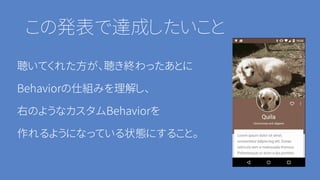
この発表で達成したいこと
聴いてくれた方が、聴き終わったあとに
Behaviorの仕組みを理解し、
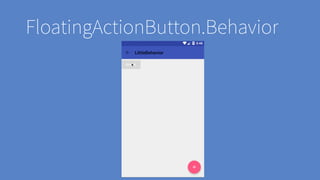
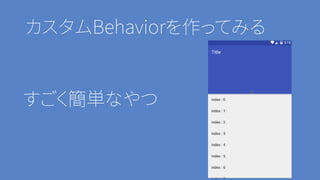
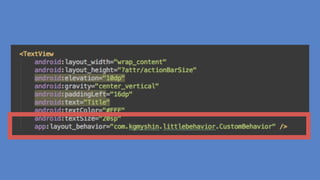
右のようなカスタムBehaviorを
作れるようになっている状態にすること。
目次
・ CoordinatorLayoutとは
・ Behaviorとは
・ Behaviorの仕組み
・ すでにあるBehaviorたち
・ カスタムBehaviorを作ってみる
CoordinatorLayoutとは
CoordinatorLayoutというのは子ビュー同士が
相互に動くようなインタラクションをする場合に使われるViewGroupです。
とくにMaterial DesignガイドラインのScrolling techniquesを実現するときに使う印象。
Behaviorとは
CoordinatorLayoutの子ビューの動きのプラグインです。
だいたいがこの二つのメソッドをOverrideして使っているみたい
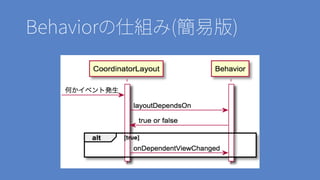
• layoutDependsOn
• onDependentViewChanged
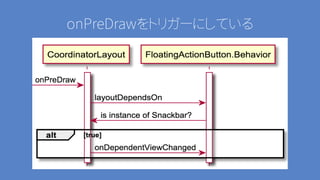
Behaviorの仕組み(簡易版)
これ以外にも
TouchEventやScrollのイベントが取れたりもする
・onNestedFling
・onNestedPreFling
・onNestedPreScroll
・onNestedScroll
・onTouchEvent
:
実際のBehaviorを見てみましょう
FloatingActionButton.Behavior
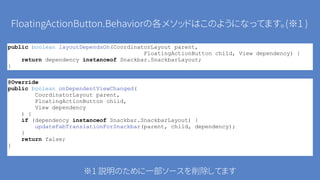
FloatingActionButton.Behaviorの各メソッドはこのようになってます。(※1 )
public boolean layoutDependsOn(CoordinatorLayout parent,
FloatingActionButton child, View dependency) {
return dependency instanceof Snackbar.SnackbarLayout;
}
@Override
public boolean onDependentViewChanged(
CoordinatorLayout parent,
FloatingActionButton child,
View dependency
) {
if (dependency instanceof Snackbar.SnackbarLayout) {
updateFabTranslationForSnackbar(parent, child, dependency);
}
return false;
}
※1 説明のために一部ソースを削除してます
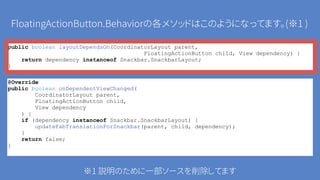
FloatingActionButton.Behaviorの各メソッドはこのようになってます。(※1 )
public boolean layoutDependsOn(CoordinatorLayout parent,
FloatingActionButton child, View dependency) {
return dependency instanceof Snackbar.SnackbarLayout;
}
@Override
public boolean onDependentViewChanged(
CoordinatorLayout parent,
FloatingActionButton child,
View dependency
) {
if (dependency instanceof Snackbar.SnackbarLayout) {
updateFabTranslationForSnackbar(parent, child, dependency);
}
return false;
}
※1 説明のために一部ソースを削除してます
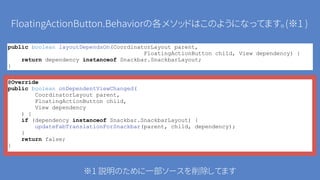
FloatingActionButton.Behaviorの各メソッドはこのようになってます。(※1 )
public boolean layoutDependsOn(CoordinatorLayout parent,
FloatingActionButton child, View dependency) {
return dependency instanceof Snackbar.SnackbarLayout;
}
@Override
public boolean onDependentViewChanged(
CoordinatorLayout parent,
FloatingActionButton child,
View dependency
) {
if (dependency instanceof Snackbar.SnackbarLayout) {
updateFabTranslationForSnackbar(parent, child, dependency);
}
return false;
}
※1 説明のために一部ソースを削除してます
onPreDrawをトリガーにしている
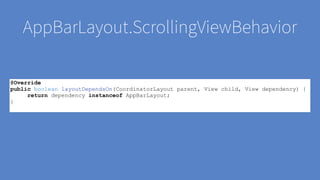
AppBarLayout.ScrollingViewBehavior
@Override
public boolean layoutDependsOn(CoordinatorLayout parent, View child, View dependency) {
return dependency instanceof AppBarLayout;
}
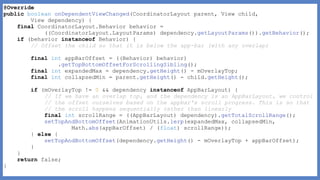
@Override
public boolean onDependentViewChanged(CoordinatorLayout parent, View child,
View dependency) {
final CoordinatorLayout.Behavior behavior =
((CoordinatorLayout.LayoutParams) dependency.getLayoutParams()).getBehavior();
if (behavior instanceof Behavior) {
// Offset the child so that it is below the app-bar (with any overlap)
final int appBarOffset = ((Behavior) behavior)
.getTopBottomOffsetForScrollingSibling();
final int expandedMax = dependency.getHeight() - mOverlayTop;
final int collapsedMin = parent.getHeight() - child.getHeight();
if (mOverlayTop != 0 && dependency instanceof AppBarLayout) {
// If we have an overlap top, and the dependency is an AppBarLayout, we control
// the offset ourselves based on the appbar's scroll progress. This is so that
// the scroll happens sequentially rather than linearly
final int scrollRange = ((AppBarLayout) dependency).getTotalScrollRange();
setTopAndBottomOffset(AnimationUtils.lerp(expandedMax, collapsedMin,
Math.abs(appBarOffset) / (float) scrollRange));
} else {
setTopAndBottomOffset(dependency.getHeight() - mOverlayTop + appBarOffset);
}
}
return false;
}
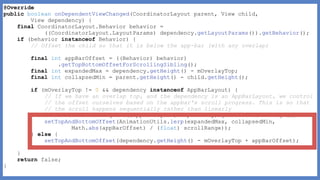
@Override
public boolean onDependentViewChanged(CoordinatorLayout parent, View child,
View dependency) {
final CoordinatorLayout.Behavior behavior =
((CoordinatorLayout.LayoutParams) dependency.getLayoutParams()).getBehavior();
if (behavior instanceof Behavior) {
// Offset the child so that it is below the app-bar (with any overlap)
final int appBarOffset = ((Behavior) behavior)
.getTopBottomOffsetForScrollingSibling();
final int expandedMax = dependency.getHeight() - mOverlayTop;
final int collapsedMin = parent.getHeight() - child.getHeight();
if (mOverlayTop != 0 && dependency instanceof AppBarLayout) {
// If we have an overlap top, and the dependency is an AppBarLayout, we control
// the offset ourselves based on the appbar's scroll progress. This is so that
// the scroll happens sequentially rather than linearly
final int scrollRange = ((AppBarLayout) dependency).getTotalScrollRange();
setTopAndBottomOffset(AnimationUtils.lerp(expandedMax, collapsedMin,
Math.abs(appBarOffset) / (float) scrollRange));
} else {
setTopAndBottomOffset(dependency.getHeight() - mOverlayTop + appBarOffset);
}
}
return false;
}
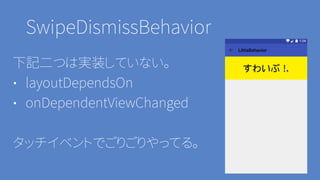
SwipeDismissBehavior
下記二つは実装していない。
• layoutDependsOn
• onDependentViewChanged
タッチイベントでごりごりやってる。
カスタムBehaviorを作ってみる
すごく簡単なやつ
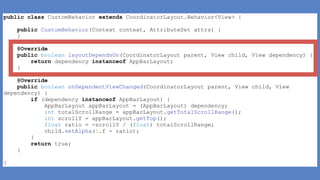
• layoutDependsOn
• onDependentViewChanged
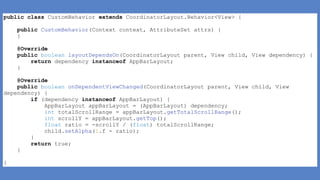
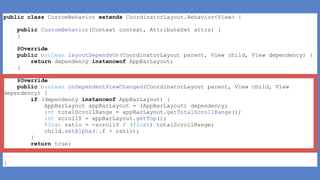
下記を実装するだけ
public class CustomBehavior extends CoordinatorLayout.Behavior<View> {
public CustomBehavior(Context context, AttributeSet attrs) {
}
@Override
public boolean layoutDependsOn(CoordinatorLayout parent, View child, View dependency) {
return dependency instanceof AppBarLayout;
}
@Override
public boolean onDependentViewChanged(CoordinatorLayout parent, View child, View
dependency) {
if (dependency instanceof AppBarLayout) {
AppBarLayout appBarLayout = (AppBarLayout) dependency;
int totalScrollRange = appBarLayout.getTotalScrollRange();
int scrollY = appBarLayout.getTop();
float ratio = -scrollY / (float) totalScrollRange;
child.setAlpha(1.f - ratio);
}
return true;
}
}
public class CustomBehavior extends CoordinatorLayout.Behavior<View> {
public CustomBehavior(Context context, AttributeSet attrs) {
}
@Override
public boolean layoutDependsOn(CoordinatorLayout parent, View child, View dependency) {
return dependency instanceof AppBarLayout;
}
@Override
public boolean onDependentViewChanged(CoordinatorLayout parent, View child, View
dependency) {
if (dependency instanceof AppBarLayout) {
AppBarLayout appBarLayout = (AppBarLayout) dependency;
int totalScrollRange = appBarLayout.getTotalScrollRange();
int scrollY = appBarLayout.getTop();
float ratio = -scrollY / (float) totalScrollRange;
child.setAlpha(1.f - ratio);
}
return true;
}
}
public class CustomBehavior extends CoordinatorLayout.Behavior<View> {
public CustomBehavior(Context context, AttributeSet attrs) {
}
@Override
public boolean layoutDependsOn(CoordinatorLayout parent, View child, View dependency) {
return dependency instanceof AppBarLayout;
}
@Override
public boolean onDependentViewChanged(CoordinatorLayout parent, View child, View
dependency) {
if (dependency instanceof AppBarLayout) {
AppBarLayout appBarLayout = (AppBarLayout) dependency;
int totalScrollRange = appBarLayout.getTotalScrollRange();
int scrollY = appBarLayout.getTop();
float ratio = -scrollY / (float) totalScrollRange;
child.setAlpha(1.f - ratio);
}
return true;
}
}
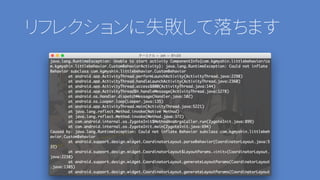
注意 コンストラクタも実装しよう
public CustomBehavior(Context context, AttributeSet attrs) {
}
リフレクションに失敗して落ちます
まとめ
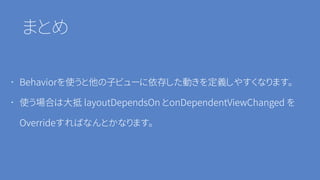
・ Behaviorを使うと他の子ビューに依存した動きを定義しやすくなります。
・ 使う場合は大抵 layoutDependsOn とonDependentViewChanged を
Overrideすればなんとかなります。
宣伝
・ shinobu.apkってのやります!
http://shinobu-apk.connpass.com/event/24921/
shinobu.apkとは
「Shinobu Okanoと愉快な仲間たちが繰り広げるファンタジーな勉強会」
です。
ご静聴ありがとうございました。

Coordinator Layout Behavior