Topic:Executing the pipeline for application
deployment automation
Session- 26
•
DEPARTMENT OF CSE
COURSE NAME – CONTINUOUS DELIVERY & DEVOPS
COURSE CODE – 21CI3246A
2
2
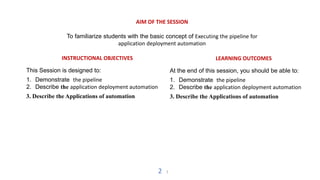
AIM OF THE SESSION
To familiarize students with the basic concept of Executing the pipeline for
application deployment automation
INSTRUCTIONAL OBJECTIVES
This Session is designed to:
1. Demonstrate the pipeline
2. Describe the application deployment automation
3. Describe the Applications of automation
LEARNING OUTCOMES
At the end of this session, you should be able to:
1. Demonstrate the pipeline
2. Describe the application deployment automation
3. Describe the Applications of automation
SESSION INTRODUCTION
AGENDA
1. Pipeline application deployment automation
2. Execution of Pipeline application
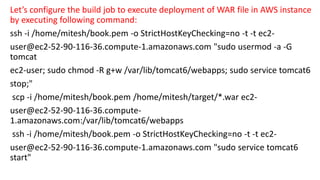
Let’s configure the build job to execute deployment of WAR file in AWS instance
by executing following command:
ssh -i /home/mitesh/book.pem -o StrictHostKeyChecking=no -t -t ec2-
user@ec2-52-90-116-36.compute-1.amazonaws.com "sudo usermod -a -G
tomcat
ec2-user; sudo chmod -R g+w /var/lib/tomcat6/webapps; sudo service tomcat6
stop;"
scp -i /home/mitesh/book.pem /home/mitesh/target/*.war ec2-
user@ec2-52-90-116-36.compute-
1.amazonaws.com:/var/lib/tomcat6/webapps
ssh -i /home/mitesh/book.pem -o StrictHostKeyChecking=no -t -t ec2-
user@ec2-52-90-116-36.compute-1.amazonaws.com "sudo service tomcat6
start"
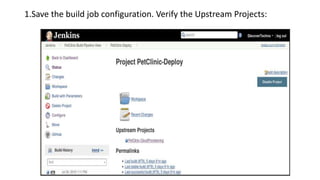
1.Save the build job configuration. Verify the Upstream Projects:
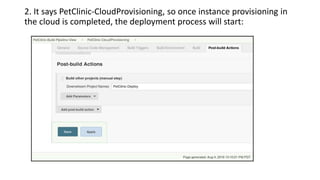
2. It says PetClinic-CloudProvisioning, so once instance provisioning in
the cloud is completed, the deployment process will start:
3. Make sure to configure Downstream Projects in the PetClinicCloudProvisioning
build job.
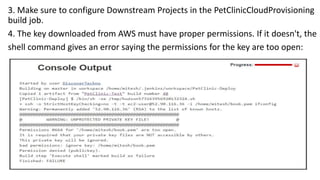
4. The key downloaded from AWS must have proper permissions. If it doesn't, the
shell command gives an error saying the permissions for the key are too open:
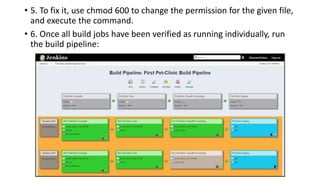
• 5. To fix it, use chmod 600 to change the permission for the given file,
and execute the command.
• 6. Once all build jobs have been verified as running individually, run
the build pipeline:
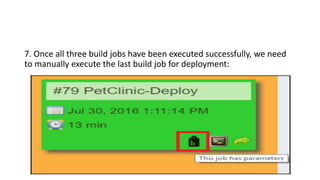
7. Once all three build jobs have been executed successfully, we need
to manually execute the last build job for deployment:
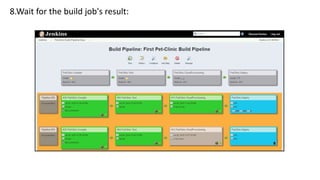
8.Wait for the build job's result:
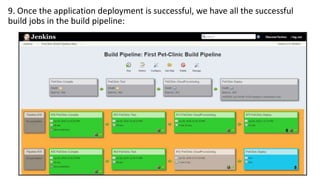
9. Once the application deployment is successful, we have all the successful
build jobs in the build pipeline:
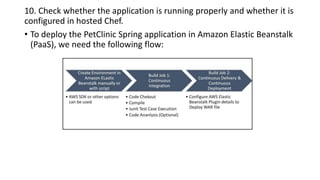
10. Check whether the application is running properly and whether it is
configured in hosted Chef.
• To deploy the PetClinic Spring application in Amazon Elastic Beanstalk
(PaaS), we need the following flow:
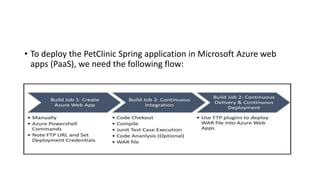
• To deploy the PetClinic Spring application in Microsoft Azure web
apps (PaaS), we need the following flow:
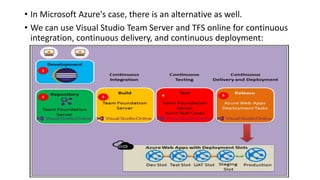
• In Microsoft Azure's case, there is an alternative as well.
• We can use Visual Studio Team Server and TFS online for continuous
integration, continuous delivery, and continuous deployment:
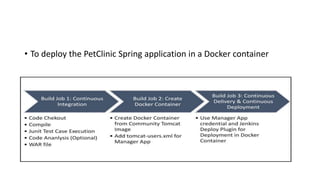
• To deploy the PetClinic Spring application in a Docker container
Executing the pipeline for application deployment
automation
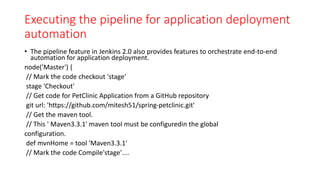
• The pipeline feature in Jenkins 2.0 also provides features to orchestrate end-to-end
automation for application deployment.
node('Master') {
// Mark the code checkout 'stage'
stage 'Checkout'
// Get code for PetClinic Application from a GitHub repository
git url: 'https://github.com/mitesh51/spring-petclinic.git'
// Get the maven tool.
// This ' Maven3.3.1' maven tool must be configuredin the global
configuration.
def mvnHome = tool 'Maven3.3.1'
// Mark the code Compile'stage'....
stage 'Compile'
// Run the maven build
sh "${mvnHome}/bin/mvn clean compile"
// Mark the code for Unit test execution and package 'stage'....
stage 'Test&Package'
sh "${mvnHome}/bin/mvn clean package"
// Mark the code Cloud provisioning 'stage' where instance is allocated
in Amazon EC2
// Once Instance is available, Chef will be used for Configuration
Management
// knife ec2 plugin will be used for instance provisioning in the AWS cloud
stage 'Cloud Provisioning'
sh "ssh -t -t root@192.168.1.39 'ifconfig; rvm use 2.1.0; knife ec2
server create -I ami-1ecae776 -f t2.micro -N DevOpsVMonAWS9 --aws-accesskey-id
XXXXXXXXXXXXXXXXXXX --aws-secret-access-key
XXXXXXXXXXXXXXXXXXXXXXXXXXXXXXXX -S book --identity-file book.pem --sshuser ec2-user -r
role[v-tomcat]'"
}
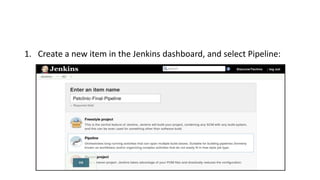
1. Create a new item in the Jenkins dashboard, and select Pipeline:
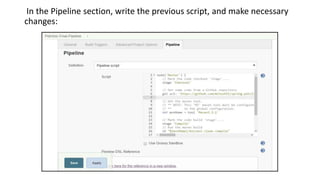
In the Pipeline section, write the previous script, and make necessary
changes:
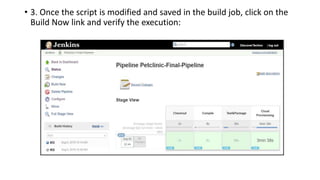
• 3. Once the script is modified and saved in the build job, click on the
Build Now link and verify the execution:
SUMMARY
By following these steps, organizations can establish a robust and
automated deployment pipeline that promotes continuous
integration, testing, and delivery of applications, fostering a DevOps
culture of collaboration and efficiency.
SELF-ASSESSMENT QUESTIONS
What triggers the initiation of a deployment pipeline in the context of
continuous integration?
Why is artifact storage important in the deployment pipeline?
How does a deployment pipeline contribute to the reliability of the
application deployment process?
Explain the purpose of monitoring and verification in the deployment
pipeline.
What role do manual approval gates play in the deployment pipeline?
REFERENCES FOR FURTHER LEARNING OF THE SESSION
TEXTBOOKS:
DevOps for Web Development , Mitesh Soni, Packt Publisher.
Reference Book
Beginning DevOps With Docker , Joseph Muli , Packt Publisher.
WEB REFERNCES/MOOCS:
https://www.coursera.org/programs/cse-faculty-courses-
an6zm/browse?collectionId=&productId=Q5Krn5BMEei3MQqxoqmsBA&productType=course&query
=continuous+delivery+and+devops++course&showMiniModal=true&source=2
THANK YOU
Team – CDD

Continous delivery devoops Session no 26_new.pptx

  • 1.
    Topic:Executing the pipelinefor application deployment automation Session- 26 • DEPARTMENT OF CSE COURSE NAME – CONTINUOUS DELIVERY & DEVOPS COURSE CODE – 21CI3246A
  • 2.
    2 2 AIM OF THESESSION To familiarize students with the basic concept of Executing the pipeline for application deployment automation INSTRUCTIONAL OBJECTIVES This Session is designed to: 1. Demonstrate the pipeline 2. Describe the application deployment automation 3. Describe the Applications of automation LEARNING OUTCOMES At the end of this session, you should be able to: 1. Demonstrate the pipeline 2. Describe the application deployment automation 3. Describe the Applications of automation
  • 3.
    SESSION INTRODUCTION AGENDA 1. Pipelineapplication deployment automation 2. Execution of Pipeline application
  • 4.
    Let’s configure thebuild job to execute deployment of WAR file in AWS instance by executing following command: ssh -i /home/mitesh/book.pem -o StrictHostKeyChecking=no -t -t ec2- user@ec2-52-90-116-36.compute-1.amazonaws.com "sudo usermod -a -G tomcat ec2-user; sudo chmod -R g+w /var/lib/tomcat6/webapps; sudo service tomcat6 stop;" scp -i /home/mitesh/book.pem /home/mitesh/target/*.war ec2- user@ec2-52-90-116-36.compute- 1.amazonaws.com:/var/lib/tomcat6/webapps ssh -i /home/mitesh/book.pem -o StrictHostKeyChecking=no -t -t ec2- user@ec2-52-90-116-36.compute-1.amazonaws.com "sudo service tomcat6 start"
  • 5.
    1.Save the buildjob configuration. Verify the Upstream Projects:
  • 6.
    2. It saysPetClinic-CloudProvisioning, so once instance provisioning in the cloud is completed, the deployment process will start:
  • 7.
    3. Make sureto configure Downstream Projects in the PetClinicCloudProvisioning build job. 4. The key downloaded from AWS must have proper permissions. If it doesn't, the shell command gives an error saying the permissions for the key are too open:
  • 8.
    • 5. Tofix it, use chmod 600 to change the permission for the given file, and execute the command. • 6. Once all build jobs have been verified as running individually, run the build pipeline:
  • 9.
    7. Once allthree build jobs have been executed successfully, we need to manually execute the last build job for deployment:
  • 10.
    8.Wait for thebuild job's result:
  • 11.
    9. Once theapplication deployment is successful, we have all the successful build jobs in the build pipeline:
  • 12.
    10. Check whetherthe application is running properly and whether it is configured in hosted Chef. • To deploy the PetClinic Spring application in Amazon Elastic Beanstalk (PaaS), we need the following flow:
  • 13.
    • To deploythe PetClinic Spring application in Microsoft Azure web apps (PaaS), we need the following flow:
  • 14.
    • In MicrosoftAzure's case, there is an alternative as well. • We can use Visual Studio Team Server and TFS online for continuous integration, continuous delivery, and continuous deployment:
  • 15.
    • To deploythe PetClinic Spring application in a Docker container
  • 16.
    Executing the pipelinefor application deployment automation • The pipeline feature in Jenkins 2.0 also provides features to orchestrate end-to-end automation for application deployment. node('Master') { // Mark the code checkout 'stage' stage 'Checkout' // Get code for PetClinic Application from a GitHub repository git url: 'https://github.com/mitesh51/spring-petclinic.git' // Get the maven tool. // This ' Maven3.3.1' maven tool must be configuredin the global configuration. def mvnHome = tool 'Maven3.3.1' // Mark the code Compile'stage'....
  • 17.
    stage 'Compile' // Runthe maven build sh "${mvnHome}/bin/mvn clean compile" // Mark the code for Unit test execution and package 'stage'.... stage 'Test&Package' sh "${mvnHome}/bin/mvn clean package" // Mark the code Cloud provisioning 'stage' where instance is allocated in Amazon EC2 // Once Instance is available, Chef will be used for Configuration Management // knife ec2 plugin will be used for instance provisioning in the AWS cloud stage 'Cloud Provisioning' sh "ssh -t -t root@192.168.1.39 'ifconfig; rvm use 2.1.0; knife ec2 server create -I ami-1ecae776 -f t2.micro -N DevOpsVMonAWS9 --aws-accesskey-id XXXXXXXXXXXXXXXXXXX --aws-secret-access-key XXXXXXXXXXXXXXXXXXXXXXXXXXXXXXXX -S book --identity-file book.pem --sshuser ec2-user -r role[v-tomcat]'" }
  • 18.
    1. Create anew item in the Jenkins dashboard, and select Pipeline:
  • 19.
    In the Pipelinesection, write the previous script, and make necessary changes:
  • 20.
    • 3. Oncethe script is modified and saved in the build job, click on the Build Now link and verify the execution:
  • 21.
    SUMMARY By following thesesteps, organizations can establish a robust and automated deployment pipeline that promotes continuous integration, testing, and delivery of applications, fostering a DevOps culture of collaboration and efficiency.
  • 22.
    SELF-ASSESSMENT QUESTIONS What triggersthe initiation of a deployment pipeline in the context of continuous integration? Why is artifact storage important in the deployment pipeline? How does a deployment pipeline contribute to the reliability of the application deployment process? Explain the purpose of monitoring and verification in the deployment pipeline. What role do manual approval gates play in the deployment pipeline?
  • 23.
    REFERENCES FOR FURTHERLEARNING OF THE SESSION TEXTBOOKS: DevOps for Web Development , Mitesh Soni, Packt Publisher. Reference Book Beginning DevOps With Docker , Joseph Muli , Packt Publisher. WEB REFERNCES/MOOCS: https://www.coursera.org/programs/cse-faculty-courses- an6zm/browse?collectionId=&productId=Q5Krn5BMEei3MQqxoqmsBA&productType=course&query =continuous+delivery+and+devops++course&showMiniModal=true&source=2
  • 24.