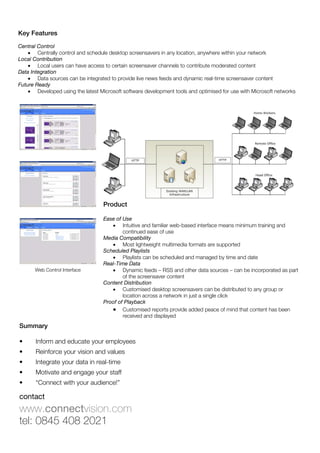
screensaver
Leverage your existing desktop PCs and monitors as strategic communication tools
Concept Overview

By harnessing the latent potential of existing
desktop PCs and monitors, targeted and
scheduled screensavers can provide
powerful and inexpensive desktop
communication channels for a wide range
of organisations.

Dynamic rich multimedia content can be
targeted to individual groups of PCs to inform,
educate and engage with many potential
audiences at different times during each day.


Defining The Difference

Standard Screensaver                                Connectvision Screensaver

•    Putting single message on all screens           •    Multiple messages to multiple audiences
•    One to all generic content                      •    Centrally controlled information cascaded
•    Minimal publishing and user control                  throughout an organisation
                                                     •    Personalised, localised, automated and
                                                          scheduled screensaver content
                                                     •    Multiple users – role based

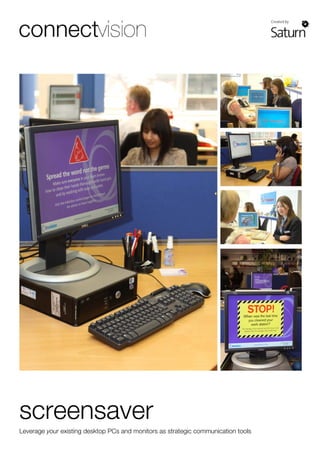
Whenever any PC goes into screensaver mode, the latest centrally controlled multimedia messages
are displayed as a dynamic looping sequence. This flexible, configurable and scalable screensaver
solution has been developed to exploit Microsoft operating systems and standard PC networks.


                                             Typical Messages

                                             •    Hospital news            •   Infection control initiatives
                                             •    Health & safety alerts   •   Recruitment bulletins
                                             •    Staff training           •   Performance feedback
                                             •    Workshop bulletins       •   Security alerts
                                             •    Local transport info     •   Values reinforcement
                                             •    Weather updates          •   Major incident comms
                                             •    Posters and              •   Management briefings
                                                  campaigns


contact
www.connectvision.com
tel: 0845 408 2021
Key Features
Central Control
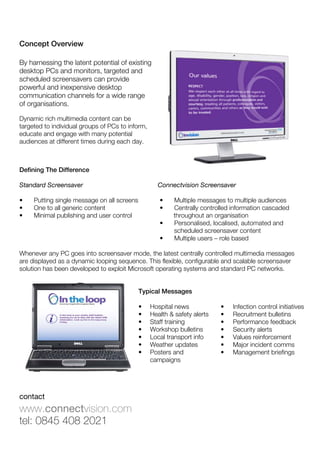
    • Centrally control and schedule desktop screensavers in any location, anywhere within your network
Local Contribution
    • Local users can have access to certain screensaver channels to contribute moderated content
Data Integration
    • Data sources can be integrated to provide live news feeds and dynamic real-time screensaver content
Future Ready
    • Developed using the latest Microsoft software development tools and optimised for use with Microsoft networks


                                   Product

                                   Ease of Use
                                      • Intuitive and familiar web-based interface means minimum training and
                                           continued ease of use
                                   Media Compatibility
                                      • Most lightweight multimedia formats are supported
                                   Scheduled Playlists
                                      • Playlists can be scheduled and managed by time and date
                                   Real-Time Data
       Web Control Interface          • Dynamic feeds – RSS and other data sources – can be incorporated as part
                                           of the screensaver content
                                   Content Distribution
                                      • Customised desktop screensavers can be distributed to any group or
                                           location across a network in just a single click
                                   Proof of Playback
                                      • Customised reports provide added peace of mind that content has been
                                           received and displayed
Summary

•      Inform and educate your employees
•      Reinforce your vision and values
•      Integrate your data in real-time
•      Motivate and engage your staff
•      “Connect with your audience!”

contact
www.connectvision.com
tel: 0845 408 2021
Connectvision Screensaver

  • 1.
    screensaver Leverage your existingdesktop PCs and monitors as strategic communication tools
  • 2.
    Concept Overview By harnessingthe latent potential of existing desktop PCs and monitors, targeted and scheduled screensavers can provide powerful and inexpensive desktop communication channels for a wide range of organisations. Dynamic rich multimedia content can be targeted to individual groups of PCs to inform, educate and engage with many potential audiences at different times during each day. Defining The Difference Standard Screensaver Connectvision Screensaver • Putting single message on all screens • Multiple messages to multiple audiences • One to all generic content • Centrally controlled information cascaded • Minimal publishing and user control throughout an organisation • Personalised, localised, automated and scheduled screensaver content • Multiple users – role based Whenever any PC goes into screensaver mode, the latest centrally controlled multimedia messages are displayed as a dynamic looping sequence. This flexible, configurable and scalable screensaver solution has been developed to exploit Microsoft operating systems and standard PC networks. Typical Messages • Hospital news • Infection control initiatives • Health & safety alerts • Recruitment bulletins • Staff training • Performance feedback • Workshop bulletins • Security alerts • Local transport info • Values reinforcement • Weather updates • Major incident comms • Posters and • Management briefings campaigns contact www.connectvision.com tel: 0845 408 2021
  • 3.
    Key Features Central Control • Centrally control and schedule desktop screensavers in any location, anywhere within your network Local Contribution • Local users can have access to certain screensaver channels to contribute moderated content Data Integration • Data sources can be integrated to provide live news feeds and dynamic real-time screensaver content Future Ready • Developed using the latest Microsoft software development tools and optimised for use with Microsoft networks Product Ease of Use • Intuitive and familiar web-based interface means minimum training and continued ease of use Media Compatibility • Most lightweight multimedia formats are supported Scheduled Playlists • Playlists can be scheduled and managed by time and date Real-Time Data Web Control Interface • Dynamic feeds – RSS and other data sources – can be incorporated as part of the screensaver content Content Distribution • Customised desktop screensavers can be distributed to any group or location across a network in just a single click Proof of Playback • Customised reports provide added peace of mind that content has been received and displayed Summary • Inform and educate your employees • Reinforce your vision and values • Integrate your data in real-time • Motivate and engage your staff • “Connect with your audience!” contact www.connectvision.com tel: 0845 408 2021