Setting up Computer
Networks
Lesson 3: Configuring the Network
Introduction
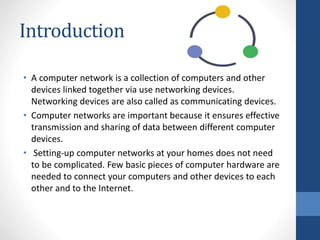
• A computer network is a collection of computers and other
devices linked together via use networking devices.
Networking devices are also called as communicating devices.
• Computer networks are important because it ensures effective
transmission and sharing of data between different computer
devices.
• Setting-up computer networks at your homes does not need
to be complicated. Few basic pieces of computer hardware are
needed to connect your computers and other devices to each
other and to the Internet.
Network Categories
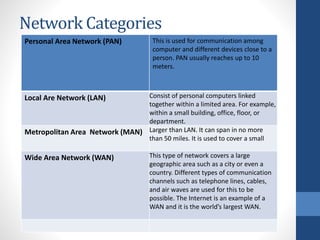
Personal Area Network (PAN) This is used for communication among
computer and different devices close to a
person. PAN usually reaches up to 10
meters.
Local Are Network (LAN) Consist of personal computers linked
together within a limited area. For example,
within a small building, office, floor, or
department.
Metropolitan Area Network (MAN) Larger than LAN. It can span in no more
than 50 miles. It is used to cover a small
Wide Area Network (WAN) This type of network covers a large
geographic area such as a city or even a
country. Different types of communication
channels such as telephone lines, cables,
and air waves are used for this to be
possible. The Internet is an example of a
WAN and it is the world’s largest WAN.
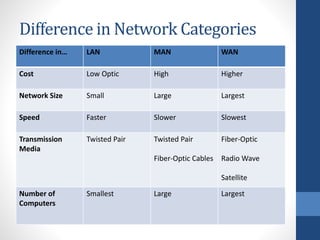
Difference in Network Categories
Difference in… LAN MAN WAN
Cost Low Optic High Higher
Network Size Small Large Largest
Speed Faster Slower Slowest
Transmission
Media
Twisted Pair Twisted Pair
Fiber-Optic Cables
Fiber-Optic
Radio Wave
Satellite
Number of
Computers
Smallest Large Largest
Network Topologies
• Basically, network topology is how the network of
devices/computers is arranged through the connection of
various nodes through lines of connections.
• Imagine a topology as a guide or a map in creating your own
network.
Bus Topology
• This is a network type in which the computers and network devices are
connected to a single cable.
• This type of network can transmit data in only one direction. Each device is
connected to a single cable.
• PROS
• ☑ Cost-effective
• ☑ Cable is required
• ☑ For small networks
• ☑ Easy to understand and create
• ☑ Easy to expand (through joining two cables)
• CONS
• ☑ When cable fails, the whole network fails
• ☑ If network traffic is heavy, the performance of the network decreases
• ☑ Cable has limited length
• ☑ Slower than ring topology
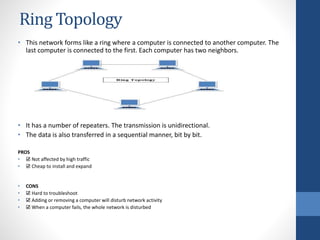
Ring Topology
• This network forms like a ring where a computer is connected to another computer. The
last computer is connected to the first. Each computer has two neighbors.
• It has a number of repeaters. The transmission is unidirectional.
• The data is also transferred in a sequential manner, bit by bit.
PROS
• ☑ Not affected by high traffic
• ☑ Cheap to install and expand
• CONS
• ☑ Hard to troubleshoot
• ☑ Adding or removing a computer will disturb network activity
• ☑ When a computer fails, the whole network is disturbed
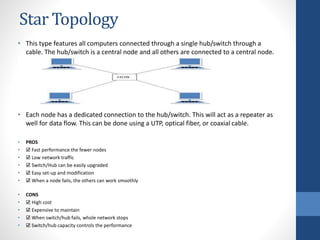
Star Topology
• This type features all computers connected through a single hub/switch through a
cable. The hub/switch is a central node and all others are connected to a central node.
• Each node has a dedicated connection to the hub/switch. This will act as a repeater as
well for data flow. This can be done using a UTP, optical fiber, or coaxial cable.
• PROS
• ☑ Fast performance the fewer nodes
• ☑ Low network traffic
• ☑ Switch/Hub can be easily upgraded
• ☑ Easy set-up and modification
• ☑ When a node fails, the others can work smoothly
• CONS
• ☑ High cost
• ☑ Expensive to maintain
• ☑ When switch/hub fails, whole network stops
• ☑ Switch/hub capacity controls the performance
Mesh Topology
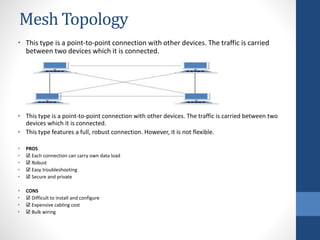
• This type is a point-to-point connection with other devices. The traffic is carried
between two devices which it is connected.
• This type is a point-to-point connection with other devices. The traffic is carried between two
devices which it is connected.
• This type features a full, robust connection. However, it is not flexible.
• PROS
• ☑ Each connection can carry own data load
• ☑ Robust
• ☑ Easy troubleshooting
• ☑ Secure and private
• CONS
• ☑ Difficult to install and configure
• ☑ Expensive cabling cost
• ☑ Bulk wiring
Tree Topology
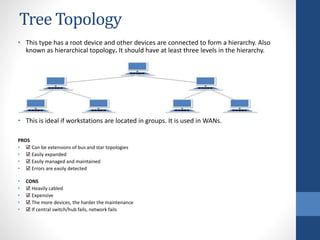
• This type has a root device and other devices are connected to form a hierarchy. Also
known as hierarchical topology. It should have at least three levels in the hierarchy.
• This is ideal if workstations are located in groups. It is used in WANs.
PROS
• ☑ Can be extensions of bus and star topologies
• ☑ Easily expanded
• ☑ Easily managed and maintained
• ☑ Errors are easily detected
• CONS
• ☑ Heavily cabled
• ☑ Expensive
• ☑ The more devices, the harder the maintenance
• ☑ If central switch/hub fails, network fails
Hybrid Topology
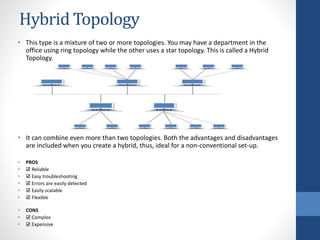
• This type is a mixture of two or more topologies. You may have a department in the
office using ring topology while the other uses a star topology. This is called a Hybrid
Topology.
• It can combine even more than two topologies. Both the advantages and disadvantages
are included when you create a hybrid, thus, ideal for a non-conventional set-up.
• PROS
• ☑ Reliable
• ☑ Easy troubleshooting
• ☑ Errors are easily detected
• ☑ Easily scalable
• ☑ Flexible
• CONS
• ☑ Complex
• ☑ Expensive
Configuring the Network

Configuring the Network

  • 1.
    Setting up Computer Networks Lesson3: Configuring the Network
  • 2.
    Introduction • A computernetwork is a collection of computers and other devices linked together via use networking devices. Networking devices are also called as communicating devices. • Computer networks are important because it ensures effective transmission and sharing of data between different computer devices. • Setting-up computer networks at your homes does not need to be complicated. Few basic pieces of computer hardware are needed to connect your computers and other devices to each other and to the Internet.
  • 3.
    Network Categories Personal AreaNetwork (PAN) This is used for communication among computer and different devices close to a person. PAN usually reaches up to 10 meters. Local Are Network (LAN) Consist of personal computers linked together within a limited area. For example, within a small building, office, floor, or department. Metropolitan Area Network (MAN) Larger than LAN. It can span in no more than 50 miles. It is used to cover a small Wide Area Network (WAN) This type of network covers a large geographic area such as a city or even a country. Different types of communication channels such as telephone lines, cables, and air waves are used for this to be possible. The Internet is an example of a WAN and it is the world’s largest WAN.
  • 4.
    Difference in NetworkCategories Difference in… LAN MAN WAN Cost Low Optic High Higher Network Size Small Large Largest Speed Faster Slower Slowest Transmission Media Twisted Pair Twisted Pair Fiber-Optic Cables Fiber-Optic Radio Wave Satellite Number of Computers Smallest Large Largest
  • 5.
    Network Topologies • Basically,network topology is how the network of devices/computers is arranged through the connection of various nodes through lines of connections. • Imagine a topology as a guide or a map in creating your own network.
  • 6.
    Bus Topology • Thisis a network type in which the computers and network devices are connected to a single cable. • This type of network can transmit data in only one direction. Each device is connected to a single cable. • PROS • ☑ Cost-effective • ☑ Cable is required • ☑ For small networks • ☑ Easy to understand and create • ☑ Easy to expand (through joining two cables) • CONS • ☑ When cable fails, the whole network fails • ☑ If network traffic is heavy, the performance of the network decreases • ☑ Cable has limited length • ☑ Slower than ring topology
  • 7.
    Ring Topology • Thisnetwork forms like a ring where a computer is connected to another computer. The last computer is connected to the first. Each computer has two neighbors. • It has a number of repeaters. The transmission is unidirectional. • The data is also transferred in a sequential manner, bit by bit. PROS • ☑ Not affected by high traffic • ☑ Cheap to install and expand • CONS • ☑ Hard to troubleshoot • ☑ Adding or removing a computer will disturb network activity • ☑ When a computer fails, the whole network is disturbed
  • 8.
    Star Topology • Thistype features all computers connected through a single hub/switch through a cable. The hub/switch is a central node and all others are connected to a central node. • Each node has a dedicated connection to the hub/switch. This will act as a repeater as well for data flow. This can be done using a UTP, optical fiber, or coaxial cable. • PROS • ☑ Fast performance the fewer nodes • ☑ Low network traffic • ☑ Switch/Hub can be easily upgraded • ☑ Easy set-up and modification • ☑ When a node fails, the others can work smoothly • CONS • ☑ High cost • ☑ Expensive to maintain • ☑ When switch/hub fails, whole network stops • ☑ Switch/hub capacity controls the performance
  • 9.
    Mesh Topology • Thistype is a point-to-point connection with other devices. The traffic is carried between two devices which it is connected. • This type is a point-to-point connection with other devices. The traffic is carried between two devices which it is connected. • This type features a full, robust connection. However, it is not flexible. • PROS • ☑ Each connection can carry own data load • ☑ Robust • ☑ Easy troubleshooting • ☑ Secure and private • CONS • ☑ Difficult to install and configure • ☑ Expensive cabling cost • ☑ Bulk wiring
  • 10.
    Tree Topology • Thistype has a root device and other devices are connected to form a hierarchy. Also known as hierarchical topology. It should have at least three levels in the hierarchy. • This is ideal if workstations are located in groups. It is used in WANs. PROS • ☑ Can be extensions of bus and star topologies • ☑ Easily expanded • ☑ Easily managed and maintained • ☑ Errors are easily detected • CONS • ☑ Heavily cabled • ☑ Expensive • ☑ The more devices, the harder the maintenance • ☑ If central switch/hub fails, network fails
  • 11.
    Hybrid Topology • Thistype is a mixture of two or more topologies. You may have a department in the office using ring topology while the other uses a star topology. This is called a Hybrid Topology. • It can combine even more than two topologies. Both the advantages and disadvantages are included when you create a hybrid, thus, ideal for a non-conventional set-up. • PROS • ☑ Reliable • ☑ Easy troubleshooting • ☑ Errors are easily detected • ☑ Easily scalable • ☑ Flexible • CONS • ☑ Complex • ☑ Expensive