DISCOVER . LEARN . EMPOWER
PYTHON BASICS
UNIVERSITY INSTITUTE OF
ENGINEERING
DEPARTMENT OF COMPUTER SCIENCE
AND ENGINEERING
Programming in Python
Python If ... Else
• Python supports the usual logical conditions from mathematics:
• Equals: a == b
• Not Equals: a != b
• Less than: a < b
• Less than or equal to: a <= b
• Greater than: a > b
• Greater than or equal to: a >= b
• These conditions can be used in several ways, most commonly in "if statements" and loops.
• An "if statement" is written by using the if keyword.
2
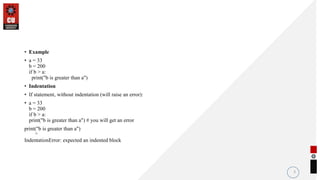
• Example
• a = 33
b = 200
if b > a:
print("b is greater than a")
• Indentation
• If statement, without indentation (will raise an error):
• a = 33
b = 200
if b > a:
print("b is greater than a") # you will get an error
print("b is greater than a")
^
IndentationError: expected an indented block
3
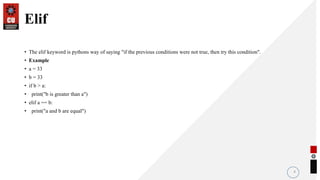
Elif
• The elif keyword is pythons way of saying "if the previous conditions were not true, then try this condition".
• Example
• a = 33
• b = 33
• if b > a:
• print("b is greater than a")
• elif a == b:
• print("a and b are equal")
4
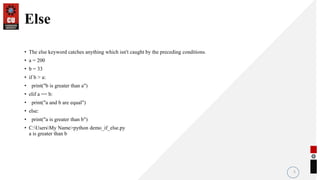
Else
• The else keyword catches anything which isn't caught by the preceding conditions.
• a = 200
• b = 33
• if b > a:
• print("b is greater than a")
• elif a == b:
• print("a and b are equal")
• else:
• print("a is greater than b")
• C:UsersMy Name>python demo_if_else.py
a is greater than b
5
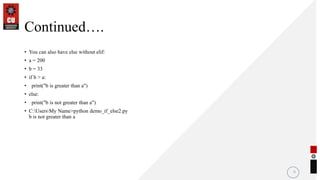
Continued….
• You can also have else without elif:
• a = 200
• b = 33
• if b > a:
• print("b is greater than a")
• else:
• print("b is not greater than a")
• C:UsersMy Name>python demo_if_else2.py
b is not greater than a
6
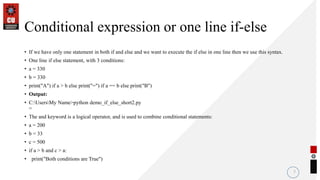
Conditional expression or one line if-else
• If we have only one statement in both if and else and we want to execute the if else in one line then we use this syntax.
• One line if else statement, with 3 conditions:
• a = 330
• b = 330
• print("A") if a > b else print("=") if a == b else print("B")
• Output:
• C:UsersMy Name>python demo_if_else_short2.py
=
• The and keyword is a logical operator, and is used to combine conditional statements:
• a = 200
• b = 33
• c = 500
• if a > b and c > a:
• print("Both conditions are True")
7
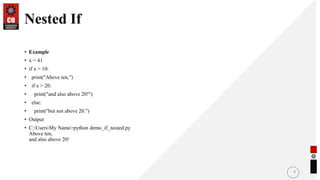
Nested If
• Example
• x = 41
• if x > 10:
• print("Above ten,")
• if x > 20:
• print("and also above 20!")
• else:
• print("but not above 20.")
• Output
• C:UsersMy Name>python demo_if_nested.py
Above ten,
and also above 20!
8
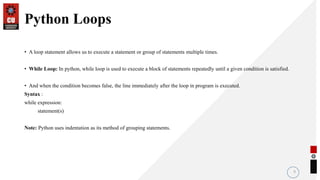
Python Loops
• A loop statement allows us to execute a statement or group of statements multiple times.
• While Loop: In python, while loop is used to execute a block of statements repeatedly until a given condition is satisfied.
• And when the condition becomes false, the line immediately after the loop in program is executed.
Syntax :
while expression:
statement(s)
Note: Python uses indentation as its method of grouping statements.
9
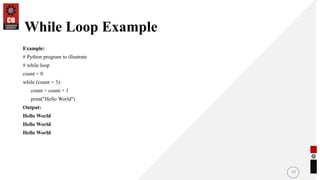
While Loop Example
Example:
# Python program to illustrate
# while loop
count = 0
while (count < 3):
count = count + 1
print("Hello World")
Output:
Hello World
Hello World
Hello World
10
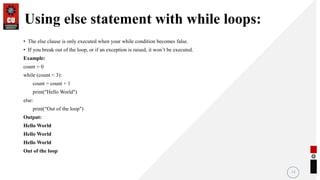
Using else statement with while loops:
• The else clause is only executed when your while condition becomes false.
• If you break out of the loop, or if an exception is raised, it won’t be executed.
Example:
count = 0
while (count < 3):
count = count + 1
print("Hello World")
else:
print(“Out of the loop")
Output:
Hello World
Hello World
Hello World
Out of the loop
11
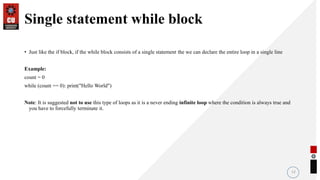
Single statement while block
• Just like the if block, if the while block consists of a single statement the we can declare the entire loop in a single line
Example:
count = 0
while (count == 0): print("Hello World")
Note: It is suggested not to use this type of loops as it is a never ending infinite loop where the condition is always true and
you have to forcefully terminate it.
12
THANK YOU
36

Conditional Statements.pptx

  • 1.
    DISCOVER . LEARN. EMPOWER PYTHON BASICS UNIVERSITY INSTITUTE OF ENGINEERING DEPARTMENT OF COMPUTER SCIENCE AND ENGINEERING Programming in Python
  • 2.
    Python If ...Else • Python supports the usual logical conditions from mathematics: • Equals: a == b • Not Equals: a != b • Less than: a < b • Less than or equal to: a <= b • Greater than: a > b • Greater than or equal to: a >= b • These conditions can be used in several ways, most commonly in "if statements" and loops. • An "if statement" is written by using the if keyword. 2
  • 3.
    • Example • a= 33 b = 200 if b > a: print("b is greater than a") • Indentation • If statement, without indentation (will raise an error): • a = 33 b = 200 if b > a: print("b is greater than a") # you will get an error print("b is greater than a") ^ IndentationError: expected an indented block 3
  • 4.
    Elif • The elifkeyword is pythons way of saying "if the previous conditions were not true, then try this condition". • Example • a = 33 • b = 33 • if b > a: • print("b is greater than a") • elif a == b: • print("a and b are equal") 4
  • 5.
    Else • The elsekeyword catches anything which isn't caught by the preceding conditions. • a = 200 • b = 33 • if b > a: • print("b is greater than a") • elif a == b: • print("a and b are equal") • else: • print("a is greater than b") • C:UsersMy Name>python demo_if_else.py a is greater than b 5
  • 6.
    Continued…. • You canalso have else without elif: • a = 200 • b = 33 • if b > a: • print("b is greater than a") • else: • print("b is not greater than a") • C:UsersMy Name>python demo_if_else2.py b is not greater than a 6
  • 7.
    Conditional expression orone line if-else • If we have only one statement in both if and else and we want to execute the if else in one line then we use this syntax. • One line if else statement, with 3 conditions: • a = 330 • b = 330 • print("A") if a > b else print("=") if a == b else print("B") • Output: • C:UsersMy Name>python demo_if_else_short2.py = • The and keyword is a logical operator, and is used to combine conditional statements: • a = 200 • b = 33 • c = 500 • if a > b and c > a: • print("Both conditions are True") 7
  • 8.
    Nested If • Example •x = 41 • if x > 10: • print("Above ten,") • if x > 20: • print("and also above 20!") • else: • print("but not above 20.") • Output • C:UsersMy Name>python demo_if_nested.py Above ten, and also above 20! 8
  • 9.
    Python Loops • Aloop statement allows us to execute a statement or group of statements multiple times. • While Loop: In python, while loop is used to execute a block of statements repeatedly until a given condition is satisfied. • And when the condition becomes false, the line immediately after the loop in program is executed. Syntax : while expression: statement(s) Note: Python uses indentation as its method of grouping statements. 9
  • 10.
    While Loop Example Example: #Python program to illustrate # while loop count = 0 while (count < 3): count = count + 1 print("Hello World") Output: Hello World Hello World Hello World 10
  • 11.
    Using else statementwith while loops: • The else clause is only executed when your while condition becomes false. • If you break out of the loop, or if an exception is raised, it won’t be executed. Example: count = 0 while (count < 3): count = count + 1 print("Hello World") else: print(“Out of the loop") Output: Hello World Hello World Hello World Out of the loop 11
  • 12.
    Single statement whileblock • Just like the if block, if the while block consists of a single statement the we can declare the entire loop in a single line Example: count = 0 while (count == 0): print("Hello World") Note: It is suggested not to use this type of loops as it is a never ending infinite loop where the condition is always true and you have to forcefully terminate it. 12
  • 13.