Programming Fundamentals
(SE111)
BY
FAIZA LATIF
Department of Software Engineering
Federal Urdu University of Arts, Sciences and
Technology Islamabad
Week 1 Lectures by Faiza Latif, March 11, 2024, Department of Software Engineering,
Federal Urdu University of Arts, Sciences and Technology Islamabad
1
LECTURE 01
Week 1 Lectures by Faiza Latif, March 11, 2024, Department of Software Engineering,
Federal Urdu University of Arts, Sciences and Technology Islamabad
2
About the Instructor
► Course Instructor: Faiza Latif
► Email: fyzalatyf22@gmail.com
► Education: MS Software Engineering (COMSATS University Islamabad)
► BS Information Technology (Quaid-i-Azam University Islamabad)
Week 1 Lectures by Faiza Latif, March 11, 2024, Department of Software Engineering, Federal Urdu
University of Arts, Sciences and Technology Islamabad
3
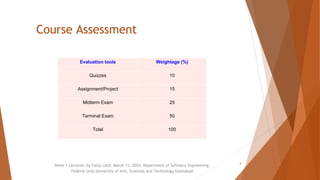
Course Assessment
Evaluation tools Weightage (%)
Quizzes 10
Assignment/Project 15
Midterm Exam 25
Terminal Exam 50
Total 100
Week 1 Lectures by Faiza Latif, March 11, 2024, Department of Software Engineering,
Federal Urdu University of Arts, Sciences and Technology Islamabad
4
Week 1 Lectures by Faiza Latif, March 11, 2024, Department of Software Engineering,
Federal Urdu University of Arts, Sciences and Technology Islamabad
About Course
5
► Provides fundamental concepts of
programming.
► Problem solving Steps.
► Role of compiler and linker.
► Introduction to algorithms.
► Basic data types and variables.
► Input/output constructs.
► Arithmetic, comparison and logical
operators.
► Lists, string and string operations.
► Function definition and calling.
► Pointers/references, static and
dynamic memory allocation &
► File I/O operations.
Reading Material
► Text Books:
1. Problem Solving and Program Design in C++, 7th
Edition by Jeri R. Hanly & Elliot B. Koffman.
2. Starting out with Programming Logic & Degins, 4th
Edition, Tony Gaddis,
► Reference Books:
1. Object Oriented Programming in C++ by Robert
Lafore
2. The C Programming Language, 2nd Edition by Brian
W. Kernighan, Dennis M. Ritchie
Week 1 Lectures by Faiza Latif, March 11, 2024, Department of Software
Engineering, Federal Urdu University of Arts, Sciences and Technology Islamabad
6
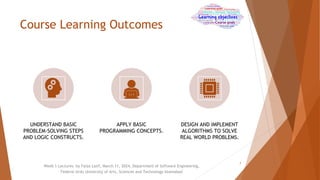
Course Learning Outcomes
UNDERSTAND BASIC
PROBLEM-SOLVING STEPS
AND LOGIC CONSTRUCTS.
APPLY BASIC
PROGRAMMING CONCEPTS.
DESIGN AND IMPLEMENT
ALGORITHMS TO SOLVE
REAL WORLD PROBLEMS.
Week 1 Lectures by Faiza Latif, March 11, 2024, Department of Software Engineering,
Federal Urdu University of Arts, Sciences and Technology Islamabad
7
Policy & Procedures
Evaluation
► Attendance Policy:
Every student must attend 75% of the
lectures delivered in this course. The students falling
short of required percentage of attendance of
lectures shall not be allowed to appear in the
terminal examination of this course and shall be
treated as having failed this course.
► Missing Exam:
No makeup will be given for any exam.
Week 1 Lectures by Faiza Latif, March 11, 2024, Department of Software Engineering,
Federal Urdu University of Arts, Sciences and Technology Islamabad
8
Electronic Computers Then Now:
► The first electronic computer was built in the late 1930s by Dr. John
Atanasoff and Clifford Berry at Iowa State University.
► The first large-scale, general-purpose electronic digital computer,
called the ENIAC, was completed in 1946 at the University of
Pennsylvania.
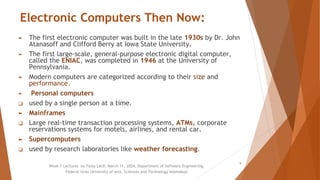
► Modern computers are categorized according to their size and
performance.
► Personal computers
❑ used by a single person at a time.
► Mainframes
❑ Large real-time transaction processing systems, ATMs, corporate
reservations systems for motels, airlines, and rental car.
► Supercomputers
❑ used by research laboratories like weather forecasting.
Week 1 Lectures by Faiza Latif, March 11, 2024, Department of Software Engineering,
Federal Urdu University of Arts, Sciences and Technology Islamabad
9
Week 1 Lectures by Faiza Latif, March 11, 2024, Department of Software Engineering,
Federal Urdu University of Arts, Sciences and Technology Islamabad
10
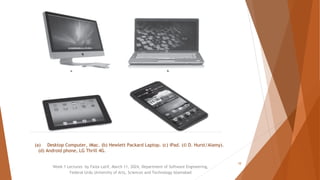
(a) Desktop Computer, iMac. (b) Hewlett Packard Laptop. (c) iPad. (© D. Hurst/Alamy).
(d) Android phone, LG Thrill 4G.
Computer System
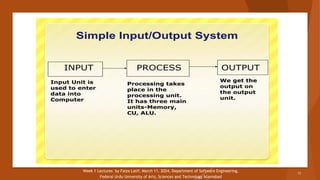
► A Computer System is the combination of
hardware and software. A typical
Computer System has a memory and set of
states that define the relationship
between the system’s inputs and outputs.
Week 1 Lectures by Faiza Latif, March 11, 2024, Department of Software Engineering,
Federal Urdu University of Arts, Sciences and Technology Islamabad
11
Week 1 Lectures by Faiza Latif, March 11, 2024, Department of Software Engineering,
Federal Urdu University of Arts, Sciences and Technology Islamabad
12
Hardware & Software
► Hardware
Physical parts of the computer, including processor
and memory chips, input/output devices, tapes, disks,
modems, cable, etc.
► Software
Programs that tell the computer what to do. It
provides instructions that the CPU will need to carry
out.
Week 1 Lectures by Faiza Latif, March 11, 2024, Department of Software Engineering,
Federal Urdu University of Arts, Sciences and Technology Islamabad
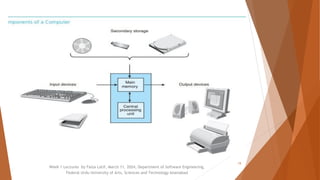
Computer Hardware
Following are the computer hardware components:
► Main memory
► Secondary memory, which includes storage devices such as
hard disks, CDs, DVDs, and flash drives
► Central processing unit (CPU)
► Input devices, such as keyboards, mouses, touch pads,
scanners, joysticks
► Output devices, such as monitors, printers, and speakers
Week 1 Lectures by Faiza Latif, March 11, 2024, Department of Software Engineering,
Federal Urdu University of Arts, Sciences and Technology Islamabad
14
Week 1 Lectures by Faiza Latif, March 11, 2024, Department of Software Engineering,
Federal Urdu University of Arts, Sciences and Technology Islamabad
15
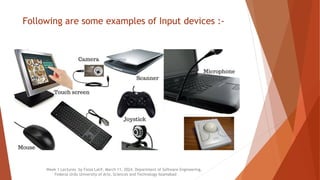
Input Devices
► The data that is given to the computer
is called Input.
► Input devices are used to input data
and instructions into the computer.
► These devices send this data to the
Processing Unit.
► Most common input devices are
keyboard and mouse.
Week 1 Lectures by Faiza Latif, March 11, 2024, Department of Software Engineering,
Federal Urdu University of Arts, Sciences and Technology Islamabad
16
Following are some examples of Input devices :-
Week 1 Lectures by Faiza Latif, March 11, 2024, Department of Software Engineering,
Federal Urdu University of Arts, Sciences and Technology Islamabad
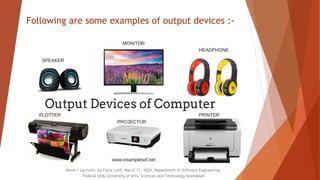
Output Devices
► The data processed into useful information is called output.
► Output devices are used to display the result of processing.
► Most common output devices include monitor and printer.
Week 1 Lectures by Faiza Latif, March 11, 2024, Department of Software Engineering,
Federal Urdu University of Arts, Sciences and Technology Islamabad
18
Following are some examples of output devices :-
Week 1 Lectures by Faiza Latif, March 11, 2024, Department of Software Engineering,
Federal Urdu University of Arts, Sciences and Technology Islamabad
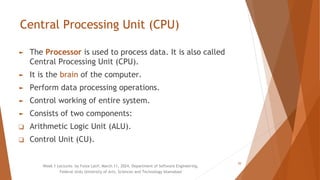
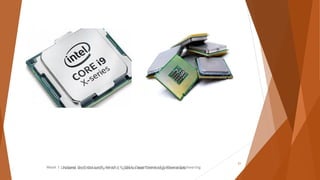
Central Processing Unit (CPU)
► The Processor is used to process data. It is also called
Central Processing Unit (CPU).
► It is the brain of the computer.
► Perform data processing operations.
► Control working of entire system.
► Consists of two components:
❑ Arithmetic Logic Unit (ALU).
❑ Control Unit (CU).
Week 1 Lectures by Faiza Latif, March 11, 2024, Department of Software Engineering,
Federal Urdu University of Arts, Sciences and Technology Islamabad
20
Week 1 Lectures by Faiza Latif, March 11, 2024, Department of Software Engineering
Federal Urdu University of Arts, Sciences and Technology Islamabad
eering,
21
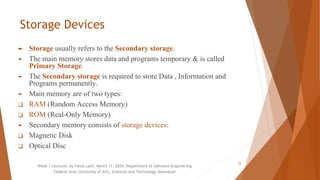
Storage Devices
► Storage usually refers to the Secondary storage.
► The main memory stores data and programs temporary & is called
Primary Storage.
► The Secondary storage is required to store Data , Information and
Programs permanently.
► Main memory are of two types:
❑ RAM (Random Access Memory)
❑ ROM (Real-Only Memory)
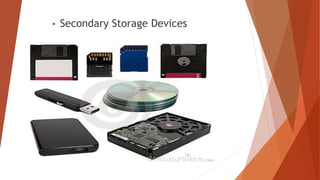
► Secondary memory consists of storage devices:
❑ Magnetic Disk
❑ Optical Disc
Week 1 Lectures by Faiza Latif, March 11, 2024, Department of Software Engineering
Federal Urdu University of Arts, Sciences and Technology Islamabad
22
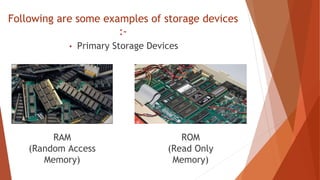
Following are some examples of storage devices
:-
• Primary Storage Devices
RAM
(Random Access
Memory)
ROM
(Read Only
Memory)
• Secondary Storage Devices
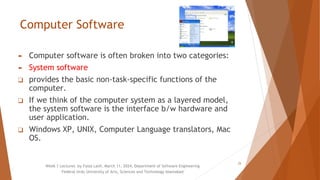
Computer Software
► Computer software is often broken into two categories:
► System software
❑ provides the basic non-task-specific functions of the
computer.
❑ If we think of the computer system as a layered model,
the system software is the interface b/w hardware and
user application.
❑ Windows XP, UNIX, Computer Language translators, Mac
OS.
Week 1 Lectures by Faiza Latif, March 11, 2024, Department of Software Engineering
Federal Urdu University of Arts, Sciences and Technology Islamabad
25
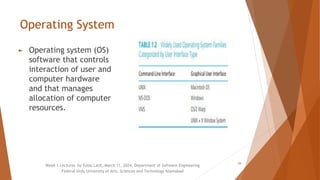
Operating System
► Operating system (OS)
software that controls
interaction of user and
computer hardware
and that manages
allocation of computer
resources.
Week 1 Lectures by Faiza Latif, March 11, 2024, Department of Software Engineering
Federal Urdu University of Arts, Sciences and Technology Islamabad
26
Computer Software
► Application software
❑ used by users to accomplish specific tasks.
❑ It includes things such as database
programs, word processors, Web browsers
and spreadsheets.
❑ Microsoft office, Adobe photoshop, Google
chrome. VLC Media players, Tally etc.
Week 1 Lectures by Faiza Latif, March 11, 2024, Department of Software Engineering
Federal Urdu University of Arts, Sciences and Technology Islamabad
27
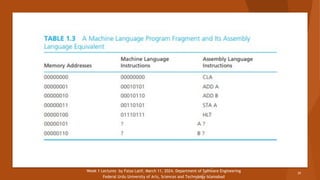
Computer Languages
► Developing new software requires writing lists of instructions for a
computer to execute.
► Machine Language:
► A collection of binary numbers understood by computers.
► A drawback of machine language is that it is not standardized: There
is a different machine language for every type of CPU.
► Assembly Language:
► A language in which computer operations are represented by
mnemonic codes rather than binary numbers and variables can be
given names rather than binary memory addresses.
► Each assembly language instruction corresponds to exactly one
machine instruction.
Week 1 Lectures by Faiza Latif, March 11, 2024, Department of Software Engineering
Federal Urdu University of Arts, Sciences and Technology Islamabad
28
Week 1 Lectures by Faiza Latif, March 11, 2024, Department of Software Engineering
Federal Urdu University of Arts, Sciences and Technology Islamabad
29
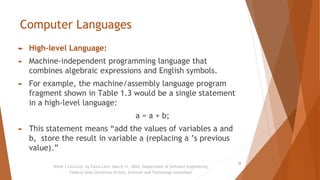
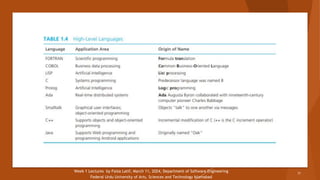
Computer Languages
► High-level Language:
► Machine-independent programming language that
combines algebraic expressions and English symbols.
► For example, the machine/assembly language program
fragment shown in Table 1.3 would be a single statement
in a high-level language:
a = a + b;
► This statement means “add the values of variables a and
b, store the result in variable a (replacing a ’s previous
value).”
Week 1 Lectures by Faiza Latif, March 11, 2024, Department of Software Engineering
Federal Urdu University of Arts, Sciences and Technology Islamabad
30
Week 1 Lectures by Faiza Latif, March 11, 2024, Department of Software Engineering
Federal Urdu University of Arts, Sciences and Technology Islamabad
31

Computers History and Hardware/software.

  • 1.
    Programming Fundamentals (SE111) BY FAIZA LATIF Departmentof Software Engineering Federal Urdu University of Arts, Sciences and Technology Islamabad Week 1 Lectures by Faiza Latif, March 11, 2024, Department of Software Engineering, Federal Urdu University of Arts, Sciences and Technology Islamabad 1
  • 2.
    LECTURE 01 Week 1Lectures by Faiza Latif, March 11, 2024, Department of Software Engineering, Federal Urdu University of Arts, Sciences and Technology Islamabad 2
  • 3.
    About the Instructor ►Course Instructor: Faiza Latif ► Email: fyzalatyf22@gmail.com ► Education: MS Software Engineering (COMSATS University Islamabad) ► BS Information Technology (Quaid-i-Azam University Islamabad) Week 1 Lectures by Faiza Latif, March 11, 2024, Department of Software Engineering, Federal Urdu University of Arts, Sciences and Technology Islamabad 3
  • 4.
    Course Assessment Evaluation toolsWeightage (%) Quizzes 10 Assignment/Project 15 Midterm Exam 25 Terminal Exam 50 Total 100 Week 1 Lectures by Faiza Latif, March 11, 2024, Department of Software Engineering, Federal Urdu University of Arts, Sciences and Technology Islamabad 4
  • 5.
    Week 1 Lecturesby Faiza Latif, March 11, 2024, Department of Software Engineering, Federal Urdu University of Arts, Sciences and Technology Islamabad About Course 5 ► Provides fundamental concepts of programming. ► Problem solving Steps. ► Role of compiler and linker. ► Introduction to algorithms. ► Basic data types and variables. ► Input/output constructs. ► Arithmetic, comparison and logical operators. ► Lists, string and string operations. ► Function definition and calling. ► Pointers/references, static and dynamic memory allocation & ► File I/O operations.
  • 6.
    Reading Material ► TextBooks: 1. Problem Solving and Program Design in C++, 7th Edition by Jeri R. Hanly & Elliot B. Koffman. 2. Starting out with Programming Logic & Degins, 4th Edition, Tony Gaddis, ► Reference Books: 1. Object Oriented Programming in C++ by Robert Lafore 2. The C Programming Language, 2nd Edition by Brian W. Kernighan, Dennis M. Ritchie Week 1 Lectures by Faiza Latif, March 11, 2024, Department of Software Engineering, Federal Urdu University of Arts, Sciences and Technology Islamabad 6
  • 7.
    Course Learning Outcomes UNDERSTANDBASIC PROBLEM-SOLVING STEPS AND LOGIC CONSTRUCTS. APPLY BASIC PROGRAMMING CONCEPTS. DESIGN AND IMPLEMENT ALGORITHMS TO SOLVE REAL WORLD PROBLEMS. Week 1 Lectures by Faiza Latif, March 11, 2024, Department of Software Engineering, Federal Urdu University of Arts, Sciences and Technology Islamabad 7
  • 8.
    Policy & Procedures Evaluation ►Attendance Policy: Every student must attend 75% of the lectures delivered in this course. The students falling short of required percentage of attendance of lectures shall not be allowed to appear in the terminal examination of this course and shall be treated as having failed this course. ► Missing Exam: No makeup will be given for any exam. Week 1 Lectures by Faiza Latif, March 11, 2024, Department of Software Engineering, Federal Urdu University of Arts, Sciences and Technology Islamabad 8
  • 9.
    Electronic Computers ThenNow: ► The first electronic computer was built in the late 1930s by Dr. John Atanasoff and Clifford Berry at Iowa State University. ► The first large-scale, general-purpose electronic digital computer, called the ENIAC, was completed in 1946 at the University of Pennsylvania. ► Modern computers are categorized according to their size and performance. ► Personal computers ❑ used by a single person at a time. ► Mainframes ❑ Large real-time transaction processing systems, ATMs, corporate reservations systems for motels, airlines, and rental car. ► Supercomputers ❑ used by research laboratories like weather forecasting. Week 1 Lectures by Faiza Latif, March 11, 2024, Department of Software Engineering, Federal Urdu University of Arts, Sciences and Technology Islamabad 9
  • 10.
    Week 1 Lecturesby Faiza Latif, March 11, 2024, Department of Software Engineering, Federal Urdu University of Arts, Sciences and Technology Islamabad 10 (a) Desktop Computer, iMac. (b) Hewlett Packard Laptop. (c) iPad. (© D. Hurst/Alamy). (d) Android phone, LG Thrill 4G.
  • 11.
    Computer System ► AComputer System is the combination of hardware and software. A typical Computer System has a memory and set of states that define the relationship between the system’s inputs and outputs. Week 1 Lectures by Faiza Latif, March 11, 2024, Department of Software Engineering, Federal Urdu University of Arts, Sciences and Technology Islamabad 11
  • 12.
    Week 1 Lecturesby Faiza Latif, March 11, 2024, Department of Software Engineering, Federal Urdu University of Arts, Sciences and Technology Islamabad 12
  • 13.
    Hardware & Software ►Hardware Physical parts of the computer, including processor and memory chips, input/output devices, tapes, disks, modems, cable, etc. ► Software Programs that tell the computer what to do. It provides instructions that the CPU will need to carry out. Week 1 Lectures by Faiza Latif, March 11, 2024, Department of Software Engineering, Federal Urdu University of Arts, Sciences and Technology Islamabad
  • 14.
    Computer Hardware Following arethe computer hardware components: ► Main memory ► Secondary memory, which includes storage devices such as hard disks, CDs, DVDs, and flash drives ► Central processing unit (CPU) ► Input devices, such as keyboards, mouses, touch pads, scanners, joysticks ► Output devices, such as monitors, printers, and speakers Week 1 Lectures by Faiza Latif, March 11, 2024, Department of Software Engineering, Federal Urdu University of Arts, Sciences and Technology Islamabad 14
  • 15.
    Week 1 Lecturesby Faiza Latif, March 11, 2024, Department of Software Engineering, Federal Urdu University of Arts, Sciences and Technology Islamabad 15
  • 16.
    Input Devices ► Thedata that is given to the computer is called Input. ► Input devices are used to input data and instructions into the computer. ► These devices send this data to the Processing Unit. ► Most common input devices are keyboard and mouse. Week 1 Lectures by Faiza Latif, March 11, 2024, Department of Software Engineering, Federal Urdu University of Arts, Sciences and Technology Islamabad 16
  • 17.
    Following are someexamples of Input devices :- Week 1 Lectures by Faiza Latif, March 11, 2024, Department of Software Engineering, Federal Urdu University of Arts, Sciences and Technology Islamabad
  • 18.
    Output Devices ► Thedata processed into useful information is called output. ► Output devices are used to display the result of processing. ► Most common output devices include monitor and printer. Week 1 Lectures by Faiza Latif, March 11, 2024, Department of Software Engineering, Federal Urdu University of Arts, Sciences and Technology Islamabad 18
  • 19.
    Following are someexamples of output devices :- Week 1 Lectures by Faiza Latif, March 11, 2024, Department of Software Engineering, Federal Urdu University of Arts, Sciences and Technology Islamabad
  • 20.
    Central Processing Unit(CPU) ► The Processor is used to process data. It is also called Central Processing Unit (CPU). ► It is the brain of the computer. ► Perform data processing operations. ► Control working of entire system. ► Consists of two components: ❑ Arithmetic Logic Unit (ALU). ❑ Control Unit (CU). Week 1 Lectures by Faiza Latif, March 11, 2024, Department of Software Engineering, Federal Urdu University of Arts, Sciences and Technology Islamabad 20
  • 21.
    Week 1 Lecturesby Faiza Latif, March 11, 2024, Department of Software Engineering Federal Urdu University of Arts, Sciences and Technology Islamabad eering, 21
  • 22.
    Storage Devices ► Storageusually refers to the Secondary storage. ► The main memory stores data and programs temporary & is called Primary Storage. ► The Secondary storage is required to store Data , Information and Programs permanently. ► Main memory are of two types: ❑ RAM (Random Access Memory) ❑ ROM (Real-Only Memory) ► Secondary memory consists of storage devices: ❑ Magnetic Disk ❑ Optical Disc Week 1 Lectures by Faiza Latif, March 11, 2024, Department of Software Engineering Federal Urdu University of Arts, Sciences and Technology Islamabad 22
  • 23.
    Following are someexamples of storage devices :- • Primary Storage Devices RAM (Random Access Memory) ROM (Read Only Memory)
  • 24.
  • 25.
    Computer Software ► Computersoftware is often broken into two categories: ► System software ❑ provides the basic non-task-specific functions of the computer. ❑ If we think of the computer system as a layered model, the system software is the interface b/w hardware and user application. ❑ Windows XP, UNIX, Computer Language translators, Mac OS. Week 1 Lectures by Faiza Latif, March 11, 2024, Department of Software Engineering Federal Urdu University of Arts, Sciences and Technology Islamabad 25
  • 26.
    Operating System ► Operatingsystem (OS) software that controls interaction of user and computer hardware and that manages allocation of computer resources. Week 1 Lectures by Faiza Latif, March 11, 2024, Department of Software Engineering Federal Urdu University of Arts, Sciences and Technology Islamabad 26
  • 27.
    Computer Software ► Applicationsoftware ❑ used by users to accomplish specific tasks. ❑ It includes things such as database programs, word processors, Web browsers and spreadsheets. ❑ Microsoft office, Adobe photoshop, Google chrome. VLC Media players, Tally etc. Week 1 Lectures by Faiza Latif, March 11, 2024, Department of Software Engineering Federal Urdu University of Arts, Sciences and Technology Islamabad 27
  • 28.
    Computer Languages ► Developingnew software requires writing lists of instructions for a computer to execute. ► Machine Language: ► A collection of binary numbers understood by computers. ► A drawback of machine language is that it is not standardized: There is a different machine language for every type of CPU. ► Assembly Language: ► A language in which computer operations are represented by mnemonic codes rather than binary numbers and variables can be given names rather than binary memory addresses. ► Each assembly language instruction corresponds to exactly one machine instruction. Week 1 Lectures by Faiza Latif, March 11, 2024, Department of Software Engineering Federal Urdu University of Arts, Sciences and Technology Islamabad 28
  • 29.
    Week 1 Lecturesby Faiza Latif, March 11, 2024, Department of Software Engineering Federal Urdu University of Arts, Sciences and Technology Islamabad 29
  • 30.
    Computer Languages ► High-levelLanguage: ► Machine-independent programming language that combines algebraic expressions and English symbols. ► For example, the machine/assembly language program fragment shown in Table 1.3 would be a single statement in a high-level language: a = a + b; ► This statement means “add the values of variables a and b, store the result in variable a (replacing a ’s previous value).” Week 1 Lectures by Faiza Latif, March 11, 2024, Department of Software Engineering Federal Urdu University of Arts, Sciences and Technology Islamabad 30
  • 31.
    Week 1 Lecturesby Faiza Latif, March 11, 2024, Department of Software Engineering Federal Urdu University of Arts, Sciences and Technology Islamabad 31