INTRODUCTION
What is ComputerNetwork?
A computer network is a set
of computers connected together for the
purpose of sharing resources. The most
common resource shared today is connection
to the Internet. Other shared resources can
include a printer or a file server.
The Internet itself can be considered
a computer network
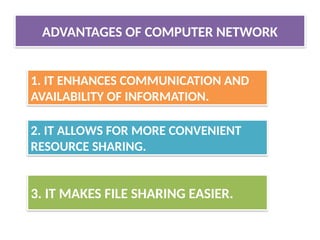
ADVANTAGES OF COMPUTERNETWORK
1. IT ENHANCES COMMUNICATION AND
AVAILABILITY OF INFORMATION.
2. IT ALLOWS FOR MORE CONVENIENT
RESOURCE SHARING.
3. IT MAKES FILE SHARING EASIER.
6.
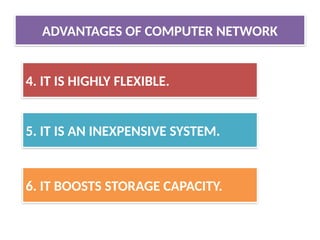
4. IT ISHIGHLY FLEXIBLE.
5. IT IS AN INEXPENSIVE SYSTEM.
6. IT BOOSTS STORAGE CAPACITY.
ADVANTAGES OF COMPUTER NETWORK
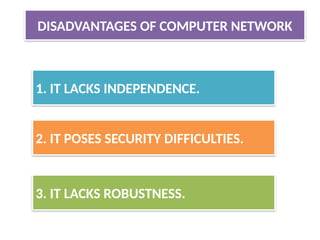
1. IT LACKSINDEPENDENCE.
2. IT POSES SECURITY DIFFICULTIES.
3. IT LACKS ROBUSTNESS.
DISADVANTAGES OF COMPUTER NETWORK
9.
4. IT ALLOWSFOR MORE PRESENCE OF
COMPUTER VIRUSES AND MALWARE.
5. IT REQUIRES AN EFFICIENT HANDLER.
6. IT REQUIRES AN EXPENSIVE SET-UP.
DISADVANTAGES OF COMPUTER NETWORK
COMPONENTS OF COMPUTERNETWORK
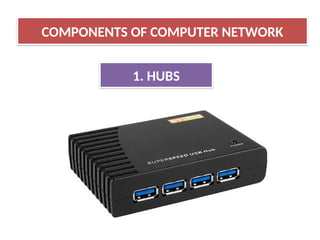
1. HUBS
A network host is a computer or other
device connected to a computer network. A
network host may offer information resources,
services, and applications to users or
other nodes on the network.
There are two types of hub:
(I) ACTIVE HUB (II) PASSIVE HUB
14.
(i) it’s electricallyamplify the signal as it moves
from one connected device to another.
(ii)active concentrators are used like repeaters
to extend the length of the network.
(I) ACTIVE HUB
15.
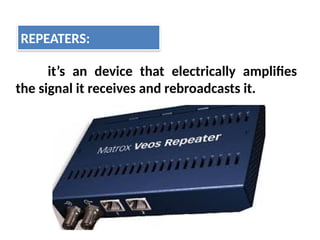
it’s an devicethat electrically amplifies
the signal it receives and rebroadcasts it.
REPEATERS:
16.
It allows thesignal to pass from one
computer to another without any change.
(ii) PASSIVE HUB
COMPONENTS OF COMPUTERNETWORK
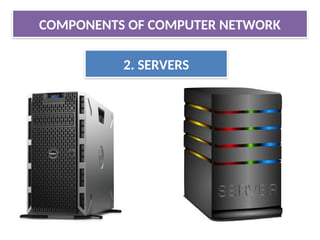
2. SERVERS
A server is a type of computer or device
on a network that manages network resources.
Servers are often dedicated.
COMPONENTS OF COMPUTERNETWORK
4. COMMUNICATION CHANNEL
A communication channel or simply
channel refers either to a physical transmission
medium such as a wire, or to a logical
connection over a multiplexed medium such as
a radio channel in telecommunications and
computer networking
23.
COMPONENTS OF COMPUTERNETWORK
4. COMMUNICATION CHANNEL
1. WIRED OR GUIDED COMMUNICATION
CHANNEL
2. WIRELESS OR UNGUIDED COMMUNICATION
CHANNEL
Types of communication channels are:
24.
1. WIRED ORGUIDED COMMUNICATION CHANNEL
4. COMMUNICATION CHANNEL
25.
When host andserver with one another
through guided media
Like ,network cables like it’s called
wired communication channels/medium
Example:
TWISTED-PAIR CABLES
COAXIAL CABLES
FIBRE OPTICAL CABLE .
1. WIRED OR GUIDED COMMUNICATION CHANNEL
26.
2. WIRELESS ORUNGUIDED COMMUNICATION CHANNEL
4. COMMUNICATION CHANNEL
27.
When hosts andserver are connected
with one another through guided media.
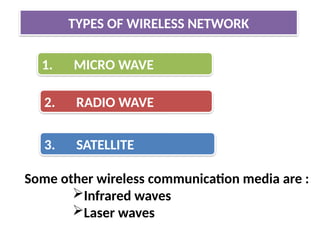
Like, radio waves ,satellite etc.,
Example of wireless communication:
RADIO WAVE ,
MICRO WAVE,
SATELLITE etc.,
2. WIRELESS OR UNGUIDED COMMUNICATION CHANNEL
A computer networkmeans a group of
‘network’ Computers
A network can mean a small of linked
computers to a chain of a few hundred computer
of different types (eg , PCs, minis, mainframes
etc ) Spread around the world.
TYPES OF NETWORK
30.
Based on networkspan or geographical
spread , network can be divided into two
types:
TYPES OF NETWORK BASED ON GEOGRAPHICAL SPREAD
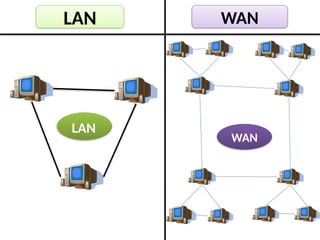
(I)LAN (LOCAL AREA NETWORK)
(II)WAN(WIDE AREA NETWORK)
Small computer networkthat are
confined to a localised are a ( eg ; an office ,
a building or a factory) are known as LAN’s.
The key purpose of LAN is to serve its users in
resource sharing .
The hardware as well as software resources are
shared through LAN’s.
LAN users can share data , information ,
programs , printers , modems ,etc.,
LAN (LOCAL AREA NETWORK)
33.
WAN (WIDE AREANETWORK)
TYPES OF NETWORK BASED ON GEOGRAPHICAL SPREAD
34.
The network spreadacross countries (or) on a
very big geographical area are known as WAN‘s.
It is a group of computers that are separated by a large
distance and tied together .
It can be a group of LAN’s that are separated across
several locations and connected together to look like
one big LAN.
Computers are connected to a wide area network are
often connected through public networks such as
telephone systems .
WAN (WIDE AREA NETWORK)
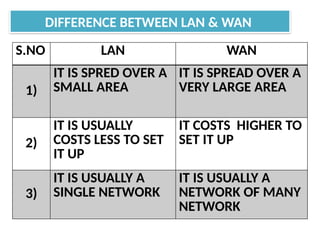
DIFFERENCE BETWEEN LAN& WAN
S.NO LAN WAN
1)
IT IS SPRED OVER A
SMALL AREA
IT IS SPREAD OVER A
VERY LARGE AREA
2)
IT IS USUALLY
COSTS LESS TO SET
IT UP
IT COSTS HIGHER TO
SET IT UP
3)
IT IS USUALLY A
SINGLE NETWORK
IT IS USUALLY A
NETWORK OF MANY
NETWORK
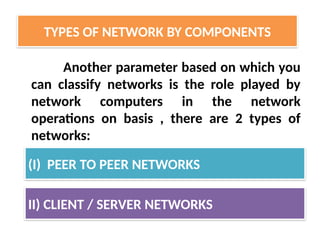
Another parameter basedon which you
can classify networks is the role played by
network computers in the network
operations on basis , there are 2 types of
networks:
TYPES OF NETWORK BY COMPONENTS
(I) PEER TO PEER NETWORKS
II) CLIENT / SERVER NETWORKS
40.
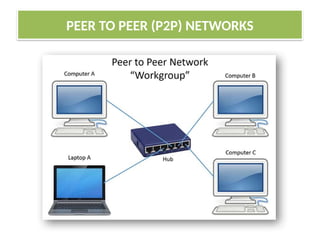
PEER TO PEER(P2P) NETWORKS
TYPES OF NETWORK BY COMPONENTS
P2P network literallyimplements the meaning
word Peer (ex : Each computer on P2P network
is equal) , that is each computer can play a role
of a client or a server.
The computer that serve on P2P computers are
often termed as non-dedicated servers
Contd….
PEER TO PEER (P2P) NETWORKS
43.
• (P2P) networksare popular as home networks and
for use in small companies as they are inexpensive
and easy to install ,but they are limited scope and
are difficult to secure.
• On small networks , workstation that can double up
as a server is known as
NON-DEDICATDED SERVER .
• Non–Dedicated Server can shuttle bw client as well
as server role.
• Small networks that are using such a servers are
known as P2P networks.
PEER TO PEER (P2P) NETWORKS
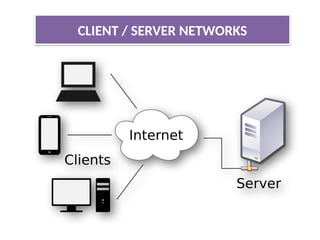
• Unlike P2Pnetworks , bigger networks prefer to
have centralised control .
• They do this by clearing designations servers and
clients such networks are called
CLIENT-SERVER NETWORKS (or)
MASTER-SLAVE NETWORKS.
• On bigger network installation , there is a computer
reserved for the server’s job and its only job is to
help workstations access the data, software ,
hardware resources . CONTD…
CLIENT / SERVER NETWORKS
47.
• It doesnot double up as workstation and such
servers is known as dedicated servers.
• Dedicated servers operates solely as a server on a
network.
• For ex : There may be a server exclusively for
serving files – related requests like storing files
deciding about their access privileges & regulating
the amount of space allowed for each server.
CLIENT / SERVER NETWORKS
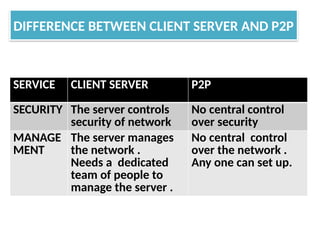
DIFFERENCE BETWEEN CLIENTSERVER AND P2P
SERVICE CLIENT SERVER P2P
SECURITY The server controls
security of network
No central control
over security
MANAGE
MENT
The server manages
the network .
Needs a dedicated
team of people to
manage the server .
No central control
over the network .
Any one can set up.
50.
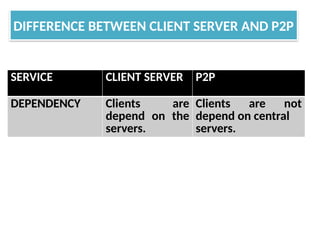
DIFFERENCE BETWEEN CLIENTSERVER AND P2P
SERVICE CLIENT SERVER P2P
DEPENDENCY Clients are
depend on the
servers.
Clients are not
depend on central
servers.
51.
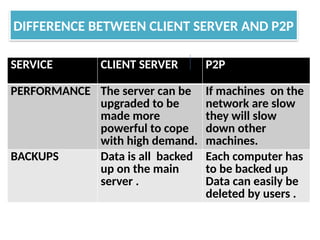
DIFFERENCE BETWEEN CLIENTSERVER AND P2P
SERVICE CLIENT SERVER P2P
PERFORMANCE The server can be
upgraded to be
made more
powerful to cope
with high demand.
If machines on the
network are slow
they will slow
down other
machines.
BACKUPS Data is all backed
up on the main
server .
Each computer has
to be backed up
Data can easily be
deleted by users .
52.
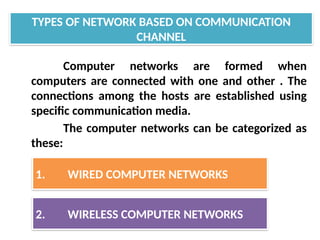
Computer networks areformed when
computers are connected with one and other . The
connections among the hosts are established using
specific communication media.
The computer networks can be categorized as
these:
TYPES OF NETWORK BASED ON COMMUNICATION
CHANNEL
1. WIRED COMPUTER NETWORKS
2. WIRELESS COMPUTER NETWORKS
53.
1. WIRED COMPUTERNETWORK
TYPES OF NETWORK BASED ON COMMUNICATION
CHANNEL
54.
As clear byname in wired computer networks ,
the host and other devices are interconnected through
wiring or cables. Most wired computer networks are
of LAN type .
Although , there are wireless LAN’s too and
there are bigger networks that used wireless medias
too.
Contd..
WIRED COMPUTER NETWORK
55.
Commonly used cablesin wired networks are
one of the following three types:
WIRED COMPUTER NETWORK
A) TWISTED PAIR CABLE
B) COAXIAL CABLE (COAX)
C)FIBRE OPTIC CABLE (OPTIC FIBRE CABLE).
56.
TYPES OF WIREDCABLES
A) TWISTED PAIR CABLE:
TYPES OF NETWORK BASED ON COMMUNICATION
CHANNEL
57.
A twisted paircable is a pair of
insulated wires that are twisted together to
improve electromagnetic capability and to
reduce from outside source these available in
various forms such as CAT1 , CAT2 , CAT3 ,
CAT4 , CAT5 , CAT6
TYPES OF WIRED CABLES
A) TWISTED PAIR CABLE:
58.
TYPES OF WIREDCABLES
B) COAXIAL CABLE (COAX)
TYPES OF NETWORK BASED ON COMMUNICATION
CHANNEL
59.
This type cablesconsist of a solid wire
core surrounded by one or more foil or wire
shield each separated by some kind of plastic
insulator
Ex : Thicknet and Thinnet .
TYPES OF WIRED CABLES
B) COAXIAL CABLE (COAX)
60.
TYPES OF WIREDCABLES
C) FIBRE OPTIC CABLE :
TYPES OF NETWORK BASED ON COMMUNICATION
CHANNEL
61.
Consist of abundle of glass threads
each of which capable of transmitting
messages modulated on to light waves .
Example:
Single node
Multi-node
TYPES OF WIRED CABLES
C) FIBRE OPTIC CABLE :
WIRELESS COMPUTER NETWORKS
Thecomputer networks that use
environment or air as the media , through
which information is transmitted without any
cable or wires or the electronic conductor ,
rather by using electromagnetic waves like:
IR(infrared) , RF(radio frequencies) , satellite ,
etc are wireless computer networks
EXAMPLE: i) When you connect all smartphones to a
common WIFI (a wireless LAN )
ii) WAN can also be formed using wireless media such
as satellite.
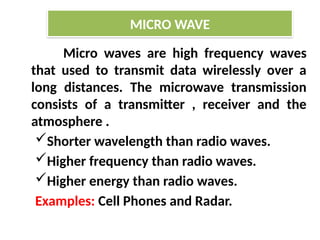
Micro waves arehigh frequency waves
that used to transmit data wirelessly over a
long distances. The microwave transmission
consists of a transmitter , receiver and the
atmosphere .
Shorter wavelength than radio waves.
Higher frequency than radio waves.
Higher energy than radio waves.
Examples: Cell Phones and Radar.
MICRO WAVE
Longest wave Length.
LowestFrequency.
Lowest Energy.
WI-FI that has become common word today
also use radio waves to transmit data among
connected devices.
Some More Examples: TV,AM,FM Radio
Signals.
Radio waves easily travel through the
atmosphere and many materials.
RADIO WAVE
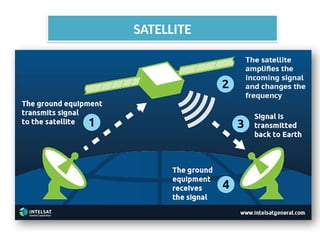
Satellite communication isa special case of a
microwave relay system.
Satellite communication use the synchronous
satellite to relay the alien radio signal transmitted
from ground station.
The satellite accept data / signals transmitted from
an earth station , amplify them , and retransmit
them to another station.
Using such as a setup data can be transmitted to
other side of the earth in only one step. Contd…
SATELLITE
In the smoothfunctioning of a computer ,
other than computers and wiring , many devices (or)
specialized hardware play important roles .
NETWORK DEVICES AND HARDWARE
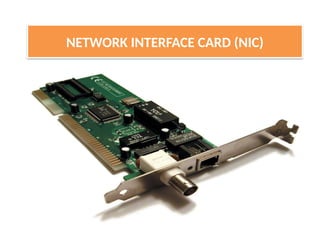
A standalone computer(a computer that does not
attached to a network) lives in its own world and
carries out its tasks with its own inbuilt resources.
The (NIC) is a device that is attached to each of the
workstations and the server & helps the workstation
to establish all the important connections with
network.
Each NIC that is attached to a workstation has a
unique number identification which is known as note
address
Contd…
NETWORK INTERFACE CARD (NIC)
77.
The NIC isalso called as Terminal Access Point (TAP)
different manufacturers have different name for the
interface .
The NIC is also called as NIU – (Network Interface
Unit)
The (NIC) manufacturers assigns a unique physical
address to each NIC-card , this physical address is
know as MAC-address ------ (Media Access Control)
NETWORK INTERFACE CARD (NIC)
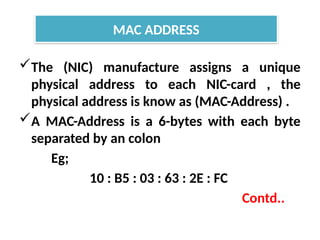
The (NIC) manufactureassigns a unique
physical address to each NIC-card , the
physical address is know as (MAC-Address) .
A MAC-Address is a 6-bytes with each byte
separated by an colon
Eg;
10 : B5 : 03 : 63 : 2E : FC
Contd..
MAC ADDRESS
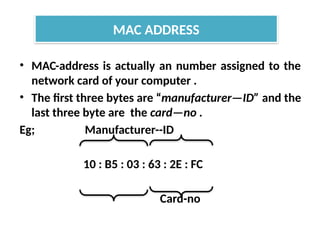
80.
• MAC-address isactually an number assigned to the
network card of your computer .
• The first three bytes are “manufacturer—ID” and the
last three byte are the card—no .
Eg; Manufacturer--ID
10 : B5 : 03 : 63 : 2E : FC
Card-no
MAC ADDRESS
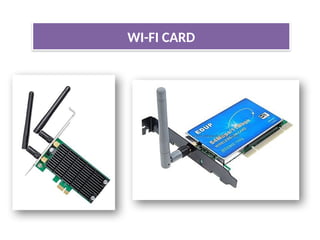
It’s either aninternal (or) external local area
network adapter with a built-in wireless radio and
antenna.
Most common WI-FI cards used in desktop
computers are PCI express WI-FI cards made to fit
the PCI express cards slots on the mother board .
The primary benefit of using a WI-FI card in desktop
computer is that it allows you to set-up your
workstation (or) home office without considering
the proximity (or) availability of hard line network
access
WI-FI CARD
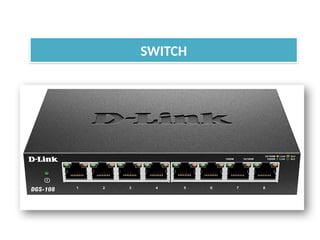
A switch isa device that is used to segment
networks into different subnetworks called
subnet or LAN Segment.
Segmenting the network into smaller subnet,
prevents traffic overload in a network.
A switch is responsible for filtering (or)
transforming data in a specific way and
forwarding packets between LAN segment.
SWITCH
Contd…
85.
• A switchcan support any packet of protocol.
• LAN’s that are segmented through switches
are called as switched LANs.
SWITCH
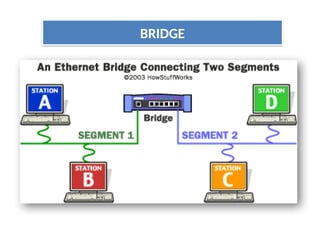
A bridge isa device that let’s you link
networks together.
Bridges are smart enough to know which
computers are on which side of the bridge, so
they only allow those messages that need to
get other side to cross the bridge.
Bridges can handle networks that follow same
protocol.
Contd..
BRIDGE
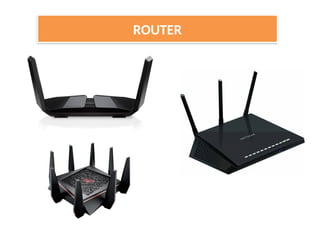
A device thatworks like a bridge but can
handle different protocol is know as Router.
A Router is a network device that forwards
data from one network to another network.
A router works like a bridge but can handle
different protocols.
ROUTER
91.
• If thedestination is unknow to a router it
sends the traffic to another router (using
logical address) which knows the destination,
Based on a network road map called as
(Routing Table).
• Routers can help to ensure that packets are
travelling the most efficient paths to their
destination.
ROUTER
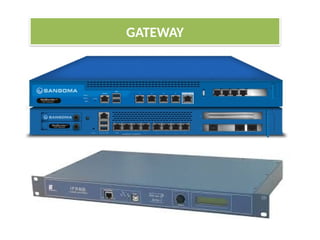
A gateway isa network device that connects
dissimilar networks.
It establishes an intelligent connection between
a local network and external network with
completely different structures
Gateway is actually a node on a network that
server as an entrance to another network.
In enterprises the gateway is the computer that
routes the traffic from workstation to a out side
network that serving the web pages.
GATEWAY
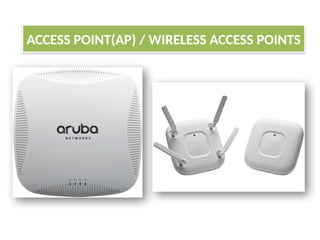
• An ACCESSPOINT-(AP) , also called as
(Wireless access point) WAP
• WAP is a hardware device that establishes
connections of computer devices on wireless LAN
with a fixed wire network.
• AP is a station that transmits and receives data
• AP has a range of (up to 150 feet for home based
APs).
• Wireless routers can function as(AP) , but not all
(AP)can work as routers.
ACCESS POINT(AP)
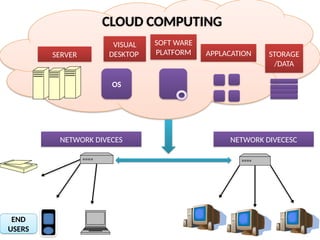
• A cloudis a generic term used for “INTERNET”.
• Cloud computing is internet-based computing
whereby shared resources, software , and
information are provided to computer and
other devices are in demand, like electricity
grid.
• Cloud computing is a new name for an old
concept :the delivery of computing services
from a remote location .
THE CLOUDS
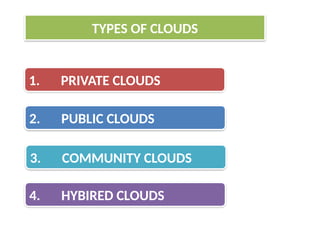
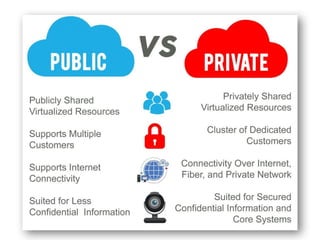
These are theclouds for exclusive use by
single organization and typically controlled,
managed and hosted in private data centers.
The hosting and operation of private clouds
may also be outsourced to third party services
provider, but a private clouds remains for the
exclusive use of one organization.
Contd…
1.PRIVATE CLOUDS
102.
Best Private CloudProviders
HPE. By most estimates, Hewlett Packard
Enterprise (HPE) is a key leader in the private
cloud market.
Vmware Dell Oracle
IBM Microsoft. Cisco.
NetApp.
1.PRIVATE CLOUDS
These are theclouds for use by
multiple organization on shared basis and
hosted and by the third party services
provider.
Examples of public clouds include Amazon
Elastic ComputeCloud (EC2), IBM's
Blue Cloud, Sun Cloud,Google AppEngine and
Windows Azure Services Platform
2.PUBLIC CLOUDS
• These arethe clouds for use by a group of
related organization who wish to make use of a
common cloud computing environment .
• FOR EXP:
All suppliers to a larger manufacture.
All universities in a given region.
3.COMMUNITY CLOUDS
When a singleorganization adopts both
private and public clouds for a single
application in order to take advantage of the
benefits of both.
4.HYBRID CLOUDS
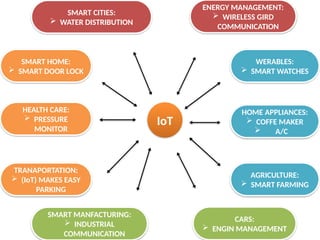
• (IoT) isa phenomenon that connects the
things to the internet over wired or wireless
connections.
• (IoT) allows the people and things to be
connected ANYTIME, ANYPLACE WITH
ANYTHING AND ANYONE .
Contd…
INTERNET OF THING (IoT)
111.
IoT
WERABLES:
SMART WATCHES
HEALTHCARE:
PRESSURE
MONITOR
TRANAPORTATION:
(IoT) MAKES EASY
PARKING
SMART MANFACTURING:
INDUSTRIAL
COMMUNICATION
CARS:
ENGIN MANAGEMENT
HOME APPLIANCES:
COFFE MAKER
A/C
AGRICULTURE:
SMART FARMING
SMART CITIES:
WATER DISTRIBUTION
SMART HOME:
SMART DOOR LOCK
ENERGY MANAGEMENT:
WIRELESS GIRD
COMMUNICATION