Modem
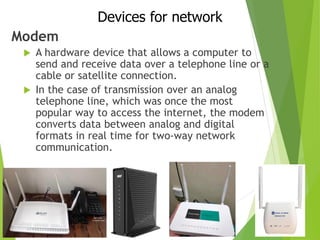
 A hardware device that allows a computer to
send and receive data over a telephone line or a
cable or satellite connection.
 In the case of transmission over an analog
telephone line, which was once the most
popular way to access the internet, the modem
converts data between analog and digital
formats in real time for two-way network
communication.
Devices for network
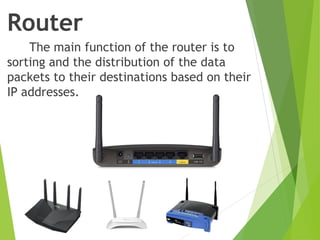
Router
The main function of the router is to
sorting and the distribution of the data
packets to their destinations based on their
IP addresses.
Access Point (WAP)
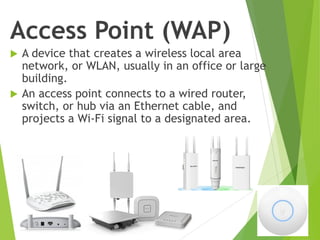
 A device that creates a wireless local area
network, or WLAN, usually in an office or large
building.
 An access point connects to a wired router,
switch, or hub via an Ethernet cable, and
projects a Wi-Fi signal to a designated area.
Access Point (WAP)
HUB
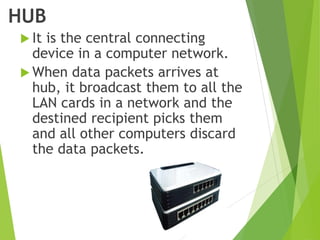
 It is the central connecting
device in a computer network.
 When data packets arrives at
hub, it broadcast them to all the
LAN cards in a network and the
destined recipient picks them
and all other computers discard
the data packets.
Switch
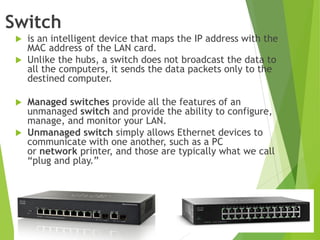
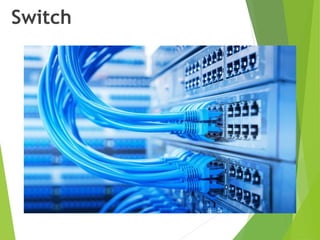
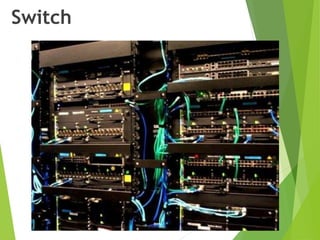
 is an intelligent device that maps the IP address with the
MAC address of the LAN card.
 Unlike the hubs, a switch does not broadcast the data to
all the computers, it sends the data packets only to the
destined computer.
 Managed switches provide all the features of an
unmanaged switch and provide the ability to configure,
manage, and monitor your LAN.
 Unmanaged switch simply allows Ethernet devices to
communicate with one another, such as a PC
or network printer, and those are typically what we call
“plug and play.”
Switch
Switch
Patch Panel
 A central location that can
provide a simple, neat and easy-
to-manage solution.
 A patch panel performs no other
function except for acting as a
connector..
LAN Card
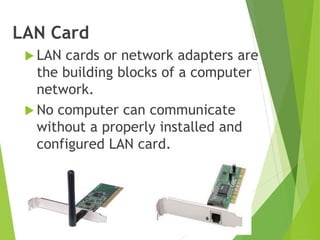
 LAN cards or network adapters are
the building blocks of a computer
network.
 No computer can communicate
without a properly installed and
configured LAN card.
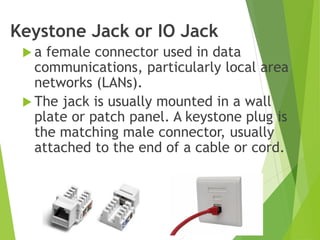
Keystone Jack or IO Jack
 a female connector used in data
communications, particularly local area
networks (LANs).
 The jack is usually mounted in a wall
plate or patch panel. A keystone plug is
the matching male connector, usually
attached to the end of a cable or cord.
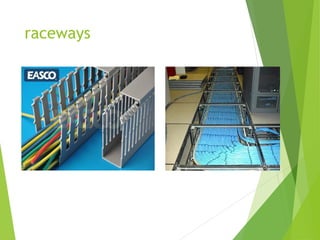
raceways
Raceways
A raceway is a channel that
contains cables.
Raceways include common
electrical conduits ,
specialized cable trays or
ladder racks ,
in-floor duct systems ,
and plastic or metal surface
mounted raceways.
CAT.5 Installation
DON’T overstress cables by
overtightering cable ties, especially to
the point where crush stress is visible.
DO use tie wraps loosely
on large bundles. (see
also “Using Tie-wraps”)
DO use Velcro tie wraps
to secure large bundles.
DO use cable clamps on
individual runs.
RUNNING & SECURING CABLE
USING WIRE CHANNELS
DO use sweeping bends.
DON’T allow the cable to form
right angles or sharp bends.
CAT.5 Installation
STAPLING CABLE
USING TIE-WRAPS
DO staple by hand, or use
staplers with depth stops.
DON’T squish cables
when securing them.
DO use Velcro to keep cables
from becoming over-cinched.
DON’T chinch the cables tightly, especially
to the point where crush stress is visible.
DO tie-wrap the
bundle loosely.
DO use Velcro as a flexible and reusable alternative to
plastic tie-wraps to keep bundles from cinching.
CAT.5 Installation
REMOVING CABLE JACKET
DON’T remove too much cable jacket.
DO retain cable jacket as close to
the termination point as possible.
MAINTAINING PAIR TWISTS DURING TERMINATION
DON’T untwist the cable pairs more
than 12 mm and DON’T strip cable
jacket back any more than you need to.
DO maintain pair twists to within 12 mm of the
termination point, and the cable jacket is maintained
as close to the terminations as possible.

Computer Networking Devices for Network.pdf

  • 1.
    Modem  A hardwaredevice that allows a computer to send and receive data over a telephone line or a cable or satellite connection.  In the case of transmission over an analog telephone line, which was once the most popular way to access the internet, the modem converts data between analog and digital formats in real time for two-way network communication. Devices for network
  • 2.
    Router The main functionof the router is to sorting and the distribution of the data packets to their destinations based on their IP addresses.
  • 3.
    Access Point (WAP) A device that creates a wireless local area network, or WLAN, usually in an office or large building.  An access point connects to a wired router, switch, or hub via an Ethernet cable, and projects a Wi-Fi signal to a designated area.
  • 4.
  • 5.
    HUB  It isthe central connecting device in a computer network.  When data packets arrives at hub, it broadcast them to all the LAN cards in a network and the destined recipient picks them and all other computers discard the data packets.
  • 6.
    Switch  is anintelligent device that maps the IP address with the MAC address of the LAN card.  Unlike the hubs, a switch does not broadcast the data to all the computers, it sends the data packets only to the destined computer.  Managed switches provide all the features of an unmanaged switch and provide the ability to configure, manage, and monitor your LAN.  Unmanaged switch simply allows Ethernet devices to communicate with one another, such as a PC or network printer, and those are typically what we call “plug and play.”
  • 7.
  • 8.
  • 9.
    Patch Panel  Acentral location that can provide a simple, neat and easy- to-manage solution.  A patch panel performs no other function except for acting as a connector..
  • 12.
    LAN Card  LANcards or network adapters are the building blocks of a computer network.  No computer can communicate without a properly installed and configured LAN card.
  • 13.
    Keystone Jack orIO Jack  a female connector used in data communications, particularly local area networks (LANs).  The jack is usually mounted in a wall plate or patch panel. A keystone plug is the matching male connector, usually attached to the end of a cable or cord.
  • 14.
  • 15.
    Raceways A raceway isa channel that contains cables. Raceways include common electrical conduits , specialized cable trays or ladder racks , in-floor duct systems , and plastic or metal surface mounted raceways.
  • 16.
    CAT.5 Installation DON’T overstresscables by overtightering cable ties, especially to the point where crush stress is visible. DO use tie wraps loosely on large bundles. (see also “Using Tie-wraps”) DO use Velcro tie wraps to secure large bundles. DO use cable clamps on individual runs. RUNNING & SECURING CABLE USING WIRE CHANNELS DO use sweeping bends. DON’T allow the cable to form right angles or sharp bends.
  • 17.
    CAT.5 Installation STAPLING CABLE USINGTIE-WRAPS DO staple by hand, or use staplers with depth stops. DON’T squish cables when securing them. DO use Velcro to keep cables from becoming over-cinched. DON’T chinch the cables tightly, especially to the point where crush stress is visible. DO tie-wrap the bundle loosely. DO use Velcro as a flexible and reusable alternative to plastic tie-wraps to keep bundles from cinching.
  • 18.
    CAT.5 Installation REMOVING CABLEJACKET DON’T remove too much cable jacket. DO retain cable jacket as close to the termination point as possible. MAINTAINING PAIR TWISTS DURING TERMINATION DON’T untwist the cable pairs more than 12 mm and DON’T strip cable jacket back any more than you need to. DO maintain pair twists to within 12 mm of the termination point, and the cable jacket is maintained as close to the terminations as possible.