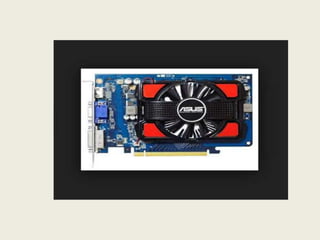
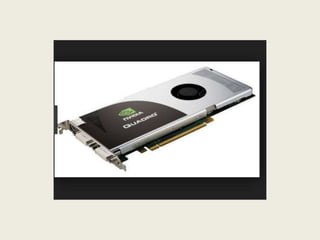
Field Technician: Alsocalled ‘Service Technician’, the Field Technician provides after sale
support services to customers, typically, at their premises.
जिसे 'सेवा तकनीशियन' भी कहा िाता है, फ़ील्ड तकनीशियन ग्राहकों को बिक्ऱी समर्थन सेवाओं क
े
िाद प्रदान करता है, आमतौर पर, उनक
े पररसर।
Brief Job Description: The individual at work is responsible for attending to customer
complaints, installing newly purchased products, troubleshooting system problems and,
configuring peripherals such as printers, scanners and network devices.
काम पर व्यजतत ग्राहक क़ी शिकायतों में भाग लेने, नए खरीदे गए उत्पादों को स्र्ापपत करने, शसस्टम
क़ी समस्याओं का ननवारण और, पप्रंटर, स्क
ै नर और नेटवक
थ उपकरणों िैसे िाह्य उपकरणों को
कॉजफफगर करने क
े शलए जिम्मेदार है।
Personal Attributes: The job requires the individual to have: ability to build interpersonal
relationships and critical thinking. The individual must be willing to travel to client
premises in order to attend to calls at different locations.
नौकरी क
े शलए व्यजतत क़ी आवश्यकता होती है: पारस्पररक संिंधों और महत्वपूणथ सोच क
े ननमाथण
क़ी क्षमता। अलग-अलग स्र्ानों पर कॉल में भाग लेने क
े शलए व्यजतत को ग्राहक पररसर क़ी यात्रा
करने क
े शलए तैयार होना चाहहए।
5.
Computer Hardware Definition
''कम््यूटरहार्डवेयर कम््यूटर का भौनतक भाग होता है जिसमें उसक
े डडिीटल
सर्क
थ ट (digital circuit) लगे होते हैं िैसा र्क कम््यूटर सॉफ्टवेयर से प्रदशिथत
होता है और यह हार्डवेयर क
े अंदर ही रहता है।
र्कसी क
ं प्यूटर का हार्डवेयर उसक
े सोफ्टवेयर और हार्डवेयर डाटा क़ी तुलना में
यदा-कदा िदल िाता है।
6.
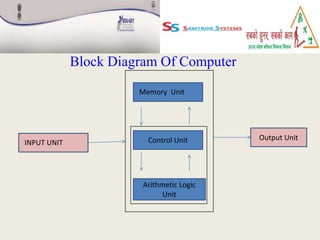
Block Diagram OfComputer
Output Unit
Control Unit
Arithmetic Logic
Unit
INPUT UNIT
Memory Unit
7.
Input Unit:- Incomputer input unit is defined as an input device, a piece of computer hardware
apparatus used to supply a data processing system including a computer or information device with
control and data signals.
क
ं ्यूटर इनपुट इकाई में एक इनपुट डडवाइस क
े रूप में पररभापित र्कया गया है, क
ं ्यूटर
हाडथवेयर उपकरण का एक टुकडा िो क
ं ्यूटर या सूचना उपकरण सहहत डेटा प्रोसेशसंग
शसस्टम को ननयंत्रण और डेटा संक
े तों क
े सार् आपूनतथ करने क
े शलए उपयोग र्कया िाता है।
Memory Unit:- Memory unit is the amount of data that can be stored in the
storage unit. This storage capacity is expressed in terms of Bytes.
मेमोरी यूननट डेटा क़ी मात्रा है जिसे स्टोरेि यूननट में स्टोर र्कया िा सकता है। यह
भंडारण क्षमता िाइट्स क
े संदभथ में व्यतत क़ी िाती है।
Control Unit:- The control unit (CU) is a component of a computer's central
processing unit (CPU) that directs the operation of the processor.
ननयंत्रण इकाई (सीयू) क
ं ्यूटर क़ी क
ें द्रीय प्रसंस्करण इकाई (सीपीयू) का एक घटक है िो
प्रोसेसर क
े संचालन को ननदेशित करता है।
8.
Arithmetic Logic Unit:-The ALU performs simple addition, subtraction, multiplication,
division, and logic operations, such as OR and AND. The memory stores the program's
instructions and data.
ALU OR और AND िैसे सरल िोड, घटाव, गुणा, भाग और तक
थ संचालन करता है। मेमोरी
प्रोग्राम क
े ननदेिों और डेटा को स्टोर करती है।
Output Unit:- An output device is any device used to send data from a computer to
another device or user.
एक आउटपुट डडवाइस वह उपकरण है जिसका उपयोग क
ं ्यूटर से दूसरे डडवाइस या
उपयोगकताथ को डेटा भेिने क
े शलए र्कया िाता है।
List Of Components
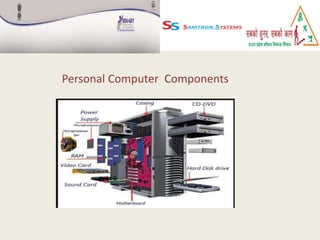
1.Motherboard
2. Chipsets
3. CPU and Socket or Slots
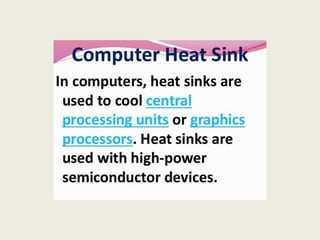
4. Cooling Systems
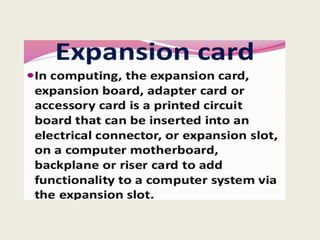
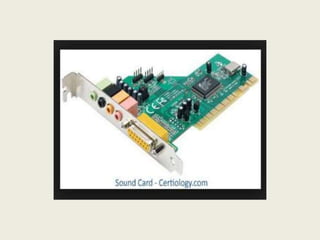
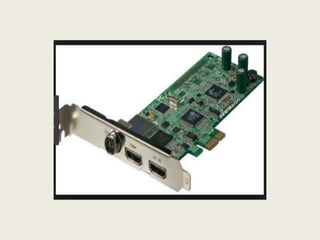
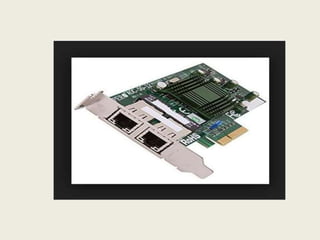
5. Expansion Slot and Card
6. Memory
7. Storage
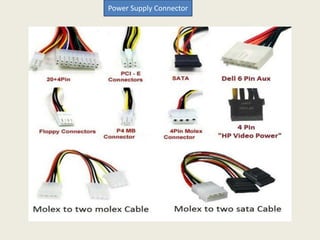
8. Ports and Cables
9. Power Supply and Connectors
10.Case
11.
Motherboard
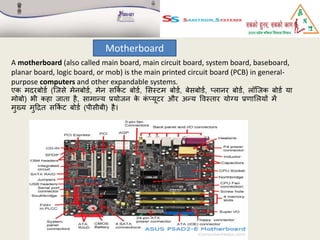
A motherboard (alsocalled main board, main circuit board, system board, baseboard,
planar board, logic board, or mob) is the main printed circuit board (PCB) in general-
purpose computers and other expandable systems.
एक मदरिोडथ (जिसे मेनिोडथ, मेन सर्क
थ ट िोडथ, शसस्टम िोडथ, िेसिोडथ, ्लानर िोडथ, लॉजिक िोडथ या
मोिो) भी कहा िाता है, सामाफय प्रयोिन क
े क
ं ्यूटर और अफय पवस्तार योग्य प्रणाशलयों में
मुख्य मुहद्रत सर्क
थ ट िोडथ (पीसीिी) है।
14.
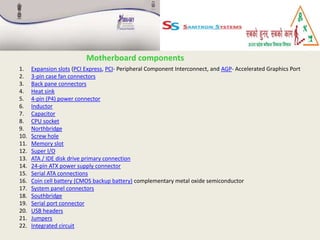
Motherboard components
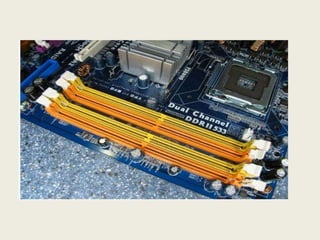
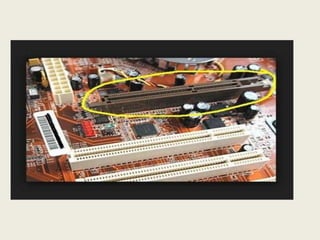
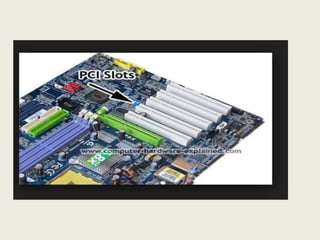
1. Expansionslots (PCI Express, PCI- Peripheral Component Interconnect, and AGP- Accelerated Graphics Port
2. 3-pin case fan connectors
3. Back pane connectors
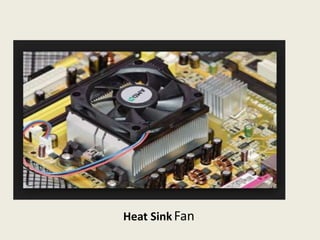
4. Heat sink
5. 4-pin (P4) power connector
6. Inductor
7. Capacitor
8. CPU socket
9. Northbridge
10. Screw hole
11. Memory slot
12. Super I/O
13. ATA / IDE disk drive primary connection
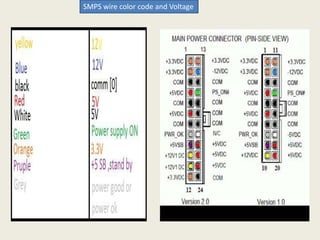
14. 24-pin ATX power supply connector
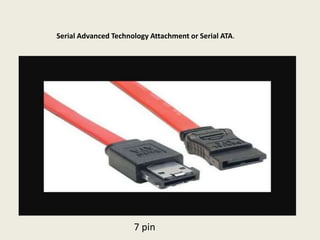
15. Serial ATA connections
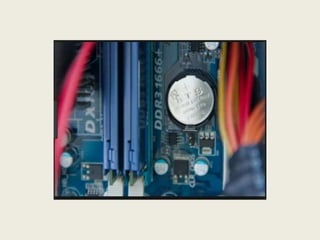
16. Coin cell battery (CMOS backup battery) complementary metal oxide semiconductor
17. System panel connectors
18. Southbridge
19. Serial port connector
20. USB headers
21. Jumpers
22. Integrated circuit
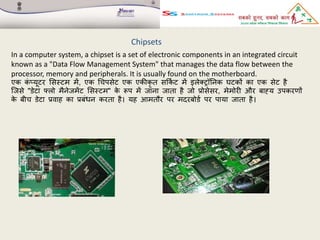
Chipsets
In a computersystem, a chipset is a set of electronic components in an integrated circuit
known as a "Data Flow Management System" that manages the data flow between the
processor, memory and peripherals. It is usually found on the motherboard.
एक क
ं ्यूटर शसस्टम में, एक चचपसेट एक एक़ीकृ त सर्क
थ ट में इलेतरॉननक घटकों का एक सेट है
जिसे "डेटा फ्लो मैनेिमेंट शसस्टम" क
े रूप में िाना िाता है िो प्रोसेसर, मेमोरी और िाह्य उपकरणों
क
े िीच डेटा प्रवाह का प्रिंधन करता है। यह आमतौर पर मदरिोडथ पर पाया िाता है।
76.
1. Pentium 4/PentiumD/Pentium EE chipsets.
2. Pentium M/Celeron M mobile chipsets.
3. Core/Core 2 mobile chipsets.
4. Core 2 chipsets.
5. Core 2 mobile chipsets.
Intel chipsets
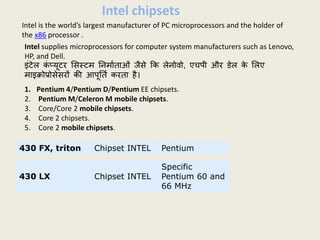
Intel is the world’s largest manufacturer of PC microprocessors and the holder of
the x86 processor .
Intel supplies microprocessors for computer system manufacturers such as Lenovo,
HP, and Dell.
इंटेल क
ं ्यूटर शसस्टम ननमाथताओं िैसे र्क लेनोवो, एचपी और डेल क
े शलए
माइक्रोप्रोसेसरों क़ी आपूनतथ करता है।
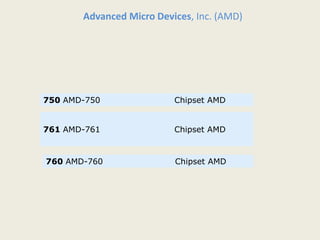
430 FX, triton Chipset INTEL Pentium
430 LX Chipset INTEL
Specific
Pentium 60 and
66 MHz
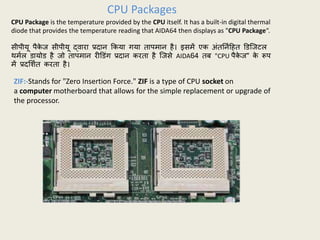
CPU Package isthe temperature provided by the CPU itself. It has a built-in digital thermal
diode that provides the temperature reading that AIDA64 then displays as "CPU Package“.
सीपीयू पैक
े ि सीपीयू द्वारा प्रदान र्कया गया तापमान है। इसमें एक अंतननथहहत डडजिटल
र्मथल डायोड है िो तापमान रीडडंग प्रदान करता है जिसे AIDA64 ति "CPU पैक
े ि" क
े रूप
में प्रदशिथत करता है।
CPU Packages
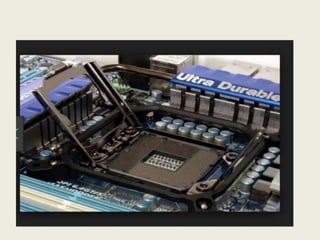
ZIF:-Stands for "Zero Insertion Force." ZIF is a type of CPU socket on
a computer motherboard that allows for the simple replacement or upgrade of
the processor.
79.
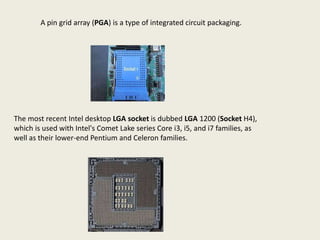
A pin gridarray (PGA) is a type of integrated circuit packaging.
The most recent Intel desktop LGA socket is dubbed LGA 1200 (Socket H4),
which is used with Intel's Comet Lake series Core i3, i5, and i7 families, as
well as their lower-end Pentium and Celeron families.
80.
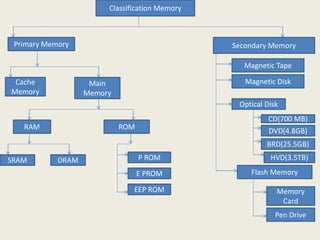
Classification Memory
Primary MemorySecondary Memory
Cache
Memory
Main
Memory
RAM ROM
SRAM DRAM P ROM
E PROM
EEP ROM
Magnetic Tape
Magnetic Disk
Optical Disk
CD(700 MB)
DVD(4.8GB)
BRD(25.5GB)
HVD(3.5TB)
Flash Memory
Memory
Card
Pen Drive
81.
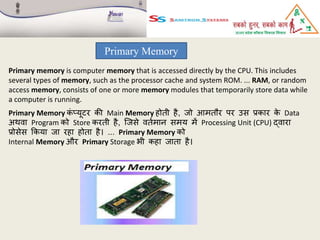
Primary Memory
Primary memoryis computer memory that is accessed directly by the CPU. This includes
several types of memory, such as the processor cache and system ROM. ... RAM, or random
access memory, consists of one or more memory modules that temporarily store data while
a computer is running.
Primary Memory क
ं ्यूटर क़ी Main Memory होती है, िो आमतौर पर उस प्रकार क
े Data
अर्वा Program को Store करती है, जिसे वतथमान समय में Processing Unit (CPU) द्वारा
प्रोसेस र्कया िा रहा होता है। ... Primary Memory को
Internal Memory और Primary Storage भी कहा िाता है।
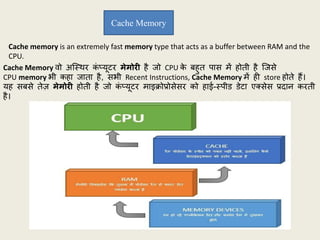
82.
Cache Memory वोअजस्र्र क
ं ्यूटर मेमोरी है िो CPU क
े िहुत पास में होती है जिसे
CPU memory भी कहा िाता है, सभी Recent Instructions, Cache Memory में ही store होते हैं।
यह सिसे तेज़ मेमोरी होती है िो क
ं ्यूटर माइक्रोप्रोसेसर को हाई-स्पीड डेटा एतसेस प्रदान करती
है।
Cache Memory
Cache memory is an extremely fast memory type that acts as a buffer between RAM and the
CPU.
83.
Primary Memory कोमुख्य मेमोरी (Main Memory) और अस्र्ाई मेमोरी (Volatile Memory)
भी कहा िाता हैं. यह मेमोरी CPU का भाग होती हैं. िहााँ से CPU डाटा और ननदेि प्रा्त
करता हैं. और प्रोसेस करने क
े िाद रक्षक्षत रखता हैं.
Main Memory
Primary Memory is also called Main Memory and Volatile Memory. This memory is part
of the CPU. From where the CPU receives data and instructions. And preserve after
processing.
Types of main memory
1. RAM(Random Access Memory)
2. ROM(Read Only Memory)
85.
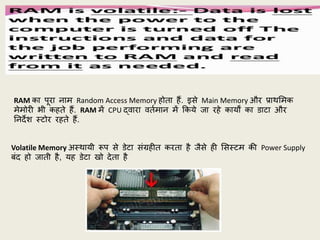
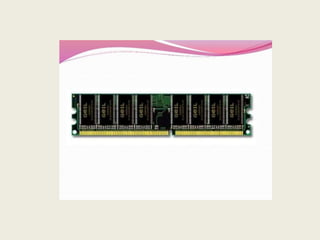
RAM का पूरानाम Random Access Memory होता हैं. इसे Main Memory और प्रार्शमक
मेमोरी भी कहते हैं. RAM में CPU द्वारा वतथमान में र्कये िा रहे कायों का डाटा और
ननदेि स्टोर रहते हैं.
Volatile Memory अस्र्ायी रूप से डेटा संग्रहीत करता है िैसे ही शसस्टम क़ी Power Supply
िंद हो िाती है, यह डेटा खो देता है
88.
Types of
RAM
1.S RAM(Static RAM)
2.D RAM(Dynamic RAM)
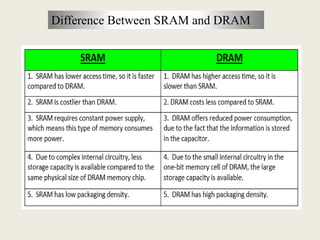
S RAM-Static random-access memory (static RAM or SRAM) is a type of random-access
memory (RAM) that uses latching circuitry (flip-flop) to store each bit. SRAM is volatile
memory; data is lost when power is removed.
स्टैहटक रैंडम-एतसेस मेमोरी (जस्र्र रैम या एसआरएएम) एक प्रकार क़ी रैंडम-एतसेस मेमोरी
(रैम) है िो प्रत्येक बिट को स्टोर करने क
े शलए लैचचंग सर्क
थ टरी (जफ्लप-फ्लॉप) का उपयोग
करती है। SRAM अजस्र्र स्मृनत है; डेटा हटा हदया िाता है िि बििली हटा दी िाती है।
89.
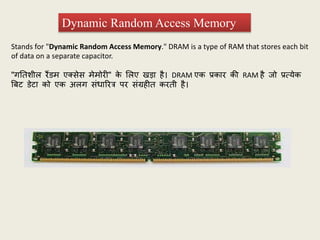
Stands for "DynamicRandom Access Memory." DRAM is a type of RAM that stores each bit
of data on a separate capacitor.
"गनतिील रैंडम एतसेस मेमोरी" क
े शलए खडा है। DRAM एक प्रकार क़ी RAM है िो प्रत्येक
बिट डेटा को एक अलग संधाररत्र पर संग्रहीत करती है।
Dynamic Random Access Memory
Types of DRAM
SynchronousDRAM (SDRAM) is DRAM that operates in synchronization with the memory
bus. The memory bus is the data path between the CPU and the main memory.
शसंक्रोनस डीआरएएम (एसडीआरएएम) डीआरएएम है िो मेमोरी िस क
े सार् शसंक्रनाइिेिन
में काम करता है। मेमोरी िस सीपीयू और मुख्य मेमोरी क
े िीच आाँकडे पर् है।
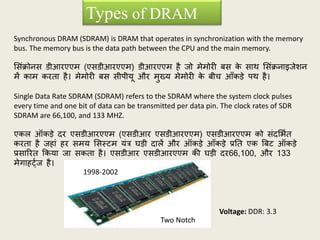
Single Data Rate SDRAM (SDRAM) refers to the SDRAM where the system clock pulses
every time and one bit of data can be transmitted per data pin. The clock rates of SDR
SDRAM are 66,100, and 133 MHZ.
एकल ऑकडे दर एसडीआरएएम (एसडीआर एसडीआरएएम) एसडीआरएएम को संदशभथत
करता है िहां हर समय शसस्टम यंत्र घडी दालें और ऑकडे आाँकडे प्रनत एक बिट ऑकडे
प्रसाररत र्कया िा सकता है। एसडीआर एसडीआरएएम क़ी घडी दर66,100, और 133
मेगाहट्थि है।
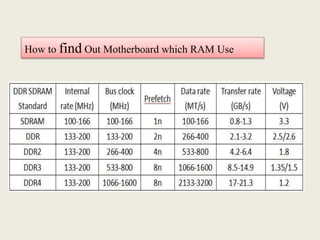
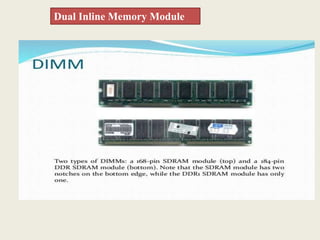
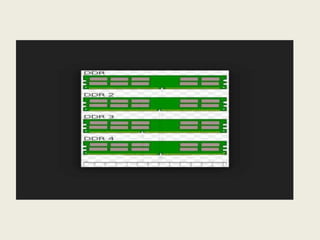
Two Notch
1998-2002
Voltage: DDR: 3.3
93.
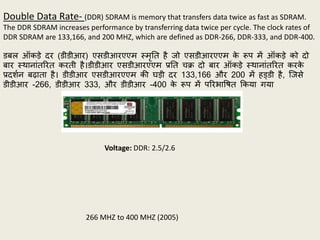
Double Data Rate-(DDR) SDRAM is memory that transfers data twice as fast as SDRAM.
The DDR SDRAM increases performance by transferring data twice per cycle. The clock rates of
DDR SDRAM are 133,166, and 200 MHZ, which are defined as DDR-266, DDR-333, and DDR-400.
डिल ऑकडे दर (डीडीआर) एसडीआरएएम स्मृनत है िो एसडीआरएएम क
े रूप में ऑकडे को दो
िार स्र्ानांतररत करती है।डीडीआर एसडीआरएएम प्रनत चक्र दो िार ऑकडे स्र्ानांतररत करक
े
प्रदिथन िढाता है। डीडीआर एसडीआरएएम क़ी घडी दर 133,166 और 200 में हड्डी है, जिसे
डीडीआर -266, डीडीआर 333, और डीडीआर -400 क
े रूप में पररभापित र्कया गया
266 MHZ to 400 MHZ (2005)
Voltage: DDR: 2.5/2.6
94.
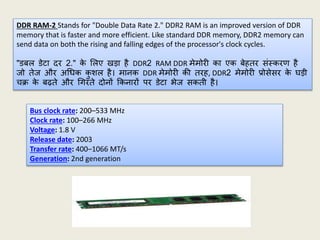
DDR RAM-2 Standsfor "Double Data Rate 2." DDR2 RAM is an improved version of DDR
memory that is faster and more efficient. Like standard DDR memory, DDR2 memory can
send data on both the rising and falling edges of the processor's clock cycles.
"डिल डेटा दर 2." क
े शलए खडा है DDR2 RAM DDR मेमोरी का एक िेहतर संस्करण है
िो तेि और अचधक क
ु िल है। मानक DDR मेमोरी क़ी तरह, DDR2 मेमोरी प्रोसेसर क
े घडी
चक्र क
े िढते और चगरते दोनों र्कनारों पर डेटा भेि सकती है।
Bus clock rate: 200–533 MHz
Clock rate: 100–266 MHz
Voltage: 1.8 V
Release date: 2003
Transfer rate: 400–1066 MT/s
Generation: 2nd generation
95.
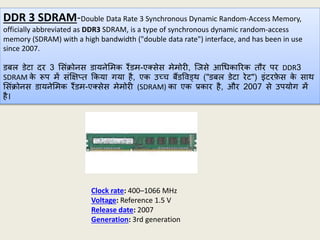
DDR 3 SDRAM-DoubleData Rate 3 Synchronous Dynamic Random-Access Memory,
officially abbreviated as DDR3 SDRAM, is a type of synchronous dynamic random-access
memory (SDRAM) with a high bandwidth ("double data rate") interface, and has been in use
since 2007.
डिल डेटा दर 3 शसंक्रोनस डायनेशमक रैंडम-एतसेस मेमोरी, जिसे आचधकाररक तौर पर DDR3
SDRAM क
े रूप में संक्षक्ष्त र्कया गया है, एक उच्च िैंडपवड्र् ("डिल डेटा रेट") इंटरफ
े स क
े सार्
शसंक्रोनस डायनेशमक रैंडम-एतसेस मेमोरी (SDRAM) का एक प्रकार है, और 2007 से उपयोग में
है।
Clock rate: 400–1066 MHz
Voltage: Reference 1.5 V
Release date: 2007
Generation: 3rd generation
96.
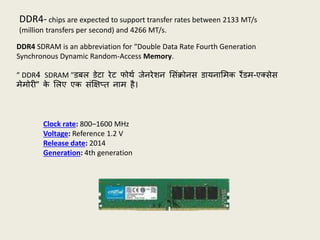
DDR4- chips areexpected to support transfer rates between 2133 MT/s
(million transfers per second) and 4266 MT/s.
DDR4 SDRAM is an abbreviation for “Double Data Rate Fourth Generation
Synchronous Dynamic Random-Access Memory.
” DDR4 SDRAM "डिल डेटा रेट फोर्थ िेनरेिन शसंक्रोनस डायनाशमक रैंडम-एतसेस
मेमोरी" क
े शलए एक संक्षक्ष्त नाम है।
Clock rate: 800–1600 MHz
Voltage: Reference 1.2 V
Release date: 2014
Generation: 4th generation
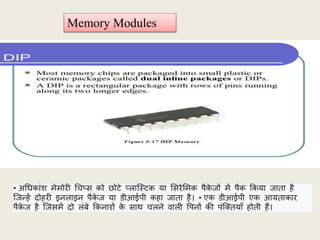
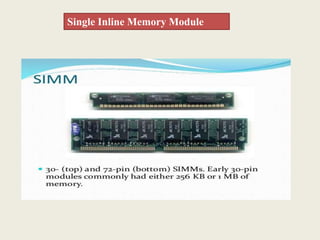
Memory Modules
• अचधकांिमेमोरी चच्स को छोटे ्लाजस्टक या शसरेशमक पैक
े िों में पैक र्कया िाता है
जिफहें दोहरी इनलाइन पैक
े ि या डीआईपी कहा िाता है। • एक डीआईपी एक आयताकार
पैक
े ि है जिसमें दो लंिे र्कनारों क
े सार् चलने वाली पपनों क़ी पंजततयााँ होती हैं।
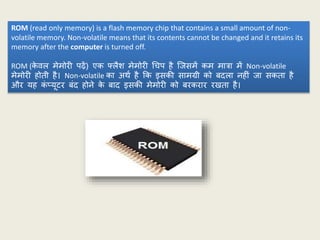
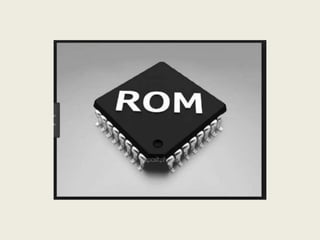
ROM (read onlymemory) is a flash memory chip that contains a small amount of non-
volatile memory. Non-volatile means that its contents cannot be changed and it retains its
memory after the computer is turned off.
ROM (क
े वल मेमोरी पढें) एक फ्लैि मेमोरी चचप है जिसमें कम मात्रा में Non-volatile
मेमोरी होती है। Non-volatile का अर्थ है र्क इसक़ी सामग्री को िदला नहीं िा सकता है
और यह क
ं ्यूटर िंद होने क
े िाद इसक़ी मेमोरी को िरकरार रखता है।
108.
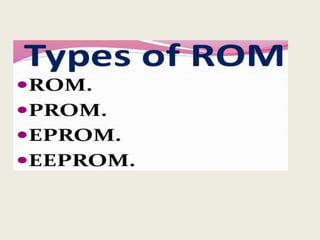
PROM
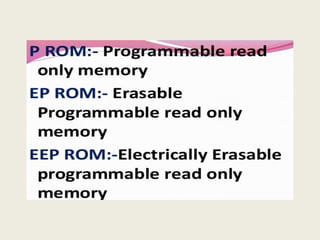
PROM stands for“Programmable Read Only Memory“. On this PROM, data can be written only
one time, and it remains there forever. PROM is capable to retain their needed data when
Computer is getting turn off.
PROM का अर्थ है "प्रोग्रामेिल रीड ओनली मेमोरी"। इस PROM पर, डेटा को क
े वल एक िार शलखा
िा सकता है, और यह हमेिा क
े शलए रहता है। िि क
ं ्यूटर िंद हो रहा हो, तो PROM उनक
े
आवश्यक डेटा को िनाए रखने में सक्षम होता है।
Applications of Programmable Read Only Memory
Radio-Frequency Identification
Video game consoles
Mobile Phones
High definition Multimedia Interfaces
109.
EPROM
EPROM stands for“Erasable and Programmable Read Only Memory”, and in which
stored data can be deleted by using of ultra-violet light for some time frame up to 40
minutes. The ultraviolet light clears its data, and now you can to reprogram the memory.
To write to and erase an EPROM, you require a special device called a PROM programmer
or PROM burner.
EPROM का मतलि "इरेज़ेिल एंड प्रोग्रामेिल रीड ओनली मेमोरी" है, और जिसमें स्टोर
र्कए गए डेटा को अल्रा-वायलेट लाइट क
े उपयोग से क
ु छ समय सीमा में 40 शमनट तक
हटाया िा सकता है। परािैंगनी प्रकाि अपने डेटा को साफ करता है, और अि आप
मेमोरी को रीप्रोग्राम कर सकते हैं। EPROM शलखने और शमटाने क
े शलए, आपको एक
पविेि उपकरण क़ी आवश्यकता होती है जिसे PROM प्रोग्रामर या PROM िनथर कहा िाता
है।
Applications of Erasable Programmable Read Only Memory
1. Well programmed chip in the micro controller, modem, video card and other electronic
gadgets.
2. Debugging
3. For writing program
4. BIOS chip in the computer
110.
EEPROM
EEPROM stands for“Electrically Erasable and Programmable Read Only Memory“, and
In EEPROM, all activities such as programming and erasing are performed by electrically.
This EEPROM is able to reprogrammed and erased in more than ten thousand time.
Entire chip cannot be erased one time, only erase one byte at once.
EEPROM का अर्थ है "इलेजतटकली एरैसेिल और प्रोग्रामेिल रीड ओनली मेमोरी", और
ईईप्रॉम में, प्रोग्राशमंग और शमटाने िैसी सभी गनतपवचधयााँ पवद्युत द्वारा क़ी िाती हैं। यह
EEPROM दस हिार से अचधक समय में पुन: संग्रहहत और शमटाने में सक्षम है। संपूणथ
चचप को एक िार में शमटाया नहीं िा सकता, क
े वल एक िार में एक िाइट को शमटाया
िाता है।
Applications of Electrically Erasable Programmable Read Only Memory
1. BIOS chip in Computer
2. As storage for re-programmable calibration information in test-equipment
3. As storage for in-built self learning functionality in remote operated transmitters
112.
Secondary Memory
Secondary memoryrefers to storage devices, such as hard drives and solid state
drives. It may also refer to removable storage media, such as USB flash drives,
CDs, and DVDs.
Additionally, secondary memory is non-volatile, meaning it retains its data with or
without electrical power.
सेक
ें डरी मेमोरी हाडथ ड्राइव और सॉशलड स्टेट ड्राइव िैसे स्टोरेि डडवाइस को संदशभथत
करता है। यह USB फ्लैि ड्राइव, सीडी और डीवीडी िैसे ररमूवेिल स्टोरेि मीडडया को भी
संदशभथत कर सकता है। ...
इसक
े अनतररतत, माध्यशमक मेमोरी non-volatile होती है, जिसका अर्थ है र्क यह पवद्युत
िजतत क
े सार् या उसक
े बिना अपना डेटा िरकरार रखती है।
113.
Types Of SecondaryMemory
A magnetic tape drive is a storage device that makes use of magnetic tape as a
medium for storage. It uses a long strip of narrow plastic film with tapes of thin
magnetizable coating.
एक चुंिक़ीय टेप ड्राइव एक भंडारण उपकरण है िो भंडारण क
े शलए एक माध्यम क
े
रूप में चुंिक़ीय टेप का उपयोग करता है। यह पतली चुम्िक़ीय कोहटंग क
े टेप क
े सार्
संक़ीणथ ्लाजस्टक र्फल्म क़ी एक लंिी पट्टी का उपयोग करता है।
114.
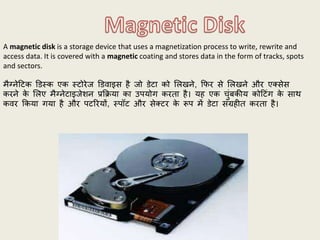
A magnetic diskis a storage device that uses a magnetization process to write, rewrite and
access data. It is covered with a magnetic coating and stores data in the form of tracks, spots
and sectors.
मैग्नेहटक डडस्क एक स्टोरेि डडवाइस है िो डेटा को शलखने, र्फर से शलखने और एतसेस
करने क
े शलए मैग्नेटाइिेिन प्रर्क्रया का उपयोग करता है। यह एक चुंिक़ीय कोहटंग क
े सार्
कवर र्कया गया है और पटररयों, स्पॉट और सेतटर क
े रूप में डेटा संग्रहीत करता है।
115.
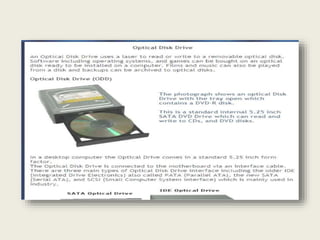
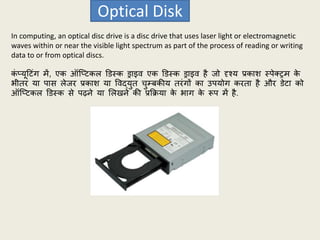
In computing, anoptical disc drive is a disc drive that uses laser light or electromagnetic
waves within or near the visible light spectrum as part of the process of reading or writing
data to or from optical discs.
क
ं ्यूहटंग में, एक ऑज्टकल डडस्क ड्राइव एक डडस्क ड्राइव है िो दृश्य प्रकाि स्पेतरम क
े
भीतर या पास लेिर प्रकाि या पवद्युत चुम्िक़ीय तरंगों का उपयोग करता है और डेटा को
ऑज्टकल डडस्क से पढने या शलखने क़ी प्रर्क्रया क
े भाग क
े रूप में है.
Optical Disk
116.
Types of OpticalDisk
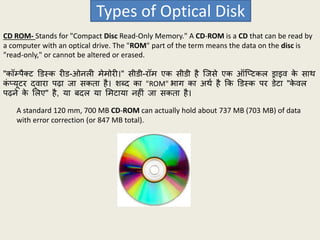
CD ROM- Stands for "Compact Disc Read-Only Memory." A CD-ROM is a CD that can be read by
a computer with an optical drive. The "ROM" part of the term means the data on the disc is
"read-only," or cannot be altered or erased.
"कॉम्पैतट डडस्क रीड-ओनली मेमोरी।" सीडी-रॉम एक सीडी है जिसे एक ऑज्टकल ड्राइव क
े सार्
क
ं ्यूटर द्वारा पढा िा सकता है। िब्द का "ROM" भाग का अर्थ है र्क डडस्क पर डेटा "क
े वल
पढने क
े शलए" है, या िदल या शमटाया नहीं िा सकता है।
A standard 120 mm, 700 MB CD-ROM can actually hold about 737 MB (703 MB) of data
with error correction (or 847 MB total).
117.
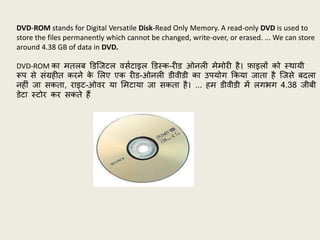
DVD-ROM stands forDigital Versatile Disk-Read Only Memory. A read-only DVD is used to
store the files permanently which cannot be changed, write-over, or erased. ... We can store
around 4.38 GB of data in DVD.
DVD-ROM का मतलि डडजिटल वसथटाइल डडस्क-रीड ओनली मेमोरी है। फाइलों को स्र्ायी
रूप से संग्रहीत करने क
े शलए एक रीड-ओनली डीवीडी का उपयोग र्कया िाता है जिसे िदला
नहीं िा सकता, राइट-ओवर या शमटाया िा सकता है। ... हम डीवीडी में लगभग 4.38 िीिी
डेटा स्टोर कर सकते हैं
118.
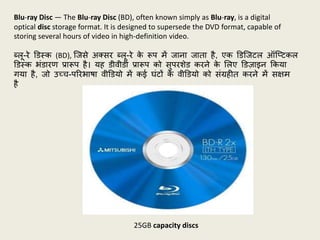
Blu-ray Disc —The Blu-ray Disc (BD), often known simply as Blu-ray, is a digital
optical disc storage format. It is designed to supersede the DVD format, capable of
storing several hours of video in high-definition video.
ब्लू-रे डडस्क (BD), जिसे अतसर ब्लू-रे क
े रूप में िाना िाता है, एक डडजिटल ऑज्टकल
डडस्क भंडारण प्रारूप है। यह डीवीडी प्रारूप को सुपरिेड करने क
े शलए डडज़ाइन र्कया
गया है, िो उच्च-पररभािा वीडडयो में कई घंटों क
े वीडडयो को संग्रहीत करने में सक्षम
है
25GB capacity discs
119.
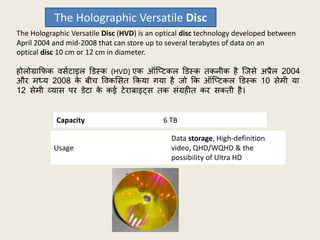
The Holographic VersatileDisc (HVD) is an optical disc technology developed between
April 2004 and mid-2008 that can store up to several terabytes of data on an
optical disc 10 cm or 12 cm in diameter.
होलोग्रार्फक वसथटाइल डडस्क (HVD) एक ऑज्टकल डडस्क तकनीक है जिसे अप्रैल 2004
और मध्य 2008 क
े िीच पवकशसत र्कया गया है िो र्क ऑज्टकल डडस्क 10 सेमी या
12 सेमी व्यास पर डेटा क
े कई टेरािाइट्स तक संग्रहीत कर सकती है।
The Holographic Versatile Disc
Capacity 6 TB
Usage
Data storage, High-definition
video, QHD/WQHD & the
possibility of Ultra HD
120.
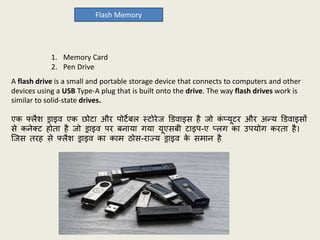
Flash Memory
1. MemoryCard
2. Pen Drive
A flash drive is a small and portable storage device that connects to computers and other
devices using a USB Type-A plug that is built onto the drive. The way flash drives work is
similar to solid-state drives.
एक फ्लैि ड्राइव एक छोटा और पोटेिल स्टोरेि डडवाइस है िो क
ं ्यूटर और अफय डडवाइसों
से कनेतट होता है िो ड्राइव पर िनाया गया यूएसिी टाइप-ए ्लग का उपयोग करता है।
जिस तरह से फ्लैि ड्राइव का काम ठोस-राज्य ड्राइव क
े समान है
121.
Storage
A computer storagedevice is any type of hardware that stores data.
The computer's primary hard drive stores the operating system, applications, and files and
folders for users of the computer.
क
ं ्यूटर स्टोरेि डडवाइस र्कसी भी प्रकार का हाडथवेयर होता है िो डेटा को स्टोर करता है।
क
ं ्यूटर क़ी प्रार्शमक हाडथ ड्राइव क
ं ्यूटर क
े उपयोगकताथओं क
े शलए ऑपरेहटंग शसस्टम,
एज्लक
े िन और फाइलों और फोल्डरों को संग्रहीत करती है।
122.
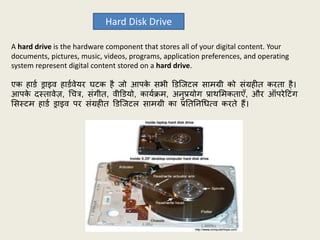
Hard Disk Drive
Ahard drive is the hardware component that stores all of your digital content. Your
documents, pictures, music, videos, programs, application preferences, and operating
system represent digital content stored on a hard drive.
एक हाडथ ड्राइव हाडथवेयर घटक है िो आपक
े सभी डडजिटल सामग्री को संग्रहीत करता है।
आपक
े दस्तावेज़, चचत्र, संगीत, वीडडयो, कायथक्रम, अनुप्रयोग प्रार्शमकताएाँ, और ऑपरेहटंग
शसस्टम हाडथ ड्राइव पर संग्रहीत डडजिटल सामग्री का प्रनतननचधत्व करते हैं।
123.
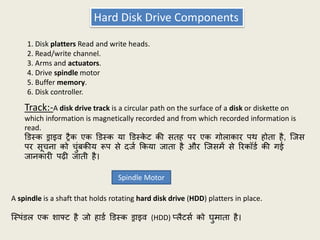
Hard Disk DriveComponents
1. Disk platters Read and write heads.
2. Read/write channel.
3. Arms and actuators.
4. Drive spindle motor
5. Buffer memory.
6. Disk controller.
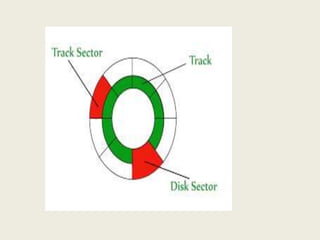
Track:-A disk drive track is a circular path on the surface of a disk or diskette on
which information is magnetically recorded and from which recorded information is
read.
डडस्क ड्राइव रैक एक डडस्क या डडस्क
े ट क़ी सतह पर एक गोलाकार पर् होता है, जिस
पर सूचना को चुंिक़ीय रूप से दिथ र्कया िाता है और जिसमें से ररकॉडथ क़ी गई
िानकारी पढी िाती है।
A spindle is a shaft that holds rotating hard disk drive (HDD) platters in place.
जस्पंडल एक िाफ्ट है िो हाडथ डडस्क ड्राइव (HDD) ्लैटसथ को घुमाता है।
Spindle Motor
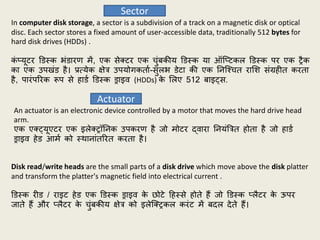
124.
In computer diskstorage, a sector is a subdivision of a track on a magnetic disk or optical
disc. Each sector stores a fixed amount of user-accessible data, traditionally 512 bytes for
hard disk drives (HDDs) .
क
ं ्यूटर डडस्क भंडारण में, एक सेतटर एक चुंिक़ीय डडस्क या ऑज्टकल डडस्क पर एक रैक
का एक उपखंड है। प्रत्येक क्षेत्र उपयोगकताथ-सुलभ डेटा क़ी एक ननजश्चत राशि संग्रहीत करता
है, पारंपररक रूप से हाडथ डडस्क ड्राइव (HDDs) क
े शलए 512 िाइट्स.
Sector
An actuator is an electronic device controlled by a motor that moves the hard drive head
arm.
एक एतट्यूएटर एक इलेतरॉननक उपकरण है िो मोटर द्वारा ननयंबत्रत होता है िो हाडथ
ड्राइव हेड आमथ को स्र्ानांतररत करता है।
Actuator
Disk read/write heads are the small parts of a disk drive which move above the disk platter
and transform the platter's magnetic field into electrical current .
डडस्क रीड / राइट हेड एक डडस्क ड्राइव क
े छोटे हहस्से होते हैं िो डडस्क ्लैटर क
े ऊपर
िाते हैं और ्लैटर क
े चुंिक़ीय क्षेत्र को इलेजतरकल करंट में िदल देते हैं।
127.
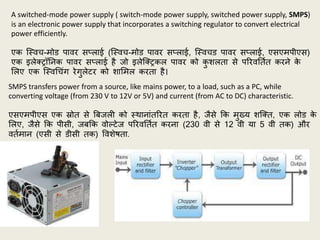
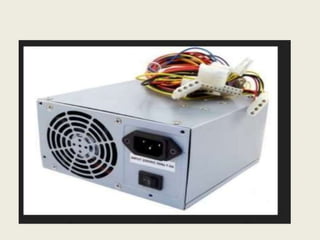
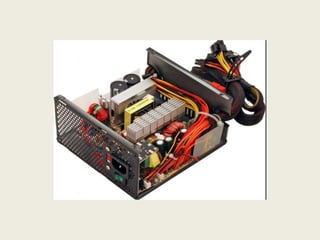
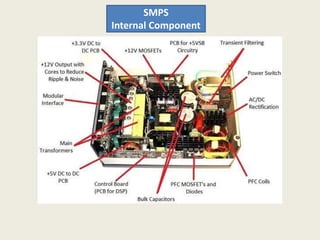
A switched-mode powersupply ( switch-mode power supply, switched power supply, SMPS)
is an electronic power supply that incorporates a switching regulator to convert electrical
power efficiently.
एक जस्वच-मोड पावर स्लाई (जस्वच-मोड पावर स्लाई, जस्वचड पावर स्लाई, एसएमपीएस)
एक इलेतरॉननक पावर स्लाई है िो इलेजतरकल पावर को क
ु िलता से पररवनतथत करने क
े
शलए एक जस्वचचंग रेगुलेटर को िाशमल करता है।
SMPS transfers power from a source, like mains power, to a load, such as a PC, while
converting voltage (from 230 V to 12V or 5V) and current (from AC to DC) characteristic.
एसएमपीएस एक स्रोत से बििली को स्र्ानांतररत करता है, िैसे र्क मुख्य िजतत, एक लोड क
े
शलए, िैसे र्क पीसी, ििर्क वोल्टेि पररवनतथत करना (230 वी से 12 वी या 5 वी तक) और
वतथमान (एसी से डीसी तक) पविेिता.
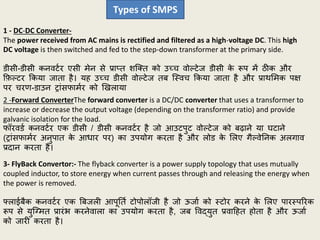
1 - DC-DCConverter-
The power received from AC mains is rectified and filtered as a high-voltage DC. This high
DC voltage is then switched and fed to the step-down transformer at the primary side.
डीसी-डीसी कनवटथर एसी मेन से प्रा्त िजतत को उच्च वोल्टेि डीसी क
े रूप में ठीक और
र्फल्टर र्कया िाता है। यह उच्च डीसी वोल्टेि ति जस्वच र्कया िाता है और प्रार्शमक पक्ष
पर चरण-डाउन रांसफामथर को खखलाया
Types of SMPS
2 -Forward ConverterThe forward converter is a DC/DC converter that uses a transformer to
increase or decrease the output voltage (depending on the transformer ratio) and provide
galvanic isolation for the load.
फॉरवडथ कनवटथर एक डीसी / डीसी कनवटथर है िो आउटपुट वोल्टेि को िढाने या घटाने
(रांसफामथर अनुपात क
े आधार पर) का उपयोग करता है और लोड क
े शलए गैल्वेननक अलगाव
प्रदान करता है।
3- FlyBack Convertor:- The flyback converter is a power supply topology that uses mutually
coupled inductor, to store energy when current passes through and releasing the energy when
the power is removed.
फ्लाईिैक कनवटथर एक बििली आपूनतथ टोपोलॉिी है िो ऊिाथ को स्टोर करने क
े शलए पारस्पररक
रूप से युजग्मत प्रारंभ करनेवाला का उपयोग करता है, िि पवद्युत प्रवाहहत होता है और ऊिाथ
को िारी करता है।
SHUTDOWN AND RESTARTOF PC (RESTART) PROBLEMS
Step-1 Electrical issues: This is a very common cause of computer constant heating and cooling
of the computer, atmospheric conditions and dust can all play a part.
यह पुराने क
ं ्यूटरों में क
ं ्यूटर पवफलता का एक िहुत ही सामाफय कारण है क
ं ्यूटर क
े
ननरंतर हीहटंग और क
ू शलंग, वायुमंडलीय जस्र्नतयों और धूल सभी इसक
े कारण हैं।
Connection between a memory module and the motherboard: It is a very common cause of
boot failure that a memory module is not properly connecting with the motherboard. If just one
of the many pins on the module fail to connect in the motherboard slot, thecomputer will not
start.
यह िूट पवफलता का एक िहुत ही सामाफय कारण है र्क स्मृनत मॉड्यूल ठीक से मदरिोडथ से
कनेतट न हुआ हो। यहद मॉड्यूल पर कई पपनों में से कोई एक भी मदरिोडथ स्लॉट से ननकला है,
तो क
ं ्यूटर start नहीं होगा I
Loose cable; Particularly if your have been moving a computer around, or you have
opened the case for any reason, it is perfectly possible that a cable is loose or there is not
a good electrical connection.
हो सकता है क़ी आप ने कभी र्कसी कारणवि अपने क
ं ्यूटर को र्कसी अफय स्र्ान पर
खखसकाया हो या र्फर क
ं ्यूटर क
े क
े स को खोला हो तो इस पररजस्र्नत में आप क
े क
ं ्यूटर
क
े क
े िल ठीले हो गए हो या र्फर ननकल गए हो।
135.
Step-2 Power failure:Your computer is completely dead when you turn on, that is no fans, no
lights, nothing, and the power supply may have failed.
िि आप क
ं ्यूटर चालू करते है और आपक
े CPU में कोई लाइट नहीं िलती है और फ
ै न
भी नहीं चलता तो इसका अर्थ है क़ी आपक
े पॉवर स्लाई में समस्या है।
Step-3 Operating system failure: Generally, if a computer turns on, LEDs light up, the hard
drive makes a few noises and some text appears on the initial screen, then the
probable reasonfor boot failure is the operating system.
आम तौर पर, अगर आपका क
ं ्यूटर चालू हो िाता है, एलईड लाइट हल्का हो िाता है.
हाडथ ड्राइव क
ु छ िोर करता है एवं क
ु छ टेतस्ट प्रारंशभक स्क्ऱीन पर हदखाई देता है तो
इसका मतलि यह है र्क आपका ऑपरेहटंग शसस्टम िूट नहीं कर रहा है।
136.
Missing or CorruptfIles: When the operating system falls to start and the hardwarenot a
fault, it will be because one or more essential files that the operating yetneeds to start have
come corrupt or missing. The two most probable causes of this are
िि ऑपरेहटंग शसस्टम िुरू होने में पवफल हो िाये और हाडथवेयर में कोई कमी न हो तो हो
सकता है क़ी आपक
े ऑपरेहटंग शसस्टम क़ी कोई फाइल चगस हो गयी है या कर्ट हो गई है।
इसक
े दो सिसे समा कारण हो सकते हैं-
• The hard disk is old and beginning to fall and/or
आपका हाडथ डडस्क पुराना हो गया है और स्टाटथ होने में समस्या कर रहा हो।
• An infestation of the computer with malicious software
कोई हाननकारक (वायरस) फाइल क
ं ्यूटर या सॉफ्टवेर में आ गया हो।Many people faced >
Attack of malidous software: Malicious software is a generic name of viruses Le, the nasties
you need to keep out of your computer.
माशलशसअस सॉफ्टवेर या फाइल को वायरस कहते है िैसे र्क nnsties। यहद आपका शसस्टम
माशलशसअग सॉफ्टवेर क
े कारण खराि हुआ है
137.
Step-4 Hardware failure:
•Video card: Not all computers have a separate video card. The trouble with video is that they
often only have a life span of about three years.Fortunately, they are easy and inexpensive to
replace.
सभी क
ं ्यूटर में अलग से वीडडयो काडथ नहीं होता है िीडडयो काडथ क
े सार् परेिानी यह है र्क
उनक
े पास क
े वल तीन साल का िीवन काल होता है। परफतु इसे िदलना आसान एवं सस्ता
होता है I
Hard drive failure: Sometimes hard disk drives just break If you hear clicking noises, then this
is a likely scenario.
कभी आपक
े हारडडस्क झाइय से अिीि िोर होने लगता है िात हाडथ डडस्क खराि हो िाती है.
आपका डाटा भी खराि हो सकता है।
Motherboard Failure: If it is not the video card, power supply, memory modules, hard drive,
etc,
यहद आपका वीडडयो काडथ, पॉवर स्लाई, मेमोरी मॉड्यूल, हाडथ ड्राइव आहद सही है तो हो सकता
है
138.
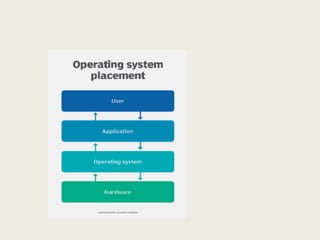
OPERATING SYSTEM
An OperatingSystem (OS) is an Interface betweenComputer hardware and the User.An
operating system is software which performs all the basic tasks.
क
ं ्यूटर हाडथवेयर और उपयोगकताथ क
े िीच एक इंटरफ
े स (अरफलक) है। ऑपरेहटंग शसस्टम
सॉफ्टोयर है िो सभी मूलभूत कायथ करता है
1. MS-DOS (1981)
2. Windows 1.0 – 2.0(1985-1992)
3. Windows 3.0 3.1(1990 -1994)
4. Windows 95 (1995)
5. Windows 98 (1998)
6. Windows ME – Millennium
Edition(2000)
7. Windows 2000(2000)
8. Windows XP(2001)
9. Windows Vista(2006)
10. Windows 7(2009)
11. Windows 8(2012)
12. Windows 10(2015)
Microsoft Windows Operating Systems for PCs
141.
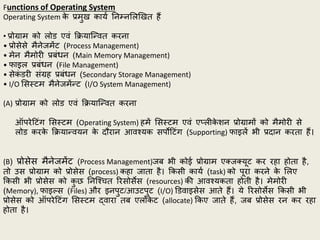
Functions of OperatingSystem
Operating System क
े प्रमुख कायथ ननम्नशलखखत हैं
• प्रोग्राम को लोड एवं र्क्रयाजफवत करना
• प्रोसेसे मैनेिमेंट (Process Management)
• मेन मैमोरी प्रिंधन (Main Memory Management)
• फाइल प्रिंधन (File Management)
• सेक
ं डरी संग्रह प्रिंधन (Secondary Storage Management)
• I/O शसस्टम मैनेिमेंफट (I/O System Management)
(A) प्रोग्राम को लोड एवं र्क्रयाजफवत करना
ऑपरेहटंग शसस्टम (Operating System) हमें शसस्टम एवं ए्लीक
े िन प्रोग्रामों को मैमोरी से
लोड करक
े र्क्रयाफवयन क
े दौरान आवश्यक सपोहटंग (Supporting) फाइलें भी प्रदान करता हैं।
(B) प्रोसेस मैनेिमेंट (Process Management)िि भी कोई प्रोग्राम एतितयूट कर रहा होता है,
तो उस प्रोग्राम को प्रोसेस (process) कहा िाता है। र्कसी कायथ (task) को पूरा करने क
े शलए
र्कसी भी प्रोसेस को क
ु छ ननजश्चत ररसोसेस (resources) क़ी आवश्यकता होती है। मेमोरी
(Memory), फाइल्स (Files) और इनपुट/आउटपुट (I/O) डडवाइसेस आते हैं। ये ररसोसेस र्कसी भी
प्रोसेस को ऑपरेहटंग शसस्टम द्वारा ति एलोक
े ट (allocate) र्कए िाते हैं, िि प्रोसेस रन कर रहा
होता है।
142.
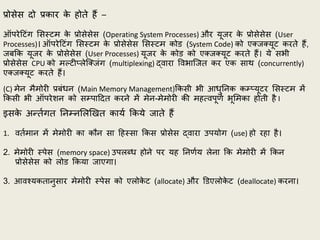
प्रोसेस दो प्रकारक
े होते हैं –
ऑपरेहटंग शसस्टम क
े प्रोसेसेस (Operating System Processes) और यूिर क
े प्रोसेसेस (User
Processes)। ऑपरेहटंग शसस्टम क
े प्रोसेसेस शसस्टम कोड (System Code) को एतितयूट करते हैं,
ििर्क यूिर क
े प्रोसेसेस (User Processes) यूिर क
े कोड को एतितयूट करते हैं। ये सभी
प्रोसेसेस CPU को मल्टी्लेजतिंग (multiplexing) द्वारा पवभाजित कर एक सार् (concurrently)
एतितयूट करते हैं।
(C) मेन मैमोरी प्रिंधन (Main Memory Management)र्कसी भी आधुननक कम््यूटर शसस्टम में
र्कसी भी ऑपरेिन को सम्पाहदत करने में मेन-मेमोरी क़ी महत्वपूणथ भूशमका होती है I
इसक
े अफतथगत ननम्नशलखखत कायथ र्कये िाते हैं
1. वतथमान में मेमोरी का कौन सा हहस्सा र्कस प्रोसेस द्वारा उपयोग (use) हो रहा है।
2. मेमोरी स्पेस (memory space) उपलब्ध होने पर यह ननणथय लेना र्क मेमोरी में र्कन
प्रोसेसेस को लोड र्कया िाएगा।
3. आवश्यकतानुसार मेमोरी स्पेस को एलोक
े ट (allocate) और डडएलोक
े ट (deallocate) करना।
143.
(D) फाइल प्रिंधन(File Management)
फाइल मैनेिमेंट ऑपरेहटंग शसस्टम का सिसे दृश्य (visible) कम्पोनेफट है। फाइल, सम्िजफधत
इनफॉरमेिन (related information) का एक कॉलेतिन हैं,प्रत्येक फाइल, िो सेकण्डरी स्टोरेि
डडवाइस में स्टोर क़ी िाती है, उसका क
ु छ नाम होता है, जिस नाम से उसे ननहदथष्ट र्कया िाता
है। र्कसी डाइरेतरी क
े अधीन स्टोर क़ी िाती है। प्रत्येक फाइल क़ी अपनी प्रॉपटीि अर्ाथत्
एरीब्यूट्स होती है।
ऑपरेहटंग शसस्टम (Operating System) क
े ननम्नशलखखत कायथ हैं:
1. फाइलों को र्क्रएट तर्ा डडलीट करना।
2. डाइरेतरीि को र्क्रएट तर्ा डडलीट करना।
3. फाइल्स तर्ा डाइरेतरीि क
े मैननपुलेिन को समर्थन करना।
4. फाइलों को सेक
े ण्डरी स्टोरेि पर मैप करना।5. फाइलों क
े िैकअप (backup) का समर्थन
करना।
144.
(E) सेक
ं डरीसंग्रह प्रिंधन (Secondary Storage Management)
जिसमें स्टोर र्कए गए डेटा और प्रोग्राम पावर (Power) क
े गायि होने क़ी जस्र्नत में नष्ट हो
िाते हैं।) अत: कम््यूटर शसस्टम में मेन-मेमोरी में स्टोडथ डेटा और प्रोग्राम को स्र्ायी रूप से
स्टोर करने क
े शलए सेकण्डरी स्टोरेि (Secondary Storage) का होना आवश्यक होता है।
ननम्नशलखखत कायथ सम्पफन कराता हैं।
1. डडस्क क
े फ्ऱी-स्पेस को मैनेि करने क
े शलए।
2. स्टोरेि स्पेस को एलोक
े ट करने क
े शलए।
3. डडस्क-शिड्युशलंग (Disk Scheduling) क
े शलए
(F)1/0 शसस्टम मैनेिमेंफट (1/0 system Management)
ऑपरेहटंग शसस्टम (Operating System)I/o डडवाइसेि को प्रभाविाली रूप में उपयोग करने में मदद
करता हैं, एवं उसक़ी िहटलताओं से यूिर को मुतत करता हैं ऑपरेहटंग शसस्टम पवशभफन
हाडथवेयर डडवाइसेस (hardware devices) क
े डडवाइस ड्राइवर (device drivers) क़ी उपलब्धता भी
सुननजश्चत करता है ।
(G) ऑपरेहटंग शसस्टम क
े अफय कायथ (Additional Function Of Operating System)
1. ररसोसथ एलोक
े िन (Resource Allocation) सभी ऑपरेहटंग शसस्टम ररसोसेि (िैसे CPU,मैमोरी,
पेरीफ
े रल आहद)र्क सभी ररसोसेि का अच्छे ढग से उपयोग हो सक
े ।
2. ए्लीक
े िन प्रोग्राम को र्क्रयाजफवत करना।
3. यूटीशलटी प्रोग्रामों को र्क्रयाजफवत कराना।
4. ऐरर डडटेतिन।
5. कम्यूननक
े िन तर्ा नेटवर्क
िं ग।
145.
Start-up Process (Booting)
Itis useful to understand what happens behind the scenes when you switch on your computer
from a cold idle machine to an operable and functional system.
There are essentially two forms of booting - the soft boot and the hard boot.
िि आप र्कसी क
ं ्यूटर को ऑन करते है तो यह िानना िरुरी है र्क उसक
े पीछे तया होता है
या ऑन होने क
े दौरानकौन सी प्रर्क्रया होती है। क
ं ्यूटर क
े ऑन होने का मतलि है र्क वह िूट
कर रहा है और
िूट दो प्रकार से होता है- सॉफ्ट िूट एवं हाडथ िूट। -
1. A warm boot or soft boot on the other hand takes place when a software application or
operatingsystem triggers the computer to perform a reboot.
िि कोई सॉफ्टवेयर एज्लक
े िन या ऑपरेहटंग शसस्टम क
ं ्यूटर को एक ररिूट करने क
े शलए
हरगर करता है तो उसे वामथ िूट या सॉफ्ट िूट कहते है।
2.The cold boot or hard boot involves powering the computer up from an initial zero power
supply.
िि आप क
ं ्यूटर ऑन करते है तो होने वाले िूट को कोल्ड िूट या हाडथ िूट कहते है।
146.
Booting a Windows2000 / XP System
The boot-up process is a list of detailed procedures that the system undergoes to perform all
system check and load all necessary files to bring the computer to an operable state.
िूट-अप एक प्रर्क्रया है जिसमे पवस्तृत प्रर्क्रयाओं क़ी एक सूची होती है, िो शसस्टम चेक" करने
और क
ं ्यूटर को प्रचालन स्टेट में लाने क
े शलए सभी आवश्यक फाइलों को लोड करती है।
The Windows XP booting process comprises of the following steps:
Step 1. POST: As soon as you power up your computer, a (power on self-test) is performed by
the power. supply to ensure that the volume and current levels are correct before the Power
Good signal is sent to the processor. When this first stage is cleared, the microprocessor will
then trigger the BIOS to perform a series of operations.
िैसे ही आप अपने क
ं ्यूटर को पॉवर देते हैं वैसे ही पॉवर स्लाई क
े द्वारा सेल्फ टेस्ट र्कया
िाता है. यह सुननजश्चत करने क
े शलए र्क माइक्रोप्रोसेसर को शसग्नल पहुचने से पहले वॉल्यूम
और करंट लेवल सही है। ििपहले चरण का पररक्षण हो िाता है तो ऑपरेिन परफॉमथ करने क
े
शलए BIOS को हरगर करता है।
Step-2 BIOS ROM: The BIOS, also known as the Basic Input Output System is a firmware or
set of instructions that resides on a ROM chip as contained in the motherboard.
BIOS िेशसक इनपुट आउटपुट शसस्टम होता है िोर्क एक फमथवेयर या ननदेिों का सम्मुदय
होता है और ROM चचप में होता है तर्ा यह चचप मदर िोडथ पर स्र्ापपत होता है।
147.
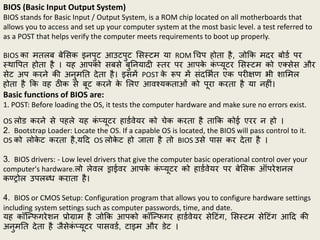
BIOS (Basic InputOutput System)
BIOS stands for Basic Input / Output System, is a ROM chip located on all motherboards that
allows you to access and set up your computer system at the most basic level. a test referred to
as a POST that helps verify the computer meets requirements to boot up properly.
BIOS का मतलि िेशसक इनपुट आउटपुट शसस्टम या ROM चचप होता है, िोर्क मदर िोडथ पर
स्र्ापपत होता है । यह आपको सिसे िुननयादी स्तर पर आपक
े क
ं ्यूटर शसस्टम को एतसेस और
सेट अप करने क़ी अनुमनत देता है। इसमें POST क
े रूप में संदशभथत एक परीक्षण भी िाशमल
होता है र्क वह ठीक से िूट करने क
े शलए आवश्यकताओं को पूरा करता है या नहीं।
Basic functions of BIOS are:
1. POST: Before loading the OS, it tests the computer hardware and make sure no errors exist.
OS लोड करने से पहले यह क
ं ्यूटर हाडथवेयर को चेक करता है तार्क कोई एरर न हो ।
2. Bootstrap Loader: Locate the OS. If a capable OS is located, the BIOS will pass control to it.
OS को लोक
े ट करता है,यहद OS लोक
े ट हो िाता है तो BIOS उसे पास कर देता है ।
3. BIOS drivers: - Low level drivers that give the computer basic operational control over your
computer's hardware.लो लेवल ड्राईवर आपक
े क
ं ्यूटर को हाडथवेयर पर िेशसक ऑपरेिनल
कण्रोल उपलब्ध कराता है।
4. BIOS or CMOS Setup: Configuration program that allows you to configure hardware settings
including system settings such as computer passwords, time, and date.
यह कॉजफफगरेिन प्रोग्राम है िोर्क आपको कॉजफफगर हाडथवेयर सेहटंग, शसस्टम सेहटंग आहद क़ी
अनुमनत देता है िैसेक
ं ्यूटर पासवडथ, टाइम और डेट ।
148.
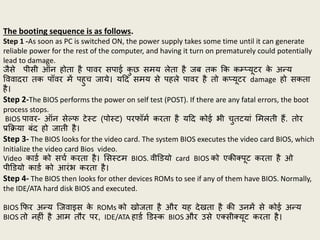
The booting sequenceis as follows.
Step 1 -As soon as PC is switched ON, the power supply takes some time until it can generate
reliable power for the rest of the computer, and having it turn on prematurely could potentially
lead to damage.
िैसे पीसी ऑन होता है पावर सपाई क
ु छ समय लेता है िि तक र्क कम््यूटर क
े अफय
पववादरा तक पॉवर में पहुच िाये। यहद समय से पहले पावर है तो क्यूटर damage हो सकता
है।
Step 2-The BIOS performs the power on self test (POST). If there are any fatal errors, the boot
process stops.
BIOS पावर- ऑन सेल्फ टेस्ट (पोस्ट) परफॉमथ करता है यहद कोई भी चुतटयां शमलती हैं. तोर
प्रर्क्रया िंद हो िाती है।
Step 3- The BIOS looks for the video card. The system BIOS executes the video card BIOS, which
Initialize the video card Bios video.
Video काडथ को सचथ करता है। शसस्टम BIOS. वीडडयो card BIOS को एक़ीतपूट करता है ओ
पीडडयो काडथ को आरंभ करता है।
Step 4- The BIOS then looks for other devices ROMs to see if any of them have BIOS. Normally,
the IDE/ATA hard disk BIOS and executed.
BIOS र्फर अफय जिवाइस क
े ROMs को खोिता है और यह देखता है क़ी उनमें से कोई अफय
BIOS तो नहीं है आम तौर पर, IDE/ATA हाडथ डडस्क BIOS और उसे एतसीतयूट करता है।
149.
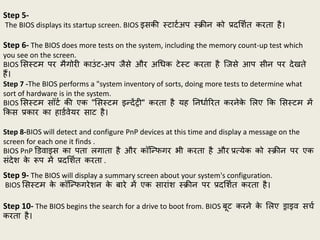
Step 5-
The BIOSdisplays its startup screen. BIOS इसक़ी स्टाटथअप स्क्ऱीन को प्रदशिथत करता है।
Step 6- The BIOS does more tests on the system, including the memory count-up test which
you see on the screen.
BIOS शसस्टम पर मैगोरी काउंट-अप िैसे और अचधक टेस्ट करता है जिसे आप सीन पर देखते
हैं।
Step 7 -The BIOS performs a "system inventory of sorts, doing more tests to determine what
sort of hardware is in the system.
BIOS शसस्टम सॉटथ क़ी एक "शसस्टम इफदेंरी" करता है यह ननधाथररत करनेक
े शलए र्क शसस्टम में
र्कस प्रकार का हाडथवेयर साट है।
Step 8-BIOS will detect and configure PnP devices at this time and display a message on the
screen for each one it finds .
BIOS PnP डडवाइस का पता लगाता है और कॉजफफगर भी करता है और प्रत्येक को स्क्ऱीन पर एक
संदेि क
े रूप में प्रदशिथत करता .
Step 9- The BIOS will display a summary screen about your system's configuration.
BIOS शसस्टम क
े कॉजफफगरेिन क
े िारे में एक सारांि स्क्ऱीन पर प्रदशिथत करता है।
Step 10- The BIOS begins the search for a drive to boot from. BIOS िूट करने क
े शलए ड्राइव सचथ
करता है।
150.
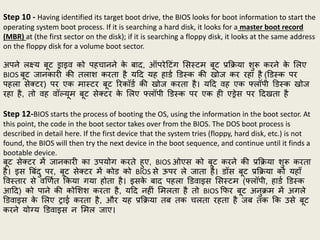
Step 10 -Having identified its target boot drive, the BIOS looks for boot information to start the
operating system boot process. If it is searching a hard disk, it looks for a master boot record
(MBR) at (the first sector on the disk); if it is searching a floppy disk, it looks at the same address
on the floppy disk for a volume boot sector.
अपने लक्ष्य िूट ड्राइव को पहचानने क
े िाद, ऑपरेहटंग शसस्टम िूट प्रर्क्रया िुरू करने क
े शलए
BIOS िूट िानकारी क़ी तलाि करता है यहद यह हाडथ डडस्क क़ी खोि कर रहा है (डडस्क पर
पहला सेतटर) पर एक मास्टर िूट ररकॉडथ क़ी खोि करता है। यहद वह एक फ्लॉपी डडस्क खोि
रहा है, तो वह वॉल्यूम िूट सेतटर क
े शलए फ्लॉपी डडस्क पर एक ही एड्रेस पर हदखता है
Step 12-BIOS starts the process of booting the OS, using the information in the boot sector. At
this point, the code in the boot sector takes over from the BIOS. The DOS boot process is
described in detail here. If the first device that the system tries (floppy, hard disk, etc.) is not
found, the BIOS will then try the next device in the boot sequence, and continue until it finds a
bootable device.
िूट सेतटर में िानकारी का उपयोग करते हुए, BIOS ओएस को िूट करने क़ी प्रर्क्रया िुरू करता
है। इस बिंदु पर, िूट सेतटर में कोड को BIOS से ऊपर ले िाता है। डॉस िूट प्रर्क्रया को यहााँ
पवस्तार से वखणथत र्कया गया होता है। इसक
े िाद पहला डडवाइस शसस्टम (फ्लॉपी, हाडथ डडस्क
आहद) को पाने क़ी कोशिि करता है, यहद नहीं शमलता है तो BIOS र्फर िूट अनुक्रम में अगले
डडवाइस क
े शलए राई करता है, और यह प्रर्क्रया ति तक चलता रहता है िि तक र्क उसे िूट
करने योग्य डडवाइस न शमल िाए।
151.
Step 13-If noboot device, the system will normally display an error message and then
freeze up the system.
यहद कोई िूट डडवाइस नहीं शमलता है, तो शसस्टम आमतौर पर एक एरर मेसेि (त्रुहट
संदेि) प्रदशिथत करता है तर्ा शसस्टम को फ्ऱीि अप कर देता है अर्ाथत शसस्टम वही
रुक िाता है।
Step 14-This process is called a "cold boot". A "warm boot" is the same thing except it
occurs when the machine is rebooted using {Ctrl}+{Alt}+{Delete}. In this case the POST is
skipped and the boot process continues roughly at step 8 above.
इस प्रर्क्रया को "क
ू ल िूट" कहा िाता है, "वामथ िूट" भी यही करता है, परफतु यह ति होता
है िि मिीन को {Ctrl}+{Alt}+{Delete} का उपयोग करक
े ररिूट र्कया िाता है। इस प्रर्क्रया
में, POST क़ी प्रर्क्रया छ
ू ट िाता है और िूट प्रर्क्रया लगभग चरण 8 से िारी होता है।
152.
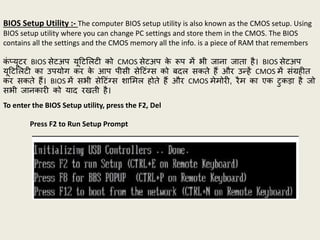
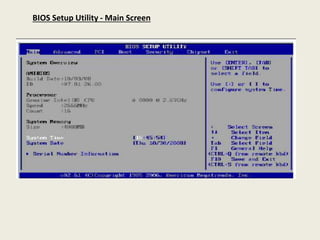
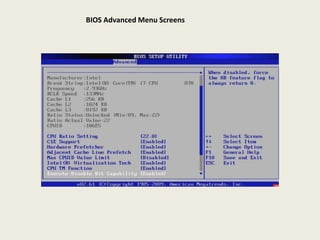
BIOS Setup Utility:- The computer BIOS setup utility is also known as the CMOS setup. Using
BIOS setup utility where you can change PC settings and store them in the CMOS. The BIOS
contains all the settings and the CMOS memory all the info. is a piece of RAM that remembers
क
ं ्यूटर BIOS सेटअप यूहटशलटी को CMOS सेटअप क
े रूप में भी िाना िाता है। BIOS सेटअप
यूहटशलटी का उपयोग कर क
े आप पीसी सेहटंग्स को िदल सकते हैं और उफहें CMOS में संग्रहीत
कर सकते हैं। BIOS में सभी सेहटंग्स िाशमल होते हैं और CMOS मेमोरी, रैम का एक टुकडा है िो
सभी िानकारी को याद रखती है।
To enter the BIOS Setup utility, press the F2, Del
Press F2 to Run Setup Prompt
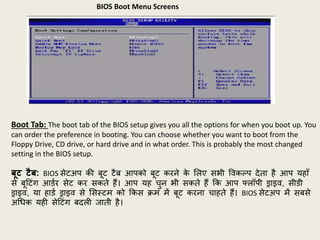
BIOS Boot MenuScreens
Boot Tab: The boot tab of the BIOS setup gives you all the options for when you boot up. You
can order the preference in booting. You can choose whether you want to boot from the
Floppy Drive, CD drive, or hard drive and in what order. This is probably the most changed
setting in the BIOS setup.
बूट टैब: BIOS सेटअप क़ी िूट टैि आपको िूट करने क
े शलए सभी पवकल्प देता है आप यहााँ
से िूहटंग आडथर सेट कर सकते हैं। आप यह चुन भी सकते हैं र्क आप फ्लॉपी ड्राइव, सीडी
ड्राइव, या हाडथ ड्राइव से शसस्टम को र्कस क्रम में िूट करना चाहते हैं। BIOS सेटअप में सिसे
अचधक यही सेहटंग िदली िाती है।
156.
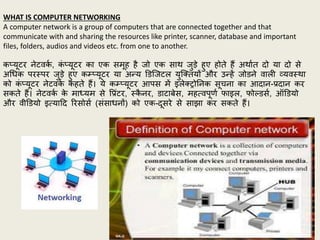
WHAT IS COMPUTERNETWORKING
A computer network is a group of computers that are connected together and that
communicate with and sharing the resources like printer, scanner, database and important
files, folders, audios and videos etc. from one to another.
क्यूटर नेटवक
थ , क
ं ्यूटर का एक समूह है िो एक सार् िुडे हुए होते हैं अर्ाथत दो या दो से
अचधक परस्पर िुडे हुए कम््यूटर या अफय डडजिटल युजततयों और उफहें िोडने वाली व्यवस्र्ा
को क
ं ्यूटर नेटवक
थ कहते हैं। ये कम््यूटर आपस में इलेतरोननक सूचना का आदान-प्रदान कर
सकते हैं। नेटवक
थ क
े माध्यम से पप्रंटर, स्क
ै नर, डाटािेस, महत्वपूणथ फाइल, फोल्डसथ, ऑडडयो
और वीडडयो इत्याहद ररसोसथ (संसाधनों) को एक-दूसरे से साझा कर सकते हैं।
157.
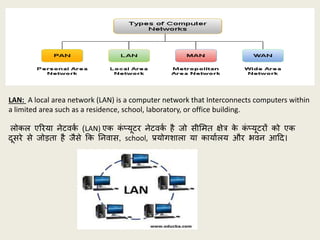
LAN: A localarea network (LAN) is a computer network that Interconnects computers within
a limited area such as a residence, school, laboratory, or office building.
लोकल एररया नेटवक
थ (LAN) एक क
ं ्यूटर नेटवक
थ है िो सीशमत क्षेत्र क
े क
ं ्यूटरों को एक
दूसरे से िोडता है िैसे र्क ननवास, school, प्रयोगिाला या कायाथलय और भवन आहद।
158.
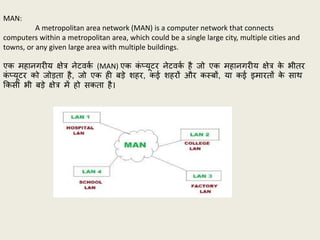
MAN:
A metropolitan areanetwork (MAN) is a computer network that connects
computers within a metropolitan area, which could be a single large city, multiple cities and
towns, or any given large area with multiple buildings.
एक महानगरीय क्षेत्र नेटवक
थ (MAN) एक क
ं ्यूटर नेटवक
थ है िो एक महानगरीय क्षेत्र क
े भीतर
क
ं ्यूटर को िोडता है, िो एक ही िडे िहर, कई िहरों और कस्िों, या कई इमारतों क
े सार्
र्कसी भी िडे क्षेत्र में हो सकता है।
159.
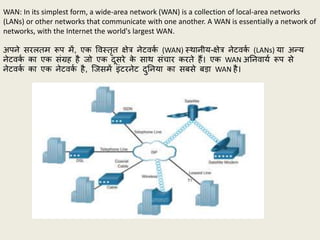
WAN: In itssimplest form, a wide-area network (WAN) is a collection of local-area networks
(LANs) or other networks that communicate with one another. A WAN is essentially a network of
networks, with the Internet the world's largest WAN.
अपने सरलतम रूप में, एक पवस्तृत क्षेत्र नेटवक
थ (WAN) स्र्ानीय-क्षेत्र नेटवक
थ (LANs) या अफय
नेटवक
थ का एक संग्रह है िो एक दूसरे क
े सार् संचार करते हैं। एक WAN अननवायथ रूप से
नेटवक
थ का एक नेटवक
थ है, जिसमें इंटरनेट दुननया का सिसे िडा WAN है।
Router:-
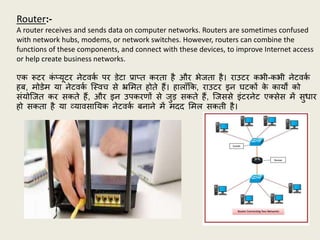
A router receivesand sends data on computer networks. Routers are sometimes confused
with network hubs, modems, or network switches. However, routers can combine the
functions of these components, and connect with these devices, to improve Internet access
or help create business networks.
एक रूटर क
ं ्यूटर नेटवक
थ पर डेटा प्रा्त करता है और भेिता है। राउटर कभी-कभी नेटवक
थ
हि, मोडेम या नेटवक
थ जस्वच से भ्रशमत होते हैं। हालााँर्क, राउटर इन घटकों क
े कायों को
संयोजित कर सकते हैं, और इन उपकरणों से िुड सकते हैं, जिससे इंटरनेट एतसेस में सुधार
हो सकता है या व्यावसानयक नेटवक
थ िनाने में मदद शमल सकती है।
162.
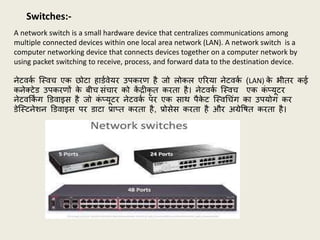
A network switchis a small hardware device that centralizes communications among
multiple connected devices within one local area network (LAN). A network switch is a
computer networking device that connects devices together on a computer network by
using packet switching to receive, process, and forward data to the destination device.
नेटवक
थ जस्वच एक छोटा हाडथवेयर उपकरण है िो लोकल एररया नेटवक
थ (LAN) क
े भीतर कई
कनेतटेड उपकरणों क
े िीच संचार को क
ें द्रीकृ त करता है। नेटवक
थ जस्वच एक क
ं ्यूटर
नेटवर्क
िं ग डडवाइस है िो क
ं ्यूटर नेटवक
थ पर एक सार् पैक
े ट जस्वचचंग का उपयोग कर
डेजस्टनेिन डडवाइस पर डाटा प्रा्त करता है, प्रोसेस करता है और अग्रेपित करता है।
Switches:-
163.
Hubs:-
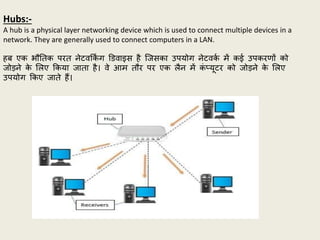
A hub isa physical layer networking device which is used to connect multiple devices in a
network. They are generally used to connect computers in a LAN.
हि एक भौनतक परत नेटवर्क
िं ग डडवाइस है जिसका उपयोग नेटवक
थ में कई उपकरणों को
िोडने क
े शलए र्कया िाता है। वे आम तौर पर एक लैन में क
ं ्यूटर को िोडने क
े शलए
उपयोग र्कए िाते हैं।
164.
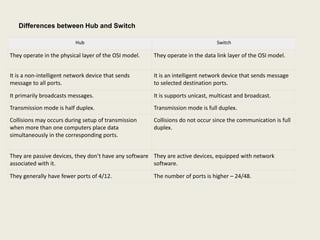
Hub Switch
They operatein the physical layer of the OSI model. They operate in the data link layer of the OSI model.
It is a non-intelligent network device that sends
message to all ports.
It is an intelligent network device that sends message
to selected destination ports.
It primarily broadcasts messages. It is supports unicast, multicast and broadcast.
Transmission mode is half duplex. Transmission mode is full duplex.
Collisions may occurs during setup of transmission
when more than one computers place data
simultaneously in the corresponding ports.
Collisions do not occur since the communication is full
duplex.
They are passive devices, they don’t have any software
associated with it.
They are active devices, equipped with network
software.
They generally have fewer ports of 4/12. The number of ports is higher – 24/48.
Differences between Hub and Switch
165.
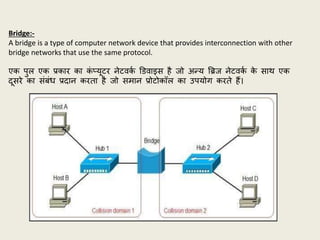
Bridge:-
A bridge isa type of computer network device that provides interconnection with other
bridge networks that use the same protocol.
एक पुल एक प्रकार का क
ं ्यूटर नेटवक
थ डडवाइस है िो अफय बिि नेटवक
थ क
े सार् एक
दूसरे का संिंध प्रदान करता है िो समान प्रोटोकॉल का उपयोग करते हैं।
166.
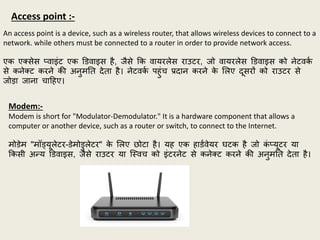
An access pointis a device, such as a wireless router, that allows wireless devices to connect to a
network. while others must be connected to a router in order to provide network access.
एक एतसेस ्वाइंट एक डडवाइस है, िैसे र्क वायरलेस राउटर, िो वायरलेस डडवाइस को नेटवक
थ
से कनेतट करने क़ी अनुमनत देता है। नेटवक
थ पहुंच प्रदान करने क
े शलए दूसरों को राउटर से
िोडा िाना चाहहए।
Access point :-
Modem:-
Modem is short for "Modulator-Demodulator." It is a hardware component that allows a
computer or another device, such as a router or switch, to connect to the Internet.
मोडेम "मॉड्यूलेटर-डेमोडुलेटर" क
े शलए छोटा है। यह एक हाडथवेयर घटक है िो क
ं ्यूटर या
र्कसी अफय डडवाइस, िैसे राउटर या जस्वच को इंटरनेट से कनेतट करने क़ी अनुमनत देता है।
167.
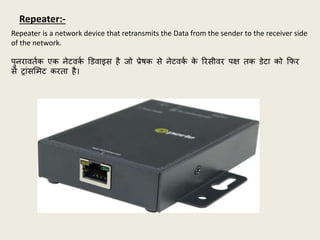
Repeater is anetwork device that retransmits the Data from the sender to the receiver side
of the network.
पुनरावतथक एक नेटवक
थ डडवाइस है िो प्रेिक से नेटवक
थ क
े ररसीवर पक्ष तक डेटा को र्फर
से रांसशमट करता है।
Repeater:-
168.
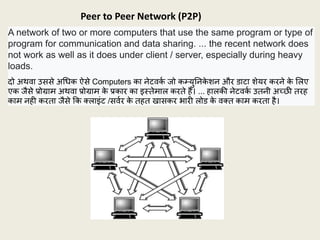
A network oftwo or more computers that use the same program or type of
program for communication and data sharing. ... the recent network does
not work as well as it does under client / server, especially during heavy
loads.
दो अर्वा उससे अचधक ऐसे Computers का नेटवक
थ िो कम्युननक
े िन और डाटा िेयर करने क
े शलए
एक िैसे प्रोग्राम अर्वा प्रोग्राम क
े प्रकार का इस्तेमाल करते हैं। ... हालक़ी नेटवक
थ उतनी अच्छी तरह
काम नही करता िैसे र्क तलाइंट /सवथर क
े तहत खासकर भारी लोड क
े वतत काम करता है।
Peer to Peer Network (P2P)
169.
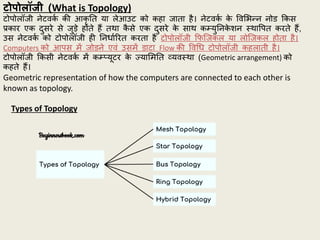
टोपोलॉजी (What isTopology)
टोपोलॉिी नेटवक
थ क़ी आकृ नत या लेआउट को कहा िाता है। नेटवक
थ क
े पवशभफन नोड र्कस
प्रकार एक दुसरे से िुडे होते हैं तर्ा क
ै से एक दुसरे क
े सार् कम्युननक
े िन स्र्ापपत करते हैं,
उस नेटवक
थ को टोपोलॉिी ही ननधाथररत करता है टोपोलॉिी र्फजिकल या लोजिकल होता है।
Computers को आपस में िोडने एवं उसमें डाटा Flow क़ी पवचध टोपोलॉिी कहलाती है।
टोपोलॉिी र्कसी नेटवक
थ में कम््यूटर क
े ज्याशमनत व्यवस्र्ा (Geometric arrangement) को
कहते हैं।
Geometric representation of how the computers are connected to each other is
known as topology.
Types of Topology
170.
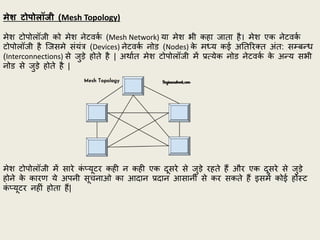
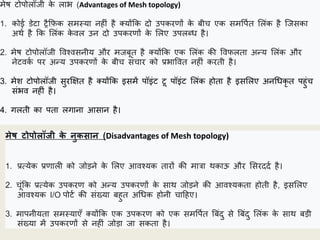
मेश टोपोलॉजी (MeshTopology)
मेि टोपोलॉिी को मेि नेटवक
थ (Mesh Network) या मेि भी कहा िाता है। मेि एक नेटवक
थ
टोपोलॉिी है जिसमे संयंत्र (Devices) नेटवक
थ नोड (Nodes) क
े मध्य कई अनतररतत अंत: सम्िफध
(Interconnections) से िुडे होते है | अर्ाथत मेि टोपोलॉिी में प्रत्येक नोड नेटवक
थ क
े अफय सभी
नोड से िुडे होते है |
मेि टोपोलॉिी में सारे क
ं ्यूटर कही न कही एक दूसरे से िुडे रहते हैं और एक दूसरे से िुडे
होने क
े कारण ये अपनी सूचनाओ का आदान प्रदान आसानी से कर सकते हैं इसमें कोई होस्ट
क
ं ्यूटर नहीं होता हैं|
171.
मेि टोपोलॉिी क
ेलाभ (Advantages of Mesh topology)
1. कोई डेटा रैर्फक समस्या नहीं है तयोंर्क दो उपकरणों क
े िीच एक समपपथत शलंक है जिसका
अर्थ है र्क शलंक क
े वल उन दो उपकरणों क
े शलए उपलब्ध है।
2. मेि टोपोलॉिी पवश्वसनीय और मििूत है तयोंर्क एक शलंक क़ी पवफलता अफय शलंक और
नेटवक
थ पर अफय उपकरणों क
े िीच संचार को प्रभापवत नहीं करती है।
3. मेि टोपोलॉिी सुरक्षक्षत है तयोंर्क इसमें पॉइंट टू पॉइंट शलंक होता है इसशलए अनचधकृ त पहुंच
संभव नहीं है।
4. गलती का पता लगाना आसान है।
मेष टोपोलॉजी क
े नुकसान (Disadvantages of Mesh topology)
1. प्रत्येक प्रणाली को िोडने क
े शलए आवश्यक तारों क़ी मात्रा र्काऊ और शसरददथ है।
2. चूंर्क प्रत्येक उपकरण को अफय उपकरणों क
े सार् िोडने क़ी आवश्यकता होती है, इसशलए
आवश्यक I/O पोटथ क़ी संख्या िहुत अचधक होनी चाहहए।
3. मापनीयता समस्याएाँ तयोंर्क एक उपकरण को एक समपपथत बिंदु से बिंदु शलंक क
े सार् िडी
संख्या में उपकरणों से नहीं िोडा िा सकता है।
172.
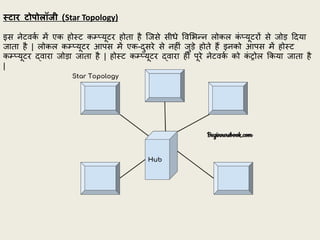
स्टार टोपोलॉजी (StarTopology)
इस नेटवक
थ में एक होस्ट कम््यूटर होता है जिसे सीधे पवशभफन लोकल क
ं ्यूटरों से िोड हदया
िाता है | लोकल कम््यूटर आपस में एक-दुसरे से नहीं िुडे होते हैं इनको आपस में होस्ट
कम््यूटर द्वारा िोडा िाता है | होस्ट कम््यूटर द्वारा ही पूरे नेटवक
थ को क
ं रोल र्कया िाता है
|
173.
लाभ (Advantages) –
•इस नेटवक
थ टोपोलॉिी में एक कम््यूटर से होस्ट (Host) कम््यूटर को िोडने में लाइन बिछाने
क़ी लागत कम आती है।
• इसमें लोकल कम््यूटर क़ी संख्या िढाये िाने पर एक कम््यूटर से दुसरे कम््यूटर पर सूचनाओं
क
े आदान प्रदान क़ी गनत प्रभापवत नही होती है, इसक
े कायथ करने क़ी गनत कम हो िाती है
तयोर्क दो कम््यूटर क
े िीच क
े वल होस्ट (Host) कम््यूटर ही होता है।
• यहद कोई लोकल कम््यूटर ख़राि होता है तो िेि नेटवक
थ इससे प्रभापवत नही होता है।
हानन (Disadvantages) –
• यह पूरा तंत्र होस्ट कम््यूटर पर ननभथर होता है | यहद होस्ट कम््यूटर ख़राि हो िाय तो पूरा
का पूरा नेटवक
थ फ
े ल Fail हो िाता हैं।
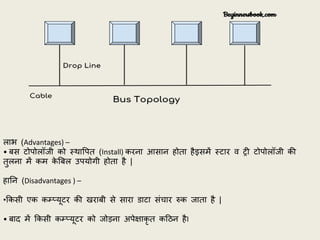
बस टोपोलॉजी (Bus Topology)
िस टोपोलॉिी (Bus Topology) में एक ही तार (Cable) का प्रयोग होता है और सभी कम््यूटरो को
एक ही तार से एक ही क्रम में िोडा िाता है। तार क
े प्रारम्भ तर्ा अंत में एक पविेि प्रकार का
संयंत्र (Device) लगा होता है। जिसे टशमथनेटर (Terminator) कहते है। इसका कायथ संक
े तो (Signals)
को ननयंत्रण करना होता है।
174.
लाभ (Advantages) –
•िस टोपोलॉिी को स्र्ापपत (Install) करना आसान होता हैइसमें स्टार व री टोपोलॉिी क़ी
तुलना में कम क
े बिल उपयोगी होता है |
हानन (Disadvantages ) –
•र्कसी एक कम््यूटर क़ी खरािी से सारा डाटा संचार रुक िाता है |
• िाद में र्कसी कम््यूटर को िोडना अपेक्षाकृ त कहठन हैI
175.
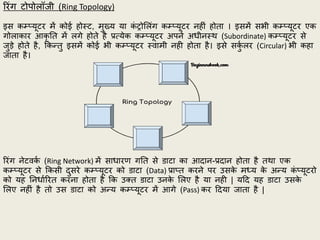
ररंग टोपोलॉिी (RingTopology)
इस कम््यूटर में कोई होस्ट, मुख्य या क
ं रोशलंग कम््यूटर नहीं होता । इसमें सभी कम््यूटर एक
गोलाकार आकृ नत में लगे होते है प्रत्येक कम््यूटर अपने अधीनस्र् (Subordinate) कम््यूटर से
िुडे होते है, र्कफतु इसमें कोई भी कम््यूटर स्वामी नही होता है। इसे सक
ुथ लर (Circular) भी कहा
िाता है।
ररंग नेटवक
थ (Ring Network) में साधारण गनत से डाटा का आदान-प्रदान होता है तर्ा एक
कम््यूटर से र्कसी दुसरे कम््यूटर को डाटा (Data) प्रा्त करने पर उसक
े मध्य क
े अफय क
ं ्यूटरो
को यह ननधाथररत करना होता है र्क उतत डाटा उनक
े शलए है या नही | यहद यह डाटा उसक
े
शलए नहीं है तो उस डाटा को अफय कम््यूटर में आगे (Pass) कर हदया िाता है |
176.
लाभ (Advantages) –
•यह नेटवक
थ अचधक क
ु िलता से कायथ करता है, तयोर्क इसमें कोई होस्ट (Host) यह क
ं रोशलंग
कम््यूटर (Controlling Computer) नहीं होता |
• यह स्टार से अचधक पवश्वसनीय है, तयोंर्क यह र्कसी एक कम््यूटर पर ननभथर नही होता है |
• इस नेटवक
थ क़ी यहद एक लाइन या कम््यूटर कायथ करना िंद कर दे तो दुसरी हदिा क़ी लाइन
क
े द्वारा कामर्कया िा सकता है |
हानन (Disadvantages) –
इसक़ी गनत नेटवक
थ में लगे कम््यूटरों पर ननभथर करती है। यहद कम््यूटर कम है तो गनत
अचधक होती है और यहद क
ं ्यूटरों क़ी संख्या अचधक है तो गनत कम होती है ।
• यह स्टार नेटवक
थ क़ी तुलना में कम प्रचशलत है, तयोंर्क इस नेटवक
थ पर कायथ करने क
े शलए
अत्यंत िहटल साफ्टवेयर क़ी आवश्यकता होती है ।
177.
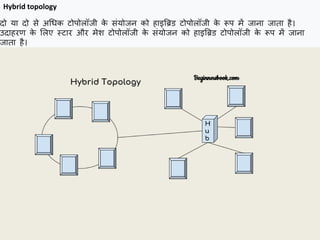
दो या दोसे अचधक टोपोलॉिी क
े संयोिन को हाइबिड टोपोलॉिी क
े रूप में िाना िाता है।
उदाहरण क
े शलए स्टार और मेि टोपोलॉिी क
े संयोिन को हाइबिड टोपोलॉिी क
े रूप में िाना
िाता है।
Hybrid topology
178.
हाइबिड टोपोलॉिी क
ेलाभ Advantages of Hybrid topology
1. हम आवश्यकता क
े आधार पर टोपोलॉिी चुन सकते हैं उदाहरण क
े शलए, स्क
े लेबिशलटी हमारी
चचंता है तो हम िस प्रौद्योचगक़ी क
े ििाय स्टार टोपोलॉिी का उपयोग कर सकते हैं।
2. स्क
े लेिल तयोंर्क हम अफय क
ं ्यूटर नेटवक
थ को पवशभफन टोपोलॉिी क
े सार् मौिूदा नेटवक
थ से
िोड सकते हैं।
हाइब्रिर् टोपोलॉजी क
े नुकसान Disadvantages of Hybrid topology
1. गलती का पता लगाना मुजश्कल है।
2. स्र्ापना मुजश्कल है।
3. डडिाइन िहटल है इसशलए रखरखाव अचधक है इसशलए महंगा है।
179.
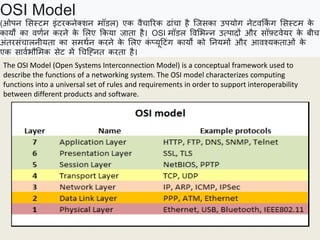
OSI Model
(ओपन शसस्टमइंटरकनेतिन मॉडल) एक वैचाररक ढांचा है जिसका उपयोग नेटवर्क
िं ग शसस्टम क
े
कायों का वणथन करने क
े शलए र्कया िाता है। OSI मॉडल पवशभफन उत्पादों और सॉफ़्टवेयर क
े िीच
अंतरसंचालनीयता का समर्थन करने क
े शलए क
ं ्यूहटंग कायों को ननयमों और आवश्यकताओं क
े
एक सावथभौशमक सेट में चचजह्नत करता है।
The OSI Model (Open Systems Interconnection Model) is a conceptual framework used to
describe the functions of a networking system. The OSI model characterizes computing
functions into a universal set of rules and requirements in order to support interoperability
between different products and software.
180.
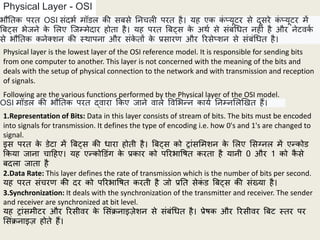
Physical Layer -OSI
Physical layer is the lowest layer of the OSI reference model. It is responsible for sending bits
from one computer to another. This layer is not concerned with the meaning of the bits and
deals with the setup of physical connection to the network and with transmission and reception
of signals.
भौनतक परत OSI संदभथ मॉडल क़ी सिसे ननचली परत है। यह एक क
ं ्यूटर से दूसरे क
ं ्यूटर में
बिट्स भेिने क
े शलए जिम्मेदार होता है। यह परत बिट्स क
े अर्थ से संिंचधत नहीं है और नेटवक
थ
से भौनतक कनेतिन क़ी स्र्ापना और संक
े तों क
े प्रसारण और ररसे्िन से संिंचधत है।
Following are the various functions performed by the Physical layer of the OSI model.
OSI मॉडल क़ी भौनतक परत द्वारा र्कए िाने वाले पवशभफन कायथ ननम्नशलखखत हैं।
1.Representation of Bits: Data in this layer consists of stream of bits. The bits must be encoded
into signals for transmission. It defines the type of encoding i.e. how 0's and 1's are changed to
signal.
इस परत क
े डेटा में बिट्स क़ी धारा होती है। बिट्स को रांसशमिन क
े शलए शसग्नल में एफकोड
र्कया िाना चाहहए। यह एफकोडडंग क
े प्रकार को पररभापित करता है यानी 0 और 1 को क
ै से
िदला िाता है
2.Data Rate: This layer defines the rate of transmission which is the number of bits per second.
यह परत संचरण क़ी दर को पररभापित करती है िो प्रनत सेक
ं ड बिट्स क़ी संख्या है।
3.Synchronization: It deals with the synchronization of the transmitter and receiver. The sender
and receiver are synchronized at bit level.
यह रांसमीटर और ररसीवर क
े शसंक्रनाइज़ेिन से संिंचधत है। प्रेिक और ररसीवर बिट स्तर पर
शसंक्रनाइज़ होते हैं।
181.
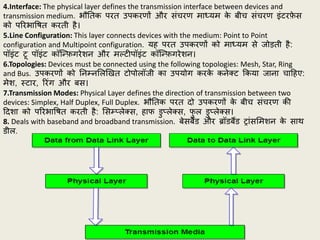
4.Interface: The physicallayer defines the transmission interface between devices and
transmission medium. भौनतक परत उपकरणों और संचरण माध्यम क
े िीच संचरण इंटरफ
े स
को पररभापित करती है।
5.Line Configuration: This layer connects devices with the medium: Point to Point
configuration and Multipoint configuration. यह परत उपकरणों को माध्यम से िोडती है:
पॉइंट टू पॉइंट कॉजफफगरेिन और मल्टीपॉइंट कॉजफफगरेिन।
6.Topologies: Devices must be connected using the following topologies: Mesh, Star, Ring
and Bus. उपकरणों को ननम्नशलखखत टोपोलॉिी का उपयोग करक
े कनेतट र्कया िाना चाहहए:
मेि, स्टार, ररंग और िस।
7.Transmission Modes: Physical Layer defines the direction of transmission between two
devices: Simplex, Half Duplex, Full Duplex. भौनतक परत दो उपकरणों क
े िीच संचरण क़ी
हदिा को पररभापित करती है: शसम््लेतस, हाफ डु्लेतस, फ
ु ल डु्लेतस।
8. Deals with baseband and broadband transmission. िेसिैंड और िॉडिैंड रांसशमिन क
े सार्
डील.
182.
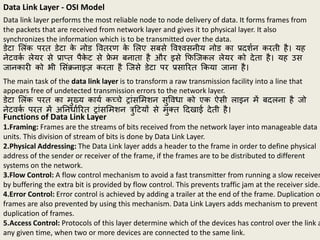
Data Link Layer- OSI Model
Data link layer performs the most reliable node to node delivery of data. It forms frames from
the packets that are received from network layer and gives it to physical layer. It also
synchronizes the information which is to be transmitted over the data.
डेटा शलंक परत डेटा क
े नोड पवतरण क
े शलए सिसे पवश्वसनीय नोड का प्रदिथन करती है। यह
नेटवक
थ लेयर से प्रा्त पैक
े ट से फ्र
े म िनाता है और इसे र्फजिकल लेयर को देता है। यह उस
िानकारी को भी शसंक्रनाइज़ करता है जिसे डेटा पर प्रसाररत र्कया िाना है।
The main task of the data link layer is to transform a raw transmission facility into a line that
appears free of undetected transmission errors to the network layer.
डेटा शलंक परत का मुख्य कायथ कच्चे रांसशमिन सुपवधा को एक ऐसी लाइन में िदलना है िो
नेटवक
थ परत में अननधाथररत रांसशमिन त्रुहटयों से मुतत हदखाई देती है।
Functions of Data Link Layer
1.Framing: Frames are the streams of bits received from the network layer into manageable data
units. This division of stream of bits is done by Data Link Layer.
2.Physical Addressing: The Data Link layer adds a header to the frame in order to define physical
address of the sender or receiver of the frame, if the frames are to be distributed to different
systems on the network.
3.Flow Control: A flow control mechanism to avoid a fast transmitter from running a slow receiver
by buffering the extra bit is provided by flow control. This prevents traffic jam at the receiver side.
4.Error Control: Error control is achieved by adding a trailer at the end of the frame. Duplication o
frames are also prevented by using this mechanism. Data Link Layers adds mechanism to prevent
duplication of frames.
5.Access Control: Protocols of this layer determine which of the devices has control over the link a
any given time, when two or more devices are connected to the same link.
183.
Network Layer -OSI Model
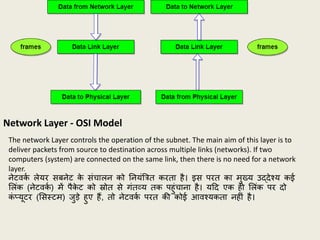
The network Layer controls the operation of the subnet. The main aim of this layer is to
deliver packets from source to destination across multiple links (networks). If two
computers (system) are connected on the same link, then there is no need for a network
layer.
नेटवक
थ लेयर सिनेट क
े संचालन को ननयंबत्रत करता है। इस परत का मुख्य उद्देश्य कई
शलंक (नेटवक
थ ) में पैक
े ट को स्रोत से गंतव्य तक पहुंचाना है। यहद एक ही शलंक पर दो
क
ं ्यूटर (शसस्टम) िुडे हुए हैं, तो नेटवक
थ परत क़ी कोई आवश्यकता नहीं है।
184.
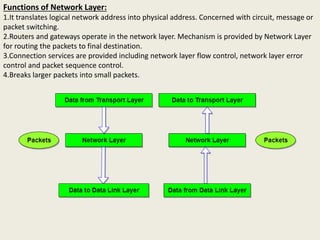
Functions of NetworkLayer:
1.It translates logical network address into physical address. Concerned with circuit, message or
packet switching.
2.Routers and gateways operate in the network layer. Mechanism is provided by Network Layer
for routing the packets to final destination.
3.Connection services are provided including network layer flow control, network layer error
control and packet sequence control.
4.Breaks larger packets into small packets.
185.
Transport Layer -OSI Model
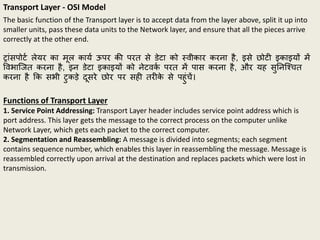
The basic function of the Transport layer is to accept data from the layer above, split it up into
smaller units, pass these data units to the Network layer, and ensure that all the pieces arrive
correctly at the other end.
रांसपोटथ लेयर का मूल कायथ ऊपर क़ी परत से डेटा को स्वीकार करना है, इसे छोटी इकाइयों में
पवभाजित करना है, इन डेटा इकाइयों को नेटवक
थ परत में पास करना है, और यह सुननजश्चत
करना है र्क सभी टुकडे दूसरे छोर पर सही तरीक
े से पहुंचें।
Functions of Transport Layer
1. Service Point Addressing: Transport Layer header includes service point address which is
port address. This layer gets the message to the correct process on the computer unlike
Network Layer, which gets each packet to the correct computer.
2. Segmentation and Reassembling: A message is divided into segments; each segment
contains sequence number, which enables this layer in reassembling the message. Message is
reassembled correctly upon arrival at the destination and replaces packets which were lost in
transmission.
186.
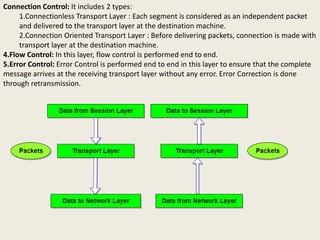
Connection Control: Itincludes 2 types:
1.Connectionless Transport Layer : Each segment is considered as an independent packet
and delivered to the transport layer at the destination machine.
2.Connection Oriented Transport Layer : Before delivering packets, connection is made with
transport layer at the destination machine.
4.Flow Control: In this layer, flow control is performed end to end.
5.Error Control: Error Control is performed end to end in this layer to ensure that the complete
message arrives at the receiving transport layer without any error. Error Correction is done
through retransmission.
187.
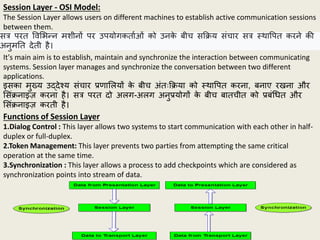
Session Layer -OSI Model:
The Session Layer allows users on different machines to establish active communication sessions
between them.
सत्र परत पवशभफन मिीनों पर उपयोगकताथओं को उनक
े िीच सर्क्रय संचार सत्र स्र्ापपत करने क़ी
अनुमनत देती है।
It's main aim is to establish, maintain and synchronize the interaction between communicating
systems. Session layer manages and synchronize the conversation between two different
applications.
इसका मुख्य उद्देश्य संचार प्रणाशलयों क
े िीच अंतःर्क्रया को स्र्ापपत करना, िनाए रखना और
शसंक्रनाइज़ करना है। सत्र परत दो अलग-अलग अनुप्रयोगों क
े िीच िातचीत को प्रिंचधत और
शसंक्रनाइज़ करती है।
Functions of Session Layer
1.Dialog Control : This layer allows two systems to start communication with each other in half-
duplex or full-duplex.
2.Token Management: This layer prevents two parties from attempting the same critical
operation at the same time.
3.Synchronization : This layer allows a process to add checkpoints which are considered as
synchronization points into stream of data.
188.
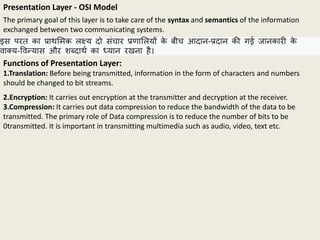
Presentation Layer -OSI Model
The primary goal of this layer is to take care of the syntax and semantics of the information
exchanged between two communicating systems.
इस परत का प्रार्शमक लक्ष्य दो संचार प्रणाशलयों क
े िीच आदान-प्रदान क़ी गई िानकारी क
े
वातय-पवफयास और िब्दार्थ का ध्यान रखना है।
Functions of Presentation Layer:
1.Translation: Before being transmitted, information in the form of characters and numbers
should be changed to bit streams.
2.Encryption: It carries out encryption at the transmitter and decryption at the receiver.
3.Compression: It carries out data compression to reduce the bandwidth of the data to be
transmitted. The primary role of Data compression is to reduce the number of bits to be
0transmitted. It is important in transmitting multimedia such as audio, video, text etc.
189.
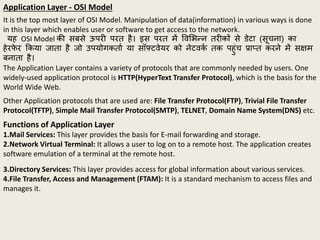
Application Layer -OSI Model
It is the top most layer of OSI Model. Manipulation of data(information) in various ways is done
in this layer which enables user or software to get access to the network.
यह OSI Model क़ी सिसे ऊपरी परत है। इस परत में पवशभफन तरीकों से डेटा (सूचना) का
हेरफ
े र र्कया िाता है िो उपयोगकताथ या सॉफ़्टवेयर को नेटवक
थ तक पहुंच प्रा्त करने में सक्षम
िनाता है।
The Application Layer contains a variety of protocols that are commonly needed by users. One
widely-used application protocol is HTTP(HyperText Transfer Protocol), which is the basis for the
World Wide Web.
Other Application protocols that are used are: File Transfer Protocol(FTP), Trivial File Transfer
Protocol(TFTP), Simple Mail Transfer Protocol(SMTP), TELNET, Domain Name System(DNS) etc.
Functions of Application Layer
1.Mail Services: This layer provides the basis for E-mail forwarding and storage.
2.Network Virtual Terminal: It allows a user to log on to a remote host. The application creates
software emulation of a terminal at the remote host.
3.Directory Services: This layer provides access for global information about various services.
4.File Transfer, Access and Management (FTAM): It is a standard mechanism to access files and
manages it.
190.
The TCP/IP ReferenceModel
TCP/IP means Transmission Control Protocol and Internet Protocol. It is the network model used
in the current Internet architecture as well. Protocols are set of rules which govern every
possible communication over a network.
TCP/IP का अर्थ है रांसशमिन क
ं रोल प्रोटोकॉल और इंटरनेट प्रोटोकॉल। यह वतथमान इंटरनेट
आर्क
थ टेतचर में भी उपयोग र्कया िाने वाला नेटवक
थ मॉडल है। प्रोटोकॉल ननयमों का समूह है िो
एक नेटवक
थ पर हर संभव संचार को ननयंबत्रत करता है।
191.
The TCP/IP specificationsdescribed a lot of applications that were at the top of the protocol
stack. Some of them were TELNET, FTP, SMTP, DNS etc.
TELNET is a two-way communication protocol which allows connecting to a remote machine and
run applications on it.
FTP(File Transfer Protocol) is a protocol, that allows File transfer amongst computer users
connected over a network. It is reliable, simple and efficient.
SMTP(Simple Mail Transport Protocol) is a protocol, which is used to transport electronic mail
between a source and destination, directed via a route.
DNS(Domain Name Server) resolves an IP address into a textual address for Hosts connected
over a network.
It allows peer entities to carry conversation.
It defines two end-to-end protocols: TCP and UDP
TCP(Transmission Control Protocol): It is a reliable connection-oriented protocol which
handles byte-stream from source to destination without error and flow control.
UDP(User-Datagram Protocol): It is an unreliable connection-less protocol that do not want
TCPs, sequencing and flow control. Eg: One-shot request-reply kind of service.
193.
An IP addressis a string of numbers separated by periods. IP addresses are expressed as a
set of four numbers — an example address might be 192.158.1.38.
What is an IP
एक आईपी पता अवचधयों द्वारा अलग क़ी गई संख्याओं क़ी एक जस्रंग है। आईपी पते चार नंिरों
क
े सेट क
े रूप में व्यतत र्कए िाते हैं - एक उदाहरण पता 192.158.1.38 हो सकता है।
Types of IP addresses
Consumer IP addresses
Every individual or business with an internet service plan will have two types of IP addresses:
their private IP addresses and their public IP address.
Private IP addresses
Public IP addresses
Every device that connects to your internet network has a private IP address. This includes
computers, smartphones, and tablets but also any Bluetooth-enabled devices like speakers,
printers, or smart TVs.
A public IP address is the primary address associated with your whole network. While each
connected device has its own IP address, they are also included within the main IP address for
your network.
194.
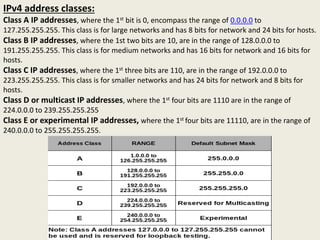
IPv4 address classes:
ClassA IP addresses, where the 1st bit is 0, encompass the range of 0.0.0.0 to
127.255.255.255. This class is for large networks and has 8 bits for network and 24 bits for hosts.
Class B IP addresses, where the 1st two bits are 10, are in the range of 128.0.0.0 to
191.255.255.255. This class is for medium networks and has 16 bits for network and 16 bits for
hosts.
Class C IP addresses, where the 1st three bits are 110, are in the range of 192.0.0.0 to
223.255.255.255. This class is for smaller networks and has 24 bits for network and 8 bits for
hosts.
Class D or multicast IP addresses, where the 1st four bits are 1110 are in the range of
224.0.0.0 to 239.255.255.255
Class E or experimental IP addresses, where the 1st four bits are 11110, are in the range of
240.0.0.0 to 255.255.255.255.