Language Translators
Syntax vs Semantics
Syntax: rules that govern how statements in a
computer programming language must be
constructed.
 Incorrect spelling
 Wrong brackets
 Leave off matching brackets
 Leave off end statements
Semantics: meaning conveyed by collection
of statements.
Computers (compilers) detect SYNTAX
errors, but they cannot determine the purpose
of programs or semantic meaning (yet!!).
Low Level Languages
Inside the RAM programs are represented in
binary form (000101000111100110, machine
code language)
First step: created codes that stand for binary
instructions (ADD 2310, Assembly Language:
each line corresponds to one machine code
instruction). They are machine specific.
As this was still difficult to handle High
Level Languages
High Level Languages
Portable: can run in different machines
English-like
One instruction = many machine code instructions
More than 2000 languages developed
Early: FORTRAN (FORmula TRANslation lang),
COBOL (COmmon Business Oriented Language,
ALGOL (ALGorithic Lang: first structured lang which
led to C and PASCAL), BASIC (Beginners All-
purpose Symbolic Code)
Object Oriented Languages: SAMLLTALK, C++ and
JAVA.
Compiler
Translation program that converts source code into
object code format (from HLL to machine code to be
executed)
Checks for syntax errors and reports to programmer.
Programmer corrects source code and compiles
again.
If syntactically correct  compiler links modules and
generates required object code.
Compiled code usually executes faster than an
interpreted version and can be moved to other
computers.
IDE
Integrated Development Environment
Integrates editor (to create the code) +
debugger (allows programmer to
remove bugs from source code)
Compiler
Interpreter
Translation Process
(Summary)
Converts source code into object code
that can be executed
Compiled code:
completely separate prg
Can stand alone
Does not need the compiler to run
Code run via an interpreter can be
usually viewed.
Compiler
Creates a completely
new prg to be executed.
Does not stop at the
first error and continues
reporting syntax errors
found.
No need to load into
memory to execute a
compiled prg
The object code cannot
be modified
Analyses and executes
each line of source code
in succession
Does not look first to the
entire prg
Runs slower than
compiled prg
Line being interpreted is
executed straight away
(good for large prg)
Need to be loaded each
time  memory usage
Interpreter
Compiling & Running Java
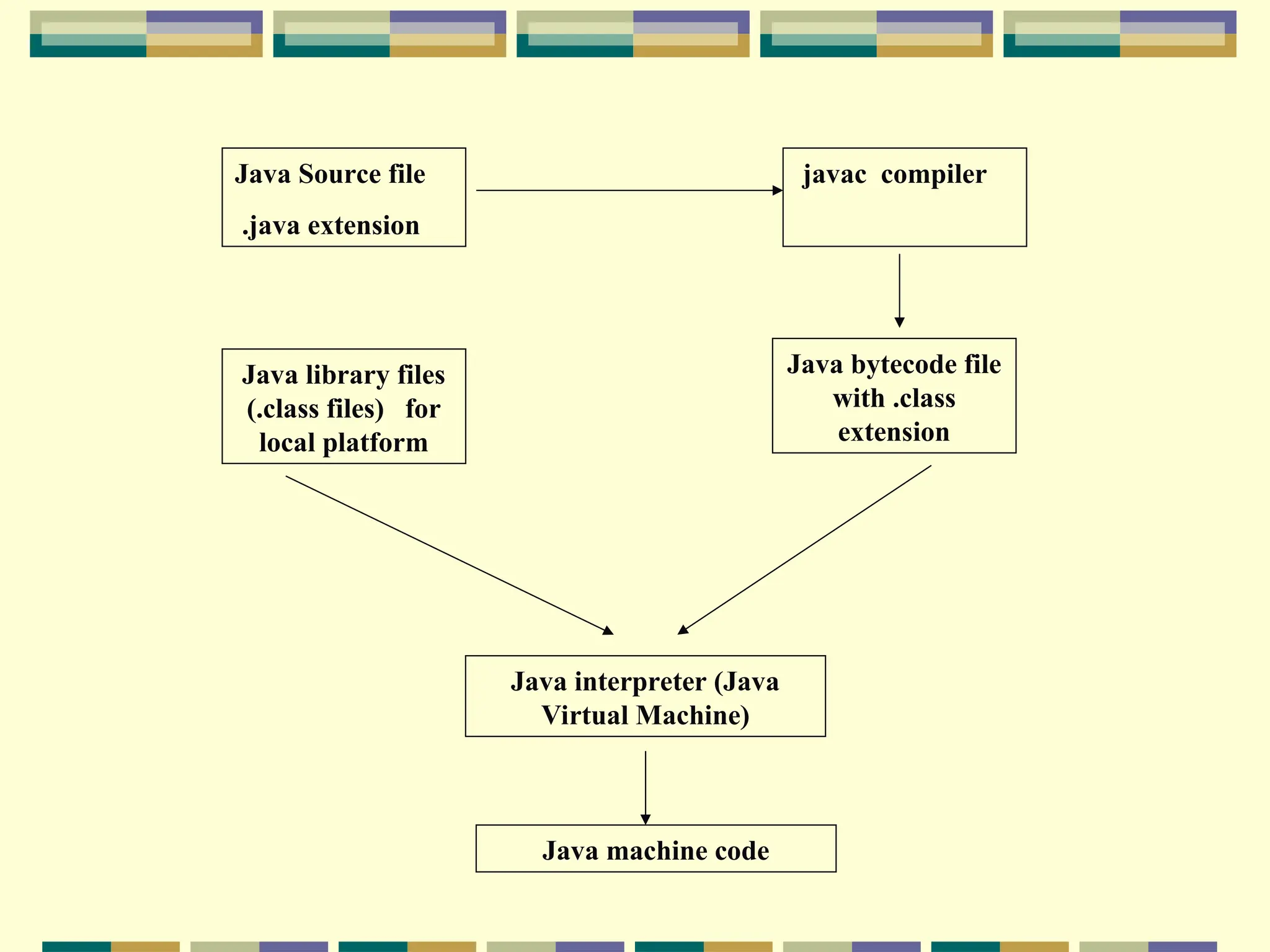
Compiles to an intermediate stage: Java
bytecode
Java bytecode:
 Stage found in in a java .class file produced by running
the javac program on a Java source code file.
 compressed version then passed to an interpreter
(JavaVirtual Machine)
JVM actually produces the machine code from the
bytecode file and pre-compiled library units
needed by the Op System.
Java Source file
.java extension
javac compiler
Java library files
(.class files) for
local platform
Java bytecode file
with .class
extension
Java interpreter (Java
Virtual Machine)
Java machine code

Computer Fundamentals and programming introduce

  • 1.
  • 2.
    Syntax vs Semantics Syntax:rules that govern how statements in a computer programming language must be constructed.  Incorrect spelling  Wrong brackets  Leave off matching brackets  Leave off end statements Semantics: meaning conveyed by collection of statements. Computers (compilers) detect SYNTAX errors, but they cannot determine the purpose of programs or semantic meaning (yet!!).
  • 3.
    Low Level Languages Insidethe RAM programs are represented in binary form (000101000111100110, machine code language) First step: created codes that stand for binary instructions (ADD 2310, Assembly Language: each line corresponds to one machine code instruction). They are machine specific. As this was still difficult to handle High Level Languages
  • 4.
    High Level Languages Portable:can run in different machines English-like One instruction = many machine code instructions More than 2000 languages developed Early: FORTRAN (FORmula TRANslation lang), COBOL (COmmon Business Oriented Language, ALGOL (ALGorithic Lang: first structured lang which led to C and PASCAL), BASIC (Beginners All- purpose Symbolic Code) Object Oriented Languages: SAMLLTALK, C++ and JAVA.
  • 5.
    Compiler Translation program thatconverts source code into object code format (from HLL to machine code to be executed) Checks for syntax errors and reports to programmer. Programmer corrects source code and compiles again. If syntactically correct  compiler links modules and generates required object code. Compiled code usually executes faster than an interpreted version and can be moved to other computers.
  • 6.
    IDE Integrated Development Environment Integrateseditor (to create the code) + debugger (allows programmer to remove bugs from source code)
  • 7.
  • 8.
  • 9.
    Translation Process (Summary) Converts sourcecode into object code that can be executed Compiled code: completely separate prg Can stand alone Does not need the compiler to run Code run via an interpreter can be usually viewed.
  • 10.
    Compiler Creates a completely newprg to be executed. Does not stop at the first error and continues reporting syntax errors found. No need to load into memory to execute a compiled prg The object code cannot be modified Analyses and executes each line of source code in succession Does not look first to the entire prg Runs slower than compiled prg Line being interpreted is executed straight away (good for large prg) Need to be loaded each time  memory usage Interpreter
  • 11.
    Compiling & RunningJava Compiles to an intermediate stage: Java bytecode Java bytecode:  Stage found in in a java .class file produced by running the javac program on a Java source code file.  compressed version then passed to an interpreter (JavaVirtual Machine) JVM actually produces the machine code from the bytecode file and pre-compiled library units needed by the Op System.
  • 12.
    Java Source file .javaextension javac compiler Java library files (.class files) for local platform Java bytecode file with .class extension Java interpreter (Java Virtual Machine) Java machine code