SERVICE MANUAL
Screw Compressor
Model: CSD 100/125
No.: 9_5704_05USE
Contents
Chapter --- page
i
1 Regarding this Document 1 --- 1. . . . . . . . . . . . . . . . . . . . . . . . . . . . . . . . . . . . .
1.1 Handling the Document 1 --- 1. . . . . . . . . . . . . . . . . . . . . . . . . . . . . . . . . . . . . . . . . . . . .
1.2 Further Documents 1 --- 1. . . . . . . . . . . . . . . . . . . . . . . . . . . . . . . . . . . . . . . . . . . . . . . . .
1.3 Copyright 1 --- 1. . . . . . . . . . . . . . . . . . . . . . . . . . . . . . . . . . . . . . . . . . . . . . . . . . . . . . . . .
1.4 Symbols and Identifications 1 --- 1. . . . . . . . . . . . . . . . . . . . . . . . . . . . . . . . . . . . . . . . . .
1.4.1 Warning notices 1 --- 1. . . . . . . . . . . . . . . . . . . . . . . . . . . . . . . . . . . . . . . . . . . . . . . . .
1.4.2 Miscellaneous notices and symbols 1 --- 2. . . . . . . . . . . . . . . . . . . . . . . . . . . . . . . .
2 Technical Specification 2 --- 3. . . . . . . . . . . . . . . . . . . . . . . . . . . . . . . . . . . . . . .
2.1 Weight 2 --- 3. . . . . . . . . . . . . . . . . . . . . . . . . . . . . . . . . . . . . . . . . . . . . . . . . . . . . . . . . . . .
2.2 Temperature 2 --- 4. . . . . . . . . . . . . . . . . . . . . . . . . . . . . . . . . . . . . . . . . . . . . . . . . . . . . . .
2.3 Ambient Conditions 2 --- 4. . . . . . . . . . . . . . . . . . . . . . . . . . . . . . . . . . . . . . . . . . . . . . . . .
2.4 Pressure 2 --- 4. . . . . . . . . . . . . . . . . . . . . . . . . . . . . . . . . . . . . . . . . . . . . . . . . . . . . . . . . .
2.5 Free Air Delivery (FAD) 2 --- 4. . . . . . . . . . . . . . . . . . . . . . . . . . . . . . . . . . . . . . . . . . . . . .
2.6 Sound Pressure Level 2 --- 5. . . . . . . . . . . . . . . . . . . . . . . . . . . . . . . . . . . . . . . . . . . . . . .
2.7 Motor and Performance 2 --- 5. . . . . . . . . . . . . . . . . . . . . . . . . . . . . . . . . . . . . . . . . . . . .
2.7.1 Compressor motor: 2 --- 5. . . . . . . . . . . . . . . . . . . . . . . . . . . . . . . . . . . . . . . . . . . . . .
2.7.2 Fan Motor 2 --- 5. . . . . . . . . . . . . . . . . . . . . . . . . . . . . . . . . . . . . . . . . . . . . . . . . . . . . .
2.8 Cooling oil 2 --- 6. . . . . . . . . . . . . . . . . . . . . . . . . . . . . . . . . . . . . . . . . . . . . . . . . . . . . . . .
2.8.1 General Information 2 --- 6. . . . . . . . . . . . . . . . . . . . . . . . . . . . . . . . . . . . . . . . . . . . . .
2.8.2 Cooling Oil Quantity 2 --- 7. . . . . . . . . . . . . . . . . . . . . . . . . . . . . . . . . . . . . . . . . . . . .
2.9 Electrical Connections 2 --- 7. . . . . . . . . . . . . . . . . . . . . . . . . . . . . . . . . . . . . . . . . . . . . .
2.9.1 Power supply 2 --- 7. . . . . . . . . . . . . . . . . . . . . . . . . . . . . . . . . . . . . . . . . . . . . . . . . . .
2.9.2 Power supply specifications 2 --- 8. . . . . . . . . . . . . . . . . . . . . . . . . . . . . . . . . . . . . . .
2.10 Water cooling (option K2) 2 --- 9. . . . . . . . . . . . . . . . . . . . . . . . . . . . . . . . . . . . . . . . . . .
2.10.1 Design data 2 --- 9. . . . . . . . . . . . . . . . . . . . . . . . . . . . . . . . . . . . . . . . . . . . . . . . . . . . .
2.10.2 Cooling Water Quality 2 --- 9. . . . . . . . . . . . . . . . . . . . . . . . . . . . . . . . . . . . . . . . . . . .
2.11 Heat Recovery 2 --- 10. . . . . . . . . . . . . . . . . . . . . . . . . . . . . . . . . . . . . . . . . . . . . . . . . . . . .
2.11.1 Prepared for heat recovery (option W1) 2 --- 10. . . . . . . . . . . . . . . . . . . . . . . . . . . . .
2.11.2 Internal Heat Recovery (option W2 / W3) 2 --- 10. . . . . . . . . . . . . . . . . . . . . . . . . . . .
3 Safety and Responsibility 3 --- 13. . . . . . . . . . . . . . . . . . . . . . . . . . . . . . . . . . . . .
3.1 Proper Use 3 --- 13. . . . . . . . . . . . . . . . . . . . . . . . . . . . . . . . . . . . . . . . . . . . . . . . . . . . . . . .
3.2 Improper Use 3 --- 13. . . . . . . . . . . . . . . . . . . . . . . . . . . . . . . . . . . . . . . . . . . . . . . . . . . . .
3.3 User’s Responsibilities 3 --- 13. . . . . . . . . . . . . . . . . . . . . . . . . . . . . . . . . . . . . . . . . . . . . .
3.3.1 Qualified personnel 3 --- 13. . . . . . . . . . . . . . . . . . . . . . . . . . . . . . . . . . . . . . . . . . . . . .
3.3.2 Adhere to inspection schedules and accident prevention regulations. 3 --- 14. . .
3.4 Safety Devices 3 --- 14. . . . . . . . . . . . . . . . . . . . . . . . . . . . . . . . . . . . . . . . . . . . . . . . . . . . .
3.5 Dangers 3 --- 14. . . . . . . . . . . . . . . . . . . . . . . . . . . . . . . . . . . . . . . . . . . . . . . . . . . . . . . . . .
3.5.1 Danger from electricity 3 --- 15. . . . . . . . . . . . . . . . . . . . . . . . . . . . . . . . . . . . . . . . . . .
3.5.2 Dangers from compressed air 3 --- 15. . . . . . . . . . . . . . . . . . . . . . . . . . . . . . . . . . . . .
3.5.3 Dangers from spring forces 3 --- 16. . . . . . . . . . . . . . . . . . . . . . . . . . . . . . . . . . . . . . .
3.5.4 Further dangers 3 --- 16. . . . . . . . . . . . . . . . . . . . . . . . . . . . . . . . . . . . . . . . . . . . . . . . .
3.5.5 Danger zones 3 --- 16. . . . . . . . . . . . . . . . . . . . . . . . . . . . . . . . . . . . . . . . . . . . . . . . . . .
3.6 Safety Signs 3 --- 17. . . . . . . . . . . . . . . . . . . . . . . . . . . . . . . . . . . . . . . . . . . . . . . . . . . . . . .
3.7 Emergencies 3 --- 19. . . . . . . . . . . . . . . . . . . . . . . . . . . . . . . . . . . . . . . . . . . . . . . . . . . . . .
3.7.1 Fire supression 3 --- 19. . . . . . . . . . . . . . . . . . . . . . . . . . . . . . . . . . . . . . . . . . . . . . . . . .
3.7.2 Cooling oil 3 --- 19. . . . . . . . . . . . . . . . . . . . . . . . . . . . . . . . . . . . . . . . . . . . . . . . . . . . . .
3.8 Environmental Protection 3 --- 19. . . . . . . . . . . . . . . . . . . . . . . . . . . . . . . . . . . . . . . . . . . .
Contents
Chapter --- page
ii
4 Design and Function 4 --- 20. . . . . . . . . . . . . . . . . . . . . . . . . . . . . . . . . . . . . . . . . .
4.1 Machine Overview 4 --- 20. . . . . . . . . . . . . . . . . . . . . . . . . . . . . . . . . . . . . . . . . . . . . . . . . .
4.1.1 Cabinet 4 --- 20. . . . . . . . . . . . . . . . . . . . . . . . . . . . . . . . . . . . . . . . . . . . . . . . . . . . . . . .
4.1.2 Function 4 --- 21. . . . . . . . . . . . . . . . . . . . . . . . . . . . . . . . . . . . . . . . . . . . . . . . . . . . . . .
4.2 Volt---free Contacts 4 --- 22. . . . . . . . . . . . . . . . . . . . . . . . . . . . . . . . . . . . . . . . . . . . . . . . .
4.3 Options 4 --- 23. . . . . . . . . . . . . . . . . . . . . . . . . . . . . . . . . . . . . . . . . . . . . . . . . . . . . . . . . . .
4.3.1 Machine mountings (option H1) 4 --- 23. . . . . . . . . . . . . . . . . . . . . . . . . . . . . . . . . . .
4.3.2 Filter mat panels (option K3) 4 --- 23. . . . . . . . . . . . . . . . . . . . . . . . . . . . . . . . . . . . . .
4.3.3 Water cooling (option K2) 4 --- 23. . . . . . . . . . . . . . . . . . . . . . . . . . . . . . . . . . . . . . . . .
4.3.4 Heat recovery 4 --- 23. . . . . . . . . . . . . . . . . . . . . . . . . . . . . . . . . . . . . . . . . . . . . . . . . . .
4.4 Operating States and Control Modes 4 --- 24. . . . . . . . . . . . . . . . . . . . . . . . . . . . . . . . . .
4.4.1 Operating states 4 --- 24. . . . . . . . . . . . . . . . . . . . . . . . . . . . . . . . . . . . . . . . . . . . . . . . .
4.4.2 Controller Operation 4 --- 24. . . . . . . . . . . . . . . . . . . . . . . . . . . . . . . . . . . . . . . . . . . . .
4.4.3 Control Modes 4 --- 24. . . . . . . . . . . . . . . . . . . . . . . . . . . . . . . . . . . . . . . . . . . . . . . . . .
4.4.4 Modulation Control (option C1) 4 --- 25. . . . . . . . . . . . . . . . . . . . . . . . . . . . . . . . . . . .
4.5 Safety Devices 4 --- 25. . . . . . . . . . . . . . . . . . . . . . . . . . . . . . . . . . . . . . . . . . . . . . . . . . . . .
4.6 SIGMA CONTROL Keys and Indicators 4 --- 26. . . . . . . . . . . . . . . . . . . . . . . . . . . . . . . .
5 Installation and Operating Conditions 5 --- 28. . . . . . . . . . . . . . . . . . . . . . . . . .
5.1 Ambient Conditions 5 --- 28. . . . . . . . . . . . . . . . . . . . . . . . . . . . . . . . . . . . . . . . . . . . . . . . .
5.2 Installation Conditions 5 --- 28. . . . . . . . . . . . . . . . . . . . . . . . . . . . . . . . . . . . . . . . . . . . . .
5.2.1 Place of installation and space required 5 --- 28. . . . . . . . . . . . . . . . . . . . . . . . . . . . .
5.2.2 Ventilation 5 --- 29. . . . . . . . . . . . . . . . . . . . . . . . . . . . . . . . . . . . . . . . . . . . . . . . . . . . . .
5.2.3 Operating in a compressed air system 5 --- 30. . . . . . . . . . . . . . . . . . . . . . . . . . . . . .
6 Installation 6 --- 31. . . . . . . . . . . . . . . . . . . . . . . . . . . . . . . . . . . . . . . . . . . . . . . . . .
6.1 Safety 6 --- 31. . . . . . . . . . . . . . . . . . . . . . . . . . . . . . . . . . . . . . . . . . . . . . . . . . . . . . . . . . . .
6.2 Report Transport Damage 6 --- 31. . . . . . . . . . . . . . . . . . . . . . . . . . . . . . . . . . . . . . . . . . .
6.3 Install the Compressed Air Connection 6 --- 31. . . . . . . . . . . . . . . . . . . . . . . . . . . . . . . .
6.4 Electrical Connection 6 --- 32. . . . . . . . . . . . . . . . . . . . . . . . . . . . . . . . . . . . . . . . . . . . . . .
6.5 Options 6 --- 32. . . . . . . . . . . . . . . . . . . . . . . . . . . . . . . . . . . . . . . . . . . . . . . . . . . . . . . . . . .
6.5.1 Mounting (option H1) 6 --- 32. . . . . . . . . . . . . . . . . . . . . . . . . . . . . . . . . . . . . . . . . . . .
6.5.2 Water cooling connection (option K2) 6 --- 32. . . . . . . . . . . . . . . . . . . . . . . . . . . . . .
6.5.3 Heat recovery system connection 6 --- 33. . . . . . . . . . . . . . . . . . . . . . . . . . . . . . . . . .
7 Initial Start---up 7 --- 35. . . . . . . . . . . . . . . . . . . . . . . . . . . . . . . . . . . . . . . . . . . . . . .
7.1 Safety 7 --- 35. . . . . . . . . . . . . . . . . . . . . . . . . . . . . . . . . . . . . . . . . . . . . . . . . . . . . . . . . . . .
7.2 Before Every Initial Start---up 7 --- 35. . . . . . . . . . . . . . . . . . . . . . . . . . . . . . . . . . . . . . . . .
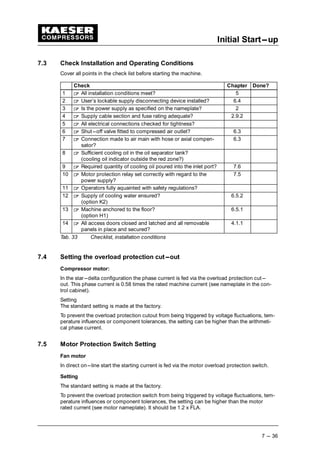
7.3 Check Installation and Operating Conditions 7 --- 36. . . . . . . . . . . . . . . . . . . . . . . . . . .
7.4 Setting the overload protection cut---out 7 --- 36. . . . . . . . . . . . . . . . . . . . . . . . . . . . . . .
7.5 Motor Protection Switch Setting 7 --- 36. . . . . . . . . . . . . . . . . . . . . . . . . . . . . . . . . . . . . .
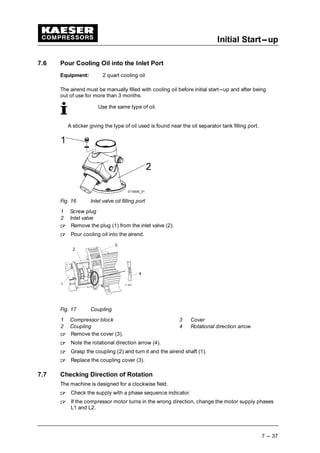
7.6 Pour Cooling Oil into the Inlet Port 7 --- 37. . . . . . . . . . . . . . . . . . . . . . . . . . . . . . . . . . . .
7.7 Checking Direction of Rotation 7 --- 37. . . . . . . . . . . . . . . . . . . . . . . . . . . . . . . . . . . . . . .
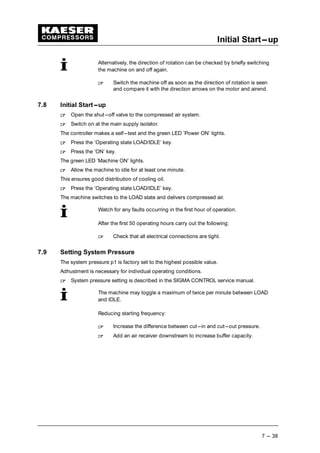
7.8 Initial Start---up 7 --- 38. . . . . . . . . . . . . . . . . . . . . . . . . . . . . . . . . . . . . . . . . . . . . . . . . . . . .
7.9 Setting System Pressure 7 --- 38. . . . . . . . . . . . . . . . . . . . . . . . . . . . . . . . . . . . . . . . . . . .
Contents
Chapter --- page
iii
8 Operation 8 --- 39. . . . . . . . . . . . . . . . . . . . . . . . . . . . . . . . . . . . . . . . . . . . . . . . . . .
8.1 Switching On and Off 8 --- 39. . . . . . . . . . . . . . . . . . . . . . . . . . . . . . . . . . . . . . . . . . . . . . .
8.1.1 Switching on 8 --- 39. . . . . . . . . . . . . . . . . . . . . . . . . . . . . . . . . . . . . . . . . . . . . . . . . . . .
8.1.2 Automatic restart 8 --- 39. . . . . . . . . . . . . . . . . . . . . . . . . . . . . . . . . . . . . . . . . . . . . . . .
8.1.3 Switching Off 8 --- 40. . . . . . . . . . . . . . . . . . . . . . . . . . . . . . . . . . . . . . . . . . . . . . . . . . .
8.2 Switching Off in an Emergency and Switching On Again 8 --- 40. . . . . . . . . . . . . . . . .
8.3 Remote On and Off Switching 8 --- 40. . . . . . . . . . . . . . . . . . . . . . . . . . . . . . . . . . . . . . . .
8.4 Switching on and off with the Clock 8 --- 41. . . . . . . . . . . . . . . . . . . . . . . . . . . . . . . . . . .
8.5 Acknowledging and Resetting Warning and Alarm Messages 8 --- 41. . . . . . . . . . . . .
8.5.1 Resetting alarm messages 8 --- 42. . . . . . . . . . . . . . . . . . . . . . . . . . . . . . . . . . . . . . . .
8.5.2 Resetting warning messages 8 --- 42. . . . . . . . . . . . . . . . . . . . . . . . . . . . . . . . . . . . . .
9 Event Recognition and Fault Rectification 9 --- 43. . . . . . . . . . . . . . . . . . . . . .
9.1 Alarms (machine shut---down, red LED blinking) 9 --- 43. . . . . . . . . . . . . . . . . . . . . . . .
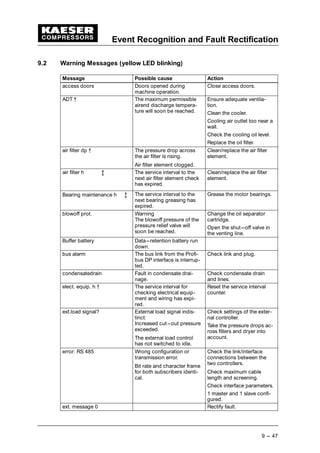
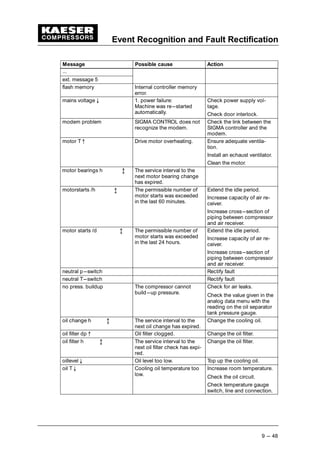
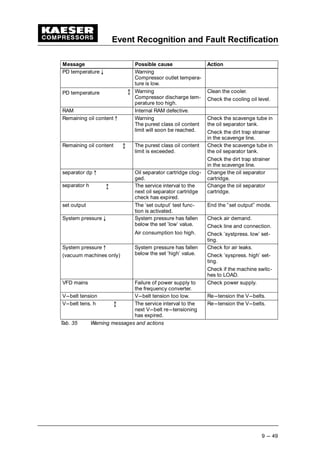
9.2 Warning Messages (yellow LED blinking) 9 --- 47. . . . . . . . . . . . . . . . . . . . . . . . . . . . . .
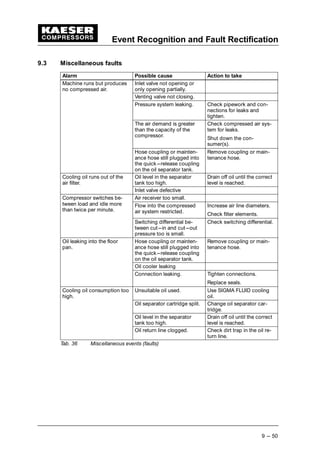
9.3 Miscellaneous faults 9 --- 50. . . . . . . . . . . . . . . . . . . . . . . . . . . . . . . . . . . . . . . . . . . . . . . .
10 Maintenance 10 --- 51. . . . . . . . . . . . . . . . . . . . . . . . . . . . . . . . . . . . . . . . . . . . . . . . .
10.1 Safety 10 --- 51. . . . . . . . . . . . . . . . . . . . . . . . . . . . . . . . . . . . . . . . . . . . . . . . . . . . . . . . . . . .
10.2 Maintenance Schedule 10 --- 52. . . . . . . . . . . . . . . . . . . . . . . . . . . . . . . . . . . . . . . . . . . . . .
10.2.1 Resetting maintenance interval counters 10 --- 52. . . . . . . . . . . . . . . . . . . . . . . . . . . .
10.2.2 Regular maintenance work 10 --- 53. . . . . . . . . . . . . . . . . . . . . . . . . . . . . . . . . . . . . . . .
10.2.3 Oil change intervals 10 --- 53. . . . . . . . . . . . . . . . . . . . . . . . . . . . . . . . . . . . . . . . . . . . . .
10.2.4 Regular service work 10 --- 54. . . . . . . . . . . . . . . . . . . . . . . . . . . . . . . . . . . . . . . . . . . . .
10.3 Cooler Maintenance 10 --- 55. . . . . . . . . . . . . . . . . . . . . . . . . . . . . . . . . . . . . . . . . . . . . . . .
10.3.1 Air cooling (option K1) 10 --- 55. . . . . . . . . . . . . . . . . . . . . . . . . . . . . . . . . . . . . . . . . . .
10.3.2 Filter mat maintenance (option K3) 10 --- 55. . . . . . . . . . . . . . . . . . . . . . . . . . . . . . . . .
10.3.3 Water cooling maintenance (option K2) 10 --- 56. . . . . . . . . . . . . . . . . . . . . . . . . . . . .
10.4 Internal Heat Recovery Maintenance (option W2 / W3) 10 --- 57. . . . . . . . . . . . . . . . . . .
10.5 Air Filter Maintenance. 10 --- 57. . . . . . . . . . . . . . . . . . . . . . . . . . . . . . . . . . . . . . . . . . . . . .
10.6 Filter mat maintenance (control cabinet) 10 --- 59. . . . . . . . . . . . . . . . . . . . . . . . . . . . . . .
10.7 Electric motor maintenance 10 --- 59. . . . . . . . . . . . . . . . . . . . . . . . . . . . . . . . . . . . . . . . . .
10.8 Checking the Coupling 10 --- 61. . . . . . . . . . . . . . . . . . . . . . . . . . . . . . . . . . . . . . . . . . . . . .
10.9 Checking the Safety Relief Valve. 10 --- 61. . . . . . . . . . . . . . . . . . . . . . . . . . . . . . . . . . . . .
10.10 Checking the Overheating Safety Shutdown Function 10 --- 62. . . . . . . . . . . . . . . . . . . .
10.11 Venting the Machine Manually 10 --- 62. . . . . . . . . . . . . . . . . . . . . . . . . . . . . . . . . . . . . . . .
10.12 Checking and Topping up the Cooling Oil 10 --- 64. . . . . . . . . . . . . . . . . . . . . . . . . . . . . .
10.12.1 Check cooling oil level. 10 --- 64. . . . . . . . . . . . . . . . . . . . . . . . . . . . . . . . . . . . . . . . . . .
10.12.2 Topping up the cooling oil 10 --- 65. . . . . . . . . . . . . . . . . . . . . . . . . . . . . . . . . . . . . . . .
10.13 Changing the Cooling Oil 10 --- 66. . . . . . . . . . . . . . . . . . . . . . . . . . . . . . . . . . . . . . . . . . . .
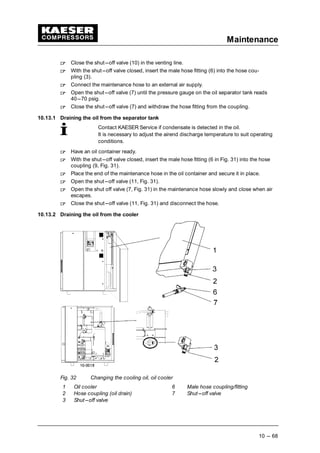
10.13.1 Draining the oil from the separator tank 10 --- 68. . . . . . . . . . . . . . . . . . . . . . . . . . . . .
10.13.2 Draining the oil from the cooler 10 --- 68. . . . . . . . . . . . . . . . . . . . . . . . . . . . . . . . . . . .
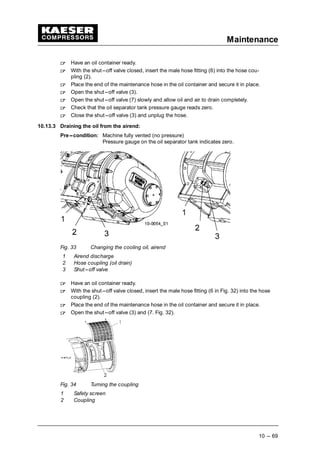
10.13.3 Draining the oil from the airend: 10 --- 69. . . . . . . . . . . . . . . . . . . . . . . . . . . . . . . . . . . .
10.13.4 Draining the oil from the heat recovery system (option W1/W2/W3) 10 --- 70. . . . .
10.13.5 Filling with cooling oil 10 --- 70. . . . . . . . . . . . . . . . . . . . . . . . . . . . . . . . . . . . . . . . . . . .
10.13.6 Start the machine and carry out a test run. 10 --- 71. . . . . . . . . . . . . . . . . . . . . . . . . .
10.14 Oil filter maintenance 10 --- 71. . . . . . . . . . . . . . . . . . . . . . . . . . . . . . . . . . . . . . . . . . . . . . .
10.15 Changing the Oil Separator Cartridge 10 --- 72. . . . . . . . . . . . . . . . . . . . . . . . . . . . . . . . .
10.16 Logging Maintenance Work 10 --- 74. . . . . . . . . . . . . . . . . . . . . . . . . . . . . . . . . . . . . . . . . .
Contents
Chapter --- page
iv
11 Spares, Operating Materials, Service 11 --- 75. . . . . . . . . . . . . . . . . . . . . . . . . . .
11.1 Note the nameplate 11 --- 75. . . . . . . . . . . . . . . . . . . . . . . . . . . . . . . . . . . . . . . . . . . . . . . . .
11.2 Ordering Maintenance Parts and Operating Materials 11 --- 75. . . . . . . . . . . . . . . . . . . .
11.3 Maintenance Contract 11 --- 75. . . . . . . . . . . . . . . . . . . . . . . . . . . . . . . . . . . . . . . . . . . . . .
11.4 Service Addresses 11 --- 75. . . . . . . . . . . . . . . . . . . . . . . . . . . . . . . . . . . . . . . . . . . . . . . . . .
11.5 Spare Parts for Service and Repair 11 --- 75. . . . . . . . . . . . . . . . . . . . . . . . . . . . . . . . . . . .
12 De---commissioning, Storage and Transport 12 --- 82. . . . . . . . . . . . . . . . . . . .
12.1 De---commissioning 12 --- 82. . . . . . . . . . . . . . . . . . . . . . . . . . . . . . . . . . . . . . . . . . . . . . . .
12.2 Packing 12 --- 82. . . . . . . . . . . . . . . . . . . . . . . . . . . . . . . . . . . . . . . . . . . . . . . . . . . . . . . . . . .
12.3 Storage 12 --- 83. . . . . . . . . . . . . . . . . . . . . . . . . . . . . . . . . . . . . . . . . . . . . . . . . . . . . . . . . . .
12.4 Transporting 12 --- 83. . . . . . . . . . . . . . . . . . . . . . . . . . . . . . . . . . . . . . . . . . . . . . . . . . . . . . .
12.4.1 Safety 12 --- 83. . . . . . . . . . . . . . . . . . . . . . . . . . . . . . . . . . . . . . . . . . . . . . . . . . . . . . . . .
12.4.2 Transverse beams 12 --- 84. . . . . . . . . . . . . . . . . . . . . . . . . . . . . . . . . . . . . . . . . . . . . . .
12.5 Disposal 12 --- 84. . . . . . . . . . . . . . . . . . . . . . . . . . . . . . . . . . . . . . . . . . . . . . . . . . . . . . . . . .
13 Annex 13 --- 85. . . . . . . . . . . . . . . . . . . . . . . . . . . . . . . . . . . . . . . . . . . . . . . . . . . . . . .
13.1 Diagrams and Drawings 13 --- 85. . . . . . . . . . . . . . . . . . . . . . . . . . . . . . . . . . . . . . . . . . . . .
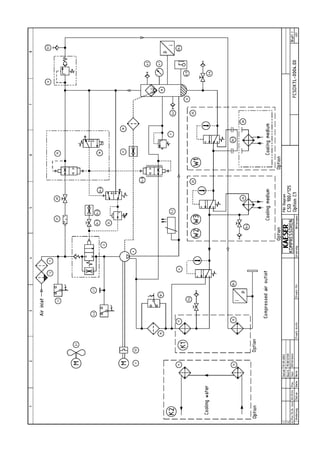
13.1.1 Pipeline and instrument flow diagram (P&I diagrams) 13 --- 85. . . . . . . . . . . . . . . . .
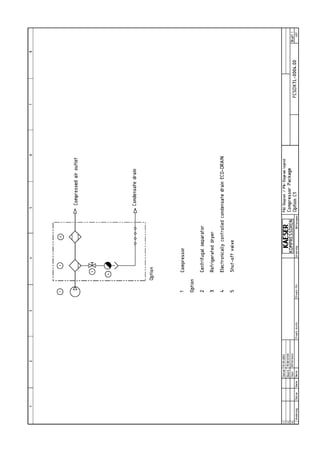
13.1.2 Pipeline and instrument flow diagram (option C1) 13 --- 91. . . . . . . . . . . . . . . . . . . .
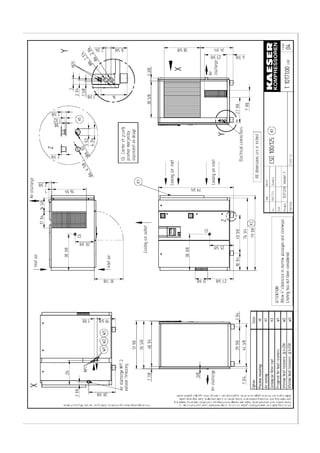
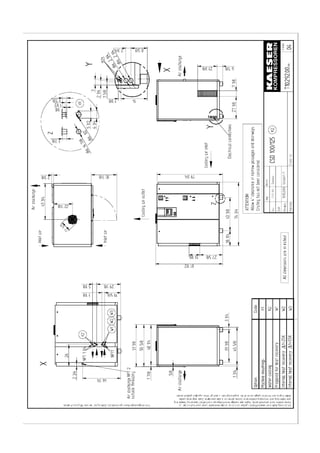
13.1.3 Dimensional drawing 13 --- 97. . . . . . . . . . . . . . . . . . . . . . . . . . . . . . . . . . . . . . . . . . . . .
13.1.4 Electrical diagram 13 --- 103. . . . . . . . . . . . . . . . . . . . . . . . . . . . . . . . . . . . . . . . . . . . . . .
Directory of Illustrations
Chapter --- page
v
Fig. 1 Three---phase star (wye); four wire; earthed neutral 2 --- 7. . . . . . . . . . . . . . . . . . . . . . .
Fig. 2 Three---phase star (wye); three wire; earthed neutral 2 --- 7. . . . . . . . . . . . . . . . . . . . . .
Fig. 3 Location of safety signs 3 --- 19. . . . . . . . . . . . . . . . . . . . . . . . . . . . . . . . . . . . . . . . . . . . . .
Fig. 4 Cabinet 4 --- 20. . . . . . . . . . . . . . . . . . . . . . . . . . . . . . . . . . . . . . . . . . . . . . . . . . . . . . . . . . . .
Fig. 5 Air---cooled machine 4 --- 21. . . . . . . . . . . . . . . . . . . . . . . . . . . . . . . . . . . . . . . . . . . . . . . . .
Fig. 6 Machine mountings 4 --- 23. . . . . . . . . . . . . . . . . . . . . . . . . . . . . . . . . . . . . . . . . . . . . . . . . .
Fig. 7 Filter mat panel 4 --- 23. . . . . . . . . . . . . . . . . . . . . . . . . . . . . . . . . . . . . . . . . . . . . . . . . . . . .
Fig. 8 Water cooling 4 --- 23. . . . . . . . . . . . . . . . . . . . . . . . . . . . . . . . . . . . . . . . . . . . . . . . . . . . . . .
Fig. 9 Internal heat recovery 4 --- 24. . . . . . . . . . . . . . . . . . . . . . . . . . . . . . . . . . . . . . . . . . . . . . . .
Fig. 10 SIGMA CONTROL keys 4 --- 26. . . . . . . . . . . . . . . . . . . . . . . . . . . . . . . . . . . . . . . . . . . . . .
Fig. 11 SIGMA CONTROL indicators 4 --- 27. . . . . . . . . . . . . . . . . . . . . . . . . . . . . . . . . . . . . . . . . .
Fig. 12 Installation recommendation, dimensions [in] 5 --- 29. . . . . . . . . . . . . . . . . . . . . . . . . . . .
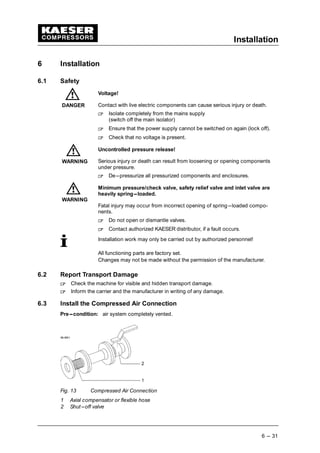
Fig. 13 Compressed Air Connection 6 --- 31. . . . . . . . . . . . . . . . . . . . . . . . . . . . . . . . . . . . . . . . . .
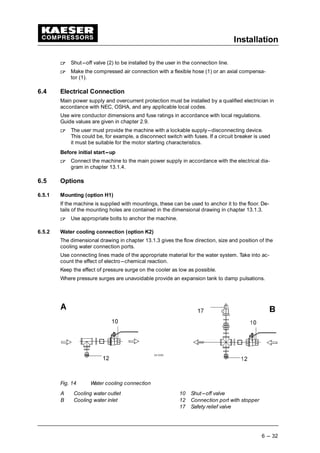
Fig. 14 Water cooling connection 6 --- 32. . . . . . . . . . . . . . . . . . . . . . . . . . . . . . . . . . . . . . . . . . . . .
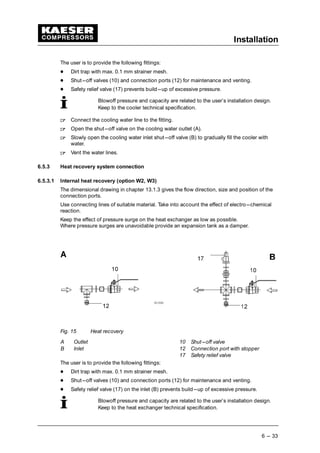
Fig. 15 Heat recovery 6 --- 33. . . . . . . . . . . . . . . . . . . . . . . . . . . . . . . . . . . . . . . . . . . . . . . . . . . . . . .
Fig. 16 Inlet valve oil filling port 7 --- 37. . . . . . . . . . . . . . . . . . . . . . . . . . . . . . . . . . . . . . . . . . . . . . .
Fig. 17 Coupling 7 --- 37. . . . . . . . . . . . . . . . . . . . . . . . . . . . . . . . . . . . . . . . . . . . . . . . . . . . . . . . . . .
Fig. 18 Switching On and Off 8 --- 39. . . . . . . . . . . . . . . . . . . . . . . . . . . . . . . . . . . . . . . . . . . . . . . .
Fig. 19 Switching off in an emergency 8 --- 40. . . . . . . . . . . . . . . . . . . . . . . . . . . . . . . . . . . . . . . . .
Fig. 20 Acknowledging and Resetting Warning and Alarm Messages 8 --- 41. . . . . . . . . . . . . . .
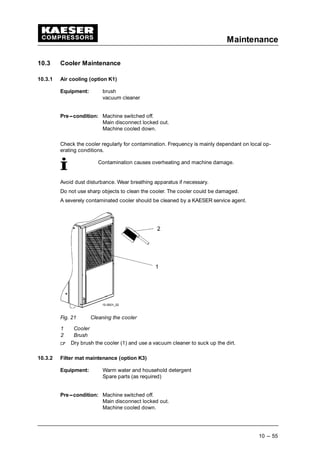
Fig. 21 Cleaning the cooler 10 --- 55. . . . . . . . . . . . . . . . . . . . . . . . . . . . . . . . . . . . . . . . . . . . . . . . . .
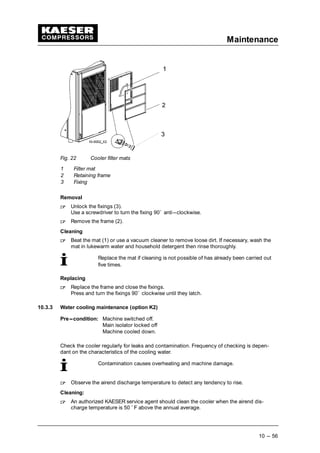
Fig. 22 Cooler filter mats 10 --- 56. . . . . . . . . . . . . . . . . . . . . . . . . . . . . . . . . . . . . . . . . . . . . . . . . . . .
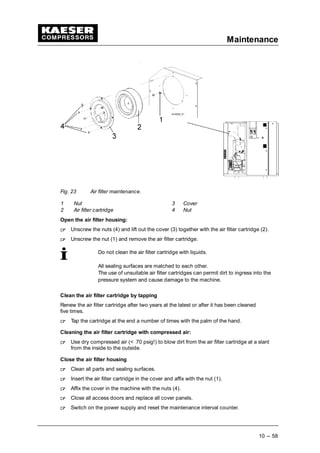
Fig. 23 Air filter maintenance. 10 --- 58. . . . . . . . . . . . . . . . . . . . . . . . . . . . . . . . . . . . . . . . . . . . . . . .
Fig. 24 Control cabinet ventilator 10 --- 59. . . . . . . . . . . . . . . . . . . . . . . . . . . . . . . . . . . . . . . . . . . . .
Fig. 25 Compressor motor maintenance 10 --- 60. . . . . . . . . . . . . . . . . . . . . . . . . . . . . . . . . . . . . . .
Fig. 26 Fan motor maintenance 10 --- 60. . . . . . . . . . . . . . . . . . . . . . . . . . . . . . . . . . . . . . . . . . . . . .
Fig. 27 Checking the Coupling 10 --- 61. . . . . . . . . . . . . . . . . . . . . . . . . . . . . . . . . . . . . . . . . . . . . . .
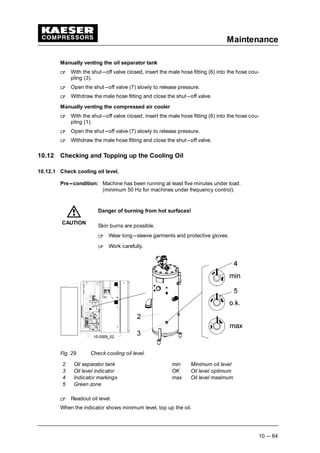
Fig. 28 Vent the machine. 10 --- 63. . . . . . . . . . . . . . . . . . . . . . . . . . . . . . . . . . . . . . . . . . . . . . . . . . .
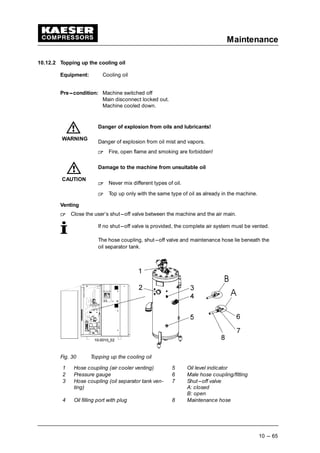
Fig. 29 Check cooling oil level. 10 --- 64. . . . . . . . . . . . . . . . . . . . . . . . . . . . . . . . . . . . . . . . . . . . . . .
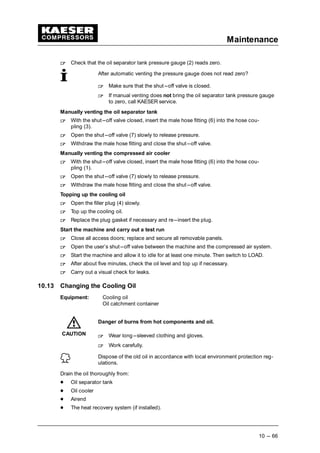
Fig. 30 Topping up the cooling oil 10 --- 65. . . . . . . . . . . . . . . . . . . . . . . . . . . . . . . . . . . . . . . . . . . .
Fig. 31 Changing the cooling oil, oil separator tank 10 --- 67. . . . . . . . . . . . . . . . . . . . . . . . . . . . . .
Fig. 32 Changing the cooling oil, oil cooler 10 --- 68. . . . . . . . . . . . . . . . . . . . . . . . . . . . . . . . . . . . .
Fig. 33 Changing the cooling oil, airend 10 --- 69. . . . . . . . . . . . . . . . . . . . . . . . . . . . . . . . . . . . . . .
Fig. 34 Turning the coupling 10 --- 69. . . . . . . . . . . . . . . . . . . . . . . . . . . . . . . . . . . . . . . . . . . . . . . . .
Fig. 35 Cooling oil changing, internal heat recovery 10 --- 70. . . . . . . . . . . . . . . . . . . . . . . . . . . . .
Fig. 36 Changing the Oil Filter 10 --- 71. . . . . . . . . . . . . . . . . . . . . . . . . . . . . . . . . . . . . . . . . . . . . . .
Fig. 37 Changing the Oil Separator Cartridge 10 --- 72. . . . . . . . . . . . . . . . . . . . . . . . . . . . . . . . . . .
Fig. 38 Transport by fork truck 12 --- 83. . . . . . . . . . . . . . . . . . . . . . . . . . . . . . . . . . . . . . . . . . . . . . .
Fig. 39 Transport with lifting cradle 12 --- 84. . . . . . . . . . . . . . . . . . . . . . . . . . . . . . . . . . . . . . . . . . .
Table Directory
Chapter --- page
vi
Tab. 1 Nameplate 2 --- 3. . . . . . . . . . . . . . . . . . . . . . . . . . . . . . . . . . . . . . . . . . . . . . . . . . . . . . . . .
Tab. 2 Options 2 --- 3. . . . . . . . . . . . . . . . . . . . . . . . . . . . . . . . . . . . . . . . . . . . . . . . . . . . . . . . . . . .
Tab. 3 Machine weights 2 --- 3. . . . . . . . . . . . . . . . . . . . . . . . . . . . . . . . . . . . . . . . . . . . . . . . . . . .
Tab. 4 Machine temperatures 2 --- 4. . . . . . . . . . . . . . . . . . . . . . . . . . . . . . . . . . . . . . . . . . . . . . .
Tab. 5 Ambient Conditions 2 --- 4. . . . . . . . . . . . . . . . . . . . . . . . . . . . . . . . . . . . . . . . . . . . . . . . . .
Tab. 6 Safety relief valve setting 2 --- 4. . . . . . . . . . . . . . . . . . . . . . . . . . . . . . . . . . . . . . . . . . . . .
Tab. 7 Capacitiy at rated pressure [CFM FAD] 2 --- 4. . . . . . . . . . . . . . . . . . . . . . . . . . . . . . . . .
Tab. 8 Sound Pressure Level 2 --- 5. . . . . . . . . . . . . . . . . . . . . . . . . . . . . . . . . . . . . . . . . . . . . . . .
Tab. 9 Compressor motor data 2 --- 5. . . . . . . . . . . . . . . . . . . . . . . . . . . . . . . . . . . . . . . . . . . . . .
Tab. 10 Fan motor data (option K1) 2 --- 5. . . . . . . . . . . . . . . . . . . . . . . . . . . . . . . . . . . . . . . . . . .
Tab. 11 Fan motor data (option K2) 2 --- 5. . . . . . . . . . . . . . . . . . . . . . . . . . . . . . . . . . . . . . . . . . .
Tab. 12 Cooling oil volumes 2 --- 7. . . . . . . . . . . . . . . . . . . . . . . . . . . . . . . . . . . . . . . . . . . . . . . . . .
Tab. 13 Supply 208V/3/60Hz 2 --- 8. . . . . . . . . . . . . . . . . . . . . . . . . . . . . . . . . . . . . . . . . . . . . . . . .
Tab. 14 Supply 230V/3/60Hz 2 --- 8. . . . . . . . . . . . . . . . . . . . . . . . . . . . . . . . . . . . . . . . . . . . . . . . .
Tab. 15 Supply 380V/3/60Hz 2 --- 8. . . . . . . . . . . . . . . . . . . . . . . . . . . . . . . . . . . . . . . . . . . . . . . . .
Tab. 16 Supply 460V/3/60Hz 2 --- 8. . . . . . . . . . . . . . . . . . . . . . . . . . . . . . . . . . . . . . . . . . . . . . . . .
Tab. 17 Supply 575V/3/60Hz 2 --- 9. . . . . . . . . . . . . . . . . . . . . . . . . . . . . . . . . . . . . . . . . . . . . . . . .
Tab. 18 Water cooling design data (30 ˚ F) 2 --- 9. . . . . . . . . . . . . . . . . . . . . . . . . . . . . . . . . . . . .
Tab. 19 Water cooling design data (70 ˚ F) 2 --- 9. . . . . . . . . . . . . . . . . . . . . . . . . . . . . . . . . . . . .
Tab. 20 Cooler specification; water cooling 2 --- 9. . . . . . . . . . . . . . . . . . . . . . . . . . . . . . . . . . . . .
Tab. 21 Cooling Water Quality 2 --- 10. . . . . . . . . . . . . . . . . . . . . . . . . . . . . . . . . . . . . . . . . . . . . . . .
Tab. 22 Heat capacity (option W1) 2 --- 10. . . . . . . . . . . . . . . . . . . . . . . . . . . . . . . . . . . . . . . . . . . .
Tab. 23 Water Quality Specification 2 --- 11. . . . . . . . . . . . . . . . . . . . . . . . . . . . . . . . . . . . . . . . . . .
Tab. 24 General specification of the heat exchanger 2 --- 11. . . . . . . . . . . . . . . . . . . . . . . . . . . . .
Tab. 25 Flow rate and heat available (option W2) 2 --- 11. . . . . . . . . . . . . . . . . . . . . . . . . . . . . . . .
Tab. 26 Flow rate and heat available (option W3) 2 --- 12. . . . . . . . . . . . . . . . . . . . . . . . . . . . . . . .
Tab. 27 Danger zones 3 --- 17. . . . . . . . . . . . . . . . . . . . . . . . . . . . . . . . . . . . . . . . . . . . . . . . . . . . . . .
Tab. 28 Safety signs 3 --- 18. . . . . . . . . . . . . . . . . . . . . . . . . . . . . . . . . . . . . . . . . . . . . . . . . . . . . . . .
Tab. 29 SIGMA CONTROL keys 4 --- 27. . . . . . . . . . . . . . . . . . . . . . . . . . . . . . . . . . . . . . . . . . . . . .
Tab. 30 SIGMA CONTROL indicators 4 --- 27. . . . . . . . . . . . . . . . . . . . . . . . . . . . . . . . . . . . . . . . . .
Tab. 31 Ventilation (option K1) 5 --- 29. . . . . . . . . . . . . . . . . . . . . . . . . . . . . . . . . . . . . . . . . . . . . . . .
Tab. 32 Ventilation (option K2) 5 --- 30. . . . . . . . . . . . . . . . . . . . . . . . . . . . . . . . . . . . . . . . . . . . . . . .
Tab. 33 Checklist, installation conditions 7 --- 36. . . . . . . . . . . . . . . . . . . . . . . . . . . . . . . . . . . . . . .
Tab. 34 Alarm messages and actions 9 --- 46. . . . . . . . . . . . . . . . . . . . . . . . . . . . . . . . . . . . . . . . . .
Tab. 35 Warning messages and actions 9 --- 49. . . . . . . . . . . . . . . . . . . . . . . . . . . . . . . . . . . . . . . .
Tab. 36 Miscellaneous events (faults) 9 --- 50. . . . . . . . . . . . . . . . . . . . . . . . . . . . . . . . . . . . . . . . . .
Tab. 37 Regular maintenance work 10 --- 53. . . . . . . . . . . . . . . . . . . . . . . . . . . . . . . . . . . . . . . . . . . .
Tab. 38 Oil change intervals lubricants 10 --- 54. . . . . . . . . . . . . . . . . . . . . . . . . . . . . . . . . . . . . . . . .
Tab. 39 Oil change intervals speciality lubricants 10 --- 54. . . . . . . . . . . . . . . . . . . . . . . . . . . . . . . .
Tab. 40 Regular service intervals 10 --- 54. . . . . . . . . . . . . . . . . . . . . . . . . . . . . . . . . . . . . . . . . . . . . .
Tab. 41 Maintenance log 10 --- 74. . . . . . . . . . . . . . . . . . . . . . . . . . . . . . . . . . . . . . . . . . . . . . . . . . . .
Tab. 42 Machine maintenance parts 11 --- 75. . . . . . . . . . . . . . . . . . . . . . . . . . . . . . . . . . . . . . . . . . .
Regarding this Document
1 --- 1
1 Regarding this Document
1.1 Handling the Document
The service manual is part of the machine.
 
Keep the service manual in a safe place throughout the life of the machine.
 
Pass the manual onto the next owner/user of the machine.
 
Ensure that all amendments are entered in the manual.
 
Enter details from the machine nameplate in the table in chapter 2 ’Technical Specifica-
tions’.
1.2 Further Documents
Included with this Service Manual are documents intended to assist in safe and sure opera-
tion of the machine:
¡
certificate of acceptance / operating instructions for the pressure vessel
¡
manufacturer’s declaration or declaration of conformity in accordance with applicable
directives
¡
SIGMA CONTROL Service Manual
 
Make sure all documents are at hand and their contents understood.
Request the supply of any missing documents from KAESER.
Make sure you give the data from the nameplate.
1.3 Copyright
This service manual is copyright protected. Inquiries regarding use or duplication of the
documentation should be referred to KAESER.
1.4 Symbols and Identifications
1.4.1 Warning notices
Here is a notice warning of danger.
Here are consequences of ignoring the warning notice.
The word ’Danger’ indicates that death or severe injury can result from ig-
noring the notice.
 
Always read and diligently comply with warning notices.
Danger levels
Warning notices indicate three levels of danger identified by the signal word under the dan-
ger symbol.
Signal word Meaning Consequences of ignoring the warning
DANGER Warns of imminent threa-
tening danger
Death or severe injury or serious damage to
the machine is possible
WARNING Warns of possible threate-
ning danger
Death or severe injury or serious damage to
the machine is possible
CAUTION Warns of a possibly
dangerous situation
Light injury or slight damage possible
DANGER
Regarding this Document
1 --- 2
1.4.2 Miscellaneous notices and symbols
 
Here is a task to be carried out.
This symbol identifies environmental protection measures.
This indicates important information.
Technical Specification
2 --- 3
2 Technical Specification
Model and important technical information is to be found on the machine nameplate. The
nameplate is found inside the machine. It is fixed to the outside of the control cabinet.
Please transfer data from the nameplate.
Model
Part no.
Year
Serial no.
psig
cfm
Voltage
Hz/RPM
Package FLA
Phase
HP
Wiring Diagram
FOR SERVICE, REFER TO EQIPMENT
NUMBER
Tab. 1 Nameplate
A summary of the included options helps to relate the service manual information to your
machine.
Please enter details of options.
Option Code Exists
Air cooled K1
Water cooled K2
Filter mat panels K3
Machine mountings H1
Prepared for heat recovery W1
Internal heat recovery
 
T= 25K W2
Internal heat recovery
 
T= 55K W3
Modulation control C1
Transformer power supply for refrigeration
dryer
T2
Tab. 2 Options
2.1 Weight
Maximum weights are shown. Actual weights of individual machines are dependent on
equipment fitted.
CSD 100 CSD 125
Weight [lb] 4235 4455
Tab. 3 Machine weights
Technical Specification
2 --- 4
2.2 Temperature
CSD 100 CSD 125
Minimum cut---in temperature
[˚ F]
40 40
Typical airend discharge tem-
perature during operation [˚ F]
167 --- 200 167 --- 200
Max. airend discharge temp.
(automatic shut---down) [˚ F]
230 230
Tab. 4 Machine temperatures
2.3 Ambient Conditions
CSD 100 CSD 125
Maximum elevation [ft] 3000 3000
Ambient temperature [˚ F] 40 – 115 40 – 115
Inlet air / cooling air tempera-
ture [˚ F]
40 – 115 40 – 115
Humidity of the inlet air at
90 ˚ F [%]
100 100
Humidity of the inlet air at
113 ˚ F [%]
50 50
* Higher elevation permissible only after consultation with the manufacturer
Tab. 5 Ambient Conditions
2.4 Pressure
See nameplate for maximum working pressure.
Maximum working pressure
[psig]
Blow---off setting of the safety relief valve [psig]
CSD 100 CSD 125
125 155 155
160 230 230
217 230 230
Tab. 6 Safety relief valve setting
2.5 Free Air Delivery (FAD)
Rated pressure [psig] CSD 100 CSD 125
110 506 584
125 503 581
145 420 498
160 417 494
175 348 414
190 345 411
217 337 406
Tab. 7 Capacitiy at rated pressure [CFM FAD]
Technical Specification
2 --- 5
2.6 Sound Pressure Level
Operational state
 
under load at rated speed, rated delivery and rated pressure.
Measuring conditions:
 
Free---field measurement to CAGI/PNEUROP PN8 NTC 2.3 at 1 m distance
CSD 100 CSD 125
Sound pressure level (60Hz) [dB(A)] 73 74
Tab. 8 Sound Pressure Level
2.7 Motor and Performance
2.7.1 Compressor motor:
CSD 100 CSD 125
Rated power [Hp] 100 125
Rated speed [rpm] 3580 3582
Enclosure protection TEFC TEFC
Motor bearing greasing
[operating hours]
2000 2000
Grease requirement, each bearing
[oz]*
* Transfer data from motor nameplate to the table
Tab. 9 Compressor motor data
2.7.2 Fan Motor
Air cooling (option K1)
CSD 100 CSD 125
Rated power [Hp] 3 3
Rated speed [rpm] 1170 1170
Enclosure protection TEFC TEFC
Motor bearing greasing
[operating hours]
2000 2000
Grease requirement, each bearing
[oz]*
* Transfer data from motor nameplate to the table
Tab. 10 Fan motor data (option K1)
Water cooling (option K2)
CSD 100 CSD 125
Rated power [Hp] 0.13 0.13
Rated speed [rpm] 2700 2700
Enclosure protection TEFC TEFC
Tab. 11 Fan motor data (option K2)
Technical Specification
2 --- 6
2.8 Cooling oil
Ordering: see ’Spare Parts, Operating Materials, Service’ chapter 11.
Lubrication of an air compressor is essential to reliable operation. Carbon and varnish can
form in compressor oils. These deposits block the flow of lubricant and cause excessive
wear and failure of moving parts. Contamination of the lubricant can allow the formation of
acids, causing extensive internal corrosion. Water may be condensed decreasing the lu-
bricity.
Lubricants in rotary compressors do much more than lubricate. During the compression
process, it acts as a sealant in the airend which is important for maximum efficiency. The
lubricant also absorbs much of the heat of compression to cool the airend and reduce the
temperature of the compressed air. It’s not enough that a compressor cooling oil lubricates
well, it must stand up to the heat, pressure and contaminants that are present in every air
compressor.
2.8.1 General Information
KAESER synthetic lubricants should be stored in a protected location to prevent contami-
nation. Do not re---use drums; flush and send to reconditioner.
Although the KAESER synthetic is not highly flammable, it will burn. While KAESER syn-
thetic compressor oil is less flammable than equal viscosity mineral oils, it cannot be classi-
fied as a fire---resistant fluid. It has a flash point above 460 ˚ F. Since the user has total con-
trol over the conditions of the compressor lubricant, he assumes total responsibility for its
safe usage.
Material Safety Data Sheets are available for each lubricant from your KAESER authorized
distributors.
Regardless of the lubricant selected, the KAESER Sigma lubricants will separate readily
from water. If condensate occurs it can easily be removed. Let the compressor sit so that
any water can drain back to the separator tank and separate to the bottom. See chap-
ter 10.13 proper draining procedure.
KAESER has several lubricants available that are specially formulated to match these de-
mands. They feature excellent lubricity, outstanding demulsibility (ability to separate from
water), and long life.
M---SERIES SEMI---SYNTHETIC LUBRICANTS
 
M---Series SIGMA compressor cooling oils are the highest quality petroleum lubricants.
M---460 is specially blended to provide reliable performance in KAESER screw com-
pressors.
S---SERIES SYNTHETIC LUBRICANTS
 
S---Series SIGMA compressor oils are formulated from the most advanced synthetic
lubricants. These ”synthetic” lubricants begin as high quality petroleum feed stock.
They are then refined, processed and purified into fluids with very consistent molecular
structure. These oils are carefully blended to produce extremely consistant lubricants
with superior properties. SIGMA synthetic lubricants feature all the advantages of both
PAO and diester fluids.
 
S---460 lubricant is recommended for compressors operating in ambient temperatures
between 40 ˚ F and 105 ˚ F.
Specialty KAESER LUBRICANTS
 
S---680 lubricant may be used when ambient temperatures are always between 70 ˚ F
and 105 ˚ F.
 
FG---460 synthetic hydrocarbon based food grade lubricant is designed for use in
rotary screw compressors in the application where incidental food contact may occur
Technical Specification
2 --- 7
with the discharge air. This lubricant meets the requirements of the FDA Regulation 21
CFR §178.3570 and is USDA H---1 approved and NSF certified. FG---460 is approved
for canning, food packing, meat and poultry processing and other applications where
incidental food contact may occur.
2.8.2 Cooling Oil Quantity
CSD 100 CSD 125
Total charge [gal] (option K1) 14.5 14.5
Total charge [gal] (option K2) 11.4 11.4
Top---up volume [gal]
(minimum --- maximum
1.3 1.3
Additional volume [gal] (option W2) 1.9 1.9
Additional volume [gal] (option W3) 1.2 1.2
Additional volume [gal] (option W1) *
* Input the additional volume corresponding to your heat recovery system.
Tab. 12 Cooling oil volumes
2.9 Electrical Connections
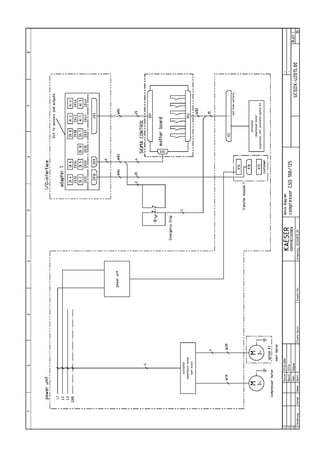
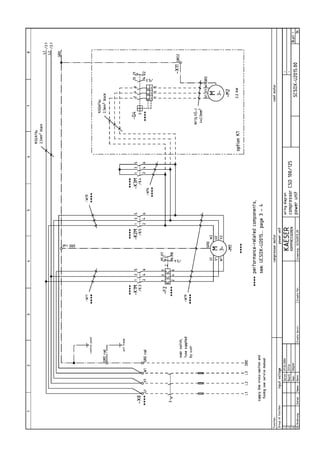
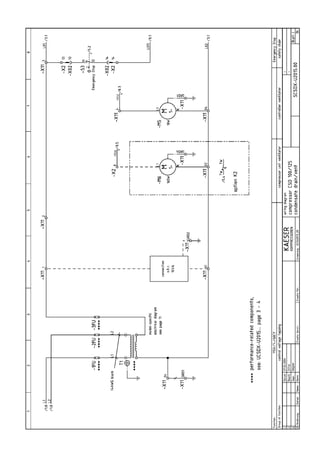
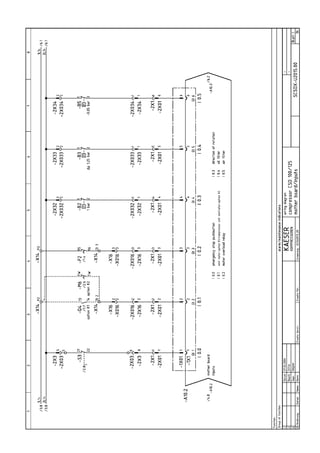
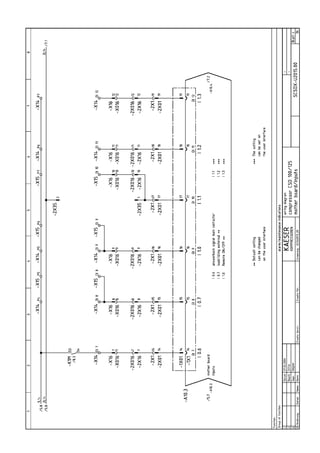
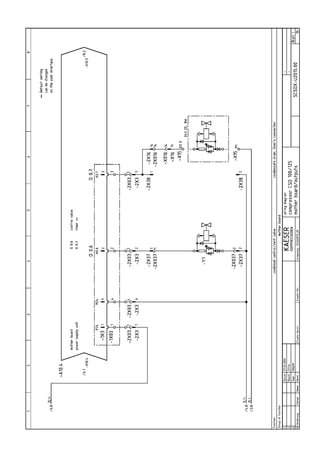
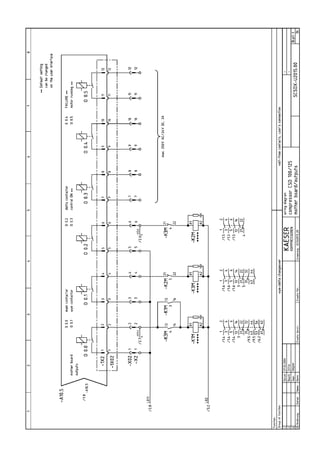
See electrical diagrams in chapter 13.1.4.
2.9.1 Power supply
The machine is designed for an electrical supply according to National Electric Code
(NEC) NEC---670, particulary NFPA 79, section 5.7. In the absence of any user---specified
alternatives, the limits given in these standards must be adhered to. Consult manufacturer
for any other specific power supply.
Three---phase
Do NOT operate package on any unsymmetrical power supply. Also do NOT operate pack-
age on power supplies like, for example, a three---phase (open) delta or three---phase star
with non---earthed neutral.
Fig. 1 Three---phase star (wye); four wire; earthed neutral
Fig. 2 Three---phase star (wye); three wire; earthed neutral
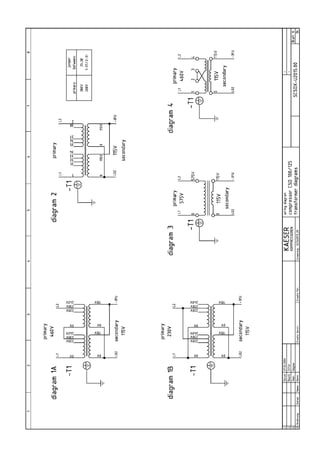
The machine requires a symmetrical three---phase power supply transformer with a WYE
configuration output as shown in Fig. 1 and Fig. 2.
In a symmetrical three phase supply the phase angles and voltages are all the same.
Other power supplies are not suitable. Please contact authorized KAESER distributor for
options.
Technical Specification
2 --- 8
2.9.2 Power supply specifications
The following multi---strand copper core wires are given according to 2002 NEC 310---15,
Table 310---16 for 40 ˚ C ambient temperature.
If other local conditions prevail, like for example high temperature, the cross section should
be checked and adjusted according to 2002 NEC 110---14
 
, 220---3,310---15, Table
310---16, 430---6, 430---22, 430---24 and other local codes.
Dual element time delay fuses are selected according to 2002 NEC 240---6,430---52 and
tables 430---52, 430---148 and 430---150.
We strongly suggest using a separate copper conductor for the equipment GROUNDING.
NEC Table 250.122 will point out the ”minimum size”, however, we recommend a ground
conductor the same size as the power leads, if local codes allow.
Rated power supply 208V ¡ 10%, 3---ph, 60Hz
CSD 100 CSD 125
Pre---fuse [A] 450 500
Supply 2x 4xAWG4/0 2x 4xMCM250
Consumption [A] (Option K1) 320 354
Consumption [A] (Option K2) 310 345
Tab. 13 Supply 208V/3/60Hz
Rated power supply 230V ¡ 10%, 3---ph, 60Hz
CSD 100 CSD 125
Pre---fuse [A] 400 450
Supply 2x 4xAWG4/0 2x 4xAWG4/0
Consumption [A] (Option K1) 288 320
Consumption [A] (Option K2) 279 311
Tab. 14 Supply 230V/3/60Hz
Rated power supply 380V ¡ 10%, 3---ph, 60Hz
CSD 100 CSD 125
Pre---fuse [A] 250 250
Supply 4xMCM250 4xMCM300
Consumption [A] (Option K1) 175 195
Consumption [A] (Option K2) 169 190
Tab. 15 Supply 380V/3/60Hz
Rated power supply 460V ¡ 10%, 3---ph, 60Hz
CSD 100 CSD 125
Pre---fuse [A] 200 225
Supply 4xAWG4/0 4xAWG4/0
Consumption [A] (Option K1) 146 160
Consumption [A] (Option K2) 142 157
Tab. 16 Supply 460V/3/60Hz
Rated power supply 575V ¡ 10%, 3---ph, 60Hz
CSD 100 CSD 125
Pre---fuse [A] 150 175
Supply 4xAWG2/0 4xAWG3/0
Technical Specification
2 --- 9
CSD 125CSD 100
Consumption [A] (Option K1) 115 128
Consumption [A] (Option K2) 112 125
Tab. 17 Supply 575V/3/60Hz
2.10 Water cooling (option K2)
2.10.1 Design data
Cooling water temperature rise 30 ˚ F
CSD 100 CSD 125
Max. permissible inlet temperature
[˚ F]
90 90
Min. cooling water flow [gpm] 26.4 31.9
Water pressure drop [psig] 15 20
Tab. 18 Water cooling design data (30 ˚ F)
Cooling water temperature rise 70 ˚ F
CSD 100 CSD 125
Max. permissible inlet temperature
[˚ F]
50 50
Min. cooling water flow [gpm] 8.8 10.6
Water pressure drop [psig] 7 7
Tab. 19 Water cooling design data (70 ˚ F)
Cooler specification
Material of manufacture 1.4401
Solder Copper
Maximum working pressure (cooling water
end) [psig]
145
Unsuitable cooling medium Seawater
Consult KAESER before using cooling wa-
ter solutions
Max. permissible discharge temperature
[˚ F]
158
Tab. 20 Cooler specification; water cooling
2.10.2 Cooling Water Quality
Do not use the cooling water as drinking water.
If a leak occurs, oil can contaminate the cooling water.
Measures for cooling water treatment and filtration are essential and must be carried out.
The addresses of companies specializing in the analysis of cooling water and supplying
suitable equipment for the its treatment can be obtained from KAESER on request.
To avoid operating breakdowns from a corroded or clogged cooler, the cooling water must
meet certain minimum requirements:
Technical Specification
2 --- 10
pH value 7.5 to 9.0
Hardness [ dH] 4.0---8.5
Chloride (Cl) [mg/l] < 150
Free chlorine gas (Cl2) [mg/l] < 1
Sulphate (SO3) [mg/l] < 1
Dissolved iron (Fe) [mg/l] < 0.2
Hydrogen carbonate (HCO3) [mg/l] 70---300
Sulphate (SO4) [mg/l] < 70
HCO3 / SO4 > 1
Electrical conductivity [  S/cm] 10---500
Ammonia (NH3) [mg/l] < 2
Dissolved magnesium (Mn) [mg/l] < 0.1
Dissolved aluminium (Al) [mg/l] < 0.2
Nitrate (NO3), dissolved [mg/l] < 100
Hydrogen sulphate (SO2) [mg/l] < 0.05
Free aggressive carbon dioxide (CO2) [mg/l] < 5
Glycol [%] < 50
Solids (particle size) [mm] < 0.1
Algae not permissible
Tab. 21 Cooling Water Quality
2.11 Heat Recovery
2.11.1 Prepared for heat recovery (option W1)
Connections for an external heat recovery system are provided.
Heat capacity
CSD 100 CSD 125
Max. heat capacity available [kW] 40.3 49.4
Max. heat capacity available [MJ/h] 145 178
Max. heat capacity available [kcal/h] 34669 42511
Tab. 22 Heat capacity (option W1)
2.11.2 Internal Heat Recovery (option W2 / W3)
A soldered, plate heat exchanger is installed for heat recovery.
Generally water is used as the heat transfer medium. This must conform to the specifica-
tion given below.
The water may not be used as drinking water.
If a leak occurs, oil can contaminate the water.
The manufacturer should be consulted before another type of heat transfer
medium is used.
Water Quality Specification
pH value 7.5 to 9
Hardness [ dH] 4.0---8.5
Technical Specification
2 --- 11
Chloride (Cl)* [mg/l] < 150
Free chlorine gass (Cl2) [mg/l] < 1
Sulphate (SO3) [mg/l] < 1
Dissolved iron (Fe) [mg/l] < 0.2
Hydrogen carbonate (HCO3) [mg/l] 70---300
Sulphate (SO4) [mg/l] < 70
HCO3 / SO4 > 1
Electrical conductivity [  S/cm] 10---500
Ammonia (NH3) [mg/l] < 2
Dissolved magnesium (Mn) [mg/l] < 0.1
Dissolved aluminium (Al) [mg/l] < 0.2
Nitrate (NO3), dissolved [mg/l] < 100
Hydrogen sulphate (SO2) [mg/l] < 0.05
Free aggressive carbon dioxide (CO2) [mg/l] < 5
Glycol [%] < 50
Solids (particle size) [mm] < 0.1
Algae not permissible
Tab. 23 Water Quality Specification
If the heat transfer medium outlet temperature is to be kept constant, the
user must install an appropriate regulating device.
Heat Exchanger Specification
CSD 100 CSD 125
Maximum working pressure of the
heat transfer medium [psig]
145 145
Pressure drop [psig] < 1.5 < 1.5
Plate material 1.4401 1.4401
Solder Cu Cu
Maximum permissible temperature of
the heat transfer medium [˚ F]
210 210
Tab. 24 General specification of the heat exchanger
Flow rate and heat capacity by heating from 110 ˚ F to 160 ˚ F (equivalent to ¡ T= 25 K),
(option W2)
CSD 100 CSD 125
Flow rate [gpm] 9.7 11.9
Max. heat capacity available [kW] 40.3 49.4
Max. heat capacity available [MJ/h] 145 178
Max. heat capacity available [kcal/h] 34669 42511
Tab. 25 Flow rate and heat available (option W2)
Flow rate and heat capacity by heating from 60 ˚ F to 160 ˚ F (equivalent to ¡ T= 55 K),
(option W3)
CSD 100 CSD 125
Flow rate [gpm] 4.4 5.3
Max. heat capacity available [kW] 40.3 49.4
Technical Specification
2 --- 12
CSD 125CSD 100
Max. heat capacity available [MJ/h] 145 178
Max. heat capacity available [kcal/h] 34669 42511
Tab. 26 Flow rate and heat available (option W3)
Safety and Responsibility
3 --- 13
3 Safety and Responsibility
Disregard of these instructions can result in serious injury.
 
Read the service manual carefully and pay attention to its contents.
This machine is manufactured to the latest engineering standards and acknowledged
safety regulations. Nevertheless, risk of injury and death for the user and other parties and
damage to the machine and other property can arise from its use.
Use this machine only if it is in a technically perfect condition and only for the purpose for
which it is intended; observe all safety measures and the instructions in the service
manual.
In particular, immediately rectify (have rectified) any faults that could be detrimental to
safety.
3.1 Proper Use
¡
The machine is intended solely for industrial use in generating compressed air. Any
other use is considered incorrect. The manufacturer is not liable for any damages re-
sulting from such unspecified use or application. The risk involved in such unspecified
use is taken solely by the user.
¡
Specified use also includes compliance with the instructions in this manual.
3.2 Improper Use
¡
Never direct compressed air at persons or animals.
¡
Do not use untreated compressed air for breathing purposes.
¡
Do not use untreated compressed for any application that will bring it into direct con-
tact with foodstuffs.
¡
Cooling air, warmed after passing through the machine, may be used for heating pur-
poses but only when it poses no health risk to humans or animals. If necessary, the
warmed cooling air should be treated to render it harmless.
¡
Do not allow the machine to take in toxic, acidic, flammable of explosive gases or va-
pors.
¡
Do not operate the machine in areas in which specific requirements with regard to ex-
plosion protection are applied.
3.3 User’s Responsibilities
The basic principle: observe approved safety regulations
Observe the relevant regulations during installation, operation, maintenance and repair of
the machine. These are, for example, valid national laws and safety and accident preven-
tion regulations.
3.3.1 Qualified personnel
Ensure that operating, installation and maintenance personnel are qualified and authorized
for their tasks.
These are people who, by virtue of their training, knowledge and experience as well as
their knowledge of the prevailing conditions, can assess the work to be done and recog-
nize the possible dangers involved.
DANGER
Safety and Responsibility
3 --- 14
Operating personnel
Authorized operating personnel:
 
must be adult,
 
must be conversant with and adhere to the safety instructions and sections of the ser-
vice manual relevant to operation of the machine,
 
must have received adequate training and authorisation to operate electrical and com-
pressed air devices
 
must have adequate training and authorisation to operate refrigeration equipment (for
machines with refrigeration dryers).
Installation and maintenance personnel
Authorised installation and maintenance personnel:
 
must be adult,
 
must have read, be conversant with and adhere to the safety instructions and sections
of the service manual applicable to installation and maintenance.
 
must be fully conversant with the safety concepts and regulations of electrical and
compressed air engineering,
 
must be conversant with safety concepts and regulations relating to refrigeration
equipment (for machines with refrigeration dryers),
 
must be able to recognize the possible dangers of electrical and compressed air de-
vices and take appropriate measures to safeguard persons and property,
 
must be able to recognize the possible dangers of refrigeration devices and take ap-
propriate measures to safeguard persons and property (for machines with refrigeration
dryers),
 
must have received adequate training and authorization for the safe installation and
maintenance on this machine.
3.3.2 Adhere to inspection schedules and accident prevention regulations.
The machine is subject to local inspection schedules.
3.4 Safety Devices
Do not change, bypass or disable safety devices.
Do not remove or obliterate labels and notices.
Ensure that labels and notices are clearly legible.
More information on safety devices is contained in chapter 4 ’Design and Function’, sec-
tion 4.5 ’Safety Devices’.
3.5 Hazards
Fundamentals: observe the accepted safety regulations
Observe safety regulations at all times when working on the machine.
Examples of these are requirements and national regulations concerning safety and acci-
dent prevention.
Safety and Responsibility
3 --- 15
3.5.1 Danger from electricity
Voltage!
Touching electrically energized components can cause serious injury or
death.
 
Isolate completely from the power supply (all conductors)
(switch off at the main isolator)
 
Ensure the supply cannot be switched on again (lock off).
 
Check that no voltage is present.
Volt---free contacts may be under power from an external source even
when the machine is isolated from the main power supply.
Before the machine is switched on for the first time the user must provide and check mea-
sures to guard against electric shock by direct or indirect contact.
3.5.2 Dangers from compressed air
Danger from compressed air quality
The compressed air from this machine may not be used without taking appropriate precau-
tions:
¡
as breathing air
¡
for processing foodstuffs.
Unsuitable compressed air!
Injury and/or contamination can result from breathing compressed air.
 
Never breath untreated compressed air!
 
Air from this compressor must meet OSHA 29CFR1910.134 and
FDA 21CFR178.3570 standards, if used for breathing or food process-
ing. Use proper compressed air treatment.
 
Food grade coolant must be used for food processing.
Danger from compressive forces
Compressed air is a contained force. Uncontrolled release of this force can cause serious
injury or death.
Uncontrolled pressure release!
Serious injury or death can result from loosening or opening components
under pressure.
 
Close shut---off valves or otherwise isolate the machine from the com-
pressed air system to ensure that no compressed air can flow back
into the machine.
 
De---pressurize all pressurized components and enclosures.
 
Check all machine hose connectors with a hand---held pressure gauge
to ensure that all read zero.
DANGER
DANGER
WARNING
Safety and Responsibility
3 --- 16
Welding, heat treatment and mechanical modifications to pressure components (e.g. pipes
and vessels) is not permitted as this influences the component’s pressure resistance. The
safety of the machine is then no longer ensured.
Use only genuine KAESER spares for parts subject to pressure. The use of unsuitable
parts may adversely influence the safe working of the machine.
Extension or modification of the compressed air system
If a compressed air installation is extended or modified check the blow---off capacity of the
safety relief valves on air receivers and pipelines before installing the new machines.
Any safety relief valves of insufficient capacity must be replaced with larger models.
3.5.3 Danger from released spring force
Springs under tension or compression contain force. Uncontrolled release of this force can
cause serious injury or death.
Minimum pressure/check valve, safety relief valve and inlet valve are
heavilly spring---loaded.
Fatal injury may occur from incorrect opening of spring---loaded compo-
nents.
 
Do not open (dismantle) valves.
 
Contact authorized KAESER distributor.
3.5.4 Further dangers
Handling cooling and lubricating fluids
¡
Avoid contact with skin and eyes.
¡
Do not inhale oil mist or vapor.
¡
Do not eat or drink while handling cooling and lubricating fluids.
¡
Fire, open flame and smoking are strictly forbidden.
Conversion or modification of the machine
Conversion or modification of the machine is not permitted as this can influence function
and safe working.
Fire hazard
When welding is taking place on or near the machine take adequate measures to ensure
that no parts of the machine or any oil vapours can ignite because of sparks or heat.
3.5.5 Danger zones
The table gives information on the zones dangerous to personnel.
Only authorized personnel may enter these zones.
Activity Danger zone Authorized personnel
Transport 10 ft radius from the machine Installation or transport per-
sonnel.
All personnel excluded dur-
ing transport.
Beneath the lifted machine. All personnel excluded!
WARNING
Safety and Responsibility
3 --- 17
Activity Authorized personnelDanger zone
Installation Within the machine.
3 ft radius of the machine and power
lines.
Installation personnel
Operation 3 ft radius from the machine
6 ft radius from the cooling air discharge.
Operating personnel
Maintenance Within the machine.
3 ft radius from the machine
Maintenance personnel
Tab. 27 Danger zones
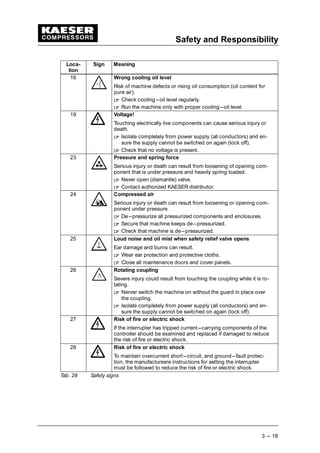
3.6 Safety Signs
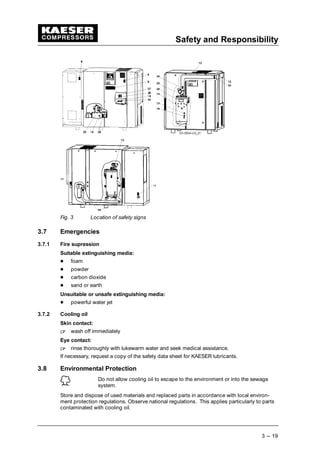
The table lists the various safety signs used and their meanings. The diagram shows the
positions of the signs on the machine.
Loca-
tion
Sign Meaning
8 Voltage!
Touching electrically live components can cause serious injury or
death.
 
Isolate completely from power supply (all conductors) and en-
sure the supply cannot be switched on again (lock off).
 
Check that no voltage is present.
9 Automatic starting
Servere injury could result from rotation components, electrical
voltage and air pressure.
 
Isolate completely from power supply (all conductors) and en-
sure the supply cannot be switched on again (lock off).
 
Check that no voltage is present.
11 Compressed air qualitiy
Injury and/or contamination can result from breathing compressed
air. Contamination of food can result from using untreated com-
pressed air for food processing.
 
Never breath untreated compressed air!
 
Air from this compressor must meet OSHA 29CFR1910.134 and
FDA 21CFR178.3570 stamdards, if used for breathing or food
processing.
 
Use proper compressed air treatment.
 
Food grade coolant must be used for food processing.
12 Rejected parts
Severe injury, especially of the eyes, could result while the fan is
rotating.
 
Prevent all materials from falling into the fan guard.
 
Never work over the running machine.
13 Hot surface can cause burns
 
Let the machine cool down.
 
Wear long---sleeved garments (not synthetics such as polyester)
and protective gloves.
Safety and Responsibility
3 --- 18
Loca-
tion
MeaningSign
16 Wrong cooling oil level
Risk of machine defects or rising oil consumption (oil content for
pure air).
 
Check cooling---oil level regularly.
 
Run the machine only with proper cooling---oil level.
19 Voltage!
Touching electrically live components can cause serious injury or
death.
 
Isolate completely from power supply (all conductors) and en-
sure the supply cannot be switched on again (lock off).
 
Check that no voltage is present.
23 Pressure and spring force
Serious injury or death can result from loosening of opening com-
ponent that is under pressure and heavily spring loaded.
 
Never open (dismantle) valve.
 
Contact authorized KAESER distributor.
24 Compressed air
Serious injury or death can result from loosening or opening com-
ponent under pressure
 
De---pressurize all pressurized components and enclosures.
 
Secure that machine keeps de---pressurized.
 
Check that machine is de---pressurized.
25 Loud noise and oil mist when safety relief valve opens
Ear damage and burns can result.
 
Wear ear protection and protective cloths.
 
Close all maintenance doors and cover panels.
26 Rotating coupling
Severe injury could result from touching the coupling while it is ro-
tating.
 
Nerver switch the machine on without the guard in place over
the coupling.
 
Isolate completely from power supply (all conductors) and en-
sure the supply cannot be switched on again (lock off).
27 Risk of fire or electric shock
If the interrupter has tripped current---carrying components of the
controller should be examined and replaced if damaged to reduce
the risk of fire or electric shock.
28 Risk of fire or electric shock
To maintain overcurrent short---circuit, and ground---fault protec-
tion, the manufacturesre instructions for setting the interrupter
must be followed to reduce the risk of fire or electric shock.
Tab. 28 Safety signs
Safety and Responsibility
3 --- 19
Fig. 3 Location of safety signs
3.7 Emergencies
3.7.1 Fire supression
Suitable extinguishing media:
 
foam
 
powder
 
carbon dioxide
 
sand or earth
Unsuitable or unsafe extinguishing media:
 
powerful water jet
3.7.2 Cooling oil
Skin contact:
¡
wash off immediately
Eye contact:
¡
rinse thoroughly with lukewarm water and seek medical assistance.
If necessary, request a copy of the safety data sheet for KAESER lubricants.
3.8 Environmental Protection
Do not allow cooling oil to escape to the environment or into the sewage
system.
Store and dispose of used materials and replaced parts in accordance with local environ-
ment protection regulations. Observe national regulations. This applies particularly to parts
contaminated with cooling oil.
Design and Function
4 --- 20
4 Design and Function
4.1 Machine Overview
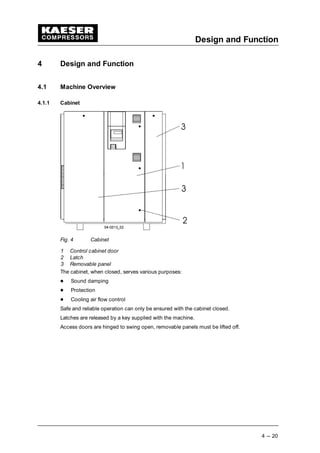
4.1.1 Cabinet
Fig. 4 Cabinet
1 Control cabinet door
2 Latch
3 Removable panel
The cabinet, when closed, serves various purposes:
 
Sound damping
 
Protection
 
Cooling air flow control
Safe and reliable operation can only be ensured with the cabinet closed.
Latches are released by a key supplied with the machine.
Access doors are hinged to swing open, removable panels must be lifted off.
Design and Function
4 --- 21
4.1.2 Function
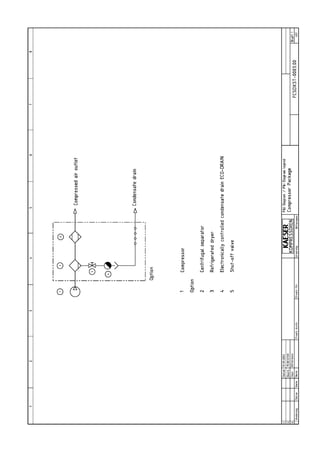
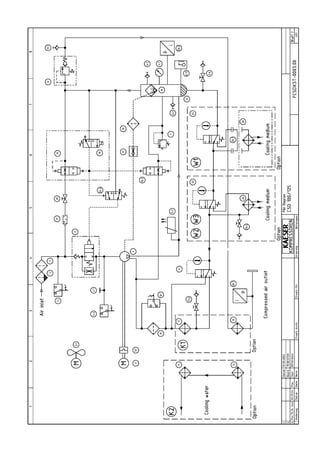
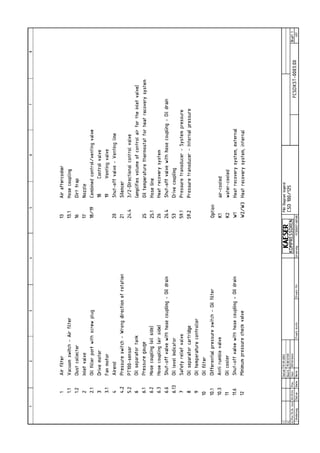
Items in brackets [ ] correspond to the Pipe and Instrument Flow Diagram (P & I Diagram)
in chapter 13.1.1.
An air---cooled machine serves to illustrate function.
Fig. 5 Air---cooled machine
1 Inlet valve [2] 6 Control cabinet
2 Coupling [5] 7 Oil separator tank [6]
3 Compressor motor [3] 8 Air filter [1]
4 Oil filter [10] 9 Oil/air cooler [11/13]
5 Airend [4]
Compressor
Atmospheric air is cleaned as it is drawn in through the filter (8).
The air is then compressed in the airend (5).
The airend is driven by an electric motor (3).
Cooling oil is injected into the airend. It lubricates moving parts and forms a seal between
the rotors themselves and between them and the airend casing. The cooling effect directly
within the compression chamber ensures a low airend discharge temperature.
Cooling oil is recovered from the compressed air in the oil separator tank (7) and is then
cooled in the oil cooler (9). The oil then flows through the filter (4) and back to the point of
injection. Air pressure within the machine keeps the oil circulating and therefore a separate
pump is not necessary. A thermostatic valve maintains optimum oil temperature.
Compressed air, freed of its oil content in the separator tank (7), flows through the mini-
mum pressure/check valve into the aftercooler (9). The minimum pressure/check valve en-
sures there is always sufficient air pressure to maintain cooling oil circulation.
The aftercooler brings down the compressed air temperature to 5 to 10 K above ambient.
Most of the moisture carried in the air is removed in the aftercooler.
Design and Function
4 --- 22
4.2 Volt---free Contacts
Volt---free contacts are provided for passing messages.
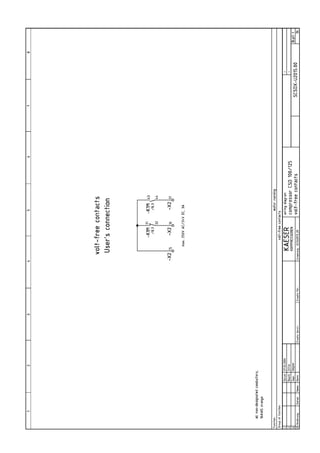
Information on location, load and type of message is to be found in the electrical diagram.
If the volt---free contacts are connected to an external power source they
may be under power even when the machine is isolated from the supply.
Design and Function
4 --- 23
4.3 Options
4.3.1 Machine mountings (option H1)
The machine mountings enable the machine to be anchored to the floor.
Fig. 6 Machine mountings
4.3.2 Filter mat panels (option K3)
Mats filter the cooling air and keep the cooler surface clean.
Fig. 7 Filter mat panel
1 Cooling air filter mat
4.3.3 Water cooling (option K2)
Plate heat exchangers in stainless steel are used for water---cooled machines.
Fig. 8 Water cooling
1 Oil cooler [11] 3 Cooling water connection
2 Compressed air aftercooler [13] 4 Cooling water connection
4.3.4 Heat recovery
External heat recovery (option W1)
Connections are provided and bridged.
Design and Function
4 --- 24
An external heat recovery system can be retro---fitted at any time.
Internal heat recovery (option W2 / W3)
A plate heat exchanger (1) is installed for heat recovery.
Fig. 9 Internal heat recovery
1 Plate heat exchanger [26]
4.4 Operating States and Control Modes
4.4.1 Operating states
There are three operating states:
 
LOAD: the inlet valve is open. The airend delivers compressed air to the system.
The compressor motor runs under full load.
 
IDLING: The inlet valve is closed. The minimum pressure/check valve shuts off the oil
separator from the air system. The oil separator tank is vented.
A small volume of air circulates through the bleed hole in the inlet valve, through the
airend and back to the inlet valve via the venting valve.
The compressor motor runs without load and draws little current.
 
STANDSTILL: The inlet valve is closed. The minimum pressure/check valve shuts off
the oil separator from the air system. The oil separator tank is vented.
The compresor motor is stopped.
 
MODULATION CONTROL (option C1): The proportional controller continuously varies
the degree of opening of the inlet valve, and thereby the delivery rate of the compres-
sor, in response and in proportion to the air demand. The airend delivers compressed
air to the system.
The load and power consumption of the compressor motor rises and falls with the air
demand.
The regulating valve is factory set. Consult with KAESER Service before changing.
4.4.2 Controller Operation
Using the selected control mode, the controller switches the compressor between its vari-
ous operational states in order to maintain system pressure between the set minimum and
maximum values.
According to the individual compressed air demand one of the various control modes avail-
able will provide the optimum duty cycle for the machine.
4.4.3 Control Modes
The controller can operate in the following modes:
 
DUAL
 
VARIO
 
QUADRO
Design and Function
4 --- 25
DUAL
In the DUAL control mode, the compressor is switched back and forth between LOAD and
IDLE to maintain system pressure between the set minimum and maximum values. When
the maximum pressure is reached the machine switches to idle running. When the preset
idling time has elapsed the machine is STOPPED.
The shorter the idling time setting, the sooner and more frequently the motor is stopped.
VARIO
The VARIO control mode is an extension of DUAL control. The difference from DUAL being
that under VARIO control the idling time is automatically increased or decreased corre-
sponding to the increased or decreased switching frequency of the drive motor.
QUADRO
In QUADRO control mode the machine switches from LOAD to IDLE during periods of high
air demand and directly from LOAD to STANDSTILL during periods of low air demand.
This mode of control requires two pre---set time periods: the running time and the idle/
standstill time. The shorter these time settings, the sooner and more frequently the motor is
stopped.
4.4.4 Modulation Control (option C1)
The modulating control mode is an extension of DUAL control. The difference being that, in
this mode, the delivery of the compressor is steplessly varied within the control range of
the machine.
 
Increasing air demand
The machine operates between PARTIAL LOAD and LOAD.
 
Falling air demand
The machine operates between PARTIAL LOAD, IDLE RUNNING and STANDSTILL.
4.5 Safety Devices
The following safety devices are provided and may not be changed:
 
EMERGENCY STOP button
The EMERGENCY STOP button shuts down the compressor immediately. The motor
remains still. The pressure system is vented.
 
Safety relief valve
The safety relief valve protects the system from excessive pressure. This is factory set.
 
Housing and covers for moving parts and electrical connections.
Protection from accidental contact.
Design and Function
4 --- 26
4.6 SIGMA CONTROL Keys and Indicators
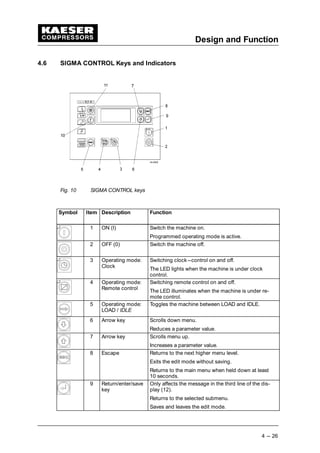
Fig. 10 SIGMA CONTROL keys
Symbol Item Description Function
1 ON (I) Switch the machine on.
Programmed operating mode is active.
2 OFF (0) Switch the machine off.
3 Operating mode:
Clock
Switching clock---control on and off.
The LED lights when the machine is under clock
control.
4 Operating mode:
Remote control
Switching remote control on and off.
The LED illuminates when the machine is under re-
mote control.
5 Operating mode:
LOAD / IDLE
Toggles the machine between LOAD and IDLE.
6 Arrow key Scrolls down menu.
Reduces a parameter value.
7 Arrow key Scrolls menu up.
Increases a parameter value.
8 Escape Returns to the next higher menu level.
Exits the edit mode without saving.
Returns to the main menu when held down at least
10 seconds.
9 Return/enter/save
key
Only affects the message in the third line of the dis-
play (12).
Returns to the selected submenu.
Saves and leaves the edit mode.
Design and Function
4 --- 27
Symbol FunctionDescriptionItem
10 Events and infor-
mation key
Displays the event memory.
Selection from every menu.
Returns together with ’esc’ key (8).
11 Acknowledge (re-
set) key
Acknowledges (re---sets) messages and resets the
event memory (if permitted).
Tab. 29 SIGMA CONTROL keys
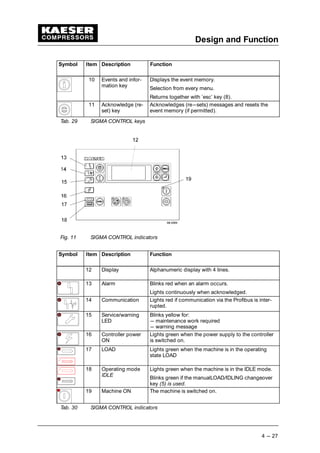
Fig. 11 SIGMA CONTROL indicators
Symbol Item Description Function
12 Display Alphanumeric display with 4 lines.
13 Alarm Blinks red when an alarm occurs.
Lights continuously when acknowledged.
14 Communication Lights red if communication via the Profibus is inter-
rupted.
15 Service/warning
LED
Blinks yellow for:
--- maintenance work required
--- warning message
16 Controller power
ON
Lights green when the power supply to the controller
is switched on.
17 LOAD Lights green when the machine is in the operating
state LOAD
18 Operating mode
IDLE
Lights green when the machine is in the IDLE mode.
Blinks green if the manualLOAD/IDLING changeover
key (5) is used.
19 Machine ON The machine is switched on.
Tab. 30 SIGMA CONTROL indicators
Installation and Operating Conditions
5 --- 28
5 Installation and Operating Conditions
5.1 Ambient Conditions
 
There must be no open flames or sparks at the place of installation.
 
Any welding work carried out on the equipment must not cause a fire hazard through
flying sparks or excessive temperature.
 
The machine is not explosion---proof.
Do not operate in areas in which specific requirements with regard to explosion
protection are applied.
 
Clean inlet air with no damaging contaminants.
 
Inlet air free of explosive or chemically unstable gas or vapor.
 
Inlet air free of acid---forming substances, particulatly ammmonia, chlorine or hydrosul-
phide.
 
Ambient temperature must be acceptable and stable.
 
The airend discharge temperature must remain constant to prevent the build---up of
condensate.
 
Suitable fire extinguishing material must be readily available.
5.2 Installation Conditions
5.2.1 Place of installation and space required
The spacings given are recommended and ensure unhindered access to
all machine parts.
Please consult KAESER if they cannot be achieved.
 
The floor must be level, firm and able to bear the weight of the equipment.
 
If installed outdoors, the equipment must be protected from cold temperature, direct
sunlight, dust and rain.
 
Allow sufficient distance from any wall to enable unhindered maintenance work.
Installation and Operating Conditions
5 --- 29
Fig. 12 Installation recommendation, dimensions [in]
A Exhaust fan
B Exhaust air duct
Z Inlet air opening
5.2.2 Ventilation
Values given are minimum guidelines.
If the inlet aperture is insufficient a dangerous vacuum can be created in
the compressor room.
 
Ensure that the volume of air flowing into the compressor room is at
least equivalent to that being removed from it by the machine and
exhaust fan.
 
Make sure that the machine and exhaust fan can only operate when
the inlet aperture is actually open.
Option K1:
CSD 100 CSD 125
Inlet opening [sq.ft.] 20 24
Forced ventilation with exhaust venti-
lator: Flow rate [cfm] at 0.4 in wc
14714 17657
Exhaust air duct:
Dimensions [in]
39 3/8 x 39 3/8 39 3/8 x 39 3/8
Tab. 31 Ventilation (option K1)
Installation and Operating Conditions
5 --- 30
Option K2:
CSD 100 CSD 125
Inlet opening [sq.ft.] 3.2 3.2
Forced ventilation with exhaust venti-
lator: Flow rate [cfm] at 0.4 in wc
1766 1766
Exhaust air duct:
Dimensions [in]
27 1/2 x 27 1/2 27 1/2 x 27 1/2
Tab. 32 Ventilation (option K2)
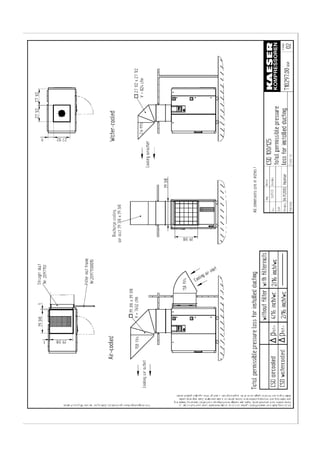
Exhaust ducting
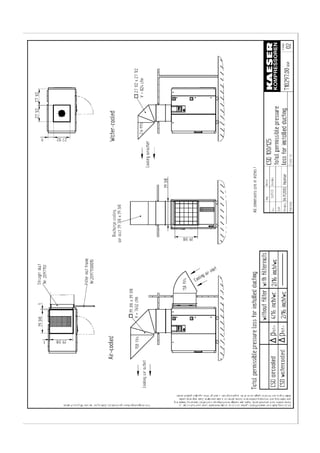
Consult the manufacturer on the design of the ducting, length, number of bends, etc.
Further information on exhaust air ducts can be found in chapter 13.1.3.
5.2.3 Operating in a compressed air system
When the machine is connected to an air system, the operating pressure must not exceed
230 psig.
Initial filling of a fully vented air system generally creates a very high rate of flow through air
treatment devices. These conditions are detrimental to correct air treatment. Air quality can
be degraded.
To ensure maintenance of desired air quality when filling a vented air system we recom-
mend the installation of an air main charging system.
Please contact KAESER for assistance in selecting and installing an air main charging sys-
tem.
Installation
6 --- 31
6 Installation
6.1 Safety
Voltage!
Contact with live electric components can cause serious injury or death.
 
Isolate completely from the mains supply
(switch off the main isolator)
 
Ensure that the power supply cannot be switched on again (lock off).
 
Check that no voltage is present.
Uncontrolled pressure release!
Serious injury or death can result from loosening or opening components
under pressure.
 
De---pressurize all pressurized components and enclosures.
Minimum pressure/check valve, safety relief valve and inlet valve are
heavily spring---loaded.
Fatal injury may occur from incorrect opening of spring---loaded compo-
nents.
 
Do not open or dismantle valves.
 
Contact authorized KAESER distributor, if a fault occurs.
Installation work may only be carried out by authorized personnel!
All functioning parts are factory set.
Changes may not be made without the permission of the manufacturer.
6.2 Report Transport Damage
 
Check the machine for visible and hidden transport damage.
 
Inform the carrier and the manufacturer in writing of any damage.
6.3 Install the Compressed Air Connection
Pre---condition: air system completely vented.
Fig. 13 Compressed Air Connection
1 Axial compensator or flexible hose
2 Shut---off valve
DANGER
WARNING
WARNING
Installation
6 --- 32
 
Shut---off valve (2) to be installed by the user in the connection line.
 
Make the compressed air connection with a flexible hose (1) or an axial compensa-
tor (1).
6.4 Electrical Connection
Main power supply and overcurrent protection must be installed by a qualified electrician in
accordance with NEC, OSHA, and any applicable local codes.
Use wire conductor dimensions and fuse ratings in accordance with local regulations.
Guide values are given in chapter 2.9.
 
The user must provide the machine with a lockable supply---disconnecting device.
This could be, for example, a disconnect switch with fuses. If a circuit breaker is used
it must be suitable for the motor starting characteristics.
Before initial start---up
 
Connect the machine to the main power supply in accordance with the electrical dia-
gram in chapter 13.1.4.
6.5 Options
6.5.1 Mounting (option H1)
If the machine is supplied with mountings, these can be used to anchor it to the floor. De-
tails of the mounting holes are contained in the dimensional drawing in chapter 13.1.3.
 
Use appropriate bolts to anchor the machine.
6.5.2 Water cooling connection (option K2)
The dimensional drawing in chapter 13.1.3 gives the flow direction, size and position of the
cooling water connection ports.
Use connecting lines made of the appropriate material for the water system. Take into ac-
count the effect of electro---chemical reaction.
Keep the effect of pressure surge on the cooler as low as possible.
Where pressure surges are unavoidable provide an expansion tank to damp pulsations.
Fig. 14 Water cooling connection
A Cooling water outlet 10 Shut---off valve
B Cooling water inlet 12 Connection port with stopper
17 Safety relief valve
Installation
6 --- 33
The user is to provide the following fittings:
 
Dirt trap with max. 0.1 mm strainer mesh.
 
Shut---off valves (10) and connection ports (12) for maintenance and venting.
 
Safety relief valve (17) prevents build---up of excessive pressure.
Blowoff pressure and capacity are related to the user’s installation design.
Keep to the cooler technical specification.
¡
Connect the cooling water line to the fitting.
¡
Open the shut---off valve on the cooling water outlet (A).
¡
Slowly open the cooling water inlet shut---off valve (B) to gradually fill the cooler with
water.
¡
Vent the water lines.
6.5.3 Heat recovery system connection
6.5.3.1 Internal heat recovery (option W2, W3)
The dimensional drawing in chapter 13.1.3 gives the flow direction, size and position of the
connection ports.
Use connecting lines of suitable material. Take into account the effect of electro---chemical
reaction.
Keep the effect of pressure surge on the heat exchanger as low as possible.
Where pressure surges are unavoidable provide an expansion tank as a damper.
Fig. 15 Heat recovery
A Outlet 10 Shut---off valve
B Inlet 12 Connection port with stopper
17 Safety relief valve
The user is to provide the following fittings:
 
Dirt trap with max. 0.1 mm strainer mesh.
 
Shut---off valves (10) and connection ports (12) for maintenance and venting.
 
Safety relief valve (17) on the inlet (B) prevents build---up of excessive pressure.
Blowoff pressure and capacity are related to the user’s installation design.
Keep to the heat exchanger technical specification.
Installation
6 --- 34
 
Connect the water lines to the fittings.
 
Open the shut---off valve on the outlet (A).
 
Slowly open the inlet (B) shut---off tap to gradually fill the heat exchanger with water.
 
Vent the lines.
6.5.3.2 External heat recovery system (option W1)
The dimensional drawing in chapter 13.1.3 gives the flow direction, size and position of the
connection ports.
 
Follow the manufacturer’s instructions on connecting the external heat exchanger.
Initial Start---up
7 --- 35
7 Initial Start---up
7.1 Safety
Danger of fatal injury from electric shock!
Contact with live electric components can cause serious injury or death.
 
Isolate all phases of the main power supply.
(switch off the main isolator)
 
Ensure that the power supply cannot be switched on again (lock off).
 
Check that no voltage is present.
Compressed air can cause injury or death.
Serious injury or death can result from loosening or opening components
under pressure.
 
Close shut---off valves or otherwise isolate the machine from the com-
opressed air system to ensure that no compressed air can flow back
into the machine.
 
De---pressurize all pressurized components and enclosures.
 
Check all machine hose connectors with a hand---held pressure gauge
to ensure that all read zero.
Initial start---up may only be carried out by authorized personnel!
Before switching on ensure that:
¡
no one is working on the machine,
¡
all panels are in place and secured,
¡
all access doors are closed.
7.2 Before Every Initial Start---up
Initial start---up of the machine may only be carried out by trained and authorized installa-
tion or maintenance personnel.
Incorrect or improper start---up can cause damage to the machine.
Special measures on re---starting after storage:
Storage period longer
than...
Action to take
12 months  
Change the oil filter.
 
Change the oil separator cartridge.
 
Change the cooling oil.
 
Have the motor bearings checked by an authorized
KAESER distributor.
36 months  
Have the overall technical condition checked by an autho-
rized KAESER distirbutor.
DANGER
WARNING
Initial Start---up
7 --- 36
7.3 Check Installation and Operating Conditions
Cover all points in the check list before starting the machine.
Check Chapter Done?
1   All installation conditions meet? 5
2   User’s lockable supply disconnecting device installed? 6.4
3   Is the power supply as specified on the nameplate? 2
4   Supply cable section and fuse rating adequate? 2.9.2
5   All electrical connections checked for tightness?
6   Shut---off valve fitted to compressed air outlet? 6.3
7   Connection made to air main with hose or axial compen-
sator?
6.3
8   Sufficient cooling oil in the oil separator tank?
(cooling oil indicator outside the red zone?)
9   Required quantity of cooling oil poured into the inlet port? 7.6
10   Motor protection relay set correctly with regard to the
power supply?
7.5
11   Operators fully aquainted with safety regulations?
12   Supply of cooling water ensured?
(option K2)
6.5.2
13   Machine anchored to the floor?
(option H1)
6.5.1
14   All access doors closed and latched and all removable
panels in place and secured?
4.1.1
Tab. 33 Checklist, installation conditions
7.4 Setting the overload protection cut---out
Compressor motor:
In the star---delta configuration the phase current is fed via the overload protection cut---
out. This phase current is 0.58 times the rated machine current (see nameplate in the con-
trol cabinet).
Setting
The standard setting is made at the factory.
To prevent the overload protection cutout from being triggered by voltage fluctuations, tem-
perature influences or component tolerances, the setting can be higher than the arithmeti-
cal phase current.
7.5 Motor Protection Switch Setting
Fan motor
In direct on---line start the starting current is fed via the motor overload protection switch.
Setting
The standard setting is made at the factory.
To prevent the overload protection switch from being triggered by voltage fluctuations, tem-
perature influences or component tolerances, the setting can be higher than the motor
rated current (see motor nameplate). It should be 1.2 x FLA.
Initial Start---up
7 --- 37
7.6 Pour Cooling Oil into the Inlet Port
Equipment: 2 quart cooling oil
The airend must be manually filled with cooling oil before initial start---up and after being
out of use for more than 3 months.
Use the same type of oil.
A sticker giving the type of oil used is found near the oil separator tank filling port.
Fig. 16 Inlet valve oil filling port
1 Screw plug
2 Inlet valve
 
Remove the plug (1) from the inlet valve (2).
 
Pour cooling oil into the airend.
Fig. 17 Coupling
1 Compressor block 3 Cover
2 Coupling 4 Rotational direction arrow
 
Remove the cover (3).
 
Note the rotational direction arrow (4).
 
Grasp the coupling (2) and turn it and the airend shaft (1).
 
Replace the coupling cover (3).
7.7 Checking Direction of Rotation
The machine is designed for a clockwise field.
 
Check the supply with a phase sequence indicator.
 
If the compressor motor turns in the wrong direction, change the motor supply phases
L1 and L2.
Initial Start---up
7 --- 38
Alternatively, the direction of rotation can be checked by briefly switching
the machine on and off again.
 
Switch the machine off as soon as the direction of rotation is seen
and compare it with the direction arrows on the motor and airend.
7.8 Initial Start---up
 
Open the shut---off valve to the compressed air system.
 
Switch on at the main supply isolator.
The controller makes a self---test and the green LED ’Power ON’ lights.
 
Press the ’Operating state LOAD/IDLE’ key.
 
Press the ’ON’ key.
The green LED ’Machine ON’ lights.
 
Allow the machine to idle for at least one minute.
This ensures good distribution of cooling oil.
 
Press the ’Operating state LOAD/IDLE’ key.
The machine switches to the LOAD state and delivers compressed air.
Watch for any faults occurring in the first hour of operation.
After the first 50 operating hours carry out the following:
 
Check that all electrical connections are tight.
7.9 Setting System Pressure
The system pressure p1 is factory set to the highest possible value.
Adhustment is necessary for individual operating conditions.
 
System pressure setting is described in the SIGMA CONTROL service manual.
The machine may toggle a maximum of twice per minute between LOAD
and IDLE.
Reducing starting frequency:
 
Increase the difference between cut---in and cut---out pressure.
 
Add an air receiver downstream to increase buffer capacity.
Operation
8 --- 39
8 Operation
Fig. 18 Switching On and Off
1 ’Machine ON’ LED (green) 5 ’Remote’ key
2 ’ON’ key (’I’) 6 ’LOAD’ LED
3 OFF key (’0’) 7 ’IDLE’LED
4 ’Clock’ key 8 ’Power ON’ LED (green)
13 LOAD / IDLE toggle key
8.1 Switching On and Off
Always switch the machine on and off with the ’ON’ and ’OFF’ keys.
The supply disconnecting device is installed by the user.
8.1.1 Switching on
Compressed air can cause serious injury!
Serious injury possible.
 
Never direct compressed air at a person or animal!
 
Ensure that:
¡
no one is working on the machine,
¡
all panels are in place,
¡
all access doors are closed,
¡
no parts of the machine are colder than + 37 ˚ F.
 
Switch on at the main supply isolator.
The controller makes a self---test and the green LED ’Power ON’ (8) lights.
 
Press the ’ON’ key (2).
The green LED ’Machine ON’ lights (1).
The compressor motor runs, assuming the system pressure is lower than the cut---out
pressure.
8.1.2 Automatic restart
Pre---condition: System pressure is lower than cut---out pressure.
Automatic restart is factory---set.
The machine restarts automatically when power is resumed after a power cut.
WARNING
Operation
8 --- 40
8.1.3 Switching Off
 
Press the ’LOAD/IDLE’ toggle key (13).
The machine switches to IDLE and the LED (7) blinks.
 
After running in idle for 20 seconds, press the OFF key (3).
The ’Machine ON’ LED goes out (1).
 
Switch off and lock out the main supply isolator.
8.2 Switching Off in an Emergency and Switching On Again
Fig. 19 Switching off in an emergency
9 EMERGENCYSTOP button
Switching off
 
Press the ’EMERGENCY STOP’ button (9)
The ’EMERGENCY STOP’ remains latched in.
The machine pressure system is vented and the machine is prevented from re---starting.
Starting again
Pre---condition: Fault rectified.
 
Turn the ’EMERGENCY STOP’ button in the direction of the arrow to unlatch it.
 
Press the ’Reset’ key (11).
 
Switch the machine on.
8.3 Remote On and Off Switching
Pre---condition: Connection to a remote control device.
 
Press the ’Remote’ key (5).
The LED in the corner of the key lights. The remote control device has control of the ma-
chine.
The machine can still be switched on and off by the ’ON’ and ’OFF’ keys (2 and 3) if re-
quired.
Operation
8 --- 41
Apply the remote warning label to the machine where it is plainly visible.
BEWARE! This machine is remotely controlled and can start at any
time.
Label the remote control device accordingly:
Before starting, make sure that no one is working on the machine and
it can be safely started.
8.4 Switching on and off with the Clock
Pre---condition: Clock programmed
 
Press the ’Clock’ key (4).
The LED in the corner of the key lights. The integrated clock has control of the machine.
Apply the time---controlled warning label to the machine where it is plainly
visible.
BEWARE! This machine is clock---controlled and can start at any time.
8.5 Acknowledging and Resetting Warning and Alarm Messages
Fig. 20 Acknowledging and Resetting Warning and Alarm Messages
10 ’Warning’ LED (yellow)
11 ’Alarm’ LED (red)
12 ’Acknowledge’ (reset) key
Alarm
An alarm shuts the machine down automatically. The red ’Alarm’ LED blinks (11).
Faults are displayed on the ”New value” principle:
Alarm is triggered LED blinks
Alarm is acknowledged LED illuminates
Alarm delets LED out
or
Alarm is triggered LED blinks
Alarm delets LED blinks
Alarm is acknowledged LED out
Operation
8 --- 42
Warning
The display shows a maintenance or warning message.
The yellow warning LED (10) blinks, for example, if a maintenance task is due.
8.5.1 Resetting alarm messages
Pre---condition: Fault rectified.
 
Press the ’Acknowledgement (reset)’ key (12).
The alarm LED (red) goes out (11).
The machine is now ready to start again.
8.5.2 Resetting warning messages
Pre---condition: The cause of the warning eliminated.
Maintenance task completed.
 
Press the ’Acknowledgement (reset)’ key (12).
The warning LED (yellow) goes out (10).
Event Recognition and Fault Rectification
9 --- 43
9 Event Recognition and Fault Rectification
Inform KAESER service if the event cannot be rectified by the action suggested.
Do not attempt rectifications other than those given in this manual.
The measures valid for your machine are dependant on the individual equipment.
There are three types of event:
Description Indicated by see chapter
An event that triggers an alarm (with automatic
shut---down)
Blinking red LED 9.1
An event that triggers a warning (no shut---
down)
Blinking yellow LED 9.2
Miscellaneous events (faults) No indication 9.3
9.1 Alarms (machine shut---down, red LED blinking)
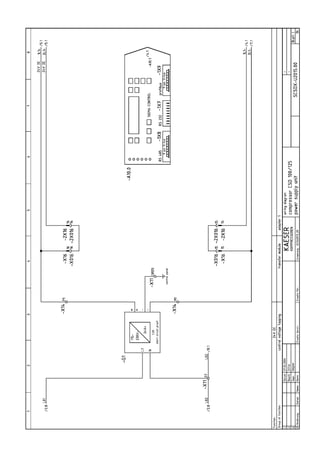
Message Possible cause Action
access doors Door opened during mac-
hine operation.
Close the door(s).
ADT   Maximum airend discharge
temperature exceeded.
Clean cooler.
Machine positioned with
cooling air outlet too near a
wall.
Check cooling oil level.
Maintain permitted room
temperature.
Check the cooling oil level.
Replace oil filter.
ADT dT/dt Maximum airend discharge
temperature rise rate excee-
ded.
Clean cooler.
Machine positioned with
cooling air outlet too near a
wall.
Check cooling oil level.
Maintain permitted room
temperature.
Check the cooling oil level.
Replace oil filter.
airend rotation The motor is turning in the
wrong direction.
Changeover phase lines L1
and L2.
AI 1 open cct. Connection is broken be-
tween the system pressure
transducer and analog in-
put 1.
Short circuit to earth.
Check line and connection.
AI 2 open cct. Connection is broken be-
tween the internal pressure
transducer and analog in-
put 2.
Short circuit to earth.
Check line and connection.
Event Recognition and Fault Rectification
9 --- 44
Message ActionPossible cause
AI 3 open cct. No connection between the
sensor measuring airend di-
scharge temperature and
the analog input 3.
Check line and connection.
AI 4 open cct. No connection between the
sensor measuring motor
temperature and the analog
input 4.
Check line and connection.
AI 5 open cct. There is no connection be-
tween the sensor allocated
to analog input 5 and the in-
put itself.
Short circuit to earth.
Check line and connection.
AI 6 open cct. There is no connection be-
tween the sensor allocated
to an analog input and the
input itself.
Short circuit to earth.
Check line and connection.
...
AI 8 open cct.
AI 1 short cct. The connection between
the sensor and the analog
input is shorted.
Check line and connection.
...
AI 8 short cct.
back pressure Back pressure in the oil se-
parator tank caused by
poor venting.
Check venting line.
blowoff prot. The blowoff pressure of the
pressure relief valve on the
oil separator tank has been
exceeded.
Change the oil separator
cartridge.
Open the shut---off valve in
the venting line.
condensate drain Fault in condensate drai-
nage.
Check condensate drai-
nage.
coolingwater low Cooling water pressure too
low.
Check cooling water supply.
Check that cooling water
shut---off valve is fully open.
EMERGENCYSTOP EMERGENCY STOP button
pressed.
Unlatch the pushbutton.
ext. message 0 Rectify fault.
...
ext. message 5
Fan M2 I   First fan motor shut down
because of overload.
Investigate cause.
Reset overload trip.
Fan M3 I   Second fan motor shut
down because of overload.
Investigate cause.
Reset overload trip.
Fan M4 I   Third fan motor shut down
because of overload.
Investigate cause.
Reset overload trip.
Event Recognition and Fault Rectification
9 --- 45
Message ActionPossible cause
HT cell Fault in the high tension
cell.
mains cont. off? The mains contactor does
not drop out despite an
OFF command.
mains cont. on? The mains contactor does
not pull in despite an ON
command.
mains monitor Fault in mains power
supply.
Have the mains power
supply checked.
model Machine model indistinct
motor I   Drive motor shutdown be-
cause of overload.
Change the oil separator
cartridge.
Check minimum pressure/
check valve.
Investigate cause.
motor T   Drive motor overheated. Ensure adequate ventila-
tion.
Install an extractor.
Clean the motor.
motor bearings Drive motor bearings over-
heated.
Grease the motor bearings
with the greasing device.
neutral p---switch Rectify fault
neutral T---switch Rectify fault
no press. buildup Machine produces no
compressed air.
The setpoint pressure does
not rise above 50 psig for a
preset period.
Check for air leaks.
Check the coupling /
V---belts.
O 0.6/A 0.7 Short circuit in the line be-
tween output O 0.6 or O 0.7
and a consumer.
Check line and connection.
O 1.6/A 1.7 Short circuit in the line be-
tween output O 1.6 or O 1.7
and a consumer.
Check line and connection.
oil p ¡ No changeover to load as
long as the minimum oil
pressure is not reached.
Check oil circulation.
Check pressure switch, line
and connection.
PD temperature ¢ Compressor outlet tempera-
ture too low.
PD temperature   Compressor outlet tempera-
ture too high.
Check the fan motor.
Clean the cooler.
Check the cooling oil level.
Power supply ¢ 2. Power failure Check power supply vol-
tage.
Check door interlock.
Event Recognition and Fault Rectification
9 --- 46
Message ActionPossible cause
pRV   The blowoff pressure of the
pressure relief valve on the
oil separator tank has been
exceeded.
Replace the pressure relief
valve.
RD compr. p   Pressure switch on the refri-
gerant compressor activa-
ted.
Ensure adequate ventila-
tion.
Clean the refrigerant con-
denser.
Clean the cooler.
RD compr. T ¡ Refrigerant compressor
overheating.
Clean the refrigerant con-
denser.
Ensure adequate ventila-
tion.
Install an extractor.
Cleaning the cooler
RD compr. T ¢ Refrigerant compressor too
cold.
separator dp   Oil separator cartridge clog-
ged.
Replace the oil separator
cartridge.
separator T   Maximum temperature on
oil separator tank outlet ex-
ceeded.
Check the cutout line.
SIGMA CONTROL T   SIGMA controller housing
temperature to high.
Ensure adequate ventila-
tion.
Ensure permitted room tem-
perature not exceeded.
Check control cabinet venti-
lator (filter mats).
softstart Fault in the soft start sys-
tem.
start T   Air temperature at the ai-
rend discharge port too low.
Ambient temperature below
+ 40 ˚ F.
Heat the compressor room.
V---belts broken The V---belts parted during
machine operation.
Replace the V---belts.
VFD Frequency converter faulty.
Tab. 34 Alarm messages and actions
Event Recognition and Fault Rectification
9 --- 47
9.2 Warning Messages (yellow LED blinking)
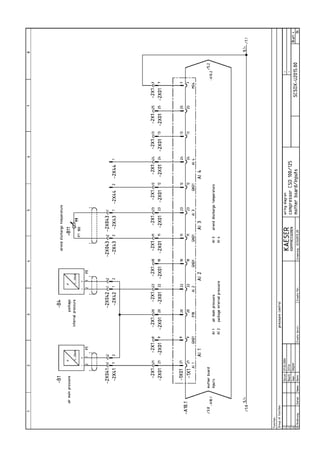
Message Possible cause Action
access doors Doors opened during
machine operation.
Close access doors.
ADT   The maximum permissible
airend discharge tempera-
ture will soon be reached.
Ensure adequate ventila-
tion.
Clean the cooler.
Cooling air outlet too near a
wall.
Check the cooling oil level.
Replace the oil filter.
air filter dp   The pressure drop across
the air filter is rising.
Air filter element clogged.
Clean/replace the air filter
element.
air filter h ¡ The service interval to the
next air filter element check
has expired.
Clean/replace the air filter
element.
Bearing maintenance h ¡ The service interval to the
next bearing greasing has
expired.
Grease the motor bearings.
blowoff prot. Warning
The blowoff pressure of the
pressure relief valve will
soon be reached.
Change the oil separator
cartridge.
Open the shut---off valve in
the venting line.
Buffer battery Data---retention battery run
down.
bus alarm The bus link from the Profi-
bus DP interface is interrup-
ted.
Check link and plug.
condensatedrain Fault in condensate drai-
nage.
Check condensate drain
and lines.
elect. equip. h   The service interval for
checking electrical equip-
ment and wiring has expi-
red.
Reset the service interval
counter.
ext.load signal? External load signal indis-
tinct:
Increased cut---out pressure
exceeded.
The external load control
has not switched to idle.
Check settings of the exter-
nal controller.
Take the pressure drops ac-
ross filters and dryer into
account.
error: RS 485 Wrong configuration or
transmission error.
Bit rate and character frame
for both subscribers identi-
cal.
Check the link/interface
connections between the
two controllers.
Check maximum cable
length and screening.
Check interface parameters.
1 master and 1 slave confi-
gured.
ext. message 0 Rectify fault.
Event Recognition and Fault Rectification
9 --- 48
Message ActionPossible cause
...
ext. message 5
flash memory Internal controller memory
error.
mains voltage   1. power failure:
Machine was re---started
automatically.
Check power supply vol-
tage.
Check door interlock.
modem problem SIGMA CONTROL does not
recognize the modem.
Check the link between the
SIGMA controller and the
modem.
motor T ¡ Drive motor overheating. Ensure adequate ventila-
tion.
Install an echaust ventilator.
Clean the motor.
motor bearings h ¢ The service interval to the
next motor bearing change
has expired.
motorstarts /h ¢ The permissible number of
motor starts was exceeded
in the last 60 minutes.
Extend the idle period.
Increase capacity of air re-
ceiver.
Increase cross---section of
piping between compressor
and air receiver.
motor starts /d ¢ The permissible number of
motor starts was exceeded
in the last 24 hours.
Extend the idle period.
Increase capacity of air re-
ceiver.
Increase cross---section of
piping between compressor
and air receiver.
neutral p---switch Rectify fault
neutral T---switch Rectify fault
no press. buildup The compressor cannot
build---up pressure.
Check for air leaks.
Check the value given in the
analog data menu with the
reading on the oil separator
tank pressure gauge.
oil change h ¢ The service interval to the
next oil change has expired.
Change the cooling oil.
oil filter dp ¡ Oil filter clogged. Change the oil filter.
oil filter h ¢ The service interval to the
next oil filter check has expi-
red.
Change the oil filter.
oillevel   Oil level too low. Top up the cooling oil.
oil T   Cooling oil temperature too
low.
Increase room temperature.
Check the oil circuit.
Check temperature gauge
switch, line and connection.
Event Recognition and Fault Rectification
9 --- 49
Message ActionPossible cause
PD temperature   Warning
Compressor outlet tempera-
ture is low.
PD temperature ¡
Warning
Compressor discharge tem-
perature too high.
Clean the cooler.
Check the cooling oil level.
RAM Internal RAM defective.
Remaining oil content ¢ Warning
The purest class oil content
limit will soon be reached.
Check the scavenge tube in
the oil separator tank.
Check the dirt trap strainer
in the scavenge line.
Remaining oil content ¡
The purest class oil content
limit is exceeded.
Check the scavenge tube in
the oil separator tank.
Check the dirt trap strainer
in the scavenge line.
separator dp ¢ Oil separator cartridge clog-
ged.
Change the oil separator
cartridge.
separator h ¡
The service interval to the
next oil separator cartridge
check has expired.
Change the oil separator
cartridge.
set output The ’set output’ test func-
tion is activated.
End the ”set output” mode.
System pressure   System pressure has fallen
below the set ’low’ value.
Air consumption too high.
Check air demand.
Check line and connection.
Check ’systpress. low’ set-
ting.
System pressure ¢
(vacuum machines only)
System pressure has fallen
below the set ’high’ value.
Check for air leaks.
Check ’syspress. high’ set-
ting.
Check if the machine switc-
hes to LOAD.
VFD mains Failure of power supply to
the frequency converter.
Check power supply.
V---belt tension V---belt tension too low. Re---tension the V---belts.
V---belt tens. h ¡
The service interval to the
next V---belt re---tensioning
has expired.
Re---tension the V---belts.
Tab. 35 Warning messages and actions
Event Recognition and Fault Rectification
9 --- 50
9.3 Miscellaneous faults
Alarm Possible cause Action to take
Machine runs but produces
no compressed air.
Inlet valve not opening or
only opening partially.no compressed air.
Venting valve not closing.
Pressure system leaking. Check pipework and con-
nections for leaks and
tighten.
The air demand is greater
than the capacity of the
compressor.
Check compressed air sys-
tem for leaks.
Shut down the con-
sumer(s).
Hose coupling or mainten-
ance hose still plugged into
the quick---release coupling
on the oil separator tank.
Remove coupling or main-
tenance hose.
Cooling oil runs out of the
air filter.
Oil level in the separator
tank too high.
Drain off oil until the correct
level is reached.air filter.
Inlet valve defective
Compressor switches be-
tween load and idle more
Air receiver too small.Compressor switches be-
tween load and idle more
than twice per minute.
Flow into the compressed
air system restricted.
Increase air line diameters.
Check filter elements.
Switching differential be-
tween cut---in and cut---out
pressure too is small.
Check switching differential.
Oil leaking into the floor
pan.
Hose coupling or mainten-
ance hose still plugged into
the quick---release coupling
on the oil separator tank.
Remove coupling or main-
tenance hose.
Oil cooler leaking
Connection leaking. Tighten connections.
Replace seals.
Cooling oil consumption too
high.
Unsuitable oil used. Use SIGMA FLUID cooling
oil.high.
Oil separator cartridge split. Change oil separator car-
tridge.
Oil level in the separator
tank too high.
Drain off oil until the correct
level is reached.
Oil return line clogged. Check dirt trap in the oil re-
turn line.
Tab. 36 Miscellaneous events (faults)
Maintenance
10 --- 51
10 Maintenance
10.1 Safety
Any disregard of these instructions and/or incorrect handling may result in serious
injuries.
Voltage!
Touching electrically energized components can cause serious injury or
death.
 
Isolate completely from the power supply (all conductors)
(switch off at the main isolator)
 
Ensure the supply cannot be switched on again (lock off).
 
Check that no voltage is present.
Volt---free contacts may be under power from an external source even
when the machine is isolated from the main power supply.
Minimum pressure/check valve, safety relief valve and inlet valve are
heavilly spring---loaded.
Fatal injury may occur from incorrect opening of spring---loaded compo-
nents.
 
Do not open (dismantle) valves.
 
Contact authorized KAESER distributor, if a fault occurs.
Uncontrolled pressure release!
Serious injury or death can result from loosening or opening components
under pressure.
 
Close shut---off valves or otherwise isolate the machine from the com-
pressed air system to ensure that no compressed air can flow back
into the machine.
 
De---pressurize all pressurized components and enclosures.
 
Check all machine hose connectors with a hand---held pressure gauge
to ensure that all read zero.
Leakage
Leaks result in loss of oil and reduced performance.
Damage or complete breakdown can result.
 
Test run on completion of maintenance work.
 
Carry out a visual check of the machine.
DANGER
WARNING
WARNING
CAUTION
Maintenance
10 --- 52
Maintenance work may only be carried out by authorized personnel!
Before switching on again ensure that:
 
no one is working on the machine,
 
all panels are in place and secured,
 
all access doors are closed.
10.2 Maintenance Schedule
Maintenance intervals are recommendations only and should be adjusted
to suit the installation and operating conditions.
According to the way a machine is equipped, sensors and/or maintenance interval count-
ers monitor the operational state of important functional devices. Necessary maintenance
tasks are signalled by the SIGMA controller.
¡
Keep a log of all service work.
This enables the frequency of individual maintenance tasks to be compared with KAES-
ER’s recommendations. A list is given in chapter 10.16.
10.2.1 Resetting maintenance interval counters
Maintenance interval counters indicate the operating hours between maintenance tasks.
When a maintenance task is completed, reset the corresponding counter to its original
value.
See the SIGMA CONTROL service manual.
Pre---condition: Maintenance task completed.
Service message reset.
Activate password level 4.
¡
Select the appropriate entry from the maintenance menu.
¡
Select ’reset’ and ’y’ and confirm with the enter key.
Maintenance
10 --- 53
10.2.2 Regular maintenance work
When operating conditions are unfavorable (e.g. dusty atmosphere) or
when the equipment is heavily utilized, maintenance tasks must be carried
out more frequently (shorter intervals).
 
Heed controller maintenance messages.
 
Have KAESER service adjust the maintenance interval counters to
suit operating conditions.
Interval Maintenance tasks see chapter
Weekly Check cooling oil level. 10.12.1Weekly
Clean or renew the filter mats. 10.3.2 / 10.6
Every 1000 h Oil and air cooler maintenance. 10.3Every 1000 h
Heat recovery system maintenance. 10.4
Indicated by
SIGMA CONTROL
Air filter maintenance. 10.5
Indicated by
SIGMA CONTROL
but at least an-
nually.
Change the oil filter. 10.14
Indicated by
SIGMA CONTROL
but at least every
3 years.
Change the oil separator cartridge. 10.15
Every 2000 h, but at
least annually.
Grease the motor bearings. 10.7
Every 3000 h Check the coupling. 10.8
Variable (see
chapter 10.2.3)
Change the cooling oil. 10.13
Annually Check that all electrical connections are tight.Annually
Check the safety relief valve. 10.9
Check the overheating safety shutdown function 10.10
Check the oil and air coolers for leaks. 10.3
h = operating hours
Tab. 37 Regular maintenance work
10.2.3 Oil change intervals
The duty cycle and ambient conditions are important criteria for the number and length of
the change intervals.
Maintenance
10 --- 54
KAESER LUBRICANTS
SIGMA
LUBRICANT
DESCRIPTION MAXIMUM RECOMMENDED
CHANGE INTERVAL*
First Oil Change Subsequent Oil
Change
M---460
S---460
ISO 46 Semi---Synthetic Lubricant
ISO 46 Synthetic Lubricant
2000 Hours
6000 Hours
3000 Hours
8000 Hours
* Cool to moderate ambient temperatures, low humidity, high duty cycle
Tab. 38 Oil change intervals lubricants
SPECIALTY KAESER LUBRICANTS
(Refer to product information to determine suitability.)
SIGMA
LUBRICANT
DESCRIPTION MAXIMUM RECOMMENDED
CHANGE INTERVAL*
First Oil Change Subsequent Oil
Change
S---680
FG---460
ISO 68 Synthetic Lubricant
ISO 46 Food Grade Synthetic
Fluid
6000 Hours
2000 Hours
8000 Hours
3000 Hours
* Cool to moderate ambient temperatures, low humidity, high duty cycle
Tab. 39 Oil change intervals speciality lubricants
10.2.4 Regular service work
Only authorized KAESER service agents should carry out service work.
When operating conditions are unfavorable (e. g. dusty atmosphere) or
when the equipment is heavily utilized, service work must be carried out
more frequently.
Interval Service tasks
up to 12000 hours Check valves.
Up to 12000 hours,
at the latest every
3 years
Change the fan motor bearings or the motor complete.
(non re---greasable bearings)
Up to 36000 hours,
at the latest every
8 years
Change the fan motor bearings
(re---greasable bearings)at the latest every
8 years Change the compressor drive motor bearings.
Change the coupling.
Change the hose lines.
h = operating hours
Tab. 40 Regular service intervals
Maintenance
10 --- 55
10.3 Cooler Maintenance
10.3.1 Air cooling (option K1)
Equipment: brush
vacuum cleaner
Pre---condition: Machine switched off.
Main disconnect locked out.
Machine cooled down.
Check the cooler regularly for contamination. Frequency is mainly dependant on local op-
erating conditions.
Contamination causes overheating and machine damage.
Avoid dust disturbance. Wear breathing apparatus if necessary.
Do not use sharp objects to clean the cooler. The cooler could be damaged.
A severely contaminated cooler should be cleaned by a KAESER service agent.
Fig. 21 Cleaning the cooler
1 Cooler
2 Brush
 
Dry brush the cooler (1) and use a vacuum cleaner to suck up the dirt.
10.3.2 Filter mat maintenance (option K3)
Equipment: Warm water and household detergent
Spare parts (as required)
Pre---condition: Machine switched off.
Main disconnect locked out.
Machine cooled down.
Maintenance
10 --- 56
Fig. 22 Cooler filter mats
1 Filter mat
2 Retaining frame
3 Fixing
Removal
 
Unlock the fixings (3).
Use a screwdriver to turn the fixing 90˚ anti---clockwise.
 
Remove the frame (2).
Cleaning
 
Beat the mat (1) or use a vacuum cleaner to remove loose dirt. If necessary, wash the
mat in lukewarm water and household detergent then rinse thoroughly.
Replace the mat if cleaning is not possible of has already been carried out
five times.
Replacing
 
Replace the frame and close the fixings.
Press and turn the fixings 90˚ clockwise until they latch.
10.3.3 Water cooling maintenance (option K2)
Pre---condition: Machine switched off.
Main isolator locked off
Machine cooled down.
Check the cooler regularly for leaks and contamination. Frequency of checking is depen-
dant on the characteristics of the cooling water.
Contamination causes overheating and machine damage.
 
Observe the airend discharge temperature to detect any tendency to rise.
Cleaning:
 
An authorized KAESER service agent should clean the cooler when the airend dis-
charge temperature is 50 ˚ F above the annual average.
Maintenance
10 --- 57
Leakage
Pressure in the cooling oil circuit is generally higher than that in the cooling water system.
If a leak occurs, oil will run into the cooling water.
 
Check the cooler visually for leaks.
 
Have an authorized KAESER service agent check the cooler for internal leaks at least
once a year.
10.4 Internal Heat Recovery Maintenance (option W2 / W3)
Pre---condition: Machine switched off.
Main isolator locked off
Machine cooled down.
Deposits in the heat exchanger in machines with heat recovery systems can adversely af-
fect heat transfer.
Check the heat exchanger regularly for leaks and contamination. Frequency of checking is
dependant on the characteristics of the heat transfer medium.
Contamination
 
Have an authorized KAESER service agent clean the heat exchanger as soon as a
pressure drop in the heat transfer medium is detected.
Leakage
If a leak occurs, cooling oil can flow into the heat transfer medium as pressure the cooling
oil circuit is generally higher.
 
Check the heat exchanger visually for leaks.
 
Have an authorized KAESER service agent check the heat exchanger for internal leaks
at least once a year.
10.5 Air Filter Maintenance.
Equipment: Compressed air
Spare parts (as required)
Pre---condition: Machine switched off
Main isolator locked off
Machine cooled down.
Maintenance
10 --- 58
Fig. 23 Air filter maintenance.
1 Nut 3 Cover
2 Air filter cartridge 4 Nut
Open the air filter housing:
 
Unscrew the nuts (4) and lift out the cover (3) together with the air filter cartridge (2).
 
Unscrew the nut (1) and remove the air filter cartridge.
Do not clean the air filter cartridge with liquids.
All sealing surfaces are matched to each other.
The use of unsuitable air filter cartridges can permit dirt to ingress into the
pressure system and cause damage to the machine.
Clean the air filter cartridge by tapping
Renew the air filter cartridge after two years at the latest or after it has been cleaned
five times.
 
Tap the cartridge at the end a number of times with the palm of the hand.
Cleaning the air filter cartridge with compressed air:
 
Use dry compressed air (< 70 psig!) to blow dirt from the air filter cartridge at a slant
from the inside to the outside.
Close the air filter housing
 
Clean all parts and sealing surfaces.
 
Insert the air filter cartridge in the cover and affix with the nut (1).
 
Affix the cover in the machine with the nuts (4).
 
Close all access doors and replace all cover panels.
 
Switch on the power supply and reset the maintenance interval counter.
Maintenance
10 --- 59
10.6 Filter mat maintenance (control cabinet)
Equipment: Warm water and household detergent
Spare parts (as required)
Pre---condition: Machine switched off.
Main isolator locked off
Machine cooled down.
Fig. 24 Control cabinet ventilator
1 Ventilator grill
2 Filter mat
Removal
 
Remove the ventilator grill (1) and the filter mat (2).
Cleaning
 
Beat the mat or use a vacuum cleaner to remove loose dirt. If necessary, wash the mat
in lukewarm water and household detergent then rinse thoroughly.
Replace the mat if cleaning is not possible or has already been carried out five times.
Replacing
 
Lay the filter mat in the frame and push on the grill to latch.
10.7 Electric motor maintenance
Equipment: Bearing grease
Cleaning rags
Pre---condition: Machine running.
Hot components --- danger of burning
 
Wear long---sleeve clothing and gloves.
 
Work carefully.
CAUTION
Maintenance
10 --- 60
High---temperature grease ESSO UNIREX N3 should be used for re---greas-
ing the motor bearings. Bearing damages caused by the use of other
brands of grease are excluded from the warranty.
Compressor motor
The motor bearings are fitted with grease nipples.
Fig. 25 Compressor motor maintenance
1 Grease nipple
 
Clean the grease nipple (1) with a rag.
Apply the quantity of grease as given on the motor nameplate.
 
Grease both bearings.
 
Close all access doors; replace and secure all removable panels.
 
Switch on the machine and reset the maintenance interval counter.
Fan motor
Option K1
The motor bearings are fitted with grease nipples.
Fig. 26 Fan motor maintenance
1 Grease nipple
 
Clean the grease nipple (1) with a rag.
Apply the quantity of grease as given on the motor nameplate.
 
Grease both bearings.
 
Close all access doors; replace and secure all removable panels.
Option K2
Fan motor bearings are permanently greased and need no further greasing.
Maintenance
10 --- 61
10.8 Checking the Coupling
Danger of injury from rotating coupling!
Severe injury could result from touching the coupling while it is rotating.
 
Never switch the machine on without the guard in place over the cou-
pling.
The coupling must be carefully inspected at regular intervals.
A defective coupling is recognizable by:
¡
noisy operation,
¡
surface cracks,
¡
color change.
Fig. 27 Checking the Coupling
1 Safety screen
2 Coupling
Check for uneven or noisy operation
 
Switch the machine on.
 
Check the coupling (2) for noisy or uneven operation.
Check for damage
Pre---condition: Machine switched off.
Main isolator locked off
Machine cooled down.
 
Remove the fixing screws from the safety screen (1).
 
Turn the coupling by hand and look for damage or color change.
 
Have a damaged coupling changed by an authorized KAESER service agent.
 
Refit the safety screen.
 
Close all access doors and replace all cover panels.
10.9 Checking the Safety Relief Valve.
Pre---condition: Machine switched off.
Activate password level 4.
In order to check the safety relief valve, the machine’s working pressure is raised above
the blowoff pressure of the valve.
WARNING
Maintenance
10 --- 62
Safety relief valve blows off.
Excessive noise is caused when the safety relief valve blows off.
There is danger of scalding from hot oil.
There is danger of injury from bursting components and compressed air.
 
Close all access doors; replace and secure all removable panels.
 
Wear ear and eye protection.
 
Abort the test if the working pressure reaches 10% above the blowoff
pressure of the valve.
Carry out the test exactly as described in the SIGMA CONTROL manual.
Blowoff protection and system pressure monitoring are switched off during
the test.
The machine may only be operated with a correctly functioning safety relief
valve.
 
Close the user’s shut---off valve between the machine and the compressed air system.
 
Read the blowoff pressure on the valve. (the blow---off pressure is usually to be found
at the end of the part identification)
 
Observe the pressure indicator on the SIGMA controller and call up the test function.
 
Stop the test as soon as the safety relief valve blows off or working pressure reaches
10% above the blowoff set point.
 
If necessary, vent the machine and replace the safety relief valve.
 
Deactivate the test function.
 
Open the user’s shut---off valve between the machine and the compressed air system.
10.10 Checking the Overheating Safety Shutdown Function
The machine should shut down if the airend discharge temperature reaches 230˚ F.
A detailed description of the checking procedure is to be found in the SIGMA CONTROL
service manual.
10.11 Venting the Machine Manually
Pre---condition: Machine switched off.
Main disconnect locked out.
Machine cooled down.
Compressed air can cause injury or death.
Compressed air and devices under pressure can injure or cause death if
the contained energy of the air is released suddenly or uncontrolled.
After shutting down the compressor and venting the oil separator tank
there is still pressure on the check valve from the air system.
 
Close the shut---off valve provided by the user to isolate the machine
from the air system.
 
Vent the oil separator tank.
 
Vent the air aftercooler to completely depressurize the system between
the user’s shut---off valve and the minimum pressure/check valve.
WARNING
WARNING
Maintenance
10 --- 63
Escaping oil mist is damaging to health.
 
Do not direct the maintenance hose at a person while venting.
 
Do not inhale oil mist or vapor.
 
Avoid contact with skin and eyes.
Before undertaking any maintenance or service work on the pressure system the machine
must be isolated from the air system and completely vented.
The machine is vented in three stages:
¡
the oil circuit vents automatically when the machine is switched off,
¡
air is vented manually from the oil separator tank,
¡
air is vented manually from the air cooler.
Venting
 
Close the user’s shut---off valve between the machine and the air system.
If no shut---off valve is provided, the complete air system must be vented.
The hose coupling, shut---off valve and maintenance hose lie beneath the
oil separator tank.
Fig. 28 Vent the machine.
1 Hose coupling (air cooler venting) 6 Male hose coupling/fitting
2 Pressure gauge 7 Shut---off valve
A: closed
B: open
3 Hose coupling (oil separator tank ven-
ting)
8 Maintenance hose
 
Check that the oil separator tank pressure gauge reads zero.
After automatic venting the pressure gauge does not read zero?
 
Make sure that the shut---off valve is closed.
 
If manual venting does not bring the oil separator tank pressure gauge
to zero, call KAESER service.
CAUTION
Maintenance
10 --- 64
Manually venting the oil separator tank
 
With the shut---off valve closed, insert the male hose fitting (6) into the hose cou-
pling (3).
 
Open the shut---off valve (7) slowly to release pressure.
 
Withdraw the male hose fitting and close the shut---off valve.
Manually venting the compressed air cooler
 
With the shut---off valve closed, insert the male hose fitting (6) into the hose cou-
pling (1).
 
Open the shut---off valve (7) slowly to release pressure.
 
Withdraw the male hose fitting and close the shut---off valve.
10.12 Checking and Topping up the Cooling Oil
10.12.1 Check cooling oil level.
Pre---condition: Machine has been running at least five minutes under load.
(minimum 50 Hz for machines under frequency control).
Danger of burning from hot surfaces!
Skin burns are possible.
 
Wear long---sleeve garments and protective gloves.
 
Work carefully.
Fig. 29 Check cooling oil level.
2 Oil separator tank min Minimum oil level
3 Oil level indicator OK Oil level optimum
4 Indicator markings max Oil level maximum
5 Green zone
 
Readout oil level.
When the indicator shows minimum level, top up the oil.
CAUTION
Maintenance
10 --- 65
10.12.2 Topping up the cooling oil
Equipment: Cooling oil
Pre---condition: Machine switched off
Main disconnect locked out.
Machine cooled down.
Danger of explosion from oils and lubricants!
Danger of explosion from oil mist and vapors.
 
Fire, open flame and smoking are forbidden!
Damage to the machine from unsuitable oil
 
Never mix different types of oil.
 
Top up only with the same type of oil as already in the machine.
Venting
 
Close the user’s shut---off valve between the machine and the air main.
If no shut---off valve is provided, the complete air system must be vented.
The hose coupling, shut---off valve and maintenance hose lie beneath the
oil separator tank.
Fig. 30 Topping up the cooling oil
1 Hose coupling (air cooler venting) 5 Oil level indicator
2 Pressure gauge 6 Male hose coupling/fitting
3 Hose coupling (oil separator tank ven-
ting)
7 Shut---off valve
A: closed
B: open
4 Oil filling port with plug 8 Maintenance hose
WARNING
CAUTION
Maintenance
10 --- 66
 
Check that the oil separator tank pressure gauge (2) reads zero.
After automatic venting the pressure gauge does not read zero?
 
Make sure that the shut---off valve is closed.
 
If manual venting does not bring the oil separator tank pressure gauge
to zero, call KAESER service.
Manually venting the oil separator tank
 
With the shut---off valve closed, insert the male hose fitting (6) into the hose cou-
pling (3).
 
Open the shut---off valve (7) slowly to release pressure.
 
Withdraw the male hose fitting and close the shut---off valve.
Manually venting the compressed air cooler
 
With the shut---off valve closed, insert the male hose fitting (6) into the hose cou-
pling (1).
 
Open the shut---off valve (7) slowly to release pressure.
 
Withdraw the male hose fitting and close the shut---off valve.
Topping up the cooling oil
 
Open the filler plug (4) slowly.
 
Top up the cooling oil.
 
Replace the plug gasket if necessary and re---insert the plug.
Start the machine and carry out a test run
 
Close all access doors; replace and secure all removable panels.
 
Open the user’s shut---off valve between the machine and the compressed air system.
 
Start the machine and allow it to idle for at least one minute. Then switch to LOAD.
 
After about five minutes, check the oil level and top up if necessary.
 
Carry out a visual check for leaks.
10.13 Changing the Cooling Oil
Equipment: Cooling oil
Oil catchment container
Danger of burns from hot components and oil.
 
Wear long---sleeved clothing and gloves.
 
Work carefully.
Dispose of the old oil in accordance with local environment protection reg-
ulations.
Drain the oil thoroughly from:
¡
Oil separator tank
¡
Oil cooler
¡
Airend
¡
The heat recovery system (if installed).
CAUTION
Maintenance
10 --- 67
Compressed air helps to expel the oil.
This pressure can be generated by the machine itself.
Alternatively, an external source of compressed air can be used.
External air is necessary if:
 
the machine is not operational,
 
the machine is to be restarted after a long standstill period.
Fig. 31 Changing the cooling oil, oil separator tank
1 Hose coupling (air cooler venting) 6 Male hose coupling/fitting
2 Pressure gauge 7 Shut---off valve
A: closed
B: open
3 Hose coupling (oil separator tank vent-
ing)
8 Maintenance hose
4 Oil filling port with plug 9 Hose coupling (oil drain)
5 Oil level indicator 10 Shut---off valve (venting line)
11 Shut---off valve (oil drain)
Changing the oil with help from internal pressure
Pre---condition: The machine has been running at least five minutes under LOAD.
Machine is switched off.
Machine fully vented (no pressure).
Pressure gauge on the oil separator tank indicates zero.
¡
Close the shut---off valve (10) in the venting line.
¡
Start the machine in idle mode and watch the oil separator tank pressure gauge (2)
until it reads 40---70 psig.
¡
Switch the machine off.
¡
Switch off and lock out the supply disconnecting device.
¡
Wait at least two minutes for oil to flow back to the separator tank.
Changing the oil with help from an external pressure source
Pre---condition: Machine switched off.
Supply disconnecting device switched off and locked out.
Machine fully vented (no pressure).
Pressure gauge on the oil separator tank indicates zero.
External source of compressed air available.
Maintenance
10 --- 68
 
Close the shut---off valve (10) in the venting line.
 
With the shut---off valve closed, insert the male hose fitting (6) into the hose cou-
pling (3).
 
Connect the maintenance hose to an external air supply.
 
Open the shut---off valve (7) until the pressure gauge on the oil separator tank reads
40---70 psig.
 
Close the shut---off valve (7) and withdraw the hose fitting from the coupling.
10.13.1 Draining the oil from the separator tank
Contact KAESER Service if condensate is detected in the oil.
It is necessary to adjust the airend discharge temperature to suit operating
conditions.
 
Have an oil container ready.
 
With the shut---off valve closed, insert the male hose fitting (6 in Fig. 31) into the hose
coupling (9, Fig. 31).
 
Place the end of the maintenance hose in the oil container and secure it in place.
 
Open the shut---off valve (11, Fig. 31).
 
Open the shut off valve (7, Fig. 31) in the maintenance hose slowly and close when air
escapes.
 
Close the shut---off valve (11, Fig. 31) and disconnect the hose.
10.13.2 Draining the oil from the cooler
Fig. 32 Changing the cooling oil, oil cooler
1 Oil cooler 6 Male hose coupling/fitting
2 Hose coupling (oil drain) 7 Shut---off valve
3 Shut---off valve
Maintenance
10 --- 69
 
Have an oil container ready.
 
With the shut---off valve closed, insert the male hose fitting (6) into the hose cou-
pling (2).
 
Place the end of the maintenance hose in the oil container and secure it in place.
 
Open the shut---off valve (3).
 
Open the shut---off valve (7) slowly and allow oil and air to drain completely.
 
Check that the oil separator tank pressure gauge reads zero.
 
Close the shut---off valve (3) and unplug the hose.
10.13.3 Draining the oil from the airend:
Pre---condition: Machine fully vented (no pressure)
Pressure gauge on the oil separator tank indicates zero.
Fig. 33 Changing the cooling oil, airend
1 Airend discharge
2 Hose coupling (oil drain)
3 Shut---off valve
 
Have an oil container ready.
 
With the shut---off valve closed, insert the male hose fitting (6 in Fig. 32) into the hose
coupling (2).
 
Place the end of the maintenance hose in the oil container and secure it in place.
 
Open the shut---off valve (3) and (7. Fig. 32).
Fig. 34 Turning the coupling
1 Safety screen
2 Coupling
Maintenance
10 --- 70
 
Remove the protective screen (1, Fig. 34) and turn the coupling (2, Fig. 34) by hand at
least five revolutions until all the oil has run out.
 
Replace and secure the safety screen (1, Fig. 34).
 
Close the shut---off valve (3) and unplug the hose.
Turning the coupling can cause a small amount of oil to flow back to the cooler and sepa-
rator tank.
 
Drain oil from the separator tank via the hose coupling (9, Fig. 31).
 
Drain oil from the oil cooler via the hose coupling (2, Fig. 32).
10.13.4 Draining the oil from the heat recovery system (option W1/W2/W3)
Pre---condition: Machine fully vented (no pressure)
Pressure gauge on the oil separator tank indicates zero.
The procedure is dependent on the heat recovery system installed.
Internal heat recovery (option W2 / W3)
Fig. 35 Cooling oil changing, internal heat recovery
1 Hose coupling
2 Thermostatic valve
3 Shut---off valve
 
Have an oil container ready.
 
With the shut---off valve closed, insert the male hose fitting (6 in Fig. 32) into the hose
coupling (1) on the thermostatic valve (2).
 
Place the end of the maintenance hose in the oil container and secure it in place.
 
Open the shut---off valve (3) and (7, Fig. 32) and wait for the cooling oil to drain out.
 
Close the shut---off valve (3) and unplug the hose.
Prepared for heat recovery (option W1)
 
Have an oil container ready.
 
Use the maintenance hose to drain the oil from the drain point of the heat recovery
system.
10.13.5 Filling with cooling oil
 
Open the oil filler plug (4, Fig. 31) slowly.
 
Fill with oil.
Machines with heat recovery systems need correspondingly more oil.
 
Check the plug and gasket for damage and re---insert the plug.
Maintenance
10 --- 71
10.13.6 Start the machine and carry out a test run.
 
Open the shut---off valve (10, Fig. 31) in the venting line.
 
Close all access doors; replace and secure all removable panels.
 
Open the user’s shut---off valve between the machine and the air main.
 
Switch on the power supply and reset the maintenance interval counter.
 
Allow the machine to idle for at least one minute. Then switch to LOAD.
 
After about ten minutes, check the oil level and top up again, if necessary.
 
Carry out a visual check for leaks.
10.14 Oil filter maintenance
Equipment: Spare parts
Have the oil container ready.
Pre---condition: Machine switched off
Main disconnect locked out.
Machine fully vented (no pressure).
Pressure gauge on the oil separator tank indicates zero.
Danger of burning from hot components and oil.
 
Wear long---sleeve clothing and gloves.
 
Work carefully.
Fig. 36 Changing the Oil Filter
1 Oil filter
2 Direction to unscrew
Dispose of parts and materials contaminated with oil in accordance
with local environment protection regulations.
 
Unscrew the oil filter counter---clockwise, catch oil spillage and dispose of correctly.
 
Lightly oil the new oil filter gasket.
Screw on the new filter using hand pressure only. Do not use any tool.
 
The oil filter is turned clockwise to tighten.
CAUTION
Maintenance
10 --- 72
Start the machine and carry out a test run
 
Close all access doors; replace and secure all removable panels.
 
Open the user’s shut---off valve between the machine and the air main.
 
Switch on the power supply and reset the maintenance interval counter.
 
Allow the machine to idle for at least one minute. Then switch to LOAD.
 
After about five minutes, check the oil level and top up if necessary.
 
Carry out a visual check for leaks.
10.15 Changing the Oil Separator Cartridge
Equipment: Spare parts
Cleaning rags
Pre---condition: Machine switched off.
Main disconnect locked out.
Machine fully vented (no pressure).
Pressure gauge on the oil separator tank indicates zero.
Machine cooled down.
The life of the oil separator cartridge is influenced by:
¡
contamination in the air drawn into the compressor,
¡
adherence to the schedule of oil and air filter changes,
Fig. 37 Changing the Oil Separator Cartridge
14 Cover 19 Pipe fitting
15 Dirt trap 20 Fitting
16 Air pipe 21 Gasket
17 Retaining bolt 23 Oil separator cartridge
25 Minimum pressure/check valve
Maintenance
10 --- 73
 
Unscrew the fitting (20) and carefully put the parts to one side; pull out the copper
pipe at item (15).
 
Unscrew the fittings (19) from the ends of the air pipe (16).
 
Withdraw the air pipe from the minimum pressure/check valve (25) and push carefully
to one side.
 
Remove the cover retaining bolts (17) and carefully lift the cover (14).
The oil separator element cannot be cleaned.
Dispose of parts and materials contaminated with oil in accordance
with local environment protection regulations.
 
Take out the used oil separator element (23) together with the gaskets (21) and dis-
pose of according to environmental regulations.
 
Wipe all sealing faces with a cleaning rag.
 
Insert the new oil separator cartridge with gaskets and re---fix the cover.
 
Renew the dirt trap (15) strainer and O---ring.
 
Connect the air pipe to the minimum pressure/check valve.
 
Replace and tighten all fittings.
Start the machine and carry out a test run
 
Close all access doors; replace and secure all removable panels.
 
Open the user’s shut---off valve between the machine and the air main.
 
Switch on the power supply and reset the maintenance interval counter.
 
Allow the machine to idle for at least one minute. Then switch to LOAD.
 
Carry out a visual check for leaks.
Maintenance
10 --- 74
10.16 Logging Maintenance Work
Machine number:
Date Maintenance task carried out Operating hours Signature
Tab. 41 Maintenance log
Spares, Operating Materiels, Service
11 --- 75
11 Spares, Operating Materials, Service
11.1 Note the nameplate
Please quote the data on the nameplate for all inquiries and spare parts orders.
11.2 Ordering Maintenance Parts and Operating Materials
Personal injury or machine damage may result from the use of unsuit-
able spare parts or operating materials.
Unsuitable or poor quality maintenance parts and operating materials may
damage the machine or impair its proper function.
Damage to the machine can also result in personal injury.
 
Use only genuine spare parts and authorized operating materials.
 
Have an authorized KAESER service agent carry out regular mainte-
nance.
KAESER maintenance parts and operating materials correspond to the original. These are
correct for use in our machines.
Machine
Name Quantity Number
Air filter cartridge 1 1250
Filter mat (control cabinet fan) 2 1100
Filter mat (cooler) 1 1050
Oil filter 1 1200
Oil separator cartridge 1 1450
Cooling oil 1 1600
Bearing grease [g] 100 9.0915.0Bearing grease [g]
400 6.3234.0
Tab. 42 Machine maintenance parts
11.3 Maintenance Contract
 
Sign a maintenance contract with an authorized KAESER distirbutor.
This ensures the utmost reliability and availability of your compressed air supply system.
11.4 Service Addresses
Addresses of KAESER distributors are given at the end of this manual.
11.5 Spare Parts for Service and Repair
Any inspection, maintenance or repair tasks not described in this manual
should be carried out by an authorized KAESER distributor.
With the help of this parts list you can obtain in advance the spares you need in accor-
dance with your operating conditions.
CAUTION
De---commissioning, Storage and Transport
12 --- 82
12 De---commissioning, Storage and Transport
12.1 De---commissioning
De---commissioning is necessary when:
 
the machine will not be needed for some time,
 
the machine is to be moved to another location,
 
the machine is no longer needed,
 
the machine is to be scrapped.
Temporarily out of service
Pre---condition: The machine can be started at regular intervals.
¡
Run the machine once a week under load for at least 30 minutes to ensure corrosion
protection.
Out of service for a considerable period
Pre---condition: Before taking out of service the machine should have run under load for
at least 30 minutes.
Machine switched off and fully vented.
Main supply isolator switched off and locked.
¡
Allow the machine to cool down completely.
¡
In water---cooled machines, disconnect the water supply and drain all water from the
machine.
¡
Disconnect all air and electrical connections.
12.2 Packing
Equipment: Desiccant
Plastic sheeting
Wooden transport crate
Pre---condition: Machine is de---commissioned.
Machine dry and cool.
¡
Place desiccant inside the machine cabinet.
¡
Wrap the machine in plastic sheeting.
Transport packing
A wooden crate is required for ground transportation to protect the machine from mechani-
cal damage.
Consult an authorized KAESER service agent for advice on packing for sea or air transport.
De---commissioning, Storage and Transport
12 --- 83
12.3 Storage
Pre---condition: The machine is adequately packed.
Moisture and frost
Machine damage possible.
 
Store the machine in a dry, frost---free room.
 
Prevent ingress of moisture and condensation.
Advice can be obtained from KAESER on suitable storage and initial
start---up.
Moisture can lead to corrosion, particularly on the surfaces of the airend and oil separator
tank.
Frozen moisture can damage components, diaphragms, valves and gaskets.
12.4 Transporting
12.4.1 Safety
Transport only by fork truck or lifting cradle and with personnel trained in the safe use of
the transport equipment.
The water cooling system of water---cooled machines must be drained
completely if there is danger of frost.
 
Take weight and centre of gravity into consideration. The centre of gravity is shown in
the drawing in chapter 13.1.3.
 
Make sure the danger zone is clear of personnel during transporting.
Fork truck
Pre---condition: The whole machine is over the forks.
Fig. 38 Transport by fork truck
CAUTION
De---commissioning, Storage and Transport
12 --- 84
12.4.2 Transverse beams
Pre---condition: The lifting cradle complies with local safety regulations.
No pressure bears on the sides of the machine cabinet.
Incorrect application of the lifting cradle can damage the machine.
 
Do not attach the lifting cradle to any of the machine components.
 
The machine manufacturer can advise on application of a suitable lift-
ing cradle.
Examples of unsuitable fixing points:
¡
pipe supports
¡
flanges
¡
attached components such as centrifugal separators, condensate drains or filters
¡
rain protection covers
The diagram shows how the machine should be lifted by a cradle.
Fig. 39 Transport with lifting cradle
1 Transverse beams
2 Straps
12.5 Disposal
Pre---condition: Machine is de---commissioned.
When disposing of a machine, drain out all liquids and remove dirty filters.
Parts contaminated with cooling oil must be disposed of in accordance
with local environment protection regulations.
 
Completely drain the cooling oil from the machine.
 
Remove used ail filter and separator cartridge.
 
Hand the machine over to an authorized disposal expert.
CAUTION
Annex
13 --- 85
13 Annex
13.1 Diagrams and Drawings
13.1.1 Pipeline and instrument flow diagram (P&I diagrams)
Appendix
13 --- 91
13.1.2 Pipeline and instrument flow diagram (option C1)
Appendix
13 --- 97
13.1.3 Dimensional drawing
13.1.3.1 Air cooling (option K1)
Appendix
13 --- 100
13.1.3.2 Water cooling (option K2)
Appendix
13 --- 103
13.1.4 Electrical diagram
Compresor kaeser-csd100-ingl.

Compresor kaeser-csd100-ingl.

  • 1.
    SERVICE MANUAL Screw Compressor Model:CSD 100/125 No.: 9_5704_05USE
  • 3.
    Contents Chapter --- page i 1Regarding this Document 1 --- 1. . . . . . . . . . . . . . . . . . . . . . . . . . . . . . . . . . . . . 1.1 Handling the Document 1 --- 1. . . . . . . . . . . . . . . . . . . . . . . . . . . . . . . . . . . . . . . . . . . . . 1.2 Further Documents 1 --- 1. . . . . . . . . . . . . . . . . . . . . . . . . . . . . . . . . . . . . . . . . . . . . . . . . 1.3 Copyright 1 --- 1. . . . . . . . . . . . . . . . . . . . . . . . . . . . . . . . . . . . . . . . . . . . . . . . . . . . . . . . . 1.4 Symbols and Identifications 1 --- 1. . . . . . . . . . . . . . . . . . . . . . . . . . . . . . . . . . . . . . . . . . 1.4.1 Warning notices 1 --- 1. . . . . . . . . . . . . . . . . . . . . . . . . . . . . . . . . . . . . . . . . . . . . . . . . 1.4.2 Miscellaneous notices and symbols 1 --- 2. . . . . . . . . . . . . . . . . . . . . . . . . . . . . . . . 2 Technical Specification 2 --- 3. . . . . . . . . . . . . . . . . . . . . . . . . . . . . . . . . . . . . . . 2.1 Weight 2 --- 3. . . . . . . . . . . . . . . . . . . . . . . . . . . . . . . . . . . . . . . . . . . . . . . . . . . . . . . . . . . . 2.2 Temperature 2 --- 4. . . . . . . . . . . . . . . . . . . . . . . . . . . . . . . . . . . . . . . . . . . . . . . . . . . . . . . 2.3 Ambient Conditions 2 --- 4. . . . . . . . . . . . . . . . . . . . . . . . . . . . . . . . . . . . . . . . . . . . . . . . . 2.4 Pressure 2 --- 4. . . . . . . . . . . . . . . . . . . . . . . . . . . . . . . . . . . . . . . . . . . . . . . . . . . . . . . . . . 2.5 Free Air Delivery (FAD) 2 --- 4. . . . . . . . . . . . . . . . . . . . . . . . . . . . . . . . . . . . . . . . . . . . . . 2.6 Sound Pressure Level 2 --- 5. . . . . . . . . . . . . . . . . . . . . . . . . . . . . . . . . . . . . . . . . . . . . . . 2.7 Motor and Performance 2 --- 5. . . . . . . . . . . . . . . . . . . . . . . . . . . . . . . . . . . . . . . . . . . . . 2.7.1 Compressor motor: 2 --- 5. . . . . . . . . . . . . . . . . . . . . . . . . . . . . . . . . . . . . . . . . . . . . . 2.7.2 Fan Motor 2 --- 5. . . . . . . . . . . . . . . . . . . . . . . . . . . . . . . . . . . . . . . . . . . . . . . . . . . . . . 2.8 Cooling oil 2 --- 6. . . . . . . . . . . . . . . . . . . . . . . . . . . . . . . . . . . . . . . . . . . . . . . . . . . . . . . . 2.8.1 General Information 2 --- 6. . . . . . . . . . . . . . . . . . . . . . . . . . . . . . . . . . . . . . . . . . . . . . 2.8.2 Cooling Oil Quantity 2 --- 7. . . . . . . . . . . . . . . . . . . . . . . . . . . . . . . . . . . . . . . . . . . . . 2.9 Electrical Connections 2 --- 7. . . . . . . . . . . . . . . . . . . . . . . . . . . . . . . . . . . . . . . . . . . . . . 2.9.1 Power supply 2 --- 7. . . . . . . . . . . . . . . . . . . . . . . . . . . . . . . . . . . . . . . . . . . . . . . . . . . 2.9.2 Power supply specifications 2 --- 8. . . . . . . . . . . . . . . . . . . . . . . . . . . . . . . . . . . . . . . 2.10 Water cooling (option K2) 2 --- 9. . . . . . . . . . . . . . . . . . . . . . . . . . . . . . . . . . . . . . . . . . . 2.10.1 Design data 2 --- 9. . . . . . . . . . . . . . . . . . . . . . . . . . . . . . . . . . . . . . . . . . . . . . . . . . . . . 2.10.2 Cooling Water Quality 2 --- 9. . . . . . . . . . . . . . . . . . . . . . . . . . . . . . . . . . . . . . . . . . . . 2.11 Heat Recovery 2 --- 10. . . . . . . . . . . . . . . . . . . . . . . . . . . . . . . . . . . . . . . . . . . . . . . . . . . . . 2.11.1 Prepared for heat recovery (option W1) 2 --- 10. . . . . . . . . . . . . . . . . . . . . . . . . . . . . 2.11.2 Internal Heat Recovery (option W2 / W3) 2 --- 10. . . . . . . . . . . . . . . . . . . . . . . . . . . . 3 Safety and Responsibility 3 --- 13. . . . . . . . . . . . . . . . . . . . . . . . . . . . . . . . . . . . . 3.1 Proper Use 3 --- 13. . . . . . . . . . . . . . . . . . . . . . . . . . . . . . . . . . . . . . . . . . . . . . . . . . . . . . . . 3.2 Improper Use 3 --- 13. . . . . . . . . . . . . . . . . . . . . . . . . . . . . . . . . . . . . . . . . . . . . . . . . . . . . 3.3 User’s Responsibilities 3 --- 13. . . . . . . . . . . . . . . . . . . . . . . . . . . . . . . . . . . . . . . . . . . . . . 3.3.1 Qualified personnel 3 --- 13. . . . . . . . . . . . . . . . . . . . . . . . . . . . . . . . . . . . . . . . . . . . . . 3.3.2 Adhere to inspection schedules and accident prevention regulations. 3 --- 14. . . 3.4 Safety Devices 3 --- 14. . . . . . . . . . . . . . . . . . . . . . . . . . . . . . . . . . . . . . . . . . . . . . . . . . . . . 3.5 Dangers 3 --- 14. . . . . . . . . . . . . . . . . . . . . . . . . . . . . . . . . . . . . . . . . . . . . . . . . . . . . . . . . . 3.5.1 Danger from electricity 3 --- 15. . . . . . . . . . . . . . . . . . . . . . . . . . . . . . . . . . . . . . . . . . . 3.5.2 Dangers from compressed air 3 --- 15. . . . . . . . . . . . . . . . . . . . . . . . . . . . . . . . . . . . . 3.5.3 Dangers from spring forces 3 --- 16. . . . . . . . . . . . . . . . . . . . . . . . . . . . . . . . . . . . . . . 3.5.4 Further dangers 3 --- 16. . . . . . . . . . . . . . . . . . . . . . . . . . . . . . . . . . . . . . . . . . . . . . . . . 3.5.5 Danger zones 3 --- 16. . . . . . . . . . . . . . . . . . . . . . . . . . . . . . . . . . . . . . . . . . . . . . . . . . . 3.6 Safety Signs 3 --- 17. . . . . . . . . . . . . . . . . . . . . . . . . . . . . . . . . . . . . . . . . . . . . . . . . . . . . . . 3.7 Emergencies 3 --- 19. . . . . . . . . . . . . . . . . . . . . . . . . . . . . . . . . . . . . . . . . . . . . . . . . . . . . . 3.7.1 Fire supression 3 --- 19. . . . . . . . . . . . . . . . . . . . . . . . . . . . . . . . . . . . . . . . . . . . . . . . . . 3.7.2 Cooling oil 3 --- 19. . . . . . . . . . . . . . . . . . . . . . . . . . . . . . . . . . . . . . . . . . . . . . . . . . . . . . 3.8 Environmental Protection 3 --- 19. . . . . . . . . . . . . . . . . . . . . . . . . . . . . . . . . . . . . . . . . . . .
  • 4.
    Contents Chapter --- page ii 4Design and Function 4 --- 20. . . . . . . . . . . . . . . . . . . . . . . . . . . . . . . . . . . . . . . . . . 4.1 Machine Overview 4 --- 20. . . . . . . . . . . . . . . . . . . . . . . . . . . . . . . . . . . . . . . . . . . . . . . . . . 4.1.1 Cabinet 4 --- 20. . . . . . . . . . . . . . . . . . . . . . . . . . . . . . . . . . . . . . . . . . . . . . . . . . . . . . . . 4.1.2 Function 4 --- 21. . . . . . . . . . . . . . . . . . . . . . . . . . . . . . . . . . . . . . . . . . . . . . . . . . . . . . . 4.2 Volt---free Contacts 4 --- 22. . . . . . . . . . . . . . . . . . . . . . . . . . . . . . . . . . . . . . . . . . . . . . . . . 4.3 Options 4 --- 23. . . . . . . . . . . . . . . . . . . . . . . . . . . . . . . . . . . . . . . . . . . . . . . . . . . . . . . . . . . 4.3.1 Machine mountings (option H1) 4 --- 23. . . . . . . . . . . . . . . . . . . . . . . . . . . . . . . . . . . 4.3.2 Filter mat panels (option K3) 4 --- 23. . . . . . . . . . . . . . . . . . . . . . . . . . . . . . . . . . . . . . 4.3.3 Water cooling (option K2) 4 --- 23. . . . . . . . . . . . . . . . . . . . . . . . . . . . . . . . . . . . . . . . . 4.3.4 Heat recovery 4 --- 23. . . . . . . . . . . . . . . . . . . . . . . . . . . . . . . . . . . . . . . . . . . . . . . . . . . 4.4 Operating States and Control Modes 4 --- 24. . . . . . . . . . . . . . . . . . . . . . . . . . . . . . . . . . 4.4.1 Operating states 4 --- 24. . . . . . . . . . . . . . . . . . . . . . . . . . . . . . . . . . . . . . . . . . . . . . . . . 4.4.2 Controller Operation 4 --- 24. . . . . . . . . . . . . . . . . . . . . . . . . . . . . . . . . . . . . . . . . . . . . 4.4.3 Control Modes 4 --- 24. . . . . . . . . . . . . . . . . . . . . . . . . . . . . . . . . . . . . . . . . . . . . . . . . . 4.4.4 Modulation Control (option C1) 4 --- 25. . . . . . . . . . . . . . . . . . . . . . . . . . . . . . . . . . . . 4.5 Safety Devices 4 --- 25. . . . . . . . . . . . . . . . . . . . . . . . . . . . . . . . . . . . . . . . . . . . . . . . . . . . . 4.6 SIGMA CONTROL Keys and Indicators 4 --- 26. . . . . . . . . . . . . . . . . . . . . . . . . . . . . . . . 5 Installation and Operating Conditions 5 --- 28. . . . . . . . . . . . . . . . . . . . . . . . . . 5.1 Ambient Conditions 5 --- 28. . . . . . . . . . . . . . . . . . . . . . . . . . . . . . . . . . . . . . . . . . . . . . . . . 5.2 Installation Conditions 5 --- 28. . . . . . . . . . . . . . . . . . . . . . . . . . . . . . . . . . . . . . . . . . . . . . 5.2.1 Place of installation and space required 5 --- 28. . . . . . . . . . . . . . . . . . . . . . . . . . . . . 5.2.2 Ventilation 5 --- 29. . . . . . . . . . . . . . . . . . . . . . . . . . . . . . . . . . . . . . . . . . . . . . . . . . . . . . 5.2.3 Operating in a compressed air system 5 --- 30. . . . . . . . . . . . . . . . . . . . . . . . . . . . . . 6 Installation 6 --- 31. . . . . . . . . . . . . . . . . . . . . . . . . . . . . . . . . . . . . . . . . . . . . . . . . . 6.1 Safety 6 --- 31. . . . . . . . . . . . . . . . . . . . . . . . . . . . . . . . . . . . . . . . . . . . . . . . . . . . . . . . . . . . 6.2 Report Transport Damage 6 --- 31. . . . . . . . . . . . . . . . . . . . . . . . . . . . . . . . . . . . . . . . . . . 6.3 Install the Compressed Air Connection 6 --- 31. . . . . . . . . . . . . . . . . . . . . . . . . . . . . . . . 6.4 Electrical Connection 6 --- 32. . . . . . . . . . . . . . . . . . . . . . . . . . . . . . . . . . . . . . . . . . . . . . . 6.5 Options 6 --- 32. . . . . . . . . . . . . . . . . . . . . . . . . . . . . . . . . . . . . . . . . . . . . . . . . . . . . . . . . . . 6.5.1 Mounting (option H1) 6 --- 32. . . . . . . . . . . . . . . . . . . . . . . . . . . . . . . . . . . . . . . . . . . . 6.5.2 Water cooling connection (option K2) 6 --- 32. . . . . . . . . . . . . . . . . . . . . . . . . . . . . . 6.5.3 Heat recovery system connection 6 --- 33. . . . . . . . . . . . . . . . . . . . . . . . . . . . . . . . . . 7 Initial Start---up 7 --- 35. . . . . . . . . . . . . . . . . . . . . . . . . . . . . . . . . . . . . . . . . . . . . . . 7.1 Safety 7 --- 35. . . . . . . . . . . . . . . . . . . . . . . . . . . . . . . . . . . . . . . . . . . . . . . . . . . . . . . . . . . . 7.2 Before Every Initial Start---up 7 --- 35. . . . . . . . . . . . . . . . . . . . . . . . . . . . . . . . . . . . . . . . . 7.3 Check Installation and Operating Conditions 7 --- 36. . . . . . . . . . . . . . . . . . . . . . . . . . . 7.4 Setting the overload protection cut---out 7 --- 36. . . . . . . . . . . . . . . . . . . . . . . . . . . . . . . 7.5 Motor Protection Switch Setting 7 --- 36. . . . . . . . . . . . . . . . . . . . . . . . . . . . . . . . . . . . . . 7.6 Pour Cooling Oil into the Inlet Port 7 --- 37. . . . . . . . . . . . . . . . . . . . . . . . . . . . . . . . . . . . 7.7 Checking Direction of Rotation 7 --- 37. . . . . . . . . . . . . . . . . . . . . . . . . . . . . . . . . . . . . . . 7.8 Initial Start---up 7 --- 38. . . . . . . . . . . . . . . . . . . . . . . . . . . . . . . . . . . . . . . . . . . . . . . . . . . . . 7.9 Setting System Pressure 7 --- 38. . . . . . . . . . . . . . . . . . . . . . . . . . . . . . . . . . . . . . . . . . . .
  • 5.
    Contents Chapter --- page iii 8Operation 8 --- 39. . . . . . . . . . . . . . . . . . . . . . . . . . . . . . . . . . . . . . . . . . . . . . . . . . . 8.1 Switching On and Off 8 --- 39. . . . . . . . . . . . . . . . . . . . . . . . . . . . . . . . . . . . . . . . . . . . . . . 8.1.1 Switching on 8 --- 39. . . . . . . . . . . . . . . . . . . . . . . . . . . . . . . . . . . . . . . . . . . . . . . . . . . . 8.1.2 Automatic restart 8 --- 39. . . . . . . . . . . . . . . . . . . . . . . . . . . . . . . . . . . . . . . . . . . . . . . . 8.1.3 Switching Off 8 --- 40. . . . . . . . . . . . . . . . . . . . . . . . . . . . . . . . . . . . . . . . . . . . . . . . . . . 8.2 Switching Off in an Emergency and Switching On Again 8 --- 40. . . . . . . . . . . . . . . . . 8.3 Remote On and Off Switching 8 --- 40. . . . . . . . . . . . . . . . . . . . . . . . . . . . . . . . . . . . . . . . 8.4 Switching on and off with the Clock 8 --- 41. . . . . . . . . . . . . . . . . . . . . . . . . . . . . . . . . . . 8.5 Acknowledging and Resetting Warning and Alarm Messages 8 --- 41. . . . . . . . . . . . . 8.5.1 Resetting alarm messages 8 --- 42. . . . . . . . . . . . . . . . . . . . . . . . . . . . . . . . . . . . . . . . 8.5.2 Resetting warning messages 8 --- 42. . . . . . . . . . . . . . . . . . . . . . . . . . . . . . . . . . . . . . 9 Event Recognition and Fault Rectification 9 --- 43. . . . . . . . . . . . . . . . . . . . . . 9.1 Alarms (machine shut---down, red LED blinking) 9 --- 43. . . . . . . . . . . . . . . . . . . . . . . . 9.2 Warning Messages (yellow LED blinking) 9 --- 47. . . . . . . . . . . . . . . . . . . . . . . . . . . . . . 9.3 Miscellaneous faults 9 --- 50. . . . . . . . . . . . . . . . . . . . . . . . . . . . . . . . . . . . . . . . . . . . . . . . 10 Maintenance 10 --- 51. . . . . . . . . . . . . . . . . . . . . . . . . . . . . . . . . . . . . . . . . . . . . . . . . 10.1 Safety 10 --- 51. . . . . . . . . . . . . . . . . . . . . . . . . . . . . . . . . . . . . . . . . . . . . . . . . . . . . . . . . . . . 10.2 Maintenance Schedule 10 --- 52. . . . . . . . . . . . . . . . . . . . . . . . . . . . . . . . . . . . . . . . . . . . . . 10.2.1 Resetting maintenance interval counters 10 --- 52. . . . . . . . . . . . . . . . . . . . . . . . . . . . 10.2.2 Regular maintenance work 10 --- 53. . . . . . . . . . . . . . . . . . . . . . . . . . . . . . . . . . . . . . . . 10.2.3 Oil change intervals 10 --- 53. . . . . . . . . . . . . . . . . . . . . . . . . . . . . . . . . . . . . . . . . . . . . . 10.2.4 Regular service work 10 --- 54. . . . . . . . . . . . . . . . . . . . . . . . . . . . . . . . . . . . . . . . . . . . . 10.3 Cooler Maintenance 10 --- 55. . . . . . . . . . . . . . . . . . . . . . . . . . . . . . . . . . . . . . . . . . . . . . . . 10.3.1 Air cooling (option K1) 10 --- 55. . . . . . . . . . . . . . . . . . . . . . . . . . . . . . . . . . . . . . . . . . . 10.3.2 Filter mat maintenance (option K3) 10 --- 55. . . . . . . . . . . . . . . . . . . . . . . . . . . . . . . . . 10.3.3 Water cooling maintenance (option K2) 10 --- 56. . . . . . . . . . . . . . . . . . . . . . . . . . . . . 10.4 Internal Heat Recovery Maintenance (option W2 / W3) 10 --- 57. . . . . . . . . . . . . . . . . . . 10.5 Air Filter Maintenance. 10 --- 57. . . . . . . . . . . . . . . . . . . . . . . . . . . . . . . . . . . . . . . . . . . . . . 10.6 Filter mat maintenance (control cabinet) 10 --- 59. . . . . . . . . . . . . . . . . . . . . . . . . . . . . . . 10.7 Electric motor maintenance 10 --- 59. . . . . . . . . . . . . . . . . . . . . . . . . . . . . . . . . . . . . . . . . . 10.8 Checking the Coupling 10 --- 61. . . . . . . . . . . . . . . . . . . . . . . . . . . . . . . . . . . . . . . . . . . . . . 10.9 Checking the Safety Relief Valve. 10 --- 61. . . . . . . . . . . . . . . . . . . . . . . . . . . . . . . . . . . . . 10.10 Checking the Overheating Safety Shutdown Function 10 --- 62. . . . . . . . . . . . . . . . . . . . 10.11 Venting the Machine Manually 10 --- 62. . . . . . . . . . . . . . . . . . . . . . . . . . . . . . . . . . . . . . . . 10.12 Checking and Topping up the Cooling Oil 10 --- 64. . . . . . . . . . . . . . . . . . . . . . . . . . . . . . 10.12.1 Check cooling oil level. 10 --- 64. . . . . . . . . . . . . . . . . . . . . . . . . . . . . . . . . . . . . . . . . . . 10.12.2 Topping up the cooling oil 10 --- 65. . . . . . . . . . . . . . . . . . . . . . . . . . . . . . . . . . . . . . . . 10.13 Changing the Cooling Oil 10 --- 66. . . . . . . . . . . . . . . . . . . . . . . . . . . . . . . . . . . . . . . . . . . . 10.13.1 Draining the oil from the separator tank 10 --- 68. . . . . . . . . . . . . . . . . . . . . . . . . . . . . 10.13.2 Draining the oil from the cooler 10 --- 68. . . . . . . . . . . . . . . . . . . . . . . . . . . . . . . . . . . . 10.13.3 Draining the oil from the airend: 10 --- 69. . . . . . . . . . . . . . . . . . . . . . . . . . . . . . . . . . . . 10.13.4 Draining the oil from the heat recovery system (option W1/W2/W3) 10 --- 70. . . . . 10.13.5 Filling with cooling oil 10 --- 70. . . . . . . . . . . . . . . . . . . . . . . . . . . . . . . . . . . . . . . . . . . . 10.13.6 Start the machine and carry out a test run. 10 --- 71. . . . . . . . . . . . . . . . . . . . . . . . . . 10.14 Oil filter maintenance 10 --- 71. . . . . . . . . . . . . . . . . . . . . . . . . . . . . . . . . . . . . . . . . . . . . . . 10.15 Changing the Oil Separator Cartridge 10 --- 72. . . . . . . . . . . . . . . . . . . . . . . . . . . . . . . . . 10.16 Logging Maintenance Work 10 --- 74. . . . . . . . . . . . . . . . . . . . . . . . . . . . . . . . . . . . . . . . . .
  • 6.
    Contents Chapter --- page iv 11Spares, Operating Materials, Service 11 --- 75. . . . . . . . . . . . . . . . . . . . . . . . . . . 11.1 Note the nameplate 11 --- 75. . . . . . . . . . . . . . . . . . . . . . . . . . . . . . . . . . . . . . . . . . . . . . . . . 11.2 Ordering Maintenance Parts and Operating Materials 11 --- 75. . . . . . . . . . . . . . . . . . . . 11.3 Maintenance Contract 11 --- 75. . . . . . . . . . . . . . . . . . . . . . . . . . . . . . . . . . . . . . . . . . . . . . 11.4 Service Addresses 11 --- 75. . . . . . . . . . . . . . . . . . . . . . . . . . . . . . . . . . . . . . . . . . . . . . . . . . 11.5 Spare Parts for Service and Repair 11 --- 75. . . . . . . . . . . . . . . . . . . . . . . . . . . . . . . . . . . . 12 De---commissioning, Storage and Transport 12 --- 82. . . . . . . . . . . . . . . . . . . . 12.1 De---commissioning 12 --- 82. . . . . . . . . . . . . . . . . . . . . . . . . . . . . . . . . . . . . . . . . . . . . . . . 12.2 Packing 12 --- 82. . . . . . . . . . . . . . . . . . . . . . . . . . . . . . . . . . . . . . . . . . . . . . . . . . . . . . . . . . . 12.3 Storage 12 --- 83. . . . . . . . . . . . . . . . . . . . . . . . . . . . . . . . . . . . . . . . . . . . . . . . . . . . . . . . . . . 12.4 Transporting 12 --- 83. . . . . . . . . . . . . . . . . . . . . . . . . . . . . . . . . . . . . . . . . . . . . . . . . . . . . . . 12.4.1 Safety 12 --- 83. . . . . . . . . . . . . . . . . . . . . . . . . . . . . . . . . . . . . . . . . . . . . . . . . . . . . . . . . 12.4.2 Transverse beams 12 --- 84. . . . . . . . . . . . . . . . . . . . . . . . . . . . . . . . . . . . . . . . . . . . . . . 12.5 Disposal 12 --- 84. . . . . . . . . . . . . . . . . . . . . . . . . . . . . . . . . . . . . . . . . . . . . . . . . . . . . . . . . . 13 Annex 13 --- 85. . . . . . . . . . . . . . . . . . . . . . . . . . . . . . . . . . . . . . . . . . . . . . . . . . . . . . . 13.1 Diagrams and Drawings 13 --- 85. . . . . . . . . . . . . . . . . . . . . . . . . . . . . . . . . . . . . . . . . . . . . 13.1.1 Pipeline and instrument flow diagram (P&I diagrams) 13 --- 85. . . . . . . . . . . . . . . . . 13.1.2 Pipeline and instrument flow diagram (option C1) 13 --- 91. . . . . . . . . . . . . . . . . . . . 13.1.3 Dimensional drawing 13 --- 97. . . . . . . . . . . . . . . . . . . . . . . . . . . . . . . . . . . . . . . . . . . . . 13.1.4 Electrical diagram 13 --- 103. . . . . . . . . . . . . . . . . . . . . . . . . . . . . . . . . . . . . . . . . . . . . . .
  • 7.
    Directory of Illustrations Chapter--- page v Fig. 1 Three---phase star (wye); four wire; earthed neutral 2 --- 7. . . . . . . . . . . . . . . . . . . . . . . Fig. 2 Three---phase star (wye); three wire; earthed neutral 2 --- 7. . . . . . . . . . . . . . . . . . . . . . Fig. 3 Location of safety signs 3 --- 19. . . . . . . . . . . . . . . . . . . . . . . . . . . . . . . . . . . . . . . . . . . . . . Fig. 4 Cabinet 4 --- 20. . . . . . . . . . . . . . . . . . . . . . . . . . . . . . . . . . . . . . . . . . . . . . . . . . . . . . . . . . . . Fig. 5 Air---cooled machine 4 --- 21. . . . . . . . . . . . . . . . . . . . . . . . . . . . . . . . . . . . . . . . . . . . . . . . . Fig. 6 Machine mountings 4 --- 23. . . . . . . . . . . . . . . . . . . . . . . . . . . . . . . . . . . . . . . . . . . . . . . . . . Fig. 7 Filter mat panel 4 --- 23. . . . . . . . . . . . . . . . . . . . . . . . . . . . . . . . . . . . . . . . . . . . . . . . . . . . . Fig. 8 Water cooling 4 --- 23. . . . . . . . . . . . . . . . . . . . . . . . . . . . . . . . . . . . . . . . . . . . . . . . . . . . . . . Fig. 9 Internal heat recovery 4 --- 24. . . . . . . . . . . . . . . . . . . . . . . . . . . . . . . . . . . . . . . . . . . . . . . . Fig. 10 SIGMA CONTROL keys 4 --- 26. . . . . . . . . . . . . . . . . . . . . . . . . . . . . . . . . . . . . . . . . . . . . . Fig. 11 SIGMA CONTROL indicators 4 --- 27. . . . . . . . . . . . . . . . . . . . . . . . . . . . . . . . . . . . . . . . . . Fig. 12 Installation recommendation, dimensions [in] 5 --- 29. . . . . . . . . . . . . . . . . . . . . . . . . . . . Fig. 13 Compressed Air Connection 6 --- 31. . . . . . . . . . . . . . . . . . . . . . . . . . . . . . . . . . . . . . . . . . Fig. 14 Water cooling connection 6 --- 32. . . . . . . . . . . . . . . . . . . . . . . . . . . . . . . . . . . . . . . . . . . . . Fig. 15 Heat recovery 6 --- 33. . . . . . . . . . . . . . . . . . . . . . . . . . . . . . . . . . . . . . . . . . . . . . . . . . . . . . . Fig. 16 Inlet valve oil filling port 7 --- 37. . . . . . . . . . . . . . . . . . . . . . . . . . . . . . . . . . . . . . . . . . . . . . . Fig. 17 Coupling 7 --- 37. . . . . . . . . . . . . . . . . . . . . . . . . . . . . . . . . . . . . . . . . . . . . . . . . . . . . . . . . . . Fig. 18 Switching On and Off 8 --- 39. . . . . . . . . . . . . . . . . . . . . . . . . . . . . . . . . . . . . . . . . . . . . . . . Fig. 19 Switching off in an emergency 8 --- 40. . . . . . . . . . . . . . . . . . . . . . . . . . . . . . . . . . . . . . . . . Fig. 20 Acknowledging and Resetting Warning and Alarm Messages 8 --- 41. . . . . . . . . . . . . . . Fig. 21 Cleaning the cooler 10 --- 55. . . . . . . . . . . . . . . . . . . . . . . . . . . . . . . . . . . . . . . . . . . . . . . . . . Fig. 22 Cooler filter mats 10 --- 56. . . . . . . . . . . . . . . . . . . . . . . . . . . . . . . . . . . . . . . . . . . . . . . . . . . . Fig. 23 Air filter maintenance. 10 --- 58. . . . . . . . . . . . . . . . . . . . . . . . . . . . . . . . . . . . . . . . . . . . . . . . Fig. 24 Control cabinet ventilator 10 --- 59. . . . . . . . . . . . . . . . . . . . . . . . . . . . . . . . . . . . . . . . . . . . . Fig. 25 Compressor motor maintenance 10 --- 60. . . . . . . . . . . . . . . . . . . . . . . . . . . . . . . . . . . . . . . Fig. 26 Fan motor maintenance 10 --- 60. . . . . . . . . . . . . . . . . . . . . . . . . . . . . . . . . . . . . . . . . . . . . . Fig. 27 Checking the Coupling 10 --- 61. . . . . . . . . . . . . . . . . . . . . . . . . . . . . . . . . . . . . . . . . . . . . . . Fig. 28 Vent the machine. 10 --- 63. . . . . . . . . . . . . . . . . . . . . . . . . . . . . . . . . . . . . . . . . . . . . . . . . . . Fig. 29 Check cooling oil level. 10 --- 64. . . . . . . . . . . . . . . . . . . . . . . . . . . . . . . . . . . . . . . . . . . . . . . Fig. 30 Topping up the cooling oil 10 --- 65. . . . . . . . . . . . . . . . . . . . . . . . . . . . . . . . . . . . . . . . . . . . Fig. 31 Changing the cooling oil, oil separator tank 10 --- 67. . . . . . . . . . . . . . . . . . . . . . . . . . . . . . Fig. 32 Changing the cooling oil, oil cooler 10 --- 68. . . . . . . . . . . . . . . . . . . . . . . . . . . . . . . . . . . . . Fig. 33 Changing the cooling oil, airend 10 --- 69. . . . . . . . . . . . . . . . . . . . . . . . . . . . . . . . . . . . . . . Fig. 34 Turning the coupling 10 --- 69. . . . . . . . . . . . . . . . . . . . . . . . . . . . . . . . . . . . . . . . . . . . . . . . . Fig. 35 Cooling oil changing, internal heat recovery 10 --- 70. . . . . . . . . . . . . . . . . . . . . . . . . . . . . Fig. 36 Changing the Oil Filter 10 --- 71. . . . . . . . . . . . . . . . . . . . . . . . . . . . . . . . . . . . . . . . . . . . . . . Fig. 37 Changing the Oil Separator Cartridge 10 --- 72. . . . . . . . . . . . . . . . . . . . . . . . . . . . . . . . . . . Fig. 38 Transport by fork truck 12 --- 83. . . . . . . . . . . . . . . . . . . . . . . . . . . . . . . . . . . . . . . . . . . . . . . Fig. 39 Transport with lifting cradle 12 --- 84. . . . . . . . . . . . . . . . . . . . . . . . . . . . . . . . . . . . . . . . . . .
  • 8.
    Table Directory Chapter ---page vi Tab. 1 Nameplate 2 --- 3. . . . . . . . . . . . . . . . . . . . . . . . . . . . . . . . . . . . . . . . . . . . . . . . . . . . . . . . . Tab. 2 Options 2 --- 3. . . . . . . . . . . . . . . . . . . . . . . . . . . . . . . . . . . . . . . . . . . . . . . . . . . . . . . . . . . . Tab. 3 Machine weights 2 --- 3. . . . . . . . . . . . . . . . . . . . . . . . . . . . . . . . . . . . . . . . . . . . . . . . . . . . Tab. 4 Machine temperatures 2 --- 4. . . . . . . . . . . . . . . . . . . . . . . . . . . . . . . . . . . . . . . . . . . . . . . Tab. 5 Ambient Conditions 2 --- 4. . . . . . . . . . . . . . . . . . . . . . . . . . . . . . . . . . . . . . . . . . . . . . . . . . Tab. 6 Safety relief valve setting 2 --- 4. . . . . . . . . . . . . . . . . . . . . . . . . . . . . . . . . . . . . . . . . . . . . Tab. 7 Capacitiy at rated pressure [CFM FAD] 2 --- 4. . . . . . . . . . . . . . . . . . . . . . . . . . . . . . . . . Tab. 8 Sound Pressure Level 2 --- 5. . . . . . . . . . . . . . . . . . . . . . . . . . . . . . . . . . . . . . . . . . . . . . . . Tab. 9 Compressor motor data 2 --- 5. . . . . . . . . . . . . . . . . . . . . . . . . . . . . . . . . . . . . . . . . . . . . . Tab. 10 Fan motor data (option K1) 2 --- 5. . . . . . . . . . . . . . . . . . . . . . . . . . . . . . . . . . . . . . . . . . . Tab. 11 Fan motor data (option K2) 2 --- 5. . . . . . . . . . . . . . . . . . . . . . . . . . . . . . . . . . . . . . . . . . . Tab. 12 Cooling oil volumes 2 --- 7. . . . . . . . . . . . . . . . . . . . . . . . . . . . . . . . . . . . . . . . . . . . . . . . . . Tab. 13 Supply 208V/3/60Hz 2 --- 8. . . . . . . . . . . . . . . . . . . . . . . . . . . . . . . . . . . . . . . . . . . . . . . . . Tab. 14 Supply 230V/3/60Hz 2 --- 8. . . . . . . . . . . . . . . . . . . . . . . . . . . . . . . . . . . . . . . . . . . . . . . . . Tab. 15 Supply 380V/3/60Hz 2 --- 8. . . . . . . . . . . . . . . . . . . . . . . . . . . . . . . . . . . . . . . . . . . . . . . . . Tab. 16 Supply 460V/3/60Hz 2 --- 8. . . . . . . . . . . . . . . . . . . . . . . . . . . . . . . . . . . . . . . . . . . . . . . . . Tab. 17 Supply 575V/3/60Hz 2 --- 9. . . . . . . . . . . . . . . . . . . . . . . . . . . . . . . . . . . . . . . . . . . . . . . . . Tab. 18 Water cooling design data (30 ˚ F) 2 --- 9. . . . . . . . . . . . . . . . . . . . . . . . . . . . . . . . . . . . . Tab. 19 Water cooling design data (70 ˚ F) 2 --- 9. . . . . . . . . . . . . . . . . . . . . . . . . . . . . . . . . . . . . Tab. 20 Cooler specification; water cooling 2 --- 9. . . . . . . . . . . . . . . . . . . . . . . . . . . . . . . . . . . . . Tab. 21 Cooling Water Quality 2 --- 10. . . . . . . . . . . . . . . . . . . . . . . . . . . . . . . . . . . . . . . . . . . . . . . . Tab. 22 Heat capacity (option W1) 2 --- 10. . . . . . . . . . . . . . . . . . . . . . . . . . . . . . . . . . . . . . . . . . . . Tab. 23 Water Quality Specification 2 --- 11. . . . . . . . . . . . . . . . . . . . . . . . . . . . . . . . . . . . . . . . . . . Tab. 24 General specification of the heat exchanger 2 --- 11. . . . . . . . . . . . . . . . . . . . . . . . . . . . . Tab. 25 Flow rate and heat available (option W2) 2 --- 11. . . . . . . . . . . . . . . . . . . . . . . . . . . . . . . . Tab. 26 Flow rate and heat available (option W3) 2 --- 12. . . . . . . . . . . . . . . . . . . . . . . . . . . . . . . . Tab. 27 Danger zones 3 --- 17. . . . . . . . . . . . . . . . . . . . . . . . . . . . . . . . . . . . . . . . . . . . . . . . . . . . . . . Tab. 28 Safety signs 3 --- 18. . . . . . . . . . . . . . . . . . . . . . . . . . . . . . . . . . . . . . . . . . . . . . . . . . . . . . . . Tab. 29 SIGMA CONTROL keys 4 --- 27. . . . . . . . . . . . . . . . . . . . . . . . . . . . . . . . . . . . . . . . . . . . . . Tab. 30 SIGMA CONTROL indicators 4 --- 27. . . . . . . . . . . . . . . . . . . . . . . . . . . . . . . . . . . . . . . . . . Tab. 31 Ventilation (option K1) 5 --- 29. . . . . . . . . . . . . . . . . . . . . . . . . . . . . . . . . . . . . . . . . . . . . . . . Tab. 32 Ventilation (option K2) 5 --- 30. . . . . . . . . . . . . . . . . . . . . . . . . . . . . . . . . . . . . . . . . . . . . . . . Tab. 33 Checklist, installation conditions 7 --- 36. . . . . . . . . . . . . . . . . . . . . . . . . . . . . . . . . . . . . . . Tab. 34 Alarm messages and actions 9 --- 46. . . . . . . . . . . . . . . . . . . . . . . . . . . . . . . . . . . . . . . . . . Tab. 35 Warning messages and actions 9 --- 49. . . . . . . . . . . . . . . . . . . . . . . . . . . . . . . . . . . . . . . . Tab. 36 Miscellaneous events (faults) 9 --- 50. . . . . . . . . . . . . . . . . . . . . . . . . . . . . . . . . . . . . . . . . . Tab. 37 Regular maintenance work 10 --- 53. . . . . . . . . . . . . . . . . . . . . . . . . . . . . . . . . . . . . . . . . . . . Tab. 38 Oil change intervals lubricants 10 --- 54. . . . . . . . . . . . . . . . . . . . . . . . . . . . . . . . . . . . . . . . . Tab. 39 Oil change intervals speciality lubricants 10 --- 54. . . . . . . . . . . . . . . . . . . . . . . . . . . . . . . . Tab. 40 Regular service intervals 10 --- 54. . . . . . . . . . . . . . . . . . . . . . . . . . . . . . . . . . . . . . . . . . . . . . Tab. 41 Maintenance log 10 --- 74. . . . . . . . . . . . . . . . . . . . . . . . . . . . . . . . . . . . . . . . . . . . . . . . . . . . Tab. 42 Machine maintenance parts 11 --- 75. . . . . . . . . . . . . . . . . . . . . . . . . . . . . . . . . . . . . . . . . . .
  • 9.
    Regarding this Document 1--- 1 1 Regarding this Document 1.1 Handling the Document The service manual is part of the machine.   Keep the service manual in a safe place throughout the life of the machine.   Pass the manual onto the next owner/user of the machine.   Ensure that all amendments are entered in the manual.   Enter details from the machine nameplate in the table in chapter 2 ’Technical Specifica- tions’. 1.2 Further Documents Included with this Service Manual are documents intended to assist in safe and sure opera- tion of the machine: ¡ certificate of acceptance / operating instructions for the pressure vessel ¡ manufacturer’s declaration or declaration of conformity in accordance with applicable directives ¡ SIGMA CONTROL Service Manual   Make sure all documents are at hand and their contents understood. Request the supply of any missing documents from KAESER. Make sure you give the data from the nameplate. 1.3 Copyright This service manual is copyright protected. Inquiries regarding use or duplication of the documentation should be referred to KAESER. 1.4 Symbols and Identifications 1.4.1 Warning notices Here is a notice warning of danger. Here are consequences of ignoring the warning notice. The word ’Danger’ indicates that death or severe injury can result from ig- noring the notice.   Always read and diligently comply with warning notices. Danger levels Warning notices indicate three levels of danger identified by the signal word under the dan- ger symbol. Signal word Meaning Consequences of ignoring the warning DANGER Warns of imminent threa- tening danger Death or severe injury or serious damage to the machine is possible WARNING Warns of possible threate- ning danger Death or severe injury or serious damage to the machine is possible CAUTION Warns of a possibly dangerous situation Light injury or slight damage possible DANGER
  • 10.
    Regarding this Document 1--- 2 1.4.2 Miscellaneous notices and symbols   Here is a task to be carried out. This symbol identifies environmental protection measures. This indicates important information.
  • 11.
    Technical Specification 2 ---3 2 Technical Specification Model and important technical information is to be found on the machine nameplate. The nameplate is found inside the machine. It is fixed to the outside of the control cabinet. Please transfer data from the nameplate. Model Part no. Year Serial no. psig cfm Voltage Hz/RPM Package FLA Phase HP Wiring Diagram FOR SERVICE, REFER TO EQIPMENT NUMBER Tab. 1 Nameplate A summary of the included options helps to relate the service manual information to your machine. Please enter details of options. Option Code Exists Air cooled K1 Water cooled K2 Filter mat panels K3 Machine mountings H1 Prepared for heat recovery W1 Internal heat recovery   T= 25K W2 Internal heat recovery   T= 55K W3 Modulation control C1 Transformer power supply for refrigeration dryer T2 Tab. 2 Options 2.1 Weight Maximum weights are shown. Actual weights of individual machines are dependent on equipment fitted. CSD 100 CSD 125 Weight [lb] 4235 4455 Tab. 3 Machine weights
  • 12.
    Technical Specification 2 ---4 2.2 Temperature CSD 100 CSD 125 Minimum cut---in temperature [˚ F] 40 40 Typical airend discharge tem- perature during operation [˚ F] 167 --- 200 167 --- 200 Max. airend discharge temp. (automatic shut---down) [˚ F] 230 230 Tab. 4 Machine temperatures 2.3 Ambient Conditions CSD 100 CSD 125 Maximum elevation [ft] 3000 3000 Ambient temperature [˚ F] 40 – 115 40 – 115 Inlet air / cooling air tempera- ture [˚ F] 40 – 115 40 – 115 Humidity of the inlet air at 90 ˚ F [%] 100 100 Humidity of the inlet air at 113 ˚ F [%] 50 50 * Higher elevation permissible only after consultation with the manufacturer Tab. 5 Ambient Conditions 2.4 Pressure See nameplate for maximum working pressure. Maximum working pressure [psig] Blow---off setting of the safety relief valve [psig] CSD 100 CSD 125 125 155 155 160 230 230 217 230 230 Tab. 6 Safety relief valve setting 2.5 Free Air Delivery (FAD) Rated pressure [psig] CSD 100 CSD 125 110 506 584 125 503 581 145 420 498 160 417 494 175 348 414 190 345 411 217 337 406 Tab. 7 Capacitiy at rated pressure [CFM FAD]
  • 13.
    Technical Specification 2 ---5 2.6 Sound Pressure Level Operational state   under load at rated speed, rated delivery and rated pressure. Measuring conditions:   Free---field measurement to CAGI/PNEUROP PN8 NTC 2.3 at 1 m distance CSD 100 CSD 125 Sound pressure level (60Hz) [dB(A)] 73 74 Tab. 8 Sound Pressure Level 2.7 Motor and Performance 2.7.1 Compressor motor: CSD 100 CSD 125 Rated power [Hp] 100 125 Rated speed [rpm] 3580 3582 Enclosure protection TEFC TEFC Motor bearing greasing [operating hours] 2000 2000 Grease requirement, each bearing [oz]* * Transfer data from motor nameplate to the table Tab. 9 Compressor motor data 2.7.2 Fan Motor Air cooling (option K1) CSD 100 CSD 125 Rated power [Hp] 3 3 Rated speed [rpm] 1170 1170 Enclosure protection TEFC TEFC Motor bearing greasing [operating hours] 2000 2000 Grease requirement, each bearing [oz]* * Transfer data from motor nameplate to the table Tab. 10 Fan motor data (option K1) Water cooling (option K2) CSD 100 CSD 125 Rated power [Hp] 0.13 0.13 Rated speed [rpm] 2700 2700 Enclosure protection TEFC TEFC Tab. 11 Fan motor data (option K2)
  • 14.
    Technical Specification 2 ---6 2.8 Cooling oil Ordering: see ’Spare Parts, Operating Materials, Service’ chapter 11. Lubrication of an air compressor is essential to reliable operation. Carbon and varnish can form in compressor oils. These deposits block the flow of lubricant and cause excessive wear and failure of moving parts. Contamination of the lubricant can allow the formation of acids, causing extensive internal corrosion. Water may be condensed decreasing the lu- bricity. Lubricants in rotary compressors do much more than lubricate. During the compression process, it acts as a sealant in the airend which is important for maximum efficiency. The lubricant also absorbs much of the heat of compression to cool the airend and reduce the temperature of the compressed air. It’s not enough that a compressor cooling oil lubricates well, it must stand up to the heat, pressure and contaminants that are present in every air compressor. 2.8.1 General Information KAESER synthetic lubricants should be stored in a protected location to prevent contami- nation. Do not re---use drums; flush and send to reconditioner. Although the KAESER synthetic is not highly flammable, it will burn. While KAESER syn- thetic compressor oil is less flammable than equal viscosity mineral oils, it cannot be classi- fied as a fire---resistant fluid. It has a flash point above 460 ˚ F. Since the user has total con- trol over the conditions of the compressor lubricant, he assumes total responsibility for its safe usage. Material Safety Data Sheets are available for each lubricant from your KAESER authorized distributors. Regardless of the lubricant selected, the KAESER Sigma lubricants will separate readily from water. If condensate occurs it can easily be removed. Let the compressor sit so that any water can drain back to the separator tank and separate to the bottom. See chap- ter 10.13 proper draining procedure. KAESER has several lubricants available that are specially formulated to match these de- mands. They feature excellent lubricity, outstanding demulsibility (ability to separate from water), and long life. M---SERIES SEMI---SYNTHETIC LUBRICANTS   M---Series SIGMA compressor cooling oils are the highest quality petroleum lubricants. M---460 is specially blended to provide reliable performance in KAESER screw com- pressors. S---SERIES SYNTHETIC LUBRICANTS   S---Series SIGMA compressor oils are formulated from the most advanced synthetic lubricants. These ”synthetic” lubricants begin as high quality petroleum feed stock. They are then refined, processed and purified into fluids with very consistent molecular structure. These oils are carefully blended to produce extremely consistant lubricants with superior properties. SIGMA synthetic lubricants feature all the advantages of both PAO and diester fluids.   S---460 lubricant is recommended for compressors operating in ambient temperatures between 40 ˚ F and 105 ˚ F. Specialty KAESER LUBRICANTS   S---680 lubricant may be used when ambient temperatures are always between 70 ˚ F and 105 ˚ F.   FG---460 synthetic hydrocarbon based food grade lubricant is designed for use in rotary screw compressors in the application where incidental food contact may occur
  • 15.
    Technical Specification 2 ---7 with the discharge air. This lubricant meets the requirements of the FDA Regulation 21 CFR §178.3570 and is USDA H---1 approved and NSF certified. FG---460 is approved for canning, food packing, meat and poultry processing and other applications where incidental food contact may occur. 2.8.2 Cooling Oil Quantity CSD 100 CSD 125 Total charge [gal] (option K1) 14.5 14.5 Total charge [gal] (option K2) 11.4 11.4 Top---up volume [gal] (minimum --- maximum 1.3 1.3 Additional volume [gal] (option W2) 1.9 1.9 Additional volume [gal] (option W3) 1.2 1.2 Additional volume [gal] (option W1) * * Input the additional volume corresponding to your heat recovery system. Tab. 12 Cooling oil volumes 2.9 Electrical Connections See electrical diagrams in chapter 13.1.4. 2.9.1 Power supply The machine is designed for an electrical supply according to National Electric Code (NEC) NEC---670, particulary NFPA 79, section 5.7. In the absence of any user---specified alternatives, the limits given in these standards must be adhered to. Consult manufacturer for any other specific power supply. Three---phase Do NOT operate package on any unsymmetrical power supply. Also do NOT operate pack- age on power supplies like, for example, a three---phase (open) delta or three---phase star with non---earthed neutral. Fig. 1 Three---phase star (wye); four wire; earthed neutral Fig. 2 Three---phase star (wye); three wire; earthed neutral The machine requires a symmetrical three---phase power supply transformer with a WYE configuration output as shown in Fig. 1 and Fig. 2. In a symmetrical three phase supply the phase angles and voltages are all the same. Other power supplies are not suitable. Please contact authorized KAESER distributor for options.
  • 16.
    Technical Specification 2 ---8 2.9.2 Power supply specifications The following multi---strand copper core wires are given according to 2002 NEC 310---15, Table 310---16 for 40 ˚ C ambient temperature. If other local conditions prevail, like for example high temperature, the cross section should be checked and adjusted according to 2002 NEC 110---14   , 220---3,310---15, Table 310---16, 430---6, 430---22, 430---24 and other local codes. Dual element time delay fuses are selected according to 2002 NEC 240---6,430---52 and tables 430---52, 430---148 and 430---150. We strongly suggest using a separate copper conductor for the equipment GROUNDING. NEC Table 250.122 will point out the ”minimum size”, however, we recommend a ground conductor the same size as the power leads, if local codes allow. Rated power supply 208V ¡ 10%, 3---ph, 60Hz CSD 100 CSD 125 Pre---fuse [A] 450 500 Supply 2x 4xAWG4/0 2x 4xMCM250 Consumption [A] (Option K1) 320 354 Consumption [A] (Option K2) 310 345 Tab. 13 Supply 208V/3/60Hz Rated power supply 230V ¡ 10%, 3---ph, 60Hz CSD 100 CSD 125 Pre---fuse [A] 400 450 Supply 2x 4xAWG4/0 2x 4xAWG4/0 Consumption [A] (Option K1) 288 320 Consumption [A] (Option K2) 279 311 Tab. 14 Supply 230V/3/60Hz Rated power supply 380V ¡ 10%, 3---ph, 60Hz CSD 100 CSD 125 Pre---fuse [A] 250 250 Supply 4xMCM250 4xMCM300 Consumption [A] (Option K1) 175 195 Consumption [A] (Option K2) 169 190 Tab. 15 Supply 380V/3/60Hz Rated power supply 460V ¡ 10%, 3---ph, 60Hz CSD 100 CSD 125 Pre---fuse [A] 200 225 Supply 4xAWG4/0 4xAWG4/0 Consumption [A] (Option K1) 146 160 Consumption [A] (Option K2) 142 157 Tab. 16 Supply 460V/3/60Hz Rated power supply 575V ¡ 10%, 3---ph, 60Hz CSD 100 CSD 125 Pre---fuse [A] 150 175 Supply 4xAWG2/0 4xAWG3/0
  • 17.
    Technical Specification 2 ---9 CSD 125CSD 100 Consumption [A] (Option K1) 115 128 Consumption [A] (Option K2) 112 125 Tab. 17 Supply 575V/3/60Hz 2.10 Water cooling (option K2) 2.10.1 Design data Cooling water temperature rise 30 ˚ F CSD 100 CSD 125 Max. permissible inlet temperature [˚ F] 90 90 Min. cooling water flow [gpm] 26.4 31.9 Water pressure drop [psig] 15 20 Tab. 18 Water cooling design data (30 ˚ F) Cooling water temperature rise 70 ˚ F CSD 100 CSD 125 Max. permissible inlet temperature [˚ F] 50 50 Min. cooling water flow [gpm] 8.8 10.6 Water pressure drop [psig] 7 7 Tab. 19 Water cooling design data (70 ˚ F) Cooler specification Material of manufacture 1.4401 Solder Copper Maximum working pressure (cooling water end) [psig] 145 Unsuitable cooling medium Seawater Consult KAESER before using cooling wa- ter solutions Max. permissible discharge temperature [˚ F] 158 Tab. 20 Cooler specification; water cooling 2.10.2 Cooling Water Quality Do not use the cooling water as drinking water. If a leak occurs, oil can contaminate the cooling water. Measures for cooling water treatment and filtration are essential and must be carried out. The addresses of companies specializing in the analysis of cooling water and supplying suitable equipment for the its treatment can be obtained from KAESER on request. To avoid operating breakdowns from a corroded or clogged cooler, the cooling water must meet certain minimum requirements:
  • 18.
    Technical Specification 2 ---10 pH value 7.5 to 9.0 Hardness [ dH] 4.0---8.5 Chloride (Cl) [mg/l] < 150 Free chlorine gas (Cl2) [mg/l] < 1 Sulphate (SO3) [mg/l] < 1 Dissolved iron (Fe) [mg/l] < 0.2 Hydrogen carbonate (HCO3) [mg/l] 70---300 Sulphate (SO4) [mg/l] < 70 HCO3 / SO4 > 1 Electrical conductivity [  S/cm] 10---500 Ammonia (NH3) [mg/l] < 2 Dissolved magnesium (Mn) [mg/l] < 0.1 Dissolved aluminium (Al) [mg/l] < 0.2 Nitrate (NO3), dissolved [mg/l] < 100 Hydrogen sulphate (SO2) [mg/l] < 0.05 Free aggressive carbon dioxide (CO2) [mg/l] < 5 Glycol [%] < 50 Solids (particle size) [mm] < 0.1 Algae not permissible Tab. 21 Cooling Water Quality 2.11 Heat Recovery 2.11.1 Prepared for heat recovery (option W1) Connections for an external heat recovery system are provided. Heat capacity CSD 100 CSD 125 Max. heat capacity available [kW] 40.3 49.4 Max. heat capacity available [MJ/h] 145 178 Max. heat capacity available [kcal/h] 34669 42511 Tab. 22 Heat capacity (option W1) 2.11.2 Internal Heat Recovery (option W2 / W3) A soldered, plate heat exchanger is installed for heat recovery. Generally water is used as the heat transfer medium. This must conform to the specifica- tion given below. The water may not be used as drinking water. If a leak occurs, oil can contaminate the water. The manufacturer should be consulted before another type of heat transfer medium is used. Water Quality Specification pH value 7.5 to 9 Hardness [ dH] 4.0---8.5
  • 19.
    Technical Specification 2 ---11 Chloride (Cl)* [mg/l] < 150 Free chlorine gass (Cl2) [mg/l] < 1 Sulphate (SO3) [mg/l] < 1 Dissolved iron (Fe) [mg/l] < 0.2 Hydrogen carbonate (HCO3) [mg/l] 70---300 Sulphate (SO4) [mg/l] < 70 HCO3 / SO4 > 1 Electrical conductivity [  S/cm] 10---500 Ammonia (NH3) [mg/l] < 2 Dissolved magnesium (Mn) [mg/l] < 0.1 Dissolved aluminium (Al) [mg/l] < 0.2 Nitrate (NO3), dissolved [mg/l] < 100 Hydrogen sulphate (SO2) [mg/l] < 0.05 Free aggressive carbon dioxide (CO2) [mg/l] < 5 Glycol [%] < 50 Solids (particle size) [mm] < 0.1 Algae not permissible Tab. 23 Water Quality Specification If the heat transfer medium outlet temperature is to be kept constant, the user must install an appropriate regulating device. Heat Exchanger Specification CSD 100 CSD 125 Maximum working pressure of the heat transfer medium [psig] 145 145 Pressure drop [psig] < 1.5 < 1.5 Plate material 1.4401 1.4401 Solder Cu Cu Maximum permissible temperature of the heat transfer medium [˚ F] 210 210 Tab. 24 General specification of the heat exchanger Flow rate and heat capacity by heating from 110 ˚ F to 160 ˚ F (equivalent to ¡ T= 25 K), (option W2) CSD 100 CSD 125 Flow rate [gpm] 9.7 11.9 Max. heat capacity available [kW] 40.3 49.4 Max. heat capacity available [MJ/h] 145 178 Max. heat capacity available [kcal/h] 34669 42511 Tab. 25 Flow rate and heat available (option W2) Flow rate and heat capacity by heating from 60 ˚ F to 160 ˚ F (equivalent to ¡ T= 55 K), (option W3) CSD 100 CSD 125 Flow rate [gpm] 4.4 5.3 Max. heat capacity available [kW] 40.3 49.4
  • 20.
    Technical Specification 2 ---12 CSD 125CSD 100 Max. heat capacity available [MJ/h] 145 178 Max. heat capacity available [kcal/h] 34669 42511 Tab. 26 Flow rate and heat available (option W3)
  • 21.
    Safety and Responsibility 3--- 13 3 Safety and Responsibility Disregard of these instructions can result in serious injury.   Read the service manual carefully and pay attention to its contents. This machine is manufactured to the latest engineering standards and acknowledged safety regulations. Nevertheless, risk of injury and death for the user and other parties and damage to the machine and other property can arise from its use. Use this machine only if it is in a technically perfect condition and only for the purpose for which it is intended; observe all safety measures and the instructions in the service manual. In particular, immediately rectify (have rectified) any faults that could be detrimental to safety. 3.1 Proper Use ¡ The machine is intended solely for industrial use in generating compressed air. Any other use is considered incorrect. The manufacturer is not liable for any damages re- sulting from such unspecified use or application. The risk involved in such unspecified use is taken solely by the user. ¡ Specified use also includes compliance with the instructions in this manual. 3.2 Improper Use ¡ Never direct compressed air at persons or animals. ¡ Do not use untreated compressed air for breathing purposes. ¡ Do not use untreated compressed for any application that will bring it into direct con- tact with foodstuffs. ¡ Cooling air, warmed after passing through the machine, may be used for heating pur- poses but only when it poses no health risk to humans or animals. If necessary, the warmed cooling air should be treated to render it harmless. ¡ Do not allow the machine to take in toxic, acidic, flammable of explosive gases or va- pors. ¡ Do not operate the machine in areas in which specific requirements with regard to ex- plosion protection are applied. 3.3 User’s Responsibilities The basic principle: observe approved safety regulations Observe the relevant regulations during installation, operation, maintenance and repair of the machine. These are, for example, valid national laws and safety and accident preven- tion regulations. 3.3.1 Qualified personnel Ensure that operating, installation and maintenance personnel are qualified and authorized for their tasks. These are people who, by virtue of their training, knowledge and experience as well as their knowledge of the prevailing conditions, can assess the work to be done and recog- nize the possible dangers involved. DANGER
  • 22.
    Safety and Responsibility 3--- 14 Operating personnel Authorized operating personnel:   must be adult,   must be conversant with and adhere to the safety instructions and sections of the ser- vice manual relevant to operation of the machine,   must have received adequate training and authorisation to operate electrical and com- pressed air devices   must have adequate training and authorisation to operate refrigeration equipment (for machines with refrigeration dryers). Installation and maintenance personnel Authorised installation and maintenance personnel:   must be adult,   must have read, be conversant with and adhere to the safety instructions and sections of the service manual applicable to installation and maintenance.   must be fully conversant with the safety concepts and regulations of electrical and compressed air engineering,   must be conversant with safety concepts and regulations relating to refrigeration equipment (for machines with refrigeration dryers),   must be able to recognize the possible dangers of electrical and compressed air de- vices and take appropriate measures to safeguard persons and property,   must be able to recognize the possible dangers of refrigeration devices and take ap- propriate measures to safeguard persons and property (for machines with refrigeration dryers),   must have received adequate training and authorization for the safe installation and maintenance on this machine. 3.3.2 Adhere to inspection schedules and accident prevention regulations. The machine is subject to local inspection schedules. 3.4 Safety Devices Do not change, bypass or disable safety devices. Do not remove or obliterate labels and notices. Ensure that labels and notices are clearly legible. More information on safety devices is contained in chapter 4 ’Design and Function’, sec- tion 4.5 ’Safety Devices’. 3.5 Hazards Fundamentals: observe the accepted safety regulations Observe safety regulations at all times when working on the machine. Examples of these are requirements and national regulations concerning safety and acci- dent prevention.
  • 23.
    Safety and Responsibility 3--- 15 3.5.1 Danger from electricity Voltage! Touching electrically energized components can cause serious injury or death.   Isolate completely from the power supply (all conductors) (switch off at the main isolator)   Ensure the supply cannot be switched on again (lock off).   Check that no voltage is present. Volt---free contacts may be under power from an external source even when the machine is isolated from the main power supply. Before the machine is switched on for the first time the user must provide and check mea- sures to guard against electric shock by direct or indirect contact. 3.5.2 Dangers from compressed air Danger from compressed air quality The compressed air from this machine may not be used without taking appropriate precau- tions: ¡ as breathing air ¡ for processing foodstuffs. Unsuitable compressed air! Injury and/or contamination can result from breathing compressed air.   Never breath untreated compressed air!   Air from this compressor must meet OSHA 29CFR1910.134 and FDA 21CFR178.3570 standards, if used for breathing or food process- ing. Use proper compressed air treatment.   Food grade coolant must be used for food processing. Danger from compressive forces Compressed air is a contained force. Uncontrolled release of this force can cause serious injury or death. Uncontrolled pressure release! Serious injury or death can result from loosening or opening components under pressure.   Close shut---off valves or otherwise isolate the machine from the com- pressed air system to ensure that no compressed air can flow back into the machine.   De---pressurize all pressurized components and enclosures.   Check all machine hose connectors with a hand---held pressure gauge to ensure that all read zero. DANGER DANGER WARNING
  • 24.
    Safety and Responsibility 3--- 16 Welding, heat treatment and mechanical modifications to pressure components (e.g. pipes and vessels) is not permitted as this influences the component’s pressure resistance. The safety of the machine is then no longer ensured. Use only genuine KAESER spares for parts subject to pressure. The use of unsuitable parts may adversely influence the safe working of the machine. Extension or modification of the compressed air system If a compressed air installation is extended or modified check the blow---off capacity of the safety relief valves on air receivers and pipelines before installing the new machines. Any safety relief valves of insufficient capacity must be replaced with larger models. 3.5.3 Danger from released spring force Springs under tension or compression contain force. Uncontrolled release of this force can cause serious injury or death. Minimum pressure/check valve, safety relief valve and inlet valve are heavilly spring---loaded. Fatal injury may occur from incorrect opening of spring---loaded compo- nents.   Do not open (dismantle) valves.   Contact authorized KAESER distributor. 3.5.4 Further dangers Handling cooling and lubricating fluids ¡ Avoid contact with skin and eyes. ¡ Do not inhale oil mist or vapor. ¡ Do not eat or drink while handling cooling and lubricating fluids. ¡ Fire, open flame and smoking are strictly forbidden. Conversion or modification of the machine Conversion or modification of the machine is not permitted as this can influence function and safe working. Fire hazard When welding is taking place on or near the machine take adequate measures to ensure that no parts of the machine or any oil vapours can ignite because of sparks or heat. 3.5.5 Danger zones The table gives information on the zones dangerous to personnel. Only authorized personnel may enter these zones. Activity Danger zone Authorized personnel Transport 10 ft radius from the machine Installation or transport per- sonnel. All personnel excluded dur- ing transport. Beneath the lifted machine. All personnel excluded! WARNING
  • 25.
    Safety and Responsibility 3--- 17 Activity Authorized personnelDanger zone Installation Within the machine. 3 ft radius of the machine and power lines. Installation personnel Operation 3 ft radius from the machine 6 ft radius from the cooling air discharge. Operating personnel Maintenance Within the machine. 3 ft radius from the machine Maintenance personnel Tab. 27 Danger zones 3.6 Safety Signs The table lists the various safety signs used and their meanings. The diagram shows the positions of the signs on the machine. Loca- tion Sign Meaning 8 Voltage! Touching electrically live components can cause serious injury or death.   Isolate completely from power supply (all conductors) and en- sure the supply cannot be switched on again (lock off).   Check that no voltage is present. 9 Automatic starting Servere injury could result from rotation components, electrical voltage and air pressure.   Isolate completely from power supply (all conductors) and en- sure the supply cannot be switched on again (lock off).   Check that no voltage is present. 11 Compressed air qualitiy Injury and/or contamination can result from breathing compressed air. Contamination of food can result from using untreated com- pressed air for food processing.   Never breath untreated compressed air!   Air from this compressor must meet OSHA 29CFR1910.134 and FDA 21CFR178.3570 stamdards, if used for breathing or food processing.   Use proper compressed air treatment.   Food grade coolant must be used for food processing. 12 Rejected parts Severe injury, especially of the eyes, could result while the fan is rotating.   Prevent all materials from falling into the fan guard.   Never work over the running machine. 13 Hot surface can cause burns   Let the machine cool down.   Wear long---sleeved garments (not synthetics such as polyester) and protective gloves.
  • 26.
    Safety and Responsibility 3--- 18 Loca- tion MeaningSign 16 Wrong cooling oil level Risk of machine defects or rising oil consumption (oil content for pure air).   Check cooling---oil level regularly.   Run the machine only with proper cooling---oil level. 19 Voltage! Touching electrically live components can cause serious injury or death.   Isolate completely from power supply (all conductors) and en- sure the supply cannot be switched on again (lock off).   Check that no voltage is present. 23 Pressure and spring force Serious injury or death can result from loosening of opening com- ponent that is under pressure and heavily spring loaded.   Never open (dismantle) valve.   Contact authorized KAESER distributor. 24 Compressed air Serious injury or death can result from loosening or opening com- ponent under pressure   De---pressurize all pressurized components and enclosures.   Secure that machine keeps de---pressurized.   Check that machine is de---pressurized. 25 Loud noise and oil mist when safety relief valve opens Ear damage and burns can result.   Wear ear protection and protective cloths.   Close all maintenance doors and cover panels. 26 Rotating coupling Severe injury could result from touching the coupling while it is ro- tating.   Nerver switch the machine on without the guard in place over the coupling.   Isolate completely from power supply (all conductors) and en- sure the supply cannot be switched on again (lock off). 27 Risk of fire or electric shock If the interrupter has tripped current---carrying components of the controller should be examined and replaced if damaged to reduce the risk of fire or electric shock. 28 Risk of fire or electric shock To maintain overcurrent short---circuit, and ground---fault protec- tion, the manufacturesre instructions for setting the interrupter must be followed to reduce the risk of fire or electric shock. Tab. 28 Safety signs
  • 27.
    Safety and Responsibility 3--- 19 Fig. 3 Location of safety signs 3.7 Emergencies 3.7.1 Fire supression Suitable extinguishing media:   foam   powder   carbon dioxide   sand or earth Unsuitable or unsafe extinguishing media:   powerful water jet 3.7.2 Cooling oil Skin contact: ¡ wash off immediately Eye contact: ¡ rinse thoroughly with lukewarm water and seek medical assistance. If necessary, request a copy of the safety data sheet for KAESER lubricants. 3.8 Environmental Protection Do not allow cooling oil to escape to the environment or into the sewage system. Store and dispose of used materials and replaced parts in accordance with local environ- ment protection regulations. Observe national regulations. This applies particularly to parts contaminated with cooling oil.
  • 28.
    Design and Function 4--- 20 4 Design and Function 4.1 Machine Overview 4.1.1 Cabinet Fig. 4 Cabinet 1 Control cabinet door 2 Latch 3 Removable panel The cabinet, when closed, serves various purposes:   Sound damping   Protection   Cooling air flow control Safe and reliable operation can only be ensured with the cabinet closed. Latches are released by a key supplied with the machine. Access doors are hinged to swing open, removable panels must be lifted off.
  • 29.
    Design and Function 4--- 21 4.1.2 Function Items in brackets [ ] correspond to the Pipe and Instrument Flow Diagram (P & I Diagram) in chapter 13.1.1. An air---cooled machine serves to illustrate function. Fig. 5 Air---cooled machine 1 Inlet valve [2] 6 Control cabinet 2 Coupling [5] 7 Oil separator tank [6] 3 Compressor motor [3] 8 Air filter [1] 4 Oil filter [10] 9 Oil/air cooler [11/13] 5 Airend [4] Compressor Atmospheric air is cleaned as it is drawn in through the filter (8). The air is then compressed in the airend (5). The airend is driven by an electric motor (3). Cooling oil is injected into the airend. It lubricates moving parts and forms a seal between the rotors themselves and between them and the airend casing. The cooling effect directly within the compression chamber ensures a low airend discharge temperature. Cooling oil is recovered from the compressed air in the oil separator tank (7) and is then cooled in the oil cooler (9). The oil then flows through the filter (4) and back to the point of injection. Air pressure within the machine keeps the oil circulating and therefore a separate pump is not necessary. A thermostatic valve maintains optimum oil temperature. Compressed air, freed of its oil content in the separator tank (7), flows through the mini- mum pressure/check valve into the aftercooler (9). The minimum pressure/check valve en- sures there is always sufficient air pressure to maintain cooling oil circulation. The aftercooler brings down the compressed air temperature to 5 to 10 K above ambient. Most of the moisture carried in the air is removed in the aftercooler.
  • 30.
    Design and Function 4--- 22 4.2 Volt---free Contacts Volt---free contacts are provided for passing messages. Information on location, load and type of message is to be found in the electrical diagram. If the volt---free contacts are connected to an external power source they may be under power even when the machine is isolated from the supply.
  • 31.
    Design and Function 4--- 23 4.3 Options 4.3.1 Machine mountings (option H1) The machine mountings enable the machine to be anchored to the floor. Fig. 6 Machine mountings 4.3.2 Filter mat panels (option K3) Mats filter the cooling air and keep the cooler surface clean. Fig. 7 Filter mat panel 1 Cooling air filter mat 4.3.3 Water cooling (option K2) Plate heat exchangers in stainless steel are used for water---cooled machines. Fig. 8 Water cooling 1 Oil cooler [11] 3 Cooling water connection 2 Compressed air aftercooler [13] 4 Cooling water connection 4.3.4 Heat recovery External heat recovery (option W1) Connections are provided and bridged.
  • 32.
    Design and Function 4--- 24 An external heat recovery system can be retro---fitted at any time. Internal heat recovery (option W2 / W3) A plate heat exchanger (1) is installed for heat recovery. Fig. 9 Internal heat recovery 1 Plate heat exchanger [26] 4.4 Operating States and Control Modes 4.4.1 Operating states There are three operating states:   LOAD: the inlet valve is open. The airend delivers compressed air to the system. The compressor motor runs under full load.   IDLING: The inlet valve is closed. The minimum pressure/check valve shuts off the oil separator from the air system. The oil separator tank is vented. A small volume of air circulates through the bleed hole in the inlet valve, through the airend and back to the inlet valve via the venting valve. The compressor motor runs without load and draws little current.   STANDSTILL: The inlet valve is closed. The minimum pressure/check valve shuts off the oil separator from the air system. The oil separator tank is vented. The compresor motor is stopped.   MODULATION CONTROL (option C1): The proportional controller continuously varies the degree of opening of the inlet valve, and thereby the delivery rate of the compres- sor, in response and in proportion to the air demand. The airend delivers compressed air to the system. The load and power consumption of the compressor motor rises and falls with the air demand. The regulating valve is factory set. Consult with KAESER Service before changing. 4.4.2 Controller Operation Using the selected control mode, the controller switches the compressor between its vari- ous operational states in order to maintain system pressure between the set minimum and maximum values. According to the individual compressed air demand one of the various control modes avail- able will provide the optimum duty cycle for the machine. 4.4.3 Control Modes The controller can operate in the following modes:   DUAL   VARIO   QUADRO
  • 33.
    Design and Function 4--- 25 DUAL In the DUAL control mode, the compressor is switched back and forth between LOAD and IDLE to maintain system pressure between the set minimum and maximum values. When the maximum pressure is reached the machine switches to idle running. When the preset idling time has elapsed the machine is STOPPED. The shorter the idling time setting, the sooner and more frequently the motor is stopped. VARIO The VARIO control mode is an extension of DUAL control. The difference from DUAL being that under VARIO control the idling time is automatically increased or decreased corre- sponding to the increased or decreased switching frequency of the drive motor. QUADRO In QUADRO control mode the machine switches from LOAD to IDLE during periods of high air demand and directly from LOAD to STANDSTILL during periods of low air demand. This mode of control requires two pre---set time periods: the running time and the idle/ standstill time. The shorter these time settings, the sooner and more frequently the motor is stopped. 4.4.4 Modulation Control (option C1) The modulating control mode is an extension of DUAL control. The difference being that, in this mode, the delivery of the compressor is steplessly varied within the control range of the machine.   Increasing air demand The machine operates between PARTIAL LOAD and LOAD.   Falling air demand The machine operates between PARTIAL LOAD, IDLE RUNNING and STANDSTILL. 4.5 Safety Devices The following safety devices are provided and may not be changed:   EMERGENCY STOP button The EMERGENCY STOP button shuts down the compressor immediately. The motor remains still. The pressure system is vented.   Safety relief valve The safety relief valve protects the system from excessive pressure. This is factory set.   Housing and covers for moving parts and electrical connections. Protection from accidental contact.
  • 34.
    Design and Function 4--- 26 4.6 SIGMA CONTROL Keys and Indicators Fig. 10 SIGMA CONTROL keys Symbol Item Description Function 1 ON (I) Switch the machine on. Programmed operating mode is active. 2 OFF (0) Switch the machine off. 3 Operating mode: Clock Switching clock---control on and off. The LED lights when the machine is under clock control. 4 Operating mode: Remote control Switching remote control on and off. The LED illuminates when the machine is under re- mote control. 5 Operating mode: LOAD / IDLE Toggles the machine between LOAD and IDLE. 6 Arrow key Scrolls down menu. Reduces a parameter value. 7 Arrow key Scrolls menu up. Increases a parameter value. 8 Escape Returns to the next higher menu level. Exits the edit mode without saving. Returns to the main menu when held down at least 10 seconds. 9 Return/enter/save key Only affects the message in the third line of the dis- play (12). Returns to the selected submenu. Saves and leaves the edit mode.
  • 35.
    Design and Function 4--- 27 Symbol FunctionDescriptionItem 10 Events and infor- mation key Displays the event memory. Selection from every menu. Returns together with ’esc’ key (8). 11 Acknowledge (re- set) key Acknowledges (re---sets) messages and resets the event memory (if permitted). Tab. 29 SIGMA CONTROL keys Fig. 11 SIGMA CONTROL indicators Symbol Item Description Function 12 Display Alphanumeric display with 4 lines. 13 Alarm Blinks red when an alarm occurs. Lights continuously when acknowledged. 14 Communication Lights red if communication via the Profibus is inter- rupted. 15 Service/warning LED Blinks yellow for: --- maintenance work required --- warning message 16 Controller power ON Lights green when the power supply to the controller is switched on. 17 LOAD Lights green when the machine is in the operating state LOAD 18 Operating mode IDLE Lights green when the machine is in the IDLE mode. Blinks green if the manualLOAD/IDLING changeover key (5) is used. 19 Machine ON The machine is switched on. Tab. 30 SIGMA CONTROL indicators
  • 36.
    Installation and OperatingConditions 5 --- 28 5 Installation and Operating Conditions 5.1 Ambient Conditions   There must be no open flames or sparks at the place of installation.   Any welding work carried out on the equipment must not cause a fire hazard through flying sparks or excessive temperature.   The machine is not explosion---proof. Do not operate in areas in which specific requirements with regard to explosion protection are applied.   Clean inlet air with no damaging contaminants.   Inlet air free of explosive or chemically unstable gas or vapor.   Inlet air free of acid---forming substances, particulatly ammmonia, chlorine or hydrosul- phide.   Ambient temperature must be acceptable and stable.   The airend discharge temperature must remain constant to prevent the build---up of condensate.   Suitable fire extinguishing material must be readily available. 5.2 Installation Conditions 5.2.1 Place of installation and space required The spacings given are recommended and ensure unhindered access to all machine parts. Please consult KAESER if they cannot be achieved.   The floor must be level, firm and able to bear the weight of the equipment.   If installed outdoors, the equipment must be protected from cold temperature, direct sunlight, dust and rain.   Allow sufficient distance from any wall to enable unhindered maintenance work.
  • 37.
    Installation and OperatingConditions 5 --- 29 Fig. 12 Installation recommendation, dimensions [in] A Exhaust fan B Exhaust air duct Z Inlet air opening 5.2.2 Ventilation Values given are minimum guidelines. If the inlet aperture is insufficient a dangerous vacuum can be created in the compressor room.   Ensure that the volume of air flowing into the compressor room is at least equivalent to that being removed from it by the machine and exhaust fan.   Make sure that the machine and exhaust fan can only operate when the inlet aperture is actually open. Option K1: CSD 100 CSD 125 Inlet opening [sq.ft.] 20 24 Forced ventilation with exhaust venti- lator: Flow rate [cfm] at 0.4 in wc 14714 17657 Exhaust air duct: Dimensions [in] 39 3/8 x 39 3/8 39 3/8 x 39 3/8 Tab. 31 Ventilation (option K1)
  • 38.
    Installation and OperatingConditions 5 --- 30 Option K2: CSD 100 CSD 125 Inlet opening [sq.ft.] 3.2 3.2 Forced ventilation with exhaust venti- lator: Flow rate [cfm] at 0.4 in wc 1766 1766 Exhaust air duct: Dimensions [in] 27 1/2 x 27 1/2 27 1/2 x 27 1/2 Tab. 32 Ventilation (option K2) Exhaust ducting Consult the manufacturer on the design of the ducting, length, number of bends, etc. Further information on exhaust air ducts can be found in chapter 13.1.3. 5.2.3 Operating in a compressed air system When the machine is connected to an air system, the operating pressure must not exceed 230 psig. Initial filling of a fully vented air system generally creates a very high rate of flow through air treatment devices. These conditions are detrimental to correct air treatment. Air quality can be degraded. To ensure maintenance of desired air quality when filling a vented air system we recom- mend the installation of an air main charging system. Please contact KAESER for assistance in selecting and installing an air main charging sys- tem.
  • 39.
    Installation 6 --- 31 6Installation 6.1 Safety Voltage! Contact with live electric components can cause serious injury or death.   Isolate completely from the mains supply (switch off the main isolator)   Ensure that the power supply cannot be switched on again (lock off).   Check that no voltage is present. Uncontrolled pressure release! Serious injury or death can result from loosening or opening components under pressure.   De---pressurize all pressurized components and enclosures. Minimum pressure/check valve, safety relief valve and inlet valve are heavily spring---loaded. Fatal injury may occur from incorrect opening of spring---loaded compo- nents.   Do not open or dismantle valves.   Contact authorized KAESER distributor, if a fault occurs. Installation work may only be carried out by authorized personnel! All functioning parts are factory set. Changes may not be made without the permission of the manufacturer. 6.2 Report Transport Damage   Check the machine for visible and hidden transport damage.   Inform the carrier and the manufacturer in writing of any damage. 6.3 Install the Compressed Air Connection Pre---condition: air system completely vented. Fig. 13 Compressed Air Connection 1 Axial compensator or flexible hose 2 Shut---off valve DANGER WARNING WARNING
  • 40.
    Installation 6 --- 32   Shut---offvalve (2) to be installed by the user in the connection line.   Make the compressed air connection with a flexible hose (1) or an axial compensa- tor (1). 6.4 Electrical Connection Main power supply and overcurrent protection must be installed by a qualified electrician in accordance with NEC, OSHA, and any applicable local codes. Use wire conductor dimensions and fuse ratings in accordance with local regulations. Guide values are given in chapter 2.9.   The user must provide the machine with a lockable supply---disconnecting device. This could be, for example, a disconnect switch with fuses. If a circuit breaker is used it must be suitable for the motor starting characteristics. Before initial start---up   Connect the machine to the main power supply in accordance with the electrical dia- gram in chapter 13.1.4. 6.5 Options 6.5.1 Mounting (option H1) If the machine is supplied with mountings, these can be used to anchor it to the floor. De- tails of the mounting holes are contained in the dimensional drawing in chapter 13.1.3.   Use appropriate bolts to anchor the machine. 6.5.2 Water cooling connection (option K2) The dimensional drawing in chapter 13.1.3 gives the flow direction, size and position of the cooling water connection ports. Use connecting lines made of the appropriate material for the water system. Take into ac- count the effect of electro---chemical reaction. Keep the effect of pressure surge on the cooler as low as possible. Where pressure surges are unavoidable provide an expansion tank to damp pulsations. Fig. 14 Water cooling connection A Cooling water outlet 10 Shut---off valve B Cooling water inlet 12 Connection port with stopper 17 Safety relief valve
  • 41.
    Installation 6 --- 33 Theuser is to provide the following fittings:   Dirt trap with max. 0.1 mm strainer mesh.   Shut---off valves (10) and connection ports (12) for maintenance and venting.   Safety relief valve (17) prevents build---up of excessive pressure. Blowoff pressure and capacity are related to the user’s installation design. Keep to the cooler technical specification. ¡ Connect the cooling water line to the fitting. ¡ Open the shut---off valve on the cooling water outlet (A). ¡ Slowly open the cooling water inlet shut---off valve (B) to gradually fill the cooler with water. ¡ Vent the water lines. 6.5.3 Heat recovery system connection 6.5.3.1 Internal heat recovery (option W2, W3) The dimensional drawing in chapter 13.1.3 gives the flow direction, size and position of the connection ports. Use connecting lines of suitable material. Take into account the effect of electro---chemical reaction. Keep the effect of pressure surge on the heat exchanger as low as possible. Where pressure surges are unavoidable provide an expansion tank as a damper. Fig. 15 Heat recovery A Outlet 10 Shut---off valve B Inlet 12 Connection port with stopper 17 Safety relief valve The user is to provide the following fittings:   Dirt trap with max. 0.1 mm strainer mesh.   Shut---off valves (10) and connection ports (12) for maintenance and venting.   Safety relief valve (17) on the inlet (B) prevents build---up of excessive pressure. Blowoff pressure and capacity are related to the user’s installation design. Keep to the heat exchanger technical specification.
  • 42.
    Installation 6 --- 34   Connectthe water lines to the fittings.   Open the shut---off valve on the outlet (A).   Slowly open the inlet (B) shut---off tap to gradually fill the heat exchanger with water.   Vent the lines. 6.5.3.2 External heat recovery system (option W1) The dimensional drawing in chapter 13.1.3 gives the flow direction, size and position of the connection ports.   Follow the manufacturer’s instructions on connecting the external heat exchanger.
  • 43.
    Initial Start---up 7 ---35 7 Initial Start---up 7.1 Safety Danger of fatal injury from electric shock! Contact with live electric components can cause serious injury or death.   Isolate all phases of the main power supply. (switch off the main isolator)   Ensure that the power supply cannot be switched on again (lock off).   Check that no voltage is present. Compressed air can cause injury or death. Serious injury or death can result from loosening or opening components under pressure.   Close shut---off valves or otherwise isolate the machine from the com- opressed air system to ensure that no compressed air can flow back into the machine.   De---pressurize all pressurized components and enclosures.   Check all machine hose connectors with a hand---held pressure gauge to ensure that all read zero. Initial start---up may only be carried out by authorized personnel! Before switching on ensure that: ¡ no one is working on the machine, ¡ all panels are in place and secured, ¡ all access doors are closed. 7.2 Before Every Initial Start---up Initial start---up of the machine may only be carried out by trained and authorized installa- tion or maintenance personnel. Incorrect or improper start---up can cause damage to the machine. Special measures on re---starting after storage: Storage period longer than... Action to take 12 months   Change the oil filter.   Change the oil separator cartridge.   Change the cooling oil.   Have the motor bearings checked by an authorized KAESER distributor. 36 months   Have the overall technical condition checked by an autho- rized KAESER distirbutor. DANGER WARNING
  • 44.
    Initial Start---up 7 ---36 7.3 Check Installation and Operating Conditions Cover all points in the check list before starting the machine. Check Chapter Done? 1   All installation conditions meet? 5 2   User’s lockable supply disconnecting device installed? 6.4 3   Is the power supply as specified on the nameplate? 2 4   Supply cable section and fuse rating adequate? 2.9.2 5   All electrical connections checked for tightness? 6   Shut---off valve fitted to compressed air outlet? 6.3 7   Connection made to air main with hose or axial compen- sator? 6.3 8   Sufficient cooling oil in the oil separator tank? (cooling oil indicator outside the red zone?) 9   Required quantity of cooling oil poured into the inlet port? 7.6 10   Motor protection relay set correctly with regard to the power supply? 7.5 11   Operators fully aquainted with safety regulations? 12   Supply of cooling water ensured? (option K2) 6.5.2 13   Machine anchored to the floor? (option H1) 6.5.1 14   All access doors closed and latched and all removable panels in place and secured? 4.1.1 Tab. 33 Checklist, installation conditions 7.4 Setting the overload protection cut---out Compressor motor: In the star---delta configuration the phase current is fed via the overload protection cut--- out. This phase current is 0.58 times the rated machine current (see nameplate in the con- trol cabinet). Setting The standard setting is made at the factory. To prevent the overload protection cutout from being triggered by voltage fluctuations, tem- perature influences or component tolerances, the setting can be higher than the arithmeti- cal phase current. 7.5 Motor Protection Switch Setting Fan motor In direct on---line start the starting current is fed via the motor overload protection switch. Setting The standard setting is made at the factory. To prevent the overload protection switch from being triggered by voltage fluctuations, tem- perature influences or component tolerances, the setting can be higher than the motor rated current (see motor nameplate). It should be 1.2 x FLA.
  • 45.
    Initial Start---up 7 ---37 7.6 Pour Cooling Oil into the Inlet Port Equipment: 2 quart cooling oil The airend must be manually filled with cooling oil before initial start---up and after being out of use for more than 3 months. Use the same type of oil. A sticker giving the type of oil used is found near the oil separator tank filling port. Fig. 16 Inlet valve oil filling port 1 Screw plug 2 Inlet valve   Remove the plug (1) from the inlet valve (2).   Pour cooling oil into the airend. Fig. 17 Coupling 1 Compressor block 3 Cover 2 Coupling 4 Rotational direction arrow   Remove the cover (3).   Note the rotational direction arrow (4).   Grasp the coupling (2) and turn it and the airend shaft (1).   Replace the coupling cover (3). 7.7 Checking Direction of Rotation The machine is designed for a clockwise field.   Check the supply with a phase sequence indicator.   If the compressor motor turns in the wrong direction, change the motor supply phases L1 and L2.
  • 46.
    Initial Start---up 7 ---38 Alternatively, the direction of rotation can be checked by briefly switching the machine on and off again.   Switch the machine off as soon as the direction of rotation is seen and compare it with the direction arrows on the motor and airend. 7.8 Initial Start---up   Open the shut---off valve to the compressed air system.   Switch on at the main supply isolator. The controller makes a self---test and the green LED ’Power ON’ lights.   Press the ’Operating state LOAD/IDLE’ key.   Press the ’ON’ key. The green LED ’Machine ON’ lights.   Allow the machine to idle for at least one minute. This ensures good distribution of cooling oil.   Press the ’Operating state LOAD/IDLE’ key. The machine switches to the LOAD state and delivers compressed air. Watch for any faults occurring in the first hour of operation. After the first 50 operating hours carry out the following:   Check that all electrical connections are tight. 7.9 Setting System Pressure The system pressure p1 is factory set to the highest possible value. Adhustment is necessary for individual operating conditions.   System pressure setting is described in the SIGMA CONTROL service manual. The machine may toggle a maximum of twice per minute between LOAD and IDLE. Reducing starting frequency:   Increase the difference between cut---in and cut---out pressure.   Add an air receiver downstream to increase buffer capacity.
  • 47.
    Operation 8 --- 39 8Operation Fig. 18 Switching On and Off 1 ’Machine ON’ LED (green) 5 ’Remote’ key 2 ’ON’ key (’I’) 6 ’LOAD’ LED 3 OFF key (’0’) 7 ’IDLE’LED 4 ’Clock’ key 8 ’Power ON’ LED (green) 13 LOAD / IDLE toggle key 8.1 Switching On and Off Always switch the machine on and off with the ’ON’ and ’OFF’ keys. The supply disconnecting device is installed by the user. 8.1.1 Switching on Compressed air can cause serious injury! Serious injury possible.   Never direct compressed air at a person or animal!   Ensure that: ¡ no one is working on the machine, ¡ all panels are in place, ¡ all access doors are closed, ¡ no parts of the machine are colder than + 37 ˚ F.   Switch on at the main supply isolator. The controller makes a self---test and the green LED ’Power ON’ (8) lights.   Press the ’ON’ key (2). The green LED ’Machine ON’ lights (1). The compressor motor runs, assuming the system pressure is lower than the cut---out pressure. 8.1.2 Automatic restart Pre---condition: System pressure is lower than cut---out pressure. Automatic restart is factory---set. The machine restarts automatically when power is resumed after a power cut. WARNING
  • 48.
    Operation 8 --- 40 8.1.3Switching Off   Press the ’LOAD/IDLE’ toggle key (13). The machine switches to IDLE and the LED (7) blinks.   After running in idle for 20 seconds, press the OFF key (3). The ’Machine ON’ LED goes out (1).   Switch off and lock out the main supply isolator. 8.2 Switching Off in an Emergency and Switching On Again Fig. 19 Switching off in an emergency 9 EMERGENCYSTOP button Switching off   Press the ’EMERGENCY STOP’ button (9) The ’EMERGENCY STOP’ remains latched in. The machine pressure system is vented and the machine is prevented from re---starting. Starting again Pre---condition: Fault rectified.   Turn the ’EMERGENCY STOP’ button in the direction of the arrow to unlatch it.   Press the ’Reset’ key (11).   Switch the machine on. 8.3 Remote On and Off Switching Pre---condition: Connection to a remote control device.   Press the ’Remote’ key (5). The LED in the corner of the key lights. The remote control device has control of the ma- chine. The machine can still be switched on and off by the ’ON’ and ’OFF’ keys (2 and 3) if re- quired.
  • 49.
    Operation 8 --- 41 Applythe remote warning label to the machine where it is plainly visible. BEWARE! This machine is remotely controlled and can start at any time. Label the remote control device accordingly: Before starting, make sure that no one is working on the machine and it can be safely started. 8.4 Switching on and off with the Clock Pre---condition: Clock programmed   Press the ’Clock’ key (4). The LED in the corner of the key lights. The integrated clock has control of the machine. Apply the time---controlled warning label to the machine where it is plainly visible. BEWARE! This machine is clock---controlled and can start at any time. 8.5 Acknowledging and Resetting Warning and Alarm Messages Fig. 20 Acknowledging and Resetting Warning and Alarm Messages 10 ’Warning’ LED (yellow) 11 ’Alarm’ LED (red) 12 ’Acknowledge’ (reset) key Alarm An alarm shuts the machine down automatically. The red ’Alarm’ LED blinks (11). Faults are displayed on the ”New value” principle: Alarm is triggered LED blinks Alarm is acknowledged LED illuminates Alarm delets LED out or Alarm is triggered LED blinks Alarm delets LED blinks Alarm is acknowledged LED out
  • 50.
    Operation 8 --- 42 Warning Thedisplay shows a maintenance or warning message. The yellow warning LED (10) blinks, for example, if a maintenance task is due. 8.5.1 Resetting alarm messages Pre---condition: Fault rectified.   Press the ’Acknowledgement (reset)’ key (12). The alarm LED (red) goes out (11). The machine is now ready to start again. 8.5.2 Resetting warning messages Pre---condition: The cause of the warning eliminated. Maintenance task completed.   Press the ’Acknowledgement (reset)’ key (12). The warning LED (yellow) goes out (10).
  • 51.
    Event Recognition andFault Rectification 9 --- 43 9 Event Recognition and Fault Rectification Inform KAESER service if the event cannot be rectified by the action suggested. Do not attempt rectifications other than those given in this manual. The measures valid for your machine are dependant on the individual equipment. There are three types of event: Description Indicated by see chapter An event that triggers an alarm (with automatic shut---down) Blinking red LED 9.1 An event that triggers a warning (no shut--- down) Blinking yellow LED 9.2 Miscellaneous events (faults) No indication 9.3 9.1 Alarms (machine shut---down, red LED blinking) Message Possible cause Action access doors Door opened during mac- hine operation. Close the door(s). ADT   Maximum airend discharge temperature exceeded. Clean cooler. Machine positioned with cooling air outlet too near a wall. Check cooling oil level. Maintain permitted room temperature. Check the cooling oil level. Replace oil filter. ADT dT/dt Maximum airend discharge temperature rise rate excee- ded. Clean cooler. Machine positioned with cooling air outlet too near a wall. Check cooling oil level. Maintain permitted room temperature. Check the cooling oil level. Replace oil filter. airend rotation The motor is turning in the wrong direction. Changeover phase lines L1 and L2. AI 1 open cct. Connection is broken be- tween the system pressure transducer and analog in- put 1. Short circuit to earth. Check line and connection. AI 2 open cct. Connection is broken be- tween the internal pressure transducer and analog in- put 2. Short circuit to earth. Check line and connection.
  • 52.
    Event Recognition andFault Rectification 9 --- 44 Message ActionPossible cause AI 3 open cct. No connection between the sensor measuring airend di- scharge temperature and the analog input 3. Check line and connection. AI 4 open cct. No connection between the sensor measuring motor temperature and the analog input 4. Check line and connection. AI 5 open cct. There is no connection be- tween the sensor allocated to analog input 5 and the in- put itself. Short circuit to earth. Check line and connection. AI 6 open cct. There is no connection be- tween the sensor allocated to an analog input and the input itself. Short circuit to earth. Check line and connection. ... AI 8 open cct. AI 1 short cct. The connection between the sensor and the analog input is shorted. Check line and connection. ... AI 8 short cct. back pressure Back pressure in the oil se- parator tank caused by poor venting. Check venting line. blowoff prot. The blowoff pressure of the pressure relief valve on the oil separator tank has been exceeded. Change the oil separator cartridge. Open the shut---off valve in the venting line. condensate drain Fault in condensate drai- nage. Check condensate drai- nage. coolingwater low Cooling water pressure too low. Check cooling water supply. Check that cooling water shut---off valve is fully open. EMERGENCYSTOP EMERGENCY STOP button pressed. Unlatch the pushbutton. ext. message 0 Rectify fault. ... ext. message 5 Fan M2 I   First fan motor shut down because of overload. Investigate cause. Reset overload trip. Fan M3 I   Second fan motor shut down because of overload. Investigate cause. Reset overload trip. Fan M4 I   Third fan motor shut down because of overload. Investigate cause. Reset overload trip.
  • 53.
    Event Recognition andFault Rectification 9 --- 45 Message ActionPossible cause HT cell Fault in the high tension cell. mains cont. off? The mains contactor does not drop out despite an OFF command. mains cont. on? The mains contactor does not pull in despite an ON command. mains monitor Fault in mains power supply. Have the mains power supply checked. model Machine model indistinct motor I   Drive motor shutdown be- cause of overload. Change the oil separator cartridge. Check minimum pressure/ check valve. Investigate cause. motor T   Drive motor overheated. Ensure adequate ventila- tion. Install an extractor. Clean the motor. motor bearings Drive motor bearings over- heated. Grease the motor bearings with the greasing device. neutral p---switch Rectify fault neutral T---switch Rectify fault no press. buildup Machine produces no compressed air. The setpoint pressure does not rise above 50 psig for a preset period. Check for air leaks. Check the coupling / V---belts. O 0.6/A 0.7 Short circuit in the line be- tween output O 0.6 or O 0.7 and a consumer. Check line and connection. O 1.6/A 1.7 Short circuit in the line be- tween output O 1.6 or O 1.7 and a consumer. Check line and connection. oil p ¡ No changeover to load as long as the minimum oil pressure is not reached. Check oil circulation. Check pressure switch, line and connection. PD temperature ¢ Compressor outlet tempera- ture too low. PD temperature   Compressor outlet tempera- ture too high. Check the fan motor. Clean the cooler. Check the cooling oil level. Power supply ¢ 2. Power failure Check power supply vol- tage. Check door interlock.
  • 54.
    Event Recognition andFault Rectification 9 --- 46 Message ActionPossible cause pRV   The blowoff pressure of the pressure relief valve on the oil separator tank has been exceeded. Replace the pressure relief valve. RD compr. p   Pressure switch on the refri- gerant compressor activa- ted. Ensure adequate ventila- tion. Clean the refrigerant con- denser. Clean the cooler. RD compr. T ¡ Refrigerant compressor overheating. Clean the refrigerant con- denser. Ensure adequate ventila- tion. Install an extractor. Cleaning the cooler RD compr. T ¢ Refrigerant compressor too cold. separator dp   Oil separator cartridge clog- ged. Replace the oil separator cartridge. separator T   Maximum temperature on oil separator tank outlet ex- ceeded. Check the cutout line. SIGMA CONTROL T   SIGMA controller housing temperature to high. Ensure adequate ventila- tion. Ensure permitted room tem- perature not exceeded. Check control cabinet venti- lator (filter mats). softstart Fault in the soft start sys- tem. start T   Air temperature at the ai- rend discharge port too low. Ambient temperature below + 40 ˚ F. Heat the compressor room. V---belts broken The V---belts parted during machine operation. Replace the V---belts. VFD Frequency converter faulty. Tab. 34 Alarm messages and actions
  • 55.
    Event Recognition andFault Rectification 9 --- 47 9.2 Warning Messages (yellow LED blinking) Message Possible cause Action access doors Doors opened during machine operation. Close access doors. ADT   The maximum permissible airend discharge tempera- ture will soon be reached. Ensure adequate ventila- tion. Clean the cooler. Cooling air outlet too near a wall. Check the cooling oil level. Replace the oil filter. air filter dp   The pressure drop across the air filter is rising. Air filter element clogged. Clean/replace the air filter element. air filter h ¡ The service interval to the next air filter element check has expired. Clean/replace the air filter element. Bearing maintenance h ¡ The service interval to the next bearing greasing has expired. Grease the motor bearings. blowoff prot. Warning The blowoff pressure of the pressure relief valve will soon be reached. Change the oil separator cartridge. Open the shut---off valve in the venting line. Buffer battery Data---retention battery run down. bus alarm The bus link from the Profi- bus DP interface is interrup- ted. Check link and plug. condensatedrain Fault in condensate drai- nage. Check condensate drain and lines. elect. equip. h   The service interval for checking electrical equip- ment and wiring has expi- red. Reset the service interval counter. ext.load signal? External load signal indis- tinct: Increased cut---out pressure exceeded. The external load control has not switched to idle. Check settings of the exter- nal controller. Take the pressure drops ac- ross filters and dryer into account. error: RS 485 Wrong configuration or transmission error. Bit rate and character frame for both subscribers identi- cal. Check the link/interface connections between the two controllers. Check maximum cable length and screening. Check interface parameters. 1 master and 1 slave confi- gured. ext. message 0 Rectify fault.
  • 56.
    Event Recognition andFault Rectification 9 --- 48 Message ActionPossible cause ... ext. message 5 flash memory Internal controller memory error. mains voltage   1. power failure: Machine was re---started automatically. Check power supply vol- tage. Check door interlock. modem problem SIGMA CONTROL does not recognize the modem. Check the link between the SIGMA controller and the modem. motor T ¡ Drive motor overheating. Ensure adequate ventila- tion. Install an echaust ventilator. Clean the motor. motor bearings h ¢ The service interval to the next motor bearing change has expired. motorstarts /h ¢ The permissible number of motor starts was exceeded in the last 60 minutes. Extend the idle period. Increase capacity of air re- ceiver. Increase cross---section of piping between compressor and air receiver. motor starts /d ¢ The permissible number of motor starts was exceeded in the last 24 hours. Extend the idle period. Increase capacity of air re- ceiver. Increase cross---section of piping between compressor and air receiver. neutral p---switch Rectify fault neutral T---switch Rectify fault no press. buildup The compressor cannot build---up pressure. Check for air leaks. Check the value given in the analog data menu with the reading on the oil separator tank pressure gauge. oil change h ¢ The service interval to the next oil change has expired. Change the cooling oil. oil filter dp ¡ Oil filter clogged. Change the oil filter. oil filter h ¢ The service interval to the next oil filter check has expi- red. Change the oil filter. oillevel   Oil level too low. Top up the cooling oil. oil T   Cooling oil temperature too low. Increase room temperature. Check the oil circuit. Check temperature gauge switch, line and connection.
  • 57.
    Event Recognition andFault Rectification 9 --- 49 Message ActionPossible cause PD temperature   Warning Compressor outlet tempera- ture is low. PD temperature ¡ Warning Compressor discharge tem- perature too high. Clean the cooler. Check the cooling oil level. RAM Internal RAM defective. Remaining oil content ¢ Warning The purest class oil content limit will soon be reached. Check the scavenge tube in the oil separator tank. Check the dirt trap strainer in the scavenge line. Remaining oil content ¡ The purest class oil content limit is exceeded. Check the scavenge tube in the oil separator tank. Check the dirt trap strainer in the scavenge line. separator dp ¢ Oil separator cartridge clog- ged. Change the oil separator cartridge. separator h ¡ The service interval to the next oil separator cartridge check has expired. Change the oil separator cartridge. set output The ’set output’ test func- tion is activated. End the ”set output” mode. System pressure   System pressure has fallen below the set ’low’ value. Air consumption too high. Check air demand. Check line and connection. Check ’systpress. low’ set- ting. System pressure ¢ (vacuum machines only) System pressure has fallen below the set ’high’ value. Check for air leaks. Check ’syspress. high’ set- ting. Check if the machine switc- hes to LOAD. VFD mains Failure of power supply to the frequency converter. Check power supply. V---belt tension V---belt tension too low. Re---tension the V---belts. V---belt tens. h ¡ The service interval to the next V---belt re---tensioning has expired. Re---tension the V---belts. Tab. 35 Warning messages and actions
  • 58.
    Event Recognition andFault Rectification 9 --- 50 9.3 Miscellaneous faults Alarm Possible cause Action to take Machine runs but produces no compressed air. Inlet valve not opening or only opening partially.no compressed air. Venting valve not closing. Pressure system leaking. Check pipework and con- nections for leaks and tighten. The air demand is greater than the capacity of the compressor. Check compressed air sys- tem for leaks. Shut down the con- sumer(s). Hose coupling or mainten- ance hose still plugged into the quick---release coupling on the oil separator tank. Remove coupling or main- tenance hose. Cooling oil runs out of the air filter. Oil level in the separator tank too high. Drain off oil until the correct level is reached.air filter. Inlet valve defective Compressor switches be- tween load and idle more Air receiver too small.Compressor switches be- tween load and idle more than twice per minute. Flow into the compressed air system restricted. Increase air line diameters. Check filter elements. Switching differential be- tween cut---in and cut---out pressure too is small. Check switching differential. Oil leaking into the floor pan. Hose coupling or mainten- ance hose still plugged into the quick---release coupling on the oil separator tank. Remove coupling or main- tenance hose. Oil cooler leaking Connection leaking. Tighten connections. Replace seals. Cooling oil consumption too high. Unsuitable oil used. Use SIGMA FLUID cooling oil.high. Oil separator cartridge split. Change oil separator car- tridge. Oil level in the separator tank too high. Drain off oil until the correct level is reached. Oil return line clogged. Check dirt trap in the oil re- turn line. Tab. 36 Miscellaneous events (faults)
  • 59.
    Maintenance 10 --- 51 10Maintenance 10.1 Safety Any disregard of these instructions and/or incorrect handling may result in serious injuries. Voltage! Touching electrically energized components can cause serious injury or death.   Isolate completely from the power supply (all conductors) (switch off at the main isolator)   Ensure the supply cannot be switched on again (lock off).   Check that no voltage is present. Volt---free contacts may be under power from an external source even when the machine is isolated from the main power supply. Minimum pressure/check valve, safety relief valve and inlet valve are heavilly spring---loaded. Fatal injury may occur from incorrect opening of spring---loaded compo- nents.   Do not open (dismantle) valves.   Contact authorized KAESER distributor, if a fault occurs. Uncontrolled pressure release! Serious injury or death can result from loosening or opening components under pressure.   Close shut---off valves or otherwise isolate the machine from the com- pressed air system to ensure that no compressed air can flow back into the machine.   De---pressurize all pressurized components and enclosures.   Check all machine hose connectors with a hand---held pressure gauge to ensure that all read zero. Leakage Leaks result in loss of oil and reduced performance. Damage or complete breakdown can result.   Test run on completion of maintenance work.   Carry out a visual check of the machine. DANGER WARNING WARNING CAUTION
  • 60.
    Maintenance 10 --- 52 Maintenancework may only be carried out by authorized personnel! Before switching on again ensure that:   no one is working on the machine,   all panels are in place and secured,   all access doors are closed. 10.2 Maintenance Schedule Maintenance intervals are recommendations only and should be adjusted to suit the installation and operating conditions. According to the way a machine is equipped, sensors and/or maintenance interval count- ers monitor the operational state of important functional devices. Necessary maintenance tasks are signalled by the SIGMA controller. ¡ Keep a log of all service work. This enables the frequency of individual maintenance tasks to be compared with KAES- ER’s recommendations. A list is given in chapter 10.16. 10.2.1 Resetting maintenance interval counters Maintenance interval counters indicate the operating hours between maintenance tasks. When a maintenance task is completed, reset the corresponding counter to its original value. See the SIGMA CONTROL service manual. Pre---condition: Maintenance task completed. Service message reset. Activate password level 4. ¡ Select the appropriate entry from the maintenance menu. ¡ Select ’reset’ and ’y’ and confirm with the enter key.
  • 61.
    Maintenance 10 --- 53 10.2.2Regular maintenance work When operating conditions are unfavorable (e.g. dusty atmosphere) or when the equipment is heavily utilized, maintenance tasks must be carried out more frequently (shorter intervals).   Heed controller maintenance messages.   Have KAESER service adjust the maintenance interval counters to suit operating conditions. Interval Maintenance tasks see chapter Weekly Check cooling oil level. 10.12.1Weekly Clean or renew the filter mats. 10.3.2 / 10.6 Every 1000 h Oil and air cooler maintenance. 10.3Every 1000 h Heat recovery system maintenance. 10.4 Indicated by SIGMA CONTROL Air filter maintenance. 10.5 Indicated by SIGMA CONTROL but at least an- nually. Change the oil filter. 10.14 Indicated by SIGMA CONTROL but at least every 3 years. Change the oil separator cartridge. 10.15 Every 2000 h, but at least annually. Grease the motor bearings. 10.7 Every 3000 h Check the coupling. 10.8 Variable (see chapter 10.2.3) Change the cooling oil. 10.13 Annually Check that all electrical connections are tight.Annually Check the safety relief valve. 10.9 Check the overheating safety shutdown function 10.10 Check the oil and air coolers for leaks. 10.3 h = operating hours Tab. 37 Regular maintenance work 10.2.3 Oil change intervals The duty cycle and ambient conditions are important criteria for the number and length of the change intervals.
  • 62.
    Maintenance 10 --- 54 KAESERLUBRICANTS SIGMA LUBRICANT DESCRIPTION MAXIMUM RECOMMENDED CHANGE INTERVAL* First Oil Change Subsequent Oil Change M---460 S---460 ISO 46 Semi---Synthetic Lubricant ISO 46 Synthetic Lubricant 2000 Hours 6000 Hours 3000 Hours 8000 Hours * Cool to moderate ambient temperatures, low humidity, high duty cycle Tab. 38 Oil change intervals lubricants SPECIALTY KAESER LUBRICANTS (Refer to product information to determine suitability.) SIGMA LUBRICANT DESCRIPTION MAXIMUM RECOMMENDED CHANGE INTERVAL* First Oil Change Subsequent Oil Change S---680 FG---460 ISO 68 Synthetic Lubricant ISO 46 Food Grade Synthetic Fluid 6000 Hours 2000 Hours 8000 Hours 3000 Hours * Cool to moderate ambient temperatures, low humidity, high duty cycle Tab. 39 Oil change intervals speciality lubricants 10.2.4 Regular service work Only authorized KAESER service agents should carry out service work. When operating conditions are unfavorable (e. g. dusty atmosphere) or when the equipment is heavily utilized, service work must be carried out more frequently. Interval Service tasks up to 12000 hours Check valves. Up to 12000 hours, at the latest every 3 years Change the fan motor bearings or the motor complete. (non re---greasable bearings) Up to 36000 hours, at the latest every 8 years Change the fan motor bearings (re---greasable bearings)at the latest every 8 years Change the compressor drive motor bearings. Change the coupling. Change the hose lines. h = operating hours Tab. 40 Regular service intervals
  • 63.
    Maintenance 10 --- 55 10.3Cooler Maintenance 10.3.1 Air cooling (option K1) Equipment: brush vacuum cleaner Pre---condition: Machine switched off. Main disconnect locked out. Machine cooled down. Check the cooler regularly for contamination. Frequency is mainly dependant on local op- erating conditions. Contamination causes overheating and machine damage. Avoid dust disturbance. Wear breathing apparatus if necessary. Do not use sharp objects to clean the cooler. The cooler could be damaged. A severely contaminated cooler should be cleaned by a KAESER service agent. Fig. 21 Cleaning the cooler 1 Cooler 2 Brush   Dry brush the cooler (1) and use a vacuum cleaner to suck up the dirt. 10.3.2 Filter mat maintenance (option K3) Equipment: Warm water and household detergent Spare parts (as required) Pre---condition: Machine switched off. Main disconnect locked out. Machine cooled down.
  • 64.
    Maintenance 10 --- 56 Fig.22 Cooler filter mats 1 Filter mat 2 Retaining frame 3 Fixing Removal   Unlock the fixings (3). Use a screwdriver to turn the fixing 90˚ anti---clockwise.   Remove the frame (2). Cleaning   Beat the mat (1) or use a vacuum cleaner to remove loose dirt. If necessary, wash the mat in lukewarm water and household detergent then rinse thoroughly. Replace the mat if cleaning is not possible of has already been carried out five times. Replacing   Replace the frame and close the fixings. Press and turn the fixings 90˚ clockwise until they latch. 10.3.3 Water cooling maintenance (option K2) Pre---condition: Machine switched off. Main isolator locked off Machine cooled down. Check the cooler regularly for leaks and contamination. Frequency of checking is depen- dant on the characteristics of the cooling water. Contamination causes overheating and machine damage.   Observe the airend discharge temperature to detect any tendency to rise. Cleaning:   An authorized KAESER service agent should clean the cooler when the airend dis- charge temperature is 50 ˚ F above the annual average.
  • 65.
    Maintenance 10 --- 57 Leakage Pressurein the cooling oil circuit is generally higher than that in the cooling water system. If a leak occurs, oil will run into the cooling water.   Check the cooler visually for leaks.   Have an authorized KAESER service agent check the cooler for internal leaks at least once a year. 10.4 Internal Heat Recovery Maintenance (option W2 / W3) Pre---condition: Machine switched off. Main isolator locked off Machine cooled down. Deposits in the heat exchanger in machines with heat recovery systems can adversely af- fect heat transfer. Check the heat exchanger regularly for leaks and contamination. Frequency of checking is dependant on the characteristics of the heat transfer medium. Contamination   Have an authorized KAESER service agent clean the heat exchanger as soon as a pressure drop in the heat transfer medium is detected. Leakage If a leak occurs, cooling oil can flow into the heat transfer medium as pressure the cooling oil circuit is generally higher.   Check the heat exchanger visually for leaks.   Have an authorized KAESER service agent check the heat exchanger for internal leaks at least once a year. 10.5 Air Filter Maintenance. Equipment: Compressed air Spare parts (as required) Pre---condition: Machine switched off Main isolator locked off Machine cooled down.
  • 66.
    Maintenance 10 --- 58 Fig.23 Air filter maintenance. 1 Nut 3 Cover 2 Air filter cartridge 4 Nut Open the air filter housing:   Unscrew the nuts (4) and lift out the cover (3) together with the air filter cartridge (2).   Unscrew the nut (1) and remove the air filter cartridge. Do not clean the air filter cartridge with liquids. All sealing surfaces are matched to each other. The use of unsuitable air filter cartridges can permit dirt to ingress into the pressure system and cause damage to the machine. Clean the air filter cartridge by tapping Renew the air filter cartridge after two years at the latest or after it has been cleaned five times.   Tap the cartridge at the end a number of times with the palm of the hand. Cleaning the air filter cartridge with compressed air:   Use dry compressed air (< 70 psig!) to blow dirt from the air filter cartridge at a slant from the inside to the outside. Close the air filter housing   Clean all parts and sealing surfaces.   Insert the air filter cartridge in the cover and affix with the nut (1).   Affix the cover in the machine with the nuts (4).   Close all access doors and replace all cover panels.   Switch on the power supply and reset the maintenance interval counter.
  • 67.
    Maintenance 10 --- 59 10.6Filter mat maintenance (control cabinet) Equipment: Warm water and household detergent Spare parts (as required) Pre---condition: Machine switched off. Main isolator locked off Machine cooled down. Fig. 24 Control cabinet ventilator 1 Ventilator grill 2 Filter mat Removal   Remove the ventilator grill (1) and the filter mat (2). Cleaning   Beat the mat or use a vacuum cleaner to remove loose dirt. If necessary, wash the mat in lukewarm water and household detergent then rinse thoroughly. Replace the mat if cleaning is not possible or has already been carried out five times. Replacing   Lay the filter mat in the frame and push on the grill to latch. 10.7 Electric motor maintenance Equipment: Bearing grease Cleaning rags Pre---condition: Machine running. Hot components --- danger of burning   Wear long---sleeve clothing and gloves.   Work carefully. CAUTION
  • 68.
    Maintenance 10 --- 60 High---temperaturegrease ESSO UNIREX N3 should be used for re---greas- ing the motor bearings. Bearing damages caused by the use of other brands of grease are excluded from the warranty. Compressor motor The motor bearings are fitted with grease nipples. Fig. 25 Compressor motor maintenance 1 Grease nipple   Clean the grease nipple (1) with a rag. Apply the quantity of grease as given on the motor nameplate.   Grease both bearings.   Close all access doors; replace and secure all removable panels.   Switch on the machine and reset the maintenance interval counter. Fan motor Option K1 The motor bearings are fitted with grease nipples. Fig. 26 Fan motor maintenance 1 Grease nipple   Clean the grease nipple (1) with a rag. Apply the quantity of grease as given on the motor nameplate.   Grease both bearings.   Close all access doors; replace and secure all removable panels. Option K2 Fan motor bearings are permanently greased and need no further greasing.
  • 69.
    Maintenance 10 --- 61 10.8Checking the Coupling Danger of injury from rotating coupling! Severe injury could result from touching the coupling while it is rotating.   Never switch the machine on without the guard in place over the cou- pling. The coupling must be carefully inspected at regular intervals. A defective coupling is recognizable by: ¡ noisy operation, ¡ surface cracks, ¡ color change. Fig. 27 Checking the Coupling 1 Safety screen 2 Coupling Check for uneven or noisy operation   Switch the machine on.   Check the coupling (2) for noisy or uneven operation. Check for damage Pre---condition: Machine switched off. Main isolator locked off Machine cooled down.   Remove the fixing screws from the safety screen (1).   Turn the coupling by hand and look for damage or color change.   Have a damaged coupling changed by an authorized KAESER service agent.   Refit the safety screen.   Close all access doors and replace all cover panels. 10.9 Checking the Safety Relief Valve. Pre---condition: Machine switched off. Activate password level 4. In order to check the safety relief valve, the machine’s working pressure is raised above the blowoff pressure of the valve. WARNING
  • 70.
    Maintenance 10 --- 62 Safetyrelief valve blows off. Excessive noise is caused when the safety relief valve blows off. There is danger of scalding from hot oil. There is danger of injury from bursting components and compressed air.   Close all access doors; replace and secure all removable panels.   Wear ear and eye protection.   Abort the test if the working pressure reaches 10% above the blowoff pressure of the valve. Carry out the test exactly as described in the SIGMA CONTROL manual. Blowoff protection and system pressure monitoring are switched off during the test. The machine may only be operated with a correctly functioning safety relief valve.   Close the user’s shut---off valve between the machine and the compressed air system.   Read the blowoff pressure on the valve. (the blow---off pressure is usually to be found at the end of the part identification)   Observe the pressure indicator on the SIGMA controller and call up the test function.   Stop the test as soon as the safety relief valve blows off or working pressure reaches 10% above the blowoff set point.   If necessary, vent the machine and replace the safety relief valve.   Deactivate the test function.   Open the user’s shut---off valve between the machine and the compressed air system. 10.10 Checking the Overheating Safety Shutdown Function The machine should shut down if the airend discharge temperature reaches 230˚ F. A detailed description of the checking procedure is to be found in the SIGMA CONTROL service manual. 10.11 Venting the Machine Manually Pre---condition: Machine switched off. Main disconnect locked out. Machine cooled down. Compressed air can cause injury or death. Compressed air and devices under pressure can injure or cause death if the contained energy of the air is released suddenly or uncontrolled. After shutting down the compressor and venting the oil separator tank there is still pressure on the check valve from the air system.   Close the shut---off valve provided by the user to isolate the machine from the air system.   Vent the oil separator tank.   Vent the air aftercooler to completely depressurize the system between the user’s shut---off valve and the minimum pressure/check valve. WARNING WARNING
  • 71.
    Maintenance 10 --- 63 Escapingoil mist is damaging to health.   Do not direct the maintenance hose at a person while venting.   Do not inhale oil mist or vapor.   Avoid contact with skin and eyes. Before undertaking any maintenance or service work on the pressure system the machine must be isolated from the air system and completely vented. The machine is vented in three stages: ¡ the oil circuit vents automatically when the machine is switched off, ¡ air is vented manually from the oil separator tank, ¡ air is vented manually from the air cooler. Venting   Close the user’s shut---off valve between the machine and the air system. If no shut---off valve is provided, the complete air system must be vented. The hose coupling, shut---off valve and maintenance hose lie beneath the oil separator tank. Fig. 28 Vent the machine. 1 Hose coupling (air cooler venting) 6 Male hose coupling/fitting 2 Pressure gauge 7 Shut---off valve A: closed B: open 3 Hose coupling (oil separator tank ven- ting) 8 Maintenance hose   Check that the oil separator tank pressure gauge reads zero. After automatic venting the pressure gauge does not read zero?   Make sure that the shut---off valve is closed.   If manual venting does not bring the oil separator tank pressure gauge to zero, call KAESER service. CAUTION
  • 72.
    Maintenance 10 --- 64 Manuallyventing the oil separator tank   With the shut---off valve closed, insert the male hose fitting (6) into the hose cou- pling (3).   Open the shut---off valve (7) slowly to release pressure.   Withdraw the male hose fitting and close the shut---off valve. Manually venting the compressed air cooler   With the shut---off valve closed, insert the male hose fitting (6) into the hose cou- pling (1).   Open the shut---off valve (7) slowly to release pressure.   Withdraw the male hose fitting and close the shut---off valve. 10.12 Checking and Topping up the Cooling Oil 10.12.1 Check cooling oil level. Pre---condition: Machine has been running at least five minutes under load. (minimum 50 Hz for machines under frequency control). Danger of burning from hot surfaces! Skin burns are possible.   Wear long---sleeve garments and protective gloves.   Work carefully. Fig. 29 Check cooling oil level. 2 Oil separator tank min Minimum oil level 3 Oil level indicator OK Oil level optimum 4 Indicator markings max Oil level maximum 5 Green zone   Readout oil level. When the indicator shows minimum level, top up the oil. CAUTION
  • 73.
    Maintenance 10 --- 65 10.12.2Topping up the cooling oil Equipment: Cooling oil Pre---condition: Machine switched off Main disconnect locked out. Machine cooled down. Danger of explosion from oils and lubricants! Danger of explosion from oil mist and vapors.   Fire, open flame and smoking are forbidden! Damage to the machine from unsuitable oil   Never mix different types of oil.   Top up only with the same type of oil as already in the machine. Venting   Close the user’s shut---off valve between the machine and the air main. If no shut---off valve is provided, the complete air system must be vented. The hose coupling, shut---off valve and maintenance hose lie beneath the oil separator tank. Fig. 30 Topping up the cooling oil 1 Hose coupling (air cooler venting) 5 Oil level indicator 2 Pressure gauge 6 Male hose coupling/fitting 3 Hose coupling (oil separator tank ven- ting) 7 Shut---off valve A: closed B: open 4 Oil filling port with plug 8 Maintenance hose WARNING CAUTION
  • 74.
    Maintenance 10 --- 66   Checkthat the oil separator tank pressure gauge (2) reads zero. After automatic venting the pressure gauge does not read zero?   Make sure that the shut---off valve is closed.   If manual venting does not bring the oil separator tank pressure gauge to zero, call KAESER service. Manually venting the oil separator tank   With the shut---off valve closed, insert the male hose fitting (6) into the hose cou- pling (3).   Open the shut---off valve (7) slowly to release pressure.   Withdraw the male hose fitting and close the shut---off valve. Manually venting the compressed air cooler   With the shut---off valve closed, insert the male hose fitting (6) into the hose cou- pling (1).   Open the shut---off valve (7) slowly to release pressure.   Withdraw the male hose fitting and close the shut---off valve. Topping up the cooling oil   Open the filler plug (4) slowly.   Top up the cooling oil.   Replace the plug gasket if necessary and re---insert the plug. Start the machine and carry out a test run   Close all access doors; replace and secure all removable panels.   Open the user’s shut---off valve between the machine and the compressed air system.   Start the machine and allow it to idle for at least one minute. Then switch to LOAD.   After about five minutes, check the oil level and top up if necessary.   Carry out a visual check for leaks. 10.13 Changing the Cooling Oil Equipment: Cooling oil Oil catchment container Danger of burns from hot components and oil.   Wear long---sleeved clothing and gloves.   Work carefully. Dispose of the old oil in accordance with local environment protection reg- ulations. Drain the oil thoroughly from: ¡ Oil separator tank ¡ Oil cooler ¡ Airend ¡ The heat recovery system (if installed). CAUTION
  • 75.
    Maintenance 10 --- 67 Compressedair helps to expel the oil. This pressure can be generated by the machine itself. Alternatively, an external source of compressed air can be used. External air is necessary if:   the machine is not operational,   the machine is to be restarted after a long standstill period. Fig. 31 Changing the cooling oil, oil separator tank 1 Hose coupling (air cooler venting) 6 Male hose coupling/fitting 2 Pressure gauge 7 Shut---off valve A: closed B: open 3 Hose coupling (oil separator tank vent- ing) 8 Maintenance hose 4 Oil filling port with plug 9 Hose coupling (oil drain) 5 Oil level indicator 10 Shut---off valve (venting line) 11 Shut---off valve (oil drain) Changing the oil with help from internal pressure Pre---condition: The machine has been running at least five minutes under LOAD. Machine is switched off. Machine fully vented (no pressure). Pressure gauge on the oil separator tank indicates zero. ¡ Close the shut---off valve (10) in the venting line. ¡ Start the machine in idle mode and watch the oil separator tank pressure gauge (2) until it reads 40---70 psig. ¡ Switch the machine off. ¡ Switch off and lock out the supply disconnecting device. ¡ Wait at least two minutes for oil to flow back to the separator tank. Changing the oil with help from an external pressure source Pre---condition: Machine switched off. Supply disconnecting device switched off and locked out. Machine fully vented (no pressure). Pressure gauge on the oil separator tank indicates zero. External source of compressed air available.
  • 76.
    Maintenance 10 --- 68   Closethe shut---off valve (10) in the venting line.   With the shut---off valve closed, insert the male hose fitting (6) into the hose cou- pling (3).   Connect the maintenance hose to an external air supply.   Open the shut---off valve (7) until the pressure gauge on the oil separator tank reads 40---70 psig.   Close the shut---off valve (7) and withdraw the hose fitting from the coupling. 10.13.1 Draining the oil from the separator tank Contact KAESER Service if condensate is detected in the oil. It is necessary to adjust the airend discharge temperature to suit operating conditions.   Have an oil container ready.   With the shut---off valve closed, insert the male hose fitting (6 in Fig. 31) into the hose coupling (9, Fig. 31).   Place the end of the maintenance hose in the oil container and secure it in place.   Open the shut---off valve (11, Fig. 31).   Open the shut off valve (7, Fig. 31) in the maintenance hose slowly and close when air escapes.   Close the shut---off valve (11, Fig. 31) and disconnect the hose. 10.13.2 Draining the oil from the cooler Fig. 32 Changing the cooling oil, oil cooler 1 Oil cooler 6 Male hose coupling/fitting 2 Hose coupling (oil drain) 7 Shut---off valve 3 Shut---off valve
  • 77.
    Maintenance 10 --- 69   Havean oil container ready.   With the shut---off valve closed, insert the male hose fitting (6) into the hose cou- pling (2).   Place the end of the maintenance hose in the oil container and secure it in place.   Open the shut---off valve (3).   Open the shut---off valve (7) slowly and allow oil and air to drain completely.   Check that the oil separator tank pressure gauge reads zero.   Close the shut---off valve (3) and unplug the hose. 10.13.3 Draining the oil from the airend: Pre---condition: Machine fully vented (no pressure) Pressure gauge on the oil separator tank indicates zero. Fig. 33 Changing the cooling oil, airend 1 Airend discharge 2 Hose coupling (oil drain) 3 Shut---off valve   Have an oil container ready.   With the shut---off valve closed, insert the male hose fitting (6 in Fig. 32) into the hose coupling (2).   Place the end of the maintenance hose in the oil container and secure it in place.   Open the shut---off valve (3) and (7. Fig. 32). Fig. 34 Turning the coupling 1 Safety screen 2 Coupling
  • 78.
    Maintenance 10 --- 70   Removethe protective screen (1, Fig. 34) and turn the coupling (2, Fig. 34) by hand at least five revolutions until all the oil has run out.   Replace and secure the safety screen (1, Fig. 34).   Close the shut---off valve (3) and unplug the hose. Turning the coupling can cause a small amount of oil to flow back to the cooler and sepa- rator tank.   Drain oil from the separator tank via the hose coupling (9, Fig. 31).   Drain oil from the oil cooler via the hose coupling (2, Fig. 32). 10.13.4 Draining the oil from the heat recovery system (option W1/W2/W3) Pre---condition: Machine fully vented (no pressure) Pressure gauge on the oil separator tank indicates zero. The procedure is dependent on the heat recovery system installed. Internal heat recovery (option W2 / W3) Fig. 35 Cooling oil changing, internal heat recovery 1 Hose coupling 2 Thermostatic valve 3 Shut---off valve   Have an oil container ready.   With the shut---off valve closed, insert the male hose fitting (6 in Fig. 32) into the hose coupling (1) on the thermostatic valve (2).   Place the end of the maintenance hose in the oil container and secure it in place.   Open the shut---off valve (3) and (7, Fig. 32) and wait for the cooling oil to drain out.   Close the shut---off valve (3) and unplug the hose. Prepared for heat recovery (option W1)   Have an oil container ready.   Use the maintenance hose to drain the oil from the drain point of the heat recovery system. 10.13.5 Filling with cooling oil   Open the oil filler plug (4, Fig. 31) slowly.   Fill with oil. Machines with heat recovery systems need correspondingly more oil.   Check the plug and gasket for damage and re---insert the plug.
  • 79.
    Maintenance 10 --- 71 10.13.6Start the machine and carry out a test run.   Open the shut---off valve (10, Fig. 31) in the venting line.   Close all access doors; replace and secure all removable panels.   Open the user’s shut---off valve between the machine and the air main.   Switch on the power supply and reset the maintenance interval counter.   Allow the machine to idle for at least one minute. Then switch to LOAD.   After about ten minutes, check the oil level and top up again, if necessary.   Carry out a visual check for leaks. 10.14 Oil filter maintenance Equipment: Spare parts Have the oil container ready. Pre---condition: Machine switched off Main disconnect locked out. Machine fully vented (no pressure). Pressure gauge on the oil separator tank indicates zero. Danger of burning from hot components and oil.   Wear long---sleeve clothing and gloves.   Work carefully. Fig. 36 Changing the Oil Filter 1 Oil filter 2 Direction to unscrew Dispose of parts and materials contaminated with oil in accordance with local environment protection regulations.   Unscrew the oil filter counter---clockwise, catch oil spillage and dispose of correctly.   Lightly oil the new oil filter gasket. Screw on the new filter using hand pressure only. Do not use any tool.   The oil filter is turned clockwise to tighten. CAUTION
  • 80.
    Maintenance 10 --- 72 Startthe machine and carry out a test run   Close all access doors; replace and secure all removable panels.   Open the user’s shut---off valve between the machine and the air main.   Switch on the power supply and reset the maintenance interval counter.   Allow the machine to idle for at least one minute. Then switch to LOAD.   After about five minutes, check the oil level and top up if necessary.   Carry out a visual check for leaks. 10.15 Changing the Oil Separator Cartridge Equipment: Spare parts Cleaning rags Pre---condition: Machine switched off. Main disconnect locked out. Machine fully vented (no pressure). Pressure gauge on the oil separator tank indicates zero. Machine cooled down. The life of the oil separator cartridge is influenced by: ¡ contamination in the air drawn into the compressor, ¡ adherence to the schedule of oil and air filter changes, Fig. 37 Changing the Oil Separator Cartridge 14 Cover 19 Pipe fitting 15 Dirt trap 20 Fitting 16 Air pipe 21 Gasket 17 Retaining bolt 23 Oil separator cartridge 25 Minimum pressure/check valve
  • 81.
    Maintenance 10 --- 73   Unscrewthe fitting (20) and carefully put the parts to one side; pull out the copper pipe at item (15).   Unscrew the fittings (19) from the ends of the air pipe (16).   Withdraw the air pipe from the minimum pressure/check valve (25) and push carefully to one side.   Remove the cover retaining bolts (17) and carefully lift the cover (14). The oil separator element cannot be cleaned. Dispose of parts and materials contaminated with oil in accordance with local environment protection regulations.   Take out the used oil separator element (23) together with the gaskets (21) and dis- pose of according to environmental regulations.   Wipe all sealing faces with a cleaning rag.   Insert the new oil separator cartridge with gaskets and re---fix the cover.   Renew the dirt trap (15) strainer and O---ring.   Connect the air pipe to the minimum pressure/check valve.   Replace and tighten all fittings. Start the machine and carry out a test run   Close all access doors; replace and secure all removable panels.   Open the user’s shut---off valve between the machine and the air main.   Switch on the power supply and reset the maintenance interval counter.   Allow the machine to idle for at least one minute. Then switch to LOAD.   Carry out a visual check for leaks.
  • 82.
    Maintenance 10 --- 74 10.16Logging Maintenance Work Machine number: Date Maintenance task carried out Operating hours Signature Tab. 41 Maintenance log
  • 83.
    Spares, Operating Materiels,Service 11 --- 75 11 Spares, Operating Materials, Service 11.1 Note the nameplate Please quote the data on the nameplate for all inquiries and spare parts orders. 11.2 Ordering Maintenance Parts and Operating Materials Personal injury or machine damage may result from the use of unsuit- able spare parts or operating materials. Unsuitable or poor quality maintenance parts and operating materials may damage the machine or impair its proper function. Damage to the machine can also result in personal injury.   Use only genuine spare parts and authorized operating materials.   Have an authorized KAESER service agent carry out regular mainte- nance. KAESER maintenance parts and operating materials correspond to the original. These are correct for use in our machines. Machine Name Quantity Number Air filter cartridge 1 1250 Filter mat (control cabinet fan) 2 1100 Filter mat (cooler) 1 1050 Oil filter 1 1200 Oil separator cartridge 1 1450 Cooling oil 1 1600 Bearing grease [g] 100 9.0915.0Bearing grease [g] 400 6.3234.0 Tab. 42 Machine maintenance parts 11.3 Maintenance Contract   Sign a maintenance contract with an authorized KAESER distirbutor. This ensures the utmost reliability and availability of your compressed air supply system. 11.4 Service Addresses Addresses of KAESER distributors are given at the end of this manual. 11.5 Spare Parts for Service and Repair Any inspection, maintenance or repair tasks not described in this manual should be carried out by an authorized KAESER distributor. With the help of this parts list you can obtain in advance the spares you need in accor- dance with your operating conditions. CAUTION
  • 90.
    De---commissioning, Storage andTransport 12 --- 82 12 De---commissioning, Storage and Transport 12.1 De---commissioning De---commissioning is necessary when:   the machine will not be needed for some time,   the machine is to be moved to another location,   the machine is no longer needed,   the machine is to be scrapped. Temporarily out of service Pre---condition: The machine can be started at regular intervals. ¡ Run the machine once a week under load for at least 30 minutes to ensure corrosion protection. Out of service for a considerable period Pre---condition: Before taking out of service the machine should have run under load for at least 30 minutes. Machine switched off and fully vented. Main supply isolator switched off and locked. ¡ Allow the machine to cool down completely. ¡ In water---cooled machines, disconnect the water supply and drain all water from the machine. ¡ Disconnect all air and electrical connections. 12.2 Packing Equipment: Desiccant Plastic sheeting Wooden transport crate Pre---condition: Machine is de---commissioned. Machine dry and cool. ¡ Place desiccant inside the machine cabinet. ¡ Wrap the machine in plastic sheeting. Transport packing A wooden crate is required for ground transportation to protect the machine from mechani- cal damage. Consult an authorized KAESER service agent for advice on packing for sea or air transport.
  • 91.
    De---commissioning, Storage andTransport 12 --- 83 12.3 Storage Pre---condition: The machine is adequately packed. Moisture and frost Machine damage possible.   Store the machine in a dry, frost---free room.   Prevent ingress of moisture and condensation. Advice can be obtained from KAESER on suitable storage and initial start---up. Moisture can lead to corrosion, particularly on the surfaces of the airend and oil separator tank. Frozen moisture can damage components, diaphragms, valves and gaskets. 12.4 Transporting 12.4.1 Safety Transport only by fork truck or lifting cradle and with personnel trained in the safe use of the transport equipment. The water cooling system of water---cooled machines must be drained completely if there is danger of frost.   Take weight and centre of gravity into consideration. The centre of gravity is shown in the drawing in chapter 13.1.3.   Make sure the danger zone is clear of personnel during transporting. Fork truck Pre---condition: The whole machine is over the forks. Fig. 38 Transport by fork truck CAUTION
  • 92.
    De---commissioning, Storage andTransport 12 --- 84 12.4.2 Transverse beams Pre---condition: The lifting cradle complies with local safety regulations. No pressure bears on the sides of the machine cabinet. Incorrect application of the lifting cradle can damage the machine.   Do not attach the lifting cradle to any of the machine components.   The machine manufacturer can advise on application of a suitable lift- ing cradle. Examples of unsuitable fixing points: ¡ pipe supports ¡ flanges ¡ attached components such as centrifugal separators, condensate drains or filters ¡ rain protection covers The diagram shows how the machine should be lifted by a cradle. Fig. 39 Transport with lifting cradle 1 Transverse beams 2 Straps 12.5 Disposal Pre---condition: Machine is de---commissioned. When disposing of a machine, drain out all liquids and remove dirty filters. Parts contaminated with cooling oil must be disposed of in accordance with local environment protection regulations.   Completely drain the cooling oil from the machine.   Remove used ail filter and separator cartridge.   Hand the machine over to an authorized disposal expert. CAUTION
  • 93.
    Annex 13 --- 85 13Annex 13.1 Diagrams and Drawings 13.1.1 Pipeline and instrument flow diagram (P&I diagrams)
  • 99.
    Appendix 13 --- 91 13.1.2Pipeline and instrument flow diagram (option C1)
  • 105.
    Appendix 13 --- 97 13.1.3Dimensional drawing 13.1.3.1 Air cooling (option K1)
  • 108.
    Appendix 13 --- 100 13.1.3.2Water cooling (option K2)
  • 111.
    Appendix 13 --- 103 13.1.4Electrical diagram