wwwwww..bbllyytthheecoc.oco.cmom 
Compare 3 Top 
Accounting and 
Operational Systems 
Webinar 1: 
Finance and Reporting Across 3 Solutions
Agenda 
Intros 
Why compare? 
Solutions at a glance 
Financial capabilities 
Reporting capabilities 
Where do they fit? 
Next Steps and resources for 
today
Introductions 
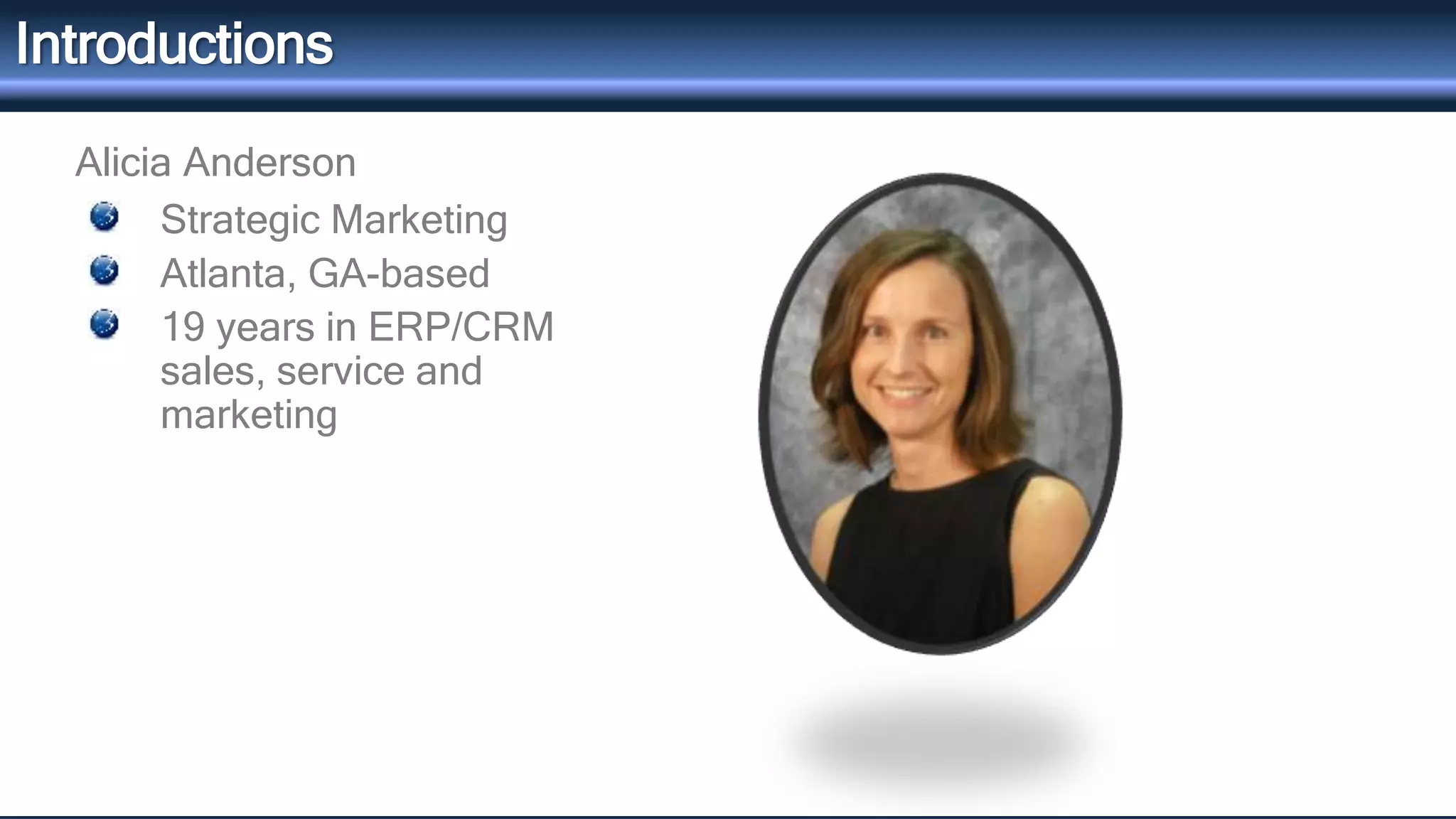
Alicia Anderson 
Strategic Marketing 
Atlanta, GA-based 
19 years in ERP/CRM 
sales, service and 
marketing
The Series 
Finance and Reporting Capabilities across 3 Major Solutions – 
TODAY 
Distribution Capabilities across 3 Major Solutions – October 14 
Manufacturing Capabilities across 3 Major Solutions – November 11 
Sign up here.
Why compare solutions? 
There are hundreds of solutions 
Most of the buying process takes place online 
It’s not so much about features – it’s more FIT
Sage 100 MS Dynamics GP QuickBooks 
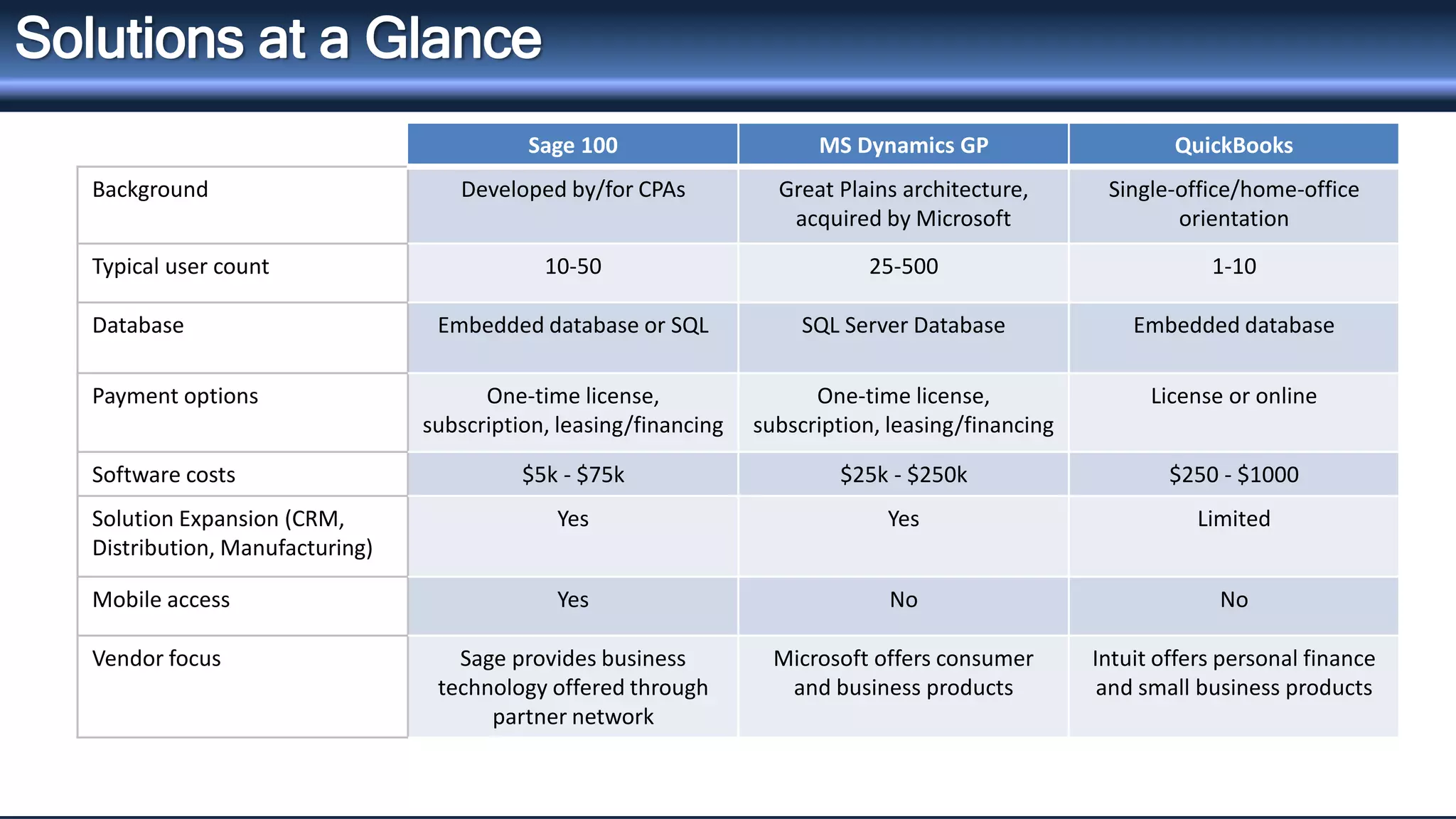
Background Developed by/for CPAs Great Plains architecture, 
acquired by Microsoft 
Single-office/home-office 
orientation 
Typical user count 10-50 25-500 1-10 
Database Embedded database or SQL SQL Server Database Embedded database 
Payment options One-time license, 
subscription, leasing/financing 
One-time license, 
subscription, leasing/financing 
License or online 
Software costs $5k - $75k $25k - $250k $250 - $1000 
Solution Expansion (CRM, 
Yes Yes Limited 
Distribution,Manufacturing) 
Mobile access Yes No No 
Vendor focus Sage provides business 
technology offered through 
partner network 
Microsoft offers consumer 
and business products 
Intuit offers personal finance 
and small business products 
Solutions at a Glance
Financial Capabilities 
System security 
Traceability of transactions 
Intercompany transactions 
Tax filing 
Workflows
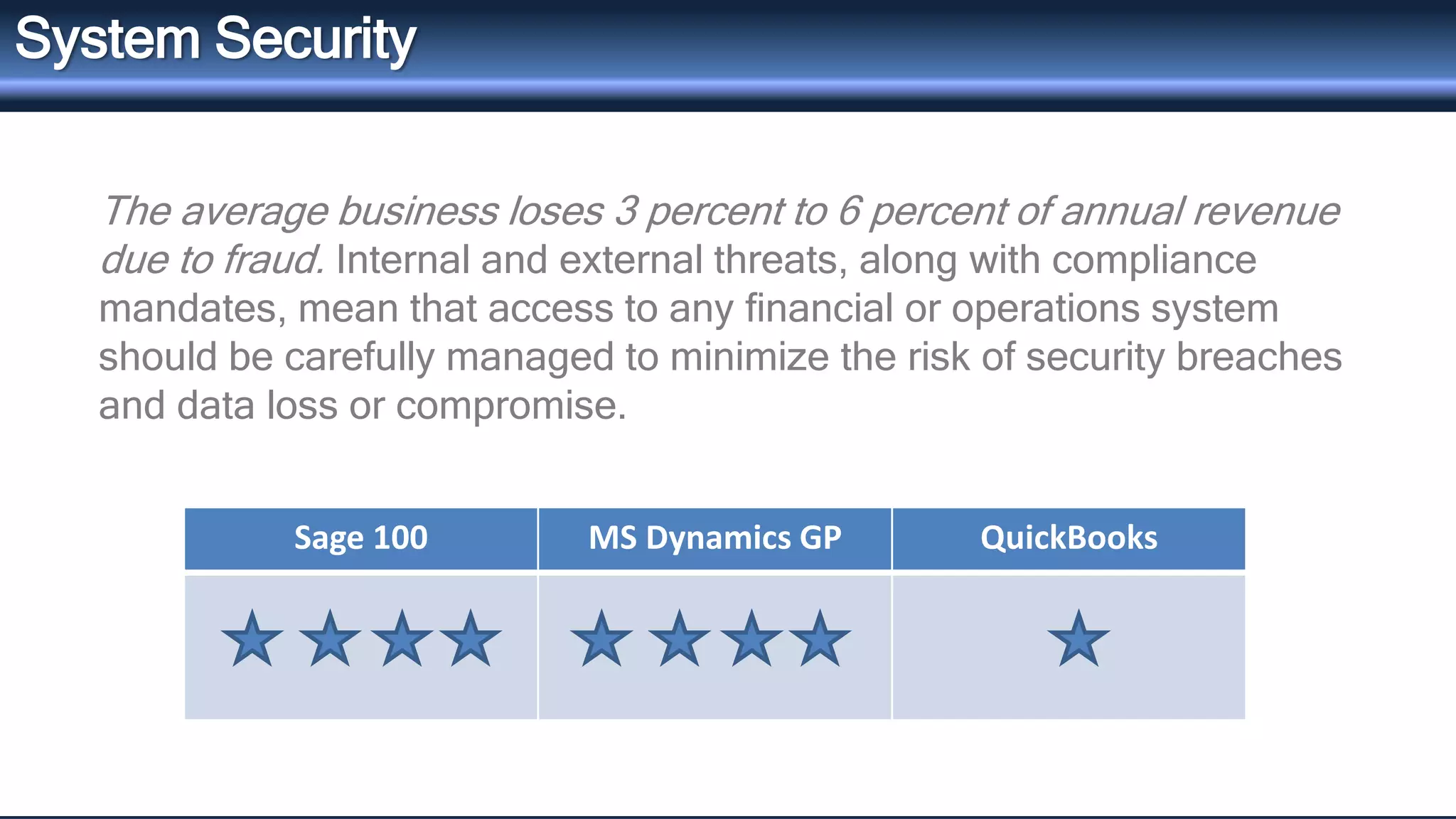
System Security 
The average business loses 3 percent to 6 percent of annual revenue 
due to fraud. Internal and external threats, along with compliance 
mandates, mean that access to any financial or operations system 
should be carefully managed to minimize the risk of security breaches 
and data loss or compromise. 
Sage 100 MS Dynamics GP QuickBooks
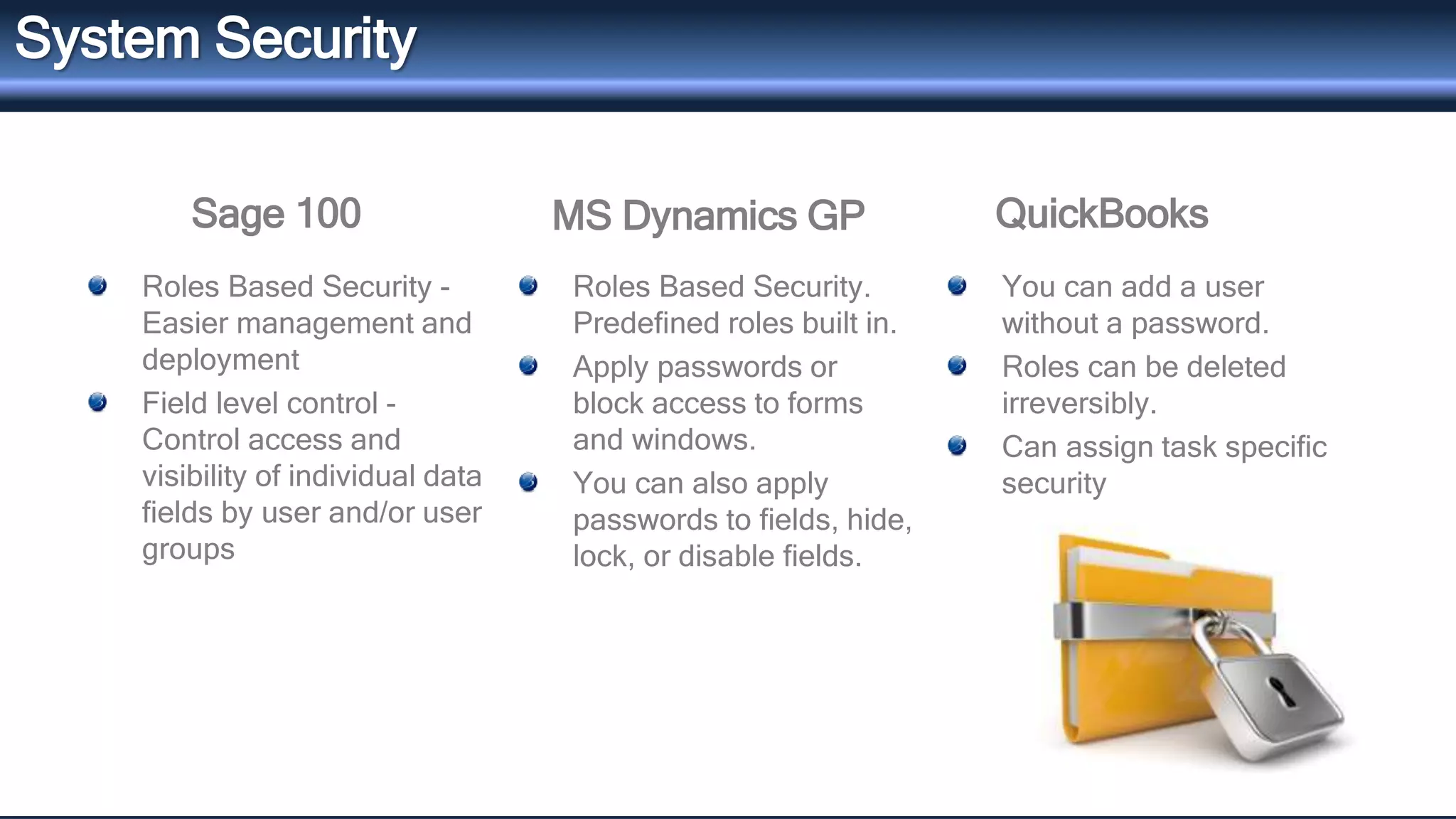
QuickBooks 
System Security 
Sage 100 MS Dynamics GP 
Roles Based Security - 
Easier management and 
deployment 
Field level control - 
Control access and 
visibility of individual data 
fields by user and/or user 
groups 
Roles Based Security. 
Predefined roles built in. 
Apply passwords or 
block access to forms 
and windows. 
You can also apply 
passwords to fields, hide, 
lock, or disable fields. 
You can add a user 
without a password. 
Roles can be deleted 
irreversibly. 
Can assign task specific 
security
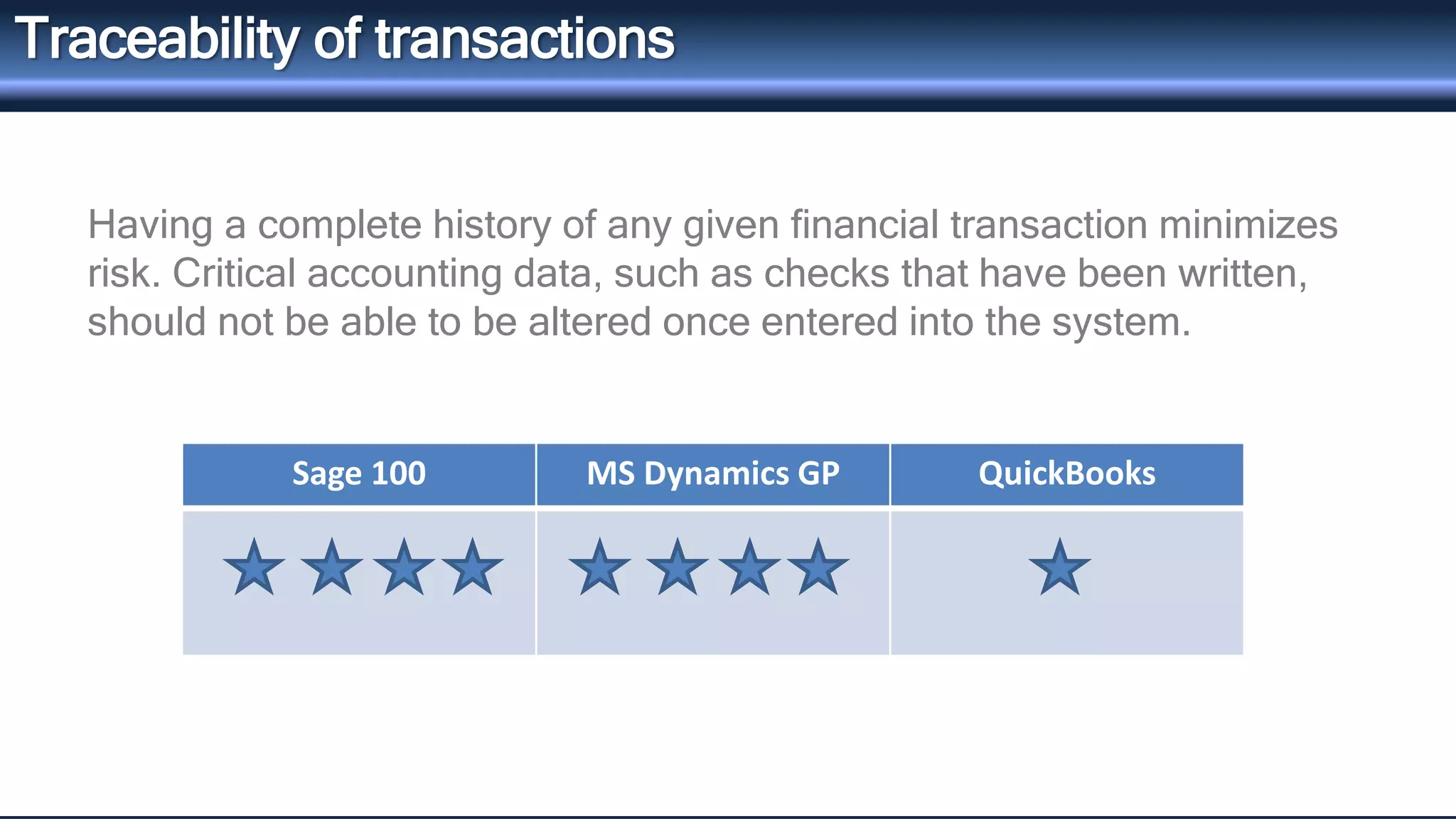
Traceability of transactions 
Having a complete history of any given financial transaction minimizes 
risk. Critical accounting data, such as checks that have been written, 
should not be able to be altered once entered into the system. 
Sage 100 MS Dynamics GP QuickBooks
QuickBooks 
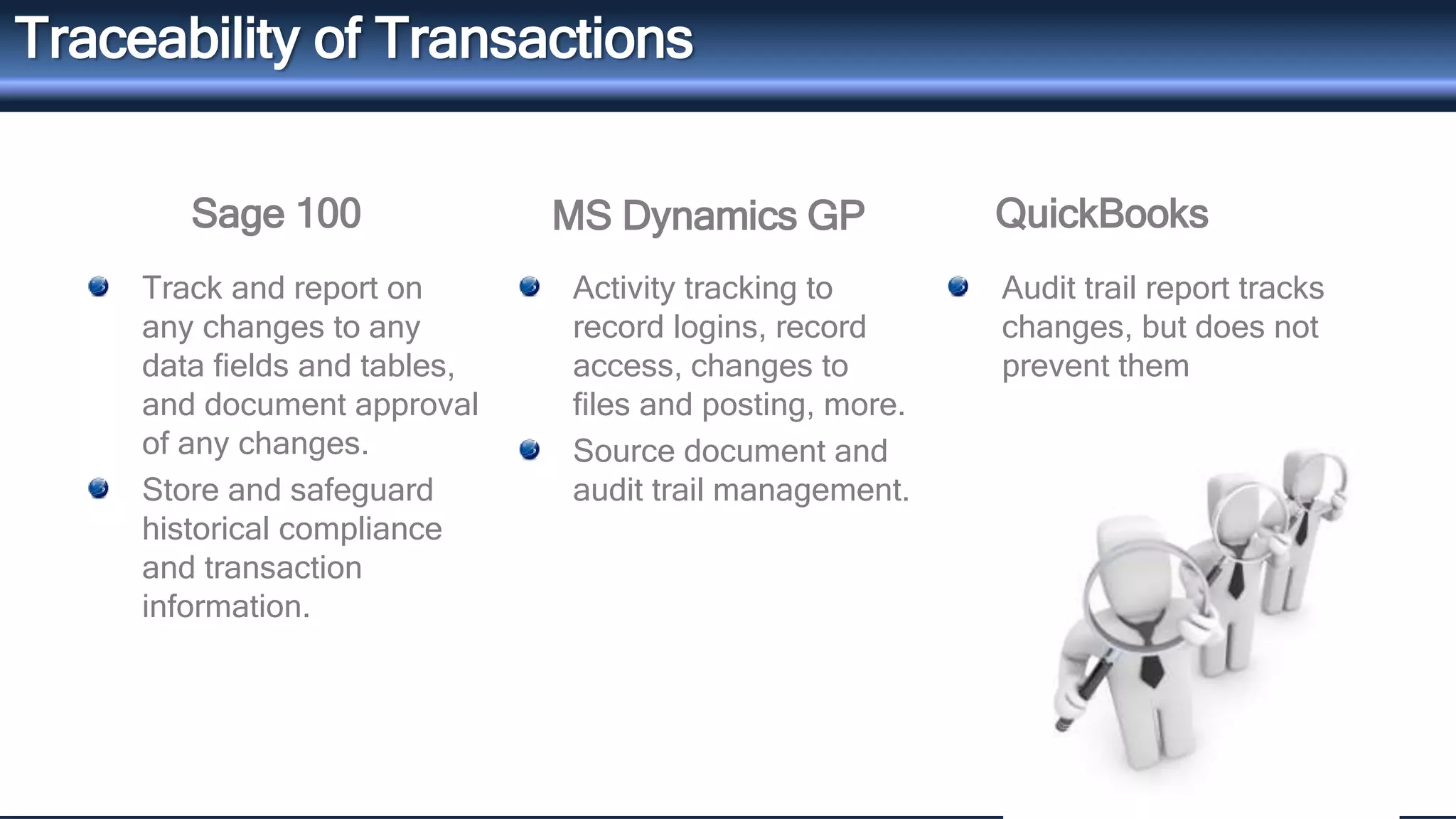
Traceability of Transactions 
Sage 100 MS Dynamics GP 
Track and report on 
any changes to any 
data fields and tables, 
and document approval 
of any changes. 
Store and safeguard 
historical compliance 
and transaction 
information. 
Activity tracking to 
record logins, record 
access, changes to 
files and posting, more. 
Source document and 
audit trail management. 
Audit trail report tracks 
changes, but does not 
prevent them
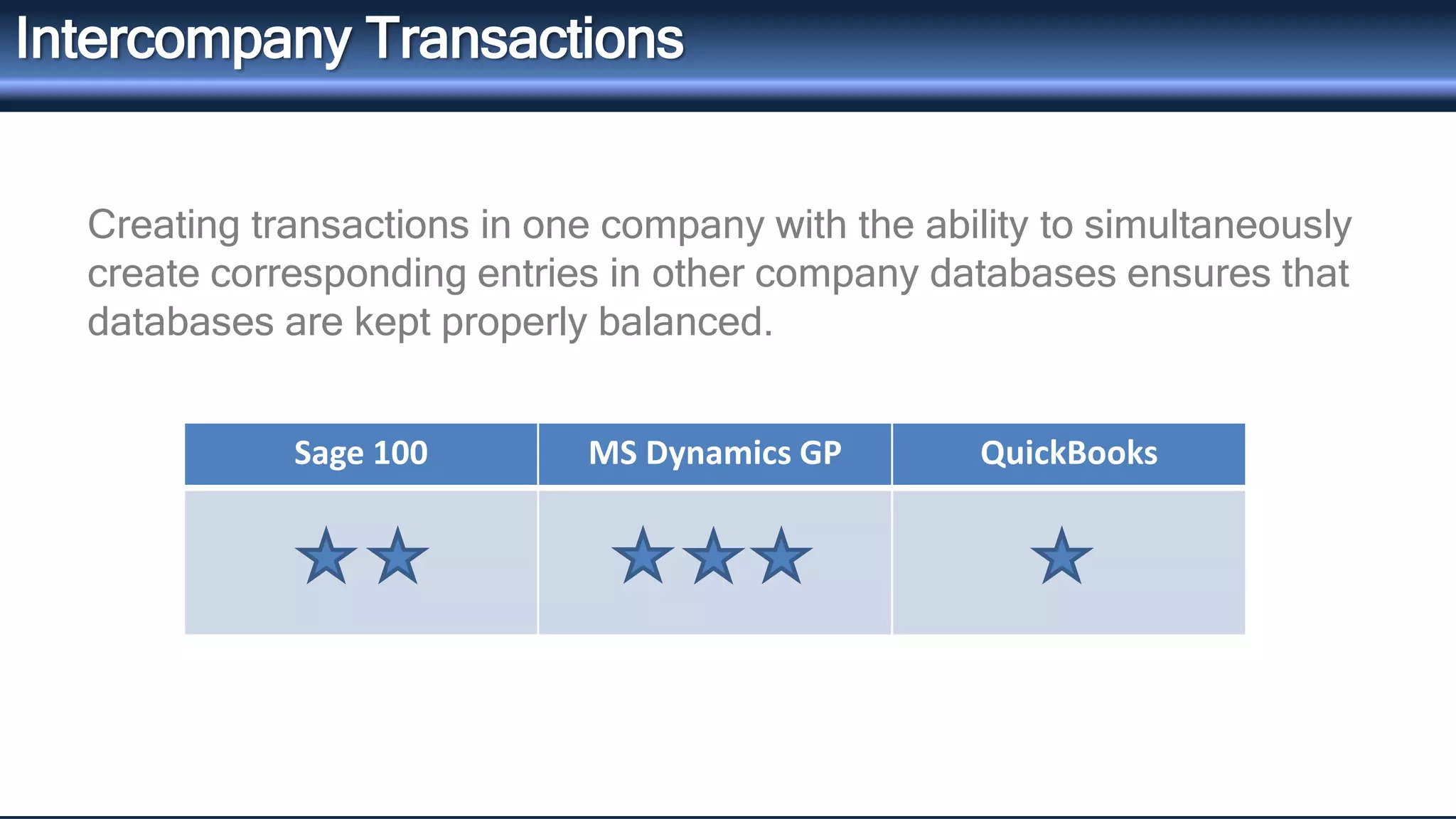
Intercompany Transactions 
Creating transactions in one company with the ability to simultaneously 
create corresponding entries in other company databases ensures that 
databases are kept properly balanced. 
Sage 100 MS Dynamics GP QuickBooks
QuickBooks 
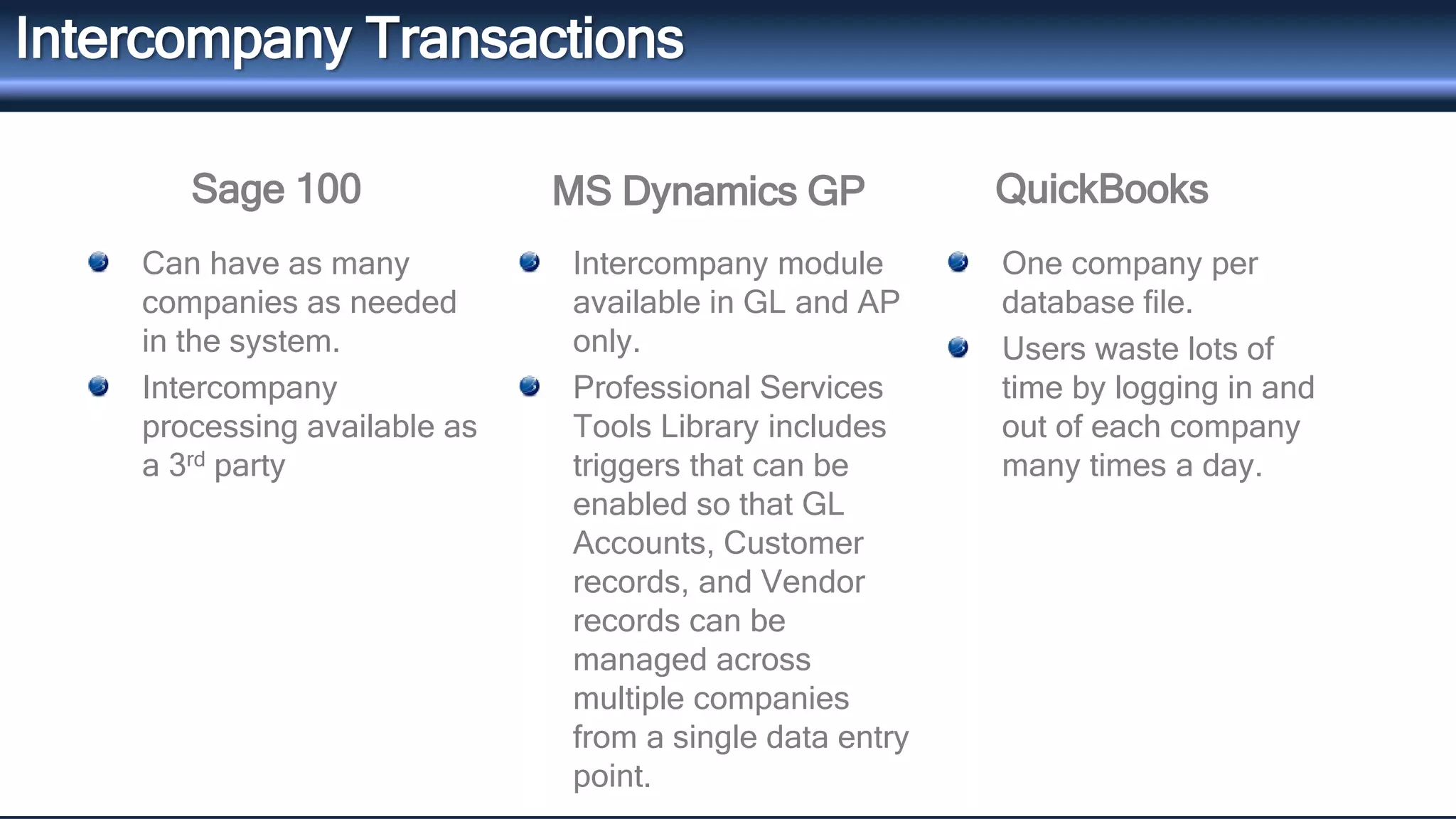
Intercompany Transactions 
Sage 100 MS Dynamics GP 
Can have as many 
companies as needed 
in the system. 
Intercompany 
processing available as 
a 3rd party 
Intercompany module 
available in GL and AP 
only. 
Professional Services 
Tools Library includes 
triggers that can be 
enabled so that GL 
Accounts, Customer 
records, and Vendor 
records can be 
managed across 
multiple companies 
from a single data entry 
point. 
One company per 
database file. 
Users waste lots of 
time by logging in and 
out of each company 
many times a day.
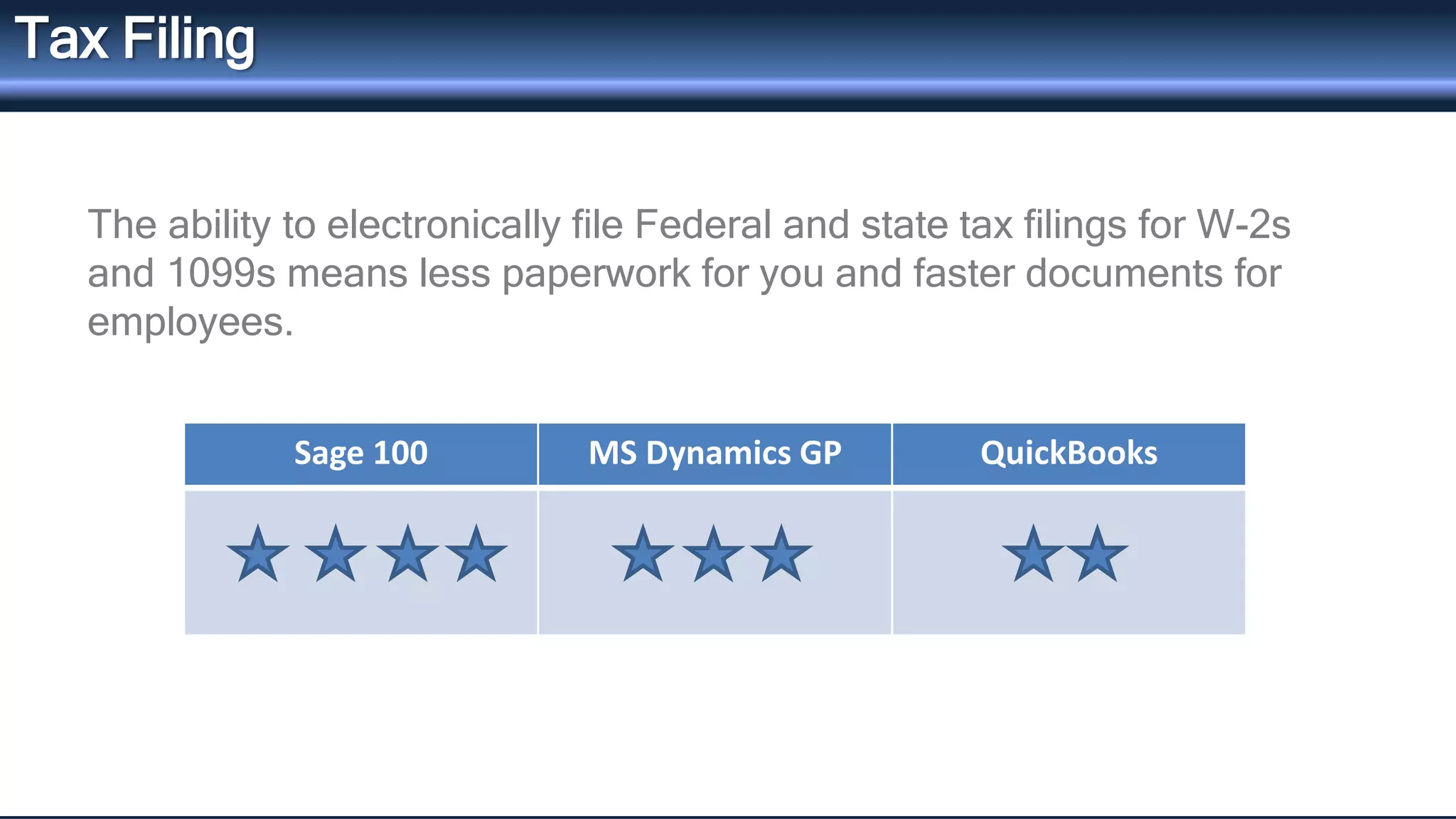
Tax Filing 
The ability to electronically file Federal and state tax filings for W-2s 
and 1099s means less paperwork for you and faster documents for 
employees. 
Sage 100 MS Dynamics GP QuickBooks
QuickBooks 
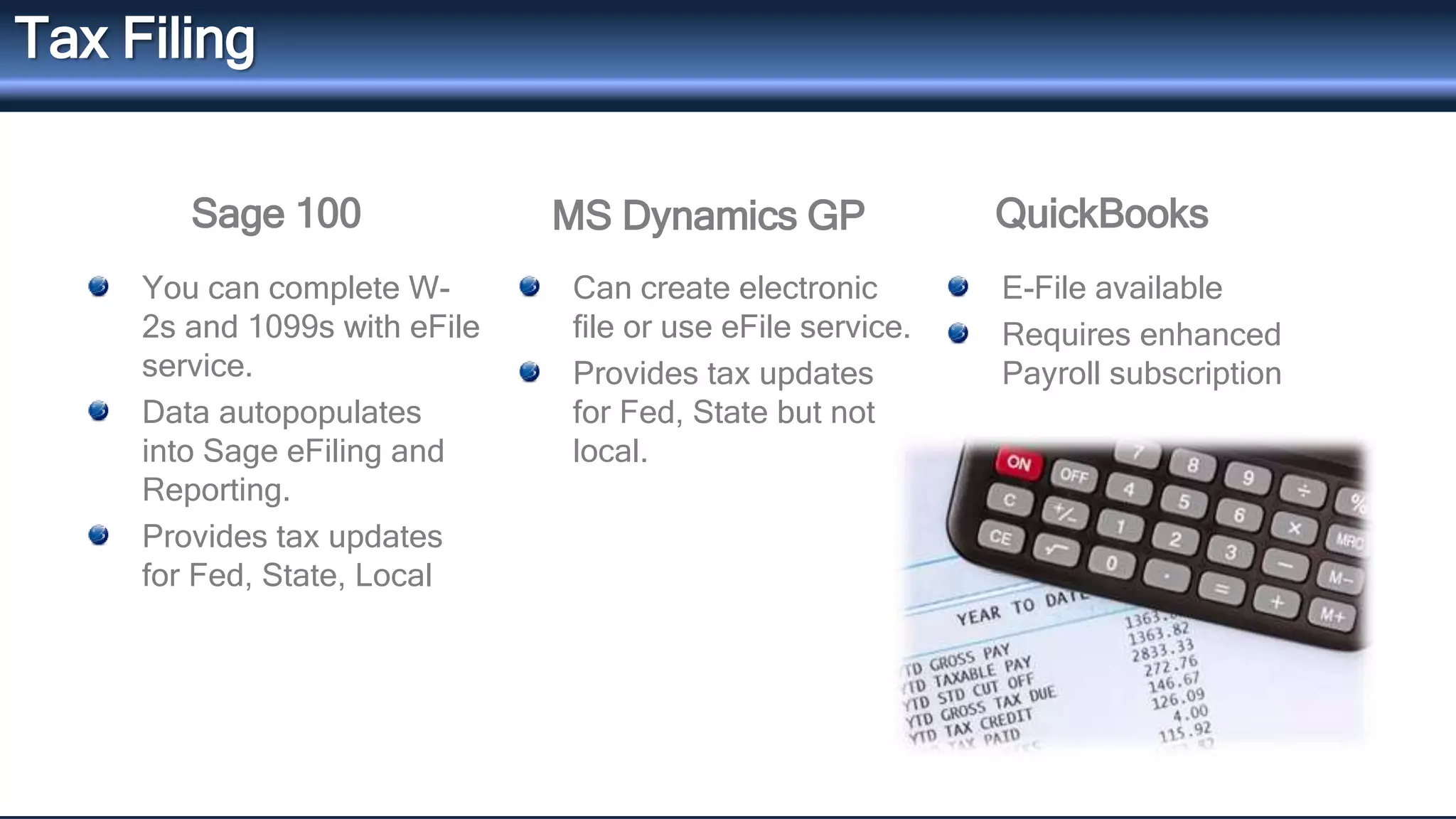
Tax Filing 
Sage 100 MS Dynamics GP 
You can complete W- 
2s and 1099s with eFile 
service. 
Data autopopulates 
into Sage eFiling and 
Reporting. 
Provides tax updates 
for Fed, State, Local 
Can create electronic 
file or use eFile service. 
Provides tax updates 
for Fed, State but not 
local. 
E-File available 
Requires enhanced 
Payroll subscription
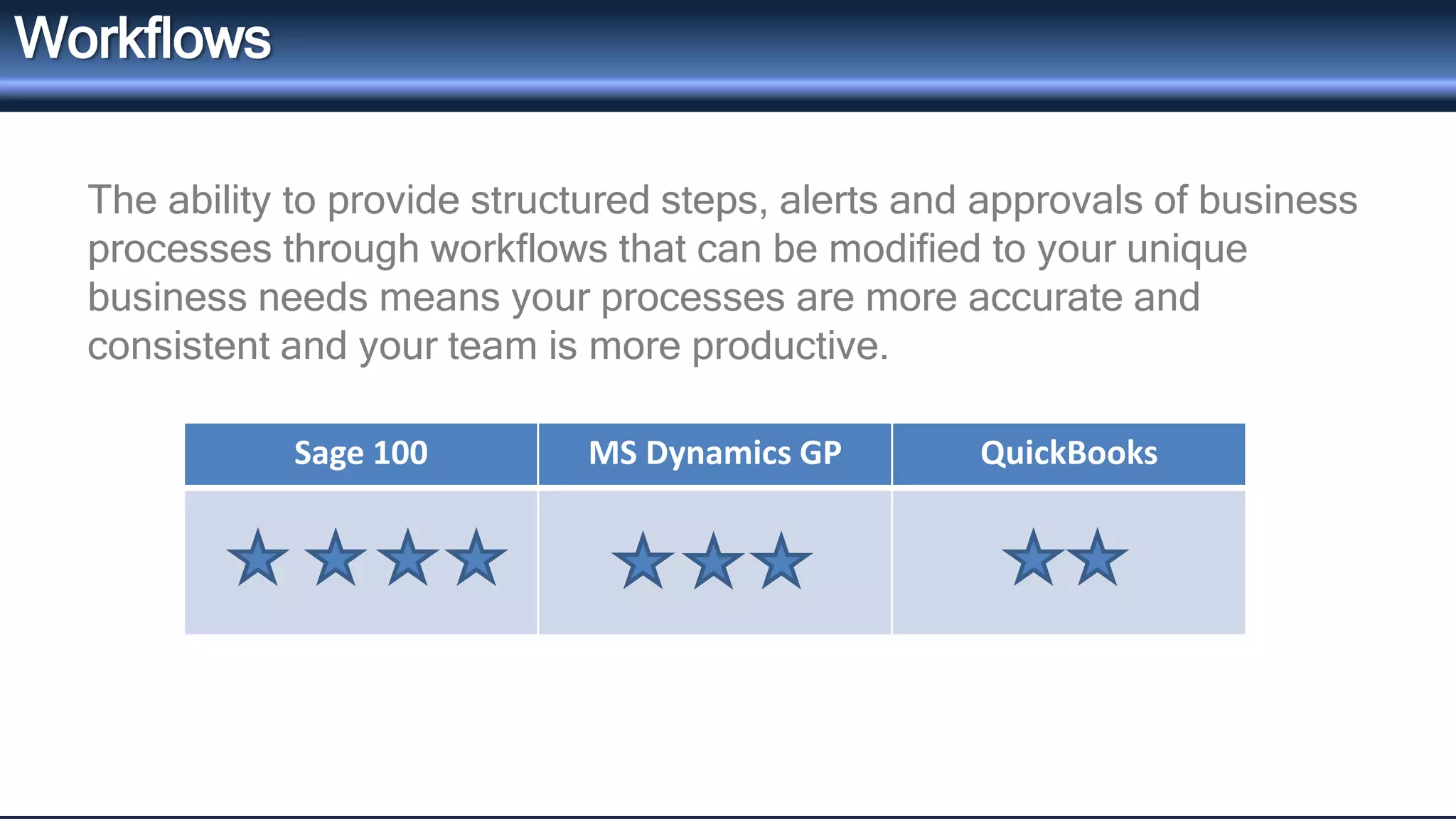
Workflows 
The ability to provide structured steps, alerts and approvals of business 
processes through workflows that can be modified to your unique 
business needs means your processes are more accurate and 
consistent and your team is more productive. 
Sage 100 MS Dynamics GP QuickBooks
QuickBooks 
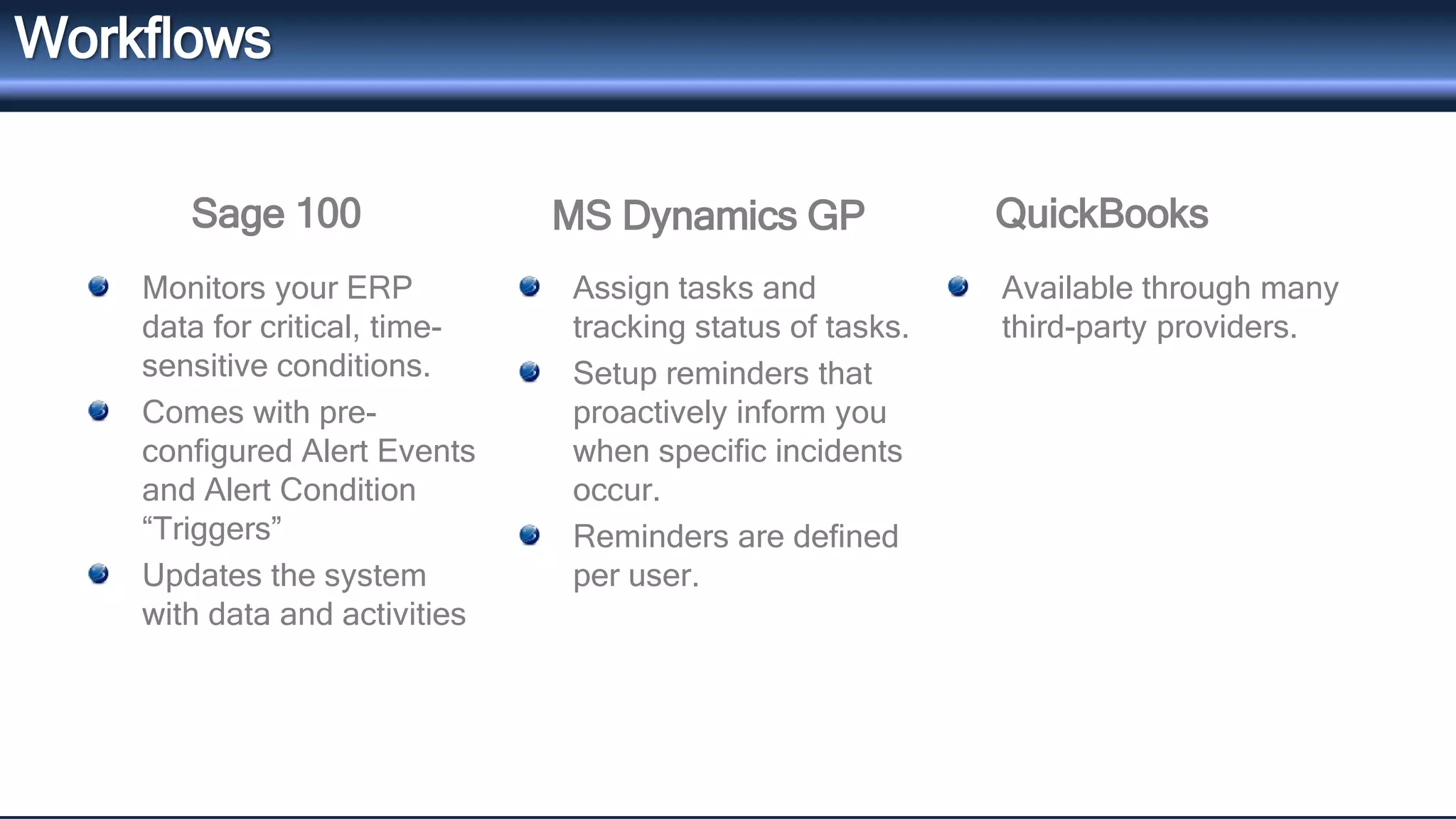
Workflows 
Sage 100 MS Dynamics GP 
Monitors your ERP 
data for critical, time-sensitive 
conditions. 
Comes with pre-configured 
Alert Events 
and Alert Condition 
“Triggers” 
Updates the system 
with data and activities 
Assign tasks and 
tracking status of tasks. 
Setup reminders that 
proactively inform you 
when specific incidents 
occur. 
Reminders are defined 
per user. 
Available through many 
third-party providers.
Reporting Capabilities 
Financial reporting 
Dashboards and KPIs 
Multicompany consolidation
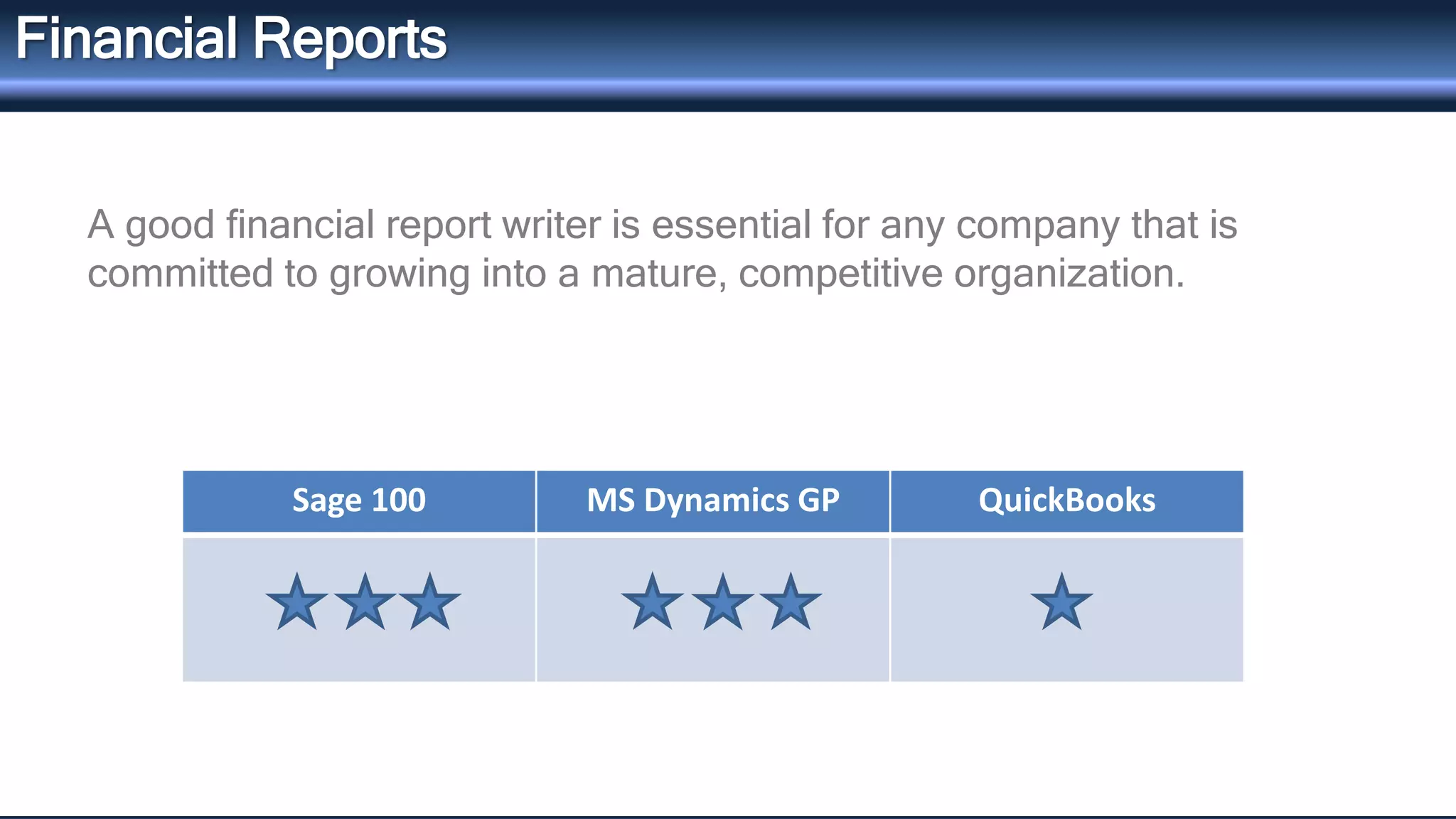
Financial Reports 
A good financial report writer is essential for any company that is 
committed to growing into a mature, competitive organization. 
Sage 100 MS Dynamics GP QuickBooks
QuickBooks 
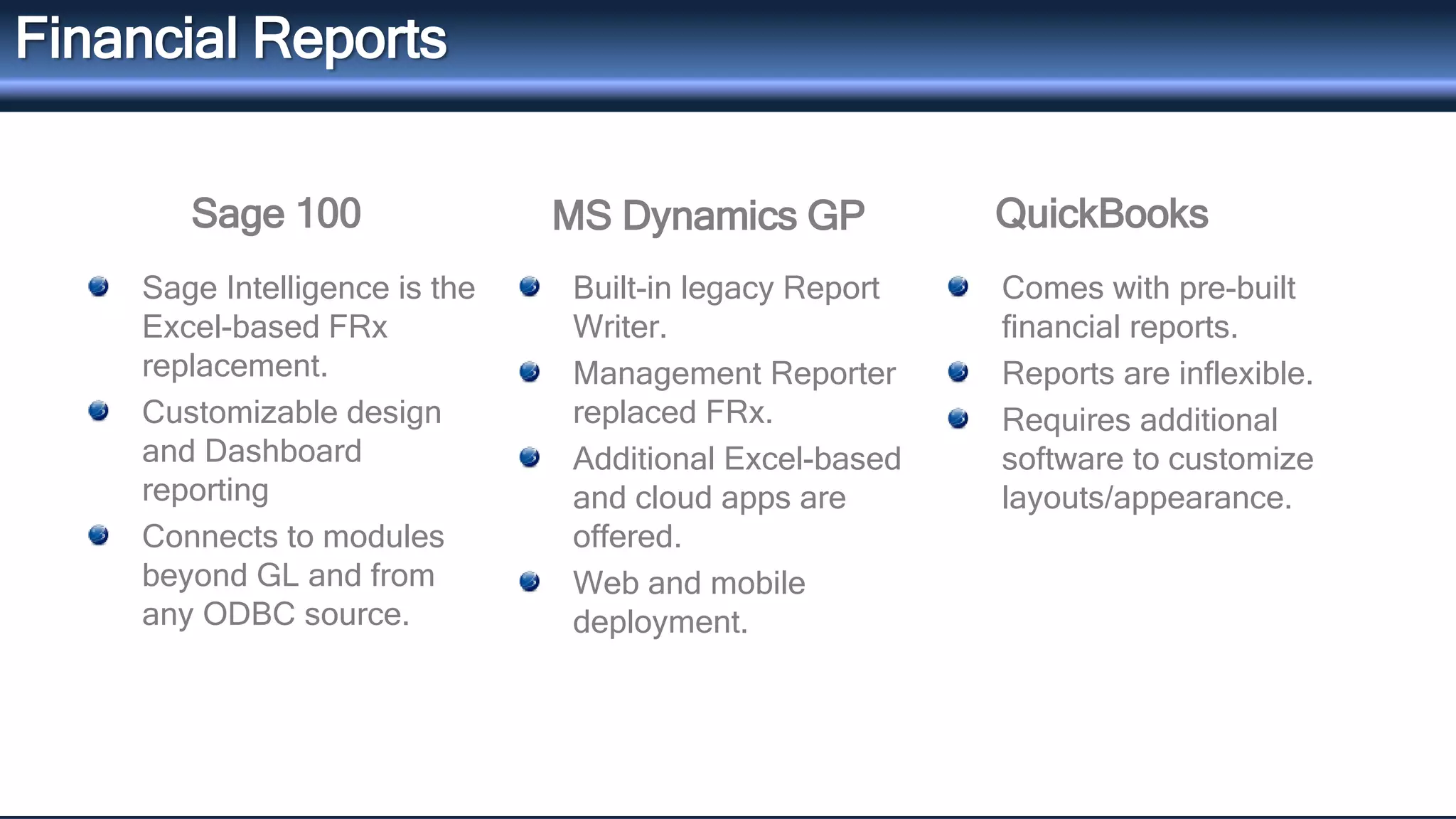
Financial Reports 
Sage 100 MS Dynamics GP 
Sage Intelligence is the 
Excel-based FRx 
replacement. 
Customizable design 
and Dashboard 
reporting 
Connects to modules 
beyond GL and from 
any ODBC source. 
Built-in legacy Report 
Writer. 
Management Reporter 
replaced FRx. 
Additional Excel-based 
and cloud apps are 
offered. 
Web and mobile 
deployment. 
Comes with pre-built 
financial reports. 
Reports are inflexible. 
Requires additional 
software to customize 
layouts/appearance.
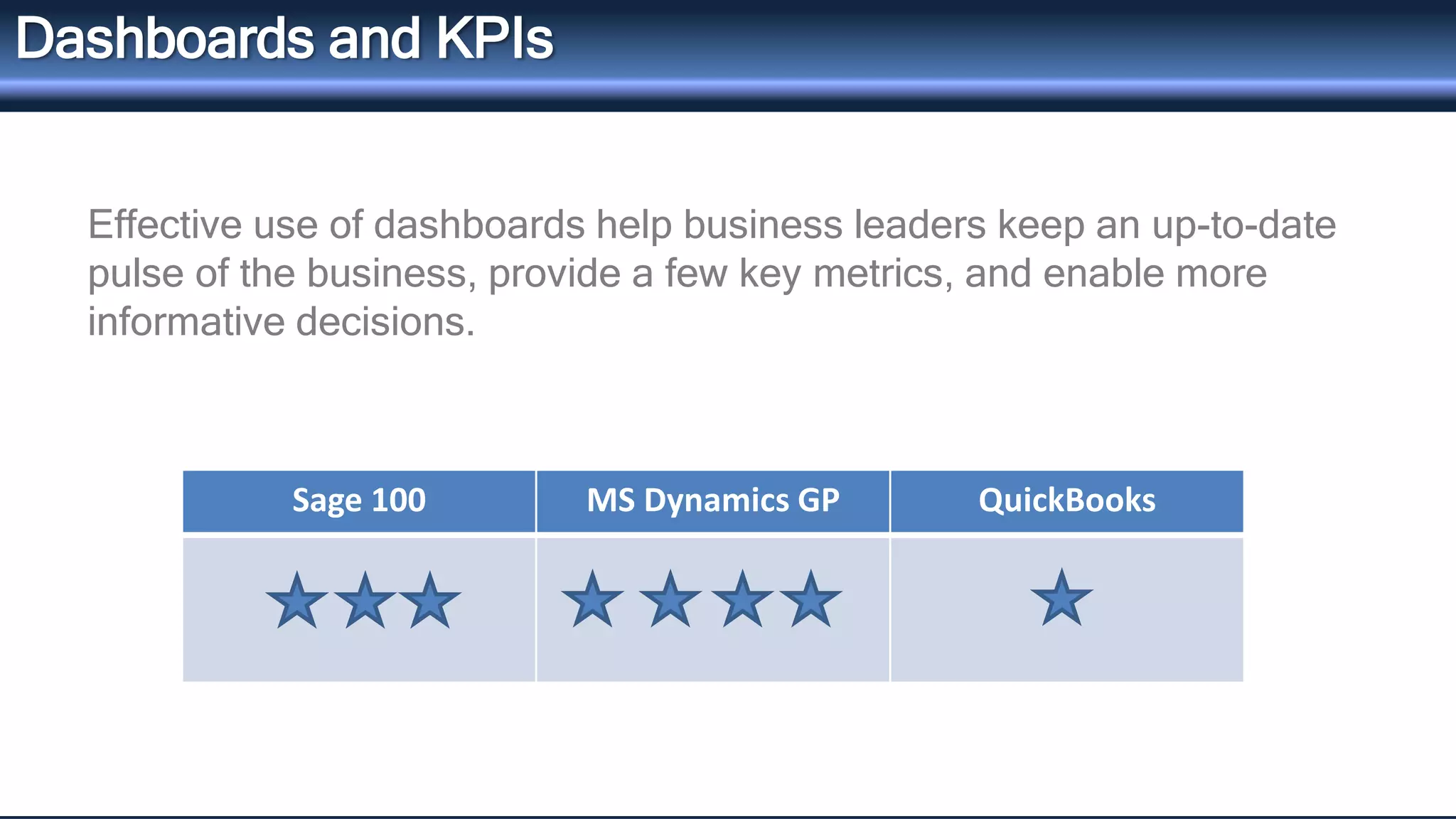
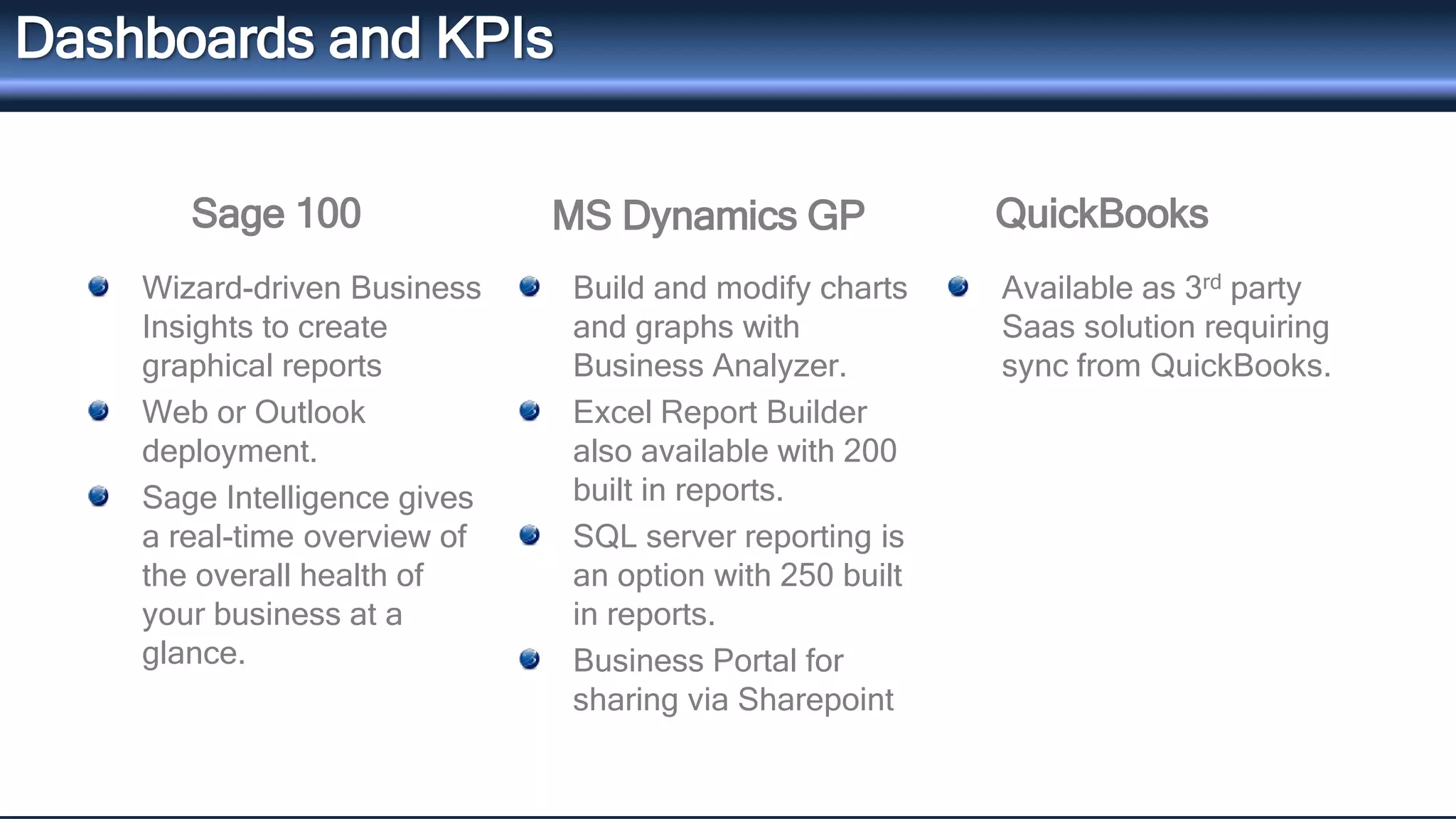
Dashboards and KPIs 
Effective use of dashboards help business leaders keep an up-to-date 
pulse of the business, provide a few key metrics, and enable more 
informative decisions. 
Sage 100 MS Dynamics GP QuickBooks
QuickBooks 
Dashboards and KPIs 
Sage 100 MS Dynamics GP 
Wizard-driven Business 
Insights to create 
graphical reports 
Web or Outlook 
deployment. 
Sage Intelligence gives 
a real-time overview of 
the overall health of 
your business at a 
glance. 
Build and modify charts 
and graphs with 
Business Analyzer. 
Excel Report Builder 
also available with 200 
built in reports. 
SQL server reporting is 
an option with 250 built 
in reports. 
Business Portal for 
sharing via Sharepoint 
Available as 3rd party 
Saas solution requiring 
sync from QuickBooks.
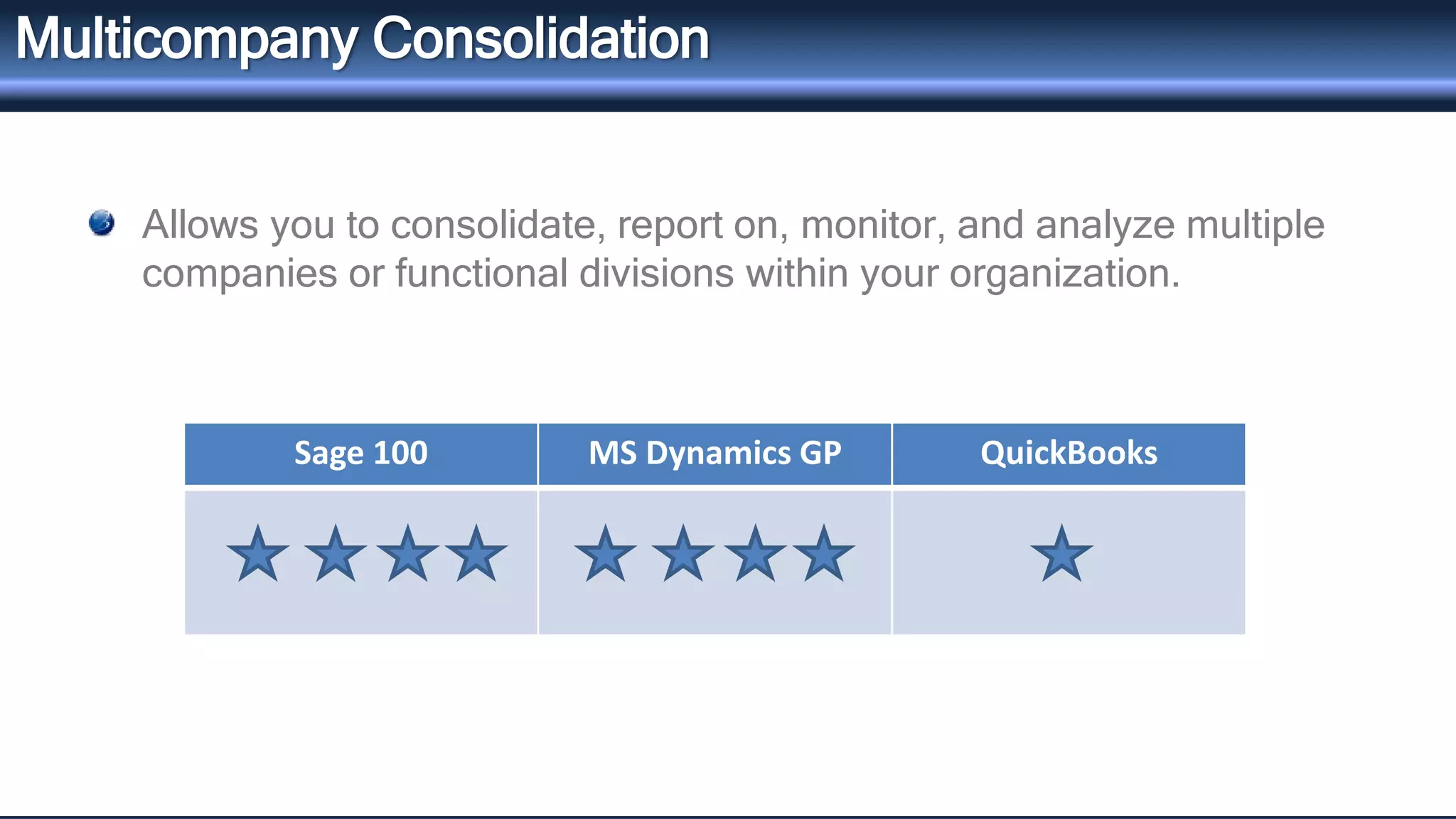
Multicompany Consolidation 
Allows you to consolidate, report on, monitor, and analyze multiple 
companies or functional divisions within your organization. 
Sage 100 MS Dynamics GP QuickBooks
QuickBooks 
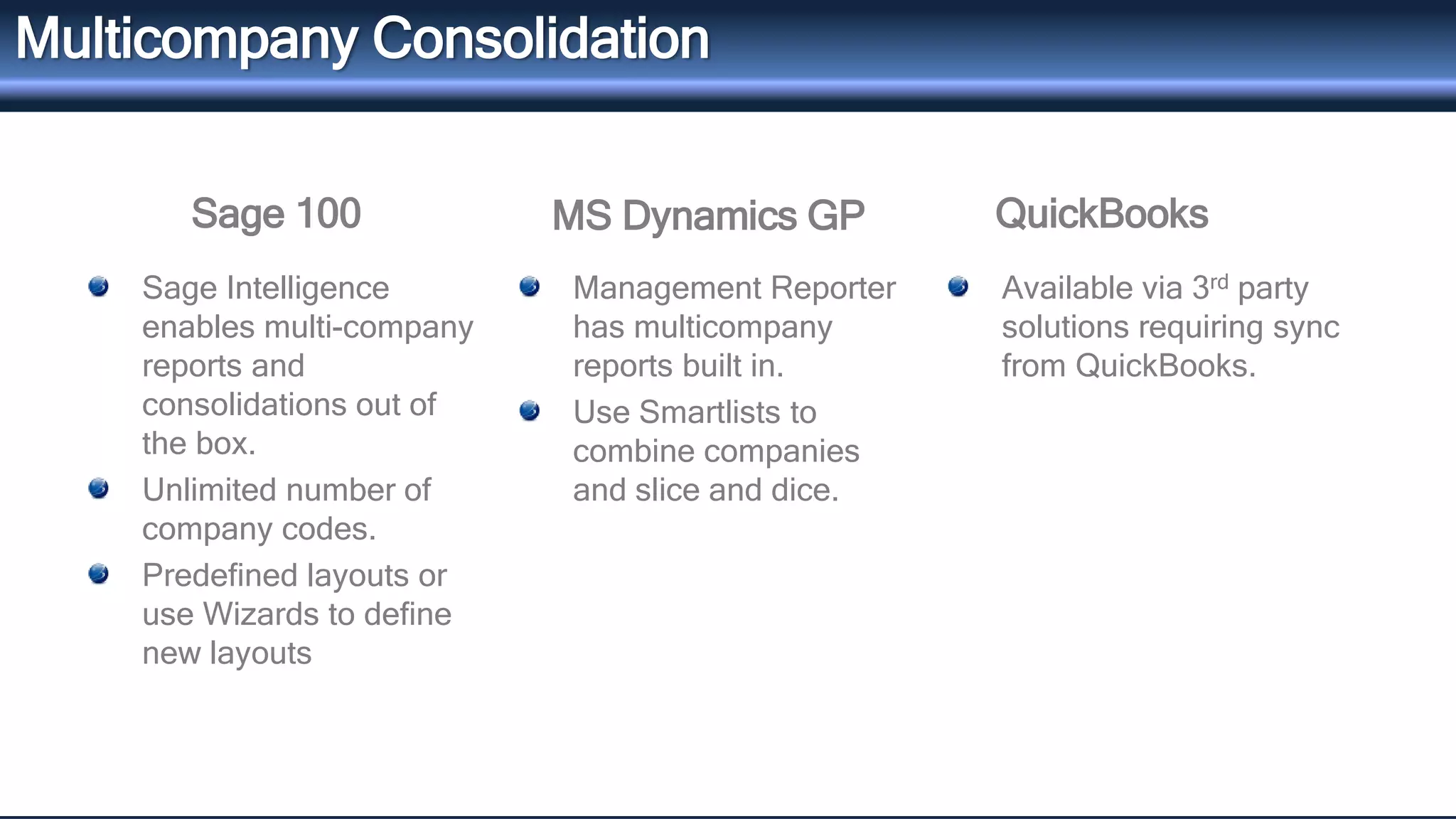
Multicompany Consolidation 
Sage 100 MS Dynamics GP 
Sage Intelligence 
enables multi-company 
reports and 
consolidations out of 
the box. 
Unlimited number of 
company codes. 
Predefined layouts or 
use Wizards to define 
new layouts 
Management Reporter 
has multicompany 
reports built in. 
Use Smartlists to 
combine companies 
and slice and dice. 
Available via 3rd party 
solutions requiring sync 
from QuickBooks.
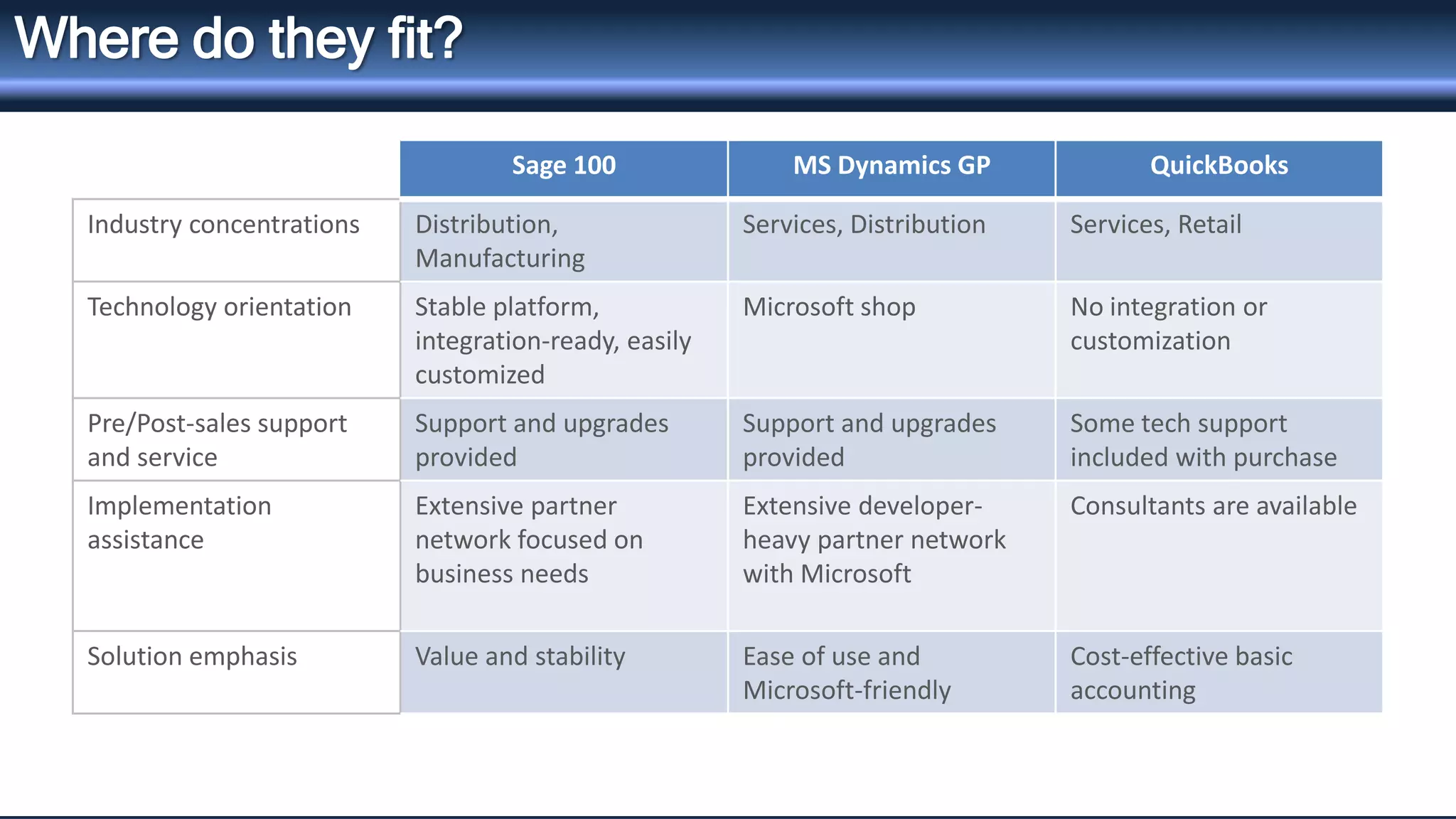
Sage 100 MS Dynamics GP QuickBooks 
Industry concentrations Distribution, 
Manufacturing 
Services, Distribution Services, Retail 
Technology orientation Stable platform, 
integration-ready, easily 
customized 
Microsoft shop No integration or 
customization 
Pre/Post-sales support 
and service 
Support and upgrades 
provided 
Support and upgrades 
provided 
Some tech support 
included with purchase 
Implementation 
assistance 
Extensive partner 
network focused on 
business needs 
Extensive developer-heavy 
partner network 
with Microsoft 
Consultants are available 
Solution emphasis Value and stability Ease of use and 
Microsoft-friendly 
Cost-effective basic 
accounting 
Where do they fit?
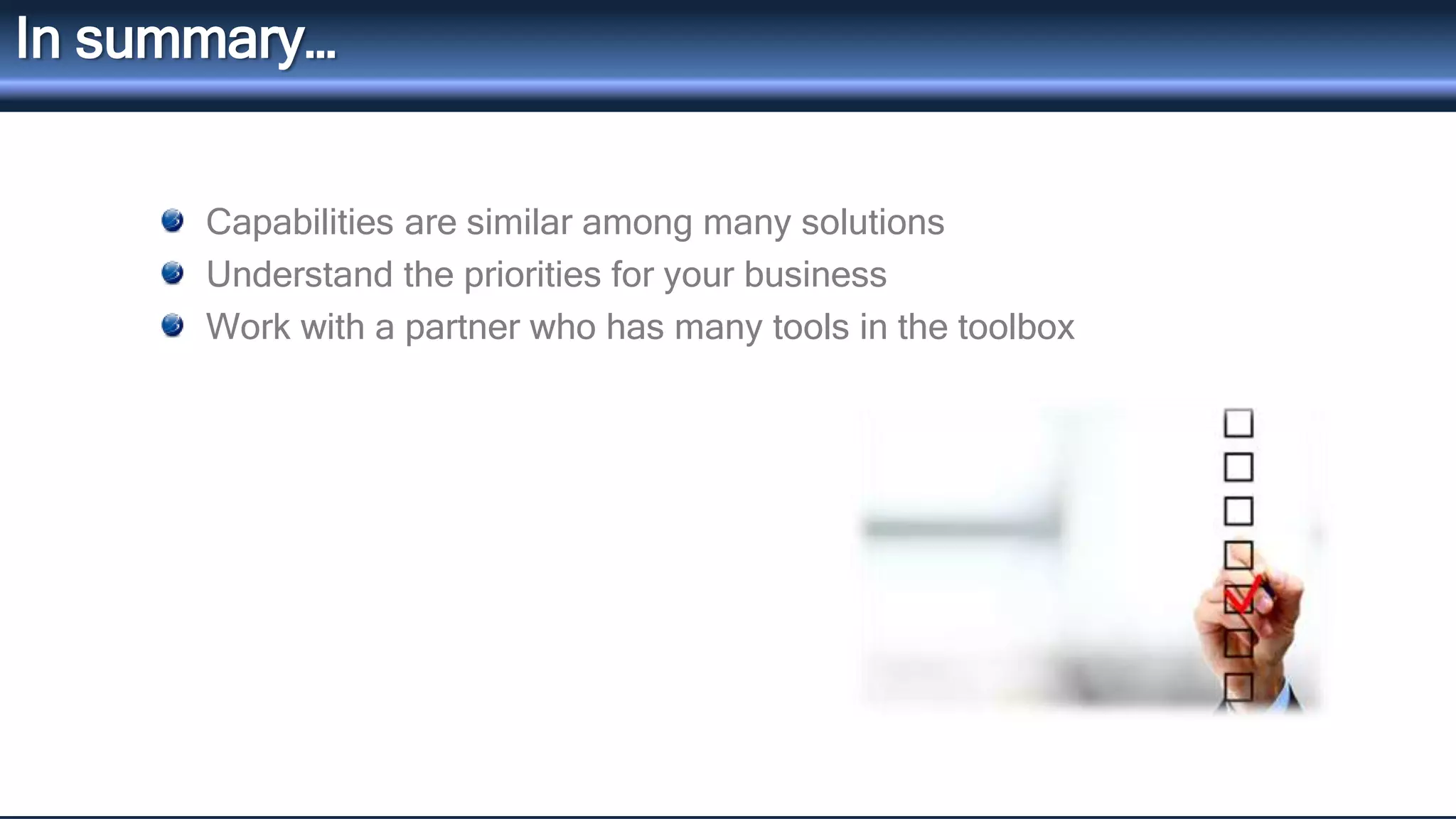
In summary… 
Capabilities are similar among many solutions 
Understand the priorities for your business 
Work with a partner who has many tools in the toolbox
Resources for today’s class 
Available on http://info.blytheco.com/compare-erp-resources 
Copy of this presentation 
Preparing for a change – “Are You Ready for Replatforming?” series 
Build a Business Case 
Evaluation Criteria tools 
Cloud vs. On-Premise 
More 
How to know if you have outgrown Quickbooks?
Next Class… 
• Distribution Capabilities across Four Major Solutions – October 
14 
• Manufacturing Capabilities across Four Major Solutions – 
November 11 
• Sign up here.

Compare 3 Accounting and Operational Systems: Financial and Reporting Capabilities

  • 1.
    wwwwww..bbllyytthheecoc.oco.cmom Compare 3Top Accounting and Operational Systems Webinar 1: Finance and Reporting Across 3 Solutions
  • 2.
    Agenda Intros Whycompare? Solutions at a glance Financial capabilities Reporting capabilities Where do they fit? Next Steps and resources for today
  • 3.
    Introductions Alicia Anderson Strategic Marketing Atlanta, GA-based 19 years in ERP/CRM sales, service and marketing
  • 4.
    The Series Financeand Reporting Capabilities across 3 Major Solutions – TODAY Distribution Capabilities across 3 Major Solutions – October 14 Manufacturing Capabilities across 3 Major Solutions – November 11 Sign up here.
  • 5.
    Why compare solutions? There are hundreds of solutions Most of the buying process takes place online It’s not so much about features – it’s more FIT
  • 6.
    Sage 100 MSDynamics GP QuickBooks Background Developed by/for CPAs Great Plains architecture, acquired by Microsoft Single-office/home-office orientation Typical user count 10-50 25-500 1-10 Database Embedded database or SQL SQL Server Database Embedded database Payment options One-time license, subscription, leasing/financing One-time license, subscription, leasing/financing License or online Software costs $5k - $75k $25k - $250k $250 - $1000 Solution Expansion (CRM, Yes Yes Limited Distribution,Manufacturing) Mobile access Yes No No Vendor focus Sage provides business technology offered through partner network Microsoft offers consumer and business products Intuit offers personal finance and small business products Solutions at a Glance
  • 7.
    Financial Capabilities Systemsecurity Traceability of transactions Intercompany transactions Tax filing Workflows
  • 8.
    System Security Theaverage business loses 3 percent to 6 percent of annual revenue due to fraud. Internal and external threats, along with compliance mandates, mean that access to any financial or operations system should be carefully managed to minimize the risk of security breaches and data loss or compromise. Sage 100 MS Dynamics GP QuickBooks
  • 9.
    QuickBooks System Security Sage 100 MS Dynamics GP Roles Based Security - Easier management and deployment Field level control - Control access and visibility of individual data fields by user and/or user groups Roles Based Security. Predefined roles built in. Apply passwords or block access to forms and windows. You can also apply passwords to fields, hide, lock, or disable fields. You can add a user without a password. Roles can be deleted irreversibly. Can assign task specific security
  • 10.
    Traceability of transactions Having a complete history of any given financial transaction minimizes risk. Critical accounting data, such as checks that have been written, should not be able to be altered once entered into the system. Sage 100 MS Dynamics GP QuickBooks
  • 11.
    QuickBooks Traceability ofTransactions Sage 100 MS Dynamics GP Track and report on any changes to any data fields and tables, and document approval of any changes. Store and safeguard historical compliance and transaction information. Activity tracking to record logins, record access, changes to files and posting, more. Source document and audit trail management. Audit trail report tracks changes, but does not prevent them
  • 12.
    Intercompany Transactions Creatingtransactions in one company with the ability to simultaneously create corresponding entries in other company databases ensures that databases are kept properly balanced. Sage 100 MS Dynamics GP QuickBooks
  • 13.
    QuickBooks Intercompany Transactions Sage 100 MS Dynamics GP Can have as many companies as needed in the system. Intercompany processing available as a 3rd party Intercompany module available in GL and AP only. Professional Services Tools Library includes triggers that can be enabled so that GL Accounts, Customer records, and Vendor records can be managed across multiple companies from a single data entry point. One company per database file. Users waste lots of time by logging in and out of each company many times a day.
  • 14.
    Tax Filing Theability to electronically file Federal and state tax filings for W-2s and 1099s means less paperwork for you and faster documents for employees. Sage 100 MS Dynamics GP QuickBooks
  • 15.
    QuickBooks Tax Filing Sage 100 MS Dynamics GP You can complete W- 2s and 1099s with eFile service. Data autopopulates into Sage eFiling and Reporting. Provides tax updates for Fed, State, Local Can create electronic file or use eFile service. Provides tax updates for Fed, State but not local. E-File available Requires enhanced Payroll subscription
  • 16.
    Workflows The abilityto provide structured steps, alerts and approvals of business processes through workflows that can be modified to your unique business needs means your processes are more accurate and consistent and your team is more productive. Sage 100 MS Dynamics GP QuickBooks
  • 17.
    QuickBooks Workflows Sage100 MS Dynamics GP Monitors your ERP data for critical, time-sensitive conditions. Comes with pre-configured Alert Events and Alert Condition “Triggers” Updates the system with data and activities Assign tasks and tracking status of tasks. Setup reminders that proactively inform you when specific incidents occur. Reminders are defined per user. Available through many third-party providers.
  • 18.
    Reporting Capabilities Financialreporting Dashboards and KPIs Multicompany consolidation
  • 19.
    Financial Reports Agood financial report writer is essential for any company that is committed to growing into a mature, competitive organization. Sage 100 MS Dynamics GP QuickBooks
  • 20.
    QuickBooks Financial Reports Sage 100 MS Dynamics GP Sage Intelligence is the Excel-based FRx replacement. Customizable design and Dashboard reporting Connects to modules beyond GL and from any ODBC source. Built-in legacy Report Writer. Management Reporter replaced FRx. Additional Excel-based and cloud apps are offered. Web and mobile deployment. Comes with pre-built financial reports. Reports are inflexible. Requires additional software to customize layouts/appearance.
  • 21.
    Dashboards and KPIs Effective use of dashboards help business leaders keep an up-to-date pulse of the business, provide a few key metrics, and enable more informative decisions. Sage 100 MS Dynamics GP QuickBooks
  • 22.
    QuickBooks Dashboards andKPIs Sage 100 MS Dynamics GP Wizard-driven Business Insights to create graphical reports Web or Outlook deployment. Sage Intelligence gives a real-time overview of the overall health of your business at a glance. Build and modify charts and graphs with Business Analyzer. Excel Report Builder also available with 200 built in reports. SQL server reporting is an option with 250 built in reports. Business Portal for sharing via Sharepoint Available as 3rd party Saas solution requiring sync from QuickBooks.
  • 23.
    Multicompany Consolidation Allowsyou to consolidate, report on, monitor, and analyze multiple companies or functional divisions within your organization. Sage 100 MS Dynamics GP QuickBooks
  • 24.
    QuickBooks Multicompany Consolidation Sage 100 MS Dynamics GP Sage Intelligence enables multi-company reports and consolidations out of the box. Unlimited number of company codes. Predefined layouts or use Wizards to define new layouts Management Reporter has multicompany reports built in. Use Smartlists to combine companies and slice and dice. Available via 3rd party solutions requiring sync from QuickBooks.
  • 25.
    Sage 100 MSDynamics GP QuickBooks Industry concentrations Distribution, Manufacturing Services, Distribution Services, Retail Technology orientation Stable platform, integration-ready, easily customized Microsoft shop No integration or customization Pre/Post-sales support and service Support and upgrades provided Support and upgrades provided Some tech support included with purchase Implementation assistance Extensive partner network focused on business needs Extensive developer-heavy partner network with Microsoft Consultants are available Solution emphasis Value and stability Ease of use and Microsoft-friendly Cost-effective basic accounting Where do they fit?
  • 26.
    In summary… Capabilitiesare similar among many solutions Understand the priorities for your business Work with a partner who has many tools in the toolbox
  • 27.
    Resources for today’sclass Available on http://info.blytheco.com/compare-erp-resources Copy of this presentation Preparing for a change – “Are You Ready for Replatforming?” series Build a Business Case Evaluation Criteria tools Cloud vs. On-Premise More How to know if you have outgrown Quickbooks?
  • 28.
    Next Class… •Distribution Capabilities across Four Major Solutions – October 14 • Manufacturing Capabilities across Four Major Solutions – November 11 • Sign up here.