COMBATTING DOCTOR GOOGLE
Presented by:
WHO IS DR. GOOGLE?
• Your Major Competitor
• Most famous doctors on the
planet
• Almost every one of your
patients consults with her
before they contact you
• Dr. Google only performs house
calls and is open 24/7/365
2
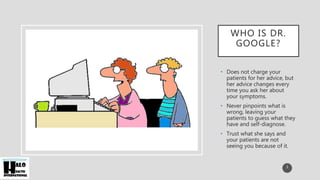
WHO IS DR.
GOOGLE?
• Does not charge your
patients for her advice, but
her advice changes every
time you ask her about
your symptoms.
• Never pinpoints what is
wrong, leaving your
patients to guess what they
have and self-diagnose.
• Trust what she says and
your patients are not
seeing you because of it.
3
WHAT CAN YOU DO TO STOP DR. GOOGLE?
• To combat Dr. Google and her team of copycats, Dr. Facebook and Dr. Twitter,
you need to turn your practice into a Learning and Service Center.
• Improve Your Website
• Master Social Media
• Embrace Telehealth
• Utilize “Personalized” Email
• Turn Practice into Education Center
4
IMPROVE YOUR WEBSITE
• Make sure your patients can find the
information they need on your website.
• Invest in a robust education section on your
website that explains:
• Your specialty
• The services you provide
• The common symptoms of the diseases you treat
• Information on how to know when to make an
appointment versus running to the emergency
room
5
IMPROVE YOUR WEBSITE
• Work with your web developer:
• Make the site easy to use
• Create hot buttons to learn about frequent issues
• Keep the design clean
• Tell everyone how great your practice is upfront and center
6
MASTER SOCIAL MEDIA
• Build Awareness of Your Practice’s Expertise by Utilizing the Big Five:
• YouTube
• Facebook
• Twitter
• Instagram
• Pinterest
7
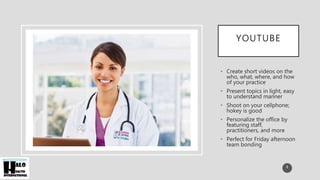
YOUTUBE
• Create short videos on the
who, what, where, and how
of your practice
• Present topics in light, easy
to understand manner
• Shoot on your cellphone;
hokey is good
• Personalize the office by
featuring staff,
practitioners, and more
• Perfect for Friday afternoon
team bonding
8
FACEBOOK
• Create a “Fan Page” for Your
Practice
• Allows you to:
• Post interesting topics and
personal messages
• Promote events
• Introduce new staff
• Encourage dialogue
between patients
• Add your YouTube videos
for added exposure
• Engage patients in private
conversations
9
TWITTER
• Twitter allows you to the same things as
Facebook plus:
• Interact in a quicker, less formal manner
• Post images and videos to spur discussion to a
wider audience
• Follow peers to see what topics are resonating
with their patient base
• Create flash alerts for important practice issues
10
INSTAGRAM
• Very trendy for your younger patients
• Post photos and quick captions
• Great for “specials” and news flashes
• Let patients know when you are at community events
• Introduce new staff as soon as they start
11
PINTEREST
• Social photo board
• Great for recipes, healthy
activities, candid office
shots
• “Mom” is a power user of
this medium
• Focus on what makes her
tick
• Exercises
• Disease Recognition
• Health and Beauty Tips
12
EMBRACE TELEHEALTH
• Invest in making your office telehealth friendly
• Patients need to have the confidence that someone will
answer their emergency calls during off hours and be able
to discern whether they are having a true medical
emergency or something that can wait until morning.
• Get a simple telehealth program from Skype or a more
robust one from Telehealth Services to safely and
securely diagnose the situation
• Share the duties with your partners or outsource them
so you are not on call 24/7
13
“PERSONALIZE” COMMUNICATIONS
• In addition to sending birthday cards, appointment reminders, and
newsletters, focus on reaching people based on their disease states
• Send targeted emails to your diabetes patients with tips, recipes, and exercises.
Do the same for each disease state.
• Have your office call after every visit for any patient questions or
confusion especially after a new diagnosis
• Send patients a record of their appointment including a copy of your
notes and their action plan.
14
“PERSONALIZE”
COMMUNICATIONS
• Increase your monthly communication:
• Send your patients planning tools for their
appointments, things like food journals, exercise
logs, sleep logs, etc.
• Don’t worry if you think it is overkill. Anything
that gets them thinking about your practice as
the go to for their health.
• There are great third party software programs
that can automate this.
15
IMPROVE YOUR OFFICE
EXPERIENCE
• Turn Your Office into an Education Station:
• Invest in digital patient education in your waiting, exam and
in patient rooms.
• Work with a company like Halo Health who customizes the
content so that the only message your patients hear is yours.
• Tell your patients about your services, your community
involvement, your ancillary service providers, and your staff
while they wait.
16
IMPROVE YOUR OFFICE
EXPERIENCE
• Turn Your Office into an Education Station:
• Give them tips on how to live healthier, feel better and be
more productive.
• Deliver this information on HDTVs which is we all know is a
format patients are used to viewing.
• Inform your patients on all of the extra services that they
receive by working with you- and how you are the only
resource they need to manage their health.
17
WHY INVEST IN THESE METHODS?
• Most of these activities lead to “billable events”:
• Appointments
• Referrals
• Better conversations with your patients
• Positive Outcomes
• Many practices have seen great returns on investment (ROI) (5X or
more) for as little as $10,000 per year.
18
CALL HALO HEALTH,
WE CAN HELP YOU
Do more than work with an education company that
pushes pharmaceuticals and retailers on your patients.
Work with one who understands how to combat Dr.
Google.
19
CONTACT US (JIM@HALOHEALS.COM)
OR (856) 520-8655 TO SEE HOW HALO
HEALTH CAN MAKE YOUR OFFICE THE
GO TO RESOURCE FOR YOUR PATIENTS.
LEARN MORE AT
WWW.HALOHEALS.COM.
20

Combatting Doctor Google

  • 1.
  • 2.
    WHO IS DR.GOOGLE? • Your Major Competitor • Most famous doctors on the planet • Almost every one of your patients consults with her before they contact you • Dr. Google only performs house calls and is open 24/7/365 2
  • 3.
    WHO IS DR. GOOGLE? •Does not charge your patients for her advice, but her advice changes every time you ask her about your symptoms. • Never pinpoints what is wrong, leaving your patients to guess what they have and self-diagnose. • Trust what she says and your patients are not seeing you because of it. 3
  • 4.
    WHAT CAN YOUDO TO STOP DR. GOOGLE? • To combat Dr. Google and her team of copycats, Dr. Facebook and Dr. Twitter, you need to turn your practice into a Learning and Service Center. • Improve Your Website • Master Social Media • Embrace Telehealth • Utilize “Personalized” Email • Turn Practice into Education Center 4
  • 5.
    IMPROVE YOUR WEBSITE •Make sure your patients can find the information they need on your website. • Invest in a robust education section on your website that explains: • Your specialty • The services you provide • The common symptoms of the diseases you treat • Information on how to know when to make an appointment versus running to the emergency room 5
  • 6.
    IMPROVE YOUR WEBSITE •Work with your web developer: • Make the site easy to use • Create hot buttons to learn about frequent issues • Keep the design clean • Tell everyone how great your practice is upfront and center 6
  • 7.
    MASTER SOCIAL MEDIA •Build Awareness of Your Practice’s Expertise by Utilizing the Big Five: • YouTube • Facebook • Twitter • Instagram • Pinterest 7
  • 8.
    YOUTUBE • Create shortvideos on the who, what, where, and how of your practice • Present topics in light, easy to understand manner • Shoot on your cellphone; hokey is good • Personalize the office by featuring staff, practitioners, and more • Perfect for Friday afternoon team bonding 8
  • 9.
    FACEBOOK • Create a“Fan Page” for Your Practice • Allows you to: • Post interesting topics and personal messages • Promote events • Introduce new staff • Encourage dialogue between patients • Add your YouTube videos for added exposure • Engage patients in private conversations 9
  • 10.
    TWITTER • Twitter allowsyou to the same things as Facebook plus: • Interact in a quicker, less formal manner • Post images and videos to spur discussion to a wider audience • Follow peers to see what topics are resonating with their patient base • Create flash alerts for important practice issues 10
  • 11.
    INSTAGRAM • Very trendyfor your younger patients • Post photos and quick captions • Great for “specials” and news flashes • Let patients know when you are at community events • Introduce new staff as soon as they start 11
  • 12.
    PINTEREST • Social photoboard • Great for recipes, healthy activities, candid office shots • “Mom” is a power user of this medium • Focus on what makes her tick • Exercises • Disease Recognition • Health and Beauty Tips 12
  • 13.
    EMBRACE TELEHEALTH • Investin making your office telehealth friendly • Patients need to have the confidence that someone will answer their emergency calls during off hours and be able to discern whether they are having a true medical emergency or something that can wait until morning. • Get a simple telehealth program from Skype or a more robust one from Telehealth Services to safely and securely diagnose the situation • Share the duties with your partners or outsource them so you are not on call 24/7 13
  • 14.
    “PERSONALIZE” COMMUNICATIONS • Inaddition to sending birthday cards, appointment reminders, and newsletters, focus on reaching people based on their disease states • Send targeted emails to your diabetes patients with tips, recipes, and exercises. Do the same for each disease state. • Have your office call after every visit for any patient questions or confusion especially after a new diagnosis • Send patients a record of their appointment including a copy of your notes and their action plan. 14
  • 15.
    “PERSONALIZE” COMMUNICATIONS • Increase yourmonthly communication: • Send your patients planning tools for their appointments, things like food journals, exercise logs, sleep logs, etc. • Don’t worry if you think it is overkill. Anything that gets them thinking about your practice as the go to for their health. • There are great third party software programs that can automate this. 15
  • 16.
    IMPROVE YOUR OFFICE EXPERIENCE •Turn Your Office into an Education Station: • Invest in digital patient education in your waiting, exam and in patient rooms. • Work with a company like Halo Health who customizes the content so that the only message your patients hear is yours. • Tell your patients about your services, your community involvement, your ancillary service providers, and your staff while they wait. 16
  • 17.
    IMPROVE YOUR OFFICE EXPERIENCE •Turn Your Office into an Education Station: • Give them tips on how to live healthier, feel better and be more productive. • Deliver this information on HDTVs which is we all know is a format patients are used to viewing. • Inform your patients on all of the extra services that they receive by working with you- and how you are the only resource they need to manage their health. 17
  • 18.
    WHY INVEST INTHESE METHODS? • Most of these activities lead to “billable events”: • Appointments • Referrals • Better conversations with your patients • Positive Outcomes • Many practices have seen great returns on investment (ROI) (5X or more) for as little as $10,000 per year. 18
  • 19.
    CALL HALO HEALTH, WECAN HELP YOU Do more than work with an education company that pushes pharmaceuticals and retailers on your patients. Work with one who understands how to combat Dr. Google. 19
  • 20.
    CONTACT US (JIM@HALOHEALS.COM) OR(856) 520-8655 TO SEE HOW HALO HEALTH CAN MAKE YOUR OFFICE THE GO TO RESOURCE FOR YOUR PATIENTS. LEARN MORE AT WWW.HALOHEALS.COM. 20