Combating Phishing Emails
with SPF/DKIM/DMARC
Security Awareness Program 2016 – Technical Session Part 2
SPF
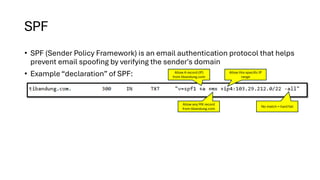
• SPF (Sender Policy Framework) is an email authentication protocol that helps
prevent email spoofing by verifying the sender's domain
• Example “declaration” of SPF: Allow A record (IP)
from tibandung.com
Allow any MX record
from tibandung.com
Allow this specific IP
range
No match = hard fail
DKIM
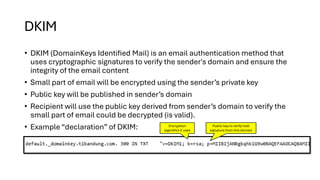
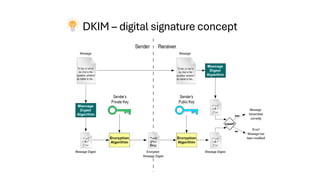
• DKIM (DomainKeys Identified Mail) is an email authentication method that
uses cryptographic signatures to verify the sender's domain and ensure the
integrity of the email content
• Small part of email will be encrypted using the sender’s private key
• Public key will be published in sender’s domain
• Recipient will use the public key derived from sender’s domain to verify the
small part of email could be decrypted (is valid).
• Example “declaration” of DKIM: Encryption
algorithm it uses
Public key to verify mail
signature from this domain
DMARC
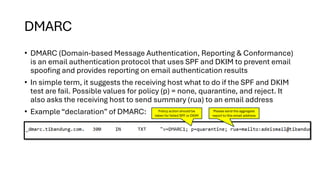
• DMARC (Domain-based Message Authentication, Reporting & Conformance)
is an email authentication protocol that uses SPF and DKIM to prevent email
spoofing and provides reporting on email authentication results
• In simple term, it suggests the receiving host what to do if the SPF and DKIM
test are fail. Possible values for policy (p) = none, quarantine, and reject. It
also asks the receiving host to send summary (rua) to an email address
• Example “declaration” of DMARC: Policy action should be
taken for failed SPF or DKIM
Please send the aggregate
report to this email address
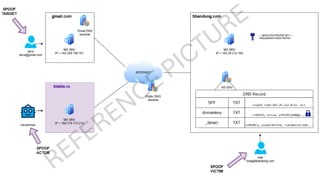
Simulation: Sending spoof email to Alice from Bob
• Send email to: alice@gmail.com
• Spoof email sent from a mailer host ‘blabla.ru’ (not a real domain
name ☺) claimed to be from: bob@tibandung.com
• How will Alice’s Gmail respond?
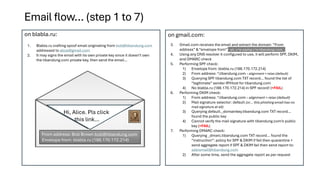
Email flow… (step 1 to 7)
1. Blabla.ru crafting spoof email originating from bob@tibandung.com
addressed to alice@gmail.com
2. It may signs the email with its own private key since it doesn’t own
the tibandung.com private key, then send the email…
on blabla.ru: on gmail.com:
3. Gmail.com receives the email and extract the domain “From
address” & “envelope from” – ah, u’re saying u’re tibandung.com…
4. Using any DNS resolver it configured to use, it will perform SPF, DKIM,
and DMARC check
5. Performing SPF check:
1) Envelope from: blabla.ru (188.170.172.214)
2) From address: *.tibandung.com – alignment = relax (default)
3) Querying SPF tibandung.com TXT record… found the list of
“legitimate” sender IP/Host for tibandung.com
4) No blabla.ru (188.170.172.214) in SPF record! (=FAIL)
6. Performing DKIM check:
1) From address: *.tibandung.com – alignment = relax (default)
2) Mail signature selector: default (or… this phishing email has no
mail signature at all)
3) Querying default._domainkey.tibandung.com TXT record…
found the public key
4) Cannot verify the mail signature with tibandung.com’s public
key (=FAIL)
7. Performing DMARC check:
1) Querying _dmarc.tibandung.com TXT record… found the
“instruction”: policy for SPF & DKIM if fail then quarantine +
send aggregate report if SPF & DKIM fail then send report to:
adeismail@tibandung.com
2) After some time, send the aggregate report as per request
From address: Bob Brown bob@tibandung.com
Envelope from: blabla.ru (188.170.172.214)
Hi, Alice. Pls click
this link…
DKIM – digital signature concept
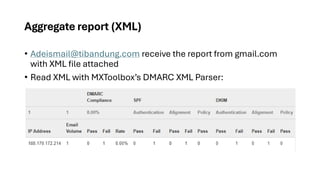
Aggregate report (XML)
• Adeismail@tibandung.com receive the report from gmail.com
with XML file attached
• Read XML with MXToolbox’s DMARC XML Parser:
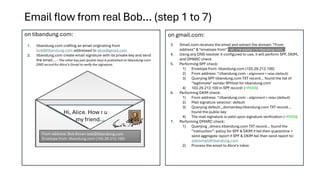
Email flow from real Bob… (step 1 to 7)
1. tibandung.com crafting an email originating from
bob@tibandung.com addressed to alice@gmail.com
2. tibandung.com create email signature with its private key and send
the email… – The other key pair (public key) is published on tibandung.com
DNS record for Alice’s Gmail to verify the signature.
on tibandung.com: on gmail.com:
3. Gmail.com receives the email and extract the domain “From
address” & “envelope from” – ah, u’re saying u’re tibandung.com…
4. Using any DNS resolver it configured to use, it will perform SPF, DKIM,
and DMARC check
5. Performing SPF check:
1) Envelope from: tibandung.com (103.29.212.100)
2) From address: *.tibandung.com – alignment = relax (default)
3) Querying SPF tibandung.com TXT record… found the list of
“legitimate” sender IP/Host for tibandung.com
4) 103.29.212.100 in SPF record! (=PASS)
6. Performing DKIM check:
1) From address: *.tibandung.com – alignment = relax (default)
2) Mail signature selector: default
3) Querying default._domainkey.tibandung.com TXT record…
found the public key
4) The mail signature is valid upon signature verification (=PASS)
7. Performing DMARC check:
1) Querying _dmarc.tibandung.com TXT record… found the
“instruction”: policy for SPF & DKIM if fail then quarantine +
send aggregate report if SPF & DKIM fail then send report to:
adeismail@tibandung.com
2) Process the email to Alice’s inbox
From address: Bob Brown bob@tibandung.com
Envelope from: tibandung.com (103.29.212.100)
Hi, Alice. How r u
my friend…
k, thx, bye.

Combating Phishing Emails with SPF, DKIM, DMARC

  • 1.
    Combating Phishing Emails withSPF/DKIM/DMARC Security Awareness Program 2016 – Technical Session Part 2
  • 2.
    SPF • SPF (SenderPolicy Framework) is an email authentication protocol that helps prevent email spoofing by verifying the sender's domain • Example “declaration” of SPF: Allow A record (IP) from tibandung.com Allow any MX record from tibandung.com Allow this specific IP range No match = hard fail
  • 3.
    DKIM • DKIM (DomainKeysIdentified Mail) is an email authentication method that uses cryptographic signatures to verify the sender's domain and ensure the integrity of the email content • Small part of email will be encrypted using the sender’s private key • Public key will be published in sender’s domain • Recipient will use the public key derived from sender’s domain to verify the small part of email could be decrypted (is valid). • Example “declaration” of DKIM: Encryption algorithm it uses Public key to verify mail signature from this domain
  • 4.
    DMARC • DMARC (Domain-basedMessage Authentication, Reporting & Conformance) is an email authentication protocol that uses SPF and DKIM to prevent email spoofing and provides reporting on email authentication results • In simple term, it suggests the receiving host what to do if the SPF and DKIM test are fail. Possible values for policy (p) = none, quarantine, and reject. It also asks the receiving host to send summary (rua) to an email address • Example “declaration” of DMARC: Policy action should be taken for failed SPF or DKIM Please send the aggregate report to this email address
  • 5.
    Simulation: Sending spoofemail to Alice from Bob • Send email to: alice@gmail.com • Spoof email sent from a mailer host ‘blabla.ru’ (not a real domain name ☺) claimed to be from: bob@tibandung.com • How will Alice’s Gmail respond?
  • 7.
    Email flow… (step1 to 7) 1. Blabla.ru crafting spoof email originating from bob@tibandung.com addressed to alice@gmail.com 2. It may signs the email with its own private key since it doesn’t own the tibandung.com private key, then send the email… on blabla.ru: on gmail.com: 3. Gmail.com receives the email and extract the domain “From address” & “envelope from” – ah, u’re saying u’re tibandung.com… 4. Using any DNS resolver it configured to use, it will perform SPF, DKIM, and DMARC check 5. Performing SPF check: 1) Envelope from: blabla.ru (188.170.172.214) 2) From address: *.tibandung.com – alignment = relax (default) 3) Querying SPF tibandung.com TXT record… found the list of “legitimate” sender IP/Host for tibandung.com 4) No blabla.ru (188.170.172.214) in SPF record! (=FAIL) 6. Performing DKIM check: 1) From address: *.tibandung.com – alignment = relax (default) 2) Mail signature selector: default (or… this phishing email has no mail signature at all) 3) Querying default._domainkey.tibandung.com TXT record… found the public key 4) Cannot verify the mail signature with tibandung.com’s public key (=FAIL) 7. Performing DMARC check: 1) Querying _dmarc.tibandung.com TXT record… found the “instruction”: policy for SPF & DKIM if fail then quarantine + send aggregate report if SPF & DKIM fail then send report to: adeismail@tibandung.com 2) After some time, send the aggregate report as per request From address: Bob Brown bob@tibandung.com Envelope from: blabla.ru (188.170.172.214) Hi, Alice. Pls click this link…
  • 8.
    DKIM – digitalsignature concept
  • 9.
    Aggregate report (XML) •Adeismail@tibandung.com receive the report from gmail.com with XML file attached • Read XML with MXToolbox’s DMARC XML Parser:
  • 10.
    Email flow fromreal Bob… (step 1 to 7) 1. tibandung.com crafting an email originating from bob@tibandung.com addressed to alice@gmail.com 2. tibandung.com create email signature with its private key and send the email… – The other key pair (public key) is published on tibandung.com DNS record for Alice’s Gmail to verify the signature. on tibandung.com: on gmail.com: 3. Gmail.com receives the email and extract the domain “From address” & “envelope from” – ah, u’re saying u’re tibandung.com… 4. Using any DNS resolver it configured to use, it will perform SPF, DKIM, and DMARC check 5. Performing SPF check: 1) Envelope from: tibandung.com (103.29.212.100) 2) From address: *.tibandung.com – alignment = relax (default) 3) Querying SPF tibandung.com TXT record… found the list of “legitimate” sender IP/Host for tibandung.com 4) 103.29.212.100 in SPF record! (=PASS) 6. Performing DKIM check: 1) From address: *.tibandung.com – alignment = relax (default) 2) Mail signature selector: default 3) Querying default._domainkey.tibandung.com TXT record… found the public key 4) The mail signature is valid upon signature verification (=PASS) 7. Performing DMARC check: 1) Querying _dmarc.tibandung.com TXT record… found the “instruction”: policy for SPF & DKIM if fail then quarantine + send aggregate report if SPF & DKIM fail then send report to: adeismail@tibandung.com 2) Process the email to Alice’s inbox From address: Bob Brown bob@tibandung.com Envelope from: tibandung.com (103.29.212.100) Hi, Alice. How r u my friend…
  • 11.