In this lecturewe will learn:
• How all forms of data are represented as 0s and 1s
• That ASCII and Unicode are coding systems for characters and numbers
• How to check for and correct errors in data
• How bit-mapped graphics are created
• How analogue and digital data are transmitted and converted
• How sound is sampled and digitised
• How to compress data using lossy and lossless techniques.
Learning Objectives
3.
Introduction
• Binary codescan also be used to represent text and characters.
• The term character is used in the widest sense to include all the keyboard characters, control and
special characters.
• Each character has a character code, which is its binary representation.
• Two Binary Uses:
•True Numbers: Used for calculations.
•Character Codes: Represent numbers or characters not involved in calculations
(e.g., house numbers, phone numbers).
•Key Distinction:
•Binary for mathematical calculations vs. coding systems for character representation.
4.
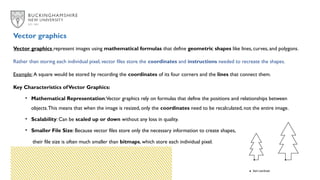
Early Days ofBinary Coding
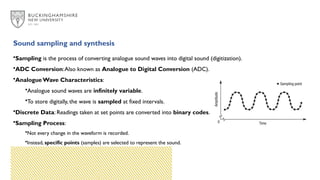
In early days of Binary Coding, Custom Coding Systems was used:
•Programmers created their own sequences of 0s and 1s to represent characters.
•Example:
•00000000 for A
•00000001 for B
•Problem:
•Different programmers used different codes, leading to confusion and inconsistency.
5.
ASCII and Unicode
ASCIIStandard
• Why the Need for a Standard?
• Confusion due to different coding systems for characters.
• Solution:
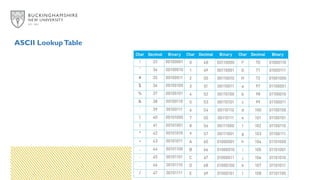
• ASCII:American Standard Code for Information Interchange.
• Key Features:
• 7-bit code (128 permutations) for common characters, which is enough for the most commonly
used characters.
• Extended ASCII: 8-bit code (256 characters) for wider representation.
Limitation of ASCII
•ASCII was until recently the standard method of converting keyboard and other characters into binary
codes.
• However,ASCII does have certain limitations:
•Character Limit:
• Only 256 characters, not enough for all possible symbols and characters.
•Language Limitation:
• Initially developed for English, lacks representation of other languages and scripts.
•Global Web Usage:
• The internet’s growth required a universal international coding system.
•Expanded Platforms & Programs:
• More developers worldwide use a broader range of characters.
8.
• Based onASCII:
• Unicode follows the same principles as ASCII, with unique 8-bit codes for
standard English keyboard characters.
• Compatibility with ASCII:
• ASCII codes are incorporated into Unicode (e.g., capital letter 'A' is 65 in both
systems).
• International Support:
• Unicode includes characters from over 20 countries.
• Historical and Classical Scripts:
• Supports a wide range of ancient and classical characters.
Emergence of Unicode
9.
Unicode Encoding
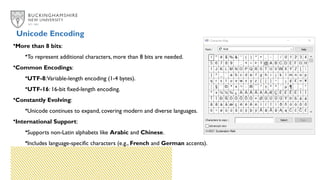
•More than8 bits:
•To represent additional characters, more than 8 bits are needed.
•Common Encodings:
•UTF-8:Variable-length encoding (1-4 bytes).
•UTF-16: 16-bit fixed-length encoding.
•Constantly Evolving:
•Unicode continues to expand, covering modern and diverse languages.
•International Support:
•Supports non-Latin alphabets like Arabic and Chinese.
•Includes language-specific characters (e.g., French and German accents).
10.
Importance of UniversalStandards: Unicode
• Universal Adoption:
• Crucial for the entire computing industry worldwide.
• Global Data Sharing:
• Increased Internet use requires consistent encoding to avoid data corruption.
• Cross-Platform Compatibility:
• Unicode ensures smooth data exchange across different hardware, operating systems, and programs.
• Multilingual Support:
• Covers a wide range of languages and scripts to support global communication.
11.
Error checking andcorrection
• Data is being transmitted around the computer all the time.
• All this data is made up of strings of 0s and 1s.
• It is possible that the data can get corrupted at any point either when it is being processed or
transmitted.
• There are various methods for checking and correcting errors in data.
12.
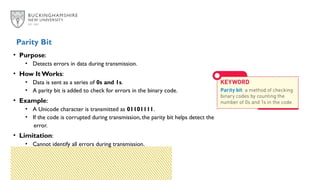
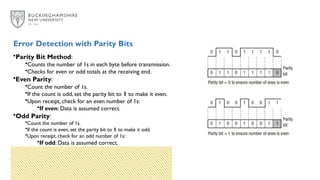
• Purpose:
• Detectserrors in data during transmission.
• How It Works:
• Data is sent as a series of 0s and 1s.
• A parity bit is added to check for errors in the binary code.
• Example:
• A Unicode character is transmitted as 01101111.
• If the code is corrupted during transmission, the parity bit helps detect the
error.
• Limitation:
• Cannot identify all errors during transmission.
Parity Bit
13.
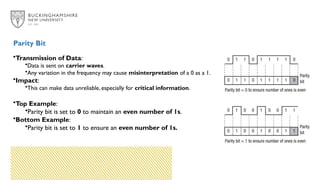
•Transmission of Data:
•Datais sent on carrier waves.
•Any variation in the frequency may cause misinterpretation of a 0 as a 1.
•Impact:
•This can make data unreliable, especially for critical information.
•Top Example:
•Parity bit is set to 0 to maintain an even number of 1s.
•Bottom Example:
•Parity bit is set to 1 to ensure an even number of 1s.
Parity Bit
14.
Error Detection withParity Bits
•Parity Bit Method:
•Counts the number of 1s in each byte before transmission.
•Checks for even or odd totals at the receiving end.
•Even Parity:
•Count the number of 1s.
•If the count is odd, set the parity bit to 1 to make it even.
•Upon receipt, check for an even number of 1s:
•If even: Data is assumed correct.
•Odd Parity:
•Count the number of 1s.
•If the count is even, set the parity bit to 1 to make it odd.
•Upon receipt, check for an odd number of 1s:
•If odd: Data is assumed correct.
15.
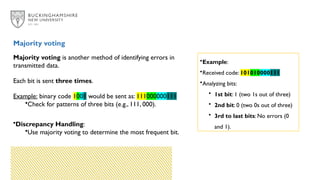
Majority voting isanother method of identifying errors in
transmitted data.
Each bit is sent three times.
Example: binary code 1001 would be sent as: 111000000111
•Check for patterns of three bits (e.g., 111, 000).
•Discrepancy Handling:
•Use majority voting to determine the most frequent bit.
Majority voting
•Example:
•Received code: 101010000111
•Analyzing bits:
• 1st bit: 1 (two 1s out of three)
• 2nd bit: 0 (two 0s out of three)
• 3rd to last bits: No errors (0
and 1).
16.
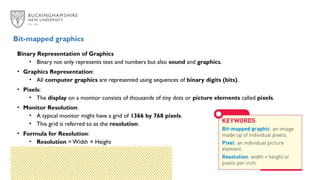
Binary Representation ofGraphics
• Binary not only represents text and numbers but also sound and graphics.
• Graphics Representation:
• All computer graphics are represented using sequences of binary digits (bits).
• Pixels:
• The display on a monitor consists of thousands of tiny dots or picture elements called pixels.
• Monitor Resolution:
• A typical monitor might have a grid of 1366 by 768 pixels.
• This grid is referred to as the resolution.
• Formula for Resolution:
• Resolution = Width × Height
Bit-mapped graphics
17.
Pixel Density andColour Representation
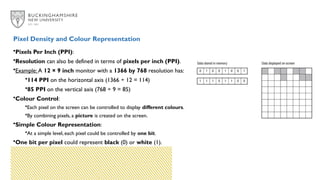
•Pixels Per Inch (PPI):
•Resolution can also be defined in terms of pixels per inch (PPI).
•Example: A 12 × 9 inch monitor with a 1366 by 768 resolution has:
•114 PPI on the horizontal axis (1366 ÷ 12 = 114)
•85 PPI on the vertical axis (768 ÷ 9 = 85)
•Colour Control:
•Each pixel on the screen can be controlled to display different colours.
•By combining pixels, a picture is created on the screen.
•Simple Colour Representation:
•At a simple level, each pixel could be controlled by one bit.
•One bit per pixel could represent black (0) or white (1).
18.
Colour Depth
•Pixel Representation:
•Apixel might be represented by a byte (8 bits) in memory.
•This allows for 2^8 or 256 different colours for each pixel.
•Colour Depth:
•The amount of memory allocated to each pixel is called the colour depth.
•Higher colour depth increases the number of colours that can be represented.
•Graphics Card and Bit-Mapping:
•Your computer uses a graphics card to control how graphics are displayed.
•The amount of memory allocated for bit-mapping graphics depends on the memory available on the
graphics card.
19.
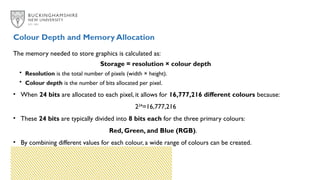
The memory neededto store graphics is calculated as:
Storage = resolution × colour depth
• Resolution is the total number of pixels (width × height).
• Colour depth is the number of bits allocated per pixel.
• When 24 bits are allocated to each pixel, it allows for 16,777,216 different colours because:
224
=16,777,216
• These 24 bits are typically divided into 8 bits each for the three primary colours:
Red, Green, and Blue (RGB).
• By combining different values for each colour, a wide range of colours can be created.
Colour Depth and Memory Allocation
20.
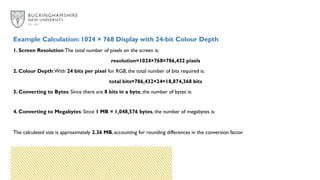
Example Calculation: 1024× 768 Display with 24-bit Colour Depth
1. Screen Resolution:The total number of pixels on the screen is:
resolution=1024×768=786,432 pixels
2. Colour Depth:With 24 bits per pixel for RGB, the total number of bits required is:
total bits=786,432×24=18,874,368 bits
3. Converting to Bytes: Since there are 8 bits in a byte, the number of bytes is:
4. Converting to Megabytes: Since 1 MB = 1,048,576 bytes, the number of megabytes is:
The calculated size is approximately 2.36 MB, accounting for rounding differences in the conversion factor.
21.
Bitmaps often includemetadata stored in a file header.This metadata provides
information about:
• The file type.
• The width and height of the image in pixels.
• The colour depth used.
This extra data is essential for proper rendering and interpretation of the image but
adds to the overall file size slightly beyond the pixel data itself.
Metadata in Bitmap Files
22.
Vector graphics representimages using mathematical formulas that define geometric shapes like lines, curves, and polygons.
Rather than storing each individual pixel, vector files store the coordinates and instructions needed to recreate the shapes.
Example: A square would be stored by recording the coordinates of its four corners and the lines that connect them.
Key Characteristics ofVector Graphics:
• Mathematical Representation:Vector graphics rely on formulas that define the positions and relationships between
objects.This means that when the image is resized, only the coordinates need to be recalculated, not the entire image.
• Scalability: Can be scaled up or down without any loss in quality.
• Smaller File Size: Because vector files store only the necessary information to create shapes,
their file size is often much smaller than bitmaps, which store each individual pixel.
Vector graphics
23.
Sound sampling andsynthesis
•Sampling is the process of converting analogue sound waves into digital sound (digitization).
•ADC Conversion:Also known as Analogue to Digital Conversion (ADC).
•Analogue Wave Characteristics:
•Analogue sound waves are infinitely variable.
•To store digitally, the wave is sampled at fixed intervals.
•Discrete Data: Readings taken at set points are converted into binary codes.
•Sampling Process:
•Not every change in the waveform is recorded.
•Instead, specific points (samples) are selected to represent the sound.
24.
• Binary codescan be used to represent text, characters, numbers, graphics, video and audio.
• ASCII and Unicode are systems for representing characters.
• It is possible that the data can get corrupted at any point when it is being either processed or transmitted.
• Error detection and correction methods include check digits and majority voting.
• Bit-mapped graphics are made up of individual pixels (picture elements).
• Vector graphics are composed of objects.
• Resolution is the measure of the height and width of an image.
• Analogue signals such as sound waves need to be converted into digital form so they can be processed by the
computer by sampling.
Key Points




![[1] Data Representation](https://cdn.slidesharecdn.com/ss_thumbnails/1-data-representation-1223301143048751-8-thumbnail.jpg?width=640&height=640&fit=bounds)


![How Big Brands are Taking Your Traffic in Alberta [Data Inside].pptx](https://cdn.slidesharecdn.com/ss_thumbnails/howbigbrandsaretakingyourtrafficinalbertadatainside-260123180142-42d276f3-thumbnail.jpg?width=640&height=640&fit=bounds)


