Collection Framework
R.Hannah Roseline
Assistant Professor
What is a Framework?
• A framework is a set
of classes and interfaces which provide a ready-
made architecture.
• An optimal object-oriented design always
includes a framework with a collection of classes
such that all the classes perform the same kind
of task.
Collections in Java / Collections Framework
• The Java collections framework provides a set
of interfaces and classes to implement various
data structures and algorithms.
• Java Collections can achieve all the operations
that you perform on a data such as searching,
sorting, insertion, manipulation, and
deletion.
What is Collection in Java
• Java Collection means a single unit of objects.
(i.e., a group)
• Java Collection framework provides many
interfaces
(Set, List, Queue, Deque) and classes
(ArrayList, Vector, LinkedList, PriorityQueue,
HashSet, LinkedHashSet, TreeSet).
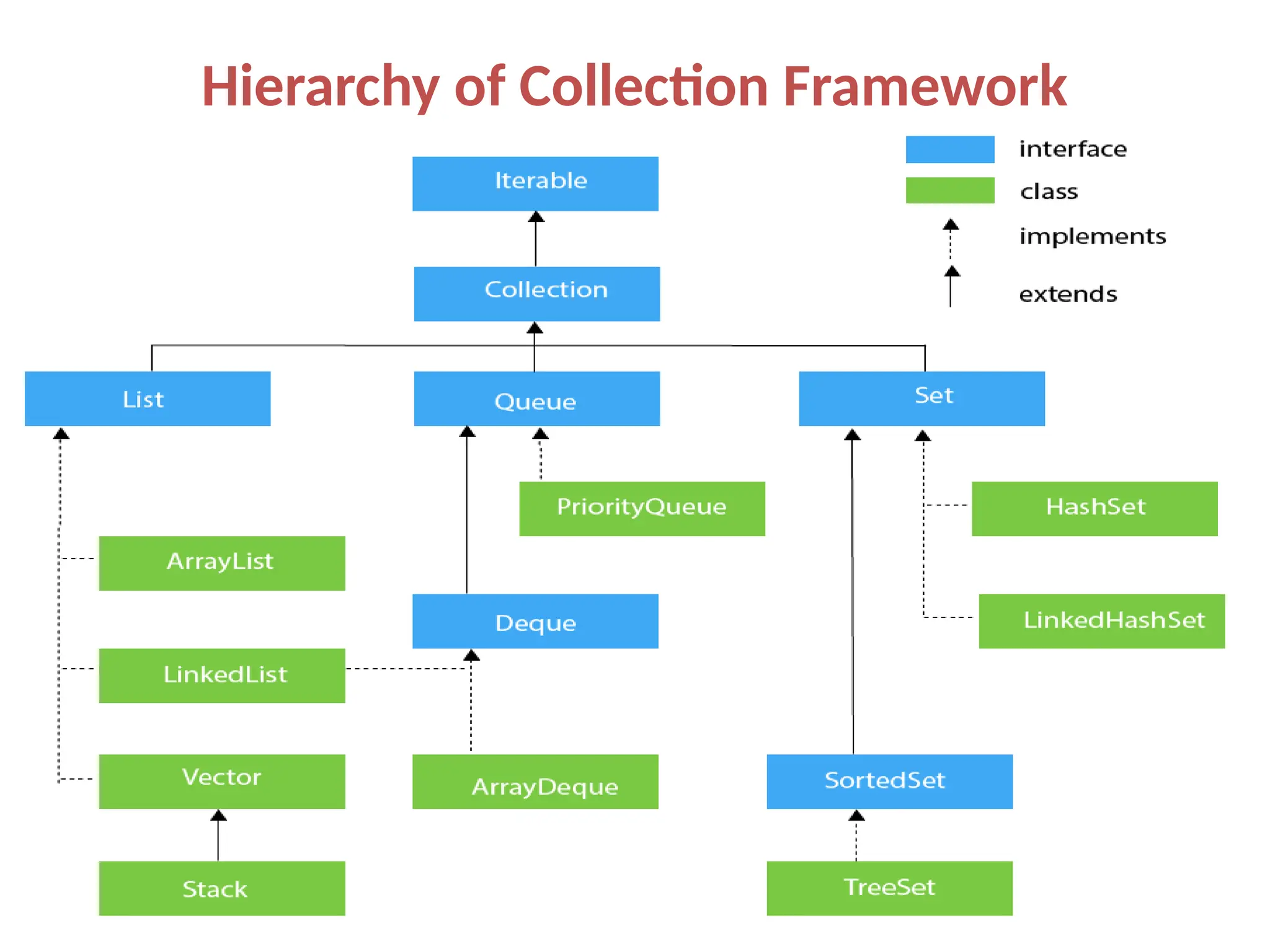
Hierarchy of Collection Framework
Methods of Collection interface
No. Method Description
1 public boolean add(E e) It is used to insert an element in this collection.
2 public boolean addAll(Collection<?
extends E> c)
It is used to insert the specified collection elements in the invoking collection.
3 public boolean remove(Object element) It is used to delete an element from the collection.
4 public boolean
removeAll(Collection<?> c)
It is used to delete all the elements of the specified collection from the
invoking collection.
5 default boolean removeIf(Predicate<?
super E> filter)
It is used to delete all the elements of the collection that satisfy the specified
predicate.
6 public boolean retainAll(Collection<?>
c)
It is used to delete all the elements of invoking collection except the specified
collection.
7 public int size() It returns the total number of elements in the collection.
8 public void clear() It removes the total number of elements from the collection.
9 public boolean contains(Object
element)
It is used to search an element.
10 public boolean
containsAll(Collection<?> c)
It is used to search the specified collection in the collection.
11 public Iterator iterator() It returns an iterator.
12 public Object[] toArray() It converts collection into array.
13 public <T> T[] toArray(T[] a) It converts collection into array. Here, the runtime type of the returned array is
that of the specified array.
14 public boolean isEmpty() It checks if collection is empty.
15 default Stream<E> parallelStream() It returns a possibly parallel Stream with the collection as its source.
16 default Stream<E> stream() It returns a sequential Stream with the collection as its source.
17 default Spliterator<E> spliterator() It generates a Spliterator over the specified elements in the collection.
18 public boolean equals(Object element) It matches two collections.
19 public int hashCode() It returns the hash code number of the collection.
List Interface
• To store the ordered collection of objects. It
can have duplicate values.
• List interface is implemented by the classes
ArrayList, LinkedList, Vector, and Stack.
Example
List <data-type> list1= new ArrayList();
List <data-type> list2 = new LinkedList();
List <data-type> list3 = new Vector();
List <data-type> list4 = new Stack();
There are various methods in List interface that can be used to insert, delete, and
access the elements from the list.
The classes that implement the List interface
are given below.
ArrayList :
• The ArrayList class implements the List interface.
• It uses a dynamic array to store the duplicate
element of different data types.
• The ArrayList class maintains the insertion order
and is non-synchronized.
• The elements stored in the ArrayList class can be
randomly accessed.
Java Iterators
• to access every item in a collection of items -
We call this traversing or iterating
• Example: array for
(inti = 0; i < array.length; i++)
// do something with array[i]
• Java provides an interface for stepping through
all elements in any collection, called an iterator
Iterating through an ArrayList
• Iterating through an ArrayListn Iterating through an ArrayList

of Strings:
for (int i = 0; i < list.size(); i++)
{
String s = list.get(i); //do something with s
}
Alternative:
Iterator<String> itr = list.iterator();
while (itr.hasNext())
{
String s = list.next();
}
This syntax of iteration is generic and
applies to any Java class that implements
the Iterator interface
the code will work even if we decide to store
the data in a different data structure (as long
as it provides an iterator)
Iterator Interface
Iterator<T>: - a generic interface with the following
methods
• public booleanhasNext(); returns true if there are
more elements to iterate over
• public T next(); returns the next element
– throws a NoSuchElement exception if a next element does
not exist
• public void remove(); removes the last element
returned by the iterator (optional operation)
• It is in the java.utilpackage
ArrayList :
import java.util.*;
class TestJavaCollection1{
public static void main(String args[]){
ArrayList<String> list=new ArrayList<String>();//Creating arraylist
list.add("Ravi");//Adding object in arraylist
list.add("Vijay");
list.add("Ravi");
list.add("Ajay");
//Traversing list through Iterator
Iterator itr=list.iterator();
while(itr.hasNext()){
System.out.println(itr.next());
}
}
}
Output:
Ravi
Vijay
Ravi
Ajay
LinkedList
• LinkedList implements the Collection interface.
• It uses a doubly linked list internally to store the
elements.
• It can store the duplicate elements. It
maintains the insertion order and is not
synchronized.
• In LinkedList, the manipulation is fast because
no shifting is required.
import java.util.*;
public class TestJavaCollection2{
public static void main(String args[]){
LinkedList<String> al=new LinkedList<String>();
al.add("Ravi");
al.add("Vijay");
al.add("Ravi");
al.add("Ajay");
Iterator<String> itr=al.iterator();
while(itr.hasNext()){
System.out.println(itr.next());
}
}
}
LinkedList
Output:
Ravi
Vijay
Ravi
Ajay
Vector
• Vector uses a dynamic array to store the data
elements.
• It is similar to ArrayList.
• However, It is synchronized and contains many
methods that are not the part of Collection
framework.
import java.util.*;
public class TestJavaCollection3{
public static void main(String args[]){
Vector<String> v=new Vector<String>();
v.add("Ayush");
v.add("Amit");
v.add("Ashish");
v.add("Garima");
Iterator<String> itr=v.iterator();
while(itr.hasNext()){
System.out.println(itr.next());
}
}
}
Output:
Ayush
Amit
Ashish
Garima
Vector
Stack
• The stack is the subclass of Vector.
• It implements the last-in-first-out data structure,
i.e., Stack.
• The stack contains all of the methods of Vector
class and also provides its methods like boolean
push(),
boolean peek(),
boolean push(object o), which defines its
properties.
import java.util.*;
public class TestJavaCollection4{
public static void main(String args[]){
Stack<String> stack = new Stack<String>();
stack.push("Ayush");
stack.push("Garvit");
stack.push("Amit");
stack.push("Ashish");
stack.push("Garima");
stack.pop();
Iterator<String> itr=stack.iterator();
while(itr.hasNext()){
System.out.println(itr.next());
}
}
}
Output:
Ayush
Garvit
Amit
Ashish
Stack
HashSet
• to create a collection that uses a hash table for storage.
• It inherits the AbstractSet class and implements Set
interface.
• It stores the elements by using a mechanism
called hashing.
• It contains unique elements only.
• It allows null value.
• HashSet class is non synchronized.
• It doesn't maintain the insertion order. Here, elements
are inserted on the basis of their hashcode.
• It is the best approach for search operations.
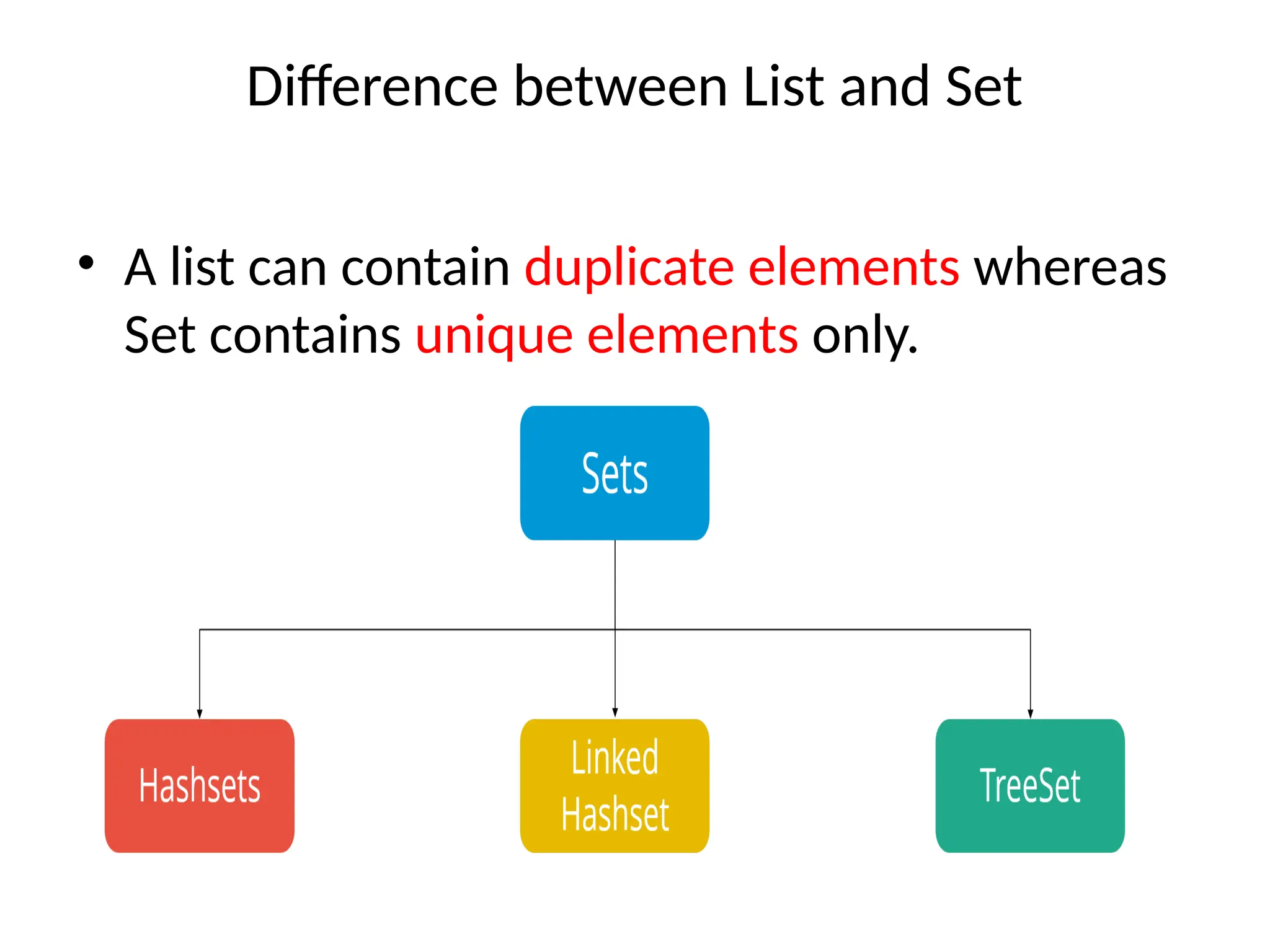
Difference between List and Set
• A list can contain duplicate elements whereas
Set contains unique elements only.
HashSet example ignoring duplicate elements
import java.util.*;
class HashSet2{
public static void main(String args[]){
//Creating HashSet and adding elements
HashSet<String> set=new HashSet<String>();
set.add("Ravi");
set.add("Vijay");
set.add("Ravi");
set.add("Ajay");
//Traversing elements
Iterator<String> itr=set.iterator();
while(itr.hasNext()){
System.out.println(itr.next());
}
}
}
Ajay
Vijay
Ravi
Java Collections – Map
• A Map is an object that maps keys to values.
• A map cannot contain duplicate keys.
• There are three main implementations of Map
interfaces: HashMap, TreeMap, and LinkedHashMap.
• HashMap: it makes no guarantees concerning the order
of iteration
• TreeMap: It stores its elements in a red-black tree,
orders its elements based on their values; it is
substantially slower than HashMap.
• LinkedHashMap: It orders its elements based on the
order in which they were inserted into the set (insertion-
order).
HashMap
• HashMap is a Map based collection class that is
used for storing Key & value pairs,
• it is denoted as HashMap<Key, Value> or
HashMap<K, V>.
• This class makes no guarantees as to the order of
the map.
• It is similar to the Hashtable class except that it is
unsynchronized and permits nulls(null values and
null key).
HashMap
• It is not an ordered collection
• which means it does not return the keys and
values in the same order in which they have
been inserted into the HashMap.
• It does not sort the stored keys and Values.
• to import java.util.HashMap or its super class
in order to use the HashMap class and
methods.
import java.util.*;
public class HashMapExample1{
public static void main(String args[]){
HashMap<Integer,String> map=new HashMap<Integer,String>();//
Creating HashMap
map.put(1,"Mango"); //Put elements in Map
map.put(2,"Apple");
map.put(3,"Banana");
map.put(4,"Grapes");
System.out.println("Iterating Hashmap...");
for(Map.Entry m : map.entrySet()){
System.out.println(m.getKey()+" "+m.getValue());
}
}
}
import java.util.ArrayList;
class Main {
public static void main(String[] args) {
// create an array list to store Integer data
ArrayList<Integer> list1 = new ArrayList<>();
list1.add(4);
list1.add(5);
System.out.println("ArrayList of Integer: " + list1);
// creates an array list to store String data
ArrayList<String> list2 = new ArrayList<>();
list2.add("Four");
list2.add("Five");
System.out.println("ArrayList of String: " + list2);
// creates an array list to store Double data
ArrayList<Double> list3 = new ArrayList<>();
list3.add(4.5);
list3.add(6.5);
System.out.println("ArrayList of Double: " + list3);
}
}
Output
ArrayList of Integer:
[4, 5]
ArrayList of String:
[Four, Five]
ArrayList of Double:
[4.5, 6.5]
• we have used the same ArrayList class to store
elements of Integer, String, and Double types.
This is possible because of Java Generics.
• Here, notice the line,
• ArrayList<Integer> list1 = new ArrayList<>();
We have used Integer inside the angle
brackets, <>. The angle bracket, <> is known as
the type parameter in generics.
• The type parameter is used to specify the type
of objects (data) that the generics class or
method works on.

collectionsframework210616084411 (1).pptx

  • 1.
  • 2.
    What is aFramework? • A framework is a set of classes and interfaces which provide a ready- made architecture. • An optimal object-oriented design always includes a framework with a collection of classes such that all the classes perform the same kind of task.
  • 3.
    Collections in Java/ Collections Framework • The Java collections framework provides a set of interfaces and classes to implement various data structures and algorithms. • Java Collections can achieve all the operations that you perform on a data such as searching, sorting, insertion, manipulation, and deletion.
  • 4.
    What is Collectionin Java • Java Collection means a single unit of objects. (i.e., a group) • Java Collection framework provides many interfaces (Set, List, Queue, Deque) and classes (ArrayList, Vector, LinkedList, PriorityQueue, HashSet, LinkedHashSet, TreeSet).
  • 5.
  • 7.
    Methods of Collectioninterface No. Method Description 1 public boolean add(E e) It is used to insert an element in this collection. 2 public boolean addAll(Collection<? extends E> c) It is used to insert the specified collection elements in the invoking collection. 3 public boolean remove(Object element) It is used to delete an element from the collection. 4 public boolean removeAll(Collection<?> c) It is used to delete all the elements of the specified collection from the invoking collection. 5 default boolean removeIf(Predicate<? super E> filter) It is used to delete all the elements of the collection that satisfy the specified predicate. 6 public boolean retainAll(Collection<?> c) It is used to delete all the elements of invoking collection except the specified collection. 7 public int size() It returns the total number of elements in the collection. 8 public void clear() It removes the total number of elements from the collection. 9 public boolean contains(Object element) It is used to search an element. 10 public boolean containsAll(Collection<?> c) It is used to search the specified collection in the collection. 11 public Iterator iterator() It returns an iterator. 12 public Object[] toArray() It converts collection into array. 13 public <T> T[] toArray(T[] a) It converts collection into array. Here, the runtime type of the returned array is that of the specified array. 14 public boolean isEmpty() It checks if collection is empty. 15 default Stream<E> parallelStream() It returns a possibly parallel Stream with the collection as its source. 16 default Stream<E> stream() It returns a sequential Stream with the collection as its source. 17 default Spliterator<E> spliterator() It generates a Spliterator over the specified elements in the collection. 18 public boolean equals(Object element) It matches two collections. 19 public int hashCode() It returns the hash code number of the collection.
  • 8.
    List Interface • Tostore the ordered collection of objects. It can have duplicate values. • List interface is implemented by the classes ArrayList, LinkedList, Vector, and Stack. Example List <data-type> list1= new ArrayList(); List <data-type> list2 = new LinkedList(); List <data-type> list3 = new Vector(); List <data-type> list4 = new Stack(); There are various methods in List interface that can be used to insert, delete, and access the elements from the list.
  • 9.
    The classes thatimplement the List interface are given below. ArrayList : • The ArrayList class implements the List interface. • It uses a dynamic array to store the duplicate element of different data types. • The ArrayList class maintains the insertion order and is non-synchronized. • The elements stored in the ArrayList class can be randomly accessed.
  • 11.
    Java Iterators • toaccess every item in a collection of items - We call this traversing or iterating • Example: array for (inti = 0; i < array.length; i++) // do something with array[i] • Java provides an interface for stepping through all elements in any collection, called an iterator
  • 12.
    Iterating through anArrayList • Iterating through an ArrayListn Iterating through an ArrayList  of Strings: for (int i = 0; i < list.size(); i++) { String s = list.get(i); //do something with s } Alternative: Iterator<String> itr = list.iterator(); while (itr.hasNext()) { String s = list.next(); } This syntax of iteration is generic and applies to any Java class that implements the Iterator interface the code will work even if we decide to store the data in a different data structure (as long as it provides an iterator)
  • 13.
    Iterator Interface Iterator<T>: -a generic interface with the following methods • public booleanhasNext(); returns true if there are more elements to iterate over • public T next(); returns the next element – throws a NoSuchElement exception if a next element does not exist • public void remove(); removes the last element returned by the iterator (optional operation) • It is in the java.utilpackage
  • 14.
    ArrayList : import java.util.*; classTestJavaCollection1{ public static void main(String args[]){ ArrayList<String> list=new ArrayList<String>();//Creating arraylist list.add("Ravi");//Adding object in arraylist list.add("Vijay"); list.add("Ravi"); list.add("Ajay"); //Traversing list through Iterator Iterator itr=list.iterator(); while(itr.hasNext()){ System.out.println(itr.next()); } } } Output: Ravi Vijay Ravi Ajay
  • 15.
    LinkedList • LinkedList implementsthe Collection interface. • It uses a doubly linked list internally to store the elements. • It can store the duplicate elements. It maintains the insertion order and is not synchronized. • In LinkedList, the manipulation is fast because no shifting is required.
  • 17.
    import java.util.*; public classTestJavaCollection2{ public static void main(String args[]){ LinkedList<String> al=new LinkedList<String>(); al.add("Ravi"); al.add("Vijay"); al.add("Ravi"); al.add("Ajay"); Iterator<String> itr=al.iterator(); while(itr.hasNext()){ System.out.println(itr.next()); } } } LinkedList Output: Ravi Vijay Ravi Ajay
  • 18.
    Vector • Vector usesa dynamic array to store the data elements. • It is similar to ArrayList. • However, It is synchronized and contains many methods that are not the part of Collection framework.
  • 20.
    import java.util.*; public classTestJavaCollection3{ public static void main(String args[]){ Vector<String> v=new Vector<String>(); v.add("Ayush"); v.add("Amit"); v.add("Ashish"); v.add("Garima"); Iterator<String> itr=v.iterator(); while(itr.hasNext()){ System.out.println(itr.next()); } } } Output: Ayush Amit Ashish Garima Vector
  • 21.
    Stack • The stackis the subclass of Vector. • It implements the last-in-first-out data structure, i.e., Stack. • The stack contains all of the methods of Vector class and also provides its methods like boolean push(), boolean peek(), boolean push(object o), which defines its properties.
  • 22.
    import java.util.*; public classTestJavaCollection4{ public static void main(String args[]){ Stack<String> stack = new Stack<String>(); stack.push("Ayush"); stack.push("Garvit"); stack.push("Amit"); stack.push("Ashish"); stack.push("Garima"); stack.pop(); Iterator<String> itr=stack.iterator(); while(itr.hasNext()){ System.out.println(itr.next()); } } } Output: Ayush Garvit Amit Ashish Stack
  • 23.
    HashSet • to createa collection that uses a hash table for storage. • It inherits the AbstractSet class and implements Set interface. • It stores the elements by using a mechanism called hashing. • It contains unique elements only. • It allows null value. • HashSet class is non synchronized. • It doesn't maintain the insertion order. Here, elements are inserted on the basis of their hashcode. • It is the best approach for search operations.
  • 24.
    Difference between Listand Set • A list can contain duplicate elements whereas Set contains unique elements only.
  • 25.
    HashSet example ignoringduplicate elements import java.util.*; class HashSet2{ public static void main(String args[]){ //Creating HashSet and adding elements HashSet<String> set=new HashSet<String>(); set.add("Ravi"); set.add("Vijay"); set.add("Ravi"); set.add("Ajay"); //Traversing elements Iterator<String> itr=set.iterator(); while(itr.hasNext()){ System.out.println(itr.next()); } } } Ajay Vijay Ravi
  • 26.
    Java Collections –Map • A Map is an object that maps keys to values. • A map cannot contain duplicate keys. • There are three main implementations of Map interfaces: HashMap, TreeMap, and LinkedHashMap. • HashMap: it makes no guarantees concerning the order of iteration • TreeMap: It stores its elements in a red-black tree, orders its elements based on their values; it is substantially slower than HashMap. • LinkedHashMap: It orders its elements based on the order in which they were inserted into the set (insertion- order).
  • 27.
    HashMap • HashMap isa Map based collection class that is used for storing Key & value pairs, • it is denoted as HashMap<Key, Value> or HashMap<K, V>. • This class makes no guarantees as to the order of the map. • It is similar to the Hashtable class except that it is unsynchronized and permits nulls(null values and null key).
  • 28.
    HashMap • It isnot an ordered collection • which means it does not return the keys and values in the same order in which they have been inserted into the HashMap. • It does not sort the stored keys and Values. • to import java.util.HashMap or its super class in order to use the HashMap class and methods.
  • 29.
    import java.util.*; public classHashMapExample1{ public static void main(String args[]){ HashMap<Integer,String> map=new HashMap<Integer,String>();// Creating HashMap map.put(1,"Mango"); //Put elements in Map map.put(2,"Apple"); map.put(3,"Banana"); map.put(4,"Grapes"); System.out.println("Iterating Hashmap..."); for(Map.Entry m : map.entrySet()){ System.out.println(m.getKey()+" "+m.getValue()); } } }
  • 30.
    import java.util.ArrayList; class Main{ public static void main(String[] args) { // create an array list to store Integer data ArrayList<Integer> list1 = new ArrayList<>(); list1.add(4); list1.add(5); System.out.println("ArrayList of Integer: " + list1); // creates an array list to store String data ArrayList<String> list2 = new ArrayList<>(); list2.add("Four"); list2.add("Five"); System.out.println("ArrayList of String: " + list2); // creates an array list to store Double data ArrayList<Double> list3 = new ArrayList<>(); list3.add(4.5); list3.add(6.5); System.out.println("ArrayList of Double: " + list3); } } Output ArrayList of Integer: [4, 5] ArrayList of String: [Four, Five] ArrayList of Double: [4.5, 6.5]
  • 31.
    • we haveused the same ArrayList class to store elements of Integer, String, and Double types. This is possible because of Java Generics. • Here, notice the line, • ArrayList<Integer> list1 = new ArrayList<>(); We have used Integer inside the angle brackets, <>. The angle bracket, <> is known as the type parameter in generics. • The type parameter is used to specify the type of objects (data) that the generics class or method works on.