[COGNOS TM1 10.2.2 – Training]
3/8/2016 1
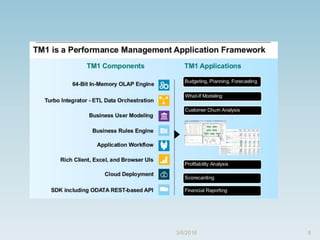
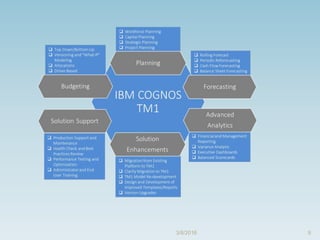
Cognos TM1
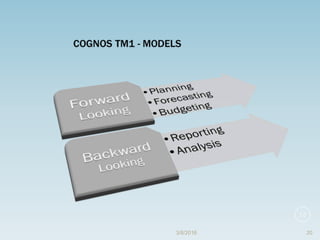
 Its an enterprise planning software platform that can
transform your entire planning life cycle
i) From target setting and
ii) Budget to reporting
iii) Scorecarding
iv) Analysis and forecasting
TM1 Deploys:
i) A distributed and client server architecture
ii) That consists of IBM Cognos TM1 Server
iii) To which a different combination of clients can
connect
3/8/2016 2
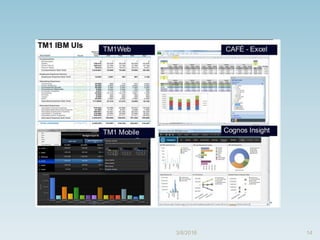
Cognos TM1 Provides
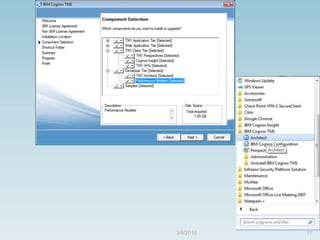
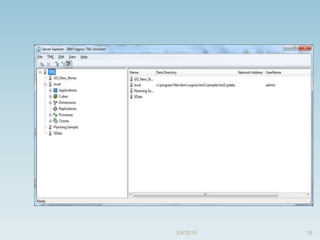
 TM1 Architect
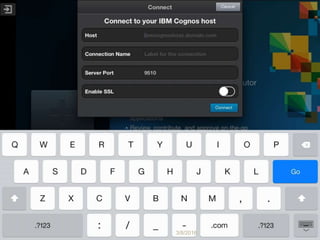
 TM1 Perspectives
 TM1 Web Client
 TM1 Application Portal
 Performance Modeler
 Cognos Insight
3/8/2016 3
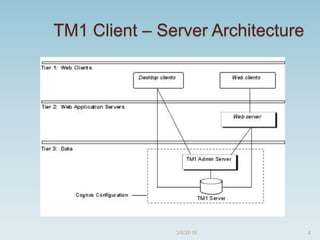
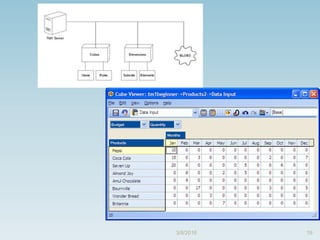
TM1 Client – Server Architecture
3/8/2016 4
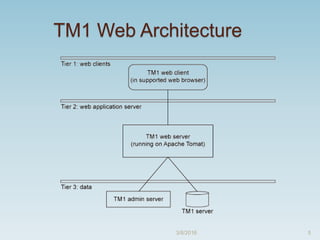
TM1 Web Architecture
3/8/2016 5
63/8/2016
73/8/2016
83/8/2016
93/8/2016
103/8/2016
Setting up TM1 Server
 There are 3 ways to run TM1 Server
 i) As a service
 ii) As a desktop application
 iii) As a local server
3/8/2016 11
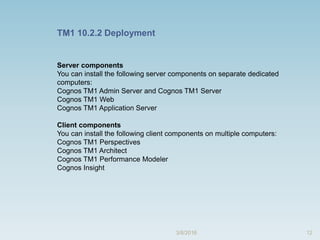
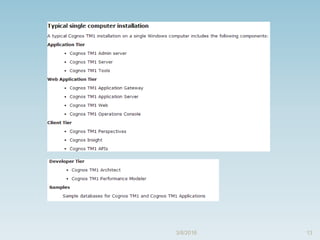
12
Server components
You can install the following server components on separate dedicated
computers:
Cognos TM1 Admin Server and Cognos TM1 Server
Cognos TM1 Web
Cognos TM1 Application Server
Client components
You can install the following client components on multiple computers:
Cognos TM1 Perspectives
Cognos TM1 Architect
Cognos TM1 Performance Modeler
Cognos Insight
TM1 10.2.2 Deployment
3/8/2016
133/8/2016
143/8/2016
153/8/2016
163/8/2016
173/8/2016
183/8/2016
193/8/2016
3/8/2016 20
21
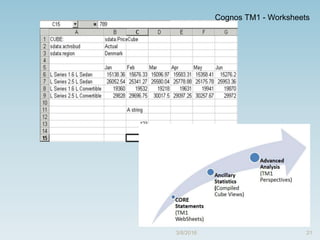
Cognos TM1 - Worksheets
3/8/2016
223/8/2016
23
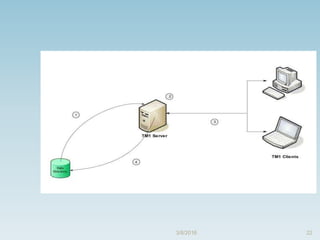
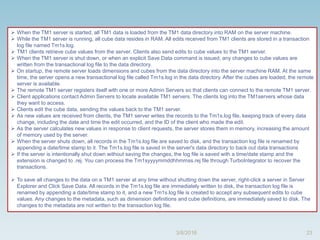
 When the TM1 server is started, all TM1 data is loaded from the TM1 data directory into RAM on the server machine.
 While the TM1 server is running, all cube data resides in RAM. All edits received from TM1 clients are stored in a transaction
log file named Tm1s.log.
 TM1 clients retrieve cube values from the server. Clients also send edits to cube values to the TM1 server.
 When the TM1 server is shut down, or when an explicit Save Data command is issued, any changes to cube values are
written from the transactional log file to the data directory.
 On startup, the remote server loads dimensions and cubes from the data directory into the server machine RAM. At the same
time, the server opens a new transactional log file called Tm1s.log in the data directory. After the cubes are loaded, the remote
server is available.
 The remote TM1 server registers itself with one or more Admin Servers so that clients can connect to the remote TM1 server.
 Client applications contact Admin Servers to locate available TM1 servers. The clients log into the TM1servers whose data
they want to access.
 Clients edit the cube data, sending the values back to the TM1 server.
 As new values are received from clients, the TM1 server writes the records to the Tm1s.log file, keeping track of every data
change, including the date and time the edit occurred, and the ID of the client who made the edit.
 As the server calculates new values in response to client requests, the server stores them in memory, increasing the amount
of memory used by the server.
 When the server shuts down, all records in the Tm1s.log file are saved to disk, and the transaction log file is renamed by
appending a date/time stamp to it. The Tm1s.log file is saved in the server's data directory to back out data transactions
 If the server is intentionally shut down without saving the changes, the log file is saved with a time/date stamp and the
extension is changed to .rej. You can process the Tm1syyyymmddhhmmss.rej file through TurboIntegrator to recover the
transactions.
 To save all changes to the data on a TM1 server at any time without shutting down the server, right-click a server in Server
Explorer and Click Save Data. All records in the Tm1s.log file are immediately written to disk, the transaction log file is
renamed by appending a date/time stamp to it, and a new Tm1s.log file is created to accept any subsequent edits to cube
values. Any changes to the metadata, such as dimension definitions and cube definitions, are immediately saved to disk. The
changes to the metadata are not written to the transaction log file.
3/8/2016
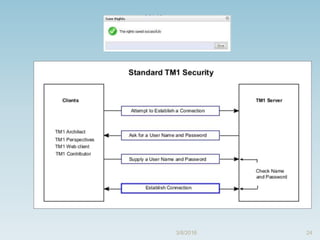
243/8/2016
25
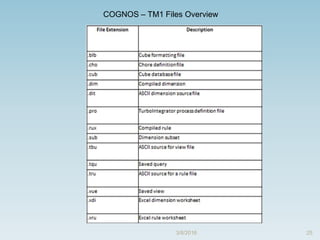
COGNOS – TM1 Files Overview
3/8/2016
263/8/2016

Cognos TM1

  • 1.
    [COGNOS TM1 10.2.2– Training] 3/8/2016 1
  • 2.
    Cognos TM1  Itsan enterprise planning software platform that can transform your entire planning life cycle i) From target setting and ii) Budget to reporting iii) Scorecarding iv) Analysis and forecasting TM1 Deploys: i) A distributed and client server architecture ii) That consists of IBM Cognos TM1 Server iii) To which a different combination of clients can connect 3/8/2016 2
  • 3.
    Cognos TM1 Provides TM1 Architect  TM1 Perspectives  TM1 Web Client  TM1 Application Portal  Performance Modeler  Cognos Insight 3/8/2016 3
  • 4.
    TM1 Client –Server Architecture 3/8/2016 4
  • 5.
  • 6.
  • 7.
  • 8.
  • 9.
  • 10.
  • 11.
    Setting up TM1Server  There are 3 ways to run TM1 Server  i) As a service  ii) As a desktop application  iii) As a local server 3/8/2016 11
  • 12.
    12 Server components You caninstall the following server components on separate dedicated computers: Cognos TM1 Admin Server and Cognos TM1 Server Cognos TM1 Web Cognos TM1 Application Server Client components You can install the following client components on multiple computers: Cognos TM1 Perspectives Cognos TM1 Architect Cognos TM1 Performance Modeler Cognos Insight TM1 10.2.2 Deployment 3/8/2016
  • 13.
  • 14.
  • 15.
  • 16.
  • 17.
  • 18.
  • 19.
  • 20.
  • 21.
    21 Cognos TM1 -Worksheets 3/8/2016
  • 22.
  • 23.
    23  When theTM1 server is started, all TM1 data is loaded from the TM1 data directory into RAM on the server machine.  While the TM1 server is running, all cube data resides in RAM. All edits received from TM1 clients are stored in a transaction log file named Tm1s.log.  TM1 clients retrieve cube values from the server. Clients also send edits to cube values to the TM1 server.  When the TM1 server is shut down, or when an explicit Save Data command is issued, any changes to cube values are written from the transactional log file to the data directory.  On startup, the remote server loads dimensions and cubes from the data directory into the server machine RAM. At the same time, the server opens a new transactional log file called Tm1s.log in the data directory. After the cubes are loaded, the remote server is available.  The remote TM1 server registers itself with one or more Admin Servers so that clients can connect to the remote TM1 server.  Client applications contact Admin Servers to locate available TM1 servers. The clients log into the TM1servers whose data they want to access.  Clients edit the cube data, sending the values back to the TM1 server.  As new values are received from clients, the TM1 server writes the records to the Tm1s.log file, keeping track of every data change, including the date and time the edit occurred, and the ID of the client who made the edit.  As the server calculates new values in response to client requests, the server stores them in memory, increasing the amount of memory used by the server.  When the server shuts down, all records in the Tm1s.log file are saved to disk, and the transaction log file is renamed by appending a date/time stamp to it. The Tm1s.log file is saved in the server's data directory to back out data transactions  If the server is intentionally shut down without saving the changes, the log file is saved with a time/date stamp and the extension is changed to .rej. You can process the Tm1syyyymmddhhmmss.rej file through TurboIntegrator to recover the transactions.  To save all changes to the data on a TM1 server at any time without shutting down the server, right-click a server in Server Explorer and Click Save Data. All records in the Tm1s.log file are immediately written to disk, the transaction log file is renamed by appending a date/time stamp to it, and a new Tm1s.log file is created to accept any subsequent edits to cube values. Any changes to the metadata, such as dimension definitions and cube definitions, are immediately saved to disk. The changes to the metadata are not written to the transaction log file. 3/8/2016
  • 24.
  • 25.
    25 COGNOS – TM1Files Overview 3/8/2016
  • 26.