Docs / Learn / Browse / Code scanning with GitHub CodeQL / 
R Previous Unit 2 of 12 S Next T
What is CodeQL?
10 minutes
CodeQL is the analysis engine used by developers to automate security checks, and by security researchers to perform variant analysis.
In CodeQL, code is treated like data. Security vulnerabilities, bugs, and other errors are modeled as queries that can be executed against
databases extracted from code. You can run the standard CodeQL queries, written by GitHub researchers and community contributors, or
write your own to use in custom analyses. Queries that find potential bugs highlight the result directly in the source file.
In this unit, you will learn about the CodeQL static analysis tool and how it uses databases, query suites and query language packs to
perform variant analysis.
Variant analysis
Variant analysis is the process of using a known security vulnerability as a seed to find similar problems in your code. It’s a technique that
security engineers use to identify potential vulnerabilities, and ensure these threats are properly fixed across multiple codebases.
Querying code using CodeQL is the most efficient way to perform variant analysis. You can use the standard CodeQL queries to identify
seed vulnerabilities, or find new vulnerabilities by writing your own custom CodeQL queries. Then, develop or iterate over the query to
automatically find logical variants of the same bug that could be missed using traditional manual techniques.
200 XP
CodeQL databases
CodeQL databases contain queryable data extracted from a codebase, for a single language at a particular point in time. The database
contains a full, hierarchical representation of the code, including a representation of the abstract syntax tree, the data flow graph, and the
control flow graph.
Each language has its own unique database schema that defines the relations used to create a database. The schema provides an interface
between the initial lexical analysis performed during the extraction process, and the actual complex analysis of the CodeQL query
evaluator. The schema specifies, for instance, that there is a table for every language construct.
For each language, the CodeQL libraries define classes to provide a layer of abstraction over the database tables. This provides an object-
oriented view of the data which makes it easier to write queries.
For example, in a CodeQL database for a Java program, two key tables are:
• The expressions table containing a row for every single expression in the source code that was analyzed during the build process.
• The statements table containing a row for every single statement in the source code that was analyzed during the build process.
The CodeQL library defines classes to provide a layer of abstraction over each of these tables (and the related auxiliary tables): Expr and
Stmt .
Query suites
CodeQL query suites provide a way of selecting queries, based on their filename, location on disk or in a QL pack, or metadata properties.
Create query suites for the queries that you want to frequently use in your CodeQL analyses.
Query suites allow you to pass multiple queries to CodeQL without having to specify the path to each query file individually. Query suite
definitions are stored in YAML files with the extension .qls . A suite definition is a sequence of instructions, where each instruction is a
YAML mapping with (usually) a single key. The instructions are executed in the order they appear in the query suite definition. After all the
instructions in the suite definition have been executed, the result is a set of selected queries.
Default query suites
There are three default query suites for CodeQL:
• code-scanning : queries run by default in CodeQL code scanning on GitHub.
• security-extended : queries from code-scanning , plus extra security queries with slightly lower precision and severity.
• security-and-quality : queries from code-scanning , security-extended , plus extra maintainability and reliability queries.
Query Language (QL) packs
QL packs are used to organize the files used in CodeQL analysis. They contain queries, library files, query suites, and important metadata.
The CodeQL repository contains QL packs for C/C++, C#, Java, JavaScript, Python, and Ruby. The CodeQL for Go repository contains a QL
pack for Go analysis. You can also make custom QL packs to contain your own queries and libraries.
QL pack structure
A QL pack must contain a file called qlpack.yml in its root directory. The other files and directories within the pack should be logically
organized. For example:
• Queries are organized into directories for specific categories.
• Queries for specific products, libraries, and frameworks are organized into their own top-level directories.
• There is a top-level directory named <owner>/<language> for query library ( .qll ) files. Within this directory, .qll files should be
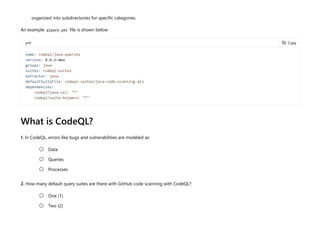
organized into subdirectories for specific categories.
An example qlpack.yml file is shown below.
yml
What is CodeQL?
1. In CodeQL, errors like bugs and vulnerabilities are modeled as:
2. How many default query suites are there with GitHub code scanning with CodeQL?
= Copy
name: codeql/java-queries
version: 0.0.6-dev
groups: java
suites: codeql-suites
extractor: java
defaultSuiteFile: codeql-suites/java-code-scanning.qls
dependencies:
codeql/java-all: "*"
codeql/suite-helpers: "*"
Data

Queries

Processes

One (1)

Two (2)

3. Which of the following are part of a CodeQL database?
Three (3)

Query length (.qlg) files

A representation of the language's abstract syntax tree

A logic flow graph

Check your answers
Docs / Learn / Browse / Code scanning with GitHub CodeQL / 
R Previous Unit 3 of 12 S Next T
How does CodeQL analyze code?
8 minutes
Implementing code scanning with CodeQL requires an understanding of how the tool analyzes code.
CodeQL analysis consists of three steps:
1. Preparing the code, by creating a CodeQL database.
2. Running CodeQL queries against the database.
3. Interpreting the query results.
In this unit, you will learn about the three phases of CodeQL analysis.
Database creation
To create a database, CodeQL first extracts a single relational representation of each source file in the codebase.
For compiled languages, extraction works by monitoring the normal build process. Each time a compiler is invoked to process a source file,
a copy of that file is made, and all relevant information about the source code is collected. This includes syntactic data about the abstract
syntax tree and semantic data about name binding and type information.
For interpreted languages, the extractor runs directly on the source code, resolving dependencies to give an accurate representation of the
codebase.
200 XP
There is one extractor for each language supported by CodeQL to ensure that the extraction process is as accurate as possible. For multi-
language codebases, databases are generated one language at a time.
After extraction, all the data required for analysis (relational data, copied source files, and a language-specific database schema, which
specifies the mutual relations in the data) is imported into a single directory, known as a CodeQL database.
Query execution
After you’ve created a CodeQL database, one or more queries are executed against it. CodeQL queries are written in a specially designed
object-oriented query language called QL.
You can run the queries checked out from the CodeQL repo (or custom queries that you’ve written yourself) using the CodeQL for VS Code
extension or the CodeQL CLI.
Query results
The final step converts results produced during query execution into a form that is more meaningful in the context of the source code.
That is, the results are interpreted in a way that highlights the potential issue that the queries are designed to find.
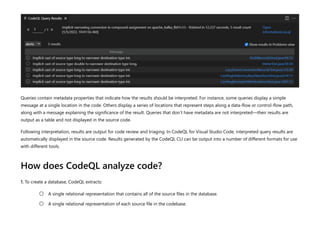
Queries contain metadata properties that indicate how the results should be interpreted. For instance, some queries display a simple
message at a single location in the code. Others display a series of locations that represent steps along a data-flow or control-flow path,
along with a message explaining the significance of the result. Queries that don’t have metadata are not interpreted—their results are
output as a table and not displayed in the source code.
Following interpretation, results are output for code review and triaging. In CodeQL for Visual Studio Code, interpreted query results are
automatically displayed in the source code. Results generated by the CodeQL CLI can be output into a number of different formats for use
with different tools.
How does CodeQL analyze code?
1. To create a database, CodeQL extracts:
A single relational representation that contains all of the source files in the database.

A single relational representation of each source file in the codebase.

2. How does CodeQL database creation work for compiled languages?
3. The final step of CodeQL analysis is:
Multiple relational representations for each source file in the database.

The extractor runs directly on the source code.

For compiled languages, extraction works by monitoring the normal build process.

The extractor can run either directly on the source code, or during the build process, depending on how it's
configured.

Interpreting the results

Running CodeQL queries against the database

Creating a CodeQL database

Check your answers
How are we doing? X X X X X
Docs / Learn / Browse / Code scanning with GitHub CodeQL / 
R Previous Unit 4 of 12 S Next T
What is QL?
8 minutes
QL is a declarative, object-oriented query language that is optimized to enable efficient analysis of hierarchical data structures, in
particular, databases representing software artifacts.
A database is an organized collection of data. The most commonly used database model is a relational model which stores data in tables
and SQL (Structured Query Language) is the most commonly used query language for relational databases.
The purpose of a query language is to provide a programming platform where you can ask questions about information stored in a
database. A database management system manages the storage and administration of data and provides the querying mechanism. A
query typically refers to the relevant database entities and specifies various conditions (called predicates) that must be satisfied by the
results. Query evaluation involves checking these predicates and generating the results. Some of the desirable properties of a good query
language and its implementation include:
• Declarative specifications - a declarative specification describes properties that the result must satisfy, rather than providing the
procedure to compute the result. In the context of database query languages, declarative specifications abstract away the details of
the underlying database management system and query processing techniques. This greatly simplifies query writing.
• Expressiveness - a powerful query language allows you to write complex queries. This makes the language widely applicable.
• Efficient execution - queries can be complex and databases can be very large, so it is crucial for a query language implementation to
process and execute queries efficiently.
In this unit, you will learn about the basic features of the QL programming language so that you can write your own custom queries or
200 XP
better understand the pre-existing open source queries available.
The QL syntax
The syntax of QL is similar to SQL, but the semantics of QL are based on Datalog, a declarative logic programming language often used as
a query language. This makes QL primarily a logic language, and all operations in QL are logical operations. Furthermore, QL inherits
recursive predicates from Datalog, and adds support for aggregates, making even complex queries concise and simple. For example,
consider a database containing parent-child relationships for people. If you want to find the number of descendants of a person, typically
you would:
1. Find a descendant of the given person, that is, a child or a descendant of a child.
2. Count the number of descendants found using the previous step.
When you write this process in QL, it closely resembles the above structure. Notice that the example used recursion to find all descendants
of the given person, and an aggregate to count the number of descendants. Translating these steps into the final query without adding
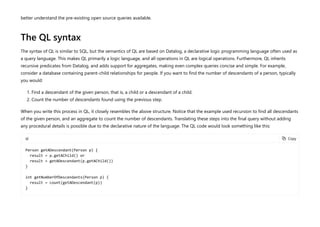
any procedural details is possible due to the declarative nature of the language. The QL code would look something like this:
ql = Copy
Person getADescendant(Person p) {
result = p.getAChild() or
result = getADescendant(p.getAChild())
}
int getNumberOfDescendants(Person p) {
result = count(getADescendant(p))
}
Object orientation
Object orientation is an important feature of QL. The benefits of object orientation are well-known – it increases modularity, enables
information hiding, and allows code reuse. QL offers all these benefits without compromising on its logical foundation. This is achieved by
defining a simple object model where classes are modeled as predicates and inheritance as implication. The libraries made available for all
supported languages make extensive use of classes and inheritance.
QL and general purpose programming languages
Here are a few prominent conceptual and functional differences between general purpose programming languages and QL:
• QL does not have any imperative features such as assignments to variables or file system operations.
• QL operates on sets of tuples and a query can be viewed as a complex sequence of set operations that defines the result of the
query.
• QL’s set-based semantics makes it very natural to process collections of values without having to worry about efficiently storing,
indexing and traversing them.
In object-oriented programming languages, instantiating a class involves creating an object by allocating physical memory to hold the
state of that instance of the class. In QL, classes are just logical properties describing sets of already existing values.
What is QL?
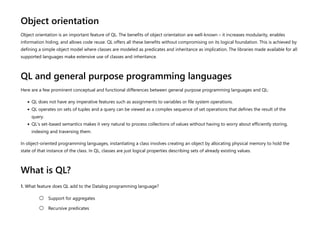
1. What feature does QL add to the Datalog programming language?
Support for aggregates

Recursive predicates

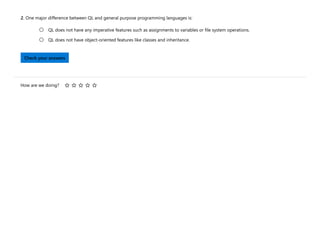
2. One major difference between QL and general purpose programming languages is:
QL does not have any imperative features such as assignments to variables or file system operations.

QL does not have object-oriented features like classes and inheritance.

Check your answers
How are we doing? X X X X X
Docs / Learn / Browse / Code scanning with GitHub CodeQL / 
R Previous Unit 5 of 12 S Next T
Code scanning and CodeQL
8 minutes
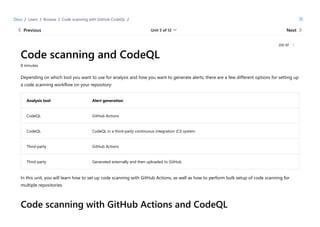
Depending on which tool you want to use for analysis and how you want to generate alerts, there are a few different options for setting up
a code scanning workflow on your repository:
Analysis tool Alert generation
CodeQL GitHub Actions
CodeQL CodeQL in a third-party continuous integration (CI) system
Third-party GitHub Actions
Third-party Generated externally and then uploaded to GitHub
In this unit, you will learn how to set up code scanning with GitHub Actions, as well as how to perform bulk setup of code scanning for
multiple repositories.
Code scanning with GitHub Actions and CodeQL
200 XP
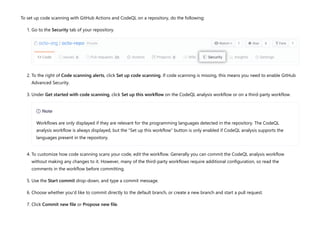
To set up code scanning with GitHub Actions and CodeQL on a repository, do the following:
1. Go to the Security tab of your repository.
2. To the right of Code scanning alerts, click Set up code scanning. If code scanning is missing, this means you need to enable GitHub
Advanced Security.
3. Under Get started with code scanning, click Set up this workflow on the CodeQL analysis workflow or on a third-party workflow.
4. To customize how code scanning scans your code, edit the workflow. Generally you can commit the CodeQL analysis workflow
without making any changes to it. However, many of the third-party workflows require additional configuration, so read the
comments in the workflow before committing.
5. Use the Start commit drop-down, and type a commit message.
6. Choose whether you'd like to commit directly to the default branch, or create a new branch and start a pull request.
7. Click Commit new file or Propose new file.
7 Note
Workflows are only displayed if they are relevant for the programming languages detected in the repository. The CodeQL
analysis workflow is always displayed, but the "Set up this workflow" button is only enabled if CodeQL analysis supports the
languages present in the repository.
In the default CodeQL analysis workflow, code scanning is configured to analyze your code each time you either push a change to the
default branch or any protected branches, or raise a pull request against the default branch. As a result, code scanning will now
commence.
The on:pull_request and on:push triggers for code scanning are each useful for different purposes.
Bulk setup of code scanning
You can set up code scanning in many repositories at once using a script. If you'd like to use a script to raise pull requests that add a
GitHub Actions workflow to multiple repositories, see the jhutchings1/Create-ActionsPRs repository for an example using PowerShell, or
nickliffen/ghas-enablement for an example using NodeJS.
Code scanning and CodeQL
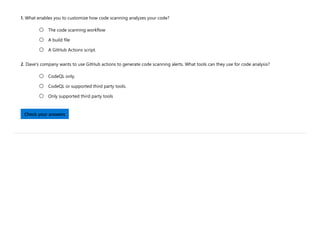
1. What enables you to customize how code scanning analyzes your code?
2. Dave's company wants to use GitHub actions to generate code scanning alerts. What tools can they use for code analysis?
The code scanning workflow

A build file

A GitHub Actions script.

CodeQL only.

CodeQL or supported third party tools.

Only supported third party tools

Check your answers
Docs / Learn / Browse / Code scanning with GitHub CodeQL / 
R Previous Unit 6 of 12 S Next T
Customize your code scanning workflow with CodeQL
- Part 1
10 minutes
Code scanning workflows that use CodeQL have various configuration options that can be adjusted to better suit the needs of your
organization.
When you use CodeQL to scan code, the CodeQL analysis engine generates a database from the code and runs queries on it. CodeQL
analysis uses a default set of queries, but you can specify more queries to run, in addition to the default queries.
You can run extra queries if they are part of a CodeQL pack (beta) published to the GitHub Container registry or a QL pack stored in a
repository.
There are two options for specifying which queries you want to run with CodeQL code scanning:
• Using your code scanning workflow
• Using a custom configuration file
In this unit, you will learn how to edit a workflow file to reference additional queries, how to use queries from query packs and how to
combine queries from a workflow file and a custom configuration file.
Specify additional queries in a workflow file
200 XP
The options available to specify the additional queries you want to run are:
• packs to install one or more CodeQL query packs (beta) and run the default query suite or queries for those packs.
• queries to specify a single .ql file, a directory containing multiple .ql files, a .qls query suite definition file, or any combination.
You can use both packs and queries in the same workflow.
We don't recommend referencing query suites directly from the github/codeql repository, like github/codeql/cpp/ql/src@main . Such
queries may not be compiled with the same version of CodeQL as used for your other queries, which could lead to errors during analysis.
Use CodeQL query packs
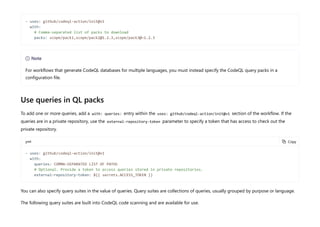
To add one or more CodeQL query packs (beta), add a with: packs: entry within the uses: github/codeql-action/init@v1 section of the
workflow. Within packs you specify one or more packages to use and, optionally, which version to download. Where you don't specify a
version, the latest version is downloaded. If you want to use packages that are not publicly available, you need to set the GITHUB_TOKEN
environment variable to a secret that has access to the packages.
In the example below, scope is the organization or personal account that published the package. When the workflow runs, the three
CodeQL query packs are downloaded from GitHub and the default queries or query suite for each pack run. The latest version of pack1 is
downloaded as no version is specified. Version 1.2.3 of pack2 is downloaded, as well as the latest version of pack3 that is compatible with
version 1.2.3.
yml
7 Note
The CodeQL package management functionality, including CodeQL packs, is currently in beta and subject to change.
= Copy
Use queries in QL packs
To add one or more queries, add a with: queries: entry within the uses: github/codeql-action/init@v1 section of the workflow. If the
queries are in a private repository, use the external-repository-token parameter to specify a token that has access to check out the
private repository.
yml
You can also specify query suites in the value of queries. Query suites are collections of queries, usually grouped by purpose or language.
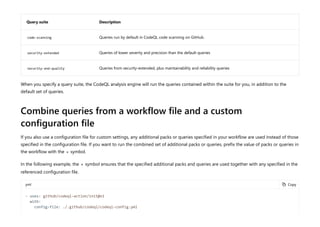
The following query suites are built into CodeQL code scanning and are available for use.
- uses: github/codeql-action/init@v1
with:
# Comma-separated list of packs to download
packs: scope/pack1,scope/pack2@1.2.3,scope/pack3@~1.2.3
7 Note
For workflows that generate CodeQL databases for multiple languages, you must instead specify the CodeQL query packs in a
configuration file.
= Copy
- uses: github/codeql-action/init@v1
with:
queries: COMMA-SEPARATED LIST OF PATHS
# Optional. Provide a token to access queries stored in private repositories.
external-repository-token: ${{ secrets.ACCESS_TOKEN }}
Query suite Description
code-scanning Queries run by default in CodeQL code scanning on GitHub.
security-extended Queries of lower severity and precision than the default queries
security-and-quality Queries from security-extended, plus maintainability and reliability queries
When you specify a query suite, the CodeQL analysis engine will run the queries contained within the suite for you, in addition to the
default set of queries.
Combine queries from a workflow file and a custom
configuration file
If you also use a configuration file for custom settings, any additional packs or queries specified in your workflow are used instead of those
specified in the configuration file. If you want to run the combined set of additional packs or queries, prefix the value of packs or queries in
the workflow with the + symbol.
In the following example, the + symbol ensures that the specified additional packs and queries are used together with any specified in the
referenced configuration file.
yml = Copy
- uses: github/codeql-action/init@v1
with:
config-file: ./.github/codeql/codeql-config.yml
Customize your code scanning workflow with CodeQL - Part 1
1. What options are available for referencing other queries in a workflow file?
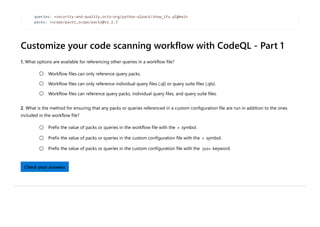
2. What is the method for ensuring that any packs or queries referenced in a custom configuration file are run in addition to the ones
included in the workflow file?
queries: +security-and-quality,octo-org/python-qlpack/show_ifs.ql@main
packs: +scope/pack1,scope/pack2@v1.2.3`
Workflow files can only reference query packs.

Workflow files can only reference individual query files (.ql) or query suite files (.qls).

Workflow files can reference query packs, individual query files, and query suite files.

Prefix the value of packs or queries in the workflow file with the + symbol.

Prefix the value of packs or queries in the custom configuration file with the + symbol.

Prefix the value of packs or queries in the custom configuration file with the join keyword.

Check your answers
Docs / Learn / Browse / Code scanning with GitHub CodeQL / 
R Previous Unit 8 of 12 S Next T
Customize your code scanning workflow with CodeQL
- Part 2
8 minutes
Code scanning workflows that use CodeQL have various configuration options that can be adjusted to better suit the needs of your
organization.
In this unit, you will learn how to reference additional queries in a custom configuration file.
Additional queries in a custom configuration file
A custom configuration file is an alternative way to specify additional packs and queries to run. You can also use the file to disable the
default queries and to specify which directories to scan during analysis.
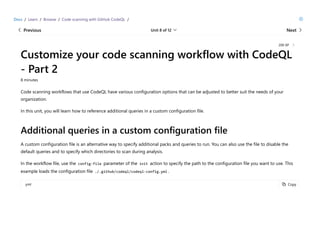
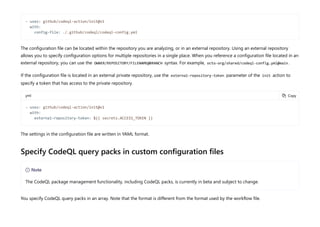
In the workflow file, use the config-file parameter of the init action to specify the path to the configuration file you want to use. This
example loads the configuration file ./.github/codeql/codeql-config.yml .
yml
200 XP
= Copy
The configuration file can be located within the repository you are analyzing, or in an external repository. Using an external repository
allows you to specify configuration options for multiple repositories in a single place. When you reference a configuration file located in an
external repository, you can use the OWNER/REPOSITORY/FILENAME@BRANCH syntax. For example, octo-org/shared/codeql-config.yml@main .
If the configuration file is located in an external private repository, use the external-repository-token parameter of the init action to
specify a token that has access to the private repository.
yml
The settings in the configuration file are written in YAML format.
Specify CodeQL query packs in custom configuration files
You specify CodeQL query packs in an array. Note that the format is different from the format used by the workflow file.
- uses: github/codeql-action/init@v1
with:
config-file: ./.github/codeql/codeql-config.yml
= Copy
- uses: github/codeql-action/init@v1
with:
external-repository-token: ${{ secrets.ACCESS_TOKEN }}
7 Note
The CodeQL package management functionality, including CodeQL packs, is currently in beta and subject to change.
yml
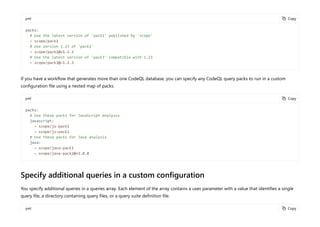
If you have a workflow that generates more than one CodeQL database, you can specify any CodeQL query packs to run in a custom
configuration file using a nested map of packs.
yml
Specify additional queries in a custom configuration
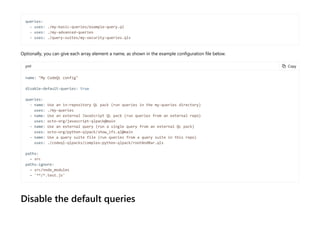
You specify additional queries in a queries array. Each element of the array contains a uses parameter with a value that identifies a single
query file, a directory containing query files, or a query suite definition file.
yml
= Copy
packs:
# Use the latest version of 'pack1' published by 'scope'
- scope/pack1
# Use version 1.23 of 'pack2'
- scope/pack2@v1.2.3
# Use the latest version of 'pack3' compatible with 1.23
- scope/pack3@~1.2.3
= Copy
packs:
# Use these packs for JavaScript analysis
javascript:
- scope/js-pack1
- scope/js-pack2
# Use these packs for Java analysis
java:
- scope/java-pack1
- scope/java-pack2@v1.0.0
= Copy
Optionally, you can give each array element a name, as shown in the example configuration file below.
yml
Disable the default queries
queries:
- uses: ./my-basic-queries/example-query.ql
- uses: ./my-advanced-queries
- uses: ./query-suites/my-security-queries.qls
= Copy
name: "My CodeQL config"
disable-default-queries: true
queries:
- name: Use an in-repository QL pack (run queries in the my-queries directory)
uses: ./my-queries
- name: Use an external JavaScript QL pack (run queries from an external repo)
uses: octo-org/javascript-qlpack@main
- name: Use an external query (run a single query from an external QL pack)
uses: octo-org/python-qlpack/show_ifs.ql@main
- name: Use a query suite file (run queries from a query suite in this repo)
uses: ./codeql-qlpacks/complex-python-qlpack/rootAndBar.qls
paths:
- src
paths-ignore:
- src/node_modules
- '**/*.test.js'
If you only want to run custom queries, you can disable the default security queries by using disable-default-queries: true . This flag
should also be used if you are trying to construct a custom query suite that excludes a particular rule. This is to avoid having all of the
queries run twice.
Specify directories to scan
For the interpreted languages that CodeQL supports (Python, Ruby and JavaScript/TypeScript), you can restrict code scanning to files in
specific directories by adding a paths array to the configuration file. You can exclude the files in specific directories from analysis by adding
a paths-ignore array.
yml = Copy
paths:
- src
paths-ignore:
- src/node_modules
- '**/*.test.js'
7 Note
• The paths and paths-ignore keywords, used in the context of the code scanning configuration file, should not be confused with
the same keywords when used for on.<push|pull_request>.paths in a workflow. When they are used to modify
on.<push|pull_request> in a workflow, they determine whether the actions will be run when someone modifies code in the
specified directories.
• The filter pattern characters ? , + , [ , ] , and ! are not supported and will be matched literally.
• ** characters can only be at the start or end of a line, or surrounded by slashes, and you can't mix ** and other characters. For
For compiled languages, if you want to limit code scanning to specific directories in your project, you must specify appropriate build steps
in the workflow. The commands you need to use to exclude a directory from the build will depend on your build system.
You can quickly analyze small portions of a monorepo when you modify code in specific directories. You'll need to both exclude directories
in your build steps and use the paths-ignore and paths keywords for on.<push|pull_request> in your workflow.
Customize your code scanning workflow with CodeQL - Part 2
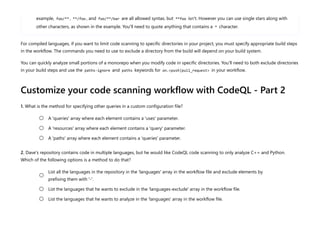
1. What is the method for specifying other queries in a custom configuration file?
2. Dave's repository contains code in multiple languages, but he would like CodeQL code scanning to only analyze C++ and Python.
Which of the following options is a method to do that?
example, foo/** , **/foo , and foo/**/bar are all allowed syntax, but **foo isn't. However you can use single stars along with
other characters, as shown in the example. You'll need to quote anything that contains a * character.
A 'queries' array where each element contains a 'uses' parameter.

A 'resources' array where each element contains a 'query' parameter.

A 'paths' array where each element contains a 'queries' parameter.

List all the languages in the repository in the 'languages' array in the workflow file and exclude elements by
prefixing them with '-'.

List the languages that he wants to exclude in the 'languages-exclude' array in the workflow file.

List the languages that he wants to analyze in the 'languages' array in the workflow file.

Check your answers
How are we doing? X X X X X
Docs / Learn / Browse / Code scanning with GitHub CodeQL / 
R Previous Unit 9 of 12 S Next T
Use the CodeQL CLI
8 minutes
In addition to the graphical user interface on GitHub.com, you can also access many of the same primary CodeQL features through a
command line interface.
This unit will cover using the CodeQL CLI to create databases, analyze databases and upload the results to GitHub.
CodeQL CLI commands
Once you've made the CodeQL CLI available to servers in your CI system, and ensured that they can authenticate with GitHub, you're ready
to generate data.
You use three different commands to generate results and upload them to GitHub:
• database create to create a CodeQL database to represent the hierarchical structure of each supported programming language in
the repository.
• database analyze to run queries to analyze each CodeQL database and summarize the results in a SARIF file.
• github upload-results to upload the resulting SARIF files to GitHub where the results are matched to a branch or pull request and
displayed as code scanning alerts.
You can display the command-line help for any command using the --help option .
200 XP
Uploading SARIF data to display as code scanning results in GitHub is supported for organization-owned repositories with GitHub
Advanced Security enabled, and public repositories on GitHub.com.
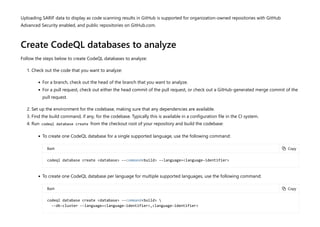
Create CodeQL databases to analyze
Follow the steps below to create CodeQL databases to analyze:
1. Check out the code that you want to analyze:
• For a branch, check out the head of the branch that you want to analyze.
• For a pull request, check out either the head commit of the pull request, or check out a GitHub-generated merge commit of the
pull request.
2. Set up the environment for the codebase, making sure that any dependencies are available.
3. Find the build command, if any, for the codebase. Typically this is available in a configuration file in the CI system.
4. Run codeql database create from the checkout root of your repository and build the codebase:
• To create one CodeQL database for a single supported language, use the following command:
Bash
• To create one CodeQL database per language for multiple supported languages, use the following command:
Bash
= Copy
codeql database create <database> --command<build> --language=<language-identifier>
= Copy
codeql database create <database> --command<build> 
--db-cluster --language=<language-identifier>,<language-identifier>
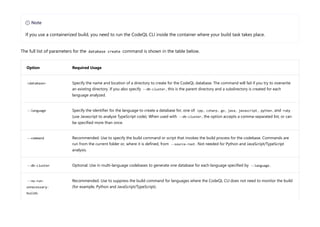
The full list of parameters for the database create command is shown in the table below.
Option Required Usage
<database> Specify the name and location of a directory to create for the CodeQL database. The command will fail if you try to overwrite
an existing directory. If you also specify --db-cluster , this is the parent directory and a subdirectory is created for each
language analyzed.
--language Specify the identifier for the language to create a database for, one of: cpp , csharp , go , java , javascript , python , and ruby
(use Javascript to analyze TypeScript code). When used with --db-cluster , the option accepts a comma-separated list, or can
be specified more than once.
--command Recommended. Use to specify the build command or script that invokes the build process for the codebase. Commands are
run from the current folder or, where it is defined, from --source-root . Not needed for Python and JavaScript/TypeScript
analysis.
--db-cluster Optional. Use in multi-language codebases to generate one database for each language specified by --language .
--no-run-
unnecessary-
builds
Recommended. Use to suppress the build command for languages where the CodeQL CLI does not need to monitor the build
(for example, Python and JavaScript/TypeScript).
7 Note
If you use a containerized build, you need to run the CodeQL CLI inside the container where your build task takes place.
Option Required Usage
--source-root Optional. Use if you run the CLI outside the checkout root of the repository. By default, the database create command
assumes that the current directory is the root directory for the source files, use this option to specify a different location.
Single language example
This example creates a CodeQL database for the repository checked out at /checkouts/example-repo . It uses the JavaScript extractor to
create a hierarchical representation of the JavaScript and TypeScript code in the repository. The resulting database is stored in /codeql-
dbs/example-repo .
Bash
Multiple languages example
This example creates two CodeQL databases for the repository checked out at /checkouts/example-repo-multi . It uses:
= Copy
$ codeql database create /codeql-dbs/example-repo --language=javascript 
--source-root /checkouts/example-repo
> Initializing database at /codeql-dbs/example-repo.
> Running command [/codeql-home/codeql/javascript/tools/autobuild.cmd]
in /checkouts/example-repo.
> [build-stdout] Single-threaded extraction.
> [build-stdout] Extracting
...
> Finalizing database at /codeql-dbs/example-repo.
> Successfully created database at /codeql-dbs/example-repo.
• --db-cluster to request analysis of more than one language.
• --language to specify which languages to create databases for.
• --command to tell the tool the build command for the codebase, here make.
• --no-run-unnecessary-builds to tell the tool to skip the build command for languages where it is not needed (like Python).
The resulting databases are stored in python and cpp subdirectories of /codeql-dbs/example-repo-multi .
Bash
Analyze a CodeQL database
After creating your CodeQL database, follow the steps below to analyze it:
= Copy
$ codeql database create /codeql-dbs/example-repo-multi 
--db-cluster --language python,cpp 
--command make --no-run-unnecessary-builds 
--source-root /checkouts/example-repo-multi
Initializing databases at /codeql-dbs/example-repo-multi.
Running build command: [make]
[build-stdout] Calling python3 /codeql-bundle/codeql/python/tools/get_venv_lib.py
[build-stdout] Calling python3 -S /codeql-bundle/codeql/python/tools/python_tracer.py -v -z all -c /codeql-dbs/example-
repo-multi/python/working/trap_cache -p ERROR: 'pip' not installed.
[build-stdout] /usr/local/lib/python3.6/dist-packages -R /checkouts/example-repo-multi
[build-stdout] [INFO] Python version 3.6.9
[build-stdout] [INFO] Python extractor version 5.16
[build-stdout] [INFO] [2] Extracted file /checkouts/example-repo-multi/hello.py in 5ms
[build-stdout] [INFO] Processed 1 modules in 0.15s
[build-stdout] <output from calling 'make' to build the C/C++ code>
Finalizing databases at /codeql-dbs/example-repo-multi.
Successfully created databases at /codeql-dbs/example-repo-multi.
$
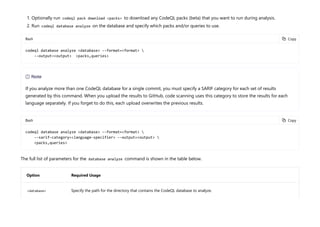
1. Optionally run codeql pack download <packs> to download any CodeQL packs (beta) that you want to run during analysis.
2. Run codeql database analyze on the database and specify which packs and/or queries to use.
Bash
Bash
The full list of parameters for the database analyze command is shown in the table below.
Option Required Usage
<database> Specify the path for the directory that contains the CodeQL database to analyze.
= Copy
codeql database analyze <database> --format=<format> 
--output=<output> <packs,queries>
7 Note
If you analyze more than one CodeQL database for a single commit, you must specify a SARIF category for each set of results
generated by this command. When you upload the results to GitHub, code scanning uses this category to store the results for each
language separately. If you forget to do this, each upload overwrites the previous results.
= Copy
codeql database analyze <database> --format=<format> 
--sarif-category=<language-specifier> --output=<output> 
<packs,queries>
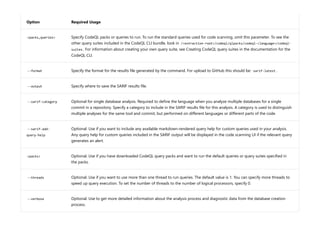
Option Required Usage
<packs,queries> Specify CodeQL packs or queries to run. To run the standard queries used for code scanning, omit this parameter. To see the
other query suites included in the CodeQL CLI bundle, look in /<extraction-root>/codeql/qlpacks/codeql-<language>/codeql-
suites . For information about creating your own query suite, see Creating CodeQL query suites in the documentation for the
CodeQL CLI.
--format Specify the format for the results file generated by the command. For upload to GitHub this should be: sarif-latest .
--output Specify where to save the SARIF results file.
--sarif-category Optional for single database analysis. Required to define the language when you analyze multiple databases for a single
commit in a repository. Specify a category to include in the SARIF results file for this analysis. A category is used to distinguish
multiple analyses for the same tool and commit, but performed on different languages or different parts of the code.
--sarif-add-
query-help
Optional. Use if you want to include any available markdown-rendered query help for custom queries used in your analysis.
Any query help for custom queries included in the SARIF output will be displayed in the code scanning UI if the relevant query
generates an alert.
<packs> Optional. Use if you have downloaded CodeQL query packs and want to run the default queries or query suites specified in
the packs.
--threads Optional. Use if you want to use more than one thread to run queries. The default value is 1. You can specify more threads to
speed up query execution. To set the number of threads to the number of logical processors, specify 0.
--verbose Optional. Use to get more detailed information about the analysis process and diagnostic data from the database creation
process.
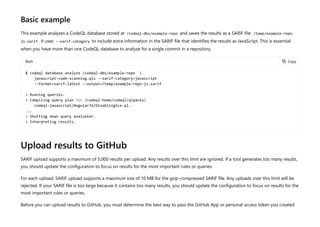
Basic example
This example analyzes a CodeQL database stored at /codeql-dbs/example-repo and saves the results as a SARIF file: /temp/example-repo-
js.sarif . It uses --sarif-category to include extra information in the SARIF file that identifies the results as JavaScript. This is essential
when you have more than one CodeQL database to analyze for a single commit in a repository.
Bash
Upload results to GitHub
SARIF upload supports a maximum of 5,000 results per upload. Any results over this limit are ignored. If a tool generates too many results,
you should update the configuration to focus on results for the most important rules or queries.
For each upload, SARIF upload supports a maximum size of 10 MB for the gzip-compressed SARIF file. Any uploads over this limit will be
rejected. If your SARIF file is too large because it contains too many results, you should update the configuration to focus on results for the
most important rules or queries.
Before you can upload results to GitHub, you must determine the best way to pass the GitHub App or personal access token you created
= Copy
$ codeql database analyze /codeql-dbs/example-repo 
javascript-code-scanning.qls --sarif-category=javascript
--format=sarif-latest --output=/temp/example-repo-js.sarif
> Running queries.
> Compiling query plan for /codeql-home/codeql/qlpacks/
codeql-javascript/AngularJS/DisablingSce.ql.
...
> Shutting down query evaluator.
> Interpreting results.
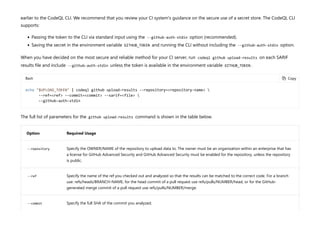
earlier to the CodeQL CLI. We recommend that you review your CI system's guidance on the secure use of a secret store. The CodeQL CLI
supports:
• Passing the token to the CLI via standard input using the --github-auth-stdin option (recommended).
• Saving the secret in the environment variable GITHUB_TOKEN and running the CLI without including the --github-auth-stdin option.
When you have decided on the most secure and reliable method for your CI server, run codeql github upload-results on each SARIF
results file and include --github-auth-stdin unless the token is available in the environment variable GITHUB_TOKEN .
Bash
The full list of parameters for the github upload-results command is shown in the table below.
Option Required Usage
--repository Specify the OWNER/NAME of the repository to upload data to. The owner must be an organization within an enterprise that has
a license for GitHub Advanced Security and GitHub Advanced Security must be enabled for the repository, unless the repository
is public.
--ref Specify the name of the ref you checked out and analyzed so that the results can be matched to the correct code. For a branch
use: refs/heads/BRANCH-NAME, for the head commit of a pull request use refs/pulls/NUMBER/head, or for the GitHub-
generated merge commit of a pull request use refs/pulls/NUMBER/merge.
--commit Specify the full SHA of the commit you analyzed.
= Copy
echo "$UPLOAD_TOKEN" | codeql github upload-results --repository=<repository-name> 
--ref=<ref> --commit=<commit> --sarif=<file> 
--github-auth-stdin
Option Required Usage
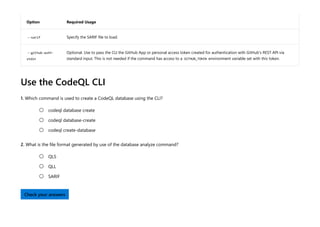
--sarif Specify the SARIF file to load.
--github-auth-
stdin
Optional. Use to pass the CLI the GitHub App or personal access token created for authentication with GitHub's REST API via
standard input. This is not needed if the command has access to a GITHUB_TOKEN environment variable set with this token.
Use the CodeQL CLI
1. Which command is used to create a CodeQL database using the CLI?
2. What is the file format generated by use of the database analyze command?
codeql database create

codeql database-create

codeql create-database

QLS

QLL

SARIF

Check your answers
Docs / Learn / Browse / Code scanning with GitHub CodeQL / 
R Previous Unit 10 of 12 S Next T
Customize languages and builds for code scanning
8 minutes
CodeQL code scanning supports many languages by default with an autobuild feature. If your code uses a non-standard build process,
however, you may need to customize your workflow with custom build steps.
This unit will describe how to change the languages analyzed by code scanning and how to add custom build steps to a CodeQL code
scanning workflow.
Change the languages that are analyzed
CodeQL code scanning automatically detects code written in the following supported languages: C/C++, C#, Go, Java,
JavaScript/TypeScript, Python, and Ruby.
The default CodeQL analysis workflow file contains a build matrix called language which lists the languages in your repository that are
analyzed. CodeQL automatically populates this matrix when you add code scanning to a repository. Using the language matrix optimizes
200 XP
7 Note
CodeQL analysis for Ruby is currently in beta. During the beta, analysis of Ruby will be less comprehensive than CodeQL analysis of
other languages.
CodeQL to run each analysis in parallel. We recommend that all workflows adopt this configuration due to the performance benefits of
parallelizing builds.
If your repository contains code in more than one of the supported languages, you can choose which languages you want to analyze.
There are several reasons you might want to prevent a language being analyzed. For example, the project might have dependencies in a
different language to the main body of your code, and you might prefer not to see alerts for those dependencies.
If your workflow uses the language matrix then CodeQL is hardcoded to analyze only the languages in the matrix. To change the
languages you want to analyze, edit the value of the matrix variable. You can remove a language to prevent it being analyzed or you can
add a language that was not present in the repository when code scanning was set up. For example, if the repository initially only
contained JavaScript when code scanning was set up, and you later added Python code, you will need to add python to the matrix.
yml
If your workflow does not contain a matrix called language, then CodeQL is configured to run analysis sequentially. If you don't specify
languages in the workflow, CodeQL automatically detects, and attempts to analyze, any supported languages in the repository. If you want
to choose which languages to analyze, without using a matrix, you can use the languages parameter under the init action.
yml
= Copy
jobs:
analyze:
name: Analyze
...
strategy:
fail-fast: false
matrix:
language: ['javascript', 'python']
= Copy
- uses: github/codeql-action/init@v1
with:
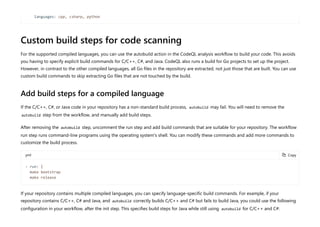
Custom build steps for code scanning
For the supported compiled languages, you can use the autobuild action in the CodeQL analysis workflow to build your code. This avoids
you having to specify explicit build commands for C/C++, C#, and Java. CodeQL also runs a build for Go projects to set up the project.
However, in contrast to the other compiled languages, all Go files in the repository are extracted, not just those that are built. You can use
custom build commands to skip extracting Go files that are not touched by the build.
Add build steps for a compiled language
If the C/C++, C#, or Java code in your repository has a non-standard build process, autobuild may fail. You will need to remove the
autobuild step from the workflow, and manually add build steps.
After removing the autobuild step, uncomment the run step and add build commands that are suitable for your repository. The workflow
run step runs command-line programs using the operating system's shell. You can modify these commands and add more commands to
customize the build process.
yml
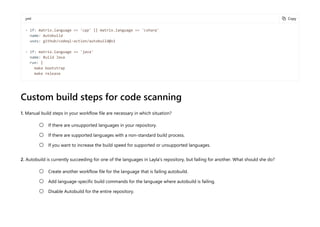
If your repository contains multiple compiled languages, you can specify language-specific build commands. For example, if your
repository contains C/C++, C# and Java, and autobuild correctly builds C/C++ and C# but fails to build Java, you could use the following
configuration in your workflow, after the init step. This specifies build steps for Java while still using autobuild for C/C++ and C#:
languages: cpp, csharp, python
= Copy
- run: |
make bootstrap
make release
yml
Custom build steps for code scanning
1. Manual build steps in your workflow file are necessary in which situation?
2. Autobuild is currently succeeding for one of the languages in Layla's repository, but failing for another. What should she do?
= Copy
- if: matrix.language == 'cpp' || matrix.language == 'csharp'
name: Autobuild
uses: github/codeql-action/autobuild@v1
- if: matrix.language == 'java'
name: Build Java
run: |
make bootstrap
make release
If there are unsupported languages in your repository.

If there are supported languages with a non-standard build process.

If you want to increase the build speed for supported or unsupported languages.

Create another workflow file for the language that is failing autobuild.

Add language-specific build commands for the language where autobuild is failing.

Disable Autobuild for the entire repository.

Check your answers
How are we doing? X X X X X

CodeQL Microsoft documentation - Basic of CodeQL

  • 1.
    Docs / Learn/ Browse / Code scanning with GitHub CodeQL /  R Previous Unit 2 of 12 S Next T What is CodeQL? 10 minutes CodeQL is the analysis engine used by developers to automate security checks, and by security researchers to perform variant analysis. In CodeQL, code is treated like data. Security vulnerabilities, bugs, and other errors are modeled as queries that can be executed against databases extracted from code. You can run the standard CodeQL queries, written by GitHub researchers and community contributors, or write your own to use in custom analyses. Queries that find potential bugs highlight the result directly in the source file. In this unit, you will learn about the CodeQL static analysis tool and how it uses databases, query suites and query language packs to perform variant analysis. Variant analysis Variant analysis is the process of using a known security vulnerability as a seed to find similar problems in your code. It’s a technique that security engineers use to identify potential vulnerabilities, and ensure these threats are properly fixed across multiple codebases. Querying code using CodeQL is the most efficient way to perform variant analysis. You can use the standard CodeQL queries to identify seed vulnerabilities, or find new vulnerabilities by writing your own custom CodeQL queries. Then, develop or iterate over the query to automatically find logical variants of the same bug that could be missed using traditional manual techniques. 200 XP
  • 2.
    CodeQL databases CodeQL databasescontain queryable data extracted from a codebase, for a single language at a particular point in time. The database contains a full, hierarchical representation of the code, including a representation of the abstract syntax tree, the data flow graph, and the control flow graph. Each language has its own unique database schema that defines the relations used to create a database. The schema provides an interface between the initial lexical analysis performed during the extraction process, and the actual complex analysis of the CodeQL query evaluator. The schema specifies, for instance, that there is a table for every language construct. For each language, the CodeQL libraries define classes to provide a layer of abstraction over the database tables. This provides an object- oriented view of the data which makes it easier to write queries. For example, in a CodeQL database for a Java program, two key tables are: • The expressions table containing a row for every single expression in the source code that was analyzed during the build process. • The statements table containing a row for every single statement in the source code that was analyzed during the build process. The CodeQL library defines classes to provide a layer of abstraction over each of these tables (and the related auxiliary tables): Expr and Stmt . Query suites CodeQL query suites provide a way of selecting queries, based on their filename, location on disk or in a QL pack, or metadata properties. Create query suites for the queries that you want to frequently use in your CodeQL analyses. Query suites allow you to pass multiple queries to CodeQL without having to specify the path to each query file individually. Query suite definitions are stored in YAML files with the extension .qls . A suite definition is a sequence of instructions, where each instruction is a
  • 3.
    YAML mapping with(usually) a single key. The instructions are executed in the order they appear in the query suite definition. After all the instructions in the suite definition have been executed, the result is a set of selected queries. Default query suites There are three default query suites for CodeQL: • code-scanning : queries run by default in CodeQL code scanning on GitHub. • security-extended : queries from code-scanning , plus extra security queries with slightly lower precision and severity. • security-and-quality : queries from code-scanning , security-extended , plus extra maintainability and reliability queries. Query Language (QL) packs QL packs are used to organize the files used in CodeQL analysis. They contain queries, library files, query suites, and important metadata. The CodeQL repository contains QL packs for C/C++, C#, Java, JavaScript, Python, and Ruby. The CodeQL for Go repository contains a QL pack for Go analysis. You can also make custom QL packs to contain your own queries and libraries. QL pack structure A QL pack must contain a file called qlpack.yml in its root directory. The other files and directories within the pack should be logically organized. For example: • Queries are organized into directories for specific categories. • Queries for specific products, libraries, and frameworks are organized into their own top-level directories. • There is a top-level directory named <owner>/<language> for query library ( .qll ) files. Within this directory, .qll files should be
  • 4.
    organized into subdirectoriesfor specific categories. An example qlpack.yml file is shown below. yml What is CodeQL? 1. In CodeQL, errors like bugs and vulnerabilities are modeled as: 2. How many default query suites are there with GitHub code scanning with CodeQL? = Copy name: codeql/java-queries version: 0.0.6-dev groups: java suites: codeql-suites extractor: java defaultSuiteFile: codeql-suites/java-code-scanning.qls dependencies: codeql/java-all: "*" codeql/suite-helpers: "*" Data  Queries  Processes  One (1)  Two (2) 
  • 5.
    3. Which ofthe following are part of a CodeQL database? Three (3)  Query length (.qlg) files  A representation of the language's abstract syntax tree  A logic flow graph  Check your answers
  • 6.
    Docs / Learn/ Browse / Code scanning with GitHub CodeQL /  R Previous Unit 3 of 12 S Next T How does CodeQL analyze code? 8 minutes Implementing code scanning with CodeQL requires an understanding of how the tool analyzes code. CodeQL analysis consists of three steps: 1. Preparing the code, by creating a CodeQL database. 2. Running CodeQL queries against the database. 3. Interpreting the query results. In this unit, you will learn about the three phases of CodeQL analysis. Database creation To create a database, CodeQL first extracts a single relational representation of each source file in the codebase. For compiled languages, extraction works by monitoring the normal build process. Each time a compiler is invoked to process a source file, a copy of that file is made, and all relevant information about the source code is collected. This includes syntactic data about the abstract syntax tree and semantic data about name binding and type information. For interpreted languages, the extractor runs directly on the source code, resolving dependencies to give an accurate representation of the codebase. 200 XP
  • 7.
    There is oneextractor for each language supported by CodeQL to ensure that the extraction process is as accurate as possible. For multi- language codebases, databases are generated one language at a time. After extraction, all the data required for analysis (relational data, copied source files, and a language-specific database schema, which specifies the mutual relations in the data) is imported into a single directory, known as a CodeQL database. Query execution After you’ve created a CodeQL database, one or more queries are executed against it. CodeQL queries are written in a specially designed object-oriented query language called QL. You can run the queries checked out from the CodeQL repo (or custom queries that you’ve written yourself) using the CodeQL for VS Code extension or the CodeQL CLI. Query results The final step converts results produced during query execution into a form that is more meaningful in the context of the source code. That is, the results are interpreted in a way that highlights the potential issue that the queries are designed to find.
  • 8.
    Queries contain metadataproperties that indicate how the results should be interpreted. For instance, some queries display a simple message at a single location in the code. Others display a series of locations that represent steps along a data-flow or control-flow path, along with a message explaining the significance of the result. Queries that don’t have metadata are not interpreted—their results are output as a table and not displayed in the source code. Following interpretation, results are output for code review and triaging. In CodeQL for Visual Studio Code, interpreted query results are automatically displayed in the source code. Results generated by the CodeQL CLI can be output into a number of different formats for use with different tools. How does CodeQL analyze code? 1. To create a database, CodeQL extracts: A single relational representation that contains all of the source files in the database.  A single relational representation of each source file in the codebase. 
  • 9.
    2. How doesCodeQL database creation work for compiled languages? 3. The final step of CodeQL analysis is: Multiple relational representations for each source file in the database.  The extractor runs directly on the source code.  For compiled languages, extraction works by monitoring the normal build process.  The extractor can run either directly on the source code, or during the build process, depending on how it's configured.  Interpreting the results  Running CodeQL queries against the database  Creating a CodeQL database  Check your answers How are we doing? X X X X X
  • 10.
    Docs / Learn/ Browse / Code scanning with GitHub CodeQL /  R Previous Unit 4 of 12 S Next T What is QL? 8 minutes QL is a declarative, object-oriented query language that is optimized to enable efficient analysis of hierarchical data structures, in particular, databases representing software artifacts. A database is an organized collection of data. The most commonly used database model is a relational model which stores data in tables and SQL (Structured Query Language) is the most commonly used query language for relational databases. The purpose of a query language is to provide a programming platform where you can ask questions about information stored in a database. A database management system manages the storage and administration of data and provides the querying mechanism. A query typically refers to the relevant database entities and specifies various conditions (called predicates) that must be satisfied by the results. Query evaluation involves checking these predicates and generating the results. Some of the desirable properties of a good query language and its implementation include: • Declarative specifications - a declarative specification describes properties that the result must satisfy, rather than providing the procedure to compute the result. In the context of database query languages, declarative specifications abstract away the details of the underlying database management system and query processing techniques. This greatly simplifies query writing. • Expressiveness - a powerful query language allows you to write complex queries. This makes the language widely applicable. • Efficient execution - queries can be complex and databases can be very large, so it is crucial for a query language implementation to process and execute queries efficiently. In this unit, you will learn about the basic features of the QL programming language so that you can write your own custom queries or 200 XP
  • 11.
    better understand thepre-existing open source queries available. The QL syntax The syntax of QL is similar to SQL, but the semantics of QL are based on Datalog, a declarative logic programming language often used as a query language. This makes QL primarily a logic language, and all operations in QL are logical operations. Furthermore, QL inherits recursive predicates from Datalog, and adds support for aggregates, making even complex queries concise and simple. For example, consider a database containing parent-child relationships for people. If you want to find the number of descendants of a person, typically you would: 1. Find a descendant of the given person, that is, a child or a descendant of a child. 2. Count the number of descendants found using the previous step. When you write this process in QL, it closely resembles the above structure. Notice that the example used recursion to find all descendants of the given person, and an aggregate to count the number of descendants. Translating these steps into the final query without adding any procedural details is possible due to the declarative nature of the language. The QL code would look something like this: ql = Copy Person getADescendant(Person p) { result = p.getAChild() or result = getADescendant(p.getAChild()) } int getNumberOfDescendants(Person p) { result = count(getADescendant(p)) }
  • 12.
    Object orientation Object orientationis an important feature of QL. The benefits of object orientation are well-known – it increases modularity, enables information hiding, and allows code reuse. QL offers all these benefits without compromising on its logical foundation. This is achieved by defining a simple object model where classes are modeled as predicates and inheritance as implication. The libraries made available for all supported languages make extensive use of classes and inheritance. QL and general purpose programming languages Here are a few prominent conceptual and functional differences between general purpose programming languages and QL: • QL does not have any imperative features such as assignments to variables or file system operations. • QL operates on sets of tuples and a query can be viewed as a complex sequence of set operations that defines the result of the query. • QL’s set-based semantics makes it very natural to process collections of values without having to worry about efficiently storing, indexing and traversing them. In object-oriented programming languages, instantiating a class involves creating an object by allocating physical memory to hold the state of that instance of the class. In QL, classes are just logical properties describing sets of already existing values. What is QL? 1. What feature does QL add to the Datalog programming language? Support for aggregates  Recursive predicates 
  • 13.
    2. One majordifference between QL and general purpose programming languages is: QL does not have any imperative features such as assignments to variables or file system operations.  QL does not have object-oriented features like classes and inheritance.  Check your answers How are we doing? X X X X X
  • 14.
    Docs / Learn/ Browse / Code scanning with GitHub CodeQL /  R Previous Unit 5 of 12 S Next T Code scanning and CodeQL 8 minutes Depending on which tool you want to use for analysis and how you want to generate alerts, there are a few different options for setting up a code scanning workflow on your repository: Analysis tool Alert generation CodeQL GitHub Actions CodeQL CodeQL in a third-party continuous integration (CI) system Third-party GitHub Actions Third-party Generated externally and then uploaded to GitHub In this unit, you will learn how to set up code scanning with GitHub Actions, as well as how to perform bulk setup of code scanning for multiple repositories. Code scanning with GitHub Actions and CodeQL 200 XP
  • 15.
    To set upcode scanning with GitHub Actions and CodeQL on a repository, do the following: 1. Go to the Security tab of your repository. 2. To the right of Code scanning alerts, click Set up code scanning. If code scanning is missing, this means you need to enable GitHub Advanced Security. 3. Under Get started with code scanning, click Set up this workflow on the CodeQL analysis workflow or on a third-party workflow. 4. To customize how code scanning scans your code, edit the workflow. Generally you can commit the CodeQL analysis workflow without making any changes to it. However, many of the third-party workflows require additional configuration, so read the comments in the workflow before committing. 5. Use the Start commit drop-down, and type a commit message. 6. Choose whether you'd like to commit directly to the default branch, or create a new branch and start a pull request. 7. Click Commit new file or Propose new file. 7 Note Workflows are only displayed if they are relevant for the programming languages detected in the repository. The CodeQL analysis workflow is always displayed, but the "Set up this workflow" button is only enabled if CodeQL analysis supports the languages present in the repository.
  • 16.
    In the defaultCodeQL analysis workflow, code scanning is configured to analyze your code each time you either push a change to the default branch or any protected branches, or raise a pull request against the default branch. As a result, code scanning will now commence. The on:pull_request and on:push triggers for code scanning are each useful for different purposes. Bulk setup of code scanning You can set up code scanning in many repositories at once using a script. If you'd like to use a script to raise pull requests that add a GitHub Actions workflow to multiple repositories, see the jhutchings1/Create-ActionsPRs repository for an example using PowerShell, or nickliffen/ghas-enablement for an example using NodeJS. Code scanning and CodeQL
  • 17.
    1. What enablesyou to customize how code scanning analyzes your code? 2. Dave's company wants to use GitHub actions to generate code scanning alerts. What tools can they use for code analysis? The code scanning workflow  A build file  A GitHub Actions script.  CodeQL only.  CodeQL or supported third party tools.  Only supported third party tools  Check your answers
  • 18.
    Docs / Learn/ Browse / Code scanning with GitHub CodeQL /  R Previous Unit 6 of 12 S Next T Customize your code scanning workflow with CodeQL - Part 1 10 minutes Code scanning workflows that use CodeQL have various configuration options that can be adjusted to better suit the needs of your organization. When you use CodeQL to scan code, the CodeQL analysis engine generates a database from the code and runs queries on it. CodeQL analysis uses a default set of queries, but you can specify more queries to run, in addition to the default queries. You can run extra queries if they are part of a CodeQL pack (beta) published to the GitHub Container registry or a QL pack stored in a repository. There are two options for specifying which queries you want to run with CodeQL code scanning: • Using your code scanning workflow • Using a custom configuration file In this unit, you will learn how to edit a workflow file to reference additional queries, how to use queries from query packs and how to combine queries from a workflow file and a custom configuration file. Specify additional queries in a workflow file 200 XP
  • 19.
    The options availableto specify the additional queries you want to run are: • packs to install one or more CodeQL query packs (beta) and run the default query suite or queries for those packs. • queries to specify a single .ql file, a directory containing multiple .ql files, a .qls query suite definition file, or any combination. You can use both packs and queries in the same workflow. We don't recommend referencing query suites directly from the github/codeql repository, like github/codeql/cpp/ql/src@main . Such queries may not be compiled with the same version of CodeQL as used for your other queries, which could lead to errors during analysis. Use CodeQL query packs To add one or more CodeQL query packs (beta), add a with: packs: entry within the uses: github/codeql-action/init@v1 section of the workflow. Within packs you specify one or more packages to use and, optionally, which version to download. Where you don't specify a version, the latest version is downloaded. If you want to use packages that are not publicly available, you need to set the GITHUB_TOKEN environment variable to a secret that has access to the packages. In the example below, scope is the organization or personal account that published the package. When the workflow runs, the three CodeQL query packs are downloaded from GitHub and the default queries or query suite for each pack run. The latest version of pack1 is downloaded as no version is specified. Version 1.2.3 of pack2 is downloaded, as well as the latest version of pack3 that is compatible with version 1.2.3. yml 7 Note The CodeQL package management functionality, including CodeQL packs, is currently in beta and subject to change. = Copy
  • 20.
    Use queries inQL packs To add one or more queries, add a with: queries: entry within the uses: github/codeql-action/init@v1 section of the workflow. If the queries are in a private repository, use the external-repository-token parameter to specify a token that has access to check out the private repository. yml You can also specify query suites in the value of queries. Query suites are collections of queries, usually grouped by purpose or language. The following query suites are built into CodeQL code scanning and are available for use. - uses: github/codeql-action/init@v1 with: # Comma-separated list of packs to download packs: scope/pack1,scope/pack2@1.2.3,scope/pack3@~1.2.3 7 Note For workflows that generate CodeQL databases for multiple languages, you must instead specify the CodeQL query packs in a configuration file. = Copy - uses: github/codeql-action/init@v1 with: queries: COMMA-SEPARATED LIST OF PATHS # Optional. Provide a token to access queries stored in private repositories. external-repository-token: ${{ secrets.ACCESS_TOKEN }}
  • 21.
    Query suite Description code-scanningQueries run by default in CodeQL code scanning on GitHub. security-extended Queries of lower severity and precision than the default queries security-and-quality Queries from security-extended, plus maintainability and reliability queries When you specify a query suite, the CodeQL analysis engine will run the queries contained within the suite for you, in addition to the default set of queries. Combine queries from a workflow file and a custom configuration file If you also use a configuration file for custom settings, any additional packs or queries specified in your workflow are used instead of those specified in the configuration file. If you want to run the combined set of additional packs or queries, prefix the value of packs or queries in the workflow with the + symbol. In the following example, the + symbol ensures that the specified additional packs and queries are used together with any specified in the referenced configuration file. yml = Copy - uses: github/codeql-action/init@v1 with: config-file: ./.github/codeql/codeql-config.yml
  • 22.
    Customize your codescanning workflow with CodeQL - Part 1 1. What options are available for referencing other queries in a workflow file? 2. What is the method for ensuring that any packs or queries referenced in a custom configuration file are run in addition to the ones included in the workflow file? queries: +security-and-quality,octo-org/python-qlpack/show_ifs.ql@main packs: +scope/pack1,scope/pack2@v1.2.3` Workflow files can only reference query packs.  Workflow files can only reference individual query files (.ql) or query suite files (.qls).  Workflow files can reference query packs, individual query files, and query suite files.  Prefix the value of packs or queries in the workflow file with the + symbol.  Prefix the value of packs or queries in the custom configuration file with the + symbol.  Prefix the value of packs or queries in the custom configuration file with the join keyword.  Check your answers
  • 23.
    Docs / Learn/ Browse / Code scanning with GitHub CodeQL /  R Previous Unit 8 of 12 S Next T Customize your code scanning workflow with CodeQL - Part 2 8 minutes Code scanning workflows that use CodeQL have various configuration options that can be adjusted to better suit the needs of your organization. In this unit, you will learn how to reference additional queries in a custom configuration file. Additional queries in a custom configuration file A custom configuration file is an alternative way to specify additional packs and queries to run. You can also use the file to disable the default queries and to specify which directories to scan during analysis. In the workflow file, use the config-file parameter of the init action to specify the path to the configuration file you want to use. This example loads the configuration file ./.github/codeql/codeql-config.yml . yml 200 XP = Copy
  • 24.
    The configuration filecan be located within the repository you are analyzing, or in an external repository. Using an external repository allows you to specify configuration options for multiple repositories in a single place. When you reference a configuration file located in an external repository, you can use the OWNER/REPOSITORY/FILENAME@BRANCH syntax. For example, octo-org/shared/codeql-config.yml@main . If the configuration file is located in an external private repository, use the external-repository-token parameter of the init action to specify a token that has access to the private repository. yml The settings in the configuration file are written in YAML format. Specify CodeQL query packs in custom configuration files You specify CodeQL query packs in an array. Note that the format is different from the format used by the workflow file. - uses: github/codeql-action/init@v1 with: config-file: ./.github/codeql/codeql-config.yml = Copy - uses: github/codeql-action/init@v1 with: external-repository-token: ${{ secrets.ACCESS_TOKEN }} 7 Note The CodeQL package management functionality, including CodeQL packs, is currently in beta and subject to change.
  • 25.
    yml If you havea workflow that generates more than one CodeQL database, you can specify any CodeQL query packs to run in a custom configuration file using a nested map of packs. yml Specify additional queries in a custom configuration You specify additional queries in a queries array. Each element of the array contains a uses parameter with a value that identifies a single query file, a directory containing query files, or a query suite definition file. yml = Copy packs: # Use the latest version of 'pack1' published by 'scope' - scope/pack1 # Use version 1.23 of 'pack2' - scope/pack2@v1.2.3 # Use the latest version of 'pack3' compatible with 1.23 - scope/pack3@~1.2.3 = Copy packs: # Use these packs for JavaScript analysis javascript: - scope/js-pack1 - scope/js-pack2 # Use these packs for Java analysis java: - scope/java-pack1 - scope/java-pack2@v1.0.0 = Copy
  • 26.
    Optionally, you cangive each array element a name, as shown in the example configuration file below. yml Disable the default queries queries: - uses: ./my-basic-queries/example-query.ql - uses: ./my-advanced-queries - uses: ./query-suites/my-security-queries.qls = Copy name: "My CodeQL config" disable-default-queries: true queries: - name: Use an in-repository QL pack (run queries in the my-queries directory) uses: ./my-queries - name: Use an external JavaScript QL pack (run queries from an external repo) uses: octo-org/javascript-qlpack@main - name: Use an external query (run a single query from an external QL pack) uses: octo-org/python-qlpack/show_ifs.ql@main - name: Use a query suite file (run queries from a query suite in this repo) uses: ./codeql-qlpacks/complex-python-qlpack/rootAndBar.qls paths: - src paths-ignore: - src/node_modules - '**/*.test.js'
  • 27.
    If you onlywant to run custom queries, you can disable the default security queries by using disable-default-queries: true . This flag should also be used if you are trying to construct a custom query suite that excludes a particular rule. This is to avoid having all of the queries run twice. Specify directories to scan For the interpreted languages that CodeQL supports (Python, Ruby and JavaScript/TypeScript), you can restrict code scanning to files in specific directories by adding a paths array to the configuration file. You can exclude the files in specific directories from analysis by adding a paths-ignore array. yml = Copy paths: - src paths-ignore: - src/node_modules - '**/*.test.js' 7 Note • The paths and paths-ignore keywords, used in the context of the code scanning configuration file, should not be confused with the same keywords when used for on.<push|pull_request>.paths in a workflow. When they are used to modify on.<push|pull_request> in a workflow, they determine whether the actions will be run when someone modifies code in the specified directories. • The filter pattern characters ? , + , [ , ] , and ! are not supported and will be matched literally. • ** characters can only be at the start or end of a line, or surrounded by slashes, and you can't mix ** and other characters. For
  • 28.
    For compiled languages,if you want to limit code scanning to specific directories in your project, you must specify appropriate build steps in the workflow. The commands you need to use to exclude a directory from the build will depend on your build system. You can quickly analyze small portions of a monorepo when you modify code in specific directories. You'll need to both exclude directories in your build steps and use the paths-ignore and paths keywords for on.<push|pull_request> in your workflow. Customize your code scanning workflow with CodeQL - Part 2 1. What is the method for specifying other queries in a custom configuration file? 2. Dave's repository contains code in multiple languages, but he would like CodeQL code scanning to only analyze C++ and Python. Which of the following options is a method to do that? example, foo/** , **/foo , and foo/**/bar are all allowed syntax, but **foo isn't. However you can use single stars along with other characters, as shown in the example. You'll need to quote anything that contains a * character. A 'queries' array where each element contains a 'uses' parameter.  A 'resources' array where each element contains a 'query' parameter.  A 'paths' array where each element contains a 'queries' parameter.  List all the languages in the repository in the 'languages' array in the workflow file and exclude elements by prefixing them with '-'.  List the languages that he wants to exclude in the 'languages-exclude' array in the workflow file.  List the languages that he wants to analyze in the 'languages' array in the workflow file. 
  • 29.
    Check your answers Howare we doing? X X X X X
  • 30.
    Docs / Learn/ Browse / Code scanning with GitHub CodeQL /  R Previous Unit 9 of 12 S Next T Use the CodeQL CLI 8 minutes In addition to the graphical user interface on GitHub.com, you can also access many of the same primary CodeQL features through a command line interface. This unit will cover using the CodeQL CLI to create databases, analyze databases and upload the results to GitHub. CodeQL CLI commands Once you've made the CodeQL CLI available to servers in your CI system, and ensured that they can authenticate with GitHub, you're ready to generate data. You use three different commands to generate results and upload them to GitHub: • database create to create a CodeQL database to represent the hierarchical structure of each supported programming language in the repository. • database analyze to run queries to analyze each CodeQL database and summarize the results in a SARIF file. • github upload-results to upload the resulting SARIF files to GitHub where the results are matched to a branch or pull request and displayed as code scanning alerts. You can display the command-line help for any command using the --help option . 200 XP
  • 31.
    Uploading SARIF datato display as code scanning results in GitHub is supported for organization-owned repositories with GitHub Advanced Security enabled, and public repositories on GitHub.com. Create CodeQL databases to analyze Follow the steps below to create CodeQL databases to analyze: 1. Check out the code that you want to analyze: • For a branch, check out the head of the branch that you want to analyze. • For a pull request, check out either the head commit of the pull request, or check out a GitHub-generated merge commit of the pull request. 2. Set up the environment for the codebase, making sure that any dependencies are available. 3. Find the build command, if any, for the codebase. Typically this is available in a configuration file in the CI system. 4. Run codeql database create from the checkout root of your repository and build the codebase: • To create one CodeQL database for a single supported language, use the following command: Bash • To create one CodeQL database per language for multiple supported languages, use the following command: Bash = Copy codeql database create <database> --command<build> --language=<language-identifier> = Copy codeql database create <database> --command<build> --db-cluster --language=<language-identifier>,<language-identifier>
  • 32.
    The full listof parameters for the database create command is shown in the table below. Option Required Usage <database> Specify the name and location of a directory to create for the CodeQL database. The command will fail if you try to overwrite an existing directory. If you also specify --db-cluster , this is the parent directory and a subdirectory is created for each language analyzed. --language Specify the identifier for the language to create a database for, one of: cpp , csharp , go , java , javascript , python , and ruby (use Javascript to analyze TypeScript code). When used with --db-cluster , the option accepts a comma-separated list, or can be specified more than once. --command Recommended. Use to specify the build command or script that invokes the build process for the codebase. Commands are run from the current folder or, where it is defined, from --source-root . Not needed for Python and JavaScript/TypeScript analysis. --db-cluster Optional. Use in multi-language codebases to generate one database for each language specified by --language . --no-run- unnecessary- builds Recommended. Use to suppress the build command for languages where the CodeQL CLI does not need to monitor the build (for example, Python and JavaScript/TypeScript). 7 Note If you use a containerized build, you need to run the CodeQL CLI inside the container where your build task takes place.
  • 33.
    Option Required Usage --source-rootOptional. Use if you run the CLI outside the checkout root of the repository. By default, the database create command assumes that the current directory is the root directory for the source files, use this option to specify a different location. Single language example This example creates a CodeQL database for the repository checked out at /checkouts/example-repo . It uses the JavaScript extractor to create a hierarchical representation of the JavaScript and TypeScript code in the repository. The resulting database is stored in /codeql- dbs/example-repo . Bash Multiple languages example This example creates two CodeQL databases for the repository checked out at /checkouts/example-repo-multi . It uses: = Copy $ codeql database create /codeql-dbs/example-repo --language=javascript --source-root /checkouts/example-repo > Initializing database at /codeql-dbs/example-repo. > Running command [/codeql-home/codeql/javascript/tools/autobuild.cmd] in /checkouts/example-repo. > [build-stdout] Single-threaded extraction. > [build-stdout] Extracting ... > Finalizing database at /codeql-dbs/example-repo. > Successfully created database at /codeql-dbs/example-repo.
  • 34.
    • --db-cluster torequest analysis of more than one language. • --language to specify which languages to create databases for. • --command to tell the tool the build command for the codebase, here make. • --no-run-unnecessary-builds to tell the tool to skip the build command for languages where it is not needed (like Python). The resulting databases are stored in python and cpp subdirectories of /codeql-dbs/example-repo-multi . Bash Analyze a CodeQL database After creating your CodeQL database, follow the steps below to analyze it: = Copy $ codeql database create /codeql-dbs/example-repo-multi --db-cluster --language python,cpp --command make --no-run-unnecessary-builds --source-root /checkouts/example-repo-multi Initializing databases at /codeql-dbs/example-repo-multi. Running build command: [make] [build-stdout] Calling python3 /codeql-bundle/codeql/python/tools/get_venv_lib.py [build-stdout] Calling python3 -S /codeql-bundle/codeql/python/tools/python_tracer.py -v -z all -c /codeql-dbs/example- repo-multi/python/working/trap_cache -p ERROR: 'pip' not installed. [build-stdout] /usr/local/lib/python3.6/dist-packages -R /checkouts/example-repo-multi [build-stdout] [INFO] Python version 3.6.9 [build-stdout] [INFO] Python extractor version 5.16 [build-stdout] [INFO] [2] Extracted file /checkouts/example-repo-multi/hello.py in 5ms [build-stdout] [INFO] Processed 1 modules in 0.15s [build-stdout] <output from calling 'make' to build the C/C++ code> Finalizing databases at /codeql-dbs/example-repo-multi. Successfully created databases at /codeql-dbs/example-repo-multi. $
  • 35.
    1. Optionally runcodeql pack download <packs> to download any CodeQL packs (beta) that you want to run during analysis. 2. Run codeql database analyze on the database and specify which packs and/or queries to use. Bash Bash The full list of parameters for the database analyze command is shown in the table below. Option Required Usage <database> Specify the path for the directory that contains the CodeQL database to analyze. = Copy codeql database analyze <database> --format=<format> --output=<output> <packs,queries> 7 Note If you analyze more than one CodeQL database for a single commit, you must specify a SARIF category for each set of results generated by this command. When you upload the results to GitHub, code scanning uses this category to store the results for each language separately. If you forget to do this, each upload overwrites the previous results. = Copy codeql database analyze <database> --format=<format> --sarif-category=<language-specifier> --output=<output> <packs,queries>
  • 36.
    Option Required Usage <packs,queries>Specify CodeQL packs or queries to run. To run the standard queries used for code scanning, omit this parameter. To see the other query suites included in the CodeQL CLI bundle, look in /<extraction-root>/codeql/qlpacks/codeql-<language>/codeql- suites . For information about creating your own query suite, see Creating CodeQL query suites in the documentation for the CodeQL CLI. --format Specify the format for the results file generated by the command. For upload to GitHub this should be: sarif-latest . --output Specify where to save the SARIF results file. --sarif-category Optional for single database analysis. Required to define the language when you analyze multiple databases for a single commit in a repository. Specify a category to include in the SARIF results file for this analysis. A category is used to distinguish multiple analyses for the same tool and commit, but performed on different languages or different parts of the code. --sarif-add- query-help Optional. Use if you want to include any available markdown-rendered query help for custom queries used in your analysis. Any query help for custom queries included in the SARIF output will be displayed in the code scanning UI if the relevant query generates an alert. <packs> Optional. Use if you have downloaded CodeQL query packs and want to run the default queries or query suites specified in the packs. --threads Optional. Use if you want to use more than one thread to run queries. The default value is 1. You can specify more threads to speed up query execution. To set the number of threads to the number of logical processors, specify 0. --verbose Optional. Use to get more detailed information about the analysis process and diagnostic data from the database creation process.
  • 37.
    Basic example This exampleanalyzes a CodeQL database stored at /codeql-dbs/example-repo and saves the results as a SARIF file: /temp/example-repo- js.sarif . It uses --sarif-category to include extra information in the SARIF file that identifies the results as JavaScript. This is essential when you have more than one CodeQL database to analyze for a single commit in a repository. Bash Upload results to GitHub SARIF upload supports a maximum of 5,000 results per upload. Any results over this limit are ignored. If a tool generates too many results, you should update the configuration to focus on results for the most important rules or queries. For each upload, SARIF upload supports a maximum size of 10 MB for the gzip-compressed SARIF file. Any uploads over this limit will be rejected. If your SARIF file is too large because it contains too many results, you should update the configuration to focus on results for the most important rules or queries. Before you can upload results to GitHub, you must determine the best way to pass the GitHub App or personal access token you created = Copy $ codeql database analyze /codeql-dbs/example-repo javascript-code-scanning.qls --sarif-category=javascript --format=sarif-latest --output=/temp/example-repo-js.sarif > Running queries. > Compiling query plan for /codeql-home/codeql/qlpacks/ codeql-javascript/AngularJS/DisablingSce.ql. ... > Shutting down query evaluator. > Interpreting results.
  • 38.
    earlier to theCodeQL CLI. We recommend that you review your CI system's guidance on the secure use of a secret store. The CodeQL CLI supports: • Passing the token to the CLI via standard input using the --github-auth-stdin option (recommended). • Saving the secret in the environment variable GITHUB_TOKEN and running the CLI without including the --github-auth-stdin option. When you have decided on the most secure and reliable method for your CI server, run codeql github upload-results on each SARIF results file and include --github-auth-stdin unless the token is available in the environment variable GITHUB_TOKEN . Bash The full list of parameters for the github upload-results command is shown in the table below. Option Required Usage --repository Specify the OWNER/NAME of the repository to upload data to. The owner must be an organization within an enterprise that has a license for GitHub Advanced Security and GitHub Advanced Security must be enabled for the repository, unless the repository is public. --ref Specify the name of the ref you checked out and analyzed so that the results can be matched to the correct code. For a branch use: refs/heads/BRANCH-NAME, for the head commit of a pull request use refs/pulls/NUMBER/head, or for the GitHub- generated merge commit of a pull request use refs/pulls/NUMBER/merge. --commit Specify the full SHA of the commit you analyzed. = Copy echo "$UPLOAD_TOKEN" | codeql github upload-results --repository=<repository-name> --ref=<ref> --commit=<commit> --sarif=<file> --github-auth-stdin
  • 39.
    Option Required Usage --sarifSpecify the SARIF file to load. --github-auth- stdin Optional. Use to pass the CLI the GitHub App or personal access token created for authentication with GitHub's REST API via standard input. This is not needed if the command has access to a GITHUB_TOKEN environment variable set with this token. Use the CodeQL CLI 1. Which command is used to create a CodeQL database using the CLI? 2. What is the file format generated by use of the database analyze command? codeql database create  codeql database-create  codeql create-database  QLS  QLL  SARIF  Check your answers
  • 41.
    Docs / Learn/ Browse / Code scanning with GitHub CodeQL /  R Previous Unit 10 of 12 S Next T Customize languages and builds for code scanning 8 minutes CodeQL code scanning supports many languages by default with an autobuild feature. If your code uses a non-standard build process, however, you may need to customize your workflow with custom build steps. This unit will describe how to change the languages analyzed by code scanning and how to add custom build steps to a CodeQL code scanning workflow. Change the languages that are analyzed CodeQL code scanning automatically detects code written in the following supported languages: C/C++, C#, Go, Java, JavaScript/TypeScript, Python, and Ruby. The default CodeQL analysis workflow file contains a build matrix called language which lists the languages in your repository that are analyzed. CodeQL automatically populates this matrix when you add code scanning to a repository. Using the language matrix optimizes 200 XP 7 Note CodeQL analysis for Ruby is currently in beta. During the beta, analysis of Ruby will be less comprehensive than CodeQL analysis of other languages.
  • 42.
    CodeQL to runeach analysis in parallel. We recommend that all workflows adopt this configuration due to the performance benefits of parallelizing builds. If your repository contains code in more than one of the supported languages, you can choose which languages you want to analyze. There are several reasons you might want to prevent a language being analyzed. For example, the project might have dependencies in a different language to the main body of your code, and you might prefer not to see alerts for those dependencies. If your workflow uses the language matrix then CodeQL is hardcoded to analyze only the languages in the matrix. To change the languages you want to analyze, edit the value of the matrix variable. You can remove a language to prevent it being analyzed or you can add a language that was not present in the repository when code scanning was set up. For example, if the repository initially only contained JavaScript when code scanning was set up, and you later added Python code, you will need to add python to the matrix. yml If your workflow does not contain a matrix called language, then CodeQL is configured to run analysis sequentially. If you don't specify languages in the workflow, CodeQL automatically detects, and attempts to analyze, any supported languages in the repository. If you want to choose which languages to analyze, without using a matrix, you can use the languages parameter under the init action. yml = Copy jobs: analyze: name: Analyze ... strategy: fail-fast: false matrix: language: ['javascript', 'python'] = Copy - uses: github/codeql-action/init@v1 with:
  • 43.
    Custom build stepsfor code scanning For the supported compiled languages, you can use the autobuild action in the CodeQL analysis workflow to build your code. This avoids you having to specify explicit build commands for C/C++, C#, and Java. CodeQL also runs a build for Go projects to set up the project. However, in contrast to the other compiled languages, all Go files in the repository are extracted, not just those that are built. You can use custom build commands to skip extracting Go files that are not touched by the build. Add build steps for a compiled language If the C/C++, C#, or Java code in your repository has a non-standard build process, autobuild may fail. You will need to remove the autobuild step from the workflow, and manually add build steps. After removing the autobuild step, uncomment the run step and add build commands that are suitable for your repository. The workflow run step runs command-line programs using the operating system's shell. You can modify these commands and add more commands to customize the build process. yml If your repository contains multiple compiled languages, you can specify language-specific build commands. For example, if your repository contains C/C++, C# and Java, and autobuild correctly builds C/C++ and C# but fails to build Java, you could use the following configuration in your workflow, after the init step. This specifies build steps for Java while still using autobuild for C/C++ and C#: languages: cpp, csharp, python = Copy - run: | make bootstrap make release
  • 44.
    yml Custom build stepsfor code scanning 1. Manual build steps in your workflow file are necessary in which situation? 2. Autobuild is currently succeeding for one of the languages in Layla's repository, but failing for another. What should she do? = Copy - if: matrix.language == 'cpp' || matrix.language == 'csharp' name: Autobuild uses: github/codeql-action/autobuild@v1 - if: matrix.language == 'java' name: Build Java run: | make bootstrap make release If there are unsupported languages in your repository.  If there are supported languages with a non-standard build process.  If you want to increase the build speed for supported or unsupported languages.  Create another workflow file for the language that is failing autobuild.  Add language-specific build commands for the language where autobuild is failing.  Disable Autobuild for the entire repository. 
  • 45.
    Check your answers Howare we doing? X X X X X