NSURLConnectionの
デリゲートメソッドと認証
Cocoa勉強会 #47
2011/9/3
Masayuki Nii

1
Agenda

NSURLConnectionを利用した通信処理
状況別のメソッド呼び出し順序

**6月の浦和での勉強会と同じネタ**

2
NSURLConnection+デリゲート

通信のためのクラスNSURLConnection

•

同期通信は1行でできるが、低速なiOSでは使うことは少ない

デリゲートされるメソッドを使って組み込み

•
•

メインスレッドで動かせなくもない
別スレッドを作りそちらで動作させるのがいいかも

3
NSURLConnectionの最低限の使用法
NSURLRequest等からインスタンス化
受信を始めると、以下のメドッドが呼び出される

•

- (void)connection:(NSURLConnection *)connection 
didReceiveData:(NSData *)data

受信が完了すると、以下のメソッドが呼び出される

•

- (void)connectionDidFinishLoading:(NSURLConnection
*)connection

いちおうエラー処理くらいしよう

•

- (void)connection:(NSURLConnection *)connection
didFailWithError:(NSError *)error

4
しかしながら…

これであらゆる場合に対処できるのか?
あらゆるエラーを取得できるのか?
SSLや認証はこれでいいのか?
全メソッドをインプリメントしていろいろな状況で動か
してみる

•
•

プロジェクト:ConnectionTest
テスト:iOS 4.3 (シミュレータ)、Mac OS X Server 10.6.x

5
すべてのデリゲートメソッド(1)

通信前

•

- (NSURLRequest *)connection:(NSURLConnection
*)connection willSendRequest:(NSURLRequest *)request
redirectResponse:(NSURLResponse *)redirectResponse

通信中

•
•

- (void)connection:(NSURLConnection *)connection
didReceiveData:(NSData *)data
- (void)connection:(NSURLConnection *)connection
didReceiveResponse:(NSURLResponse *)response

6
すべてのデリゲートメソッド(2)

通信後

•
•
•

- (void)connectionDidFinishLoading:(NSURLConnection
*)connection
- (void)connection:(NSURLConnection *)connection
didFailWithError:(NSError *)error
- (void)connection:(NSURLConnection *)connection
didSendBodyData:(NSInteger)bytesWritten
totalBytesWritten:(NSInteger)totalBytesWritten
totalBytesExpectedToWrite:
(NSInteger)totalBytesExpectedToWrite

7
すべてのデリゲートメソッド(3)
認証

•
•
•
•

- (BOOL)connectionShouldUseCredentialStorage:
(NSURLConnection *)connection
- (BOOL)connection:(NSURLConnection *)connection
canAuthenticateAgainstProtectionSpace:
(NSURLProtectionSpace *)protectionSpace
- (void)connection:(NSURLConnection *)connection
didReceiveAuthenticationChallenge:
(NSURLAuthenticationChallenge *)challenge
- (void)connection:(NSURLConnection *)connection
didCancelAuthenticationChallenge:
(NSURLAuthenticationChallenge *)challenge

8
- (void)downloadData: (NSString *)urlString
{
NSURL *url = [NSURL URLWithString: urlString];
NSMutableURLRequest *urlRequest = [NSMutableURLRequest requestWithURL: url];
NSLog( @"urlString = %@", urlString );
self.receivedData = [NSMutableData data];
NSURLConnection *connection = [[NSURLConnection alloc] initWithRequest: urlRequest
delegate: self];
if ( connection == nil )
{
NSLog( @"ERROR: NSURLConnection is nil" );
}
}
- (void)connection:(NSURLConnection *)connection
didReceiveData:(NSData *)data
{
NSLog( @"Calling: connection:didReceiveData:" );
[self.receivedData appendData: data];
}

基本3メソッド

- (void)connection:(NSURLConnection *)connection
didFailWithError:(NSError *)error
{
NSLog( @"Calling: connection:didFailWithError: %@", error );
self.receivedData = nil;
}
- (void)connectionDidFinishLoading:(NSURLConnection *)connection
{
NSLog( @"Calling: connectionDidFinishLoading:" );
[connection release];
NSLog( @"receivedData = %@", [[[NSString alloc] initWithData: self.receivedData
encoding: NSUTF8StringEncoding] autorelease] );
self.receivedData = nil;
}
9
- (void)
connection:(NSURLConnection *)connection
didReceiveResponse:(NSURLResponse *)response
{
NSHTTPURLResponse *httpRes = (NSHTTPURLResponse *)response;
NSLog( @"Calling: connection:didReceiveResponse: status code=%d", [httpRes statusCode] );
}
- (void)
connection:(NSURLConnection *)connection
didCancelAuthenticationChallenge:(NSURLAuthenticationChallenge *)challenge
{
NSLog( @"Calling: connection:didCancelAuthenticationChallenge: %@", challenge );
}
- (void)

connection:(NSURLConnection *)connection
didSendBodyData:(NSInteger)bytesWritten
totalBytesWritten:(NSInteger)totalBytesWritten
totalBytesExpectedToWrite:(NSInteger)totalBytesExpectedToWrite

{
NSLog( @"Calling: connection:didSendBodyData:totalBytesWritten:totalBytesExpectedToWrite:" );
}
- (NSURLRequest *)connection:(NSURLConnection *)connection
willSendRequest:(NSURLRequest *)request
redirectResponse:(NSURLResponse *)redirectResponse
{
NSLog( @"Calling: connection:willSendRequest:redirectResponse: %@", redirectResponse );
return request;
}
- (BOOL)connectionShouldUseCredentialStorage:(NSURLConnection *)connection
{
NSLog( @"Calling: connectionShouldUseCredentialStorage:" );
return NO;
}
10
ネットワーク関連エラー

11
普通にうまくいった場合

didReceiveResponseが先に呼ばれる

urlString = http://msyk.dyndns.org/test.php
Calling: connection:willSendRequest:redirectResponse: (null)
Calling: connectionShouldUseCredentialStorage:
Calling: connection:didReceiveResponse: status code=200
Calling: connection:didReceiveData:
:
Calling: connection:didReceiveData:
Calling: connectionDidFinishLoading:
receivedData = 012345678901234567890…
12
存在しないファイルにアクセスした場合
didFailWithError:は呼ばれない
didReceiveResponse:でのステータスコードのチェッ
クが必要
urlString = http://msyk.dyndns.org/test1.php
Calling: connection:willSendRequest:redirectResponse: (null)
Calling: connectionShouldUseCredentialStorage:
Calling: connection:didReceiveResponse: status code=404
Calling: connection:didReceiveData:
Calling: connectionDidFinishLoading:
receivedData = <!DOCTYPE HTML PUBLIC "-//IETF//DTD HTML 2.0//EN">
<html><head>
<title>404 Not Found</title>
13
存在しないURLに接続しようとした

didFailWithError:が呼び出される
エラーは「サーバが見つからない」
urlString = http://msyk1234.dyndns.org/
Calling: connection:willSendRequest:redirectResponse: (null)
Calling: connectionShouldUseCredentialStorage:
Calling: connection:didFailWithError: Error Domain=NSURLErrorDomain
Code=-1003 "A server with the specified hostname could not be found."
UserInfo=0x7013250 {NSErrorFailingURLStringKey=http://
msyk1234.dyndns.org/, NSErrorFailingURLKey=http://
msyk1234.dyndns.org/, NSLocalizedDescription=A server with the specified
hostname could not be found., NSUnderlyingError=0x7013190 "A server
with the specified hostname could not be found."}
14
DNSの応答がない場合

didFailWithError:が呼び出される
エラーは「タイムアウト」

urlString = http://msyk.dyndns.org/
Calling: connection:willSendRequest:redirectResponse: (null)
Calling: connectionShouldUseCredentialStorage:
Calling: connection:didFailWithError: Error Domain=NSURLErrorDomain
Code=-1001 "The request timed out." UserInfo=0x8b14b50
{NSErrorFailingURLStringKey=http://msyk.dyndns.org/,
NSErrorFailingURLKey=http://msyk.dyndns.org/, NSLocalizedDescription=The
request timed out., NSUnderlyingError=0x8b132d0 "The request timed out."}

15
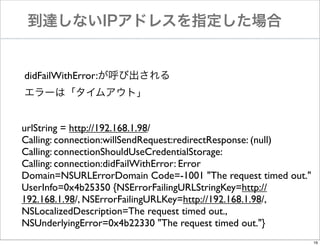
到達しないIPアドレスを指定した場合

didFailWithError:が呼び出される
エラーは「タイムアウト」
urlString = http://192.168.1.98/
Calling: connection:willSendRequest:redirectResponse: (null)
Calling: connectionShouldUseCredentialStorage:
Calling: connection:didFailWithError: Error
Domain=NSURLErrorDomain Code=-1001 "The request timed out."
UserInfo=0x4b25350 {NSErrorFailingURLStringKey=http://
192.168.1.98/, NSErrorFailingURLKey=http://192.168.1.98/,
NSLocalizedDescription=The request timed out.,
NSUnderlyingError=0x4b22330 "The request timed out."}
16
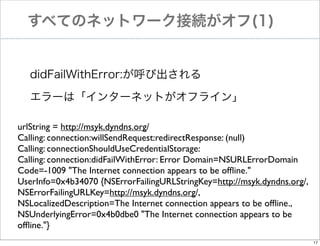
すべてのネットワーク接続がオフ(1)

didFailWithError:が呼び出される
エラーは「インターネットがオフライン」
urlString = http://msyk.dyndns.org/
Calling: connection:willSendRequest:redirectResponse: (null)
Calling: connectionShouldUseCredentialStorage:
Calling: connection:didFailWithError: Error Domain=NSURLErrorDomain
Code=-1009 "The Internet connection appears to be offline."
UserInfo=0x4b34070 {NSErrorFailingURLStringKey=http://msyk.dyndns.org/,
NSErrorFailingURLKey=http://msyk.dyndns.org/,
NSLocalizedDescription=The Internet connection appears to be offline.,
NSUnderlyingError=0x4b0dbe0 "The Internet connection appears to be
offline."}
17
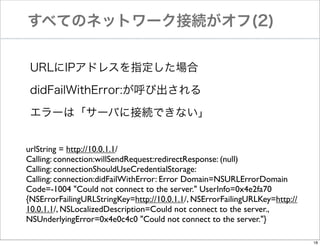
すべてのネットワーク接続がオフ(2)
URLにIPアドレスを指定した場合
didFailWithError:が呼び出される
エラーは「サーバに接続できない」
urlString = http://10.0.1.1/
Calling: connection:willSendRequest:redirectResponse: (null)
Calling: connectionShouldUseCredentialStorage:
Calling: connection:didFailWithError: Error Domain=NSURLErrorDomain
Code=-1004 "Could not connect to the server." UserInfo=0x4e2fa70
{NSErrorFailingURLStringKey=http://10.0.1.1/, NSErrorFailingURLKey=http://
10.0.1.1/, NSLocalizedDescription=Could not connect to the server.,
NSUnderlyingError=0x4e0c4c0 "Could not connect to the server."}
18
リダイレクト
基本3メソッドだけの場合、何もしなくてもOK
willSendRequest:redirectResponse:の呼び出し2回

urlString = http://msyk.dyndns.org/test.php
Calling: connection:willSendRequest:redirectResponse: (null)
Calling: connectionShouldUseCredentialStorage:
Calling: connection:willSendRequest:redirectResponse: <NSHTTPURLResponse: 0x6834f60>
Calling: connection:didReceiveResponse: status code=200
Calling: connection:didReceiveData:
:
Calling: connection:didReceiveData:
Calling: connectionDidFinishLoading:
receivedData = <html lang="ja">
	

<head>
19
SSL

20
正しい証明書のサイト(1)

基本3メソッドだけの場合、何もしなくても接続可能
認証関連のメソッドを単に組み込んだだけの場合だと、
以下のように通信は正しくできない

urlString = https://msyk.net/
Calling: connection:willSendRequest:redirectResponse: (null)
Calling: connectionShouldUseCredentialStorage:
Calling: connection:canAuthenticateAgainstProtectionSpace: <NSURLProtectionSpace: 0x6502
Calling: connection:didReceiveAuthenticationChallenge: <NSURLAuthenticationChallenge: 0x
****何も受信できていない

21
- (BOOL)
connection:(NSURLConnection *)connection
canAuthenticateAgainstProtectionSpace:(NSURLProtectionSpace *)protectionSpace
{
NSString *authMethod = [protectionSpace authenticationMethod];
NSLog( @"Calling: connection:canAuthenticateAgainstProtectionSpace: "
" auth method=%@/host=%@", authMethod, [protectionSpace host] );
if ( [authMethod isEqualToString: NSURLAuthenticationMethodServerTrust] )
secTrustRef = [protectionSpace serverTrust];
if (secTrustRef != NULL)
{
SecTrustResultType result;
OSErr er = SecTrustEvaluate( secTrustRef, &result );
if ( er != noErr) {
return NO;
}
if ( result == kSecTrustResultRecoverableTrustFailure ) {
NSLog( @"---SecTrustResultRecoverableTrustFailure" );
}
NSLog( @"---Return YES" );
return YES;
}
}
if ( [authMethod isEqualToString: NSURLAuthenticationMethodDefault] ) {
NSLog( @"---Return YES" );
return YES;
}
return NO;

{

}

Security.frameworkも参照しておく必要がある
22
正しい証明書のサイト(2)
- (void)
connection:(NSURLConnection *)connection
didReceiveAuthenticationChallenge:(NSURLAuthenticationChallenge *)challenge
{
NSLog( @"Calling: connection:didReceiveAuthenticationChallenge: %@", challenge );
NSURLCredential *credential = [NSURLCredential credentialForTrust: secTrustRef];
[[challenge sender] useCredential: credential forAuthenticationChallenge:challenge];
}

認証関連メソッドに対応することで接続できる
確認できない証明書にも対応

urlString = https://msyk.net/
Calling: connection:willSendRequest:redirectResponse: (null)
Calling: connectionShouldUseCredentialStorage:
Calling: connection:canAuthenticateAgainstProtectionSpace: auth method=NSURLAuthenticationMe
---Return YES
Calling: connection:didReceiveAuthenticationChallenge: <NSURLAuthenticationChallenge: 0x4d0818
Calling: connection:didReceiveResponse: status code=200
Calling: connection:didReceiveData:
Calling: connectionDidFinishLoading:
receivedData = <html lang="ja">
23
確認できない証明書(エラーにする場合)
SecTrustEvaluate関数の戻り値

•

kSecTrustResultRecoverableTrustFailureの場合にNOを返す

基本3メソッドではこれと同じ状態
urlString = https://coolnotify.com/
Calling: connection:willSendRequest:redirectResponse: (null)
Calling: connectionShouldUseCredentialStorage:
Calling: connection:canAuthenticateAgainstProtectionSpace: auth
method=NSURLAuthenticationMethodServerTrust/host=coolnotify.com
Calling: connection:didFailWithError: Error Domain=NSURLErrorDomain Code=-1202 "The
certificate for this server is invalid.You might be connecting to a server that is pretending to be
“coolnotify.com” which could put your confidential information at risk." UserInfo=0x4b232e0
{NSErrorFailingURLStringKey=https://coolnotify.com/, NSLocalizedRecoverySuggestion=Would
you like to connect to the server anyway?, NSErrorFailingURLKey=https://coolnotify.com/,
NSLocalizedDescription=The certificate for this server is invalid.You might be connecting to a
server that is pretending to be “coolnotify.com” which could put your confidential information
at risk., NSUnderlyingError=0x4b22c10 "The certificate for this server is invalid.You might be
connecting to a server that is pretending to be “coolnotify.com” which could put your
confidential information at risk.", NSURLErrorFailingURLPeerTrustErrorKey=<SecTrustRef:

24
Authentication

25
- (void)
connection:(NSURLConnection *)connection
didReceiveAuthenticationChallenge:(NSURLAuthenticationChallenge *)challenge
{
NSLog( @"Calling: connection:didReceiveAuthenticationChallenge: %@", challenge );
if ( [challenge previousFailureCount] == 0 )
{
NSURLCredential *credential
= [NSURLCredential credentialWithUser: @"te"
password: @"te"
persistence: NSURLCredentialPersistenceNone];
[[challenge sender] useCredential: credential
forAuthenticationChallenge:challenge];
} else if ( [challenge previousFailureCount] == 1 )
{
NSURLCredential *credential
= [NSURLCredential credentialWithUser: @"msyk"
password: @"12345678"
persistence: NSURLCredentialPersistenceNone];
[[challenge sender] useCredential: credential
forAuthenticationChallenge:challenge];
} else {
[[challenge sender] cancelAuthenticationChallenge: challenge];
}
}

26
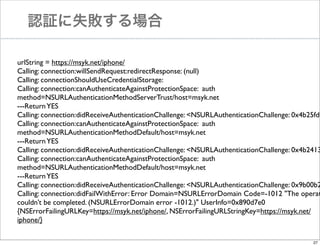
認証に失敗する場合

urlString = https://msyk.net/iphone/
Calling: connection:willSendRequest:redirectResponse: (null)
Calling: connectionShouldUseCredentialStorage:
Calling: connection:canAuthenticateAgainstProtectionSpace: auth
method=NSURLAuthenticationMethodServerTrust/host=msyk.net
---Return YES
Calling: connection:didReceiveAuthenticationChallenge: <NSURLAuthenticationChallenge: 0x4b25fd0
Calling: connection:canAuthenticateAgainstProtectionSpace: auth
method=NSURLAuthenticationMethodDefault/host=msyk.net
---Return YES
Calling: connection:didReceiveAuthenticationChallenge: <NSURLAuthenticationChallenge: 0x4b2413
Calling: connection:canAuthenticateAgainstProtectionSpace: auth
method=NSURLAuthenticationMethodDefault/host=msyk.net
---Return YES
Calling: connection:didReceiveAuthenticationChallenge: <NSURLAuthenticationChallenge: 0x9b00b2
Calling: connection:didFailWithError: Error Domain=NSURLErrorDomain Code=-1012 "The operat
couldn’t be completed. (NSURLErrorDomain error -1012.)" UserInfo=0x890d7e0
{NSErrorFailingURLKey=https://msyk.net/iphone/, NSErrorFailingURLStringKey=https://msyk.net/
iphone/}
27
認証に1度失敗し、2度目に成功する場合

urlString = https://msyk.net/iphone/
Calling: connection:willSendRequest:redirectResponse: (null)
Calling: connectionShouldUseCredentialStorage:
Calling: connection:canAuthenticateAgainstProtectionSpace: auth
method=NSURLAuthenticationMethodServerTrust/host=msyk.net
---Return YES
Calling: connection:didReceiveAuthenticationChallenge: <NSURLAuthenticationChallenge: 0x9a030e0
Calling: connection:canAuthenticateAgainstProtectionSpace: auth
method=NSURLAuthenticationMethodDefault/host=msyk.net
---Return YES
Calling: connection:didReceiveAuthenticationChallenge: <NSURLAuthenticationChallenge: 0x700ae90
Calling: connection:canAuthenticateAgainstProtectionSpace: auth
method=NSURLAuthenticationMethodDefault/host=msyk.net
---Return YES
Calling: connection:didReceiveAuthenticationChallenge: <NSURLAuthenticationChallenge: 0x4e0a6f0
Calling: connection:didReceiveResponse: status code=200
Calling: connection:didReceiveData:
Calling: connectionDidFinishLoading:
receivedData = <?xml version="1.0" encoding="UTF-8"?>…

28
その他

なぜかdidCancelAuthenticationChallenge:はコールさ
れなかった
connectionShouldUseCredentialStorageの返り値に
よる違いないとしか思えない

29
まとめ

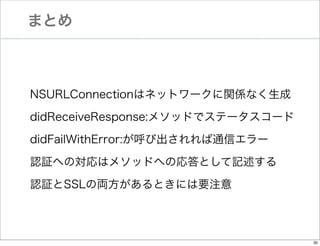
NSURLConnectionはネットワークに関係なく生成
didReceiveResponse:メソッドでステータスコード
didFailWithError:が呼び出されれば通信エラー
認証への対応はメソッドへの応答として記述する
認証とSSLの両方があるときには要注意

30

Cocoa勉強会#47-NSURLConnectionのデリゲートメソッドと認証