1
Computer Networks
— Unit - 3 —
— Network Layer —
Network Layer
Network Layer
2
Unit-3 : Network Layer
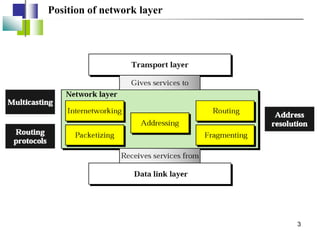
Position of network layer
3
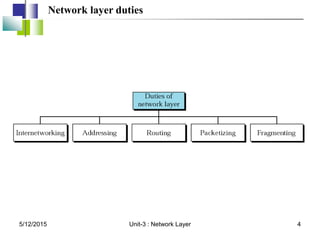
Network layer duties
5/12/2015 4
Unit-3 : Network Layer
Host-to-Host
Delivery:
Internetworking,
Addressing,
and Routing
5/12/2015 5
Unit-3 : Network Layer
19.1 Internetworks
19.1 Internetworks
Need For Network Layer
Internet As A Packet-Switched Network
Internet As A Connectionless Network
5/12/2015 6
Unit-3 : Network Layer
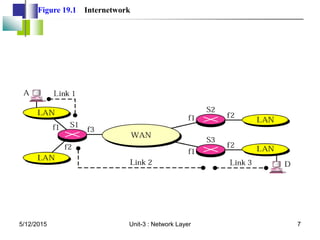
Figure 19.1 Internetwork
5/12/2015 7
Unit-3 : Network Layer
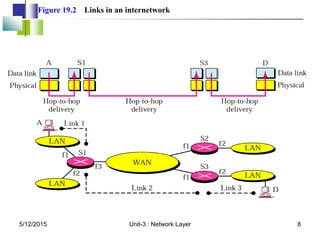
Figure 19.2 Links in an internetwork
5/12/2015 8
Unit-3 : Network Layer
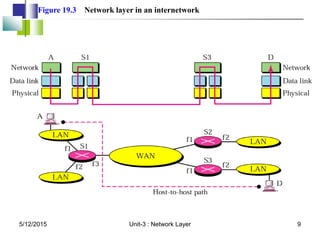
Figure 19.3 Network layer in an internetwork
5/12/2015 9
Unit-3 : Network Layer
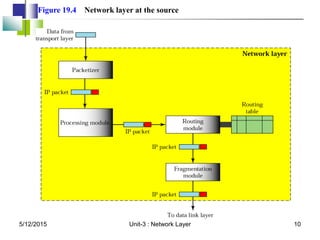
Figure 19.4 Network layer at the source
5/12/2015 10
Unit-3 : Network Layer
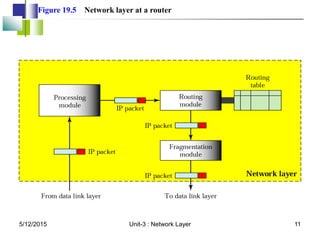
Figure 19.5 Network layer at a router
5/12/2015 11
Unit-3 : Network Layer
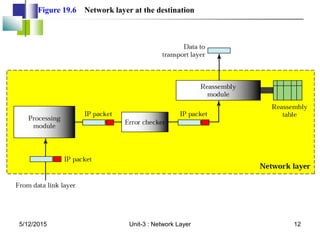
Figure 19.6 Network layer at the destination
5/12/2015 12
Unit-3 : Network Layer
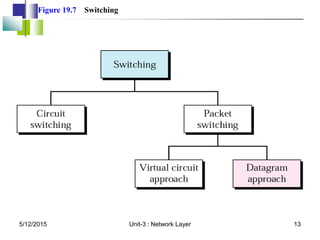
Figure 19.7 Switching
5/12/2015 13
Unit-3 : Network Layer
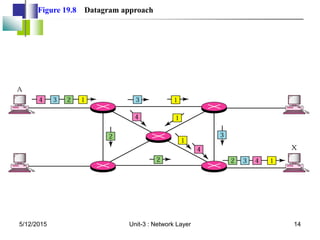
Figure 19.8 Datagram approach
5/12/2015 14
Unit-3 : Network Layer
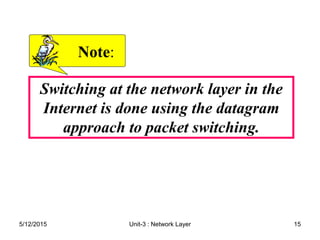
Switching at the network layer in the
Internet is done using the datagram
approach to packet switching.
Note
Note:
:
5/12/2015 15
Unit-3 : Network Layer
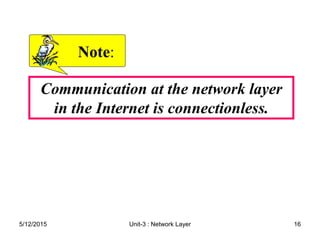
Communication at the network layer
in the Internet is connectionless.
Note
Note:
:
5/12/2015 16
Unit-3 : Network Layer
19.2 Addressing
19.2 Addressing
Internet Address
Classful Addressing
Supernetting
Subnetting
Classless Addressing
Dynamic Address Configuration
Network Address Translation
5/12/2015 17
Unit-3 : Network Layer
An IP address is a 32-bit address.
Note
Note:
:
5/12/2015 18
Unit-3 : Network Layer
The IP addresses are unique
and universal.
Note
Note:
:
5/12/2015 19
Unit-3 : Network Layer
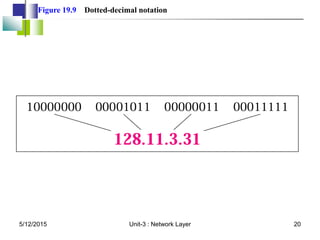
Figure 19.9 Dotted-decimal notation
5/12/2015 20
Unit-3 : Network Layer
The binary, decimal, and hexadecimal
number systems are reviewed in
Appendix B.
Note
Note:
:
5/12/2015 21
Unit-3 : Network Layer
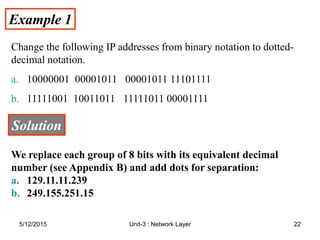
Example 1
Example 1
Change the following IP addresses from binary notation to dotted-
decimal notation.
a. 10000001 00001011 00001011 11101111
b. 11111001 10011011 11111011 00001111
Solution
Solution
We replace each group of 8 bits with its equivalent decimal
number (see Appendix B) and add dots for separation:
a. 129.11.11.239
b. 249.155.251.15
5/12/2015 22
Unit-3 : Network Layer
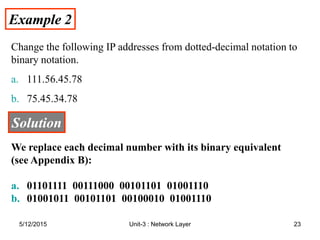
Example 2
Example 2
Change the following IP addresses from dotted-decimal notation to
binary notation.
a. 111.56.45.78
b. 75.45.34.78
Solution
Solution
We replace each decimal number with its binary equivalent
(see Appendix B):
a. 01101111 00111000 00101101 01001110
b. 01001011 00101101 00100010 01001110
5/12/2015 23
Unit-3 : Network Layer
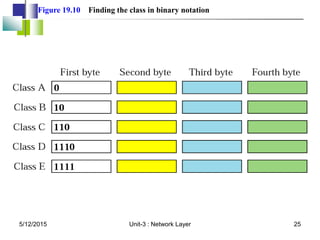
In classful addressing, the address
space is divided into five classes: A, B,
C, D, and E.
Note
Note:
:
5/12/2015 24
Unit-3 : Network Layer
Figure 19.10 Finding the class in binary notation
5/12/2015 25
Unit-3 : Network Layer
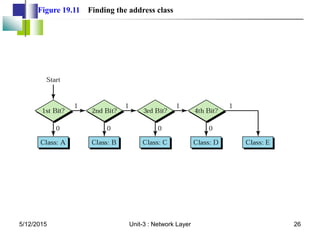
Figure 19.11 Finding the address class
5/12/2015 26
Unit-3 : Network Layer
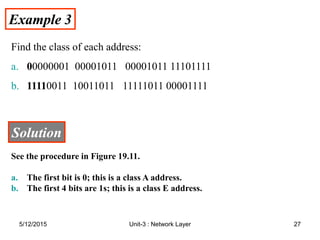
Example 3
Example 3
Find the class of each address:
a. 0
00000001 00001011 00001011 11101111
b. 1111
11110011 10011011 11111011 00001111
Solution
Solution
See the procedure in Figure 19.11.
a. The first bit is 0; this is a class A address.
b. The first 4 bits are 1s; this is a class E address.
5/12/2015 27
Unit-3 : Network Layer
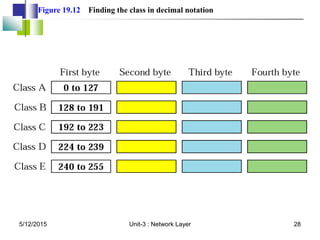
Figure 19.12 Finding the class in decimal notation
5/12/2015 28
Unit-3 : Network Layer
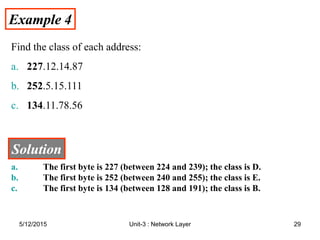
Example 4
Example 4
Find the class of each address:
a. 227.12.14.87
b. 252.5.15.111
c. 134.11.78.56
Solution
Solution
a. The first byte is 227 (between 224 and 239); the class is D.
b. The first byte is 252 (between 240 and 255); the class is E.
c. The first byte is 134 (between 128 and 191); the class is B.
5/12/2015 29
Unit-3 : Network Layer
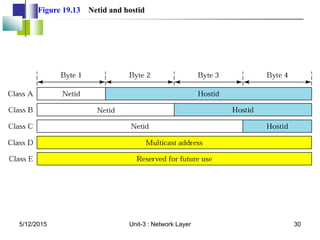
Figure 19.13 Netid and hostid
5/12/2015 30
Unit-3 : Network Layer
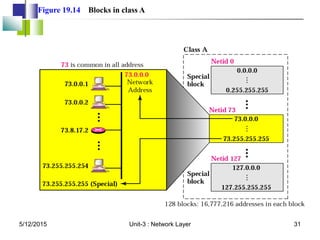
Figure 19.14 Blocks in class A
5/12/2015 31
Unit-3 : Network Layer
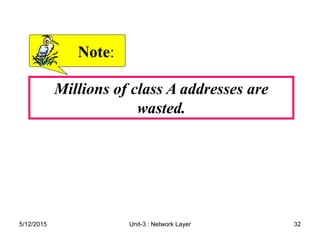
Millions of class A addresses are
wasted.
Note
Note:
:
5/12/2015 32
Unit-3 : Network Layer
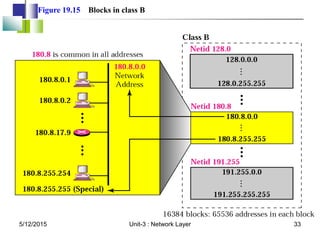
Figure 19.15 Blocks in class B
5/12/2015 33
Unit-3 : Network Layer
Many class B addresses are wasted.
Note
Note:
:
5/12/2015 34
Unit-3 : Network Layer
The number of addresses in class C is
smaller than the needs of most
organizations.
Note
Note:
:
5/12/2015 35
Unit-3 : Network Layer
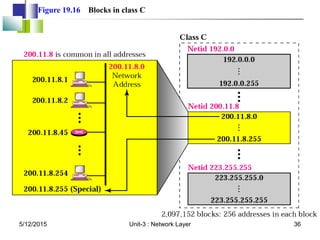
Figure 19.16 Blocks in class C
5/12/2015 36
Unit-3 : Network Layer
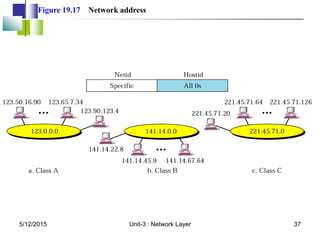
Figure 19.17 Network address
5/12/2015 37
Unit-3 : Network Layer
In classful addressing, the network
address is the one that is assigned to
the organization.
Note
Note:
:
5/12/2015 38
Unit-3 : Network Layer
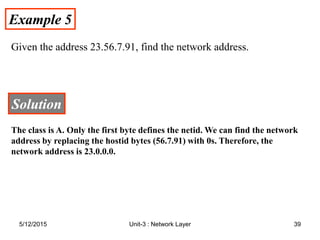
Example 5
Example 5
Given the address 23.56.7.91, find the network address.
Solution
Solution
The class is A. Only the first byte defines the netid. We can find the network
address by replacing the hostid bytes (56.7.91) with 0s. Therefore, the
network address is 23.0.0.0.
5/12/2015 39
Unit-3 : Network Layer
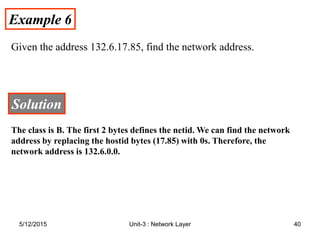
Example 6
Example 6
Given the address 132.6.17.85, find the network address.
Solution
Solution
The class is B. The first 2 bytes defines the netid. We can find the network
address by replacing the hostid bytes (17.85) with 0s. Therefore, the
network address is 132.6.0.0.
5/12/2015 40
Unit-3 : Network Layer
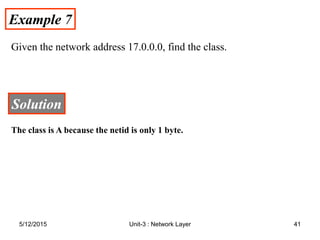
Example 7
Example 7
Given the network address 17.0.0.0, find the class.
Solution
Solution
The class is A because the netid is only 1 byte.
5/12/2015 41
Unit-3 : Network Layer
A network address is different from a
netid. A network address has both
netid and hostid,
with 0s for the hostid.
Note
Note:
:
5/12/2015 42
Unit-3 : Network Layer
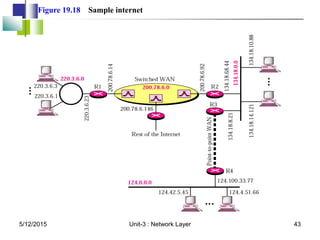
Figure 19.18 Sample internet
5/12/2015 43
Unit-3 : Network Layer
IP addresses are designed with two
levels of hierarchy.
Note
Note:
:
5/12/2015 44
Unit-3 : Network Layer
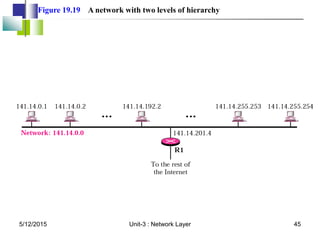
Figure 19.19 A network with two levels of hierarchy
5/12/2015 45
Unit-3 : Network Layer
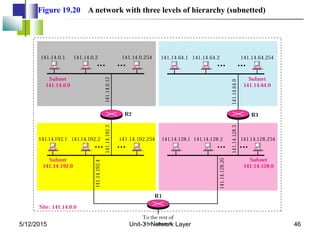
Figure 19.20 A network with three levels of hierarchy (subnetted)
5/12/2015 46
Unit-3 : Network Layer
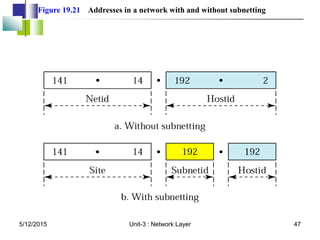
Figure 19.21 Addresses in a network with and without subnetting
5/12/2015 47
Unit-3 : Network Layer
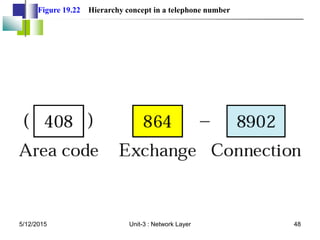
Figure 19.22 Hierarchy concept in a telephone number
5/12/2015 48
Unit-3 : Network Layer
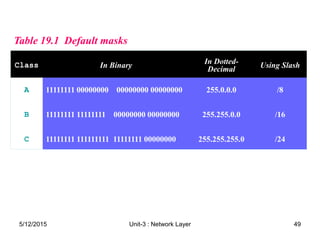
Table 19.1 Default masks
Class In Binary In Dotted-
Decimal Using Slash
A 11111111 00000000 00000000 00000000 255.0.0.0 /8
B 11111111 11111111 00000000 00000000 255.255.0.0 /16
C 11111111 111111111 11111111 00000000 255.255.255.0 /24
5/12/2015 49
Unit-3 : Network Layer
The network address can be found
by applying the default mask to any
address in the block (including itself).
It retains the netid of the block and
sets the hostid to 0s.
Note
Note:
:
5/12/2015 50
Unit-3 : Network Layer
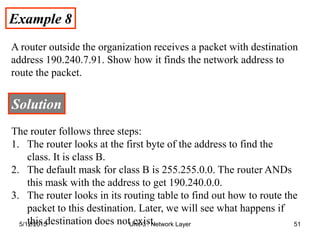
Example 8
Example 8
A router outside the organization receives a packet with destination
address 190.240.7.91. Show how it finds the network address to
route the packet.
Solution
Solution
The router follows three steps:
1. The router looks at the first byte of the address to find the
class. It is class B.
2. The default mask for class B is 255.255.0.0. The router ANDs
this mask with the address to get 190.240.0.0.
3. The router looks in its routing table to find out how to route the
packet to this destination. Later, we will see what happens if
this destination does not exist.
5/12/2015 51
Unit-3 : Network Layer
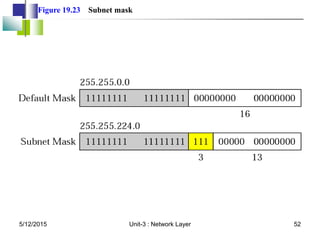
Figure 19.23 Subnet mask
5/12/2015 52
Unit-3 : Network Layer
Example 9
Example 9
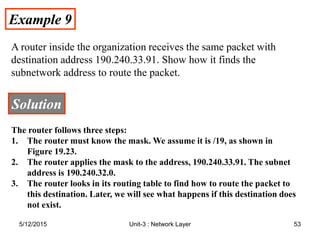
A router inside the organization receives the same packet with
destination address 190.240.33.91. Show how it finds the
subnetwork address to route the packet.
Solution
Solution
The router follows three steps:
1. The router must know the mask. We assume it is /19, as shown in
Figure 19.23.
2. The router applies the mask to the address, 190.240.33.91. The subnet
address is 190.240.32.0.
3. The router looks in its routing table to find how to route the packet to
this destination. Later, we will see what happens if this destination does
not exist.
5/12/2015 53
Unit-3 : Network Layer
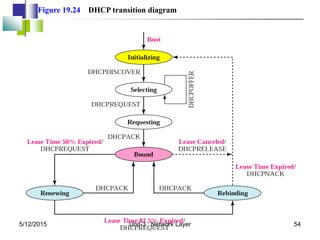
Figure 19.24 DHCP transition diagram
5/12/2015 54
Unit-3 : Network Layer
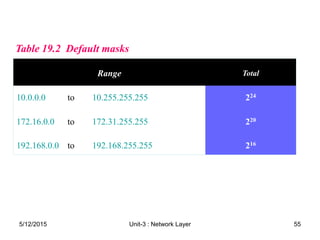
Table 19.2 Default masks
Range Total
10.0.0.0 to 10.255.255.255 224
172.16.0.0 to 172.31.255.255 220
192.168.0.0 to 192.168.255.255 216
5/12/2015 55
Unit-3 : Network Layer
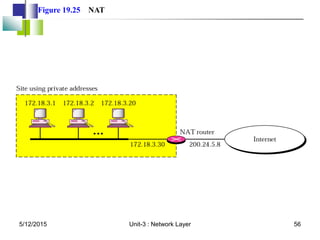
Figure 19.25 NAT
5/12/2015 56
Unit-3 : Network Layer
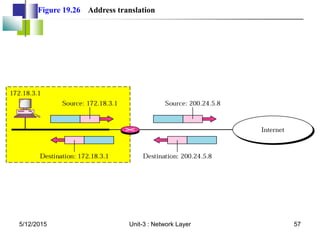
Figure 19.26 Address translation
5/12/2015 57
Unit-3 : Network Layer
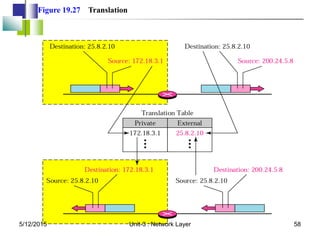
Figure 19.27 Translation
5/12/2015 58
Unit-3 : Network Layer
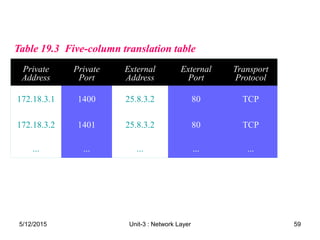
Table 19.3 Five
Table 19.3 Five-
-column translation table
column translation table
Private
Address
Private
Port
External
Address
External
Port
Transport
Protocol
172.18.3.1 1400 25.8.3.2 80 TCP
172.18.3.2 1401 25.8.3.2 80 TCP
... ... ... ... ...
5/12/2015 59
Unit-3 : Network Layer
19.3 Routing
19.3 Routing
Routing Techniques
Static Versus Dynamic Routing
Routing Table for Classful Addressing
Routing Table for Classless Addressing
5/12/2015 60
Unit-3 : Network Layer
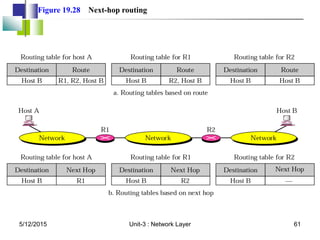
Figure 19.28 Next-hop routing
5/12/2015 61
Unit-3 : Network Layer
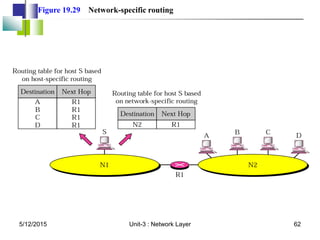
Figure 19.29 Network-specific routing
5/12/2015 62
Unit-3 : Network Layer
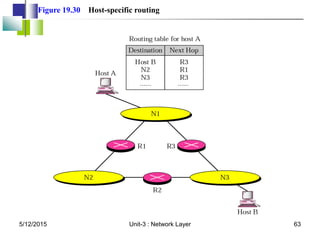
Figure 19.30 Host-specific routing
5/12/2015 63
Unit-3 : Network Layer
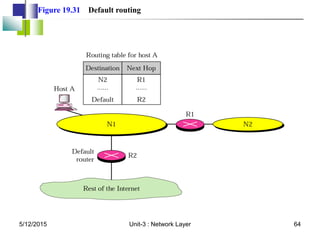
Figure 19.31 Default routing
5/12/2015 64
Unit-3 : Network Layer
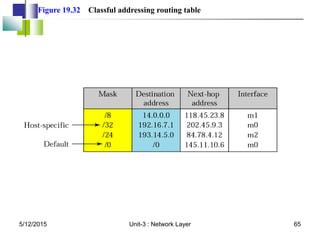
Figure 19.32 Classful addressing routing table
5/12/2015 65
Unit-3 : Network Layer
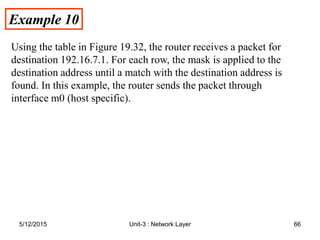
Example 10
Example 10
Using the table in Figure 19.32, the router receives a packet for
destination 192.16.7.1. For each row, the mask is applied to the
destination address until a match with the destination address is
found. In this example, the router sends the packet through
interface m0 (host specific).
5/12/2015 66
Unit-3 : Network Layer
Example 11
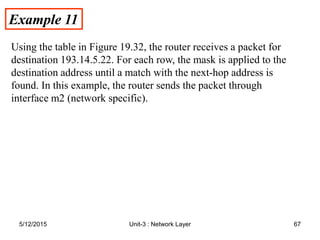
Example 11
Using the table in Figure 19.32, the router receives a packet for
destination 193.14.5.22. For each row, the mask is applied to the
destination address until a match with the next-hop address is
found. In this example, the router sends the packet through
interface m2 (network specific).
5/12/2015 67
Unit-3 : Network Layer
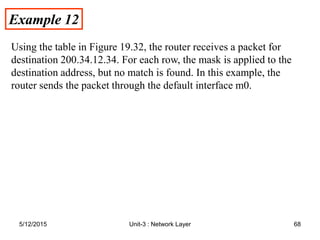
Example 12
Example 12
Using the table in Figure 19.32, the router receives a packet for
destination 200.34.12.34. For each row, the mask is applied to the
destination address, but no match is found. In this example, the
router sends the packet through the default interface m0.
5/12/2015 68
Unit-3 : Network Layer
Routing Algorithms
1.Distance Vector Routing
2.Link State Routing
5/12/2015 69
Unit-3 : Network Layer
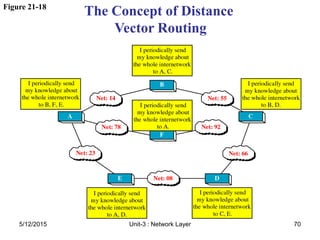
Figure 21-18
The Concept of Distance
Vector Routing
5/12/2015 70
Unit-3 : Network Layer
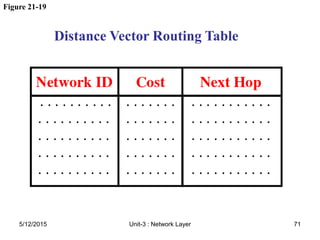
Figure 21-19
Distance Vector Routing Table
5/12/2015 71
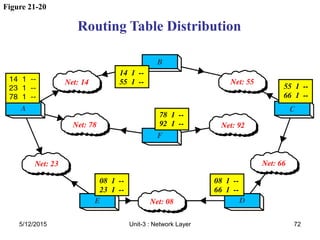
Unit-3 : Network Layer
Figure 21-20
Routing Table Distribution
5/12/2015 72
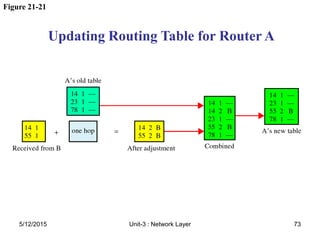
Unit-3 : Network Layer
Figure 21-21
Updating Routing Table for Router A
5/12/2015 73
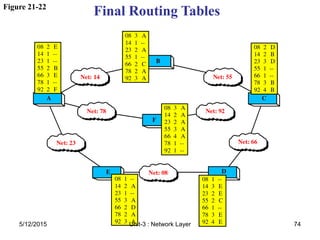
Unit-3 : Network Layer
Figure 21-22
Final Routing Tables
5/12/2015 74
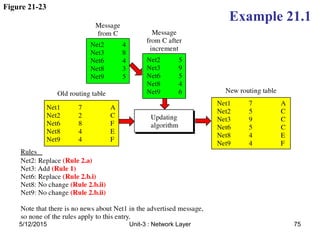
Unit-3 : Network Layer
Figure 21-23
Example 21.1
5/12/2015 75
Unit-3 : Network Layer
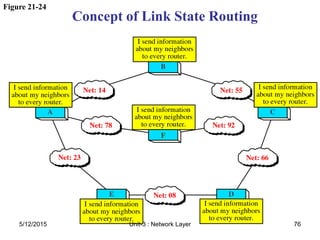
Figure 21-24
Concept of Link State Routing
5/12/2015 76
Unit-3 : Network Layer
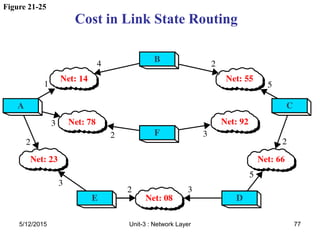
Figure 21-25
Cost in Link State Routing
5/12/2015 77
Unit-3 : Network Layer
Figure 21-26
Link State Packet
5/12/2015 78
Unit-3 : Network Layer
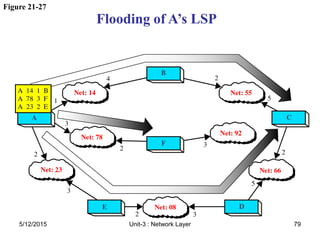
Figure 21-27
Flooding of A’s LSP
5/12/2015 79
Unit-3 : Network Layer
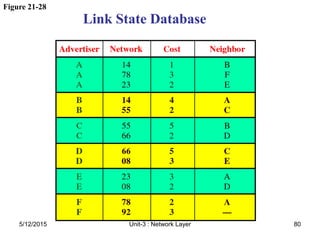
Figure 21-28
Link State Database
5/12/2015 80
Unit-3 : Network Layer
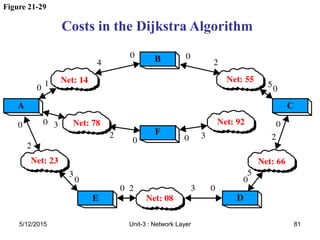
Figure 21-29
Costs in the Dijkstra Algorithm
5/12/2015 81
Unit-3 : Network Layer
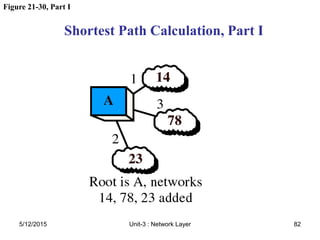
Figure 21-30, Part I
Shortest Path Calculation, Part I
5/12/2015 82
Unit-3 : Network Layer
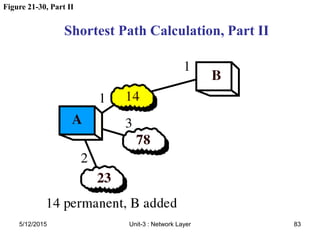
Figure 21-30, Part II
Shortest Path Calculation, Part II
5/12/2015 83
Unit-3 : Network Layer
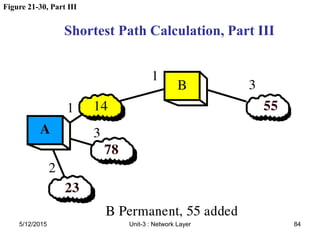
Figure 21-30, Part III
Shortest Path Calculation, Part III
5/12/2015 84
Unit-3 : Network Layer
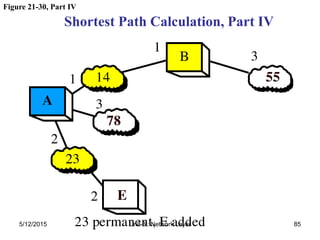
Figure 21-30, Part IV
Shortest Path Calculation, Part IV
5/12/2015 85
Unit-3 : Network Layer
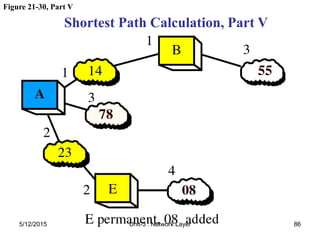
Figure 21-30, Part V
Shortest Path Calculation, Part V
5/12/2015 86
Unit-3 : Network Layer
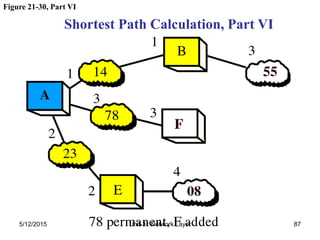
Figure 21-30, Part VI
Shortest Path Calculation, Part VI
5/12/2015 87
Unit-3 : Network Layer
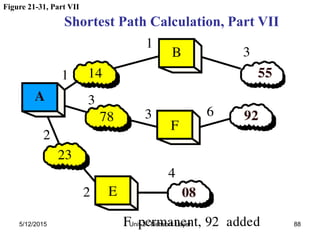
Figure 21-31, Part VII
Shortest Path Calculation, Part VII
5/12/2015 88
Unit-3 : Network Layer
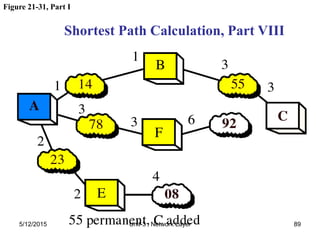
Figure 21-31, Part I
Shortest Path Calculation, Part VIII
5/12/2015 89
Unit-3 : Network Layer
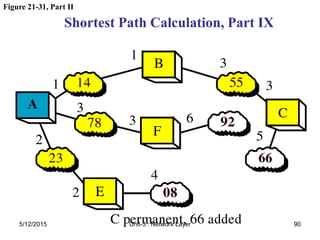
Figure 21-31, Part II
Shortest Path Calculation, Part IX
5/12/2015 90
Unit-3 : Network Layer
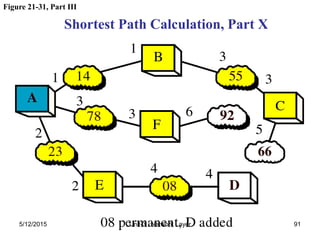
Figure 21-31, Part III
Shortest Path Calculation, Part X
5/12/2015 91
Unit-3 : Network Layer
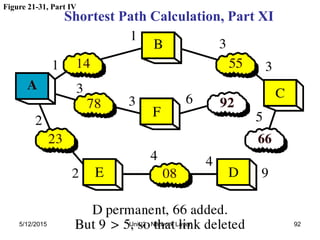
Figure 21-31, Part IV
Shortest Path Calculation, Part XI
5/12/2015 92
Unit-3 : Network Layer
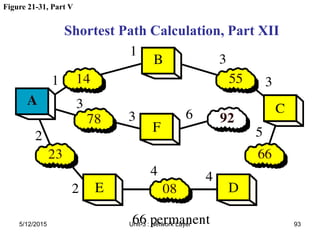
Figure 21-31, Part V
Shortest Path Calculation, Part XII
5/12/2015 93
Unit-3 : Network Layer
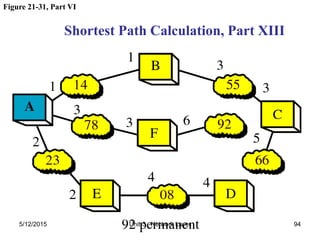
Figure 21-31, Part VI
Shortest Path Calculation, Part XIII
5/12/2015 94
Unit-3 : Network Layer
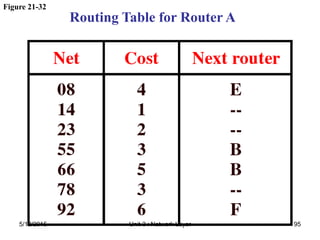
Routing Table for Router A
Figure 21-32
5/12/2015 95
Unit-3 : Network Layer

CN-Unit-3 on Network layer and routing protocols.pdf

  • 1.
    1 Computer Networks — Unit- 3 — — Network Layer —
  • 2.
  • 3.
  • 4.
    Network layer duties 5/12/20154 Unit-3 : Network Layer
  • 5.
  • 6.
    19.1 Internetworks 19.1 Internetworks NeedFor Network Layer Internet As A Packet-Switched Network Internet As A Connectionless Network 5/12/2015 6 Unit-3 : Network Layer
  • 7.
    Figure 19.1 Internetwork 5/12/20157 Unit-3 : Network Layer
  • 8.
    Figure 19.2 Linksin an internetwork 5/12/2015 8 Unit-3 : Network Layer
  • 9.
    Figure 19.3 Networklayer in an internetwork 5/12/2015 9 Unit-3 : Network Layer
  • 10.
    Figure 19.4 Networklayer at the source 5/12/2015 10 Unit-3 : Network Layer
  • 11.
    Figure 19.5 Networklayer at a router 5/12/2015 11 Unit-3 : Network Layer
  • 12.
    Figure 19.6 Networklayer at the destination 5/12/2015 12 Unit-3 : Network Layer
  • 13.
    Figure 19.7 Switching 5/12/201513 Unit-3 : Network Layer
  • 14.
    Figure 19.8 Datagramapproach 5/12/2015 14 Unit-3 : Network Layer
  • 15.
    Switching at thenetwork layer in the Internet is done using the datagram approach to packet switching. Note Note: : 5/12/2015 15 Unit-3 : Network Layer
  • 16.
    Communication at thenetwork layer in the Internet is connectionless. Note Note: : 5/12/2015 16 Unit-3 : Network Layer
  • 17.
    19.2 Addressing 19.2 Addressing InternetAddress Classful Addressing Supernetting Subnetting Classless Addressing Dynamic Address Configuration Network Address Translation 5/12/2015 17 Unit-3 : Network Layer
  • 18.
    An IP addressis a 32-bit address. Note Note: : 5/12/2015 18 Unit-3 : Network Layer
  • 19.
    The IP addressesare unique and universal. Note Note: : 5/12/2015 19 Unit-3 : Network Layer
  • 20.
    Figure 19.9 Dotted-decimalnotation 5/12/2015 20 Unit-3 : Network Layer
  • 21.
    The binary, decimal,and hexadecimal number systems are reviewed in Appendix B. Note Note: : 5/12/2015 21 Unit-3 : Network Layer
  • 22.
    Example 1 Example 1 Changethe following IP addresses from binary notation to dotted- decimal notation. a. 10000001 00001011 00001011 11101111 b. 11111001 10011011 11111011 00001111 Solution Solution We replace each group of 8 bits with its equivalent decimal number (see Appendix B) and add dots for separation: a. 129.11.11.239 b. 249.155.251.15 5/12/2015 22 Unit-3 : Network Layer
  • 23.
    Example 2 Example 2 Changethe following IP addresses from dotted-decimal notation to binary notation. a. 111.56.45.78 b. 75.45.34.78 Solution Solution We replace each decimal number with its binary equivalent (see Appendix B): a. 01101111 00111000 00101101 01001110 b. 01001011 00101101 00100010 01001110 5/12/2015 23 Unit-3 : Network Layer
  • 24.
    In classful addressing,the address space is divided into five classes: A, B, C, D, and E. Note Note: : 5/12/2015 24 Unit-3 : Network Layer
  • 25.
    Figure 19.10 Findingthe class in binary notation 5/12/2015 25 Unit-3 : Network Layer
  • 26.
    Figure 19.11 Findingthe address class 5/12/2015 26 Unit-3 : Network Layer
  • 27.
    Example 3 Example 3 Findthe class of each address: a. 0 00000001 00001011 00001011 11101111 b. 1111 11110011 10011011 11111011 00001111 Solution Solution See the procedure in Figure 19.11. a. The first bit is 0; this is a class A address. b. The first 4 bits are 1s; this is a class E address. 5/12/2015 27 Unit-3 : Network Layer
  • 28.
    Figure 19.12 Findingthe class in decimal notation 5/12/2015 28 Unit-3 : Network Layer
  • 29.
    Example 4 Example 4 Findthe class of each address: a. 227.12.14.87 b. 252.5.15.111 c. 134.11.78.56 Solution Solution a. The first byte is 227 (between 224 and 239); the class is D. b. The first byte is 252 (between 240 and 255); the class is E. c. The first byte is 134 (between 128 and 191); the class is B. 5/12/2015 29 Unit-3 : Network Layer
  • 30.
    Figure 19.13 Netidand hostid 5/12/2015 30 Unit-3 : Network Layer
  • 31.
    Figure 19.14 Blocksin class A 5/12/2015 31 Unit-3 : Network Layer
  • 32.
    Millions of classA addresses are wasted. Note Note: : 5/12/2015 32 Unit-3 : Network Layer
  • 33.
    Figure 19.15 Blocksin class B 5/12/2015 33 Unit-3 : Network Layer
  • 34.
    Many class Baddresses are wasted. Note Note: : 5/12/2015 34 Unit-3 : Network Layer
  • 35.
    The number ofaddresses in class C is smaller than the needs of most organizations. Note Note: : 5/12/2015 35 Unit-3 : Network Layer
  • 36.
    Figure 19.16 Blocksin class C 5/12/2015 36 Unit-3 : Network Layer
  • 37.
    Figure 19.17 Networkaddress 5/12/2015 37 Unit-3 : Network Layer
  • 38.
    In classful addressing,the network address is the one that is assigned to the organization. Note Note: : 5/12/2015 38 Unit-3 : Network Layer
  • 39.
    Example 5 Example 5 Giventhe address 23.56.7.91, find the network address. Solution Solution The class is A. Only the first byte defines the netid. We can find the network address by replacing the hostid bytes (56.7.91) with 0s. Therefore, the network address is 23.0.0.0. 5/12/2015 39 Unit-3 : Network Layer
  • 40.
    Example 6 Example 6 Giventhe address 132.6.17.85, find the network address. Solution Solution The class is B. The first 2 bytes defines the netid. We can find the network address by replacing the hostid bytes (17.85) with 0s. Therefore, the network address is 132.6.0.0. 5/12/2015 40 Unit-3 : Network Layer
  • 41.
    Example 7 Example 7 Giventhe network address 17.0.0.0, find the class. Solution Solution The class is A because the netid is only 1 byte. 5/12/2015 41 Unit-3 : Network Layer
  • 42.
    A network addressis different from a netid. A network address has both netid and hostid, with 0s for the hostid. Note Note: : 5/12/2015 42 Unit-3 : Network Layer
  • 43.
    Figure 19.18 Sampleinternet 5/12/2015 43 Unit-3 : Network Layer
  • 44.
    IP addresses aredesigned with two levels of hierarchy. Note Note: : 5/12/2015 44 Unit-3 : Network Layer
  • 45.
    Figure 19.19 Anetwork with two levels of hierarchy 5/12/2015 45 Unit-3 : Network Layer
  • 46.
    Figure 19.20 Anetwork with three levels of hierarchy (subnetted) 5/12/2015 46 Unit-3 : Network Layer
  • 47.
    Figure 19.21 Addressesin a network with and without subnetting 5/12/2015 47 Unit-3 : Network Layer
  • 48.
    Figure 19.22 Hierarchyconcept in a telephone number 5/12/2015 48 Unit-3 : Network Layer
  • 49.
    Table 19.1 Defaultmasks Table 19.1 Default masks Class In Binary In Dotted- Decimal Using Slash A 11111111 00000000 00000000 00000000 255.0.0.0 /8 B 11111111 11111111 00000000 00000000 255.255.0.0 /16 C 11111111 111111111 11111111 00000000 255.255.255.0 /24 5/12/2015 49 Unit-3 : Network Layer
  • 50.
    The network addresscan be found by applying the default mask to any address in the block (including itself). It retains the netid of the block and sets the hostid to 0s. Note Note: : 5/12/2015 50 Unit-3 : Network Layer
  • 51.
    Example 8 Example 8 Arouter outside the organization receives a packet with destination address 190.240.7.91. Show how it finds the network address to route the packet. Solution Solution The router follows three steps: 1. The router looks at the first byte of the address to find the class. It is class B. 2. The default mask for class B is 255.255.0.0. The router ANDs this mask with the address to get 190.240.0.0. 3. The router looks in its routing table to find out how to route the packet to this destination. Later, we will see what happens if this destination does not exist. 5/12/2015 51 Unit-3 : Network Layer
  • 52.
    Figure 19.23 Subnetmask 5/12/2015 52 Unit-3 : Network Layer
  • 53.
    Example 9 Example 9 Arouter inside the organization receives the same packet with destination address 190.240.33.91. Show how it finds the subnetwork address to route the packet. Solution Solution The router follows three steps: 1. The router must know the mask. We assume it is /19, as shown in Figure 19.23. 2. The router applies the mask to the address, 190.240.33.91. The subnet address is 190.240.32.0. 3. The router looks in its routing table to find how to route the packet to this destination. Later, we will see what happens if this destination does not exist. 5/12/2015 53 Unit-3 : Network Layer
  • 54.
    Figure 19.24 DHCPtransition diagram 5/12/2015 54 Unit-3 : Network Layer
  • 55.
    Table 19.2 Defaultmasks Table 19.2 Default masks Range Total 10.0.0.0 to 10.255.255.255 224 172.16.0.0 to 172.31.255.255 220 192.168.0.0 to 192.168.255.255 216 5/12/2015 55 Unit-3 : Network Layer
  • 56.
    Figure 19.25 NAT 5/12/201556 Unit-3 : Network Layer
  • 57.
    Figure 19.26 Addresstranslation 5/12/2015 57 Unit-3 : Network Layer
  • 58.
    Figure 19.27 Translation 5/12/201558 Unit-3 : Network Layer
  • 59.
    Table 19.3 Five Table19.3 Five- -column translation table column translation table Private Address Private Port External Address External Port Transport Protocol 172.18.3.1 1400 25.8.3.2 80 TCP 172.18.3.2 1401 25.8.3.2 80 TCP ... ... ... ... ... 5/12/2015 59 Unit-3 : Network Layer
  • 60.
    19.3 Routing 19.3 Routing RoutingTechniques Static Versus Dynamic Routing Routing Table for Classful Addressing Routing Table for Classless Addressing 5/12/2015 60 Unit-3 : Network Layer
  • 61.
    Figure 19.28 Next-hoprouting 5/12/2015 61 Unit-3 : Network Layer
  • 62.
    Figure 19.29 Network-specificrouting 5/12/2015 62 Unit-3 : Network Layer
  • 63.
    Figure 19.30 Host-specificrouting 5/12/2015 63 Unit-3 : Network Layer
  • 64.
    Figure 19.31 Defaultrouting 5/12/2015 64 Unit-3 : Network Layer
  • 65.
    Figure 19.32 Classfuladdressing routing table 5/12/2015 65 Unit-3 : Network Layer
  • 66.
    Example 10 Example 10 Usingthe table in Figure 19.32, the router receives a packet for destination 192.16.7.1. For each row, the mask is applied to the destination address until a match with the destination address is found. In this example, the router sends the packet through interface m0 (host specific). 5/12/2015 66 Unit-3 : Network Layer
  • 67.
    Example 11 Example 11 Usingthe table in Figure 19.32, the router receives a packet for destination 193.14.5.22. For each row, the mask is applied to the destination address until a match with the next-hop address is found. In this example, the router sends the packet through interface m2 (network specific). 5/12/2015 67 Unit-3 : Network Layer
  • 68.
    Example 12 Example 12 Usingthe table in Figure 19.32, the router receives a packet for destination 200.34.12.34. For each row, the mask is applied to the destination address, but no match is found. In this example, the router sends the packet through the default interface m0. 5/12/2015 68 Unit-3 : Network Layer
  • 69.
    Routing Algorithms 1.Distance VectorRouting 2.Link State Routing 5/12/2015 69 Unit-3 : Network Layer
  • 70.
    Figure 21-18 The Conceptof Distance Vector Routing 5/12/2015 70 Unit-3 : Network Layer
  • 71.
    Figure 21-19 Distance VectorRouting Table 5/12/2015 71 Unit-3 : Network Layer
  • 72.
    Figure 21-20 Routing TableDistribution 5/12/2015 72 Unit-3 : Network Layer
  • 73.
    Figure 21-21 Updating RoutingTable for Router A 5/12/2015 73 Unit-3 : Network Layer
  • 74.
    Figure 21-22 Final RoutingTables 5/12/2015 74 Unit-3 : Network Layer
  • 75.
    Figure 21-23 Example 21.1 5/12/201575 Unit-3 : Network Layer
  • 76.
    Figure 21-24 Concept ofLink State Routing 5/12/2015 76 Unit-3 : Network Layer
  • 77.
    Figure 21-25 Cost inLink State Routing 5/12/2015 77 Unit-3 : Network Layer
  • 78.
    Figure 21-26 Link StatePacket 5/12/2015 78 Unit-3 : Network Layer
  • 79.
    Figure 21-27 Flooding ofA’s LSP 5/12/2015 79 Unit-3 : Network Layer
  • 80.
    Figure 21-28 Link StateDatabase 5/12/2015 80 Unit-3 : Network Layer
  • 81.
    Figure 21-29 Costs inthe Dijkstra Algorithm 5/12/2015 81 Unit-3 : Network Layer
  • 82.
    Figure 21-30, PartI Shortest Path Calculation, Part I 5/12/2015 82 Unit-3 : Network Layer
  • 83.
    Figure 21-30, PartII Shortest Path Calculation, Part II 5/12/2015 83 Unit-3 : Network Layer
  • 84.
    Figure 21-30, PartIII Shortest Path Calculation, Part III 5/12/2015 84 Unit-3 : Network Layer
  • 85.
    Figure 21-30, PartIV Shortest Path Calculation, Part IV 5/12/2015 85 Unit-3 : Network Layer
  • 86.
    Figure 21-30, PartV Shortest Path Calculation, Part V 5/12/2015 86 Unit-3 : Network Layer
  • 87.
    Figure 21-30, PartVI Shortest Path Calculation, Part VI 5/12/2015 87 Unit-3 : Network Layer
  • 88.
    Figure 21-31, PartVII Shortest Path Calculation, Part VII 5/12/2015 88 Unit-3 : Network Layer
  • 89.
    Figure 21-31, PartI Shortest Path Calculation, Part VIII 5/12/2015 89 Unit-3 : Network Layer
  • 90.
    Figure 21-31, PartII Shortest Path Calculation, Part IX 5/12/2015 90 Unit-3 : Network Layer
  • 91.
    Figure 21-31, PartIII Shortest Path Calculation, Part X 5/12/2015 91 Unit-3 : Network Layer
  • 92.
    Figure 21-31, PartIV Shortest Path Calculation, Part XI 5/12/2015 92 Unit-3 : Network Layer
  • 93.
    Figure 21-31, PartV Shortest Path Calculation, Part XII 5/12/2015 93 Unit-3 : Network Layer
  • 94.
    Figure 21-31, PartVI Shortest Path Calculation, Part XIII 5/12/2015 94 Unit-3 : Network Layer
  • 95.
    Routing Table forRouter A Figure 21-32 5/12/2015 95 Unit-3 : Network Layer