Network+ Guide to Networks
5th Edition
Chapter 10
In-Depth TCP/IP Networking
Objectives
• Understand methods of network design unique to
TCP/IP networks, including subnetting, CIDR, and
address translation
• Explain the differences between public and private
TCP/IP networks
• Describe protocols used between mail clients and
mail servers, including SMTP, POP3, and IMAP4
• Employ multiple TCP/IP utilities for network
discovery and troubleshooting
DESIGNING TCP/IP-BASED
NETWORKS
Designing TCP/IP-Based Networks
• TCP/IP protocol suite use
– Public Internet connectivity
– Private connection data transmission
• TCP/IP fundamentals
– IP: routable protocol
• Interfaces requires unique IP address
• Node may use multiple IP addresses
– Two IP versions: IPv4 and IPv6
• IPv4: older; more common
Designing TCP/IP-Based Networks
(cont’d.)
• IPv4 addresses
– Four 8-bit octets
• Binary or dotted decimal
• Network host name assignment
– Dynamic using DHCP
– Static
• Network classes: A, B, C, D, E
– Class D, E addresses reserved
– Node’s network class provides information about
segment network node belongs to
Subnetting
• Separates network
– Multiple logically defined segments (subnets)
• Geographic locations, departmental boundaries,
technology types
• Subnet traffic separated from other subnet traffic
• Reasons to separate traffic
– Enhance security
– Improve performance
– Simplify troubleshooting
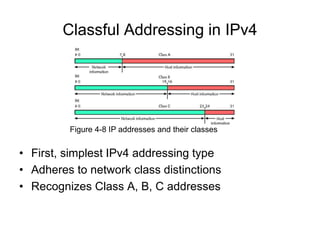
Classful Addressing in IPv4
• First, simplest IPv4 addressing type
• Adheres to network class distinctions
• Recognizes Class A, B, C addresses
Figure 4-8 IP addresses and their classes
Classful Addressing in IPv4 (cont’d.)
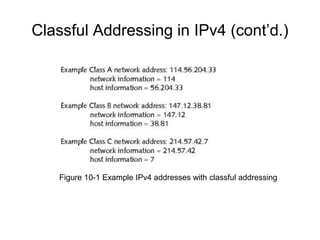
• Network information (network ID)
– First 8 bits in Class A address
– First 16 bits in Class B address
– First 24 bits in a Class C address
• Host information
– Last 24 bits in Class A address
– Last 16 bits in Class B address
– Last 8 bits in Class C address
Classful Addressing in IPv4 (cont’d.)
Figure 10-1 Example IPv4 addresses with classful addressing
Classful Addressing in IPv4 (cont’d.)
• Drawbacks
– Fixed network ID size limits number of network hosts
– Difficult to separate traffic from various parts of a
network
IPv4 Subnet Masks
• Identifies how network subdivided
• Indicates where network information located
• Subnet mask bits
– 1: corresponding IPv4 address bits contain network
information
– 0: corresponding IPv4 address bits contain host
information
IPv4 Subnet Masks (cont’d.)
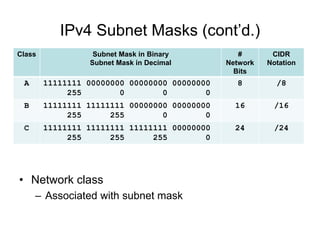
• Network class
– Associated with subnet mask
Class Subnet Mask in Binary
Subnet Mask in Decimal
#
Network
Bits
CIDR
Notation
A 11111111 00000000 00000000 00000000
255 0 0 0
8 /8
B 11111111 11111111 00000000 00000000
255 255 0 0
16 /16
C 11111111 11111111 11111111 00000000
255 255 255 0
24 /24
IPv4 Subnet Masks (cont’d.)
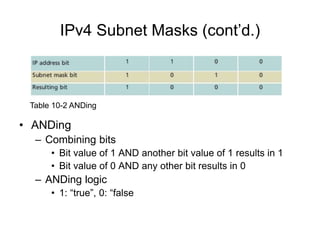
• ANDing
– Combining bits
• Bit value of 1 AND another bit value of 1 results in 1
• Bit value of 0 AND any other bit results in 0
– ANDing logic
• 1: “true”, 0: “false
Table 10-2 ANDing
IPv4 Subnet Masks (cont’d.)
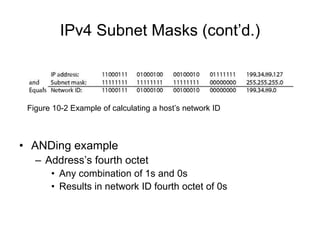
• ANDing example
– Address’s fourth octet
• Any combination of 1s and 0s
• Results in network ID fourth octet of 0s
Figure 10-2 Example of calculating a host’s network ID
Reserved Addresses
• Cannot be assigned to node network interface; used
as subnet masks
• Network ID
– Bits available for host information set to 0
– Classful IPv4 addressing network ID ends with 0 octet
– Subnetting allows network ID with other decimal
values in last octet(s)
• Broadcast address
– Octet(s) representing host information equal all 1s
– Decimal notation: 255 (for class C)
IPv4 Subnetting Techniques
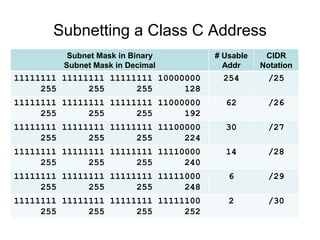
• Subnetting breaks classful IPv4 addressing rules
– IP address bits representing host information change
to represent network information
• Reduce usable host addresses per subnet
• Hosts, subnets available after subnetting related to host
information bits borrowed
Subnetting a Class C Address
Subnet Mask in Binary
Subnet Mask in Decimal
# Usable
Addr
CIDR
Notation
11111111 11111111 11111111 10000000
255 255 255 128
254 /25
11111111 11111111 11111111 11000000
255 255 255 192
62 /26
11111111 11111111 11111111 11100000
255 255 255 224
30 /27
11111111 11111111 11111111 11110000
255 255 255 240
14 /28
11111111 11111111 11111111 11111000
255 255 255 248
6 /29
11111111 11111111 11111111 11111100
255 255 255 252
2 /30
Calculating IPv4 Subnets
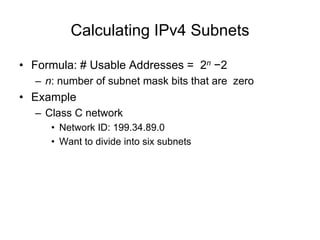
• Formula: # Usable Addresses = 2n −2
– n: number of subnet mask bits that are zero
• Example
– Class C network
• Network ID: 199.34.89.0
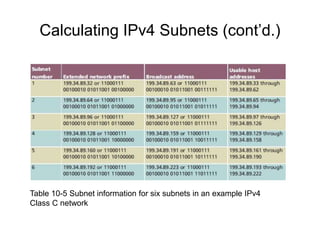
• Want to divide into six subnets
Calculating IPv4 Subnets (cont’d.)
Table 10-5 Subnet information for six subnets in an example IPv4
Class C network
Calculating IPv4 Subnets (cont’d.)
• Class A, Class B, and Class C networks
– Can be subnetted
• Each class has different number of host information bits
usable for subnet information
• Varies depending on network class and the way
subnetting is used
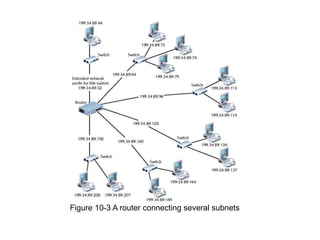
• LAN subnetting
– LAN’s devices interpret device subnetting information
– External routers
• Need network portion of device IP address
Figure 10-3 A router connecting several subnets
CIDR (Classless Interdomain Routing)
• Also called classless routing or supernetting
• Not exclusive of subnetting
– Provides additional ways of arranging network and
host information in an IP address
– Conventional network class distinctions do not exist
• Example: subdividing Class C network into six
subnets of 30 addressable hosts each
• Supernet
– Subnet created by moving subnet boundary left
Subnet and Supernet Masks
• Suppose you are starting with a class C address like
192.168.0.0/24
• This would be a subnet:
– Subnet Address: 192.168.0.0 / 26
– Subnet Mask: 11111111 11111111 11111111 11000000
– 255 255 255 192
– Usable address range: 192.168.0.1 - 192.168.0.62
• This would be a supernet:
– Subnet Address: 192.168.0.0 / 22
– Subnet Mask: 11111111 11111111 11111100 00000000
– 255 255 252 0
– Usable address range: 192.168.0.1 - 192.168.3.254
CIDR (cont’d.)
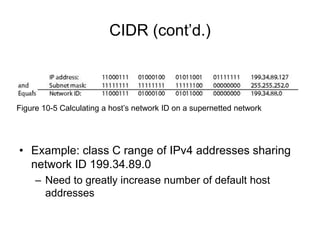
• Example: class C range of IPv4 addresses sharing
network ID 199.34.89.0
– Need to greatly increase number of default host
addresses
Figure 10-5 Calculating a host’s network ID on a supernetted network
CIDR (cont’d.)
• CIDR notation (or slash notation)
– Shorthand denoting subnet boundary position
– Form
• Network ID followed by forward slash ( / ), followed by
number of bits used for network portion of the address
• Like 147.144.51.0/24
Internet Gateways
• Gateway
– A device that connects two networks or subnets
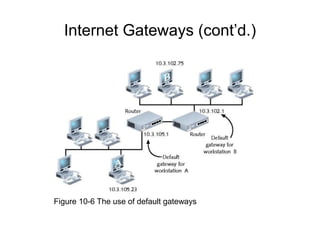
• Default gateway
– Sends LAN traffic to other subnets, such as the
Internet
– Usually a router
• Network nodes
– Have one default gateway address
• Assigned manually or automatically (DHCP)
Internet Gateways (cont’d.)
Figure 10-6 The use of default gateways
Address Translation
• Public network
– Any user may access
• Little or no restrictions
• Private network
– Access restricted
• Clients, machines with proper credentials
– Hiding IP addresses
• Provides more flexibility in assigning addresses
• NAT (Network Address Translation)
– Gateway replaces client’s private IP address with
Internet-recognized IP address
Address Translation (cont’d.)
• Reasons for using address translation
– Overcome IPv4 address quantity limitations
– Add marginal security to private network when
connected to public network
– Develop network addressing scheme
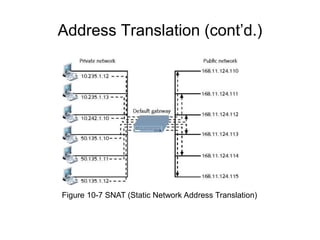
• SNAT (Static Network Address Translation)
– Client associated with one private IP address, one
public IP address
• Never changes
– Useful when operating mail server
Address Translation (cont’d.)
Figure 10-7 SNAT (Static Network Address Translation)
Address Translation (cont’d.)
• DNAT (Dynamic Network Address Translation)
– Also called IP masquerading
– Internet-valid IP address might be assigned to any
client’s outgoing transmission
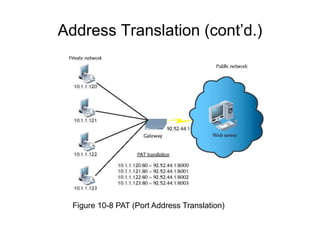
• PAT (Port Address Translation)
– Each client session with server on Internet assigned
separate TCP port number
• Client server request datagram contains port number
– Internet server responds with datagram’s destination
address including same port number
Address Translation (cont’d.)
Figure 10-8 PAT (Port Address Translation)
Address Translation (cont’d.)
• NAT
– Separates private, public transmissions on TCP/IP
network
• Gateways conduct network translation
– Most networks use router
• Gateway might operate on network host
– Windows operating systems
• ICS (Internet Connection Sharing)
TCP/IP MAIL SERVICES
TCP/IP Mail Services
• E-mail
– Most frequently used Internet services
– Functions
• Mail delivery, storage, pickup
• Mail servers
– Communicate with other mail servers
– Deliver messages, send, receive, store messages
• Mail clients
– Send messages to; retrieve messages from mail
servers
SMTP (Simple Mail Transfer Protocol)
• Used to send email
– From one mail server to another
• Operates at Application layer
– Relies on TCP at Transport layer
– Uses TCP port 25
• Email client software
– Administrator must specify SMTP server name
• Such as smtp.gmail.com
MIME (Multipurpose Internet Mail
Extensions)
• SMPT drawback: ASCII characters only
• MIME standard encodes, interprets binary files,
images, video, non-ASCII character sets within e-
mail message
– Identifies each mail message element according to
content type
• Text, graphics, audio, video, multipart
• Does not replace SMTP
– Works in conjunction with it
• Encodes different content types
– Fools SMTP
POP (Post Office Protocol)
• Application layer protocol
– Retrieve messages from mail server
• POP3 (Post Office Protocol, version 3)
– Current, popular version
– Relies on TCP, operates over port 110
– Store-and-forward type of service
• Advantages
– Minimizes server resources
• Mail deleted from server after retrieval
• Disadvantage for mobile users
– Mail server, client applications support POP3
IMAP (Internet Message Access
Protocol)
• More sophisticated alternative to POP3
• IMAP4: current version
• Advantages
– Replace POP3 without having to change e-mail
programs
– E-mail stays on server after retrieval
• Good for mobile users
IMAP (cont’d.)
• Features
– Users can retrieve all or portion of mail message
– Users can review messages and delete them
• While messages remain on server
– Users can create sophisticated methods of organizing
messages on server
– Users can share mailbox in central location
IMAP (cont’d.)
• Disadvantages
– Requires more storage space, processing resources
than POP servers
– Network managers must watch user allocations
closely
– If the IMAP4 server fails, users cannot access mail
ADDITIONAL TCP/IP UTILITIES
Additional TCP/IP Utilities
• TCP/IP transmission process
– Many points of failure
• Increase with network size, distance
• Utilities
– Help track down most TCP/IP-related problems
– Help discover information about node, network
• Nearly all TCP/IP utilities
– Accessible from command prompt
– Syntax differs per operating system
Ipconfig
• Command-line utility providing network adapter
information
– IP address, subnet mask, default gateway
• Windows operating system tool
– Command prompt window
• Type ipconfig and press Enter
– Switches manage TCP/IP settings
• Forward slash ( / ) precedes command switches
• Requires administrator rights
– To change workstation’s IP configuration
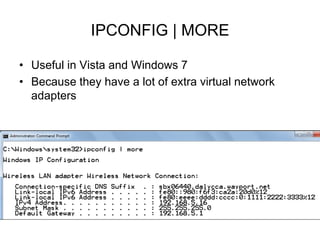
IPCONFIG | MORE
• Useful in Vista and Windows 7
• Because they have a lot of extra virtual network
adapters
Renewing a IP Address
• IPCONFIG /RELEASE
– Ends the current IP address lease
• IPCONFIG /RENEW
– Asks DHCP for a new IP address
• These commands are often required when moving
from one LAN to another
Ifconfig
• Utility used on UNIX and Linux systems
– Modify TCP/IP network interface settings, release and
renew DHCP-assigned addresses, check TCP/IP
setting status
– Runs at UNIX, Linux system starts
• Establishes computer TCP/IP configuration
• Used alone or with switches
– Uses hyphen ( - ) before some switches
– No preceding character for other switches
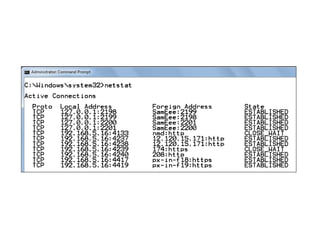
Netstat
• Displays TCP/IP statistics, component details, host
connections
• Used without switches
– Displays active TCP/IP connections on machine
• Can be used with switches
-a shows all connections including listening ones
-n display raw port numbers instead of letters like http
• For help, use NETSTAT /?
Nbtstat
• NetBIOS
– Used on Windows LANs
– Protocol runs in Session and Transport layers
– Associates NetBIOS names with workstations
– Not routable
• Can be made routable by encapsulation
• Nbtstat utility
– Provides information about NetBIOS statistics
– Resolves NetBIOS names to IP addresses
• Limited use as TCP/IP diagnostic utility
Hostname, Host, and Nslookup
• Hostname utility
– Provides client’s host name
• Administrator may change
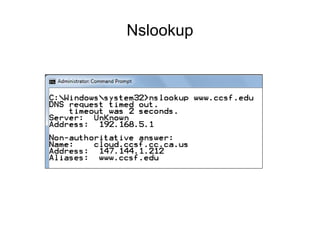
• Nslookup
– Query DNS database from any network computer
• Find the device host name by specifying its IP address
– Verify host configured correctly; troubleshoot DNS
resolution problems
Nslookup
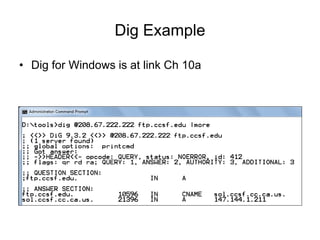
Dig
• Domain information groper
• Similar to nslookup
– Query DNS database
– Find specific IP address host name
• Useful for diagnosing DNS problems
• Dig utility provides more detailed information than
nslookup
• Flexible: two dozen switches
• Included with UNIX, Linux operating systems
• Windows system: must obtain third party code
Dig Example
• Dig for Windows is at link Ch 10a
Whois
• Query DNS registration database
– Obtain domain information
• Troubleshoot network problems
• Syntax on Linux or Unix
– whois xxx.yy
• xxx.yy is second-level domain name
• Windows system
– Requires additional utilities
• Web sites provide simple, Web-based interfaces
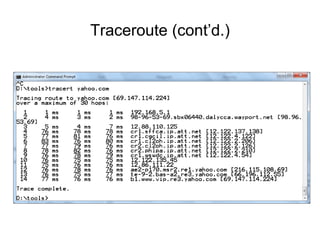
Traceroute
• Windows-based systems: tracert
• Linux systems: tracepath
• ICMP ECHO requests
– Trace path from one networked node to another
– Identifying all intermediate hops between two nodes
• Transmits UDP datagrams to specified destination
– Using either IP address or host name
• To identify destination
• Command used a number of switches
Traceroute (cont’d.)
Mtr (my traceroute)
• UNIX, Linux operating systems
– Route discovery, analysis utility
– Combines ping, traceroute functions
• Output: easy-to-read chart
• Simplest form
– mtr ip_address or mtr host_name
• Run continuously
• Stop with Ctrl+C or add limiting option to command
• Number of switches refine functioning, output
• Results misleading
– If devices prevented from responding to ICMP traffic
Mtr (my traceroute)
• Windows XP, Vista, Server 2003, Server 2008
– Pathping program as command-line utility
– Similar switches as mtr
– Pathping output differs slightly
• Displays path first
• Then issues hundreds of ICMP ECHO requests before
revealing reply, packet loss statistics
Route
• Route utility
– Allows viewing of host’s routing table
• UNIX or Linux system
– Type route and press Enter
• Windows-based system
– Type route print and press Enter
• Cisco-brand router
– Type show ip route and press Enter
Route (cont’d.)
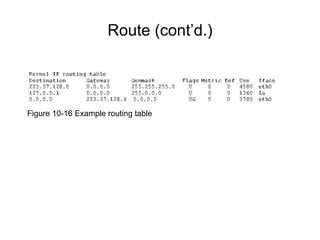
Figure 10-16 Example routing table
Route (cont’d.)
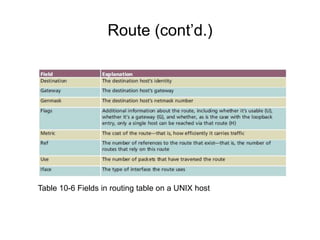
Table 10-6 Fields in routing table on a UNIX host
Route (cont’d.)
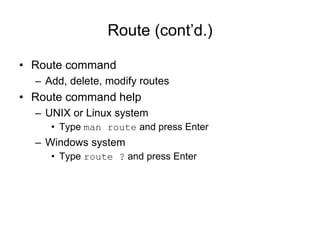
• Route command
– Add, delete, modify routes
• Route command help
– UNIX or Linux system
• Type man route and press Enter
– Windows system
• Type route ? and press Enter

chsadsadasdasdasdasdsadsadsadsadsadasda10.ppt

  • 1.
    Network+ Guide toNetworks 5th Edition Chapter 10 In-Depth TCP/IP Networking
  • 2.
    Objectives • Understand methodsof network design unique to TCP/IP networks, including subnetting, CIDR, and address translation • Explain the differences between public and private TCP/IP networks • Describe protocols used between mail clients and mail servers, including SMTP, POP3, and IMAP4 • Employ multiple TCP/IP utilities for network discovery and troubleshooting
  • 3.
  • 4.
    Designing TCP/IP-Based Networks •TCP/IP protocol suite use – Public Internet connectivity – Private connection data transmission • TCP/IP fundamentals – IP: routable protocol • Interfaces requires unique IP address • Node may use multiple IP addresses – Two IP versions: IPv4 and IPv6 • IPv4: older; more common
  • 5.
    Designing TCP/IP-Based Networks (cont’d.) •IPv4 addresses – Four 8-bit octets • Binary or dotted decimal • Network host name assignment – Dynamic using DHCP – Static • Network classes: A, B, C, D, E – Class D, E addresses reserved – Node’s network class provides information about segment network node belongs to
  • 6.
    Subnetting • Separates network –Multiple logically defined segments (subnets) • Geographic locations, departmental boundaries, technology types • Subnet traffic separated from other subnet traffic • Reasons to separate traffic – Enhance security – Improve performance – Simplify troubleshooting
  • 7.
    Classful Addressing inIPv4 • First, simplest IPv4 addressing type • Adheres to network class distinctions • Recognizes Class A, B, C addresses Figure 4-8 IP addresses and their classes
  • 8.
    Classful Addressing inIPv4 (cont’d.) • Network information (network ID) – First 8 bits in Class A address – First 16 bits in Class B address – First 24 bits in a Class C address • Host information – Last 24 bits in Class A address – Last 16 bits in Class B address – Last 8 bits in Class C address
  • 9.
    Classful Addressing inIPv4 (cont’d.) Figure 10-1 Example IPv4 addresses with classful addressing
  • 10.
    Classful Addressing inIPv4 (cont’d.) • Drawbacks – Fixed network ID size limits number of network hosts – Difficult to separate traffic from various parts of a network
  • 11.
    IPv4 Subnet Masks •Identifies how network subdivided • Indicates where network information located • Subnet mask bits – 1: corresponding IPv4 address bits contain network information – 0: corresponding IPv4 address bits contain host information
  • 12.
    IPv4 Subnet Masks(cont’d.) • Network class – Associated with subnet mask Class Subnet Mask in Binary Subnet Mask in Decimal # Network Bits CIDR Notation A 11111111 00000000 00000000 00000000 255 0 0 0 8 /8 B 11111111 11111111 00000000 00000000 255 255 0 0 16 /16 C 11111111 11111111 11111111 00000000 255 255 255 0 24 /24
  • 13.
    IPv4 Subnet Masks(cont’d.) • ANDing – Combining bits • Bit value of 1 AND another bit value of 1 results in 1 • Bit value of 0 AND any other bit results in 0 – ANDing logic • 1: “true”, 0: “false Table 10-2 ANDing
  • 14.
    IPv4 Subnet Masks(cont’d.) • ANDing example – Address’s fourth octet • Any combination of 1s and 0s • Results in network ID fourth octet of 0s Figure 10-2 Example of calculating a host’s network ID
  • 15.
    Reserved Addresses • Cannotbe assigned to node network interface; used as subnet masks • Network ID – Bits available for host information set to 0 – Classful IPv4 addressing network ID ends with 0 octet – Subnetting allows network ID with other decimal values in last octet(s) • Broadcast address – Octet(s) representing host information equal all 1s – Decimal notation: 255 (for class C)
  • 16.
    IPv4 Subnetting Techniques •Subnetting breaks classful IPv4 addressing rules – IP address bits representing host information change to represent network information • Reduce usable host addresses per subnet • Hosts, subnets available after subnetting related to host information bits borrowed
  • 17.
    Subnetting a ClassC Address Subnet Mask in Binary Subnet Mask in Decimal # Usable Addr CIDR Notation 11111111 11111111 11111111 10000000 255 255 255 128 254 /25 11111111 11111111 11111111 11000000 255 255 255 192 62 /26 11111111 11111111 11111111 11100000 255 255 255 224 30 /27 11111111 11111111 11111111 11110000 255 255 255 240 14 /28 11111111 11111111 11111111 11111000 255 255 255 248 6 /29 11111111 11111111 11111111 11111100 255 255 255 252 2 /30
  • 18.
    Calculating IPv4 Subnets •Formula: # Usable Addresses = 2n −2 – n: number of subnet mask bits that are zero • Example – Class C network • Network ID: 199.34.89.0 • Want to divide into six subnets
  • 19.
    Calculating IPv4 Subnets(cont’d.) Table 10-5 Subnet information for six subnets in an example IPv4 Class C network
  • 20.
    Calculating IPv4 Subnets(cont’d.) • Class A, Class B, and Class C networks – Can be subnetted • Each class has different number of host information bits usable for subnet information • Varies depending on network class and the way subnetting is used • LAN subnetting – LAN’s devices interpret device subnetting information – External routers • Need network portion of device IP address
  • 21.
    Figure 10-3 Arouter connecting several subnets
  • 22.
    CIDR (Classless InterdomainRouting) • Also called classless routing or supernetting • Not exclusive of subnetting – Provides additional ways of arranging network and host information in an IP address – Conventional network class distinctions do not exist • Example: subdividing Class C network into six subnets of 30 addressable hosts each • Supernet – Subnet created by moving subnet boundary left
  • 23.
    Subnet and SupernetMasks • Suppose you are starting with a class C address like 192.168.0.0/24 • This would be a subnet: – Subnet Address: 192.168.0.0 / 26 – Subnet Mask: 11111111 11111111 11111111 11000000 – 255 255 255 192 – Usable address range: 192.168.0.1 - 192.168.0.62 • This would be a supernet: – Subnet Address: 192.168.0.0 / 22 – Subnet Mask: 11111111 11111111 11111100 00000000 – 255 255 252 0 – Usable address range: 192.168.0.1 - 192.168.3.254
  • 24.
    CIDR (cont’d.) • Example:class C range of IPv4 addresses sharing network ID 199.34.89.0 – Need to greatly increase number of default host addresses Figure 10-5 Calculating a host’s network ID on a supernetted network
  • 25.
    CIDR (cont’d.) • CIDRnotation (or slash notation) – Shorthand denoting subnet boundary position – Form • Network ID followed by forward slash ( / ), followed by number of bits used for network portion of the address • Like 147.144.51.0/24
  • 26.
    Internet Gateways • Gateway –A device that connects two networks or subnets • Default gateway – Sends LAN traffic to other subnets, such as the Internet – Usually a router • Network nodes – Have one default gateway address • Assigned manually or automatically (DHCP)
  • 27.
    Internet Gateways (cont’d.) Figure10-6 The use of default gateways
  • 28.
    Address Translation • Publicnetwork – Any user may access • Little or no restrictions • Private network – Access restricted • Clients, machines with proper credentials – Hiding IP addresses • Provides more flexibility in assigning addresses • NAT (Network Address Translation) – Gateway replaces client’s private IP address with Internet-recognized IP address
  • 29.
    Address Translation (cont’d.) •Reasons for using address translation – Overcome IPv4 address quantity limitations – Add marginal security to private network when connected to public network – Develop network addressing scheme • SNAT (Static Network Address Translation) – Client associated with one private IP address, one public IP address • Never changes – Useful when operating mail server
  • 30.
    Address Translation (cont’d.) Figure10-7 SNAT (Static Network Address Translation)
  • 31.
    Address Translation (cont’d.) •DNAT (Dynamic Network Address Translation) – Also called IP masquerading – Internet-valid IP address might be assigned to any client’s outgoing transmission • PAT (Port Address Translation) – Each client session with server on Internet assigned separate TCP port number • Client server request datagram contains port number – Internet server responds with datagram’s destination address including same port number
  • 32.
    Address Translation (cont’d.) Figure10-8 PAT (Port Address Translation)
  • 33.
    Address Translation (cont’d.) •NAT – Separates private, public transmissions on TCP/IP network • Gateways conduct network translation – Most networks use router • Gateway might operate on network host – Windows operating systems • ICS (Internet Connection Sharing)
  • 34.
  • 35.
    TCP/IP Mail Services •E-mail – Most frequently used Internet services – Functions • Mail delivery, storage, pickup • Mail servers – Communicate with other mail servers – Deliver messages, send, receive, store messages • Mail clients – Send messages to; retrieve messages from mail servers
  • 36.
    SMTP (Simple MailTransfer Protocol) • Used to send email – From one mail server to another • Operates at Application layer – Relies on TCP at Transport layer – Uses TCP port 25 • Email client software – Administrator must specify SMTP server name • Such as smtp.gmail.com
  • 37.
    MIME (Multipurpose InternetMail Extensions) • SMPT drawback: ASCII characters only • MIME standard encodes, interprets binary files, images, video, non-ASCII character sets within e- mail message – Identifies each mail message element according to content type • Text, graphics, audio, video, multipart • Does not replace SMTP – Works in conjunction with it • Encodes different content types – Fools SMTP
  • 38.
    POP (Post OfficeProtocol) • Application layer protocol – Retrieve messages from mail server • POP3 (Post Office Protocol, version 3) – Current, popular version – Relies on TCP, operates over port 110 – Store-and-forward type of service • Advantages – Minimizes server resources • Mail deleted from server after retrieval • Disadvantage for mobile users – Mail server, client applications support POP3
  • 39.
    IMAP (Internet MessageAccess Protocol) • More sophisticated alternative to POP3 • IMAP4: current version • Advantages – Replace POP3 without having to change e-mail programs – E-mail stays on server after retrieval • Good for mobile users
  • 40.
    IMAP (cont’d.) • Features –Users can retrieve all or portion of mail message – Users can review messages and delete them • While messages remain on server – Users can create sophisticated methods of organizing messages on server – Users can share mailbox in central location
  • 41.
    IMAP (cont’d.) • Disadvantages –Requires more storage space, processing resources than POP servers – Network managers must watch user allocations closely – If the IMAP4 server fails, users cannot access mail
  • 42.
  • 43.
    Additional TCP/IP Utilities •TCP/IP transmission process – Many points of failure • Increase with network size, distance • Utilities – Help track down most TCP/IP-related problems – Help discover information about node, network • Nearly all TCP/IP utilities – Accessible from command prompt – Syntax differs per operating system
  • 44.
    Ipconfig • Command-line utilityproviding network adapter information – IP address, subnet mask, default gateway • Windows operating system tool – Command prompt window • Type ipconfig and press Enter – Switches manage TCP/IP settings • Forward slash ( / ) precedes command switches • Requires administrator rights – To change workstation’s IP configuration
  • 45.
    IPCONFIG | MORE •Useful in Vista and Windows 7 • Because they have a lot of extra virtual network adapters
  • 46.
    Renewing a IPAddress • IPCONFIG /RELEASE – Ends the current IP address lease • IPCONFIG /RENEW – Asks DHCP for a new IP address • These commands are often required when moving from one LAN to another
  • 47.
    Ifconfig • Utility usedon UNIX and Linux systems – Modify TCP/IP network interface settings, release and renew DHCP-assigned addresses, check TCP/IP setting status – Runs at UNIX, Linux system starts • Establishes computer TCP/IP configuration • Used alone or with switches – Uses hyphen ( - ) before some switches – No preceding character for other switches
  • 48.
    Netstat • Displays TCP/IPstatistics, component details, host connections • Used without switches – Displays active TCP/IP connections on machine • Can be used with switches -a shows all connections including listening ones -n display raw port numbers instead of letters like http • For help, use NETSTAT /?
  • 50.
    Nbtstat • NetBIOS – Usedon Windows LANs – Protocol runs in Session and Transport layers – Associates NetBIOS names with workstations – Not routable • Can be made routable by encapsulation • Nbtstat utility – Provides information about NetBIOS statistics – Resolves NetBIOS names to IP addresses • Limited use as TCP/IP diagnostic utility
  • 51.
    Hostname, Host, andNslookup • Hostname utility – Provides client’s host name • Administrator may change • Nslookup – Query DNS database from any network computer • Find the device host name by specifying its IP address – Verify host configured correctly; troubleshoot DNS resolution problems
  • 52.
  • 53.
    Dig • Domain informationgroper • Similar to nslookup – Query DNS database – Find specific IP address host name • Useful for diagnosing DNS problems • Dig utility provides more detailed information than nslookup • Flexible: two dozen switches • Included with UNIX, Linux operating systems • Windows system: must obtain third party code
  • 54.
    Dig Example • Digfor Windows is at link Ch 10a
  • 55.
    Whois • Query DNSregistration database – Obtain domain information • Troubleshoot network problems • Syntax on Linux or Unix – whois xxx.yy • xxx.yy is second-level domain name • Windows system – Requires additional utilities • Web sites provide simple, Web-based interfaces
  • 56.
    Traceroute • Windows-based systems:tracert • Linux systems: tracepath • ICMP ECHO requests – Trace path from one networked node to another – Identifying all intermediate hops between two nodes • Transmits UDP datagrams to specified destination – Using either IP address or host name • To identify destination • Command used a number of switches
  • 57.
  • 58.
    Mtr (my traceroute) •UNIX, Linux operating systems – Route discovery, analysis utility – Combines ping, traceroute functions • Output: easy-to-read chart • Simplest form – mtr ip_address or mtr host_name • Run continuously • Stop with Ctrl+C or add limiting option to command • Number of switches refine functioning, output • Results misleading – If devices prevented from responding to ICMP traffic
  • 59.
    Mtr (my traceroute) •Windows XP, Vista, Server 2003, Server 2008 – Pathping program as command-line utility – Similar switches as mtr – Pathping output differs slightly • Displays path first • Then issues hundreds of ICMP ECHO requests before revealing reply, packet loss statistics
  • 60.
    Route • Route utility –Allows viewing of host’s routing table • UNIX or Linux system – Type route and press Enter • Windows-based system – Type route print and press Enter • Cisco-brand router – Type show ip route and press Enter
  • 61.
    Route (cont’d.) Figure 10-16Example routing table
  • 62.
    Route (cont’d.) Table 10-6Fields in routing table on a UNIX host
  • 63.
    Route (cont’d.) • Routecommand – Add, delete, modify routes • Route command help – UNIX or Linux system • Type man route and press Enter – Windows system • Type route ? and press Enter