1
©2019 Check Point Software Technologies Ltd.
Anat Eytan-Davidi
Use Cases and More
SECURITY MANAGEMENT
R80.20
[Internal Use] for Check Point employees​
2
©2019 Check Point Software Technologies Ltd.
• Management feature release
• How R80.20 can improve your day-2-day work
• R80.30 – join the EA program
• Q&A
Agenda
[Internal Use] for Check Point employees​
©2019 Check Point Software Technologies Ltd.
MANAGEMENT FEATURE
RELEASE
[Internal Use] for Check Point employees​
4
©2019 Check Point Software Technologies Ltd. [Internal Use] for Check Point employees​
Management Feature Release
5
©2019 Check Point Software Technologies Ltd. [Internal Use] for Check Point employees​
Main
Release
Management
Feature Release
R80.10
R80.20
R80.30
R80.20.M1 R80.20.M2
JHF
JHF
(25-Jun-2018)
(26-Sep-2018)
(23-Dec-2018)
Coming next
(17-May-2017)
R80.30.M1 TBD
6
©2019 Check Point Software Technologies Ltd. [Internal Use] for Check Point employees​
Which version should I install?
©2019 Check Point Software Technologies Ltd.
R80.20 NEW FEATURES
[Internal Use] for Check Point employees​
8
©2019 Check Point Software Technologies Ltd. [Internal Use] for Check Point employees​
IPS updates
Until R80.20
• Management fetched the IPS
Updates
• Required policy installation
Starting R80.20
• Gateway can fetch the IPS updates
independently
• Default option for users who used
“scheduled IPS updates with
automatic install policy”
Keep gateway always up-to-date with the latest IPS signatures
Management
Gateway
IPS updates
Check Point
Cloud
9
©2019 Check Point Software Technologies Ltd. [Internal Use] for Check Point employees​
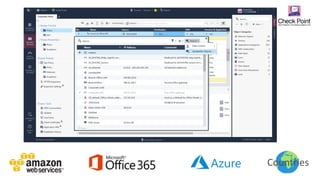
Maintain Office365 list of IPs
Until R80.20
• Requires an on-going maintenance
for the list of IPs
• Requires policy installation
Starting R80.20
• Add Office365 object in your policy
– Updatable object
• One-time policy installation
• Gateway fetches the list of IPs
– No need for an additional policy
installation
Your company is using Office 365 and you need to configure the policy accordingly
10
©2019 Check Point Software Technologies Ltd.
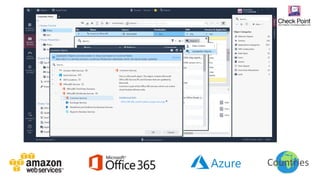
Countries
11
©2019 Check Point Software Technologies Ltd.
Countries
12
©2019 Check Point Software Technologies Ltd.
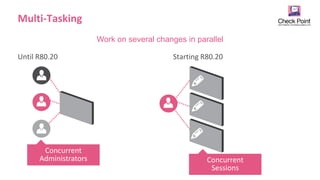
Multi-Tasking
Until R80.20 Starting R80.20
Work on several changes in parallel
Concurrent
Administrators Concurrent
Sessions
13
©2019 Check Point Software Technologies Ltd. [Internal Use] for Check Point employees​
 Isolate tasks
 No need to publish or discard unfinished work
 Work on several tasks in parallel
 Have several open sessions at the same time
Multi-Tasking
14
©2019 Check Point Software Technologies Ltd. [Internal Use] for Check Point employees​
1. Enable the feature
2. Create a new session
Multi-Tasking
15
©2019 Check Point Software Technologies Ltd. [Internal Use] for Check Point employees​
Also review all changes before publish
16
©2019 Check Point Software Technologies Ltd.
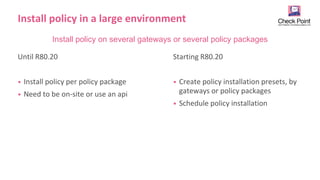
Install policy in a large environment
Until R80.20
• Install policy per policy package
• Need to be on-site or use an api
Starting R80.20
• Create policy installation presets, by
gateways or policy packages
• Schedule policy installation
Install policy on several gateways or several policy packages
17
©2019 Check Point Software Technologies Ltd. [Internal Use] for Check Point employees​
Schedule Install Policy
19
©2019 Check Point Software Technologies Ltd. [Internal Use] for Check Point employees​
Wildcard Object
192.29.0.1 192.29.1.1 192.29.2.1 192.29.3.1 192.29.255.1
20
©2019 Check Point Software Technologies Ltd. [Internal Use] for Check Point employees​
Export Check Point logs
Log Exporter
cp_log_export add name cp_exporter target-server 192.168.1.100 target-port 7781 protocol tcp format
splunk read-mode semi-unified
Check Point App for Splunk
21
©2019 Check Point Software Technologies Ltd. [Internal Use] for Check Point employees​
• SmartEndpoint
• SmartProvisioining
• Global VPN Community
Some more…
©2019 Check Point Software Technologies Ltd.
IMPORTANT TO KNOW
BEFORE UPGRADING TO
R80.20
[Internal Use] for Check Point employees​
23
©2019 Check Point Software Technologies Ltd.
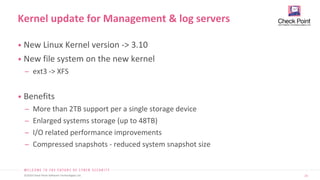
• New Linux Kernel version -> 3.10
• New file system on the new kernel
̶ ext3 -> XFS
• Benefits
̶ More than 2TB support per a single storage device
̶ Enlarged systems storage (up to 48TB)
̶ I/O related performance improvements
̶ Compressed snapshots - reduced system snapshot size
Kernel update for Management & log servers
24
©2019 Check Point Software Technologies Ltd. [Internal Use] for Check Point employees​
Kernel File System
Clean install 3.10 XFS
Advanced upgrade 3.10 XFS
In-place upgrade 3.10 ext3
Upgrade Method to R80.20
©2019 Check Point Software Technologies Ltd.
SMARTCONSOLE
EXTENSIONS
[Internal Use] for Check Point employees​
26
©2019 Check Point Software Technologies Ltd.
• Expand and customize Check Point
SmartConsole for your needs
• Integrate tools you work with, into
SmartConsole
SmartConsole Extensions
27
©2019 Check Point Software Technologies Ltd.
28
©2019 Check Point Software Technologies Ltd.
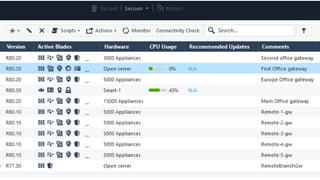
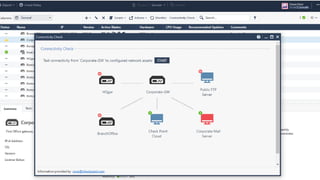
• Screenshot with the extension
That’s it – the extension is ready and you can use it
29
©2019 Check Point Software Technologies Ltd. [Internal Use] for Check Point employees​
Where can I find it? And more information
https://community.checkpoint.com/docs/DOC-3472-how-to-extend-and-enhance-smartconsole
30
©2019 Check Point Software Technologies Ltd.
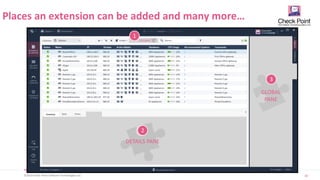
Places an extension can be added and many more…
TOOLBAR
DETAILS PANE
GLOBAL
PANE
1
2
3
©2019 Check Point Software Technologies Ltd.
R80.30 – JOIN THE EA
PROGRAM
[Internal Use] for Check Point employees​
R80.30
35
©2019 Check Point Software Technologies Ltd.
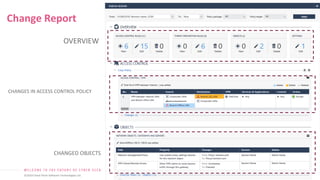
OVERVIEW
CHANGES IN ACCESS CONTROL POLICY
CHANGED OBJECTS
Change Report
36
©2019 Check Point Software Technologies Ltd.
Summary
[Internal Use] for Check Point employees​
30
37
©2019 Check Point Software Technologies Ltd. [Internal Use] for Check Point employees​
38
©2019 Check Point Software Technologies Ltd.
THANK YOU
[Internal Use] for Check Point employees​

Checkpoint Firewall R80.20 TechTalk.pptx

  • 1.
    1 ©2019 Check PointSoftware Technologies Ltd. ©2019 Check Point Software Technologies Ltd. Anat Eytan-Davidi Use Cases and More SECURITY MANAGEMENT R80.20 [Internal Use] for Check Point employees​
  • 2.
    2 ©2019 Check PointSoftware Technologies Ltd. • Management feature release • How R80.20 can improve your day-2-day work • R80.30 – join the EA program • Q&A Agenda [Internal Use] for Check Point employees​
  • 3.
    ©2019 Check PointSoftware Technologies Ltd. MANAGEMENT FEATURE RELEASE [Internal Use] for Check Point employees​
  • 4.
    4 ©2019 Check PointSoftware Technologies Ltd. [Internal Use] for Check Point employees​ Management Feature Release
  • 5.
    5 ©2019 Check PointSoftware Technologies Ltd. [Internal Use] for Check Point employees​ Main Release Management Feature Release R80.10 R80.20 R80.30 R80.20.M1 R80.20.M2 JHF JHF (25-Jun-2018) (26-Sep-2018) (23-Dec-2018) Coming next (17-May-2017) R80.30.M1 TBD
  • 6.
    6 ©2019 Check PointSoftware Technologies Ltd. [Internal Use] for Check Point employees​ Which version should I install?
  • 7.
    ©2019 Check PointSoftware Technologies Ltd. R80.20 NEW FEATURES [Internal Use] for Check Point employees​
  • 8.
    8 ©2019 Check PointSoftware Technologies Ltd. [Internal Use] for Check Point employees​ IPS updates Until R80.20 • Management fetched the IPS Updates • Required policy installation Starting R80.20 • Gateway can fetch the IPS updates independently • Default option for users who used “scheduled IPS updates with automatic install policy” Keep gateway always up-to-date with the latest IPS signatures Management Gateway IPS updates Check Point Cloud
  • 9.
    9 ©2019 Check PointSoftware Technologies Ltd. [Internal Use] for Check Point employees​ Maintain Office365 list of IPs Until R80.20 • Requires an on-going maintenance for the list of IPs • Requires policy installation Starting R80.20 • Add Office365 object in your policy – Updatable object • One-time policy installation • Gateway fetches the list of IPs – No need for an additional policy installation Your company is using Office 365 and you need to configure the policy accordingly
  • 10.
    10 ©2019 Check PointSoftware Technologies Ltd. Countries
  • 11.
    11 ©2019 Check PointSoftware Technologies Ltd. Countries
  • 12.
    12 ©2019 Check PointSoftware Technologies Ltd. Multi-Tasking Until R80.20 Starting R80.20 Work on several changes in parallel Concurrent Administrators Concurrent Sessions
  • 13.
    13 ©2019 Check PointSoftware Technologies Ltd. [Internal Use] for Check Point employees​  Isolate tasks  No need to publish or discard unfinished work  Work on several tasks in parallel  Have several open sessions at the same time Multi-Tasking
  • 14.
    14 ©2019 Check PointSoftware Technologies Ltd. [Internal Use] for Check Point employees​ 1. Enable the feature 2. Create a new session Multi-Tasking
  • 15.
    15 ©2019 Check PointSoftware Technologies Ltd. [Internal Use] for Check Point employees​ Also review all changes before publish
  • 16.
    16 ©2019 Check PointSoftware Technologies Ltd. Install policy in a large environment Until R80.20 • Install policy per policy package • Need to be on-site or use an api Starting R80.20 • Create policy installation presets, by gateways or policy packages • Schedule policy installation Install policy on several gateways or several policy packages
  • 17.
    17 ©2019 Check PointSoftware Technologies Ltd. [Internal Use] for Check Point employees​ Schedule Install Policy
  • 18.
    19 ©2019 Check PointSoftware Technologies Ltd. [Internal Use] for Check Point employees​ Wildcard Object 192.29.0.1 192.29.1.1 192.29.2.1 192.29.3.1 192.29.255.1
  • 19.
    20 ©2019 Check PointSoftware Technologies Ltd. [Internal Use] for Check Point employees​ Export Check Point logs Log Exporter cp_log_export add name cp_exporter target-server 192.168.1.100 target-port 7781 protocol tcp format splunk read-mode semi-unified Check Point App for Splunk
  • 20.
    21 ©2019 Check PointSoftware Technologies Ltd. [Internal Use] for Check Point employees​ • SmartEndpoint • SmartProvisioining • Global VPN Community Some more…
  • 21.
    ©2019 Check PointSoftware Technologies Ltd. IMPORTANT TO KNOW BEFORE UPGRADING TO R80.20 [Internal Use] for Check Point employees​
  • 22.
    23 ©2019 Check PointSoftware Technologies Ltd. • New Linux Kernel version -> 3.10 • New file system on the new kernel ̶ ext3 -> XFS • Benefits ̶ More than 2TB support per a single storage device ̶ Enlarged systems storage (up to 48TB) ̶ I/O related performance improvements ̶ Compressed snapshots - reduced system snapshot size Kernel update for Management & log servers
  • 23.
    24 ©2019 Check PointSoftware Technologies Ltd. [Internal Use] for Check Point employees​ Kernel File System Clean install 3.10 XFS Advanced upgrade 3.10 XFS In-place upgrade 3.10 ext3 Upgrade Method to R80.20
  • 24.
    ©2019 Check PointSoftware Technologies Ltd. SMARTCONSOLE EXTENSIONS [Internal Use] for Check Point employees​
  • 25.
    26 ©2019 Check PointSoftware Technologies Ltd. • Expand and customize Check Point SmartConsole for your needs • Integrate tools you work with, into SmartConsole SmartConsole Extensions
  • 26.
    27 ©2019 Check PointSoftware Technologies Ltd.
  • 27.
    28 ©2019 Check PointSoftware Technologies Ltd. • Screenshot with the extension That’s it – the extension is ready and you can use it
  • 28.
    29 ©2019 Check PointSoftware Technologies Ltd. [Internal Use] for Check Point employees​ Where can I find it? And more information https://community.checkpoint.com/docs/DOC-3472-how-to-extend-and-enhance-smartconsole
  • 29.
    30 ©2019 Check PointSoftware Technologies Ltd. Places an extension can be added and many more… TOOLBAR DETAILS PANE GLOBAL PANE 1 2 3
  • 30.
    ©2019 Check PointSoftware Technologies Ltd. R80.30 – JOIN THE EA PROGRAM [Internal Use] for Check Point employees​ R80.30
  • 31.
    35 ©2019 Check PointSoftware Technologies Ltd. OVERVIEW CHANGES IN ACCESS CONTROL POLICY CHANGED OBJECTS Change Report
  • 32.
    36 ©2019 Check PointSoftware Technologies Ltd. Summary [Internal Use] for Check Point employees​ 30
  • 33.
    37 ©2019 Check PointSoftware Technologies Ltd. [Internal Use] for Check Point employees​
  • 34.
    38 ©2019 Check PointSoftware Technologies Ltd. ©2019 Check Point Software Technologies Ltd. THANK YOU [Internal Use] for Check Point employees​

Editor's Notes

  • #9 For all gateways, in Threat Prevention -> Updates -> clear the scheduled update. To disable for specific gateway, on gateway configuration go to IPS tab and select 'Use IPS managements updates' in the gateway editor. Fall back on gateway update failure - if gateway fails to perform automatic update, the gateway will get the management package during policy installation. Scheduled update time - recommended every 2 hours. Switch version - if user wants to switch gateway version he will need to disable scheduled update, switch to the version he wants and then preform install policy.
  • #10 Get them from the IT manager as embed them in the security policy
  • #11 Services that run online typically change the IP Addresses of their servers frequently. Examples of such services include: AWS, Microsoft Office 365, Microsoft Azure, and Countries. Managing changes made by these vendors is a common task for Security Administrators. Check Point provides Updatable Objects, representing the IP Addresses and Domains that get updated periodically. After these objects are installed on a Gateway, the Gateway fetches updates for these objects independently. How does this work: Requires R80.20 Security Management Server and R80.20 Gateway. Updatable Objects is a Check Point online service that collects current lists of IP addresses and FQDN URI’s from dynamic list providers. The Security Management presents the current repository of Updatable Objects through the CloudGuard Controller component. Pick the object once, publish, install policy once. From now on, the Gateway periodically checks for updates at the Check Point online service for the Updatable Objects that are currently in use. No need to monitor updates for the service – the Gateway already does this for you.
  • #12 Services that run online typically change the IP Addresses of their servers frequently. Examples of such services include: AWS, Microsoft Office 365, Microsoft Azure, and Countries. Managing changes made by these vendors is a common task for Security Administrators. Check Point provides Updatable Objects, representing the IP Addresses and Domains that get updated periodically. After these objects are installed on a Gateway, the Gateway fetches updates for these objects independently. How does this work: Requires R80.20 Security Management Server and R80.20 Gateway. Updatable Objects is a Check Point online service that collects current lists of IP addresses and FQDN URI’s from dynamic list providers. The Security Management presents the current repository of Updatable Objects through the CloudGuard Controller component. Pick the object once, publish, install policy once. From now on, the Gateway periodically checks for updates at the Check Point online service for the Updatable Objects that are currently in use. No need to monitor updates for the service – the Gateway already does this for you.
  • #13 might be due to urgency or separation of tasks
  • #17 might be due to urgency or separation of tasks
  • #19 Wildcard objects let you define IP address objects that share a common pattern that can be permitted or denied access in a security policy. This feature is only supported for R80.20 and above gateways A supermarket chain has all of its cash registers on subnet 194.29.x.1, where x defines the region. In this use case, all the cash registers in this region must have access to the database server at 194.30.1.1. Instead of defining 256 hosts (194.29.0.1, 194.29.1.1, 194.29.2.1....194.29.255.1), the administrator creates a wildcard object that represents all the cash registers in the region:
  • #20 Assume you have the following deployment in your organization, and you want to allow an access for all to a specific server. Instead of using 256 hosts, you can use 1 wild card object that represents all . Wildcard objects let you define IP address objects that share a common pattern that can be permitted or denied access in a security policy.
  • #21 Sk122323 Check Point "Log Exporter" is an easy and secure method for exporting Check Point logs over syslog. Exporting can be done in few standard protocols and formats. Log Exporter supports: SIEM applications: Splunk, Arcsight, RSA, LogRhythm, QRadar, McAfee, rsyslog, ng-syslog and any other SIEM application that can run a syslog agent. Protocols: syslog over TCP or UDP. Formats: Syslog, Splunk, CEF, LEEF, Generic. Security: Mutual authentication TLS. Log Types: The ability to export security logs / audit logs or both. Filter out (don't export) firewall connection logs. Filtering: choose what to export based on field values. Filtering ability is not integrated to R80.20 yet, this SK will be updated when it will be supported In order to support exporting logs in Splunk format, please install R80.20 Jumbo Hotfix Take 5 and above. 
  • #22 Starting R80.20.M1 and above, the Endpoint Security Management Server is fully integrated into the Check Point main train  Important fixes for the Endpoint Security Management Server will be either included in the standard Jumbo hotfix, or in a dedicated hotfix. R80.20.M1 and above can manage E80.64 and above Endpoint Security Clients.
  • #25 When performing clean install – File system will be XFS When performing advanced upgrade - File system will change to XFS When performing in-place upgrade - file system will remain ext3 The recommendation is due to the new faster file system that comes with the updated Linux kernel.
  • #27 SmartConsole Extensions was designed to further extend the consolidation vision, and invite external interfaces to be integrated inside our Smart Console. For example, you can create a web interface for an existing ticketing system, and embed it in SmartConsole so associated tickets can be displayed for every rule in the Rule Base.   Customers, vendors, partners and third-parties can develop their own extensions and use them inside SmartConsole.  
  • #28 A new button was added to the SmartConsole Tool bar “Connectivity Check”, all you need to do it to clink it
  • #29 And in short time you will have your results in the SmartConsole
  • #31 Our new extension platform was designed to further extend the consolidation vision, and invite those interfaces to be integrated inside our Smart Console.
  • #33 CPView on MDS CPView SNMP SmartConsole side by side
  • #36 Change management diff view integrated in SmartConsole. See changes made in the policy packages and in objects SmartConsole includes built-in revision management. Every time an administrator publishes changes, a new revision is automatically created.  You can review changes made by each revision and private changes with the SmartConsole Change Report