Check Point Security Administration NGX I Course Overview
Course Description Objectives Describe Check Point’s unified approach to network management, and the key elements of this architecture Design a distributed environment using the network detailed in the course topology Install the Security Gateway version R71 in a distribute environment using the network detailed in the course topology Given Check Point’s latest integration of CoreXL technology, select the best security solution for your corporate environment Given network specifications, perform a backup and restore the current Gateway installation from the command line Check Point Security Administration NGX R71 I
Course Description Objectives Identify critical files needed to purge or backup, import and export users and groups and add or delete administrators from the command line Deploy Gateways using sysconfig and cpconfig from the Gateway command line Use the Command Line to assist support in troubleshooting common problems on the Security Gateway Given the network topology, create and configure network, host and gateway objects Verify SIC establishment between the SmartCenter Server and the Gateway using SmartDashboard Create a basic Rule Base in SmartDashboard that includes permissions for administrative users, external services, and LAN outbound use Check Point Security Administration NGX R71 I
Course Description Objectives Configure NAT rules on Web and Gateway servers Evaluate existing policies and optimize the rules based on current corporate requirements Maintain the Security Management Server with scheduled backups and policy versions to ensure seamless upgrades and minimal downtime Use queries in SmartView Tracker to monitor IPS and common network traffic and troubleshoot events using packet data Using packet data on a given corporate network, generate reports, troubleshoot system and security issues, and ensure network functionality Using SmartView Monitor, configure alerts and traffic counters, view a Gateway's status, monitor suspicious activity rules, analyze tunnel activity and monitor remote user access based on corporate requirements Check Point Security Administration NGX R71 I
Course Description Objectives Monitor remote Gateways using SmartUpdate to evaluate the need for upgrades, new installations, and license modifications Use SmartUpdate to apply upgrade packages to single or multiple VPN-1 Gateways Upgrade and attach product licenses using SmartUpdate Centrally manage users to ensure only authenticated users securely access the corporate network either locally or remotely Manage users to access to the corporate LAN by using external databases Select the most appropriate encryption algorithm when securing communication over a VPN, based on corporate requirements Check Point Security Administration NGX R71 I
Course Description Objectives Establish VPN connections to partner sites in order to establish access to a central database by configuring Advanced IKE properties Configure a pre-shared secret site-to-site VPN with partner sites Configure a certificate based site-to-site VPN using one partner's internal Configure a certificate based site-to-site VPN using a third-party CA Configure permanent tunnels for remote access to corporate resources Configure VPN tunnel sharing, given the difference between host-based, subnet-based and gateway-based tunnels Check Point Security Administration NGX R71 I
Course Description Objectives Configure Check Point Messaging Security to test IP Reputation, content based anti-spam, and zero hour virus detection Based on network analysis disclosing threats by specific sites, configure a Web-filtering and antivirus policy to filter and scan traffic Implement default or customized profiles to designated Gateways in the corporate network Check Point Security Administration NGX R71 I
Course Layout Course Requirements Prerequisites Check Point Certified Security Administrator (CCSA) Check Point Security Administration NGX R71 I
The course is geared towards System administators Support analysts Network engineers Course Requirements
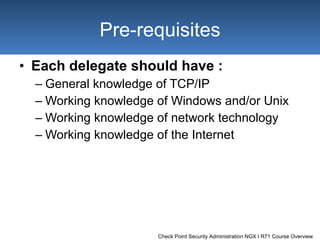
Each delegate should have : General knowledge of TCP/IP Working knowledge of Windows and/or Unix Working knowledge of network technology Working knowledge of the Internet Pre-requisites
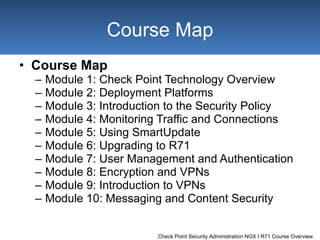
Course Map Module 1:  Check Point Technology Overview Module 2:  Deployment Platforms Module 3:  Introduction to the Security Policy Module 4:  Monitoring Traffic and Connections Module 5:  Using SmartUpdate Module 6:  Upgrading to R71 Module 7:  User Management and Authentication Module 8:  Encryption and VPNs Module 9:  Introduction to VPNs Module 10:  Messaging and Content Security Course Map
Lab Setup Lab Topology IP Addresses Lab Terms Lab Stations Lab Setup
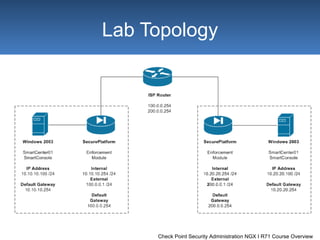
Lab Topology
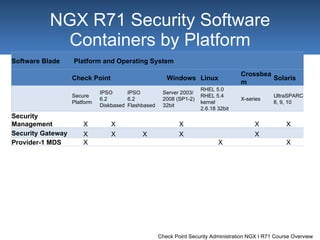
NGX R71  Security Software Containers by Platform Software Blade Platform and Operating System Check Point Windows Linux Crossbeam Solaris Secure Platform IPSO  6.2  Diskbased IPSO  6.2  Flashbased Server 2003/ 2008 (SP1-2)  32bit RHEL 5.0 RHEL 5.4  kernel  2.6.18 32bit X-series UltraSPARC  8, 9, 10 Security  Management X X X X X Security Gateway X X X X X Provider-1 MDS X X X
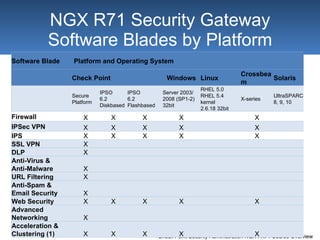
NGX R71  Security Gateway Software Blades by Platform Software Blade Platform and Operating System Check Point Windows Linux Crossbeam Solaris Secure Platform IPSO  6.2  Diskbased IPSO  6.2  Flashbased Server 2003/ 2008 (SP1-2)  32bit RHEL 5.0 RHEL 5.4  kernel  2.6.18 32bit X-series UltraSPARC  8, 9, 10 Firewall X X X X X IPSec VPN X X X X X IPS X X X X X SSL VPN X DLP X Anti-Virus &  Anti-Malware X URL Filtering X Anti-Spam &  Email Security X Web Security X X X X X Advanced  Networking X Acceleration &  Clustering (1) X X X X X
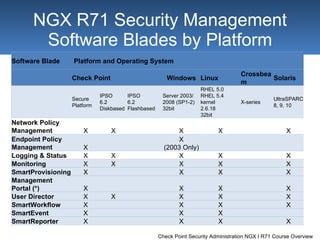
NGX R71  Security Management Software Blades by Platform Software Blade Platform and Operating System Check Point Windows Linux Crossbeam Solaris Secure Platform IPSO  6.2  Diskbased IPSO  6.2  Flashbased Server 2003/ 2008 (SP1-2)  32bit RHEL 5.0 RHEL 5.4  kernel  2.6.18 32bit X-series UltraSPARC  8, 9, 10 Network Policy  Management X X X X X Endpoint Policy  Management X X (2003 Only) Logging & Status X X X X X Monitoring X X X X X SmartProvisioning X X X X Management  Portal (*) X X X X User Director X X X X X SmartWorkflow X X X X SmartEvent X X X SmartReporter X X X X
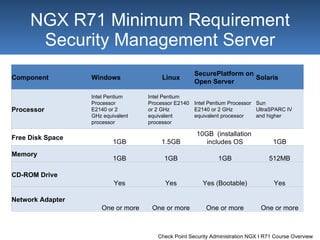
NGX R71 Minimum Requirement Security Management Server Component Windows Linux SecurePlatform on Open Server Solaris Processor Intel Pentium  Processor  E2140 or 2  GHz equivalent  processor Intel Pentium  Processor E2140  or 2 GHz  equivalent  processor Intel Pentium Processor  E2140 or 2 GHz  equivalent processor Sun  UltraSPARC IV  and higher Free Disk Space 1GB 1.5GB 10GB  (installation  includes OS 1GB Memory 1GB 1GB 1GB 512MB CD-ROM Drive Yes Yes Yes (Bootable) Yes Network Adapter One or more One or more One or more One or more
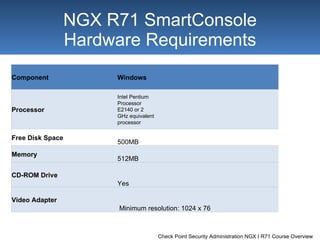
NGX R71  SmartConsole Hardware Requirements Component Windows Processor Intel Pentium  Processor  E2140 or 2  GHz equivalent  processor Free Disk Space 500MB Memory 512MB CD-ROM Drive Yes Video Adapter Minimum resolution: 1024 x 76
End End of Course Overview

Check Point CCSA NGX R71 Course Overview

  • 1.
    Check Point SecurityAdministration NGX I Course Overview
  • 2.
    Course Description ObjectivesDescribe Check Point’s unified approach to network management, and the key elements of this architecture Design a distributed environment using the network detailed in the course topology Install the Security Gateway version R71 in a distribute environment using the network detailed in the course topology Given Check Point’s latest integration of CoreXL technology, select the best security solution for your corporate environment Given network specifications, perform a backup and restore the current Gateway installation from the command line Check Point Security Administration NGX R71 I
  • 3.
    Course Description ObjectivesIdentify critical files needed to purge or backup, import and export users and groups and add or delete administrators from the command line Deploy Gateways using sysconfig and cpconfig from the Gateway command line Use the Command Line to assist support in troubleshooting common problems on the Security Gateway Given the network topology, create and configure network, host and gateway objects Verify SIC establishment between the SmartCenter Server and the Gateway using SmartDashboard Create a basic Rule Base in SmartDashboard that includes permissions for administrative users, external services, and LAN outbound use Check Point Security Administration NGX R71 I
  • 4.
    Course Description ObjectivesConfigure NAT rules on Web and Gateway servers Evaluate existing policies and optimize the rules based on current corporate requirements Maintain the Security Management Server with scheduled backups and policy versions to ensure seamless upgrades and minimal downtime Use queries in SmartView Tracker to monitor IPS and common network traffic and troubleshoot events using packet data Using packet data on a given corporate network, generate reports, troubleshoot system and security issues, and ensure network functionality Using SmartView Monitor, configure alerts and traffic counters, view a Gateway's status, monitor suspicious activity rules, analyze tunnel activity and monitor remote user access based on corporate requirements Check Point Security Administration NGX R71 I
  • 5.
    Course Description ObjectivesMonitor remote Gateways using SmartUpdate to evaluate the need for upgrades, new installations, and license modifications Use SmartUpdate to apply upgrade packages to single or multiple VPN-1 Gateways Upgrade and attach product licenses using SmartUpdate Centrally manage users to ensure only authenticated users securely access the corporate network either locally or remotely Manage users to access to the corporate LAN by using external databases Select the most appropriate encryption algorithm when securing communication over a VPN, based on corporate requirements Check Point Security Administration NGX R71 I
  • 6.
    Course Description ObjectivesEstablish VPN connections to partner sites in order to establish access to a central database by configuring Advanced IKE properties Configure a pre-shared secret site-to-site VPN with partner sites Configure a certificate based site-to-site VPN using one partner's internal Configure a certificate based site-to-site VPN using a third-party CA Configure permanent tunnels for remote access to corporate resources Configure VPN tunnel sharing, given the difference between host-based, subnet-based and gateway-based tunnels Check Point Security Administration NGX R71 I
  • 7.
    Course Description ObjectivesConfigure Check Point Messaging Security to test IP Reputation, content based anti-spam, and zero hour virus detection Based on network analysis disclosing threats by specific sites, configure a Web-filtering and antivirus policy to filter and scan traffic Implement default or customized profiles to designated Gateways in the corporate network Check Point Security Administration NGX R71 I
  • 8.
    Course Layout CourseRequirements Prerequisites Check Point Certified Security Administrator (CCSA) Check Point Security Administration NGX R71 I
  • 9.
    The course isgeared towards System administators Support analysts Network engineers Course Requirements
  • 10.
    Each delegate shouldhave : General knowledge of TCP/IP Working knowledge of Windows and/or Unix Working knowledge of network technology Working knowledge of the Internet Pre-requisites
  • 11.
    Course Map Module1: Check Point Technology Overview Module 2: Deployment Platforms Module 3: Introduction to the Security Policy Module 4: Monitoring Traffic and Connections Module 5: Using SmartUpdate Module 6: Upgrading to R71 Module 7: User Management and Authentication Module 8: Encryption and VPNs Module 9: Introduction to VPNs Module 10: Messaging and Content Security Course Map
  • 12.
    Lab Setup LabTopology IP Addresses Lab Terms Lab Stations Lab Setup
  • 13.
  • 14.
    NGX R71 Security Software Containers by Platform Software Blade Platform and Operating System Check Point Windows Linux Crossbeam Solaris Secure Platform IPSO 6.2 Diskbased IPSO 6.2 Flashbased Server 2003/ 2008 (SP1-2) 32bit RHEL 5.0 RHEL 5.4 kernel 2.6.18 32bit X-series UltraSPARC 8, 9, 10 Security Management X X X X X Security Gateway X X X X X Provider-1 MDS X X X
  • 15.
    NGX R71 Security Gateway Software Blades by Platform Software Blade Platform and Operating System Check Point Windows Linux Crossbeam Solaris Secure Platform IPSO 6.2 Diskbased IPSO 6.2 Flashbased Server 2003/ 2008 (SP1-2) 32bit RHEL 5.0 RHEL 5.4 kernel 2.6.18 32bit X-series UltraSPARC 8, 9, 10 Firewall X X X X X IPSec VPN X X X X X IPS X X X X X SSL VPN X DLP X Anti-Virus & Anti-Malware X URL Filtering X Anti-Spam & Email Security X Web Security X X X X X Advanced Networking X Acceleration & Clustering (1) X X X X X
  • 16.
    NGX R71 Security Management Software Blades by Platform Software Blade Platform and Operating System Check Point Windows Linux Crossbeam Solaris Secure Platform IPSO 6.2 Diskbased IPSO 6.2 Flashbased Server 2003/ 2008 (SP1-2) 32bit RHEL 5.0 RHEL 5.4 kernel 2.6.18 32bit X-series UltraSPARC 8, 9, 10 Network Policy Management X X X X X Endpoint Policy Management X X (2003 Only) Logging & Status X X X X X Monitoring X X X X X SmartProvisioning X X X X Management Portal (*) X X X X User Director X X X X X SmartWorkflow X X X X SmartEvent X X X SmartReporter X X X X
  • 17.
    NGX R71 MinimumRequirement Security Management Server Component Windows Linux SecurePlatform on Open Server Solaris Processor Intel Pentium Processor E2140 or 2 GHz equivalent processor Intel Pentium Processor E2140 or 2 GHz equivalent processor Intel Pentium Processor E2140 or 2 GHz equivalent processor Sun UltraSPARC IV and higher Free Disk Space 1GB 1.5GB 10GB (installation includes OS 1GB Memory 1GB 1GB 1GB 512MB CD-ROM Drive Yes Yes Yes (Bootable) Yes Network Adapter One or more One or more One or more One or more
  • 18.
    NGX R71 SmartConsole Hardware Requirements Component Windows Processor Intel Pentium Processor E2140 or 2 GHz equivalent processor Free Disk Space 500MB Memory 512MB CD-ROM Drive Yes Video Adapter Minimum resolution: 1024 x 76
  • 19.
    End End ofCourse Overview