5 Reasons to use ColdFusion  for your next internet application project Speaker Name Speaker Title Company or Date
5 Reasons to use ColdFusion for your next project Increased Productivity Standard J2EE Environment Innovative Features Integration with other Adobe products Part of a world-class software company
1. Increased Productivity Easy to learn Rapid development with common tasks encapsulated Leverages standards and existing IT and training investments. Power  of  J2EE without the complexity. Great equalizer - allows developers of all skill levels to work together.
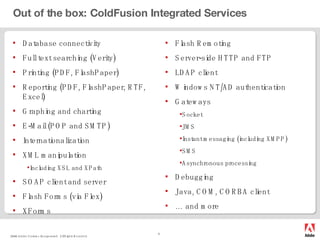
Out of the box: ColdFusion Integrated Services Database connectivity Full text searching (Verity) Printing (PDF, FlashPaper) Reporting (PDF, FlashPaper, RTF, Excel) Graphing and charting E-Mail (POP and SMTP) Internationalization XML manipulation Including XSL and XPath SOAP client and server Flash Forms (via Flex) XForms Flash Remoting Server-side HTTP and FTP  LDAP client Windows NT/AD authentication Gateways Socket JMS Instant messaging (including XMPP) SMS Asynchronous processing Debugging Java, COM, CORBA client …  and more
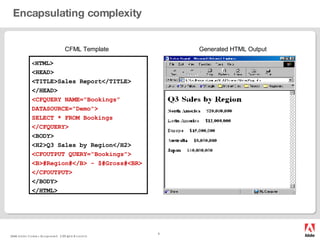
Encapsulating complexity CFML Template Generated HTML Output < HTML> <HEAD> <TITLE>Sales Report</TITLE> </HEAD> <CFQUERY NAME=ā€œBookingsā€ DATASOURCE=&quot;Demo&quot;> SELECT * FROM Bookings </CFQUERY> <BODY> <H2>Q3 Sales by Region</H2> <CFOUTPUT QUERY=ā€œBookings&quot;> <B>#Region#</B> - $#Gross#<BR> </CFOUTPUT> </BODY> </HTML>
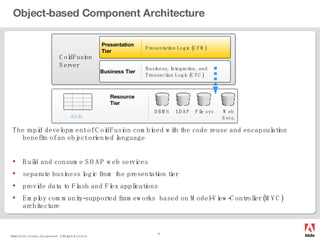
Object-based Component Architecture The rapid development of ColdFusion combined with the code reuse and encapsulation benefits of an object oriented language  Build and consume SOAP web services separate business logic from the presentation tier provide data to Flash and Flex applications Employ community-supported frameworks  based on Model-View-Controller (MVC) architecture Presentation Tier Business Tier Presentation Logic (CFM) Business, Integration, and Transaction Logic (CFC) ColdFusion Server Resource Tier DBMS LDAP File sys Web Svcs. data
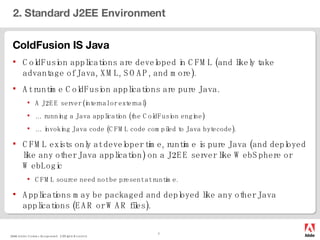
2. Standard J2EE Environment ColdFusion IS Java ColdFusion applications are developed in CFML (and likely take advantage of Java, XML, SOAP, and more). At runtime ColdFusion applications are pure Java. A J2EE server (internal or external) …  running a Java application (the ColdFusion engine) …  invoking Java code (CFML code compiled to Java bytecode). CFML exists only at developer time, runtime is pure Java (and deployed like any other Java application) on a J2EE server like WebSphere or WebLogic CFML source need not be present at runtime. Applications may be packaged and deployed like any other Java applications (EAR or WAR files).
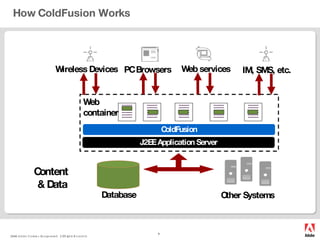
How ColdFusion Works ------- ------- ------- ------- ------- ------- Web  container ColdFusion PC Browsers ------- ------- ------- ------- ------- ------- ------- ------- ------- ------- ------- ------- ------- ------- ------- ------- ------- ------- Other   Systems   Content  & Data Database Wireless Devices Web services ------- ------- ------- ------- ------- ------- J2EE Application Server IM, SMS, etc.
3. Innovative Features Document Generation Convert Web Content to PDF or FlashPaper Structured business reports Generate PDF, Excel, RTF Reduce or eliminate the need for 3 rd  party solutions (Crystal) Event Gateways for non-HTTP applications IM – Jabber, Google, Lotus Sametime SMS text messaging Asynchronous processing Rich Forms Flash or XML forms Grid, tree, tab, accordion controls
4. Integration with other Adobe products Flex 2 Develop rich applications that are portable across platforms Wizards that automatically generate code and applications Data push and synchronization applications LiveCycle PDF Forms Workflow Dreamweaver Extensions for quickly building ColdFusion applications Much more to come…!
5. Part of a world-class software company Confidence working with one of the world’s largest and most diversified software companies 5700 employees worldwide FlashĀ® Player and AdobeĀ® ReaderĀ® combined are installed on 600 million + PCs and devices worldwide Adobe Reader distributed in 26 languages on 10 major platforms worldwide World’s top 10 PC manufacturers ship with PDF technology pre-installed Adobe PDF documents make up nearly 10% of the content on the web ColdFusion Used at 75 of the Fortune 100 companies  300,000 developers at more than 10,000 organizations Global network of more than 360 user groups
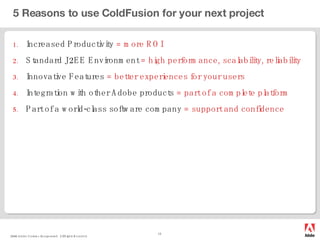
5 Reasons to use ColdFusion for your next project Increased Productivity  = more ROI Standard J2EE Environment  = high performance, scalability, reliability Innovative Features  = better experiences for your users Integration with other Adobe products  = part of a complete platform Part of a world-class software company  = support and confidence
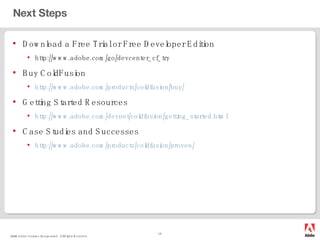
Next Steps Download a Free Trial or Free Developer Edition http://www.adobe.com/go/devcenter_cf_try Buy ColdFusion http://www.adobe.com/products/coldfusion/buy/ Getting Started Resources http://www.adobe.com/devnet/coldfusion/getting_started.html Case Studies and Successes http://www.adobe.com/products/coldfusion/proven/
Ā 

Check

  • 1.
    5 Reasons touse ColdFusion for your next internet application project Speaker Name Speaker Title Company or Date
  • 2.
    5 Reasons touse ColdFusion for your next project Increased Productivity Standard J2EE Environment Innovative Features Integration with other Adobe products Part of a world-class software company
  • 3.
    1. Increased ProductivityEasy to learn Rapid development with common tasks encapsulated Leverages standards and existing IT and training investments. Power of J2EE without the complexity. Great equalizer - allows developers of all skill levels to work together.
  • 4.
    Out of thebox: ColdFusion Integrated Services Database connectivity Full text searching (Verity) Printing (PDF, FlashPaper) Reporting (PDF, FlashPaper, RTF, Excel) Graphing and charting E-Mail (POP and SMTP) Internationalization XML manipulation Including XSL and XPath SOAP client and server Flash Forms (via Flex) XForms Flash Remoting Server-side HTTP and FTP LDAP client Windows NT/AD authentication Gateways Socket JMS Instant messaging (including XMPP) SMS Asynchronous processing Debugging Java, COM, CORBA client … and more
  • 5.
    Encapsulating complexity CFMLTemplate Generated HTML Output < HTML> <HEAD> <TITLE>Sales Report</TITLE> </HEAD> <CFQUERY NAME=ā€œBookingsā€ DATASOURCE=&quot;Demo&quot;> SELECT * FROM Bookings </CFQUERY> <BODY> <H2>Q3 Sales by Region</H2> <CFOUTPUT QUERY=ā€œBookings&quot;> <B>#Region#</B> - $#Gross#<BR> </CFOUTPUT> </BODY> </HTML>
  • 6.
    Object-based Component ArchitectureThe rapid development of ColdFusion combined with the code reuse and encapsulation benefits of an object oriented language Build and consume SOAP web services separate business logic from the presentation tier provide data to Flash and Flex applications Employ community-supported frameworks based on Model-View-Controller (MVC) architecture Presentation Tier Business Tier Presentation Logic (CFM) Business, Integration, and Transaction Logic (CFC) ColdFusion Server Resource Tier DBMS LDAP File sys Web Svcs. data
  • 7.
    2. Standard J2EEEnvironment ColdFusion IS Java ColdFusion applications are developed in CFML (and likely take advantage of Java, XML, SOAP, and more). At runtime ColdFusion applications are pure Java. A J2EE server (internal or external) … running a Java application (the ColdFusion engine) … invoking Java code (CFML code compiled to Java bytecode). CFML exists only at developer time, runtime is pure Java (and deployed like any other Java application) on a J2EE server like WebSphere or WebLogic CFML source need not be present at runtime. Applications may be packaged and deployed like any other Java applications (EAR or WAR files).
  • 8.
    How ColdFusion Works------- ------- ------- ------- ------- ------- Web container ColdFusion PC Browsers ------- ------- ------- ------- ------- ------- ------- ------- ------- ------- ------- ------- ------- ------- ------- ------- ------- ------- Other Systems Content & Data Database Wireless Devices Web services ------- ------- ------- ------- ------- ------- J2EE Application Server IM, SMS, etc.
  • 9.
    3. Innovative FeaturesDocument Generation Convert Web Content to PDF or FlashPaper Structured business reports Generate PDF, Excel, RTF Reduce or eliminate the need for 3 rd party solutions (Crystal) Event Gateways for non-HTTP applications IM – Jabber, Google, Lotus Sametime SMS text messaging Asynchronous processing Rich Forms Flash or XML forms Grid, tree, tab, accordion controls
  • 10.
    4. Integration withother Adobe products Flex 2 Develop rich applications that are portable across platforms Wizards that automatically generate code and applications Data push and synchronization applications LiveCycle PDF Forms Workflow Dreamweaver Extensions for quickly building ColdFusion applications Much more to come…!
  • 11.
    5. Part ofa world-class software company Confidence working with one of the world’s largest and most diversified software companies 5700 employees worldwide FlashĀ® Player and AdobeĀ® ReaderĀ® combined are installed on 600 million + PCs and devices worldwide Adobe Reader distributed in 26 languages on 10 major platforms worldwide World’s top 10 PC manufacturers ship with PDF technology pre-installed Adobe PDF documents make up nearly 10% of the content on the web ColdFusion Used at 75 of the Fortune 100 companies 300,000 developers at more than 10,000 organizations Global network of more than 360 user groups
  • 12.
    5 Reasons touse ColdFusion for your next project Increased Productivity = more ROI Standard J2EE Environment = high performance, scalability, reliability Innovative Features = better experiences for your users Integration with other Adobe products = part of a complete platform Part of a world-class software company = support and confidence
  • 13.
    Next Steps Downloada Free Trial or Free Developer Edition http://www.adobe.com/go/devcenter_cf_try Buy ColdFusion http://www.adobe.com/products/coldfusion/buy/ Getting Started Resources http://www.adobe.com/devnet/coldfusion/getting_started.html Case Studies and Successes http://www.adobe.com/products/coldfusion/proven/
  • 14.