August 26, 2025| U & P U. Patel Department of Computer Engineering 1
Unit-3
STRING, FILES AND POINTERS
Prepared By:
Dr. Aayushi Chaudhari
Prof. Nishat Shaikh
2.
August 26, 2025|U & P U. Patel Department of Computer Engineering
Contents
• String Operations (Comparing, Assignment, Concatenation, Swapping, substring) and
String Characteristics
• Numeric Conversions of string and string_view
• Pointer to object and this pointer
• Stream classes for files
• Sequential I/O operations
• Error handling during file operation
3.
August 26, 2025|U & P U. Patel Department of Computer Engineering
What is a string?
• C++ strings are sequences of characters stored in a char array. Strings are used to store
words and text. They are also used to store data, such as numbers and other types of
information. Strings in C++ can be defined either using the std::string class or the C-style
character arrays.
Strings in C++
C Style string
char alpha[] = “Hello”;
char alpha1[] = {‘H’,’I’};
char* alpha = “Hello all”;
C++ Style string
string Alpha = (“Hello”);
string Alpha1 = “Hello”;
string Alpha; Alpha = “Hello”;
4.
August 26, 2025|U & P U. Patel Department of Computer Engineering
C Style Strings
These strings are stored as the plain old array of characters terminated by a null character ‘
0’. They are the type of strings that C++ inherited from C language.
Syntax:
char str[] = “Hello world";
// C++ Program to demonstrate strings
#include <iostream>
using namespace std;
int main()
{
char str[] = "Hello world";
cout << str << endl;
return 0;
}
5.
August 26, 2025|U & P U. Patel Department of Computer Engineering
std::string Class
• String represents a sequence of characters as an object of
the class.
• This class is called std:: string.
• The string class stores the characters as a sequence of bytes
with the functionality of allowing access to the single-byte
character.
6.
August 26, 2025|U & P U. Patel Department of Computer Engineering
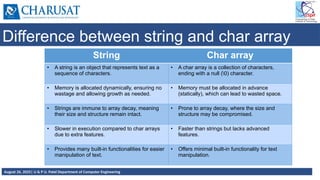
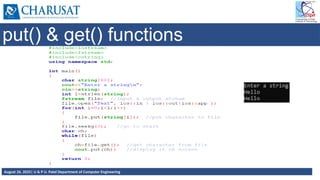
Difference between string and char array
String Char array
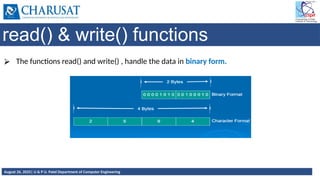
• A string is an object that represents text as a
sequence of characters.
• A char array is a collection of characters,
ending with a null (0) character.
• Memory is allocated dynamically, ensuring no
wastage and allowing growth as needed.
• Memory must be allocated in advance
(statically), which can lead to wasted space.
• Strings are immune to array decay, meaning
their size and structure remain intact.
• Prone to array decay, where the size and
structure may be compromised.
• Slower in execution compared to char arrays
due to extra features.
• Faster than strings but lacks advanced
features.
• Provides many built-in functionalities for easier
manipulation of text.
• Offers minimal built-in functionality for text
manipulation.
7.
August 26, 2025|U & P U. Patel Department of Computer Engineering
Ways to take string input in C++
String input means accepting a string from a user.
In C++, we have different types of taking input from the user which depend on the string.
The most common way is to take input with cin keyword with the extraction operator (>>) in
C++.
Methods to take a string as input are:
cin
getline
stringstream
8.
August 26, 2025|U & P U. Patel Department of Computer Engineering
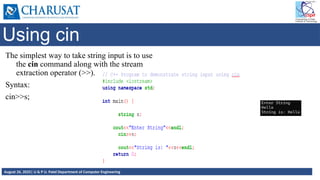
Using cin
The simplest way to take string input is to use
the cin command along with the stream
extraction operator (>>).
Syntax:
cin>>s;
9.
August 26, 2025|U & P U. Patel Department of Computer Engineering
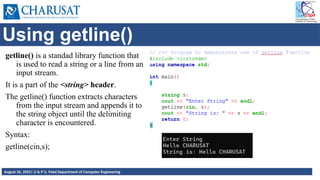
Using getline()
getline() is a standad library function that
is used to read a string or a line from an
input stream.
It is a part of the <string> header.
The getline() function extracts characters
from the input stream and appends it to
the string object until the delimiting
character is encountered.
Syntax:
getline(cin,s);
10.
August 26, 2025|U & P U. Patel Department of Computer Engineering
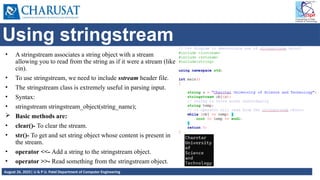
Using stringstream
• A stringstream associates a string object with a stream
allowing you to read from the string as if it were a stream (like
cin).
• To use stringstream, we need to include sstream header file.
• The stringstream class is extremely useful in parsing input.
• Syntax:
• stringstream stringstream_object(string_name);
Basic methods are:
• clear()- To clear the stream.
• str()- To get and set string object whose content is present in
the stream.
• operator <<- Add a string to the stringstream object.
• operator >>- Read something from the stringstream object.
11.
August 26, 2025|U & P U. Patel Department of Computer Engineering
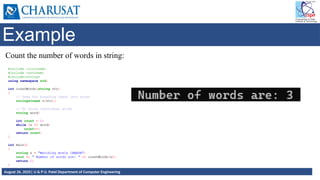
Example
Count the number of words in string:
12.
August 26, 2025|U & P U. Patel Department of Computer Engineering
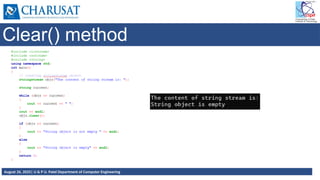
Clear() method
13.
August 26, 2025|U & P U. Patel Department of Computer Engineering
Example with map
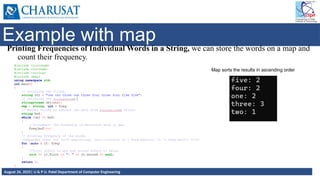
Printing Frequencies of Individual Words in a String, we can store the words on a map and
count their frequency.
Map sorts the results in ascending order
14.
August 26, 2025|U & P U. Patel Department of Computer Engineering
Passing string to function
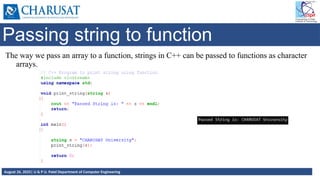
The way we pass an array to a function, strings in C++ can be passed to functions as character
arrays.
15.
August 26, 2025|U & P U. Patel Department of Computer Engineering
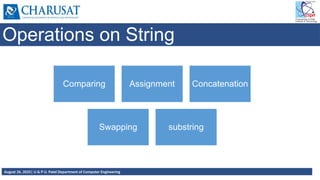
Operations on String
Comparing Assignment Concatenation
Swapping substring
16.
August 26, 2025|U & P U. Patel Department of Computer Engineering
String comparison
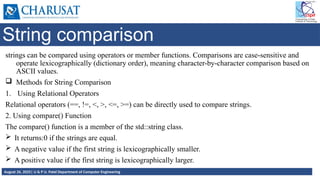
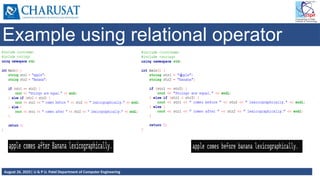
strings can be compared using operators or member functions. Comparisons are case-sensitive and
operate lexicographically (dictionary order), meaning character-by-character comparison based on
ASCII values.
Methods for String Comparison
1. Using Relational Operators
Relational operators (==, !=, <, >, <=, >=) can be directly used to compare strings.
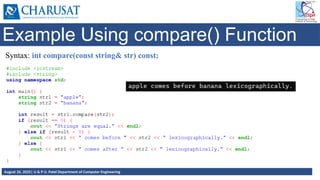
2. Using compare() Function
The compare() function is a member of the std::string class.
It returns:0 if the strings are equal.
A negative value if the first string is lexicographically smaller.
A positive value if the first string is lexicographically larger.
17.
August 26, 2025|U & P U. Patel Department of Computer Engineering
Example using relational operator
18.
August 26, 2025|U & P U. Patel Department of Computer Engineering
Example Using compare() Function
Syntax: int compare(const string& str) const;
19.
August 26, 2025|U & P U. Patel Department of Computer Engineering
String Assignment Operation
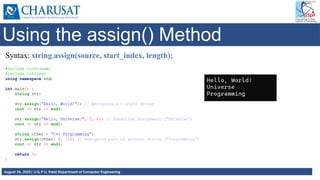
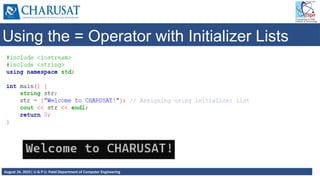
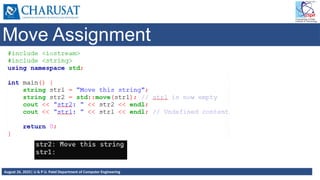
The string assignment operation in C++ is used to assign a value to a string object.
The std::string class provides several ways to perform this operation.
Ways of Assignment operation:
1. Using the Assignment Operator (=)
2. Using the assign() Method
3. Using the = Operator with Initializer Lists
4. Move Assignment
20.
August 26, 2025|U & P U. Patel Department of Computer Engineering
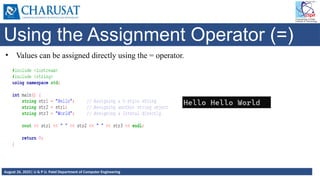
Using the Assignment Operator (=)
• Values can be assigned directly using the = operator.
21.
August 26, 2025|U & P U. Patel Department of Computer Engineering
Using the assign() Method
Syntax: string.assign(source, start_index, length);
22.
August 26, 2025|U & P U. Patel Department of Computer Engineering
Using the = Operator with Initializer Lists
23.
August 26, 2025|U & P U. Patel Department of Computer Engineering
Move Assignment
24.
August 26, 2025|U & P U. Patel Department of Computer Engineering
String concatenation
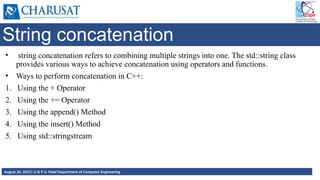
• string concatenation refers to combining multiple strings into one. The std::string class
provides various ways to achieve concatenation using operators and functions.
• Ways to perform concatenation in C++:
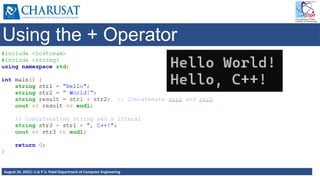
1. Using the + Operator
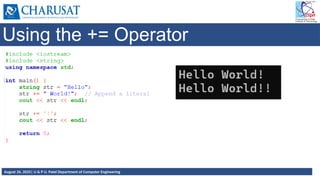
2. Using the += Operator
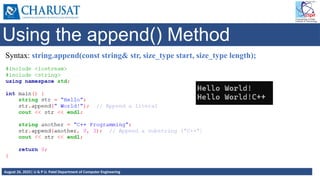
3. Using the append() Method
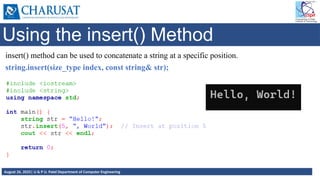
4. Using the insert() Method
5. Using std::stringstream
25.
August 26, 2025|U & P U. Patel Department of Computer Engineering
Using the + Operator
26.
August 26, 2025|U & P U. Patel Department of Computer Engineering
Using the += Operator
27.
August 26, 2025|U & P U. Patel Department of Computer Engineering
Using the append() Method
Syntax: string.append(const string& str, size_type start, size_type length);
28.
August 26, 2025|U & P U. Patel Department of Computer Engineering
Using the insert() Method
insert() method can be used to concatenate a string at a specific position.
string.insert(size_type index, const string& str);
29.
August 26, 2025|U & P U. Patel Department of Computer Engineering
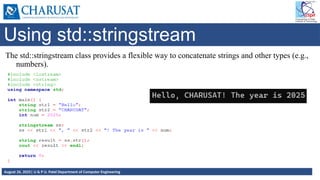
Using std::stringstream
The std::stringstream class provides a flexible way to concatenate strings and other types (e.g.,
numbers).
30.
August 26, 2025|U & P U. Patel Department of Computer Engineering
String Swapping
Strings can be swapped in C++ using the following ways:
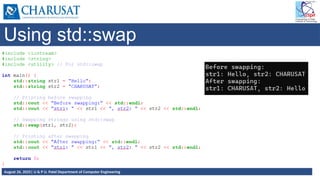
1. Using std::swap
2. Swapping using temporary variable
3. Swapping using move()
31.
August 26, 2025|U & P U. Patel Department of Computer Engineering
Using std::swap
32.
August 26, 2025|U & P U. Patel Department of Computer Engineering
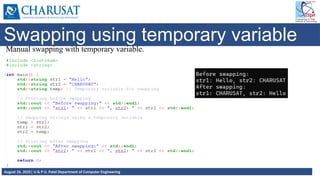
Swapping using temporary variable
Manual swapping with temporary variable.
33.
August 26, 2025|U & P U. Patel Department of Computer Engineering
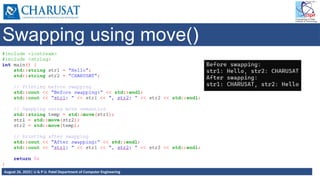
Swapping using move()
34.
August 26, 2025|U & P U. Patel Department of Computer Engineering
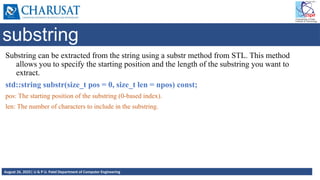
substring
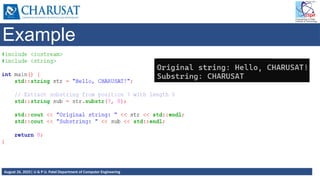
Substring can be extracted from the string using a substr method from STL. This method
allows you to specify the starting position and the length of the substring you want to
extract.
std::string substr(size_t pos = 0, size_t len = npos) const;
pos: The starting position of the substring (0-based index).
len: The number of characters to include in the substring.
35.
August 26, 2025|U & P U. Patel Department of Computer Engineering
Example
36.
August 26, 2025|U & P U. Patel Department of Computer Engineering
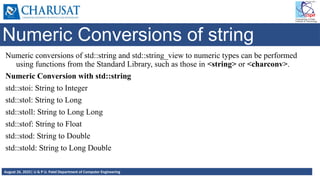
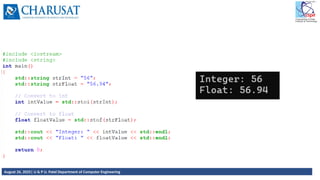
Numeric Conversions of string
Numeric conversions of std::string and std::string_view to numeric types can be performed
using functions from the Standard Library, such as those in <string> or <charconv>.
Numeric Conversion with std::string
std::stoi: String to Integer
std::stol: String to Long
std::stoll: String to Long Long
std::stof: String to Float
std::stod: String to Double
std::stold: String to Long Double
37.
August 26, 2025|U & P U. Patel Department of Computer Engineering
38.
August 26, 2025|U & P U. Patel Department of Computer Engineering
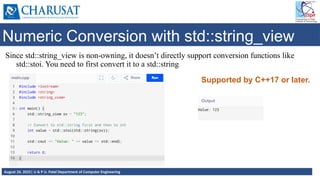
Numeric Conversion with std::string_view
Since std::string_view is non-owning, it doesn’t directly support conversion functions like
std::stoi. You need to first convert it to a std::string
Supported by C++17 or later.
39.
August 26, 2025|U & P U. Patel Department of Computer Engineering
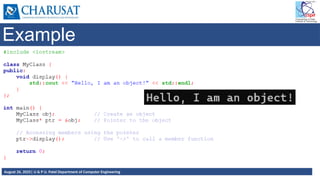
Pointer to object
• A pointer to an object is a pointer that holds the memory address of an object. Using
pointers to objects allows for dynamic memory allocation, polymorphism, and efficient
manipulation of objects in programs.
Syntax:
ClassName* ptr;
ptr is a pointer that can store the address of an object of type ClassName.
40.
August 26, 2025|U & P U. Patel Department of Computer Engineering
Example
41.
August 26, 2025|U & P U. Patel Department of Computer Engineering
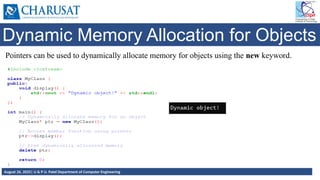
Dynamic Memory Allocation for Objects
Pointers can be used to dynamically allocate memory for objects using the new keyword.
42.
August 26, 2025|U & P U. Patel Department of Computer Engineering
This pointer
The this pointer is an implicit pointer available in all non-static member functions of a class. It
points to the object for which the member function is called.
The this pointer is particularly useful when you need to refer to the current object, especially
when distinguishing between class members and local variables or parameters with the
same name.
Scope: It is available in non-static member functions of a class. Static member functions do
not have access to the this pointer because they are not tied to any specific object.
Type: The type of the this pointer is a pointer to the class type (ClassName*), and it points to
the memory address of the object invoking the member function.
43.
August 26, 2025|U & P U. Patel Department of Computer Engineering
Accessing Members using this pointer
The this pointer allows access to the invoking object's members directly.
44.
August 26, 2025|U & P U. Patel Department of Computer Engineering
Constructor
A constructor in C++ is a special member function of a class that is automatically called
when an object of the class is created. It is primarily used to initialize the objects of the
class.
Characteristics:
Same Name as Class: A constructor has the same name as the class.
No Return Type: A constructor does not have a return type, not even void.
Automatic Invocation: It is automatically called when an object is created.
Overloading: Like other functions, constructors can be overloaded to create multiple
constructors with different parameters.
45.
August 26, 2025|U & P U. Patel Department of Computer Engineering
Types of Constructors
Default constructor
Parameterized constructor
Copy constructor
46.
August 26, 2025|U & P U. Patel Department of Computer Engineering
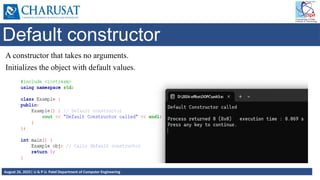
Default constructor
A constructor that takes no arguments.
Initializes the object with default values.
47.
August 26, 2025|U & P U. Patel Department of Computer Engineering
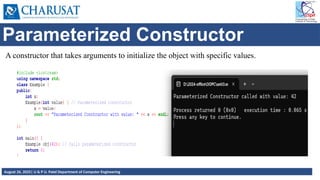
Parameterized Constructor
A constructor that takes arguments to initialize the object with specific values.
48.
August 26, 2025|U & P U. Patel Department of Computer Engineering
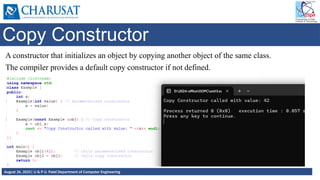
Copy Constructor
A constructor that initializes an object by copying another object of the same class.
The compiler provides a default copy constructor if not defined.
49.
August 26, 2025|U & P U. Patel Department of Computer Engineering
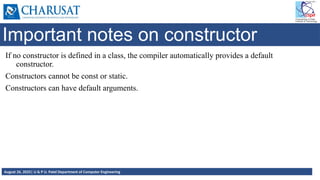
Important notes on constructor
If no constructor is defined in a class, the compiler automatically provides a default
constructor.
Constructors cannot be const or static.
Constructors can have default arguments.
50.
August 26, 2025|U & P U. Patel Department of Computer Engineering
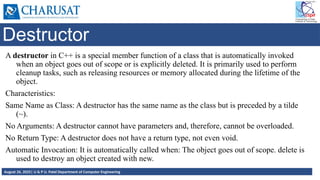
Destructor
A destructor in C++ is a special member function of a class that is automatically invoked
when an object goes out of scope or is explicitly deleted. It is primarily used to perform
cleanup tasks, such as releasing resources or memory allocated during the lifetime of the
object.
Characteristics:
Same Name as Class: A destructor has the same name as the class but is preceded by a tilde
(~).
No Arguments: A destructor cannot have parameters and, therefore, cannot be overloaded.
No Return Type: A destructor does not have a return type, not even void.
Automatic Invocation: It is automatically called when: The object goes out of scope. delete is
used to destroy an object created with new.
51.
August 26, 2025|U & P U. Patel Department of Computer Engineering
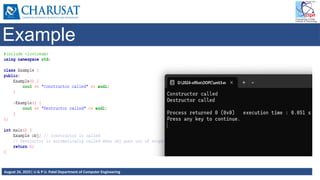
Example
52.
August 26, 2025|U & P U. Patel Department of Computer Engineering
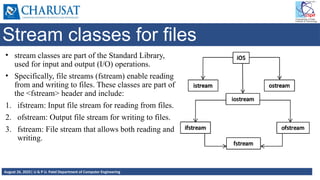
Stream classes for files
• stream classes are part of the Standard Library,
used for input and output (I/O) operations.
• Specifically, file streams (fstream) enable reading
from and writing to files. These classes are part of
the <fstream> header and include:
1. ifstream: Input file stream for reading from files.
2. ofstream: Output file stream for writing to files.
3. fstream: File stream that allows both reading and
writing.
53.
August 26, 2025|U & P U. Patel Department of Computer Engineering
Opening and Closing Files:
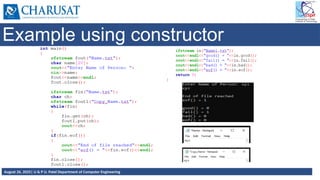
Use open() to explicitly open a file. File can be opened using constructor or open() function.
Always close a file after operations using close().
File Modes:
ios::in: Open file for input (default for ifstream).
ios::out: Open file for output (default for ofstream).
54.
August 26, 2025|U & P U. Patel Department of Computer Engineering
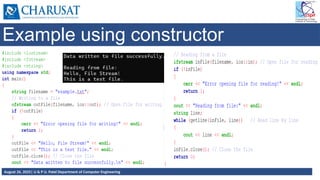
Example using constructor
55.
August 26, 2025|U & P U. Patel Department of Computer Engineering
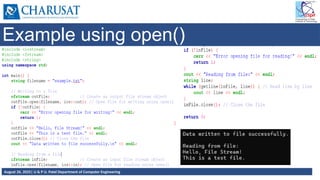
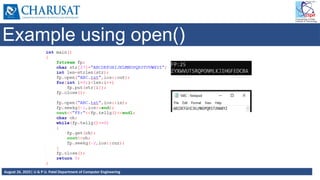
Example using open()
56.
August 26, 2025|U & P U. Patel Department of Computer Engineering
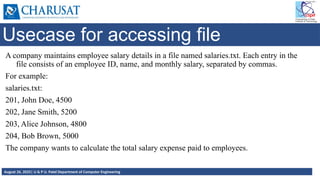
Usecase for accessing file
A company maintains employee salary details in a file named salaries.txt. Each entry in the
file consists of an employee ID, name, and monthly salary, separated by commas.
For example:
salaries.txt:
201, John Doe, 4500
202, Jane Smith, 5200
203, Alice Johnson, 4800
204, Bob Brown, 5000
The company wants to calculate the total salary expense paid to employees.
57.
August 26, 2025|U & P U. Patel Department of Computer Engineering
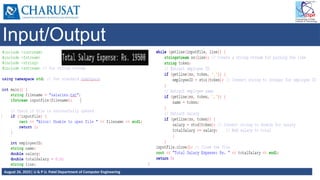
Input/Output
58.
August 26, 2025|U & P U. Patel Department of Computer Engineering
Sequential I/O operations
⮚ The file stream class support a number of member functions for performing the input and
output operations on files.
⮚ put() and get(): used for handling a single character.
⮚ read() and write(): used for handling large blocks of binary data.
59.
August 26, 2025|U & P U. Patel Department of Computer Engineering
put() & get() functions
⮚ Function put() writes a single character to the associated stream
⮚ Function get() reads a single character from the associated stream.
60.
August 26, 2025|U & P U. Patel Department of Computer Engineering
put() & get() functions
61.
August 26, 2025|U & P U. Patel Department of Computer Engineering
read() & write() functions
⮚ The functions read() and write() , handle the data in binary form.
62.
August 26, 2025|U & P U. Patel Department of Computer Engineering
read() & write() functions
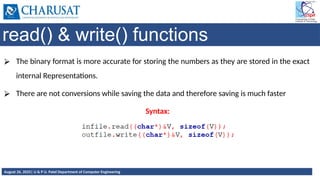
⮚ The binary format is more accurate for storing the numbers as they are stored in the exact
internal Representations.
⮚ There are not conversions while saving the data and therefore saving is much faster
Syntax:
63.
August 26, 2025|U & P U. Patel Department of Computer Engineering
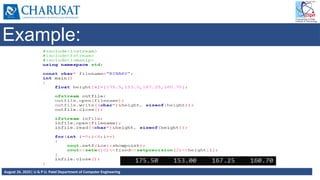
Example:
64.
August 26, 2025|U & P U. Patel Department of Computer Engineering
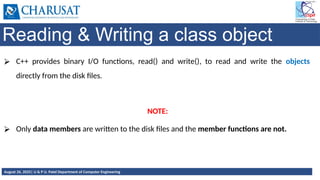
Reading & Writing a class object
⮚ C++ provides binary I/O functions, read() and write(), to read and write the objects
directly from the disk files.
NOTE:
⮚ Only data members are written to the disk files and the member functions are not.
65.
August 26, 2025|U & P U. Patel Department of Computer Engineering
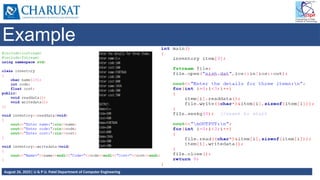
Example
66.
August 26, 2025|U & P U. Patel Department of Computer Engineering
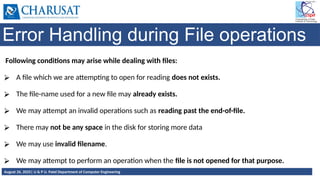
Error Handling during File operations
Following conditions may arise while dealing with files:
⮚ A file which we are attempting to open for reading does not exists.
⮚ The file-name used for a new file may already exists.
⮚ We may attempt an invalid operations such as reading past the end-of-file.
⮚ There may not be any space in the disk for storing more data
⮚ We may use invalid filename.
⮚ We may attempt to perform an operation when the file is not opened for that purpose.
67.
August 26, 2025|U & P U. Patel Department of Computer Engineering
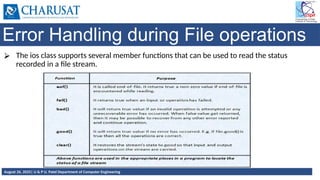
Error Handling during File operations
⮚ The ios class supports several member functions that can be used to read the status
recorded in a file stream.
68.
August 26, 2025|U & P U. Patel Department of Computer Engineering
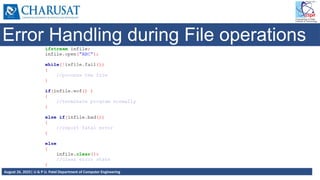
Error Handling during File operations
69.
August 26, 2025|U & P U. Patel Department of Computer Engineering
Example using open()
70.
August 26, 2025|U & P U. Patel Department of Computer Engineering
Example using constructor
71.
August 26, 2025|U & P U. Patel Department of Computer Engineering
Thank You.


![August 26, 2025| U & P U. Patel Department of Computer Engineering
What is a string?
• C++ strings are sequences of characters stored in a char array. Strings are used to store
words and text. They are also used to store data, such as numbers and other types of
information. Strings in C++ can be defined either using the std::string class or the C-style
character arrays.
Strings in C++
C Style string
char alpha[] = “Hello”;
char alpha1[] = {‘H’,’I’};
char* alpha = “Hello all”;
C++ Style string
string Alpha = (“Hello”);
string Alpha1 = “Hello”;
string Alpha; Alpha = “Hello”;](https://image.slidesharecdn.com/chapter-3pc-250826052541-d7d5e015/85/Chapter-3_PC-strings-files-and-pointers-3-320.jpg)
![August 26, 2025| U & P U. Patel Department of Computer Engineering
C Style Strings
These strings are stored as the plain old array of characters terminated by a null character ‘
0’. They are the type of strings that C++ inherited from C language.
Syntax:
char str[] = “Hello world";
// C++ Program to demonstrate strings
#include <iostream>
using namespace std;
int main()
{
char str[] = "Hello world";
cout << str << endl;
return 0;
}](https://image.slidesharecdn.com/chapter-3pc-250826052541-d7d5e015/85/Chapter-3_PC-strings-files-and-pointers-4-320.jpg)