More Related Content

PPT
Distributed_and_cloud_computing-unit-2.ppt ![UNIT I -Introduction to CLOUD COMPUTING [Autosaved].pptx](https://cdn.slidesharecdn.com/ss_thumbnails/uniti-introductiontocloudcomputingautosaved-250128091123-f66abd14-thumbnail.jpg?width=640&height=640&fit=bounds)
PPTX
UNIT I -Introduction to CLOUD COMPUTING [Autosaved].pptx 
PPTX
cloud computing module3 CLOUD COMPUTING ARCHITECTURE 
PPT
Introduction au Cloud computing 
PPTX
Above the cloud joarder kamal 
PPT
Cloud computing introduction 
PDF
Chapter 1 Introduction to Cloud Computing 
PDF
Similar to ch03 - Database Architectures & Web.ppt chapter 3

PPT
Information system architecture 
PPTX

PPTX

PPTX
Introduction to Cloud Computing 
PPTX

PPTX
CloudComputingArchitecture Module 1 ppt.pptx 
PPTX
Webinar presentation on cloud computing 
PPT
SystemModelsforDistributedandCloudComputing.ppt 
PPT

PPTX

PDF
Enterprise Cloud Computing Technology Architecture Applications 1st Edition G... 
PPTX
UNIT-7-Recent-Trends -in-Technology.pptx 
PDF

PPT

PDF

PPTX

PPTX

PDF
Parallel and Distributed Computing: BOINC Grid Implementation Paper 
PDF
"Parallel and Distributed Computing: BOINC Grid Implementation" por Rodrigo N... 
PDF
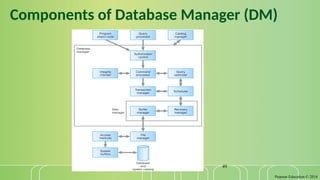
Using cloud-computing-in-you-organization Recently uploaded

PDF
Caribbean Examinations Council Literacy and Numeracy Standards 
PDF
Agents in Artificial Intelligence: Types, Architecture and Real-World Examples 
PPTX
Activity on Job position in Odoo 19 Recruitment 
PDF
BÀI GIẢNG POWERPOINT CHÍNH KHÓA PHIÊN BẢN AI TIẾNG ANH 6 CẢ NĂM, THEO TỪNG BÀ... 
PDF
GIÁO ÁN KẾ HOẠCH BÀI DẠY NĂNG LỰC SỐ MÔN TIẾNG ANH LỚP 10 CẢ NĂM - GLOBAL SUC... 
PDF
GIÁO ÁN KẾ HOẠCH BÀI DẠY NĂNG LỰC SỐ MÔN TIẾNG ANH LỚP 11 CẢ NĂM - GLOBAL SUC... 
PPTX
How to Add or Remove Multiple Followers in a Records 
PDF
GIÁO ÁN KẾ HOẠCH BÀI DẠY NĂNG LỰC SỐ MÔN TIẾNG ANH LỚP 12 CẢ NĂM - GLOBAL SUC... 
DOCX
COMMUNITY HEALTH NURSING OSCE CHECKLIST.docx 
PPTX
Insertion of Suppositories..........pptx 
PPTX
ANTISEPTICS AND DISINFECTANTS CHAPTER NO.05.pptx 
PPTX
How to Create Opening Balance in Odoo 18 
PPTX
How to create Article in Odoo 18 Knowledge App 
PPTX
VAGINAL IRRIGATION..................pptx 
PDF
ĐỀ MINH HỌA KỲ THI TỐT NGHIỆP TRUNG HỌC PHỔ THÔNG NĂM 2026 MÔN TIẾNG ANH 2026... 
PPTX
Contract Act 1872 - Sections 10, 11 13-by Judge Nazmul Hasan.pptx 
PPTX
NMR Spectroscopy: Principles and Applications 
PPTX
Exploring car engine oil and lubricants purpose and functions 
PPTX
Weaving Threads: Mapping Practitioner Theses to Understand Professional Becom... 
PPTX
Introduction of Carbohydrates - Dr.M.Jothimuniyandi ch03 - Database Architectures & Web.ppt chapter 3
- 1.
- 2.
Pearson Education ©2014
2
Database Environment - Objectives
The meaning of the client–server architecture and the
advantages of this type of architecture for a DBMS.
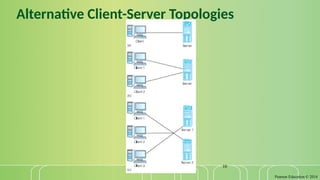
The difference between two-tier, three-tier and n-tier
client–server architectures.
About cloud computing and data as a service (DaaS) and
database as a service (DBaaS).
Software components of a DBMS.
- 3.
Pearson Education ©2014
3
Database Environment - Objectives
The purpose of a Web service and the technological standards
used to develop a Web service.
The meaning of service-oriented architecture (SOA).
The difference between distributed DBMSs, and distributed
processing.
The architecture of a data warehouse.
About cloud computing and cloud databases.
- 4.
Pearson Education ©2014
4
Multi-user DBMS Architectures
The common architectures that are used to implement multi-
user database management systems:
Teleprocessing
File-Server
Client-Server
- 5.
Pearson Education ©2014
5
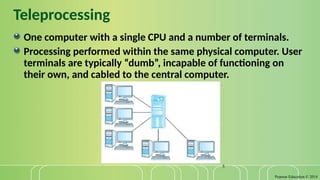
Teleprocessing
One computer with a single CPU and a number of terminals.
Processing performed within the same physical computer. User
terminals are typically “dumb”, incapable of functioning on
their own, and cabled to the central computer.
- 6.
Pearson Education ©2014
6
File-Server
File-server is connected to several workstations across a
network.
Database resides on file-server.
DBMS and applications run on each workstation.
Disadvantages include:
Significant network traffic.
Copy of DBMS on each workstation.
Concurrency, recovery and integrity control more complex.
- 7.
Pearson Education ©2014
7
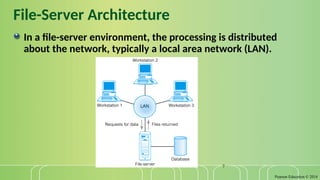
File-Server Architecture
In a file-server environment, the processing is distributed
about the network, typically a local area network (LAN).
- 8.
Pearson Education ©2014
8
Traditional Two-Tier Client-Server
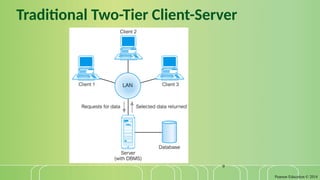
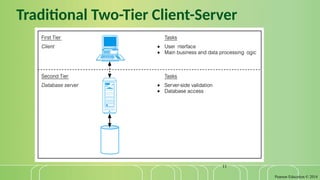
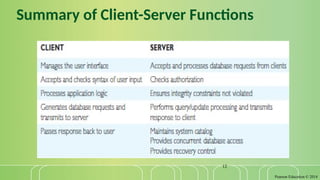
Client (tier 1) manages user interface and runs applications.
Server (tier 2) holds database and DBMS.
Advantages include:
wider access to existing databases;
increased performance;
possible reduction in hardware costs;
reduction in communication costs;
increased consistency.
- 9.
- 10.
- 11.
- 12.
- 13.
Pearson Education ©2014
13
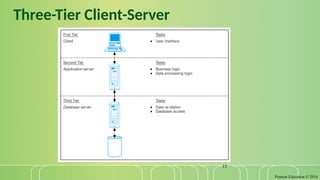
Three-Tier Client-Server
The need for enterprise scalability challenged the traditional
two-tier client–server model.
Client side presented two problems preventing true scalability:
‘Fat’ client, requiring considerable resources on client’s computer to run
effectively.
Significant client side administration overhead.
By 1995, three layers proposed, each potentially running on a
different platform.
- 14.
Pearson Education ©2014
14
Three-Tier Client-Server
Advantages:
‘Thin’ client, requiring less expensive hardware.
Application maintenance centralized.
Easier to modify or replace one tier without affecting others.
Separating business logic from database functions makes it easier to
implement load balancing.
Maps quite naturally to Web environment.
- 15.
- 16.
Pearson Education ©2014
16
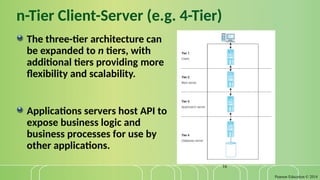
n-Tier Client-Server (e.g. 4-Tier)
The three-tier architecture can
be expanded to n tiers, with
additional tiers providing more
flexibility and scalability.
Applications servers host API to
expose business logic and
business processes for use by
other applications.
- 17.
Pearson Education ©2014
17
Middleware
Middleware is a generic term used to describe software that
mediates with other software and allows for communication
between disparate applications in a heterogeneous system.
The need for middleware arises when distributed systems
become too complex to manage efficiently without a common
interface.
- 18.
Pearson Education ©2014
18
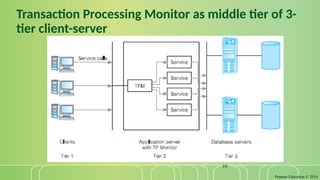
Transaction Processing Monitors
TP monitor is a program that controls data transfer between
clients and servers in order to provide a consistent
environment, particularly for online transaction processing
(OLTP).
- 19.
Pearson Education ©2014
19
Transaction Processing Monitor as middle tier of 3-
tier client-server
- 20.
Pearson Education ©2014
20
Web Services and Service-Oriented
Architectures
Web service is a software system designed to support interoperable
machine-to-web service machine interaction over a network.
Web services share business logic, data, and processes through a
programmatic interface across a network.
Developers can add the Web service to a Web page (or an executable
program) to offer specific functionality to users.
- 21.
Pearson Education ©2014
21
Web Services and Service-Oriented
Architectures
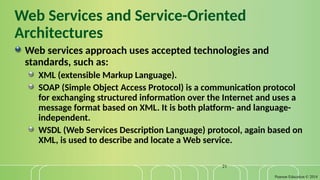
Web services approach uses accepted technologies and
standards, such as:
XML (extensible Markup Language).
SOAP (Simple Object Access Protocol) is a communication protocol
for exchanging structured information over the Internet and uses a
message format based on XML. It is both platform- and language-
independent.
WSDL (Web Services Description Language) protocol, again based on
XML, is used to describe and locate a Web service.
- 22.
Pearson Education ©2014
22
Web Services and Service-Oriented
Architectures
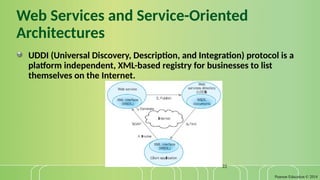
UDDI (Universal Discovery, Description, and Integration) protocol is a
platform independent, XML-based registry for businesses to list
themselves on the Internet.
- 23.
Pearson Education ©2014
23
Service-Oriented Architectures (SOA)
A business-centric software architecture for building
applications that implement business processes as sets of
services published at a granularity relevant to the service
consumer. Services can be invoked, published, and
discovered, and are abstracted away from the
implementation using a single standards-based form of
interface.
- 24.
Pearson Education ©2014
24
Distributed DBMSs
A distributed database is a logically interrelated collection of
shared data (and a description of this data), physically
distributed over a computer network.
A distributed DBMS is the software system that permits the
management of the distributed database and makes the
distribution transparent to users.
- 25.
Pearson Education ©2014
25
Distributed DBMSs
A DDBMS consists of a single logical database split into a number of
fragments.
Each fragment is stored on one or more computers (replicas) under the
control of a separate DBMS, with the computers connected by a
network.
Each site is capable of independently processing user requests that
require access to local data (that is, each site has some degree of local
autonomy) and is also capable of processing data stored on other
computers in the network.
- 26.
Pearson Education ©2014
26
Data Warehousing
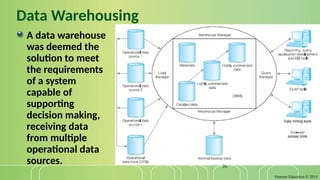
A data warehouse
was deemed the
solution to meet
the requirements
of a system
capable of
supporting
decision making,
receiving data
from multiple
operational data
sources.
- 27.
Pearson Education ©2014
27
Cloud Computing
The National Institute of Standards and Technology (NIST)
provided a definition.
Defined as “A model for enabling ubiquitous, convenient, on-
demand network access to a shared pool of configurable
computing resources (e.g. networks, servers, storage,
applications, and services) that can be rapidly provisioned and
released with minimal management effort or service provider
interaction.”
- 28.
Pearson Education ©2014
28
Cloud Computing – Key Characteristics
On-demand self-service
Consumers can obtain, configure and deploy cloud services without
help from provider.
Broad network access (ubiquitous)
Accessible from anywhere, from any standardized platform (e.g.
desktop computers, laptops, mobile devices).
- 29.
Pearson Education ©2014
29
Cloud Computing – Key Characteristics
Resource pooling
Provider’s computing resources are pooled to serve multiple
consumers, with different physical and virtual resources
dynamically assigned and reassigned according to consumer
demand. Examples of resources include storage, processing,
memory, and network bandwidth.
- 30.
Pearson Education ©2014
30
Cloud Computing – Key Characteristics
Rapid elasticity
Provider’s capacity caters for customer’s spikes in demand and
reduces risk of outages and service interruptions. Capacity can be
automated to scale rapidly based on demand.
Measured service
Provider uses a metering capability to measure usage of service (e.g.
storage, processing, bandwidth, and active user accounts).
- 31.
Pearson Education ©2014
31
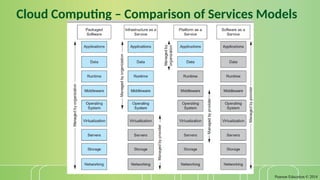
Cloud Computing – Service Models
Software as a Service (SaaS):
Software and data hosted on cloud. Accessed through using thin
client interface (e.g. web browser). Consumer may be offered
limited user specific application configuration settings.
Examples include Salesforce.com sales management applications,
NetSuite’s integrated business management software, Google’s
Gmail and Cornerstone OnDemand.
- 32.
Pearson Education ©2014
32
Cloud Computing – Service Models
Platform as a Service (PaaS)
Allows creation of web applications without buying/maintaining the
software and underlying infrastructure. Provider manages the
infrastructure including network, servers, OS and storage, while
customer controls deployment of applications and possibly
configuration.
Examples include Salesforce.com’s Force.com, Google’s App Engine,
and Microsoft’s Azure.
- 33.
Pearson Education ©2014
33
Cloud Computing – Service Models
Infrastructure as a Service (IaaS)
Provider’s offer servers, storage, network and operating systems –
typically a platform virtualization environment – to consumers as an
on-demand service, in a single bundle and billed according to usage.
A popular use of IaaS is in hosting websites. Examples Amazon’s
Elastic Compute Cloud (EC2), Rackspace and GoGrid.
- 34.
- 35.
Pearson Education ©2014
35
Benefits of Cloud Computing
Cost-Reduction: Avoid up-front capital expenditure.
Scalability/Agility: Organisations set up resources on an as-needs basis.
Improved Security: Providers can devote expertise & resources to
security; not affordable by customer.
Improved Reliability: Providers can devote expertise & resources on
reliability of systems; not affordable by customer.
Access to new technologies: Through use of provider’s systems,
customers may access latest technology.
- 36.
Pearson Education ©2014
36
Benefits of Cloud Computing
Faster development: Provider’s platforms can provide many of the core
services to accelerate development cycle.
Large scale prototyping/load testing: Providers have the resources to
enable this.
More flexible working practices: Staff can access files using mobile
devices.
Increased competitiveness: Allows organizations to focus on their core
competencies rather than their IT infrastructures.
- 37.
Pearson Education ©2014
37
Risks of Cloud Computing
Network Dependency: Power outages, bandwidth issues and service
interruptions.
System Dependency: Customer’s dependency on availability and
reliability of provider’s systems.
Cloud Provider Dependency: Provider could become insolvent or
acquired by competitor, resulting in the service suddenly terminating.
Lack of control: Customers unable to deploy technical or organisational
measures to safeguard the data. May result in reduced availability,
integrity, confidentiality, intervenability and isolation.
Lack of information on processing transparency
- 38.
Pearson Education ©2014
38
Cloud-based database solutions
As a type of Software as a Service (SaaS), cloud-based
database solutions fall into two basic categories:
Data as a Service (DaaS) and
Database as a Service (DBaaS).
Key difference between the two options is mainly how the
data is managed.
- 39.
Pearson Education ©2014
39
Cloud-based database solutions
DBaaS
Offers full database functionality to application developers.
Provides a management layer that provides continuous monitoring
and configuring of the database to optimized scaling, high
availability, multi-tenancy (that is, serving multiple client
organizations), and effective resource allocation in the cloud,
thereby sparing the developer from ongoing database
administration tasks.
- 40.
Pearson Education ©2014
40
Cloud-based database solutions
DaaS:
Services enable data definition in the cloud and subsequently
querying.
Does not implement typical DBMS interfaces (e.g. SQL) but instead
data is accessed via common APIs.
Enables organization with valuable data to offer access to others.
Examples Urban Mapping (geography data service), Xignite
(financial data service) and Hoovers (business data service.)
- 41.
Pearson Education ©2014
41
Cloud-based database solutions
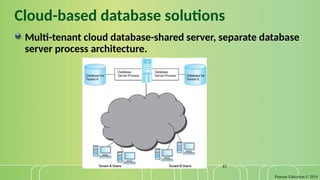
Multi-tenant cloud database-shared server, separate database
server process architecture.
- 42.
Pearson Education ©2014
42
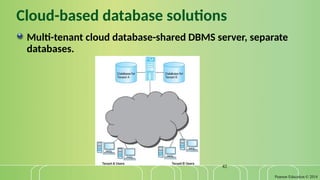
Cloud-based database solutions
Multi-tenant cloud database-shared DBMS server, separate
databases.
- 43.
Pearson Education ©2014
43
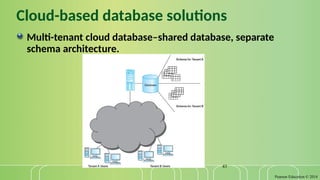
Cloud-based database solutions
Multi-tenant cloud database–shared database, separate
schema architecture.
- 44.
Pearson Education ©2014
44
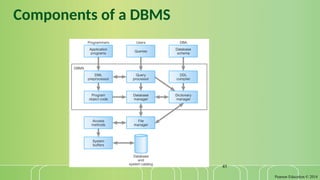
Components of a DBMS
A DBMS is partitioned into several software components (or
modules), each of which is assigned a specific operation. As
stated previously, some of the functions of the DBMS are
supported by the underlying operating system.
The DBMS interfaces with other software components, such as
user queries and access methods (file management techniques
for storing and retrieving data records).
- 45.
- 46.
Pearson Education ©2014
46
Components of a DBMS (Continued)
Query processor is a major DBMS component that transforms
queries into a series of low-level instructions directed to the
database manager.
Database manager (DM) interfaces with user-submitted
application programs and queries. The DM examines the
external and conceptual schemas to determine what
conceptual records are required to satisfy the request. The
DM then places a call to the file manager to perform the
request.
- 47.
Pearson Education ©2014
47
Components of a DBMS (Continued)
File manager manipulates the underlying storage files and
manages the allocation of storage space on disk. It establishes
and maintains the list of structures and indexes defined in the
internal schema.
DML preprocessor converts DML statements embedded in an
application program into standard function calls in the host
language. The DML preprocessor must interact with the query
processor to generate the appropriate code.
- 48.
Pearson Education ©2014
48
Components of a DBMS (Continued)
DDL compiler converts DDL statements into a set of tables
containing metadata. These tables are then stored in the
system catalog while control information is stored in data file
headers.
Catalog manager manages access to and maintains the system
catalog. The system catalog is accessed by most DBMS
components.
- 49.
- 50.
Pearson Education ©2014
50
Components of the Database Manager
Authorization control to confirm whether the user has the
necessary permission to carry out the required operation.
Command processor on confirmation of user authority, control
is passed to the command processor.
Integrity checker ensures that requested operation satisfies
all necessary integrity constraints (e.g. key constraints) for an
operation that changes the database.
- 51.
Pearson Education ©2014
51
Components of the Database Manager
(Continued)
Query optimizer determines an optimal strategy for the query
execution.
Transaction manager performs the required processing of
operations that it receives from transactions.
Scheduler ensures that concurrent operations on the database
proceed without conflicting with one another. It controls the
relative order in which transaction operations are executed.
- 52.
Pearson Education ©2014
52
Components of the Database Manager
(Continued)
Recovery manager ensures that the database remains in a
consistent state in the presence of failures. It is responsible for
transaction commit and abort.
Buffer manager responsible for the transfer of data between
main memory and secondary storage, such as disk and tape.
The recovery manager and the buffer manager also known as
(aka) the data manager. The buffer manager aka the cache
manager.