Catching Pokémon
O N G O O G L E M A P S T I M E L I N E
Techugo Updates
Niantic might not technically be part of Google, but Google has decided to bring a wonderful features
for the Pokemon fans. 
Google has added an interesting addition to the activity selector in the Timeline feature of Google
Maps.
To know more flip the slide with Techugo…
Google Timeline
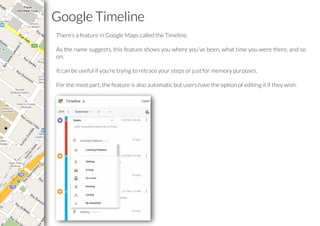
There’s a feature in Google Maps called the Timeline.
As the name suggests, this feature shows you where you’ve been, what time you were there, and so
on.
It can be useful if you’re trying to retrace your steps or just for memory purposes.
For the most part, the feature is also automatic but users have the option of editing it if they wish.
Catching Pokemon On Google Timeline
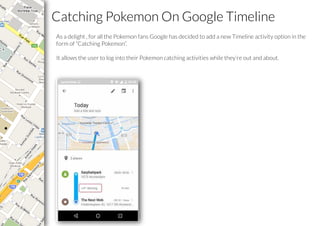
As a delight , for all the Pokemon fans Google has decided to add a new Timeline activity option in the
form of “Catching Pokemon”.
It allows the user to log into their Pokemon catching activities while they’re out and about.
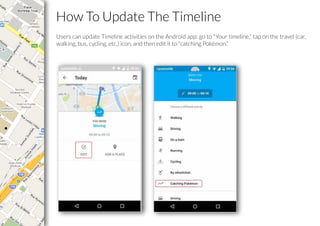
How To Update The Timeline
Users can update Timeline activities on the Android app: go to "Your timeline," tap on the travel (car,
walking, bus, cycling, etc.) icon, and then edit it to "catching Pokémon.”
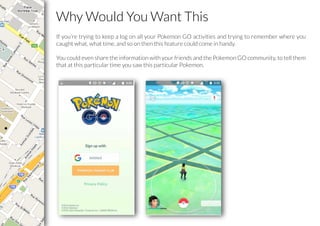
Why Would You Want This
If you’re trying to keep a log on all your Pokemon GO activities and trying to remember where you
caught what, what time, and so on then this feature could come in handy.
You could even share the information with your friends and the Pokemon GO community, to tell them
that at this particular time you saw this particular Pokemon.
W E L O V E T O B E F O L L O W E D
Thank You !
L E T T E C H N O L O G Y S U R P A S S Y O U R I M A G I N A T I O N
You can reach us at:
sales@techugo.com
Skype:
ankit.techugo
vaibhav_techugo

Catching pokémon

  • 1.
    Catching Pokémon O NG O O G L E M A P S T I M E L I N E
  • 2.
    Techugo Updates Niantic mightnot technically be part of Google, but Google has decided to bring a wonderful features for the Pokemon fans.  Google has added an interesting addition to the activity selector in the Timeline feature of Google Maps. To know more flip the slide with Techugo…
  • 3.
    Google Timeline There’s afeature in Google Maps called the Timeline. As the name suggests, this feature shows you where you’ve been, what time you were there, and so on. It can be useful if you’re trying to retrace your steps or just for memory purposes. For the most part, the feature is also automatic but users have the option of editing it if they wish.
  • 4.
    Catching Pokemon OnGoogle Timeline As a delight , for all the Pokemon fans Google has decided to add a new Timeline activity option in the form of “Catching Pokemon”. It allows the user to log into their Pokemon catching activities while they’re out and about.
  • 5.
    How To UpdateThe Timeline Users can update Timeline activities on the Android app: go to "Your timeline," tap on the travel (car, walking, bus, cycling, etc.) icon, and then edit it to "catching Pokémon.”
  • 6.
    Why Would YouWant This If you’re trying to keep a log on all your Pokemon GO activities and trying to remember where you caught what, what time, and so on then this feature could come in handy. You could even share the information with your friends and the Pokemon GO community, to tell them that at this particular time you saw this particular Pokemon.
  • 7.
    W E LO V E T O B E F O L L O W E D
  • 8.
    Thank You ! LE T T E C H N O L O G Y S U R P A S S Y O U R I M A G I N A T I O N You can reach us at: sales@techugo.com Skype: ankit.techugo vaibhav_techugo