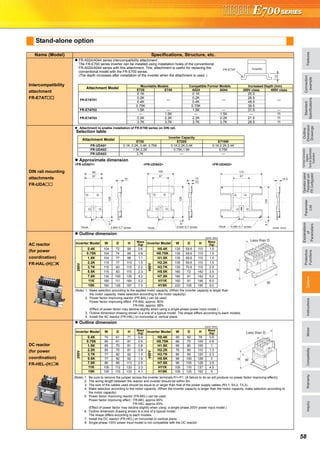
Tư vấn chọn sản phẩm
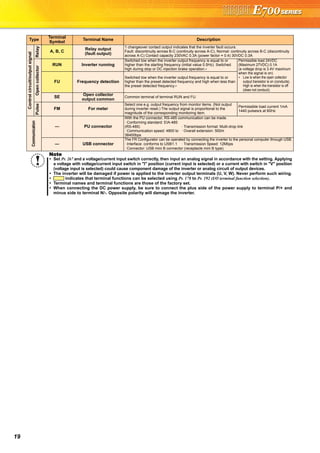
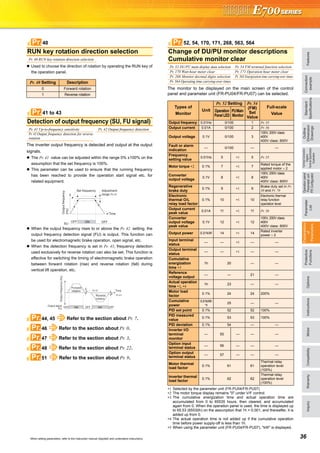
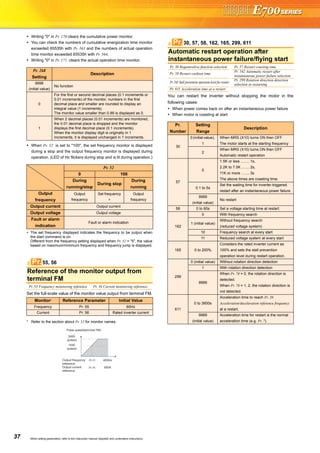
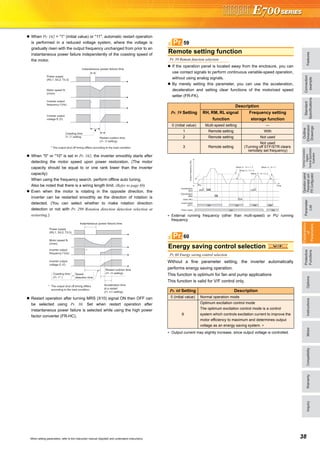
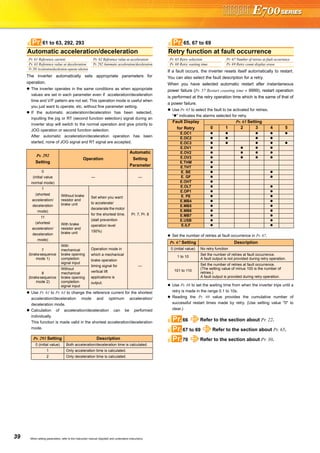
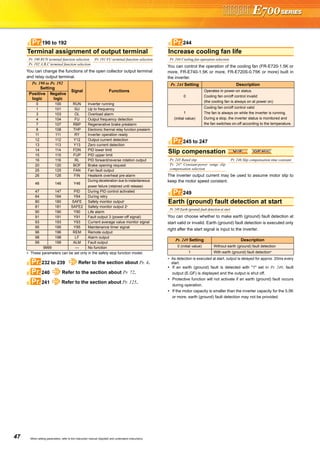
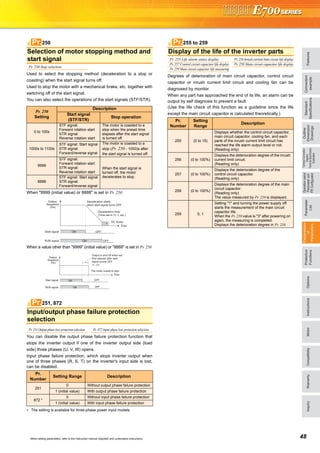
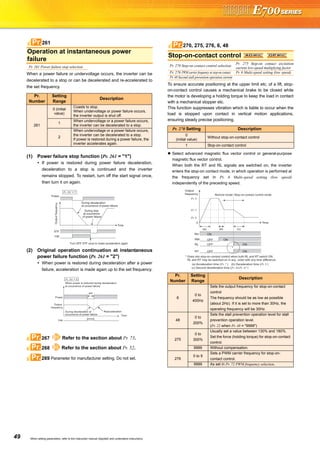
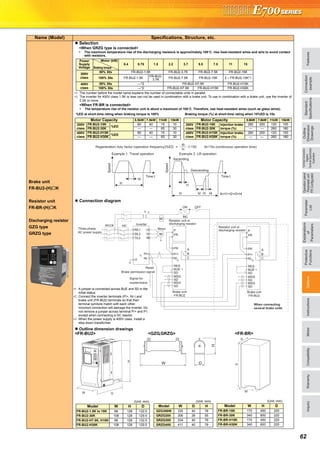
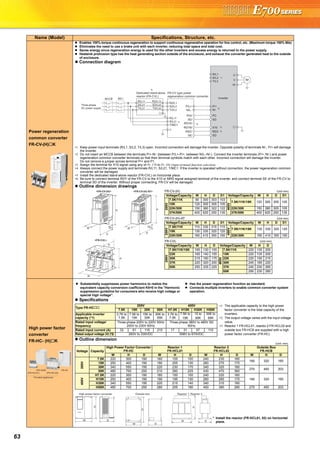
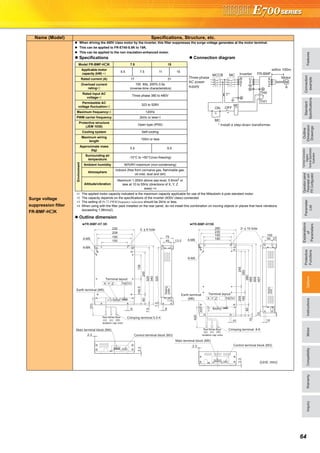
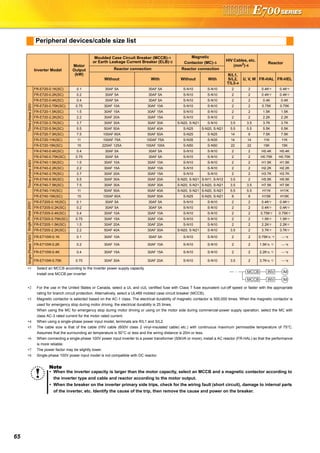
Giao hàng tận nơi
Hỗ trợ kỹ thuật
Chính sách hậu mãi đa dạng
DỊCH VỤ CHĂM SÓC KHÁCH HÀNG TOÀN DIỆN
Nhà cung cấp thiết bị điện chuyên nghiệp
Hotline: 0904.676.925
CÔNG TY TNHH THƯƠNG MẠI KỸ THUẬT ASTER
Số 7 Đại lộ Độc Lập, KCN Sóng Thần,
P. Dĩ An, Tx. Dĩ An, Bình Dương, VN.
Tel: (0650) 3617 012
Fax: (0650) 3617 011
www.beeteco.com
Enhanced expandability
Mitsubishi inverters offer the expandability that answers to every need
Compact and space saving
Compact design expands flexibility of enclosure design.
Ensured maintenance
700 series are the pioneer of long life and high reliability.
Environment-friendly
Human and environment-friendly inverter
Full of useful functions
(1) A variety of plug-in options are mountable
Plug-in options supporting digital input, analog output extension, and a variety of communications provide extended functions which is
almost equivalent to the FR-A700 series. (One type of plug-in option can be mounted.)
•The design life of the cooling fan has been extended to 10
years*1. The life of the fan can be further extended utilizing the
it’s ON/OFF control.
•The design life of the capacitors has been extended to 10
years by adopting a capacitor that endures 5000 hours at
105˚C surrounding air temperature*1,*2.
(3) Control terminals are
selectable according to applications
(1) Compact body with
high performance function
Installation size is the same as
the conventional mode (FR-
E500 series) in consideration
of intercompatibility.
(7.5K or less)
(2) Side by side installation saves space
Space can be saved by side by side
no clearance installation*.
(4) Various kinds of networks are supported
EIA-485 (RS-485), ModbusRTU (equipped as standard), CC-Link,
PROFIBUS-DP, DeviceNet®, LONWORKS® (option)
(1) Long-life design
A cooling fan is provided on top of the
inverter for all capacities requiring a
cooling fan*.
A cooling fan can be easily replaced
without disconnecting main circuit wires.
(3) Easy replacement of cooling fan
Since a wiring cover can be installed
after wiring, wiring work is easily done.
(4) Combed shaped wiring cover
Wiring of the control circuit when replacing the same series
inverter can be done by changing the terminal block.
(5) Removable control terminal block
•Degrees of deterioration of main circuit capacitor, control circuit
capacitor, and inrush current limit circuit can be monitored.
•Trouble can be avoided with the self-diagnostic alarm*4 that is
output when the life span is near.
*4: Any one of main circuit capacitor, control circuit capacitor, inrush current limit circuit or
cooling fan reaches the output level, an alarm is output.
Capacity of the main circuit capacitor can be measured by setting parameter at a stop and
turning the power from off to on. Measuring the capacity enables an alarm to be output.
*: The inverter may trip and the motor may coast depending on the load condition.
Detection of coasting speed (frequency search function) prevents the motor speed from
decreasing at a restart, starting the motor smoothly with less output current.
*1: Surrounding air temperature : annual average 40˚C (free from corrosive gas, flammable gas,
oil mist, dust and dirt) Since the design life is a calculated value, it is not a guaranteed value.
*2: Output current : 80% of the inverter rated current
*: Cooling fans are equipped with FR-E720-1.5K (SC) or
more, FR-E740-1.5K (SC) or more, and FR-E720S-0.75K
(SC) or more.
(2) Leading life check function
The inverter is human and environment-friendly by being
compliance with the RoHS Directive.
•Automatic restart after instantaneous power failure function
with frequency search
•Brake sequence mode is useful for mechanical brake control of a lift.
•Regeneration avoidance function prevents regenerative overvoltage in a pressing machine.
•Optimum excitation control can save more energy with the maximum motor efficiency control.
•Main circuit power supply DC input can be connected to DC power supply.
•Enhanced I/O terminal function supports switchover of analog input (voltage / current).
•Password function is effective for parameter setting protection.
and so on
•Power-failure deceleration stop function/operation
continuation at instantaneous power failure function
The motor can be decelerated to a stop when a power failure
or undervoltage occurs to prevent the motor from coasting.
This function is useful to stop a motor at power failure as a fail
safe of machine tool, etc.
With the new operation continuation function at instantaneous
power failure, the motor continues running without coasting
even if an instantaneous power failure occurs during operation.
•The inverter with filterpack FR-BFP2 (a package of power factor
improving DC reactor, common mode choke and capacitive
filter) conforms to the Japanese harmonic suppression guideline.
•Noise filter option which is compatible with EMC Directive
(EN61800-3 2nd Environment Category C3) is available.
(2) Filter options
Plug-in option
Plug-in option dedicated front cover
Compatible Plug-in Options
•FR-A7AX E kit ...16-bit digital input
•FR-A7AY E kit ...Digital output
Extension analog output
•FR-A7AR E kit ...Relay output
•FR-A7NC E kit ...CC-Link
•FR-A7ND E kit ...DeviceNet
•FR-A7NP E kit ...PROFIBUS-DP
•FR-A7NL E kit ...LONWORKS
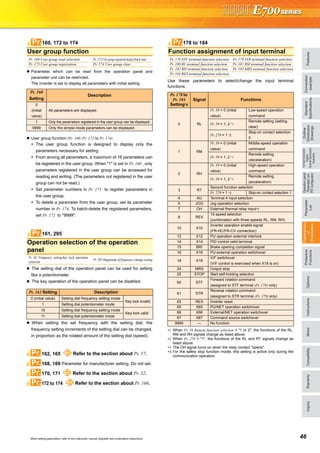
FR-E720-0.2K (SC) FR-E520-0.2K
•Life indication of life components
Components
Cooling fan
Main circuit smoothing capacitor
Printed board smoothing capacitor
Guideline of the FR-E700 Life
10 years
10 years
10 years
Guideline of JEMA*3
2 to 3 years
5 years
5 years
*3: Excerpts from “Periodic check of the transistorized inverter” of JEMA (Japan Electrical Manufacturer’s Association)
FR-E500 series FR-E700 series
Input voltage Output frequency
Motor speed
Output current
Input voltage Output frequency
Motor speed
Output current
LONWORKS® is a registered trademark of Echelon Corporation, DeviceNet® is of ODVA,
and PROFIBUS is of PROFIBUS User Organization.
Other company and product names herein are the trademarks of their respective owners.
These plug-in options are supported by the standard control circuit terminal model.
Terminal
card
128mm
Terminal cards other than standard terminal
such as two port RS-485 terminal are
available as options.
A terminal card is removable and can be
easily replaced from a standard terminal
card.
*: Use the inverter at the surrounding air temperature
of 40˚C or less.
(1) Compliance with the EU Restriction
of Hazardous Substances (RoHS)
[ For the FR-E700 series, use the "FR-A7 E kit" which is a set of optional board and dedicated front cover.]
(2) Safety stop function (FR-E700-SC)
•Spring clamp terminals are adopted as control circuit terminals.
Spring clamp terminals are highly reliable and can be easily wired.
•The FR-E700-SC series is compliant to the EU Machinery Directive
without the addition of previously required external devices.
Operation of an external Emergency Stop device results in a
highly reliable immediate shutoff of the D700's output to the motor.
This safety stop function conforms to the following standards.
EN ISO 13849-1 Category 3 / PLd
EN62061 / IEC61508 SIL2
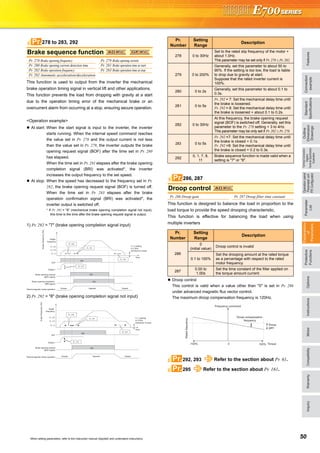
Provided by the user (present) FR-D700
Safety function
is equipped
Emergency stop Emergency stop
For conventional modelFor conventional model...
Two MCs were necessaryTwo MCs were necessary
For conventional model...
Two MCs were necessary
•High cost
•Maintenance of two MCs
was necessary
•Installation space was necessary
•Magnetic contactor (MC)
•Emergency stop wiring
Only one MC is recommendedOnly one MC is recommended
instead of twoinstead of two.
Although MC is not requiredAlthough MC is not required
for the safety stop functionfor the safety stop function.
Only one MC is recommended
instead of two.
Although MC is not required
for the safety stop function.
•Cost reduction
•Maintenance of one MC
•Installation space is reduced
*: Approved safety relay unit
*
Peripheral
device
Mitsubishi magnetic
contactors
•Offer a selection of small frames
•Offer a line-up of safety contactors
•Support with low-level load (auxiliary contact)
•Support many international regulations as a standard model
Refer to page 62 for the selection.
Enhanced functions for all sorts of applications
3 4
FeaturesOptionsInstructionsMotorCompatibilityWarrantyInquiry
Connection
example
Standard
Specifications
Operationpanel
Parameterunit
FRConfigurator
Parameter
List
Protective
Functions
Explanations
of
Parameters
TerminalConnection
Diagram
TerminalSpecification
Explanation
Outline
Dimension
Drawings
FR-E720 -0.1K -
EMC filter (ferrite core)
(FR-BSF01, FR-BLF)
Motor
Earth
(Ground)
EMC filter (ferrite core)*
(FR-BSF01, FR-BLF)
P/+
P/+
PR
PR
High power factor
converter (FR-HC)
Power regeneration
common converter (FR-CV)
Register unit (FR-BR)
Discharging resistor (GZG, GRZG)
Earth
(Ground)
Install a noise filter to reduce the
electromagnetic noise
generated from the inverter.
Effective in the range from about
1MHz to 10MHz. A wire should be
wound four turns at a maximum.
AC power supply
Use within the permissible power supply
specifications of the inverter.
To ensure safety, use a moulded case circuit
breaker, earth leakage circuit breaker or
magnetic contactor to switch power ON/OFF.
Enclosure surface
operation panel (FR-PA07)
Connect a connection cable (FR-CB2) to
the PU connector to use the FR-PA07,
FR-PU07/FR-PU07BB(-L).
USB connector
A personal computer and an inverter can
be connected with a USB (Ver1.1) cable.
Moulded case circuit breaker
(MCCB) or earth leakage current
breaker (ELB), fuse
The breaker must be selected carefully
since an in-rush current flows in the
inverter at power on.
Magnetic contactor (MC)
Install the magnetic contactor to ensure
safety. Do not use this magnetic
contactor to start and stop the inverter.
Doing so will cause the inverter life to be
shorten.
Reactor (FR-HAL, FR-HEL option)
Install reactors to suppress harmonics
and to improve the power factor.
A reactor (option) is required when
installing the inverter near a large power
supply system (500kVA or more).
The inverter may be damaged if you do
not use reactors. Select the reactor
according to the model. Remove the
jumpers across terminals P/+ - P1 to
connect the DC reactor.
Devices connected to the output
Do not install a power factor correction capacitor,
surge suppressor or radio noise filter on the output
side of the inverter. When installing a moulded case
circuit breaker on the output side of the inverter,
contact each manufacturer for selection of the
moulded case circuit breaker.
Earth (Ground)
To prevent an electric shock, always earth (ground)
the motor and inverter. For reduction of induction noise
from the power line of the inverter, it is recommended
to wire the earth (ground) cable by returning it to the
earth (ground) terminal of the inverter.
R/L1 S/L2 T/L3P1P/+
N/-P/+ U W
Brake unit (FR-BU2)
P/+
PR
V
Power supply harmonics
can be greatly suppressed.
Install this as required.
Great braking capability is obtained.
Install this as required.
The regenerative braking capability
of the inverter can be exhibited fully.
Install this as required.
Install a noise filter to
reduce the electromagnetic
noise generated from the
inverter. Effective in the
range from about 1MHz to
10MHz. When more wires
are passed through, a more
effective result can be
obtained. A wire should be
wound four turns or more.
EMC filter
(capacitor)*
(FR-BIF)
Reduces
the radio
noise.
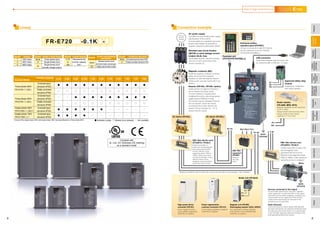
Lineup Connection example
Inverter Model
Inverter Capacity
0.1K 0.2K 0.4K 0.75K 1.5K 2.2K 3.7K 5.5K 7.5K 11K 15K
Three-phase 200V
FR-E720- (SC)
Three-phase 400V
FR-E740- (SC)
Single-phase 200V
FR-E720S- (SC)*
Single-phase 100V
FR-E710W- *
Enclosed-type
structure (IP20)
Totally enclosed
structure (IP40)
Enclosed-type
structure (IP20)
Totally enclosed
structure (IP40)
Enclosed-type
structure (IP20)
Enclosed-type
structure (IP20)
*:Output of the single-phase 200V and single-phase 100V input specifications is three-phase 200V.
*Filterpack (FR-BFP2), which contains DC reactor and noise filter in one package, is also available.
:Available models :Models to be released :Not available
Complies with
UL, cUL, EC Directives (CE marking)
as a standard model
Symbol
1
2
4
Voltage
100V class
200V class
400V class
Symbol
None
C
Protective Structure
Enclosed-type structure IP20
Totally enclosed structure IP40
Symbol
None
SC
Control circuit terminal
specification
Standard control circuit
terminal model (screw type)
Safety stop function model
Symbol
0.1K
to
15K
Inverter Capacity
Represents the
inverter capacity
"kW".
Symbol
None
S
W
Number of Power Phases
Three-phase input
Single-phase input
Single-phase input
(double voltage output)
DC reactor (FR-HEL)*AC reactor (FR-HAL)
Brake resistor
(FR-ABR, MRS, MYS)
Braking capability can be improved.
(0.4K or more)
Always install a thermal relay when
using a brake resistor whose
capacity is 11K or more.
Parameter unit
(FR-PU07/FR-PU07BB(-L))
S1
S2
PC
Approved safety relay
module
Required for compliance
with safety standard.
5 6
FeaturesOptionsInstructionsMotorCompatibilityWarrantyInquiry
Connection
example
Standard
Specifications
Operationpanel
Parameterunit
FRConfigurator
Parameter
List
Protective
Functions
Explanations
of
Parameters
TerminalConnection
Diagram
TerminalSpecification
Explanation
Outline
Dimension
Drawings
7
Standard specifications
Three-phase 200V power supply
Three-phase 400V power supply
∗1 The applicable motor capacity indicated is the maximum capacity applicable for use of the Mitsubishi 4-pole standard motor.
∗2 The rated output capacity indicated assumes that the output voltage is 230V for three-phase 200V class and 440V for three-phase 400V class.
∗3 The % value of the overload current rating indicated is the ratio of the overload current to the inverter's rated output current. For repeated duty, allow time for
the inverter and motor to return to or below the temperatures under 100% load.
∗4 The maximum output voltage does not exceed the power supply voltage. The maximum output voltage can be changed within the setting range. However,
the pulse voltage value of the inverter output side voltage remains unchanged at about that of the power supply.
∗5 The braking torque indicated is a short-duration average torque (which varies with motor loss) when the motor alone is decelerated from 60Hz in the shortest
time and is not a continuous regenerative torque. When the motor is decelerated from the frequency higher than the base frequency, the average
deceleration torque will reduce. Since the inverter does not contain a brake resistor, use the optional brake resistor when regenerative energy is large. A
brake unit (FR-BU2) may also be used. (Option brake resisitor cannot be used for 0.1K and 0.2K.)
∗6 The power supply capacity varies with the value of the power supply side inverter impedance (including those of the input reactor and cables).
∗7 Setting 2kHz or more in Pr. 72 PWM frequency selection to perform low acoustic noise operation in the surrounding air temperature exceeding 40°C (totally-
enclosed structure is 30°C), the rated output current is the value in parenthesis.
∗8 Connect DC power supply to terminal P/+ and N/-. Connect the plus side of the power supply to terminal P/+ and minus side to terminal N/-.
Since the voltage between P/+ and N/- may increase due to the regeneration energy from the motor and exceeds 415V temporarily, select the DC power
supply which can withstand the voltage/energy during regeneration. If using the power supply which can not withstand voltage/energy during regeneration,
insert diodes in series for reverse current prevention.
Although the FR-E700 series has the built-in inrush current limit circuit, select the DC power supply considering the inrush current at powering ON as the
inrush current four times of the rated inverter flows at powering ON.
Since the power supply capacity depends on the output impedance of the power, select the power supply capacity which has enough allowance according
to the AC power supply system capacity.
∗9 The safety stop function model is indicated with SC.
∗10 Totally enclosed structure series ends with -C.
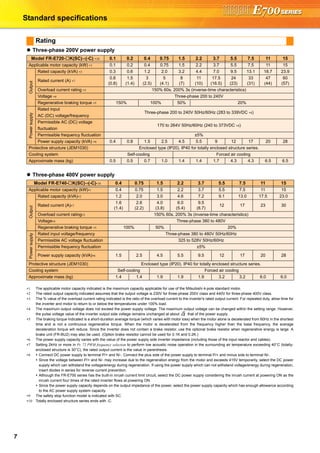
Rating
Model FR-E720- K(SC)∗9(-C) ∗10 0.1 0.2 0.4 0.75 1.5 2.2 3.7 5.5 7.5 11 15
Applicable motor capacity (kW) ∗1 0.1 0.2 0.4 0.75 1.5 2.2 3.7 5.5 7.5 11 15
Output
Rated capacity (kVA) ∗2 0.3 0.6 1.2 2.0 3.2 4.4 7.0 9.5 13.1 18.7 23.9
Rated current (A) ∗7
0.8
(0.8)
1.5
(1.4)
3
(2.5)
5
(4.1)
8
(7)
11
(10)
17.5
(16.5)
24
(23)
33
(31)
47
(44)
60
(57)
Overload current rating ∗3 150% 60s, 200% 3s (inverse-time characteristics)
Voltage ∗4 Three-phase 200 to 240V
Regenerative braking torque ∗5 150% 100% 50% 20%
Powersupply
Rated input
AC (DC) voltage/frequency
Three-phase 200 to 240V 50Hz/60Hz (283 to 339VDC ∗8)
Permissible AC (DC) voltage
fluctuation
170 to 264V 50Hz/60Hz (240 to 373VDC ∗8)
Permissible frequency fluctuation ±5%
Power supply capacity (kVA) ∗6 0.4 0.8 1.5 2.5 4.5 5.5 9 12 17 20 28
Protective structure (JEM1030) Enclosed type (IP20). IP40 for totally enclosed structure series.
Cooling system Self-cooling Forced air cooling
Approximate mass (kg) 0.5 0.5 0.7 1.0 1.4 1.4 1.7 4.3 4.3 6.5 6.5
Model FR-E740- K(SC)∗9(-C)∗10 0.4 0.75 1.5 2.2 3.7 5.5 7.5 11 15
Applicable motor capacity (kW)∗1 0.4 0.75 1.5 2.2 3.7 5.5 7.5 11 15
Output
Rated capacity (kVA)∗2 1.2 2.0 3.0 4.6 7.2 9.1 13.0 17.5 23.0
Rated current (A)∗7
1.6
(1.4)
2.6
(2.2)
4.0
(3.8)
6.0
(5.4)
9.5
(8.7)
12 17 23 30
Overload current rating∗3 150% 60s, 200% 3s (inverse-time characteristics)
Voltage∗4 Three-phase 380 to 480V
Regenerative braking torque ∗5 100% 50% 20%
Powersupply
Rated input voltage/frequency Three-phase 380 to 480V 50Hz/60Hz
Permissible AC voltage fluctuation 325 to 528V 50Hz/60Hz
Permissible frequency fluctuation ±5%
Power supply capacity (kVA)∗6 1.5 2.5 4.5 5.5 9.5 12 17 20 28
Protective structure (JEM1030) Enclosed type (IP20). IP40 for totally enclosed structure series.
Cooling system Self-cooling Forced air cooling
Approximate mass (kg) 1.4 1.4 1.9 1.9 1.9 3.2 3.2 6.0 6.0
2
FeaturesOptionsInstructionsMotorCompatibilityWarrantyInquiry
Connection
example
Standard
Specifications
Operationpanel
Parameterunit
FRConfigurator
Parameter
List
Protective
Functions
Explanations
of
Parameters
TerminalConnection
Diagram
TerminalSpecification
Explanation
Outline
Dimension
Drawings
8
Single-phase 200V power supply
Single-phase 100V power supply
∗1 The applicable motor capacity indicated is the maximum capacity applicable for use of the Mitsubishi 4-pole standard motor.
∗2 The rated output capacity indicated assumes that the output voltage is 230V.
∗3 The % value of the overload current rating indicated is the ratio of the overload current to the inverter's rated output current. For repeated duty, allow time for
the inverter and motor to return to or below the temperatures under 100% load. If the automatic restart after instantaneous power failure function (Pr. 57) or
power failure stop function (Pr. 261) is set and power supply voltage is low while load becomes bigger, the bus voltage decreases to power failure detection
level and load of 100% or more may not be available.
∗4 The maximum output voltage does not exceed the power supply voltage. The maximum output voltage can be changed within the setting range. However,
the pulse voltage value of the inverter output side voltage remains unchanged at about that of the power supply.
∗5 The braking torque indicated is a short-duration average torque (which varies with motor loss) when the motor alone is decelerated from 60Hz in the shortest
time and is not a continuous regenerative torque. When the motor is decelerated from the frequency higher than the base frequency, the average
deceleration torque will reduce. Since the inverter does not contain a brake resistor, use the optional brake resistor when regenerative energy is large. A
brake unit (FR-BU2) may also be used. (Option brake resisitor cannot be used for 0.1K and 0.2K.)
∗6 The power supply capacity varies with the value of the power supply side inverter impedance (including those of the input reactor and cables).
∗7 Setting 2kHz or more in Pr. 72 PWM frequency selection to perform low acoustic noise operation with the surrounding air temperature exceeding 40°C, the
rated output current is the value in parenthesis.
∗8 For single-phase 100V power input model, the maximum output voltage is twice the amount of the power supply voltage and cannot be exceeded.
∗9 In a single-phase 100V power input model, the output voltage may fall down when the load is heavy, and larger output current may flow compared to a
threephase input model. Use the motor with less load so that the output current is within the rated motor current range.
∗10 The safety stop function model is indicated with SC.
Model FR-E720S- K(SC)∗10 0.1 0.2 0.4 0.75 1.5 2.2
Applicable motor capacity (kW)∗1 0.1 0.2 0.4 0.75 1.5 2.2
Output
Rated capacity (kVA)∗2 0.3 0.6 1.2 2.0 3.2 4.4
Rated current (A)∗7
0.8
(0.8)
1.5
(1.4)
3.0
(2.5)
5.0
(4.1)
8.0
(7.0)
11.0
(10.0)
Overload current rating∗3 150% 60s, 200% 3s (inverse-time characteristics)
Rated output voltage∗4 Three-phase 200 to 240V
Regenerative braking torque ∗5 150% 100% 50% 20%
Powersupply
Rated input AC voltage/frequency Single-phase 200 to 240V 50Hz/60Hz
Permissible AC voltage fluctuation 170 to 264V 50Hz/60Hz
Permissible frequency fluctuation Within ±5%
Power supply capacity (kVA)∗6 0.5 0.9 1.5 2.5 4.0 5.2
Protective structure (JEM1030) Enclosed type (IP20)
Cooling system Self-cooling Forced air cooling
Approximate mass (kg) 0.6 0.6 0.9 1.4 1.5 2.0
Model FR-E710W- K 0.1 0.2 0.4 0.75
Applicable motor capacity (kW)∗1 0.1 0.2 0.4 0.75
Output
Rated capacity (kVA)∗2 0.3 0.6 1.2 2.0
Rated Current (A)∗7
0.8
(0.8)
1.5
(1.4)
3.0
(2.5)
5.0
(4.1)
Overload current rating∗3
150% 60s, 200% 3s
(inverse-time characteristics)
Rated output voltage Three-phase 200 to 230V ∗8, ∗9
Regenerative braking torque ∗5 150% 100%
Powersupply
Rated input AC voltage/frequency Single-phase 100 to 115V 50Hz/60Hz
Permissible AC voltage fluctuation 90 to 132V 50Hz/60Hz
Permissible frequency fluctuation Within ±5%
Power supply capacity (kVA)∗6 0.5 0.9 1.5 2.5
Protective structure (JEM1030) Enclosed type (IP20)
Cooling system Self-cooling
Approximate mass (kg) 0.6 0.7 0.9 1.5
2
9
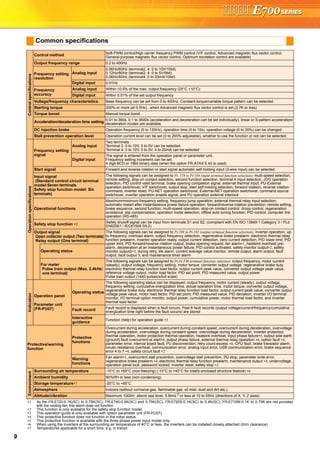
Common specifications
Controlspecifications
Control method Soft-PWM control/high carrier frequency PWM control (V/F control, Advanced magnetic flux vector control,
General-purpose magnetic flux vector control, Optimum excitation control are available)
Output frequency range 0.2 to 400Hz
Frequency setting
resolution
Analog input
0.06Hz/60Hz (terminal2, 4: 0 to 10V/10bit)
0.12Hz/60Hz (terminal2, 4: 0 to 5V/9bit)
0.06Hz/60Hz (terminal4: 0 to 20mA/10bit)
Digital input 0.01Hz
Frequency
accuracy
Analog input Within ±0.5% of the max. output frequency (25°C ±10°C)
Digital input Within 0.01% of the set output frequency
Voltage/frequency characteristics Base frequency can be set from 0 to 400Hz, Constant-torque/variable torque pattern can be selected
Starting torque 200% or more (at 0.5Hz)...when Advanced magnetic flux vector control is set (3.7K or less)
Torque boost Manual torque boost
Acceleration/deceleration time setting 0.01 to 360s, 0.1 to 3600s (acceleration and deceleration can be set individually), linear or S-pattern acceleration/
deceleration modes are available.
DC injection brake Operation frequency (0 to 120Hz), operation time (0 to 10s), operation voltage (0 to 30%) can be changed.
Stall prevention operation level Operation current level can be set (0 to 200% adjustable), whether to use the function or not can be selected
Operationspecifications
Frequency setting
signal
Analog input
Two terminals
Terminal 2: 0 to 10V, 0 to 5V can be selected
Terminal 4: 0 to 10V, 0 to 5V, 4 to 20mA can be selected
Digital input
The signal is entered from the operation panel or parameter unit.
Frequency setting increment can be set.
4 digit BCD or 16bit binary data (when the option FR-A7AX E kit is used)
Start signal Forward and reverse rotation or start signal automatic self-holding input (3-wire input) can be selected.
Input signal
(Standard control circuit terminal
model:Seven terminals
Safety stop function model: Six
terminals)
The following signals can be assigned to Pr. 178 to Pr.184 (input terminal function selection): multi-speed selection,
remote setting, stop-on contact selection, second function selection, terminal 4 input selection, JOG operation
selection, PID control valid terminal, brake opening completion signal, external thermal input, PU-External
operation switchover, V/F switchover, output stop, start self-holding selection, forward rotation, reverse rotation
command, inverter reset, PU-NET operation switchover, External-NET operation switchover, command source
switchover, inverter operation enable signal, and PU operation external interlock
Operational functions
Maximum/minimum frequency setting, frequency jump operation, external thermal relay input selection,
automatic restart after instantaneous power failure operation, forward/reverse rotation prevention, remote setting,
brake sequence, second function, multi-speed operation, stop-on contact control, droop control, regeneration
avoidance, slip compensation, operation mode selection, offline auto tuning function, PID control, computer link
operation (RS-485)
Safety stop function ∗2
Safety shutoff signal can be input from terminals S1 and S2. (compliant with EN ISO 13849-1 Category 3 / PLd
EN62061 / IEC61508 SIL2)
Output signal
Open collector output (Two terminals)
Relay output (One terminal)
The following signals can be assigned to Pr.190 to Pr.192 (output terminal function selection): inverter operation, up-
to-frequency, overload alarm, output frequency detection, regenerative brake prealarm, electronic thermal relay
function prealarm, inverter operation ready, output current detection, zero current detection, PID lower limit, PID
upper limit, PID forward/reverse rotation output, brake opening request, fan alarm∗1, heatsink overheat pre-
alarm, deceleration at an instantaneous power failure, PID control activated, safety monitor output∗2, safety
monitor output2∗2, during retry, life alarm, current average value monitor, remote output, alarm output, fault
output, fault output 3, and maintenance timer alarm
Operating status
For meter
Pulse train output (Max. 2.4kHz:
one terminal)
The following signals can be assigned to Pr.54 FM terminal function selection: output frequency, motor current
(steady), output voltage, frequency setting, motor torque, converter output voltage, regenerative brake duty,
electronic thermal relay function load factor, output current peak value, converter output voltage peak value,
reference voltage output, motor load factor, PID set point, PID measured value, output power
Pulse train output (1440 pulses/s/full scale)
Indication
Operation panel
Parameter unit
(FR-PU07)
Operating status
The following operating status can be displayed: output frequency, motor current (steady), output voltage,
frequency setting, cumulative energization time, actual operation time, motor torque, converter output voltage,
regenerative brake duty, electronic thermal relay function load factor, output current peak value, converter output
voltage peak value, motor load factor, PID set point, PID measured value, PID deviation, inverter I/O terminal
monitor, I/O terminal option monitor, output power, cumulative power, motor thermal load factor, and inverter
thermal load factor.
Fault record Fault record is displayed when a fault occurs. Past 8 fault records (output voltage/current/frequency/cumulative
energization time right before the fault occurs) are stored
Interactive
guidance
Function (help) for operation guide ∗3
Protective/warning
function
Protective
functions
Overcurrent during acceleration, overcurrent during constant speed, overcurrent during deceleration, overvoltage
during acceleration, overvoltage during constant speed, overvoltage during deceleration, inverter protection
thermal operation, motor protection thermal operation, heatsink overheat, input phase failure∗5, output side earth
(ground) fault overcurrent at start∗4, output phase failure, external thermal relay operation ∗4, option fault ∗4,
parameter error, internal board fault, PU disconnection, retry count excess ∗4, CPU fault, brake transistor alarm,
inrush resistance overheat, communication error, analog input error, USB communication error, brake sequence
error 4 to 7 ∗4, safety circuit fault ∗2
Warning
functions
Fan alarm∗1, overcurrent stall prevention, overvoltage stall prevention, PU stop, parameter write error,
regenerative brake prealarm ∗4, electronic thermal relay function prealarm, maintenance output ∗4, undervoltage,
operation panel lock, password locked, inverter reset, safety stop ∗2
Environment
Surrounding air temperature -10°C to +50°C (non-freezing) (-10°C to +40°C for totally-enclosed structure feature) ∗6
Ambient humidity 90%RH or less (non-condensing)
Storage temperature∗7 -20°C to +65°C
Atmosphere Indoors (without corrosive gas, flammable gas, oil mist, dust and dirt etc.)
Altitude/vibration Maximum 1000m above sea level, 5.9m/s 2
or less at 10 to 55Hz (directions of X, Y, Z axes)
∗1 As the FR-E720-0.1K(SC) to 0.75K(SC), FR-E740-0.4K(SC) and 0.75K(SC), FR-E720S-0.1K(SC) to 0.4K(SC), FR-E710W-0.1K to 0.75K are not provided
with the cooling fan, this alarm does not function.
∗2 This function is only available for the safety stop function model.
∗3 This operation guide is only available with option parameter unit (FR-PU07).
∗4 This protective function does not function in the initial status.
∗5 This protective function is available with the three-phase power input model only.
∗6 When using the inverters at the surrounding air temperature of 40°C or less, the inverters can be installed closely attached (0cm clearance).
∗7 Temperatures applicable for a short time, e.g. in transit.
FeaturesOptionsInstructionsMotorCompatibilityWarrantyInquiry
Operationpanel
Parameterunit
FRConfigurator
Parameter
List
Protective
Functions
Explanations
of
Parameters
TerminalConnection
Diagram
TerminalSpecification
Explanation
Outline
Dimension
Drawings
Connection
example
Standard
Specifications
10
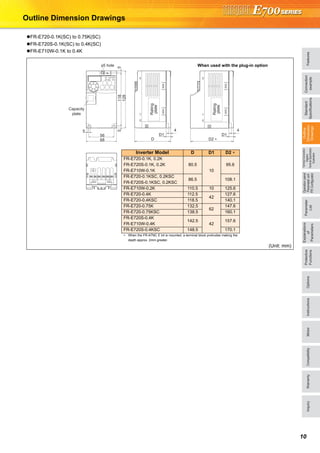
Outline Dimension Drawings
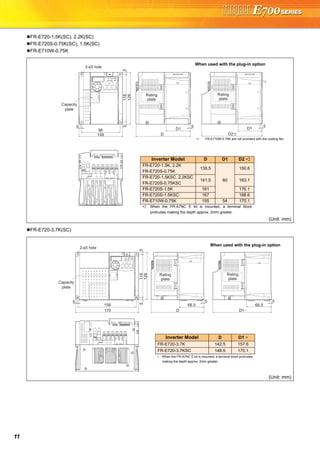
FR-E720-0.1K(SC) to 0.75K(SC)
FR-E720S-0.1K(SC) to 0.4K(SC)
FR-E710W-0.1K to 0.4K
(Unit: mm)
4
D
D1
4
D2 ∗
D1
5
68
56
51185
128
φ5 hole
Capacity
plate
Rating
plate
Rating
plate
Inverter Model D D1 D2 ∗
FR-E720-0.1K, 0.2K
FR-E720S-0.1K, 0.2K
FR-E710W-0.1K
80.5
10
95.6
FR-E720-0.1KSC, 0.2KSC
FR-E720S-0.1KSC, 0.2KSC
86.5 108.1
FR-E710W-0.2K 110.5 10 125.6
FR-E720-0.4K 112.5
42
127.6
FR-E720-0.4KSC 118.5 140.1
FR-E720-0.75K 132.5
62
147.6
FR-E720-0.75KSC 138.5 160.1
FR-E720S-0.4K
FR-E710W-0.4K
142.5
42
157.6
FR-E720S-0.4KSC 148.5 170.1
∗ When the FR-A7NC E kit is mounted, a terminal block protrudes making the
depth approx. 2mm greater.
When used with the plug-in option
11
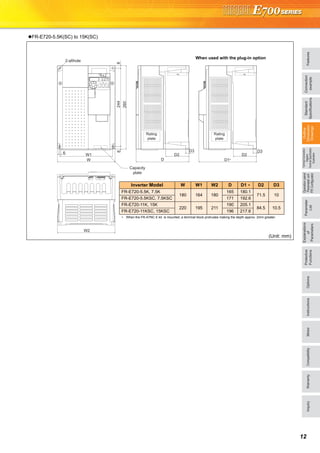
FR-E720-1.5K(SC), 2.2K(SC)
FR-E720S-0.75K(SC), 1.5K(SC)
FR-E710W-0.75K
FR-E720-3.7K(SC)
(Unit: mm)
(Unit: mm)
2-φ5 hole
96
108
51185
128
5
D
5
D2*2
5
Capacity
plate
Rating
plate
Rating
plate
D1 D1
*1
When used with the plug-in option
∗1 FR-E710W-0.75K are not provided with the cooling fan.
Inverter Model D D1 D2 ∗2
FR-E720-1.5K, 2.2K
FR-E720S-0.75K
135.5
60
150.6
FR-E720-1.5KSC, 2.2KSC
FR-E720S-0.75KSC
141.5 163.1
FR-E720S-1.5K 161 176.1
FR-E720S-1.5KSC 167 188.6
FR-E710W-0.75K 155 54 170.1
∗2 When the FR-A7NC E kit is mounted, a terminal block
protrudes making the depth approx. 2mm greater.
5
158
170
51185
128
2-φ5 hole
5
D D1 *
5
Capacity
plate
Rating
plate
Rating
plate
66.5 66.5
When used with the plug-in option
Inverter Model D D1 ∗
FR-E720-3.7K 142.5 157.6
FR-E720-3.7KSC 148.5 170.1
∗ When the FR-A7NC E kit is mounted, a terminal block protrudes
making the depth approx. 2mm greater.
FeaturesOptionsInstructionsMotorCompatibilityWarrantyInquiry
Operationpanel
Parameterunit
FRConfigurator
Parameter
List
Protective
Functions
Explanations
of
Parameters
TerminalConnection
Diagram
TerminalSpecification
Explanation
Outline
Dimension
Drawings
Connection
example
Standard
Specifications
12
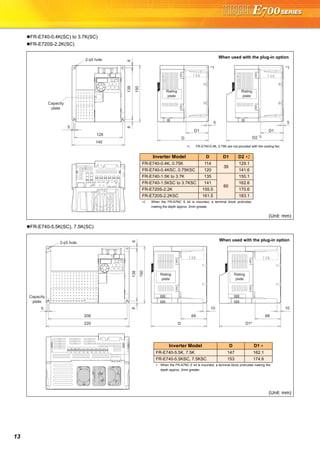
FR-E720-5.5K(SC) to 15K(SC)
(Unit: mm)
6 W1
W
82448
260
D3
D
D3
D1*
2-φ6hole
W2
D2 D2
Capacity
plate
Rating
plate
Rating
plate
When used with the plug-in option
Inverter Model W W1 W2 D D1 ∗ D2 D3
FR-E720-5.5K, 7.5K
180 164 180
165 180.1
71.5 10
FR-E720-5.5KSC, 7.5KSC 171 192.6
FR-E720-11K, 15K
220 195 211
190 205.1
84.5 10.5
FR-E720-11KSC, 15KSC 196 217.6
∗ When the FR-A7NC E kit is mounted, a terminal block protrudes making the depth approx. 2mm greater.
13
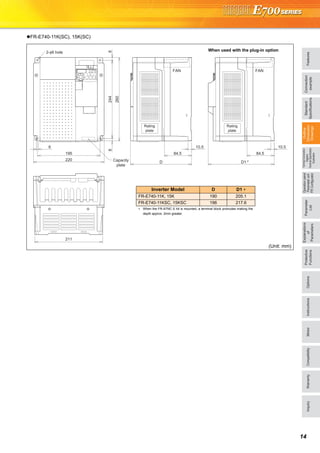
FR-E740-0.4K(SC) to 3.7K(SC)
FR-E720S-2.2K(SC)
FR-E740-5.5K(SC), 7.5K(SC)
(Unit: mm)
(Unit: mm)
5
D
D1
5
128
140
13866
2-φ5 hole
150 5
D2 *2
D1
*1 *1
Rating
plate
Rating
plate
Capacity
plate
When used with the plug-in option
∗1 FR-E740-0.4K, 0.75K are not provided with the cooling fan.
Inverter Model D D1 D2 ∗2
FR-E740-0.4K, 0.75K 114
39
129.1
FR-E740-0.4KSC, 0.75KSC 120 141.6
FR-E740-1.5K to 3.7K 135
60
150.1
FR-E740-1.5KSC to 3.7KSC 141 162.6
FR-E720S-2.2K 155.5 170.6
FR-E720S-2.2KSC 161.5 183.1
∗2 When the FR-A7NC E kit is mounted, a terminal block protrudes
making the depth approx. 2mm greater.
2-φ5 hole
13866
150
5
208
220
10
D
68
10
D1*
68
Capacity
plate
Rating
plate
Rating
plate
When used with the plug-in option
Inverter Model D D1 ∗
FR-E740-5.5K, 7.5K 147 162.1
FR-E740-5.5KSC, 7.5KSC 153 174.6
∗ When the FR-A7NC E kit is mounted, a terminal block protrudes making the
depth approx. 2mm greater.
FeaturesOptionsInstructionsMotorCompatibilityWarrantyInquiry
Operationpanel
Parameterunit
FRConfigurator
Parameter
List
Protective
Functions
Explanations
of
Parameters
TerminalConnection
Diagram
TerminalSpecification
Explanation
Outline
Dimension
Drawings
Connection
example
Standard
Specifications
14
FR-E740-11K(SC), 15K(SC)
(Unit: mm)
6
195
88
260
244
FAN
10.5
84.5 84.5
D
2-φ6 hole
FAN
10.5
D1 *
211
220 Capacity
plate
Rating
plate
Rating
plate
When used with the plug-in option
Inverter Model D D1 ∗
FR-E740-11K, 15K 190 205.1
FR-E740-11KSC, 15KSC 196 217.6
∗ When the FR-A7NC E kit is mounted, a terminal block protrudes making the
depth approx. 2mm greater.
15
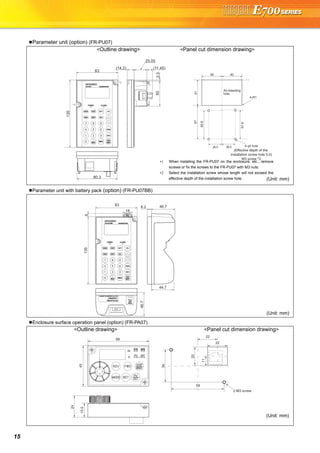
Parameter unit (option) (FR-PU07)
<Outline drawing> <Panel cut dimension drawing>
Parameter unit with battery pack (option) (FR-PU07BB)
Enclosure surface operation panel (option) (FR-PA07)
<Outline drawing> <Panel cut dimension drawing>
6751
40
56.8
57.8
26.5
4-R1
26.5
40
4-φ4 hole
(Effective depth of the
installation screw hole 5.0)
M3 screw *2
Air-bleeding
hole
80.3
(14.2)
2.550
(11.45)
25.05
135
83
*1
*1
*1
*1
∗1 When installing the FR-PU07 on the enclosure, etc., remove
screws or fix the screws to the FR-PU07 with M3 nuts.
∗2 Select the installation screw whose length will not exceed the
effective depth of the installation screw hole. (Unit: mm)
46.7
135
83
18
6
8.2 46.7
44.7
(Unit: mm)
68
59
22
22
2-M3 screw
(Unit: mm)
FeaturesOptionsInstructionsMotorCompatibilityWarrantyInquiry
Standard
Specifications
Operationpanel
Parameterunit
FRConfigurator
Parameter
List
Protective
Functions
Explanations
of
Parameters
TerminalConnection
Diagram
TerminalSpecification
Explanation
Outline
Dimension
Drawings
Connection
example
16
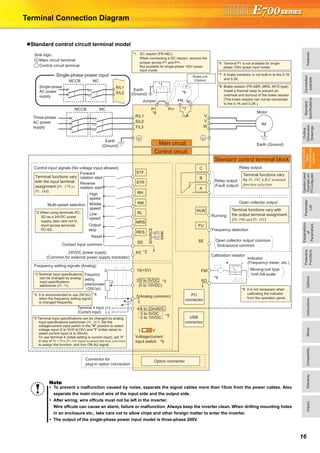
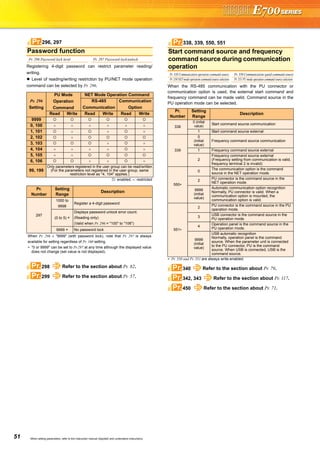
Terminal Connection Diagram
Standard control circuit terminal model
Note
To prevent a malfunction caused by noise, separate the signal cables more than 10cm from the power cables. Also
separate the main circuit wire of the input side and the output side.
After wiring, wire offcuts must not be left in the inverter.
Wire offcuts can cause an alarm, failure or malfunction. Always keep the inverter clean. When drilling mounting holes
in an enclosure etc., take care not to allow chips and other foreign matter to enter the inverter.
The output of the single-phase power input model is three-phase 200V.
Earth
(Ground)
Motor
IM
Earth (Ground)
Three-phase
AC power
supply
MCCB MC
R/L1
P1 P/+
PR N/-
S/L2
T/L3
U
V
W
Earth
(Ground)
*8 Brake resistor (FR-ABR, MRS, MYS type)
Install a thermal relay to prevent an
overheat and burnout of the brake resistor.
(The brake resistor can not be connected
to the 0.1K and 0.2K.)
*7 A brake transistor is not built-in to the 0.1K
and 0.2K.
Forward
rotation start
Reverse
rotation start
Middle
speed
High
speed
Low
speed
Output
stop
Reset
Control input signals (No voltage input allowed)
Contact input common
24VDC power supply
(Common for external power supply transistor)
STR
STF
RH
RM
RL
MRS
SD
PC
Relay output
Running
Frequency detection
Open collector output
Open collector output common
Sink/source common
FU
RUN
SE
A
B
C
FM
SD
Indicator
(Frequency meter, etc.)+ -
Moving-coil type
1mA full-scale
Calibration resistor
Frequency setting signals (Analog)
2 0 to 5VDC
10(+5V)
2
3
1
Frequency
setting
potentiometer
1/2W1kΩ
5(Analog common)*4
Connector for
plug-in option connection
Option connector
*3 Terminal input specifications
can be changed by analog
input specifications
switchover (Pr. 73).
*2 When using terminals PC-
SD as a 24VDC power
supply, take care not to
short across terminals
PC-SD.
PU
connector
USB
connector
*9 It is not necessary when
calibrating the indicator
from the operation panel.
*1. DC reactor (FR-HEL)
When connecting a DC reactor, remove the
jumper across P1 and P/+.
Not available for single-phase 100V power
input model.
Control circuit terminal
Main circuit terminal
Sink logic
Jumper
*1
*8
*7
*6
*2
*3
*9
Terminal functions vary
with the input terminal
assignment (Pr. 178 to
Pr. 184)
Multi-speed selection
Terminal functions vary with
the output terminal assignment
(Pr. 190 and Pr. 191)
Terminal functions vary
by Pr. 192 A,B,C terminal
function selection
SINK
SOURCE
I V
*5
(0 to 10VDC)
Voltage/current
input switch
Main circuit
Control circuit
Standard control terminal block
R
RES
Relay output
(Fault output)
Brake unit
(Option)
Single-phase
AC power
supply
MCCB MC
R/L1
S/L2
Single-phase power input
*6 Terminal P1 is not available for single-
phase 100V power input model.
Terminal 4 input
(Current input)
(+)
(-)
4 4 to 20mADC
*50 to 5VDC
0 to 10VDC*5 Terminal input specifications can be changed by analog
input specifications switchover (Pr. 267). Set the
voltage/current input switch in the "V" position to select
voltage input (0 to 5V/0 to10V) and "I" (initial value) to
select current input (4 to 20mA).
To use terminal 4 (initial setting is current input), set "4"
in any of Pr.178 to Pr.184 (input terminal function selection)
to assign the function, and turn ON AU signal.
*4 It is recommended to use 2W1kΩ
when the frequency setting signal
is changed frequently.
17
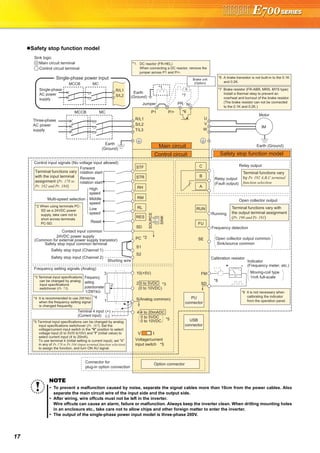
Safety stop function model
NOTE
To prevent a malfunction caused by noise, separate the signal cables more than 10cm from the power cables. Also
separate the main circuit wire of the input side and the output side.
After wiring, wire offcuts must not be left in the inverter.
Wire offcuts can cause an alarm, failure or malfunction. Always keep the inverter clean. When drilling mounting holes
in an enclosure etc., take care not to allow chips and other foreign matter to enter the inverter.
The output of the single-phase power input model is three-phase 200V.
Earth
(Ground)
Motor
IM
Earth (Ground)
Three-phase
AC power
supply
MCCB MC
R/L1
P1 P/+
PR N/-
S/L2
T/L3
U
V
W
Earth
(Ground)
*7 Brake resistor (FR-ABR, MRS, MYS type)
Install a thermal relay to prevent an
overheat and burnout of the brake resistor.
(The brake resistor can not be connected
to the 0.1K and 0.2K.)
*6 A brake transistor is not built-in to the 0.1K
and 0.2K.
Forward
rotation start
Reverse
rotation start
Middle
speed
High
speed
Low
speed
Reset
Control input signals (No voltage input allowed)
Contact input common
STR
STF
RH
RM
RL
RES
Relay output
Running
Frequency detection
Open collector output
Open collector output common
Sink/source common
FU
RUN
SE
A
B
C
FM
SD
Indicator
(Frequency meter, etc.)+ -
Moving-coil type
1mA full-scale
Calibration resistor
Frequency setting signals (Analog)
2 0 to 5VDC
10(+5V)
2
3
1
Frequency
setting
potentiometer
1/2W1kΩ
5(Analog common)*4
Connector for
plug-in option connection
Option connector
*3 Terminal input specifications
can be changed by analog
input specifications
switchover (Pr. 73).
*2 When using terminals PC-
SD as a 24VDC power
supply, take care not to
short across terminals
PC-SD.
PU
connector
USB
connector
*8 It is not necessary when
calibrating the indicator
from the operation panel.
*1. DC reactor (FR-HEL)
When connecting a DC reactor, remove the
jumper across P1 and P/+.
Control circuit terminal
Main circuit terminal
Sink logic
Jumper
*1
*7
*6
*3
*8
Terminal functions vary
with the input terminal
assignment (Pr. 178 to
Pr. 182 and Pr. 184)
Multi-speed selection
Terminal functions vary with
the output terminal assignment
(Pr. 190 and Pr. 191)
Terminal functions vary
by Pr. 192 A,B,C terminal
function selection
SINK
SOURCE
V I
*5
(0 to 10VDC)
Voltage/current
input switch
Main circuit
Control circuit Safety stop function model
R
SD
Relay output
(Fault output)
Brake unit
(Option)
Single-phase
AC power
supply
MCCB MC
R/L1
S/L2
Single-phase power input
24VDC power supply
(Common for external power supply transistor)
Safety stop input common terminal
PC *2
S1
S2
Safety stop input (Channel 1)
Shorting wire
Safety stop input (Channel 2)
Terminal 4 input
(Current input)
(+)
(-)
4 4 to 20mADC
*50 to 5VDC
0 to 10VDC*5 Terminal input specifications can be changed by analog
input specifications switchover (Pr. 267). Set the
voltage/current input switch in the "V" position to select
voltage input (0 to 5V/0 to10V) and "I" (initial value) to
select current input (4 to 20mA).
To use terminal 4 (initial setting is current input), set "4"
in any of Pr.178 to Pr.184 (input terminal function selection)
to assign the function, and turn ON AU signal.
*4 It is recommended to use 2W1kΩ
when the frequency setting signal
is changed frequently.
FeaturesOptionsInstructionsMotorCompatibilityWarrantyInquiry
Standard
Specifications
Operationpanel
Parameterunit
FRConfigurator
Parameter
List
Protective
Functions
Explanations
of
Parameters
TerminalConnection
Diagram
TerminalSpecification
Explanation
Outline
Dimension
Drawings
Connection
example
18
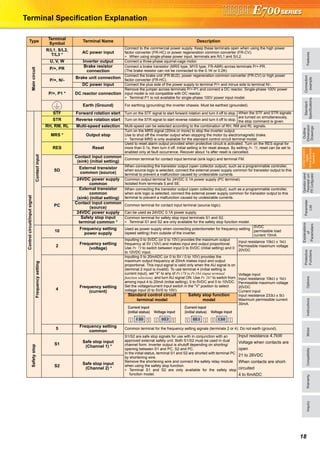
Terminal Specification Explanation
Type
Terminal
Symbol
Terminal Name Description
Maincircuit
R/L1, S/L2,
T/L3 *
AC power input
Connect to the commercial power supply. Keep these terminals open when using the high power
factor converter (FR-HC) or power regeneration common converter (FR-CV).
∗ When using single-phase power input, terminals are R/L1 and S/L2.
U, V, W Inverter output Connect a three-phase squirrel-cage motor.
P/+, PR
Brake resistor
connection
Connect a brake transistor (MRS type, MYS type, FR-ABR) across terminals P/+-PR.
(The brake resistor can not be connected to the 0.1K or 0.2K)
P/+, N/-
Brake unit connection
Connect the brake unit (FR-BU2), power regeneration common converter (FR-CV) or high power
factor converter (FR-HC).
DC power input Connect the plus side of the power supply to terminal P/+ and minus side to terminal N/-.
P/+, P1 * DC reactor connection
Remove the jumper across terminals P/+-P1 and connect a DC reactor. Single-phase 100V power
input model is not compatible with DC reactor.
∗ Terminal P1 is not available for single-phase 100V power input model.
Earth (Ground) For earthing (grounding) the inverter chassis. Must be earthed (grounded).
Controlcircuit/inputsignal
Contactinput
STF Forward rotation start Turn on the STF signal to start forward rotation and turn it off to stop. When the STF and STR signals
are turned on simultaneously,
the stop command is given.STR Reverse rotation start Turn on the STR signal to start reverse rotation and turn it off to stop.
RH, RM, RL Multi-speed selection Multi-speed can be selected according to the combination of RH, RM and RL signals.
MRS * Output stop
Turn on the MRS signal (20ms or more) to stop the inverter output.
Use to shut off the inverter output when stopping the motor by electromagnetic brake.
∗ Terminal MRS is only available for the standard control circuit terminal model.
RES Reset
Used to reset alarm output provided when protective circuit is activated. Turn on the RES signal for
more than 0.1s, then turn it off. Initial setting is for reset always. By setting Pr. 75, reset can be set to
enabled only at fault occurrence. Recover about 1s after reset is cancelled.
SD
Contact input common
(sink) (initial setting)
Common terminal for contact input terminal (sink logic) and terminal FM.
External transistor
common (source)
When connecting the transistor output (open collector output), such as a programmable controller,
when source logic is selected, connect the external power supply common for transistor output to this
terminal to prevent a malfunction caused by undesirable currents.
24VDC power supply
common
Common output terminal for 24VDC 0.1A power supply (PC terminal).
Isolated from terminals 5 and SE.
PC
External transistor
common
(sink) (initial setting)
When connecting the transistor output (open collector output), such as a programmable controller,
when sink logic is selected, connect the external power supply common for transistor output to this
terminal to prevent a malfunction caused by undesirable currents.
Contact input common
(source)
Common terminal for contact input terminal (source logic).
24VDC power supply Can be used as 24VDC 0.1A power supply.
Safety stop input
terminal common *
Common terminal for safety stop input terminals S1 and S2.
∗ Terminal S1 and S2 are only available for the safety stop function model.
Frequencysetting
10
Frequency setting
power supply
Used as power supply when connecting potentiometer for frequency setting
(speed setting) from outside of the inverter.
5VDC
permissible load
current 10mA
2
Frequency setting
(voltage)
Inputting 0 to 5VDC (or 0 to 10V) provides the maximum output
frequency at 5V (10V) and makes input and output proportional.
Use Pr. 73 to switch between input 0 to 5VDC (initial setting) and 0
to 10VDC input.
Input resistance 10kΩ ± 1kΩ
Permissible maximum voltage
20VDC
4
Frequency setting
(current)
Inputting 0 to 20mADC (or 0 to 5V / 0 to 10V) provides the
maximum output frequency at 20mA makes input and output
proportional. This input signal is valid only when the AU signal is on
(terminal 2 input is invalid). To use terminal 4 (initial setting is
current input), set "4" to any of Pr.178 to Pr.184 (input terminal
function selection), and turn AU signal ON. Use Pr. 267 to switch from
among input 4 to 20mA (initial setting), 0 to 5VDC and 0 to 10VDC.
Set the voltage/current input switch in the "V" position to select
voltage input (0 to 5V/0 to 10V).
Voltage input:
Input resistance 10kΩ ± 1kΩ
Permissible maximum voltage
20VDC
Current input:
Input resistance 233Ω ± 5Ω
Maximum permissible current
30mA.
Standard control circuit
terminal model
Safety stop function
model
5
Frequency setting
common
Common terminal for the frequency setting signals (terminals 2 or 4). Do not earth (ground).
Safetystop
S1
Safe stop input
(Channel 1) *
S1/S2 are safe stop signals for use with in conjunction with an
approved external safety unit. Both S1/S2 must be used in dual
channel form. Inverter output is shutoff depending on shorting/
opening between S1 and PC, S2 and PC.
In the initial status, terminal S1 and S2 are shorted with terminal PC
by shortening wire.
Remove the shortening wire and connect the safety relay module
when using the safety stop function.
∗ Terminal S1 and S2 are only available for the safety stop
function model.
Input resistance 4.7kW
Voltage when contacts are
open
21 to 26VDC
When contacts are short-
circuited
4 to 6mADC
S2
Safe stop input
(Channel 2) *
Voltage input
Current input
(initial status) Voltage input
Current input
(initial status)
19
Controlcircuit/outputsignal
Relay
A, B, C
Relay output
(fault output)
1 changeover contact output indicates that the inverter fault occurs.
Fault: discontinuity across B-C (continuity across A-C), Normal: continuity across B-C (discontinuity
across A-C) Contact capacity 230VAC 0.3A (power factor = 0.4) 30VDC 0.3A
Opencollector
RUN Inverter running
Switched low when the inverter output frequency is equal to or
higher than the starting frequency (initial value 0.5Hz). Switched
high during stop or DC injection brake operation.∗
Permissible load 24VDC
(Maximum 27VDC) 0.1A
(a voltage drop is 3.4V maximum
when the signal is on)
∗ Low is when the open collector
output transistor is on (conducts).
High is when the transistor is off
(does not conduct).
FU Frequency detection
Switched low when the inverter output frequency is equal to or
higher than the preset detected frequency and high when less than
the preset detected frequency.∗
SE
Open collector
output common
Common terminal of terminal RUN and FU.
Pulse
FM For meter
Select one e.g. output frequency from monitor items. (Not output
during inverter reset.) The output signal is proportional to the
magnitude of the corresponding monitoring item.
Permissible load current 1mA
1440 pulses/s at 60Hz
Communication
— PU connector
With the PU connector, RS-485 communication can be made.
· Conforming standard: EIA-485
(RS-485)
· Communication speed: 4800 to
38400bps
· Transmission format: Multi-drop link
· Overall extension: 500m
— USB connector
The FR Configurator can be operated by connecting the inverter to the personal computer through USB.
· Interface: conforms to USB1.1 · Transmission Speed: 12Mbps
· Connector: USB mini B connector (receptacle mini B type)
Note
Set Pr. 267 and a voltage/current input switch correctly, then input an analog signal in accordance with the setting. Applying
a voltage with voltage/current input switch in "I" position (current input is selected) or a current with switch in "V" position
(voltage input is selected) could cause component damage of the inverter or analog circuit of output devices.
The inverter will be damaged if power is applied to the inverter output terminals (U, V, W). Never perform such wiring.
indicates that terminal functions can be selected using Pr. 178 to Pr. 192 (I/O terminal function selection).
Terminal names and terminal functions are those of the factory set.
When connecting the DC power supply, be sure to connect the plus side of the power supply to terminal P/+ and
minus side to terminal N/-. Opposite polarity will damage the inverter.
Type
Terminal
Symbol
Terminal Name Description
FeaturesOptionsInstructionsMotorCompatibilityWarrantyInquiry
Standard
Specifications
Operationpanel
Parameterunit
FRConfigurator
Parameter
List
Protective
Functions
Explanations
of
Parameters
TerminalConnection
Diagram
TerminalSpecification
Explanation
Outline
Dimension
Drawings
Connection
example
20
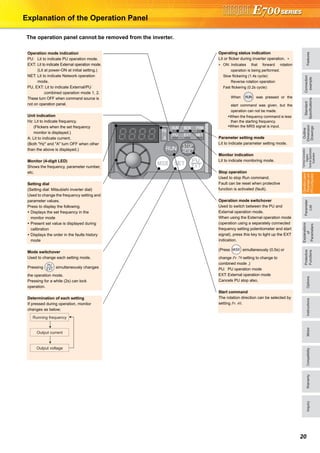
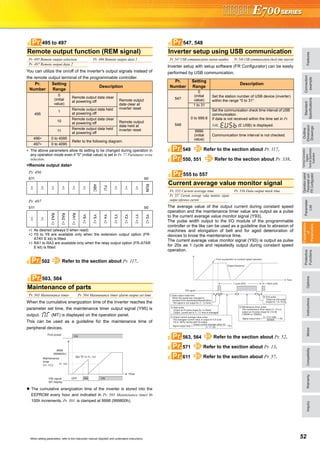
Explanation of the Operation Panel
The operation panel cannot be removed from the inverter.
Operation mode indication
PU: Lit to indicate PU operation mode.
EXT: Lit to indicate External operation mode.
(Lit at power-ON at initial setting.)
NET: Lit to indicate Network operation
mode.
PU, EXT: Lit to indicate External/PU
combined operation mode 1, 2.
These turn OFF when command source is
not on operation panel.
Unit indication
Hz: Lit to indicate frequency.
(Flickers when the set frequency
monitor is displayed.)
A: Lit to indicate current.
(Both "Hz" and "A" turn OFF when other
than the above is displayed.)
Monitor (4-digit LED)
Shows the frequency, parameter number,
etc.
Setting dial
(Setting dial: Mitsubishi inverter dial)
Used to change the frequency setting and
parameter values.
Press to display the following.
Displays the set frequency in the
monitor mode
Present set value is displayed during
calibration
Displays the order in the faults history
mode
Mode switchover
Used to change each setting mode.
Pressing simultaneously changes
the operation mode.
Pressing for a while (2s) can lock
operation.
Determination of each setting
If pressed during operation, monitor
changes as below;
Running frequency
Output current
Output voltage
Operating status indication
Lit or flicker during inverter operation. ∗
∗ ON: Indicates that forward rotation
operation is being performed.
Slow flickering (1.4s cycle):
Reverse rotation operation
Fast flickering (0.2s cycle):
When was pressed or the
start command was given, but the
operation can not be made.
When the frequency command is less
than the starting frequency.
When the MRS signal is input.
Parameter setting mode
Lit to indicate parameter setting mode.
Monitor indication
Lit to indicate monitoring mode.
Stop operation
Used to stop Run command.
Fault can be reset when protective
function is activated (fault).
Operation mode switchover
Used to switch between the PU and
External operation mode.
When using the External operation mode
(operation using a separately connected
frequency setting potentiometer and start
signal), press this key to light up the EXT
indication.
(Press simultaneously (0.5s) or
change Pr. 79 setting to change to
combined mode .)
PU: PU operation mode
EXT: External operation mode
Cancels PU stop also.
Start command
The rotation direction can be selected by
setting Pr. 40.
21
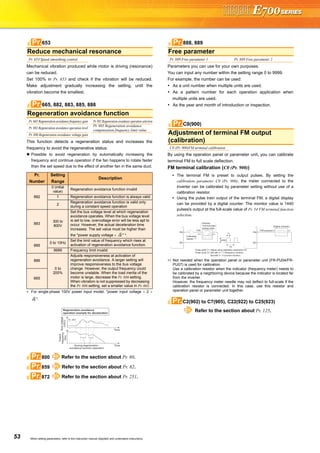
Basic operation of the operation panel
STOP
Operation mode switchover
ParametersettingFaultshistoryMonitor/frequencysetting
At powering ON (External operation mode)
PU operation mode
(output frequency monitor)
Parameter setting mode
PU Jog operation mode
Output current monitor Output voltage monitor
Display the
present setting
Value change
Value change
Parameter write is completed!!
Parameter and a setting value
flicker alternately.
Parameter clear All parameter
clear
Faults history clear
Initial value
change list
(Example)
(Example)
Frequency setting has been
written and completed!!
and frequency flicker.
[Operation for displaying faults history]
Past eight faults can be displayed.
(The latest fault is ended by ".".)
When no fault history exists, is displayed.
FeaturesOptionsInstructionsMotorCompatibilityWarrantyInquiry
Standard
Specifications
Operationpanel
Parameterunit
FRConfigurator
Parameter
List
Protective
Functions
Explanations
of
Parameters
TerminalConnection
Diagram
TerminalSpecification
Explanation
Outline
Dimension
Drawings
Connection
example
22
Explanations of Parameter unit
The parameter unit is a convenient tool for inverter setting
such as direct input method with a numeric keypad,
operation status indication, and help function.
Eight languages can be displayed.
Parameter setting values of maximum of three inverters can
be stored.
With the FR-PU07BB(-L), parameter check and setting
change can be made without connecting a power supply to
the inverter. Use AA nickel hydride batteries, AA alkali
batteries, or AC adapter separately available as power
supply.
Since the shape is specially designed for portable use, it is
easy to work with the FR-PU07BB(-L) in hand.
∗ The parameter unit connection cable FR-CB20 is required for connecting to
the inverter. (Parameter unit connection cable FR-CB203(3m) is enclosed
with FR-PU07BB(-L).)
∗ To use a parameter unit with battery pack (FR-PU07BB) outside Japan, order
a "FR-PU07BB-L" (parameter unit type indicated on the package has L at the
end). Since enclosed batteries may conflict with laws in countries to be used
(new EU Directive on batteries and accumulators, etc.), batteries are not
enclosed with an FR-PU07BB-L.
Main functions
∗ Available function differs by the inverter. Please refer to the instruction manual of the inverter and the parameter unit.
Parameter unit (FR-PU07), parameter unit with battery pack (FR-PU07BB(-L))
POWER lamp
Lit when the power turns on.
Monitor
Liquid crystal display
(16 characters 4 lines with backlight)
Interactive parameter setting
Trouble shooting guidance
Monitor (frequency, current, power, etc.)
ALARM lamp
Lit to indicate an inverter alarm occurrence.
(Refer to the table
on the right)
Operation keys
FR-PU07
FR-PU07BB
Key Description
Use for parameter setting
Press to choose the parameter setting mode.
First priority monitor is displayed.
In the initial setting, the output frequency is displayed.
Operation cancel key
Used to display the function menu.
A variety of functions can be used on the function menu.
Used to shift to the next item in the setting or monitoring mode.
to Used to enter a frequency, parameter number or set value.
Inverter operates in the External operation mode.
Used to select the PU operation mode to display the frequency
setting screen.
Used to keep on increasing or decreasing the running
frequency. Hold down to vary the frequency.
Press either of these keys on the parameter setting mode
screen to change the parameter setting value sequentially.
On the selecting screen, these keys are used to move the cursor.
Hold down and press either of these keys to advance
or return the display screen one page.
Forward rotation command key.
Reverse rotation command key.
Stop command key.
Used to reset the inverter when an alarm occurs.
Used to write a set value in the setting mode.
Used as a clear key in the all parameter clear or alarm history
clear mode.
Used as a decimal point when entering numerical value.
Used as a parameter number read key in the setting mode.
Used as an item select key on the menu screen such as
parameter list or monitoring list.
Used as an alarm definition display key in the alarm history
display mode.
Used as a command voltage read key in the calibration mode.
Function Description
Monitor 6 types of monitors appear by simply pressing .
Frequency setting
For PU operation mode and External/PU combined operation mode (Pr.79 = "3"), frequency setting is available.
Settings is performed by the direct setting, which sets frequency directly by to , and the step setting, which
sets frequency continuously by .
Parameter Setting
Reading parameter and changing setting values are easily done. To change the setting value of an parameter, specify
the parameter number, or select a parameter from the functional parameter list.
Batch copy
FR-PU07 (PU07BB) reads parameter settings of an inverter, and stores three different parameter settings.
FR-PU07 (PU07BB) can also copy the stored parameter setting to another inverter of the same series, or verify its
stored parameter setting against the parameter setting stored in an inverter.
Operation
Switching between External operation mode [EXT] and PU operation mode [PU] is easy.
Start/stop is enabled during PU operation mode and External/PU operation mode (Pr.79 = "3").
23
FR Configurator (INVERTER SETUP SOFTWARE)
FR Configurator is software offers an easy operating environment.
Can be utilized effectively from inverter setting up to maintenance.
Parameter setting, monitoring, etc. can be performed on a display of Windows *2 personal computer.
A personal computer and an inverter can be easily connected with a USB cable.
(RS-485 communication *3 using PU connector is also available.)
∗1 FR Configurator does not support the safety stop function model.
∗2 Microsoft, Windows, Microsoft Windows2000, Microsoft Windows XP, Microsoft Windows Vista are registered
trademarks of Microsoft Corporation in the United States and/or other countries.
∗3 RS-485⇔RS-232C converter is required.
Desired function can be performed just after a start-up of
the software.
(1) Open the recent used
System File
(2) Perform Easy Setup
(3) Perform each functions
(4) Help
From station number to parameter setting, setting with
wizard style dialog (interactive) is available.
Procedure for Easy Setup
(1) System File setting
(2) Communication setting
(3) Inverter recognition
(4) Control method selection
(5) Motor setting
(6) Start command,
frequency command
setting
(7) Parameter setting
In Navigation area, switching ONLINE/
OFFLINE and changing operation mode can
be performed.
(1) Frequency setting and forward/reverse
rotation [Test operation]
(2) Display the connected inverter in tree
view [System List]
(3) Function setting without regard to
parameter number [Basic setting]
(4) Estimates the cause of trouble, and
suggest counteraction. [Troubleshooting]
In Monitor area, inverter status can be monitored.
(1) Displays monitor data in
waveform
Displays current
waveform with High
Speed graph function
[Graph]
(2) Monitors the status of I/O
terminals. [I/O Terminal
Monitor]
(3) Displays multiple data in batch. [Batch Monitor]
In System area, parameter setting, Diagnosis,
Troubleshooting, etc. can be performed.
(1) Parameter reading,
writing, verification,
Functional List and
Individual List display
are available.
[Parameter List]
(2) Displays alarm history
and monitor value at
each alarm
occurrence. [Diagnosis]
(3) Parameter setting conversion from conventional
models [Convert]
Setting wizard can set parameters with wizard style dialog
(interactive). Inputting or selecting required items for each
function, parameter setting can be made, without regard to
parameter number.
Displays operating instructions and details of each
parameters.
FR-SW3-SETUP-WE (for 700 series) and FR-SW1-SETUP-WE (500 series) can be installed from the FR Configurator SW3.
FR-SW3-SETUP-WE is available for download (free of charge) from the below URL on the internet. FR Configurator SW3 (FR-SW3-SETUP-
WE or FR-SW1-SETUP-WE) needs to be installed to the personal computer prior to updating the software. Also, user registration is required
for the download (free of charge.) (Registration is free of charge.)
MELFANSweb homepage address http://www.MitsubishiElectric.co.jp/melfansweb
FR-SW3-SETUP-WE *1
(Microsoft®
Windows®
2000 Professional SP4 or later, XP Home Edition SP2 or later, XP Professional SP2 or later
Windows Vista®
SP1 or later supported)
USB cable USB connector
<How to open the USB connector cover>
Pull the cover in the direction of arrow. Then turn it upward.
Startup
Easy Setup
Navigation area
Monitor area
System area
Setting wizard
Help
FeaturesOptionsInstructionsMotorCompatibilityWarrantyInquiry
Standard
Specifications
Operationpanel
Parameterunit
FRConfigurator
Parameter
List
Protective
Functions
Explanations
of
Parameters
TerminalConnection
Diagram
TerminalSpecification
Explanation
Outline
Dimension
Drawings
Connection
example
24
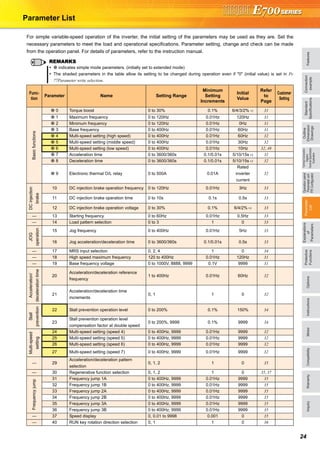
Parameter List
For simple variable-speed operation of the inverter, the initial setting of the parameters may be used as they are. Set the
necessary parameters to meet the load and operational specifications. Parameter setting, change and check can be made
from the operation panel. For details of parameters, refer to the instruction manual.
REMARKS
indicates simple mode parameters. (initially set to extended mode)
The shaded parameters in the table allow its setting to be changed during operation even if "0" (initial value) is set in Pr.
77Parameter write selection.
Func-
tion
Parameter Name Setting Range
Minimum
Setting
Increments
Initial
Value
Refer
to
Page
Customer
Setting
Basicfunctions
0 Torque boost 0 to 30% 0.1% 6/4/3/2% ∗1 31
1 Maximum frequency 0 to 120Hz 0.01Hz 120Hz 31
2 Minimum frequency 0 to 120Hz 0.01Hz 0Hz 31
3 Base frequency 0 to 400Hz 0.01Hz 60Hz 31
4 Multi-speed setting (high speed) 0 to 400Hz 0.01Hz 60Hz 32
5 Multi-speed setting (middle speed) 0 to 400Hz 0.01Hz 30Hz 32
6 Multi-speed setting (low speed) 0 to 400Hz 0.01Hz 10Hz 32, 49
7 Acceleration time 0 to 3600/360s 0.1/0.01s 5/10/15s ∗2 32
8 Deceleration time 0 to 3600/360s 0.1/0.01s 5/10/15s ∗2 32
9 Electronic thermal O/L relay 0 to 500A 0.01A
Rated
inverter
current
32
DCinjection
brake
10 DC injection brake operation frequency 0 to 120Hz 0.01Hz 3Hz 33
11 DC injection brake operation time 0 to 10s 0.1s 0.5s 33
12 DC injection brake operation voltage 0 to 30% 0.1% 6/4/2% ∗3 33
— 13 Starting frequency 0 to 60Hz 0.01Hz 0.5Hz 33
— 14 Load pattern selection 0 to 3 1 0 33
JOG
operation
15 Jog frequency 0 to 400Hz 0.01Hz 5Hz 33
16 Jog acceleration/deceleration time 0 to 3600/360s 0.1/0.01s 0.5s 33
— 17 MRS input selection 0, 2, 4 1 0 34
— 18 High speed maximum frequency 120 to 400Hz 0.01Hz 120Hz 31
— 19 Base frequency voltage 0 to 1000V, 8888, 9999 0.1V 9999 31
Acceleration/
decelerationtime
20
Acceleration/deceleration reference
frequency
1 to 400Hz 0.01Hz 60Hz 32
21
Acceleration/deceleration time
increments
0, 1 1 0 32
Stall
prevention
22 Stall prevention operation level 0 to 200% 0.1% 150% 34
23
Stall prevention operation level
compensation factor at double speed
0 to 200%, 9999 0.1% 9999 34
Multi-speed
setting
24 Multi-speed setting (speed 4) 0 to 400Hz, 9999 0.01Hz 9999 32
25 Multi-speed setting (speed 5) 0 to 400Hz, 9999 0.01Hz 9999 32
26 Multi-speed setting (speed 6) 0 to 400Hz, 9999 0.01Hz 9999 32
27 Multi-speed setting (speed 7) 0 to 400Hz, 9999 0.01Hz 9999 32
— 29
Acceleration/deceleration pattern
selection
0, 1, 2 1 0 35
— 30 Regenerative function selection 0, 1, 2 1 0 35, 37
Frequencyjump
31 Frequency jump 1A 0 to 400Hz, 9999 0.01Hz 9999 35
32 Frequency jump 1B 0 to 400Hz, 9999 0.01Hz 9999 35
33 Frequency jump 2A 0 to 400Hz, 9999 0.01Hz 9999 35
34 Frequency jump 2B 0 to 400Hz, 9999 0.01Hz 9999 35
35 Frequency jump 3A 0 to 400Hz, 9999 0.01Hz 9999 35
36 Frequency jump 3B 0 to 400Hz, 9999 0.01Hz 9999 35
— 37 Speed display 0, 0.01 to 9998 0.001 0 35
— 40 RUN key rotation direction selection 0, 1 1 0 36
25
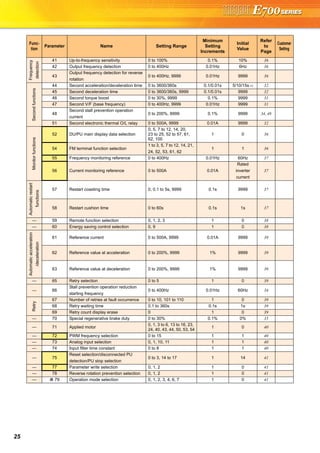
Frequency
detection
41 Up-to-frequency sensitivity 0 to 100% 0.1% 10% 36
42 Output frequency detection 0 to 400Hz 0.01Hz 6Hz 36
43
Output frequency detection for reverse
rotation
0 to 400Hz, 9999 0.01Hz 9999 36
Secondfunctions
44 Second acceleration/deceleration time 0 to 3600/360s 0.1/0.01s 5/10/15s ∗2 32
45 Second deceleration time 0 to 3600/360s, 9999 0.1/0.01s 9999 32
46 Second torque boost 0 to 30%, 9999 0.1% 9999 31
47 Second V/F (base frequency) 0 to 400Hz, 9999 0.01Hz 9999 31
48
Second stall prevention operation
current
0 to 200%, 9999 0.1% 9999 34, 49
51 Second electronic thermal O/L relay 0 to 500A, 9999 0.01A 9999 32
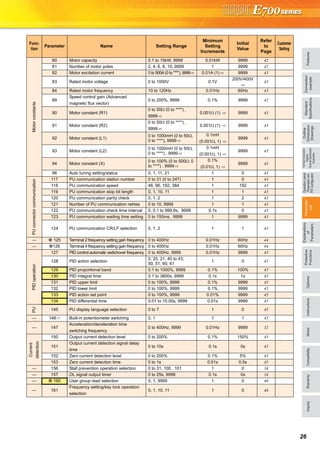
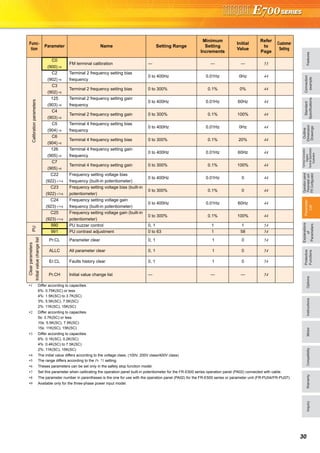
Monitorfunctions
52 DU/PU main display data selection
0, 5, 7 to 12, 14, 20,
23 to 25, 52 to 57, 61,
62, 100
1 0 36
54 FM terminal function selection
1 to 3, 5, 7 to 12, 14, 21,
24, 52, 53, 61, 62
1 1 36
55 Frequency monitoring reference 0 to 400Hz 0.01Hz 60Hz 37
56 Current monitoring reference 0 to 500A 0.01A
Rated
inverter
current
37
Automaticrestart
functions
57 Restart coasting time 0, 0.1 to 5s, 9999 0.1s 9999 37
58 Restart cushion time 0 to 60s 0.1s 1s 37
— 59 Remote function selection 0, 1, 2, 3 1 0 38
— 60 Energy saving control selection 0, 9 1 0 38
Automaticacceleration
/deceleration
61 Reference current 0 to 500A, 9999 0.01A 9999 39
62 Reference value at acceleration 0 to 200%, 9999 1% 9999 39
63 Reference value at deceleration 0 to 200%, 9999 1% 9999 39
— 65 Retry selection 0 to 5 1 0 39
— 66
Stall prevention operation reduction
starting frequency
0 to 400Hz 0.01Hz 60Hz 34
Retry
67 Number of retries at fault occurrence 0 to 10, 101 to 110 1 0 39
68 Retry waiting time 0.1 to 360s 0.1s 1s 39
69 Retry count display erase 0 1 0 39
— 70 Special regenerative brake duty 0 to 30% 0.1% 0% 35
— 71 Applied motor
0, 1, 3 to 6, 13 to 16, 23,
24, 40, 43, 44, 50, 53, 54
1 0 40
— 72 PWM frequency selection 0 to 15 1 1 40
— 73 Analog input selection 0, 1, 10, 11 1 1 40
— 74 Input filter time constant 0 to 8 1 1 40
— 75
Reset selection/disconnected PU
detection/PU stop selection
0 to 3, 14 to 17 1 14 41
— 77 Parameter write selection 0, 1, 2 1 0 41
— 78 Reverse rotation prevention selection 0, 1, 2 1 0 41
— 79 Operation mode selection 0, 1, 2, 3, 4, 6, 7 1 0 41
Func-
tion
Parameter Name Setting Range
Minimum
Setting
Increments
Initial
Value
Refer
to
Page
Customer
Setting
FeaturesOptionsInstructionsMotorCompatibilityWarrantyInquiry
Standard
Specifications
Operationpanel
Parameterunit
FRConfigurator
Parameter
List
Protective
Functions
Explanations
of
Parameters
TerminalConnection
Diagram
TerminalSpecification
Explanation
Outline
Dimension
Drawings
Connection
example
26
Motorconstants
80 Motor capacity 0.1 to 15kW, 9999 0.01kW 9999 42
81 Number of motor poles 2, 4, 6, 8, 10, 9999 1 9999 42
82 Motor excitation current 0 to 500A (0 to ****), 9999∗5 0.01A (1) ∗5 9999 43
83 Rated motor voltage 0 to 1000V 0.1V
200V/400V
∗4
43
84 Rated motor frequency 10 to 120Hz 0.01Hz 60Hz 43
89
Speed control gain (Advanced
magnetic flux vector)
0 to 200%, 9999 0.1% 9999 42
90 Motor constant (R1)
0 to 50Ω (0 to ****) ,
9999 ∗5
0.001Ω (1) ∗5 9999 43
91 Motor constant (R2)
0 to 50Ω (0 to ****) ,
9999 ∗5
0.001Ω (1) ∗5 9999 43
92 Motor constant (L1)
0 to 1000mH (0 to 50Ω,
0 to ****), 9999 ∗5
0.1mH
(0.001Ω, 1) ∗5
9999 43
93 Motor constant (L2)
0 to 1000mH (0 to 50Ω,
0 to ****) , 9999 ∗5
0.1mH
(0.001Ω, 1) ∗5
9999 43
94 Motor constant (X)
0 to 100% (0 to 500Ω, 0
to ****) , 9999 ∗5
0.1%
(0.01Ω, 1) ∗5
9999 43
96 Auto tuning setting/status 0, 1, 11, 21 1 0 43
PUconnectorcommunication
117 PU communication station number 0 to 31 (0 to 247) 1 0 43
118 PU communication speed 48, 96, 192, 384 1 192 43
119 PU communication stop bit length 0, 1, 10, 11 1 1 43
120 PU communication parity check 0, 1, 2 1 2 43
121 Number of PU communication retries 0 to 10, 9999 1 1 43
122 PU communication check time interval 0, 0.1 to 999.8s, 9999 0.1s 0 43
123 PU communication waiting time setting 0 to 150ms, 9999 1 9999 43
124 PU communication CR/LF selection 0, 1, 2 1 1 43
— 125 Terminal 2 frequency setting gain frequency 0 to 400Hz 0.01Hz 60Hz 44
— 126 Terminal 4 frequency setting gain frequency 0 to 400Hz 0.01Hz 60Hz 44
PIDoperation
127 PID control automatic switchover frequency 0 to 400Hz, 9999 0.01Hz 9999 45
128 PID action selection
0, 20, 21, 40 to 43,
50, 51, 60, 61
1 0 45
129 PID proportional band 0.1 to 1000%, 9999 0.1% 100% 45
130 PID integral time 0.1 to 3600s, 9999 0.1s 1s 45
131 PID upper limit 0 to 100%, 9999 0.1% 9999 45
132 PID lower limit 0 to 100%, 9999 0.1% 9999 45
133 PID action set point 0 to 100%, 9999 0.01% 9999 45
134 PID differential time 0.01 to 10.00s, 9999 0.01s 9999 45
PU
145 PU display language selection 0 to 7 1 0 45
— 146 ∗7 Built-in potentiometer switching 0, 1 1 1 45
— 147
Acceleration/deceleration time
switching frequency
0 to 400Hz, 9999 0.01Hz 9999 32
Current
detection
150 Output current detection level 0 to 200% 0.1% 150% 45
151
Output current detection signal delay
time
0 to 10s 0.1s 0s 45
152 Zero current detection level 0 to 200% 0.1% 5% 45
153 Zero current detection time 0 to 1s 0.01s 0.5s 45
— 156 Stall prevention operation selection 0 to 31, 100, 101 1 0 34
— 157 OL signal output timer 0 to 25s, 9999 0.1s 0s 34
— 160 User group read selection 0, 1, 9999 1 0 46
— 161
Frequency setting/key lock operation
selection
0, 1, 10, 11 1 0 46
Func-
tion
Parameter Name Setting Range
Minimum
Setting
Increments
Initial
Value
Refer
to
Page
Customer
Setting
27
Automaticrestart
functions
162
Automatic restart after instantaneous
power failure selection
0, 1, 10, 11 1 1 37
165
Stall prevention operation level for
restart
0 to 200% 0.1% 150% 37
— 168
Parameter for manufacturer setting. Do not set.
— 169
Cumulative
monitorclear
170 Watt-hour meter clear 0, 10, 9999 1 9999 36
171 Operation hour meter clear 0, 9999 1 9999 36
User
group
172
User group registered display/batch
clear
9999, (0 to 16) 1 0 46
173 User group registration 0 to 999, 9999 1 9999 46
174 User group clear 0 to 999, 9999 1 9999 46
Inputterminalfunctionassignment
178 STF terminal function selection
0 to 5, 7, 8, 10, 12,
14 to 16, 18, 24, 25,
60, 62, 65 to 67, 9999
1 60 46
179 STR terminal function selection
0 to 5, 7, 8, 10, 12,
14 to 16, 18, 24, 25,
61, 62, 65 to 67, 9999
1 61 46
180 RL terminal function selection
0 to 5, 7, 8, 10, 12,
14 to 16, 18, 24, 25,
62, 65 to 67, 9999
1 0 46
181 RM terminal function selection 1 1 46
182 RH terminal function selection 1 2 46
183 MRS terminal function selection 1 24 46
184 RES terminal function selection 1 62 46
Outputterminalfunctionassignment
190 RUN terminal function selection
0, 1, 3, 4, 7, 8, 11 to 16,
20, 25, 26, 46, 47, 64,
80 ∗6, 81 ∗6, 90, 91, 93,
95, 96, 98, 99, 100, 101,
103, 104, 107, 108,
111 to 116, 120, 125,
126, 146, 147, 164,
180 ∗6, 181 ∗6, 190, 191,
193, 195, 196, 198, 199,
9999
1 0 47
191 FU terminal function selection 1 4 47
192 A,B,C terminal function selection
0, 1, 3, 4, 7, 8, 11 to 16,
20, 25, 26, 46, 47, 64,
80 ∗6, 81 ∗6, 90, 91, 95,
96, 98, 99, 100, 101,
103, 104, 107, 108,
111 to 116, 120, 125,
126, 146, 147, 164,
180 ∗6, 181 ∗6, 190, 191,
195, 196, 198, 199,
9999
1 99 47
Multi-speedsetting
232 Multi-speed setting (speed 8) 0 to 400Hz, 9999 0.01Hz 9999 32
233 Multi-speed setting (speed 9) 0 to 400Hz, 9999 0.01Hz 9999 32
234 Multi-speed setting (speed 10) 0 to 400Hz, 9999 0.01Hz 9999 32
235 Multi-speed setting (speed 11) 0 to 400Hz, 9999 0.01Hz 9999 32
236 Multi-speed setting (speed 12) 0 to 400Hz, 9999 0.01Hz 9999 32
237 Multi-speed setting (speed 13) 0 to 400Hz, 9999 0.01Hz 9999 32
238 Multi-speed setting (speed 14) 0 to 400Hz, 9999 0.01Hz 9999 32
239 Multi-speed setting (speed 15) 0 to 400Hz, 9999 0.01Hz 9999 32
— 240 Soft-PWM operation selection 0, 1 1 1 40
— 241 Analog input display unit switchover 0, 1 1 0 44
— 244 Cooling fan operation selection 0, 1 1 1 47
Func-
tion
Parameter Name Setting Range
Minimum
Setting
Increments
Initial
Value
Refer
to
Page
Customer
Setting
FeaturesOptionsInstructionsMotorCompatibilityWarrantyInquiry
Standard
Specifications
Operationpanel
Parameterunit
FRConfigurator
Parameter
List
Protective
Functions
Explanations
of
Parameters
TerminalConnection
Diagram
TerminalSpecification
Explanation
Outline
Dimension
Drawings
Connection
example
28
Slip
compensation
245 Rated slip 0 to 50%, 9999 0.01% 9999 47
246 Slip compensation time constant 0.01 to 10s 0.01s 0.5s 47
247
Constant-power range slip
compensation selection
0, 9999 1 9999 47
— 249 Earth (ground) fault detection at start 0, 1 1 0 47
— 250 Stop selection
0 to 100s,
1000 to 1100s,
8888, 9999
0.1s 9999 48
— 251 Output phase loss protection selection 0, 1 1 1 48
Lifediagnosis
255 Life alarm status display (0 to 15) 1 0 48
256 Inrush current limit circuit life display (0 to 100%) 1% 100% 48
257 Control circuit capacitor life display (0 to 100%) 1% 100% 48
258 Main circuit capacitor life display (0 to 100%) 1% 100% 48
259 Main circuit capacitor life measuring 0, 1 (2, 3, 8, 9) 1 0 48
Power
failure
stop
261 Power failure stop selection 0, 1, 2 1 0 49
— 267 Terminal 4 input selection 0, 1, 2 1 0 40
— 268 Monitor decimal digits selection 0, 1, 9999 1 9999 36
— 269 Parameter for manufacturer setting. Do not set.
— 270 Stop-on contact control selection 0, 1 1 0 49
Stop-on
contact
control
275
Stop-on contact excitation current low-
speed multiplying factor
0 to 300%, 9999 0.1% 9999 49
276
PWM carrier frequency at stop-on
contact
0 to 9, 9999 1 9999 49
— 277
Stall prevention operation current
switchover
0, 1 1 0 34
Brakesequence
function
278 Brake opening frequency 0 to 30Hz 0.01Hz 3Hz 50
279 Brake opening current 0 to 200% 0.1% 130% 50
280 Brake opening current detection time 0 to 2s 0.1s 0.3s 50
281 Brake operation time at start 0 to 5s 0.1s 0.3s 50
282 Brake operation frequency 0 to 30Hz 0.01Hz 6Hz 50
283 Brake operation time at stop 0 to 5s 0.1s 0.3s 50
Droop
control
286 Droop gain 0 to 100% 0.1% 0% 50
287 Droop filter time constant 0 to 1s 0.01s 0.3s 50
— 292 Automatic acceleration/deceleration 0, 1, 7, 8, 11 1 0 39, 50
— 293
Acceleration/deceleration separate
selection
0 to 2 1 0 39
— 295 Magnitude of frequency change setting 0, 0.01, 0.1, 1, 10 0.01 0 46
Password
function
296 Password lock level
0 to 6, 99, 100 to 106,
199, 9999
1 9999 51
297 Password lock/unlock
(0 to 5), 1000 to 9998,
9999
1 9999 51
— 298 Frequency search gain 0 to 32767, 9999 1 9999 43
— 299
Rotation direction detection selection
at restarting
0, 1, 9999 1 0 37
RS-485communication
338
Communication operation command
source
0, 1 1 0 51
339
Communication speed command
source
0, 1, 2 1 0 51
340 Communication startup mode selection 0, 1, 10 1 0 41
342
Communication EEPROM write
selection
0, 1 1 0 43
343 Communication error count — 1 0 43
Func-
tion
Parameter Name Setting Range
Minimum
Setting
Increments
Initial
Value
Refer
to
Page
Customer
Setting
29
Secondmotor
constant
450 Second applied motor 0, 1, 9999 1 9999 40
Output
495 Remote output selection 0, 1, 10, 11 1 0 52
496 Remote output data 1 0 to 4095 1 0 52
497 Remote output data 2 0 to 4095 1 0 52
— 502
Stop mode selection at communication
error
0, 1, 2, 3 1 0 43
Maintenance
503 Maintenance timer 0 (1 to 9998) 1 0 52
504
Maintenance timer alarm output set
time
0 to 9998, 9999 1 9999 52
USB
547 USB communication station number 0 to 31 1 0 52
548
USB communication check time
interval
0 to 999.8s, 9999 0.1s 9999 52
Communication
549 Protocol selection 0, 1 1 0 43
550
NET mode operation command source
selection
0, 2, 9999 1 9999 51
551
PU mode operation command source
selection
2 to 4, 9999 1 9999 51
Currentaverage
timemonitor
555 Current average time 0.1 to 1.0s 0.1s 1s 52
556 Data output mask time 0 to 20s 0.1s 0s 52
557
Current average value monitor signal
output reference current
0 to 500A 0.01A
Rated
inverter
current
52
— 563 Energization time carrying-over times (0 to 65535) 1 0 36
— 564 Operating time carrying-over times (0 to 65535) 1 0 36
— 571 Holding time at a start 0 to 10s, 9999 0.1s 9999 33
— 611 Acceleration time at a restart 0 to 3600s, 9999 0.1s 9999 37
— 653 Speed smoothing control 0 to 200% 0.1% 0 53
— 665
Regeneration avoidance frequency
gain
0 to 200% 0.1% 100 53
— 800 Control method selection 20, 30 1 20 42
— 859 Torque current
0 to 500A (0 to ****) ,
9999 ∗5
0.01A (1) ∗5 9999 43
Protective
functions
872 ∗9 Input phase loss protection selection 0, 1 1 1 48
Regenerationavoidance
function
882
Regeneration avoidance operation
selection
0, 1, 2 1 0 53
883
Regeneration avoidance operation
level
300 to 800V 0.1V
400VDC/
780VDC ∗4
53
885
Regeneration avoidance compensation
frequency limit value
0 to 10Hz, 9999 0.01Hz 6Hz 53
886 Regeneration avoidance voltage gain 0 to 200% 0.1% 100% 53
Free
parameter
888 Free parameter 1 0 to 9999 1 9999 53
889 Free parameter 2 0 to 9999 1 9999 53
Func-
tion
Parameter Name Setting Range
Minimum
Setting
Increments
Initial
Value
Refer
to
Page
Customer
Setting
FeaturesOptionsInstructionsMotorCompatibilityWarrantyInquiry
Standard
Specifications
Operationpanel
Parameterunit
FRConfigurator
Parameter
List
Protective
Functions
Explanations
of
Parameters
TerminalConnection
Diagram
TerminalSpecification
Explanation
Outline
Dimension
Drawings
Connection
example
30
Calibrationparameters
C0
(900) ∗8
FM terminal calibration — — — 53
C2
(902) ∗8
Terminal 2 frequency setting bias
frequency
0 to 400Hz 0.01Hz 0Hz 44
C3
(902) ∗8
Terminal 2 frequency setting bias 0 to 300% 0.1% 0% 44
125
(903) ∗8
Terminal 2 frequency setting gain
frequency
0 to 400Hz 0.01Hz 60Hz 44
C4
(903) ∗8
Terminal 2 frequency setting gain 0 to 300% 0.1% 100% 44
C5
(904) ∗8
Terminal 4 frequency setting bias
frequency
0 to 400Hz 0.01Hz 0Hz 44
C6
(904) ∗8
Terminal 4 frequency setting bias 0 to 300% 0.1% 20% 44
126
(905) ∗8
Terminal 4 frequency setting gain
frequency
0 to 400Hz 0.01Hz 60Hz 44
C7
(905) ∗8
Terminal 4 frequency setting gain 0 to 300% 0.1% 100% 44
C22
(922) ∗7∗8
Frequency setting voltage bias
frequency (built-in potentiometer)
0 to 400Hz 0.01Hz 0 44
C23
(922) ∗7∗8
Frequency setting voltage bias (built-in
potentiometer)
0 to 300% 0.1% 0 44
C24
(923) ∗7∗8
Frequency setting voltage gain
frequency (built-in potentiometer)
0 to 400Hz 0.01Hz 60Hz 44
C25
(923) ∗7∗8
Frequency setting voltage gain (built-in
potentiometer)
0 to 300% 0.1% 100% 44
PU
990 PU buzzer control 0, 1 1 1 54
991 PU contrast adjustment 0 to 63 1 58 54
Clearparameters
Initialvaluechangelist
Pr.CL Parameter clear 0, 1 1 0 54
ALLC All parameter clear 0, 1 1 0 54
Er.CL Faults history clear 0, 1 1 0 54
Pr.CH Initial value change list — — — 54
∗1 Differ according to capacities.
6%: 0.75K(SC) or less
4%: 1.5K(SC) to 3.7K(SC)
3%: 5.5K(SC), 7.5K(SC)
2%: 11K(SC), 15K(SC)
∗2 Differ according to capacities.
5s: 3.7K(SC) or less
10s: 5.5K(SC), 7.5K(SC)
15s: 11K(SC), 15K(SC)
∗3 Differ according to capacities.
6%: 0.1K(SC), 0.2K(SC)
4%: 0.4K(SC) to 7.5K(SC)
2%: 11K(SC), 15K(SC)
∗4 The initial value differs according to the voltage class. (100V, 200V class/400V class)
∗5 The range differs according to the Pr. 71 setting.
∗6 Theses parameters can be set only in the safety stop function model.
∗7 Set this parameter when calibrating the operation panel built-in potentiometer for the FR-E500 series operation panel (PA02) connected with cable.
∗8 The parameter number in parentheses is the one for use with the operation panel (PA02) for the FR-E500 series or parameter unit (FR-PU04/FR-PU07).
∗9 Available only for the three-phase power input model.
Func-
tion
Parameter Name Setting Range
Minimum
Setting
Increments
Initial
Value
Refer
to
Page
Customer
Setting
31 When setting parameters, refer to the instruction manual (Applied) and understand instructions.
Explanations of Parameters
You can compensate for a voltage drop in the low-frequency
region to improve motor torque reduction in the low-speed region.
Motor torque in the low-frequency range can be adjusted to the load
to increase the starting motor torque.
Two kinds of starting torque boost can be switched by using RT
signal.
This function is valid for V/F control only.
Motor speed can be limited.
Clamp the upper and lower limits of the output frequency.
To perform operation above 120Hz, set the maximum output
frequency in Pr. 18.
(When Pr. 18 is set, Pr. 1 is automatically changed to the frequency
set in Pr. 18. Also, when Pr. 1 is set, Pr. 18 is automatically changed
to the frequency set in Pr. 1.)
Used to adjust the inverter outputs (voltage, frequency) to the motor
rating.
When running the standard motor, generally set the rated frequency
of the motor in Pr. 3 Base frequency. When running the motor using
electronic bypass operation, set Pr. 3 to the same value as the power
supply frequency.
When you want to change the base frequency when switching two
types of motors with one inverter, use the Pr. 47 Second V/F (base
frequency).
Use Pr. 19 Base frequency voltage to set the base voltage (e.g. rated
motor voltage).
This function is valid for V/F control only.
The abbreviations in the explanations below indicate ...V/F control, ...advanced magnetic flux vector control,
...general-purpose magnetic flux vector control. (Parameters without any indication are valid for all control)
V/FV/FV/F AD MFVCAD MFVCAD MFVC
GP MFVCGP MFVCGP MFVC
Manual torque boost
Pr. 0 Torque boost Pr. 46 Second torque boost
∗ If the Pr. 71 initial value is
changed to the setting for use
with a constant-torque motor,
the Pr. 0 setting changes to the
corresponding value in the
above table.
Maximum/minimum frequency
Pr. 1 Maximum frequency Pr. 2 Minimum frequency
Pr. 18 High speed maximum frequency
0, 46Pr.
V/FV/FV/F
Outputvoltage
Pr. 0
Pr. 46
Setting range
Base frequency0
100%
Output frequency (Hz)
Pr. 0 Initial Value
When Using
the Mitsubishi
Constant
Torque Motor
0.1K to
0.75K
6%
1.5K to 3.7K 4%
5.5K, 7.5K 3% 2%∗
11K, 15K 2%
1, 2, 18Pr.
Output frequency
(Hz)
Pr. 1
Pr. 18
Pr. 2 Frequency setting
Clamped at the
maximum frequency
Clamped at the
minimum frequency
5, 10V
(20mA)
0
(4mA)
Base frequency, voltage
Pr. 3 Base frequency Pr. 19 Base frequency voltage
Pr. 47 Second V/F (base frequency)
3, 19, 47Pr.
V/FV/FV/F
Pr. 19Outputvoltage(V)
Output frequency
(Hz)
Pr. 3
Pr. 47
FeaturesOptionsInstructionsMotorCompatibilityWarrantyInquiry
Standard
Specifications
Operationpanel
Parameterunit
FRConfigurator
Parameter
List
Protective
Functions
Explanations
of
Parameters
TerminalConnection
Diagram
TerminalSpecification
Explanation
Outline
Dimension
Drawings
Connection
example
32When setting parameters, refer to the instruction manual (Applied) and understand instructions.
Can be used to change the preset speed in the parameter with the
contact signals.
Any speed can be selected by merely turning on-off the contact
signals (RH, RM, RL, REX signals).
Operation is performed at the frequency set in Pr. 4 when the RH
signal turns on, Pr. 5 when the RM signal turns on, and Pr. 6 when
the RL signal turns on.
Used to set motor acceleration/deceleration time.
Set a larger value for a slower speed increase/decrease or a
smaller value for a faster speed increase/decrease.
Use Pr. 7 Acceleration time to set the acceleration time to reach Pr. 20
Acceleration/deceleration reference frequency from 0Hz
Use Pr. 8 Deceleration time to set the deceleration time taken to
reach 0Hz from Pr. 20 Acceleration/deceleration reference frequency.
When RT signal is off, automatic switching of the acceleration/
deceleration time is available with Pr. 147.
Set the current of the electronic thermal relay function to protect
the motor from overheat. This feature provides the optimum
protective characteristics, including reduced motor cooling
capability, at low speed.
This function detects the overload (overheat) of the motor, stops the
operation of the inverter's output transistor, and stops the output.
Set the rated current [A] of the motor in Pr. 9.
(If the motor has both 50Hz and 60Hz rating and the Pr. 3 Base
frequency is set to 60Hz, set the 1.1 times of the 60Hz rated motor
current.)
Set "0" in Pr. 9 to make the electronic thermal relay function invalid
when using a motor with an external thermal relay, etc. (Note that
the output transistor protection of the inverter functions (E.THT).)
When using a Mitsubishi constant-torque motor
1) Set any of "1, 13 to 16, 50, 53, 54" in Pr. 71. (This provides a
100% continuous torque characteristic in the low-speed range.)
2) Set the rated current of the motor in Pr. 9.
When the RT signal is on, thermal protection is provided based on
the Pr. 51 setting.
Use this function when running two motors of different rated currents
individually by a single inverter. (When running two motors together,
use external thermal relays.)
Multi-speed setting operation
Pr. 4 Multi-speed setting (high speed) Pr. 5Multi-speed setting (middle speed)
Pr. 6 Multi-speed setting (low speed) Pr. 24 Multi-speed setting (speed 4)
Pr. 25 Multi-speed setting (speed 5) Pr. 26 Multi-speed setting (speed 6)
Pr. 27 Multi-speed setting (speed 7) Pr. 232 Multi-speed setting (speed 8)
Pr. 233 Multi-speed setting (speed 9) Pr. 234 Multi-speed setting (speed 10)
Pr. 235 Multi-speed setting (speed 11) Pr. 236 Multi-speed setting (speed 12)
Pr. 237 Multi-speed setting (speed 13) Pr. 238 Multi-speed setting (speed 14)
Pr. 239 Multi-speed setting (speed 15)
Frequency from 4 speed to 15 speed can be set according to the
combination of the RH, RM, RL and REX signals. Set the running
frequencies in Pr. 24 to Pr. 27, Pr. 232 to Pr. 239 (In the initial value
setting, speed 4 to speed 15 are unavailable)
∗1 When "9999" is set in Pr. 232 Multi-speed setting (speed 8), operation is
performed at frequency set in Pr. 6 when RH, RM and RL are turned
OFF and REX is turned ON.
4 to 6, 24 to 27, 232 to 239Pr.
ON
ON
ON
Outputfrequency(Hz)
Speed 1
(High speed)
Speed 2
(Middle speed)
Speed 3
(Low speed)
RH
RM
RL
Time
ON ON ON
ON ON
ONON
ON
Speed 4
Speed 5
Speed 6
Speed 7
Time
Speed 8
Speed 9
Speed 10
Speed 11
Speed 12
Speed 13
Speed 14
Speed 15
ONON ON ON ON ON ON ON
ON ON ON ON
ON ON ON ON
ON ON ON ON
RH
RM
RL
REX
Outputfrequency(Hz)
*1
Acceleration/deceleration time setting
Pr. 7 Acceleration time Pr. 8 Deceleration time
Pr. 20 Acceleration/deceleration reference frequency Pr. 21 Acceleration/deceleration time increments
Pr. 44 Second acceleration/deceleration time Pr. 45 Second deceleration time
Pr. 147 Acceleration/deceleration time switching frequency
Motor protection from overheat
(electronic thermal relay function)
Pr. 9 Electronic thermal O/L relay Pr. 51 Second electronic thermal O/L relay
7, 8, 20, 21, 44, 45, 147Pr.
Running
frequency
Acceleration time
Pr. 7, Pr. 44
Deceleration time
Pr. 8, Pr. 45
Time
Pr. 20
(60Hz)
(Hz)
Output
frequency
Pr. 21
Setting
Description
0
(initial
value)
Increments:
0.1s
Range:
0 to 3600s
Increments
and setting
range of
acceleration/
deceleration
time setting
can be
changed.
1
Increments:
0.01s
Range: 0 to
360s
Time
Acceleration time Deceleration time
Output frequency
(Hz)
Set
frequency
Pr. 147
setting
Pr. 7 Pr. 44 Pr. 44
(Pr. 45)
Pr. 8
9, 51Pr.
33 When setting parameters, refer to the instruction manual (Applied) and understand instructions.
The DC injection brake can be operated at a motor stop to adjust
the stop timing and braking torque.
When 0 is set in Pr. 11 or Pr. 12, DC injection brake is not
performed.
You can set the starting frequency and hold the set starting
frequency for a certain period of time.
Set these functions when you need the staring torque or want
smooth motor drive at a start.
You can select the optimum output characteristic (V/F
characteristic) for the application and load characteristics.
This function is valid for V/F control only.
You can set the frequency and acceleration/deceleration time for
jog operation. Jog operation can be performed from either of the
external or the PU operation mode.
Can be used for conveyor positioning, test operation, etc.
DC injection brake
Pr. 10 DC injection brake operation frequency Pr. 11 DC injection brake operation time
Pr. 12 DC injection brake operation voltage
Starting frequency
Pr. 13 Starting frequency Pr. 571 Holding time at a start
10 to 12Pr.
Operation frequency
Time
Pr. 10
Time
Operation
voltage
Pr. 12
DC injection
brake voltage
Operation timePr. 11
(Hz)Outputfrequency
Pr. 12 Initial
Value
When Using the
Mitsubishi
Constant Torque
Motor
0.1K, 0.2K 6%
0.4K to 3.7K 4%
5.5K, 7.5K 4% 2%∗
11K, 15K 2%
∗ If the Pr. 71 initial value is
changed to the setting for use
with a constant-torque motor, the
Pr. 12 setting changes to the
corresponding value in the above
table.
13, 571Pr.
Output
frequency (Hz)
Time
Pr. 13
Pr. 571 setting time
STF ON
0
60
Setting
range
V/F pattern matching applications
Pr. 14 Load pattern selection
For constant torque load
(initial value)
For variable torque load
For constant torque vertical load For constant torque lift load
Jog operation
Pr. 15 Jog frequency Pr. 16 Jog acceleration/deceleration time
14Pr.
V/FV/FV/F
100%
Outputvoltage
Pr. 3 Base frequency
Output frequency (Hz)
Pr. 14 = 0
100%
Outputvoltage
Pr. 3 Base frequency
Output frequency (Hz)
Pr. 14 = 1
For vertical lift loads
At forward rotation boost...Pr. 0 (Pr. 46)
setting
At reverse rotation boost...0%
100%
Outputvoltage
Base frequency
Output frequency (Hz)
Reverse
rotation
Forward
rotation
Pr. 0
Pr. 46
Pr. 14 = 2
For vertical lift loads
At forward rotation boost...0%
At reverse rotation boost...Pr. 0 (Pr. 46)
setting
100%
Outputvoltage
Base frequency
Output frequency (Hz)
Forward
rotation
Reverse
rotation
Pr. 0
Pr. 46
Pr. 14 = 3
15, 16Pr.
Output frequency (Hz)
Pr. 20
Pr. 15 Jog frequency
setting range
Pr. 16
Forward
rotation
Reverse
rotation
ON
ON
ON
JOG signal
Forward rotation STF
Reverse rotation STR
Time
FeaturesOptionsInstructionsMotorCompatibilityWarrantyInquiry
Standard
Specifications
Operationpanel
Parameterunit
FRConfigurator
Parameter
List
Protective
Functions
Explanations
of
Parameters
TerminalConnection
Diagram
TerminalSpecification
Explanation
Outline
Dimension
Drawings
Connection
example
34When setting parameters, refer to the instruction manual (Applied) and understand instructions.
The inverter output can be shut off by the MRS signal. Also, logic
for the MRS signal can be selected.
When Pr. 17 is set to "4", the MRS signal from external terminal
(output stop) can be changed to the normally closed (NC contact)
input, and the MRS signal from communication can be changed to
the normally open (NO contact) input.
This function monitors the output current and automatically
changes the output frequency to prevent the inverter from coming
to trips stop due to overcurrent, overvoltage, etc. It can also limit
stall prevention and fast-response current limit operation during
acceleration/deceleration, driving or regeneration.
In addition, torque limit which limits the output torque to the
predetermined value can be selected.
Stall prevention
If the output current exceeds the stall prevention operation level, the
output frequency of the inverter is automatically varied to reduce the
output current.
Fast-response current limit
If the current exceeds the limit value, the output of the inverter is
shut off to prevent an overcurrent.
Set in Pr. 22 the percentage of the output current to the rated inverter
current at which stall prevention operation will be performed.
Normally set this parameter to 150% (initial value).
During high-speed operation above the rated motor frequency,
acceleration may not be made because the motor current does not
increase. If operation is performed in a high frequency range, the
current at motor lockup becomes smaller than the rated output
current of the inverter, and the protective function (OL) is not
executed even if the motor is at a stop.
To improve the operating characteristics of the motor in this case,
the stall prevention level can be reduced in the high frequency
range. This function is effective for performing operation up to the
high-speed range on a centrifugal separator etc. Normally, set 60Hz
in Pr. 66 and 100% in Pr. 23.
By setting "9999" (initial value) in Pr. 23 Stall prevention operation level
compensation factor at double speed, the stall prevention operation
level is constant at the Pr. 22 setting up to 400Hz.
Stall prevention operation and fast response current limit function
can be restricted according to the operation condition using Pr. 156.
When Pr. 277 = "1" , torque limit can be set. Torque limit level can be
set using Pr. 22 .
Logic selection of output stop signal (MRS)
Pr. 17 MRS input selection
18 Refer to the section about Pr. 1.
19 Refer to the section about Pr. 3.
20, 21 Refer to the section about Pr. 7.
17Pr.
MRS signal
Time
STF (STR)
signal
The motor coasts to stop
ON
ON
Setting value "0" Setting value "2"(initial value)
Output stop
MRS
SD
Inverter
Output stop
MRS
SD
Inverter
Pr.
Pr.
Pr.
Stall prevention operation
Pr. 22 Stall prevention operation level
Pr. 23 Stall prevention operation level
compensation factor at double speed
Pr. 48 Second stall prevention operation current
Pr. 66 Stall prevention operation
reduction starting frequency
Pr. 156 Stall prevention operation selection Pr. 157 OL signal output timer
Pr. 277 Stall prevention operation current switchover
24 to 27 Refer to the section about Pr. 4.
22, 23, 48, 66, 156, 157, 277Pr.
Output frequency (Hz)
Pr. 22
When Pr. 23 = 9999
Pr. 66 400Hz
Stallpreventionoperation
level(%)
Stall prevention operation level
as set in Pr. 23
When Pr. 23 = "9999", the stall prevention
operation level is as set in Pr. 22 to 400Hz.
Pr.
35 When setting parameters, refer to the instruction manual (Applied) and understand instructions.
You can set the acceleration/deceleration pattern suitable for
application.
When making frequent starts/stops, use the optional brake resistor
to increase the regeneration capability. (0.4K or more)
Use a power regeneration common converter (FR-CV) for continuous
operation in regeneration status.
Use a high efficiency converter (FR-HC) for harmonic suppression
and power factor improvement.
∗1 The brake duty varies according to the inverter capacity.
∗2 7.5K or less/11K or more
∗3 Available only for the FR-E720-3.7K
Up to three areas may be set, with the jump frequencies set to either
the top or bottom point of each area.
The settings of frequency jumps 1A, 2A, 3A are jump points, and
operation is performed at these frequencies in the jump areas.
Frequency jump is not performed if the initial value is set to "9999".
During acceleration/deceleration, the running frequency within the
set area is valid.
The monitor display and frequency setting of the PU (FR-PU04/
FR-PU07) can be changed to the machine speed.
To display the machine speed, set in Pr. 37 the machine speed for
60Hz operation.
∗1 Machine speed conversion formula..........Pr.37 x frequency/60Hz
∗2 Hz is displayed in 0.01Hz increments and machine speed is in 0.001.
Acceleration/deceleration pattern
Pr. 29 Acceleration/deceleration pattern selection
Linear acceleration/deceleration (setting
"0", initial value)
For the inverter operation, the output
frequency is made to change linearly (linear
acceleration/deceleration) to prevent the
motor and inverter from excessive stress to
reach the set frequency during acceleration,
deceleration, etc. when frequency changes.
S-pattern acceleration/deceleration A
(setting "1")
For machine tool spindle applications, etc.
Used when acceleration/deceleration
must be made in a short time to a high-
speed range of not lower than Pr. 3 Base
frequency (fb).
S-pattern acceleration/deceleration B
(setting "2")
For prevention of load shifting in
conveyor and other applications.
Since acceleration/deceleration is always
made in an S shape from current
frequency (f2) to target frequency (f1),
this function eases shock produced at
acceleration/deceleration and is effective
for load collapse prevention, etc.
Selection of regeneration unit
Pr. 30 Regenerative function selection Pr. 70 Special regenerative brake duty
Pr. 30
Set Value
Pr. 70
Set Value
Regeneration Unit
0
(initial
value)
∗1
Brake resistor (MRS type, MYS type)
Brake unit (FR-BU2)
Power regeneration common converter (FR-CV)
High power factor converter (FR-HC)
1
6%
Brake resistor (MYS type)
(When using at 100% torque 6%ED ) ∗3
10/6% ∗2 High-duty brake resistor (FR-ABR)
2 —
High power factor converter (FR-HC)
(when an automatic restart after
instantaneous power failure is selected)
29Pr.
(Hz)
Time
Setting value "0"
[Linear acceleration/
deceleration]
Outputfrequency
fb
(Hz)
Setting value "1"
[S-pattern acceleration/
deceleration A]
Outputfrequency
Time
f1
(Hz)(Hz)
f2
SetfrequencyOutputfrequency
Time
Setting value "2"
[S-pattern acceleration/
deceleration B]
30, 70Pr.
Avoid mechanical resonance points
(frequency jump)
Pr. 31 Frequency jump 1A Pr. 32 Frequency jump 1B
Pr. 33 Frequency jump 2A Pr. 34 Frequency jump 2B
Pr. 35 Frequency jump 3A Pr. 36 Frequency jump 3B
When it is desired to avoid
resonance attributable to
the natural frequency of a
mechanical system, these
parameters allow
resonant frequencies to
be jumped.
Speed display
Pr. 37 Speed display
Pr. 37
Setting
Output
Frequency
Monitor
Set
Frequency
Monitor
Frequency
Setting
Parameter
Setting
0 (initial
value)
Hz Hz Hz
Hz
0.01 to
9998
Machine
speed ∗1
Machine
speed ∗1
Machine
speed ∗1
31 to 36Pr.
Pr. 31
Pr. 32
Pr. 33
Pr. 34
Pr. 35
Pr. 36
Frequency jump
Setfrequency(Hz)
37Pr.
FeaturesOptionsInstructionsMotorCompatibilityWarrantyInquiry
Standard
Specifications
Operationpanel
Parameterunit
FRConfigurator
Parameter
List
Protective
Functions
Explanations
of
Parameters
TerminalConnection
Diagram
TerminalSpecification
Explanation
Outline
Dimension
Drawings
Connection
example
36When setting parameters, refer to the instruction manual (Applied) and understand instructions.
Used to choose the direction of rotation by operating the RUN key of
the operation panel.
The inverter output frequency is detected and output at the output
signals.
The Pr. 41 value can be adjusted within the range 0% ±100% on the
assumption that the set frequency is 100%.
This parameter can be used to ensure that the running frequency
has been reached to provide the operation start signal etc. for
related equipment.
When the output frequency rises to or above the Pr. 42 setting, the
output frequency detection signal (FU) is output. This function can
be used for electromagnetic brake operation, open signal, etc.
When the detection frequency is set in Pr. 43, frequency detection
used exclusively for reverse rotation can also be set. This function is
effective for switching the timing of electromagnetic brake operation
between forward rotation (rise) and reverse rotation (fall) during
vertical lift operation, etc.
The monitor to be displayed on the main screen of the control
panel and parameter unit (FR-PU04/FR-PU07) can be selected.
∗1 Selected by the parameter unit (FR-PU04/FR-PU07)
∗2 The motor torque display remains "0" under V/F control.
∗3 The cumulative energization time and actual operation time are
accumulated from 0 to 65535 hours, then cleared, and accumulated
again from 0. When the operation panel is used, the time is displayed up
to 65.53 (65530h) on the assumption that 1h = 0.001, and thereafter, it is
added up from 0.
∗4 The actual operation time is not added up if the cumulative operation
time before power supply-off is less than 1h.
∗5 When using the parameter unit (FR-PU04/FR-PU07), "kW" is displayed.
RUN key rotation direction selection
Pr. 40 RUN key rotation direction selection
Pr. 40 Setting Description
0 Forward rotation
1 Reverse rotation
Detection of output frequency (SU, FU signal)
Pr. 41 Up-to-frequency sensitivity Pr. 42 Output frequency detection
Pr. 43 Output frequency detection for reverse
rotation
44, 45 Refer to the section about Pr. 7.
46 Refer to the section about Pr. 0.
47 Refer to the section about Pr. 3.
48 Refer to the section about Pr. 22.
51 Refer to the section about Pr. 9.
40Pr.
41 to 43Pr.
Outputfrequency
(Hz)
ON
Set frequency Adjustment
range Pr.41
SU
Time
OFFOFF
Output signal
Forward
rotation
Reverse
rotation
Time
Outputfrequency(Hz)
ON ONOFF OFFOFF
FU
Pr.43
Pr.42
Pr.
Pr.
Pr.
Pr.
Pr.
Change of DU/PU monitor descriptions
Cumulative monitor clear
Pr. 52 DU/PU main display data selection Pr. 54 FM terminal function selection
Pr. 170 Watt-hour meter clear Pr. 171 Operation hour meter clear
Pr. 268 Monitor decimal digits selection Pr. 563 Energization time carrying-over times
Pr. 564 Operating time carrying-over times
Types of
Monitor
Unit
Pr. 52 Setting Pr. 54
(FM)
Set
Value
Full-scale
Value
Operation
Panel LED
PUMain
Monitor
Output frequency 0.01Hz 0/100 1 Pr. 55
Output current 0.01A 0/100 2 Pr. 56
Output voltage 0.1V 0/100 3
100V, 200V class:
400V
400V class: 800V
Fault or alarm
indication
— 0/100 — —
Frequency
setting value
0.01Hz 5 ∗1 5 Pr. 55
Motor torque ∗2 0.1% 7 ∗1 7
Rated torque of the
applied motor × 2
Converter
output voltage
0.1V 8 ∗1 8
100V, 200V class:
400V
400V class: 800V
Regenerative
brake duty
0.1% 9 ∗1 9
Brake duty set in Pr.
30 and Pr. 70
Electronic
thermal O/L
relay load factor
0.1% 10 ∗1 10
Electronic thermal
relay function
operation level
Output current
peak value
0.01A 11 ∗1 11 Pr. 56
Converter
output voltage
peak value
0.1V 12 ∗1 12
100V, 200V class:
400V
400V class: 800V
Output power 0.01kW 14 ∗1 14
Rated inverter
power × 2
Input terminal
status
— — ∗1 — —
Output terminal
status
— — ∗1 — —
Cumulative
energization
time ∗3
1h 20 — —
Reference
voltage output
— — 21 —
Actual operation
time ∗3, ∗4
1h 23 — —
Motor load
factor
0.1% 24 24 200%
Cumulative
power
0.01kWh
*5
25 — —
PID set point 0.1% 52 52 100%
PID measured
value
0.1% 53 53 100%
PID deviation 0.1% 54 — —
Inverter I/O
terminal
monitor
— 55 — — —
Option input
terminal status
— 56 — — —
Option output
terminal status
— 57 — — —
Motor thermal
load factor
0.1% 61 61
Thermal relay
operation level
(100%)
Inverter thermal
load factor
0.1% 62 62
Thermal relay
operation level
(100%)
52, 54, 170, 171, 268, 563, 564Pr.
37 When setting parameters, refer to the instruction manual (Applied) and understand instructions.
Writing "0" in Pr. 170 clears the cumulative power monitor.
You can check the numbers of cumulative energization time monitor
exceeded 65535h with Pr. 563 and the numbers of actual operation
time monitor exceeded 65535h with Pr. 564.
Writing "0" in Pr. 171 clears the actual operation time monitor.
When Pr. 52 is set to "100", the set frequency monitor is displayed
during a stop and the output frequency monitor is displayed during
operation. (LED of Hz flickers during stop and is lit during operation.)
∗ The set frequency displayed indicates the frequency to be output when
the start command is on.
Different from the frequency setting displayed when Pr. 52 = "5", the value
based on maximum/minimum frequency and frequency jump is displayed.
Set the full-scale value of the monitor value output from terminal FM.
* Refer to the section about Pr. 52 for monitor names.
You can restart the inverter without stopping the motor in the
following cases:
When power comes back on after an instantaneous power failure
When motor is coasting at start
Pr. 268
Setting
Description
9999
(initial value)
No function
0
For the first or second decimal places (0.1 increments or
0.01 increments) of the monitor, numbers in the first
decimal place and smaller are rounded to display an
integral value (1 increments).
The monitor value smaller than 0.99 is displayed as 0.
1
When 2 decimal places (0.01 increments) are monitored,
the 0.01 decimal place is dropped and the monitor
displays the first decimal place (0.1 increments).
When the monitor display digit is originally in 1
increments, it is displayed unchanged in 1 increments.
Pr. 52
0 100
During
running/stop
During stop
During
running
Output
frequency
Output
frequency
Set frequency
∗
Output
frequency
Output current Output current
Output voltage Output voltage
Fault or alarm
indication
Fault or alarm indication
Reference of the monitor output from
terminal FM
Pr. 55 Frequency monitoring reference Pr. 56 Current monitoring reference
Monitor* Reference Parameter Initial Value
Frequency Pr. 55 60Hz
Current Pr. 56 Rated inverter current
55, 56Pr.
2400
pulse/s
1440
pulse/s
Output frequency
reference
Output current
reference
400Hz
Pr.56
Pulse speed(terminal FM)
Pr.55
500A
Automatic restart operation after
instantaneous power failure/flying start
Pr. 30 Regenerative function selection Pr. 57 Restart coasting time
Pr. 58 Restart cushion time
Pr. 162 Automatic restart after
instantaneous power failure selection
Pr. 165 Stall prevention operation level for restart
Pr. 299 Rotation direction detection
selection at restarting
Pr. 611 Acceleration time at a restart
Pr.
Number
Setting
Range
Description
30
0 (initial value),
1
When MRS (X10) turns ON then OFF
The motor starts at the starting frequency
2
When MRS (X10) turns ON then OFF
Automatic restart operation
57
0
1.5K or less ......... 1s,
2.2K to 7.5K ........ 2s,
11K or more ........ 3s
The above times are coasting time.
0.1 to 5s
Set the waiting time for inverter-triggered
restart after an instantaneous power failure.
9999
(initial value)
No restart
58 0 to 60s Set a voltage starting time at restart.
162
0 With frequency search
1 (initial value)
Without frequency search
(reduced voltage system)
10 Frequency search at every start
11 Reduced voltage system at every start
165 0 to 200%
Considers the rated inverter current as
100% and sets the stall prevention
operation level during restart operation.
299
0 (initial value) Without rotation direction detection
1 With rotation direction detection
9999
When Pr. 78 = 0, the rotation direction is
detected.
When Pr. 78 = 1, 2, the rotation direction is
not detected.
611
0 to 3600s
Acceleration time to reach Pr. 20
Acceleration/deceleration reference frequency
at a restart.
9999
(initial value)
Acceleration time for restart is the normal
acceleration time (e.g. Pr. 7).
30, 57, 58, 162, 165, 299, 611Pr.
FeaturesOptionsInstructionsMotorCompatibilityWarrantyInquiry
Standard
Specifications
Operationpanel
Parameterunit
FRConfigurator
Parameter
List
Protective
Functions
Explanations
of
Parameters
TerminalConnection
Diagram
TerminalSpecification
Explanation
Outline
Dimension
Drawings
Connection
example
38When setting parameters, refer to the instruction manual (Applied) and understand instructions.
When Pr. 162 = "1" (initial value) or "11", automatic restart operation
is performed in a reduced voltage system, where the voltage is
gradually risen with the output frequency unchanged from prior to an
instantaneous power failure independently of the coasting speed of
the motor.
When "0" or "10" is set in Pr. 162, the inverter smoothly starts after
detecting the motor speed upon power restoration. (The motor
capacity should be equal to or one rank lower than the inverter
capacity)
When using the frequency search, perform offline auto tuning.
Also be noted that there is a wiring length limit. (Refer to page 69)
Even when the motor is rotating in the opposite direction, the
inverter can be restarted smoothly as the direction of rotation is
detected. (You can select whether to make rotation direction
detection or not with Pr. 299 Rotation direction detection selection at
restarting.)
Restart operation after turning MRS (X10) signal ON then OFF can
be selected using Pr. 30. Set when restart operation after
instantaneous power failure is selected while using the high power
factor converter (FR-HC).
If the operation panel is located away from the enclosure, you can
use contact signals to perform continuous variable-speed operation,
without using analog signals.
By merely setting this parameter, you can use the acceleration,
deceleration and setting clear functions of the motorized speed
setter (FR-FK).
∗ External running frequency (other than multi-speed) or PU running
frequency
Without a fine parameter setting, the inverter automatically
performs energy saving operation.
This function is optimum for fan and pump applications
This function is valid for V/F control only.
∗ Output current may slightly increase, since output voltage is controlled.
Instantaneous (power failure) time
Coasting time
Pr. 57 setting Restart cushion time
(Pr. 58 setting)
Power supply
(R/L1, S/L2, T/L3)
Motor speed N
(r/min)
Inverter output
frequency f (Hz)
Inverter output
voltage E (V)
* The output shut off timing differs according to the load condition.
*
Instantaneous (power failure) time
Power supply
(R/L1, S/L2, T/L3)
Motor speed N
(r/min)
Inverter output
frequency f (Hz)
Inverter output
voltage E (V)
Coasting time
(Pr. 57 )
Speed
detection time
+
Acceleration time
at a restart
(Pr. 611 setting)
*
* The output shut off timing differs
according to the load condition.
Restart cushion time
(Pr. 58 setting)
Remote setting function
Pr. 59 Remote function selection
Pr. 59 Setting
Description
RH, RM, RL signal
function
Frequency setting
storage function
0 (initial value) Multi-speed setting —
1 Remote setting With
2 Remote setting Not used
3 Remote setting
Not used
(Turning off STF/STR clears
remotely set frequency)
Energy saving control selection
Pr. 60 Energy saving control selection
Pr. 60 Setting Description
0 (initial value) Normal operation mode
9
Optimum excitation control mode
The optimum excitation control mode is a control
system which controls excitation current to improve the
motor efficiency to maximum and determines output
voltage as an energy saving system. ∗
59Pr.
0
ON ON ON
ON
ON
ON ON ON ON
ON ON
Deceleration
(RM)
Clear (RL)
Acceleration
(RH)
Forward rotation
(STF)
Power supply
0Hz Time
Outputfrequency(Hz) *
When Pr. 59 = 1
When Pr. 59 = 2, 3
When Pr. 59 = 1, 2
When Pr. 59 = 3
60Pr.
V/FV/FV/F
39 When setting parameters, refer to the instruction manual (Applied) and understand instructions.
The inverter automatically sets appropriate parameters for
operation.
The inverter operates in the same conditions as when appropriate
values are set in each parameter even if acceleration/deceleration
time and V/F pattern are not set. This operation mode is useful when
you just want to operate, etc. without fine parameter setting.
If the automatic acceleration/deceleration has been selected,
inputting the jog or RT (second function selection) signal during an
inverter stop will switch to the normal operation and give priority to
JOG operation or second function selection.
After automatic acceleration/deceleration operation has been
started, none of JOG signal and RT signal are accepted.
Use Pr. 61 to Pr. 63 to change the reference current for the shortest
acceleration/deceleration mode and optimum acceleration/
deceleration mode.
Calculation of acceleration/deceleration can be performed
individually.
This function is made valid in the shortest acceleration/deceleration
mode.
If a fault occurs, the inverter resets itself automatically to restart.
You can also select the fault description for a retry.
When you have selected automatic restart after instantaneous
power failure (Pr. 57 Restart coasting time ≠ 9999), restart operation
is performed at the retry operation time which is the same of that of
a power failure.
Use Pr. 65 to select the fault to be activated for retries.
" " indicates the alarms selected for retry.
Set the number of retries at fault occurrence in Pr. 67.
Use Pr. 68 to set the waiting time from when the inverter trips until a
retry is made in the range 0.1 to 10s.
Reading the Pr. 69 value provides the cumulative number of
successful restart times made by retry. (Use setting value "0" to
clear.)
Automatic acceleration/deceleration
Pr. 61 Reference current Pr. 62 Reference value at acceleration
Pr. 63 Reference value at deceleration Pr. 292 Automatic acceleration/deceleration
Pr. 293 Acceleration/deceleration separate selection
Pr. 292
Setting
Operation
Automatic
Setting
Parameter
0
(initial value
normal mode)
— —
1
(shortest
acceleration/
deceleration
mode)
Without brake
resistor and
brake unit
Set when you want
to accelerate/
decelerate the motor
for the shortest time.
(stall prevention
operation level
150%)
Pr. 7, Pr. 8
11
(shortest
acceleration/
deceleration
mode)
With brake
resistor and
brake unit
7
(brakesequence
mode 1)
With
mechanical
brake opening
completion
signal input
Operation mode in
which a mechanical
brake operation
timing signal for
vertical lift
applications is
output.
—
8
(brakesequence
mode 2)
Without
mechanical
brake opening
completion
signal input
Pr. 293 Setting Description
0 (initial value) Both acceleration/deceleration time is calculated.
1 Only acceleration time is calculated.
2 Only deceleration time is calculated.
61 to 63, 292, 293Pr.
Retry function at fault occurrence
Pr. 65 Retry selection Pr. 67 Number of retries at fault occurrence
Pr. 68 Retry waiting time Pr. 69 Retry count display erase
Fault Display
for Retry
Pr. 65 Setting
0 1 2 3 4 5
E.OC1
E.OC2
E.OC3
E.OV1
E.OV2
E.OV3
E.THM
E.THT
E. BE
E. GF
E.OHT
E.OLT
E.OP1
E. PE
E.MB4
E.MB5
E.MB6
E.MB7
E.USB
E.ILF
Pr. 67 Setting Description
0 (initial value) No retry function
1 to 10
Set the number of retries at fault occurrence.
A fault output is not provided during retry operation.
101 to 110
Set the number of retries at fault occurrence.
(The setting value of minus 100 is the number of
retries.)
A fault output is provided during retry operation.
66 Refer to the section about Pr. 22.
67 to 69 Refer to the section about Pr. 65.
70 Refer to the section about Pr. 30.
65, 67 to 69Pr.
Pr.
Pr.
Pr.
FeaturesOptionsInstructionsMotorCompatibilityWarrantyInquiry
Standard
Specifications
Operationpanel
Parameterunit
FRConfigurator
Parameter
List
Protective
Functions
Explanations
of
Parameters
TerminalConnection
Diagram
TerminalSpecification
Explanation
Outline
Dimension
Drawings
Connection
example
40When setting parameters, refer to the instruction manual (Applied) and understand instructions.
Setting of the used motor selects the thermal characteristic
appropriate for the motor.
Setting is required to use a constant-torque motor. Thermal
characteristic of the electronic thermal relay function suitable for
the motor is set.
∗1 Motor constants of Mitsubishi high efficiency motor SF-HR
∗2 Motor constants of Mitsubishi constant-torque motor SF-HRCA.
∗3 Star connection
∗4 Delta connection
For the 5.5K and 7.5K, the Pr. 0 Torque boost and Pr. 12 DC injection
brake operation voltage settings are automatically changed according
to the Pr. 71 settings as follows.
∗1 Pr. 71 setting: 0, 3 to 6, 23, 24, 40, 43, 44
∗2 Pr. 71 setting: 1, 13 to 16, 50, 53, 54
You can change the motor sound.
You can select the function that switches between forward rotation
and reverse rotation according to the analog input terminal
specifications and analog input level.
Either voltage input (0 to 5V, 0 to 10V) or current input (4 to 20mA)
can be selected for terminals 4 used for analog input.
Set the voltage/current input switch in the "V" position to select
voltage input (0 to 5V/0 to10V) and "I" position to select current input
(4 to 20mA), and change the parameter setting (Pr. 267).
( indicates main speed setting)
The time constant of the primary delay filter can be set for the
external frequency command (analog input (terminal 2, 4) signal).
Effective for filtering noise in the frequency setting circuit.
Increase the filter time constant if steady operation cannot be
performed due to noise.
A larger setting results in slower response. (The time constant
can be set between approximately 5ms to 1s with the setting of 0
to 8.)
Motor selection (applied motor)
Pr. 71 Applied motor Pr. 450 Second applied motor
Pr. 71, Pr. 450
Setting
Thermal Characteristic of
the Electronic Thermal
Relay Function
Motor ( : Motor used)
Pr. 71 Pr. 450 Standard
(SF-JR, etc.)
Constant-torque
(SF-JRCA, etc.)
0
Thermal characteristics of a standard
motor (Pr. 71 initial value)
1
Thermal characteristics of the
Mitsubishi constant-torque motor
40 —
Thermal characteristic of Mitsubishi
high efficiency motor SF-HR
∗1
50 —
Thermal characteristic of Mitsubishi
constant torque motor SF-HRCA
∗2
3 — Standard
Select "Offline
auto tuning
setting"
13 — Constant-torque
23 —
Mitsubishi standard
motor SF-JR4P
(1.5kW or less)
43 —
Mitsubishi high
efficiency SF-HR
∗1
53 —
Mitsubishi constant-
torque SF-HRCA
∗2
4 — Standard
Auto tuning
data can be
read, changed,
and set.
14 — Constant-torque
24 —
Mitsubishi standard
motor SF-JR4P
(1.5kW or less)
44 —
Mitsubishi high
efficiency SF-HR
∗1
54 —
Mitsubishi constant-
torque SF-HRCA
∗2
5 — Standard∗3 Direct input of
motor
constants is
enabled
15 — Constant-torque ∗3
6 — Standard ∗4
16 — Constant-torque ∗4
— 9999 Without second applied motor (Pr. 450 initial value)
Automatic Change
Parameter
Standard Motor
Setting ∗1
Constant-torque
Motor Setting ∗2
Pr. 0 3% 2%
Pr. 12 4% 2%
71, 450Pr.
Carrier frequency and Soft-PWM
selection
Pr. 72 PWM frequency selection Pr. 240 Soft-PWM operation selection
Pr.
Number
Setting
Range
Description
72 0 to 15
PWM carrier frequency can be changed. The
setting is in [kHz].
Note that 0 indicates 0.7kHz and 15 indicates
14.5kHz.
240
0 Soft-PWM is invalid
1 When Pr. 72 = "0 to 5", Soft-PWM is valid.
Analog input selection
Pr. 73 Analog input selection Pr. 267 Terminal 4 input selection
Pr. 73
Setting
Terminal2
Input
Terminal 4 Input
Reversible
Operation
0 0 to 10V
When the AU signal is off
×
Not function1
(initial value)
0 to 5V
10 0 to 10V
Yes
11 0 to 5V
0
×
When the AU signal is on
According to Pr. 267 setting
0:4 to 20mA (initial value)
1:0 to 5V
2:0 to 10V
Not function1
(initial value)
10
× Yes
11
Response level of analog input and
noise elimination
Pr. 74 Input filter time constant
72, 240Pr.
73, 267Pr.
2.5V
C3(Pr.902)
Pr. 125
C4(Pr.903)
C2(Pr. 902)
5V
Reverse
rotation
Forward
rotation
Setfrequency(Hz)
Terminal 2
input (V)0
Frequency setting signal
Not
reversible
Reversible
74Pr.
41 When setting parameters, refer to the instruction manual (Applied) and understand instructions.
You can select the reset input acceptance, disconnected PU (FR-
PU04/FR-PU07) connector detection function and PU stop
function.
Reset selection
You can select the operation timing of reset function (RES signal,
reset command through communication) input.
Disconnected PU detection
This function detects that the PU (FR-PU04/FR-PU07) has been
disconnected from the inverter for longer than 1s and causes the
inverter to provide a fault output (E.PUE) and come to trip.
PU stop selection
In any of the PU operation, external operation and network operation
modes, the motor can be stopped by pressing of the PU.
You can select whether write to various parameters can be
performed or not. Use this function to prevent parameter values
from being rewritten by misoperation.
This function can prevent reverse rotation fault resulting from the
incorrect input of the start signal.
Used to select the operation mode of the inverter.
Mode can be changed as desired between operation using external
signals (external operation), operation from the PU (FR-PU04/FR-
PU07), combined operation of PU operation and external operation
(external/PU combined operation, and network operation (when RS-
485 communication or a communication option is used)
.
Reset selection, disconnected PU
detection
Pr. 75 Reset selection/disconnected PU
detection/PU stop selection
Pr. 75
Setting
Reset Selection
Disconnected
PU Detection
PU Stop
Selection
0
Reset input normally
enabled
If the PU is
disconnected,
operation will be
continued.
Pressing
decelerates the
motor to a stop
only in the PU
operation mode.
1
Reset input is enabled
only when a fault occurs.
2
Reset input normally
enabled
When the PU is
disconnected,
the inverter
output is shut off.
3
Reset input is enabled
only when a fault occurs.
14
(initial
value)
Reset input normally
enabled
If the PU is
disconnected,
operation will be
continued.
Pressing
decelerates the
motor to a stop in
any of the PU,
external and
communication
operation modes.
15
Reset input is enabled
only when a fault occurs.
16
Reset input normally
enabled
When the PU is
disconnected,
the inverter
output is shut off.
17
Reset input is enabled
only when a fault occurs.
Prevention of parameter rewrite
Pr. 77 Parameter write selection
Pr. 77 Setting Description
0 (initial value) Write is enabled only during a stop.
1 Parameter can not be written.
2
Parameter write is enabled in any operation mode
regardless of operating status.
Prevention of reverse rotation of the
motor
Pr. 78 Reverse rotation prevention selection
Pr. 78 Setting Description
0 (initial value) Both forward and reverse rotations allowed
1 Reverse rotation disabled
2 Forward rotation disallowed
75Pr.
77Pr.
78Pr.
Operation mode selection
Pr. 79 Operation mode selection Pr. 340 Communication startup mode selection
Pr. 79
Setting
Description
LED Indication
: OFF
: ON
0
(initial
value)
Use external/PU switchover mode
(press to switch between the PU and
External operation mode.
At power on, the inverter is placed in the
External operation mode.
External
operation mode
PU operation
mode
1 Fixed to PU operation mode
2
Fixed to External operation mode
Operation can be performed by switching
between the external and Net operation
mode.
External
operation mode
NET operation
mode
3
External/PU combined operation mode 1
Frequency command Start command
Operation panel and
PU (FR-PU04/FR-
PU07) setting or
external signal input
(multi-speed setting,
across terminals 4-5
(valid when AU signal
turns on)).
External signal
input
(terminal STF,
STR)
4
External/PU combined operation mode 2
Frequency command Start command
External signal input
(terminal 2, 4, JOG,
multi-speed selection,
etc.)
Input from the
operation panel
and the PU (FR-
PU04/FR-PU07)
( )
6
Switchover mode
Switch among PU operation, external
operation, and NET operation while
keeping the same operating status.
PU operation
mode
External
operation mode
NET operation
mode
7
External operation mode (PU operation
interlock)
X12 signal ON
Operation mode can be switched to the
PU operation mode.
(output stop during external operation)
X12 signal OFF
Operation mode can not be switched to
the PU operation mode.
PU operation
mode
External
operation mode
79, 340Pr.
FeaturesOptionsInstructionsMotorCompatibilityWarrantyInquiry
Standard
Specifications
Operationpanel
Parameterunit
FRConfigurator
Parameter
List
Protective
Functions
Explanations
of
Parameters
TerminalConnection
Diagram
TerminalSpecification
Explanation
Outline
Dimension
Drawings
Connection
example
42When setting parameters, refer to the instruction manual (Applied) and understand instructions.
Specify the operation mode at power on (Pr. 340)
When power is switched on or when power comes back on after
instantaneous power failure, the inverter can be started up in the
network operation mode.
After the inverter has started up in the network operation mode,
parameter write and operation can be performed from a program.
Set this mode for communication operation using the inverter RS-
485 communication or communication option.
You can set the operation mode at power on (reset) according to
the Pr. 79 and Pr. 340 settings.
Advanced magnetic flux vector control and general-purpose
magnetic flux vector control can be selected by setting the motor
capacity, number of poles in Pr. 80 and Pr. 81. Selection of
advanced magnetic flux vector control or general-purpose
magnetic flux vector control can be made by Pr. 800.
The motor speed fluctuation at load fluctuation can be adjusted
using Pr. 89.
Pr. 340
Setting
Pr. 79
Setting
Operation Mode at
Power-on, Power
Restoration,
Reset
Operation Mode
Switching
0
(initial
value)
As set in Pr. 79.
1
0 NET operation mode
Can be switched to
external, PU or NET
operation mode∗1
1 PU operation mode
Fixed to PU operation
mode
2 NET operation mode
Switching between the
external and NET
operation mode is
enabled
Switching to PU
operation mode disabled
3, 4
External/PU combined
operation mode
Operation mode
switching disabled
6 NET operation mode
Switching among the
external, PU, and NET
operation mode is
enabled while running.
7
X12 (MRS) signal ON
..NET operation mode
Can be switched to
external, PU or NET
operation mode∗1
X12 (MRS) signal ON
..External operation
mode
Fixed to External
operation mode (forcibly
switched to External
operation mode)
10
0 NET operation mode
Switching between the
PU and Net operation
mode is enabled∗2
1 PU operation mode
Fixed to PU operation
mode
2 NET operation mode
Fixed to NET operation
mode
3, 4
External/PU
combined operation
mode
Operation mode
switching disabled
6 NET operation mode
Switching between the
PU and NET operation
mode is enabled while
running∗2
7
External operation
mode
Fixed to External
operation mode (forcibly
switched to External
operation mode)
∗1 Operation mode can not be directly changed between the PU
operation mode and network operation mode
∗2 Operation mode can be changed between the PU operation mode and
network operation mode with key of the operation panel and X65
signal.
Selection of control method and control
mode
Pr. 80 Motor capacity Pr. 81 Number of motor poles
Pr. 89 Speed control gain (Advanced magnetic flux
vector)
Pr. 800 Control method selection
Parameter
Number
Setting
Range
Description
80
0.1 to 15kW Set the applied motor capacity.
9999
(initial value)
V/F control
81
2, 4, 6, 8, 10 Set the number of motor poles.
9999
(initial value)
V/F control
800
20
(initial value)
Advanced magnetic flux vector control ∗
30
General-purpose magnetic flux vector
control ∗
∗ Set a value other than "9999" in Pr. 80 and Pr. 81.
80, 81, 89, 800Pr.
AD MFVCAD MFVCAD MFVC GP MFVCGP MFVCGP MFVC
43 When setting parameters, refer to the instruction manual (Applied) and understand instructions.
Offline auto tuning operation for automatic calculation of motor
constants can be executed when using advanced magnetic flux
vector control and general-purpose magnetic flux vector control.
When offline auto tuning is performed under V/F control, Pr. 298
Frequency search gain necessary for frequency search for automatic
restart after instantaneous power failure is set as well as the motor
constants (R1).
You can copy the offline auto tuning data (motor constants) to
another inverter with the PU (FR-PU07).
Even when motors (other manufacturer's motor, SF-JRC, etc.) other
than Mitsubishi standard motor (SF-JR SF-HR 0.2kW or more) and
Mitsubishi constant-torque motor (SF-JRCA 4P SF-HRCA 0.2kW to
15kW) are used or the wiring length is long, using the offline auto
tuning function runs the motor with the optimum operating
characteristics.
Offline auto tuning conditions
A motor should be connected.
The motor capacity is equal to or one rank lower than the inverter
capacity.
(note that the capacity should be 0.1kW or more)
The maximum frequency is 120Hz.
A high-slip motor, high-speed motor and special motor cannot be
tuned.
As the motor may run slightly, fix the motor securely with a
mechanical brake or make sure that there will be no problem in
safety if the motor runs.
* This instruction must be followed especially in elevator.
Note that if the motor runs slightly, tuning performance is unaffected.
(1) Initial settings and specifications of RS-485
communication (Pr. 117 to Pr. 124)
Used to perform required settings for RS-485 communication
between the inverter and personal computer.
Use PU connector of the inverter for communication.
You can perform parameter setting, monitoring, etc. using
the Mitsubishi inverter protocol or Modbus-RTU protocol.
To make communication between the personal computer
and inverter, initialization of the communication
specifications must be made to the inverter.
Data communication cannot be made if the initial settings
are not made or there is any setting error.
Offline auto tuning
Pr. 82 Motor excitation current Pr. 83 Rated motor voltage
Pr. 84 Rated motor frequency Pr. 90 Motor constant (R1)
Pr. 91 Motor constant (R2) Pr. 92 Motor constant (L1)
Pr. 93 Motor constant (L2) Pr. 94 Motor constant (X)
Pr. 96 Auto tuning setting/status Pr. 298 Frequency search gain
Pr. 859 Torque current
Parameter
Number
Setting
Range
Description
96
0
(initial
value)
Without offline auto tuning
1
Offline auto tuning for advanced magnetic
flux vector control
11
Offline auto tuning for general-purpose
magnetic flux vector control
(compatible with FR-E500 series)
21
Offline auto tuning for V/F control
(automatic restart after instantaneous power
failure (with frequency search))
89 Refer to the section about Pr. 80.
82 to 84, 90 to 94, 96, 298, 859Pr.
Pr.
Communication initial setting
Pr. 117 PU communication station number Pr. 118 PU communication speed
Pr. 119 PU communication stop bit length Pr. 120 PU communication parity check
Pr. 121 Number of PU communication
retries
Pr. 122 PU communication check time interval
Pr. 123 PU communication waiting time setting Pr. 124 PU communication CR/LF selection
Pr. 342 Communication EEPROM write selection Pr. 343 Communication error count
Pr. 502 Stop mode selection at communication error Pr. 549 Protocol selection
Pr.
Number
Setting
Range
Description
117
0 to 31
(0 to 247)
∗1
Specify the inverter station number.
Set the inverter station numbers when two or
more inverters are connected to one personal
computer.
118
48, 96,
192, 384
Set the communication speed.
The setting value × 100 equals the
communication speed.
For example, the communication speed is
19200bps when the setting value is 192.
119
Stop bit length Data length
0 1bit
8bit1 (initial
value)
2bit
10 1bit
7bit
11 2bit
120
0 Without parity check
1 With odd parity check
2 (initial
value)
With even parity check
121
0 to 10
Set the permissible number of retries at
occurrence of a data receive error. If the number
of consecutive errors exceeds the permissible
value, the inverter will come to trip.
9999
If a communication error occurs, the inverter will
not come to trip.
122
0 (initial
value)
RS-485 communication can be made
Note that a communication error (E.PUE) occurs
as soon as the inverter is switched to the
operation mode with control source.
0.1 to
999.8s
Sets the interval of communication check time.
If a no-communication state persists for longer
than the permissible time, the inverter will come
to trip.
9999 No communication check
123
0 to
150ms
Set the waiting time between data transmission
to the inverter and response.
9999
(initial
value)
Set with communication data.
124
0 Without CR/LF
1 (initial
value)
With CR
2 With CR/LF
117 to 124, 342, 343, 502, 549Pr.
FeaturesOptionsInstructionsMotorCompatibilityWarrantyInquiry
Standard
Specifications
Operationpanel
Parameterunit
FRConfigurator
Parameter
List
Protective
Functions
Explanations
of
Parameters
TerminalConnection
Diagram
TerminalSpecification
Explanation
Outline
Dimension
Drawings
Connection
example
44When setting parameters, refer to the instruction manual (Applied) and understand instructions.
∗1 When making communication through Modbus-RTU protocol (Pr. 549 =
"1"), the setting range within parenthesis is applied.
(2) Communication EEPROM write selection (Pr. 342)
When parameter write is performed from the inverter PU
connector, USB communication, and communication option,
parameters storage device can be changed from EEPROM +
RAM to RAM only. Set when a frequent parameter change is
necessary.
(3) Modbus-RTU communication specifications (Pr.
343, Pr. 549)
You can set the magnitude (slope) of the output frequency as desired
in relation to the frequency setting signal (0 to 5VDC, 0 to 10V or 4 to
20mA).
C22 (Pr. 922) to C25 (Pr. 923) is available when the operation panel
(PA02) for the FR-E500 series is connected with cable. You can
calibrate the operation panel built-in potentiometer.
(1) Change the frequency at maximum analog input
(Pr. 125, Pr. 126)
Set Pr. 125 (Pr. 126) when changing only frequency setting
(gain) of the maximum analog input voltage (current). (Other
calibration parameter settings need not be changed.)
(2) Analog input bias/gain calibration
(C2 (Pr. 902) to C7 (Pr. 905))
The "bias" and "gain" functions are designed to adjust the
relationships between the output frequency and the setting
input signal, e.g. 0 to 5VDC/0 to 10VDC or 4 to 20mADC
entered from outside the inverter.
(3) Analog input display unit changing (Pr. 241)
You can change the analog input display unit (%/V/mA) for
analog input bias/gain calibration.
502
At alarm
occurrence
Indication
Error
output
At error
removal
0 (initial
value)
3
Coasts to
stop.
E.PUE Output
Stop
(E.PUE)
1
Decelerates
to stop
After stop
E.PUE
Output
after stop
Stop
(E.PUE)
2
Decelerates
to stop
After stop
E.PUE
Without
output
Automatic
restart
functions
Pr.
Number
Setting
Range
Description
343 —
Displays the number of communication
errors during Modbus-RTU communication.
(Reading only)
549
0 (initial
value)
Mitsubishi inverter (computer link
operation) protocol
1 Modbus-RTU protocol
Pr.
Number
Setting
Range
Description
Analog input frequency change and
adjustment (calibration)
Pr. 125 Terminal 2 frequency setting gain frequency Pr. 126 Terminal 4 frequency setting gain frequency
Pr. 241 Analog input display unit switchover C2 (Pr. 902) Terminal 2 frequency setting bias frequency
C3 (Pr. 902) Terminal 2 frequency setting bias C4 (Pr. 903) Terminal 2 frequency setting gain
C5(Pr. 904) Terminal 4 frequency setting bias frequency C6 (Pr. 904)Terminal 4 frequency setting bias
C7 (Pr. 905) Terminal 4 frequency setting gain
C22 (Pr. 922) Frequency setting
voltage bias frequency (built-in
potentiometer)
C23 (Pr. 922) Frequency setting
voltage bias (built-in potentiometer)
C24 (Pr. 923) Frequency setting voltage
gain frequency (built-in potentiometer)
C25 (Pr. 923) Frequency setting
voltage gain (built-in potentiometer)
125, 126, 241, C2 (902) to C7 (905), C22 (922) to C25 (923)Pr.
C2(Pr. 902)
C3(Pr. 902) C4(Pr. 903)
60Hz
Outputfrequency(Hz)
0
0
Frequency setting signal
100%
10V
Initial value
Bias
0 5V
Pr. 125
Gain
C5(Pr. 904)
C6(Pr. 904) C7(Pr. 905)
60Hz
Pr. 126
0
Frequency setting
signal
100%
Initial value
Bias
Gain
0
20
4 20mA
Outputfrequency(Hz)
45 When setting parameters, refer to the instruction manual (Applied) and understand instructions.
The inverter can be used to exercise process control, e.g. flow rate,
air volume or pressure.
The terminal 2 input signal or parameter setting is used as a set
point and the terminal 4 input signal used as a feedback value to
constitute a feedback system for PID control.
Pr. 128 = "20, 21" (measured value input)
Performs PID control by feedbacking the position signal of the
dancer roller, controlling the dancer roller is in the specified position.
Performs dancer control by setting 40 to 43 in Pr. 128 PID action
selection. The main speed command is the speed command of each
operation mode (external, PU, communication). Performs PID
control by the position detection signal of the dancer roller, then the
result is added to the main speed command.
You can switch the display language of the parameter unit (FR-
PU04/FR-PU07) to another.
When connecting the operation panel (PA02) of the FR-E500
series with a cable, use Pr. 146 Built-in potentiometer switching for
selecting the operation using the built-in frequency setting
potentiometer, or using [UP/DOWN] key.
The output power during inverter running can be detected and
output to the output terminal.
(1) Output current detection
(Y12 signal, Pr. 150, Pr. 151)
The output current detection function can be used for
excessive torque detection, etc.
If the output current remains higher than the Pr. 150 setting
during inverter operation for longer than the time set in Pr.
151, the output current detection signal (Y12) is output
from the inverter's open collector or relay output terminal.
(2) Zero current detection (Y13 signal, Pr. 152, Pr. 153)
If the output current remains lower than the Pr. 152 setting
during inverter operation for longer than the time set in Pr.
153, the zero current detection (Y13) signal is output from
the inverter's open collector or relay output terminal.
PID control, dancer control
Pr. 127 PID control automatic switchover frequency Pr. 128 PID action selection
Pr. 129 PID proportional band Pr. 130 PID integral time
Pr. 131 PID upper limit Pr. 132 PID lower limit
Pr. 133 PID action set point Pr. 134 PID differential time
Parameter unit display language
selection
Pr. 145 PU display language selection
Pr. 145 Setting Description
0 (initial value) Japanese
1 English
2 German
3 French
4 Spanish
5 Italian
6 Swedish
7 Finnish
Built-in potentiometer switching
Pr. 146 Built-in potentiometer switching
Pr. 146 Setting Description
0 Built-in frequency setting potentiometer gain
1 (initial value) Digital frequency setting by the [UP/DOWN] key.
9999
Frequency setting with the built-in frequency setting
potentiometer is available when the frequency set by
[UP/DOWN] key is "0Hz".
147 Refer to the section about Pr. 7.
127 to 134Pr.
+- IM
PID operation
Pr. 133
or terminal 2
Set point
Inverter circuit
Motor
Feedback signal (measured value)
Terminal 4
Kp: Proportionality constant Ti: Integral time S: Operator Td: Differential time
Manipulated
variable
0 to 5VDC
(0 to 10VDC)
4 to 20mADC (0 to 5V, 0 to 10V)
Ti S
Kp 1+ +Td S
1
145Pr.
146Pr.
Pr.
Detection of output current (Y12 signal)
Detection of zero current (Y13 signal)
Pr. 150 Output current detection level Pr. 151 Output current detection signal delay time
Pr. 152 Zero current detection level Pr. 153 Zero current detection time
156, 157 Refer to the section about Pr. 22.
150 to 153Pr.
Time
Pr. 150
OFF ON OFFOutput current
detection signal
(Y12)
100ms
Outputcurrent
Pr. 151
OFF ON
Start signal
Time
Outputcurrent
OFF ON
Zero current
detection time
(Y13)
Pr. 153
Detection time
Pr. 153
Detection time
Pr. 152
OFF ON
0[A]
100ms*
Pr. 152
Pr.
FeaturesOptionsInstructionsMotorCompatibilityWarrantyInquiry
Standard
Specifications
Operationpanel
Parameterunit
FRConfigurator
Parameter
List
Protective
Functions
Explanations
of
Parameters
TerminalConnection
Diagram
TerminalSpecification
Explanation
Outline
Dimension
Drawings
Connection
example
46When setting parameters, refer to the instruction manual (Applied) and understand instructions.
Parameter which can be read from the operation panel and
parameter unit can be restricted.
The inverter is set to display all parameters with initial setting.
User group function (Pr. 160, Pr. 172 to Pr. 174)
The user group function is designed to display only the
parameters necessary for setting.
From among all parameters, a maximum of 16 parameters can
be registered in the user group. When "1" is set in Pr. 160 , only
parameters registered in the user group can be accessed for
reading and writing. (The parameters not registered in the user
group can not be read.)
Set parameter numbers in Pr. 173 to register parameters in
the user group.
To delete a parameter from the user group, set its parameter
number in Pr. 174. To batch-delete the registered parameters,
set Pr. 172 to "9999".
The setting dial of the operation panel can be used for setting
like a potentiometer.
The key operation of the operation panel can be disabled.
When setting the set frequency with the setting dial, the
frequency setting increments of the setting dial can be changed,
in proportion as the rotated amount of the setting dial (speed).
Use these parameters to select/change the input terminal
functions.
∗1 When Pr. 59 Remote function selection = "1 or 2", the functions of the RL,
RM and RH signals change as listed above.
∗2 When Pr. 270 = "1", the functions of the RL and RT signals change as
listed above.
∗3 The OH signal turns on when the relay contact "opens".
∗4 For the safety stop function model, this setting is active only during the
communication operation.
User group function
Pr. 160 User group read selection Pr. 172 User group registered display/batch clear
Pr. 173 User group registration Pr. 174 User group clear
Pr. 160
Setting
Description
0
(initial
value)
All parameters are displayed.
1 Only the parameters registered in the user group can be displayed.
9999 Only the simple mode parameters can be displayed.
Operation selection of the operation
panel
Pr. 161 Frequency setting/key lock operation
selection
Pr. 295 Magnitude of frequency change setting
Pr. 161 Setting Description
0 (initial value) Setting dial frequency setting mode
Key lock invalid
1 Setting dial potentiometer mode
10 Setting dial frequency setting mode
Key lock valid
11 Setting dial potentiometer mode
162, 165 Refer to the section about Pr. 57.
168, 169 Parameter for manufacturer setting. Do not set.
170, 171 Refer to the section about Pr. 52.
172 to 174 Refer to the section about Pr. 160.
160, 172 to 174Pr.
161, 295Pr.
Pr.
Pr.
Pr.
Pr.
Function assignment of input terminal
Pr. 178 STF terminal function selection Pr. 179 STR terminal function selection
Pr. 180 RL terminal function selection Pr. 181 RM terminal function selection
Pr. 182 RH terminal function selection Pr. 183 MRS terminal function selection
Pr. 184 RES terminal function selection
Pr. 178 to
Pr. 184
Setting*4
Signal Functions
0 RL
Pr. 59 = 0 (initial
value)
Low-speed operation
command
Pr. 59 = 1, 2 *1
Remote setting (setting
clear)
Pr. 270 = 1 *2
Stop-on contact selection
0
1 RM
Pr. 59 = 0 (initial
value)
Middle-speed operation
command
Pr. 59 = 1, 2 *1
Remote setting
(deceleration)
2 RH
Pr. 59 = 0 (initial
value)
High-speed operation
command
Pr. 59 = 1, 2 *1
Remote setting
(acceleration)
3 RT
Second function selection
Pr. 270 = 1 *2 Stop-on contact selection 1
4 AU Terminal 4 input selection
5 JOG Jog operation selection
7 OH External thermal relay input*3
8 REX
15-speed selection
(combination with three speeds RL, RM, RH)
10 X10
Inverter operation enable signal
(FR-HC/FR-CV connection)
12 X12 PU operation external interlock
14 X14 PID control valid terminal
15 BRI Brake opening completion signal
16 X16 PU-external operation switchover
18 X18
V/F switchover
(V/F control is exercised when X18 is on)
24 MRS Output stop
25 STOP Start self-holding selection
60 STF
Forward rotation command
(assigned to STF terminal (Pr. 178) only)
61 STR
Reverse rotation command
(assigned to STR terminal (Pr. 179) only)
62 RES Inverter reset
65 X65 PU/NET operation switchover
66 X66 External/NET operation switchover
67 X67 Command source switchover
9999 — No function
178 to 184Pr.
47 When setting parameters, refer to the instruction manual (Applied) and understand instructions.
You can change the functions of the open collector output terminal
and relay output terminal.
∗ These parameters can be set only in the safety stop function model.
You can control the operation of the cooling fan (FR-E720-1.5K or
more, FR-E740-1.5K or more, FR-E720S-0.75K or more) built in
the inverter.
The inverter output current may be used to assume motor slip to
keep the motor speed constant.
You can choose whether to make earth (ground) fault detection at
start valid or invalid. Earth (ground) fault detection is executed only
right after the start signal is input to the inverter.
∗ As detection is executed at start, output is delayed for approx. 20ms every
start.
If an earth (ground) fault is detected with "1" set in Pr. 249, fault
output (E.GF) is displayed and the output is shut off.
Protective function will not activate if an earth (ground) fault occurs
during operation.
If the motor capacity is smaller than the inverter capacity for the 5.5K
or more, earth (ground) fault detection may not be provided.
Terminal assignment of output terminal
Pr. 190 RUN terminal function selection Pr. 191 FU terminal function selection
Pr. 192 A,B,C terminal function selection
Pr. 190 to Pr. 192
Setting
Signal Functions
Positive
logic
Negative
logic
0 100 RUN Inverter running
1 101 SU Up to frequency
3 103 OL Overload alarm
4 104 FU Output frequency detection
7 107 RBP Regenerative brake prealarm
8 108 THP Electronic thermal relay function prealarm
11 111 RY Inverter operation ready
12 112 Y12 Output current detection
13 113 Y13 Zero current detection
14 114 FDN PID lower limit
15 115 FUP PID upper limit
16 116 RL PID forward/reverse rotation output
20 120 BOF Brake opening request
25 125 FAN Fan fault output
26 126 FIN Heatsink overheat pre-alarm
46 146 Y46
During deceleration due to instantaneous
power failure (retained until release)
47 147 PID During PID control activated
64 164 Y64 During retry
80 180 SAFE Safety monitor output*
81 181 SAFE2 Safety monitor output 2*
90 190 Y90 Life alarm
91 191 Y91 Fault output 3 (power-off signal)
93 193 Y93 Current average value monitor signal
95 195 Y95 Maintenance timer signal
96 196 REM Remote output
98 198 LF Alarm output
99 199 ALM Fault output
9999 — No function
232 to 239 Refer to the section about Pr. 4.
240 Refer to the section about Pr. 72.
241 Refer to the section about Pr. 125.
190 to 192Pr.
Pr.
Pr.
Pr.
Increase cooling fan life
Pr. 244 Cooling fan operation selection
Pr. 244 Setting Description
0
Operates in power-on status.
Cooling fan on/off control invalid
(the cooling fan is always on at power on)
1
(initial value)
Cooling fan on/off control valid
The fan is always on while the inverter is running.
During a stop, the inverter status is monitored and
the fan switches on-off according to the temperature.
Slip compensation
Pr. 245 Rated slip Pr. 246 Slip compensation time constant
Pr. 247 Constant-power range slip
compensation selection
Earth (ground) fault detection at start
Pr. 249 Earth (ground) fault detection at start
Pr. 249 Setting Description
0 (initial value) Without earth (ground) fault detection
1 With earth (ground) fault detection*
244Pr.
245 to 247Pr.
V/FV/FV/F GP MFVCGP MFVCGP MFVC
249Pr.
FeaturesOptionsInstructionsMotorCompatibilityWarrantyInquiry
Standard
Specifications
Operationpanel
Parameterunit
FRConfigurator
Parameter
List
Protective
Functions
Explanations
of
Parameters
TerminalConnection
Diagram
TerminalSpecification
Explanation
Outline
Dimension
Drawings
Connection
example
48When setting parameters, refer to the instruction manual (Applied) and understand instructions.
Used to select the stopping method (deceleration to a stop or
coasting) when the start signal turns off.
Used to stop the motor with a mechanical brake, etc. together with
switching off of the start signal.
You can also select the operations of the start signals (STF/STR).
When "9999 (initial value) or 8888" is set in Pr. 250
When a value other than "9999" (initial value) or "8888" is set in Pr. 250
You can disable the output phase failure protection function that
stops the inverter output if one of the inverter output side (load
side) three phases (U, V, W) opens.
Input phase failure protection, which stops inverter output when
one of three phases (R, S, T) on the inverter's input side is lost,
can be disabled.
∗ The setting is available for three-phase power input models.
Degrees of deterioration of main circuit capacitor, control circuit
capacitor or inrush current limit circuit and cooling fan can be
diagnosed by monitor.
When any part has approached the end of its life, an alarm can be
output by self diagnosis to prevent a fault.
(Use the life check of this function as a guideline since the life
except the main circuit capacitor is calculated theoretically.)
Selection of motor stopping method and
start signal
Pr. 250 Stop selection
Pr. 250
Setting
Description
Start signal
(STF/STR)
Stop operation
0 to 100s
STF signal:
Forward rotation start
STR signal:
Reverse rotation start
The motor is coasted to a
stop when the preset time
elapses after the start signal
is turned off.
1000s to 1100s
STF signal: Start signal
STR signal:
Forward/reverse signal
The motor is coasted to a
stop (Pr. 250 - 1000)s after
the start signal is turned off.
9999
STF signal:
Forward rotation start
STR signal:
Reverse rotation start
When the start signal is
turned off, the motor
decelerates to stop.
8888
STF signal: Start signal
STR signal:
Forward/reverse signal
Input/output phase failure protection
selection
Pr. 251 Output phase loss protection selection Pr. 872 Input phase loss protection selection
Pr.
Number
Setting Range Description
251
0 Without output phase failure protection
1 (initial value) With output phase failure protection
872 *
0 Without input phase failure protection
1 (initial value) With input phase failure protection
250Pr.
Time
ON OFFStart signal
Deceleration starts
when start signal turns OFF
Deceleration time
(Time set in Pr. 8, etc.)
DC brake
Output
frequency
(Hz)
ON OFFRUN signal
OFFONStart signal
The motor coasts to stop
Time
OFFRUN signal
Output
frequency
(Hz)
ON
Output is shut off when set
time elapses after start
signal turned OFF
Pr. 250
251, 872Pr.
Display of the life of the inverter parts
Pr. 255 Life alarm status display Pr. 256 Inrush current limit circuit life display
Pr. 257 Control circuit capacitor life display Pr. 258 Main circuit capacitor life display
Pr. 259 Main circuit capacitor life measuring
Pr.
Number
Setting
Range
Description
255 (0 to 15)
Displays whether the control circuit capacitor,
main circuit capacitor, cooling fan, and each
parts of the inrush current limit circuit has
reached the life alarm output level or not.
(Reading only)
256 (0 to 100%)
Displays the deterioration degree of the inrush
current limit circuit.
(Reading only)
257 (0 to 100%)
Displays the deterioration degree of the
control circuit capacitor.
(Reading only)
258 (0 to 100%)
Displays the deterioration degree of the main
circuit capacitor.
(Reading only)
The value measured by Pr. 259 is displayed.
259 0, 1
Setting "1" and turning the power supply off
starts the measurement of the main circuit
capacitor life.
When the Pr. 259 value is "3" after powering on
again, the measuring is completed.
Displays the deterioration degree in Pr. 258.
255 to 259Pr.
49 When setting parameters, refer to the instruction manual (Applied) and understand instructions.
When a power failure or undervoltage occurs, the inverter can be
decelerated to a stop or can be decelerated and re-accelerated to
the set frequency.
(1) Power failure stop function (Pr. 261 = "1")
If power is restored during power failure deceleration,
deceleration to a stop is continued and the inverter
remains stopped. To restart, turn off the start signal once,
then turn it on again.
(2) Original operation continuation at instantaneous
power failure function (Pr. 261 = "2")
When power is restored during deceleration after a power
failure, acceleration is made again up to the set frequency.
To ensure accurate positioning at the upper limit etc. of a lift, stop-
on-contact control causes a mechanical brake to be closed while
the motor is developing a holding torque to keep the load in contact
with a mechanical stopper etc.
This function suppresses vibration which is liable to occur when the
load is stopped upon contact in vertical motion applications,
ensuring steady precise positioning.
Operation at instantaneous power
failure
Pr. 261 Power failure stop selection
Pr.
Number
Setting
Range
Description
261
0 (initial
value)
Coasts to stop.
When undervoltage or power failure occurs,
the inverter output is shut off.
1
When undervoltage or a power failure occurs,
the inverter can be decelerated to a stop.
2
When undervoltage or a power failure occurs,
the inverter can be decelerated to a stop.
If power is restored during a power failure, the
inverter accelerates again.
267 Refer to the section about Pr. 73.
268 Refer to the section about Pr. 52.
269 Parameter for manufacturer setting. Do not set.
261Pr.
During deceleration
at occurrence of power failure
During stop
at occurrence
of power failure
STF
Y46
Time
Turn OFF STF once to make acceleration again
Power
Outputfrequency
Pr. 261 = 1
Y46
During deceleration at
occurrence of power failure
Reacceleration
Time
When power is restored during deceleration
at occurrence of power failure
Output
frequency
IPF
Power
Pr. 261 = 2
Pr.
Pr.
Pr.
Stop-on-contact control
Pr. 270 Stop-on contact control selection
Pr. 275 Stop-on contact excitation
current low-speed multiplying factor
Pr. 276 PWM carrier frequency at stop-on contact Pr. 6 Multi-speed setting (low speed)
Pr. 48 Second stall prevention operation current
Pr. 270 Setting Description
0
(initial value)
Without stop-on-contact control
1 Stop-on-contact control
Select advanced magnetic flux vector control or general-purpose
magnetic flux vector control.
When both the RT and RL signals are switched on, the inverter
enters the stop-on contact mode, in which operation is performed at
the frequency set in Pr. 6 Multi-speed setting (low speed)
independently of the preceding speed.
Pr.
Number
Setting
Range
Description
6
0 to
400Hz
Sets the output frequency for stop-on-contact
control
The frequency should be as low as possible
(about 2Hz). If it is set to more than 30Hz, the
operating frequency will be 30Hz.
48
0 to
200%
Sets the stall prevention operation level for stall
prevention operation level.
(Pr. 22 when Pr. 48 = "9999")
275
0 to
300%
Usually set a value between 130% and 180%.
Set the force (holding torque) for stop-on-contact
control.
9999 Without compensation.
276
0 to 9
Sets a PWM carrier frequency for stop-on-
contact control.
9999 As set in Pr. 72 PWM frequency selection.
270, 275, 276, 6, 48Pr.
AD MFVCAD MFVCAD MFVC GP MFVCGP MFVCGP MFVC
(a) (b) (c)
Time
Pr. 4
RH
RM
RL
RT
Pr. 5
Pr. 6
Output
frequency
0
Normal mode Stop-on-contact control mode
(a) Acceleration time (Pr. 7 ) (b) Deceleration time (Pr. 8 )
(c) Second deceleration time (Pr. 44/Pr. 45 )
*
ONOFF
ONOFF
ONOFF
ON
* Goes into stop-on-contact control when both RL and RT switch ON.
RL and RT may be switched on in any order with any time difference.
FeaturesOptionsInstructionsMotorCompatibilityWarrantyInquiry
Standard
Specifications
Operationpanel
Parameterunit
FRConfigurator
Parameter
List
Protective
Functions
Explanations
of
Parameters
TerminalConnection
Diagram
TerminalSpecification
Explanation
Outline
Dimension
Drawings
Connection
example
50When setting parameters, refer to the instruction manual (Applied) and understand instructions.
This function is used to output from the inverter the mechanical
brake operation timing signal in vertical lift and other applications.
This function prevents the load from dropping with gravity at a start
due to the operation timing error of the mechanical brake or an
overcurrent alarm from occurring at a stop, ensuring secure operation.
<Operation example>
At start: When the start signal is input to the inverter, the inverter
starts running. When the internal speed command reaches
the value set in Pr. 278 and the output current is not less
than the value set in Pr. 279, the inverter outputs the brake
opening request signal (BOF) after the time set in Pr. 280
has elapsed.
When the time set in Pr. 281 elapses after the brake opening
completion signal (BRI) was activated*, the inverter
increases the output frequency to the set speed.
At stop: When the speed has decreased to the frequency set in Pr.
282, the brake opening request signal (BOF) is turned off.
When the time set in Pr. 283 elapses after the brake
operation confirmation signal (BRI) was activated*, the
inverter output is switched off.
* If Pr. 292 = "8" (mechanical brake opening completion signal not input),
this time is the time after the brake opening request signal is output.
1) Pr. 292 = "7" (brake opening completion signal input)
2) Pr. 292 = "8" (brake opening completion signal not input)
This function is designed to balance the load in proportion to the
load torque to provide the speed drooping characteristic.
This function is effective for balancing the load when using
multiple inverters
Droop control
This control is valid when a value other than "0" is set in Pr. 286
under advanced magnetic flux vector control.
The maximum droop compensation frequency is 120Hz.
Brake sequence function
Pr. 278 Brake opening frequency Pr. 279 Brake opening current
Pr. 280 Brake opening current detection time Pr. 281 Brake operation time at start
Pr. 282 Brake operation frequency Pr. 283 Brake operation time at stop
Pr. 292 Automatic acceleration/deceleration
278 to 283, 292Pr.
AD MFVCAD MFVCAD MFVC GP MFVCGP MFVCGP MFVC
STF
ON
Output I
Brake opening request
(BOF signal)
ON
Electromagnetic brake operation OpenedClosed Closed
Time
Brake opening completion
(BRI signal)
ON
Pr. 278
Pr. 282
Target
frequency
Pr. 13
Pr.13 setting
or 0.5Hz,
whichever is lower
Pr. 280
Pr. 281
Outputfrequency(Hz)
Pr. 279
Pr. 283
STF
ON
Output I
Brake opening request
(BOF signal)
ON
Electromagnetic brake operation OpenedClosed Closed
Time
Pr. 278
Pr. 282
Target
frequency
Outputfrequency(Hz)
Pr. 281
Pr. 280
Pr. 279
Pr. 13
Pr. 283
Pr.13 setting
or 0.5Hz,
whichever is lower
Pr.
Number
Setting
Range
Description
278 0 to 30Hz
Set to the rated slip frequency of the motor +
about 1.0Hz.
This parameter may be set only if Pr. 278 ≤ Pr. 282.
279 0 to 200%
Generally, set this parameter to about 50 to
90%. If the setting is too low, the load is liable
to drop due to gravity at start.
Suppose that the rated inverter current is
100%.
280 0 to 2s
Generally, set this parameter to about 0.1 to
0.3s.
281 0 to 5s
Pr. 292 = 7: Set the mechanical delay time until
the brake is loosened.
Pr. 292 = 8: Set the mechanical delay time until
the brake is loosened + about 0.1 to 0.2s.
282 0 to 30Hz
At this frequency, the brake opening request
signal (BOF) is switched off. Generally, set this
parameter to the Pr. 278 setting + 3 to 4Hz.
This parameter may be only set if Pr. 282 ≥ Pr. 278.
283 0 to 5s
Pr. 292 =7: Set the mechanical delay time until
the brake is closed + 0.1s.
Pr. 292 =8: Set the mechanical delay time until
the brake is closed + 0.2 to 0.3s.
292
0, 1, 7, 8,
11
Brake sequence function is made valid when a
setting is "7" or "8".
Droop control
Pr. 286 Droop gain Pr. 287 Droop filter time constant
Pr.
Number
Setting
Range
Description
286
0
(initial value)
Droop control is invalid
0.1 to 100%
Set the drooping amount at the rated torque
as a percentage with respect to the rated
motor frequency.
287
0.00 to
1.00s
Set the time constant of the filter applied on
the torque amount current.
292, 293 Refer to the section about Pr. 61.
295 Refer to the section about Pr. 161.
286, 287Pr.
AD MFVCAD MFVCAD MFVC
Droop compensation
frequency
Torque100%
Droop
gain
-100%
Frequency command
0
Ratedfrequency
Pr.
Pr.
51 When setting parameters, refer to the instruction manual (Applied) and understand instructions.
Registering 4-digit password can restrict parameter reading/
writing.
Level of reading/writing restriction by PU/NET mode operation
command can be selected by Pr. 296. When the RS-485 communication with the PU connector or
communication option is used, the external start command and
frequency command can be made valid. Command source in the
PU operation mode can be selected.
∗ Pr. 550 and Pr. 551 are always write-enabled.
Password function
Pr. 296 Password lock level Pr. 297 Password lock/unlock
Pr. 296
Setting
PU Mode
Operation
Command
NET Mode Operation Command
RS-485
Communication
Communication
Option
Read Write Read Write Read Write
9999
0, 100 × × × × × ×
1, 101 × × ×
2, 102 ×
3, 103 × ×
4, 104 × × × × ×
5, 105 × ×
6, 106 × × ×
99, 199
Only parameters registered in the user group can be read/written
(For the parameters not registered in the user group, same
restriction level as "4, 104" applies.)
: enabled, ×: restricted
Pr.
Number
Setting
Range
Description
297
1000 to
9998
Register a 4-digit password
(0 to 5) ∗
Displays password unlock error count.
(Reading only)
(Valid when Pr. 296 = "100" to "106")
9999 ∗ No password lock
When Pr. 296 ≠ "9999" (with password lock), note that Pr. 297 is always
available for setting regardless of Pr. 160 setting.
∗ "0 or 9999" can be set to Pr.297 at any time although the displayed value
does not change (set value is not displayed).
298 Refer to the section about Pr. 82.
299 Refer to the section about Pr. 57.
296, 297Pr.
Pr.
Pr.
Start command source and frequency
command source during communication
operation
Pr. 338 Communication operation command source Pr. 339 Communication speed command source
Pr. 550 NETmode operation command source selection Pr. 551 PU mode operation command source selection
Pr.
Number
Setting
Range
Description
338
0 (initial
value)
Start command source communication
1 Start command source external
339
0
(initial
value)
Frequency command source communication
1 Frequency command source external
2
Frequency command source external
(Frequency setting from communication is valid,
frequency terminal 2 is invalid)
550∗
0
The communication option is the command
source in the NET operation mode.
2
PU connector is the command source in the
NET operation mode.
9999
(initial
value)
Automatic communication option recognition
Normally, PU connector is valid. When a
communication option is mounted, the
communication option is valid.
551∗
2
PU connector is the command source in the PU
operation mode.
3
USB connector is the command source in the
PU operation mode.
4
Operation panel is the command source in the
PU operation mode.
9999
(initial
value)
USB automatic recognition
Normally, operation panel is the command
source. When the parameter unit is connected
to the PU connector, PU is the command
source. When USB is connected, USB is the
command source.
340 Refer to the section about Pr. 79.
342, 343 Refer to the section about Pr. 117.
450 Refer to the section about Pr. 71.
338, 339, 550, 551Pr.
Pr.
Pr.
Pr.
FeaturesOptionsInstructionsMotorCompatibilityWarrantyInquiry
Standard
Specifications
Operationpanel
Parameterunit
FRConfigurator
Parameter
List
Protective
Functions
Explanations
of
Parameters
TerminalConnection
Diagram
TerminalSpecification
Explanation
Outline
Dimension
Drawings
Connection
example
52When setting parameters, refer to the instruction manual (Applied) and understand instructions.
You can utilize the on/off of the inverter's output signals instead of
the remote output terminal of the programmable controller.
∗ The above parameters allow its setting to be changed during operation in
any operation mode even if "0" (initial value) is set in Pr. 77 Parameter write
selection.
<Remote output data>
When the cumulative energization time of the inverter reaches the
parameter set time, the maintenance timer output signal (Y95) is
output. (MT) is displayed on the operation panel.
This can be used as a guideline for the maintenance time of
peripheral devices.
The cumulative energization time of the inverter is stored into the
EEPROM every hour and indicated in Pr. 503 Maintenance timer in
100h increments. Pr. 503 is clamped at 9998 (999800h).
Inverter setup with setup software (FR Configurator) can be easily
performed by USB communication.
The average value of the output current during constant speed
operation and the maintenance timer value are output as a pulse
to the current average value monitor signal (Y93).
The pulse width output to the I/O module of the programmable
controller or the like can be used as a guideline due to abrasion of
machines and elongation of belt and for aged deterioration of
devices to know the maintenance time.
The current average value monitor signal (Y93) is output as pulse
for 20s as 1 cycle and repeatedly output during constant speed
operation.
Remote output function (REM signal)
Pr. 495 Remote output selection Pr. 496 Remote output data 1
Pr. 497 Remote output data 2
Pr.
Number
Setting
Range
Description
495
0
(initial
value)
Remote output data clear
at powering off Remote output
data clear at
inverter reset
1
Remote output data held
at powering off
10
Remote output data clear
at powering off Remote output
data held at
inverter reset11
Remote output data held
at powering off
496∗ 0 to 4095
Refer to the following diagram.
497∗ 0 to 4095
Pr. 496
b11 b0
∗1
∗1
∗1
∗1
∗1
∗1
ABC
FU
∗1
∗1
∗1
RUN
Pr. 497
b11 b0
∗1
∗1
RA3∗2
RA2∗2
RA1∗2
Y6∗2
Y5∗2
Y4∗2
Y3∗2
Y2∗2
Y1∗2
Y0∗2
∗1 As desired (always 0 when read)
∗2 Y0 to Y6 are available only when the extension output option (FR-
A7AY E kit) is fitted
∗3 RA1 to RA3 are available only when the relay output option (FR-A7AR
E kit) is fitted
502 Refer to the section about Pr. 117.
Maintenance of parts
Pr. 503 Maintenance timer Pr. 504 Maintenance timer alarm output set time
495 to 497Pr.
Pr.
503, 504Pr.
First power
Time
ON
Maintenance
timer
(Pr. 503)
Set "0" in Pr. 503
Y95 signal
MT display
OFF ONON
Pr. 504
9998
(999800h)
Inverter setup using USB communication
Pr. 547 USB communication station number Pr. 548 USB communication check time interval
Pr.
Number
Setting
Range
Description
547
0
(initial
value)
Set the station number of USB device (inverter)
within the range "0 to 31".
1 to 31
548
0 to 999.8
Set the communication check time interval of USB
communication.
If data is not received within the time set in Pr.
548, (E.USB) is displayed.
9999
(initial
value)
Communication time interval is not checked.
549 Refer to the section about Pr. 117.
550, 551 Refer to the section about Pr. 338.
Current average value monitor signal
Pr. 555 Current average time Pr. 556 Data output mask time
Pr. 557 Current average value monitor signal
output reference current
563, 564 Refer to the section about Pr. 52.
571 Refer to the section about Pr. 13.
611 Refer to the section about Pr. 57.
547, 548Pr.
Pr.
Pr.
555 to 557Pr.
Output current average value (A)
1) Data output mask time
When the speed has changed to
constant from acceleration/deceleration,
Y93 signal is not output for Pr. 556 time.
2) Start pulse
Output as Hi pulse shape for 1s (fixed)
Output current set in Pr. 555 time is averaged
3) Output current average value pulse
The averaged current value is output for 0.5 to 9s
(10 to 180%) during start bit output.
Signal output time = Pr. 557 (A)
4) Maintenance timer pulse
The maintenance timer value (Pr. 503) is
output as Hi pulse shape for 2 to 9s
(16000h to 72000h)
Signal output time = 40000h
5) End pulse
Output as low pulse
shape for 1 to 16.5s
Time
Y93 signal
1 cycle (20s) Next cycle
Output frequency
From acceleration to constant speed operation
Pr. 503 100h
5s
5s
Pr.
Pr.
Pr.
53 When setting parameters, refer to the instruction manual (Applied) and understand instructions.
Mechanical vibration produced while motor is driving (resonance)
can be reduced.
Set 100% in Pr. 653 and check if the vibration will be reduced.
Make adjustment gradually increasing the setting, until the
vibration become the smallest.
This function detects a regeneration status and increases the
frequency to avoid the regenerative status.
Possible to avoid regeneration by automatically increasing the
frequency and continue operation if the fan happens to rotate faster
than the set speed due to the effect of another fan in the same duct.
∗ For single-phase 100V power input model, "power input voltage × 2 ×
".
Parameters you can use for your own purposes.
You can input any number within the setting range 0 to 9999.
For example, the number can be used:
As a unit number when multiple units are used.
As a pattern number for each operation application when
multiple units are used.
As the year and month of introduction or inspection.
By using the operation panel or parameter unit, you can calibrate
terminal FM to full scale deflection.
FM terminal calibration (C0 (Pr. 900))
The terminal FM is preset to output pulses. By setting the
calibration parameter C0 (Pr. 900), the meter connected to the
inverter can be calibrated by parameter setting without use of a
calibration resistor.
Using the pulse train output of the terminal FM, a digital display
can be provided by a digital counter. The monitor value is 1440
pulses/s output at the full-scale value of Pr. 54 FM terminal function
selection.
∗1 Not needed when the operation panel or parameter unit (FR-PU04/FR-
PU07) is used for calibration.
Use a calibration resistor when the indicator (frequency meter) needs to
be calibrated by a neighboring device because the indicator is located far
from the inverter.
However, the frequency meter needle may not deflect to full-scale if the
calibration resistor is connected. In this case, use this resistor and
operation panel or parameter unit together.
Reduce mechanical resonance
Pr. 653 Speed smoothing control
Regeneration avoidance function
Pr. 665 Regeneration avoidance frequency gain Pr. 882 Regeneration avoidance operation selection
Pr. 883 Regeneration avoidance operation level
Pr. 885 Regeneration avoidance
compensation frequency limit value
Pr. 886 Regeneration avoidance voltage gain
Pr.
Number
Setting
Range
Description
882
0 (initial
value)
Regeneration avoidance function invalid
1 Regeneration avoidance function is always valid
2
Regeneration avoidance function is valid only
during a constant speed operation
883
300 to
800V
Set the bus voltage level at which regeneration
avoidance operates. When the bus voltage level
is set to low, overvoltage error will be less apt to
occur. However, the actual deceleration time
increases. The set value must be higher than
the "power supply voltage × " *.
885
0 to 10Hz
Set the limit value of frequency which rises at
activation of regeneration avoidance function.
9999 Frequency limit invalid
886
0 to
200%
Adjusts responsiveness at activation of
regeneration avoidance. A larger setting will
improve responsiveness to the bus voltage
change. However, the output frequency could
become unstable. When the load inertia of the
motor is large, decrease the Pr. 886 setting.
When vibration is not suppressed by decreasing
the Pr. 886 setting, set a smaller value in Pr. 665.
665
800 Refer to the section about Pr. 80.
859 Refer to the section about Pr. 82.
872 Refer to the section about Pr. 251.
653Pr.
665, 882, 883, 885, 886Pr.
2
2
Busvoltage
(VDC)
Regeneration avoidance
operation example for deceleration
Pr. 883
Output
frequency
(Hz)
Time
Time
During regeneration
avoidance function operation
Pr.
Pr.
Pr.
Free parameter
Pr. 889 Free parameter 1 Pr. 889 Free parameter 2
Adjustment of terminal FM output
(calibration)
C0 (Pr. 900)FM terminal calibration
C2(902) to C7(905), C22(922) to C25(923)
Refer to the section about Pr. 125.
888, 889Pr.
C0(900)Pr.
8VDC
T2
T1
Pulse width T1: Adjust using calibration parameter C0
Pulse cycle T2: Set with Pr. 55 (frequency monitor)
Set with Pr. 56 (current monitor)
(Digital indicator)
(-)1440 pulses/s(+)
FM
SD
Indicator
1mA full-scale
analog meter
(-)(+)
1mA
FM
SD
Calibration
resistor *1
Pr.
FeaturesOptionsInstructionsMotorCompatibilityWarrantyInquiry
Standard
Specifications
Operationpanel
Parameterunit
FRConfigurator
Parameter
List
Protective
Functions
Explanations
of
Parameters
TerminalConnection
Diagram
TerminalSpecification
Explanation
Outline
Dimension
Drawings
Connection
example
54When setting parameters, refer to the instruction manual (Applied) and understand instructions.
You can make the buzzer "beep" when you press key of the
operation panel and parameter unit (FR-PU04/FR-PU07)
Contrast adjustment of the LCD of the parameter unit (FR-PU04/
FR-PU07) can be performed.
Decreasing the setting value makes contrast light.
Set "1" in Pr.CL parameter clear to initialize all parameters.
(Calibration parameters are not cleared.) ∗
Set "1" in ALLC All parameter clear to initialize all parameters.∗
Set "1" in Er.CL Faults history clear to clear faults history.
Using Pr.CH Initial value change list, only the parameters changed
from the initial value can be displayed.
∗ Parameters are not cleared when "1" is set in Pr. 77 Parameter write
selection.
Buzzer control of the operation panel
Pr. 990 PU buzzer control
Pr. 990 Setting Description
0 Without buzzer
1
(initial value)
With buzzer
PU contrast adjustment
Pr. 991 PU contrast adjustment
Pr. 991 Setting Description
0 to 63
0: Light
63: Dark
990Pr.
991Pr.
Clear parameter, initial value change list
Pr.CL Parameter clear ALLC All parameter clear
Er.CL Fault history clear Pr.CH Initial value change list
CL, ALLC, Er.CL, CHPr.
55
Protective Functions
When a fault occurs, the inverter trips and the PU display automatically changes to any of the following fault or alarm indications.
∗1 Resetting the inverter initializes the internal thermal integrated data of the electronic thermal relay function.
∗2 The error message shows an operational error. The inverter output is not shut off.
∗3 Warnings are messages given before fault occur. The inverter output is not shut off.
∗4 Alarms warn the operator of failures with output signals. The inverter output is not shut off.
∗5 When faults occur, the protective functions are activated to inverter trip and output the fault signals.
∗6 The external thermal operates only when the OH signal is set in Pr. 178 to Pr. 184 (input terminal function selection).
∗7 This protective function does not function in the initial status.
∗8 Protective function activates when Pr.872 Input phase loss protection selection = "1".
∗9 Available for only three-phase power input models.
∗10This function is only available for the safety stop function model.
Function Name Description Display
Errormessage
∗2
Operation panel lock Appears when operation was tried during operation panel lock.
Password locked Password function is active. Display and setting of parameter is restricted.
Parameter write error Appears when an error occurred during parameter writing.
Inverter reset Appears when the RES signal is on.
Warnings
∗3
Stall prevention (overcurrent) Appears during overcurrent stall prevention.
Stall prevention (overvoltage) Appears during overvoltage stall prevention. Appears while the regeneration avoidance function is activated.
Regenerative brake prealarm ∗7
Appears if the regenerative brake duty reaches or exceeds 85% of the Pr. 70 Special regenerative brake duty
value. If the regenerative brake duty reaches 100%, a regenerative overvoltage (E. OV_) occurs.
Electronic thermal relay function prealarm Appears when the electronic thermal O/L relay has reached 85% of the specified value.
PU stop Appears when on the operation panel was pressed during external operation.
Maintenance signal output ∗7 Appears when the cumulative energization time has exceeded the maintenance output timer set value.
Undervoltage Appears when the main circuit power became low voltage.
Safety stop ∗10 Appears when safety stop function is activated (during output shutoff).
Alarms
∗4
Fan alarm
Appears when the cooling fan remains stopped when operation is required or when the speed has
decreased.
Fault
∗5
Overcurrent trip during acceleration Appears when an overcurrent occurred during acceleration.
Overcurrent trip during constant speed Appears when an overcurrent occurred during constant speed operation.
Overcurrent trip during deceleration
or stop
Appears when an overcurrent occurred during deceleration and at a stop.
Regenerative overvoltage trip during
acceleration
Appears when an overvoltage occurred during acceleration.
Regenerative overvoltage trip during
constant speed
Appears when an overvoltage occurred during constant speed operation.
Regenerative overvoltage trip during
deceleration or stop
Appears when an overvoltage occurred during deceleration and at a stop.
Inverter overload trip
(electronic thermal relay function)
Appears when the electronic thermal relay function for inverter element protection was activated.
Motor overload trip
(electronic thermal relay function) ∗1
Appears when the electronic thermal relay function for motor protection was activated.
Fin overheat Appears when the heatsink overheated.
Input phase loss ∗8 ∗9 May appear when one phase voltage is lost or differs greatly from others in three-phases power supply.
Stall prevention stop Appears when the output frequency drops to 1Hz as a result of deceleration due to the excess motor load.
Brake transistor alarm detection
This function stops the inverter output if an alarm occurs in the brake circuit, e.g. damaged brake
transistors. In this case, the inverter must be powered off immediately.
Output side earth (ground) fault
overcurrent at start ∗7
Appears when an earth (ground) fault occurred on the inverter's output side. (detects only at a start)
Output phase loss
If one of the three phases (U, V, W) on the inverter's output side (load side) is lost during inverter operation
(except during DC injection brake operation and when output frequency is under 1Hz), inverter stops the output.
External thermal relay operation∗6 ∗7 Appears when the external thermal relay connected to the OH signal was activated.
Option fault Appears when communication option is installed during password lock (Pr. 296 Password lock level = "0, 100").
Communication option fault Appears when a communication error occurred in the communication option.
Option fault
Appears when a contact fault or the like of the connector between the inverter and communication
option occurs.
Parameter storage device fault Appears when operation of the element where parameters stored became abnormal. (control board)
Internal board fault When a combination of control board and main circuit board is wrong, the inverter is tripped.
PU disconnection
Appears when a communication error between the PU and inverter occurred, the communication
interval exceeded the permissible time during the RS-485 communication with the PU connector, or
communication errors exceeded the number of retries during the RS-485 communication.
Retry count excess ∗7 Appears when the operation was not restarted within the set number of retries.
CPU fault Appears during the CPU and peripheral circuit errors occurred.
/
/
/
Inrush current limit circuit fault Appears when the resistor of the inrush current limit circuit overheated.
Analog input fault
Appears if voltage(current) is input to terminal 4 when the setting in Pr.267 Terminal 4 input selection
and the setting of voltage/current input switch are different.
Brake sequence error ∗7
The inverter output is stopped when a sequence error occurs during use of the brake sequence
function (Pr. 278 to Pr. 285).
USB communication fault Appears when USB communication error occurred.
Safety circuit fault ∗10 Stop the inverter output when an internal circuit fault occurred.
Internal circuit fault Appears when an internal circuit error occurred.
to
to
FeaturesOptionsInstructionsMotorCompatibilityWarrantyInquiry
Standard
Specifications
Operationpanel
Parameterunit
FRConfigurator
Parameter
List
Protective
Functions
Explanations
of
Parameters
TerminalConnection
Diagram
TerminalSpecification
Explanation
Outline
Dimension
Drawings
Connection
example
56
Option and Peripheral Devices
By fitting the following options to the inverter, the inverter is provided with more functions.
One type of plug-in option can be mounted.
∗1 Safety stop function model is not supported by the option.
∗2 Rated power consumption. The power supply specifications of the FR series manual controllers and speed controllers are 200VAC 50Hz, 220V/220VAC 60Hz, and 115VAC 60Hz.
Option list
Name Model Applications, Specifications, etc.
Applicable
Inverter
Plug-intype
16-bit digital input FR-A7AX E kit
This input interface sets the high frequency accuracy of the inverter using an external BCD
or binary digital signal.
BCD code 3 digits (maximum 999) BCD code 4 digits (maximum 9999)
Binary 12 bits (maximum FFFH) Binary 16 bits (maximum FFFFH)
Shared control
circuit model ∗1
Digital output
Extension analog output
FR-A7AY E kit
This option provides the inverter with open collector outputs selected from among the
standard output signals.
This option adds two different signals that can be monitored at the terminals AM0 and AM1, such
as the output frequency, output voltage and output current.
20mADC or 10VDC meter can be connected.
Relay output FR-A7AR E kit
This option provides the inverter with three different relay contact outputs selected from
among the standard output signals.
Communication
CC-Link communication FR-A7NC E kit
This option allows the inverter to be operated or monitored or the parameter setting to be
changed from programmable controller, etc.
LONWORKS communication FR-A7NL E kit
DeviceNet communication FR-A7ND E kit
PROFIBUS-DP communication FR-A7NP E kit
Control
terminal
RS-485 2-port terminal block FR-E7TR
Multi-drop connection is easy with the 2 port terminal block adapted for EIA-485 (RS-485)
communication terminal.
Shared control
circuit model ∗1
Stand-aloneshared
Parameter unit (8 languages)
FR-PU07
FR-PU04
Interactive parameter unit with LCD display
Shared among all
models
Parameter unit with battery pack FR-PU07BB
This parameter unit enables parameter setting without connecting the inverter to power
supply.
Shared among all
models
Enclosure surface operation panel FR-PA07
This operation panel enables inverter operation and monitoring of frequency, etc. from the
enclosure surface
Shared among all
models
Parameter unit connection cable FR-CB20
Cable for connection of operation panel or parameter unit
indicates a cable length. (1m, 3m, 5m)
USB cable
MR-J3USBCBL3M
Cable length 3m
Intercompatibility attachment FR-E7AT01 to 03
For installation of a FR-E700 series inverter to the installation holes of FR-A024/A044 series
inverter.
Compatible with the
3.7K or less
DIN rail attachment FR-UDA01 to 03 Attachment for installation on DIN rail
Compatible with the
3.7K or less
AC reactor FR-HAL
For harmonic current reduction and inverter input power factor improvement (total power
factor approx. 88%) According to
capacities
DC reactor FR-HEL
For harmonic current reduction and inverter input power factor improvement (total power
factor approx. 93%)
EMC Directive compliant noise filter
SF, FR-E5NF,
FR-S5NFSA
EMC Directive (EN61800-3 C3) compliant noise filter
According to
capacities
EMC compliant EMC filter
installation attachment
FR-A5AT03
For installation of the inverter to the EMC Directive compliant EMC filter (SF).
200V: According to
capacities
FR-AAT02
According to
capacities
FR-E5T(-02)
200V: According to
capacities
Radio noise filter FR-BIF(H) For radio noise reduction (connect to the input side)
Shared among all
modelsLine noise filter
FR- BSF01,
FR- BLF
For line noise reduction
Filterpack FR-BFP2
Combination of power factor improving DC reactor, common mode choke, and capacitative
filter
Three-phase power
input model:
compatible with
0.4K or more
Brake resistor MRS type, MYS type For increasing the regenerative braking capability (permissible duty 3%ED)
For the 0.4K or
more
High-duty brake resistor FR-ABR For increasing the regenerative braking capability (permissible duty 10%/6%ED)
Brake unit, Resistor unit,
Discharging resistor
FR-BU2, FR-BR,
GZG, GRZG type
For increasing the braking capability of the inverter (for high-inertia load or negative load)
Brake unit, electrical-discharge resistor and resistor unit are used in combination
Power regeneration common converter
Stand-alone reactor dedicated for the FR-CV
FR-CV
FR-CVL
Unit which can return motor-generated braking energy back to the power supply in common
converter system
According to
capacities
High power factor converter FR-HC
The high power factor converter switches the converter section on/off to reshape an input
current waveform into a sine wave, greatly suppressing harmonics. (Used in combination with
the standard accessory.)
Surge voltage suppression filter
FR-ASF
Filter for suppressing surge voltage on motor
400V: According to
capacities
FR-BMF
400V: For the 5.5K
or more
FRseriesmanual
controller/speedcontroller
Manual controller FR-AX For independent operation. With frequency meter, frequency potentiometer and start switch.
Shared among all
models
DC tach. follower FR-AL For synchronous operation (1VA) by external signal (0 to 5V, 0 to 10V DC)∗2
Three speed selector FR-AT For three speed switching, among high, middle and low speed operation (1.5VA)∗2
Motorized speed setter FR-FK For remote operation. Allows operation to be controlled from several places (5VA)∗2
Ratio setter FR-FH For ratio operation. The ratios of five inverters can be set (3VA)∗2
Speed detector FR-FP For tracking operation by a pilot generator (PG) signal (3VA)∗2
Master controller FR-FG Master controller (5VA) for parallel operation of multiple (maximum 35) inverters.∗2
Soft starter FR-FC For soft start and stop. Enables acceleration/deceleration in parallel operation (3VA)∗2
Deviation detector FR-FD
For continuous speed control operation. Used in combination with a deviation sensor or
synchro (5VA)∗2
Preamplifier FR-FA Used as an A/V converter or arithmetic amplifier (3VA)∗2
Others
Pilot generator QVAH-10 For tracking operation. 70V/35VAC 500Hz (at 2500r/min)
Deviation sensor YVGC-500W-NS For continuous speed control operation (mechanical deviation detection) Output 90VAC/90ºC
Frequency setting potentiometer WA2W 1kΩ For frequency setting. Wire-wound 2W 1kΩ type B characteristic
Analog frequency meter
(64mm × 60mm)
YM206NRI 1mA Dedicated frequency meter (graduated to 120Hz). Moving-coil type DC ammeter
Calibration resistor RV24YN 10kΩ For frequency meter calibration. Carbon film type B characteristic
FR Configurator SW3 (VFD setup
software)
FR-SW3-
SETUP-WE
Supports an inverter startup to maintenance.
Shared among all
models
(Available soon)
Connector for personal computer
A connector
Connector for amplifier
mini-B connector (5 pin)
57
Control terminal option
Name (Model) Specifications, Structure, etc.
RS-485 2port
terminal block
FR-E7TR
Use the option in exchange with standard control circuit terminals. (This option cannot be used
simultaneously with the operation panel (FR-PA07) or parameter unit (FR-PU04/FR-PU07). )
Terminal connection diagram
∗1 When using terminals PC-SD as a
24VDC power supply, take care not
to short across terminals PC-SD.
∗2 Terminal input specifications can be
changed by analog input
specifications switchover (Pr. 73).
∗3 Terminal input specifications can be
changed by analog input
specifications switchover (Pr. 267).
Set the voltage/current input switch
in the "V" position to select voltage
input (0 to 5V/0 to10V) and "I" (initial
value) to select current input (4 to
20mA).
∗4 It is recommended to use 2W1kΩ
when the frequency setting signal is
changed frequently.
∗5 It is not necessary when calibrating
the indicator from the operation
panel.
∗6 Set the switch to the right (ON)
position to pass a shielded wire
across terminal SG.
∗7 Set only the terminating resistor
switch of the remotest inverter to the
"100Ω" position.
Communication Terminal layout
Terminal 4 input
(Current input)
SINK
OPEN
SDA
I
SOURCE
(+)
V
100Ω
(-)
Running
Frequency detection
Open collector output
FM
Open collector output common
SD
Sink/source common
+ -
Indicator (Frequency meter, etc.)
FU
Moving-coil type
1mA full-scale
RUN
Calibration
resistor
SE
*5
Terminal functions vary with the
output terminal assignment (Pr.
190, Pr. 191)
SDA
SDB
SDB
RDA
RDA
RDB
RDB
From the computer
or previous inverter
To the next inverter
EIA-485 (RS-485)
communication signal
*7
Terminating
resistor switch
Output stop
Relay output
Relay output
(Alarm output)
A
B
C
Terminal functions vary by
Pr. 192 A,B,C terminal
function selection
Terminal
2/SG switch
Frequency setting signals (Analog)
0 to 5VDC
10(+5V)
2
2
3
1
4 4 to 20mADC
Frequency setting
potentiometer
1/2W1kΩ
SG
(Analog common)
*4
*2 *6
*3
O
N
*3
0 to 5VDC
(0 to 10VDC)
0 to 10VDC
Voltage/current
input switch
Forward rotation start
Reverse rotation start
Middle speed
High speed
Low speed
Reset
Control input signals (No voltage input allowed)
Contact input common
24VDC power supply
(Common for external power supply transistor)
STR
STF
RH
RM
RL
MRS
SD
PC *1
Terminal functions
vary with the input
terminal assignment
(Pr. 178 to Pr. 184)
Multi-speed
selection
RES
24V
Control terminal specifications
Item Description
Communication protocol
Mitsubishi inverter protocol (computer link
communication), Modbus-RTU protocol
Conforming standard EIA-485 (RS-485)
Number of connectable
devices
32 units maximum
Communication speed 4800/9600/19200/38400bps
Communication method Half-duplex system
Terminating resistor
100Ω (valid/invalid can be changed with a
terminating resistor switch)
Terminal Symbol Terminal Name Description
RS-485communication
SDA (2 points) Inverter send+ Sending signal output terminal from the inverter.
SDB (2 points) Inverter send- Inverse sending signal output terminal from the inverter.
RDA (2 points) Inverter receive+
Receive signal input terminal of the inverter.
Changing the terminating resistor switch to "100Ω" side connects the inverter to the 100Ω
terminating resistor.
RDB (2 points) Inverter receive-
Receive signal input terminal of the inverter.
Changing the terminating resistor switch to "100Ω" side connects the inverter to the 100Ω
terminating resistor.
Frequencysetting
10 Frequency setting power supply
Used as power supply when connecting potentiometer for frequency setting (speed setting)
from outside of the inverter. (Specifications are the same as the standard control circuit
terminal)
2
Frequency setting (voltage)/
Common terminal
Inputting 0 to 5VDC (or 0 to 10V) provides the maximum output frequency at 5V (10V) and
makes input and output proportional. (Specifications are the same as the standard control
circuit terminal)
Set terminal 2/SG switch to the right position (ON) to change terminal 2 to terminal SG to
pass a shielded wire across terminal SG during RS-485 communication. In this case,
voltage at terminal 2 is 0V input.
4 Frequency setting (current)
Inputting 4 to 20mADC (or 0 to 5V, 0 to 10V) provides the maximum output frequency at
20mA and makes input and output proportional. (Specifications are the same as the standard
control circuit terminal)
SG
RS-485 communication common,
Analog common
Common terminal of RS-485 communication and frequency setting signal (terminal 2 or
terminal 4). Do not earth (ground).
∗ Specifications of contact input (STF, STR, RH, RM, RL, MRS, RES, SD, PC) and output signal (A. B, C, RUN, FU, SE, FM) are the same as the
standard control circuit terminal.
OPENOPEN
100
SOURCESOURCE
SINKSINK
VII
SDA SDB RDA RDB RUN FU SE
SDA SDB RDA RDB SG 2
10 4
RM RH MRS RES SD PC STF STR SD SD
A B C
FM RL
FeaturesOptionsInstructionsMotorCompatibilityWarrantyInquiry
Standard
Specifications
Operationpanel
Parameterunit
FRConfigurator
Parameter
List
Protective
Functions
Explanations
of
Parameters
TerminalConnection
Diagram
TerminalSpecification
Explanation
Outline
Dimension
Drawings
Connection
example
58
Stand-alone option
Name (Model) Specifications, Structure, etc.
Intercompatibility
attachment
FR-E7AT
FR-A024/A044 series intercompatibility attachment
The FR-E700 series inverter can be installed using installation holes of the conventional
FR-A024/A044 series with this attachment. This attachment is useful for replacing the
conventional model with the FR-E700 series.
(The depth increases after installation of the inverter when the attachment is used. )
DIN rail mounting
attachments
FR-UDA
Attachment to enable installation of FR-E700 series on DIN rail.
Selection table
Approximate dimension
<FR-UDA01> <FR-UDA02> <FR-UDA03>
AC reactor
(for power
coordination)
FR-HAL-(H) K
Outline dimension
DC reactor
(for power
coordination)
FR-HEL-(H) K
Outline dimension
InverterFR-E7AT
12
Attachment Model
Mountable Models Compatible Former Models Increased Depth (mm)
E720 E740 A024 A044 200V class 400V class
FR-E7AT01
0.1K
—
0.1K
—
26.5
—
0.2K 0.2K 26.5
0.4K 0.4K 48.5
0.75K 0.75K 39.5
FR-E7AT02 1.5K — 1.5K — 31.5 —
FR-E7AT03
— 1.5K — 1.5K — 11
2.2K 2.2K 2.2K 2.2K 21.5 11
3.7K 3.7K 3.7K 3.7K 28.5 11
Attachment Model
Inverter Capacity
E720 E720S E710W
FR-UDA01 0.1K, 0.2K, 0.4K, 0.75K 0.1K,0.2K,0.4K 0.1K,0.2K,0.4K
FR-UDA02 1.5K,2.2K 0.75K,1.5K 0.75K
FR-UDA03 3.7K — —
108
67
68
67
128
128
4-M4 0.7 screw
8.7
3-M4 0.7 screwHook Hook
15 15
10
8.7
8.7128
67
170
4-M4 0.7 screwHook
14.4
(Unit: mm)
(Unit: mm)
(Note) 1. Make selection according to the applied motor capacity. (When the inverter capacity is larger than
the motor capacity, make selection according to the motor capacity)
2. Power factor improving reactor (FR-BAL) can be used.
Power factor improving effect :FR-BAL approx. 90%
FR-HAL approx. 88%
(Effect of power factor may decline slightly when using a single-phase power input model.)
3. Outline dimension drawing shown is a one of a typical model. The shape differs according to each models.
4. Install the AC reactor (FR-HAL) on horizontal or vertical plane.
Inverter Model W D H Mass
(kg) Inverter Model W D H Mass
(kg)
200V
0.4K 104 72 99 0.6
400V
H0.4K 135 59.6 115 1.5
0.75K 104 74 99 0.8 H0.75K 135 59.6 115 1.5
1.5K 104 77 99 1.1 H1.5K 135 59.6 115 1.5
2.2K 115 77 115 1.5 H2.2K 135 59.6 115 1.5
3.7K 115 83 115 2.2 H3.7K 135 70.6 115 2.5
5.5K 115 83 115 2.3 H5.5K 160 72 142 3.5
7.5K 130 100 135 4.2 H7.5K 160 91 142 5.0
11K 160 111 164 5.2 H11K 160 91 146 6.0
15K 160 126 167 7.0 H15K 220 105 195 9.0
H
W
Less than D
(Unit: mm)
Inverter Model W D H Mass
(kg) Inverter Model W D H Mass
(kg)
200V
0.4K 70 61 71 0.4
400V
H0.4K 90 60 78 0.6
0.75K 85 61 81 0.5 H0.75K 66 70 100 0.8
1.5K 85 70 81 0.8 H1.5K 66 80 100 1
2.2K 85 70 81 0.9 H2.2K 76 80 110 1.3
3.7K 77 82 92 1.5 H3.7K 86 95 120 2.3
5.5K 77 92 92 1.9 H5.5K 96 100 128 3
7.5K 86 98 113 2.5 H7.5K 96 105 128 3.5
11K 105 112 133 3.3 H11K 105 110 137 4.5
15K 105 115 133 4.1 H15K 105 125 152 5
H W
Less than D
(Note) 1. Be sure to remove the jumper across the inverter terminals P/+-P1. (A failure to do so will produce no power factor improving effect))
2. The wiring length between the reactor and inverter should be within 5m.
3. The size of the cables used should be equal to or larger than that of the power supply cables (R/L1, S/L2, T/L3).
4. Make selection according to the motor capacity. (When the inverter capacity is larger than the motor capacity, make selection according to
the motor capacity)
5. Power factor improving reactor (FR-BEL) can be used.
Power factor improving effect : FR-BEL approx.95%
FR-HEL approx.93%
(Effect of power factor may decline slightly when using a single-phase 200V power input model.)
6. Outline dimension drawing shown is a one of a typical model.
The shape differs according to each models.
7. Install the DC reactor (FR-HEL) on horizontal or vertical plane.
8. Single-phase 100V power input model is not compatible with the DC reactor.
59
EMC Directive
compliant EMC filter
SF
FR-E5NF-H K
(400V class)
FR-S5NFSA- K
(100V / 200V class)
The EMC compliant EMC filter (EN61800-3 2nd Environment Category C3) is a filter compliant with the EU EMC Directive (EN61800-3 2nd
Environment Category C3).
Radio noise filter
FR-BIF (200V class)
FR-BIF-H (400V class)
Outline dimension
(Note) 1. Can not be connected to the inverter output side.
2. Wire should be cut as short as possible, and connect to the inverter terminal block.
Line noise filter
FR-BSF01
(for inverters with
small capacities)
FR- BLF
Outline dimension
Name (Model) Specifications, Structure, etc.
EMC filter Model
Applicable inverter
model
Intercompatibility
attachment*1
Outline dimension
(Unit: mm)
Mass
(kg)
Leakage
current
(mA) *2
(reference
value)
Loss
(W)
W H D
SF1306 FR-E720-0.1K to 1.5K — 110 200 36 0.7 10 7.3
SF1309
FR-E720-2.2K, 3.7K
FR-E720S-2.2K
FR-E5T 200 282 57 2.1 15 15
SF1260
FR-E720-5.5K, 7.5K FR-E5T-02
222 468 80 5 440 118
FR-E720-11K FR-A5AT03
SF1261 FR-E720-15K FR-AAT02 253 600 86 9.3 71 37
SF1175 FR-E740-11K, 15K FR-AAT02 253 530 60 4.7 76 56
SF1320 FR-E720S-0.1K to 0.4K — 70 168 30.5 0.4 10 2.7
SF1321 FR-E720S-0.75K — 110 168 36.5 0.6 10 3.8
FR-E5NF-H0.75K FR-E740-0.4K, 0.75K — 140 210 46 1.1 22.6 5.5
FR-E5NF-H3.7K FR-E740-1.5K to 3.7K — 140 210 46 1.2 44.5 8
FR-E5NF-H7.5K FR-E740-5.5K, 7.5K — 220 210 47 2 68.4 15
FR-S5NFSA-
0.75K
FR-E710W-0.1K to 0.4K — 70 168 35 0.5 4.5 1.74
FR-S5NFSA-1.5K
FR-E720S-1.5K
FR-E710W-0.75K
— 110 168 35 0.7 9.5 8.55
W
H
D
(Note) Above outline dimension
drawing is an example.
Dimensions differ by model.
∗1 Depth is 12mm deeper when an intercompatibility attachment is installed.
∗2 Leakage current for one phase of three-phase three-wire star-connection power supply. Leakage current for all phases of three-
phase three-wire delta-connection power supply is three times greater than the indicated value.
Countermeasures for leakage current
Take the following actions to prevent malfunction of peripheral devices or an electric shock caused by leakage current.
1) Earth (ground) the EMC filter before connecting the power supply. When doing so, confirm that earthing (grounding) is
securely performed through the earthing (grounding) part of the enclosure.
2) Select an appropriate earth leakage circuit breaker or an earth leakage relay by considering leakage current of the EMC
filter. Note that earth leakage circuit breaker may not be used in some cases such as when leakage current of the EMC
filter is too large. In that case, use an earth leakage relay with high sensitivity. When both of earth leakage circuit breaker
and earth leakage relay cannot be used, securely earth (ground) as explained in 1).
300
29
58
41
29 7
44
4
φ4.3 hole
R S T
Leakage currents: 4mA
(Unit: mm)
Red White Blue Green
Earth
(Ground)Radio noise filter
FR-BIF(-H)
T/L3
S/L2
R/L1
Inverter
MCCB
Power
supply
FR-BSF01 FR-BLF
(Note) 1. Each phase should be wound at least 3
times (4T, 4 turns) in the same direction.
(The greater the number of turns, the more
effective result is obtained.)
When using several line noise filters to
make 4T or more, wind the phases(cables)
together. Do not use different line noise
filters for different phases.
2. When the thickness of the wire prevents
winding, use at least 4 in series and ensure
that the current passes through each phase
in the same direction.
3. Can be used on the output side in the same
way as the input side. When using a line
noise filter at the output side, the filter body
may heat up. Do not wind the cable more
than 3 times (4T) for each line noise filter
installed at the output side.
4. Use FR-BSF01 for the inverters with small
capacities. Thick wires (38mm2 or more)
can not be used. In such cases, use the
FR-BLF.
5. Do not wind an earthing cable.
110
95
2-φ5
22.5
65
33
65
4.5
130
160
180
2.380
35
7
φ7
31.5
85
Line noise filter T/L3
S/L2
R/L1
InverterMCCB
Power
supply
FeaturesOptionsInstructionsMotorCompatibilityWarrantyInquiry
Standard
Specifications
Operationpanel
Parameterunit
FRConfigurator
Parameter
List
Protective
Functions
Explanations
of
Parameters
TerminalConnection
Diagram
TerminalSpecification
Explanation
Outline
Dimension
Drawings
Connection
example
60
Filterpack
FR-BFP2-(H) K
Using the option, the inverter may conform to the Japanese guideline for reduction of harmonic emission.
The option is available for three-phase 200V/400V class inverters with 0.4K to 15K capacity.
Specification
Outline dimension drawing
<FR-BFP2-0.4K, 0.75K, 1.5K, 2.2K, 3.7K> <FR-BFP2-5.5K, 7.5K, 11K, 15K>
<FR-BFP2-H0.4K, H0.75K, H1.5K, H2.2K, H3.7K> <FR-BFP2-H5.5K, H7.5K, H11K, H15K>
(Note) 1. The option can be installed to the back or to the side. (The option cannot be installed to the back of FR-E720-5.5K/7.5K, FR-E740-0.4K to 3.7K.)
2. Above outline dimension drawings are examples. Dimensions differ by model.
Brake resistor
MRS type, MYS type
Outline dimension
MRS type MYS type (Unit: mm)
Name (Model) Specifications, Structure, etc.
• Three-phase 200V power input model
• Three-phase 400V power input mode
∗1 Select a capacity for the load (inverter output) current to be equal to or less than the permissible inverter output current.
∗2 The indicated leakage current is for one phase of the three-phase three-wire star-connection power supply.
Model FR-BFP2- K 0.4 0.75 1.5 2.2 3.7 5.5 7.5 11 15
Permissible inverter output current (A) ∗1 2.5 4.2 7 10 16.5 23.8 31.8 45 58
Approximate mass (kg) 1.3 1.4 2.0 2.2 2.8 3.8 4.5 6.7 7.0
Power factor improving reactor
Install a DC reactor on the DC side.
(93% to 95% of power supply power factor under 100% load)
Noise filter
Common mode choke Install a ferrite core on the input side.
Capacitive filter About 4mA of capacitor leakage current ∗2
Protective structure (JEM1030) Open type (IP00)
Model FR-BFP2-H K 0.4 0.75 1.5 2.2 3.7 5.5 7.5 11 15
Permissible inverter output current (A) ∗1 1.2 2.2 3.7 5 8.1 12 16.3 23 29.5
Approximate mass (kg) 1.6 1.7 1.9 2.3 2.6 4.5 5.0 7.0 8.2
Power factor improving reactor
Install a DC reactor on the DC side.
(93% to 95% of power supply power factor under 100% load)
Noise filter
Common mode choke Install a ferrite core on the input side.
Capacitive filter About 8mA of capacitor leakage current ∗2
Protective structure (JEM1030) Open type (IP00)
5
D1
D
4.5
D2 D2
H155
W1
W
W2
4.5
W2
H
H15
2-φ4.5 hole 2-φ4.5 hole
Rating
plate
D
12.5
C1 C1
12.5 D1
H1
H
145
195
220
H2
25
(25)
25
H2
L-bracket for inverter
back installation
(Enclosed with the option)
2-fC hole 2-fC hole
Rating
plate
H1H2H2
Capacity W W1 W2 H H1 D D1 D2
200V
0.4K, 0.75K 68 30 19 218 208 60 30 15
1.5K, 2.2K 108 55 26.5 188 178 80 55 12.5
3.7K 170 120 25 188 178 65 40 12.5
400V
H0.4K, H0.75K∗ 108 55 26.5 188 178 55 30 12.5
H1.5K, H2.2K, H3.7K 108 55 26.5 188 178 80 55 12.5
(Unit: mm)
∗ The 400V class H0.4K and H0.75K have no slit.
Capacity H H1 H2 D D1 C C1 C2
200V
5.5K, 7.5K 210 198 6 75 50 4.5 4.5 5.3
11K 320 305 7.5 85 60 6 6 5.3
15K 320 305 7.5 85 60 6 6 6.4
400V
H5.5K, H7.5K 210 198 6 75 50 4.5 4.5 4.3
H11K 320 305 7.5 85 60 6 6 4.3
H15K 320 305 7.5 85 60 6 6 6.4
(Unit: mm)
∗ L-bracket is not attached when shipped from the factory but is
enclosed with the option. L-bracket is required to install the
option to the back of inverter.
∗
500
Round
crimping
terminals
1.25-4
182
172
φ4.3 hole
42
4.320
1.2
(Unit : mm)
500 230
220
20
3.5
60
4.3
(Unit : mm)
Round
crimping
terminals
1.25-4
∗1 The option can also be connected to a single-phase 100V class inverter.
∗2 Two unit in parallel
Resistor Model
Control torque /
permissible duty
Resistance
Value
(Ω)
Permissible
Power
(W)
Applicable
Motor Capacity
(kW)
200V*1
MRS
type
MRS120W200
150% torque 3%ED
200 15 0.4 (Note) 1. The temperature of the brake resistor
becomes 200ºC or more depending on
the operation frequency, care must be
taken for installation and heat
dissipation.
2. The brake resistor can not be used with
the 0.1K and 0.2K.
MRS120W100 100 30 0.75
MRS120W60
60 55 1.5, 2.2
100% torque 3%ED
MRS120W40
150% torque 3%ED 40 80 2.2, 3.7
100% torque 3%ED
MYS
type
MYS220W50 *2
150% torque 3%ED 50/2 2×80 3.7
100% torque 6%ED
61
High-duty
brake resistor
FR-ABR-(H) K
Outline dimension
Brake unit
FR-BU2-(H) K
Resistor unit
FR-BR-(H) K
Discharging resistor
GZG type
GRZG type
A brake unit is an option that fully enhances the regenerative braking capability of the inverter, and should be used with an electrical-
discharge resistor. Select from two discharging resistor according to the required braking torque.
Specification
<Brake Unit>
<Discharging resistor>
<Resistor unit>
Combinations of brake unit and resistor unit
Name (Model) Specifications, Structure, etc.
(Unit: mm)
∗1 The option can also be connected to a single-phase 100V class inverter.
∗2 For the 1.5K and 2.2K inverter.
∗3 For the 15K brake resistor, configure so that two 18Ω resistors are connected in parallel.
∗4 For the 15K brake resistor, configure so that two 18Ω resistors are connected in series. FR-ABR-15K is indicated on the resistor.
(same resistor as the 200V class 15K)
(Note) 1. The regenerative brake duty setting should be less than permissible brake duty in the table
above.
2. The temperature of the brake resistor becomes 300°C or more depending on the operation
frequency, care must be taken for installation and heat dissipation.
3. MYS type resistor can be also used. Note that the permissible brake duty.
4. The brake resistor can not be used with the 0.1K and 0.2K.
5. Do not remove a jumper across terminal P/+ and P1 except when connecting a DC reactor.
Brake Resistor
Model
Permissible
Brake
Duty
Outline Dimension
ResistanceValue
(Ω)
Approx.Mass
(kg)
Brake Resistor
Model
Permissible
Brake
Duty
Outline Dimension
ResistanceValue
(Ω)
Approx.Mass
(kg)
W W1 D H W W1 D H
200V
FR-ABR-0.4K 10% 140 500 40 21 200 0.2
400V
FR-ABR-H0.4K 10% 115 500 40 21 1200 0.2
FR-ABR-0.75K 10% 215 500 40 21 100 0.4 FR-ABR-H0.75K 10% 140 500 40 21 700 0.2
FR-ABR-2.2K*2 10% 240 500 50 26 60 0.5
FR-ABR-H1.5K 10% 215 500 40 21 350 0.4
FR-ABR-H2.2K 10% 240 500 50 26 250 0.5
FR-ABR-3.7K 10% 215 500 61 33 40 0.8 FR-ABR-H3.7K 10% 215 500 61 33 150 0.8
FR-ABR-5.5K 10% 335 500 61 33 25 1.3 FR-ABR-H5.5K 10% 335 500 61 33 110 1.3
FR-ABR-7.5K 10% 400 500 80 40 20 2.2 FR-ABR-H7.5K 10% 400 500 80 40 75 2.2
FR-ABR-11K 6% 400 700 100 50 13 3.5 FR-ABR-H11K 6% 400 700 100 50 52 3.2
FR-ABR-15K*3 6% 300 700 100 50
18
(×1/2)
2.4
(×2)
FR-ABR-H15K*4 6% 300 700 100 50
18
(×2)
2.4
(×2)
W
W1+20
0
D
H
∗ The option can also be connected to a single-phase 100V class inverter.
Model FR-BU2-
200V * 400V
1.5K 3.7K 7.5K 15K 30K H7.5K H15K H30K
Applicable motor capacity Capacity of the motor to be used with differs according to the braking torque and duty (%ED)
Connected brake resistor GRZG type, FR-BR (refer to the table below for combinations)
Multiple (parallel) operation
Up to 10 units
(note that torque generated is not more than the tolerable overcurrent amount of connected inverter)
Approximate mass (kg) 0.9 0.9 0.9 0.9 1.4 0.9 0.9 1.4
Model GRZG
200V 400V
GZG300W-50Ω GRZG200-10Ω GRZG300-5Ω GRZG400-2Ω GRZG200-10Ω GRZG300-5Ω GRZG400-2Ω
Number of connectable devices One Three in series Four in series Six in series Six in series 8 in series 12 in series
Brake resistor total resistance value (Ω) 50 30 20 12 60 40 24
Continuous permissible power (W) 100 300 600 1200 600 1200 2400
Model FR-BR-
200V 400V
15K 30K H15K H30K
Brake resistor total resistance value (Ω) 8 4 32 16
Continuous permissible power (W) 990 1990 990 1990
Approximate mass (kg) 15 30 15 30
Brake Unit
Discharging Resistor/Resistor Unit Model
GRZG type FR-BR
200V
class
FR-BU2-1.5K GZG 300W-50Ω (1) —
FR-BU2-3.7K GRZG 200-10Ω (3 in series) —
FR-BU2-7.5K GRZG 300-5Ω (4 in series) —
FR-BU2-15K GRZG 400-2Ω (6 in series) FR-BR-15K
FR-BU2-30K — FR-BR-30K
400V
class
FR-BU2-H7.5K GRZG 200-10Ω (6 in series) —
FR-BU2-H15K GRZG 300-5Ω (8 in series) FR-BR-H15K
FR-BU2-H30K GRZG 400-2Ω (12 in series) FR-BR-H30K
FeaturesOptionsInstructionsMotorCompatibilityWarrantyInquiry
Standard
Specifications
Operationpanel
Parameterunit
FRConfigurator
Parameter
List
Protective
Functions
Explanations
of
Parameters
TerminalConnection
Diagram
TerminalSpecification
Explanation
Outline
Dimension
Drawings
Connection
example
62
Brake unit
FR-BU2-(H) K
Resistor unit
FR-BR-(H) K
Discharging resistor
GZG type
GRZG type
Selection
<When FR-BR is connected>
The temperature rise of the resistor unit is about a maximum of 100°C. Therefore, use heat-resistant wires (such as glass wires).
Connection diagram
Outline dimension drawings
<FR-BU2> <GZG,GRZG> <FR-BR>
Name (Model) Specifications, Structure, etc.
<When GRZG type is connected>
The maximum temperature rise of the discharging resistors is approximately 100°C. Use heat-resistant wires and wire to avoid contact
with resistors.
∗1 The number before the model name explains the number of connectable units in parallel.
∗2 The inverter for 400V class 1.5K or less can not be used in combination with a brake unit. To use in combination with a brake unit, use the inverter of
2.2K or more.
Power
Supply
Voltage
Motor (kW)
Braking torque
0.4 0.75 1.5 2.2 3.7 5.5 7.5 11 15
200V
class
50% 30s FR-BU2-1.5K FR-BU2-3.7K FR-BU2-7.5K FR-BU2-15K
100% 30s FR-BU2-1.5K
FR-BU2-
3.7K
FR-BU2-7.5K FR-BU2-15K 2 × FR-BU2-15K*1
400V
class
50% 30s —*2 FR-BU2-H7.5K FR-BU2-H15K
100% 30s —*2 FR-BU2-H7.5K FR-BU2-H15K FR-BU2-H30K
%ED at short-time rating when braking torque is 100% Braking torque (%) at short-time rating when 10%ED is 15s
Motor Capacity 5.5kW 7.5kW 11kW 15kW Motor Capacity 5.5kW 7.5kW 11kW 15kW
200V
class
FR-BU2-15K
%ED
80 40 15 10 200V
class
FR-BU2-15K Injection brake
torque (%)
280 200 120 100
FR-BU2-30K — — 65 30 FR-BU2-30K — — 260 180
400V
class
FR-BU2-H15K
%ED
80 40 15 10 400V
class
FR-BU2-H15K Injection brake
torque (%)
280 200 120 100
FR-BU2-H30K — — 65 30 FR-BU2-H30K — — 260 180
Example 1 Travel operation Example 2 Lift operation
Time t
tc
tb
Speed
Speed
Time t
Descending
Ascending
tc
t1
t2 tb=t1+t2+t3+t4t3 t4
Regeneration duty factor (operation frequency)%ED tb<15s (continuous operation time)
tb
tc
100
PR
N/-
MSG
SD
MSG
SD
P/+
P
A
B
C
PR
RES
SD
U
V
W
P/+
N/-
R/L1
S/L2
T/L3
IM
PR
N/-
MSG
SD
MSG
SD
P/+
P
A
B
C
PR
MCCB MC
*1
RES
BUE
SD
*2
*2 *2
Three-phase
AC power supply
Resistor unit or
discharging resistor
Resistor unit or
discharging resistor
Brake unit
FR-BU2
When connecting
several brake units
Brake unit
FR-BU2
Motor
Signal for
master/slave
Inverter
Reset
Brake permission signal
*1BUE
MC
OFFON
MC
T *3
∗1 A jumper is connected across BUE and SD in the
initial status.
∗2 Connect the inverter terminals (P/+, N/-) and
brake unit (FR-BU2) terminals so that their
terminal symbols match with each other.
Incorrect connection will damage the inverter. Do
not remove a jumper across terminal P/+ and P1
except when connecting a DC reactor.
∗3 When the power supply is 400V class, install a
step-down transformer.
H
W D
(Unit: mm)
Model W H D
FR-BU2-1.5K to 15K 68 128 132.5
FR-BU2-30K 108 128 129.5
FR-BU2-H7.5K, H15K 68 128 132.5
FR-BU2-H30K 108 128 129.5
D
H
W
(Unit: mm)
Model W D H
GZG300W 335 40 78
GRZG200 306 26 55
GRZG300 334 40 79
GRZG400 411 40 79
(Unit: mm)
Model W H D
FR-BR-15K 170 450 220
FR-BR-30K 340 600 220
FR-BR-H15K 170 450 220
FR-BR-H30K 340 600 220
W
H
D
63
Power regeneration
common converter
FR-CV-(H) K
Enables 100%-torque continuous regeneration to support continuous regenerative operation for line control, etc. (Maximum torque 150% 60s)
Eliminates the need to use a brake unit with each inverter, reducing total space and total cost.
Saves energy since regeneration energy is used for the other inverters and excess energy is returned to the power supply.
Heatsink protrusion type has the heat generating section outside of the enclosure, and exhaust the converter generated heat to the outside
of enclosure.
Connection diagram
∗1 Keep power input terminals (R/L1, S/L2, T/L3) open. Incorrect connection will damage the inverter. Opposite polarity of terminals N/-, P/+ will damage
the inverter.
∗2 Do not insert an MCCB between the terminals P/+-N/- (between P/L+-P/+, between N/L--N/-). Connect the inverter terminals (P/+, N/-) and power
regeneration common converter terminals so that their terminal symbols match with each other. Incorrect connection will damage the inverter.
Do not remove a jumper across terminal P/+ and P1.
∗3 Assign the terminal for X10 signal using any of Pr. 178 to Pr. 184 (input terminal function selection).
∗4 Always connect the power supply and terminals R/L11, S/L21, T/MC1. If the inverter is operated without connection, the power regeneration common
converter will be damaged.
∗5 Install the dedicated stand-alone reactor (FR-CVL) on horizontal place.
∗6 Be sure to connect terminal RDY of the FR-CV to the X10 or MRS signal assigned terminal of the inverter, and connect terminal SE of the FR-CV to
terminal SD of the inverter. Without proper connecting, FR-CV will be damaged.
Outline dimension drawings
High power factor
converter
FR-HC- (H) K
Specifications
Outline dimension
Name (Model) Specifications, Structure, etc.
R/L11
Dedicated stand-alone
reactor (FR-CVL)
S/L21
T/L31
R2/L12
S2/L22
T2/L32
R2/L1
S2/L2
T2/L3
R/L11
S/L21
T/MC1
P/L+
U
V
W
IM
FR-CV type power
regeneration common converter
Inverter
PC
SD
X10
RES
SD
P24
SD
RDYB
RSO
SE
RDYA
N/L-
*3
*6
*2
*4
*4
R/L1
S/L2
T/L3
P/+
N/-
*1
Three-phase
AC power supply
MCCB MC1
*5
H
H
W
W
D1
D
D
W
H
D1
D
<FR-CV-(H)> <FR-CV-(H)-AT>
<FR-CVL>
FR-CV-(H) (Unit mm)
FR-CV-(H)-AT (Unit mm)
FR-CVL (Unit mm)
Voltage/Capacity W H D D1 Voltage/Capacity W H D D1
200V
7.5K/11K 90 300 303 103
400V
7.5K/11K/15K 120 300 305 105
15K 120 300 305 105
22K/30K 150 380 322 122 22K/30K 150 380 305 105
37K/55K 400 620 250 135 37K/55K 400 620 250 135
Voltage/Capacity W H D D1 Voltage/Capacity W H D D1
200V
7.5K/11K 110 330 315 115
400V
7.5K/11K/15K 130 330 320 120
15K 130 330 320 120
22K/30K 160 410 350 150 22K/30K 160 410 350 150
Voltage/Capacity W H D Voltage/Capacity W H D
200V
7.5K/11K/15K 165 130 155
400V
7.5K/11K 220 135 200
22K 165 140 155 15K 220 135 205
30K 215 160 175 22K 220 150 215
37K 220 320 200 30K 245 185 220
55K 250 335 225 37K 245 230 265
55K 290 230 280
(FR-HCL01)
(FR-HCB)
(FR-HCL02)
FR-HC
Provided appliances
Substantially suppresses power harmonics to realize the
equivalent capacity conversion coefficient K5=0 in the "Harmonic
suppression guideline for consumers who receive high voltage or
special high voltage".
Has the power regeneration function as standard.
Connects multiple inverters to enable common converter system
operation.
Type FR-HC
200V 400V ∗1 The applicable capacity to the high power
factor converter is the total capacity of the
inverters.
∗2 The output voltage varies with the input voltage
value.
∗3 Reactor 1 FR-HCL01, reactor 2 FR-HCL02 and
outside box FR-HCB are supplied with a high
power factor converter (FR-HC)
7.5K 15K 30K 55K H7.5K H15K H30K H55K
Applicable inverter
capacity (*1)
3.7K to
7.5K
7.5K to
15K
15K to
30K
30K to
55K
3.7K to
7.5K
7.5K to
15K
15 to
30K
30K to
55K
Rated input voltage/
frequency
Three-phase 200V to 220V 50Hz
200V to 230V 60Hz
Three-phase 380V to 460V 50/
60Hz
Rated input current (A) 33 61 115 215 17 31 57 110
Rated output voltage (V) (*2) 293V to 335VDC 558V to 670VDC
(Unit: mm)
Voltage Capacity
High Power Factor Converter
FR-HC
Reactor 1
FR-HCL01
Reactor 2
FR-HCL02
Outside Box
FR-HCB
W H D W H D W H D W H D
200V
7.5K 220 300 190 160 155 100 240 230 160
190 320 165
15K 250 400 190 190 205 130 260 270 170
30K 340 550 195 220 230 170 340 320 180
270 450 203
55K 480 700 250 210 260 225 430 470 360
400V
H7.5K 220 300 190 160 150 100 240 220 160
190 320 165H15K 250 400 190 190 195 130 260 260 170
H30K 340 550 195 220 215 140 340 310 180
H55K 480 700 250 280 255 190 400 380 285 270 450 203
DW
H
High power factor converter
W D
H
Reactor 1, Reactor 2
H
W D
Outside box
* Install the reactor (FR-HCL01, 02) on horizontal
plane.
FeaturesOptionsInstructionsMotorCompatibilityWarrantyInquiry
Standard
Specifications
Operationpanel
Parameterunit
FRConfigurator
Parameter
List
Protective
Functions
Explanations
of
Parameters
TerminalConnection
Diagram
TerminalSpecification
Explanation
Outline
Dimension
Drawings
Connection
example
64
Surge voltage
suppression filter
FR-BMF-H K
When driving the 400V class motor by the inverter, this filter suppresses the surge voltage generates at the motor terminal.
This can be applied to FR-E740-5.5K to 15K.
This can be applied to the non insulation-enhanced motor.
Specifications Connection diagram
Outline dimension
Name (Model) Specifications, Structure, etc.
Model FR-BMF-H K 7.5 15
Applicable motor
capacity (kW) ∗1
5.5 7.5 11 15
Rated current (A) 17 31
Overload current
rating∗2
150 60s, 200% 0.5s
(inverse-time characteristics)
Rated input AC
voltage∗2
Three phase 380 to 480V
Permissible AC
voltage fluctuation∗2
323 to 528V
Maximum frequency∗2 120Hz
PWM carrier frequency 2kHz or less∗3
Protective structure
(JEM 1030)
Open type (IP00)
Cooling system Self-cooling
Maximum wiring
length
100m or less
Approximate mass
(kg)
5.5 9.5
Environment
Surrounding air
temperature
-10°C to +50°C(non-freezing)
Ambient humidity 90%RH maximum (non-condensing)
Atmosphere
Indoors (free from corrosive gas, flammable gas,
oil mist, dust and dirt)
Altitude/vibration
Maximum 1,000m above sea level, 5.9m/s2
or
less at 10 to 55Hz (directions of X, Y, Z
axes) ∗4
∗1 The applied motor capacity indicated is the maximum capacity applicable for use of the Mitsubishi 4-pole standard motor.
∗2 The capacity depends on the specifications of the inverter (400V class) connected.
∗3 The setting of Pr.72 PWM frequency selection should be 2kHz or less.
∗4 When using with the filter pack installed on the rear panel, do not install this combination on moving objects or places that have vibrations
(exceeding 1.96m/s2).
R
S
T
X
Y
Z
TH0
TH1
FR-BMF
Motor
within 100m
IM
U
V
W
Inverter
* Install a step-down transformer.
MCCB MC
Three-phase
AC power
supply
T*
ON
MC
OFF
MC
7.5
7.5
60
149.5
325
340
325
370
Crimping terminal 5.5-4
6
2.3
Isolation cap color
Main terminal block (M4)
Control terminal block (M3)
(U)
Red Blue
(W)(V)
White
2.3
6
195
208
150
230
4-M4
4-M5
245
138
Rating
plate
2- φ 6 hole
13.5
75
45
X
Terminal layout
Y Z TH0 TH1
Earth terminal (M5)
Rating
plate
10
165
80
285
380
500
480
2- φ 10 hole
205
Isolation cap color
Main terminal block (M5)
Control terminal block (M3)2.3
420
Red
(U)
2.3
Crimping terminal: 8-6Blue
(W)(V)
White
10
180
260
195
230
6-M5
4-M8
245
45733
10
31
100
50
X
Terminal layout
Y Z TH0 TH1
Earth terminal
(M6)
FR-BMF-H15KFR-BMF-H7.5K
(Unit: mm)
65
Peripheral devices/cable size list
Inverter Model
Motor
Output
(kW)
Moulded Case Circuit Breaker (MCCB)∗1
or Earth Leakage Current Breaker (ELB)∗2
Magnetic
Contactor (MC)∗3
HIV Cables, etc.
(mm2
)∗5
Reactor
Reactor connection Reactor connection
Without With Without With
R/L1,
S/L2,
T/L3∗4
U, V, W FR-HAL FR-HEL
Three-phase200V
FR-E720-0.1K(SC) 0.1 30AF 5A 30AF 5A S-N10 S-N10 2 2 0.4K*7 0.4K*7
FR-E720-0.2K(SC) 0.2 30AF 5A 30AF 5A S-N10 S-N10 2 2 0.4K*7 0.4K*7
FR-E720-0.4K(SC) 0.4 30AF 5A 30AF 5A S-N10 S-N10 2 2 0.4K 0.4K
FR-E720-0.75K(SC) 0.75 30AF 10A 30AF 10A S-N10 S-N10 2 2 0.75K 0.75K
FR-E720-1.5K(SC) 1.5 30AF 15A 30AF 15A S-N10 S-N10 2 2 1.5K 1.5K
FR-E720-2.2K(SC) 2.2 30AF 20A 30AF 15A S-N10 S-N10 2 2 2.2K 2.2K
FR-E720-3.7K(SC) 3.7 30AF 30A 30AF 30A S-N20, S-N21 S-N10 3.5 3.5 3.7K 3.7K
FR-E720-5.5K(SC) 5.5 50AF 50A 50AF 40A S-N25 S-N20, S-N21 5.5 5.5 5.5K 5.5K
FR-E720-7.5K(SC) 7.5 100AF 60A 50AF 50A S-N25 S-N25 14 8 7.5K 7.5K
FR-E720-11K(SC) 11 100AF 75A 100AF 75A S-N35 S-N35 14 14 11K 11K
FR-E720-15K(SC) 15 225AF 125A 100AF 100A S-N50 S-N50 22 22 15K 15K
Three-phase400V
FR-E740-0.4K(SC) 0.4 30AF 5A 30AF 5A S-N10 S-N10 2 2 H0.4K H0.4K
FR-E740-0.75K(SC) 0.75 30AF 5A 30AF 5A S-N10 S-N10 2 2 H0.75K H0.75K
FR-E740-1.5K(SC) 1.5 30AF 10A 30AF 10A S-N10 S-N10 2 2 H1.5K H1.5K
FR-E740-2.2K(SC) 2.2 30AF 15A 30AF 10A S-N10 S-N10 2 2 H2.2K H2.2K
FR-E740-3.7K(SC) 3.7 30AF 20A 30AF 15A S-N10 S-N10 2 2 H3.7K H3.7K
FR-E740-5.5K(SC) 5.5 30AF 30A 30AF 20A S-N20, S-N21 S-N11, S-N12 3.5 2 H5.5K H5.5K
FR-E740-7.5K(SC) 7.5 30AF 30A 30AF 30A S-N20, S-N21 S-N20, S-N21 3.5 3.5 H7.5K H7.5K
FR-E740-11K(SC) 11 50AF 50A 50AF 40A S-N20, S-N21 S-N20, S-N21 5.5 5.5 H11K H11K
FR-E740-15K(SC) 15 100AF 60A 50AF 50A S-N25 S-N20, S-N21 8 8 H15K H15K
Single-Phase200V
FR-E720S-0.1K(SC) 0.1 30AF 5A 30AF 5A S-N10 S-N10 2 2 0.4K*7 0.4K*7
FR-E720S-0.2K(SC) 0.2 30AF 5A 30AF 5A S-N10 S-N10 2 2 0.4K*7 0.4K*7
FR-E720S-0.4K(SC) 0.4 30AF 10A 30AF 10A S-N10 S-N10 2 2 0.75K*7 0.75K*7
FR-E720S-0.75K(SC) 0.75 30AF 15A 30AF 10A S-N10 S-N10 2 2 1.5K*7 1.5K*7
FR-E720S-1.5K(SC) 1.5 30AF 20A 30AF 20A S-N10 S-N10 2 2 2.2K*7 2.2K*7
FR-E720S-2.2K(SC) 2.2 50AF 40A 30AF 30A S-N20, S-N21 S-N10 3.5 2 3.7K*7 3.7K*7
Single-Phase100V
FR-E710W-0.1K 0.1 30AF 10A 30AF 5A S-N10 S-N10 2 2 0.75K*6, *7 −−−*8
FR-E710W-0.2K 0.2 30AF 10A 30AF 10A S-N10 S-N10 2 2 1.5K*6, *7 −−−*8
FR-E710W-0.4K 0.4 30AF 15A 30AF 15A S-N10 S-N10 2 2 2.2K*6, *7 −−−*8
FR-E710W-0.75K 0.75 30AF 30A 30AF 20A S-N10 S-N10 3.5 2 3.7K*6, *7 −−−*8
∗1 Select an MCCB according to the inverter power supply capacity.
Install one MCCB per inverter.
∗2 For the use in the United States or Canada, select a UL and cUL certified fuse with Class T fuse equivalent cut-off speed or faster with the appropriate
rating for branch circuit protection. Alternatively, select a UL489 molded case circuit breaker (MCCB).
∗3 Magnetic contactor is selected based on the AC-1 class. The electrical durability of magnetic contactor is 500,000 times. When the magnetic contactor is
used for emergency stop during motor driving, the electrical durability is 25 times.
When using the MC for emergency stop during motor driving or using on the motor side during commercial-power supply operation, select the MC with
class AC-3 rated current for the motor rated current.
∗4 When using a single-phase power input model, terminals are R/L1 and S/L2.
∗5 The cable size is that of the cable (HIV cable (600V class 2 vinyl-insulated cable) etc.) with continuous maximum permissible temperature of 75°C.
Assumes that the surrounding air temperature is 50°C or less and the wiring distance is 20m or less.
∗6 When connecting a single-phase 100V power input inverter to a power transformer (50kVA or more), install a AC reactor (FR-HAL) so that the performance
is more reliable.
∗7 The power factor may be slightly lower.
∗8 Single-phase 100V power input model is not compatible with DC reactor.
Note
When the inverter capacity is larger than the motor capacity, select an MCCB and a magnetic contactor according to
the inverter type and cable and reactor according to the motor output.
When the breaker on the inverter primary side trips, check for the wiring fault (short circuit), damage to internal parts
of the inverter, etc. Identify the cause of the trip, then remove the cause and power on the breaker.
MCCB INV
MCCB INV
IM
IM
FeaturesOptionsInstructionsMotorCompatibilityWarrantyInquiry
Standard
Specifications
Operationpanel
Parameterunit
FRConfigurator
Parameter
List
Protective
Functions
Explanations
of
Parameters
TerminalConnection
Diagram
TerminalSpecification
Explanation
Outline
Dimension
Drawings
Connection
example
66
Selecting the rated sensitivity current for the earth leakage current breaker
When using the earth leakage current breaker with the inverter
circuit, select its rated sensitivity current as follows,
independently of the PWM carrier frequency.
Example
(Note) 1 Install the earth leakage breaker (ELB) on the input side of the inverter.
2 In the connection earthed-neutral system, the sensitivity current is blunt
against an earth (ground) fault in the inverter output side. Earthing (Grounding)
must conform to the requirements of national and local safety regulations and
electrical codes. (NEC section 250, IEC 536 class 1 and other applicable
standards)
Selection example (in the case of the above figure)
Breaker designed for harmonic and surge suppression
Rated sensitivity current I∆n≥10×(Ig1+Ign+Igi+Ig2+Igm)
Standard breaker
Rated sensitivity current I∆n≥10×{Ig1+Ign+Igi+3X(Ig2+Igm)}
Ig1, Ig2: Leakage currents in wire path during commercial power supply
operation
Ign : Leakage current of inverter input side noise filter
Igm : Leakage current of motor during commercial power supply operation
Igi : Leakage current of inverter unit
(200V 60Hz)
(200V 60Hz)
0
20
40
60
80
100
120
2 3.5
5.5
8 1422
30
38
60
80
100
150
Motor capacity (kW)
Example of leakage current of
cable path per 1km during the
commercial power supply operation
when the CV cable is routed in
metal conduit
Example of leakage current
of three-phase induction motor
during the commercial
power supply operation
Leakagecurrents(mA)
Leakagecurrents(mA)
Cable size (mm2
)
0.1 0.2
0.4
0.75
1.5
2.2
3.7
5.5 11
7.5
20
15
0.02
0.03
0.05
0.07
0.1
0.2
0.3
0.5
0.7
1.0
0
20
40
60
80
100
120
2 3.5
5.5
8 1422
30
38
60
80
100
150
0. 1
0. 2
0. 3
0. 5
0. 7
1. 0
2. 0
1.5 3.7
2.2
7.5 15
11 205.5
Motor capacity (kW)
For " " connection, the amount of leakage current is appox.1/3 of the above value.
(Three-phase three-wire delta
connection 400V60Hz)
Example of leakage current per 1km during
the commercial power supply operation
when the CV cable is routed in metal conduit
Example of leakage current of three-
phase induction motor during the
commercial power supply operation
(Totally-enclosed fan-cooled
type motor 400V60Hz)
leakagecurrents(mA)
leakagecurrents(mA)
Cable size (mm2
)
Noise
filter
Inverter
ELB
Ig1 Ign Ig2 Igm
IM
3φ
200V2.2kW
Igi
5.5mm2
50m5.5mm2
5m
Breaker Designed for
Harmonic and Surge
Suppression
Standard Breaker
Leakage current
Ig1 (mA)
33 ×
5m
= 0.17
1,000m
Leakage current
Ign (mA)
0 (without noise filter)
Leakage current
Igi (mA)
1
Leakage current
Ig2 (mA)
33 ×
50m
= 1.65
1,000m
Motor leakage
current Igm (mA)
0.18
Total leakage
current (mA)
3.00 6.66
Rated sensitivity
current (mA)
(≥Ig×10)
30 100
67
Precautions for Operation/Selection
Safety Precautions
To operate the inverter correctly and safely, be sure to read the
"instruction manual" before starting operation.
This product has not been designed or manufactured for use
with any equipment or system operated under life-threatening
conditions.
Please contact our sales office when you are considering using
this product in special applications such as passenger mobile,
medical, aerospace, nuclear, power or undersea relay
equipment or system.
Although this product is manufactured under strict quality
control, safety devices should be installed when a serious
accident or loss is expected by a failure of this product.
The load used should be a three-phase induction motor only.
A magnetic contactor (MC) provided on the input side should
not be used to make frequent starts and stops. It could cause
the inverter to fail.
However, at this time, the motor cannot be brought to a sudden
stop. Hence, provide a mechanical stopping/holding mechanism
for the machine/equipment which requires an emergency stop.
It will take time for the capacitor to discharge after shutoff of the
inverter power supply. When accessing the inverter for
inspection, wait for at least 10 minutes after the power supply
has been switched off, and check to make sure that there are no
residual voltage using a tester or the like.
Application of power to the output terminals (U, V, W) of the
inverter will damage the inverter. Therefore, fully check the
wiring and sequence to ensure that wiring is correct, etc. before
powering on.
The terminals P/+, PR, P1, N/- are provided for connection of a
dedicated option. Do not connect anything other than a
dedicated option and DC power supply.
Do not short the frequency setting power supply terminal 10 and
common terminal 5 or the terminal PC and terminal SD.
When the inverter is connected
under a large-capacity power
transformer (500kVA or more
transformer) or when a power
capacitor is to be switched over,
an excessive peak current may
flow in the power input circuit,
damaging the inverter.
Also when connecting a single-phase 100V power input inverter
to a power transformer (50kVA or more), install a AC reactor
(FR-HAL) so that the performance is more reliable.
To prevent this, always install an optional AC reactor (FR-HAL).
If a surge voltage occurs in the power supply system, this surge
energy may flow into the inverter, causing the inverter to display
overvoltage protection (E.OV ) and come to an inverter trip. To
prevent this, always install an optional AC reactor (FR-HAL).
Avoid hostile environment where oil mist, fluff, dust particles,
etc. are suspended in the air, and install the inverter in a clean
place or put it in an ingress-protected "enclosed" enclosure.
When placing the inverter in an enclosure, determine the
cooling system and enclosure dimensions so that the
surrounding air temperature of the inverter is within the
permissible value. (refer to page 9 for the specified value)
Do not install the inverter on wood or other flammable material
as it will be hot partly.
Install the inverter in the vertical orientation.
The inverter can be operated as fast as a maximum of 400Hz by
parameter setting. Therefore, incorrect setting can cause a
danger. Set the upper limit using the maximum frequency limit
setting function.
A setting higher than the initial value of DC injection brake
operation voltage or operation time can cause motor overheat
(electronic thermal relay error).
Do not set Pr. 70 Special regenerative brake duty except for using
the optional brake resistor. This function is used to protect the
brake resistor from overheating. Do not set the value exceeding
permissible duty of the brake resistor.
Precautions for use of the inverter
Operation
Wiring
Power supply
500
0
1000
1500
Range
requiring
installation
of the reactor
10Wiring length (m)
Power
supply
system
capacity
(kVA)
Installation
Setting
FeaturesOptionsInstructionsMotorCompatibilityWarrantyInquiry
Standard
Specifications
Operationpanel
Parameterunit
FRConfigurator
Parameter
List
Protective
Functions
Explanations
of
Parameters
TerminalConnection
Diagram
TerminalSpecification
Explanation
Outline
Dimension
Drawings
Connection
example
68
When operating a special motor or more than one motor in
parallel with a single inverter, select the inverter capacity so that
1.1 times the total rated motor current is less than the rated
output current of the inverter.
Setting 2kHz or more in Pr. 72 PWM frequency selection to perform
low acoustic noise operation with the surrounding air
temperature exceeding 40°C (totally-enclosed structure is
30°C), decrease the output current according to the rating table
on page 7 . (Also change the Pr. 9 Electronic thermal O/L relay
setting.)
The start and acceleration characteristics of the motor driven by
the inverter are restricted by the overload current rating of that
inverter. Generally the torque characteristic is less than when
the motor is started by a commercial power supply. If torque
boost adjustment, Advanced magnetic flux vector control, or
General-purpose magnetic flux vector control cannot provide
enough torque when a large starting torque is necessary, select
the inverter of one rank higher capacity or increase the
capacities of both the motor and inverter.
The acceleration/deceleration time of the motor depends on the
motor-generated torque, load torque and moment of inertia of
the load (J).
When the torque limit function or stall prevention function is
activated during acceleration/deceleration, increase the
acceleration/deceleration time as the actual time may become
longer.
To decrease the acceleration/deceleration time, increase the
torque boost value (setting of a too large value may activate the
stall prevention function at a start, longer the acceleration time),
use the advanced magnetic flux vector control or general-
purpose magnetic flux vector control or increase the inverter
and motor capacities. To decrease the deceleration time, it is
necessary to add optional brake resistor MRS type, MYS type,
or FR-ABR (for the 0.4K or more), the brake unit (FR-BU2),
power regeneration common converter (FR-CV), or a similar
device to absorb braking energy.
When an oil-lubricated gear box, speed change/reduction gear
or similar device is used in the power transfer system, note that
continuous operation at low speed only may deteriorate oil
lubrication, causing seizure. When performing fast operation at
higher than 60Hz, fully note that such operation will cause
strength shortage due to the noise, life or centrifugal force of the
power transfer mechanism.
When performing operation of frequent start/stop of the inverter,
rise/fall in the temperature of the transistor element of the
inverter will repeat due to a repeated flow of large current,
shortening the life from thermal fatigue. Since thermal fatigue is
related to the amount of current, the life can be increased by
reducing current at locked condition, starting current, etc.
Decreasing current may increase the life. However, decreasing
current will result in insufficient torque and the inverter may not
start. Therefore, choose the inverter which has enough
allowance for current.
Precautions for selection
Inverter capacity selection
Starting torque of the motor
Acceleration/deceleration times
Power transfer mechanism (reduction
gear, belt, chain, etc.)
Instructions for overload operation
69
Precautions for Peripheral Device Selection
Install a moulded case circuit breaker (MCCB) on the power
receiving side to protect the wiring of the inverter input side. For
MCCB selection, refer to page 65 since it depends on the inverter
power supply side power factor (which changes depending on the
power supply voltage, output frequency and load). Especially for a
completely electromagnetic MCCB, one of a slightly large capacity
must be selected since its operation characteristic varies with
harmonic currents. (Check it in the data of the corresponding
breaker.) As an earth leakage current breaker, use the Mitsubishi
earth leakage current breaker designed for harmonics and surge
suppression. (Refer to page 66)
When installing a moulded case circuit breaker on the output side
of the inverter, contact each manufacturer for selection of the
moulded case circuit breaker.
For operation via external terminal (terminal STF or STR used),
provide an input side MC to prevent an accident caused by a
natural restart at power recovery after a power failure, such as
an instantaneous power failure, and to ensure safety for
maintenance work. Do not use this magnetic contactor to make
frequent starts and stops. (The switching life of the inverter input
circuit is about 1,000,000 times.) For parameter unit operation,
an automatic restart after power failure is not made and the MC
cannot be used to make a start. Note that the primary side MC
may be used to make a stop but the regenerative brake specific
to the inverter does not operate and the motor is coasted to a
stop.
Installation of a magnetic contactor at the input side is
recommended. A magnetic contactor avoids overheat or
burnout of a brake resistor when heat capacity of the resistor is
insufficient or a brake regenerative transistor is damaged with
short while connecting an optional brake resistor. In this case,
shut-off the magnetic contactor when fault occurs and inverter
trips.
Switch the magnetic contactor between the inverter and motor
only when both the inverter and motor are at a stop. When the
magnetic contactor is turned on while the inverter is operating,
overcurrent protection of the inverter and such will activate. When
an MC is provided for switching to the commercial power supply,
for example, switch it on/off after the inverter and motor have
stopped.
The inverter has an electronic thermal relay function to protect the
motor from overheating. However, when running multiple motors
with one inverter or operating a multi-pole motor, provide a thermal
relay (OCR) between the inverter and motor. In this case, set the
electronic thermal relay function of the inverter to 0A. And for the
setting of the thermal relay, add the line-to line leakage current
(refer to page 70) to the current value on the motor rating plate.
For low-speed operation where the cooling capability of the motor
reduces, it is recommended to use a thermal relay protector
incorporated motor.
When the inverter-to-motor wiring length is large, especially in the
400V class, small-capacity models, the meters and CTs may
generate heat due to line-to-line leakage current. Therefore,
choose the equipment which has enough allowance for the current
rating.
The power factor improving capacitor and surge suppressor on the
inverter output side may be overheated or damaged by the
harmonic components of the inverter output. Also, since an
excessive current flows in the inverter to activate overcurrent
protection, do not install a capacitor or surge suppressor. For
power factor improvement, use a DC reactor (refer to page 58).
When the wiring length between the inverter and motor is long,
use thick wires so that the voltage drop of the main circuit cable is
2% or less especially at low frequency output. (A selection
example for the wiring distance of 20m is shown on page 65)
Especially at a long wiring distance, the maximum wiring length
should be within the length in the table below since the overcurrent
protection function may be misactivated by the influence of a
charging current due to the stray capacitances of the wiring.
(The overall wiring length for connection of multiple motors should
be within the value in the table below.)
When using the automatic restart after instantaneous power failure
function with wiring length exceeding 100m, select without
frequency search (Pr. 162 = "1, 11").
Use the recommended connection cable when connecting the
parameter unit.
For remote operation via analog signal, wire the control cable
between the operation box or operation signal and inverter within
30m and away from the power circuits (main circuit and relay
sequence circuit) to prevent induction from other devices.
When using the external potentiometer instead of the parameter
unit to set the frequency, use a shielded or twisted cable, and do
not earth (ground) the shield, but connect it to terminal 5 as shown
below.
Installation and selection of
moulded case circuit breaker
Handling of the inverter input side
magnetic contactor
Handling of the inverter output
side magnetic contactor
Thermal relay installation
Measuring instrument on the
output side
Disuse of power factor improving
capacitor (power capacitor)
Wire thickness and wiring distance
Pr. 72 Setting
(carrier frequency)
0.1K 0.2K 0.4K 0.75K 1.5K 2.2K
3.7Kor
more
1 or less
100V,
200V
200m 200m 300m 500m 500m 500m 500m
400V — — 200m 200m 300m 500m 500m
2 to 15
100V,
200V
30m 100m 200m 300m 500m 500m 500m
400V — — 30m 100m 200m 300m 500m
Twisted
cable
Frequency setting
potentiometer
(3)
(1)
(2)
10(10E)
2
5
Shielded cable(3)
(2)
(1)
10(10E)
2
5
Frequency setting
potentiometer
FeaturesOptionsInstructionsMotorCompatibilityWarrantyInquiry
Standard
Specifications
Operationpanel
Parameterunit
FRConfigurator
Parameter
List
Protective
Functions
Explanations
of
Parameters
TerminalConnection
Diagram
TerminalSpecification
Explanation
Outline
Dimension
Drawings
Connection
example
70
When the inverter is run in the low acoustic noise mode, more
leakage currents occur than in the non-low acoustic noise mode
due to high-speed switching operation. Be sure to earth (ground)
the inverter and motor before use. In addition, always use the
earth (ground) terminal of the inverter to earth (ground) the
inverter. (Do not use the case and chassis)
When performing low-noise operation at higher carrier frequency,
electromagnetic noise tends to increase. Therefore, refer to the
following measure example and consider taking the measures.
Depending on the installation condition, the inverter may be
affected by noise in a non-low noise (initial) status.
The noise level can be reduced by decreasing the carrier
frequency (Pr. 72).
As measures against AM radio broadcasting noise, radio noise
filter FR-BIF produces an effect.
As measures against sensor malfunction, line noise filter FR-
BSF01, FR-BLF produces an effect.
As measures against induction noise from the power cable of
the inverter, an effect is produced by putting a distance of 30cm
(at least 10cm) or more and using a twisted pair shielded cable
as a signal cable. Do not earth (ground) shield but connect it to
signal common cable.
Capacitances exist between the inverter I/O cables, other cables
and earth and in the motor, through which a leakage current flows.
Since its value depends on the static capacitances, carrier
frequency, etc., low acoustic noise operation at the increased
carrier frequency of the inverter will increase the leakage current.
Therefore, take the following measures. Select the earth leakage
current breaker according to its rated sensitivity current,
independently of the carrier frequency setting. (Refer to page 66)
To-earth (ground) leakage currents
Line leakage current
Earth (Ground)
Noise
Inverter
Sensor
Use 4-core cable for motor
power cable and use one
cable as earth (ground) cable.
Use a twisted pair shielded cable
Inverter
power
supply
Control
power
supply
Do not earth (ground) shield but
connect it to signal common cable.
Enclosure
Decrease
carrier frequency
MotorIM
FR-
BSF01
FR-
BSF01
FR-
BIF
Do not earth (ground)
enclosure directly.
Do not earth (ground) control cable.
Separate inverter and power
line by more than 30cm (at
least 10cm) from sensor circuit.
Install common mode filter
on inverter output side.
FR- BLF
FR- BSF01
Install capacitor type FR-BIF filter
on inverter input side.
Install common mode filter
on inverter input side.
FR- BLF
FR- BSF01
Power
supply
for sensor
Noise reduction examples
Leakage currents
Type Influence and Measures
Influence and
measures
Leakage currents may flow not only into the inverter's
own line but also into the other line through the earth
(ground) cable, etc. These leakage currents may
operate earth (ground) leakage circuit breakers and
earth leakage relays unnecessarily.
Countermeasures
If the carrier frequency setting is high, decrease the Pr.
72 PWM frequency selection setting.
Note that motor noise increases. Select Pr. 240 Soft-
PWM operation selection to make the sound inoffensive.
By using earth leakage circuit breakers designed for
harmonic and surge suppression in the inverter's own
line and other line, operation can be performed with the
carrier frequency kept high (with low noise).
Undesirable
current path
Type Influence and Measures
Influence and
measures
• This leakage current flows via a static capacitance
between the inverter output cables.
• The external thermal relay may be operated
unnecessarily by the harmonics of the leakage current.
When the wiring length is long (50m or more) for the
400V class small capacity model (7.5kW or less), the
external thermal relay is likely to operate unnecessarily
because the ratio of the leakage current to the rated
motor current increases.
Countermeasures
• Use Pr.9 Electronic thermal O/L relay.
• If the carrier frequency setting is high, decrease the Pr.
72 PWM frequency selection setting.
Note that motor noise increases. Select Pr. 240 Soft-PWM
operation selection to make the sound inoffensive.
To ensure that the motor is protected against line-to-
line leakage currents, it is recommended to use a
temperature sensor to directly detect motor
temperature.
Undesirable
current path
Power
supply
Leakage
breaker
Leakage
breaker
NV1
NV2
Inverter
Motor
Motor
C
C
C
Power
supply
Thermal relay
Line-to-line static
capacitances
MCCB MC
Line-to-line leakage currents path
Motor
Inverter IM
71
Harmonic suppression guideline
Harmonic currents flow from the inverter to a power receiving point
via a power transformer. The harmonic suppression guideline was
established to protect other consumers from these outgoing
harmonic currents.
The three-phase 200V input specifications 3.7kW or less (single-
phase 200V power input model 2.2kW or less, single-phase 100V
power input model 0.75kW) are previously covered by "Harmonic
suppression guideline for household appliances and general-
purpose products" and other models are covered by "Harmonic
suppression guideline for consumers who receive high voltage or
special high voltage". However, the transistorized inverter has
been excluded from the target products covered by "Harmonic
suppression guideline for household appliances and general-
purpose products" in January 2004 and "Harmonic suppression
guideline for household appliances and general-purpose products"
was repealed on September 6, 2004.
All capacity and all models of general-purpose inverter used by
specific consumers are covered by "Harmonic suppression
guideline for consumers who receive high voltage or special high
voltage".
"Harmonic suppression guideline for consumers who receive high
voltage or special high voltage"
This guideline sets forth the maximum values of harmonic currents
outgoing from a high-voltage or especially high-voltage consumer
who will install, add or renew harmonic generating equipment. If any
of the maximum values is exceeded, this guideline requires that
consumer to take certain suppression measures.
Users who use models other than the target models are not covered
by the guideline. However, we ask to connect an AC reactor or a DC
reactor as before to the users who are not covered by the guideline.
For compliance to the harmonic suppression guideline for
consumers who receive high voltage or special high voltage
For compliance to "Harmonic suppression guideline of the
transistorized inverter (input current of 20A or less) for consumers
other than specific consumers" published by JEMA.
Calculation of outgoing harmonic current
Input
Power
Supply
Target
Capacity
Countermeasures
Single-phase
100V
Single-phase
200V
Three-phase
200V
Three-phase
400V
All
capacities
Make a judgment based on "Harmonic
suppression guideline for consumers who
receive high voltage or special high voltage"
issued by the Japanese Ministry of Economy,
Trade and Industry (formerly Ministry of
International Trade and Industry) in
September 1994 and take measures if
necessary. For calculation method of power
supply harmonics, refer to materials below.
Reference materials
"Harmonic suppression measures of the
inverter"
Jan. 2004 Japan Electrical Manufacturer's
Association
"Calculation method of harmonic current of
the general-purpose inverter used by
specific consumers"
JEM-TR201 (revised in Dec. 2003): Japan
Electrical Manufacturer's Association
Japan Electrical Manufacturer's Association
Input
Power
Supply
Target
Capacity
Countermeasures
Single-phase
100V
0.75kW or less
Connect the AC reactor or DC reactor
recommended in a catalog or an
instruction manual.
Reference materials
"Harmonic suppression guideline of
the general-purpose inverter (input
current of 20A or less)"
JEM-TR226 (revised in Dec. 2003):
Japan Electrical Manufacturer's
Association
Single-phase
200V
2.2kW or less
Three-phase
200V
3.7kW or less
Outgoing harmonic current = fundamental wave current (value converted
from received power voltage) × operation ratio × harmonic content
Operation ratio: Operation ratio = actual load factor operation
time ratio during 30 minutes
Harmonic content: Found in Table.
Table 1: Harmonic Contents (Values at the fundamental current of 100%)
Reactor 5th 7th 11th 13th 17th 19th 23rd 25th
Three-phase
bridge
(Capacitor
smoothing)
Not used 65 41 8.5 7.7 4.3 3.1 2.6 1.8
Used
(AC side)
38 14.5 7.4 3.4 3.2 1.9 1.7 1.3
Used
(DC side)
30 13 8.4 5.0 4.7 3.2 3.0 2.2
Used
(AC, DC sides)
28 9.1 7.2 4.1 3.2 2.4 1.6 1.4
Single-phase
bridge
(Capacitor
smoothing)
Not used 50 24 5.1 4.0 1.5 1.4 - -
Used
(AC side) *
6.0 3.9 1.6 1.2 0.6 0.1 - -
∗ The harmonic contents for "single-phase bridge/with reactor" in the table 4 are
values when the reactor value is 20%. Since a 20% reactor is large and considered
to be not practical, harmonic contents when a 5% reactor is used is written in the
technical data JEM-TR201 of The Japan Electrical Manufacturers' Association and
this value is recommended for calculation for the actual practice.
Table 2: Rated Capacities and Outgoing Harmonic Currents for Three-phase
Inverter Drive
Applied
MotorkW
Rated
Current [A]
FundamentalWaveCurrent
Convertedfrom6.6kV(mA)
RatedCapacity(kVA)
Outgoing Harmonic Current Converted from
6.6kV (mA)
(No reactor, 100% operation ratio)
200V 400V 5th 7th 11th 13th 17th 19th 23rd 25th
0.4 1.61 0.81 49 0.57 31.85 20.09 4.165 3.773 2.107 1.519 1.274 0.882
0.75 2.74 1.37 83 0.97 53.95 34.03 7.055 6.391 3.569 2.573 2.158 1.494
1.5 5.50 2.75 167 1.95 108.6 68.47 14.20 12.86 7.181 5.177 4.342 3.006
2.2 7.93 3.96 240 2.81 156.0 98.40 20.40 18.48 10.32 7.440 6.240 4.320
3.7 13.0 6.50 394 4.61 257.1 161.5 33.49 30.34 16.94 12.21 10.24 7.092
5.5 19.1 9.55 579 6.77 376.1 237.4 49.22 44.58 24.90 17.95 15.05 10.42
7.5 25.6 12.8 776 9.07 504.4 318.2 65.96 59.75 33.37 24.06 20.18 13.97
11 36.9 18.5 1121 13.1 728.7 459.6 95.29 86.32 48.20 34.75 29.15 20.18
15 49.8 24.9 1509 17.6 980.9 618.7 128.3 116.2 64.89 46.78 39.24 27.16
FeaturesOptionsInstructionsMotorCompatibilityWarrantyInquiry
Standard
Specifications
Operationpanel
Parameterunit
FRConfigurator
Parameter
List
Protective
Functions
Explanations
of
Parameters
TerminalConnection
Diagram
TerminalSpecification
Explanation
Outline
Dimension
Drawings
Connection
example
72
Application to Motor
The motor operated by the inverter has a limit on the continuous
operating torque since it is slightly higher in temperature rise than the
one operated by a commercial power supply. At a low speed, reduce
the output torque of the motor since the cooling effect decreases.
When 100% torque is needed continuously at low speed, consider
using a constant-torque motor. (Refer to page 73)
The motor operated by the inverter may be less in motor torque
(especially starting torque) than the one driven by the commercial
power supply. It is necessary to fully check the load torque
characteristic of the machine.
The machine-installed motor operated by the inverter may be slightly
greater in vibration than the one driven by the commercial power supply.
The possible causes of vibration are as follows.
1. Vibration due to imbalance of the rotator itself including the machine
2. Resonance due to the natural oscillation of the mechanical system.
Caution is required especially when the machine used at constant
speed is operated at variable speed. The frequency jump function
allows resonance points to be avoided during operation.(During
acceleration/deceleration, the frequency within the set area is
passed through.) An effect is also produced if Pr. 72 PWM frequency
selection is changed. When a two-pole motor is operated at higher
than 60Hz, caution should be taken since such operation may cause
abnormal vibration.
When the Mitsubishi standard squirrel-cage motor (SF-JR, 4-pole) and inverter of the same capacity are used, the torque characteristics are as shown
below.
∗1 Continuous operation torque is for checking the limit of permissible load torque when using the motor within the permissible ambient temperature, and is not
the motor output torque itself. Maximum torque for short time is the amount of torque a motor can output.
Continuous operation torque of a single-phase 100V power input model is 90% of the continuous operation torque indicated above.
∗2 Depending on the motor capacity or the number of motor poles, the operation at 60Hz or more may not be performed. Make sure to check the permissible
maximum operating frequency of the motor.
∗3 A 60Hz torque reference indicates that the rated torque of the motor run at 60Hz is 100%, and a 50Hz torque reference indicates that the rated torque of the
motor run at 50Hz is 100%.
∗4 Under V/F control, same torque characteristic applies to the SF-JR type with 2, 4, and 6 poles.
Application to standard motors
Motor loss and temperature rise
Torque characteristic
Vibration
Motor torque
60Hz Torque Reference∗3 50Hz Torque Reference∗3
AdvancedmagneticfluxvectorcontrolV/Fcontrol∗4
203 6 30 40 60 120Output frequency (Hz)
85
80
95
100
150
200
70
63
50
45
0
Outputtorque(%)
Maximum torque for short time
(0.1K to 3.7K)
Maximum torque for short time
(5.5K to 15K)
200V
220V
0.5
Continuous operation torque *1
(0.1K to 3.7K)
Continuous operation torque *1 (5.5K)
Continuous operation torque *1 (7.5K to 15K)
203 6 30 40 50 120Output frequency (Hz)
70
65
80
85
130
170
60
53
38
0
Maximum torque for short time (0.1K to 3.7K)
Maximum torque for short time
(5.5K to 15K)
0.5
Outputtorque(%)
Continuous operation torque *1
(0.1K to 3.7K)
Continuous operation torque *1 (5.5K)
Continuous operation torque *1 (7.5K to 15K)
150
140
100
90
80
70
50
35
30
When boost is increased
Maximum torque at initial setting (boost setting)
Maximum torque
for short time
220V
200V
Continuous operation torque *1
3 6 20 30 60 120
Output frequency (Hz)
Outputtorque(%)
130
120
85
75
70
65
45
38
30
25
When boost is increased
Maximum torque at initial setting (boost setting)
3 6 20 30 50 120
Maximum torque
for short time
Continuous operation
torque *1
Output frequency (Hz)
Outputtorque(%)
73
Continuous operation with 100% torque even at low speed of 3Hz is
possible
Load torque is not need to be reduced even at a low speed and
constant torque (100% torque) continuous operation is possible
within the range of speed ratio 1/20 (3 to 60Hz). (The characteristic
of motor running at 60Hz or more is that output torque is constant.)
Continuous operation torque of a single-phase 100V power input
model is 90% of the indicated value.
Installation size is the same as that of the standard motor
Note that operation characteristic in the chart below can not be
obtained if V/F control is employed.
Torque characteristic (during advanced magnetic flux vector control, and initial value for other parameters)
* Please contact us separately when 150% or more of maximum torque for short time is necessary.
When rapid acceleration/deceleration is needed, the inverter capacity may need to be one rank higher.
When two or more motors are operated in parallel, torque imbalance is likely to occur as motor slip is smaller than that of the standard motor.
Application to constant-torque motors
SF-HRCA type
(Advanced magnetic flux vector
control)
Standard specifications
(indoor type)
Output
(kW)
Number
of Poles
Frequency
Range
Common Specifications
0.2
4
3 to 120Hz
Standard frequency 60Hz
rotation direction (CCW) is
counterclockwise when
viewed from the motor end
Lead wire
3.7kW or less ..... 3 wires
5.5kW or more ... 6 or 12
wires
Surrounding air temperature:
40°C maximum
Protective structure is IP44
0.4
0.75
1.5
2.2
3.7
5.5
7.5
11
3 to 100Hz
15
60Hz Torque Reference
(when inverter is 0.2kW to 7.5kW)
60Hz Torque Reference
(when inverter is 11kW or 15kW)
Values in parenthesis apply to the 0.2kW to 0.75kW
150
100
70(60)
63(50)
50(45)
45(40)
0
30.5 60 120
Maximum torque for short time
Continuous operation torque
220V
200V
Output frequency (Hz)
Outputtorque(%)(60Hzisstandard)
57
150
100
85
80
60
0
3 60 100
220V
200V
0.5
Maximum torque for short time
Continuous operation torque
Output frequency (Hz)
Outputtorque(%)(60Hzisstandard)
FeaturesOptionsInstructionsMotorCompatibilityWarrantyInquiry
Standard
Specifications
Operationpanel
Parameterunit
FRConfigurator
Parameter
List
Protective
Functions
Explanations
of
Parameters
TerminalConnection
Diagram
TerminalSpecification
Explanation
Outline
Dimension
Drawings
Connection
example
74
Wide constant torque range even with the standard type(when using
advanced magnetic flux vector control)
Load torque is not need to be reduced even at a low speed and
constant torque (100% torque) continuous operation is possible
within the range of speed ratio 1/20 (3 to 60Hz). (0.1K to 0.75K)
Wide speed control range
The motor can be used in the wide speed deviation range of 3 to
120Hz
The characteristic of motor running at 60Hz or more is that output
torque is constant. (0.1K to 0.75K)
Note that operation characteristic in the chart below can not be
obtained if V/F control is employed.
Torque characteristic (range during advanced magnetic flux vector control)
Application to geared motor
GM-S, GM-D, GM-SY, GM-HY2 series Standard specifications
Inverter
Type
Output
(kW)
Number
of Poles
Available
Frequency Range
(base frequency
60Hz)
Constant Torque
Range When Using
Advanced Magnetic
Flux Vector ControlGrease
Lubrication
Oil
Lubrication
GM-S
GM-SY
GM-HY2
0.1 to
2.2
4
3 to
120Hz
3 to 60Hz
(0.1kW to 0.75kW)
6 to 60Hz
(1.5kW, 2.2kW)
GM-D
0.4 to
2.2
3 to
120Hz
25 to
120Hz
3 to 60Hz
(0.4kW, 0.75kW)
6 to 60Hz
(1.5kW, 7.5kW)
3.7
5.5
7.5
25 to
115Hz
(when 0.1kW to 0.75kW) (when 1.5kW to 7.5kW)
0
0.0
50.0
100.0
150.0
200.0
250.0
20 40 60 80 100 12036
70.0
50.0
Output frequency (Hz)
Maximum torque
for short time
Continuous operation
torque
Outputtorque(%)(60Hzisstandard)
1.5kW to 3.7kW
5.5kW, 7.5kW
1.5kW to 3.7kW
5.5kW, 7.5kW
0 10
0.0
50.0
30.0
100.0
150.0
200.0
170.0
250.0
20 40 60 80 100 12036
70.0
50.0
Output frequency (Hz)
Maximum torque
for short time
Continuous operation
torque
Outputtorque(%)(60Hzisstandard)
75
When driving a 400V class motor by the inverter, surge voltages attributable to the wiring constants may occur at the motor terminals, deteriorating the
insulation of the motor. In such a case, consider taking the following measures.
(1) Rectifying the motor insulation
1. Use a "400V class inverter driven insulation-enhanced motor".
Note: The four poles of the Mitsubishi standard motor (SF-JR, SB-JR) have the 400V class inverter driving insulation enhanced feature.
2. For the dedicated motor such as the constant-torque motor and low-vibration motor, use the "inverter-driven, dedicated motor".
(2) Suppressing the surge voltage on the inverter side
Connect a filter on the secondary side of the inverter to suppress a surge voltage so that the terminal voltage of the motor is 850V or less. When
driving by the Mitsubishi inverter, connect an optional surge voltage suppression filter (FR-ASF-H/FR-BMF-H) on the inverter output side.
Use the motor with brake having independent power supply for the
brake, connect the brake power supply to the inverter input side
power and make the inverter output off using the output stop
terminal (MRS) when the brake is applied (motor stop). Rattle may
be heard according to the type of the brake in the low speed region
but it is not a fault.
As this motor differs in rated current from the standard motor,
confirm the maximum current of the motor and select the inverter.
Be sure to change the number of poles after the motor has stopped.
If the number of poles is changed during rotation, the regenerative
overvoltage protection circuit may be activated to cause an inverter
alarm, coasting the motor to a stop.
Since the motor rated current is larger than that of the standard
motor, make selection of the inverter capacity carefully. In addition,
the wiring distance between the motor and inverter may become
longer, refer to page 65 to perform wiring with a cable thick enough.
Leakage current may flow more than the land motor, take care when
selecting the earth leakage current breaker.
To drive an explosion-proof type motor in Japan, an explosion-proof
test of the motor and inverter together is necessary. The test is also
necessary when driving an existing explosion-proof motor. Please
contact us for the FR-B, B3 series, which has passed an explosion-
proof test. The inverter is an non-explosion proof structure, install it
in a safety location.
The continuous operating rotation range of this motor changes
depending on the lubrication system and maker. Especially in the
case of oil lubrication, continuous operation in the low-speed range
only can cause gear seizure. For fast operation at higher than 60Hz,
please consult the motor maker.
This motor is not suitable for applications of large load variation or
impact, where out-of-sync is likely to occur. Please contact us when
using this motor because its starting current and rated current are
greater than those of the standard motor and will not rotate stably at
low speed.
The single phase motor is not suitable for variable operation by the
inverter.
For the capacitor starting system, the capacitor may be damaged
due to harmonic current flowing to the capacitor. For the deviation
phase starting system and repulsion starting system, not only output
torque is not generated at low speed but it will result in starting coil
burnout due to failure of centrifugal force switch inside. Replace
with a three-phase motor for use.
Inverter-driven 400V class motor
Application to special motors
Motor with brake
Pole changing motor
Submersible motor
Explosion-proof motor
Geared motor
Synchronous motor
Single phase motor
FeaturesOptionsInstructionsMotorCompatibilityWarrantyInquiry
Standard
Specifications
Operationpanel
Parameterunit
FRConfigurator
Parameter
List
Protective
Functions
Explanations
of
Parameters
TerminalConnection
Diagram
TerminalSpecification
Explanation
Outline
Dimension
Drawings
Connection
example
76
Main Differences and Compatibilities with the FR-E500 series
Item FR-E500 FR-E700
Control method
V/F control
General-purpose magnetic flux vector control
V/F control
General-purpose magnetic flux vector control
Advanced magnetic flux vector control
Optimum excitation control
Changed/cleared
functions
Torque boost (Pr. 0) initial value
FR-E520-1.5K to 7.5K: 6%
FR-E540-1.5K to 3.7K: 6%
FR-E540-5.5K, 7.5K: 4%
FR-E720-1.5K(SC) to 3.7K(SC): 4%
FR-E720-5.5K(SC), 7.5K(SC): 3%
FR-E740-1.5K(SC) to 3.7K(SC): 4%
FR-E740-5.5K(SC), 7.5K(SC): 3%
DC injection brake operation voltage (Pr. 12) initial value
0.4K to 7.5K: 6% 0.4K to 7.5K: 4%
Frequency at 5V (10V) input (Pr. 38 )
Frequency at 20mA input frequency (Pr. 39 )
Second electronic thermal O/L relay (Pr. 48 )
Shortest acceleration/deceleration mode (Pr. 60 )
Parameter number change
(Pr. 125 Terminal 2 frequency setting gain frequency)
(Pr. 126 Terminal 4 frequency setting gain frequency)
(Pr. 51 Second electronic thermal O/L relay)
(Pr. 60 Energy saving control selection)
(Pr. 292 Automatic acceleration/deceleration)
Reverse rotation from the inverter operation panel
Press .
After setting "1" in Pr. 40 RUN key rotation direction
selection , press .
FM terminal function selection (Pr. 54) setting
0: Output frequency (initial value),
1: Output current,
2: Output voltage
1: Output frequency (initial value),
2: Output current,
3: Output voltage
Second applied motor
Pr. 71 = 100 to 123
Pr. 450 Second applied motor
Terminal 2 0 to 5V, 0 to 10V selection (Pr. 73 ) setting
0: 0 to 5V (initial value),
1: 0 to 10V
Pr. 73 Analog input selection
0: 0 to 10V
1: 0 to 5V (initial value)
Operation mode selection (Pr. 79 )
Initial value 1: PU operation mode
Setting 8: Operation mode switching by external signal
Initial value 0: External operation mode is selected at
power ON
Setting 8: deleted (X16 signal is used instead)
Setting General-purpose magnetic flux vector
Pr. 80 ≠ 9999 Pr. 80 ≠ 9999, Pr. 81 ≠ 9999, Pr. 800 = 30
User group 1 (16), user group 2 (16)
(Pr. 160, Pr. 173 to Pr. 175 )
User group (16) only, setting methods were partially changed
(Pr. 160, Pr. 172, Pr. 173 )
Input terminal function selection (Pr. 180 to Pr. 183 ) setting
5: STOP signal (start self-holding selection)
6: MRS signal (output stop)
Pr. 178 to Pr. 184 Input terminal function selection setting
5: JOG signal (Jog operation selection)
6: None
24: MRS signal (output stop)
25: STOP signal (start self-holding selection)
Long wiring mode
(Pr. 240 setting 10, 11)
Setting is unnecessary
(Pr. 240 setting 0, 11 are deleted)
Cooling fan operation selection (Pr. 244 ) initial setting
0: Cooling fan operates in power-on status. 1: Cooling fan on/off control valid
Stop selection (Pr. 250 ) setting increments
1s 0.1s
RS-485 communication control source from the PU connector
PU operation mode
Network operation mode (PU operation mode as FR-
E500 when Pr. 551 = 2)
Earth (ground) fault detection
400V class: Detects always 400V class: Detects only at a start
Inrush current limit circuit Provided for the 200V class 2.2K or more and 400V class Provided for the all capacity
Control terminal block
Fixed terminal block (can not be removed)
Screw type terminal block (Phillips screw M2.5)
Length of recommended bar terminal is 7mm.
Removable terminal block
Standard control circuit terminal model:
Screw type terminal block (Flathead screw M2 (M3 for
terminal A, B, and C)
Length of recommended blade terminal is 5mm (6mm
for terminal A, B and C).
Safety stop function model:
Spring clamp terminal block (Fixes a wire with a
pressure of inside spring)
Length of recommended blade terminal is 10mm
Operation panel Removable operation panel (PA02) Integrated operation panel (can not be removed)
Parameter unit FR-PU04
FR-PU07
FR-PU04 (some functions, such as parameter copy, are
unavailable.)
Plug-in option
Dedicated plug-in option (installation is incompatible)
for 400V class only
FR-E5NC : CC-Link communication
FR-E5ND : DeviceNet communication
FR-E5NL : LONWORKS communication
FR-A7NC E kit : CC-Link communication
FR-A7ND E kit : DeviceNet communication
FR-A7NL E kit : LONWORKS communication
Installation size
FR-E720-0.1K(SC) to 7.5K(SC), FR-E740-0.4K(SC) to 7.5K(SC), FR-E720S-0.1K(SC) to 0.75K(SC), FR-E710W-
0.1K to 0.75K are compatible in mounting dimensions
77
Warranty
1. Gratis warranty period and coverage
[Gratis warranty period]
Note that an installation period of less than one year after installation in your company or your customer's premises or a
period of less than18 months (counted from the date of production) after shipment from our company, whichever is shorter,
is selected.
[Coverage]
(1) Diagnosis of failure
As a general rule, diagnosis of failure is done on site by the customer.
However, Mitsubishi or Mitsubishi service network can perform this service for an agreed upon fee upon the customer's
request.
There will be no charges if the cause of the breakdown is found to be the fault of Mitsubishi.
(2) Breakdown repairs
There will be a charge for breakdown repairs, exchange replacements and on site visits for the following four conditions
even in gratis warranty period, otherwise there will be no charge.
1)Breakdowns due to improper storage, handling, careless accident, software or hardware design by the customer.
2)Breakdowns due to modifications of the product without the consent of the manufacturer.
3)Breakdowns resulting from using the product outside the specified specifications of the product.
4)Breakdowns that are outside the terms of warranty.
Since the above services are limited to Japan, diagnosis of failures, etc. are not performed abroad.
If you desire the after service abroad, please register with Mitsubishi. For details, consult us in advance.
2. Exclusion of opportunity loss from warranty liability
Regardless of the gratis warranty term, compensation to opportunity losses incurred to your company or your customers by
failures of Mitsubishi products and compensation for damages to products other than Mitsubishi products and other
services are not covered under warranty.
3. Repair period after production is discontinued
Mitsubishi shall accept product repairs for seven years after production of the product is discontinued.
4. Terms of delivery
In regard to the standard product, Mitsubishi shall deliver the standard product without application settings or adjustments
to the customer and Mitsubishi is not liable for on site adjustment or test run of the product.
FeaturesOptionsInstructionsMotorCompatibilityWarrantyInquiry
Standard
Specifications
Operationpanel
Parameterunit
FRConfigurator
Parameter
List
Protective
Functions
Explanations
of
Parameters
TerminalConnection
Diagram
TerminalSpecification
Explanation
Outline
Dimension
Drawings
Connection
example
78
International FA Center
Korean FA Center
Beijing FA Center
European FA Center
UK FA Center
Central and Eastern Europe
FA Center
Tianjin FA Center
Shanghai FA Center
Guangzhou FA Center
Hong Kong FA Center
Taiwan FA Center
North American FA Center
ASEAN FA Center
Thailand FA Center
India FA Center
Brazil FA Center
Russian FA Center
North American FA Center
MITSUBISHI ELECTRIC AUTOMATION, INC.
500 Corporate Woods Parkway, Vernon Hills, IL 60061 U.S.A
TEL. +1-847-478-2100 FAX. +1-847-478-0327
Korean FA Center
MITSUBISHI ELECTRIC AUTOMATION KOREA CO., LTD.
B1F,2F, 1480-6, Gayang-Dong, Gangseo-Gu, Seoul, 157-200,
Korea
TEL. +82-2-3660-9607 FAX. +82-2-3664-0475
Taiwan FA Center
SETSUYO ENTERPRISE CO., LTD.
6F No.105, Wu Kung 3rd RD, Wu-Ku Hsiang Taipei Hsien,
248, Taiwan
TEL. +886-2-2299-2499 FAX. +886-2-2299-2509
Beijing FA Center
MITSUBISHI ELECTRIC AUTOMATION (SHANGHAI) LTD.
BEIJING OFFICE
9F Office Tower 1, Henderson Center, 18 Jianguomennei
Avenue, Dongcheng District, Beijing, China 100005
TEL. +86-10-6518-8830 FAX. +86-10-6518-8030
Russian FA Center
MITSUBISHI ELECTRIC EUROPE B.V.
-Representative Office in St. Petersburg
Sverdlovskaya Emb.,44, Bld Sch, BC "Benua";195027,
St.Petersburg, Russia
TEL. +7-812-633-3496 FAX. +7-812-633-3499
Tianjin FA Center
MITSUBISHI ELECTRIC AUTOMATION (SHANGHAI) LTD.
TIANJIN OFFICE
B-2 801/802, Youyi Building, No.50 Youyi Road, Hexi District,
Tianjin, China 300061
TEL +86-22-2813-1015 FAX. +86-22-2813-1017
Shanghai FA Center
MITSUBISHI ELECTRIC AUTOMATION (SHANGHAI) LTD.
4/F Zhi Fu Plazz, No.80 Xin Chang Road, Shanghai, China
200003
TEL. +86-21-6121-2460 FAX. +86-21-6121-2424
Guangzhou FA Center
MITSUBISHI ELECTRIC AUTOMATION (SHANGHAI) LTD.
GUANGZHOU OFFICE
Rm.1609, North Tower, The Hub Center, No.1068, Xing Gang
East Road, Haizhu District, Guangzhou, China 510335
TEL. +86-20-8923-6713 FAX. +86-20-8923-6715
Hong Kong FA Center
MITSUBISHI ELECTRIC AUTOMATION (Hong Kong) LTD.
10th Floor, Manulife Tower, 169 Electric Road, North Point, Hong
Kong
TEL.+852-2887-8870 FAX. +852-2887-7984
India FA Center
Mitsubishi Electric Asia Pvt. Ltd. Gurgaon Branch
2nd Floor, DLF Building No.9B, DLF Cyber City Phase ,
Gurgaon 122002, Haryana, India
TEL. +91-124-4630300 FAX. +91-124-4630399
Thailand FA Center
MITSUBISHI ELECTRIC AUTOMATION (THAILAND) CO., LTD.
Bang-Chan Industrial Estate No.111, Soi Serithai 54,
T.Kannayao, A.Kannayao, Bangkok 10230
TEL. +66-2-906-3238 FAX. +66-2-906-3239
ASEAN FA Center
MITSUBISHI ELECTRIC ASIA PTE, LTD.
307 Alexandra Road #05-01/02, Mitsubishi Electric Building,
Singapore 159943
TEL. +65-6470-2480 FAX. +65-6476-7439
European FA Center
MITSUBISHI ELECTRIC EUROPE B. V. GERMAN BRANCH
Gothaer Strasse 8, D-40880 Ratingen, Germany
TEL. +49-2102-486-0 FAX. +49-2102-486-1120
UK FA Center
MITSUBISHI ELECTRIC EUROPE B. V. UK BRANCH
Travellers Lane, Hatfield, Hertfordshire, AL10 8XB, U.K.
TEL. +44-1707-276100 FAX. +44-1707-278695
Central and Eastern Europe FA Center
MITSUBISHI ELECTRIC EUROPE B.V. CZECH BRANCH
Avenir Business Park, Radlicka 714/113a,158 00 Praha 5, Czech
Republic
TEL. +420-251-551-470 FAX. +420-251-551-471
Brazil FA Center
MELCO-TEC Representacao Comercial e Assessoria Tecnica
Ltda.
Av. Paulista 1439, conj.74, Bela Vista CEP: 01311-200 Sao
Paulo-SP-Brazil
TEL. +55-11-3146-2202 FAX. +55-11-3146-2217
HEAD OFFICE: TOKYO BUILDING 2-7-3, MARUNOUCHI, CHIYODA-KU, TOKYO 100-8310, JAPAN
L(NA)06051ENG-D (1003)MEE
To ensure proper use of the products listed in this catalog,
please be sure to read the instruction manual prior to use.
Safety Warning

Catalog Inverter FR-E700 Mitsubishi Electric-Beeteco.com

  • 2.
    Tư vấn chọnsản phẩm Giao hàng tận nơi Hỗ trợ kỹ thuật Chính sách hậu mãi đa dạng DỊCH VỤ CHĂM SÓC KHÁCH HÀNG TOÀN DIỆN Nhà cung cấp thiết bị điện chuyên nghiệp Hotline: 0904.676.925 CÔNG TY TNHH THƯƠNG MẠI KỸ THUẬT ASTER Số 7 Đại lộ Độc Lập, KCN Sóng Thần, P. Dĩ An, Tx. Dĩ An, Bình Dương, VN. Tel: (0650) 3617 012 Fax: (0650) 3617 011 www.beeteco.com
  • 3.
    Enhanced expandability Mitsubishi invertersoffer the expandability that answers to every need Compact and space saving Compact design expands flexibility of enclosure design. Ensured maintenance 700 series are the pioneer of long life and high reliability. Environment-friendly Human and environment-friendly inverter Full of useful functions (1) A variety of plug-in options are mountable Plug-in options supporting digital input, analog output extension, and a variety of communications provide extended functions which is almost equivalent to the FR-A700 series. (One type of plug-in option can be mounted.) •The design life of the cooling fan has been extended to 10 years*1. The life of the fan can be further extended utilizing the it’s ON/OFF control. •The design life of the capacitors has been extended to 10 years by adopting a capacitor that endures 5000 hours at 105˚C surrounding air temperature*1,*2. (3) Control terminals are selectable according to applications (1) Compact body with high performance function Installation size is the same as the conventional mode (FR- E500 series) in consideration of intercompatibility. (7.5K or less) (2) Side by side installation saves space Space can be saved by side by side no clearance installation*. (4) Various kinds of networks are supported EIA-485 (RS-485), ModbusRTU (equipped as standard), CC-Link, PROFIBUS-DP, DeviceNet®, LONWORKS® (option) (1) Long-life design A cooling fan is provided on top of the inverter for all capacities requiring a cooling fan*. A cooling fan can be easily replaced without disconnecting main circuit wires. (3) Easy replacement of cooling fan Since a wiring cover can be installed after wiring, wiring work is easily done. (4) Combed shaped wiring cover Wiring of the control circuit when replacing the same series inverter can be done by changing the terminal block. (5) Removable control terminal block •Degrees of deterioration of main circuit capacitor, control circuit capacitor, and inrush current limit circuit can be monitored. •Trouble can be avoided with the self-diagnostic alarm*4 that is output when the life span is near. *4: Any one of main circuit capacitor, control circuit capacitor, inrush current limit circuit or cooling fan reaches the output level, an alarm is output. Capacity of the main circuit capacitor can be measured by setting parameter at a stop and turning the power from off to on. Measuring the capacity enables an alarm to be output. *: The inverter may trip and the motor may coast depending on the load condition. Detection of coasting speed (frequency search function) prevents the motor speed from decreasing at a restart, starting the motor smoothly with less output current. *1: Surrounding air temperature : annual average 40˚C (free from corrosive gas, flammable gas, oil mist, dust and dirt) Since the design life is a calculated value, it is not a guaranteed value. *2: Output current : 80% of the inverter rated current *: Cooling fans are equipped with FR-E720-1.5K (SC) or more, FR-E740-1.5K (SC) or more, and FR-E720S-0.75K (SC) or more. (2) Leading life check function The inverter is human and environment-friendly by being compliance with the RoHS Directive. •Automatic restart after instantaneous power failure function with frequency search •Brake sequence mode is useful for mechanical brake control of a lift. •Regeneration avoidance function prevents regenerative overvoltage in a pressing machine. •Optimum excitation control can save more energy with the maximum motor efficiency control. •Main circuit power supply DC input can be connected to DC power supply. •Enhanced I/O terminal function supports switchover of analog input (voltage / current). •Password function is effective for parameter setting protection. and so on •Power-failure deceleration stop function/operation continuation at instantaneous power failure function The motor can be decelerated to a stop when a power failure or undervoltage occurs to prevent the motor from coasting. This function is useful to stop a motor at power failure as a fail safe of machine tool, etc. With the new operation continuation function at instantaneous power failure, the motor continues running without coasting even if an instantaneous power failure occurs during operation. •The inverter with filterpack FR-BFP2 (a package of power factor improving DC reactor, common mode choke and capacitive filter) conforms to the Japanese harmonic suppression guideline. •Noise filter option which is compatible with EMC Directive (EN61800-3 2nd Environment Category C3) is available. (2) Filter options Plug-in option Plug-in option dedicated front cover Compatible Plug-in Options •FR-A7AX E kit ...16-bit digital input •FR-A7AY E kit ...Digital output Extension analog output •FR-A7AR E kit ...Relay output •FR-A7NC E kit ...CC-Link •FR-A7ND E kit ...DeviceNet •FR-A7NP E kit ...PROFIBUS-DP •FR-A7NL E kit ...LONWORKS FR-E720-0.2K (SC) FR-E520-0.2K •Life indication of life components Components Cooling fan Main circuit smoothing capacitor Printed board smoothing capacitor Guideline of the FR-E700 Life 10 years 10 years 10 years Guideline of JEMA*3 2 to 3 years 5 years 5 years *3: Excerpts from “Periodic check of the transistorized inverter” of JEMA (Japan Electrical Manufacturer’s Association) FR-E500 series FR-E700 series Input voltage Output frequency Motor speed Output current Input voltage Output frequency Motor speed Output current LONWORKS® is a registered trademark of Echelon Corporation, DeviceNet® is of ODVA, and PROFIBUS is of PROFIBUS User Organization. Other company and product names herein are the trademarks of their respective owners. These plug-in options are supported by the standard control circuit terminal model. Terminal card 128mm Terminal cards other than standard terminal such as two port RS-485 terminal are available as options. A terminal card is removable and can be easily replaced from a standard terminal card. *: Use the inverter at the surrounding air temperature of 40˚C or less. (1) Compliance with the EU Restriction of Hazardous Substances (RoHS) [ For the FR-E700 series, use the "FR-A7 E kit" which is a set of optional board and dedicated front cover.] (2) Safety stop function (FR-E700-SC) •Spring clamp terminals are adopted as control circuit terminals. Spring clamp terminals are highly reliable and can be easily wired. •The FR-E700-SC series is compliant to the EU Machinery Directive without the addition of previously required external devices. Operation of an external Emergency Stop device results in a highly reliable immediate shutoff of the D700's output to the motor. This safety stop function conforms to the following standards. EN ISO 13849-1 Category 3 / PLd EN62061 / IEC61508 SIL2 Provided by the user (present) FR-D700 Safety function is equipped Emergency stop Emergency stop For conventional modelFor conventional model... Two MCs were necessaryTwo MCs were necessary For conventional model... Two MCs were necessary •High cost •Maintenance of two MCs was necessary •Installation space was necessary •Magnetic contactor (MC) •Emergency stop wiring Only one MC is recommendedOnly one MC is recommended instead of twoinstead of two. Although MC is not requiredAlthough MC is not required for the safety stop functionfor the safety stop function. Only one MC is recommended instead of two. Although MC is not required for the safety stop function. •Cost reduction •Maintenance of one MC •Installation space is reduced *: Approved safety relay unit * Peripheral device Mitsubishi magnetic contactors •Offer a selection of small frames •Offer a line-up of safety contactors •Support with low-level load (auxiliary contact) •Support many international regulations as a standard model Refer to page 62 for the selection. Enhanced functions for all sorts of applications 3 4 FeaturesOptionsInstructionsMotorCompatibilityWarrantyInquiry Connection example Standard Specifications Operationpanel Parameterunit FRConfigurator Parameter List Protective Functions Explanations of Parameters TerminalConnection Diagram TerminalSpecification Explanation Outline Dimension Drawings
  • 4.
    FR-E720 -0.1K - EMCfilter (ferrite core) (FR-BSF01, FR-BLF) Motor Earth (Ground) EMC filter (ferrite core)* (FR-BSF01, FR-BLF) P/+ P/+ PR PR High power factor converter (FR-HC) Power regeneration common converter (FR-CV) Register unit (FR-BR) Discharging resistor (GZG, GRZG) Earth (Ground) Install a noise filter to reduce the electromagnetic noise generated from the inverter. Effective in the range from about 1MHz to 10MHz. A wire should be wound four turns at a maximum. AC power supply Use within the permissible power supply specifications of the inverter. To ensure safety, use a moulded case circuit breaker, earth leakage circuit breaker or magnetic contactor to switch power ON/OFF. Enclosure surface operation panel (FR-PA07) Connect a connection cable (FR-CB2) to the PU connector to use the FR-PA07, FR-PU07/FR-PU07BB(-L). USB connector A personal computer and an inverter can be connected with a USB (Ver1.1) cable. Moulded case circuit breaker (MCCB) or earth leakage current breaker (ELB), fuse The breaker must be selected carefully since an in-rush current flows in the inverter at power on. Magnetic contactor (MC) Install the magnetic contactor to ensure safety. Do not use this magnetic contactor to start and stop the inverter. Doing so will cause the inverter life to be shorten. Reactor (FR-HAL, FR-HEL option) Install reactors to suppress harmonics and to improve the power factor. A reactor (option) is required when installing the inverter near a large power supply system (500kVA or more). The inverter may be damaged if you do not use reactors. Select the reactor according to the model. Remove the jumpers across terminals P/+ - P1 to connect the DC reactor. Devices connected to the output Do not install a power factor correction capacitor, surge suppressor or radio noise filter on the output side of the inverter. When installing a moulded case circuit breaker on the output side of the inverter, contact each manufacturer for selection of the moulded case circuit breaker. Earth (Ground) To prevent an electric shock, always earth (ground) the motor and inverter. For reduction of induction noise from the power line of the inverter, it is recommended to wire the earth (ground) cable by returning it to the earth (ground) terminal of the inverter. R/L1 S/L2 T/L3P1P/+ N/-P/+ U W Brake unit (FR-BU2) P/+ PR V Power supply harmonics can be greatly suppressed. Install this as required. Great braking capability is obtained. Install this as required. The regenerative braking capability of the inverter can be exhibited fully. Install this as required. Install a noise filter to reduce the electromagnetic noise generated from the inverter. Effective in the range from about 1MHz to 10MHz. When more wires are passed through, a more effective result can be obtained. A wire should be wound four turns or more. EMC filter (capacitor)* (FR-BIF) Reduces the radio noise. Lineup Connection example Inverter Model Inverter Capacity 0.1K 0.2K 0.4K 0.75K 1.5K 2.2K 3.7K 5.5K 7.5K 11K 15K Three-phase 200V FR-E720- (SC) Three-phase 400V FR-E740- (SC) Single-phase 200V FR-E720S- (SC)* Single-phase 100V FR-E710W- * Enclosed-type structure (IP20) Totally enclosed structure (IP40) Enclosed-type structure (IP20) Totally enclosed structure (IP40) Enclosed-type structure (IP20) Enclosed-type structure (IP20) *:Output of the single-phase 200V and single-phase 100V input specifications is three-phase 200V. *Filterpack (FR-BFP2), which contains DC reactor and noise filter in one package, is also available. :Available models :Models to be released :Not available Complies with UL, cUL, EC Directives (CE marking) as a standard model Symbol 1 2 4 Voltage 100V class 200V class 400V class Symbol None C Protective Structure Enclosed-type structure IP20 Totally enclosed structure IP40 Symbol None SC Control circuit terminal specification Standard control circuit terminal model (screw type) Safety stop function model Symbol 0.1K to 15K Inverter Capacity Represents the inverter capacity "kW". Symbol None S W Number of Power Phases Three-phase input Single-phase input Single-phase input (double voltage output) DC reactor (FR-HEL)*AC reactor (FR-HAL) Brake resistor (FR-ABR, MRS, MYS) Braking capability can be improved. (0.4K or more) Always install a thermal relay when using a brake resistor whose capacity is 11K or more. Parameter unit (FR-PU07/FR-PU07BB(-L)) S1 S2 PC Approved safety relay module Required for compliance with safety standard. 5 6 FeaturesOptionsInstructionsMotorCompatibilityWarrantyInquiry Connection example Standard Specifications Operationpanel Parameterunit FRConfigurator Parameter List Protective Functions Explanations of Parameters TerminalConnection Diagram TerminalSpecification Explanation Outline Dimension Drawings
  • 5.
    7 Standard specifications Three-phase 200Vpower supply Three-phase 400V power supply ∗1 The applicable motor capacity indicated is the maximum capacity applicable for use of the Mitsubishi 4-pole standard motor. ∗2 The rated output capacity indicated assumes that the output voltage is 230V for three-phase 200V class and 440V for three-phase 400V class. ∗3 The % value of the overload current rating indicated is the ratio of the overload current to the inverter's rated output current. For repeated duty, allow time for the inverter and motor to return to or below the temperatures under 100% load. ∗4 The maximum output voltage does not exceed the power supply voltage. The maximum output voltage can be changed within the setting range. However, the pulse voltage value of the inverter output side voltage remains unchanged at about that of the power supply. ∗5 The braking torque indicated is a short-duration average torque (which varies with motor loss) when the motor alone is decelerated from 60Hz in the shortest time and is not a continuous regenerative torque. When the motor is decelerated from the frequency higher than the base frequency, the average deceleration torque will reduce. Since the inverter does not contain a brake resistor, use the optional brake resistor when regenerative energy is large. A brake unit (FR-BU2) may also be used. (Option brake resisitor cannot be used for 0.1K and 0.2K.) ∗6 The power supply capacity varies with the value of the power supply side inverter impedance (including those of the input reactor and cables). ∗7 Setting 2kHz or more in Pr. 72 PWM frequency selection to perform low acoustic noise operation in the surrounding air temperature exceeding 40°C (totally- enclosed structure is 30°C), the rated output current is the value in parenthesis. ∗8 Connect DC power supply to terminal P/+ and N/-. Connect the plus side of the power supply to terminal P/+ and minus side to terminal N/-. Since the voltage between P/+ and N/- may increase due to the regeneration energy from the motor and exceeds 415V temporarily, select the DC power supply which can withstand the voltage/energy during regeneration. If using the power supply which can not withstand voltage/energy during regeneration, insert diodes in series for reverse current prevention. Although the FR-E700 series has the built-in inrush current limit circuit, select the DC power supply considering the inrush current at powering ON as the inrush current four times of the rated inverter flows at powering ON. Since the power supply capacity depends on the output impedance of the power, select the power supply capacity which has enough allowance according to the AC power supply system capacity. ∗9 The safety stop function model is indicated with SC. ∗10 Totally enclosed structure series ends with -C. Rating Model FR-E720- K(SC)∗9(-C) ∗10 0.1 0.2 0.4 0.75 1.5 2.2 3.7 5.5 7.5 11 15 Applicable motor capacity (kW) ∗1 0.1 0.2 0.4 0.75 1.5 2.2 3.7 5.5 7.5 11 15 Output Rated capacity (kVA) ∗2 0.3 0.6 1.2 2.0 3.2 4.4 7.0 9.5 13.1 18.7 23.9 Rated current (A) ∗7 0.8 (0.8) 1.5 (1.4) 3 (2.5) 5 (4.1) 8 (7) 11 (10) 17.5 (16.5) 24 (23) 33 (31) 47 (44) 60 (57) Overload current rating ∗3 150% 60s, 200% 3s (inverse-time characteristics) Voltage ∗4 Three-phase 200 to 240V Regenerative braking torque ∗5 150% 100% 50% 20% Powersupply Rated input AC (DC) voltage/frequency Three-phase 200 to 240V 50Hz/60Hz (283 to 339VDC ∗8) Permissible AC (DC) voltage fluctuation 170 to 264V 50Hz/60Hz (240 to 373VDC ∗8) Permissible frequency fluctuation ±5% Power supply capacity (kVA) ∗6 0.4 0.8 1.5 2.5 4.5 5.5 9 12 17 20 28 Protective structure (JEM1030) Enclosed type (IP20). IP40 for totally enclosed structure series. Cooling system Self-cooling Forced air cooling Approximate mass (kg) 0.5 0.5 0.7 1.0 1.4 1.4 1.7 4.3 4.3 6.5 6.5 Model FR-E740- K(SC)∗9(-C)∗10 0.4 0.75 1.5 2.2 3.7 5.5 7.5 11 15 Applicable motor capacity (kW)∗1 0.4 0.75 1.5 2.2 3.7 5.5 7.5 11 15 Output Rated capacity (kVA)∗2 1.2 2.0 3.0 4.6 7.2 9.1 13.0 17.5 23.0 Rated current (A)∗7 1.6 (1.4) 2.6 (2.2) 4.0 (3.8) 6.0 (5.4) 9.5 (8.7) 12 17 23 30 Overload current rating∗3 150% 60s, 200% 3s (inverse-time characteristics) Voltage∗4 Three-phase 380 to 480V Regenerative braking torque ∗5 100% 50% 20% Powersupply Rated input voltage/frequency Three-phase 380 to 480V 50Hz/60Hz Permissible AC voltage fluctuation 325 to 528V 50Hz/60Hz Permissible frequency fluctuation ±5% Power supply capacity (kVA)∗6 1.5 2.5 4.5 5.5 9.5 12 17 20 28 Protective structure (JEM1030) Enclosed type (IP20). IP40 for totally enclosed structure series. Cooling system Self-cooling Forced air cooling Approximate mass (kg) 1.4 1.4 1.9 1.9 1.9 3.2 3.2 6.0 6.0 2
  • 6.
    FeaturesOptionsInstructionsMotorCompatibilityWarrantyInquiry Connection example Standard Specifications Operationpanel Parameterunit FRConfigurator Parameter List Protective Functions Explanations of Parameters TerminalConnection Diagram TerminalSpecification Explanation Outline Dimension Drawings 8 Single-phase 200V powersupply Single-phase 100V power supply ∗1 The applicable motor capacity indicated is the maximum capacity applicable for use of the Mitsubishi 4-pole standard motor. ∗2 The rated output capacity indicated assumes that the output voltage is 230V. ∗3 The % value of the overload current rating indicated is the ratio of the overload current to the inverter's rated output current. For repeated duty, allow time for the inverter and motor to return to or below the temperatures under 100% load. If the automatic restart after instantaneous power failure function (Pr. 57) or power failure stop function (Pr. 261) is set and power supply voltage is low while load becomes bigger, the bus voltage decreases to power failure detection level and load of 100% or more may not be available. ∗4 The maximum output voltage does not exceed the power supply voltage. The maximum output voltage can be changed within the setting range. However, the pulse voltage value of the inverter output side voltage remains unchanged at about that of the power supply. ∗5 The braking torque indicated is a short-duration average torque (which varies with motor loss) when the motor alone is decelerated from 60Hz in the shortest time and is not a continuous regenerative torque. When the motor is decelerated from the frequency higher than the base frequency, the average deceleration torque will reduce. Since the inverter does not contain a brake resistor, use the optional brake resistor when regenerative energy is large. A brake unit (FR-BU2) may also be used. (Option brake resisitor cannot be used for 0.1K and 0.2K.) ∗6 The power supply capacity varies with the value of the power supply side inverter impedance (including those of the input reactor and cables). ∗7 Setting 2kHz or more in Pr. 72 PWM frequency selection to perform low acoustic noise operation with the surrounding air temperature exceeding 40°C, the rated output current is the value in parenthesis. ∗8 For single-phase 100V power input model, the maximum output voltage is twice the amount of the power supply voltage and cannot be exceeded. ∗9 In a single-phase 100V power input model, the output voltage may fall down when the load is heavy, and larger output current may flow compared to a threephase input model. Use the motor with less load so that the output current is within the rated motor current range. ∗10 The safety stop function model is indicated with SC. Model FR-E720S- K(SC)∗10 0.1 0.2 0.4 0.75 1.5 2.2 Applicable motor capacity (kW)∗1 0.1 0.2 0.4 0.75 1.5 2.2 Output Rated capacity (kVA)∗2 0.3 0.6 1.2 2.0 3.2 4.4 Rated current (A)∗7 0.8 (0.8) 1.5 (1.4) 3.0 (2.5) 5.0 (4.1) 8.0 (7.0) 11.0 (10.0) Overload current rating∗3 150% 60s, 200% 3s (inverse-time characteristics) Rated output voltage∗4 Three-phase 200 to 240V Regenerative braking torque ∗5 150% 100% 50% 20% Powersupply Rated input AC voltage/frequency Single-phase 200 to 240V 50Hz/60Hz Permissible AC voltage fluctuation 170 to 264V 50Hz/60Hz Permissible frequency fluctuation Within ±5% Power supply capacity (kVA)∗6 0.5 0.9 1.5 2.5 4.0 5.2 Protective structure (JEM1030) Enclosed type (IP20) Cooling system Self-cooling Forced air cooling Approximate mass (kg) 0.6 0.6 0.9 1.4 1.5 2.0 Model FR-E710W- K 0.1 0.2 0.4 0.75 Applicable motor capacity (kW)∗1 0.1 0.2 0.4 0.75 Output Rated capacity (kVA)∗2 0.3 0.6 1.2 2.0 Rated Current (A)∗7 0.8 (0.8) 1.5 (1.4) 3.0 (2.5) 5.0 (4.1) Overload current rating∗3 150% 60s, 200% 3s (inverse-time characteristics) Rated output voltage Three-phase 200 to 230V ∗8, ∗9 Regenerative braking torque ∗5 150% 100% Powersupply Rated input AC voltage/frequency Single-phase 100 to 115V 50Hz/60Hz Permissible AC voltage fluctuation 90 to 132V 50Hz/60Hz Permissible frequency fluctuation Within ±5% Power supply capacity (kVA)∗6 0.5 0.9 1.5 2.5 Protective structure (JEM1030) Enclosed type (IP20) Cooling system Self-cooling Approximate mass (kg) 0.6 0.7 0.9 1.5 2
  • 7.
    9 Common specifications Controlspecifications Control methodSoft-PWM control/high carrier frequency PWM control (V/F control, Advanced magnetic flux vector control, General-purpose magnetic flux vector control, Optimum excitation control are available) Output frequency range 0.2 to 400Hz Frequency setting resolution Analog input 0.06Hz/60Hz (terminal2, 4: 0 to 10V/10bit) 0.12Hz/60Hz (terminal2, 4: 0 to 5V/9bit) 0.06Hz/60Hz (terminal4: 0 to 20mA/10bit) Digital input 0.01Hz Frequency accuracy Analog input Within ±0.5% of the max. output frequency (25°C ±10°C) Digital input Within 0.01% of the set output frequency Voltage/frequency characteristics Base frequency can be set from 0 to 400Hz, Constant-torque/variable torque pattern can be selected Starting torque 200% or more (at 0.5Hz)...when Advanced magnetic flux vector control is set (3.7K or less) Torque boost Manual torque boost Acceleration/deceleration time setting 0.01 to 360s, 0.1 to 3600s (acceleration and deceleration can be set individually), linear or S-pattern acceleration/ deceleration modes are available. DC injection brake Operation frequency (0 to 120Hz), operation time (0 to 10s), operation voltage (0 to 30%) can be changed. Stall prevention operation level Operation current level can be set (0 to 200% adjustable), whether to use the function or not can be selected Operationspecifications Frequency setting signal Analog input Two terminals Terminal 2: 0 to 10V, 0 to 5V can be selected Terminal 4: 0 to 10V, 0 to 5V, 4 to 20mA can be selected Digital input The signal is entered from the operation panel or parameter unit. Frequency setting increment can be set. 4 digit BCD or 16bit binary data (when the option FR-A7AX E kit is used) Start signal Forward and reverse rotation or start signal automatic self-holding input (3-wire input) can be selected. Input signal (Standard control circuit terminal model:Seven terminals Safety stop function model: Six terminals) The following signals can be assigned to Pr. 178 to Pr.184 (input terminal function selection): multi-speed selection, remote setting, stop-on contact selection, second function selection, terminal 4 input selection, JOG operation selection, PID control valid terminal, brake opening completion signal, external thermal input, PU-External operation switchover, V/F switchover, output stop, start self-holding selection, forward rotation, reverse rotation command, inverter reset, PU-NET operation switchover, External-NET operation switchover, command source switchover, inverter operation enable signal, and PU operation external interlock Operational functions Maximum/minimum frequency setting, frequency jump operation, external thermal relay input selection, automatic restart after instantaneous power failure operation, forward/reverse rotation prevention, remote setting, brake sequence, second function, multi-speed operation, stop-on contact control, droop control, regeneration avoidance, slip compensation, operation mode selection, offline auto tuning function, PID control, computer link operation (RS-485) Safety stop function ∗2 Safety shutoff signal can be input from terminals S1 and S2. (compliant with EN ISO 13849-1 Category 3 / PLd EN62061 / IEC61508 SIL2) Output signal Open collector output (Two terminals) Relay output (One terminal) The following signals can be assigned to Pr.190 to Pr.192 (output terminal function selection): inverter operation, up- to-frequency, overload alarm, output frequency detection, regenerative brake prealarm, electronic thermal relay function prealarm, inverter operation ready, output current detection, zero current detection, PID lower limit, PID upper limit, PID forward/reverse rotation output, brake opening request, fan alarm∗1, heatsink overheat pre- alarm, deceleration at an instantaneous power failure, PID control activated, safety monitor output∗2, safety monitor output2∗2, during retry, life alarm, current average value monitor, remote output, alarm output, fault output, fault output 3, and maintenance timer alarm Operating status For meter Pulse train output (Max. 2.4kHz: one terminal) The following signals can be assigned to Pr.54 FM terminal function selection: output frequency, motor current (steady), output voltage, frequency setting, motor torque, converter output voltage, regenerative brake duty, electronic thermal relay function load factor, output current peak value, converter output voltage peak value, reference voltage output, motor load factor, PID set point, PID measured value, output power Pulse train output (1440 pulses/s/full scale) Indication Operation panel Parameter unit (FR-PU07) Operating status The following operating status can be displayed: output frequency, motor current (steady), output voltage, frequency setting, cumulative energization time, actual operation time, motor torque, converter output voltage, regenerative brake duty, electronic thermal relay function load factor, output current peak value, converter output voltage peak value, motor load factor, PID set point, PID measured value, PID deviation, inverter I/O terminal monitor, I/O terminal option monitor, output power, cumulative power, motor thermal load factor, and inverter thermal load factor. Fault record Fault record is displayed when a fault occurs. Past 8 fault records (output voltage/current/frequency/cumulative energization time right before the fault occurs) are stored Interactive guidance Function (help) for operation guide ∗3 Protective/warning function Protective functions Overcurrent during acceleration, overcurrent during constant speed, overcurrent during deceleration, overvoltage during acceleration, overvoltage during constant speed, overvoltage during deceleration, inverter protection thermal operation, motor protection thermal operation, heatsink overheat, input phase failure∗5, output side earth (ground) fault overcurrent at start∗4, output phase failure, external thermal relay operation ∗4, option fault ∗4, parameter error, internal board fault, PU disconnection, retry count excess ∗4, CPU fault, brake transistor alarm, inrush resistance overheat, communication error, analog input error, USB communication error, brake sequence error 4 to 7 ∗4, safety circuit fault ∗2 Warning functions Fan alarm∗1, overcurrent stall prevention, overvoltage stall prevention, PU stop, parameter write error, regenerative brake prealarm ∗4, electronic thermal relay function prealarm, maintenance output ∗4, undervoltage, operation panel lock, password locked, inverter reset, safety stop ∗2 Environment Surrounding air temperature -10°C to +50°C (non-freezing) (-10°C to +40°C for totally-enclosed structure feature) ∗6 Ambient humidity 90%RH or less (non-condensing) Storage temperature∗7 -20°C to +65°C Atmosphere Indoors (without corrosive gas, flammable gas, oil mist, dust and dirt etc.) Altitude/vibration Maximum 1000m above sea level, 5.9m/s 2 or less at 10 to 55Hz (directions of X, Y, Z axes) ∗1 As the FR-E720-0.1K(SC) to 0.75K(SC), FR-E740-0.4K(SC) and 0.75K(SC), FR-E720S-0.1K(SC) to 0.4K(SC), FR-E710W-0.1K to 0.75K are not provided with the cooling fan, this alarm does not function. ∗2 This function is only available for the safety stop function model. ∗3 This operation guide is only available with option parameter unit (FR-PU07). ∗4 This protective function does not function in the initial status. ∗5 This protective function is available with the three-phase power input model only. ∗6 When using the inverters at the surrounding air temperature of 40°C or less, the inverters can be installed closely attached (0cm clearance). ∗7 Temperatures applicable for a short time, e.g. in transit.
  • 8.
    FeaturesOptionsInstructionsMotorCompatibilityWarrantyInquiry Operationpanel Parameterunit FRConfigurator Parameter List Protective Functions Explanations of Parameters TerminalConnection Diagram TerminalSpecification Explanation Outline Dimension Drawings Connection example Standard Specifications 10 Outline Dimension Drawings FR-E720-0.1K(SC)to 0.75K(SC) FR-E720S-0.1K(SC) to 0.4K(SC) FR-E710W-0.1K to 0.4K (Unit: mm) 4 D D1 4 D2 ∗ D1 5 68 56 51185 128 φ5 hole Capacity plate Rating plate Rating plate Inverter Model D D1 D2 ∗ FR-E720-0.1K, 0.2K FR-E720S-0.1K, 0.2K FR-E710W-0.1K 80.5 10 95.6 FR-E720-0.1KSC, 0.2KSC FR-E720S-0.1KSC, 0.2KSC 86.5 108.1 FR-E710W-0.2K 110.5 10 125.6 FR-E720-0.4K 112.5 42 127.6 FR-E720-0.4KSC 118.5 140.1 FR-E720-0.75K 132.5 62 147.6 FR-E720-0.75KSC 138.5 160.1 FR-E720S-0.4K FR-E710W-0.4K 142.5 42 157.6 FR-E720S-0.4KSC 148.5 170.1 ∗ When the FR-A7NC E kit is mounted, a terminal block protrudes making the depth approx. 2mm greater. When used with the plug-in option
  • 9.
    11 FR-E720-1.5K(SC), 2.2K(SC) FR-E720S-0.75K(SC), 1.5K(SC) FR-E710W-0.75K FR-E720-3.7K(SC) (Unit:mm) (Unit: mm) 2-φ5 hole 96 108 51185 128 5 D 5 D2*2 5 Capacity plate Rating plate Rating plate D1 D1 *1 When used with the plug-in option ∗1 FR-E710W-0.75K are not provided with the cooling fan. Inverter Model D D1 D2 ∗2 FR-E720-1.5K, 2.2K FR-E720S-0.75K 135.5 60 150.6 FR-E720-1.5KSC, 2.2KSC FR-E720S-0.75KSC 141.5 163.1 FR-E720S-1.5K 161 176.1 FR-E720S-1.5KSC 167 188.6 FR-E710W-0.75K 155 54 170.1 ∗2 When the FR-A7NC E kit is mounted, a terminal block protrudes making the depth approx. 2mm greater. 5 158 170 51185 128 2-φ5 hole 5 D D1 * 5 Capacity plate Rating plate Rating plate 66.5 66.5 When used with the plug-in option Inverter Model D D1 ∗ FR-E720-3.7K 142.5 157.6 FR-E720-3.7KSC 148.5 170.1 ∗ When the FR-A7NC E kit is mounted, a terminal block protrudes making the depth approx. 2mm greater.
  • 10.
    FeaturesOptionsInstructionsMotorCompatibilityWarrantyInquiry Operationpanel Parameterunit FRConfigurator Parameter List Protective Functions Explanations of Parameters TerminalConnection Diagram TerminalSpecification Explanation Outline Dimension Drawings Connection example Standard Specifications 12 FR-E720-5.5K(SC) to 15K(SC) (Unit:mm) 6 W1 W 82448 260 D3 D D3 D1* 2-φ6hole W2 D2 D2 Capacity plate Rating plate Rating plate When used with the plug-in option Inverter Model W W1 W2 D D1 ∗ D2 D3 FR-E720-5.5K, 7.5K 180 164 180 165 180.1 71.5 10 FR-E720-5.5KSC, 7.5KSC 171 192.6 FR-E720-11K, 15K 220 195 211 190 205.1 84.5 10.5 FR-E720-11KSC, 15KSC 196 217.6 ∗ When the FR-A7NC E kit is mounted, a terminal block protrudes making the depth approx. 2mm greater.
  • 11.
    13 FR-E740-0.4K(SC) to 3.7K(SC) FR-E720S-2.2K(SC) FR-E740-5.5K(SC),7.5K(SC) (Unit: mm) (Unit: mm) 5 D D1 5 128 140 13866 2-φ5 hole 150 5 D2 *2 D1 *1 *1 Rating plate Rating plate Capacity plate When used with the plug-in option ∗1 FR-E740-0.4K, 0.75K are not provided with the cooling fan. Inverter Model D D1 D2 ∗2 FR-E740-0.4K, 0.75K 114 39 129.1 FR-E740-0.4KSC, 0.75KSC 120 141.6 FR-E740-1.5K to 3.7K 135 60 150.1 FR-E740-1.5KSC to 3.7KSC 141 162.6 FR-E720S-2.2K 155.5 170.6 FR-E720S-2.2KSC 161.5 183.1 ∗2 When the FR-A7NC E kit is mounted, a terminal block protrudes making the depth approx. 2mm greater. 2-φ5 hole 13866 150 5 208 220 10 D 68 10 D1* 68 Capacity plate Rating plate Rating plate When used with the plug-in option Inverter Model D D1 ∗ FR-E740-5.5K, 7.5K 147 162.1 FR-E740-5.5KSC, 7.5KSC 153 174.6 ∗ When the FR-A7NC E kit is mounted, a terminal block protrudes making the depth approx. 2mm greater.
  • 12.
    FeaturesOptionsInstructionsMotorCompatibilityWarrantyInquiry Operationpanel Parameterunit FRConfigurator Parameter List Protective Functions Explanations of Parameters TerminalConnection Diagram TerminalSpecification Explanation Outline Dimension Drawings Connection example Standard Specifications 14 FR-E740-11K(SC), 15K(SC) (Unit: mm) 6 195 88 260 244 FAN 10.5 84.584.5 D 2-φ6 hole FAN 10.5 D1 * 211 220 Capacity plate Rating plate Rating plate When used with the plug-in option Inverter Model D D1 ∗ FR-E740-11K, 15K 190 205.1 FR-E740-11KSC, 15KSC 196 217.6 ∗ When the FR-A7NC E kit is mounted, a terminal block protrudes making the depth approx. 2mm greater.
  • 13.
    15 Parameter unit (option)(FR-PU07) <Outline drawing> <Panel cut dimension drawing> Parameter unit with battery pack (option) (FR-PU07BB) Enclosure surface operation panel (option) (FR-PA07) <Outline drawing> <Panel cut dimension drawing> 6751 40 56.8 57.8 26.5 4-R1 26.5 40 4-φ4 hole (Effective depth of the installation screw hole 5.0) M3 screw *2 Air-bleeding hole 80.3 (14.2) 2.550 (11.45) 25.05 135 83 *1 *1 *1 *1 ∗1 When installing the FR-PU07 on the enclosure, etc., remove screws or fix the screws to the FR-PU07 with M3 nuts. ∗2 Select the installation screw whose length will not exceed the effective depth of the installation screw hole. (Unit: mm) 46.7 135 83 18 6 8.2 46.7 44.7 (Unit: mm) 68 59 22 22 2-M3 screw (Unit: mm)
  • 14.
    FeaturesOptionsInstructionsMotorCompatibilityWarrantyInquiry Standard Specifications Operationpanel Parameterunit FRConfigurator Parameter List Protective Functions Explanations of Parameters TerminalConnection Diagram TerminalSpecification Explanation Outline Dimension Drawings Connection example 16 Terminal Connection Diagram Standardcontrol circuit terminal model Note To prevent a malfunction caused by noise, separate the signal cables more than 10cm from the power cables. Also separate the main circuit wire of the input side and the output side. After wiring, wire offcuts must not be left in the inverter. Wire offcuts can cause an alarm, failure or malfunction. Always keep the inverter clean. When drilling mounting holes in an enclosure etc., take care not to allow chips and other foreign matter to enter the inverter. The output of the single-phase power input model is three-phase 200V. Earth (Ground) Motor IM Earth (Ground) Three-phase AC power supply MCCB MC R/L1 P1 P/+ PR N/- S/L2 T/L3 U V W Earth (Ground) *8 Brake resistor (FR-ABR, MRS, MYS type) Install a thermal relay to prevent an overheat and burnout of the brake resistor. (The brake resistor can not be connected to the 0.1K and 0.2K.) *7 A brake transistor is not built-in to the 0.1K and 0.2K. Forward rotation start Reverse rotation start Middle speed High speed Low speed Output stop Reset Control input signals (No voltage input allowed) Contact input common 24VDC power supply (Common for external power supply transistor) STR STF RH RM RL MRS SD PC Relay output Running Frequency detection Open collector output Open collector output common Sink/source common FU RUN SE A B C FM SD Indicator (Frequency meter, etc.)+ - Moving-coil type 1mA full-scale Calibration resistor Frequency setting signals (Analog) 2 0 to 5VDC 10(+5V) 2 3 1 Frequency setting potentiometer 1/2W1kΩ 5(Analog common)*4 Connector for plug-in option connection Option connector *3 Terminal input specifications can be changed by analog input specifications switchover (Pr. 73). *2 When using terminals PC- SD as a 24VDC power supply, take care not to short across terminals PC-SD. PU connector USB connector *9 It is not necessary when calibrating the indicator from the operation panel. *1. DC reactor (FR-HEL) When connecting a DC reactor, remove the jumper across P1 and P/+. Not available for single-phase 100V power input model. Control circuit terminal Main circuit terminal Sink logic Jumper *1 *8 *7 *6 *2 *3 *9 Terminal functions vary with the input terminal assignment (Pr. 178 to Pr. 184) Multi-speed selection Terminal functions vary with the output terminal assignment (Pr. 190 and Pr. 191) Terminal functions vary by Pr. 192 A,B,C terminal function selection SINK SOURCE I V *5 (0 to 10VDC) Voltage/current input switch Main circuit Control circuit Standard control terminal block R RES Relay output (Fault output) Brake unit (Option) Single-phase AC power supply MCCB MC R/L1 S/L2 Single-phase power input *6 Terminal P1 is not available for single- phase 100V power input model. Terminal 4 input (Current input) (+) (-) 4 4 to 20mADC *50 to 5VDC 0 to 10VDC*5 Terminal input specifications can be changed by analog input specifications switchover (Pr. 267). Set the voltage/current input switch in the "V" position to select voltage input (0 to 5V/0 to10V) and "I" (initial value) to select current input (4 to 20mA). To use terminal 4 (initial setting is current input), set "4" in any of Pr.178 to Pr.184 (input terminal function selection) to assign the function, and turn ON AU signal. *4 It is recommended to use 2W1kΩ when the frequency setting signal is changed frequently.
  • 15.
    17 Safety stop functionmodel NOTE To prevent a malfunction caused by noise, separate the signal cables more than 10cm from the power cables. Also separate the main circuit wire of the input side and the output side. After wiring, wire offcuts must not be left in the inverter. Wire offcuts can cause an alarm, failure or malfunction. Always keep the inverter clean. When drilling mounting holes in an enclosure etc., take care not to allow chips and other foreign matter to enter the inverter. The output of the single-phase power input model is three-phase 200V. Earth (Ground) Motor IM Earth (Ground) Three-phase AC power supply MCCB MC R/L1 P1 P/+ PR N/- S/L2 T/L3 U V W Earth (Ground) *7 Brake resistor (FR-ABR, MRS, MYS type) Install a thermal relay to prevent an overheat and burnout of the brake resistor. (The brake resistor can not be connected to the 0.1K and 0.2K.) *6 A brake transistor is not built-in to the 0.1K and 0.2K. Forward rotation start Reverse rotation start Middle speed High speed Low speed Reset Control input signals (No voltage input allowed) Contact input common STR STF RH RM RL RES Relay output Running Frequency detection Open collector output Open collector output common Sink/source common FU RUN SE A B C FM SD Indicator (Frequency meter, etc.)+ - Moving-coil type 1mA full-scale Calibration resistor Frequency setting signals (Analog) 2 0 to 5VDC 10(+5V) 2 3 1 Frequency setting potentiometer 1/2W1kΩ 5(Analog common)*4 Connector for plug-in option connection Option connector *3 Terminal input specifications can be changed by analog input specifications switchover (Pr. 73). *2 When using terminals PC- SD as a 24VDC power supply, take care not to short across terminals PC-SD. PU connector USB connector *8 It is not necessary when calibrating the indicator from the operation panel. *1. DC reactor (FR-HEL) When connecting a DC reactor, remove the jumper across P1 and P/+. Control circuit terminal Main circuit terminal Sink logic Jumper *1 *7 *6 *3 *8 Terminal functions vary with the input terminal assignment (Pr. 178 to Pr. 182 and Pr. 184) Multi-speed selection Terminal functions vary with the output terminal assignment (Pr. 190 and Pr. 191) Terminal functions vary by Pr. 192 A,B,C terminal function selection SINK SOURCE V I *5 (0 to 10VDC) Voltage/current input switch Main circuit Control circuit Safety stop function model R SD Relay output (Fault output) Brake unit (Option) Single-phase AC power supply MCCB MC R/L1 S/L2 Single-phase power input 24VDC power supply (Common for external power supply transistor) Safety stop input common terminal PC *2 S1 S2 Safety stop input (Channel 1) Shorting wire Safety stop input (Channel 2) Terminal 4 input (Current input) (+) (-) 4 4 to 20mADC *50 to 5VDC 0 to 10VDC*5 Terminal input specifications can be changed by analog input specifications switchover (Pr. 267). Set the voltage/current input switch in the "V" position to select voltage input (0 to 5V/0 to10V) and "I" (initial value) to select current input (4 to 20mA). To use terminal 4 (initial setting is current input), set "4" in any of Pr.178 to Pr.184 (input terminal function selection) to assign the function, and turn ON AU signal. *4 It is recommended to use 2W1kΩ when the frequency setting signal is changed frequently.
  • 16.
    FeaturesOptionsInstructionsMotorCompatibilityWarrantyInquiry Standard Specifications Operationpanel Parameterunit FRConfigurator Parameter List Protective Functions Explanations of Parameters TerminalConnection Diagram TerminalSpecification Explanation Outline Dimension Drawings Connection example 18 Terminal Specification Explanation Type Terminal Symbol TerminalName Description Maincircuit R/L1, S/L2, T/L3 * AC power input Connect to the commercial power supply. Keep these terminals open when using the high power factor converter (FR-HC) or power regeneration common converter (FR-CV). ∗ When using single-phase power input, terminals are R/L1 and S/L2. U, V, W Inverter output Connect a three-phase squirrel-cage motor. P/+, PR Brake resistor connection Connect a brake transistor (MRS type, MYS type, FR-ABR) across terminals P/+-PR. (The brake resistor can not be connected to the 0.1K or 0.2K) P/+, N/- Brake unit connection Connect the brake unit (FR-BU2), power regeneration common converter (FR-CV) or high power factor converter (FR-HC). DC power input Connect the plus side of the power supply to terminal P/+ and minus side to terminal N/-. P/+, P1 * DC reactor connection Remove the jumper across terminals P/+-P1 and connect a DC reactor. Single-phase 100V power input model is not compatible with DC reactor. ∗ Terminal P1 is not available for single-phase 100V power input model. Earth (Ground) For earthing (grounding) the inverter chassis. Must be earthed (grounded). Controlcircuit/inputsignal Contactinput STF Forward rotation start Turn on the STF signal to start forward rotation and turn it off to stop. When the STF and STR signals are turned on simultaneously, the stop command is given.STR Reverse rotation start Turn on the STR signal to start reverse rotation and turn it off to stop. RH, RM, RL Multi-speed selection Multi-speed can be selected according to the combination of RH, RM and RL signals. MRS * Output stop Turn on the MRS signal (20ms or more) to stop the inverter output. Use to shut off the inverter output when stopping the motor by electromagnetic brake. ∗ Terminal MRS is only available for the standard control circuit terminal model. RES Reset Used to reset alarm output provided when protective circuit is activated. Turn on the RES signal for more than 0.1s, then turn it off. Initial setting is for reset always. By setting Pr. 75, reset can be set to enabled only at fault occurrence. Recover about 1s after reset is cancelled. SD Contact input common (sink) (initial setting) Common terminal for contact input terminal (sink logic) and terminal FM. External transistor common (source) When connecting the transistor output (open collector output), such as a programmable controller, when source logic is selected, connect the external power supply common for transistor output to this terminal to prevent a malfunction caused by undesirable currents. 24VDC power supply common Common output terminal for 24VDC 0.1A power supply (PC terminal). Isolated from terminals 5 and SE. PC External transistor common (sink) (initial setting) When connecting the transistor output (open collector output), such as a programmable controller, when sink logic is selected, connect the external power supply common for transistor output to this terminal to prevent a malfunction caused by undesirable currents. Contact input common (source) Common terminal for contact input terminal (source logic). 24VDC power supply Can be used as 24VDC 0.1A power supply. Safety stop input terminal common * Common terminal for safety stop input terminals S1 and S2. ∗ Terminal S1 and S2 are only available for the safety stop function model. Frequencysetting 10 Frequency setting power supply Used as power supply when connecting potentiometer for frequency setting (speed setting) from outside of the inverter. 5VDC permissible load current 10mA 2 Frequency setting (voltage) Inputting 0 to 5VDC (or 0 to 10V) provides the maximum output frequency at 5V (10V) and makes input and output proportional. Use Pr. 73 to switch between input 0 to 5VDC (initial setting) and 0 to 10VDC input. Input resistance 10kΩ ± 1kΩ Permissible maximum voltage 20VDC 4 Frequency setting (current) Inputting 0 to 20mADC (or 0 to 5V / 0 to 10V) provides the maximum output frequency at 20mA makes input and output proportional. This input signal is valid only when the AU signal is on (terminal 2 input is invalid). To use terminal 4 (initial setting is current input), set "4" to any of Pr.178 to Pr.184 (input terminal function selection), and turn AU signal ON. Use Pr. 267 to switch from among input 4 to 20mA (initial setting), 0 to 5VDC and 0 to 10VDC. Set the voltage/current input switch in the "V" position to select voltage input (0 to 5V/0 to 10V). Voltage input: Input resistance 10kΩ ± 1kΩ Permissible maximum voltage 20VDC Current input: Input resistance 233Ω ± 5Ω Maximum permissible current 30mA. Standard control circuit terminal model Safety stop function model 5 Frequency setting common Common terminal for the frequency setting signals (terminals 2 or 4). Do not earth (ground). Safetystop S1 Safe stop input (Channel 1) * S1/S2 are safe stop signals for use with in conjunction with an approved external safety unit. Both S1/S2 must be used in dual channel form. Inverter output is shutoff depending on shorting/ opening between S1 and PC, S2 and PC. In the initial status, terminal S1 and S2 are shorted with terminal PC by shortening wire. Remove the shortening wire and connect the safety relay module when using the safety stop function. ∗ Terminal S1 and S2 are only available for the safety stop function model. Input resistance 4.7kW Voltage when contacts are open 21 to 26VDC When contacts are short- circuited 4 to 6mADC S2 Safe stop input (Channel 2) * Voltage input Current input (initial status) Voltage input Current input (initial status)
  • 17.
    19 Controlcircuit/outputsignal Relay A, B, C Relayoutput (fault output) 1 changeover contact output indicates that the inverter fault occurs. Fault: discontinuity across B-C (continuity across A-C), Normal: continuity across B-C (discontinuity across A-C) Contact capacity 230VAC 0.3A (power factor = 0.4) 30VDC 0.3A Opencollector RUN Inverter running Switched low when the inverter output frequency is equal to or higher than the starting frequency (initial value 0.5Hz). Switched high during stop or DC injection brake operation.∗ Permissible load 24VDC (Maximum 27VDC) 0.1A (a voltage drop is 3.4V maximum when the signal is on) ∗ Low is when the open collector output transistor is on (conducts). High is when the transistor is off (does not conduct). FU Frequency detection Switched low when the inverter output frequency is equal to or higher than the preset detected frequency and high when less than the preset detected frequency.∗ SE Open collector output common Common terminal of terminal RUN and FU. Pulse FM For meter Select one e.g. output frequency from monitor items. (Not output during inverter reset.) The output signal is proportional to the magnitude of the corresponding monitoring item. Permissible load current 1mA 1440 pulses/s at 60Hz Communication — PU connector With the PU connector, RS-485 communication can be made. · Conforming standard: EIA-485 (RS-485) · Communication speed: 4800 to 38400bps · Transmission format: Multi-drop link · Overall extension: 500m — USB connector The FR Configurator can be operated by connecting the inverter to the personal computer through USB. · Interface: conforms to USB1.1 · Transmission Speed: 12Mbps · Connector: USB mini B connector (receptacle mini B type) Note Set Pr. 267 and a voltage/current input switch correctly, then input an analog signal in accordance with the setting. Applying a voltage with voltage/current input switch in "I" position (current input is selected) or a current with switch in "V" position (voltage input is selected) could cause component damage of the inverter or analog circuit of output devices. The inverter will be damaged if power is applied to the inverter output terminals (U, V, W). Never perform such wiring. indicates that terminal functions can be selected using Pr. 178 to Pr. 192 (I/O terminal function selection). Terminal names and terminal functions are those of the factory set. When connecting the DC power supply, be sure to connect the plus side of the power supply to terminal P/+ and minus side to terminal N/-. Opposite polarity will damage the inverter. Type Terminal Symbol Terminal Name Description
  • 18.
    FeaturesOptionsInstructionsMotorCompatibilityWarrantyInquiry Standard Specifications Operationpanel Parameterunit FRConfigurator Parameter List Protective Functions Explanations of Parameters TerminalConnection Diagram TerminalSpecification Explanation Outline Dimension Drawings Connection example 20 Explanation of theOperation Panel The operation panel cannot be removed from the inverter. Operation mode indication PU: Lit to indicate PU operation mode. EXT: Lit to indicate External operation mode. (Lit at power-ON at initial setting.) NET: Lit to indicate Network operation mode. PU, EXT: Lit to indicate External/PU combined operation mode 1, 2. These turn OFF when command source is not on operation panel. Unit indication Hz: Lit to indicate frequency. (Flickers when the set frequency monitor is displayed.) A: Lit to indicate current. (Both "Hz" and "A" turn OFF when other than the above is displayed.) Monitor (4-digit LED) Shows the frequency, parameter number, etc. Setting dial (Setting dial: Mitsubishi inverter dial) Used to change the frequency setting and parameter values. Press to display the following. Displays the set frequency in the monitor mode Present set value is displayed during calibration Displays the order in the faults history mode Mode switchover Used to change each setting mode. Pressing simultaneously changes the operation mode. Pressing for a while (2s) can lock operation. Determination of each setting If pressed during operation, monitor changes as below; Running frequency Output current Output voltage Operating status indication Lit or flicker during inverter operation. ∗ ∗ ON: Indicates that forward rotation operation is being performed. Slow flickering (1.4s cycle): Reverse rotation operation Fast flickering (0.2s cycle): When was pressed or the start command was given, but the operation can not be made. When the frequency command is less than the starting frequency. When the MRS signal is input. Parameter setting mode Lit to indicate parameter setting mode. Monitor indication Lit to indicate monitoring mode. Stop operation Used to stop Run command. Fault can be reset when protective function is activated (fault). Operation mode switchover Used to switch between the PU and External operation mode. When using the External operation mode (operation using a separately connected frequency setting potentiometer and start signal), press this key to light up the EXT indication. (Press simultaneously (0.5s) or change Pr. 79 setting to change to combined mode .) PU: PU operation mode EXT: External operation mode Cancels PU stop also. Start command The rotation direction can be selected by setting Pr. 40.
  • 19.
    21 Basic operation ofthe operation panel STOP Operation mode switchover ParametersettingFaultshistoryMonitor/frequencysetting At powering ON (External operation mode) PU operation mode (output frequency monitor) Parameter setting mode PU Jog operation mode Output current monitor Output voltage monitor Display the present setting Value change Value change Parameter write is completed!! Parameter and a setting value flicker alternately. Parameter clear All parameter clear Faults history clear Initial value change list (Example) (Example) Frequency setting has been written and completed!! and frequency flicker. [Operation for displaying faults history] Past eight faults can be displayed. (The latest fault is ended by ".".) When no fault history exists, is displayed.
  • 20.
    FeaturesOptionsInstructionsMotorCompatibilityWarrantyInquiry Standard Specifications Operationpanel Parameterunit FRConfigurator Parameter List Protective Functions Explanations of Parameters TerminalConnection Diagram TerminalSpecification Explanation Outline Dimension Drawings Connection example 22 Explanations of Parameterunit The parameter unit is a convenient tool for inverter setting such as direct input method with a numeric keypad, operation status indication, and help function. Eight languages can be displayed. Parameter setting values of maximum of three inverters can be stored. With the FR-PU07BB(-L), parameter check and setting change can be made without connecting a power supply to the inverter. Use AA nickel hydride batteries, AA alkali batteries, or AC adapter separately available as power supply. Since the shape is specially designed for portable use, it is easy to work with the FR-PU07BB(-L) in hand. ∗ The parameter unit connection cable FR-CB20 is required for connecting to the inverter. (Parameter unit connection cable FR-CB203(3m) is enclosed with FR-PU07BB(-L).) ∗ To use a parameter unit with battery pack (FR-PU07BB) outside Japan, order a "FR-PU07BB-L" (parameter unit type indicated on the package has L at the end). Since enclosed batteries may conflict with laws in countries to be used (new EU Directive on batteries and accumulators, etc.), batteries are not enclosed with an FR-PU07BB-L. Main functions ∗ Available function differs by the inverter. Please refer to the instruction manual of the inverter and the parameter unit. Parameter unit (FR-PU07), parameter unit with battery pack (FR-PU07BB(-L)) POWER lamp Lit when the power turns on. Monitor Liquid crystal display (16 characters 4 lines with backlight) Interactive parameter setting Trouble shooting guidance Monitor (frequency, current, power, etc.) ALARM lamp Lit to indicate an inverter alarm occurrence. (Refer to the table on the right) Operation keys FR-PU07 FR-PU07BB Key Description Use for parameter setting Press to choose the parameter setting mode. First priority monitor is displayed. In the initial setting, the output frequency is displayed. Operation cancel key Used to display the function menu. A variety of functions can be used on the function menu. Used to shift to the next item in the setting or monitoring mode. to Used to enter a frequency, parameter number or set value. Inverter operates in the External operation mode. Used to select the PU operation mode to display the frequency setting screen. Used to keep on increasing or decreasing the running frequency. Hold down to vary the frequency. Press either of these keys on the parameter setting mode screen to change the parameter setting value sequentially. On the selecting screen, these keys are used to move the cursor. Hold down and press either of these keys to advance or return the display screen one page. Forward rotation command key. Reverse rotation command key. Stop command key. Used to reset the inverter when an alarm occurs. Used to write a set value in the setting mode. Used as a clear key in the all parameter clear or alarm history clear mode. Used as a decimal point when entering numerical value. Used as a parameter number read key in the setting mode. Used as an item select key on the menu screen such as parameter list or monitoring list. Used as an alarm definition display key in the alarm history display mode. Used as a command voltage read key in the calibration mode. Function Description Monitor 6 types of monitors appear by simply pressing . Frequency setting For PU operation mode and External/PU combined operation mode (Pr.79 = "3"), frequency setting is available. Settings is performed by the direct setting, which sets frequency directly by to , and the step setting, which sets frequency continuously by . Parameter Setting Reading parameter and changing setting values are easily done. To change the setting value of an parameter, specify the parameter number, or select a parameter from the functional parameter list. Batch copy FR-PU07 (PU07BB) reads parameter settings of an inverter, and stores three different parameter settings. FR-PU07 (PU07BB) can also copy the stored parameter setting to another inverter of the same series, or verify its stored parameter setting against the parameter setting stored in an inverter. Operation Switching between External operation mode [EXT] and PU operation mode [PU] is easy. Start/stop is enabled during PU operation mode and External/PU operation mode (Pr.79 = "3").
  • 21.
    23 FR Configurator (INVERTERSETUP SOFTWARE) FR Configurator is software offers an easy operating environment. Can be utilized effectively from inverter setting up to maintenance. Parameter setting, monitoring, etc. can be performed on a display of Windows *2 personal computer. A personal computer and an inverter can be easily connected with a USB cable. (RS-485 communication *3 using PU connector is also available.) ∗1 FR Configurator does not support the safety stop function model. ∗2 Microsoft, Windows, Microsoft Windows2000, Microsoft Windows XP, Microsoft Windows Vista are registered trademarks of Microsoft Corporation in the United States and/or other countries. ∗3 RS-485⇔RS-232C converter is required. Desired function can be performed just after a start-up of the software. (1) Open the recent used System File (2) Perform Easy Setup (3) Perform each functions (4) Help From station number to parameter setting, setting with wizard style dialog (interactive) is available. Procedure for Easy Setup (1) System File setting (2) Communication setting (3) Inverter recognition (4) Control method selection (5) Motor setting (6) Start command, frequency command setting (7) Parameter setting In Navigation area, switching ONLINE/ OFFLINE and changing operation mode can be performed. (1) Frequency setting and forward/reverse rotation [Test operation] (2) Display the connected inverter in tree view [System List] (3) Function setting without regard to parameter number [Basic setting] (4) Estimates the cause of trouble, and suggest counteraction. [Troubleshooting] In Monitor area, inverter status can be monitored. (1) Displays monitor data in waveform Displays current waveform with High Speed graph function [Graph] (2) Monitors the status of I/O terminals. [I/O Terminal Monitor] (3) Displays multiple data in batch. [Batch Monitor] In System area, parameter setting, Diagnosis, Troubleshooting, etc. can be performed. (1) Parameter reading, writing, verification, Functional List and Individual List display are available. [Parameter List] (2) Displays alarm history and monitor value at each alarm occurrence. [Diagnosis] (3) Parameter setting conversion from conventional models [Convert] Setting wizard can set parameters with wizard style dialog (interactive). Inputting or selecting required items for each function, parameter setting can be made, without regard to parameter number. Displays operating instructions and details of each parameters. FR-SW3-SETUP-WE (for 700 series) and FR-SW1-SETUP-WE (500 series) can be installed from the FR Configurator SW3. FR-SW3-SETUP-WE is available for download (free of charge) from the below URL on the internet. FR Configurator SW3 (FR-SW3-SETUP- WE or FR-SW1-SETUP-WE) needs to be installed to the personal computer prior to updating the software. Also, user registration is required for the download (free of charge.) (Registration is free of charge.) MELFANSweb homepage address http://www.MitsubishiElectric.co.jp/melfansweb FR-SW3-SETUP-WE *1 (Microsoft® Windows® 2000 Professional SP4 or later, XP Home Edition SP2 or later, XP Professional SP2 or later Windows Vista® SP1 or later supported) USB cable USB connector <How to open the USB connector cover> Pull the cover in the direction of arrow. Then turn it upward. Startup Easy Setup Navigation area Monitor area System area Setting wizard Help
  • 22.
    FeaturesOptionsInstructionsMotorCompatibilityWarrantyInquiry Standard Specifications Operationpanel Parameterunit FRConfigurator Parameter List Protective Functions Explanations of Parameters TerminalConnection Diagram TerminalSpecification Explanation Outline Dimension Drawings Connection example 24 Parameter List For simplevariable-speed operation of the inverter, the initial setting of the parameters may be used as they are. Set the necessary parameters to meet the load and operational specifications. Parameter setting, change and check can be made from the operation panel. For details of parameters, refer to the instruction manual. REMARKS indicates simple mode parameters. (initially set to extended mode) The shaded parameters in the table allow its setting to be changed during operation even if "0" (initial value) is set in Pr. 77Parameter write selection. Func- tion Parameter Name Setting Range Minimum Setting Increments Initial Value Refer to Page Customer Setting Basicfunctions 0 Torque boost 0 to 30% 0.1% 6/4/3/2% ∗1 31 1 Maximum frequency 0 to 120Hz 0.01Hz 120Hz 31 2 Minimum frequency 0 to 120Hz 0.01Hz 0Hz 31 3 Base frequency 0 to 400Hz 0.01Hz 60Hz 31 4 Multi-speed setting (high speed) 0 to 400Hz 0.01Hz 60Hz 32 5 Multi-speed setting (middle speed) 0 to 400Hz 0.01Hz 30Hz 32 6 Multi-speed setting (low speed) 0 to 400Hz 0.01Hz 10Hz 32, 49 7 Acceleration time 0 to 3600/360s 0.1/0.01s 5/10/15s ∗2 32 8 Deceleration time 0 to 3600/360s 0.1/0.01s 5/10/15s ∗2 32 9 Electronic thermal O/L relay 0 to 500A 0.01A Rated inverter current 32 DCinjection brake 10 DC injection brake operation frequency 0 to 120Hz 0.01Hz 3Hz 33 11 DC injection brake operation time 0 to 10s 0.1s 0.5s 33 12 DC injection brake operation voltage 0 to 30% 0.1% 6/4/2% ∗3 33 — 13 Starting frequency 0 to 60Hz 0.01Hz 0.5Hz 33 — 14 Load pattern selection 0 to 3 1 0 33 JOG operation 15 Jog frequency 0 to 400Hz 0.01Hz 5Hz 33 16 Jog acceleration/deceleration time 0 to 3600/360s 0.1/0.01s 0.5s 33 — 17 MRS input selection 0, 2, 4 1 0 34 — 18 High speed maximum frequency 120 to 400Hz 0.01Hz 120Hz 31 — 19 Base frequency voltage 0 to 1000V, 8888, 9999 0.1V 9999 31 Acceleration/ decelerationtime 20 Acceleration/deceleration reference frequency 1 to 400Hz 0.01Hz 60Hz 32 21 Acceleration/deceleration time increments 0, 1 1 0 32 Stall prevention 22 Stall prevention operation level 0 to 200% 0.1% 150% 34 23 Stall prevention operation level compensation factor at double speed 0 to 200%, 9999 0.1% 9999 34 Multi-speed setting 24 Multi-speed setting (speed 4) 0 to 400Hz, 9999 0.01Hz 9999 32 25 Multi-speed setting (speed 5) 0 to 400Hz, 9999 0.01Hz 9999 32 26 Multi-speed setting (speed 6) 0 to 400Hz, 9999 0.01Hz 9999 32 27 Multi-speed setting (speed 7) 0 to 400Hz, 9999 0.01Hz 9999 32 — 29 Acceleration/deceleration pattern selection 0, 1, 2 1 0 35 — 30 Regenerative function selection 0, 1, 2 1 0 35, 37 Frequencyjump 31 Frequency jump 1A 0 to 400Hz, 9999 0.01Hz 9999 35 32 Frequency jump 1B 0 to 400Hz, 9999 0.01Hz 9999 35 33 Frequency jump 2A 0 to 400Hz, 9999 0.01Hz 9999 35 34 Frequency jump 2B 0 to 400Hz, 9999 0.01Hz 9999 35 35 Frequency jump 3A 0 to 400Hz, 9999 0.01Hz 9999 35 36 Frequency jump 3B 0 to 400Hz, 9999 0.01Hz 9999 35 — 37 Speed display 0, 0.01 to 9998 0.001 0 35 — 40 RUN key rotation direction selection 0, 1 1 0 36
  • 23.
    25 Frequency detection 41 Up-to-frequency sensitivity0 to 100% 0.1% 10% 36 42 Output frequency detection 0 to 400Hz 0.01Hz 6Hz 36 43 Output frequency detection for reverse rotation 0 to 400Hz, 9999 0.01Hz 9999 36 Secondfunctions 44 Second acceleration/deceleration time 0 to 3600/360s 0.1/0.01s 5/10/15s ∗2 32 45 Second deceleration time 0 to 3600/360s, 9999 0.1/0.01s 9999 32 46 Second torque boost 0 to 30%, 9999 0.1% 9999 31 47 Second V/F (base frequency) 0 to 400Hz, 9999 0.01Hz 9999 31 48 Second stall prevention operation current 0 to 200%, 9999 0.1% 9999 34, 49 51 Second electronic thermal O/L relay 0 to 500A, 9999 0.01A 9999 32 Monitorfunctions 52 DU/PU main display data selection 0, 5, 7 to 12, 14, 20, 23 to 25, 52 to 57, 61, 62, 100 1 0 36 54 FM terminal function selection 1 to 3, 5, 7 to 12, 14, 21, 24, 52, 53, 61, 62 1 1 36 55 Frequency monitoring reference 0 to 400Hz 0.01Hz 60Hz 37 56 Current monitoring reference 0 to 500A 0.01A Rated inverter current 37 Automaticrestart functions 57 Restart coasting time 0, 0.1 to 5s, 9999 0.1s 9999 37 58 Restart cushion time 0 to 60s 0.1s 1s 37 — 59 Remote function selection 0, 1, 2, 3 1 0 38 — 60 Energy saving control selection 0, 9 1 0 38 Automaticacceleration /deceleration 61 Reference current 0 to 500A, 9999 0.01A 9999 39 62 Reference value at acceleration 0 to 200%, 9999 1% 9999 39 63 Reference value at deceleration 0 to 200%, 9999 1% 9999 39 — 65 Retry selection 0 to 5 1 0 39 — 66 Stall prevention operation reduction starting frequency 0 to 400Hz 0.01Hz 60Hz 34 Retry 67 Number of retries at fault occurrence 0 to 10, 101 to 110 1 0 39 68 Retry waiting time 0.1 to 360s 0.1s 1s 39 69 Retry count display erase 0 1 0 39 — 70 Special regenerative brake duty 0 to 30% 0.1% 0% 35 — 71 Applied motor 0, 1, 3 to 6, 13 to 16, 23, 24, 40, 43, 44, 50, 53, 54 1 0 40 — 72 PWM frequency selection 0 to 15 1 1 40 — 73 Analog input selection 0, 1, 10, 11 1 1 40 — 74 Input filter time constant 0 to 8 1 1 40 — 75 Reset selection/disconnected PU detection/PU stop selection 0 to 3, 14 to 17 1 14 41 — 77 Parameter write selection 0, 1, 2 1 0 41 — 78 Reverse rotation prevention selection 0, 1, 2 1 0 41 — 79 Operation mode selection 0, 1, 2, 3, 4, 6, 7 1 0 41 Func- tion Parameter Name Setting Range Minimum Setting Increments Initial Value Refer to Page Customer Setting
  • 24.
    FeaturesOptionsInstructionsMotorCompatibilityWarrantyInquiry Standard Specifications Operationpanel Parameterunit FRConfigurator Parameter List Protective Functions Explanations of Parameters TerminalConnection Diagram TerminalSpecification Explanation Outline Dimension Drawings Connection example 26 Motorconstants 80 Motor capacity0.1 to 15kW, 9999 0.01kW 9999 42 81 Number of motor poles 2, 4, 6, 8, 10, 9999 1 9999 42 82 Motor excitation current 0 to 500A (0 to ****), 9999∗5 0.01A (1) ∗5 9999 43 83 Rated motor voltage 0 to 1000V 0.1V 200V/400V ∗4 43 84 Rated motor frequency 10 to 120Hz 0.01Hz 60Hz 43 89 Speed control gain (Advanced magnetic flux vector) 0 to 200%, 9999 0.1% 9999 42 90 Motor constant (R1) 0 to 50Ω (0 to ****) , 9999 ∗5 0.001Ω (1) ∗5 9999 43 91 Motor constant (R2) 0 to 50Ω (0 to ****) , 9999 ∗5 0.001Ω (1) ∗5 9999 43 92 Motor constant (L1) 0 to 1000mH (0 to 50Ω, 0 to ****), 9999 ∗5 0.1mH (0.001Ω, 1) ∗5 9999 43 93 Motor constant (L2) 0 to 1000mH (0 to 50Ω, 0 to ****) , 9999 ∗5 0.1mH (0.001Ω, 1) ∗5 9999 43 94 Motor constant (X) 0 to 100% (0 to 500Ω, 0 to ****) , 9999 ∗5 0.1% (0.01Ω, 1) ∗5 9999 43 96 Auto tuning setting/status 0, 1, 11, 21 1 0 43 PUconnectorcommunication 117 PU communication station number 0 to 31 (0 to 247) 1 0 43 118 PU communication speed 48, 96, 192, 384 1 192 43 119 PU communication stop bit length 0, 1, 10, 11 1 1 43 120 PU communication parity check 0, 1, 2 1 2 43 121 Number of PU communication retries 0 to 10, 9999 1 1 43 122 PU communication check time interval 0, 0.1 to 999.8s, 9999 0.1s 0 43 123 PU communication waiting time setting 0 to 150ms, 9999 1 9999 43 124 PU communication CR/LF selection 0, 1, 2 1 1 43 — 125 Terminal 2 frequency setting gain frequency 0 to 400Hz 0.01Hz 60Hz 44 — 126 Terminal 4 frequency setting gain frequency 0 to 400Hz 0.01Hz 60Hz 44 PIDoperation 127 PID control automatic switchover frequency 0 to 400Hz, 9999 0.01Hz 9999 45 128 PID action selection 0, 20, 21, 40 to 43, 50, 51, 60, 61 1 0 45 129 PID proportional band 0.1 to 1000%, 9999 0.1% 100% 45 130 PID integral time 0.1 to 3600s, 9999 0.1s 1s 45 131 PID upper limit 0 to 100%, 9999 0.1% 9999 45 132 PID lower limit 0 to 100%, 9999 0.1% 9999 45 133 PID action set point 0 to 100%, 9999 0.01% 9999 45 134 PID differential time 0.01 to 10.00s, 9999 0.01s 9999 45 PU 145 PU display language selection 0 to 7 1 0 45 — 146 ∗7 Built-in potentiometer switching 0, 1 1 1 45 — 147 Acceleration/deceleration time switching frequency 0 to 400Hz, 9999 0.01Hz 9999 32 Current detection 150 Output current detection level 0 to 200% 0.1% 150% 45 151 Output current detection signal delay time 0 to 10s 0.1s 0s 45 152 Zero current detection level 0 to 200% 0.1% 5% 45 153 Zero current detection time 0 to 1s 0.01s 0.5s 45 — 156 Stall prevention operation selection 0 to 31, 100, 101 1 0 34 — 157 OL signal output timer 0 to 25s, 9999 0.1s 0s 34 — 160 User group read selection 0, 1, 9999 1 0 46 — 161 Frequency setting/key lock operation selection 0, 1, 10, 11 1 0 46 Func- tion Parameter Name Setting Range Minimum Setting Increments Initial Value Refer to Page Customer Setting
  • 25.
    27 Automaticrestart functions 162 Automatic restart afterinstantaneous power failure selection 0, 1, 10, 11 1 1 37 165 Stall prevention operation level for restart 0 to 200% 0.1% 150% 37 — 168 Parameter for manufacturer setting. Do not set. — 169 Cumulative monitorclear 170 Watt-hour meter clear 0, 10, 9999 1 9999 36 171 Operation hour meter clear 0, 9999 1 9999 36 User group 172 User group registered display/batch clear 9999, (0 to 16) 1 0 46 173 User group registration 0 to 999, 9999 1 9999 46 174 User group clear 0 to 999, 9999 1 9999 46 Inputterminalfunctionassignment 178 STF terminal function selection 0 to 5, 7, 8, 10, 12, 14 to 16, 18, 24, 25, 60, 62, 65 to 67, 9999 1 60 46 179 STR terminal function selection 0 to 5, 7, 8, 10, 12, 14 to 16, 18, 24, 25, 61, 62, 65 to 67, 9999 1 61 46 180 RL terminal function selection 0 to 5, 7, 8, 10, 12, 14 to 16, 18, 24, 25, 62, 65 to 67, 9999 1 0 46 181 RM terminal function selection 1 1 46 182 RH terminal function selection 1 2 46 183 MRS terminal function selection 1 24 46 184 RES terminal function selection 1 62 46 Outputterminalfunctionassignment 190 RUN terminal function selection 0, 1, 3, 4, 7, 8, 11 to 16, 20, 25, 26, 46, 47, 64, 80 ∗6, 81 ∗6, 90, 91, 93, 95, 96, 98, 99, 100, 101, 103, 104, 107, 108, 111 to 116, 120, 125, 126, 146, 147, 164, 180 ∗6, 181 ∗6, 190, 191, 193, 195, 196, 198, 199, 9999 1 0 47 191 FU terminal function selection 1 4 47 192 A,B,C terminal function selection 0, 1, 3, 4, 7, 8, 11 to 16, 20, 25, 26, 46, 47, 64, 80 ∗6, 81 ∗6, 90, 91, 95, 96, 98, 99, 100, 101, 103, 104, 107, 108, 111 to 116, 120, 125, 126, 146, 147, 164, 180 ∗6, 181 ∗6, 190, 191, 195, 196, 198, 199, 9999 1 99 47 Multi-speedsetting 232 Multi-speed setting (speed 8) 0 to 400Hz, 9999 0.01Hz 9999 32 233 Multi-speed setting (speed 9) 0 to 400Hz, 9999 0.01Hz 9999 32 234 Multi-speed setting (speed 10) 0 to 400Hz, 9999 0.01Hz 9999 32 235 Multi-speed setting (speed 11) 0 to 400Hz, 9999 0.01Hz 9999 32 236 Multi-speed setting (speed 12) 0 to 400Hz, 9999 0.01Hz 9999 32 237 Multi-speed setting (speed 13) 0 to 400Hz, 9999 0.01Hz 9999 32 238 Multi-speed setting (speed 14) 0 to 400Hz, 9999 0.01Hz 9999 32 239 Multi-speed setting (speed 15) 0 to 400Hz, 9999 0.01Hz 9999 32 — 240 Soft-PWM operation selection 0, 1 1 1 40 — 241 Analog input display unit switchover 0, 1 1 0 44 — 244 Cooling fan operation selection 0, 1 1 1 47 Func- tion Parameter Name Setting Range Minimum Setting Increments Initial Value Refer to Page Customer Setting
  • 26.
    FeaturesOptionsInstructionsMotorCompatibilityWarrantyInquiry Standard Specifications Operationpanel Parameterunit FRConfigurator Parameter List Protective Functions Explanations of Parameters TerminalConnection Diagram TerminalSpecification Explanation Outline Dimension Drawings Connection example 28 Slip compensation 245 Rated slip0 to 50%, 9999 0.01% 9999 47 246 Slip compensation time constant 0.01 to 10s 0.01s 0.5s 47 247 Constant-power range slip compensation selection 0, 9999 1 9999 47 — 249 Earth (ground) fault detection at start 0, 1 1 0 47 — 250 Stop selection 0 to 100s, 1000 to 1100s, 8888, 9999 0.1s 9999 48 — 251 Output phase loss protection selection 0, 1 1 1 48 Lifediagnosis 255 Life alarm status display (0 to 15) 1 0 48 256 Inrush current limit circuit life display (0 to 100%) 1% 100% 48 257 Control circuit capacitor life display (0 to 100%) 1% 100% 48 258 Main circuit capacitor life display (0 to 100%) 1% 100% 48 259 Main circuit capacitor life measuring 0, 1 (2, 3, 8, 9) 1 0 48 Power failure stop 261 Power failure stop selection 0, 1, 2 1 0 49 — 267 Terminal 4 input selection 0, 1, 2 1 0 40 — 268 Monitor decimal digits selection 0, 1, 9999 1 9999 36 — 269 Parameter for manufacturer setting. Do not set. — 270 Stop-on contact control selection 0, 1 1 0 49 Stop-on contact control 275 Stop-on contact excitation current low- speed multiplying factor 0 to 300%, 9999 0.1% 9999 49 276 PWM carrier frequency at stop-on contact 0 to 9, 9999 1 9999 49 — 277 Stall prevention operation current switchover 0, 1 1 0 34 Brakesequence function 278 Brake opening frequency 0 to 30Hz 0.01Hz 3Hz 50 279 Brake opening current 0 to 200% 0.1% 130% 50 280 Brake opening current detection time 0 to 2s 0.1s 0.3s 50 281 Brake operation time at start 0 to 5s 0.1s 0.3s 50 282 Brake operation frequency 0 to 30Hz 0.01Hz 6Hz 50 283 Brake operation time at stop 0 to 5s 0.1s 0.3s 50 Droop control 286 Droop gain 0 to 100% 0.1% 0% 50 287 Droop filter time constant 0 to 1s 0.01s 0.3s 50 — 292 Automatic acceleration/deceleration 0, 1, 7, 8, 11 1 0 39, 50 — 293 Acceleration/deceleration separate selection 0 to 2 1 0 39 — 295 Magnitude of frequency change setting 0, 0.01, 0.1, 1, 10 0.01 0 46 Password function 296 Password lock level 0 to 6, 99, 100 to 106, 199, 9999 1 9999 51 297 Password lock/unlock (0 to 5), 1000 to 9998, 9999 1 9999 51 — 298 Frequency search gain 0 to 32767, 9999 1 9999 43 — 299 Rotation direction detection selection at restarting 0, 1, 9999 1 0 37 RS-485communication 338 Communication operation command source 0, 1 1 0 51 339 Communication speed command source 0, 1, 2 1 0 51 340 Communication startup mode selection 0, 1, 10 1 0 41 342 Communication EEPROM write selection 0, 1 1 0 43 343 Communication error count — 1 0 43 Func- tion Parameter Name Setting Range Minimum Setting Increments Initial Value Refer to Page Customer Setting
  • 27.
    29 Secondmotor constant 450 Second appliedmotor 0, 1, 9999 1 9999 40 Output 495 Remote output selection 0, 1, 10, 11 1 0 52 496 Remote output data 1 0 to 4095 1 0 52 497 Remote output data 2 0 to 4095 1 0 52 — 502 Stop mode selection at communication error 0, 1, 2, 3 1 0 43 Maintenance 503 Maintenance timer 0 (1 to 9998) 1 0 52 504 Maintenance timer alarm output set time 0 to 9998, 9999 1 9999 52 USB 547 USB communication station number 0 to 31 1 0 52 548 USB communication check time interval 0 to 999.8s, 9999 0.1s 9999 52 Communication 549 Protocol selection 0, 1 1 0 43 550 NET mode operation command source selection 0, 2, 9999 1 9999 51 551 PU mode operation command source selection 2 to 4, 9999 1 9999 51 Currentaverage timemonitor 555 Current average time 0.1 to 1.0s 0.1s 1s 52 556 Data output mask time 0 to 20s 0.1s 0s 52 557 Current average value monitor signal output reference current 0 to 500A 0.01A Rated inverter current 52 — 563 Energization time carrying-over times (0 to 65535) 1 0 36 — 564 Operating time carrying-over times (0 to 65535) 1 0 36 — 571 Holding time at a start 0 to 10s, 9999 0.1s 9999 33 — 611 Acceleration time at a restart 0 to 3600s, 9999 0.1s 9999 37 — 653 Speed smoothing control 0 to 200% 0.1% 0 53 — 665 Regeneration avoidance frequency gain 0 to 200% 0.1% 100 53 — 800 Control method selection 20, 30 1 20 42 — 859 Torque current 0 to 500A (0 to ****) , 9999 ∗5 0.01A (1) ∗5 9999 43 Protective functions 872 ∗9 Input phase loss protection selection 0, 1 1 1 48 Regenerationavoidance function 882 Regeneration avoidance operation selection 0, 1, 2 1 0 53 883 Regeneration avoidance operation level 300 to 800V 0.1V 400VDC/ 780VDC ∗4 53 885 Regeneration avoidance compensation frequency limit value 0 to 10Hz, 9999 0.01Hz 6Hz 53 886 Regeneration avoidance voltage gain 0 to 200% 0.1% 100% 53 Free parameter 888 Free parameter 1 0 to 9999 1 9999 53 889 Free parameter 2 0 to 9999 1 9999 53 Func- tion Parameter Name Setting Range Minimum Setting Increments Initial Value Refer to Page Customer Setting
  • 28.
    FeaturesOptionsInstructionsMotorCompatibilityWarrantyInquiry Standard Specifications Operationpanel Parameterunit FRConfigurator Parameter List Protective Functions Explanations of Parameters TerminalConnection Diagram TerminalSpecification Explanation Outline Dimension Drawings Connection example 30 Calibrationparameters C0 (900) ∗8 FM terminalcalibration — — — 53 C2 (902) ∗8 Terminal 2 frequency setting bias frequency 0 to 400Hz 0.01Hz 0Hz 44 C3 (902) ∗8 Terminal 2 frequency setting bias 0 to 300% 0.1% 0% 44 125 (903) ∗8 Terminal 2 frequency setting gain frequency 0 to 400Hz 0.01Hz 60Hz 44 C4 (903) ∗8 Terminal 2 frequency setting gain 0 to 300% 0.1% 100% 44 C5 (904) ∗8 Terminal 4 frequency setting bias frequency 0 to 400Hz 0.01Hz 0Hz 44 C6 (904) ∗8 Terminal 4 frequency setting bias 0 to 300% 0.1% 20% 44 126 (905) ∗8 Terminal 4 frequency setting gain frequency 0 to 400Hz 0.01Hz 60Hz 44 C7 (905) ∗8 Terminal 4 frequency setting gain 0 to 300% 0.1% 100% 44 C22 (922) ∗7∗8 Frequency setting voltage bias frequency (built-in potentiometer) 0 to 400Hz 0.01Hz 0 44 C23 (922) ∗7∗8 Frequency setting voltage bias (built-in potentiometer) 0 to 300% 0.1% 0 44 C24 (923) ∗7∗8 Frequency setting voltage gain frequency (built-in potentiometer) 0 to 400Hz 0.01Hz 60Hz 44 C25 (923) ∗7∗8 Frequency setting voltage gain (built-in potentiometer) 0 to 300% 0.1% 100% 44 PU 990 PU buzzer control 0, 1 1 1 54 991 PU contrast adjustment 0 to 63 1 58 54 Clearparameters Initialvaluechangelist Pr.CL Parameter clear 0, 1 1 0 54 ALLC All parameter clear 0, 1 1 0 54 Er.CL Faults history clear 0, 1 1 0 54 Pr.CH Initial value change list — — — 54 ∗1 Differ according to capacities. 6%: 0.75K(SC) or less 4%: 1.5K(SC) to 3.7K(SC) 3%: 5.5K(SC), 7.5K(SC) 2%: 11K(SC), 15K(SC) ∗2 Differ according to capacities. 5s: 3.7K(SC) or less 10s: 5.5K(SC), 7.5K(SC) 15s: 11K(SC), 15K(SC) ∗3 Differ according to capacities. 6%: 0.1K(SC), 0.2K(SC) 4%: 0.4K(SC) to 7.5K(SC) 2%: 11K(SC), 15K(SC) ∗4 The initial value differs according to the voltage class. (100V, 200V class/400V class) ∗5 The range differs according to the Pr. 71 setting. ∗6 Theses parameters can be set only in the safety stop function model. ∗7 Set this parameter when calibrating the operation panel built-in potentiometer for the FR-E500 series operation panel (PA02) connected with cable. ∗8 The parameter number in parentheses is the one for use with the operation panel (PA02) for the FR-E500 series or parameter unit (FR-PU04/FR-PU07). ∗9 Available only for the three-phase power input model. Func- tion Parameter Name Setting Range Minimum Setting Increments Initial Value Refer to Page Customer Setting
  • 29.
    31 When settingparameters, refer to the instruction manual (Applied) and understand instructions. Explanations of Parameters You can compensate for a voltage drop in the low-frequency region to improve motor torque reduction in the low-speed region. Motor torque in the low-frequency range can be adjusted to the load to increase the starting motor torque. Two kinds of starting torque boost can be switched by using RT signal. This function is valid for V/F control only. Motor speed can be limited. Clamp the upper and lower limits of the output frequency. To perform operation above 120Hz, set the maximum output frequency in Pr. 18. (When Pr. 18 is set, Pr. 1 is automatically changed to the frequency set in Pr. 18. Also, when Pr. 1 is set, Pr. 18 is automatically changed to the frequency set in Pr. 1.) Used to adjust the inverter outputs (voltage, frequency) to the motor rating. When running the standard motor, generally set the rated frequency of the motor in Pr. 3 Base frequency. When running the motor using electronic bypass operation, set Pr. 3 to the same value as the power supply frequency. When you want to change the base frequency when switching two types of motors with one inverter, use the Pr. 47 Second V/F (base frequency). Use Pr. 19 Base frequency voltage to set the base voltage (e.g. rated motor voltage). This function is valid for V/F control only. The abbreviations in the explanations below indicate ...V/F control, ...advanced magnetic flux vector control, ...general-purpose magnetic flux vector control. (Parameters without any indication are valid for all control) V/FV/FV/F AD MFVCAD MFVCAD MFVC GP MFVCGP MFVCGP MFVC Manual torque boost Pr. 0 Torque boost Pr. 46 Second torque boost ∗ If the Pr. 71 initial value is changed to the setting for use with a constant-torque motor, the Pr. 0 setting changes to the corresponding value in the above table. Maximum/minimum frequency Pr. 1 Maximum frequency Pr. 2 Minimum frequency Pr. 18 High speed maximum frequency 0, 46Pr. V/FV/FV/F Outputvoltage Pr. 0 Pr. 46 Setting range Base frequency0 100% Output frequency (Hz) Pr. 0 Initial Value When Using the Mitsubishi Constant Torque Motor 0.1K to 0.75K 6% 1.5K to 3.7K 4% 5.5K, 7.5K 3% 2%∗ 11K, 15K 2% 1, 2, 18Pr. Output frequency (Hz) Pr. 1 Pr. 18 Pr. 2 Frequency setting Clamped at the maximum frequency Clamped at the minimum frequency 5, 10V (20mA) 0 (4mA) Base frequency, voltage Pr. 3 Base frequency Pr. 19 Base frequency voltage Pr. 47 Second V/F (base frequency) 3, 19, 47Pr. V/FV/FV/F Pr. 19Outputvoltage(V) Output frequency (Hz) Pr. 3 Pr. 47
  • 30.
    FeaturesOptionsInstructionsMotorCompatibilityWarrantyInquiry Standard Specifications Operationpanel Parameterunit FRConfigurator Parameter List Protective Functions Explanations of Parameters TerminalConnection Diagram TerminalSpecification Explanation Outline Dimension Drawings Connection example 32When setting parameters,refer to the instruction manual (Applied) and understand instructions. Can be used to change the preset speed in the parameter with the contact signals. Any speed can be selected by merely turning on-off the contact signals (RH, RM, RL, REX signals). Operation is performed at the frequency set in Pr. 4 when the RH signal turns on, Pr. 5 when the RM signal turns on, and Pr. 6 when the RL signal turns on. Used to set motor acceleration/deceleration time. Set a larger value for a slower speed increase/decrease or a smaller value for a faster speed increase/decrease. Use Pr. 7 Acceleration time to set the acceleration time to reach Pr. 20 Acceleration/deceleration reference frequency from 0Hz Use Pr. 8 Deceleration time to set the deceleration time taken to reach 0Hz from Pr. 20 Acceleration/deceleration reference frequency. When RT signal is off, automatic switching of the acceleration/ deceleration time is available with Pr. 147. Set the current of the electronic thermal relay function to protect the motor from overheat. This feature provides the optimum protective characteristics, including reduced motor cooling capability, at low speed. This function detects the overload (overheat) of the motor, stops the operation of the inverter's output transistor, and stops the output. Set the rated current [A] of the motor in Pr. 9. (If the motor has both 50Hz and 60Hz rating and the Pr. 3 Base frequency is set to 60Hz, set the 1.1 times of the 60Hz rated motor current.) Set "0" in Pr. 9 to make the electronic thermal relay function invalid when using a motor with an external thermal relay, etc. (Note that the output transistor protection of the inverter functions (E.THT).) When using a Mitsubishi constant-torque motor 1) Set any of "1, 13 to 16, 50, 53, 54" in Pr. 71. (This provides a 100% continuous torque characteristic in the low-speed range.) 2) Set the rated current of the motor in Pr. 9. When the RT signal is on, thermal protection is provided based on the Pr. 51 setting. Use this function when running two motors of different rated currents individually by a single inverter. (When running two motors together, use external thermal relays.) Multi-speed setting operation Pr. 4 Multi-speed setting (high speed) Pr. 5Multi-speed setting (middle speed) Pr. 6 Multi-speed setting (low speed) Pr. 24 Multi-speed setting (speed 4) Pr. 25 Multi-speed setting (speed 5) Pr. 26 Multi-speed setting (speed 6) Pr. 27 Multi-speed setting (speed 7) Pr. 232 Multi-speed setting (speed 8) Pr. 233 Multi-speed setting (speed 9) Pr. 234 Multi-speed setting (speed 10) Pr. 235 Multi-speed setting (speed 11) Pr. 236 Multi-speed setting (speed 12) Pr. 237 Multi-speed setting (speed 13) Pr. 238 Multi-speed setting (speed 14) Pr. 239 Multi-speed setting (speed 15) Frequency from 4 speed to 15 speed can be set according to the combination of the RH, RM, RL and REX signals. Set the running frequencies in Pr. 24 to Pr. 27, Pr. 232 to Pr. 239 (In the initial value setting, speed 4 to speed 15 are unavailable) ∗1 When "9999" is set in Pr. 232 Multi-speed setting (speed 8), operation is performed at frequency set in Pr. 6 when RH, RM and RL are turned OFF and REX is turned ON. 4 to 6, 24 to 27, 232 to 239Pr. ON ON ON Outputfrequency(Hz) Speed 1 (High speed) Speed 2 (Middle speed) Speed 3 (Low speed) RH RM RL Time ON ON ON ON ON ONON ON Speed 4 Speed 5 Speed 6 Speed 7 Time Speed 8 Speed 9 Speed 10 Speed 11 Speed 12 Speed 13 Speed 14 Speed 15 ONON ON ON ON ON ON ON ON ON ON ON ON ON ON ON ON ON ON ON RH RM RL REX Outputfrequency(Hz) *1 Acceleration/deceleration time setting Pr. 7 Acceleration time Pr. 8 Deceleration time Pr. 20 Acceleration/deceleration reference frequency Pr. 21 Acceleration/deceleration time increments Pr. 44 Second acceleration/deceleration time Pr. 45 Second deceleration time Pr. 147 Acceleration/deceleration time switching frequency Motor protection from overheat (electronic thermal relay function) Pr. 9 Electronic thermal O/L relay Pr. 51 Second electronic thermal O/L relay 7, 8, 20, 21, 44, 45, 147Pr. Running frequency Acceleration time Pr. 7, Pr. 44 Deceleration time Pr. 8, Pr. 45 Time Pr. 20 (60Hz) (Hz) Output frequency Pr. 21 Setting Description 0 (initial value) Increments: 0.1s Range: 0 to 3600s Increments and setting range of acceleration/ deceleration time setting can be changed. 1 Increments: 0.01s Range: 0 to 360s Time Acceleration time Deceleration time Output frequency (Hz) Set frequency Pr. 147 setting Pr. 7 Pr. 44 Pr. 44 (Pr. 45) Pr. 8 9, 51Pr.
  • 31.
    33 When settingparameters, refer to the instruction manual (Applied) and understand instructions. The DC injection brake can be operated at a motor stop to adjust the stop timing and braking torque. When 0 is set in Pr. 11 or Pr. 12, DC injection brake is not performed. You can set the starting frequency and hold the set starting frequency for a certain period of time. Set these functions when you need the staring torque or want smooth motor drive at a start. You can select the optimum output characteristic (V/F characteristic) for the application and load characteristics. This function is valid for V/F control only. You can set the frequency and acceleration/deceleration time for jog operation. Jog operation can be performed from either of the external or the PU operation mode. Can be used for conveyor positioning, test operation, etc. DC injection brake Pr. 10 DC injection brake operation frequency Pr. 11 DC injection brake operation time Pr. 12 DC injection brake operation voltage Starting frequency Pr. 13 Starting frequency Pr. 571 Holding time at a start 10 to 12Pr. Operation frequency Time Pr. 10 Time Operation voltage Pr. 12 DC injection brake voltage Operation timePr. 11 (Hz)Outputfrequency Pr. 12 Initial Value When Using the Mitsubishi Constant Torque Motor 0.1K, 0.2K 6% 0.4K to 3.7K 4% 5.5K, 7.5K 4% 2%∗ 11K, 15K 2% ∗ If the Pr. 71 initial value is changed to the setting for use with a constant-torque motor, the Pr. 12 setting changes to the corresponding value in the above table. 13, 571Pr. Output frequency (Hz) Time Pr. 13 Pr. 571 setting time STF ON 0 60 Setting range V/F pattern matching applications Pr. 14 Load pattern selection For constant torque load (initial value) For variable torque load For constant torque vertical load For constant torque lift load Jog operation Pr. 15 Jog frequency Pr. 16 Jog acceleration/deceleration time 14Pr. V/FV/FV/F 100% Outputvoltage Pr. 3 Base frequency Output frequency (Hz) Pr. 14 = 0 100% Outputvoltage Pr. 3 Base frequency Output frequency (Hz) Pr. 14 = 1 For vertical lift loads At forward rotation boost...Pr. 0 (Pr. 46) setting At reverse rotation boost...0% 100% Outputvoltage Base frequency Output frequency (Hz) Reverse rotation Forward rotation Pr. 0 Pr. 46 Pr. 14 = 2 For vertical lift loads At forward rotation boost...0% At reverse rotation boost...Pr. 0 (Pr. 46) setting 100% Outputvoltage Base frequency Output frequency (Hz) Forward rotation Reverse rotation Pr. 0 Pr. 46 Pr. 14 = 3 15, 16Pr. Output frequency (Hz) Pr. 20 Pr. 15 Jog frequency setting range Pr. 16 Forward rotation Reverse rotation ON ON ON JOG signal Forward rotation STF Reverse rotation STR Time
  • 32.
    FeaturesOptionsInstructionsMotorCompatibilityWarrantyInquiry Standard Specifications Operationpanel Parameterunit FRConfigurator Parameter List Protective Functions Explanations of Parameters TerminalConnection Diagram TerminalSpecification Explanation Outline Dimension Drawings Connection example 34When setting parameters,refer to the instruction manual (Applied) and understand instructions. The inverter output can be shut off by the MRS signal. Also, logic for the MRS signal can be selected. When Pr. 17 is set to "4", the MRS signal from external terminal (output stop) can be changed to the normally closed (NC contact) input, and the MRS signal from communication can be changed to the normally open (NO contact) input. This function monitors the output current and automatically changes the output frequency to prevent the inverter from coming to trips stop due to overcurrent, overvoltage, etc. It can also limit stall prevention and fast-response current limit operation during acceleration/deceleration, driving or regeneration. In addition, torque limit which limits the output torque to the predetermined value can be selected. Stall prevention If the output current exceeds the stall prevention operation level, the output frequency of the inverter is automatically varied to reduce the output current. Fast-response current limit If the current exceeds the limit value, the output of the inverter is shut off to prevent an overcurrent. Set in Pr. 22 the percentage of the output current to the rated inverter current at which stall prevention operation will be performed. Normally set this parameter to 150% (initial value). During high-speed operation above the rated motor frequency, acceleration may not be made because the motor current does not increase. If operation is performed in a high frequency range, the current at motor lockup becomes smaller than the rated output current of the inverter, and the protective function (OL) is not executed even if the motor is at a stop. To improve the operating characteristics of the motor in this case, the stall prevention level can be reduced in the high frequency range. This function is effective for performing operation up to the high-speed range on a centrifugal separator etc. Normally, set 60Hz in Pr. 66 and 100% in Pr. 23. By setting "9999" (initial value) in Pr. 23 Stall prevention operation level compensation factor at double speed, the stall prevention operation level is constant at the Pr. 22 setting up to 400Hz. Stall prevention operation and fast response current limit function can be restricted according to the operation condition using Pr. 156. When Pr. 277 = "1" , torque limit can be set. Torque limit level can be set using Pr. 22 . Logic selection of output stop signal (MRS) Pr. 17 MRS input selection 18 Refer to the section about Pr. 1. 19 Refer to the section about Pr. 3. 20, 21 Refer to the section about Pr. 7. 17Pr. MRS signal Time STF (STR) signal The motor coasts to stop ON ON Setting value "0" Setting value "2"(initial value) Output stop MRS SD Inverter Output stop MRS SD Inverter Pr. Pr. Pr. Stall prevention operation Pr. 22 Stall prevention operation level Pr. 23 Stall prevention operation level compensation factor at double speed Pr. 48 Second stall prevention operation current Pr. 66 Stall prevention operation reduction starting frequency Pr. 156 Stall prevention operation selection Pr. 157 OL signal output timer Pr. 277 Stall prevention operation current switchover 24 to 27 Refer to the section about Pr. 4. 22, 23, 48, 66, 156, 157, 277Pr. Output frequency (Hz) Pr. 22 When Pr. 23 = 9999 Pr. 66 400Hz Stallpreventionoperation level(%) Stall prevention operation level as set in Pr. 23 When Pr. 23 = "9999", the stall prevention operation level is as set in Pr. 22 to 400Hz. Pr.
  • 33.
    35 When settingparameters, refer to the instruction manual (Applied) and understand instructions. You can set the acceleration/deceleration pattern suitable for application. When making frequent starts/stops, use the optional brake resistor to increase the regeneration capability. (0.4K or more) Use a power regeneration common converter (FR-CV) for continuous operation in regeneration status. Use a high efficiency converter (FR-HC) for harmonic suppression and power factor improvement. ∗1 The brake duty varies according to the inverter capacity. ∗2 7.5K or less/11K or more ∗3 Available only for the FR-E720-3.7K Up to three areas may be set, with the jump frequencies set to either the top or bottom point of each area. The settings of frequency jumps 1A, 2A, 3A are jump points, and operation is performed at these frequencies in the jump areas. Frequency jump is not performed if the initial value is set to "9999". During acceleration/deceleration, the running frequency within the set area is valid. The monitor display and frequency setting of the PU (FR-PU04/ FR-PU07) can be changed to the machine speed. To display the machine speed, set in Pr. 37 the machine speed for 60Hz operation. ∗1 Machine speed conversion formula..........Pr.37 x frequency/60Hz ∗2 Hz is displayed in 0.01Hz increments and machine speed is in 0.001. Acceleration/deceleration pattern Pr. 29 Acceleration/deceleration pattern selection Linear acceleration/deceleration (setting "0", initial value) For the inverter operation, the output frequency is made to change linearly (linear acceleration/deceleration) to prevent the motor and inverter from excessive stress to reach the set frequency during acceleration, deceleration, etc. when frequency changes. S-pattern acceleration/deceleration A (setting "1") For machine tool spindle applications, etc. Used when acceleration/deceleration must be made in a short time to a high- speed range of not lower than Pr. 3 Base frequency (fb). S-pattern acceleration/deceleration B (setting "2") For prevention of load shifting in conveyor and other applications. Since acceleration/deceleration is always made in an S shape from current frequency (f2) to target frequency (f1), this function eases shock produced at acceleration/deceleration and is effective for load collapse prevention, etc. Selection of regeneration unit Pr. 30 Regenerative function selection Pr. 70 Special regenerative brake duty Pr. 30 Set Value Pr. 70 Set Value Regeneration Unit 0 (initial value) ∗1 Brake resistor (MRS type, MYS type) Brake unit (FR-BU2) Power regeneration common converter (FR-CV) High power factor converter (FR-HC) 1 6% Brake resistor (MYS type) (When using at 100% torque 6%ED ) ∗3 10/6% ∗2 High-duty brake resistor (FR-ABR) 2 — High power factor converter (FR-HC) (when an automatic restart after instantaneous power failure is selected) 29Pr. (Hz) Time Setting value "0" [Linear acceleration/ deceleration] Outputfrequency fb (Hz) Setting value "1" [S-pattern acceleration/ deceleration A] Outputfrequency Time f1 (Hz)(Hz) f2 SetfrequencyOutputfrequency Time Setting value "2" [S-pattern acceleration/ deceleration B] 30, 70Pr. Avoid mechanical resonance points (frequency jump) Pr. 31 Frequency jump 1A Pr. 32 Frequency jump 1B Pr. 33 Frequency jump 2A Pr. 34 Frequency jump 2B Pr. 35 Frequency jump 3A Pr. 36 Frequency jump 3B When it is desired to avoid resonance attributable to the natural frequency of a mechanical system, these parameters allow resonant frequencies to be jumped. Speed display Pr. 37 Speed display Pr. 37 Setting Output Frequency Monitor Set Frequency Monitor Frequency Setting Parameter Setting 0 (initial value) Hz Hz Hz Hz 0.01 to 9998 Machine speed ∗1 Machine speed ∗1 Machine speed ∗1 31 to 36Pr. Pr. 31 Pr. 32 Pr. 33 Pr. 34 Pr. 35 Pr. 36 Frequency jump Setfrequency(Hz) 37Pr.
  • 34.
    FeaturesOptionsInstructionsMotorCompatibilityWarrantyInquiry Standard Specifications Operationpanel Parameterunit FRConfigurator Parameter List Protective Functions Explanations of Parameters TerminalConnection Diagram TerminalSpecification Explanation Outline Dimension Drawings Connection example 36When setting parameters,refer to the instruction manual (Applied) and understand instructions. Used to choose the direction of rotation by operating the RUN key of the operation panel. The inverter output frequency is detected and output at the output signals. The Pr. 41 value can be adjusted within the range 0% ±100% on the assumption that the set frequency is 100%. This parameter can be used to ensure that the running frequency has been reached to provide the operation start signal etc. for related equipment. When the output frequency rises to or above the Pr. 42 setting, the output frequency detection signal (FU) is output. This function can be used for electromagnetic brake operation, open signal, etc. When the detection frequency is set in Pr. 43, frequency detection used exclusively for reverse rotation can also be set. This function is effective for switching the timing of electromagnetic brake operation between forward rotation (rise) and reverse rotation (fall) during vertical lift operation, etc. The monitor to be displayed on the main screen of the control panel and parameter unit (FR-PU04/FR-PU07) can be selected. ∗1 Selected by the parameter unit (FR-PU04/FR-PU07) ∗2 The motor torque display remains "0" under V/F control. ∗3 The cumulative energization time and actual operation time are accumulated from 0 to 65535 hours, then cleared, and accumulated again from 0. When the operation panel is used, the time is displayed up to 65.53 (65530h) on the assumption that 1h = 0.001, and thereafter, it is added up from 0. ∗4 The actual operation time is not added up if the cumulative operation time before power supply-off is less than 1h. ∗5 When using the parameter unit (FR-PU04/FR-PU07), "kW" is displayed. RUN key rotation direction selection Pr. 40 RUN key rotation direction selection Pr. 40 Setting Description 0 Forward rotation 1 Reverse rotation Detection of output frequency (SU, FU signal) Pr. 41 Up-to-frequency sensitivity Pr. 42 Output frequency detection Pr. 43 Output frequency detection for reverse rotation 44, 45 Refer to the section about Pr. 7. 46 Refer to the section about Pr. 0. 47 Refer to the section about Pr. 3. 48 Refer to the section about Pr. 22. 51 Refer to the section about Pr. 9. 40Pr. 41 to 43Pr. Outputfrequency (Hz) ON Set frequency Adjustment range Pr.41 SU Time OFFOFF Output signal Forward rotation Reverse rotation Time Outputfrequency(Hz) ON ONOFF OFFOFF FU Pr.43 Pr.42 Pr. Pr. Pr. Pr. Pr. Change of DU/PU monitor descriptions Cumulative monitor clear Pr. 52 DU/PU main display data selection Pr. 54 FM terminal function selection Pr. 170 Watt-hour meter clear Pr. 171 Operation hour meter clear Pr. 268 Monitor decimal digits selection Pr. 563 Energization time carrying-over times Pr. 564 Operating time carrying-over times Types of Monitor Unit Pr. 52 Setting Pr. 54 (FM) Set Value Full-scale Value Operation Panel LED PUMain Monitor Output frequency 0.01Hz 0/100 1 Pr. 55 Output current 0.01A 0/100 2 Pr. 56 Output voltage 0.1V 0/100 3 100V, 200V class: 400V 400V class: 800V Fault or alarm indication — 0/100 — — Frequency setting value 0.01Hz 5 ∗1 5 Pr. 55 Motor torque ∗2 0.1% 7 ∗1 7 Rated torque of the applied motor × 2 Converter output voltage 0.1V 8 ∗1 8 100V, 200V class: 400V 400V class: 800V Regenerative brake duty 0.1% 9 ∗1 9 Brake duty set in Pr. 30 and Pr. 70 Electronic thermal O/L relay load factor 0.1% 10 ∗1 10 Electronic thermal relay function operation level Output current peak value 0.01A 11 ∗1 11 Pr. 56 Converter output voltage peak value 0.1V 12 ∗1 12 100V, 200V class: 400V 400V class: 800V Output power 0.01kW 14 ∗1 14 Rated inverter power × 2 Input terminal status — — ∗1 — — Output terminal status — — ∗1 — — Cumulative energization time ∗3 1h 20 — — Reference voltage output — — 21 — Actual operation time ∗3, ∗4 1h 23 — — Motor load factor 0.1% 24 24 200% Cumulative power 0.01kWh *5 25 — — PID set point 0.1% 52 52 100% PID measured value 0.1% 53 53 100% PID deviation 0.1% 54 — — Inverter I/O terminal monitor — 55 — — — Option input terminal status — 56 — — — Option output terminal status — 57 — — — Motor thermal load factor 0.1% 61 61 Thermal relay operation level (100%) Inverter thermal load factor 0.1% 62 62 Thermal relay operation level (100%) 52, 54, 170, 171, 268, 563, 564Pr.
  • 35.
    37 When settingparameters, refer to the instruction manual (Applied) and understand instructions. Writing "0" in Pr. 170 clears the cumulative power monitor. You can check the numbers of cumulative energization time monitor exceeded 65535h with Pr. 563 and the numbers of actual operation time monitor exceeded 65535h with Pr. 564. Writing "0" in Pr. 171 clears the actual operation time monitor. When Pr. 52 is set to "100", the set frequency monitor is displayed during a stop and the output frequency monitor is displayed during operation. (LED of Hz flickers during stop and is lit during operation.) ∗ The set frequency displayed indicates the frequency to be output when the start command is on. Different from the frequency setting displayed when Pr. 52 = "5", the value based on maximum/minimum frequency and frequency jump is displayed. Set the full-scale value of the monitor value output from terminal FM. * Refer to the section about Pr. 52 for monitor names. You can restart the inverter without stopping the motor in the following cases: When power comes back on after an instantaneous power failure When motor is coasting at start Pr. 268 Setting Description 9999 (initial value) No function 0 For the first or second decimal places (0.1 increments or 0.01 increments) of the monitor, numbers in the first decimal place and smaller are rounded to display an integral value (1 increments). The monitor value smaller than 0.99 is displayed as 0. 1 When 2 decimal places (0.01 increments) are monitored, the 0.01 decimal place is dropped and the monitor displays the first decimal place (0.1 increments). When the monitor display digit is originally in 1 increments, it is displayed unchanged in 1 increments. Pr. 52 0 100 During running/stop During stop During running Output frequency Output frequency Set frequency ∗ Output frequency Output current Output current Output voltage Output voltage Fault or alarm indication Fault or alarm indication Reference of the monitor output from terminal FM Pr. 55 Frequency monitoring reference Pr. 56 Current monitoring reference Monitor* Reference Parameter Initial Value Frequency Pr. 55 60Hz Current Pr. 56 Rated inverter current 55, 56Pr. 2400 pulse/s 1440 pulse/s Output frequency reference Output current reference 400Hz Pr.56 Pulse speed(terminal FM) Pr.55 500A Automatic restart operation after instantaneous power failure/flying start Pr. 30 Regenerative function selection Pr. 57 Restart coasting time Pr. 58 Restart cushion time Pr. 162 Automatic restart after instantaneous power failure selection Pr. 165 Stall prevention operation level for restart Pr. 299 Rotation direction detection selection at restarting Pr. 611 Acceleration time at a restart Pr. Number Setting Range Description 30 0 (initial value), 1 When MRS (X10) turns ON then OFF The motor starts at the starting frequency 2 When MRS (X10) turns ON then OFF Automatic restart operation 57 0 1.5K or less ......... 1s, 2.2K to 7.5K ........ 2s, 11K or more ........ 3s The above times are coasting time. 0.1 to 5s Set the waiting time for inverter-triggered restart after an instantaneous power failure. 9999 (initial value) No restart 58 0 to 60s Set a voltage starting time at restart. 162 0 With frequency search 1 (initial value) Without frequency search (reduced voltage system) 10 Frequency search at every start 11 Reduced voltage system at every start 165 0 to 200% Considers the rated inverter current as 100% and sets the stall prevention operation level during restart operation. 299 0 (initial value) Without rotation direction detection 1 With rotation direction detection 9999 When Pr. 78 = 0, the rotation direction is detected. When Pr. 78 = 1, 2, the rotation direction is not detected. 611 0 to 3600s Acceleration time to reach Pr. 20 Acceleration/deceleration reference frequency at a restart. 9999 (initial value) Acceleration time for restart is the normal acceleration time (e.g. Pr. 7). 30, 57, 58, 162, 165, 299, 611Pr.
  • 36.
    FeaturesOptionsInstructionsMotorCompatibilityWarrantyInquiry Standard Specifications Operationpanel Parameterunit FRConfigurator Parameter List Protective Functions Explanations of Parameters TerminalConnection Diagram TerminalSpecification Explanation Outline Dimension Drawings Connection example 38When setting parameters,refer to the instruction manual (Applied) and understand instructions. When Pr. 162 = "1" (initial value) or "11", automatic restart operation is performed in a reduced voltage system, where the voltage is gradually risen with the output frequency unchanged from prior to an instantaneous power failure independently of the coasting speed of the motor. When "0" or "10" is set in Pr. 162, the inverter smoothly starts after detecting the motor speed upon power restoration. (The motor capacity should be equal to or one rank lower than the inverter capacity) When using the frequency search, perform offline auto tuning. Also be noted that there is a wiring length limit. (Refer to page 69) Even when the motor is rotating in the opposite direction, the inverter can be restarted smoothly as the direction of rotation is detected. (You can select whether to make rotation direction detection or not with Pr. 299 Rotation direction detection selection at restarting.) Restart operation after turning MRS (X10) signal ON then OFF can be selected using Pr. 30. Set when restart operation after instantaneous power failure is selected while using the high power factor converter (FR-HC). If the operation panel is located away from the enclosure, you can use contact signals to perform continuous variable-speed operation, without using analog signals. By merely setting this parameter, you can use the acceleration, deceleration and setting clear functions of the motorized speed setter (FR-FK). ∗ External running frequency (other than multi-speed) or PU running frequency Without a fine parameter setting, the inverter automatically performs energy saving operation. This function is optimum for fan and pump applications This function is valid for V/F control only. ∗ Output current may slightly increase, since output voltage is controlled. Instantaneous (power failure) time Coasting time Pr. 57 setting Restart cushion time (Pr. 58 setting) Power supply (R/L1, S/L2, T/L3) Motor speed N (r/min) Inverter output frequency f (Hz) Inverter output voltage E (V) * The output shut off timing differs according to the load condition. * Instantaneous (power failure) time Power supply (R/L1, S/L2, T/L3) Motor speed N (r/min) Inverter output frequency f (Hz) Inverter output voltage E (V) Coasting time (Pr. 57 ) Speed detection time + Acceleration time at a restart (Pr. 611 setting) * * The output shut off timing differs according to the load condition. Restart cushion time (Pr. 58 setting) Remote setting function Pr. 59 Remote function selection Pr. 59 Setting Description RH, RM, RL signal function Frequency setting storage function 0 (initial value) Multi-speed setting — 1 Remote setting With 2 Remote setting Not used 3 Remote setting Not used (Turning off STF/STR clears remotely set frequency) Energy saving control selection Pr. 60 Energy saving control selection Pr. 60 Setting Description 0 (initial value) Normal operation mode 9 Optimum excitation control mode The optimum excitation control mode is a control system which controls excitation current to improve the motor efficiency to maximum and determines output voltage as an energy saving system. ∗ 59Pr. 0 ON ON ON ON ON ON ON ON ON ON ON Deceleration (RM) Clear (RL) Acceleration (RH) Forward rotation (STF) Power supply 0Hz Time Outputfrequency(Hz) * When Pr. 59 = 1 When Pr. 59 = 2, 3 When Pr. 59 = 1, 2 When Pr. 59 = 3 60Pr. V/FV/FV/F
  • 37.
    39 When settingparameters, refer to the instruction manual (Applied) and understand instructions. The inverter automatically sets appropriate parameters for operation. The inverter operates in the same conditions as when appropriate values are set in each parameter even if acceleration/deceleration time and V/F pattern are not set. This operation mode is useful when you just want to operate, etc. without fine parameter setting. If the automatic acceleration/deceleration has been selected, inputting the jog or RT (second function selection) signal during an inverter stop will switch to the normal operation and give priority to JOG operation or second function selection. After automatic acceleration/deceleration operation has been started, none of JOG signal and RT signal are accepted. Use Pr. 61 to Pr. 63 to change the reference current for the shortest acceleration/deceleration mode and optimum acceleration/ deceleration mode. Calculation of acceleration/deceleration can be performed individually. This function is made valid in the shortest acceleration/deceleration mode. If a fault occurs, the inverter resets itself automatically to restart. You can also select the fault description for a retry. When you have selected automatic restart after instantaneous power failure (Pr. 57 Restart coasting time ≠ 9999), restart operation is performed at the retry operation time which is the same of that of a power failure. Use Pr. 65 to select the fault to be activated for retries. " " indicates the alarms selected for retry. Set the number of retries at fault occurrence in Pr. 67. Use Pr. 68 to set the waiting time from when the inverter trips until a retry is made in the range 0.1 to 10s. Reading the Pr. 69 value provides the cumulative number of successful restart times made by retry. (Use setting value "0" to clear.) Automatic acceleration/deceleration Pr. 61 Reference current Pr. 62 Reference value at acceleration Pr. 63 Reference value at deceleration Pr. 292 Automatic acceleration/deceleration Pr. 293 Acceleration/deceleration separate selection Pr. 292 Setting Operation Automatic Setting Parameter 0 (initial value normal mode) — — 1 (shortest acceleration/ deceleration mode) Without brake resistor and brake unit Set when you want to accelerate/ decelerate the motor for the shortest time. (stall prevention operation level 150%) Pr. 7, Pr. 8 11 (shortest acceleration/ deceleration mode) With brake resistor and brake unit 7 (brakesequence mode 1) With mechanical brake opening completion signal input Operation mode in which a mechanical brake operation timing signal for vertical lift applications is output. — 8 (brakesequence mode 2) Without mechanical brake opening completion signal input Pr. 293 Setting Description 0 (initial value) Both acceleration/deceleration time is calculated. 1 Only acceleration time is calculated. 2 Only deceleration time is calculated. 61 to 63, 292, 293Pr. Retry function at fault occurrence Pr. 65 Retry selection Pr. 67 Number of retries at fault occurrence Pr. 68 Retry waiting time Pr. 69 Retry count display erase Fault Display for Retry Pr. 65 Setting 0 1 2 3 4 5 E.OC1 E.OC2 E.OC3 E.OV1 E.OV2 E.OV3 E.THM E.THT E. BE E. GF E.OHT E.OLT E.OP1 E. PE E.MB4 E.MB5 E.MB6 E.MB7 E.USB E.ILF Pr. 67 Setting Description 0 (initial value) No retry function 1 to 10 Set the number of retries at fault occurrence. A fault output is not provided during retry operation. 101 to 110 Set the number of retries at fault occurrence. (The setting value of minus 100 is the number of retries.) A fault output is provided during retry operation. 66 Refer to the section about Pr. 22. 67 to 69 Refer to the section about Pr. 65. 70 Refer to the section about Pr. 30. 65, 67 to 69Pr. Pr. Pr. Pr.
  • 38.
    FeaturesOptionsInstructionsMotorCompatibilityWarrantyInquiry Standard Specifications Operationpanel Parameterunit FRConfigurator Parameter List Protective Functions Explanations of Parameters TerminalConnection Diagram TerminalSpecification Explanation Outline Dimension Drawings Connection example 40When setting parameters,refer to the instruction manual (Applied) and understand instructions. Setting of the used motor selects the thermal characteristic appropriate for the motor. Setting is required to use a constant-torque motor. Thermal characteristic of the electronic thermal relay function suitable for the motor is set. ∗1 Motor constants of Mitsubishi high efficiency motor SF-HR ∗2 Motor constants of Mitsubishi constant-torque motor SF-HRCA. ∗3 Star connection ∗4 Delta connection For the 5.5K and 7.5K, the Pr. 0 Torque boost and Pr. 12 DC injection brake operation voltage settings are automatically changed according to the Pr. 71 settings as follows. ∗1 Pr. 71 setting: 0, 3 to 6, 23, 24, 40, 43, 44 ∗2 Pr. 71 setting: 1, 13 to 16, 50, 53, 54 You can change the motor sound. You can select the function that switches between forward rotation and reverse rotation according to the analog input terminal specifications and analog input level. Either voltage input (0 to 5V, 0 to 10V) or current input (4 to 20mA) can be selected for terminals 4 used for analog input. Set the voltage/current input switch in the "V" position to select voltage input (0 to 5V/0 to10V) and "I" position to select current input (4 to 20mA), and change the parameter setting (Pr. 267). ( indicates main speed setting) The time constant of the primary delay filter can be set for the external frequency command (analog input (terminal 2, 4) signal). Effective for filtering noise in the frequency setting circuit. Increase the filter time constant if steady operation cannot be performed due to noise. A larger setting results in slower response. (The time constant can be set between approximately 5ms to 1s with the setting of 0 to 8.) Motor selection (applied motor) Pr. 71 Applied motor Pr. 450 Second applied motor Pr. 71, Pr. 450 Setting Thermal Characteristic of the Electronic Thermal Relay Function Motor ( : Motor used) Pr. 71 Pr. 450 Standard (SF-JR, etc.) Constant-torque (SF-JRCA, etc.) 0 Thermal characteristics of a standard motor (Pr. 71 initial value) 1 Thermal characteristics of the Mitsubishi constant-torque motor 40 — Thermal characteristic of Mitsubishi high efficiency motor SF-HR ∗1 50 — Thermal characteristic of Mitsubishi constant torque motor SF-HRCA ∗2 3 — Standard Select "Offline auto tuning setting" 13 — Constant-torque 23 — Mitsubishi standard motor SF-JR4P (1.5kW or less) 43 — Mitsubishi high efficiency SF-HR ∗1 53 — Mitsubishi constant- torque SF-HRCA ∗2 4 — Standard Auto tuning data can be read, changed, and set. 14 — Constant-torque 24 — Mitsubishi standard motor SF-JR4P (1.5kW or less) 44 — Mitsubishi high efficiency SF-HR ∗1 54 — Mitsubishi constant- torque SF-HRCA ∗2 5 — Standard∗3 Direct input of motor constants is enabled 15 — Constant-torque ∗3 6 — Standard ∗4 16 — Constant-torque ∗4 — 9999 Without second applied motor (Pr. 450 initial value) Automatic Change Parameter Standard Motor Setting ∗1 Constant-torque Motor Setting ∗2 Pr. 0 3% 2% Pr. 12 4% 2% 71, 450Pr. Carrier frequency and Soft-PWM selection Pr. 72 PWM frequency selection Pr. 240 Soft-PWM operation selection Pr. Number Setting Range Description 72 0 to 15 PWM carrier frequency can be changed. The setting is in [kHz]. Note that 0 indicates 0.7kHz and 15 indicates 14.5kHz. 240 0 Soft-PWM is invalid 1 When Pr. 72 = "0 to 5", Soft-PWM is valid. Analog input selection Pr. 73 Analog input selection Pr. 267 Terminal 4 input selection Pr. 73 Setting Terminal2 Input Terminal 4 Input Reversible Operation 0 0 to 10V When the AU signal is off × Not function1 (initial value) 0 to 5V 10 0 to 10V Yes 11 0 to 5V 0 × When the AU signal is on According to Pr. 267 setting 0:4 to 20mA (initial value) 1:0 to 5V 2:0 to 10V Not function1 (initial value) 10 × Yes 11 Response level of analog input and noise elimination Pr. 74 Input filter time constant 72, 240Pr. 73, 267Pr. 2.5V C3(Pr.902) Pr. 125 C4(Pr.903) C2(Pr. 902) 5V Reverse rotation Forward rotation Setfrequency(Hz) Terminal 2 input (V)0 Frequency setting signal Not reversible Reversible 74Pr.
  • 39.
    41 When settingparameters, refer to the instruction manual (Applied) and understand instructions. You can select the reset input acceptance, disconnected PU (FR- PU04/FR-PU07) connector detection function and PU stop function. Reset selection You can select the operation timing of reset function (RES signal, reset command through communication) input. Disconnected PU detection This function detects that the PU (FR-PU04/FR-PU07) has been disconnected from the inverter for longer than 1s and causes the inverter to provide a fault output (E.PUE) and come to trip. PU stop selection In any of the PU operation, external operation and network operation modes, the motor can be stopped by pressing of the PU. You can select whether write to various parameters can be performed or not. Use this function to prevent parameter values from being rewritten by misoperation. This function can prevent reverse rotation fault resulting from the incorrect input of the start signal. Used to select the operation mode of the inverter. Mode can be changed as desired between operation using external signals (external operation), operation from the PU (FR-PU04/FR- PU07), combined operation of PU operation and external operation (external/PU combined operation, and network operation (when RS- 485 communication or a communication option is used) . Reset selection, disconnected PU detection Pr. 75 Reset selection/disconnected PU detection/PU stop selection Pr. 75 Setting Reset Selection Disconnected PU Detection PU Stop Selection 0 Reset input normally enabled If the PU is disconnected, operation will be continued. Pressing decelerates the motor to a stop only in the PU operation mode. 1 Reset input is enabled only when a fault occurs. 2 Reset input normally enabled When the PU is disconnected, the inverter output is shut off. 3 Reset input is enabled only when a fault occurs. 14 (initial value) Reset input normally enabled If the PU is disconnected, operation will be continued. Pressing decelerates the motor to a stop in any of the PU, external and communication operation modes. 15 Reset input is enabled only when a fault occurs. 16 Reset input normally enabled When the PU is disconnected, the inverter output is shut off. 17 Reset input is enabled only when a fault occurs. Prevention of parameter rewrite Pr. 77 Parameter write selection Pr. 77 Setting Description 0 (initial value) Write is enabled only during a stop. 1 Parameter can not be written. 2 Parameter write is enabled in any operation mode regardless of operating status. Prevention of reverse rotation of the motor Pr. 78 Reverse rotation prevention selection Pr. 78 Setting Description 0 (initial value) Both forward and reverse rotations allowed 1 Reverse rotation disabled 2 Forward rotation disallowed 75Pr. 77Pr. 78Pr. Operation mode selection Pr. 79 Operation mode selection Pr. 340 Communication startup mode selection Pr. 79 Setting Description LED Indication : OFF : ON 0 (initial value) Use external/PU switchover mode (press to switch between the PU and External operation mode. At power on, the inverter is placed in the External operation mode. External operation mode PU operation mode 1 Fixed to PU operation mode 2 Fixed to External operation mode Operation can be performed by switching between the external and Net operation mode. External operation mode NET operation mode 3 External/PU combined operation mode 1 Frequency command Start command Operation panel and PU (FR-PU04/FR- PU07) setting or external signal input (multi-speed setting, across terminals 4-5 (valid when AU signal turns on)). External signal input (terminal STF, STR) 4 External/PU combined operation mode 2 Frequency command Start command External signal input (terminal 2, 4, JOG, multi-speed selection, etc.) Input from the operation panel and the PU (FR- PU04/FR-PU07) ( ) 6 Switchover mode Switch among PU operation, external operation, and NET operation while keeping the same operating status. PU operation mode External operation mode NET operation mode 7 External operation mode (PU operation interlock) X12 signal ON Operation mode can be switched to the PU operation mode. (output stop during external operation) X12 signal OFF Operation mode can not be switched to the PU operation mode. PU operation mode External operation mode 79, 340Pr.
  • 40.
    FeaturesOptionsInstructionsMotorCompatibilityWarrantyInquiry Standard Specifications Operationpanel Parameterunit FRConfigurator Parameter List Protective Functions Explanations of Parameters TerminalConnection Diagram TerminalSpecification Explanation Outline Dimension Drawings Connection example 42When setting parameters,refer to the instruction manual (Applied) and understand instructions. Specify the operation mode at power on (Pr. 340) When power is switched on or when power comes back on after instantaneous power failure, the inverter can be started up in the network operation mode. After the inverter has started up in the network operation mode, parameter write and operation can be performed from a program. Set this mode for communication operation using the inverter RS- 485 communication or communication option. You can set the operation mode at power on (reset) according to the Pr. 79 and Pr. 340 settings. Advanced magnetic flux vector control and general-purpose magnetic flux vector control can be selected by setting the motor capacity, number of poles in Pr. 80 and Pr. 81. Selection of advanced magnetic flux vector control or general-purpose magnetic flux vector control can be made by Pr. 800. The motor speed fluctuation at load fluctuation can be adjusted using Pr. 89. Pr. 340 Setting Pr. 79 Setting Operation Mode at Power-on, Power Restoration, Reset Operation Mode Switching 0 (initial value) As set in Pr. 79. 1 0 NET operation mode Can be switched to external, PU or NET operation mode∗1 1 PU operation mode Fixed to PU operation mode 2 NET operation mode Switching between the external and NET operation mode is enabled Switching to PU operation mode disabled 3, 4 External/PU combined operation mode Operation mode switching disabled 6 NET operation mode Switching among the external, PU, and NET operation mode is enabled while running. 7 X12 (MRS) signal ON ..NET operation mode Can be switched to external, PU or NET operation mode∗1 X12 (MRS) signal ON ..External operation mode Fixed to External operation mode (forcibly switched to External operation mode) 10 0 NET operation mode Switching between the PU and Net operation mode is enabled∗2 1 PU operation mode Fixed to PU operation mode 2 NET operation mode Fixed to NET operation mode 3, 4 External/PU combined operation mode Operation mode switching disabled 6 NET operation mode Switching between the PU and NET operation mode is enabled while running∗2 7 External operation mode Fixed to External operation mode (forcibly switched to External operation mode) ∗1 Operation mode can not be directly changed between the PU operation mode and network operation mode ∗2 Operation mode can be changed between the PU operation mode and network operation mode with key of the operation panel and X65 signal. Selection of control method and control mode Pr. 80 Motor capacity Pr. 81 Number of motor poles Pr. 89 Speed control gain (Advanced magnetic flux vector) Pr. 800 Control method selection Parameter Number Setting Range Description 80 0.1 to 15kW Set the applied motor capacity. 9999 (initial value) V/F control 81 2, 4, 6, 8, 10 Set the number of motor poles. 9999 (initial value) V/F control 800 20 (initial value) Advanced magnetic flux vector control ∗ 30 General-purpose magnetic flux vector control ∗ ∗ Set a value other than "9999" in Pr. 80 and Pr. 81. 80, 81, 89, 800Pr. AD MFVCAD MFVCAD MFVC GP MFVCGP MFVCGP MFVC
  • 41.
    43 When settingparameters, refer to the instruction manual (Applied) and understand instructions. Offline auto tuning operation for automatic calculation of motor constants can be executed when using advanced magnetic flux vector control and general-purpose magnetic flux vector control. When offline auto tuning is performed under V/F control, Pr. 298 Frequency search gain necessary for frequency search for automatic restart after instantaneous power failure is set as well as the motor constants (R1). You can copy the offline auto tuning data (motor constants) to another inverter with the PU (FR-PU07). Even when motors (other manufacturer's motor, SF-JRC, etc.) other than Mitsubishi standard motor (SF-JR SF-HR 0.2kW or more) and Mitsubishi constant-torque motor (SF-JRCA 4P SF-HRCA 0.2kW to 15kW) are used or the wiring length is long, using the offline auto tuning function runs the motor with the optimum operating characteristics. Offline auto tuning conditions A motor should be connected. The motor capacity is equal to or one rank lower than the inverter capacity. (note that the capacity should be 0.1kW or more) The maximum frequency is 120Hz. A high-slip motor, high-speed motor and special motor cannot be tuned. As the motor may run slightly, fix the motor securely with a mechanical brake or make sure that there will be no problem in safety if the motor runs. * This instruction must be followed especially in elevator. Note that if the motor runs slightly, tuning performance is unaffected. (1) Initial settings and specifications of RS-485 communication (Pr. 117 to Pr. 124) Used to perform required settings for RS-485 communication between the inverter and personal computer. Use PU connector of the inverter for communication. You can perform parameter setting, monitoring, etc. using the Mitsubishi inverter protocol or Modbus-RTU protocol. To make communication between the personal computer and inverter, initialization of the communication specifications must be made to the inverter. Data communication cannot be made if the initial settings are not made or there is any setting error. Offline auto tuning Pr. 82 Motor excitation current Pr. 83 Rated motor voltage Pr. 84 Rated motor frequency Pr. 90 Motor constant (R1) Pr. 91 Motor constant (R2) Pr. 92 Motor constant (L1) Pr. 93 Motor constant (L2) Pr. 94 Motor constant (X) Pr. 96 Auto tuning setting/status Pr. 298 Frequency search gain Pr. 859 Torque current Parameter Number Setting Range Description 96 0 (initial value) Without offline auto tuning 1 Offline auto tuning for advanced magnetic flux vector control 11 Offline auto tuning for general-purpose magnetic flux vector control (compatible with FR-E500 series) 21 Offline auto tuning for V/F control (automatic restart after instantaneous power failure (with frequency search)) 89 Refer to the section about Pr. 80. 82 to 84, 90 to 94, 96, 298, 859Pr. Pr. Communication initial setting Pr. 117 PU communication station number Pr. 118 PU communication speed Pr. 119 PU communication stop bit length Pr. 120 PU communication parity check Pr. 121 Number of PU communication retries Pr. 122 PU communication check time interval Pr. 123 PU communication waiting time setting Pr. 124 PU communication CR/LF selection Pr. 342 Communication EEPROM write selection Pr. 343 Communication error count Pr. 502 Stop mode selection at communication error Pr. 549 Protocol selection Pr. Number Setting Range Description 117 0 to 31 (0 to 247) ∗1 Specify the inverter station number. Set the inverter station numbers when two or more inverters are connected to one personal computer. 118 48, 96, 192, 384 Set the communication speed. The setting value × 100 equals the communication speed. For example, the communication speed is 19200bps when the setting value is 192. 119 Stop bit length Data length 0 1bit 8bit1 (initial value) 2bit 10 1bit 7bit 11 2bit 120 0 Without parity check 1 With odd parity check 2 (initial value) With even parity check 121 0 to 10 Set the permissible number of retries at occurrence of a data receive error. If the number of consecutive errors exceeds the permissible value, the inverter will come to trip. 9999 If a communication error occurs, the inverter will not come to trip. 122 0 (initial value) RS-485 communication can be made Note that a communication error (E.PUE) occurs as soon as the inverter is switched to the operation mode with control source. 0.1 to 999.8s Sets the interval of communication check time. If a no-communication state persists for longer than the permissible time, the inverter will come to trip. 9999 No communication check 123 0 to 150ms Set the waiting time between data transmission to the inverter and response. 9999 (initial value) Set with communication data. 124 0 Without CR/LF 1 (initial value) With CR 2 With CR/LF 117 to 124, 342, 343, 502, 549Pr.
  • 42.
    FeaturesOptionsInstructionsMotorCompatibilityWarrantyInquiry Standard Specifications Operationpanel Parameterunit FRConfigurator Parameter List Protective Functions Explanations of Parameters TerminalConnection Diagram TerminalSpecification Explanation Outline Dimension Drawings Connection example 44When setting parameters,refer to the instruction manual (Applied) and understand instructions. ∗1 When making communication through Modbus-RTU protocol (Pr. 549 = "1"), the setting range within parenthesis is applied. (2) Communication EEPROM write selection (Pr. 342) When parameter write is performed from the inverter PU connector, USB communication, and communication option, parameters storage device can be changed from EEPROM + RAM to RAM only. Set when a frequent parameter change is necessary. (3) Modbus-RTU communication specifications (Pr. 343, Pr. 549) You can set the magnitude (slope) of the output frequency as desired in relation to the frequency setting signal (0 to 5VDC, 0 to 10V or 4 to 20mA). C22 (Pr. 922) to C25 (Pr. 923) is available when the operation panel (PA02) for the FR-E500 series is connected with cable. You can calibrate the operation panel built-in potentiometer. (1) Change the frequency at maximum analog input (Pr. 125, Pr. 126) Set Pr. 125 (Pr. 126) when changing only frequency setting (gain) of the maximum analog input voltage (current). (Other calibration parameter settings need not be changed.) (2) Analog input bias/gain calibration (C2 (Pr. 902) to C7 (Pr. 905)) The "bias" and "gain" functions are designed to adjust the relationships between the output frequency and the setting input signal, e.g. 0 to 5VDC/0 to 10VDC or 4 to 20mADC entered from outside the inverter. (3) Analog input display unit changing (Pr. 241) You can change the analog input display unit (%/V/mA) for analog input bias/gain calibration. 502 At alarm occurrence Indication Error output At error removal 0 (initial value) 3 Coasts to stop. E.PUE Output Stop (E.PUE) 1 Decelerates to stop After stop E.PUE Output after stop Stop (E.PUE) 2 Decelerates to stop After stop E.PUE Without output Automatic restart functions Pr. Number Setting Range Description 343 — Displays the number of communication errors during Modbus-RTU communication. (Reading only) 549 0 (initial value) Mitsubishi inverter (computer link operation) protocol 1 Modbus-RTU protocol Pr. Number Setting Range Description Analog input frequency change and adjustment (calibration) Pr. 125 Terminal 2 frequency setting gain frequency Pr. 126 Terminal 4 frequency setting gain frequency Pr. 241 Analog input display unit switchover C2 (Pr. 902) Terminal 2 frequency setting bias frequency C3 (Pr. 902) Terminal 2 frequency setting bias C4 (Pr. 903) Terminal 2 frequency setting gain C5(Pr. 904) Terminal 4 frequency setting bias frequency C6 (Pr. 904)Terminal 4 frequency setting bias C7 (Pr. 905) Terminal 4 frequency setting gain C22 (Pr. 922) Frequency setting voltage bias frequency (built-in potentiometer) C23 (Pr. 922) Frequency setting voltage bias (built-in potentiometer) C24 (Pr. 923) Frequency setting voltage gain frequency (built-in potentiometer) C25 (Pr. 923) Frequency setting voltage gain (built-in potentiometer) 125, 126, 241, C2 (902) to C7 (905), C22 (922) to C25 (923)Pr. C2(Pr. 902) C3(Pr. 902) C4(Pr. 903) 60Hz Outputfrequency(Hz) 0 0 Frequency setting signal 100% 10V Initial value Bias 0 5V Pr. 125 Gain C5(Pr. 904) C6(Pr. 904) C7(Pr. 905) 60Hz Pr. 126 0 Frequency setting signal 100% Initial value Bias Gain 0 20 4 20mA Outputfrequency(Hz)
  • 43.
    45 When settingparameters, refer to the instruction manual (Applied) and understand instructions. The inverter can be used to exercise process control, e.g. flow rate, air volume or pressure. The terminal 2 input signal or parameter setting is used as a set point and the terminal 4 input signal used as a feedback value to constitute a feedback system for PID control. Pr. 128 = "20, 21" (measured value input) Performs PID control by feedbacking the position signal of the dancer roller, controlling the dancer roller is in the specified position. Performs dancer control by setting 40 to 43 in Pr. 128 PID action selection. The main speed command is the speed command of each operation mode (external, PU, communication). Performs PID control by the position detection signal of the dancer roller, then the result is added to the main speed command. You can switch the display language of the parameter unit (FR- PU04/FR-PU07) to another. When connecting the operation panel (PA02) of the FR-E500 series with a cable, use Pr. 146 Built-in potentiometer switching for selecting the operation using the built-in frequency setting potentiometer, or using [UP/DOWN] key. The output power during inverter running can be detected and output to the output terminal. (1) Output current detection (Y12 signal, Pr. 150, Pr. 151) The output current detection function can be used for excessive torque detection, etc. If the output current remains higher than the Pr. 150 setting during inverter operation for longer than the time set in Pr. 151, the output current detection signal (Y12) is output from the inverter's open collector or relay output terminal. (2) Zero current detection (Y13 signal, Pr. 152, Pr. 153) If the output current remains lower than the Pr. 152 setting during inverter operation for longer than the time set in Pr. 153, the zero current detection (Y13) signal is output from the inverter's open collector or relay output terminal. PID control, dancer control Pr. 127 PID control automatic switchover frequency Pr. 128 PID action selection Pr. 129 PID proportional band Pr. 130 PID integral time Pr. 131 PID upper limit Pr. 132 PID lower limit Pr. 133 PID action set point Pr. 134 PID differential time Parameter unit display language selection Pr. 145 PU display language selection Pr. 145 Setting Description 0 (initial value) Japanese 1 English 2 German 3 French 4 Spanish 5 Italian 6 Swedish 7 Finnish Built-in potentiometer switching Pr. 146 Built-in potentiometer switching Pr. 146 Setting Description 0 Built-in frequency setting potentiometer gain 1 (initial value) Digital frequency setting by the [UP/DOWN] key. 9999 Frequency setting with the built-in frequency setting potentiometer is available when the frequency set by [UP/DOWN] key is "0Hz". 147 Refer to the section about Pr. 7. 127 to 134Pr. +- IM PID operation Pr. 133 or terminal 2 Set point Inverter circuit Motor Feedback signal (measured value) Terminal 4 Kp: Proportionality constant Ti: Integral time S: Operator Td: Differential time Manipulated variable 0 to 5VDC (0 to 10VDC) 4 to 20mADC (0 to 5V, 0 to 10V) Ti S Kp 1+ +Td S 1 145Pr. 146Pr. Pr. Detection of output current (Y12 signal) Detection of zero current (Y13 signal) Pr. 150 Output current detection level Pr. 151 Output current detection signal delay time Pr. 152 Zero current detection level Pr. 153 Zero current detection time 156, 157 Refer to the section about Pr. 22. 150 to 153Pr. Time Pr. 150 OFF ON OFFOutput current detection signal (Y12) 100ms Outputcurrent Pr. 151 OFF ON Start signal Time Outputcurrent OFF ON Zero current detection time (Y13) Pr. 153 Detection time Pr. 153 Detection time Pr. 152 OFF ON 0[A] 100ms* Pr. 152 Pr.
  • 44.
    FeaturesOptionsInstructionsMotorCompatibilityWarrantyInquiry Standard Specifications Operationpanel Parameterunit FRConfigurator Parameter List Protective Functions Explanations of Parameters TerminalConnection Diagram TerminalSpecification Explanation Outline Dimension Drawings Connection example 46When setting parameters,refer to the instruction manual (Applied) and understand instructions. Parameter which can be read from the operation panel and parameter unit can be restricted. The inverter is set to display all parameters with initial setting. User group function (Pr. 160, Pr. 172 to Pr. 174) The user group function is designed to display only the parameters necessary for setting. From among all parameters, a maximum of 16 parameters can be registered in the user group. When "1" is set in Pr. 160 , only parameters registered in the user group can be accessed for reading and writing. (The parameters not registered in the user group can not be read.) Set parameter numbers in Pr. 173 to register parameters in the user group. To delete a parameter from the user group, set its parameter number in Pr. 174. To batch-delete the registered parameters, set Pr. 172 to "9999". The setting dial of the operation panel can be used for setting like a potentiometer. The key operation of the operation panel can be disabled. When setting the set frequency with the setting dial, the frequency setting increments of the setting dial can be changed, in proportion as the rotated amount of the setting dial (speed). Use these parameters to select/change the input terminal functions. ∗1 When Pr. 59 Remote function selection = "1 or 2", the functions of the RL, RM and RH signals change as listed above. ∗2 When Pr. 270 = "1", the functions of the RL and RT signals change as listed above. ∗3 The OH signal turns on when the relay contact "opens". ∗4 For the safety stop function model, this setting is active only during the communication operation. User group function Pr. 160 User group read selection Pr. 172 User group registered display/batch clear Pr. 173 User group registration Pr. 174 User group clear Pr. 160 Setting Description 0 (initial value) All parameters are displayed. 1 Only the parameters registered in the user group can be displayed. 9999 Only the simple mode parameters can be displayed. Operation selection of the operation panel Pr. 161 Frequency setting/key lock operation selection Pr. 295 Magnitude of frequency change setting Pr. 161 Setting Description 0 (initial value) Setting dial frequency setting mode Key lock invalid 1 Setting dial potentiometer mode 10 Setting dial frequency setting mode Key lock valid 11 Setting dial potentiometer mode 162, 165 Refer to the section about Pr. 57. 168, 169 Parameter for manufacturer setting. Do not set. 170, 171 Refer to the section about Pr. 52. 172 to 174 Refer to the section about Pr. 160. 160, 172 to 174Pr. 161, 295Pr. Pr. Pr. Pr. Pr. Function assignment of input terminal Pr. 178 STF terminal function selection Pr. 179 STR terminal function selection Pr. 180 RL terminal function selection Pr. 181 RM terminal function selection Pr. 182 RH terminal function selection Pr. 183 MRS terminal function selection Pr. 184 RES terminal function selection Pr. 178 to Pr. 184 Setting*4 Signal Functions 0 RL Pr. 59 = 0 (initial value) Low-speed operation command Pr. 59 = 1, 2 *1 Remote setting (setting clear) Pr. 270 = 1 *2 Stop-on contact selection 0 1 RM Pr. 59 = 0 (initial value) Middle-speed operation command Pr. 59 = 1, 2 *1 Remote setting (deceleration) 2 RH Pr. 59 = 0 (initial value) High-speed operation command Pr. 59 = 1, 2 *1 Remote setting (acceleration) 3 RT Second function selection Pr. 270 = 1 *2 Stop-on contact selection 1 4 AU Terminal 4 input selection 5 JOG Jog operation selection 7 OH External thermal relay input*3 8 REX 15-speed selection (combination with three speeds RL, RM, RH) 10 X10 Inverter operation enable signal (FR-HC/FR-CV connection) 12 X12 PU operation external interlock 14 X14 PID control valid terminal 15 BRI Brake opening completion signal 16 X16 PU-external operation switchover 18 X18 V/F switchover (V/F control is exercised when X18 is on) 24 MRS Output stop 25 STOP Start self-holding selection 60 STF Forward rotation command (assigned to STF terminal (Pr. 178) only) 61 STR Reverse rotation command (assigned to STR terminal (Pr. 179) only) 62 RES Inverter reset 65 X65 PU/NET operation switchover 66 X66 External/NET operation switchover 67 X67 Command source switchover 9999 — No function 178 to 184Pr.
  • 45.
    47 When settingparameters, refer to the instruction manual (Applied) and understand instructions. You can change the functions of the open collector output terminal and relay output terminal. ∗ These parameters can be set only in the safety stop function model. You can control the operation of the cooling fan (FR-E720-1.5K or more, FR-E740-1.5K or more, FR-E720S-0.75K or more) built in the inverter. The inverter output current may be used to assume motor slip to keep the motor speed constant. You can choose whether to make earth (ground) fault detection at start valid or invalid. Earth (ground) fault detection is executed only right after the start signal is input to the inverter. ∗ As detection is executed at start, output is delayed for approx. 20ms every start. If an earth (ground) fault is detected with "1" set in Pr. 249, fault output (E.GF) is displayed and the output is shut off. Protective function will not activate if an earth (ground) fault occurs during operation. If the motor capacity is smaller than the inverter capacity for the 5.5K or more, earth (ground) fault detection may not be provided. Terminal assignment of output terminal Pr. 190 RUN terminal function selection Pr. 191 FU terminal function selection Pr. 192 A,B,C terminal function selection Pr. 190 to Pr. 192 Setting Signal Functions Positive logic Negative logic 0 100 RUN Inverter running 1 101 SU Up to frequency 3 103 OL Overload alarm 4 104 FU Output frequency detection 7 107 RBP Regenerative brake prealarm 8 108 THP Electronic thermal relay function prealarm 11 111 RY Inverter operation ready 12 112 Y12 Output current detection 13 113 Y13 Zero current detection 14 114 FDN PID lower limit 15 115 FUP PID upper limit 16 116 RL PID forward/reverse rotation output 20 120 BOF Brake opening request 25 125 FAN Fan fault output 26 126 FIN Heatsink overheat pre-alarm 46 146 Y46 During deceleration due to instantaneous power failure (retained until release) 47 147 PID During PID control activated 64 164 Y64 During retry 80 180 SAFE Safety monitor output* 81 181 SAFE2 Safety monitor output 2* 90 190 Y90 Life alarm 91 191 Y91 Fault output 3 (power-off signal) 93 193 Y93 Current average value monitor signal 95 195 Y95 Maintenance timer signal 96 196 REM Remote output 98 198 LF Alarm output 99 199 ALM Fault output 9999 — No function 232 to 239 Refer to the section about Pr. 4. 240 Refer to the section about Pr. 72. 241 Refer to the section about Pr. 125. 190 to 192Pr. Pr. Pr. Pr. Increase cooling fan life Pr. 244 Cooling fan operation selection Pr. 244 Setting Description 0 Operates in power-on status. Cooling fan on/off control invalid (the cooling fan is always on at power on) 1 (initial value) Cooling fan on/off control valid The fan is always on while the inverter is running. During a stop, the inverter status is monitored and the fan switches on-off according to the temperature. Slip compensation Pr. 245 Rated slip Pr. 246 Slip compensation time constant Pr. 247 Constant-power range slip compensation selection Earth (ground) fault detection at start Pr. 249 Earth (ground) fault detection at start Pr. 249 Setting Description 0 (initial value) Without earth (ground) fault detection 1 With earth (ground) fault detection* 244Pr. 245 to 247Pr. V/FV/FV/F GP MFVCGP MFVCGP MFVC 249Pr.
  • 46.
    FeaturesOptionsInstructionsMotorCompatibilityWarrantyInquiry Standard Specifications Operationpanel Parameterunit FRConfigurator Parameter List Protective Functions Explanations of Parameters TerminalConnection Diagram TerminalSpecification Explanation Outline Dimension Drawings Connection example 48When setting parameters,refer to the instruction manual (Applied) and understand instructions. Used to select the stopping method (deceleration to a stop or coasting) when the start signal turns off. Used to stop the motor with a mechanical brake, etc. together with switching off of the start signal. You can also select the operations of the start signals (STF/STR). When "9999 (initial value) or 8888" is set in Pr. 250 When a value other than "9999" (initial value) or "8888" is set in Pr. 250 You can disable the output phase failure protection function that stops the inverter output if one of the inverter output side (load side) three phases (U, V, W) opens. Input phase failure protection, which stops inverter output when one of three phases (R, S, T) on the inverter's input side is lost, can be disabled. ∗ The setting is available for three-phase power input models. Degrees of deterioration of main circuit capacitor, control circuit capacitor or inrush current limit circuit and cooling fan can be diagnosed by monitor. When any part has approached the end of its life, an alarm can be output by self diagnosis to prevent a fault. (Use the life check of this function as a guideline since the life except the main circuit capacitor is calculated theoretically.) Selection of motor stopping method and start signal Pr. 250 Stop selection Pr. 250 Setting Description Start signal (STF/STR) Stop operation 0 to 100s STF signal: Forward rotation start STR signal: Reverse rotation start The motor is coasted to a stop when the preset time elapses after the start signal is turned off. 1000s to 1100s STF signal: Start signal STR signal: Forward/reverse signal The motor is coasted to a stop (Pr. 250 - 1000)s after the start signal is turned off. 9999 STF signal: Forward rotation start STR signal: Reverse rotation start When the start signal is turned off, the motor decelerates to stop. 8888 STF signal: Start signal STR signal: Forward/reverse signal Input/output phase failure protection selection Pr. 251 Output phase loss protection selection Pr. 872 Input phase loss protection selection Pr. Number Setting Range Description 251 0 Without output phase failure protection 1 (initial value) With output phase failure protection 872 * 0 Without input phase failure protection 1 (initial value) With input phase failure protection 250Pr. Time ON OFFStart signal Deceleration starts when start signal turns OFF Deceleration time (Time set in Pr. 8, etc.) DC brake Output frequency (Hz) ON OFFRUN signal OFFONStart signal The motor coasts to stop Time OFFRUN signal Output frequency (Hz) ON Output is shut off when set time elapses after start signal turned OFF Pr. 250 251, 872Pr. Display of the life of the inverter parts Pr. 255 Life alarm status display Pr. 256 Inrush current limit circuit life display Pr. 257 Control circuit capacitor life display Pr. 258 Main circuit capacitor life display Pr. 259 Main circuit capacitor life measuring Pr. Number Setting Range Description 255 (0 to 15) Displays whether the control circuit capacitor, main circuit capacitor, cooling fan, and each parts of the inrush current limit circuit has reached the life alarm output level or not. (Reading only) 256 (0 to 100%) Displays the deterioration degree of the inrush current limit circuit. (Reading only) 257 (0 to 100%) Displays the deterioration degree of the control circuit capacitor. (Reading only) 258 (0 to 100%) Displays the deterioration degree of the main circuit capacitor. (Reading only) The value measured by Pr. 259 is displayed. 259 0, 1 Setting "1" and turning the power supply off starts the measurement of the main circuit capacitor life. When the Pr. 259 value is "3" after powering on again, the measuring is completed. Displays the deterioration degree in Pr. 258. 255 to 259Pr.
  • 47.
    49 When settingparameters, refer to the instruction manual (Applied) and understand instructions. When a power failure or undervoltage occurs, the inverter can be decelerated to a stop or can be decelerated and re-accelerated to the set frequency. (1) Power failure stop function (Pr. 261 = "1") If power is restored during power failure deceleration, deceleration to a stop is continued and the inverter remains stopped. To restart, turn off the start signal once, then turn it on again. (2) Original operation continuation at instantaneous power failure function (Pr. 261 = "2") When power is restored during deceleration after a power failure, acceleration is made again up to the set frequency. To ensure accurate positioning at the upper limit etc. of a lift, stop- on-contact control causes a mechanical brake to be closed while the motor is developing a holding torque to keep the load in contact with a mechanical stopper etc. This function suppresses vibration which is liable to occur when the load is stopped upon contact in vertical motion applications, ensuring steady precise positioning. Operation at instantaneous power failure Pr. 261 Power failure stop selection Pr. Number Setting Range Description 261 0 (initial value) Coasts to stop. When undervoltage or power failure occurs, the inverter output is shut off. 1 When undervoltage or a power failure occurs, the inverter can be decelerated to a stop. 2 When undervoltage or a power failure occurs, the inverter can be decelerated to a stop. If power is restored during a power failure, the inverter accelerates again. 267 Refer to the section about Pr. 73. 268 Refer to the section about Pr. 52. 269 Parameter for manufacturer setting. Do not set. 261Pr. During deceleration at occurrence of power failure During stop at occurrence of power failure STF Y46 Time Turn OFF STF once to make acceleration again Power Outputfrequency Pr. 261 = 1 Y46 During deceleration at occurrence of power failure Reacceleration Time When power is restored during deceleration at occurrence of power failure Output frequency IPF Power Pr. 261 = 2 Pr. Pr. Pr. Stop-on-contact control Pr. 270 Stop-on contact control selection Pr. 275 Stop-on contact excitation current low-speed multiplying factor Pr. 276 PWM carrier frequency at stop-on contact Pr. 6 Multi-speed setting (low speed) Pr. 48 Second stall prevention operation current Pr. 270 Setting Description 0 (initial value) Without stop-on-contact control 1 Stop-on-contact control Select advanced magnetic flux vector control or general-purpose magnetic flux vector control. When both the RT and RL signals are switched on, the inverter enters the stop-on contact mode, in which operation is performed at the frequency set in Pr. 6 Multi-speed setting (low speed) independently of the preceding speed. Pr. Number Setting Range Description 6 0 to 400Hz Sets the output frequency for stop-on-contact control The frequency should be as low as possible (about 2Hz). If it is set to more than 30Hz, the operating frequency will be 30Hz. 48 0 to 200% Sets the stall prevention operation level for stall prevention operation level. (Pr. 22 when Pr. 48 = "9999") 275 0 to 300% Usually set a value between 130% and 180%. Set the force (holding torque) for stop-on-contact control. 9999 Without compensation. 276 0 to 9 Sets a PWM carrier frequency for stop-on- contact control. 9999 As set in Pr. 72 PWM frequency selection. 270, 275, 276, 6, 48Pr. AD MFVCAD MFVCAD MFVC GP MFVCGP MFVCGP MFVC (a) (b) (c) Time Pr. 4 RH RM RL RT Pr. 5 Pr. 6 Output frequency 0 Normal mode Stop-on-contact control mode (a) Acceleration time (Pr. 7 ) (b) Deceleration time (Pr. 8 ) (c) Second deceleration time (Pr. 44/Pr. 45 ) * ONOFF ONOFF ONOFF ON * Goes into stop-on-contact control when both RL and RT switch ON. RL and RT may be switched on in any order with any time difference.
  • 48.
    FeaturesOptionsInstructionsMotorCompatibilityWarrantyInquiry Standard Specifications Operationpanel Parameterunit FRConfigurator Parameter List Protective Functions Explanations of Parameters TerminalConnection Diagram TerminalSpecification Explanation Outline Dimension Drawings Connection example 50When setting parameters,refer to the instruction manual (Applied) and understand instructions. This function is used to output from the inverter the mechanical brake operation timing signal in vertical lift and other applications. This function prevents the load from dropping with gravity at a start due to the operation timing error of the mechanical brake or an overcurrent alarm from occurring at a stop, ensuring secure operation. <Operation example> At start: When the start signal is input to the inverter, the inverter starts running. When the internal speed command reaches the value set in Pr. 278 and the output current is not less than the value set in Pr. 279, the inverter outputs the brake opening request signal (BOF) after the time set in Pr. 280 has elapsed. When the time set in Pr. 281 elapses after the brake opening completion signal (BRI) was activated*, the inverter increases the output frequency to the set speed. At stop: When the speed has decreased to the frequency set in Pr. 282, the brake opening request signal (BOF) is turned off. When the time set in Pr. 283 elapses after the brake operation confirmation signal (BRI) was activated*, the inverter output is switched off. * If Pr. 292 = "8" (mechanical brake opening completion signal not input), this time is the time after the brake opening request signal is output. 1) Pr. 292 = "7" (brake opening completion signal input) 2) Pr. 292 = "8" (brake opening completion signal not input) This function is designed to balance the load in proportion to the load torque to provide the speed drooping characteristic. This function is effective for balancing the load when using multiple inverters Droop control This control is valid when a value other than "0" is set in Pr. 286 under advanced magnetic flux vector control. The maximum droop compensation frequency is 120Hz. Brake sequence function Pr. 278 Brake opening frequency Pr. 279 Brake opening current Pr. 280 Brake opening current detection time Pr. 281 Brake operation time at start Pr. 282 Brake operation frequency Pr. 283 Brake operation time at stop Pr. 292 Automatic acceleration/deceleration 278 to 283, 292Pr. AD MFVCAD MFVCAD MFVC GP MFVCGP MFVCGP MFVC STF ON Output I Brake opening request (BOF signal) ON Electromagnetic brake operation OpenedClosed Closed Time Brake opening completion (BRI signal) ON Pr. 278 Pr. 282 Target frequency Pr. 13 Pr.13 setting or 0.5Hz, whichever is lower Pr. 280 Pr. 281 Outputfrequency(Hz) Pr. 279 Pr. 283 STF ON Output I Brake opening request (BOF signal) ON Electromagnetic brake operation OpenedClosed Closed Time Pr. 278 Pr. 282 Target frequency Outputfrequency(Hz) Pr. 281 Pr. 280 Pr. 279 Pr. 13 Pr. 283 Pr.13 setting or 0.5Hz, whichever is lower Pr. Number Setting Range Description 278 0 to 30Hz Set to the rated slip frequency of the motor + about 1.0Hz. This parameter may be set only if Pr. 278 ≤ Pr. 282. 279 0 to 200% Generally, set this parameter to about 50 to 90%. If the setting is too low, the load is liable to drop due to gravity at start. Suppose that the rated inverter current is 100%. 280 0 to 2s Generally, set this parameter to about 0.1 to 0.3s. 281 0 to 5s Pr. 292 = 7: Set the mechanical delay time until the brake is loosened. Pr. 292 = 8: Set the mechanical delay time until the brake is loosened + about 0.1 to 0.2s. 282 0 to 30Hz At this frequency, the brake opening request signal (BOF) is switched off. Generally, set this parameter to the Pr. 278 setting + 3 to 4Hz. This parameter may be only set if Pr. 282 ≥ Pr. 278. 283 0 to 5s Pr. 292 =7: Set the mechanical delay time until the brake is closed + 0.1s. Pr. 292 =8: Set the mechanical delay time until the brake is closed + 0.2 to 0.3s. 292 0, 1, 7, 8, 11 Brake sequence function is made valid when a setting is "7" or "8". Droop control Pr. 286 Droop gain Pr. 287 Droop filter time constant Pr. Number Setting Range Description 286 0 (initial value) Droop control is invalid 0.1 to 100% Set the drooping amount at the rated torque as a percentage with respect to the rated motor frequency. 287 0.00 to 1.00s Set the time constant of the filter applied on the torque amount current. 292, 293 Refer to the section about Pr. 61. 295 Refer to the section about Pr. 161. 286, 287Pr. AD MFVCAD MFVCAD MFVC Droop compensation frequency Torque100% Droop gain -100% Frequency command 0 Ratedfrequency Pr. Pr.
  • 49.
    51 When settingparameters, refer to the instruction manual (Applied) and understand instructions. Registering 4-digit password can restrict parameter reading/ writing. Level of reading/writing restriction by PU/NET mode operation command can be selected by Pr. 296. When the RS-485 communication with the PU connector or communication option is used, the external start command and frequency command can be made valid. Command source in the PU operation mode can be selected. ∗ Pr. 550 and Pr. 551 are always write-enabled. Password function Pr. 296 Password lock level Pr. 297 Password lock/unlock Pr. 296 Setting PU Mode Operation Command NET Mode Operation Command RS-485 Communication Communication Option Read Write Read Write Read Write 9999 0, 100 × × × × × × 1, 101 × × × 2, 102 × 3, 103 × × 4, 104 × × × × × 5, 105 × × 6, 106 × × × 99, 199 Only parameters registered in the user group can be read/written (For the parameters not registered in the user group, same restriction level as "4, 104" applies.) : enabled, ×: restricted Pr. Number Setting Range Description 297 1000 to 9998 Register a 4-digit password (0 to 5) ∗ Displays password unlock error count. (Reading only) (Valid when Pr. 296 = "100" to "106") 9999 ∗ No password lock When Pr. 296 ≠ "9999" (with password lock), note that Pr. 297 is always available for setting regardless of Pr. 160 setting. ∗ "0 or 9999" can be set to Pr.297 at any time although the displayed value does not change (set value is not displayed). 298 Refer to the section about Pr. 82. 299 Refer to the section about Pr. 57. 296, 297Pr. Pr. Pr. Start command source and frequency command source during communication operation Pr. 338 Communication operation command source Pr. 339 Communication speed command source Pr. 550 NETmode operation command source selection Pr. 551 PU mode operation command source selection Pr. Number Setting Range Description 338 0 (initial value) Start command source communication 1 Start command source external 339 0 (initial value) Frequency command source communication 1 Frequency command source external 2 Frequency command source external (Frequency setting from communication is valid, frequency terminal 2 is invalid) 550∗ 0 The communication option is the command source in the NET operation mode. 2 PU connector is the command source in the NET operation mode. 9999 (initial value) Automatic communication option recognition Normally, PU connector is valid. When a communication option is mounted, the communication option is valid. 551∗ 2 PU connector is the command source in the PU operation mode. 3 USB connector is the command source in the PU operation mode. 4 Operation panel is the command source in the PU operation mode. 9999 (initial value) USB automatic recognition Normally, operation panel is the command source. When the parameter unit is connected to the PU connector, PU is the command source. When USB is connected, USB is the command source. 340 Refer to the section about Pr. 79. 342, 343 Refer to the section about Pr. 117. 450 Refer to the section about Pr. 71. 338, 339, 550, 551Pr. Pr. Pr. Pr.
  • 50.
    FeaturesOptionsInstructionsMotorCompatibilityWarrantyInquiry Standard Specifications Operationpanel Parameterunit FRConfigurator Parameter List Protective Functions Explanations of Parameters TerminalConnection Diagram TerminalSpecification Explanation Outline Dimension Drawings Connection example 52When setting parameters,refer to the instruction manual (Applied) and understand instructions. You can utilize the on/off of the inverter's output signals instead of the remote output terminal of the programmable controller. ∗ The above parameters allow its setting to be changed during operation in any operation mode even if "0" (initial value) is set in Pr. 77 Parameter write selection. <Remote output data> When the cumulative energization time of the inverter reaches the parameter set time, the maintenance timer output signal (Y95) is output. (MT) is displayed on the operation panel. This can be used as a guideline for the maintenance time of peripheral devices. The cumulative energization time of the inverter is stored into the EEPROM every hour and indicated in Pr. 503 Maintenance timer in 100h increments. Pr. 503 is clamped at 9998 (999800h). Inverter setup with setup software (FR Configurator) can be easily performed by USB communication. The average value of the output current during constant speed operation and the maintenance timer value are output as a pulse to the current average value monitor signal (Y93). The pulse width output to the I/O module of the programmable controller or the like can be used as a guideline due to abrasion of machines and elongation of belt and for aged deterioration of devices to know the maintenance time. The current average value monitor signal (Y93) is output as pulse for 20s as 1 cycle and repeatedly output during constant speed operation. Remote output function (REM signal) Pr. 495 Remote output selection Pr. 496 Remote output data 1 Pr. 497 Remote output data 2 Pr. Number Setting Range Description 495 0 (initial value) Remote output data clear at powering off Remote output data clear at inverter reset 1 Remote output data held at powering off 10 Remote output data clear at powering off Remote output data held at inverter reset11 Remote output data held at powering off 496∗ 0 to 4095 Refer to the following diagram. 497∗ 0 to 4095 Pr. 496 b11 b0 ∗1 ∗1 ∗1 ∗1 ∗1 ∗1 ABC FU ∗1 ∗1 ∗1 RUN Pr. 497 b11 b0 ∗1 ∗1 RA3∗2 RA2∗2 RA1∗2 Y6∗2 Y5∗2 Y4∗2 Y3∗2 Y2∗2 Y1∗2 Y0∗2 ∗1 As desired (always 0 when read) ∗2 Y0 to Y6 are available only when the extension output option (FR- A7AY E kit) is fitted ∗3 RA1 to RA3 are available only when the relay output option (FR-A7AR E kit) is fitted 502 Refer to the section about Pr. 117. Maintenance of parts Pr. 503 Maintenance timer Pr. 504 Maintenance timer alarm output set time 495 to 497Pr. Pr. 503, 504Pr. First power Time ON Maintenance timer (Pr. 503) Set "0" in Pr. 503 Y95 signal MT display OFF ONON Pr. 504 9998 (999800h) Inverter setup using USB communication Pr. 547 USB communication station number Pr. 548 USB communication check time interval Pr. Number Setting Range Description 547 0 (initial value) Set the station number of USB device (inverter) within the range "0 to 31". 1 to 31 548 0 to 999.8 Set the communication check time interval of USB communication. If data is not received within the time set in Pr. 548, (E.USB) is displayed. 9999 (initial value) Communication time interval is not checked. 549 Refer to the section about Pr. 117. 550, 551 Refer to the section about Pr. 338. Current average value monitor signal Pr. 555 Current average time Pr. 556 Data output mask time Pr. 557 Current average value monitor signal output reference current 563, 564 Refer to the section about Pr. 52. 571 Refer to the section about Pr. 13. 611 Refer to the section about Pr. 57. 547, 548Pr. Pr. Pr. 555 to 557Pr. Output current average value (A) 1) Data output mask time When the speed has changed to constant from acceleration/deceleration, Y93 signal is not output for Pr. 556 time. 2) Start pulse Output as Hi pulse shape for 1s (fixed) Output current set in Pr. 555 time is averaged 3) Output current average value pulse The averaged current value is output for 0.5 to 9s (10 to 180%) during start bit output. Signal output time = Pr. 557 (A) 4) Maintenance timer pulse The maintenance timer value (Pr. 503) is output as Hi pulse shape for 2 to 9s (16000h to 72000h) Signal output time = 40000h 5) End pulse Output as low pulse shape for 1 to 16.5s Time Y93 signal 1 cycle (20s) Next cycle Output frequency From acceleration to constant speed operation Pr. 503 100h 5s 5s Pr. Pr. Pr.
  • 51.
    53 When settingparameters, refer to the instruction manual (Applied) and understand instructions. Mechanical vibration produced while motor is driving (resonance) can be reduced. Set 100% in Pr. 653 and check if the vibration will be reduced. Make adjustment gradually increasing the setting, until the vibration become the smallest. This function detects a regeneration status and increases the frequency to avoid the regenerative status. Possible to avoid regeneration by automatically increasing the frequency and continue operation if the fan happens to rotate faster than the set speed due to the effect of another fan in the same duct. ∗ For single-phase 100V power input model, "power input voltage × 2 × ". Parameters you can use for your own purposes. You can input any number within the setting range 0 to 9999. For example, the number can be used: As a unit number when multiple units are used. As a pattern number for each operation application when multiple units are used. As the year and month of introduction or inspection. By using the operation panel or parameter unit, you can calibrate terminal FM to full scale deflection. FM terminal calibration (C0 (Pr. 900)) The terminal FM is preset to output pulses. By setting the calibration parameter C0 (Pr. 900), the meter connected to the inverter can be calibrated by parameter setting without use of a calibration resistor. Using the pulse train output of the terminal FM, a digital display can be provided by a digital counter. The monitor value is 1440 pulses/s output at the full-scale value of Pr. 54 FM terminal function selection. ∗1 Not needed when the operation panel or parameter unit (FR-PU04/FR- PU07) is used for calibration. Use a calibration resistor when the indicator (frequency meter) needs to be calibrated by a neighboring device because the indicator is located far from the inverter. However, the frequency meter needle may not deflect to full-scale if the calibration resistor is connected. In this case, use this resistor and operation panel or parameter unit together. Reduce mechanical resonance Pr. 653 Speed smoothing control Regeneration avoidance function Pr. 665 Regeneration avoidance frequency gain Pr. 882 Regeneration avoidance operation selection Pr. 883 Regeneration avoidance operation level Pr. 885 Regeneration avoidance compensation frequency limit value Pr. 886 Regeneration avoidance voltage gain Pr. Number Setting Range Description 882 0 (initial value) Regeneration avoidance function invalid 1 Regeneration avoidance function is always valid 2 Regeneration avoidance function is valid only during a constant speed operation 883 300 to 800V Set the bus voltage level at which regeneration avoidance operates. When the bus voltage level is set to low, overvoltage error will be less apt to occur. However, the actual deceleration time increases. The set value must be higher than the "power supply voltage × " *. 885 0 to 10Hz Set the limit value of frequency which rises at activation of regeneration avoidance function. 9999 Frequency limit invalid 886 0 to 200% Adjusts responsiveness at activation of regeneration avoidance. A larger setting will improve responsiveness to the bus voltage change. However, the output frequency could become unstable. When the load inertia of the motor is large, decrease the Pr. 886 setting. When vibration is not suppressed by decreasing the Pr. 886 setting, set a smaller value in Pr. 665. 665 800 Refer to the section about Pr. 80. 859 Refer to the section about Pr. 82. 872 Refer to the section about Pr. 251. 653Pr. 665, 882, 883, 885, 886Pr. 2 2 Busvoltage (VDC) Regeneration avoidance operation example for deceleration Pr. 883 Output frequency (Hz) Time Time During regeneration avoidance function operation Pr. Pr. Pr. Free parameter Pr. 889 Free parameter 1 Pr. 889 Free parameter 2 Adjustment of terminal FM output (calibration) C0 (Pr. 900)FM terminal calibration C2(902) to C7(905), C22(922) to C25(923) Refer to the section about Pr. 125. 888, 889Pr. C0(900)Pr. 8VDC T2 T1 Pulse width T1: Adjust using calibration parameter C0 Pulse cycle T2: Set with Pr. 55 (frequency monitor) Set with Pr. 56 (current monitor) (Digital indicator) (-)1440 pulses/s(+) FM SD Indicator 1mA full-scale analog meter (-)(+) 1mA FM SD Calibration resistor *1 Pr.
  • 52.
    FeaturesOptionsInstructionsMotorCompatibilityWarrantyInquiry Standard Specifications Operationpanel Parameterunit FRConfigurator Parameter List Protective Functions Explanations of Parameters TerminalConnection Diagram TerminalSpecification Explanation Outline Dimension Drawings Connection example 54When setting parameters,refer to the instruction manual (Applied) and understand instructions. You can make the buzzer "beep" when you press key of the operation panel and parameter unit (FR-PU04/FR-PU07) Contrast adjustment of the LCD of the parameter unit (FR-PU04/ FR-PU07) can be performed. Decreasing the setting value makes contrast light. Set "1" in Pr.CL parameter clear to initialize all parameters. (Calibration parameters are not cleared.) ∗ Set "1" in ALLC All parameter clear to initialize all parameters.∗ Set "1" in Er.CL Faults history clear to clear faults history. Using Pr.CH Initial value change list, only the parameters changed from the initial value can be displayed. ∗ Parameters are not cleared when "1" is set in Pr. 77 Parameter write selection. Buzzer control of the operation panel Pr. 990 PU buzzer control Pr. 990 Setting Description 0 Without buzzer 1 (initial value) With buzzer PU contrast adjustment Pr. 991 PU contrast adjustment Pr. 991 Setting Description 0 to 63 0: Light 63: Dark 990Pr. 991Pr. Clear parameter, initial value change list Pr.CL Parameter clear ALLC All parameter clear Er.CL Fault history clear Pr.CH Initial value change list CL, ALLC, Er.CL, CHPr.
  • 53.
    55 Protective Functions When afault occurs, the inverter trips and the PU display automatically changes to any of the following fault or alarm indications. ∗1 Resetting the inverter initializes the internal thermal integrated data of the electronic thermal relay function. ∗2 The error message shows an operational error. The inverter output is not shut off. ∗3 Warnings are messages given before fault occur. The inverter output is not shut off. ∗4 Alarms warn the operator of failures with output signals. The inverter output is not shut off. ∗5 When faults occur, the protective functions are activated to inverter trip and output the fault signals. ∗6 The external thermal operates only when the OH signal is set in Pr. 178 to Pr. 184 (input terminal function selection). ∗7 This protective function does not function in the initial status. ∗8 Protective function activates when Pr.872 Input phase loss protection selection = "1". ∗9 Available for only three-phase power input models. ∗10This function is only available for the safety stop function model. Function Name Description Display Errormessage ∗2 Operation panel lock Appears when operation was tried during operation panel lock. Password locked Password function is active. Display and setting of parameter is restricted. Parameter write error Appears when an error occurred during parameter writing. Inverter reset Appears when the RES signal is on. Warnings ∗3 Stall prevention (overcurrent) Appears during overcurrent stall prevention. Stall prevention (overvoltage) Appears during overvoltage stall prevention. Appears while the regeneration avoidance function is activated. Regenerative brake prealarm ∗7 Appears if the regenerative brake duty reaches or exceeds 85% of the Pr. 70 Special regenerative brake duty value. If the regenerative brake duty reaches 100%, a regenerative overvoltage (E. OV_) occurs. Electronic thermal relay function prealarm Appears when the electronic thermal O/L relay has reached 85% of the specified value. PU stop Appears when on the operation panel was pressed during external operation. Maintenance signal output ∗7 Appears when the cumulative energization time has exceeded the maintenance output timer set value. Undervoltage Appears when the main circuit power became low voltage. Safety stop ∗10 Appears when safety stop function is activated (during output shutoff). Alarms ∗4 Fan alarm Appears when the cooling fan remains stopped when operation is required or when the speed has decreased. Fault ∗5 Overcurrent trip during acceleration Appears when an overcurrent occurred during acceleration. Overcurrent trip during constant speed Appears when an overcurrent occurred during constant speed operation. Overcurrent trip during deceleration or stop Appears when an overcurrent occurred during deceleration and at a stop. Regenerative overvoltage trip during acceleration Appears when an overvoltage occurred during acceleration. Regenerative overvoltage trip during constant speed Appears when an overvoltage occurred during constant speed operation. Regenerative overvoltage trip during deceleration or stop Appears when an overvoltage occurred during deceleration and at a stop. Inverter overload trip (electronic thermal relay function) Appears when the electronic thermal relay function for inverter element protection was activated. Motor overload trip (electronic thermal relay function) ∗1 Appears when the electronic thermal relay function for motor protection was activated. Fin overheat Appears when the heatsink overheated. Input phase loss ∗8 ∗9 May appear when one phase voltage is lost or differs greatly from others in three-phases power supply. Stall prevention stop Appears when the output frequency drops to 1Hz as a result of deceleration due to the excess motor load. Brake transistor alarm detection This function stops the inverter output if an alarm occurs in the brake circuit, e.g. damaged brake transistors. In this case, the inverter must be powered off immediately. Output side earth (ground) fault overcurrent at start ∗7 Appears when an earth (ground) fault occurred on the inverter's output side. (detects only at a start) Output phase loss If one of the three phases (U, V, W) on the inverter's output side (load side) is lost during inverter operation (except during DC injection brake operation and when output frequency is under 1Hz), inverter stops the output. External thermal relay operation∗6 ∗7 Appears when the external thermal relay connected to the OH signal was activated. Option fault Appears when communication option is installed during password lock (Pr. 296 Password lock level = "0, 100"). Communication option fault Appears when a communication error occurred in the communication option. Option fault Appears when a contact fault or the like of the connector between the inverter and communication option occurs. Parameter storage device fault Appears when operation of the element where parameters stored became abnormal. (control board) Internal board fault When a combination of control board and main circuit board is wrong, the inverter is tripped. PU disconnection Appears when a communication error between the PU and inverter occurred, the communication interval exceeded the permissible time during the RS-485 communication with the PU connector, or communication errors exceeded the number of retries during the RS-485 communication. Retry count excess ∗7 Appears when the operation was not restarted within the set number of retries. CPU fault Appears during the CPU and peripheral circuit errors occurred. / / / Inrush current limit circuit fault Appears when the resistor of the inrush current limit circuit overheated. Analog input fault Appears if voltage(current) is input to terminal 4 when the setting in Pr.267 Terminal 4 input selection and the setting of voltage/current input switch are different. Brake sequence error ∗7 The inverter output is stopped when a sequence error occurs during use of the brake sequence function (Pr. 278 to Pr. 285). USB communication fault Appears when USB communication error occurred. Safety circuit fault ∗10 Stop the inverter output when an internal circuit fault occurred. Internal circuit fault Appears when an internal circuit error occurred. to to
  • 54.
    FeaturesOptionsInstructionsMotorCompatibilityWarrantyInquiry Standard Specifications Operationpanel Parameterunit FRConfigurator Parameter List Protective Functions Explanations of Parameters TerminalConnection Diagram TerminalSpecification Explanation Outline Dimension Drawings Connection example 56 Option and PeripheralDevices By fitting the following options to the inverter, the inverter is provided with more functions. One type of plug-in option can be mounted. ∗1 Safety stop function model is not supported by the option. ∗2 Rated power consumption. The power supply specifications of the FR series manual controllers and speed controllers are 200VAC 50Hz, 220V/220VAC 60Hz, and 115VAC 60Hz. Option list Name Model Applications, Specifications, etc. Applicable Inverter Plug-intype 16-bit digital input FR-A7AX E kit This input interface sets the high frequency accuracy of the inverter using an external BCD or binary digital signal. BCD code 3 digits (maximum 999) BCD code 4 digits (maximum 9999) Binary 12 bits (maximum FFFH) Binary 16 bits (maximum FFFFH) Shared control circuit model ∗1 Digital output Extension analog output FR-A7AY E kit This option provides the inverter with open collector outputs selected from among the standard output signals. This option adds two different signals that can be monitored at the terminals AM0 and AM1, such as the output frequency, output voltage and output current. 20mADC or 10VDC meter can be connected. Relay output FR-A7AR E kit This option provides the inverter with three different relay contact outputs selected from among the standard output signals. Communication CC-Link communication FR-A7NC E kit This option allows the inverter to be operated or monitored or the parameter setting to be changed from programmable controller, etc. LONWORKS communication FR-A7NL E kit DeviceNet communication FR-A7ND E kit PROFIBUS-DP communication FR-A7NP E kit Control terminal RS-485 2-port terminal block FR-E7TR Multi-drop connection is easy with the 2 port terminal block adapted for EIA-485 (RS-485) communication terminal. Shared control circuit model ∗1 Stand-aloneshared Parameter unit (8 languages) FR-PU07 FR-PU04 Interactive parameter unit with LCD display Shared among all models Parameter unit with battery pack FR-PU07BB This parameter unit enables parameter setting without connecting the inverter to power supply. Shared among all models Enclosure surface operation panel FR-PA07 This operation panel enables inverter operation and monitoring of frequency, etc. from the enclosure surface Shared among all models Parameter unit connection cable FR-CB20 Cable for connection of operation panel or parameter unit indicates a cable length. (1m, 3m, 5m) USB cable MR-J3USBCBL3M Cable length 3m Intercompatibility attachment FR-E7AT01 to 03 For installation of a FR-E700 series inverter to the installation holes of FR-A024/A044 series inverter. Compatible with the 3.7K or less DIN rail attachment FR-UDA01 to 03 Attachment for installation on DIN rail Compatible with the 3.7K or less AC reactor FR-HAL For harmonic current reduction and inverter input power factor improvement (total power factor approx. 88%) According to capacities DC reactor FR-HEL For harmonic current reduction and inverter input power factor improvement (total power factor approx. 93%) EMC Directive compliant noise filter SF, FR-E5NF, FR-S5NFSA EMC Directive (EN61800-3 C3) compliant noise filter According to capacities EMC compliant EMC filter installation attachment FR-A5AT03 For installation of the inverter to the EMC Directive compliant EMC filter (SF). 200V: According to capacities FR-AAT02 According to capacities FR-E5T(-02) 200V: According to capacities Radio noise filter FR-BIF(H) For radio noise reduction (connect to the input side) Shared among all modelsLine noise filter FR- BSF01, FR- BLF For line noise reduction Filterpack FR-BFP2 Combination of power factor improving DC reactor, common mode choke, and capacitative filter Three-phase power input model: compatible with 0.4K or more Brake resistor MRS type, MYS type For increasing the regenerative braking capability (permissible duty 3%ED) For the 0.4K or more High-duty brake resistor FR-ABR For increasing the regenerative braking capability (permissible duty 10%/6%ED) Brake unit, Resistor unit, Discharging resistor FR-BU2, FR-BR, GZG, GRZG type For increasing the braking capability of the inverter (for high-inertia load or negative load) Brake unit, electrical-discharge resistor and resistor unit are used in combination Power regeneration common converter Stand-alone reactor dedicated for the FR-CV FR-CV FR-CVL Unit which can return motor-generated braking energy back to the power supply in common converter system According to capacities High power factor converter FR-HC The high power factor converter switches the converter section on/off to reshape an input current waveform into a sine wave, greatly suppressing harmonics. (Used in combination with the standard accessory.) Surge voltage suppression filter FR-ASF Filter for suppressing surge voltage on motor 400V: According to capacities FR-BMF 400V: For the 5.5K or more FRseriesmanual controller/speedcontroller Manual controller FR-AX For independent operation. With frequency meter, frequency potentiometer and start switch. Shared among all models DC tach. follower FR-AL For synchronous operation (1VA) by external signal (0 to 5V, 0 to 10V DC)∗2 Three speed selector FR-AT For three speed switching, among high, middle and low speed operation (1.5VA)∗2 Motorized speed setter FR-FK For remote operation. Allows operation to be controlled from several places (5VA)∗2 Ratio setter FR-FH For ratio operation. The ratios of five inverters can be set (3VA)∗2 Speed detector FR-FP For tracking operation by a pilot generator (PG) signal (3VA)∗2 Master controller FR-FG Master controller (5VA) for parallel operation of multiple (maximum 35) inverters.∗2 Soft starter FR-FC For soft start and stop. Enables acceleration/deceleration in parallel operation (3VA)∗2 Deviation detector FR-FD For continuous speed control operation. Used in combination with a deviation sensor or synchro (5VA)∗2 Preamplifier FR-FA Used as an A/V converter or arithmetic amplifier (3VA)∗2 Others Pilot generator QVAH-10 For tracking operation. 70V/35VAC 500Hz (at 2500r/min) Deviation sensor YVGC-500W-NS For continuous speed control operation (mechanical deviation detection) Output 90VAC/90ºC Frequency setting potentiometer WA2W 1kΩ For frequency setting. Wire-wound 2W 1kΩ type B characteristic Analog frequency meter (64mm × 60mm) YM206NRI 1mA Dedicated frequency meter (graduated to 120Hz). Moving-coil type DC ammeter Calibration resistor RV24YN 10kΩ For frequency meter calibration. Carbon film type B characteristic FR Configurator SW3 (VFD setup software) FR-SW3- SETUP-WE Supports an inverter startup to maintenance. Shared among all models (Available soon) Connector for personal computer A connector Connector for amplifier mini-B connector (5 pin)
  • 55.
    57 Control terminal option Name(Model) Specifications, Structure, etc. RS-485 2port terminal block FR-E7TR Use the option in exchange with standard control circuit terminals. (This option cannot be used simultaneously with the operation panel (FR-PA07) or parameter unit (FR-PU04/FR-PU07). ) Terminal connection diagram ∗1 When using terminals PC-SD as a 24VDC power supply, take care not to short across terminals PC-SD. ∗2 Terminal input specifications can be changed by analog input specifications switchover (Pr. 73). ∗3 Terminal input specifications can be changed by analog input specifications switchover (Pr. 267). Set the voltage/current input switch in the "V" position to select voltage input (0 to 5V/0 to10V) and "I" (initial value) to select current input (4 to 20mA). ∗4 It is recommended to use 2W1kΩ when the frequency setting signal is changed frequently. ∗5 It is not necessary when calibrating the indicator from the operation panel. ∗6 Set the switch to the right (ON) position to pass a shielded wire across terminal SG. ∗7 Set only the terminating resistor switch of the remotest inverter to the "100Ω" position. Communication Terminal layout Terminal 4 input (Current input) SINK OPEN SDA I SOURCE (+) V 100Ω (-) Running Frequency detection Open collector output FM Open collector output common SD Sink/source common + - Indicator (Frequency meter, etc.) FU Moving-coil type 1mA full-scale RUN Calibration resistor SE *5 Terminal functions vary with the output terminal assignment (Pr. 190, Pr. 191) SDA SDB SDB RDA RDA RDB RDB From the computer or previous inverter To the next inverter EIA-485 (RS-485) communication signal *7 Terminating resistor switch Output stop Relay output Relay output (Alarm output) A B C Terminal functions vary by Pr. 192 A,B,C terminal function selection Terminal 2/SG switch Frequency setting signals (Analog) 0 to 5VDC 10(+5V) 2 2 3 1 4 4 to 20mADC Frequency setting potentiometer 1/2W1kΩ SG (Analog common) *4 *2 *6 *3 O N *3 0 to 5VDC (0 to 10VDC) 0 to 10VDC Voltage/current input switch Forward rotation start Reverse rotation start Middle speed High speed Low speed Reset Control input signals (No voltage input allowed) Contact input common 24VDC power supply (Common for external power supply transistor) STR STF RH RM RL MRS SD PC *1 Terminal functions vary with the input terminal assignment (Pr. 178 to Pr. 184) Multi-speed selection RES 24V Control terminal specifications Item Description Communication protocol Mitsubishi inverter protocol (computer link communication), Modbus-RTU protocol Conforming standard EIA-485 (RS-485) Number of connectable devices 32 units maximum Communication speed 4800/9600/19200/38400bps Communication method Half-duplex system Terminating resistor 100Ω (valid/invalid can be changed with a terminating resistor switch) Terminal Symbol Terminal Name Description RS-485communication SDA (2 points) Inverter send+ Sending signal output terminal from the inverter. SDB (2 points) Inverter send- Inverse sending signal output terminal from the inverter. RDA (2 points) Inverter receive+ Receive signal input terminal of the inverter. Changing the terminating resistor switch to "100Ω" side connects the inverter to the 100Ω terminating resistor. RDB (2 points) Inverter receive- Receive signal input terminal of the inverter. Changing the terminating resistor switch to "100Ω" side connects the inverter to the 100Ω terminating resistor. Frequencysetting 10 Frequency setting power supply Used as power supply when connecting potentiometer for frequency setting (speed setting) from outside of the inverter. (Specifications are the same as the standard control circuit terminal) 2 Frequency setting (voltage)/ Common terminal Inputting 0 to 5VDC (or 0 to 10V) provides the maximum output frequency at 5V (10V) and makes input and output proportional. (Specifications are the same as the standard control circuit terminal) Set terminal 2/SG switch to the right position (ON) to change terminal 2 to terminal SG to pass a shielded wire across terminal SG during RS-485 communication. In this case, voltage at terminal 2 is 0V input. 4 Frequency setting (current) Inputting 4 to 20mADC (or 0 to 5V, 0 to 10V) provides the maximum output frequency at 20mA and makes input and output proportional. (Specifications are the same as the standard control circuit terminal) SG RS-485 communication common, Analog common Common terminal of RS-485 communication and frequency setting signal (terminal 2 or terminal 4). Do not earth (ground). ∗ Specifications of contact input (STF, STR, RH, RM, RL, MRS, RES, SD, PC) and output signal (A. B, C, RUN, FU, SE, FM) are the same as the standard control circuit terminal. OPENOPEN 100 SOURCESOURCE SINKSINK VII SDA SDB RDA RDB RUN FU SE SDA SDB RDA RDB SG 2 10 4 RM RH MRS RES SD PC STF STR SD SD A B C FM RL
  • 56.
    FeaturesOptionsInstructionsMotorCompatibilityWarrantyInquiry Standard Specifications Operationpanel Parameterunit FRConfigurator Parameter List Protective Functions Explanations of Parameters TerminalConnection Diagram TerminalSpecification Explanation Outline Dimension Drawings Connection example 58 Stand-alone option Name (Model)Specifications, Structure, etc. Intercompatibility attachment FR-E7AT FR-A024/A044 series intercompatibility attachment The FR-E700 series inverter can be installed using installation holes of the conventional FR-A024/A044 series with this attachment. This attachment is useful for replacing the conventional model with the FR-E700 series. (The depth increases after installation of the inverter when the attachment is used. ) DIN rail mounting attachments FR-UDA Attachment to enable installation of FR-E700 series on DIN rail. Selection table Approximate dimension <FR-UDA01> <FR-UDA02> <FR-UDA03> AC reactor (for power coordination) FR-HAL-(H) K Outline dimension DC reactor (for power coordination) FR-HEL-(H) K Outline dimension InverterFR-E7AT 12 Attachment Model Mountable Models Compatible Former Models Increased Depth (mm) E720 E740 A024 A044 200V class 400V class FR-E7AT01 0.1K — 0.1K — 26.5 — 0.2K 0.2K 26.5 0.4K 0.4K 48.5 0.75K 0.75K 39.5 FR-E7AT02 1.5K — 1.5K — 31.5 — FR-E7AT03 — 1.5K — 1.5K — 11 2.2K 2.2K 2.2K 2.2K 21.5 11 3.7K 3.7K 3.7K 3.7K 28.5 11 Attachment Model Inverter Capacity E720 E720S E710W FR-UDA01 0.1K, 0.2K, 0.4K, 0.75K 0.1K,0.2K,0.4K 0.1K,0.2K,0.4K FR-UDA02 1.5K,2.2K 0.75K,1.5K 0.75K FR-UDA03 3.7K — — 108 67 68 67 128 128 4-M4 0.7 screw 8.7 3-M4 0.7 screwHook Hook 15 15 10 8.7 8.7128 67 170 4-M4 0.7 screwHook 14.4 (Unit: mm) (Unit: mm) (Note) 1. Make selection according to the applied motor capacity. (When the inverter capacity is larger than the motor capacity, make selection according to the motor capacity) 2. Power factor improving reactor (FR-BAL) can be used. Power factor improving effect :FR-BAL approx. 90% FR-HAL approx. 88% (Effect of power factor may decline slightly when using a single-phase power input model.) 3. Outline dimension drawing shown is a one of a typical model. The shape differs according to each models. 4. Install the AC reactor (FR-HAL) on horizontal or vertical plane. Inverter Model W D H Mass (kg) Inverter Model W D H Mass (kg) 200V 0.4K 104 72 99 0.6 400V H0.4K 135 59.6 115 1.5 0.75K 104 74 99 0.8 H0.75K 135 59.6 115 1.5 1.5K 104 77 99 1.1 H1.5K 135 59.6 115 1.5 2.2K 115 77 115 1.5 H2.2K 135 59.6 115 1.5 3.7K 115 83 115 2.2 H3.7K 135 70.6 115 2.5 5.5K 115 83 115 2.3 H5.5K 160 72 142 3.5 7.5K 130 100 135 4.2 H7.5K 160 91 142 5.0 11K 160 111 164 5.2 H11K 160 91 146 6.0 15K 160 126 167 7.0 H15K 220 105 195 9.0 H W Less than D (Unit: mm) Inverter Model W D H Mass (kg) Inverter Model W D H Mass (kg) 200V 0.4K 70 61 71 0.4 400V H0.4K 90 60 78 0.6 0.75K 85 61 81 0.5 H0.75K 66 70 100 0.8 1.5K 85 70 81 0.8 H1.5K 66 80 100 1 2.2K 85 70 81 0.9 H2.2K 76 80 110 1.3 3.7K 77 82 92 1.5 H3.7K 86 95 120 2.3 5.5K 77 92 92 1.9 H5.5K 96 100 128 3 7.5K 86 98 113 2.5 H7.5K 96 105 128 3.5 11K 105 112 133 3.3 H11K 105 110 137 4.5 15K 105 115 133 4.1 H15K 105 125 152 5 H W Less than D (Note) 1. Be sure to remove the jumper across the inverter terminals P/+-P1. (A failure to do so will produce no power factor improving effect)) 2. The wiring length between the reactor and inverter should be within 5m. 3. The size of the cables used should be equal to or larger than that of the power supply cables (R/L1, S/L2, T/L3). 4. Make selection according to the motor capacity. (When the inverter capacity is larger than the motor capacity, make selection according to the motor capacity) 5. Power factor improving reactor (FR-BEL) can be used. Power factor improving effect : FR-BEL approx.95% FR-HEL approx.93% (Effect of power factor may decline slightly when using a single-phase 200V power input model.) 6. Outline dimension drawing shown is a one of a typical model. The shape differs according to each models. 7. Install the DC reactor (FR-HEL) on horizontal or vertical plane. 8. Single-phase 100V power input model is not compatible with the DC reactor.
  • 57.
    59 EMC Directive compliant EMCfilter SF FR-E5NF-H K (400V class) FR-S5NFSA- K (100V / 200V class) The EMC compliant EMC filter (EN61800-3 2nd Environment Category C3) is a filter compliant with the EU EMC Directive (EN61800-3 2nd Environment Category C3). Radio noise filter FR-BIF (200V class) FR-BIF-H (400V class) Outline dimension (Note) 1. Can not be connected to the inverter output side. 2. Wire should be cut as short as possible, and connect to the inverter terminal block. Line noise filter FR-BSF01 (for inverters with small capacities) FR- BLF Outline dimension Name (Model) Specifications, Structure, etc. EMC filter Model Applicable inverter model Intercompatibility attachment*1 Outline dimension (Unit: mm) Mass (kg) Leakage current (mA) *2 (reference value) Loss (W) W H D SF1306 FR-E720-0.1K to 1.5K — 110 200 36 0.7 10 7.3 SF1309 FR-E720-2.2K, 3.7K FR-E720S-2.2K FR-E5T 200 282 57 2.1 15 15 SF1260 FR-E720-5.5K, 7.5K FR-E5T-02 222 468 80 5 440 118 FR-E720-11K FR-A5AT03 SF1261 FR-E720-15K FR-AAT02 253 600 86 9.3 71 37 SF1175 FR-E740-11K, 15K FR-AAT02 253 530 60 4.7 76 56 SF1320 FR-E720S-0.1K to 0.4K — 70 168 30.5 0.4 10 2.7 SF1321 FR-E720S-0.75K — 110 168 36.5 0.6 10 3.8 FR-E5NF-H0.75K FR-E740-0.4K, 0.75K — 140 210 46 1.1 22.6 5.5 FR-E5NF-H3.7K FR-E740-1.5K to 3.7K — 140 210 46 1.2 44.5 8 FR-E5NF-H7.5K FR-E740-5.5K, 7.5K — 220 210 47 2 68.4 15 FR-S5NFSA- 0.75K FR-E710W-0.1K to 0.4K — 70 168 35 0.5 4.5 1.74 FR-S5NFSA-1.5K FR-E720S-1.5K FR-E710W-0.75K — 110 168 35 0.7 9.5 8.55 W H D (Note) Above outline dimension drawing is an example. Dimensions differ by model. ∗1 Depth is 12mm deeper when an intercompatibility attachment is installed. ∗2 Leakage current for one phase of three-phase three-wire star-connection power supply. Leakage current for all phases of three- phase three-wire delta-connection power supply is three times greater than the indicated value. Countermeasures for leakage current Take the following actions to prevent malfunction of peripheral devices or an electric shock caused by leakage current. 1) Earth (ground) the EMC filter before connecting the power supply. When doing so, confirm that earthing (grounding) is securely performed through the earthing (grounding) part of the enclosure. 2) Select an appropriate earth leakage circuit breaker or an earth leakage relay by considering leakage current of the EMC filter. Note that earth leakage circuit breaker may not be used in some cases such as when leakage current of the EMC filter is too large. In that case, use an earth leakage relay with high sensitivity. When both of earth leakage circuit breaker and earth leakage relay cannot be used, securely earth (ground) as explained in 1). 300 29 58 41 29 7 44 4 φ4.3 hole R S T Leakage currents: 4mA (Unit: mm) Red White Blue Green Earth (Ground)Radio noise filter FR-BIF(-H) T/L3 S/L2 R/L1 Inverter MCCB Power supply FR-BSF01 FR-BLF (Note) 1. Each phase should be wound at least 3 times (4T, 4 turns) in the same direction. (The greater the number of turns, the more effective result is obtained.) When using several line noise filters to make 4T or more, wind the phases(cables) together. Do not use different line noise filters for different phases. 2. When the thickness of the wire prevents winding, use at least 4 in series and ensure that the current passes through each phase in the same direction. 3. Can be used on the output side in the same way as the input side. When using a line noise filter at the output side, the filter body may heat up. Do not wind the cable more than 3 times (4T) for each line noise filter installed at the output side. 4. Use FR-BSF01 for the inverters with small capacities. Thick wires (38mm2 or more) can not be used. In such cases, use the FR-BLF. 5. Do not wind an earthing cable. 110 95 2-φ5 22.5 65 33 65 4.5 130 160 180 2.380 35 7 φ7 31.5 85 Line noise filter T/L3 S/L2 R/L1 InverterMCCB Power supply
  • 58.
    FeaturesOptionsInstructionsMotorCompatibilityWarrantyInquiry Standard Specifications Operationpanel Parameterunit FRConfigurator Parameter List Protective Functions Explanations of Parameters TerminalConnection Diagram TerminalSpecification Explanation Outline Dimension Drawings Connection example 60 Filterpack FR-BFP2-(H) K Using theoption, the inverter may conform to the Japanese guideline for reduction of harmonic emission. The option is available for three-phase 200V/400V class inverters with 0.4K to 15K capacity. Specification Outline dimension drawing <FR-BFP2-0.4K, 0.75K, 1.5K, 2.2K, 3.7K> <FR-BFP2-5.5K, 7.5K, 11K, 15K> <FR-BFP2-H0.4K, H0.75K, H1.5K, H2.2K, H3.7K> <FR-BFP2-H5.5K, H7.5K, H11K, H15K> (Note) 1. The option can be installed to the back or to the side. (The option cannot be installed to the back of FR-E720-5.5K/7.5K, FR-E740-0.4K to 3.7K.) 2. Above outline dimension drawings are examples. Dimensions differ by model. Brake resistor MRS type, MYS type Outline dimension MRS type MYS type (Unit: mm) Name (Model) Specifications, Structure, etc. • Three-phase 200V power input model • Three-phase 400V power input mode ∗1 Select a capacity for the load (inverter output) current to be equal to or less than the permissible inverter output current. ∗2 The indicated leakage current is for one phase of the three-phase three-wire star-connection power supply. Model FR-BFP2- K 0.4 0.75 1.5 2.2 3.7 5.5 7.5 11 15 Permissible inverter output current (A) ∗1 2.5 4.2 7 10 16.5 23.8 31.8 45 58 Approximate mass (kg) 1.3 1.4 2.0 2.2 2.8 3.8 4.5 6.7 7.0 Power factor improving reactor Install a DC reactor on the DC side. (93% to 95% of power supply power factor under 100% load) Noise filter Common mode choke Install a ferrite core on the input side. Capacitive filter About 4mA of capacitor leakage current ∗2 Protective structure (JEM1030) Open type (IP00) Model FR-BFP2-H K 0.4 0.75 1.5 2.2 3.7 5.5 7.5 11 15 Permissible inverter output current (A) ∗1 1.2 2.2 3.7 5 8.1 12 16.3 23 29.5 Approximate mass (kg) 1.6 1.7 1.9 2.3 2.6 4.5 5.0 7.0 8.2 Power factor improving reactor Install a DC reactor on the DC side. (93% to 95% of power supply power factor under 100% load) Noise filter Common mode choke Install a ferrite core on the input side. Capacitive filter About 8mA of capacitor leakage current ∗2 Protective structure (JEM1030) Open type (IP00) 5 D1 D 4.5 D2 D2 H155 W1 W W2 4.5 W2 H H15 2-φ4.5 hole 2-φ4.5 hole Rating plate D 12.5 C1 C1 12.5 D1 H1 H 145 195 220 H2 25 (25) 25 H2 L-bracket for inverter back installation (Enclosed with the option) 2-fC hole 2-fC hole Rating plate H1H2H2 Capacity W W1 W2 H H1 D D1 D2 200V 0.4K, 0.75K 68 30 19 218 208 60 30 15 1.5K, 2.2K 108 55 26.5 188 178 80 55 12.5 3.7K 170 120 25 188 178 65 40 12.5 400V H0.4K, H0.75K∗ 108 55 26.5 188 178 55 30 12.5 H1.5K, H2.2K, H3.7K 108 55 26.5 188 178 80 55 12.5 (Unit: mm) ∗ The 400V class H0.4K and H0.75K have no slit. Capacity H H1 H2 D D1 C C1 C2 200V 5.5K, 7.5K 210 198 6 75 50 4.5 4.5 5.3 11K 320 305 7.5 85 60 6 6 5.3 15K 320 305 7.5 85 60 6 6 6.4 400V H5.5K, H7.5K 210 198 6 75 50 4.5 4.5 4.3 H11K 320 305 7.5 85 60 6 6 4.3 H15K 320 305 7.5 85 60 6 6 6.4 (Unit: mm) ∗ L-bracket is not attached when shipped from the factory but is enclosed with the option. L-bracket is required to install the option to the back of inverter. ∗ 500 Round crimping terminals 1.25-4 182 172 φ4.3 hole 42 4.320 1.2 (Unit : mm) 500 230 220 20 3.5 60 4.3 (Unit : mm) Round crimping terminals 1.25-4 ∗1 The option can also be connected to a single-phase 100V class inverter. ∗2 Two unit in parallel Resistor Model Control torque / permissible duty Resistance Value (Ω) Permissible Power (W) Applicable Motor Capacity (kW) 200V*1 MRS type MRS120W200 150% torque 3%ED 200 15 0.4 (Note) 1. The temperature of the brake resistor becomes 200ºC or more depending on the operation frequency, care must be taken for installation and heat dissipation. 2. The brake resistor can not be used with the 0.1K and 0.2K. MRS120W100 100 30 0.75 MRS120W60 60 55 1.5, 2.2 100% torque 3%ED MRS120W40 150% torque 3%ED 40 80 2.2, 3.7 100% torque 3%ED MYS type MYS220W50 *2 150% torque 3%ED 50/2 2×80 3.7 100% torque 6%ED
  • 59.
    61 High-duty brake resistor FR-ABR-(H) K Outlinedimension Brake unit FR-BU2-(H) K Resistor unit FR-BR-(H) K Discharging resistor GZG type GRZG type A brake unit is an option that fully enhances the regenerative braking capability of the inverter, and should be used with an electrical- discharge resistor. Select from two discharging resistor according to the required braking torque. Specification <Brake Unit> <Discharging resistor> <Resistor unit> Combinations of brake unit and resistor unit Name (Model) Specifications, Structure, etc. (Unit: mm) ∗1 The option can also be connected to a single-phase 100V class inverter. ∗2 For the 1.5K and 2.2K inverter. ∗3 For the 15K brake resistor, configure so that two 18Ω resistors are connected in parallel. ∗4 For the 15K brake resistor, configure so that two 18Ω resistors are connected in series. FR-ABR-15K is indicated on the resistor. (same resistor as the 200V class 15K) (Note) 1. The regenerative brake duty setting should be less than permissible brake duty in the table above. 2. The temperature of the brake resistor becomes 300°C or more depending on the operation frequency, care must be taken for installation and heat dissipation. 3. MYS type resistor can be also used. Note that the permissible brake duty. 4. The brake resistor can not be used with the 0.1K and 0.2K. 5. Do not remove a jumper across terminal P/+ and P1 except when connecting a DC reactor. Brake Resistor Model Permissible Brake Duty Outline Dimension ResistanceValue (Ω) Approx.Mass (kg) Brake Resistor Model Permissible Brake Duty Outline Dimension ResistanceValue (Ω) Approx.Mass (kg) W W1 D H W W1 D H 200V FR-ABR-0.4K 10% 140 500 40 21 200 0.2 400V FR-ABR-H0.4K 10% 115 500 40 21 1200 0.2 FR-ABR-0.75K 10% 215 500 40 21 100 0.4 FR-ABR-H0.75K 10% 140 500 40 21 700 0.2 FR-ABR-2.2K*2 10% 240 500 50 26 60 0.5 FR-ABR-H1.5K 10% 215 500 40 21 350 0.4 FR-ABR-H2.2K 10% 240 500 50 26 250 0.5 FR-ABR-3.7K 10% 215 500 61 33 40 0.8 FR-ABR-H3.7K 10% 215 500 61 33 150 0.8 FR-ABR-5.5K 10% 335 500 61 33 25 1.3 FR-ABR-H5.5K 10% 335 500 61 33 110 1.3 FR-ABR-7.5K 10% 400 500 80 40 20 2.2 FR-ABR-H7.5K 10% 400 500 80 40 75 2.2 FR-ABR-11K 6% 400 700 100 50 13 3.5 FR-ABR-H11K 6% 400 700 100 50 52 3.2 FR-ABR-15K*3 6% 300 700 100 50 18 (×1/2) 2.4 (×2) FR-ABR-H15K*4 6% 300 700 100 50 18 (×2) 2.4 (×2) W W1+20 0 D H ∗ The option can also be connected to a single-phase 100V class inverter. Model FR-BU2- 200V * 400V 1.5K 3.7K 7.5K 15K 30K H7.5K H15K H30K Applicable motor capacity Capacity of the motor to be used with differs according to the braking torque and duty (%ED) Connected brake resistor GRZG type, FR-BR (refer to the table below for combinations) Multiple (parallel) operation Up to 10 units (note that torque generated is not more than the tolerable overcurrent amount of connected inverter) Approximate mass (kg) 0.9 0.9 0.9 0.9 1.4 0.9 0.9 1.4 Model GRZG 200V 400V GZG300W-50Ω GRZG200-10Ω GRZG300-5Ω GRZG400-2Ω GRZG200-10Ω GRZG300-5Ω GRZG400-2Ω Number of connectable devices One Three in series Four in series Six in series Six in series 8 in series 12 in series Brake resistor total resistance value (Ω) 50 30 20 12 60 40 24 Continuous permissible power (W) 100 300 600 1200 600 1200 2400 Model FR-BR- 200V 400V 15K 30K H15K H30K Brake resistor total resistance value (Ω) 8 4 32 16 Continuous permissible power (W) 990 1990 990 1990 Approximate mass (kg) 15 30 15 30 Brake Unit Discharging Resistor/Resistor Unit Model GRZG type FR-BR 200V class FR-BU2-1.5K GZG 300W-50Ω (1) — FR-BU2-3.7K GRZG 200-10Ω (3 in series) — FR-BU2-7.5K GRZG 300-5Ω (4 in series) — FR-BU2-15K GRZG 400-2Ω (6 in series) FR-BR-15K FR-BU2-30K — FR-BR-30K 400V class FR-BU2-H7.5K GRZG 200-10Ω (6 in series) — FR-BU2-H15K GRZG 300-5Ω (8 in series) FR-BR-H15K FR-BU2-H30K GRZG 400-2Ω (12 in series) FR-BR-H30K
  • 60.
    FeaturesOptionsInstructionsMotorCompatibilityWarrantyInquiry Standard Specifications Operationpanel Parameterunit FRConfigurator Parameter List Protective Functions Explanations of Parameters TerminalConnection Diagram TerminalSpecification Explanation Outline Dimension Drawings Connection example 62 Brake unit FR-BU2-(H) K Resistorunit FR-BR-(H) K Discharging resistor GZG type GRZG type Selection <When FR-BR is connected> The temperature rise of the resistor unit is about a maximum of 100°C. Therefore, use heat-resistant wires (such as glass wires). Connection diagram Outline dimension drawings <FR-BU2> <GZG,GRZG> <FR-BR> Name (Model) Specifications, Structure, etc. <When GRZG type is connected> The maximum temperature rise of the discharging resistors is approximately 100°C. Use heat-resistant wires and wire to avoid contact with resistors. ∗1 The number before the model name explains the number of connectable units in parallel. ∗2 The inverter for 400V class 1.5K or less can not be used in combination with a brake unit. To use in combination with a brake unit, use the inverter of 2.2K or more. Power Supply Voltage Motor (kW) Braking torque 0.4 0.75 1.5 2.2 3.7 5.5 7.5 11 15 200V class 50% 30s FR-BU2-1.5K FR-BU2-3.7K FR-BU2-7.5K FR-BU2-15K 100% 30s FR-BU2-1.5K FR-BU2- 3.7K FR-BU2-7.5K FR-BU2-15K 2 × FR-BU2-15K*1 400V class 50% 30s —*2 FR-BU2-H7.5K FR-BU2-H15K 100% 30s —*2 FR-BU2-H7.5K FR-BU2-H15K FR-BU2-H30K %ED at short-time rating when braking torque is 100% Braking torque (%) at short-time rating when 10%ED is 15s Motor Capacity 5.5kW 7.5kW 11kW 15kW Motor Capacity 5.5kW 7.5kW 11kW 15kW 200V class FR-BU2-15K %ED 80 40 15 10 200V class FR-BU2-15K Injection brake torque (%) 280 200 120 100 FR-BU2-30K — — 65 30 FR-BU2-30K — — 260 180 400V class FR-BU2-H15K %ED 80 40 15 10 400V class FR-BU2-H15K Injection brake torque (%) 280 200 120 100 FR-BU2-H30K — — 65 30 FR-BU2-H30K — — 260 180 Example 1 Travel operation Example 2 Lift operation Time t tc tb Speed Speed Time t Descending Ascending tc t1 t2 tb=t1+t2+t3+t4t3 t4 Regeneration duty factor (operation frequency)%ED tb<15s (continuous operation time) tb tc 100 PR N/- MSG SD MSG SD P/+ P A B C PR RES SD U V W P/+ N/- R/L1 S/L2 T/L3 IM PR N/- MSG SD MSG SD P/+ P A B C PR MCCB MC *1 RES BUE SD *2 *2 *2 Three-phase AC power supply Resistor unit or discharging resistor Resistor unit or discharging resistor Brake unit FR-BU2 When connecting several brake units Brake unit FR-BU2 Motor Signal for master/slave Inverter Reset Brake permission signal *1BUE MC OFFON MC T *3 ∗1 A jumper is connected across BUE and SD in the initial status. ∗2 Connect the inverter terminals (P/+, N/-) and brake unit (FR-BU2) terminals so that their terminal symbols match with each other. Incorrect connection will damage the inverter. Do not remove a jumper across terminal P/+ and P1 except when connecting a DC reactor. ∗3 When the power supply is 400V class, install a step-down transformer. H W D (Unit: mm) Model W H D FR-BU2-1.5K to 15K 68 128 132.5 FR-BU2-30K 108 128 129.5 FR-BU2-H7.5K, H15K 68 128 132.5 FR-BU2-H30K 108 128 129.5 D H W (Unit: mm) Model W D H GZG300W 335 40 78 GRZG200 306 26 55 GRZG300 334 40 79 GRZG400 411 40 79 (Unit: mm) Model W H D FR-BR-15K 170 450 220 FR-BR-30K 340 600 220 FR-BR-H15K 170 450 220 FR-BR-H30K 340 600 220 W H D
  • 61.
    63 Power regeneration common converter FR-CV-(H)K Enables 100%-torque continuous regeneration to support continuous regenerative operation for line control, etc. (Maximum torque 150% 60s) Eliminates the need to use a brake unit with each inverter, reducing total space and total cost. Saves energy since regeneration energy is used for the other inverters and excess energy is returned to the power supply. Heatsink protrusion type has the heat generating section outside of the enclosure, and exhaust the converter generated heat to the outside of enclosure. Connection diagram ∗1 Keep power input terminals (R/L1, S/L2, T/L3) open. Incorrect connection will damage the inverter. Opposite polarity of terminals N/-, P/+ will damage the inverter. ∗2 Do not insert an MCCB between the terminals P/+-N/- (between P/L+-P/+, between N/L--N/-). Connect the inverter terminals (P/+, N/-) and power regeneration common converter terminals so that their terminal symbols match with each other. Incorrect connection will damage the inverter. Do not remove a jumper across terminal P/+ and P1. ∗3 Assign the terminal for X10 signal using any of Pr. 178 to Pr. 184 (input terminal function selection). ∗4 Always connect the power supply and terminals R/L11, S/L21, T/MC1. If the inverter is operated without connection, the power regeneration common converter will be damaged. ∗5 Install the dedicated stand-alone reactor (FR-CVL) on horizontal place. ∗6 Be sure to connect terminal RDY of the FR-CV to the X10 or MRS signal assigned terminal of the inverter, and connect terminal SE of the FR-CV to terminal SD of the inverter. Without proper connecting, FR-CV will be damaged. Outline dimension drawings High power factor converter FR-HC- (H) K Specifications Outline dimension Name (Model) Specifications, Structure, etc. R/L11 Dedicated stand-alone reactor (FR-CVL) S/L21 T/L31 R2/L12 S2/L22 T2/L32 R2/L1 S2/L2 T2/L3 R/L11 S/L21 T/MC1 P/L+ U V W IM FR-CV type power regeneration common converter Inverter PC SD X10 RES SD P24 SD RDYB RSO SE RDYA N/L- *3 *6 *2 *4 *4 R/L1 S/L2 T/L3 P/+ N/- *1 Three-phase AC power supply MCCB MC1 *5 H H W W D1 D D W H D1 D <FR-CV-(H)> <FR-CV-(H)-AT> <FR-CVL> FR-CV-(H) (Unit mm) FR-CV-(H)-AT (Unit mm) FR-CVL (Unit mm) Voltage/Capacity W H D D1 Voltage/Capacity W H D D1 200V 7.5K/11K 90 300 303 103 400V 7.5K/11K/15K 120 300 305 105 15K 120 300 305 105 22K/30K 150 380 322 122 22K/30K 150 380 305 105 37K/55K 400 620 250 135 37K/55K 400 620 250 135 Voltage/Capacity W H D D1 Voltage/Capacity W H D D1 200V 7.5K/11K 110 330 315 115 400V 7.5K/11K/15K 130 330 320 120 15K 130 330 320 120 22K/30K 160 410 350 150 22K/30K 160 410 350 150 Voltage/Capacity W H D Voltage/Capacity W H D 200V 7.5K/11K/15K 165 130 155 400V 7.5K/11K 220 135 200 22K 165 140 155 15K 220 135 205 30K 215 160 175 22K 220 150 215 37K 220 320 200 30K 245 185 220 55K 250 335 225 37K 245 230 265 55K 290 230 280 (FR-HCL01) (FR-HCB) (FR-HCL02) FR-HC Provided appliances Substantially suppresses power harmonics to realize the equivalent capacity conversion coefficient K5=0 in the "Harmonic suppression guideline for consumers who receive high voltage or special high voltage". Has the power regeneration function as standard. Connects multiple inverters to enable common converter system operation. Type FR-HC 200V 400V ∗1 The applicable capacity to the high power factor converter is the total capacity of the inverters. ∗2 The output voltage varies with the input voltage value. ∗3 Reactor 1 FR-HCL01, reactor 2 FR-HCL02 and outside box FR-HCB are supplied with a high power factor converter (FR-HC) 7.5K 15K 30K 55K H7.5K H15K H30K H55K Applicable inverter capacity (*1) 3.7K to 7.5K 7.5K to 15K 15K to 30K 30K to 55K 3.7K to 7.5K 7.5K to 15K 15 to 30K 30K to 55K Rated input voltage/ frequency Three-phase 200V to 220V 50Hz 200V to 230V 60Hz Three-phase 380V to 460V 50/ 60Hz Rated input current (A) 33 61 115 215 17 31 57 110 Rated output voltage (V) (*2) 293V to 335VDC 558V to 670VDC (Unit: mm) Voltage Capacity High Power Factor Converter FR-HC Reactor 1 FR-HCL01 Reactor 2 FR-HCL02 Outside Box FR-HCB W H D W H D W H D W H D 200V 7.5K 220 300 190 160 155 100 240 230 160 190 320 165 15K 250 400 190 190 205 130 260 270 170 30K 340 550 195 220 230 170 340 320 180 270 450 203 55K 480 700 250 210 260 225 430 470 360 400V H7.5K 220 300 190 160 150 100 240 220 160 190 320 165H15K 250 400 190 190 195 130 260 260 170 H30K 340 550 195 220 215 140 340 310 180 H55K 480 700 250 280 255 190 400 380 285 270 450 203 DW H High power factor converter W D H Reactor 1, Reactor 2 H W D Outside box * Install the reactor (FR-HCL01, 02) on horizontal plane.
  • 62.
    FeaturesOptionsInstructionsMotorCompatibilityWarrantyInquiry Standard Specifications Operationpanel Parameterunit FRConfigurator Parameter List Protective Functions Explanations of Parameters TerminalConnection Diagram TerminalSpecification Explanation Outline Dimension Drawings Connection example 64 Surge voltage suppression filter FR-BMF-HK When driving the 400V class motor by the inverter, this filter suppresses the surge voltage generates at the motor terminal. This can be applied to FR-E740-5.5K to 15K. This can be applied to the non insulation-enhanced motor. Specifications Connection diagram Outline dimension Name (Model) Specifications, Structure, etc. Model FR-BMF-H K 7.5 15 Applicable motor capacity (kW) ∗1 5.5 7.5 11 15 Rated current (A) 17 31 Overload current rating∗2 150 60s, 200% 0.5s (inverse-time characteristics) Rated input AC voltage∗2 Three phase 380 to 480V Permissible AC voltage fluctuation∗2 323 to 528V Maximum frequency∗2 120Hz PWM carrier frequency 2kHz or less∗3 Protective structure (JEM 1030) Open type (IP00) Cooling system Self-cooling Maximum wiring length 100m or less Approximate mass (kg) 5.5 9.5 Environment Surrounding air temperature -10°C to +50°C(non-freezing) Ambient humidity 90%RH maximum (non-condensing) Atmosphere Indoors (free from corrosive gas, flammable gas, oil mist, dust and dirt) Altitude/vibration Maximum 1,000m above sea level, 5.9m/s2 or less at 10 to 55Hz (directions of X, Y, Z axes) ∗4 ∗1 The applied motor capacity indicated is the maximum capacity applicable for use of the Mitsubishi 4-pole standard motor. ∗2 The capacity depends on the specifications of the inverter (400V class) connected. ∗3 The setting of Pr.72 PWM frequency selection should be 2kHz or less. ∗4 When using with the filter pack installed on the rear panel, do not install this combination on moving objects or places that have vibrations (exceeding 1.96m/s2). R S T X Y Z TH0 TH1 FR-BMF Motor within 100m IM U V W Inverter * Install a step-down transformer. MCCB MC Three-phase AC power supply T* ON MC OFF MC 7.5 7.5 60 149.5 325 340 325 370 Crimping terminal 5.5-4 6 2.3 Isolation cap color Main terminal block (M4) Control terminal block (M3) (U) Red Blue (W)(V) White 2.3 6 195 208 150 230 4-M4 4-M5 245 138 Rating plate 2- φ 6 hole 13.5 75 45 X Terminal layout Y Z TH0 TH1 Earth terminal (M5) Rating plate 10 165 80 285 380 500 480 2- φ 10 hole 205 Isolation cap color Main terminal block (M5) Control terminal block (M3)2.3 420 Red (U) 2.3 Crimping terminal: 8-6Blue (W)(V) White 10 180 260 195 230 6-M5 4-M8 245 45733 10 31 100 50 X Terminal layout Y Z TH0 TH1 Earth terminal (M6) FR-BMF-H15KFR-BMF-H7.5K (Unit: mm)
  • 63.
    65 Peripheral devices/cable sizelist Inverter Model Motor Output (kW) Moulded Case Circuit Breaker (MCCB)∗1 or Earth Leakage Current Breaker (ELB)∗2 Magnetic Contactor (MC)∗3 HIV Cables, etc. (mm2 )∗5 Reactor Reactor connection Reactor connection Without With Without With R/L1, S/L2, T/L3∗4 U, V, W FR-HAL FR-HEL Three-phase200V FR-E720-0.1K(SC) 0.1 30AF 5A 30AF 5A S-N10 S-N10 2 2 0.4K*7 0.4K*7 FR-E720-0.2K(SC) 0.2 30AF 5A 30AF 5A S-N10 S-N10 2 2 0.4K*7 0.4K*7 FR-E720-0.4K(SC) 0.4 30AF 5A 30AF 5A S-N10 S-N10 2 2 0.4K 0.4K FR-E720-0.75K(SC) 0.75 30AF 10A 30AF 10A S-N10 S-N10 2 2 0.75K 0.75K FR-E720-1.5K(SC) 1.5 30AF 15A 30AF 15A S-N10 S-N10 2 2 1.5K 1.5K FR-E720-2.2K(SC) 2.2 30AF 20A 30AF 15A S-N10 S-N10 2 2 2.2K 2.2K FR-E720-3.7K(SC) 3.7 30AF 30A 30AF 30A S-N20, S-N21 S-N10 3.5 3.5 3.7K 3.7K FR-E720-5.5K(SC) 5.5 50AF 50A 50AF 40A S-N25 S-N20, S-N21 5.5 5.5 5.5K 5.5K FR-E720-7.5K(SC) 7.5 100AF 60A 50AF 50A S-N25 S-N25 14 8 7.5K 7.5K FR-E720-11K(SC) 11 100AF 75A 100AF 75A S-N35 S-N35 14 14 11K 11K FR-E720-15K(SC) 15 225AF 125A 100AF 100A S-N50 S-N50 22 22 15K 15K Three-phase400V FR-E740-0.4K(SC) 0.4 30AF 5A 30AF 5A S-N10 S-N10 2 2 H0.4K H0.4K FR-E740-0.75K(SC) 0.75 30AF 5A 30AF 5A S-N10 S-N10 2 2 H0.75K H0.75K FR-E740-1.5K(SC) 1.5 30AF 10A 30AF 10A S-N10 S-N10 2 2 H1.5K H1.5K FR-E740-2.2K(SC) 2.2 30AF 15A 30AF 10A S-N10 S-N10 2 2 H2.2K H2.2K FR-E740-3.7K(SC) 3.7 30AF 20A 30AF 15A S-N10 S-N10 2 2 H3.7K H3.7K FR-E740-5.5K(SC) 5.5 30AF 30A 30AF 20A S-N20, S-N21 S-N11, S-N12 3.5 2 H5.5K H5.5K FR-E740-7.5K(SC) 7.5 30AF 30A 30AF 30A S-N20, S-N21 S-N20, S-N21 3.5 3.5 H7.5K H7.5K FR-E740-11K(SC) 11 50AF 50A 50AF 40A S-N20, S-N21 S-N20, S-N21 5.5 5.5 H11K H11K FR-E740-15K(SC) 15 100AF 60A 50AF 50A S-N25 S-N20, S-N21 8 8 H15K H15K Single-Phase200V FR-E720S-0.1K(SC) 0.1 30AF 5A 30AF 5A S-N10 S-N10 2 2 0.4K*7 0.4K*7 FR-E720S-0.2K(SC) 0.2 30AF 5A 30AF 5A S-N10 S-N10 2 2 0.4K*7 0.4K*7 FR-E720S-0.4K(SC) 0.4 30AF 10A 30AF 10A S-N10 S-N10 2 2 0.75K*7 0.75K*7 FR-E720S-0.75K(SC) 0.75 30AF 15A 30AF 10A S-N10 S-N10 2 2 1.5K*7 1.5K*7 FR-E720S-1.5K(SC) 1.5 30AF 20A 30AF 20A S-N10 S-N10 2 2 2.2K*7 2.2K*7 FR-E720S-2.2K(SC) 2.2 50AF 40A 30AF 30A S-N20, S-N21 S-N10 3.5 2 3.7K*7 3.7K*7 Single-Phase100V FR-E710W-0.1K 0.1 30AF 10A 30AF 5A S-N10 S-N10 2 2 0.75K*6, *7 −−−*8 FR-E710W-0.2K 0.2 30AF 10A 30AF 10A S-N10 S-N10 2 2 1.5K*6, *7 −−−*8 FR-E710W-0.4K 0.4 30AF 15A 30AF 15A S-N10 S-N10 2 2 2.2K*6, *7 −−−*8 FR-E710W-0.75K 0.75 30AF 30A 30AF 20A S-N10 S-N10 3.5 2 3.7K*6, *7 −−−*8 ∗1 Select an MCCB according to the inverter power supply capacity. Install one MCCB per inverter. ∗2 For the use in the United States or Canada, select a UL and cUL certified fuse with Class T fuse equivalent cut-off speed or faster with the appropriate rating for branch circuit protection. Alternatively, select a UL489 molded case circuit breaker (MCCB). ∗3 Magnetic contactor is selected based on the AC-1 class. The electrical durability of magnetic contactor is 500,000 times. When the magnetic contactor is used for emergency stop during motor driving, the electrical durability is 25 times. When using the MC for emergency stop during motor driving or using on the motor side during commercial-power supply operation, select the MC with class AC-3 rated current for the motor rated current. ∗4 When using a single-phase power input model, terminals are R/L1 and S/L2. ∗5 The cable size is that of the cable (HIV cable (600V class 2 vinyl-insulated cable) etc.) with continuous maximum permissible temperature of 75°C. Assumes that the surrounding air temperature is 50°C or less and the wiring distance is 20m or less. ∗6 When connecting a single-phase 100V power input inverter to a power transformer (50kVA or more), install a AC reactor (FR-HAL) so that the performance is more reliable. ∗7 The power factor may be slightly lower. ∗8 Single-phase 100V power input model is not compatible with DC reactor. Note When the inverter capacity is larger than the motor capacity, select an MCCB and a magnetic contactor according to the inverter type and cable and reactor according to the motor output. When the breaker on the inverter primary side trips, check for the wiring fault (short circuit), damage to internal parts of the inverter, etc. Identify the cause of the trip, then remove the cause and power on the breaker. MCCB INV MCCB INV IM IM
  • 64.
    FeaturesOptionsInstructionsMotorCompatibilityWarrantyInquiry Standard Specifications Operationpanel Parameterunit FRConfigurator Parameter List Protective Functions Explanations of Parameters TerminalConnection Diagram TerminalSpecification Explanation Outline Dimension Drawings Connection example 66 Selecting the ratedsensitivity current for the earth leakage current breaker When using the earth leakage current breaker with the inverter circuit, select its rated sensitivity current as follows, independently of the PWM carrier frequency. Example (Note) 1 Install the earth leakage breaker (ELB) on the input side of the inverter. 2 In the connection earthed-neutral system, the sensitivity current is blunt against an earth (ground) fault in the inverter output side. Earthing (Grounding) must conform to the requirements of national and local safety regulations and electrical codes. (NEC section 250, IEC 536 class 1 and other applicable standards) Selection example (in the case of the above figure) Breaker designed for harmonic and surge suppression Rated sensitivity current I∆n≥10×(Ig1+Ign+Igi+Ig2+Igm) Standard breaker Rated sensitivity current I∆n≥10×{Ig1+Ign+Igi+3X(Ig2+Igm)} Ig1, Ig2: Leakage currents in wire path during commercial power supply operation Ign : Leakage current of inverter input side noise filter Igm : Leakage current of motor during commercial power supply operation Igi : Leakage current of inverter unit (200V 60Hz) (200V 60Hz) 0 20 40 60 80 100 120 2 3.5 5.5 8 1422 30 38 60 80 100 150 Motor capacity (kW) Example of leakage current of cable path per 1km during the commercial power supply operation when the CV cable is routed in metal conduit Example of leakage current of three-phase induction motor during the commercial power supply operation Leakagecurrents(mA) Leakagecurrents(mA) Cable size (mm2 ) 0.1 0.2 0.4 0.75 1.5 2.2 3.7 5.5 11 7.5 20 15 0.02 0.03 0.05 0.07 0.1 0.2 0.3 0.5 0.7 1.0 0 20 40 60 80 100 120 2 3.5 5.5 8 1422 30 38 60 80 100 150 0. 1 0. 2 0. 3 0. 5 0. 7 1. 0 2. 0 1.5 3.7 2.2 7.5 15 11 205.5 Motor capacity (kW) For " " connection, the amount of leakage current is appox.1/3 of the above value. (Three-phase three-wire delta connection 400V60Hz) Example of leakage current per 1km during the commercial power supply operation when the CV cable is routed in metal conduit Example of leakage current of three- phase induction motor during the commercial power supply operation (Totally-enclosed fan-cooled type motor 400V60Hz) leakagecurrents(mA) leakagecurrents(mA) Cable size (mm2 ) Noise filter Inverter ELB Ig1 Ign Ig2 Igm IM 3φ 200V2.2kW Igi 5.5mm2 50m5.5mm2 5m Breaker Designed for Harmonic and Surge Suppression Standard Breaker Leakage current Ig1 (mA) 33 × 5m = 0.17 1,000m Leakage current Ign (mA) 0 (without noise filter) Leakage current Igi (mA) 1 Leakage current Ig2 (mA) 33 × 50m = 1.65 1,000m Motor leakage current Igm (mA) 0.18 Total leakage current (mA) 3.00 6.66 Rated sensitivity current (mA) (≥Ig×10) 30 100
  • 65.
    67 Precautions for Operation/Selection SafetyPrecautions To operate the inverter correctly and safely, be sure to read the "instruction manual" before starting operation. This product has not been designed or manufactured for use with any equipment or system operated under life-threatening conditions. Please contact our sales office when you are considering using this product in special applications such as passenger mobile, medical, aerospace, nuclear, power or undersea relay equipment or system. Although this product is manufactured under strict quality control, safety devices should be installed when a serious accident or loss is expected by a failure of this product. The load used should be a three-phase induction motor only. A magnetic contactor (MC) provided on the input side should not be used to make frequent starts and stops. It could cause the inverter to fail. However, at this time, the motor cannot be brought to a sudden stop. Hence, provide a mechanical stopping/holding mechanism for the machine/equipment which requires an emergency stop. It will take time for the capacitor to discharge after shutoff of the inverter power supply. When accessing the inverter for inspection, wait for at least 10 minutes after the power supply has been switched off, and check to make sure that there are no residual voltage using a tester or the like. Application of power to the output terminals (U, V, W) of the inverter will damage the inverter. Therefore, fully check the wiring and sequence to ensure that wiring is correct, etc. before powering on. The terminals P/+, PR, P1, N/- are provided for connection of a dedicated option. Do not connect anything other than a dedicated option and DC power supply. Do not short the frequency setting power supply terminal 10 and common terminal 5 or the terminal PC and terminal SD. When the inverter is connected under a large-capacity power transformer (500kVA or more transformer) or when a power capacitor is to be switched over, an excessive peak current may flow in the power input circuit, damaging the inverter. Also when connecting a single-phase 100V power input inverter to a power transformer (50kVA or more), install a AC reactor (FR-HAL) so that the performance is more reliable. To prevent this, always install an optional AC reactor (FR-HAL). If a surge voltage occurs in the power supply system, this surge energy may flow into the inverter, causing the inverter to display overvoltage protection (E.OV ) and come to an inverter trip. To prevent this, always install an optional AC reactor (FR-HAL). Avoid hostile environment where oil mist, fluff, dust particles, etc. are suspended in the air, and install the inverter in a clean place or put it in an ingress-protected "enclosed" enclosure. When placing the inverter in an enclosure, determine the cooling system and enclosure dimensions so that the surrounding air temperature of the inverter is within the permissible value. (refer to page 9 for the specified value) Do not install the inverter on wood or other flammable material as it will be hot partly. Install the inverter in the vertical orientation. The inverter can be operated as fast as a maximum of 400Hz by parameter setting. Therefore, incorrect setting can cause a danger. Set the upper limit using the maximum frequency limit setting function. A setting higher than the initial value of DC injection brake operation voltage or operation time can cause motor overheat (electronic thermal relay error). Do not set Pr. 70 Special regenerative brake duty except for using the optional brake resistor. This function is used to protect the brake resistor from overheating. Do not set the value exceeding permissible duty of the brake resistor. Precautions for use of the inverter Operation Wiring Power supply 500 0 1000 1500 Range requiring installation of the reactor 10Wiring length (m) Power supply system capacity (kVA) Installation Setting
  • 66.
    FeaturesOptionsInstructionsMotorCompatibilityWarrantyInquiry Standard Specifications Operationpanel Parameterunit FRConfigurator Parameter List Protective Functions Explanations of Parameters TerminalConnection Diagram TerminalSpecification Explanation Outline Dimension Drawings Connection example 68 When operating aspecial motor or more than one motor in parallel with a single inverter, select the inverter capacity so that 1.1 times the total rated motor current is less than the rated output current of the inverter. Setting 2kHz or more in Pr. 72 PWM frequency selection to perform low acoustic noise operation with the surrounding air temperature exceeding 40°C (totally-enclosed structure is 30°C), decrease the output current according to the rating table on page 7 . (Also change the Pr. 9 Electronic thermal O/L relay setting.) The start and acceleration characteristics of the motor driven by the inverter are restricted by the overload current rating of that inverter. Generally the torque characteristic is less than when the motor is started by a commercial power supply. If torque boost adjustment, Advanced magnetic flux vector control, or General-purpose magnetic flux vector control cannot provide enough torque when a large starting torque is necessary, select the inverter of one rank higher capacity or increase the capacities of both the motor and inverter. The acceleration/deceleration time of the motor depends on the motor-generated torque, load torque and moment of inertia of the load (J). When the torque limit function or stall prevention function is activated during acceleration/deceleration, increase the acceleration/deceleration time as the actual time may become longer. To decrease the acceleration/deceleration time, increase the torque boost value (setting of a too large value may activate the stall prevention function at a start, longer the acceleration time), use the advanced magnetic flux vector control or general- purpose magnetic flux vector control or increase the inverter and motor capacities. To decrease the deceleration time, it is necessary to add optional brake resistor MRS type, MYS type, or FR-ABR (for the 0.4K or more), the brake unit (FR-BU2), power regeneration common converter (FR-CV), or a similar device to absorb braking energy. When an oil-lubricated gear box, speed change/reduction gear or similar device is used in the power transfer system, note that continuous operation at low speed only may deteriorate oil lubrication, causing seizure. When performing fast operation at higher than 60Hz, fully note that such operation will cause strength shortage due to the noise, life or centrifugal force of the power transfer mechanism. When performing operation of frequent start/stop of the inverter, rise/fall in the temperature of the transistor element of the inverter will repeat due to a repeated flow of large current, shortening the life from thermal fatigue. Since thermal fatigue is related to the amount of current, the life can be increased by reducing current at locked condition, starting current, etc. Decreasing current may increase the life. However, decreasing current will result in insufficient torque and the inverter may not start. Therefore, choose the inverter which has enough allowance for current. Precautions for selection Inverter capacity selection Starting torque of the motor Acceleration/deceleration times Power transfer mechanism (reduction gear, belt, chain, etc.) Instructions for overload operation
  • 67.
    69 Precautions for PeripheralDevice Selection Install a moulded case circuit breaker (MCCB) on the power receiving side to protect the wiring of the inverter input side. For MCCB selection, refer to page 65 since it depends on the inverter power supply side power factor (which changes depending on the power supply voltage, output frequency and load). Especially for a completely electromagnetic MCCB, one of a slightly large capacity must be selected since its operation characteristic varies with harmonic currents. (Check it in the data of the corresponding breaker.) As an earth leakage current breaker, use the Mitsubishi earth leakage current breaker designed for harmonics and surge suppression. (Refer to page 66) When installing a moulded case circuit breaker on the output side of the inverter, contact each manufacturer for selection of the moulded case circuit breaker. For operation via external terminal (terminal STF or STR used), provide an input side MC to prevent an accident caused by a natural restart at power recovery after a power failure, such as an instantaneous power failure, and to ensure safety for maintenance work. Do not use this magnetic contactor to make frequent starts and stops. (The switching life of the inverter input circuit is about 1,000,000 times.) For parameter unit operation, an automatic restart after power failure is not made and the MC cannot be used to make a start. Note that the primary side MC may be used to make a stop but the regenerative brake specific to the inverter does not operate and the motor is coasted to a stop. Installation of a magnetic contactor at the input side is recommended. A magnetic contactor avoids overheat or burnout of a brake resistor when heat capacity of the resistor is insufficient or a brake regenerative transistor is damaged with short while connecting an optional brake resistor. In this case, shut-off the magnetic contactor when fault occurs and inverter trips. Switch the magnetic contactor between the inverter and motor only when both the inverter and motor are at a stop. When the magnetic contactor is turned on while the inverter is operating, overcurrent protection of the inverter and such will activate. When an MC is provided for switching to the commercial power supply, for example, switch it on/off after the inverter and motor have stopped. The inverter has an electronic thermal relay function to protect the motor from overheating. However, when running multiple motors with one inverter or operating a multi-pole motor, provide a thermal relay (OCR) between the inverter and motor. In this case, set the electronic thermal relay function of the inverter to 0A. And for the setting of the thermal relay, add the line-to line leakage current (refer to page 70) to the current value on the motor rating plate. For low-speed operation where the cooling capability of the motor reduces, it is recommended to use a thermal relay protector incorporated motor. When the inverter-to-motor wiring length is large, especially in the 400V class, small-capacity models, the meters and CTs may generate heat due to line-to-line leakage current. Therefore, choose the equipment which has enough allowance for the current rating. The power factor improving capacitor and surge suppressor on the inverter output side may be overheated or damaged by the harmonic components of the inverter output. Also, since an excessive current flows in the inverter to activate overcurrent protection, do not install a capacitor or surge suppressor. For power factor improvement, use a DC reactor (refer to page 58). When the wiring length between the inverter and motor is long, use thick wires so that the voltage drop of the main circuit cable is 2% or less especially at low frequency output. (A selection example for the wiring distance of 20m is shown on page 65) Especially at a long wiring distance, the maximum wiring length should be within the length in the table below since the overcurrent protection function may be misactivated by the influence of a charging current due to the stray capacitances of the wiring. (The overall wiring length for connection of multiple motors should be within the value in the table below.) When using the automatic restart after instantaneous power failure function with wiring length exceeding 100m, select without frequency search (Pr. 162 = "1, 11"). Use the recommended connection cable when connecting the parameter unit. For remote operation via analog signal, wire the control cable between the operation box or operation signal and inverter within 30m and away from the power circuits (main circuit and relay sequence circuit) to prevent induction from other devices. When using the external potentiometer instead of the parameter unit to set the frequency, use a shielded or twisted cable, and do not earth (ground) the shield, but connect it to terminal 5 as shown below. Installation and selection of moulded case circuit breaker Handling of the inverter input side magnetic contactor Handling of the inverter output side magnetic contactor Thermal relay installation Measuring instrument on the output side Disuse of power factor improving capacitor (power capacitor) Wire thickness and wiring distance Pr. 72 Setting (carrier frequency) 0.1K 0.2K 0.4K 0.75K 1.5K 2.2K 3.7Kor more 1 or less 100V, 200V 200m 200m 300m 500m 500m 500m 500m 400V — — 200m 200m 300m 500m 500m 2 to 15 100V, 200V 30m 100m 200m 300m 500m 500m 500m 400V — — 30m 100m 200m 300m 500m Twisted cable Frequency setting potentiometer (3) (1) (2) 10(10E) 2 5 Shielded cable(3) (2) (1) 10(10E) 2 5 Frequency setting potentiometer
  • 68.
    FeaturesOptionsInstructionsMotorCompatibilityWarrantyInquiry Standard Specifications Operationpanel Parameterunit FRConfigurator Parameter List Protective Functions Explanations of Parameters TerminalConnection Diagram TerminalSpecification Explanation Outline Dimension Drawings Connection example 70 When the inverteris run in the low acoustic noise mode, more leakage currents occur than in the non-low acoustic noise mode due to high-speed switching operation. Be sure to earth (ground) the inverter and motor before use. In addition, always use the earth (ground) terminal of the inverter to earth (ground) the inverter. (Do not use the case and chassis) When performing low-noise operation at higher carrier frequency, electromagnetic noise tends to increase. Therefore, refer to the following measure example and consider taking the measures. Depending on the installation condition, the inverter may be affected by noise in a non-low noise (initial) status. The noise level can be reduced by decreasing the carrier frequency (Pr. 72). As measures against AM radio broadcasting noise, radio noise filter FR-BIF produces an effect. As measures against sensor malfunction, line noise filter FR- BSF01, FR-BLF produces an effect. As measures against induction noise from the power cable of the inverter, an effect is produced by putting a distance of 30cm (at least 10cm) or more and using a twisted pair shielded cable as a signal cable. Do not earth (ground) shield but connect it to signal common cable. Capacitances exist between the inverter I/O cables, other cables and earth and in the motor, through which a leakage current flows. Since its value depends on the static capacitances, carrier frequency, etc., low acoustic noise operation at the increased carrier frequency of the inverter will increase the leakage current. Therefore, take the following measures. Select the earth leakage current breaker according to its rated sensitivity current, independently of the carrier frequency setting. (Refer to page 66) To-earth (ground) leakage currents Line leakage current Earth (Ground) Noise Inverter Sensor Use 4-core cable for motor power cable and use one cable as earth (ground) cable. Use a twisted pair shielded cable Inverter power supply Control power supply Do not earth (ground) shield but connect it to signal common cable. Enclosure Decrease carrier frequency MotorIM FR- BSF01 FR- BSF01 FR- BIF Do not earth (ground) enclosure directly. Do not earth (ground) control cable. Separate inverter and power line by more than 30cm (at least 10cm) from sensor circuit. Install common mode filter on inverter output side. FR- BLF FR- BSF01 Install capacitor type FR-BIF filter on inverter input side. Install common mode filter on inverter input side. FR- BLF FR- BSF01 Power supply for sensor Noise reduction examples Leakage currents Type Influence and Measures Influence and measures Leakage currents may flow not only into the inverter's own line but also into the other line through the earth (ground) cable, etc. These leakage currents may operate earth (ground) leakage circuit breakers and earth leakage relays unnecessarily. Countermeasures If the carrier frequency setting is high, decrease the Pr. 72 PWM frequency selection setting. Note that motor noise increases. Select Pr. 240 Soft- PWM operation selection to make the sound inoffensive. By using earth leakage circuit breakers designed for harmonic and surge suppression in the inverter's own line and other line, operation can be performed with the carrier frequency kept high (with low noise). Undesirable current path Type Influence and Measures Influence and measures • This leakage current flows via a static capacitance between the inverter output cables. • The external thermal relay may be operated unnecessarily by the harmonics of the leakage current. When the wiring length is long (50m or more) for the 400V class small capacity model (7.5kW or less), the external thermal relay is likely to operate unnecessarily because the ratio of the leakage current to the rated motor current increases. Countermeasures • Use Pr.9 Electronic thermal O/L relay. • If the carrier frequency setting is high, decrease the Pr. 72 PWM frequency selection setting. Note that motor noise increases. Select Pr. 240 Soft-PWM operation selection to make the sound inoffensive. To ensure that the motor is protected against line-to- line leakage currents, it is recommended to use a temperature sensor to directly detect motor temperature. Undesirable current path Power supply Leakage breaker Leakage breaker NV1 NV2 Inverter Motor Motor C C C Power supply Thermal relay Line-to-line static capacitances MCCB MC Line-to-line leakage currents path Motor Inverter IM
  • 69.
    71 Harmonic suppression guideline Harmoniccurrents flow from the inverter to a power receiving point via a power transformer. The harmonic suppression guideline was established to protect other consumers from these outgoing harmonic currents. The three-phase 200V input specifications 3.7kW or less (single- phase 200V power input model 2.2kW or less, single-phase 100V power input model 0.75kW) are previously covered by "Harmonic suppression guideline for household appliances and general- purpose products" and other models are covered by "Harmonic suppression guideline for consumers who receive high voltage or special high voltage". However, the transistorized inverter has been excluded from the target products covered by "Harmonic suppression guideline for household appliances and general- purpose products" in January 2004 and "Harmonic suppression guideline for household appliances and general-purpose products" was repealed on September 6, 2004. All capacity and all models of general-purpose inverter used by specific consumers are covered by "Harmonic suppression guideline for consumers who receive high voltage or special high voltage". "Harmonic suppression guideline for consumers who receive high voltage or special high voltage" This guideline sets forth the maximum values of harmonic currents outgoing from a high-voltage or especially high-voltage consumer who will install, add or renew harmonic generating equipment. If any of the maximum values is exceeded, this guideline requires that consumer to take certain suppression measures. Users who use models other than the target models are not covered by the guideline. However, we ask to connect an AC reactor or a DC reactor as before to the users who are not covered by the guideline. For compliance to the harmonic suppression guideline for consumers who receive high voltage or special high voltage For compliance to "Harmonic suppression guideline of the transistorized inverter (input current of 20A or less) for consumers other than specific consumers" published by JEMA. Calculation of outgoing harmonic current Input Power Supply Target Capacity Countermeasures Single-phase 100V Single-phase 200V Three-phase 200V Three-phase 400V All capacities Make a judgment based on "Harmonic suppression guideline for consumers who receive high voltage or special high voltage" issued by the Japanese Ministry of Economy, Trade and Industry (formerly Ministry of International Trade and Industry) in September 1994 and take measures if necessary. For calculation method of power supply harmonics, refer to materials below. Reference materials "Harmonic suppression measures of the inverter" Jan. 2004 Japan Electrical Manufacturer's Association "Calculation method of harmonic current of the general-purpose inverter used by specific consumers" JEM-TR201 (revised in Dec. 2003): Japan Electrical Manufacturer's Association Japan Electrical Manufacturer's Association Input Power Supply Target Capacity Countermeasures Single-phase 100V 0.75kW or less Connect the AC reactor or DC reactor recommended in a catalog or an instruction manual. Reference materials "Harmonic suppression guideline of the general-purpose inverter (input current of 20A or less)" JEM-TR226 (revised in Dec. 2003): Japan Electrical Manufacturer's Association Single-phase 200V 2.2kW or less Three-phase 200V 3.7kW or less Outgoing harmonic current = fundamental wave current (value converted from received power voltage) × operation ratio × harmonic content Operation ratio: Operation ratio = actual load factor operation time ratio during 30 minutes Harmonic content: Found in Table. Table 1: Harmonic Contents (Values at the fundamental current of 100%) Reactor 5th 7th 11th 13th 17th 19th 23rd 25th Three-phase bridge (Capacitor smoothing) Not used 65 41 8.5 7.7 4.3 3.1 2.6 1.8 Used (AC side) 38 14.5 7.4 3.4 3.2 1.9 1.7 1.3 Used (DC side) 30 13 8.4 5.0 4.7 3.2 3.0 2.2 Used (AC, DC sides) 28 9.1 7.2 4.1 3.2 2.4 1.6 1.4 Single-phase bridge (Capacitor smoothing) Not used 50 24 5.1 4.0 1.5 1.4 - - Used (AC side) * 6.0 3.9 1.6 1.2 0.6 0.1 - - ∗ The harmonic contents for "single-phase bridge/with reactor" in the table 4 are values when the reactor value is 20%. Since a 20% reactor is large and considered to be not practical, harmonic contents when a 5% reactor is used is written in the technical data JEM-TR201 of The Japan Electrical Manufacturers' Association and this value is recommended for calculation for the actual practice. Table 2: Rated Capacities and Outgoing Harmonic Currents for Three-phase Inverter Drive Applied MotorkW Rated Current [A] FundamentalWaveCurrent Convertedfrom6.6kV(mA) RatedCapacity(kVA) Outgoing Harmonic Current Converted from 6.6kV (mA) (No reactor, 100% operation ratio) 200V 400V 5th 7th 11th 13th 17th 19th 23rd 25th 0.4 1.61 0.81 49 0.57 31.85 20.09 4.165 3.773 2.107 1.519 1.274 0.882 0.75 2.74 1.37 83 0.97 53.95 34.03 7.055 6.391 3.569 2.573 2.158 1.494 1.5 5.50 2.75 167 1.95 108.6 68.47 14.20 12.86 7.181 5.177 4.342 3.006 2.2 7.93 3.96 240 2.81 156.0 98.40 20.40 18.48 10.32 7.440 6.240 4.320 3.7 13.0 6.50 394 4.61 257.1 161.5 33.49 30.34 16.94 12.21 10.24 7.092 5.5 19.1 9.55 579 6.77 376.1 237.4 49.22 44.58 24.90 17.95 15.05 10.42 7.5 25.6 12.8 776 9.07 504.4 318.2 65.96 59.75 33.37 24.06 20.18 13.97 11 36.9 18.5 1121 13.1 728.7 459.6 95.29 86.32 48.20 34.75 29.15 20.18 15 49.8 24.9 1509 17.6 980.9 618.7 128.3 116.2 64.89 46.78 39.24 27.16
  • 70.
    FeaturesOptionsInstructionsMotorCompatibilityWarrantyInquiry Standard Specifications Operationpanel Parameterunit FRConfigurator Parameter List Protective Functions Explanations of Parameters TerminalConnection Diagram TerminalSpecification Explanation Outline Dimension Drawings Connection example 72 Application to Motor Themotor operated by the inverter has a limit on the continuous operating torque since it is slightly higher in temperature rise than the one operated by a commercial power supply. At a low speed, reduce the output torque of the motor since the cooling effect decreases. When 100% torque is needed continuously at low speed, consider using a constant-torque motor. (Refer to page 73) The motor operated by the inverter may be less in motor torque (especially starting torque) than the one driven by the commercial power supply. It is necessary to fully check the load torque characteristic of the machine. The machine-installed motor operated by the inverter may be slightly greater in vibration than the one driven by the commercial power supply. The possible causes of vibration are as follows. 1. Vibration due to imbalance of the rotator itself including the machine 2. Resonance due to the natural oscillation of the mechanical system. Caution is required especially when the machine used at constant speed is operated at variable speed. The frequency jump function allows resonance points to be avoided during operation.(During acceleration/deceleration, the frequency within the set area is passed through.) An effect is also produced if Pr. 72 PWM frequency selection is changed. When a two-pole motor is operated at higher than 60Hz, caution should be taken since such operation may cause abnormal vibration. When the Mitsubishi standard squirrel-cage motor (SF-JR, 4-pole) and inverter of the same capacity are used, the torque characteristics are as shown below. ∗1 Continuous operation torque is for checking the limit of permissible load torque when using the motor within the permissible ambient temperature, and is not the motor output torque itself. Maximum torque for short time is the amount of torque a motor can output. Continuous operation torque of a single-phase 100V power input model is 90% of the continuous operation torque indicated above. ∗2 Depending on the motor capacity or the number of motor poles, the operation at 60Hz or more may not be performed. Make sure to check the permissible maximum operating frequency of the motor. ∗3 A 60Hz torque reference indicates that the rated torque of the motor run at 60Hz is 100%, and a 50Hz torque reference indicates that the rated torque of the motor run at 50Hz is 100%. ∗4 Under V/F control, same torque characteristic applies to the SF-JR type with 2, 4, and 6 poles. Application to standard motors Motor loss and temperature rise Torque characteristic Vibration Motor torque 60Hz Torque Reference∗3 50Hz Torque Reference∗3 AdvancedmagneticfluxvectorcontrolV/Fcontrol∗4 203 6 30 40 60 120Output frequency (Hz) 85 80 95 100 150 200 70 63 50 45 0 Outputtorque(%) Maximum torque for short time (0.1K to 3.7K) Maximum torque for short time (5.5K to 15K) 200V 220V 0.5 Continuous operation torque *1 (0.1K to 3.7K) Continuous operation torque *1 (5.5K) Continuous operation torque *1 (7.5K to 15K) 203 6 30 40 50 120Output frequency (Hz) 70 65 80 85 130 170 60 53 38 0 Maximum torque for short time (0.1K to 3.7K) Maximum torque for short time (5.5K to 15K) 0.5 Outputtorque(%) Continuous operation torque *1 (0.1K to 3.7K) Continuous operation torque *1 (5.5K) Continuous operation torque *1 (7.5K to 15K) 150 140 100 90 80 70 50 35 30 When boost is increased Maximum torque at initial setting (boost setting) Maximum torque for short time 220V 200V Continuous operation torque *1 3 6 20 30 60 120 Output frequency (Hz) Outputtorque(%) 130 120 85 75 70 65 45 38 30 25 When boost is increased Maximum torque at initial setting (boost setting) 3 6 20 30 50 120 Maximum torque for short time Continuous operation torque *1 Output frequency (Hz) Outputtorque(%)
  • 71.
    73 Continuous operation with100% torque even at low speed of 3Hz is possible Load torque is not need to be reduced even at a low speed and constant torque (100% torque) continuous operation is possible within the range of speed ratio 1/20 (3 to 60Hz). (The characteristic of motor running at 60Hz or more is that output torque is constant.) Continuous operation torque of a single-phase 100V power input model is 90% of the indicated value. Installation size is the same as that of the standard motor Note that operation characteristic in the chart below can not be obtained if V/F control is employed. Torque characteristic (during advanced magnetic flux vector control, and initial value for other parameters) * Please contact us separately when 150% or more of maximum torque for short time is necessary. When rapid acceleration/deceleration is needed, the inverter capacity may need to be one rank higher. When two or more motors are operated in parallel, torque imbalance is likely to occur as motor slip is smaller than that of the standard motor. Application to constant-torque motors SF-HRCA type (Advanced magnetic flux vector control) Standard specifications (indoor type) Output (kW) Number of Poles Frequency Range Common Specifications 0.2 4 3 to 120Hz Standard frequency 60Hz rotation direction (CCW) is counterclockwise when viewed from the motor end Lead wire 3.7kW or less ..... 3 wires 5.5kW or more ... 6 or 12 wires Surrounding air temperature: 40°C maximum Protective structure is IP44 0.4 0.75 1.5 2.2 3.7 5.5 7.5 11 3 to 100Hz 15 60Hz Torque Reference (when inverter is 0.2kW to 7.5kW) 60Hz Torque Reference (when inverter is 11kW or 15kW) Values in parenthesis apply to the 0.2kW to 0.75kW 150 100 70(60) 63(50) 50(45) 45(40) 0 30.5 60 120 Maximum torque for short time Continuous operation torque 220V 200V Output frequency (Hz) Outputtorque(%)(60Hzisstandard) 57 150 100 85 80 60 0 3 60 100 220V 200V 0.5 Maximum torque for short time Continuous operation torque Output frequency (Hz) Outputtorque(%)(60Hzisstandard)
  • 72.
    FeaturesOptionsInstructionsMotorCompatibilityWarrantyInquiry Standard Specifications Operationpanel Parameterunit FRConfigurator Parameter List Protective Functions Explanations of Parameters TerminalConnection Diagram TerminalSpecification Explanation Outline Dimension Drawings Connection example 74 Wide constant torquerange even with the standard type(when using advanced magnetic flux vector control) Load torque is not need to be reduced even at a low speed and constant torque (100% torque) continuous operation is possible within the range of speed ratio 1/20 (3 to 60Hz). (0.1K to 0.75K) Wide speed control range The motor can be used in the wide speed deviation range of 3 to 120Hz The characteristic of motor running at 60Hz or more is that output torque is constant. (0.1K to 0.75K) Note that operation characteristic in the chart below can not be obtained if V/F control is employed. Torque characteristic (range during advanced magnetic flux vector control) Application to geared motor GM-S, GM-D, GM-SY, GM-HY2 series Standard specifications Inverter Type Output (kW) Number of Poles Available Frequency Range (base frequency 60Hz) Constant Torque Range When Using Advanced Magnetic Flux Vector ControlGrease Lubrication Oil Lubrication GM-S GM-SY GM-HY2 0.1 to 2.2 4 3 to 120Hz 3 to 60Hz (0.1kW to 0.75kW) 6 to 60Hz (1.5kW, 2.2kW) GM-D 0.4 to 2.2 3 to 120Hz 25 to 120Hz 3 to 60Hz (0.4kW, 0.75kW) 6 to 60Hz (1.5kW, 7.5kW) 3.7 5.5 7.5 25 to 115Hz (when 0.1kW to 0.75kW) (when 1.5kW to 7.5kW) 0 0.0 50.0 100.0 150.0 200.0 250.0 20 40 60 80 100 12036 70.0 50.0 Output frequency (Hz) Maximum torque for short time Continuous operation torque Outputtorque(%)(60Hzisstandard) 1.5kW to 3.7kW 5.5kW, 7.5kW 1.5kW to 3.7kW 5.5kW, 7.5kW 0 10 0.0 50.0 30.0 100.0 150.0 200.0 170.0 250.0 20 40 60 80 100 12036 70.0 50.0 Output frequency (Hz) Maximum torque for short time Continuous operation torque Outputtorque(%)(60Hzisstandard)
  • 73.
    75 When driving a400V class motor by the inverter, surge voltages attributable to the wiring constants may occur at the motor terminals, deteriorating the insulation of the motor. In such a case, consider taking the following measures. (1) Rectifying the motor insulation 1. Use a "400V class inverter driven insulation-enhanced motor". Note: The four poles of the Mitsubishi standard motor (SF-JR, SB-JR) have the 400V class inverter driving insulation enhanced feature. 2. For the dedicated motor such as the constant-torque motor and low-vibration motor, use the "inverter-driven, dedicated motor". (2) Suppressing the surge voltage on the inverter side Connect a filter on the secondary side of the inverter to suppress a surge voltage so that the terminal voltage of the motor is 850V or less. When driving by the Mitsubishi inverter, connect an optional surge voltage suppression filter (FR-ASF-H/FR-BMF-H) on the inverter output side. Use the motor with brake having independent power supply for the brake, connect the brake power supply to the inverter input side power and make the inverter output off using the output stop terminal (MRS) when the brake is applied (motor stop). Rattle may be heard according to the type of the brake in the low speed region but it is not a fault. As this motor differs in rated current from the standard motor, confirm the maximum current of the motor and select the inverter. Be sure to change the number of poles after the motor has stopped. If the number of poles is changed during rotation, the regenerative overvoltage protection circuit may be activated to cause an inverter alarm, coasting the motor to a stop. Since the motor rated current is larger than that of the standard motor, make selection of the inverter capacity carefully. In addition, the wiring distance between the motor and inverter may become longer, refer to page 65 to perform wiring with a cable thick enough. Leakage current may flow more than the land motor, take care when selecting the earth leakage current breaker. To drive an explosion-proof type motor in Japan, an explosion-proof test of the motor and inverter together is necessary. The test is also necessary when driving an existing explosion-proof motor. Please contact us for the FR-B, B3 series, which has passed an explosion- proof test. The inverter is an non-explosion proof structure, install it in a safety location. The continuous operating rotation range of this motor changes depending on the lubrication system and maker. Especially in the case of oil lubrication, continuous operation in the low-speed range only can cause gear seizure. For fast operation at higher than 60Hz, please consult the motor maker. This motor is not suitable for applications of large load variation or impact, where out-of-sync is likely to occur. Please contact us when using this motor because its starting current and rated current are greater than those of the standard motor and will not rotate stably at low speed. The single phase motor is not suitable for variable operation by the inverter. For the capacitor starting system, the capacitor may be damaged due to harmonic current flowing to the capacitor. For the deviation phase starting system and repulsion starting system, not only output torque is not generated at low speed but it will result in starting coil burnout due to failure of centrifugal force switch inside. Replace with a three-phase motor for use. Inverter-driven 400V class motor Application to special motors Motor with brake Pole changing motor Submersible motor Explosion-proof motor Geared motor Synchronous motor Single phase motor
  • 74.
    FeaturesOptionsInstructionsMotorCompatibilityWarrantyInquiry Standard Specifications Operationpanel Parameterunit FRConfigurator Parameter List Protective Functions Explanations of Parameters TerminalConnection Diagram TerminalSpecification Explanation Outline Dimension Drawings Connection example 76 Main Differences andCompatibilities with the FR-E500 series Item FR-E500 FR-E700 Control method V/F control General-purpose magnetic flux vector control V/F control General-purpose magnetic flux vector control Advanced magnetic flux vector control Optimum excitation control Changed/cleared functions Torque boost (Pr. 0) initial value FR-E520-1.5K to 7.5K: 6% FR-E540-1.5K to 3.7K: 6% FR-E540-5.5K, 7.5K: 4% FR-E720-1.5K(SC) to 3.7K(SC): 4% FR-E720-5.5K(SC), 7.5K(SC): 3% FR-E740-1.5K(SC) to 3.7K(SC): 4% FR-E740-5.5K(SC), 7.5K(SC): 3% DC injection brake operation voltage (Pr. 12) initial value 0.4K to 7.5K: 6% 0.4K to 7.5K: 4% Frequency at 5V (10V) input (Pr. 38 ) Frequency at 20mA input frequency (Pr. 39 ) Second electronic thermal O/L relay (Pr. 48 ) Shortest acceleration/deceleration mode (Pr. 60 ) Parameter number change (Pr. 125 Terminal 2 frequency setting gain frequency) (Pr. 126 Terminal 4 frequency setting gain frequency) (Pr. 51 Second electronic thermal O/L relay) (Pr. 60 Energy saving control selection) (Pr. 292 Automatic acceleration/deceleration) Reverse rotation from the inverter operation panel Press . After setting "1" in Pr. 40 RUN key rotation direction selection , press . FM terminal function selection (Pr. 54) setting 0: Output frequency (initial value), 1: Output current, 2: Output voltage 1: Output frequency (initial value), 2: Output current, 3: Output voltage Second applied motor Pr. 71 = 100 to 123 Pr. 450 Second applied motor Terminal 2 0 to 5V, 0 to 10V selection (Pr. 73 ) setting 0: 0 to 5V (initial value), 1: 0 to 10V Pr. 73 Analog input selection 0: 0 to 10V 1: 0 to 5V (initial value) Operation mode selection (Pr. 79 ) Initial value 1: PU operation mode Setting 8: Operation mode switching by external signal Initial value 0: External operation mode is selected at power ON Setting 8: deleted (X16 signal is used instead) Setting General-purpose magnetic flux vector Pr. 80 ≠ 9999 Pr. 80 ≠ 9999, Pr. 81 ≠ 9999, Pr. 800 = 30 User group 1 (16), user group 2 (16) (Pr. 160, Pr. 173 to Pr. 175 ) User group (16) only, setting methods were partially changed (Pr. 160, Pr. 172, Pr. 173 ) Input terminal function selection (Pr. 180 to Pr. 183 ) setting 5: STOP signal (start self-holding selection) 6: MRS signal (output stop) Pr. 178 to Pr. 184 Input terminal function selection setting 5: JOG signal (Jog operation selection) 6: None 24: MRS signal (output stop) 25: STOP signal (start self-holding selection) Long wiring mode (Pr. 240 setting 10, 11) Setting is unnecessary (Pr. 240 setting 0, 11 are deleted) Cooling fan operation selection (Pr. 244 ) initial setting 0: Cooling fan operates in power-on status. 1: Cooling fan on/off control valid Stop selection (Pr. 250 ) setting increments 1s 0.1s RS-485 communication control source from the PU connector PU operation mode Network operation mode (PU operation mode as FR- E500 when Pr. 551 = 2) Earth (ground) fault detection 400V class: Detects always 400V class: Detects only at a start Inrush current limit circuit Provided for the 200V class 2.2K or more and 400V class Provided for the all capacity Control terminal block Fixed terminal block (can not be removed) Screw type terminal block (Phillips screw M2.5) Length of recommended bar terminal is 7mm. Removable terminal block Standard control circuit terminal model: Screw type terminal block (Flathead screw M2 (M3 for terminal A, B, and C) Length of recommended blade terminal is 5mm (6mm for terminal A, B and C). Safety stop function model: Spring clamp terminal block (Fixes a wire with a pressure of inside spring) Length of recommended blade terminal is 10mm Operation panel Removable operation panel (PA02) Integrated operation panel (can not be removed) Parameter unit FR-PU04 FR-PU07 FR-PU04 (some functions, such as parameter copy, are unavailable.) Plug-in option Dedicated plug-in option (installation is incompatible) for 400V class only FR-E5NC : CC-Link communication FR-E5ND : DeviceNet communication FR-E5NL : LONWORKS communication FR-A7NC E kit : CC-Link communication FR-A7ND E kit : DeviceNet communication FR-A7NL E kit : LONWORKS communication Installation size FR-E720-0.1K(SC) to 7.5K(SC), FR-E740-0.4K(SC) to 7.5K(SC), FR-E720S-0.1K(SC) to 0.75K(SC), FR-E710W- 0.1K to 0.75K are compatible in mounting dimensions
  • 75.
    77 Warranty 1. Gratis warrantyperiod and coverage [Gratis warranty period] Note that an installation period of less than one year after installation in your company or your customer's premises or a period of less than18 months (counted from the date of production) after shipment from our company, whichever is shorter, is selected. [Coverage] (1) Diagnosis of failure As a general rule, diagnosis of failure is done on site by the customer. However, Mitsubishi or Mitsubishi service network can perform this service for an agreed upon fee upon the customer's request. There will be no charges if the cause of the breakdown is found to be the fault of Mitsubishi. (2) Breakdown repairs There will be a charge for breakdown repairs, exchange replacements and on site visits for the following four conditions even in gratis warranty period, otherwise there will be no charge. 1)Breakdowns due to improper storage, handling, careless accident, software or hardware design by the customer. 2)Breakdowns due to modifications of the product without the consent of the manufacturer. 3)Breakdowns resulting from using the product outside the specified specifications of the product. 4)Breakdowns that are outside the terms of warranty. Since the above services are limited to Japan, diagnosis of failures, etc. are not performed abroad. If you desire the after service abroad, please register with Mitsubishi. For details, consult us in advance. 2. Exclusion of opportunity loss from warranty liability Regardless of the gratis warranty term, compensation to opportunity losses incurred to your company or your customers by failures of Mitsubishi products and compensation for damages to products other than Mitsubishi products and other services are not covered under warranty. 3. Repair period after production is discontinued Mitsubishi shall accept product repairs for seven years after production of the product is discontinued. 4. Terms of delivery In regard to the standard product, Mitsubishi shall deliver the standard product without application settings or adjustments to the customer and Mitsubishi is not liable for on site adjustment or test run of the product.
  • 76.
    FeaturesOptionsInstructionsMotorCompatibilityWarrantyInquiry Standard Specifications Operationpanel Parameterunit FRConfigurator Parameter List Protective Functions Explanations of Parameters TerminalConnection Diagram TerminalSpecification Explanation Outline Dimension Drawings Connection example 78 International FA Center KoreanFA Center Beijing FA Center European FA Center UK FA Center Central and Eastern Europe FA Center Tianjin FA Center Shanghai FA Center Guangzhou FA Center Hong Kong FA Center Taiwan FA Center North American FA Center ASEAN FA Center Thailand FA Center India FA Center Brazil FA Center Russian FA Center North American FA Center MITSUBISHI ELECTRIC AUTOMATION, INC. 500 Corporate Woods Parkway, Vernon Hills, IL 60061 U.S.A TEL. +1-847-478-2100 FAX. +1-847-478-0327 Korean FA Center MITSUBISHI ELECTRIC AUTOMATION KOREA CO., LTD. B1F,2F, 1480-6, Gayang-Dong, Gangseo-Gu, Seoul, 157-200, Korea TEL. +82-2-3660-9607 FAX. +82-2-3664-0475 Taiwan FA Center SETSUYO ENTERPRISE CO., LTD. 6F No.105, Wu Kung 3rd RD, Wu-Ku Hsiang Taipei Hsien, 248, Taiwan TEL. +886-2-2299-2499 FAX. +886-2-2299-2509 Beijing FA Center MITSUBISHI ELECTRIC AUTOMATION (SHANGHAI) LTD. BEIJING OFFICE 9F Office Tower 1, Henderson Center, 18 Jianguomennei Avenue, Dongcheng District, Beijing, China 100005 TEL. +86-10-6518-8830 FAX. +86-10-6518-8030 Russian FA Center MITSUBISHI ELECTRIC EUROPE B.V. -Representative Office in St. Petersburg Sverdlovskaya Emb.,44, Bld Sch, BC "Benua";195027, St.Petersburg, Russia TEL. +7-812-633-3496 FAX. +7-812-633-3499 Tianjin FA Center MITSUBISHI ELECTRIC AUTOMATION (SHANGHAI) LTD. TIANJIN OFFICE B-2 801/802, Youyi Building, No.50 Youyi Road, Hexi District, Tianjin, China 300061 TEL +86-22-2813-1015 FAX. +86-22-2813-1017 Shanghai FA Center MITSUBISHI ELECTRIC AUTOMATION (SHANGHAI) LTD. 4/F Zhi Fu Plazz, No.80 Xin Chang Road, Shanghai, China 200003 TEL. +86-21-6121-2460 FAX. +86-21-6121-2424 Guangzhou FA Center MITSUBISHI ELECTRIC AUTOMATION (SHANGHAI) LTD. GUANGZHOU OFFICE Rm.1609, North Tower, The Hub Center, No.1068, Xing Gang East Road, Haizhu District, Guangzhou, China 510335 TEL. +86-20-8923-6713 FAX. +86-20-8923-6715 Hong Kong FA Center MITSUBISHI ELECTRIC AUTOMATION (Hong Kong) LTD. 10th Floor, Manulife Tower, 169 Electric Road, North Point, Hong Kong TEL.+852-2887-8870 FAX. +852-2887-7984 India FA Center Mitsubishi Electric Asia Pvt. Ltd. Gurgaon Branch 2nd Floor, DLF Building No.9B, DLF Cyber City Phase , Gurgaon 122002, Haryana, India TEL. +91-124-4630300 FAX. +91-124-4630399 Thailand FA Center MITSUBISHI ELECTRIC AUTOMATION (THAILAND) CO., LTD. Bang-Chan Industrial Estate No.111, Soi Serithai 54, T.Kannayao, A.Kannayao, Bangkok 10230 TEL. +66-2-906-3238 FAX. +66-2-906-3239 ASEAN FA Center MITSUBISHI ELECTRIC ASIA PTE, LTD. 307 Alexandra Road #05-01/02, Mitsubishi Electric Building, Singapore 159943 TEL. +65-6470-2480 FAX. +65-6476-7439 European FA Center MITSUBISHI ELECTRIC EUROPE B. V. GERMAN BRANCH Gothaer Strasse 8, D-40880 Ratingen, Germany TEL. +49-2102-486-0 FAX. +49-2102-486-1120 UK FA Center MITSUBISHI ELECTRIC EUROPE B. V. UK BRANCH Travellers Lane, Hatfield, Hertfordshire, AL10 8XB, U.K. TEL. +44-1707-276100 FAX. +44-1707-278695 Central and Eastern Europe FA Center MITSUBISHI ELECTRIC EUROPE B.V. CZECH BRANCH Avenir Business Park, Radlicka 714/113a,158 00 Praha 5, Czech Republic TEL. +420-251-551-470 FAX. +420-251-551-471 Brazil FA Center MELCO-TEC Representacao Comercial e Assessoria Tecnica Ltda. Av. Paulista 1439, conj.74, Bela Vista CEP: 01311-200 Sao Paulo-SP-Brazil TEL. +55-11-3146-2202 FAX. +55-11-3146-2217
  • 77.
    HEAD OFFICE: TOKYOBUILDING 2-7-3, MARUNOUCHI, CHIYODA-KU, TOKYO 100-8310, JAPAN L(NA)06051ENG-D (1003)MEE To ensure proper use of the products listed in this catalog, please be sure to read the instruction manual prior to use. Safety Warning