 KIIT 2014
Writing Control Structures
 KIIT 2014
Objectives
After completing this lesson, you should be able to do the following:
• Identify the uses and types of control structures
• Construct an if statement
• Use of input library function scanf()
• Use switch statements and case expressions
• Construct and identify different loop statements
• Make use of guidelines while using the conditional control
structures
 KIIT 2014
Controlling Flow of Execution
The ability to control the flow of your program, allows
you to make decisions:
• What code is to be executed
– Using Selection
• How many times that code is to be executed
– Using Iteration
 KIIT 2014
IF Statements
The if statement allows you to control if a program
enters a section of code or not based on whether a
given condition is true or false
 KIIT 2014
Decision Making
C programming language provides following types of decision
making statements.
Statement Description
if statement An if statement consists of a boolean expression followed by
one or more statements.
if...else statement An if statement can be followed by an optional else
statement, which executes when the boolean expression is
false.
nested if statements You can use one if or else if statement inside
another if or else if statement(s).
switch statement A switch statement allows a variable to be tested for equality
against a list of values.
nested switch statements You can use one switch statement inside
another switchstatement(s).
 KIIT 2014
IF Statements
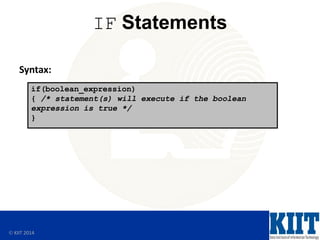
Syntax:
if(boolean_expression)
{ /* statement(s) will execute if the boolean
expression is true */
}
 KIIT 2014
IF Statements
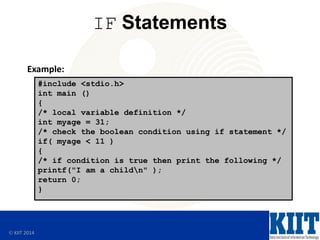
Example:
#include <stdio.h>
int main ()
{
/* local variable definition */
int myage = 31;
/* check the boolean condition using if statement */
if( myage < 11 )
{
/* if condition is true then print the following */
printf("I am a childn" );
return 0;
}
 KIIT 2014
IF .. ELSE Statement
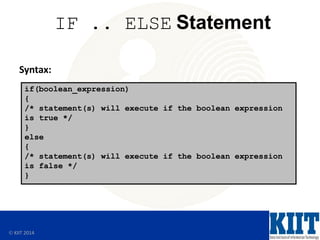
Syntax:
if(boolean_expression)
{
/* statement(s) will execute if the boolean expression
is true */
}
else
{
/* statement(s) will execute if the boolean expression
is false */
}
 KIIT 2014
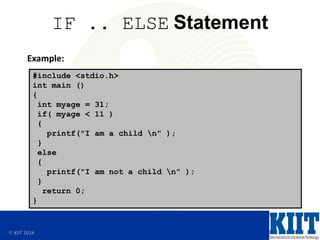
IF .. ELSE Statement
Example:
#include <stdio.h>
int main ()
{
int myage = 31;
if( myage < 11 )
{
printf("I am a child n" );
}
else
{
printf("I am not a child n" );
}
return 0;
}
 KIIT 2014
Nested IF Statement
Syntax:
if(boolean_expression1)
{
/* Executes when the boolean expression 1 is true */
if(boolean_expression2)
{
/* Executes when the boolean expression 2 is true */
}
}
 KIIT 2014
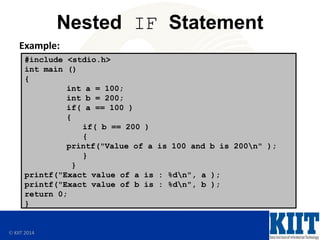
Nested IF Statement
Example:
#include <stdio.h>
int main ()
{
int a = 100;
int b = 200;
if( a == 100 )
{
if( b == 200 )
{
printf("Value of a is 100 and b is 200n" );
}
}
printf("Exact value of a is : %dn", a );
printf("Exact value of b is : %dn", b );
return 0;
}
 KIIT 2014
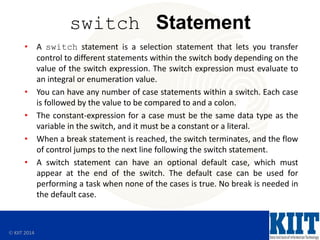
switch Statement
• A switch statement is a selection statement that lets you transfer
control to different statements within the switch body depending on the
value of the switch expression. The switch expression must evaluate to
an integral or enumeration value.
• You can have any number of case statements within a switch. Each case
is followed by the value to be compared to and a colon.
• The constant-expression for a case must be the same data type as the
variable in the switch, and it must be a constant or a literal.
• When a break statement is reached, the switch terminates, and the flow
of control jumps to the next line following the switch statement.
• A switch statement can have an optional default case, which must
appear at the end of the switch. The default case can be used for
performing a task when none of the cases is true. No break is needed in
the default case.
 KIIT 2014
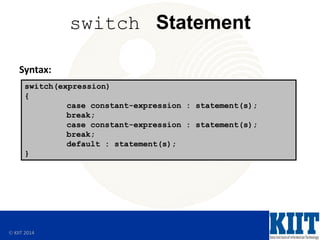
switch Statement
switch(expression)
{
case constant-expression : statement(s);
break;
case constant-expression : statement(s);
break;
default : statement(s);
}
Syntax:
 KIIT 2014
switch Statement
Example:
#include <stdio.h>
int main ()
{
char grade = 'B';
switch(grade)
{
case 'A' : printf("Excellent!n" );
break;
case 'B' : case 'C' : printf("Well donen" );
break;
case 'D' : printf("You passedn" );
break;
case 'F' : printf("Better try againn" );
break;
default : printf("Invalid graden" );
}
printf("Your grade is %cn", grade );
return 0;
}
 KIIT 2014
C library function - scanf()
The C library function scanf() reads formatted input
from stdin
#include <stdio.h>
int main()
{
char str1[20], str2[30];
printf("Enter name: ");
scanf("%s", &str1);
printf("Enter your website name: ");
scanf("%s", &str2);
printf("Entered Name: %sn", str1);
printf("Entered Website:%s", str2);
return(0);
}
 KIIT 2014
Iterative Control: LOOP
• Loops repeat a statement or sequence
of statements multiple times.
• There are three loop types:
– do .. while loop
– for loop
– while loop
 KIIT 2014
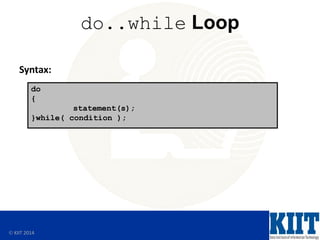
do..while Loop
Syntax:
do
{
statement(s);
}while( condition );
 KIIT 2014
do..while Loop
Example:
#include <stdio.h>
int main ()
{
int a = 10;
do
{
printf("value of a: %dn", a);
a = a + 1;
}while( a < 20 );
return 0;
}
 KIIT 2014
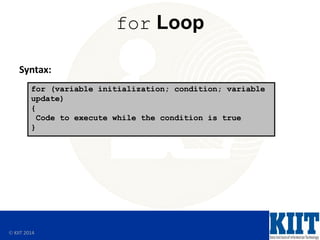
for Loop
Syntax:
for (variable initialization; condition; variable
update)
{
Code to execute while the condition is true
}
 KIIT 2014
for Loop
Example:
#include <stdio.h> int main()
{
int x;
for ( x = 0; x < 10; x++ )
{
printf( "%dn", x );
}
}
 KIIT 2014
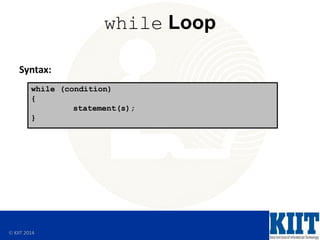
while Loop
Syntax:
while (condition)
{
statement(s);
}
 KIIT 2014
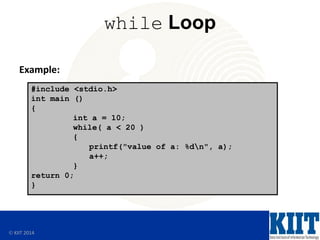
while Loop
Example:
#include <stdio.h>
int main ()
{
int a = 10;
while( a < 20 )
{
printf("value of a: %dn", a);
a++;
}
return 0;
}
 KIIT 2014
Loop Control Statement
• Change execution from its normal sequence. When
execution leaves a scope, all automatic objects that were
created in that scope are destroyed.
• C supports the following control statements
Control Statement Description
break statement Terminates the loop or switch statement and transfers
execution to the statement immediately following the
loop or switch.
continue statement Causes the loop to skip the remainder of its body and
immediately retest its condition prior to reiterating.
goto statement Transfers control to the labeled statement. Though it is
not advised to use goto statement in your program.
 KIIT 2014
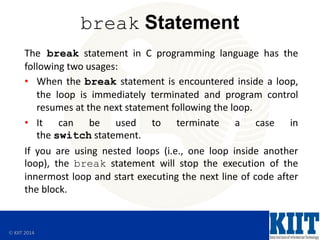
break Statement
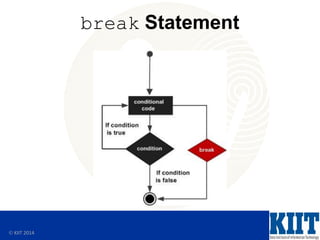
The break statement in C programming language has the
following two usages:
• When the break statement is encountered inside a loop,
the loop is immediately terminated and program control
resumes at the next statement following the loop.
• It can be used to terminate a case in
the switch statement.
If you are using nested loops (i.e., one loop inside another
loop), the break statement will stop the execution of the
innermost loop and start executing the next line of code after
the block.
 KIIT 2014
break Statement
 KIIT 2014
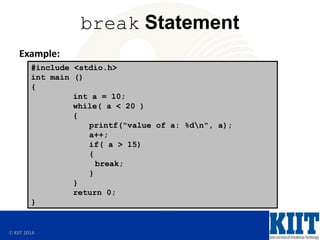
break Statement
#include <stdio.h>
int main ()
{
int a = 10;
while( a < 20 )
{
printf("value of a: %dn", a);
a++;
if( a > 15)
{
break;
}
}
return 0;
}
Example:
 KIIT 2014
continue Statement
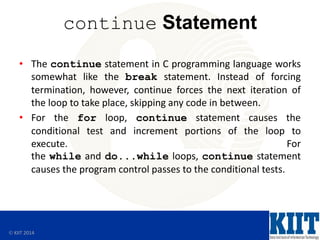
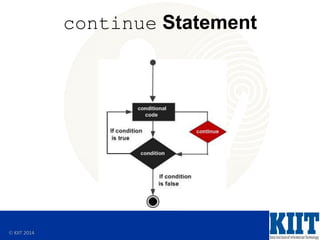
• The continue statement in C programming language works
somewhat like the break statement. Instead of forcing
termination, however, continue forces the next iteration of
the loop to take place, skipping any code in between.
• For the for loop, continue statement causes the
conditional test and increment portions of the loop to
execute. For
the while and do...while loops, continue statement
causes the program control passes to the conditional tests.
 KIIT 2014
continue Statement
 KIIT 2014
continue Statement
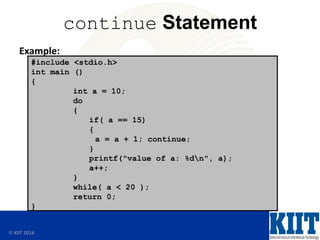
#include <stdio.h>
int main ()
{
int a = 10;
do
{
if( a == 15)
{
a = a + 1; continue;
}
printf("value of a: %dn", a);
a++;
}
while( a < 20 );
return 0;
}
Example:
 KIIT 2014
goto Statement
• A goto statement in C programming language provides an
unconditional jump from the goto to a labeled statement in
the same function.
NOTE: Use of goto statement is highly discouraged in any programming language because it makes difficult to
trace the control flow of a program, making the program hard to understand and hard to modify. Any program
that uses a goto can be rewritten so that it doesn't need the goto.
 KIIT 2014
goto Statement
#include <stdio.h>
int main ()
{
int a = 10;
LOOP:do
{
if( a == 15)
{
a = a + 1;
goto LOOP;
}
printf("value of a: %dn", a);
a++;
} while( a < 20 );
return 0;
}
Example:
 KIIT 2014
Summary
In this lesson, you should have learned how to:
• Identify the uses and types of control structures
• Construct an if statement
• Use of input library function scanf()
• Use switch statements and case expressions
• Construct and identify different loop statements
• Make use of guidelines while using the conditional control
structures
• Make use of loop control statements

C Programming Lesson 3.pdf

  • 1.
     KIIT 2014 WritingControl Structures
  • 2.
     KIIT 2014 Objectives Aftercompleting this lesson, you should be able to do the following: • Identify the uses and types of control structures • Construct an if statement • Use of input library function scanf() • Use switch statements and case expressions • Construct and identify different loop statements • Make use of guidelines while using the conditional control structures
  • 3.
     KIIT 2014 ControllingFlow of Execution The ability to control the flow of your program, allows you to make decisions: • What code is to be executed – Using Selection • How many times that code is to be executed – Using Iteration
  • 4.
     KIIT 2014 IFStatements The if statement allows you to control if a program enters a section of code or not based on whether a given condition is true or false
  • 5.
     KIIT 2014 DecisionMaking C programming language provides following types of decision making statements. Statement Description if statement An if statement consists of a boolean expression followed by one or more statements. if...else statement An if statement can be followed by an optional else statement, which executes when the boolean expression is false. nested if statements You can use one if or else if statement inside another if or else if statement(s). switch statement A switch statement allows a variable to be tested for equality against a list of values. nested switch statements You can use one switch statement inside another switchstatement(s).
  • 6.
     KIIT 2014 IFStatements Syntax: if(boolean_expression) { /* statement(s) will execute if the boolean expression is true */ }
  • 7.
     KIIT 2014 IFStatements Example: #include <stdio.h> int main () { /* local variable definition */ int myage = 31; /* check the boolean condition using if statement */ if( myage < 11 ) { /* if condition is true then print the following */ printf("I am a childn" ); return 0; }
  • 8.
     KIIT 2014 IF.. ELSE Statement Syntax: if(boolean_expression) { /* statement(s) will execute if the boolean expression is true */ } else { /* statement(s) will execute if the boolean expression is false */ }
  • 9.
     KIIT 2014 IF.. ELSE Statement Example: #include <stdio.h> int main () { int myage = 31; if( myage < 11 ) { printf("I am a child n" ); } else { printf("I am not a child n" ); } return 0; }
  • 10.
     KIIT 2014 NestedIF Statement Syntax: if(boolean_expression1) { /* Executes when the boolean expression 1 is true */ if(boolean_expression2) { /* Executes when the boolean expression 2 is true */ } }
  • 11.
     KIIT 2014 NestedIF Statement Example: #include <stdio.h> int main () { int a = 100; int b = 200; if( a == 100 ) { if( b == 200 ) { printf("Value of a is 100 and b is 200n" ); } } printf("Exact value of a is : %dn", a ); printf("Exact value of b is : %dn", b ); return 0; }
  • 12.
     KIIT 2014 switchStatement • A switch statement is a selection statement that lets you transfer control to different statements within the switch body depending on the value of the switch expression. The switch expression must evaluate to an integral or enumeration value. • You can have any number of case statements within a switch. Each case is followed by the value to be compared to and a colon. • The constant-expression for a case must be the same data type as the variable in the switch, and it must be a constant or a literal. • When a break statement is reached, the switch terminates, and the flow of control jumps to the next line following the switch statement. • A switch statement can have an optional default case, which must appear at the end of the switch. The default case can be used for performing a task when none of the cases is true. No break is needed in the default case.
  • 13.
     KIIT 2014 switchStatement switch(expression) { case constant-expression : statement(s); break; case constant-expression : statement(s); break; default : statement(s); } Syntax:
  • 14.
     KIIT 2014 switchStatement Example: #include <stdio.h> int main () { char grade = 'B'; switch(grade) { case 'A' : printf("Excellent!n" ); break; case 'B' : case 'C' : printf("Well donen" ); break; case 'D' : printf("You passedn" ); break; case 'F' : printf("Better try againn" ); break; default : printf("Invalid graden" ); } printf("Your grade is %cn", grade ); return 0; }
  • 15.
     KIIT 2014 Clibrary function - scanf() The C library function scanf() reads formatted input from stdin #include <stdio.h> int main() { char str1[20], str2[30]; printf("Enter name: "); scanf("%s", &str1); printf("Enter your website name: "); scanf("%s", &str2); printf("Entered Name: %sn", str1); printf("Entered Website:%s", str2); return(0); }
  • 16.
     KIIT 2014 IterativeControl: LOOP • Loops repeat a statement or sequence of statements multiple times. • There are three loop types: – do .. while loop – for loop – while loop
  • 17.
     KIIT 2014 do..whileLoop Syntax: do { statement(s); }while( condition );
  • 18.
     KIIT 2014 do..whileLoop Example: #include <stdio.h> int main () { int a = 10; do { printf("value of a: %dn", a); a = a + 1; }while( a < 20 ); return 0; }
  • 19.
     KIIT 2014 forLoop Syntax: for (variable initialization; condition; variable update) { Code to execute while the condition is true }
  • 20.
     KIIT 2014 forLoop Example: #include <stdio.h> int main() { int x; for ( x = 0; x < 10; x++ ) { printf( "%dn", x ); } }
  • 21.
     KIIT 2014 whileLoop Syntax: while (condition) { statement(s); }
  • 22.
     KIIT 2014 whileLoop Example: #include <stdio.h> int main () { int a = 10; while( a < 20 ) { printf("value of a: %dn", a); a++; } return 0; }
  • 23.
     KIIT 2014 LoopControl Statement • Change execution from its normal sequence. When execution leaves a scope, all automatic objects that were created in that scope are destroyed. • C supports the following control statements Control Statement Description break statement Terminates the loop or switch statement and transfers execution to the statement immediately following the loop or switch. continue statement Causes the loop to skip the remainder of its body and immediately retest its condition prior to reiterating. goto statement Transfers control to the labeled statement. Though it is not advised to use goto statement in your program.
  • 24.
     KIIT 2014 breakStatement The break statement in C programming language has the following two usages: • When the break statement is encountered inside a loop, the loop is immediately terminated and program control resumes at the next statement following the loop. • It can be used to terminate a case in the switch statement. If you are using nested loops (i.e., one loop inside another loop), the break statement will stop the execution of the innermost loop and start executing the next line of code after the block.
  • 25.
  • 26.
     KIIT 2014 breakStatement #include <stdio.h> int main () { int a = 10; while( a < 20 ) { printf("value of a: %dn", a); a++; if( a > 15) { break; } } return 0; } Example:
  • 27.
     KIIT 2014 continueStatement • The continue statement in C programming language works somewhat like the break statement. Instead of forcing termination, however, continue forces the next iteration of the loop to take place, skipping any code in between. • For the for loop, continue statement causes the conditional test and increment portions of the loop to execute. For the while and do...while loops, continue statement causes the program control passes to the conditional tests.
  • 28.
  • 29.
     KIIT 2014 continueStatement #include <stdio.h> int main () { int a = 10; do { if( a == 15) { a = a + 1; continue; } printf("value of a: %dn", a); a++; } while( a < 20 ); return 0; } Example:
  • 30.
     KIIT 2014 gotoStatement • A goto statement in C programming language provides an unconditional jump from the goto to a labeled statement in the same function. NOTE: Use of goto statement is highly discouraged in any programming language because it makes difficult to trace the control flow of a program, making the program hard to understand and hard to modify. Any program that uses a goto can be rewritten so that it doesn't need the goto.
  • 31.
     KIIT 2014 gotoStatement #include <stdio.h> int main () { int a = 10; LOOP:do { if( a == 15) { a = a + 1; goto LOOP; } printf("value of a: %dn", a); a++; } while( a < 20 ); return 0; } Example:
  • 32.
     KIIT 2014 Summary Inthis lesson, you should have learned how to: • Identify the uses and types of control structures • Construct an if statement • Use of input library function scanf() • Use switch statements and case expressions • Construct and identify different loop statements • Make use of guidelines while using the conditional control structures • Make use of loop control statements