Ch9.Drag and Drop
        Browny
      23, May, 2011
Outline


• Enabling Drag and Drop
• Supporting Custom Drag Types
• Clipboard Handling
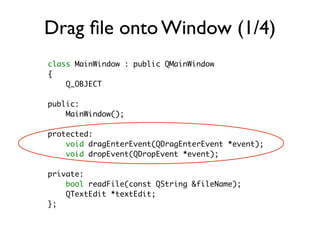
Drag file onto Window (1/4)
class MainWindow : public QMainWindow
{
    Q_OBJECT

public:
    MainWindow();

protected:
    void dragEnterEvent(QDragEnterEvent *event);
    void dropEvent(QDropEvent *event);

private:
    bool readFile(const QString &fileName);
    QTextEdit *textEdit;
};
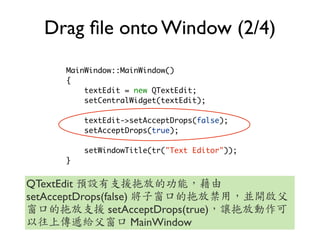
Drag file onto Window (2/4)
       MainWindow::MainWindow()
       {
           textEdit = new QTextEdit;
           setCentralWidget(textEdit);

           textEdit->setAcceptDrops(false);
           setAcceptDrops(true);

           setWindowTitle(tr("Text Editor"));
       }


QTextEdit
setAcceptDrops(false)
                setAcceptDrops(true)
                      MainWindow
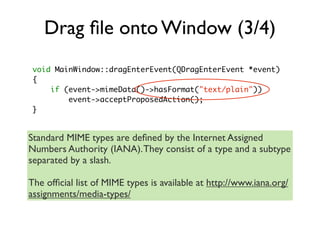
Drag file onto Window (3/4)
 void MainWindow::dragEnterEvent(QDragEnterEvent *event)
 {
     if (event->mimeData()->hasFormat("text/plain"))
         event->acceptProposedAction();
 }


Standard MIME types are defined by the Internet Assigned
Numbers Authority (IANA). They consist of a type and a subtype
separated by a slash.

The official list of MIME types is available at http://www.iana.org/
assignments/media-types/
Drag file onto Window (4/4)

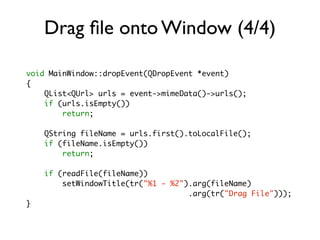
void MainWindow::dropEvent(QDropEvent *event)
{
    QList<QUrl> urls = event->mimeData()->urls();
    if (urls.isEmpty())
        return;

    QString fileName = urls.first().toLocalFile();
    if (fileName.isEmpty())
        return;

    if (readFile(fileName))
        setWindowTitle(tr("%1 - %2").arg(fileName)
                                    .arg(tr("Drag File")));
}
Initiate a Drag and Accept a Drop
               (1/4)

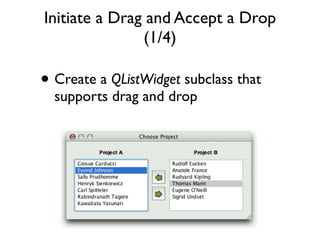
• Create a QListWidget subclass that
  supports drag and drop
Initiate a Drag and Accept a Drop
               (2/4)
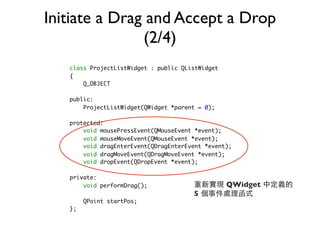
   class ProjectListWidget : public QListWidget
   {
       Q_OBJECT

   public:
       ProjectListWidget(QWidget *parent = 0);

   protected:
       void mousePressEvent(QMouseEvent *event);
       void mouseMoveEvent(QMouseEvent *event);
       void dragEnterEvent(QDragEnterEvent *event);
       void dragMoveEvent(QDragMoveEvent *event);
       void dropEvent(QDropEvent *event);

   private:
       void performDrag();                        QWidget
                                       5
        QPoint startPos;
   };
Initiate a Drag and Accept a Drop
               (3/4)
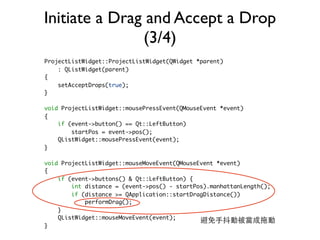
ProjectListWidget::ProjectListWidget(QWidget *parent)
    : QListWidget(parent)
{
    setAcceptDrops(true);
}

void ProjectListWidget::mousePressEvent(QMouseEvent *event)
{
    if (event->button() == Qt::LeftButton)
        startPos = event->pos();
    QListWidget::mousePressEvent(event);
}

void ProjectListWidget::mouseMoveEvent(QMouseEvent *event)
{
    if (event->buttons() & Qt::LeftButton) {
        int distance = (event->pos() - startPos).manhattanLength();
        if (distance >= QApplication::startDragDistance())
            performDrag();
    }
    QListWidget::mouseMoveEvent(event);
}
Initiate a Drag and Accept a Drop
                   (4/4)
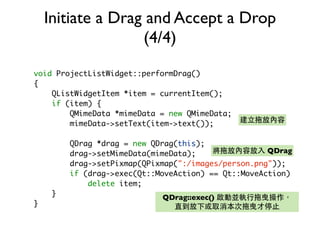
void ProjectListWidget::performDrag()
{
    QListWidgetItem *item = currentItem();
    if (item) {
        QMimeData *mimeData = new QMimeData;
        mimeData->setText(item->text());

         QDrag *drag = new QDrag(this);
         drag->setMimeData(mimeData);                QDrag
         drag->setPixmap(QPixmap(":/images/person.png"));
         if (drag->exec(Qt::MoveAction) == Qt::MoveAction)
             delete item;
     }                       QDrag::exec()
}
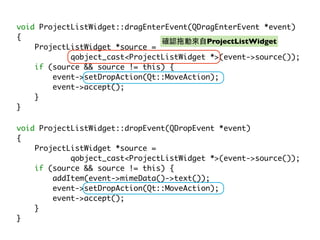
void ProjectListWidget::dragEnterEvent(QDragEnterEvent *event)
{
                                          ProjectListWidget
    ProjectListWidget *source =
            qobject_cast<ProjectListWidget *>(event->source());
    if (source && source != this) {
        event->setDropAction(Qt::MoveAction);
        event->accept();
    }
}

void ProjectListWidget::dropEvent(QDropEvent *event)
{
    ProjectListWidget *source =
            qobject_cast<ProjectListWidget *>(event->source());
    if (source && source != this) {
        addItem(event->mimeData()->text());
        event->setDropAction(Qt::MoveAction);
        event->accept();
    }
}
Drag custom data (1/2)
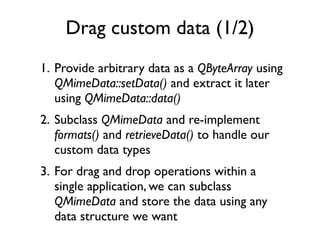
1. Provide arbitrary data as a QByteArray using
   QMimeData::setData() and extract it later
   using QMimeData::data()
2. Subclass QMimeData and re-implement
   formats() and retrieveData() to handle our
   custom data types
3. For drag and drop operations within a
   single application, we can subclass
   QMimeData and store the data using any
   data structure we want
Drag custom data (2/2)

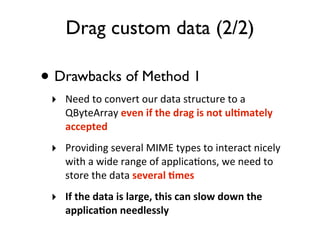
• Drawbacks of Method 1
 ‣ Need	
  to	
  convert	
  our	
  data	
  structure	
  to	
  a	
  
      QByteArray	
  even	
  if	
  the	
  drag	
  is	
  not	
  ul1mately	
  
      accepted
 ‣ Providing	
  several	
  MIME	
  types	
  to	
  interact	
  nicely	
  
      with	
  a	
  wide	
  range	
  of	
  applica=ons,	
  we	
  need	
  to	
  
      store	
  the	
  data	
  several	
  1mes
 ‣ If	
  the	
  data	
  is	
  large,	
  this	
  can	
  slow	
  down	
  the	
  
      applica1on	
  needlessly
Add drag and drop capabilities to a
          QTableWidget (1/3)

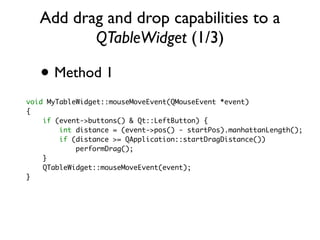
   • Method 1
void MyTableWidget::mouseMoveEvent(QMouseEvent *event)
{
    if (event->buttons() & Qt::LeftButton) {
        int distance = (event->pos() - startPos).manhattanLength();
        if (distance >= QApplication::startDragDistance())
            performDrag();
    }
    QTableWidget::mouseMoveEvent(event);
}
Add drag and drop capabilities to a
              QTableWidget (2/3)
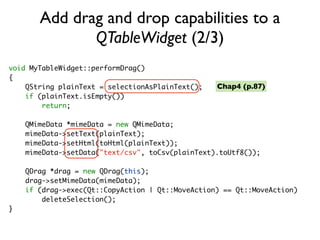
void MyTableWidget::performDrag()
{
    QString plainText = selectionAsPlainText();   Chap4 (p.87)
    if (plainText.isEmpty())
        return;

    QMimeData *mimeData = new QMimeData;
    mimeData->setText(plainText);
    mimeData->setHtml(toHtml(plainText));
    mimeData->setData("text/csv", toCsv(plainText).toUtf8());

    QDrag *drag = new QDrag(this);
    drag->setMimeData(mimeData);
    if (drag->exec(Qt::CopyAction | Qt::MoveAction) == Qt::MoveAction)
        deleteSelection();
}
Add drag and drop capabilities to a
          QTableWidget (3/3)
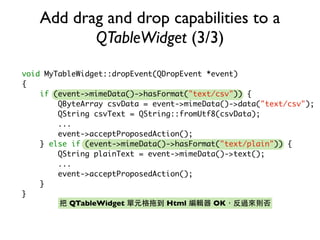
void MyTableWidget::dropEvent(QDropEvent *event)
{
    if (event->mimeData()->hasFormat("text/csv")) {
        QByteArray csvData = event->mimeData()->data("text/csv");
        QString csvText = QString::fromUtf8(csvData);
        ...
        event->acceptProposedAction();
    } else if (event->mimeData()->hasFormat("text/plain")) {
        QString plainText = event->mimeData()->text();
        ...
        event->acceptProposedAction();
    }
}
           QTableWidget         Html       OK
Subclass QMimeData (1/3)
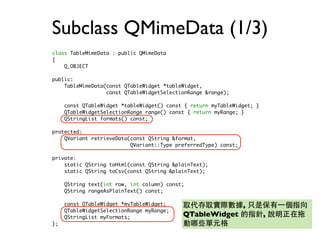
class TableMimeData : public QMimeData
{
    Q_OBJECT

public:
    TableMimeData(const QTableWidget *tableWidget,
                  const QTableWidgetSelectionRange &range);

     const QTableWidget *tableWidget() const { return myTableWidget; }
     QTableWidgetSelectionRange range() const { return myRange; }
     QStringList formats() const;

protected:
    QVariant retrieveData(const QString &format,
                          QVariant::Type preferredType) const;

private:
    static QString toHtml(const QString &plainText);
    static QString toCsv(const QString &plainText);

     QString text(int row, int column) const;
     QString rangeAsPlainText() const;

     const QTableWidget *myTableWidget;                          ,
     QTableWidgetSelectionRange myRange;
     QStringList myFormats;                 QTableWidget                 ,
};
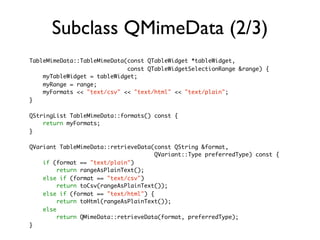
Subclass QMimeData (2/3)
TableMimeData::TableMimeData(const QTableWidget *tableWidget,
                             const QTableWidgetSelectionRange &range) {
    myTableWidget = tableWidget;
    myRange = range;
    myFormats << "text/csv" << "text/html" << "text/plain";
}

QStringList TableMimeData::formats() const {
    return myFormats;
}

QVariant TableMimeData::retrieveData(const QString &format,
                                      QVariant::Type preferredType) const {
    if (format == "text/plain")
         return rangeAsPlainText();
    else if (format == "text/csv")
         return toCsv(rangeAsPlainText());
    else if (format == "text/html") {
         return toHtml(rangeAsPlainText());
    else
         return QMimeData::retrieveData(format, preferredType);
}
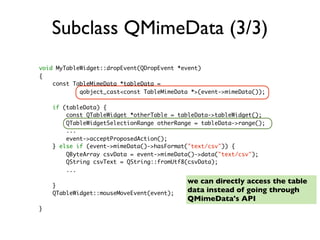
Subclass QMimeData (3/3)
void MyTableWidget::dropEvent(QDropEvent *event)
{
    const TableMimeData *tableData =
            qobject_cast<const TableMimeData *>(event->mimeData());

    if (tableData) {
        const QTableWidget *otherTable = tableData->tableWidget();
        QTableWidgetSelectionRange otherRange = tableData->range();
        ...
        event->acceptProposedAction();
    } else if (event->mimeData()->hasFormat("text/csv")) {
        QByteArray csvData = event->mimeData()->data("text/csv");
        QString csvText = QString::fromUtf8(csvData);
        ...

                                           we can directly access the table
    }
    QTableWidget::mouseMoveEvent(event);   data instead of going through
                                           QMimeData's API
}
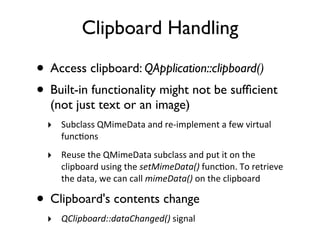
Clipboard Handling

• Access clipboard: QApplication::clipboard()
• Built-in functionality might not be sufficient
   (not just text or an image)
  ‣ Subclass	
  QMimeData	
  and	
  re-­‐implement	
  a	
  few	
  virtual	
  
       func=ons	
  
  ‣ Reuse	
  the	
  QMimeData	
  subclass	
  and	
  put	
  it	
  on	
  the	
  
       clipboard	
  using	
  the	
  setMimeData()	
  func=on.	
  To	
  retrieve	
  
       the	
  data,	
  we	
  can	
  call	
  mimeData()	
  on	
  the	
  clipboard

• Clipboard's contents change
  ‣ QClipboard::dataChanged()	
  signal
Thank you :)

[C++ gui programming with qt4] chap9

  • 1.
    Ch9.Drag and Drop Browny 23, May, 2011
  • 2.
    Outline • Enabling Dragand Drop • Supporting Custom Drag Types • Clipboard Handling
  • 3.
    Drag file ontoWindow (1/4) class MainWindow : public QMainWindow { Q_OBJECT public: MainWindow(); protected: void dragEnterEvent(QDragEnterEvent *event); void dropEvent(QDropEvent *event); private: bool readFile(const QString &fileName); QTextEdit *textEdit; };
  • 4.
    Drag file ontoWindow (2/4) MainWindow::MainWindow() { textEdit = new QTextEdit; setCentralWidget(textEdit); textEdit->setAcceptDrops(false); setAcceptDrops(true); setWindowTitle(tr("Text Editor")); } QTextEdit setAcceptDrops(false) setAcceptDrops(true) MainWindow
  • 5.
    Drag file ontoWindow (3/4) void MainWindow::dragEnterEvent(QDragEnterEvent *event) { if (event->mimeData()->hasFormat("text/plain")) event->acceptProposedAction(); } Standard MIME types are defined by the Internet Assigned Numbers Authority (IANA). They consist of a type and a subtype separated by a slash. The official list of MIME types is available at http://www.iana.org/ assignments/media-types/
  • 6.
    Drag file ontoWindow (4/4) void MainWindow::dropEvent(QDropEvent *event) { QList<QUrl> urls = event->mimeData()->urls(); if (urls.isEmpty()) return; QString fileName = urls.first().toLocalFile(); if (fileName.isEmpty()) return; if (readFile(fileName)) setWindowTitle(tr("%1 - %2").arg(fileName) .arg(tr("Drag File"))); }
  • 7.
    Initiate a Dragand Accept a Drop (1/4) • Create a QListWidget subclass that supports drag and drop
  • 8.
    Initiate a Dragand Accept a Drop (2/4) class ProjectListWidget : public QListWidget { Q_OBJECT public: ProjectListWidget(QWidget *parent = 0); protected: void mousePressEvent(QMouseEvent *event); void mouseMoveEvent(QMouseEvent *event); void dragEnterEvent(QDragEnterEvent *event); void dragMoveEvent(QDragMoveEvent *event); void dropEvent(QDropEvent *event); private: void performDrag(); QWidget 5 QPoint startPos; };
  • 9.
    Initiate a Dragand Accept a Drop (3/4) ProjectListWidget::ProjectListWidget(QWidget *parent) : QListWidget(parent) { setAcceptDrops(true); } void ProjectListWidget::mousePressEvent(QMouseEvent *event) { if (event->button() == Qt::LeftButton) startPos = event->pos(); QListWidget::mousePressEvent(event); } void ProjectListWidget::mouseMoveEvent(QMouseEvent *event) { if (event->buttons() & Qt::LeftButton) { int distance = (event->pos() - startPos).manhattanLength(); if (distance >= QApplication::startDragDistance()) performDrag(); } QListWidget::mouseMoveEvent(event); }
  • 10.
    Initiate a Dragand Accept a Drop (4/4) void ProjectListWidget::performDrag() { QListWidgetItem *item = currentItem(); if (item) { QMimeData *mimeData = new QMimeData; mimeData->setText(item->text()); QDrag *drag = new QDrag(this); drag->setMimeData(mimeData); QDrag drag->setPixmap(QPixmap(":/images/person.png")); if (drag->exec(Qt::MoveAction) == Qt::MoveAction) delete item; } QDrag::exec() }
  • 11.
    void ProjectListWidget::dragEnterEvent(QDragEnterEvent *event) { ProjectListWidget ProjectListWidget *source = qobject_cast<ProjectListWidget *>(event->source()); if (source && source != this) { event->setDropAction(Qt::MoveAction); event->accept(); } } void ProjectListWidget::dropEvent(QDropEvent *event) { ProjectListWidget *source = qobject_cast<ProjectListWidget *>(event->source()); if (source && source != this) { addItem(event->mimeData()->text()); event->setDropAction(Qt::MoveAction); event->accept(); } }
  • 12.
    Drag custom data(1/2) 1. Provide arbitrary data as a QByteArray using QMimeData::setData() and extract it later using QMimeData::data() 2. Subclass QMimeData and re-implement formats() and retrieveData() to handle our custom data types 3. For drag and drop operations within a single application, we can subclass QMimeData and store the data using any data structure we want
  • 13.
    Drag custom data(2/2) • Drawbacks of Method 1 ‣ Need  to  convert  our  data  structure  to  a   QByteArray  even  if  the  drag  is  not  ul1mately   accepted ‣ Providing  several  MIME  types  to  interact  nicely   with  a  wide  range  of  applica=ons,  we  need  to   store  the  data  several  1mes ‣ If  the  data  is  large,  this  can  slow  down  the   applica1on  needlessly
  • 14.
    Add drag anddrop capabilities to a QTableWidget (1/3) • Method 1 void MyTableWidget::mouseMoveEvent(QMouseEvent *event) { if (event->buttons() & Qt::LeftButton) { int distance = (event->pos() - startPos).manhattanLength(); if (distance >= QApplication::startDragDistance()) performDrag(); } QTableWidget::mouseMoveEvent(event); }
  • 15.
    Add drag anddrop capabilities to a QTableWidget (2/3) void MyTableWidget::performDrag() { QString plainText = selectionAsPlainText(); Chap4 (p.87) if (plainText.isEmpty()) return; QMimeData *mimeData = new QMimeData; mimeData->setText(plainText); mimeData->setHtml(toHtml(plainText)); mimeData->setData("text/csv", toCsv(plainText).toUtf8()); QDrag *drag = new QDrag(this); drag->setMimeData(mimeData); if (drag->exec(Qt::CopyAction | Qt::MoveAction) == Qt::MoveAction) deleteSelection(); }
  • 16.
    Add drag anddrop capabilities to a QTableWidget (3/3) void MyTableWidget::dropEvent(QDropEvent *event) { if (event->mimeData()->hasFormat("text/csv")) { QByteArray csvData = event->mimeData()->data("text/csv"); QString csvText = QString::fromUtf8(csvData); ... event->acceptProposedAction(); } else if (event->mimeData()->hasFormat("text/plain")) { QString plainText = event->mimeData()->text(); ... event->acceptProposedAction(); } } QTableWidget Html OK
  • 17.
    Subclass QMimeData (1/3) classTableMimeData : public QMimeData { Q_OBJECT public: TableMimeData(const QTableWidget *tableWidget, const QTableWidgetSelectionRange &range); const QTableWidget *tableWidget() const { return myTableWidget; } QTableWidgetSelectionRange range() const { return myRange; } QStringList formats() const; protected: QVariant retrieveData(const QString &format, QVariant::Type preferredType) const; private: static QString toHtml(const QString &plainText); static QString toCsv(const QString &plainText); QString text(int row, int column) const; QString rangeAsPlainText() const; const QTableWidget *myTableWidget; , QTableWidgetSelectionRange myRange; QStringList myFormats; QTableWidget , };
  • 18.
    Subclass QMimeData (2/3) TableMimeData::TableMimeData(constQTableWidget *tableWidget, const QTableWidgetSelectionRange &range) { myTableWidget = tableWidget; myRange = range; myFormats << "text/csv" << "text/html" << "text/plain"; } QStringList TableMimeData::formats() const { return myFormats; } QVariant TableMimeData::retrieveData(const QString &format, QVariant::Type preferredType) const { if (format == "text/plain") return rangeAsPlainText(); else if (format == "text/csv") return toCsv(rangeAsPlainText()); else if (format == "text/html") { return toHtml(rangeAsPlainText()); else return QMimeData::retrieveData(format, preferredType); }
  • 19.
    Subclass QMimeData (3/3) voidMyTableWidget::dropEvent(QDropEvent *event) { const TableMimeData *tableData = qobject_cast<const TableMimeData *>(event->mimeData()); if (tableData) { const QTableWidget *otherTable = tableData->tableWidget(); QTableWidgetSelectionRange otherRange = tableData->range(); ... event->acceptProposedAction(); } else if (event->mimeData()->hasFormat("text/csv")) { QByteArray csvData = event->mimeData()->data("text/csv"); QString csvText = QString::fromUtf8(csvData); ... we can directly access the table } QTableWidget::mouseMoveEvent(event); data instead of going through QMimeData's API }
  • 20.
    Clipboard Handling • Accessclipboard: QApplication::clipboard() • Built-in functionality might not be sufficient (not just text or an image) ‣ Subclass  QMimeData  and  re-­‐implement  a  few  virtual   func=ons   ‣ Reuse  the  QMimeData  subclass  and  put  it  on  the   clipboard  using  the  setMimeData()  func=on.  To  retrieve   the  data,  we  can  call  mimeData()  on  the  clipboard • Clipboard's contents change ‣ QClipboard::dataChanged()  signal
  • 21.