By
PROF MAYANKA ROY MANDAL
GGITS JABALPUR
Starting with C
Introduction
Why C?
Difference b/w C & C++
Beginning with C
How to Execute the programm
Application of C
Components of C
Agenda
Introduction
C is a procedural programming language initially developed by Dennis
Ritchie in the year 1972 at Bell Laboratories of AT&T Labs. It was mainly
developed as a system programming language to write the UNIX operating
system.
The main features of the C language include:
General Purpose and Portable
Low-level Memory Access
Fast Speed
Clean Syntax
These features make the C language suitable for system programming like
an operating system or compiler development.
Why C?
Many later languages have borrowed syntax/features
directly or indirectly from the C language like the syntax of
Java, PHP, JavaScript, and many other languages that are
mainly based on the C language. C++ is nearly a superset of
C language (Only a few programs may compile in C, but not
in C++).
So, if a person learns C programming first, it will help them
to learn any modern programming language as well. Also,
learning C helps to understand a lot of the underlying
architecture of the operating system like pointers, working
with memory locations, etc.
Difference Between C and C++
C++ was created to add the OOPs concept into the C language so they
both have very similar syntax with a few differences. The following
are some of the main differences between C and C++ Programming
languages.
C++ supports OOPs paradigm while C only has the procedural
concept of programming.
C++ has exception handling capabilities. In C, we have to resolve
exceptions manually.
There are no references in C.
Beginning with C
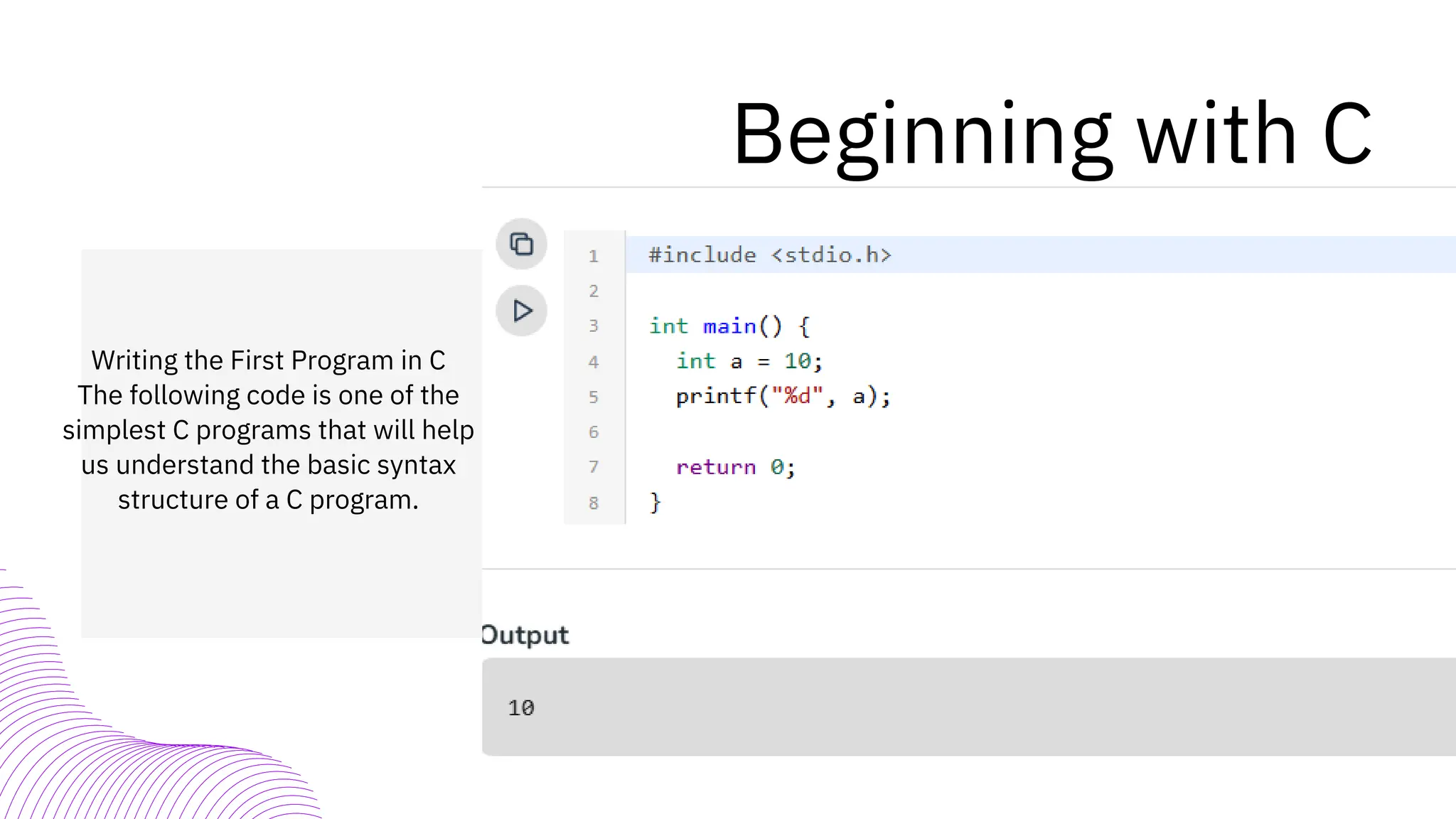
Writing the First Program in C
The following code is one of the
simplest C programs that will help
us understand the basic syntax
structure of a C program.
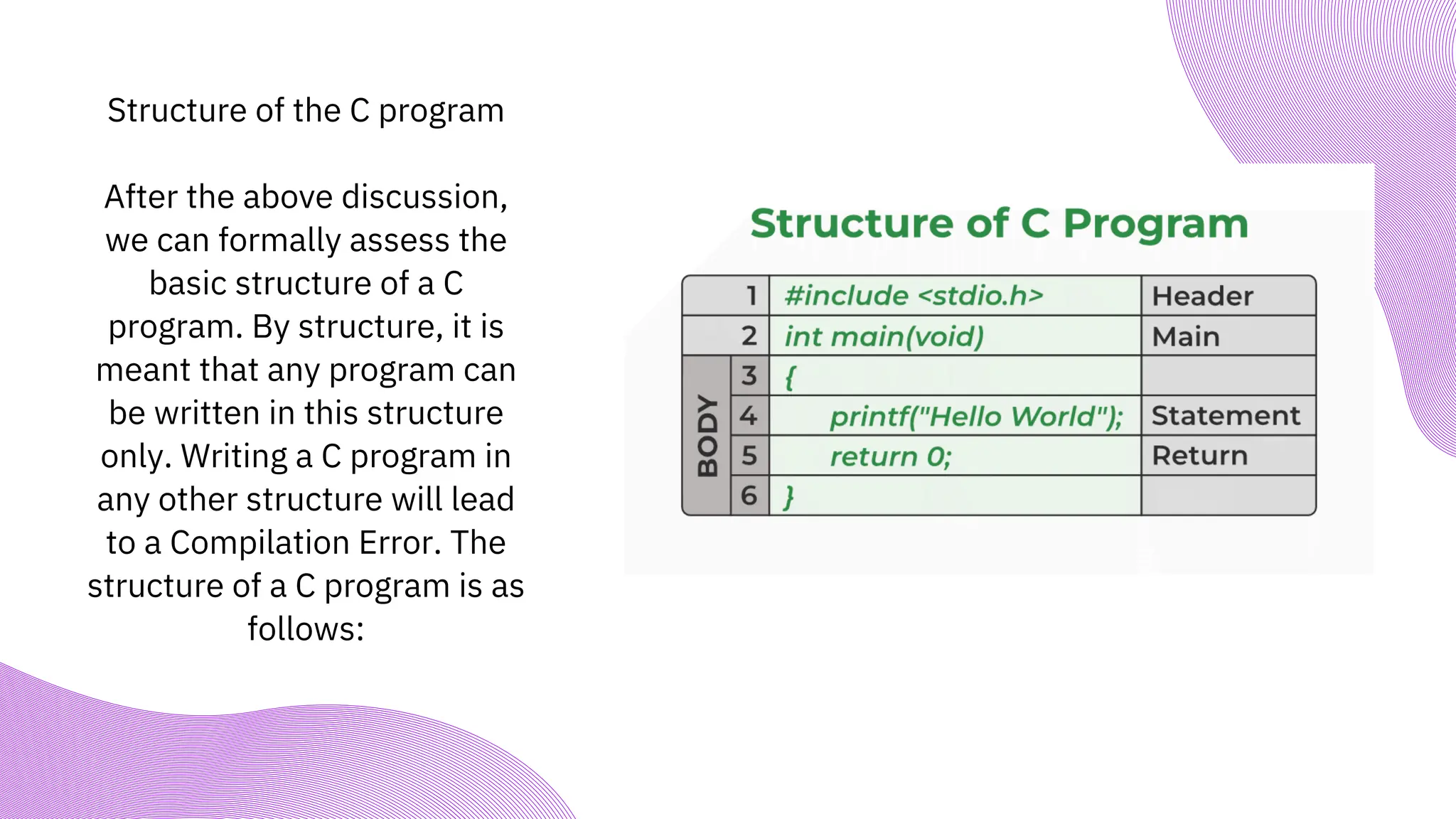
Structure of the C program
After the above discussion,
we can formally assess the
basic structure of a C
program. By structure, it is
meant that any program can
be written in this structure
only. Writing a C program in
any other structure will lead
to a Compilation Error. The
structure of a C program is as
follows:
Components of a C Program
1. Header Files Inclusion – Line 1 [#include <stdio.h>]
The first and foremost component is the inclusion of the Header files in a C program. A header file is a
file with extension .h which contains C function declarations and macro definitions to be shared
between several source files. All lines that start with # are processed by a preprocessor which is a
program invoked by the compiler. In the above example, the preprocessor copies the preprocessed
code of stdio.h to our file. The .h files are called header files in C.
Some of the C Header files:
stddef.h – Defines several useful types and macros.
stdint.h – Defines exact width integer types.
stdio.h – Defines core input and output functions
stdlib.h – Defines numeric conversion functions, pseudo-random number generator, and memory
allocation
string.h – Defines string handling functions
math.h – Defines common mathematical functions.
2. Main Method Declaration – Line 2 [int main()]
The next part of a C program is to declare the main() function. It is the
entry point of a C program and the execution typically begins with the first
line of the main(). The empty brackets indicate that the main doesn’t take
any parameter (See this for more details). The int that was written before
the main indicates the return type of main(). The value returned by the
main indicates the status of program termination. See this post for more
details on the return type.
3. Body of Main Method – Line 3 to Line 6
[enclosed in {}]
The body of a function in the C program refers to statements that are a part of
that function. It can be anything like manipulations, searching, sorting,
printing, etc. A pair of curly brackets define the body of a function. All
functions must start and end with curly brackets.
4. Statement – Line 4 [printf(“Hello World”);]
Statements are the instructions given to the compiler. In C, a statement is
always terminated by a semicolon (;). In this particular case, we use printf()
function to instruct the compiler to display “Hello World” text on the screen.
5. Return Statement – Line 5 [return 0;]
The last part of any C function is the return statement. The return statement
refers to the return values from a function. This return statement and return
value depend upon the return type of the function. The return statement in our
program returns the value from main(). The returned value may be used by an
operating system to know the termination status of your program. The value 0
typically means successful termination.
How to Execute the Above Program?
In order to execute the above program, we need to first compile it using a compiler
and then we can run the generated executable. There are online IDEs available for free
like GeeksforGeeksIDE, that can be used to start development in C without installing a
compiler.
Windows: There are many free IDEs available for developing programs in C like Code
Blocks and Dev-CPP. IDEs provide us with an environment to develop code, compile it
and finally execute it. We strongly recommend Code Blocks.
Linux: GCC compiler comes bundled with Linux which compiles C programs and
generates executables for us to run. Code Blocks can also be used with Linux.
macOS: macOS already has a built-in text editor where you can just simply write the
code and save it with a “.c” extension.
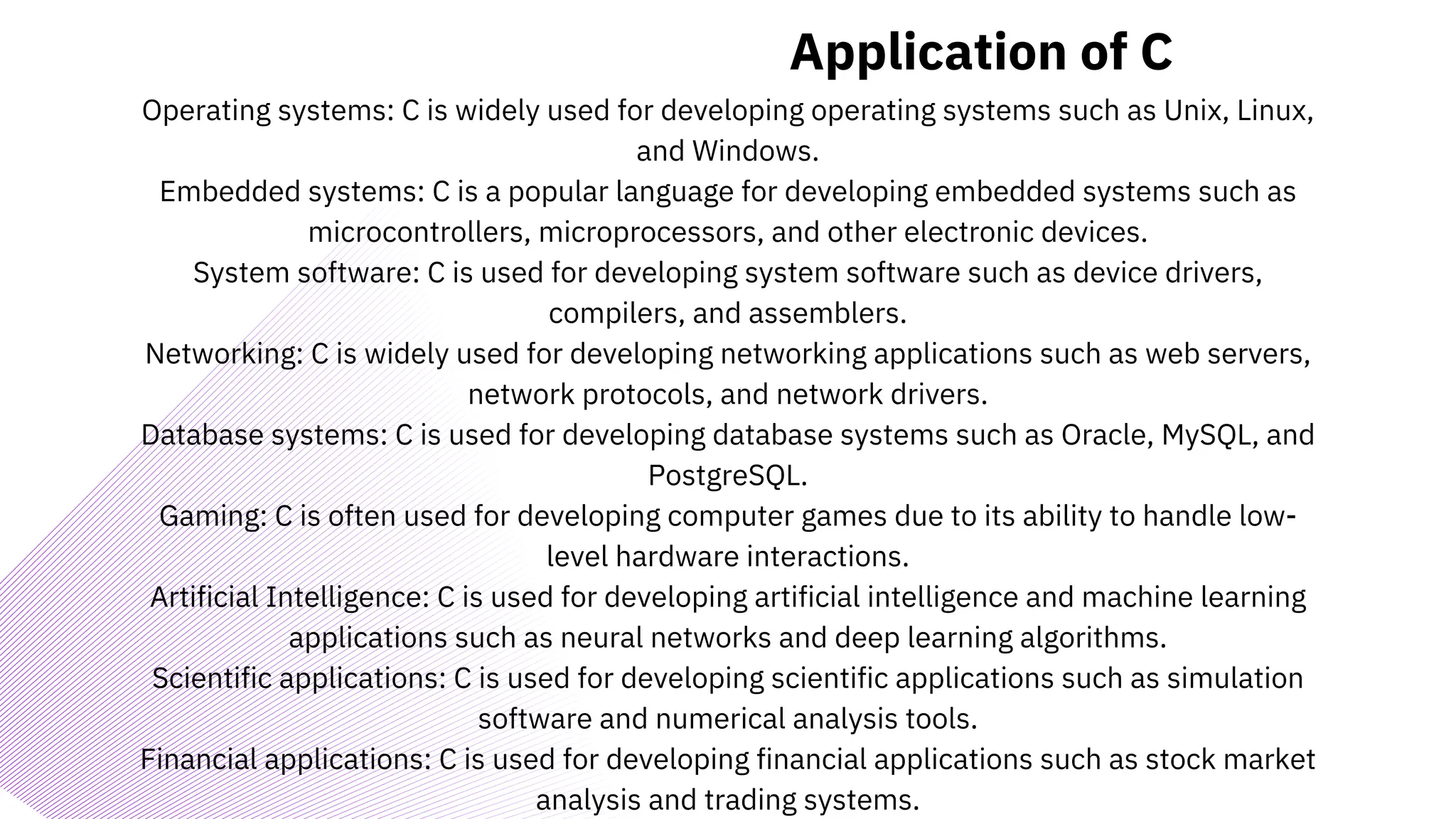
Application of C
Operating systems: C is widely used for developing operating systems such as Unix, Linux,
and Windows.
Embedded systems: C is a popular language for developing embedded systems such as
microcontrollers, microprocessors, and other electronic devices.
System software: C is used for developing system software such as device drivers,
compilers, and assemblers.
Networking: C is widely used for developing networking applications such as web servers,
network protocols, and network drivers.
Database systems: C is used for developing database systems such as Oracle, MySQL, and
PostgreSQL.
Gaming: C is often used for developing computer games due to its ability to handle low-
level hardware interactions.
Artificial Intelligence: C is used for developing artificial intelligence and machine learning
applications such as neural networks and deep learning algorithms.
Scientific applications: C is used for developing scientific applications such as simulation
software and numerical analysis tools.
Financial applications: C is used for developing financial applications such as stock market
analysis and trading systems.
C class basic programming 1 PPT mayanka (1).pdf

C class basic programming 1 PPT mayanka (1).pdf

  • 1.
    By PROF MAYANKA ROYMANDAL GGITS JABALPUR Starting with C
  • 2.
    Introduction Why C? Difference b/wC & C++ Beginning with C How to Execute the programm Application of C Components of C Agenda
  • 3.
    Introduction C is aprocedural programming language initially developed by Dennis Ritchie in the year 1972 at Bell Laboratories of AT&T Labs. It was mainly developed as a system programming language to write the UNIX operating system. The main features of the C language include: General Purpose and Portable Low-level Memory Access Fast Speed Clean Syntax These features make the C language suitable for system programming like an operating system or compiler development.
  • 4.
    Why C? Many laterlanguages have borrowed syntax/features directly or indirectly from the C language like the syntax of Java, PHP, JavaScript, and many other languages that are mainly based on the C language. C++ is nearly a superset of C language (Only a few programs may compile in C, but not in C++). So, if a person learns C programming first, it will help them to learn any modern programming language as well. Also, learning C helps to understand a lot of the underlying architecture of the operating system like pointers, working with memory locations, etc.
  • 5.
    Difference Between Cand C++ C++ was created to add the OOPs concept into the C language so they both have very similar syntax with a few differences. The following are some of the main differences between C and C++ Programming languages. C++ supports OOPs paradigm while C only has the procedural concept of programming. C++ has exception handling capabilities. In C, we have to resolve exceptions manually. There are no references in C.
  • 6.
    Beginning with C Writingthe First Program in C The following code is one of the simplest C programs that will help us understand the basic syntax structure of a C program.
  • 7.
    Structure of theC program After the above discussion, we can formally assess the basic structure of a C program. By structure, it is meant that any program can be written in this structure only. Writing a C program in any other structure will lead to a Compilation Error. The structure of a C program is as follows:
  • 8.
    Components of aC Program 1. Header Files Inclusion – Line 1 [#include <stdio.h>] The first and foremost component is the inclusion of the Header files in a C program. A header file is a file with extension .h which contains C function declarations and macro definitions to be shared between several source files. All lines that start with # are processed by a preprocessor which is a program invoked by the compiler. In the above example, the preprocessor copies the preprocessed code of stdio.h to our file. The .h files are called header files in C. Some of the C Header files: stddef.h – Defines several useful types and macros. stdint.h – Defines exact width integer types. stdio.h – Defines core input and output functions stdlib.h – Defines numeric conversion functions, pseudo-random number generator, and memory allocation string.h – Defines string handling functions math.h – Defines common mathematical functions.
  • 9.
    2. Main MethodDeclaration – Line 2 [int main()] The next part of a C program is to declare the main() function. It is the entry point of a C program and the execution typically begins with the first line of the main(). The empty brackets indicate that the main doesn’t take any parameter (See this for more details). The int that was written before the main indicates the return type of main(). The value returned by the main indicates the status of program termination. See this post for more details on the return type.
  • 10.
    3. Body ofMain Method – Line 3 to Line 6 [enclosed in {}] The body of a function in the C program refers to statements that are a part of that function. It can be anything like manipulations, searching, sorting, printing, etc. A pair of curly brackets define the body of a function. All functions must start and end with curly brackets.
  • 11.
    4. Statement –Line 4 [printf(“Hello World”);] Statements are the instructions given to the compiler. In C, a statement is always terminated by a semicolon (;). In this particular case, we use printf() function to instruct the compiler to display “Hello World” text on the screen.
  • 12.
    5. Return Statement– Line 5 [return 0;] The last part of any C function is the return statement. The return statement refers to the return values from a function. This return statement and return value depend upon the return type of the function. The return statement in our program returns the value from main(). The returned value may be used by an operating system to know the termination status of your program. The value 0 typically means successful termination.
  • 13.
    How to Executethe Above Program? In order to execute the above program, we need to first compile it using a compiler and then we can run the generated executable. There are online IDEs available for free like GeeksforGeeksIDE, that can be used to start development in C without installing a compiler. Windows: There are many free IDEs available for developing programs in C like Code Blocks and Dev-CPP. IDEs provide us with an environment to develop code, compile it and finally execute it. We strongly recommend Code Blocks. Linux: GCC compiler comes bundled with Linux which compiles C programs and generates executables for us to run. Code Blocks can also be used with Linux. macOS: macOS already has a built-in text editor where you can just simply write the code and save it with a “.c” extension.
  • 14.
    Application of C Operatingsystems: C is widely used for developing operating systems such as Unix, Linux, and Windows. Embedded systems: C is a popular language for developing embedded systems such as microcontrollers, microprocessors, and other electronic devices. System software: C is used for developing system software such as device drivers, compilers, and assemblers. Networking: C is widely used for developing networking applications such as web servers, network protocols, and network drivers. Database systems: C is used for developing database systems such as Oracle, MySQL, and PostgreSQL. Gaming: C is often used for developing computer games due to its ability to handle low- level hardware interactions. Artificial Intelligence: C is used for developing artificial intelligence and machine learning applications such as neural networks and deep learning algorithms. Scientific applications: C is used for developing scientific applications such as simulation software and numerical analysis tools. Financial applications: C is used for developing financial applications such as stock market analysis and trading systems.