C++ PROGRAMMING
Prepared By:
Ali Ijaz
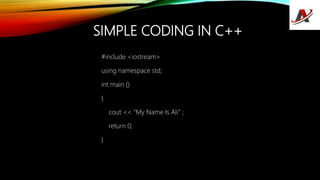
SIMPLE CODING IN C++
#include <iostream>
using namespace std;
int main ()
{
cout << “My Name Is Ali” ;
return 0;
}
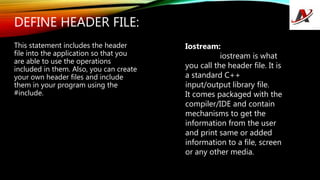
DEFINE HEADER FILE:
This statement includes the header
file into the application so that you
are able to use the operations
included in them. Also, you can create
your own header files and include
them in your program using the
#include.
Iostream:
iostream is what
you call the header file. It is
a standard C++
input/output library file.
It comes packaged with the
compiler/IDE and contain
mechanisms to get the
information from the user
and print same or added
information to a file, screen
or any other media.
WHAT IS #INCLUDE?
THE #INCLUDE IOSTREAM FILE, INTO THE
PROGRAM. THIS ENSURES THAT NOW YOU’RE
ABLE TO USE THE OPERATIONS, IOSTREAM
OPERATIONS (LIKE: TAKING INPUT FROM USER,
DISPLAYING OUTPUT ON THE SCREEN), IN THE
PROGRAM.
WHAT IS USING NAMESPACE
STD;”?
The statement is intuitive in itself, you are
“using” the “namespace” “std” in your file.
We use the namespace std to make it easier to
reference operations included in that
namespace.
If we hadn’t used the namespace, we’d have
written std::cout instead of cout. This tells the
compiler that every cout is actually std::cout.
What’s a namespace?
It’s a region where your code resides. It limits or
expands the scope of your code to one or
more files.
Why do you use namespace?
Like two persons can have the same name,
variables and functions in C++ can have same
names as well. The use of namespace is to
avoid the confusion of which
variables/functions you are referencing to.
SEMICOLON ”;”
● Ask any C++ programmer and they will tell you at least one horror story related to
the semicolon ; .
● The semicolon is a terminal. It terminates a statement. When missed or incorrectly
used, it will cause a lot of issues.
INT MAIN() { }
As the name suggests, it is the main function of the program. The code inside { } is
called the body and is executed first when you run your C++ program.
It is one code that is mandatory in a C++ program. If you just have this line of code
alone, your program will be valid.
COUT << “ALI”;
This statement prints “Ali” onto the output screen.
The cout is an object of standard output stream. What this means is, it outputs/prints the
data after << , i.e: Ali into a stream (in this case, the output screen).
WHAT IS A STREAM?
STREAM IS BASICALLY A SEQUENCE
OBJECTS, USUALLY BYTES. IT CAN
DESCRIBE FILES, INPUT/OUTPUT
TERMINAL, SOCKETS, ETC.
WHAT IS <<?
<< IS THE INSERTION OPERATOR
TO WRITE FORMATTED DATA INTO THE
STREAM.
WHAT IS RETURN 0;?
THIS STATEMENT RETURNS 0 ‘ZERO’.
THIS IS CALLED A RETURN STATEMENT. IT ISN’T
MANDATORY TO RETURN ANYTHING FROM THE
FUNCTION BUT IS RATHER A CONVENTION. IF NOT
RETURN, THE COMPILER RETURNS A STATUS
AUTOMATICALLY.
WHY ZERO IN RETURN STATEMENT?
IT DENOTES EXIT STATUS OF THE APPLICATION THAT
BASICALLY THE TELLS SYSTEM “THE PROGRAM
FINE.”
Thank You

C++ chapter # 1

  • 1.
  • 2.
    SIMPLE CODING INC++ #include <iostream> using namespace std; int main () { cout << “My Name Is Ali” ; return 0; }
  • 3.
    DEFINE HEADER FILE: Thisstatement includes the header file into the application so that you are able to use the operations included in them. Also, you can create your own header files and include them in your program using the #include. Iostream: iostream is what you call the header file. It is a standard C++ input/output library file. It comes packaged with the compiler/IDE and contain mechanisms to get the information from the user and print same or added information to a file, screen or any other media.
  • 4.
    WHAT IS #INCLUDE? THE#INCLUDE IOSTREAM FILE, INTO THE PROGRAM. THIS ENSURES THAT NOW YOU’RE ABLE TO USE THE OPERATIONS, IOSTREAM OPERATIONS (LIKE: TAKING INPUT FROM USER, DISPLAYING OUTPUT ON THE SCREEN), IN THE PROGRAM.
  • 5.
    WHAT IS USINGNAMESPACE STD;”? The statement is intuitive in itself, you are “using” the “namespace” “std” in your file. We use the namespace std to make it easier to reference operations included in that namespace. If we hadn’t used the namespace, we’d have written std::cout instead of cout. This tells the compiler that every cout is actually std::cout. What’s a namespace? It’s a region where your code resides. It limits or expands the scope of your code to one or more files. Why do you use namespace? Like two persons can have the same name, variables and functions in C++ can have same names as well. The use of namespace is to avoid the confusion of which variables/functions you are referencing to.
  • 6.
    SEMICOLON ”;” ● Askany C++ programmer and they will tell you at least one horror story related to the semicolon ; . ● The semicolon is a terminal. It terminates a statement. When missed or incorrectly used, it will cause a lot of issues.
  • 7.
    INT MAIN() {} As the name suggests, it is the main function of the program. The code inside { } is called the body and is executed first when you run your C++ program. It is one code that is mandatory in a C++ program. If you just have this line of code alone, your program will be valid.
  • 8.
    COUT << “ALI”; Thisstatement prints “Ali” onto the output screen. The cout is an object of standard output stream. What this means is, it outputs/prints the data after << , i.e: Ali into a stream (in this case, the output screen).
  • 9.
    WHAT IS ASTREAM? STREAM IS BASICALLY A SEQUENCE OBJECTS, USUALLY BYTES. IT CAN DESCRIBE FILES, INPUT/OUTPUT TERMINAL, SOCKETS, ETC. WHAT IS <<? << IS THE INSERTION OPERATOR TO WRITE FORMATTED DATA INTO THE STREAM.
  • 10.
    WHAT IS RETURN0;? THIS STATEMENT RETURNS 0 ‘ZERO’. THIS IS CALLED A RETURN STATEMENT. IT ISN’T MANDATORY TO RETURN ANYTHING FROM THE FUNCTION BUT IS RATHER A CONVENTION. IF NOT RETURN, THE COMPILER RETURNS A STATUS AUTOMATICALLY. WHY ZERO IN RETURN STATEMENT? IT DENOTES EXIT STATUS OF THE APPLICATION THAT BASICALLY THE TELLS SYSTEM “THE PROGRAM FINE.”
  • 11.